interior ALFA ROMEO GIULIA 2022 Owner's Manual
[x] Cancel search | Manufacturer: ALFA ROMEO, Model Year: 2022, Model line: GIULIA, Model: ALFA ROMEO GIULIA 2022Pages: 248, PDF Size: 9.71 MB
Page 123 of 248
121
NOTE:
The system operates in the same way, but
mirrored, in the event of exiting the right lane
when only the right lane marking has been
detected.
Left Lane Departure — Both Lanes Detected
When the system is active, both lane lines on the
display illuminate in white to indicate the
successful detection of both limits.
When lane markings are detected, the system is
ready to provide indications in case the driver
unintentionally leaves the lane (turn signal not
activated).
As the Lane Keeping Assist system detects the
lane markings while the vehicle is in motion, it will
adjust the display accordingly (from white to
yellow and yellow to white, and increase their
thickness).
If a lane line is crossed, the driver is alerted by an
audible signal as well as the visual indication in
the instrument cluster. The signal is emitted
through the speakers on the side of the lane
marking which is being crossed (e.g. if the vehicle
is exceeding the left line of the lane, the audible
signal will come from the speakers on the left of
the vehicle).
Hands Presence On The Steering Wheel
Detection
The system is able to detect the presence of the
driver’s hands on the steering wheel.
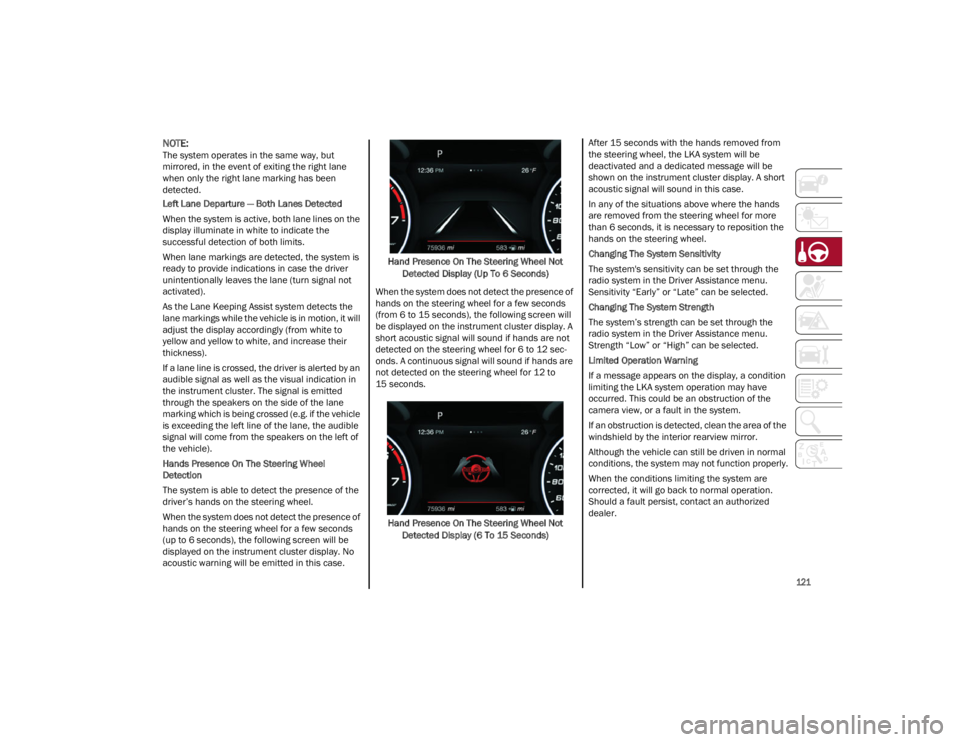
When the system does not detect the presence of
hands on the steering wheel for a few seconds
(up to 6 seconds), the following screen will be
displayed on the instrument cluster display. No
acoustic warning will be emitted in this case.Hand Presence On The Steering Wheel Not
Detected Display (Up To 6 Seconds)
When the system does not detect the presence of
hands on the steering wheel for a few seconds
(from 6 to 15 seconds), the following screen will
be displayed on the instrument cluster display. A
short acoustic signal will sound if hands are not
detected on the steering wheel for 6 to 12 sec-
onds. A continuous signal will sound if hands are
not detected on the steering wheel for 12 to
15 seconds.
Hand Presence On The Steering Wheel Not Detected Display (6 To 15 Seconds) After 15 seconds with the hands removed from
the steering wheel, the LKA system will be
deactivated and a dedicated message will be
shown on the instrument cluster display. A short
acoustic signal will sound in this case.
In any of the situations above where the hands
are removed from the steering wheel for more
than 6 seconds, it is necessary to reposition the
hands on the steering wheel.
Changing The System Sensitivity
The system's sensitivity can be set through the
radio system in the Driver Assistance menu.
Sensitivity “Early” or “Late” can be selected.
Changing The System Strength
The system’s strength can be set through the
radio system in the Driver Assistance menu.
Strength “Low” or “High” can be selected.
Limited Operation Warning
If a message appears on the display, a condition
limiting the LKA system operation may have
occurred. This could be an obstruction of the
camera view, or a fault in the system.
If an obstruction is detected, clean the area of the
windshield by the interior rearview mirror.
Although the vehicle can still be driven in normal
conditions, the system may not function properly.
When the conditions limiting the system are
corrected, it will go back to normal operation.
Should a fault persist, contact an authorized
dealer.
22_GA_OM_EN_USC_t.book Page 121
Page 124 of 248
STARTING AND OPERATING
122
(Continued)
System Failure Signaling
If the system turns off and appears on the
display, it means that there is a system fault.
In this case, it is still possible to drive the vehicle,
but you are advised to contact an authorized
dealer as soon as possible.
REAR BACK UP CAMERA /
DYNAMIC GRIDLINES
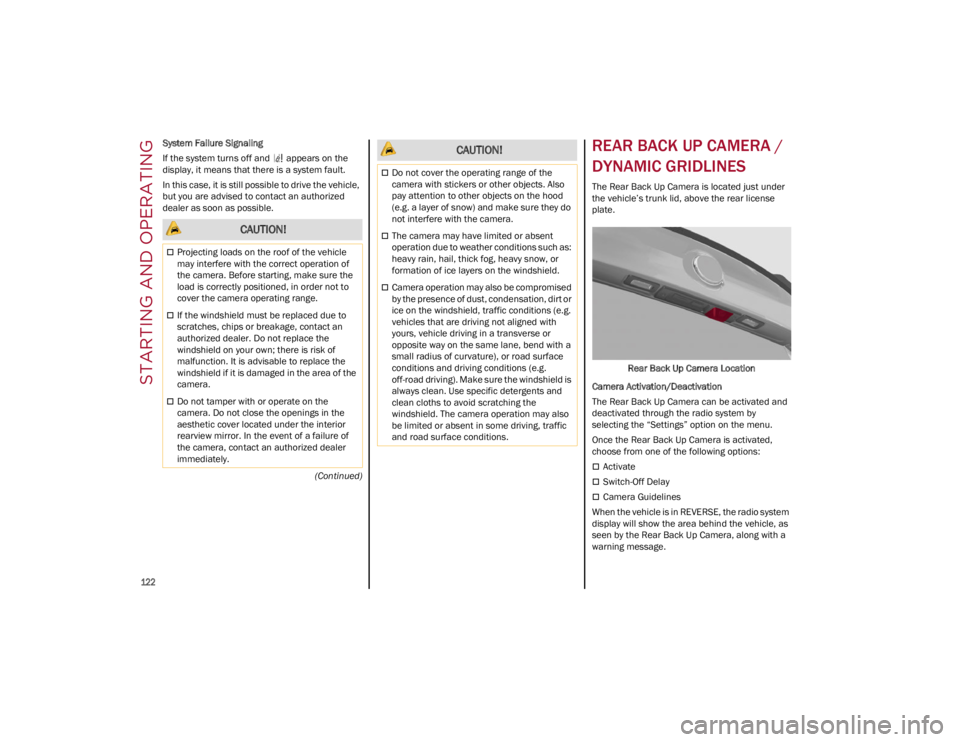
The Rear Back Up Camera is located just under
the vehicle’s trunk lid, above the rear license
plate.
Rear Back Up Camera Location
Camera Activation/Deactivation
The Rear Back Up Camera can be activated and
deactivated through the radio system by
selecting the “Settings” option on the menu.
Once the Rear Back Up Camera is activated,
choose from one of the following options:
Activate
Switch-Off Delay
Camera Guidelines
When the vehicle is in REVERSE, the radio system
display will show the area behind the vehicle, as
seen by the Rear Back Up Camera, along with a
warning message.
CAUTION!
Projecting loads on the roof of the vehicle
may interfere with the correct operation of
the camera. Before starting, make sure the
load is correctly positioned, in order not to
cover the camera operating range.
If the windshield must be replaced due to
scratches, chips or breakage, contact an
authorized dealer. Do not replace the
windshield on your own; there is risk of
malfunction. It is advisable to replace the
windshield if it is damaged in the area of the
camera.
Do not tamper with or operate on the
camera. Do not close the openings in the
aesthetic cover located under the interior
rearview mirror. In the event of a failure of
the camera, contact an authorized dealer
immediately.
Do not cover the operating range of the
camera with stickers or other objects. Also
pay attention to other objects on the hood
(e.g. a layer of snow) and make sure they do
not interfere with the camera.
The camera may have limited or absent
operation due to weather conditions such as:
heavy rain, hail, thick fog, heavy snow, or
formation of ice layers on the windshield.
Camera operation may also be compromised
by the presence of dust, condensation, dirt or
ice on the windshield, traffic conditions (e.g.
vehicles that are driving not aligned with
yours, vehicle driving in a transverse or
opposite way on the same lane, bend with a
small radius of curvature), or road surface
conditions and driving conditions (e.g.
off-road driving). Make sure the windshield is
always clean. Use specific detergents and
clean cloths to avoid scratching the
windshield. The camera operation may also
be limited or absent in some driving, traffic
and road surface conditions.
CAUTION!
22_GA_OM_EN_USC_t.book Page 122
Page 147 of 248
145
(Continued)
(Continued)
BeltAlert warning sequence has completed, the
Seat Belt Reminder Light will remain on until the
seat belts are buckled. The BeltAlert warning
sequence may repeat based on vehicle speed
until the driver and occupied outboard front seat
passenger seat belts are buckled. The driver
should instruct all occupants to buckle their seat
belts.
Change Of Status
If the driver or outboard front seat passenger (if
equipped with outboard front passenger seat
BeltAlert) unbuckles their seat belt while the
vehicle is traveling, the BeltAlert warning
sequence will begin until the seat belts are
buckled again.
The outboard front passenger seat BeltAlert is not
active when the outboard front passenger seat is
unoccupied. BeltAlert may be triggered when an
animal or other items are placed on the outboard
front passenger seat or when the seat is folded
flat (if equipped). It is recommended that pets be
restrained in the rear seat (if equipped) in pet
harnesses or pet carriers that are secured by seat
belts, and cargo is properly stowed.
Lap/Shoulder Belts
All seating positions in your vehicle are equipped
with lap/shoulder belts.
The seat belt webbing retractor will lock only
during very sudden stops or collisions. This
feature allows the shoulder part of the seat belt to
move freely with you under normal conditions.
However, in a collision the seat belt will lock and
reduce your risk of striking the inside of the
vehicle or being thrown out of the vehicle.
WARNING!
Relying on the air bags alone could lead to
more severe injuries in a collision. The air
bags work with your seat belt to restrain you
properly. In some collisions, the air bags
won’t deploy at all. Always wear your seat
belt even though you have air bags.
In a collision, you and your passengers can
suffer much greater injuries if you are not
properly buckled up. You can strike the
interior of your vehicle or other passengers,
or you can be thrown out of the vehicle.
Always be sure you and others in your vehicle
are buckled up properly.
It is dangerous to ride in a cargo area, inside
or outside of a vehicle. In a collision, people
riding in these areas are more likely to be
seriously injured or killed.
Do not allow people to ride in any area of your
vehicle that is not equipped with seats and
seat belts.
Be sure everyone in your vehicle is in a seat
and using a seat belt properly. Occupants,
including the driver, should always wear their
seat belts whether or not an air bag is also
provided at their seating position to minimize
the risk of severe injury or death in the event
of a crash.
Wearing your seat belt incorrectly could
make your injuries in a collision much worse.
You might suffer internal injuries, or you
could even slide out of the seat belt. Follow
these instructions to wear your seat belt
safely and to keep your passengers safe, too.
Two people should never be belted into a
single seat belt. People belted together can
crash into one another in a collision, hurting
one another badly. Never use a lap/shoulder
belt or a lap belt for more than one person,
no matter what their size.
WARNING!
A lap belt worn too high can increase the risk
of injury in a collision. The seat belt forces
won’t be at the strong hip and pelvic bones,
but across your abdomen. Always wear the
lap part of your seat belt as low as possible
and keep it snug.
A twisted seat belt may not protect you
properly. In a collision, it could even cut into
you. Be sure the seat belt is flat against your
body, without twists. If you can’t straighten a
seat belt in your vehicle, take it to an
authorized dealer immediately and have it
fixed.
A seat belt that is buckled into the wrong
buckle will not protect you properly. The lap
portion could ride too high on your body,
possibly causing internal injuries. Always
buckle your seat belt into the buckle nearest
you.
A seat belt that is too loose will not protect
you properly. In a sudden stop, you could
move too far forward, increasing the
possibility of injury. Wear your seat belt
snugly.
WARNING!
22_GA_OM_EN_USC_t.book Page 145
Page 156 of 248
SAFETY
154
NOTE:
Air bag covers may not be obvious in the interior
trim, but they will open during air bag deploy-
ment.
Rollover Events
Side Air Bags and seat belt pretensioners are
designed to activate in certain rollover events.
The Occupant Restraint Controller (ORC)
determines whether deployment in a particular
rollover event is appropriate, based on the
severity and type of collision. Vehicle damage by
itself is not a good indicator of whether or not
Side Air Bags and seat belt pretensioners should
have deployed.
The Side Air Bags and seat belt pretensioners will
not deploy in all rollover events. The rollover
sensing system determines if a rollover event
may be in progress and whether deployment is
appropriate. In the event the vehicle experiences
a rollover or near rollover event, and deployment is appropriate, the rollover sensing system will
deploy the side air bags and seat belt preten
-
sioners on both sides of the vehicle.
The SABICs may help reduce the risk of partial or
complete ejection of vehicle occupants through
side windows in certain rollover or side impact
events.
Air Bag System Components
NOTE:
The Occupant Restraint Controller (ORC) moni -
tors the internal circuits and interconnecting
wiring associated with electrical Air Bag System
Components listed below:
Occupant Restraint Controller (ORC)
Air Bag Warning Light
Steering Wheel and Column
Instrument Panel
Knee Impact Bolsters
Driver and Front Passenger Air Bags
Seat Belt Buckle Switch
Supplemental Side Air Bags
Supplemental Knee Air Bags
Front and Side Impact Sensors
Seat Belt Pretensioners
Seat Track Position Sensors
If A Deployment Occurs
The front air bags are designed to deflate
immediately after deployment.
NOTE:
Front and/or side air bags will not deploy in all
collisions. This does not mean something is
wrong with the air bag system. If you do have a collision which deploys the air
bags, any or all of the following may occur:
The air bag material may sometimes cause
abrasions and/or skin reddening to the
occupants as the air bags deploy and unfold.
The abrasions are similar to friction rope burns
or those you might get sliding along a carpet or
gymnasium floor. They are not caused by
contact with chemicals. They are not
permanent and normally heal quickly.
However, if you haven’t healed significantly
within a few days, or if you have any blistering,
see your doctor immediately.
As the air bags deflate, you may see some
smoke-like particles. The particles are a
normal by-product of the process that
generates the non-toxic gas used for air bag
inflation. These airborne particles may irritate
the skin, eyes, nose, or throat. If you have skin
or eye irritation, rinse the area with cool water.
For nose or throat irritation, move to fresh air.
If the irritation continues, see your doctor. If
these particles settle on your clothing, follow
the garment manufacturer’s instructions for
cleaning.
Do not drive your vehicle after the air bags have
deployed. If you are involved in another collision,
the air bags will not be in place to protect you.
WARNING!
Side Air Bags need room to inflate. Do not
lean against the door or window. Sit upright
in the center of the seat.
Being too close to the Side Air Bags during
deployment could cause you to be severely
injured or killed.
Relying on the Side Air Bags alone could lead
to more severe injuries in a collision. The
Side Air Bags work with your seat belt to
restrain you properly. In some collisions, Side
Air Bags won’t deploy at all. Always wear your
seat belt even though you have Side Air
Bags.
WARNING!
Deployed air bags and seat belt pretensioners
cannot protect you in another collision. Have
the air bags, seat belt pretensioners, and the
seat belt retractor assemblies replaced by an
authorized dealer immediately. Also, have the
Occupant Restraint Controller System serviced
as well.
22_GA_OM_EN_USC_t.book Page 154
Page 157 of 248
155
NOTE:
Air bag covers may not be obvious in the
interior trim, but they will open during air bag
deployment.
After any collision, the vehicle should be taken
to an authorized dealer immediately.
Enhanced Accident Response System
In the event of an impact, if the communication
network remains intact, and the power remains
intact, depending on the nature of the event, the
Occupant Restraint Controller (ORC) will
determine whether to have the Enhanced
Accident Response System perform the following
functions:
Cut off fuel to the engine (if equipped)
Cut off battery power to the electric motor (if
equipped)
Flash hazard lights as long as the battery has
power
Turn on the interior lights, which remain on as
long as the battery has power or for
15 minutes from the intervention of the
Enhanced Accident Response System
Unlock the power door locksYour vehicle may also be designed to perform any
of these other functions in response to the
Enhanced Accident Response System:
Turn off the Fuel Filter Heater, Turn off the
HVAC Blower Motor, Close the HVAC
Circulation Door
Cut off battery power to the:
• Engine
• Electric Motor (if equipped)
• Electric power steering
• Brake booster
• Electric park brake
• Automatic transmission gear selector
• Horn
• Front wiper
• Headlamp washer pump (if equipped)
NOTE:
After an accident, remember to cycle the ignition
to the OFF position and remove the key from the
ignition switch to avoid draining the battery. Care -
fully check the vehicle for fuel leaks in the engine
compartment and on the ground near the engine
compartment and fuel tank before resetting the
system and starting the engine. If there are no fuel leaks or damage to the vehicle electrical
devices (e.g. headlights) after an accident, reset
the system by following the procedure described
below. If you have any doubt, contact an autho
-
rized dealer.
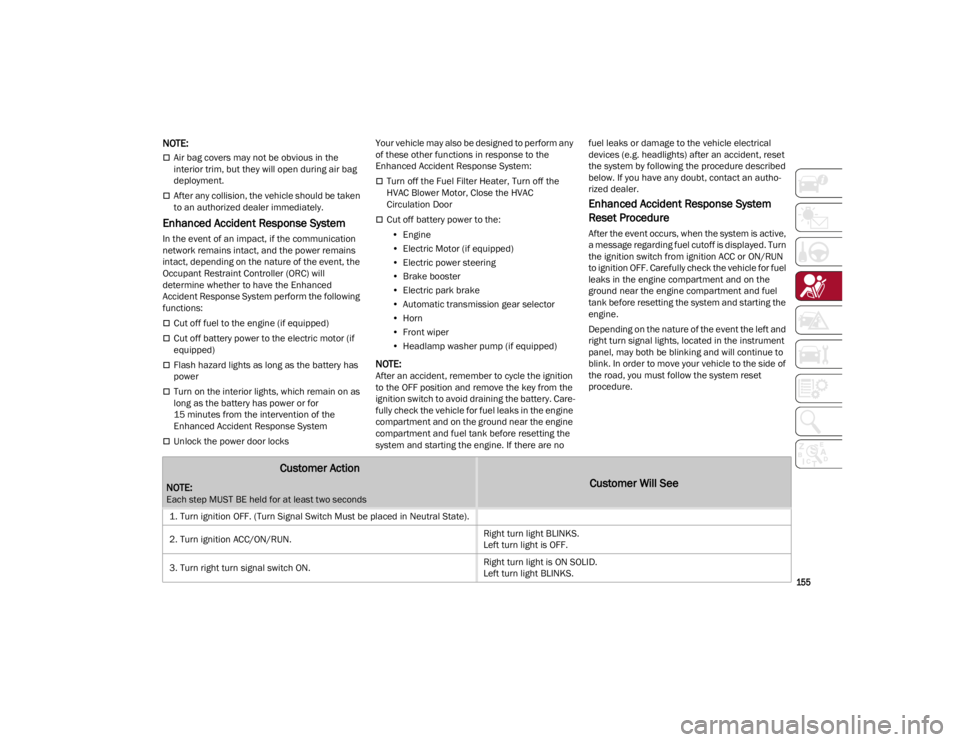
Enhanced Accident Response System
Reset Procedure
After the event occurs, when the system is active,
a message regarding fuel cutoff is displayed. Turn
the ignition switch from ignition ACC or ON/RUN
to ignition OFF. Carefully check the vehicle for fuel
leaks in the engine compartment and on the
ground near the engine compartment and fuel
tank before resetting the system and starting the
engine.
Depending on the nature of the event the left and
right turn signal lights, located in the instrument
panel, may both be blinking and will continue to
blink. In order to move your vehicle to the side of
the road, you must follow the system reset
procedure.
Customer Action
NOTE:
Each step MUST BE held for at least two seconds
Customer Will See
1. Turn ignition OFF. (Turn Signal Switch Must be placed in Neutral State).
2. Turn ignition ACC/ON/RUN. Right turn light BLINKS.
Left turn light is OFF.
3. Turn right turn signal switch ON. Right turn light is ON SOLID.
Left turn light BLINKS.
22_GA_OM_EN_USC_t.book Page 155
Page 167 of 248
165
(Continued)
anchorage and tighten the tether strap. See
Ú
page 165 for directions to attach a tether
anchor.
9. Test that the child restraint is installed tightly by pulling back and forth on the child seat at
the belt path. It should not move more than
1 inch (25.4 mm) in any direction.
Any seat belt system will loosen with time, so
check the belt occasionally, and pull it tight if
necessary.
Installing Child Restraints Using The Top
Tether Anchorage:
1. Look behind the seating position where you plan to install the child restraint to find the
tether anchorage. You may need to move the
seat forward to provide better access to the
tether anchorage. If there is no top tether
anchorage for that seating position, move the
child restraint to another position in the
vehicle if one is available.
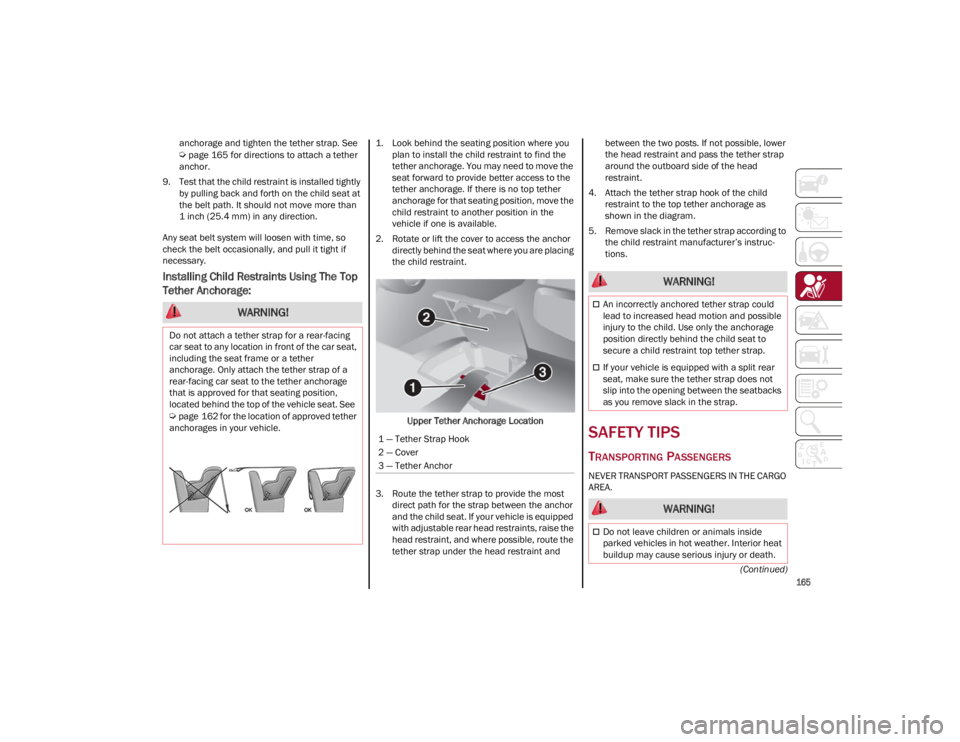
2. Rotate or lift the cover to access the anchor directly behind the seat where you are placing
the child restraint.
Upper Tether Anchorage Location
3. Route the tether strap to provide the most direct path for the strap between the anchor
and the child seat. If your vehicle is equipped
with adjustable rear head restraints, raise the
head restraint, and where possible, route the
tether strap under the head restraint and between the two posts. If not possible, lower
the head restraint and pass the tether strap
around the outboard side of the head
restraint.
4. Attach the tether strap hook of the child restraint to the top tether anchorage as
shown in the diagram.
5. Remove slack in the tether strap according to the child restraint manufacturer’s instruc -
tions.
SAFETY TIPS
TRANSPORTING PASSENGERS
NEVER TRANSPORT PASSENGERS IN THE CARGO
AREA.
WARNING!
Do not attach a tether strap for a rear-facing
car seat to any location in front of the car seat,
including the seat frame or a tether
anchorage. Only attach the tether strap of a
rear-facing car seat to the tether anchorage
that is approved for that seating position,
located behind the top of the vehicle seat. See
Ú
page 162 for the location of approved tether
anchorages in your vehicle.
1 — Tether Strap Hook
2 — Cover
3 — Tether Anchor
WARNING!
An incorrectly anchored tether strap could
lead to increased head motion and possible
injury to the child. Use only the anchorage
position directly behind the child seat to
secure a child restraint top tether strap.
If your vehicle is equipped with a split rear
seat, make sure the tether strap does not
slip into the opening between the seatbacks
as you remove slack in the strap.
WARNING!
Do not leave children or animals inside
parked vehicles in hot weather. Interior heat
buildup may cause serious injury or death.
22_GA_OM_EN_USC_t.book Page 165
Page 206 of 248
SERVICING AND MAINTENANCE
204
Replacing Exterior Bulbs
NOTE:
Only replace the bulb when the engine is off. Also
ensure that the engine is cold, to prevent the risk
of burns.
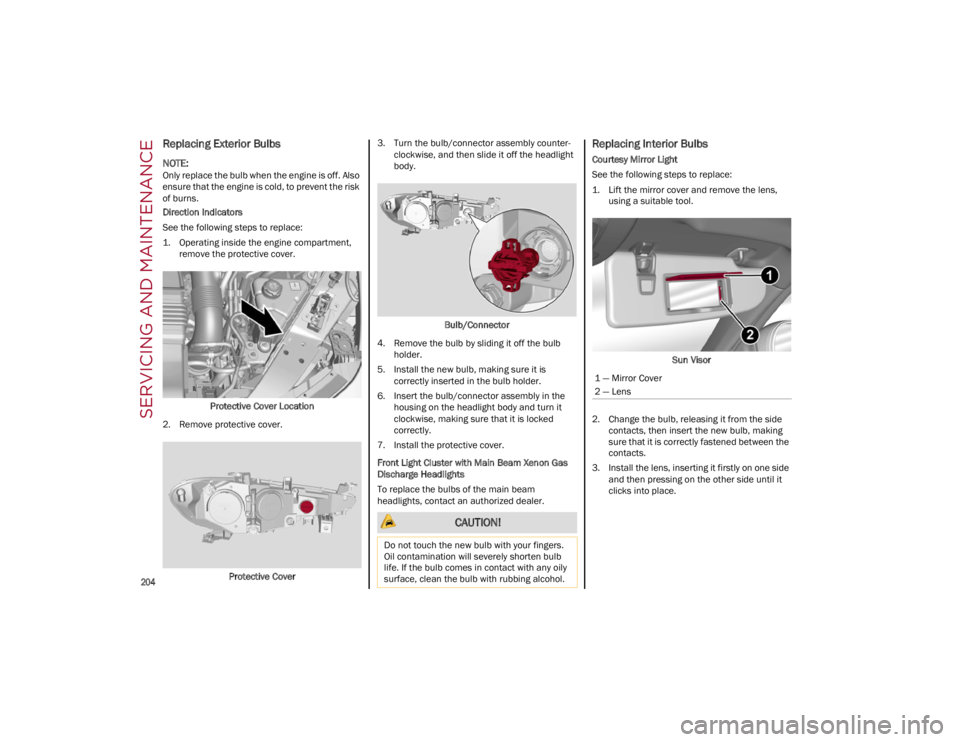
Direction Indicators
See the following steps to replace:
1. Operating inside the engine compartment,remove the protective cover.
Protective Cover Location
2. Remove protective cover.
Protective Cover 3. Turn the bulb/connector assembly counter
-
clockwise, and then slide it off the headlight
body.
Bulb/Connector
4. Remove the bulb by sliding it off the bulb holder.
5. Install the new bulb, making sure it is correctly inserted in the bulb holder.
6. Insert the bulb/connector assembly in the housing on the headlight body and turn it
clockwise, making sure that it is locked
correctly.
7. Install the protective cover.
Front Light Cluster with Main Beam Xenon Gas
Discharge Headlights
To replace the bulbs of the main beam
headlights, contact an authorized dealer.
Replacing Interior Bulbs
Courtesy Mirror Light
See the following steps to replace:
1. Lift the mirror cover and remove the lens, using a suitable tool.
Sun Visor
2. Change the bulb, releasing it from the side contacts, then insert the new bulb, making
sure that it is correctly fastened between the
contacts.
3. Install the lens, inserting it firstly on one side and then pressing on the other side until it
clicks into place.
CAUTION!
Do not touch the new bulb with your fingers.
Oil contamination will severely shorten bulb
life. If the bulb comes in contact with any oily
surface, clean the bulb with rubbing alcohol.
1 — Mirror Cover
2 — Lens
22_GA_OM_EN_USC_t.book Page 204
Page 223 of 248
221
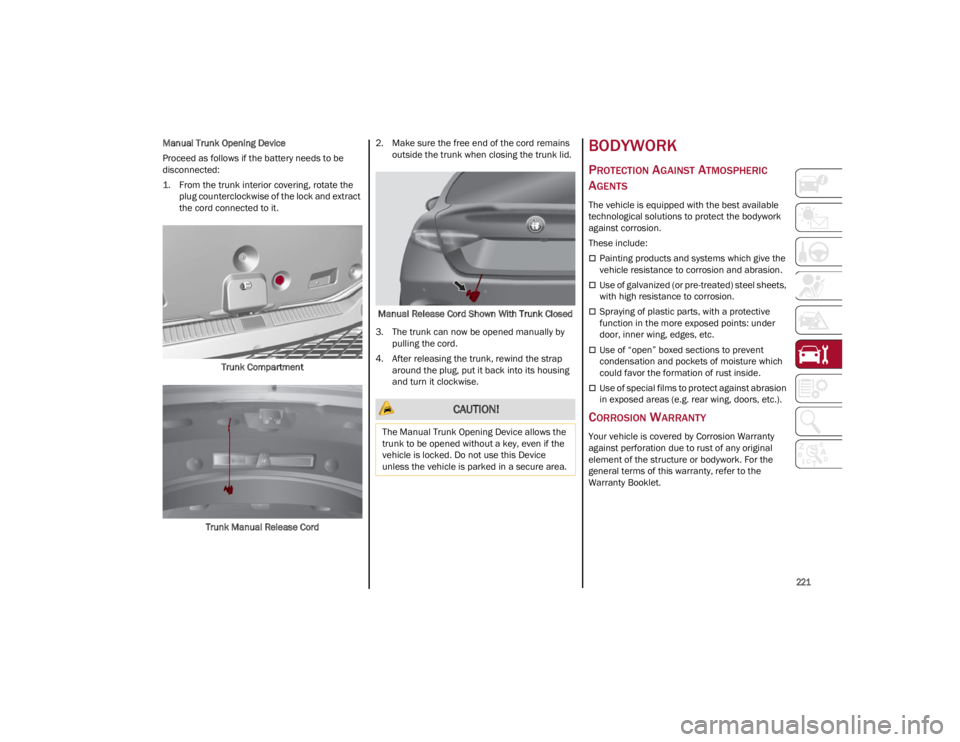
Manual Trunk Opening Device
Proceed as follows if the battery needs to be
disconnected:
1. From the trunk interior covering, rotate the plug counterclockwise of the lock and extract
the cord connected to it.
Trunk Compartment
Trunk Manual Release Cord 2. Make sure the free end of the cord remains
outside the trunk when closing the trunk lid.
Manual Release Cord Shown With Trunk Closed
3. The trunk can now be opened manually by pulling the cord.
4. After releasing the trunk, rewind the strap around the plug, put it back into its housing
and turn it clockwise.BODYWORK
PROTECTION AGAINST ATMOSPHERIC
A
GENTS
The vehicle is equipped with the best available
technological solutions to protect the bodywork
against corrosion.
These include:
Painting products and systems which give the
vehicle resistance to corrosion and abrasion.
Use of galvanized (or pre-treated) steel sheets,
with high resistance to corrosion.
Spraying of plastic parts, with a protective
function in the more exposed points: under
door, inner wing, edges, etc.
Use of “open” boxed sections to prevent
condensation and pockets of moisture which
could favor the formation of rust inside.
Use of special films to protect against abrasion
in exposed areas (e.g. rear wing, doors, etc.).
CORROSION WARRANTY
Your vehicle is covered by Corrosion Warranty
against perforation due to rust of any original
element of the structure or bodywork. For the
general terms of this warranty, refer to the
Warranty Booklet.
CAUTION!
The Manual Trunk Opening Device allows the
trunk to be opened without a key, even if the
vehicle is locked. Do not use this Device
unless the vehicle is parked in a secure area.
22_GA_OM_EN_USC_t.book Page 221
Page 224 of 248
SERVICING AND MAINTENANCE
222
PRESERVING THE BODYWORK
Paint
Touch up abrasions and scratches immediately
to prevent the formation of rust.
Maintenance of paintwork consists of washing
the car: the frequency depends on the conditions
and environment where the car is used. For
example, it is advisable to wash the vehicle more
often in areas with high levels of atmospheric
pollution or salted roads.
Some parts of the vehicle may be covered with a
matte paint which, in order to be maintained
intact, requires special care.
To correctly wash the vehicle, follow these
instructions:
If high pressure jets or cleaners are used to
wash the vehicle, keep a distance of at least
15 inches (40 cm) from the bodywork to avoid
damage or alteration. Build up of water could
cause damage to the vehicle in the long term.
To make it easier to remove any dirt deposits
in the area where the blades are normally
located it is recommended to position the
windshield wipers vertically (service position).
Wash the bodywork using a low pressure jet of
water if possible.
Wipe a sponge with a slightly soapy solution
over the bodywork, frequently rinsing the
sponge.
Rinse well with water and dry with a leather
chamois.
Dry the less visible parts (e.g. door frames, hood,
headlight frames, etc.) with special care, as water
may stagnate more easily in these areas. Do not wash the car after it has been left in the sun or
with the hood hot: this may alter the shine of the
paintwork.
Exterior plastic parts must be cleaned in the
same way as the rest of the vehicle.
If washing the car in a service that moves the car,
for cars with automatic transmissions, PARK (P)
must be cut out. You have to shut off the engine
in the following conditions: car stopped,
transmission in NEUTRAL (N), push the starter
button for at least three seconds.
NOTE:
Avoid parking under trees; the resin dropped by
trees makes the paintwork go opaque and
increases the possibility of corrosion.
Windows
Use specific detergents and clean cloths to
prevent scratching or altering the transparency.
Front Headlights
Use a soft cloth soaked in water and detergent for
washing cars.
NOTE:
Never use aromatic substances (e.g. gasoline)
or ketones (e.g. acetone) for cleaning the
plastic lenses of the headlights.
When cleaning with a pressure washer, keep
the pressure washer at least eight inches
(20 cm) away from the headlights. Engine Compartment
At the end of every Winter, wash the engine
compartment thoroughly, taking care not to aim
the jet of water directly at the electronic control
units or at the windshield wiper motors. Have this
operation performed at a specialized workshop.
For further information
Ú
page 191.
NOTE:
The washing should take place with the engine
cold and the ignition device in the STOP position.
After the washing operation, make sure that the
various protections (e.g. rubber caps and guards)
have not been removed or damaged.
INTERIORS
Periodically check the cleanliness of the interior,
beneath the mats, which could cause oxidation of
the sheet metal.
SEATS AND FABRIC PARTS
Remove dust with a soft brush or a vacuum
cleaner. Rub the seats with a sponge moistened
with a solution of water and neutral detergent.
Cleaning heat press images on seats — if equipped:
Due to the color, opacity and wear-resistant
protection with which the heat press images on
some seats are made, they may be subject to
temporary scratching if they are touched by finger
nails, keys, or other hard objects. In such cases,
the visible signs do not impair the profiled
images, and can easily be removed by wiping the
affected area with a microfiber cloth moistened
with water (not dry) to restore the seat to its
original condition. The microfiber cloth must not
have been previously soaked in other substances
or detergents.
CAUTION!
Wipe the rear window inside gently with a
cloth following the direction of the filaments to
avoid damaging the heating device.
22_GA_OM_EN_USC_t.book Page 222
Page 225 of 248
223
LEATHER SEATS
Remove the dry dirt with a chamois or slightly
damp cloth, without exerting too much pressure.
Remove any liquid or grease stains using an
absorbent dry cloth, without rubbing. Then clean
with a soft cloth or buckskin cloth dampened with
water and mild soap. If the stain persists, use
specific products and observe the instructions
carefully.
NOTE:
Never use alcohol. Make sure that the cleaning
products used contain no alcohol or alcohol deriv-
atives, even in small quantities.
PLASTIC AND COATED PARTS
Clean interior plastic parts with a damp cloth (if
possible made from microfiber), and a solution of
water and neutral, non-abrasive detergent.
To clean oily or persistent stains, use specific
products free from solvents and designed to
maintain the original appearance and color of the
components.
Remove any dust using a microfiber cloth, if
necessary moistened with water. The use of
paper tissues is not recommended as these may
leave residues.
ALCANTARA PARTS — IF EQUIPPED
Alcantara parts maintenance procedure:
Treat the surface with a microfiber cloth
moistened with mild marseille soap and water,
taking care to apply a uniform light pressure
over the entire area (do not rub vigorously).
Rinse and wring out the microfiber cloth, and
pass it over the entire area again.
Let it dry, and then brush gently with a soft
brush.
GENUINE LEATHER SURFACES —
I
F EQUIPPED
Use only water and mild soap to clean these
parts. Never use alcohol or alcohol-based
products.
Before using a specific product for cleaning
interiors, make sure that it does not contain
alcohol and/or alcohol based substances.
CARBON FIBER PARTS
To eliminate small scratches and marks on the
carbon, contact an authorized dealer. An
improperly performed operation may irreparably
damage the carbon. CAUTION!
Do not use “hard” synthetic brushes as they
can damage the fabric.
Do not clean small areas because it could
cause “aesthetic” differences between
treated and untreated areas.
Do not use alcohol or acetone-based
solvents.
22_GA_OM_EN_USC_t.book Page 223