steering ALFA ROMEO GIULIA 2022 Owner's Manual
[x] Cancel search | Manufacturer: ALFA ROMEO, Model Year: 2022, Model line: GIULIA, Model: ALFA ROMEO GIULIA 2022Pages: 248, PDF Size: 9.71 MB
Page 87 of 248
85
In addition to engaging the EPB, along with
steering and positioning chocks in front of the
wheels (when on a steep slope), you must always
place the vehicle in the PARK (P) mode before
leaving.
Should the vehicle battery be faulty, the battery
must be replaced in order to unlock the EPB.
Engaging The EPB Manually
Briefly pull the switch located on the center
console to manually engage the EPB when the
vehicle is stationary.
Noise may be heard from the rear of the vehicle
when engaging the EPB.
A slight movement of the brake pedal may be
detected when engaging the EPB with the brake
pedal pressed.
With the EPB engaged, the Brake Warning Light
on the instrument panel and the switch will
illuminate.
If, under exceptional circumstances, the use of
the brake is required with the vehicle in motion,
keep the switch on the center console pulled as
long as the brake action is necessary.The Brake Warning Light may turn on with the
hydraulic system temporarily unavailable; in this
case braking is controlled by the motors.
The brake lights will also automatically turn on in
the same way as for normal braking with the use
of the brake pedal.
Release the switch on the center console to stop
the braking action with the vehicle in motion.
If, through this procedure, the vehicle is braked
until a speed below 1.9 mph (3 km/h) is reached
and the switch is kept pulled, the parking brake
will definitively engage.
NOTE:
Driving the vehicle with the EPB engaged, or using
it several times to slow down the vehicle, may
cause severe damage to the braking system.
Disengaging The EPB Manually
In order to manually release the parking brake,
the ignition should be in the ACC position. Press
the brake pedal, and then push the switch on the
center console briefly.
Noise may be heard from the rear of the vehicle,
and a slight movement of the brake pedal may be
detected during disengagement.
After disengaging the Electric Park Brake, the
Brake Warning Light on the instrument panel and
the light on the switch will turn off.
If the Brake Warning Light on the instrument
panel remains on with the EPB disengaged, this
indicates a fault: in this case, contact an
authorized dealer.
CAUTION!
With the EPB failure warning light on, some
functions of the EPB are deactivated. In this
case the driver is responsible for brake
activation and vehicle parking in complete
safety conditions.
WARNING!
Never leave children alone in a vehicle, or
with access to an unlocked vehicle.
Allowing children to be in a vehicle
unattended is dangerous for a number of
reasons. A child or others could be seriously
or fatally injured. Children should be warned
not to touch the parking brake, brake pedal
or the gear selector.
Do not leave the key fob in or near the vehicle
or in a location accessible to children. A child
could operate power windows, other
controls, or move the vehicle.
Be sure the parking brake is fully disengaged
before driving; failure to do so can lead to
brake failure and a collision.
Always fully apply the parking brake when
leaving your vehicle, or it may roll and cause
damage or injury.
CAUTION!
Never use gear position PARK (P) instead of
the EPB. Always engage the EPB when parking
the vehicle to prevent injury or damage caused
by the unexpected movement of the vehicle.
22_GA_OM_EN_USC_t.book Page 85
Page 91 of 248
89
REVERSE (R)
Select this mode only with the vehicle at a
standstill.
NEUTRAL (N)
Use this range when the vehicle is standing for
prolonged periods with the engine running. The
engine may be started in this range. Apply the Electric Park Brake and shift the transmission
into PARK (P) if you must leave the vehicle.
DRIVE (D)
Use this mode in normal driving conditions.
Shifting from DRIVE (D) to PARK (P) or REVERSE
(R) modes must take place only after releasing
the accelerator pedal, with vehicle at a standstill
and brake pedal pressed.
This mode ensures automatic engagement of the
most suitable gears for driving needs and
maximum fuel economy in terms of consumption.
In this position, the transmission shifts the gears
automatically, selecting the most suitable for
forward driving among those available as you go.
This ensures the vehicle's optimal driving charac
-
teristics are provided for all conditions.
AutoStick
In the case of frequent shifting (e.g. for sport
driving, when the vehicle is driven with a heavy
load or on slopes), it is recommended to use the
AutoStick (sequential shifting) mode to select and
keep a lower fixed ratio.
In these conditions, the use of a lower gear
improves vehicle performance, preventing
overheating. It is possible to shift from DRIVE (D) mode to
sequential mode regardless of vehicle speed.
Activation
Starting from DRIVE (D), move the selector to the
left (– and + indication of the trim) to activate the
sequential drive mode. The gear engaged will be
shown on the display.
Shifting is made by moving the gear selector
forwards, towards symbol – or backwards,
towards symbol +.
Steering Wheel Shift Paddles — If Equipped
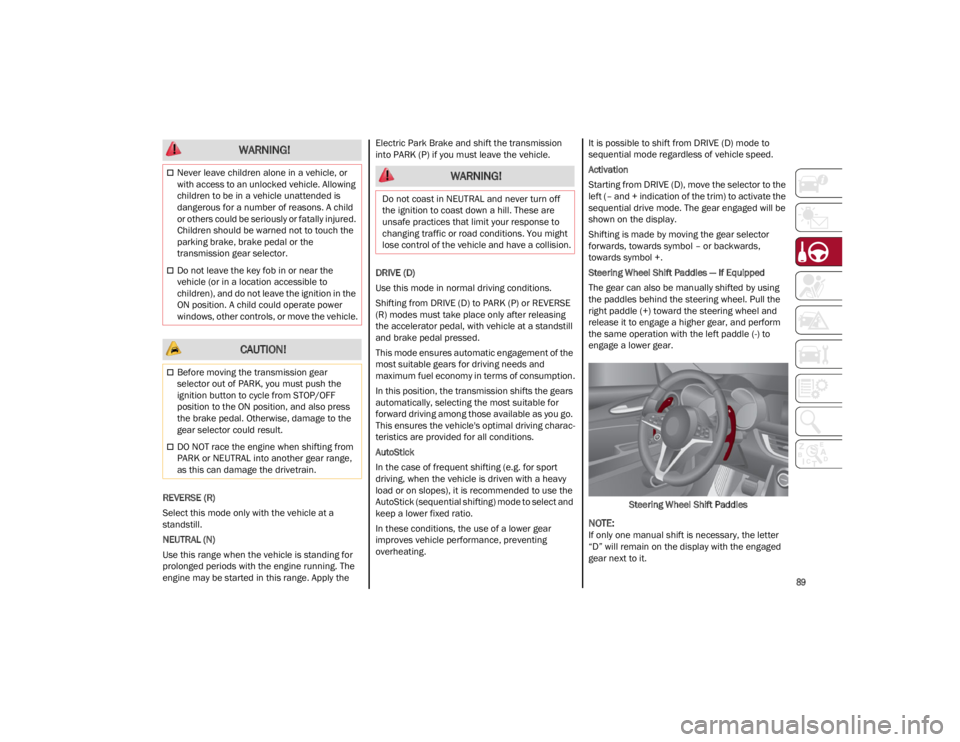
The gear can also be manually shifted by using
the paddles behind the steering wheel. Pull the
right paddle (+) toward the steering wheel and
release it to engage a higher gear, and perform
the same operation with the left paddle (-) to
engage a lower gear.
Steering Wheel Shift Paddles
NOTE:
If only one manual shift is necessary, the letter
“D” will remain on the display with the engaged
gear next to it.
Never leave children alone in a vehicle, or
with access to an unlocked vehicle. Allowing
children to be in a vehicle unattended is
dangerous for a number of reasons. A child
or others could be seriously or fatally injured.
Children should be warned not to touch the
parking brake, brake pedal or the
transmission gear selector.
Do not leave the key fob in or near the
vehicle (or in a location accessible to
children), and do not leave the ignition in the
ON position. A child could operate power
windows, other controls, or move the vehicle.
CAUTION!
Before moving the transmission gear
selector out of PARK, you must push the
ignition button to cycle from STOP/OFF
position to the ON position, and also press
the brake pedal. Otherwise, damage to the
gear selector could result.
DO NOT race the engine when shifting from
PARK or NEUTRAL into another gear range,
as this can damage the drivetrain.
WARNING!
WARNING!
Do not coast in NEUTRAL and never turn off
the ignition to coast down a hill. These are
unsafe practices that limit your response to
changing traffic or road conditions. You might
lose control of the vehicle and have a collision.
22_GA_OM_EN_USC_t.book Page 89
Page 97 of 248
95
OPERATING MODE
Stopping the Engine
With vehicle at a standstill and brake pedal
pressed, the engine switches off if the gear
selector is in a position other than REVERSE (R).
The system does not operate when the gear
selector is in REVERSE (R), in order to make
parking maneuvers easier.
In the event of stops uphill, engine switching off is
disabled to make the “Hill Start Assist” function
available (works only with running engine).
NOTE:
The engine can only be automatically stopped
after having run at about 6 mph (10 km/h). After
an automatic restart, the vehicle only needs to
exceed a speed of 0.3 mph (0.5 km/h) to stop the
engine.
Engine stopping is signaled by the symbol
lighting up on the instrument cluster display.
Restarting the Engine
To restart the engine, release the brake pedal or
turn the steering wheel slightly (if equipped).
With the brake pressed and the transmission in
automatic mode DRIVE (D), the engine will restart
by shifting to REVERSE (R), to PARK (P) or to
“AutoStick”.
With the brake pressed while the gear selector is
in “AutoStick” mode, the engine will restart by
shifting to PARK (P) or by moving the selector
to + or -.
SYSTEM MANUAL ACTIVATION/
D
EACTIVATION
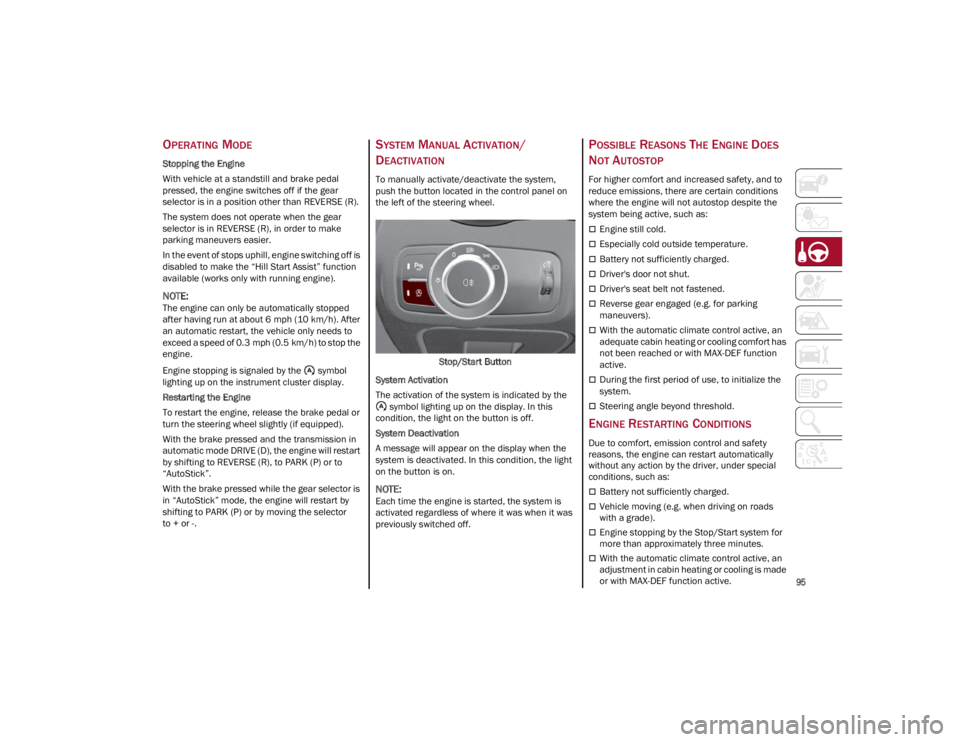
To manually activate/deactivate the system,
push the button located in the control panel on
the left of the steering wheel.
Stop/Start Button
System Activation
The activation of the system is indicated by the symbol lighting up on the display. In this
condition, the light on the button is off.
System Deactivation
A message will appear on the display when the
system is deactivated. In this condition, the light
on the button is on.
NOTE:
Each time the engine is started, the system is
activated regardless of where it was when it was
previously switched off.
POSSIBLE REASONS THE ENGINE DOES
N
OT AUTOSTOP
For higher comfort and increased safety, and to
reduce emissions, there are certain conditions
where the engine will not autostop despite the
system being active, such as:
Engine still cold.
Especially cold outside temperature.
Battery not sufficiently charged.
Driver's door not shut.
Driver's seat belt not fastened.
Reverse gear engaged (e.g. for parking
maneuvers).
With the automatic climate control active, an
adequate cabin heating or cooling comfort has
not been reached or with MAX-DEF function
active.
During the first period of use, to initialize the
system.
Steering angle beyond threshold.
ENGINE RESTARTING CONDITIONS
Due to comfort, emission control and safety
reasons, the engine can restart automatically
without any action by the driver, under special
conditions, such as:
Battery not sufficiently charged.
Vehicle moving (e.g. when driving on roads
with a grade).
Engine stopping by the Stop/Start system for
more than approximately three minutes.
With the automatic climate control active, an
adjustment in cabin heating or cooling is made
or with MAX-DEF function active.
22_GA_OM_EN_USC_t.book Page 95
Page 100 of 248
STARTING AND OPERATING
98
CRUISE CONTROL
When engaged, the Cruise Control takes over
accelerator operations at speeds greater than
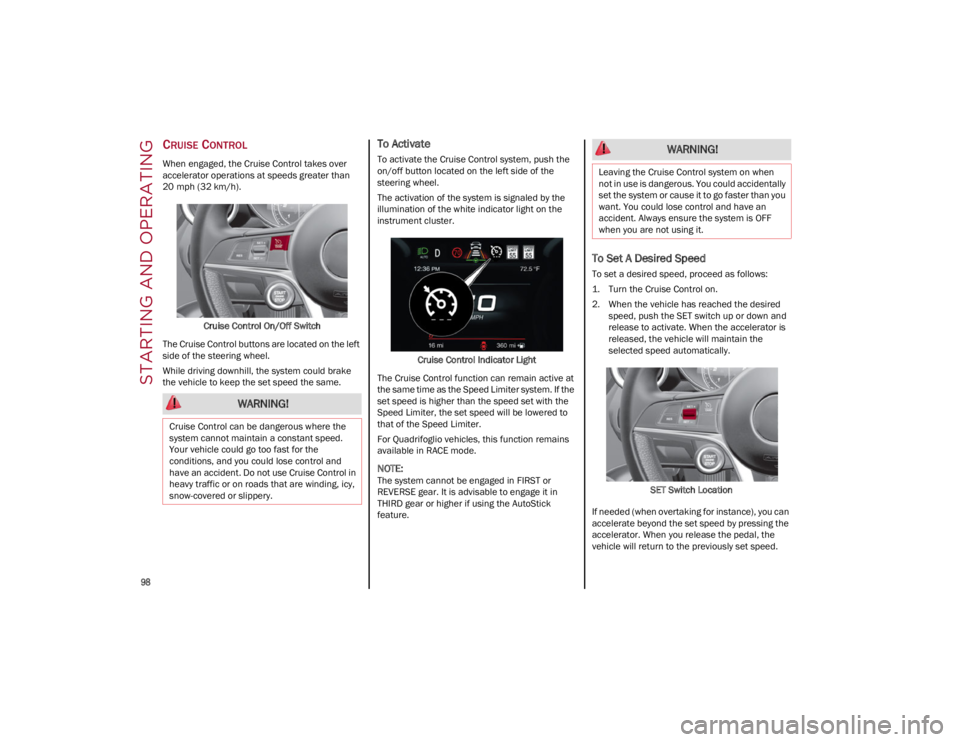
20 mph (32 km/h).Cruise Control On/Off Switch
The Cruise Control buttons are located on the left
side of the steering wheel.
While driving downhill, the system could brake
the vehicle to keep the set speed the same.
To Activate
To activate the Cruise Control system, push the
on/off button located on the left side of the
steering wheel.
The activation of the system is signaled by the
illumination of the white indicator light on the
instrument cluster.
Cruise Control Indicator Light
The Cruise Control function can remain active at
the same time as the Speed Limiter system. If the
set speed is higher than the speed set with the
Speed Limiter, the set speed will be lowered to
that of the Speed Limiter.
For Quadrifoglio vehicles, this function remains
available in RACE mode.
NOTE:
The system cannot be engaged in FIRST or
REVERSE gear. It is advisable to engage it in
THIRD gear or higher if using the AutoStick
feature.
To Set A Desired Speed
To set a desired speed, proceed as follows:
1. Turn the Cruise Control on.
2. When the vehicle has reached the desired speed, push the SET switch up or down and
release to activate. When the accelerator is
released, the vehicle will maintain the
selected speed automatically.
SET Switch Location
If needed (when overtaking for instance), you can
accelerate beyond the set speed by pressing the
accelerator. When you release the pedal, the
vehicle will return to the previously set speed.
WARNING!
Cruise Control can be dangerous where the
system cannot maintain a constant speed.
Your vehicle could go too fast for the
conditions, and you could lose control and
have an accident. Do not use Cruise Control in
heavy traffic or on roads that are winding, icy,
snow-covered or slippery.
WARNING!
Leaving the Cruise Control system on when
not in use is dangerous. You could accidentally
set the system or cause it to go faster than you
want. You could lose control and have an
accident. Always ensure the system is OFF
when you are not using it.
22_GA_OM_EN_USC_t.book Page 98
Page 103 of 248
101
Activating Adaptive Cruise Control (ACC)
The minimum set speed for the ACC system is
19 mph (30 km/h) and the maximum is 110 mph
(180 km/h).
The system cannot be activated:
When pressing the brake pedal.
When the brakes are overheated.
When the Electric Park Brake has been
operated.
When either PARK, REVERSE or NEUTRAL is
engaged.
When the engine RPM is above a maximum
threshold.
When the vehicle speed is not within the
operational speed range.
When the Electronic Stability Control (ESC) (or
Anti-Lock Brake System (ABS) or other stability
control systems) are operating or have just
operated.
When the ESC system is off.
When the Forward Collision Warning system (if
equipped) is braking automatically.
In the event of a system failure.
When the engine is off.
In case of obstruction of the radar sensor (in
this case the bumper area where it is located
must be cleaned).
If the system is set, the conditions described
above also cause a cancellation or deactivation
of the system. These situations may vary
according to the conditions.
NOTE:
The system will not be deactivated when speeds
higher than those set are reached by pressing the
accelerator pedal above 110 mph (180 km/h). In
these situations, the system may not work
correctly and it is recommended to deactivate it.
To Activate/Deactivate
The system has four operating states:
Enabled (speed not set)
Activated (speed set)
Paused
Deactivated To Activate
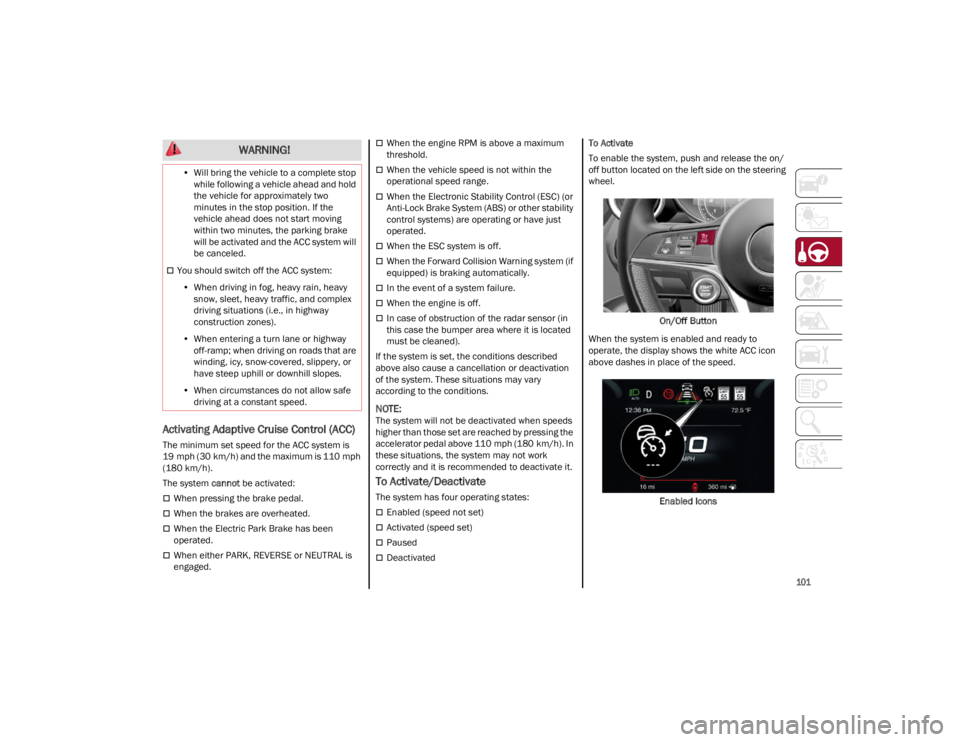
To enable the system, push and release the on/
off button located on the left side on the steering
wheel.
On/Off Button
When the system is enabled and ready to
operate, the display shows the white ACC icon
above dashes in place of the speed.
Enabled Icons
•
Will bring the vehicle to a complete stop
while following a vehicle ahead and holdthe vehicle for approximately twominutes in the stop position. If thevehicle ahead does not start movingwithin two minutes, the parking brakewill be activated and the ACC system will be canceled.
You should switch off the ACC system:
• When driving in fog, heavy rain, heavy
sn
ow, sleet, heavy traffic, and complex
driving situations (i.e., in highway construction zones).
• When entering a turn lane or highway
off-ramp; when driving on roads that are winding, icy, snow-covered, slippery, or have steep uphill or downhill slopes.
• When circumstances do not allow safe
driving at a constant speed.
WARNING!
22_GA_OM_EN_USC_t.book Page 101
Page 108 of 248
STARTING AND OPERATING
106
IFETEL: RCPBOMR 14-0766
La operación de este equipo está sujeta a las
siguientes dos condiciones:
1. es posible que este equipo o dispositivo no cause interferencia perjudicial y
2. este equipo o dispositivo debe aceptar cual -
quier interferencia, incluyendo la que pueda
causar su operación no deseada.
Changes or modifications made to this
equipment not expressly approved by Robert
BOSCH GmbH may void the FCC authorization to
operate this equipment.
This equipment has been tested and found to
comply with the limits for a Class A digital device,
pursuant to Part 15 of the FCC Rules. These limits
are designed to provide reasonable protection
against harmful interference when the
equipment is operated in a commercial
environment. This equipment generates, uses,
and can radiate radio frequency energy and, if not
installed and used in accordance with the
instruction manual, may cause harmful
interference to radio communications. Operation
of this equipment in a residential area is likely to
cause harmful interference in which case the
user will be required to correct the interference at
his own expense.
Toutes modifications apportées à cet
équipement qui ne sont pas expressément
homologuées par Robert BOSCH GmbH peuvent
annuler l'autorisation de la FCC de faire
fonctionner cet équipement.
Cet appareil a été vérifié et s'est révélé conforme
aux normes applicables aux appareils
numériques de catégorie A, en vertu de la section
15 des règlements de la FCC. Ces normes sont définies pour fournir une protection raisonnable
contre les interférences nuisibles lorsque
l'équipement est utilisé dans les installations
résidentielles. Cet appareil génère, utilise et peut
émettre des ondes radioélectriques et, s'il n'est
pas installé et utilisé conformément au manuel
d’instruction, peut causer un brouillage
radioélectrique nuisible aux communications
radio. Le fonctionnement de cet équipement
dans une zone résidentielle est susceptible de
causer des interférences nuisibles; dans ce cas,
l'usager doit corriger les interférences à ses
propres frais.
Radio Frequency Exposure Information
This equipment complies with FCC radiation
exposure limits set forth for an uncontrolled
environment. This equipment should be installed
and operated with minimum distance of 20 cm
between the radiator and your body.
This transmitter must not be co-located or
operating in conjunction with any other antenna
or transmitter.
Déclaration d’exposition aux radiations
Cet équipement est conforme aux limites
d'exposition aux rayonnements IC établies pour
un environnement non contrôlé. Cet équipement
doit être installé et utilisé avec un minimum de
20 cm de distance entre la source de
rayonnement et votre corps.
Ce transmetteur ne doit pas etre place au meme
endroit ou utilise simultanement avec un autre
transmetteur ou antenne.HIGHWAY ASSIST SYSTEM
(HAS) — IF EQUIPPED
The Highway Assist System (HAS) is a driving
assistance system that is only available when
driving on highways. The system operates up to
speeds of 90 mph (145 km/h) when horizontal
signs are detected.
The system uses information from the front
camera and radar to help keep the vehicle in the
center of the lane and at a constant speed.
The HAS system combines Adaptive Cruise
Control (ACC) functions with lane centering logic
to control the trajectory of the vehicle. The HAS
system requires the driver’s hands to remain on
the steering wheel.
Once HAS is activated, a dedicated screen will
appear on the instrument cluster display.
TO ACTIVATE/DEACTIVATE
To Activate
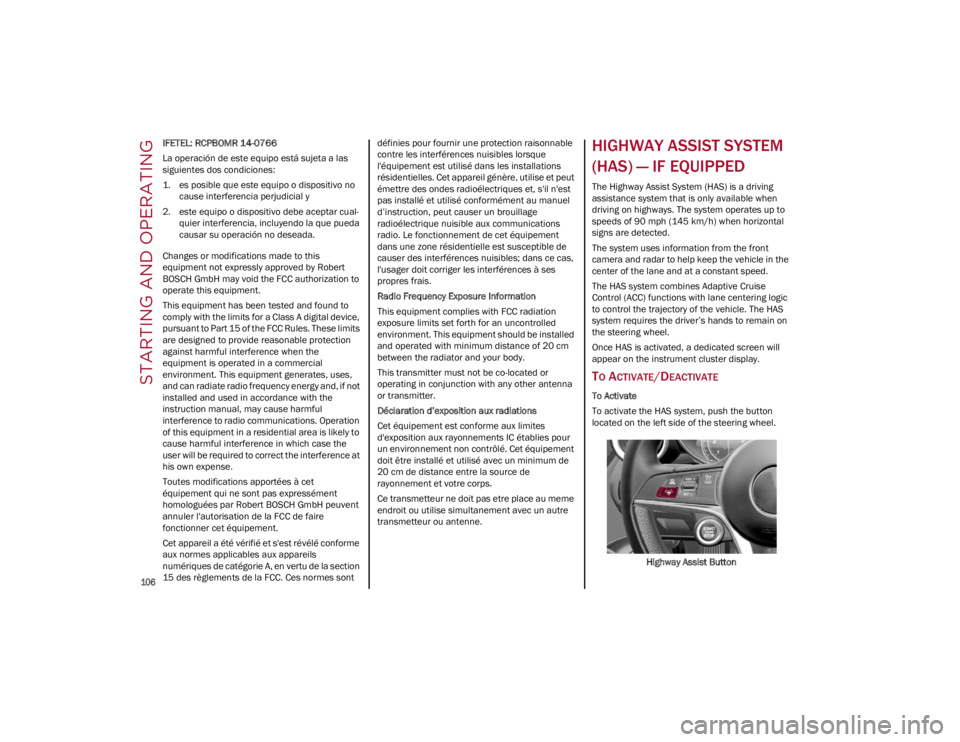
To activate the HAS system, push the button
located on the left side of the steering wheel.
Highway Assist Button
22_GA_OM_EN_USC_t.book Page 106
Page 109 of 248
107
Suspension Conditions
The following operations will suspend the HAS
system:
Steer manually
Press the brake pedal
Disable the ACC device
Activate the turn signals
Push the ACC activation setting button for two
seconds to activate Cruise Control
Place the gear selector in PARK, REVERSE, or
NEUTRAL
Reactivating the ACC system will reactivate HAS
Ú
page 99.
Automatic Deactivation
The system can be deactivated in any of the
following situations:
If there are narrow bends
When hands are removed from the steering
wheel
If the left or right turn signal is activated
If the driver intentionally changes lanes
without using the turn signal
If the driver’s seat belt is released
If the gear selector is placed in DRIVE
If the “Active Braking” function is activated
Ú
page 138
If the vehicle exits the highway
If the lane markings are not detected by the
camera
If the ACC device is deactivated
If the vehicle speed exceeds 90 mph
(145 km/h)
NOTE:
When the HAS system is turned off, the symbol
on the display turns red and then grey.
Hands on the steering wheel are detected by a
capacitive sensor installed in it.
When the automatic suspension conditions are
over, HAS will be automatically reactivated.
OPERATION
The HAS system only operates when the driver’s
hands are on the steering wheel.
If the system detects that the driver’s hands have
been removed from the steering wheel, the
system will alert the driver to place their hands
back on the steering wheel
Ú
page 108.
If the vehicle crosses the lane boundary, the
steering wheel will vibrate and the dedicated
screen will appear in the instrument cluster
display.
NOTE:
The HAS system may take up to five seconds to
turn on once all conditions are met. During this
time, a grey indicator light will appear on the
instrument cluster display and the system will
automatically activate as soon as all of the condi -
tions are met with no intervention from the driver.
The following conditions must be met before the
HAS system turns on:
The HAS system must be enabled by pushing
the button on the steering wheel
The vehicle must be on a highway
ACC must be activated
The right and left lane boundaries must be
visible
The vehicle speed must be between 0 and
90 mph (0 and 145 km/h)
The camera, radar, and radio system must be
functioning properly
The road lane width must be between 8.5 ft
and 13.7 ft (2.6 m and 4.2 m)
The turn signals must not be activated
The HAS system must be functioning properly
Other operating limits:
If the speed of ACC can be set to a higher value
(top speed 110 mph (180 km/h), HAS is only
available as long as the vehicle speed is equal
to or less than 90 mph (145 km/h).
When the ACC speed is reduced and the
vehicle speed is less than 90 mph (145 km/h),
the system will automatically reactivate.
If the ACC speed is set to 90 mph (145 km/h),
traveling downhill may increase the vehicle
speed. The HAS system will deactivate until the
speed returns to 90 mph (145 km/h).
INDICATIONS ON THE DISPLAY
The HAS system status can always be viewed in
the instrument cluster display.
The system status is indicated by the color of the
symbol on the display.
The HAS system uses sensors in the steering
wheel to detect if the driver’s hands are on it.
If the driver’s hands are not on the steering
wheel, a series of warnings will appear in the
instrument cluster display to alert the driver to
reposition their hands on the steering wheel. An
acoustic signal will also sound. After a period of
22_GA_OM_EN_USC_t.book Page 107
Page 110 of 248
STARTING AND OPERATING
108
time, the HAS system will disable if the driver’s
hands do not return to the steering wheel.
After a period of time, the HAS system will disable
if the driver has not repositioned their hands on
the steering wheel.
When the system does not detect hands on the
steering wheel, it will warn the driver by displaying
a dedicated screen on the instrument cluster
display.
SYSTEM STATUS
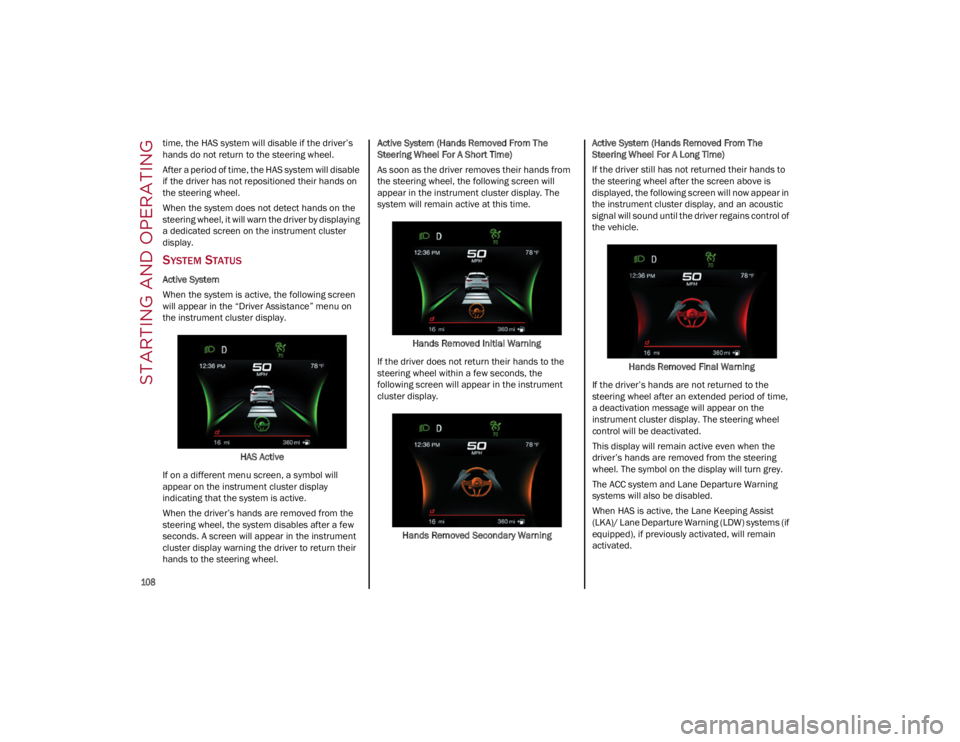
Active System
When the system is active, the following screen
will appear in the “Driver Assistance” menu on
the instrument cluster display.HAS Active
If on a different menu screen, a symbol will
appear on the instrument cluster display
indicating that the system is active.
When the driver’s hands are removed from the
steering wheel, the system disables after a few
seconds. A screen will appear in the instrument
cluster display warning the driver to return their
hands to the steering wheel. Active System (Hands Removed From The
Steering Wheel For A Short Time)
As soon as the driver removes their hands from
the steering wheel, the following screen will
appear in the instrument cluster display. The
system will remain active at this time.
Hands Removed Initial Warning
If the driver does not return their hands to the
steering wheel within a few seconds, the
following screen will appear in the instrument
cluster display.
Hands Removed Secondary Warning Active System (Hands Removed From The
Steering Wheel For A Long Time)
If the driver still has not returned their hands to
the steering wheel after the screen above is
displayed, the following screen will now appear in
the instrument cluster display, and an acoustic
signal will sound until the driver regains control of
the vehicle.
Hands Removed Final Warning
If the driver’s hands are not returned to the
steering wheel after an extended period of time,
a deactivation message will appear on the
instrument cluster display. The steering wheel
control will be deactivated.
This display will remain active even when the
driver’s hands are removed from the steering
wheel. The symbol on the display will turn grey.
The ACC system and Lane Departure Warning
systems will also be disabled.
When HAS is active, the Lane Keeping Assist
(LKA)/ Lane Departure Warning (LDW) systems (if
equipped), if previously activated, will remain
activated.
22_GA_OM_EN_USC_t.book Page 108
Page 111 of 248
109
LIMITED SYSTEM AVAILABILITY/
O
PERATION
System Availability
External factors and conditions may affect the
proper operation of the HAS system, such as:
Narrow, winding, curvy streets
Poor visibility (due to heavy rain, snow, fog,
etc.)
Front lights of oncoming vehicles or direct
sunlight or shade
Damage or obstructions caused by mud, ice,
snow, etc.
Bumper damaged or not aligned
Interference with other equipment that causes
electromagnetic waves
Presence of roadwork/road construction sites
If the indications given by the navigation
system (if any) of the radio system are not yet
ready and/or if the navigation system is
recalculating the route
System Limited Operation
The HAS system may have limited or reduced
functionality when one of the following conditions
occur:
Lane markings are not clear or in conditions of
poor visibility (e.g. in heavy rain, snow, fog,
etc.)
Either the camera or radar are damaged,
covered, or obstructed (e.g. by mud, ice, snow,
etc.)
When driving on hills or roads with narrow
bends
Near highway toll booths
When the highway entrance or exit is wider
than 20 ft (6 m)
If the camera is exposed to glare caused by
reflections or direct sunlight
If the navigation system information is
unavailable or being recalculated
NOTE:
If the vehicle approaches a bend that is too
narrow with respect to the current speed, the
HAS system will disable.
If damage to the windshield occurs, have the
windshield replaced by an authorized dealer as
soon as possible.
TRAFFIC JAM ASSIST (TJA)
SYSTEM — IF EQUIPPED
The Traffic Jam Assist (TJA) system can be
activated on all road types. The system uses a camera to detect lane markings and keep the
vehicle in the center of the lane.
When the system is unable to detect lane
markings, it will still operate using surrounding
traffic. This can occur in congested traffic
scenarios, when the vehicles ahead or
surrounding obstruct the visibility of the lane
markings. When the speed is below 12 mph
(20 km/h), the system can use a lock-on strategy
that allows the vehicle to automatically follow the
vehicle ahead.
The TJA system combines Adaptive Cruise Control
(ACC) functions with Lane Departure Warning
functions to maintain vehicle speed and steering
wheel behavior.
NOTE:
Do not use the TJA system while driving in urban
areas.
TO ACTIVATE/DEACTIVATE
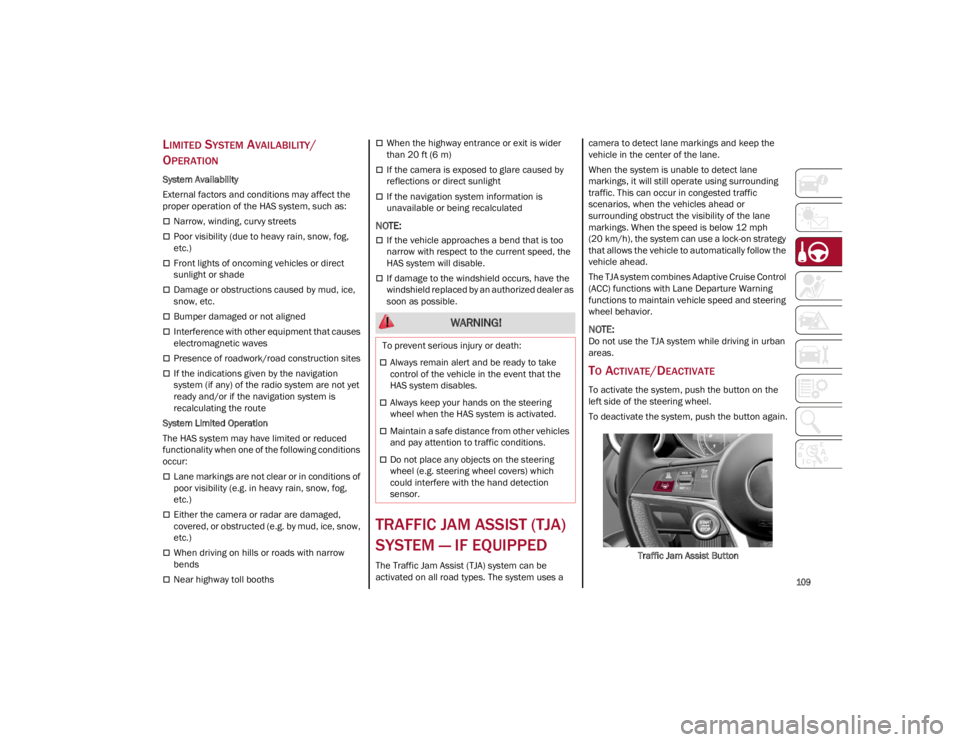
To activate the system, push the button on the
left side of the steering wheel.
To deactivate the system, push the button again.
Traffic Jam Assist Button
WARNING!
To prevent serious injury or death:
Always remain alert and be ready to take
control of the vehicle in the event that the
HAS system disables.
Always keep your hands on the steering
wheel when the HAS system is activated.
Maintain a safe distance from other vehicles
and pay attention to traffic conditions.
Do not place any objects on the steering
wheel (e.g. steering wheel covers) which
could interfere with the hand detection
sensor.
22_GA_OM_EN_USC_t.book Page 109
Page 112 of 248

STARTING AND OPERATING
110
Suspension Conditions
The following operations will suspend the TJA
system:
Pressing the brake pedal
Opening the driver’s door
Disabling ACC
If the vehicle speed exceeds 37 mph
(60 km/h)
Releasing the driver’s seat belt
Placing the gear selector in PARK, REVERSE, or
NEUTRAL
If the Forward Collision Warning system or
“Active Braking” intervenes
Automatic Deactivation
System operation will be temporarily disabled
under the following conditions:
When traveling around narrow bends
If the lane boundaries are not detected
One of the two lines is interrupted
The sun is low and reflects on the radar
camera
If the turn signals are activated
If the driver intentionally changes lanes
without using the turn signal
If manual steering begins
If the driver’s hands are removed from the
steering wheel
When there is no surrounding traffic and there
are no horizontal lane boundaries
If the system is not functioning properly
If lateral acceleration is high
NOTE:
When TJA is turned off, the symbol in the
instrument cluster display will turn red, and
then grey.
A sensor in the steering wheel detects whether
the driver’s hands are placed on the steering
wheel.
When the automatic suspension conditions are
over, the TJA system will be automatically
reactivated.
OPERATION
The TJA system can only operate when the
driver’s hands are on the steering wheel.
If the system detects that the driver’s hands have
been removed from the steering wheel, a
message will appear in the instrument cluster
display to alert the driver to place their hands
back on the wheel.
NOTE:
If the vehicle begins to cross the lane
boundary, the steering wheel will vibrate and a
dedicated screen will appear in the instrument
cluster display.
The TJA system may take up to five seconds to
become active once all conditions are met.
The following conditions must be met in order to
activate the system:
The TJA system must be enabled
The Adaptive Cruise Control (ACC) system must
be turned on
The right and left lane boundaries must be
recognized by the system
The vehicle must be traveling at a speed
between 0 and 37 mph (0 and 60 km/h)
The camera, radar, and radio system must be
functioning properly
The road lane width must be between 8.5 ft
and 13.7 ft (2.6 m and 4.2 m)
The turn signals must be turned off
The TJA system must be functioning properly
If the ACC speed is set to 37 mph (60 km/h) or
less, traveling downhill may increase the
vehicle speed. The system will remain inactive
until the speed returns to 37 mph (60 km/h)
or less.
INDICATIONS ON THE DISPLAY
The TJA system status is indicated by the color of
the symbol in the instrument cluster display.
The system uses sensors in the steering wheel to
detect if the driver’s hands are present. If the
driver’s hands are removed, a series of warnings
will appear in the instrument cluster display to
alert the driver to reposition their hands on the
steering wheel. Acoustic signals will also be
emitted.
If the driver’s hands are not returned to the
steering wheel after a period of time, the system
will be disabled.
22_GA_OM_EN_USC_t.book Page 110