change wheel ALFA ROMEO GIULIA 2023 User Guide
[x] Cancel search | Manufacturer: ALFA ROMEO, Model Year: 2023, Model line: GIULIA, Model: ALFA ROMEO GIULIA 2023Pages: 248, PDF Size: 9.62 MB
Page 109 of 248
107
TO ACTIVATE/DEACTIVATE
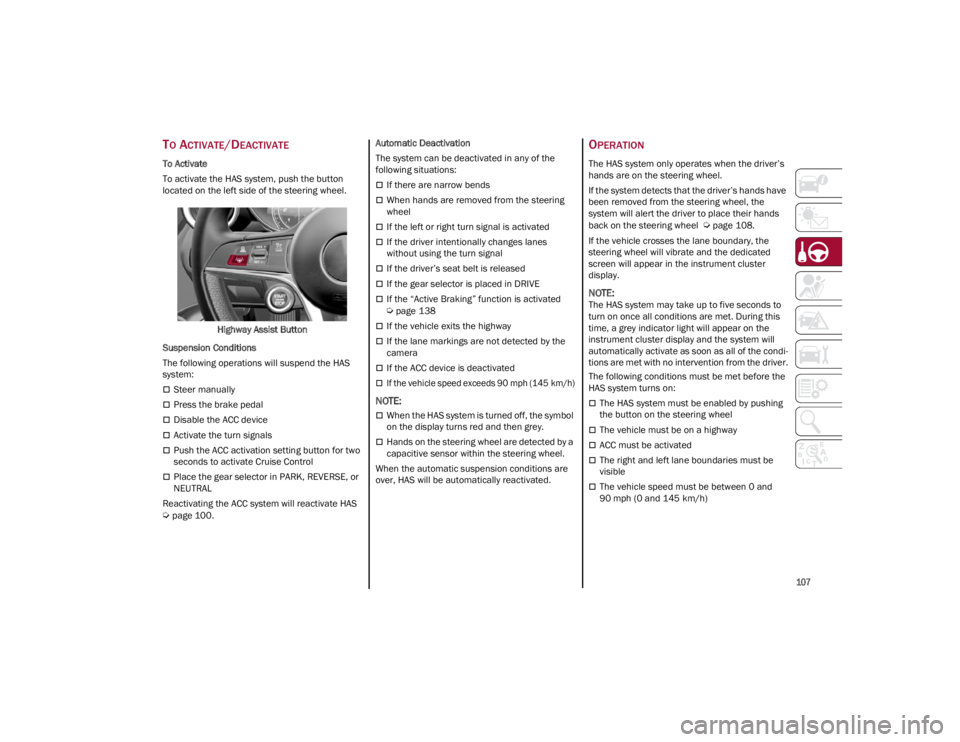
To Activate
To activate the HAS system, push the button
located on the left side of the steering wheel.Highway Assist Button
Suspension Conditions
The following operations will suspend the HAS
system:
Steer manually
Press the brake pedal
Disable the ACC device
Activate the turn signals
Push the ACC activation setting button for two
seconds to activate Cruise Control
Place the gear selector in PARK, REVERSE, or
NEUTRAL
Reactivating the ACC system will reactivate HAS
Ú
page 100. Automatic Deactivation
The system can be deactivated in any of the
following situations:
If there are narrow bends
When hands are removed from the steering
wheel
If the left or right turn signal is activated
If the driver intentionally changes lanes
without using the turn signal
If the driver’s seat belt is released
If the gear selector is placed in DRIVE
If the “Active Braking” function is activated
Ú
page 138
If the vehicle exits the highway
If the lane markings are not detected by the
camera
If the ACC device is deactivated
If the vehicle speed exceeds 90 mph (145 km/h)
NOTE:
When the HAS system is turned off, the symbol
on the display turns red and then grey.
Hands on the steering wheel are detected by a
capacitive sensor within the steering wheel.
When the automatic suspension conditions are
over, HAS will be automatically reactivated.
OPERATION
The HAS system only operates when the driver’s
hands are on the steering wheel.
If the system detects that the driver’s hands have
been removed from the steering wheel, the
system will alert the driver to place their hands
back on the steering wheel
Ú
page 108.
If the vehicle crosses the lane boundary, the
steering wheel will vibrate and the dedicated
screen will appear in the instrument cluster
display.
NOTE:
The HAS system may take up to five seconds to
turn on once all conditions are met. During this
time, a grey indicator light will appear on the
instrument cluster display and the system will
automatically activate as soon as all of the condi -
tions are met with no intervention from the driver.
The following conditions must be met before the
HAS system turns on:
The HAS system must be enabled by pushing
the button on the steering wheel
The vehicle must be on a highway
ACC must be activated
The right and left lane boundaries must be
visible
The vehicle speed must be between 0 and
90 mph (0 and 145 km/h)
23_GA_OM_EN_USC_t.book Page 107
Page 112 of 248
STARTING AND OPERATING
110
TRAFFIC JAM ASSIST (TJA)
SYSTEM — IF EQUIPPED
The Traffic Jam Assist (TJA) system can be
activated on all road types. The system uses a
camera and radar sensors located on the front
fascia/bumper to detect lane markings and keep
the vehicle in the center of the lane.
When the system is unable to detect lane
markings, it will still operate using surrounding
traffic. This can occur in congested traffic
scenarios, when the vehicles ahead or
surrounding obstruct the visibility of the lane
markings. When the speed is below 12 mph
(20 km/h), the system can use a lock-on strategy
that allows the vehicle to automatically follow the
vehicle ahead.
The TJA system combines Adaptive Cruise Control
(ACC) functions with Lane Departure Warning
functions to maintain vehicle speed and steering
wheel behavior.
NOTE:
Do not use the TJA system while driving in urban
areas.
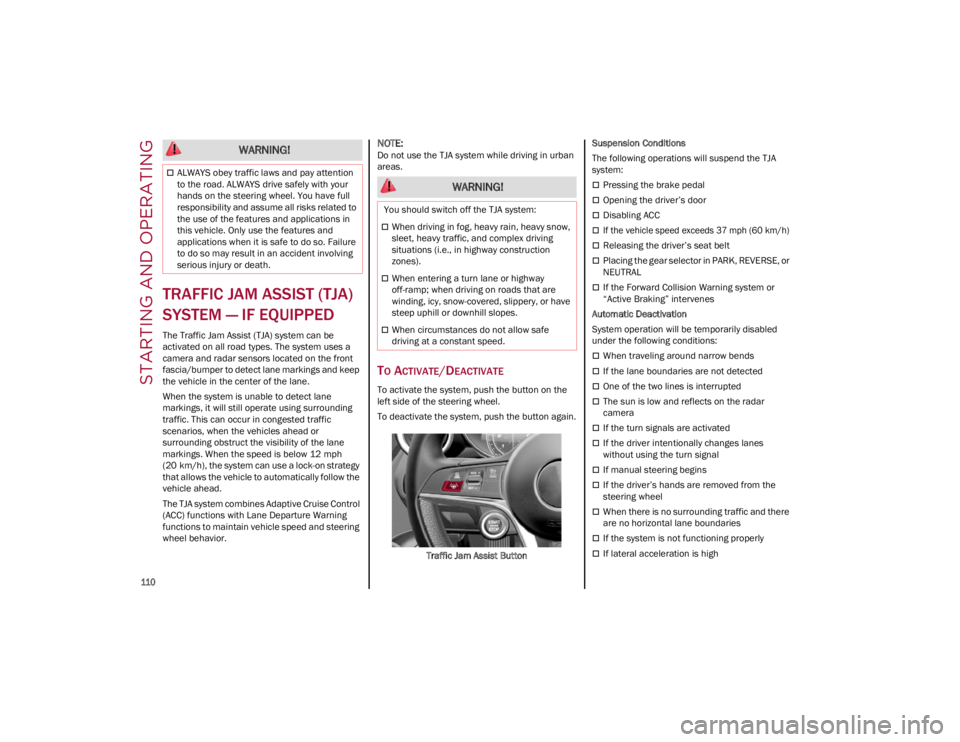
TO ACTIVATE/DEACTIVATE
To activate the system, push the button on the
left side of the steering wheel.
To deactivate the system, push the button again.Traffic Jam Assist Button Suspension Conditions
The following operations will suspend the TJA
system:
Pressing the brake pedal
Opening the driver’s door
Disabling ACC
If the vehicle speed exceeds 37 mph (60 km/h)
Releasing the driver’s seat belt
Placing the gear selector in PARK, REVERSE, or
NEUTRAL
If the Forward Collision Warning system or
“Active Braking” intervenes
Automatic Deactivation
System operation will be temporarily disabled
under the following conditions:
When traveling around narrow bends
If the lane boundaries are not detected
One of the two lines is interrupted
The sun is low and reflects on the radar
camera
If the turn signals are activated
If the driver intentionally changes lanes
without using the turn signal
If manual steering begins
If the driver’s hands are removed from the
steering wheel
When there is no surrounding traffic and there
are no horizontal lane boundaries
If the system is not functioning properly
If lateral acceleration is high
ALWAYS obey traffic laws and pay attention
to the road. ALWAYS drive safely with your
hands on the steering wheel. You have full
responsibility and assume all risks related to
the use of the features and applications in
this vehicle. Only use the features and
applications when it is safe to do so. Failure
to do so may result in an accident involving
serious injury or death.
WARNING!
WARNING!
You should switch off the TJA system:
When driving in fog, heavy rain, heavy snow,
sleet, heavy traffic, and complex driving
situations (i.e., in highway construction
zones).
When entering a turn lane or highway
off-ramp; when driving on roads that are
winding, icy, snow-covered, slippery, or have
steep uphill or downhill slopes.
When circumstances do not allow safe
driving at a constant speed.
23_GA_OM_EN_USC_t.book Page 110
Page 115 of 248
113
TRAFFIC SIGN
RECOGNITION (TSR)
SYSTEM — IF EQUIPPED
The Traffic Sign Recognition (TSR) system uses a
camera mounted on the windshield to detect
recognizable road signs such as:
Speed limits
No passing zones
Signs indicating the end of the situations
indicated aboveIf the camera does not detect valid speed limits,
the radio system navigation system may suggest
unregulated speed limits.
The system always checks the traffic signs
indicating the current speed limit signs. The
system is able to recognize and display up to two
different road signs in the instrument cluster
display.
Depending on the unit of measurement (km/h or
mph) set through the “Unit of Measurement”
menu in the radio system, the TSR system will
automatically show the indication of the road sign
in the unit of measurements selected in the
instrument cluster display.
TO ACTIVATE/DEACTIVATE
The TSR System can be activated/deactivated in
the radio system in the “Driver Assistance” menu.
The system activation is signaled by road signs
shown on the instrument cluster display.
NOTE:
The TSR system will reset to the default setting
when the vehicle is restarted.
NOTE:
By selecting “Blinking”, the driver can activate
a warning to display when the speed exceeds
the limit indicated by the TSR System. The
speed road sign on the instrument cluster
display will blink until the vehicle speed drops
below the displayed limit.
Selecting “Offset” will set the speed at which
“Blinking” is activated up to a maximum of
6 mph (10 km/h) above the limit detected by
the system.
If no speed limit signs are found, the system
will revert to the speed limit signs that are
stored in the NAV system.
INDICATIONS ON THE DISPLAY
The system status can always be viewed through
the instrument cluster display.
The instrument cluster display shows only the
speed limit indications and consists of the
following steps:
The new speed limit recognized by the system,
which is indicated by means of a
predetermined color. The road sign indicating
the end of the speed limit or a “Road Sign Not
Detected” message may appear in this zone.
After a predetermined distance, the previously
displayed road sign changes color to inform
the driver that the speed limit provided may no
longer be valid.
If the camera does not detect valid speed
limits, the navigation system may suggest
unregulated speed limits on the instrument
panel display.
WARNING!
To prevent serious injury or death:
Always remain alert and be ready to take
control of the car in the event that the TJA
system disables.
Always keep your hands on the steering
wheel when the TJA system is activated.
Maintain a safe distance from other vehicles
and pay attention to traffic conditions.
The TJA system should only be used as a
driving aid. The driver must always pay
attention to their surroundings when the
system is operating and be ready to take
control of the vehicle at any time.
Do not place any objects on the steering
wheel (e.g. steering wheel covers) that could
interfere with the hand detection sensor on
the steering wheel.
23_GA_OM_EN_USC_t.book Page 113
Page 128 of 248
STARTING AND OPERATING
126
A Month-Day-Hour (MDH) number is included on
this label and indicates the Month, Day and Hour
of manufacture. The bar code that appears on
the bottom of the label is your VIN.
Gross Vehicle Weight Rating (GVWR)
The GVWR is the total permissible weight of your
vehicle including driver, passengers, vehicle,
options and cargo. The label also specifies
maximum capacities of front and rear axle
systems (GAWR). Total load must be limited so
GVWR and front and rear GAWR are not
exceeded.
Payload
The payload of a vehicle is defined as the
allowable load weight a truck can carry, including
the weight of the driver, all passengers, options
and cargo.
Gross Axle Weight Rating (GAWR)
The GAWR is the maximum permissible load on
the front and rear axles. The load must be
distributed in the cargo area so that the GAWR of
each axle is not exceeded.
Each axle GAWR is determined by the
components in the system with the lowest load
carrying capacity (axle, springs, tires or wheels).
Heavier axles or suspension components
sometimes specified by purchasers for increased
durability do not necessarily increase the
vehicle's GVWR.
Tire Size
The tire size on the Vehicle Certification Label
represents the actual tire size on your vehicle.
Replacement tires must be equal to the load
capacity of this tire size.
Rim Size
This is the rim size that is appropriate for the tire
size listed.
Inflation Pressure
This is the cold tire inflation pressure for your
vehicle for all loading conditions up to full GAWR.
Curb Weight
The curb weight of a vehicle is defined as the total
weight of the vehicle with all fluids, including
vehicle fuel, at full capacity conditions, and with
no occupants or cargo loaded into the vehicle.
The front and rear curb weight values are
determined by weighing your vehicle on a
commercial scale before any occupants or cargo
are added.
Loading
The actual total weight and the weight of the front
and rear of your vehicle at the ground can best be
determined by weighing it when it is loaded and
ready for operation.
The entire vehicle should first be weighed on a
commercial scale to ensure that the GVWR has
not been exceeded. The weight on the front and
rear of the vehicle should then be determined
separately to be sure that the load is properly
distributed over the front and rear axle. Weighing
the vehicle may show that the GAWR of either the
front or rear axles has been exceeded but the
total load is within the specified GVWR. If so,
weight must be shifted from front to rear or rear
to front as appropriate until the specified weight
limitations are met. Store the heavier items down
low and be sure that the weight is distributed
equally. Stow all loose items securely before
driving.Improper weight distributions can have an
adverse effect on the way your vehicle steers and
handles and the way the brakes operate.
TRAILER TOWING
Trailer towing is not recommended for this
vehicle.
SUGGESTIONS FOR
DRIVING
SAVING FUEL
The following are some suggestions which may
help you save fuel and lower the amount of
harmful emissions released into the atmosphere.
Vehicle Maintenance
Checks and operations should be carried out in
accordance with the Maintenance Plan
Ú
page 182.
Tires
Check the tire pressures at least once every four
weeks: if the pressure is too low, consumption
levels increase as resistance to rolling is higher.
WARNING!
Do not load your vehicle any heavier than the
GVWR or the maximum front and rear GAWR. If
you do, parts on your vehicle can break, or it
can change the way your vehicle handles. This
could cause you to lose control. Overloading
can shorten the life of your vehicle.
23_GA_OM_EN_USC_t.book Page 126
Page 132 of 248
SAFETY
130
DYNAMIC STEERING TORQUE (DST)
DST uses the integration of the Electronic
Stability Control (ESC) system with the electric
power steering to increase the safety level of the
whole vehicle.
In critical situations (braking on surfaces with
different grip conditions), the ESC system
controls the steering through the DST function to
implement an additional torque contribution on
the steering wheel in order to suggest the most
correct maneuver to the driver.
The coordinated action of the brakes and
steering increases the sensation of safety and
control of the vehicle.
NOTE:
The DST feature is only meant to help the driver
realize the correct course of action through small
torques on the steering wheel, which means the
effectiveness of the DST feature is highly depen-
dent on the driver’s sensitivity and overall reac -
tion to the applied torque. It is very important to
realize that this feature will not steer the vehicle,
meaning the driver is still responsible for steering
the vehicle.
DRIVE TRAIN CONTROL (DTC) SYSTEM —
I
F EQUIPPED
Some models of this vehicle are equipped with an
All-Wheel Drive (AWD) system, which offers an
optimal drive for countless driving conditions and
road surfaces. The system reduces the slipping of
the tires to a minimum, automatically
redistributing the torque to the front and rear
wheels as needed. To maximize fuel savings, the vehicle with AWD
automatically passes to Rear-Wheel Drive (RWD)
when the road and environmental conditions are
such that they wouldn't cause the tires to slip.
When the road and environmental conditions
require better traction, the vehicle automatically
goes to AWD mode.
NOTE:
If the system failure symbol switches on, after
starting the engine or while driving, it means that
the AWD system is not working properly. If the
warning message activates frequently, it is
recommended to carry out the maintenance
operations.
ELECTRONIC STABILITY CONTROL (ESC)
The ESC system improves the directional control
and stability of the vehicle in various driving
conditions.
The ESC system corrects the vehicle’s understeer
and oversteer, distributing the brake force on the
appropriate wheels. The torque supplied by the
engine can also be reduced in order to maintain
control of the vehicle.
Oversteer
occurs when the vehicle is turning
more than it should according to the angle of
the steering wheel.
Understeer occurs when the vehicle is turning
less than it should according to the angle of
the steering wheel.
The ESC system uses sensors installed on the
vehicle to determine the path that the driver
intends to follow and compares it with the
vehicle’s effective path. When the real path
deviates from the desired path, the ESC system
intervenes to counteract these conditions. System Intervention
The intervention of the system is indicated by the
flashing of the ESC Warning Light on the
instrument panel, to inform the driver that the
vehicle stability and grip are critical.
WARNING!
Electronic Stability Control (ESC) cannot
prevent the natural laws of physics from
acting on the vehicle, nor can it increase the
traction afforded by prevailing road
conditions. ESC cannot prevent accidents,
including those resulting from excessive
speed in turns, driving on very slippery
surfaces, or hydroplaning. ESC also cannot
prevent accidents resulting from loss of
vehicle control due to inappropriate driver
input for the conditions. Only a safe, attentive,
and skillful driver can prevent accidents. The
capabilities of an ESC equipped vehicle must
never be exploited in a reckless or dangerous
manner which could jeopardize the user’s
safety or the safety of others.
Vehicle modifications, or failure to properly
maintain your vehicle, may change the
handling characteristics of your vehicle, and
may negatively affect the performance of the
ESC system. Changes to the steering system,
suspension, braking system, tire type and
size or wheel size may adversely affect ESC
performance. Improperly inflated and
unevenly worn tires may also degrade ESC
performance. Any vehicle modification or
poor vehicle maintenance that reduces the
effectiveness of the ESC system can
increase the risk of loss of vehicle control,
vehicle rollover, personal injury and death.
23_GA_OM_EN_USC_t.book Page 130
Page 137 of 248
135
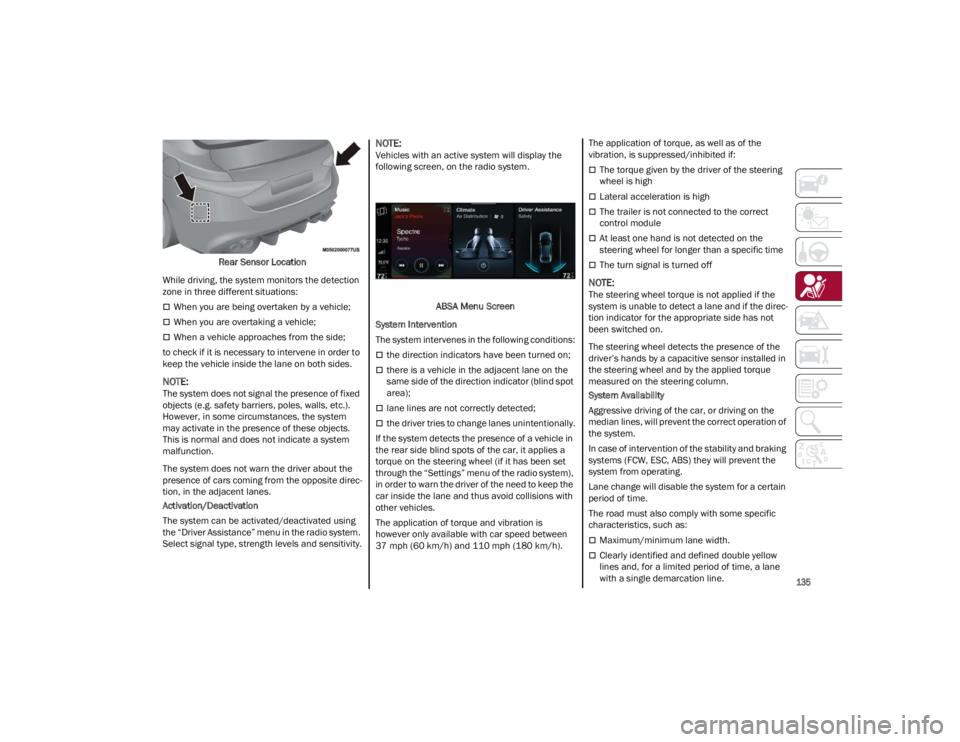
Rear Sensor Location
While driving, the system monitors the detection
zone in three different situations:
When you are being overtaken by a vehicle;
When you are overtaking a vehicle;
When a vehicle approaches from the side;
to check if it is necessary to intervene in order to
keep the vehicle inside the lane on both sides.
NOTE:
The system does not signal the presence of fixed
objects (e.g. safety barriers, poles, walls, etc.).
However, in some circumstances, the system
may activate in the presence of these objects.
This is normal and does not indicate a system
malfunction.
The system does not warn the driver about the
presence of cars coming from the opposite direc -
tion, in the adjacent lanes.
Activation/Deactivation
The system can be activated/deactivated using
the “Driver Assistance” menu in the radio system.
Select signal type, strength levels and sensitivity.
NOTE:
Vehicles with an active system will display the
following screen, on the radio system.
ABSA Menu Screen
System Intervention
The system intervenes in the following conditions:
the direction indicators have been turned on;
there is a vehicle in the adjacent lane on the
same side of the direction indicator (blind spot
area);
lane lines are not correctly detected;
the driver tries to change lanes unintentionally.
If the system detects the presence of a vehicle in
the rear side blind spots of the car, it applies a
torque on the steering wheel (if it has been set
through the “Settings” menu of the radio system),
in order to warn the driver of the need to keep the
car inside the lane and thus avoid collisions with
other vehicles.
The application of torque and vibration is
however only available with car speed between
37 mph (60 km/h) and 110 mph (180 km/h). The application of torque, as well as of the
vibration, is suppressed/inhibited if:
The torque given by the driver of the steering
wheel is high
Lateral acceleration is high
The trailer is not connected to the correct
control module
At least one hand is not detected on the
steering wheel for longer than a specific time
The turn signal is turned off
NOTE:
The steering wheel torque is not applied if the
system is unable to detect a lane and if the direc
-
tion indicator for the appropriate side has not
been switched on.
The steering wheel detects the presence of the
driver’s hands by a capacitive sensor installed in
the steering wheel and by the applied torque
measured on the steering column.
System Availability
Aggressive driving of the car, or driving on the
median lines, will prevent the correct operation of
the system.
In case of intervention of the stability and braking
systems (FCW, ESC, ABS) they will prevent the
system from operating.
Lane change will disable the system for a certain
period of time.
The road must also comply with some specific
characteristics, such as:
Maximum/minimum lane width.
Clearly identified and defined double yellow
lines and, for a limited period of time, a lane
with a single demarcation line.
23_GA_OM_EN_USC_t.book Page 135
Page 138 of 248
SAFETY
136
NOTE:
In some cases, for a limited period of time, the
system may be activated by a lane with a single
median line.
In cases of good road surface conditions, the
system could correctly recognize other types of
valid lane markings (e.g. road edges, sidewalks,
etc.).
Hand Presence On The Steering Wheel Detection
The system is able to detect the presence of the
driver’s hands on the steering wheel.
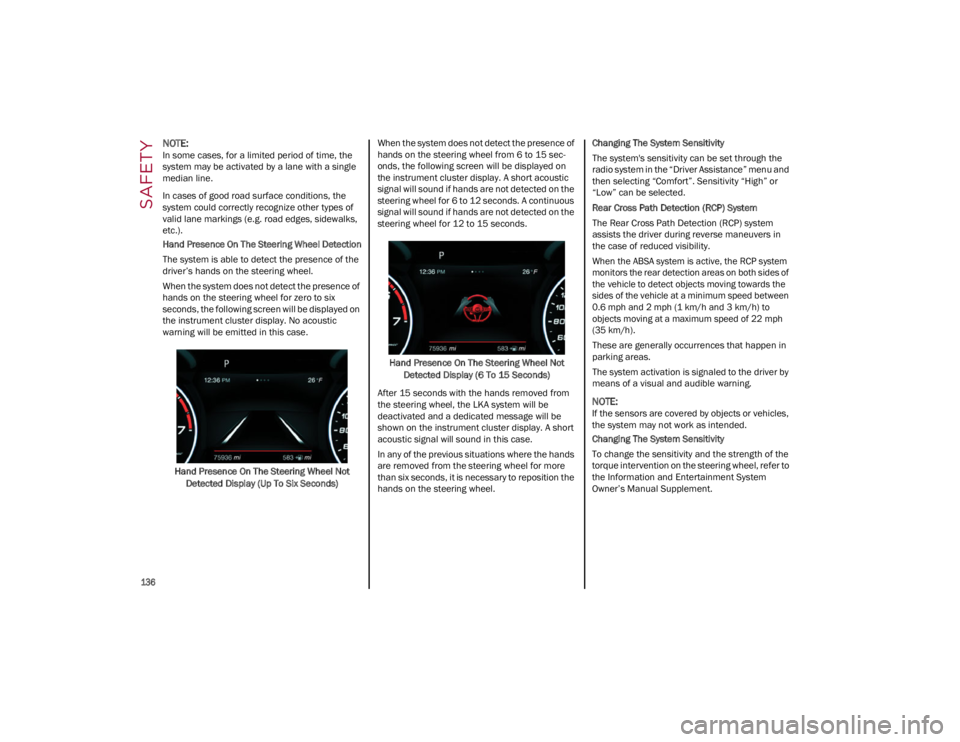
When the system does not detect the presence of
hands on the steering wheel for zero to six
seconds, the following screen will be displayed on
the instrument cluster display. No acoustic
warning will be emitted in this case.Hand Presence On The Steering Wheel Not Detected Display (Up To Six Seconds) When the system does not detect the presence of
hands on the steering wheel from 6 to 15 sec-
onds, the following screen will be displayed on
the instrument cluster display. A short acoustic
signal will sound if hands are not detected on the
steering wheel for 6 to 12 seconds. A continuous
signal will sound if hands are not detected on the
steering wheel for 12 to 15 seconds.
Hand Presence On The Steering Wheel Not Detected Display (6 To 15 Seconds)
After 15 seconds with the hands removed from
the steering wheel, the LKA system will be
deactivated and a dedicated message will be
shown on the instrument cluster display. A short
acoustic signal will sound in this case.
In any of the previous situations where the hands
are removed from the steering wheel for more
than six seconds, it is necessary to reposition the
hands on the steering wheel. Changing The System Sensitivity
The system's sensitivity can be set through the
radio system in the “Driver Assistance” menu and
then selecting “Comfort”. Sensitivity “High” or
“Low” can be selected.
Rear Cross Path Detection (RCP) System
The Rear Cross Path Detection (RCP) system
assists the driver during reverse maneuvers in
the case of reduced visibility.
When the ABSA system is active, the RCP system
monitors the rear detection areas on both sides of
the vehicle to detect objects moving towards the
sides of the vehicle at a minimum speed between
0.6 mph and 2 mph (1 km/h and 3 km/h) to
objects moving at a maximum speed of 22 mph
(35 km/h).
These are generally occurrences that happen in
parking areas.
The system activation is signaled to the driver by
means of a visual and audible warning.
NOTE:
If the sensors are covered by objects or vehicles,
the system may not work as intended.
Changing The System Sensitivity
To change the sensitivity and the strength of the
torque intervention on the steering wheel, refer to
the Information and Entertainment System
Owner’s Manual Supplement.
23_GA_OM_EN_USC_t.book Page 136
Page 139 of 248
137
DRIVER ATTENTION ASSIST (DAA)
S
YSTEM — IF EQUIPPED
The Driver Attention Assist (DAA) system detects
when the driver is feeling fatigued and warns the
driver to pull over and take a break.
To Activate/Deactivate
The DAA system can be activated and deactivated
through the radio system by selecting the
following in order:
1. “Driver Assistance”
2. “Driver Attention Assist”
System Intervention
Using information from the front camera, the
system implements two operating logics:
The first operating logic takes the driving style
into account, observing the road and detecting
to what extent the driver can continue driving
with few lane crossing events.
The second operating logic measures the time
spent behind the wheel with the vehicle speed
above 40 mph (60 km/h) and below 110 mph (180 km/h). If the “Standard” option is
selected, in these conditions, the “Dozy Driver”
message may appear after three hours of
driving. If the “Early” option is selected and
these conditions occur, the “Dozy Driver”
message will be displayed after two hours of
driving.
NOTE:
If the conditions described previously are not
detected continuously during the entire driving
period, the “Dozy Driver” message may be
displayed later than two or three hours. If the
driving style indicates that the driver is unable to
follow the road trajectory and respect the hori-
zontal lane markings, the red symbol will appear
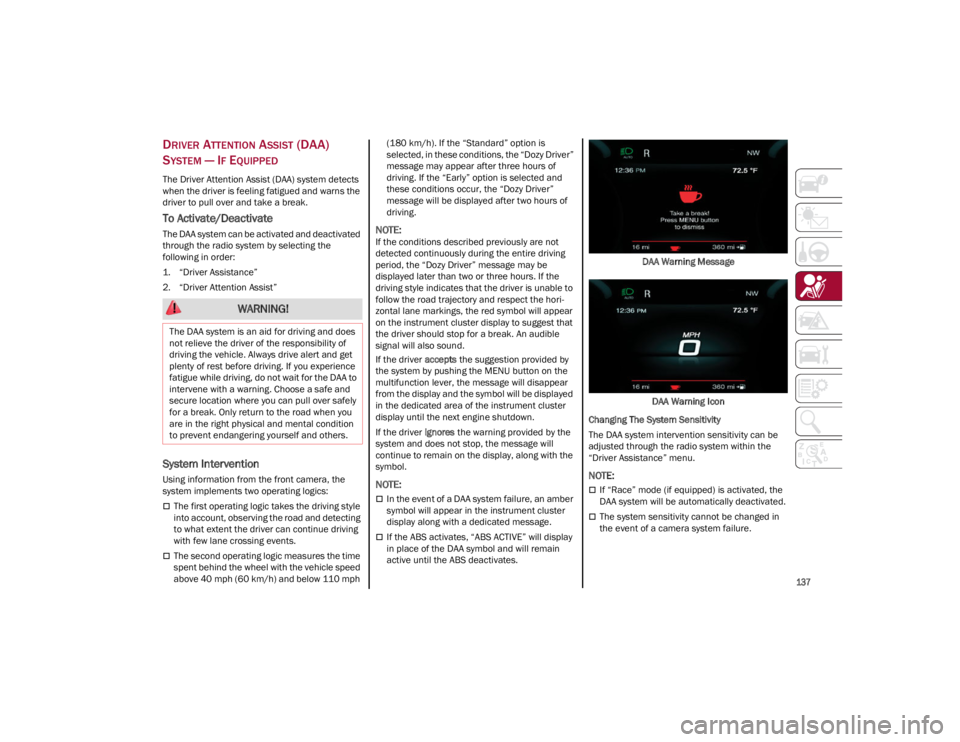
on the instrument cluster display to suggest that
the driver should stop for a break. An audible
signal will also sound.
If the driver
accepts the suggestion provided by
the system by pushing the MENU button on the
multifunction lever, the message will disappear
from the display and the symbol will be displayed
in the dedicated area of the instrument cluster
display until the next engine shutdown.
If the driver ignores the warning provided by the
system and does not stop, the message will
continue to remain on the display, along with the
symbol.
NOTE:
In the event of a DAA system failure, an amber
symbol will appear in the instrument cluster
display along with a dedicated message.
If the ABS activates, “ABS ACTIVE” will display
in place of the DAA symbol and will remain
active until the ABS deactivates. DAA Warning Message
DAA Warning Icon
Changing The System Sensitivity
The DAA system intervention sensitivity can be
adjusted through the radio system within the
“Driver Assistance” menu.
NOTE:
If “Race” mode (if equipped) is activated, the
DAA system will be automatically deactivated.
The system sensitivity cannot be changed in
the event of a camera system failure.
WARNING!
The DAA system is an aid for driving and does
not relieve the driver of the responsibility of
driving the vehicle. Always drive alert and get
plenty of rest before driving. If you experience
fatigue while driving, do not wait for the DAA to
intervene with a warning. Choose a safe and
secure location where you can pull over safely
for a break. Only return to the road when you
are in the right physical and mental condition
to prevent endangering yourself and others.
23_GA_OM_EN_USC_t.book Page 137
Page 170 of 248

SAFETY
168
PERIODIC SAFETY CHECKS YOU SHOULD
M
AKE OUTSIDE THE VEHICLE
Tires
Examine tires for excessive tread wear and
uneven wear patterns. Check for stones, nails,
glass, or other objects lodged in the tread or
sidewall. Inspect the tread for cuts and cracks.
Inspect sidewalls for cuts, cracks, and bulges.
Check the wheel nuts for tightness. Check the
tires (including spare) for proper cold inflation
pressure.
Lights
Have someone observe the operation of brake
lights and exterior lights while you work the
controls. Check turn signal and high beam
indicator lights on the instrument panel.
Door Latches
Check for proper closing, latching, and locking.
Fluid Leaks
Check area under the vehicle after overnight
parking for fuel, coolant, oil, or other fluid leaks.
Also, if gasoline fumes are detected or if fuel or
brake fluid leaks are suspected the cause should
be located and corrected immediately.
EXHAUST GAS
The best protection against carbon monoxide
entry into the vehicle body is a properly
maintained engine exhaust system.
Whenever a change is noticed in the sound of the
exhaust system, when exhaust fumes can be
detected inside the vehicle, or when the
underside or rear of the vehicle is damaged, have
an authorized dealer inspect the complete
exhaust system and adjacent body areas for
broken, damaged, deteriorated, or mispositioned
parts. Open seams or loose connections could permit exhaust fumes to seep into the passenger
compartment. In addition, inspect the exhaust
system each time the vehicle is raised for
lubrication or oil change. Replace as required.
CARBON MONOXIDE WARNINGS
It is recommended to only use mild soap and
water to clean your floor mats. After cleaning,
always check your floor mat has been
properly installed and is secured to your
vehicle using the floor mat fasteners by
lightly pulling mat.
WARNING!
WARNING!
Exhaust gases can injure or kill. They contain
carbon monoxide (CO), which is colorless and
odorless. Breathing it can make you
unconscious and can eventually poison you. To
avoid breathing (CO), follow these safety tips:
Do not run the engine in a closed garage or in
confined areas any longer than needed to
move your vehicle in or out of the area.
If you are required to drive with the trunk/
liftgate/rear doors open, make sure that all
windows are closed and the climate control
BLOWER switch is set at high speed. DO NOT
use the recirculation mode.
If it is necessary to sit in a parked vehicle with
the engine running, adjust your heating or
cooling controls to force outside air into the
vehicle. Set the blower at high speed.
WARNING!
Carbon monoxide (CO) in exhaust gases is
deadly. Follow the precautions below to
prevent carbon monoxide poisoning:
Do not inhale exhaust gases. They contain
carbon monoxide, a colorless and odorless
gas, which can kill. Never run the engine in a
closed area, such as a garage, and never sit
in a parked vehicle with the engine running
for an extended period. If the vehicle is
stopped in an open area with the engine
running for more than a short period, adjust
the ventilation system to force fresh, outside
air into the vehicle.
Guard against carbon monoxide with proper
maintenance. Have the exhaust system
inspected every time the vehicle is raised.
Have any abnormal conditions repaired
promptly. Until repaired, drive with all side
windows fully open.
When exiting the vehicle, always make sure
the ignition is in the OFF position, remove the
key fob from the vehicle, and lock your
vehicle.
23_GA_OM_EN_USC_t.book Page 168
Page 174 of 248
IN CASE OF EMERGENCY
172
(Continued)
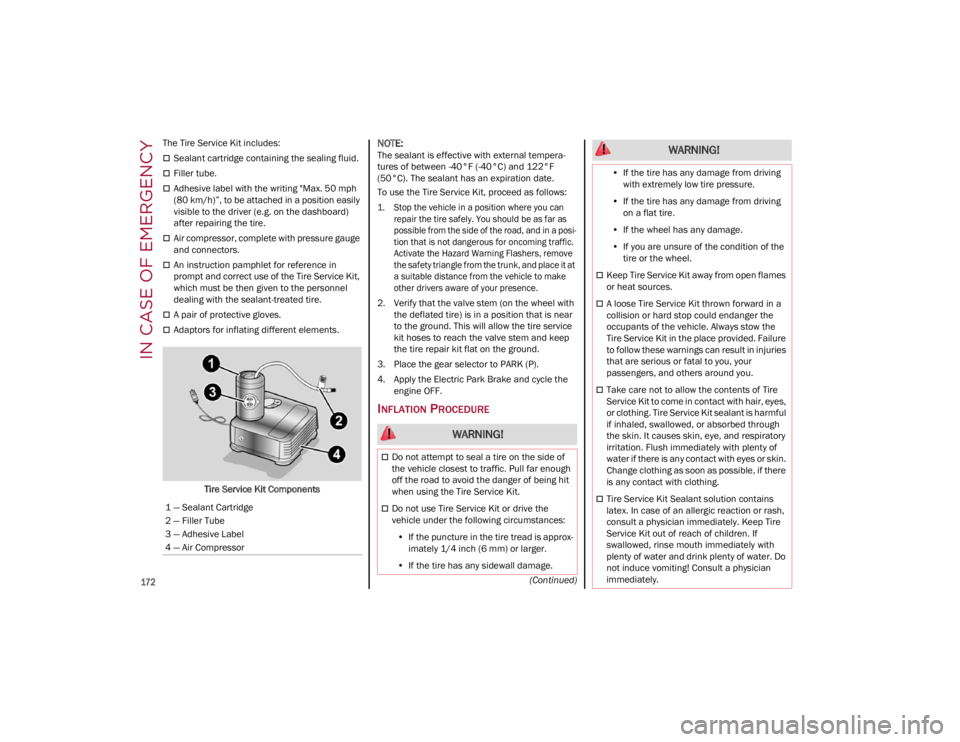
The Tire Service Kit includes:
Sealant cartridge containing the sealing fluid.
Filler tube.
Adhesive label with the writing "Max. 50 mph
(80 km/h)”, to be attached in a position easily
visible to the driver (e.g. on the dashboard)
after repairing the tire.
Air compressor, complete with pressure gauge
and connectors.
An instruction pamphlet for reference in
prompt and correct use of the Tire Service Kit,
which must be then given to the personnel
dealing with the sealant-treated tire.
A pair of protective gloves.
Adaptors for inflating different elements.
Tire Service Kit Components
NOTE:
The sealant is effective with external tempera -
tures of between -40°F (-40°C) and 122°F
(50°C). The sealant has an expiration date.
To use the Tire Service Kit, proceed as follows:
1. Stop the vehicle in a position where you can repair the tire safely. You should be as far as
possible from the side of the road, and in a posi -
tion that is not dangerous for oncoming traffic.
Activate the Hazard Warning Flashers, remove
the safety triangle from the trunk, and place it at
a suitable distance from the vehicle to make
other drivers aware of your presence.
2. Verify that the valve stem (on the wheel with the deflated tire) is in a position that is near
to the ground. This will allow the tire service
kit hoses to reach the valve stem and keep
the tire repair kit flat on the ground.
3. Place the gear selector to PARK (P).
4. Apply the Electric Park Brake and cycle the engine OFF.
INFLATION PROCEDURE
1 — Sealant Cartridge
2 — Filler Tube
3 — Adhesive Label
4 — Air Compressor
WARNING!
Do not attempt to seal a tire on the side of
the vehicle closest to traffic. Pull far enough
off the road to avoid the danger of being hit
when using the Tire Service Kit.
Do not use Tire Service Kit or drive the
vehicle under the following circumstances:
• If the puncture in the tire tread is approx-
imately 1/4 inch (6 mm) or larger.
• If the tire has any sidewall damage.
•If the tire has any damage from driving
with extremely low tire pressure.
• If the tire has any damage from driving
on a flat tire.
• If the wheel has any damage.
• If you are unsure of the condition of the
tire or the wheel.
Keep Tire Service Kit away from open flames
or heat sources.
A loose Tire Service Kit thrown forward in a
collision or hard stop could endanger the
occupants of the vehicle. Always stow the
Tire Service Kit in the place provided. Failure
to follow these warnings can result in injuries
that are serious or fatal to you, your
passengers, and others around you.
Take care not to allow the contents of Tire
Service Kit to come in contact with hair, eyes,
or clothing. Tire Service Kit sealant is harmful
if inhaled, swallowed, or absorbed through
the skin. It causes skin, eye, and respiratory
irritation. Flush immediately with plenty of
water if there is any contact with eyes or skin.
Change clothing as soon as possible, if there
is any contact with clothing.
Tire Service Kit Sealant solution contains
latex. In case of an allergic reaction or rash,
consult a physician immediately. Keep Tire
Service Kit out of reach of children. If
swallowed, rinse mouth immediately with
plenty of water and drink plenty of water. Do
not induce vomiting! Consult a physician
immediately.
WARNING!
23_GA_OM_EN_USC_t.book Page 172