active Alfa Romeo Giulia Quadrifoglio 2017 Owner's Guide
[x] Cancel search | Manufacturer: ALFA ROMEO, Model Year: 2017, Model line: Giulia Quadrifoglio, Model: Alfa Romeo Giulia Quadrifoglio 2017Pages: 268, PDF Size: 110.98 MB
Page 101 of 268
Dynamic Steering
Torque (DST) System
The DST function uses the integration
of the ESC system with the electric
power steering to increase the safety
level of the whole vehicle.
In critical situations (braking on surfaces
with different grip conditions), the ESC
system controls the steering through
the DST function to implement an
additional torque contribution on the
steering wheel in order to suggest the
most correct maneuver to the driver.
The coordinated action of the brakes
and steering increases the sensation of
safety and control of the vehicle.
Note:
The DST feature is only meant to help
the driver realize the correct course of
action through small torques on the
steering wheel, which means the
effectiveness of the DST feature is
highly dependent on the drivers
sensitivity and overall reaction to the
applied torque. It is very important to
realize that this feature will not steer the
vehicle, meaning the driver is still
responsible for steering the vehicle.
Active Torque Vectoring
(ATV) System
The dynamic drive control is used to
optimize and balance the drive torque
between the wheels of the same axles.
The ATV system improves the grip in
turns, sending more drive torque to the
external wheel.
Given that, in a turn, the external
wheels of the car travel more than the
internal ones and therefore turn faster,
sending a higher thrust to the external
rear wheel allows for the car to be more
stable and to not suffer an "understeer"
condition. Understeer occurs when the
vehicle is turning less than appropriate
for the steering wheel position.
AUXILIARY DRIVING
SYSTEMS
The vehicle can feature the following
auxiliary driving systems:
Blind Spot Monitoring (BSM)
Forward Collision Warning (FCW)
Tire Pressure Monitoring System
(TPMS)
For the operation of the systems, see
the following pages.
Blind Spot Monitoring
(BSM) System
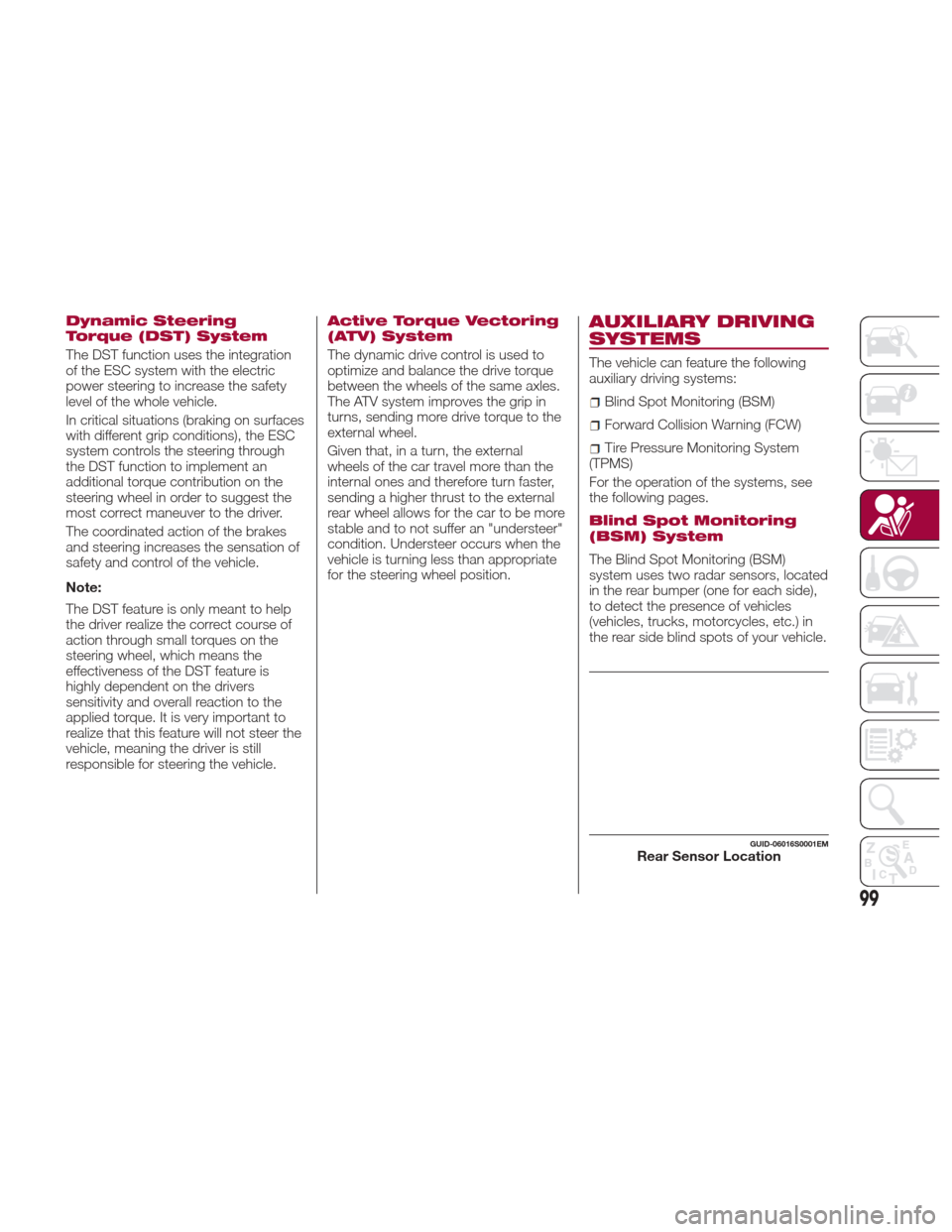
The Blind Spot Monitoring (BSM)
system uses two radar sensors, located
in the rear bumper (one for each side),
to detect the presence of vehicles
(vehicles, trucks, motorcycles, etc.) in
the rear side blind spots of your vehicle.
GUID-06016S0001EMRear Sensor Location
99
Page 102 of 268

The system warns the driver about the
presence of vehicles in the detection
area by lighting up, on the relevant side,
the warning light located on the door
mirror.
When the engine is started the warning
light turns on to signal the driver that
the system is active.
Sensors
The sensors are activated when any
forward gear is engaged at a speed
higher than approximately 6 mph
(10 km/h) or when reverse is engaged.
The sensors are temporarily deactivated
when the vehicle is stationary and the
PARK (P) mode active.
The detection area of the system
covers approximately a lane on both
sides of the vehicle which is around 9 ft
(3 m).This area begins from the door mirror
and extends for approximately 19 ft
(6 m) towards the rear part of the
vehicle.
When the sensors are active, the
system monitors the detection areas on
both sides of the vehicle and warns the
driver about the possible presence of
vehicles in these areas.
While driving, the system monitors the
detection area from three different input
points (side, rear and front) to check
whether a alert needs to be sent to the
driver. The system can detect the
presence of a vehicle in one of these
three areas.
Note:
The system does not alert the driver
for the presence of fixed object (e.g.
safety barriers, poles, walls, etc.).
However, in some circumstances, the
system may activate in the presence of
these objects. This is normal and does
not indicate a system malfunction.
The system does not alert the driver
about the presence of vehicles coming
from the opposite direction, in the
adjacent lanes.
Warning!
The Blind Spot Monitoring system is only
an aid to help detect objects in the blind
spot zones. The BSM system is not
designed to detect pedestrians, bicyclists,
or animals. Even if your vehicle is equipped
with the BSM system, always check your
vehicle’s mirrors, glance over your
shoulder, and use your turn signal before
changing lanes. Failure to do so can result
in serious injury or death.
Note:
If a trailer is hitched to the vehicle,
the system automatically deactivates.
For the system to operate correctly,
the rear bumper area where the radar
sensors are located must stay free
from snow, ice and dirt gathered from
the road surface.
Do not cover the rear bumper area
where the radar sensors are located
with any object (e.g. adhesives, bike
rack, etc.).
If you wish to install the tow hook
after purchasing the vehicle, you need to
deactivate the system via the Connect
system. To access the function, select
the following items in sequence on the
main menu: "Settings", "Safety", and
"Blind Spot Alert".
GUID-06016S0002EMBSM Indicator Light
100
SAFETY
Page 104 of 268
Forward Collision
Warning (FCW) System
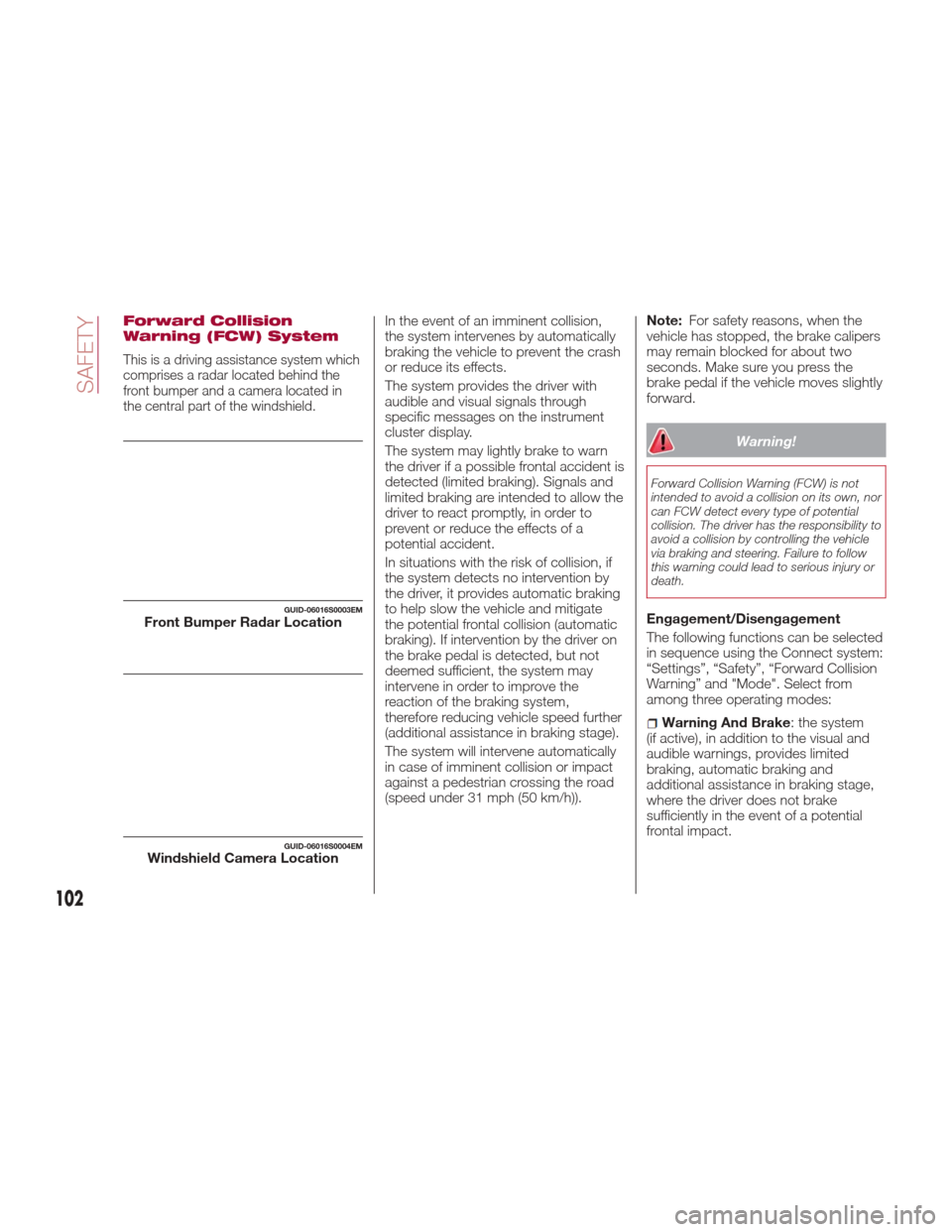
This is a driving assistance system which
comprises a radar located behind the
front bumper and a camera located in
the central part of the windshield.
In the event of an imminent collision,
the system intervenes by automatically
braking the vehicle to prevent the crash
or reduce its effects.
The system provides the driver with
audible and visual signals through
specific messages on the instrument
cluster display.
The system may lightly brake to warn
the driver if a possible frontal accident is
detected (limited braking). Signals and
limited braking are intended to allow the
driver to react promptly, in order to
prevent or reduce the effects of a
potential accident.
In situations with the risk of collision, if
the system detects no intervention by
the driver, it provides automatic braking
to help slow the vehicle and mitigate
the potential frontal collision (automatic
braking). If intervention by the driver on
the brake pedal is detected, but not
deemed sufficient, the system may
intervene in order to improve the
reaction of the braking system,
therefore reducing vehicle speed further
(additional assistance in braking stage).
The system will intervene automatically
in case of imminent collision or impact
against a pedestrian crossing the road
(speed under 31 mph (50 km/h)).Note:
For safety reasons, when the
vehicle has stopped, the brake calipers
may remain blocked for about two
seconds. Make sure you press the
brake pedal if the vehicle moves slightly
forward.
Warning!
Forward Collision Warning (FCW) is not
intended to avoid a collision on its own, nor
can FCW detect every type of potential
collision. The driver has the responsibility to
avoid a collision by controlling the vehicle
via braking and steering. Failure to follow
this warning could lead to serious injury or
death.
Engagement/Disengagement
The following functions can be selected
in sequence using the Connect system:
“Settings”, “Safety”, “Forward Collision
Warning” and "Mode". Select from
among three operating modes:
Warning And Brake : the system
(if active), in addition to the visual and
audible warnings, provides limited
braking, automatic braking and
additional assistance in braking stage,
where the driver does not brake
sufficiently in the event of a potential
frontal impact.
GUID-06016S0003EMFront Bumper Radar Location
GUID-06016S0004EMWindshield Camera Location
102
SAFETY
Page 105 of 268
Only Warning: the system, if active,
does not provide limited braking, but
guarantees automatic braking or
additional assistance in braking stage,
where the driver does not brake at all or
not sufficiently in the event of a potential
frontal impact. The visual and audible
warnings are deactivated, and will not
be provided.
Disable: the system does not
provide visual and audible warnings,
limited braking, automatic braking or
additional assistance in braking stage.
The system will therefore provide no
indication of a possible accident.
Activation/Deactivation
The Forward Collision Warning system
is activated whenever the engine is
started regardless of what is shown on
the Connect system.
Following a deactivation, the system will
not warn the driver about the possible
collision with the preceding vehicle,
regardless of the setting selected with
the Connect system.
Note: Each time the engine is started,
the system is activated regardless of
what setting was selected when it was
previously switched off.
This function is not active at a speed
lower than 4 mph (7 km/h) or higher
than 124 mph (200 km/h). The system is active when:
The engine is started.
Is active (on) in the Connect system.
The ignition is in the ON position.
The vehicle speed is between 4 mph
(7 km/h) and 124 mph (200 km/h).
The front seat belts are fastened.
The "Alfa DNA Pro" selector is not in
RACE position (where present).
Changing The System Sensitivity
The sensitivity of the system can be
changed through the Connect system
menu, choosing from one of the
following three options: "Near", "Med"
or "Far". Refer to the description in the
“Connect System Supplement” for how
to change the settings.
The pre-set option is "Med". With this
setting, the system warns the driver of a
possible collision with the vehicle in
front when that vehicle is at a standard
distance, between that of the other two
settings.
With the system sensitivity set to "Far",
the system will warn the driver of a
possible collision with the vehicle in
front when that vehicle is at a greater
distance, thus providing the possibility
of acting on the brakes more lightly and
gradually. This setting provides the
drivers with the maximum possible
reaction time to prevent a potential
accident. With the option set to "Near", the
system will alert the driver of a possible
collision with the vehicle in front when
that vehicle is close. This setting offers
the driver a lower reaction time
compared to the "Med" and "Far"
settings, in the event of a potential
collision, but permits more dynamic
driving of the vehicle.
The system sensitivity setting is kept in
the memory when the engine is
switched off.
System Limited Operation Signal
If the dedicated message is displayed,
a condition limiting the system
operation may have occurred. The
possible reasons of this limitation are
something blocking the camera view or
a fault.
If an obstruction is signaled, clean the
area of the windshield indicated in.
Although the vehicle can still be driven
in normal conditions, the system may
be not completely available.
When the conditions limiting the system
functions end, this will go back to
normal and complete operation. Should
the fault persist, contact an authorized
dealer.
System Failure Signaling
If the system switches off and a
dedicated message is shown on the
display, it means that there is a fault on
the system.
103
Page 106 of 268
In this case, it is still possible to drive
the vehicle, but you are advised to
contact an authorized dealer as soon
as possible.
Radar Indication Not Available
If conditions are such that the radar
cannot detect obstacles correctly, the
system is deactivated and a dedicated
message appears on the display. This
generally occurs in the event of poor
visibility, such as when it is snowing or
raining heavily.
The system can also be temporarily
dimmed due to obstructions such as
mud, dirt or ice on the bumper. In such
cases, a dedicated message will be
shown on the display and the system
will be deactivated. This message can
sometimes appear in conditions of high
reflectivity (e.g. tunnels with reflective
tiles or ice or snow). When the
conditions limiting the system functions
end, this will go back to normal and
complete operation.
In certain particular cases, this
dedicated message could be displayed
when the radar is not detecting any
vehicles or objects within its view range.
If atmospheric conditions are not the
real reason behind this message, check
if the sensor is dirty. It could be
necessary to clean or remove any
obstructions in the area.
If the message appears often, even in
the absence of atmospheric conditions
such as snow, rain, mud or otherobstructions, contact an authorized
dealer for a sensor alignment check.
In the absence of visible obstructions,
manually removing the decorative cover
trim and cleaning the radar surface
could be required. Have this operation
performed at an authorized dealer.
Note:
It is recommended that you do
not install devices, accessories or
aerodynamic attachments in front of the
sensor or darken it in any way, as this
can compromise the correct functioning
of the system.
Frontal Collision Alarm With Active
Braking — If Equipped
If this function is selected, the brakes
are operated to reduce the speed of the
vehicle in the event of potential frontal
impact.
This function applies an additional
braking pressure if the braking pressure
applied by the driver does not suffice to
prevent potential frontal impact.
The function is active with speed above
4 mph (7 km/h).
Driving In Special Conditions
In certain driving conditions, such as,
for example:
Driving close to a bend.
The vehicle ahead is leaving a
roundabout.
Vehicles with small dimensions
and/or not aligned in the driving lane.
Lane change by other vehicles.
Vehicles travelling at right angles to
the vehicle.
System intervention might be
unexpected or delayed. The driver must
therefore be very careful, keeping
control of the vehicle to drive in
complete safety.
Note: In particularly complex traffic
conditions, the driver can deactivate the
system manually through the Connect
system.
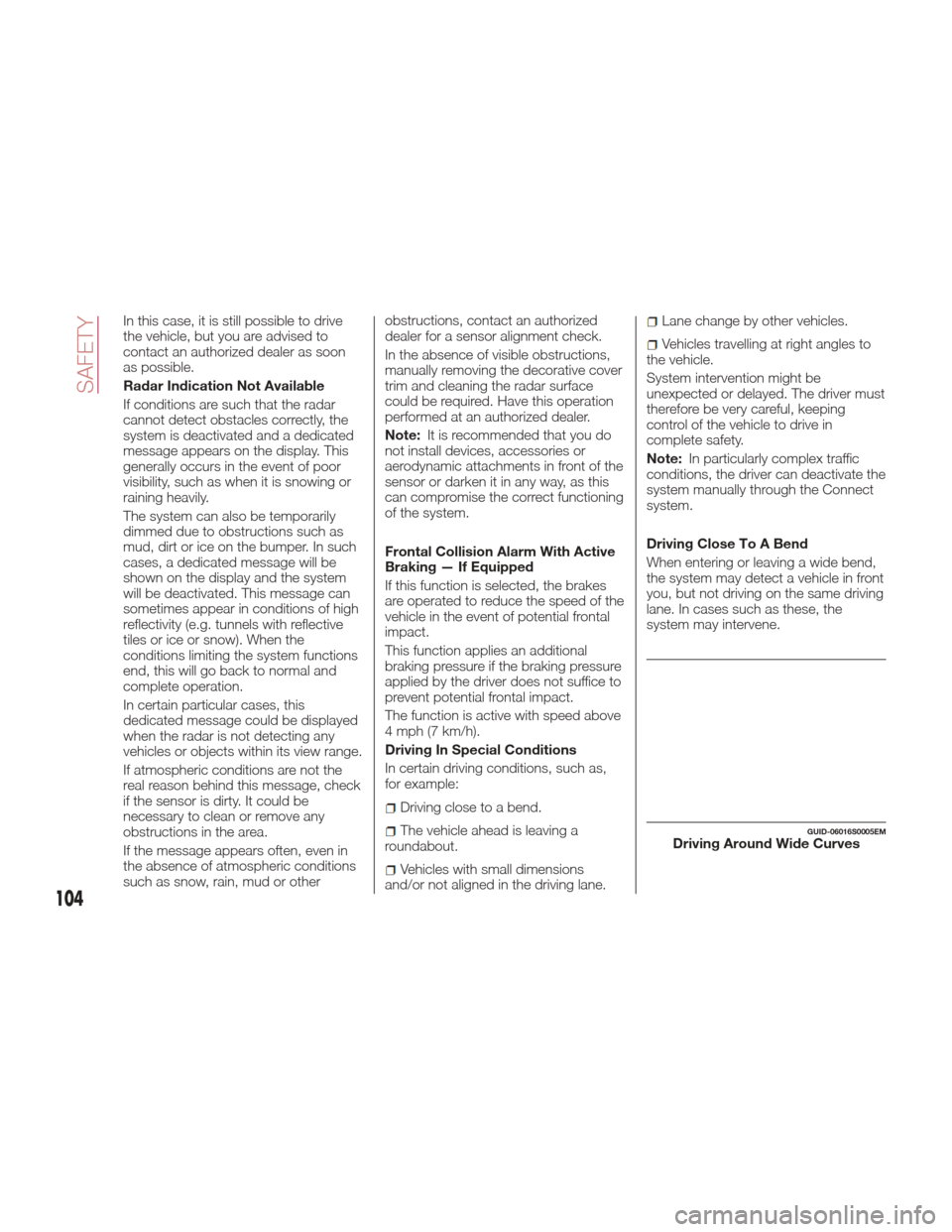
Driving Close To A Bend
When entering or leaving a wide bend,
the system may detect a vehicle in front
you, but not driving on the same driving
lane. In cases such as these, the
system may intervene.
GUID-06016S0005EMDriving Around Wide Curves
104
SAFETY
Page 111 of 268
2. Ifachildfrom2to12yearsold(not
in a rear-facing child restraint) must ride
in the front passenger seat, move the
seat as far back as possible and use
the proper child restraint (refer to “Child
Restraints” in this section for further
information).
3. Children that are not big enough to
wear the vehicle seat belt properly (refer
to “Child Restraints” in this section for
further information) should be secured
in a vehicle with a rear seat in child
restraints or belt-positioning booster
seats. Older children who do not use
child restraints or belt-positioning
booster seats should ride properly
buckled up in a vehicle with a rear seat.
4. Never allow children to slide the
shoulder belt behind them or under
their arm.
5. You should read the instructions
provided with your child restraint to
make sure that you are using it properly.
6. All occupants should always wear
their lap and shoulder belts properly.
7. The driver and front passenger seats
should be moved back as far as
practical to allow the front air bags
room to inflate.
8. Do not lean against the door or
window. If your vehicle has side air
bags, and deployment occurs, the sideair bags will inflate forcefully into the
space between occupants and the
door and occupants could be injured.
9. If the air bag system in this vehicle
needs to be modified to accommodate
a disabled person, refer to the
“Customer Assistance” section for
customer service contact information.
Warning!
Never place a rear-facing child restraint
in front of an air bag. A deploying
passenger front air bag can cause death or
serious injury to a child 12 years or
younger, including a child in a rear-facing
child restraint.
Only use a rear-facing child restraint in a
vehicle with a rear seat.
Seat Belt Systems
Buckle up even though you are an
excellent driver, even on short trips.
Someone on the road may be a poor
driver and could cause a collision that
includes you. This can happen far away
from home or on your own street.
Research has shown that seat belts
save lives, and they can reduce the
seriousness of injuries in a collision.
Some of the worst injuries happen
when people are thrown from the vehicle. Seat belts reduce the possibility
of ejection and the risk of injury caused
by striking the inside of the vehicle.
Everyone in a motor vehicle should be
belted at all times.
Enhanced Seat Belt Use
Reminder System (BeltAlert)
Driver And Passenger BeltAlert —
If Equipped
BeltAlert is a feature intended to
remind the driver and outboard front
seat passenger (if equipped with
outboard front passenger seat BeltAlert)
to buckle their seat belts. The Belt Alert
feature is active whenever the ignition
switch is in the START or ON/RUN
position.
Initial Indication
If the driver is unbuckled when the
ignition switch is first in the START or
ON/RUN position, a chime will signal for
a few seconds. If the driver or outboard
front seat passenger (if equipped with
outboard front passenger seat BeltAlert)
is unbuckled when the ignition switch is
first in the START or ON/RUN position
the Seat Belt Reminder Light will turn
on and remain on until both outboard
front seat belts are buckled. The
outboard front passenger seat BeltAlert
is not active when an outboard front
passenger seat is unoccupied.
109
Page 112 of 268
BeltAlert Warning Sequence
The BeltAlert warning sequence is
activated when the vehicle is moving
above a specified vehicle speed range
and the driver or outboard front seat
passenger is unbuckled (if equipped
with outboard front passenger seat
BeltAlert) (the outboard front passenger
seat BeltAlert is not active when the
outboard front passenger seat is
unoccupied). The BeltAlert warning
sequence starts by blinking the Seat
Belt Reminder Light and sounding an
intermittent chime. Once the BeltAlert
warning sequence has completed, the
Seat Belt Reminder Light will remain on
until the seat belts are buckled. The
BeltAlert warning sequence may repeat
based on vehicle speed until the driver
and occupied outboard front seat
passenger seat belts are buckled. The
driver should instruct all occupants to
buckle their seat belts.
Change Of Status
If the driver or outboard front seat
passenger (if equipped with outboard
front passenger seat BeltAlert)
unbuckles their seat belt while the
vehicle is traveling, the BeltAlert
warning sequence will begin until the
seat belts are buckled again.
The outboard front passenger seat
BeltAlert is not active when the
outboard front passenger seat is
unoccupied. BeltAlert may be triggered
when an animal or other items areplaced on the outboard front passenger
seat or when the seat is folded flat (if
equipped). It is recommended that pets
be restrained in the rear seat (if
equipped) in pet harnesses or pet
carriers that are secured by seat belts,
and cargo is properly stowed.
BeltAlert can be activated or
deactivated by your authorized dealer.
FCA US LLC does not recommend
deactivating BeltAlert.
Note:
If BeltAlert has been deactivated
and the driver or outboard front seat
passenger (if equipped with outboard
front passenger seat BeltAlert) is
unbuckled the Seat Belt Reminder Light
will turn on and remain on until the
driver and outboard front seat
passenger seat belts are buckled.
Lap/Shoulder Belts
All seating positions in your vehicle are
equipped with lap/shoulder belts.
The seat belt webbing retractor will lock
only during very sudden stops or
collisions. This feature allows the
shoulder part of the seat belt to move
freely with you under normal conditions.
However, in a collision the seat belt will
lock and reduce your risk of striking the
inside of the vehicle or being thrown out
of the vehicle.
Warning!
Relying on the air bags alone could lead
to more severe injuries in a collision. The air
bags work with your seat belt to restrain
you properly. In some collisions, the air
bags won’t deploy at all. Always wear your
seat belt even though you have air bags.
In a collision, you and your passengers
can suffer much greater injuries if you are
not properly buckled up. You can strike the
interior of your vehicle or other passengers,
or you can be thrown out of the vehicle.
Always be sure you and others in your
vehicle are buckled up properly.
It is dangerous to ride in a cargo area,
inside or outside of a vehicle. In a collision,
people riding in these areas are more likely
to be seriously injured or killed.
Do not allow people to ride in any area
of your vehicle that is not equipped with
seats and seat belts.
Be sure everyone in your vehicle is in a
seat and using a seat belt properly.
Occupants, including the driver, should
always wear their seat belts whether or not
an air bag is also provided at their seating
position to minimize the risk of severe injury
or death in the event of a crash.
Wearing your seat belt incorrectly could
make your injuries in a collision much
worse. You might suffer internal injuries, or
you could even slide out of the seat belt.
Follow these instructions to wear your seat
belt safely and to keep your passengers
safe, too.
110
SAFETY
Page 123 of 268
you haven’t healed significantly within a
few days, or if you have any blistering,
see your doctor immediately.
As the air bags deflate, you may see
some smoke-like particles. The
particles are a normal by-product of the
process that generates the non-toxic
gas used for air bag inflation. These
airborne particles may irritate the skin,
eyes, nose, or throat. If you have skin or
eye irritation, rinse the area with cool
water. For nose or throat irritation, move
to fresh air. If the irritation continues,
see your doctor. If these particles settle
on your clothing, follow the garment
manufacturer’s instructions for cleaning.
Do not drive your vehicle after the air
bags have deployed. If you are involved
in another collision, the air bags will not
be in place to protect you.
Warning!
Deployed air bags and seat belt
pretensioners cannot protect you in
another collision. Have the air bags, seat
belt pretensioners, and the seat belt
retractor assemblies replaced by an
authorized dealer immediately. Also, have
the Occupant Restraint Controller System
serviced as well.
Note:
Air bag covers may not be obvious
in the interior trim, but they will open
during air bag deployment.
After any collision, the vehicle
should be taken to an authorized
dealer immediately.
Enhanced Accident Response
System
In the event of an impact, if the
communication network remains intact,
and the power remains intact,
depending on the nature of the event,
the ORC will determine whether to have
the Enhanced Accident Response
System perform the following functions:
Cut off fuel to the engine.
Flash hazard lights as long as the
battery has power or until the hazard
light button is pressed. The hazard
lights can be deactivated by pressing
the hazard light button.
Turn on the interior lights, which
remain on as long as the battery has
power or for 15 minutes from the
intervention of the Enhanced Accident
Response System.
Unlock the power door locks.
Turn off the Fuel Pump Heater
(if equipped).
Turn off the HVAC Blower Motor.
Close the HVAC Circulation Door.
Enhanced Accident Response
System Reset Procedure
After the event occurs, when the
system is active, a message regarding
fuel cutoff is displayed. Turn the ignition
switch from ignition START or ON/RUN
to ignition STOP/OFF. Carefully check
the vehicle for fuel leaks in the engine
compartment and on the ground near
the engine compartment and fuel tank
before resetting the system and starting
the engine.
Depending on the nature of the event
the left and right turn signal lights,
located in the instrument panel, may
both be blinking and will continue to
blink. In order to move your vehicle to
the side of the road, you must follow
the system reset procedure.
121
Page 136 of 268
STARTING AND OPERATING
Let’s get to the core of the vehicle, and
see how you can explore its fullest
potential. We’ll look at how to drive
safely in any situation, making it a
welcome companion with our comfort
and wallets in mind.STARTINGTHEENGINE .......135
ELECTRIC PARK BRAKE.......138
AUTOMATIC TRANSMISSION . . . .140
ALFA DNA PRO SYSTEM .......146
ALFA ACTIVE SUSPENSION
(AAS) — IF EQUIPPED .........149
STOP/START EVO ...........150
SPEED LIMITER .............152
ELECTRONIC SPEED
CONTROL ................153
ADAPTIVE CRUISE CONTROL
(ACC) — IF EQUIPPED ........155PARKSENSE SYSTEM —
IF EQUIPPED
...............162
LANE DEPARTURE WARNING
(LDW) SYSTEM .............167
REAR BACK-UP
CAMERA / DYNAMIC
GRIDLINES — IF EQUIPPED . . . .170
REFUELING THE VEHICLE ......171
VEHICLE LOADING ..........173
TRAILER TOWING ...........174
SUGGESTIONS FOR DRIVING. . . .174
134
STARTING AND OPERATING
Page 138 of 268
How to use Remote Start
All of the following conditions must be
met before the engine will remote start:
Gear selector in PARK (P).
Doors closed.
Hood closed.
Trunk closed.
Hazard switch off.
Brake switch inactive (brake pedal
not pressed).
Battery at an acceptable charge level.
PANIC button not pushed.
System not disabled from previous
remote start event.
Vehicle alarm system indicator
flashing.
Ignition in the OFF mode (if equipped
with keyless ignition system).
Fuel level meets minimum
requirement.
Remote Start Comfort Systems —
If Equipped
When Remote Start is activated, the
heated steering wheel and driver
heated seat features will automatically
turn on in cold weather.
These features will stay on through the
duration of remote start also until the
ignition is cycled to the ON/RUN mode.
Remote Start Windshield Wiper
De–Icer Activation — If Equipped
When remote start is active and the
outside ambient temperature is less than 39°F (4°C), the Windshield Wiper
De-Icer will be enabled. Exiting remote
start will resume previous operation,
except if the Windshield Wiper De-Icer
is active.
The Windshield Wiper De-Icer timer and
operation will continue.
Extended Park Starting
If the vehicle has not been started or
driven for at least 35 days, it is
advisable to follow the indications
below.
To start the engine, proceed as follows:
1. Briefly push the ignition button
2. If the engine does not start, wait five
seconds and let the starter cool down
and then repeat the starting procedure
3. If the engine does not start after
eight attempts, let the starter cool down
for at least 10 seconds, and then repeat
the starting procedure
If the problem persists, contact your
authorized dealer.
Note:
After prolonged vehicle inactivity,
very difficult starting, that can be
noticed through rapid fatigue of the
starter, might also be due to a partially
flat battery. In this case, see the
"Emergency Starting" section in the
"In Case Of Emergency" chapter.
If Engine Fails To Start
Starting the Engine with Key Fob
Battery Run Down or Drained
If the ignition does not respond when
the button is pushed, the key fob
battery might be run down or drained.
Therefore, the system does not detect
the presence of the key fob in the
vehicle, and will display a dedicated
message.
In this case, follow the instructions
outlined in "Starting With A Discharged
Key Fob Battery" in the "Getting To
Know Your Vehicle" chapter, and start
the engine normally.
Warning!
Never pour fuel or other flammable liquid
into the throttle body air inlet opening in an
attempt to start the vehicle. This could
result in flash fire causing serious personal
injury.
Do not attempt to push or tow your
vehicle to get it started. Vehicles equipped
with an automatic transmission cannot be
started this way. Unburned fuel could enter
the catalytic converter and once the engine
has started, ignite and damage the
converter and vehicle.
136
STARTING AND OPERATING