Fuel Alfa Romeo Giulietta 2014 User Guide
[x] Cancel search | Manufacturer: ALFA ROMEO, Model Year: 2014, Model line: Giulietta, Model: Alfa Romeo Giulietta 2014Pages: 280, PDF Size: 6.65 MB
Page 91 of 280
PROTECTING THE
ENVIRONMENTThe following devices are used for
reducing petrol fuel engine emissions:
catalytic converter, oxygen sensors and
evaporation control system
The following devices are used for
reducing diesel fuel engine emissions:
oxidising catalytic converter, exhaust
gas recirculation system (EGR) and
particulate filter (DPF).
62)
DIESEL PARTICULATE
FILTER (DPF)
(Diesel Particulate Filter)
(for versions/markets, where provided)
The Diesel Particulate Filter is a
mechanical filter, integral to the exhaust
system, that physically traps carbon
particles present in the exhaust gases
of diesel engines.
The diesel particulate filter is needed to
eliminate almost all carbon particle
emissions in compliance with
current/future regulations and
standards.During standard use of the vehicle, the
engine control unit records a set of data
(e.g.: travel time, type of route,
temperatures, etc.) and it will then
calculate how much particulate has
been trapped by the filter.
Since this filter physically traps
particulate, it should be periodically
regenerated (cleaned) at regular
intervals by burning carbon particles.
The regeneration procedure is
controlled automatically by the engine
management control unit according
to the filter conditions and vehicle use
conditions.
During the regeneration there may be a
limited increase in the engine idle
speed, fan activation, a limited increase
in fumes and high temperatures at the
exhaust.
These are not faults; they do not impair
normal car performance or damage
the environment. If the dedicated
message is displayed, see contents of
"Warning lights and messages"
paragraph, in chapter "Knowing the
instrument panel".
WARNING
62) The catalytic converter and
particulate filter (DPF) reach very
high temperatures during
operation. Therefore do not park
the car on flammable materials
(e.g. grass, dry leaves, pine
needles, etc.): fire hazard.
87
Page 93 of 280
KNOWING THE INSTRUMENT PANEL
This section of the booklet gives you all
the information you need to
understand, interpret and use the
instrument panel correctly.DISPLAY ......................................... 90
MENU ITEMS .................................. 93
CONTROL PANEL AND
INSTRUMENTS ...............................100
TRIP COMPUTER ...........................102
WARNING LIGHTS AND
MESSAGES ...................................10
- LOW BRAKE FLUID/HANDBRAKE
ENGAGED .......................................... 106
- EBD FAILURE .................................. 107
- AIRBAG FAILURE ............................. 107
- SEAT BELTS NOT FASTENED .......... 107
- ALTERNATOR FAILURE ................... 108
- LOW ENGINE OIL PRESSURE ......... 1
-ENGINE OIL DETERIORATED ........... 110
- ENGINE COOLANT TEMPERATURE
TOO HIGH .......................................... 112
- ALFA TCT FAILURE .......................... 113
-INCOMPLETE DOOR LOCKING ........ 113
-SPEED LIMIT EXCEEDED ................. 113
- DUAL PINION ACTIVE STEERING
FAILURE ............................................. 114
- ALFA ROMEO CODE SYSTEM
FAILURE/ALARM FAILURE ................. 114
- FUEL RESERVE/LIMITED RANGE .... 115
- GENERAL FAILURE ......................... 116
- GENERAL FAILURE ......................... 117
-REAR FOG LIGHTS ........................... 11
- ABS FAILURE ................................... 119
-BRAKE PAD WEAR ........................... 119
- PASSENGER SIDE AIRBAG
DEACTIVATED .................................... 119
- INJECTION/EOBD SYSTEM
FAILURE ............................................. 120
- GLOW PLUG HEATING/GLOW
PLUG HEATING FAILURE (diesel
versions) ............................................. 121-WATER IN DIESEL FILTER (diesel
versions) ............................................. 121
- DPF CLEANING (particulate trap) in
progress (diesel versions with DPF
only) ................................................... 123
- iTPMS SYSTEM ............................... 125
- ELECTRONIC STABILITY CONTROL
(ESC) SYSTEM ................................... 126
- CRUISE CONTROL .......................... 127
- SIDE LIGHTS ................................... 127
- FOLLOW ME HOME ........................ 12
- DIPPED BEAM HEADLIGHTS .......... 127
- FOG LIGHTS .................................... 128
- LEFT-HAND DIRECTION
......................................... 128
- RIGHT-HAND DIRECTION
INDICATOR ........................................ 128
- MAIN BEAM HEADLIGHTS .............. 128
- FUEL CUT-OFF ................................ 12
- POSSIBLE ICE ON ROAD ................ 129
- BRAKE LIGHT FAILURE ................... 129
- DUSK SENSOR FAILURE ................. 129
- RAIN SENSOR FAILURE .................. 130
- PARKING SENSOR FAILURE ........... 130
-START&STOP SYSTEM
ACTIVATION/DEACTIVATION .............. 131
-START&STOP FAILURE .................... 131
- DISPLAY OF SELECTED DRIVING
MODE (“Alfa DNA” system) ................. 13
89
INDICATOR
687
2 9 09
Page 95 of 280
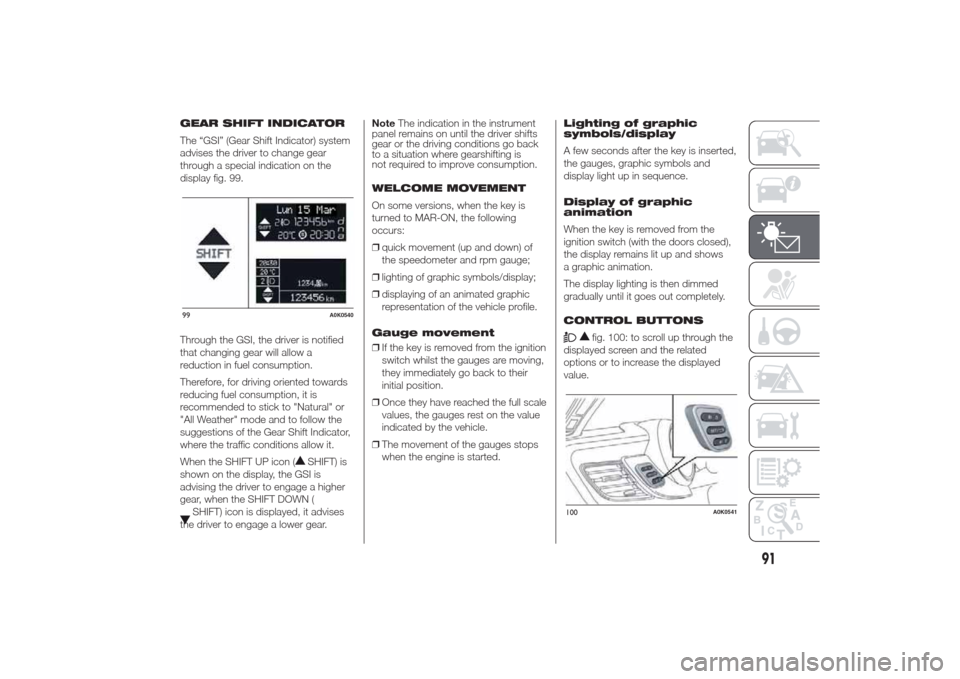
GEAR SHIFT INDICATOR
The “GSI” (Gear Shift Indicator) system
advises the driver to change gear
through a special indication on the
display fig. 99.
Through the GSI, the driver is notified
that changing gear will allow a
reduction in fuel consumption.
Therefore, for driving oriented towards
reducing fuel consumption, it is
recommended to stick to "Natural" or
"All Weather" mode and to follow the
suggestions of the Gear Shift Indicator,
where the traffic conditions allow it.
When the SHIFT UP icon (
SHIFT) is
shown on the display, the GSI is
advising the driver to engage a higher
gear, when the SHIFT DOWN (
SHIFT) icon is displayed, it advises
the driver to engage a lower gear.NoteThe indication in the instrument
panel remains on until the driver shifts
gear or the driving conditions go back
to a situation where gearshifting is
not required to improve consumption.
WELCOME MOVEMENT
On some versions, when the key is
turned to MAR-ON, the following
occurs:
❒quick movement (up and down) of
the speedometer and rpm gauge;
❒lighting of graphic symbols/display;
❒displaying of an animated graphic
representation of the vehicle profile.
Gauge movement
❒If the key is removed from the ignition
switch whilst the gauges are moving,
they immediately go back to their
initial position.
❒Once they have reached the full scale
values, the gauges rest on the value
indicated by the vehicle.
❒The movement of the gauges stops
when the engine is started.Lighting of graphic
symbols/display
A few seconds after the key is inserted,
the gauges, graphic symbols and
display light up in sequence.
Display of graphic
animation
When the key is removed from the
ignition switch (with the doors closed),
the display remains lit up and shows
a graphic animation.
The display lighting is then dimmed
gradually until it goes out completely.
CONTROL BUTTONS
fig. 100: to scroll up through the
displayed screen and the related
options or to increase the displayed
value.
99
A0K0540
100
A0K0541
91
Page 101 of 280
Unit of measurement
(Setting the unit of
measurement)
With this function it is possible to set
the measurement units through three
sub-menus: “Distance”, “Consumption”
and “Temperature”.
To set the desired measurement unit,
proceed as follows:
❒briefly press the SET/
button to
display the three sub-menus;
❒press the "
"or"
" button
to navigate through the three
submenus;
❒once the submenu to be modified
has been selected, briefly press
the SET/
button;
❒when the “Distance” submenu is
entered: briefly pressing
SET/
displays "km" or "mi"
depending on the previous setting;
❒press the "
"or"
" button
to select;
❒when the “Consumption” submenu is
entered, pressing SET/displays
km/l, l/100 km or mpg depending
on the previous setting;
If the set distance unit is "km", the fuel
consumption unit will be displayed in
km/l or l/100 km.If the distance unit set is “mi” the fuel
consumption unit will be displayed
in “mpg”.
❒press the "
"or"
" button
to select;
❒when the “Temperature” submenu is
entered, pressing SET/displays
“°C” or “°F” depending on the
previous setting;
❒press the "
"or"
" button
to select;
When you have made the required
settings, briefly press the
SET/
button to go back to the
submenu screen or hold the button
down to go back to the main menu
screen without saving the new settings.
Hold the SET/
button down again
to return to the standard screen or
to the main menu according to where
you are in the menu.
Language (Language
selection)
Display messages can be shown in
different languages: Italian, English,
German, Portuguese, Spanish, French,
Dutch, Turkish and Brazilian.
To set the desired language proceed as
follows:❒briefly press the SET/
button: the
previously set "language" starts
flashing on the display;
❒press the "
"or"
" button
to select;
❒briefly press the SET/button to
go back to the menu screen or hold
the button down to go back to the
standard screen without saving.
Warnings volume
(Adjusting the
alert/warning acoustic
signal volume)
With this function it is possible to adjust
(to eight levels) the volume of the
acoustic signal which sounds in the
event of alerts and warning.
To set the desired volume proceed as
follows:
❒press the SET/
button briefly,
making the display flash the
previously set volume "level";
❒press the "
"or"
" button
to make the adjustment;
❒briefly press the SET/button to
go back to the menu screen or hold
the button down to go back to the
standard screen without saving.
97
Page 104 of 280
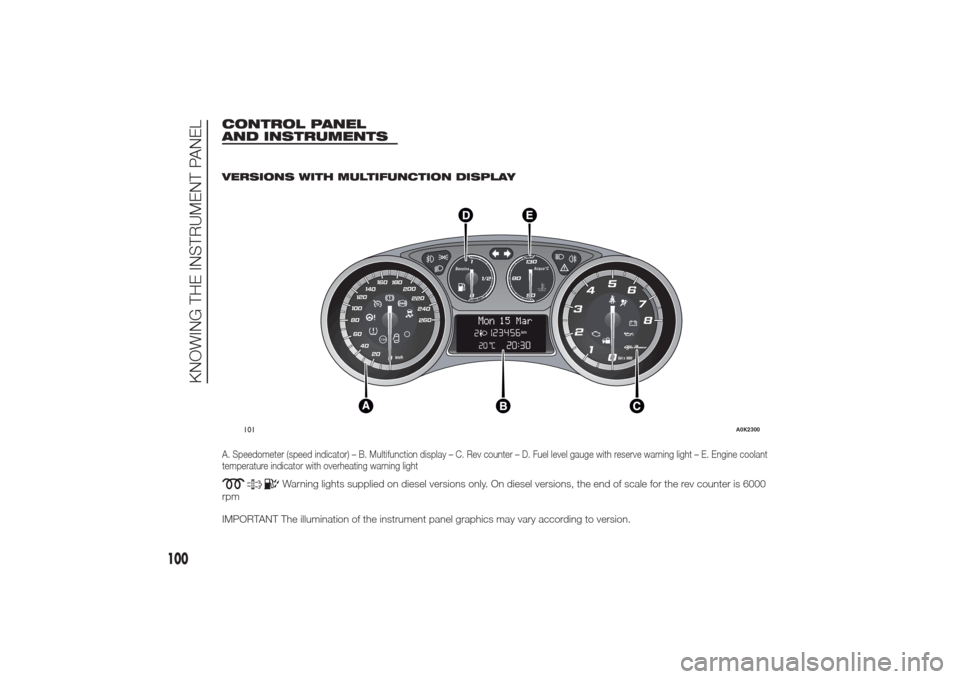
CONTROL PANEL
AND INSTRUMENTS
.
VERSIONS WITH MULTIFUNCTION DISPLAYA. Speedometer (speed indicator) – B. Multifunction display – C. Rev counter – D. Fuel level gauge with reserve warning light – E. Engine coolant
temperature indicator with overheating warning light
Warning lights supplied on diesel versions only. On diesel versions, the end of scale for the rev counter is 6000
rpm
IMPORTANT The illumination of the instrument panel graphics may vary according to version.
.
260 240220 200 180 160
140
100120
80
60
40
20
0
120
0Giri x 1000
2
1 345
6
7
8
011/2
Benzina
50130Acqua°C
90
Mon
15 Mar
101
A0K2300
100
KNOWING THE INSTRUMENT PANEL
Page 105 of 280
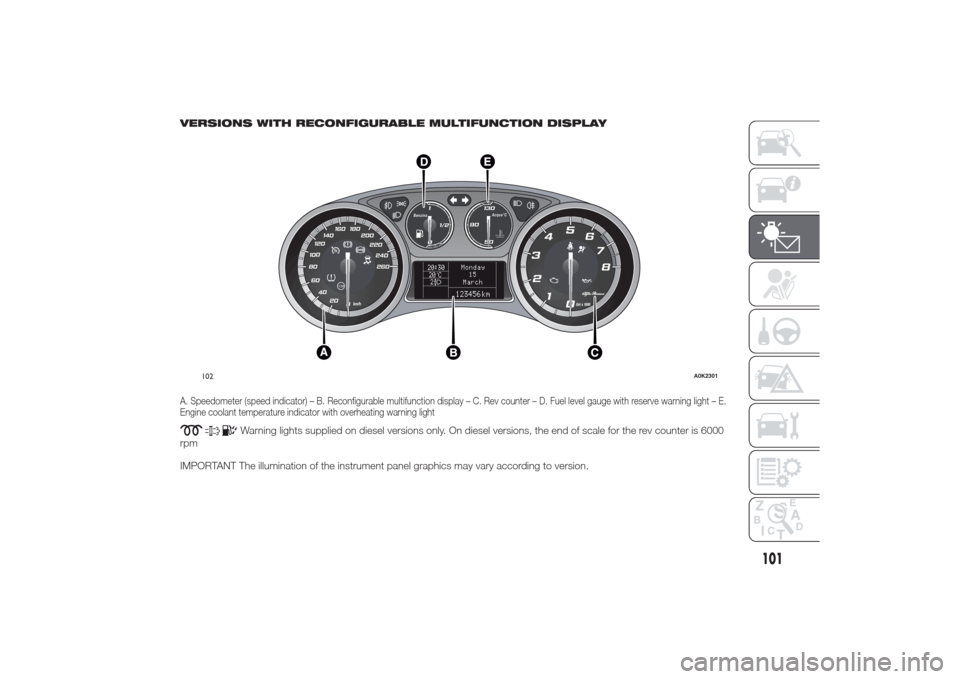
VERSIONS WITH RECONFIGURABLE MULTIFUNCTION DISPLAYA. Speedometer (speed indicator) – B. Reconfigurable multifunction display – C. Rev counter – D. Fuel level gauge with reserve warning light – E.
Engine coolant temperature indicator with overheating warning light
Warning lights supplied on diesel versions only. On diesel versions, the end of scale for the rev counter is 6000
rpm
IMPORTANT The illumination of the instrument panel graphics may vary according to version.
260 240220 200 180 160
140
100120
80
60
40
20
0
120
0Giri x 1000
2
1 345
6
7
8
011/2
Benzina
50130Acqua°C
90
20:30
20 C°2
Monday
15
March123456 km
102
A0K2301
101
Page 106 of 280
SPEEDOMETER (SPEED
INDICATOR)
This shows the speed of the car.
REV COUNTER
This indicates the engine rpm.
FUEL LEVEL GAUGE
This shows the amount of fuel left in the
fuel tank.
The warning light in the gauge lights up
when there are only 8 to 10 litres of
fuel remaining in the tank; if this
happens, refuel as soon as possible.
Do not travel with the fuel tank almost
empty: any gaps in fuel delivery could
damage the catalytic converter.ENGINE COOLANT
TEMPERATURE
INDICATOR
The needle shows the temperature of
the engine coolant and starts supplying
indications when the fluid temperature
exceeds approx. 50°C.
Under normal conditions, the needle
assumes different positions within
the scale depending on the usage
conditions.
The warning light turns on to indicate
an overheating of the engine coolant. In
this case, stop the engine and contact
an Alfa Romeo Dealership.
TRIP COMPUTER
IN BRIEF
The Trip computer is used to display
information on car operation when
the key is turned to MAR.
This function is characterised by two
separate memories, called "Trip A"
and "Trip B", where the car's
"complete missions" (journeys) are
recorded in a reciprocally
independent manner.
Both memories can be reset: i.e. start
of a new journey.
“Trip A” is used to display the figures
relating to:
❒Range
❒Distance travelled
❒Average fuel consumption
❒Instant fuel consumption
❒Average speed
❒Trip time (driving time).
“Trip B” may be used to display the
figures relating to:
❒Distance travelled B
❒Average consumption B
102
KNOWING THE INSTRUMENT PANEL
Page 107 of 280
❒Average speed B
❒Trip time B (driving time).
The “Trip B” function may be disabled
(see “Activating Trip B”). “Range” and
“Instant consumption" parameters
cannot be reset.
VALUES DISPLAYED
Range
This indicates the indicative distance
that may be travelled with the fuel in the
tank, assuming that driving conditions
do not change.
The display will show the reading '-----'
when the following events take place:
❒range value lower than 50 km (or
30 mi)
❒car parked with engine running for a
long period.IMPORTANT The range can be affected
by several factors: driving style (see
“Driving style” paragraph in the
“Starting and driving” chapter), type of
route (motorway, towns and cities,
mountain roads, etc.), conditions of use
(load, tyre pressures, etc.). Trip
planning must therefore take the above
into account.
Distance covered
Shows the distance covered since the
start of the new journey.
Average consumption
Shows the approximate average fuel
consumption since the start of the new
journey.
Instantaneous consumption
This indicates the fuel consumption.
The value is constantly updated. The
display will show “----”ifthecar
is parked with the engine running.Average speed
This shows the average car speed as a
function of the overall time elapsed
since the start of the new journey.
Trip time
The time elapsed since the start of a
new journey.
103
Page 119 of 280
Warning lights on
panelWhat it means What to do
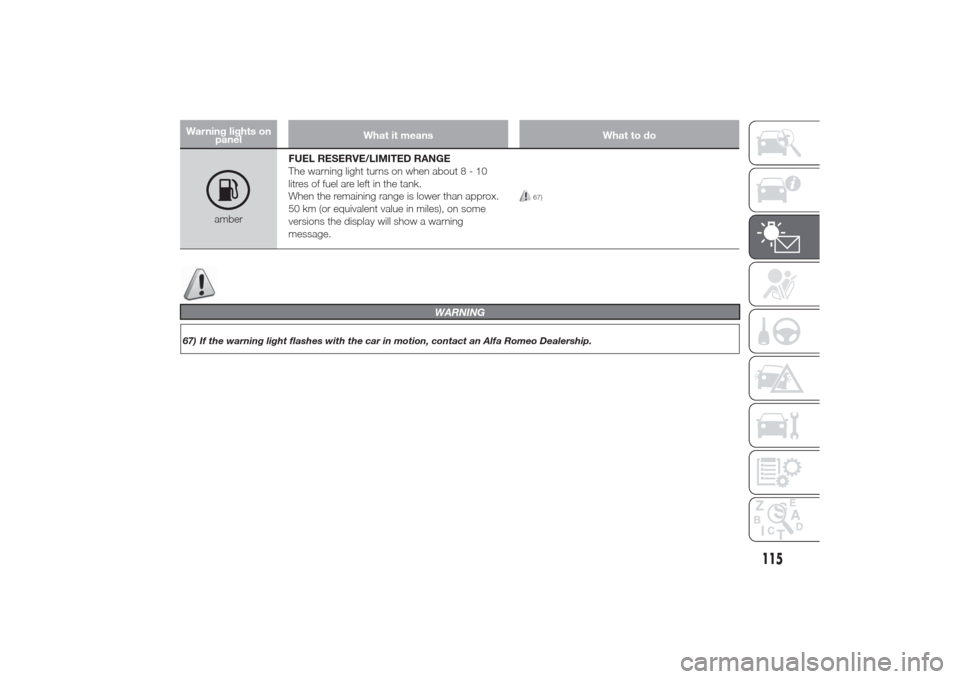
amberFUEL RESERVE/LIMITED RANGE
The warning light turns on when about8-10
litres of fuel are left in the tank.
When the remaining range is lower than approx.
50 km (or equivalent value in miles), on some
versions the display will show a warning
message.
67)
115
WARNING
67) If the warning light flashes with the car in motion, contact an Alfa Romeo Dealership.
Page 120 of 280
Warning lights on
panelWhat it means What to do
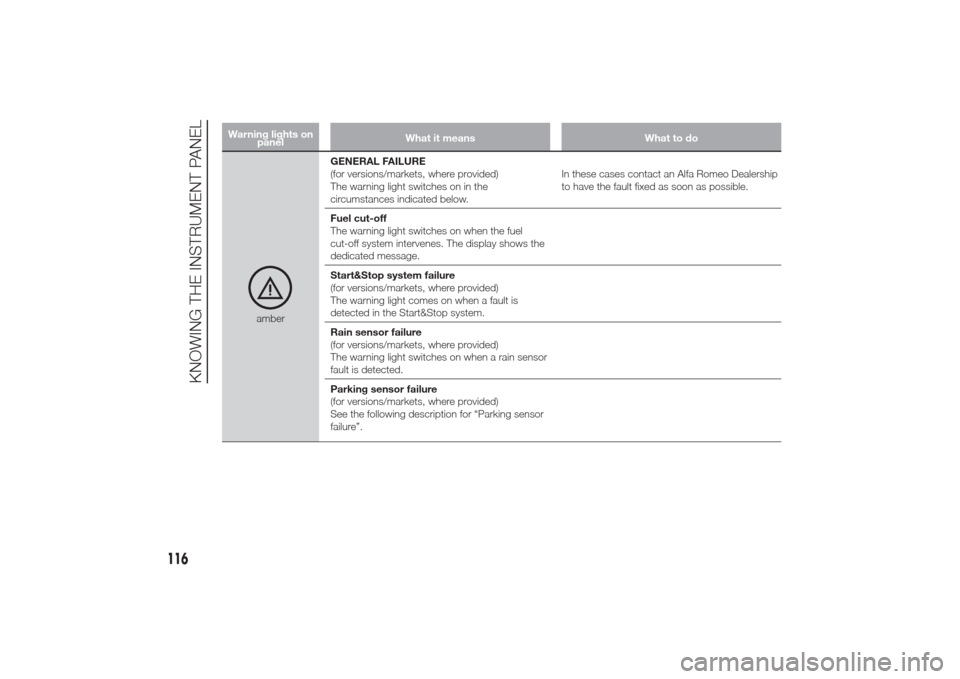
amberGENERAL FAILURE
(for versions/markets, where provided)
The warning light switches on in the
circumstances indicated below.In these cases contact an Alfa Romeo Dealership
to have the fault fixed as soon as possible.
Fuel cut-off
The warning light switches on when the fuel
cut-off system intervenes. The display shows the
dedicated message.
Start&Stop system failure
(for versions/markets, where provided)
The warning light comes on when a fault is
detected in the Start&Stop system.
Rain sensor failure
(for versions/markets, where provided)
The warning light switches on when a rain sensor
fault is detected.
Parking sensor failure
(for versions/markets, where provided)
See the following description for “Parking sensor
failure”.
116
KNOWING THE INSTRUMENT PANEL