buttons Alfa Romeo Giulietta 2014 User Guide
[x] Cancel search | Manufacturer: ALFA ROMEO, Model Year: 2014, Model line: Giulietta, Model: Alfa Romeo Giulietta 2014Pages: 280, PDF Size: 6.65 MB
Page 61 of 280
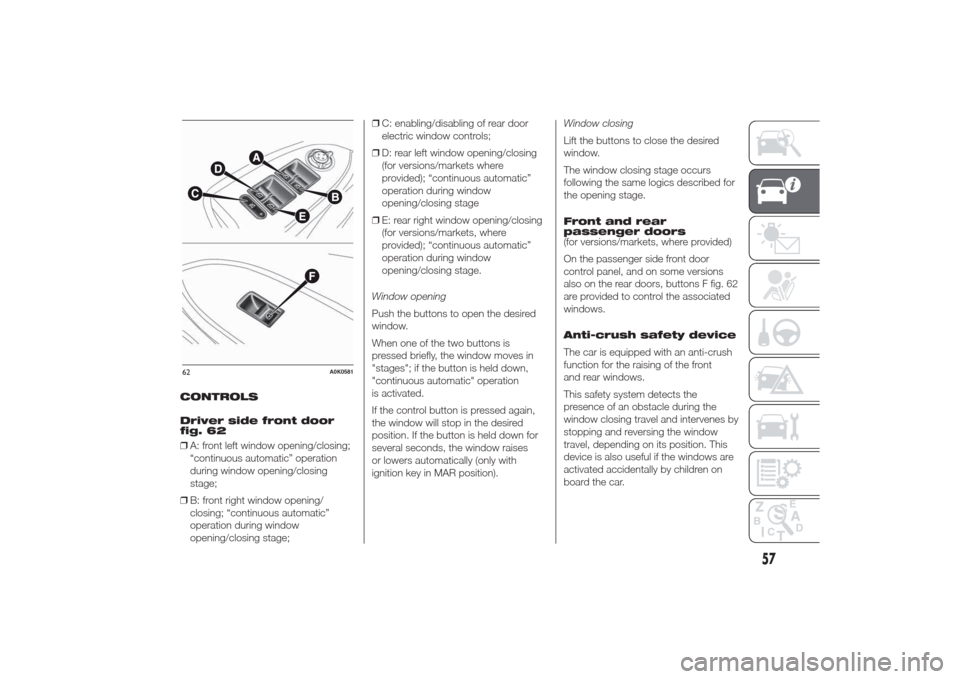
CONTROLS
Driver side front door
fig. 62
❒A: front left window opening/closing;
“continuous automatic” operation
during window opening/closing
stage;
❒B: front right window opening/
closing; “continuous automatic”
operation during window
opening/closing stage;❒C: enabling/disabling of rear door
electric window controls;
❒D: rear left window opening/closing
(for versions/markets where
provided); “continuous automatic”
operation during window
opening/closing stage
❒E: rear right window opening/closing
(for versions/markets, where
provided); “continuous automatic”
operation during window
opening/closing stage.
Window opening
Push the buttons to open the desired
window.
When one of the two buttons is
pressed briefly, the window moves in
"stages"; if the button is held down,
"continuous automatic" operation
is activated.
If the control button is pressed again,
the window will stop in the desired
position. If the button is held down for
several seconds, the window raises
or lowers automatically (only with
ignition key in MAR position).Window closing
Lift the buttons to close the desired
window.
The window closing stage occurs
following the same logics described for
the opening stage.
Front and rear
passenger doors
(for versions/markets, where provided)
On the passenger side front door
control panel, and on some versions
also on the rear doors, buttons F fig. 62
are provided to control the associated
windows.
Anti-crush safety device
The car is equipped with an anti-crush
function for the raising of the front
and rear windows.
This safety system detects the
presence of an obstacle during the
window closing travel and intervenes by
stopping and reversing the window
travel, depending on its position. This
device is also useful if the windows are
activated accidentally by children on
board the car.62
A0K0581
57
Page 65 of 280
Folding the seats
Proceed as follows:
❒raise the headrests to the maximum
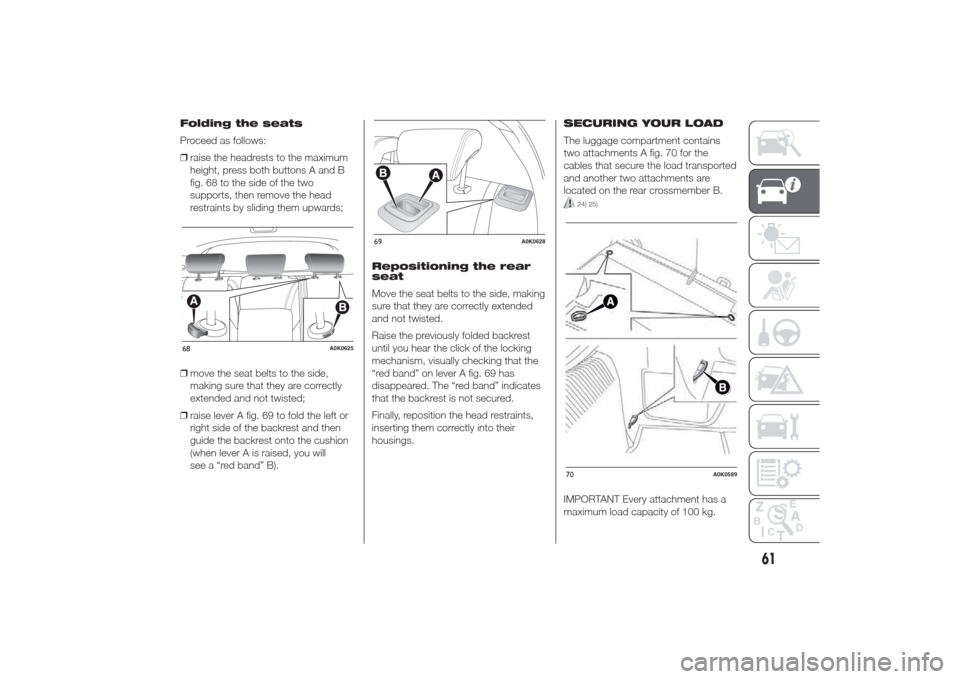
height, press both buttons A and B
fig. 68 to the side of the two
supports, then remove the head
restraints by sliding them upwards;
❒move the seat belts to the side,
making sure that they are correctly
extended and not twisted;
❒raise lever A fig. 69 to fold the left or
right side of the backrest and then
guide the backrest onto the cushion
(when lever A is raised, you will
see a “red band” B).Repositioning the rear
seat
Move the seat belts to the side, making
sure that they are correctly extended
and not twisted.
Raise the previously folded backrest
until you hear the click of the locking
mechanism, visually checking that the
“red band” on lever A fig. 69 has
disappeared. The “red band” indicates
that the backrest is not secured.
Finally, reposition the head restraints,
inserting them correctly into their
housings.SECURING YOUR LOAD
The luggage compartment contains
two attachments A fig. 70 for the
cables that secure the load transported
and another two attachments are
located on the rear crossmember B.
24) 25)
IMPORTANT Every attachment has a
maximum load capacity of 100 kg.
68
A0K0625
69
A0K0628
70
A0K0589
61
Page 68 of 280
HEADLIGHTSLIGHT BEAM DIRECTION
The correct orientation of the headlights
is important for the driver's comfort
and safety as well as for all other road
users. This is also covered by a specific
rule of the highway code.
The headlights must be correctly
directed to ensure the best visibility
conditions for all drivers. Contact a Alfa
Romeo Dealership to have the
headlights checked and adjusted, if
necessary.
HEADLIGHT ALIGNMENT
CORRECTOR
This device works with the ignition key
in the MAR position and the dipped
headlights on.
Headlight alignment
adjustment
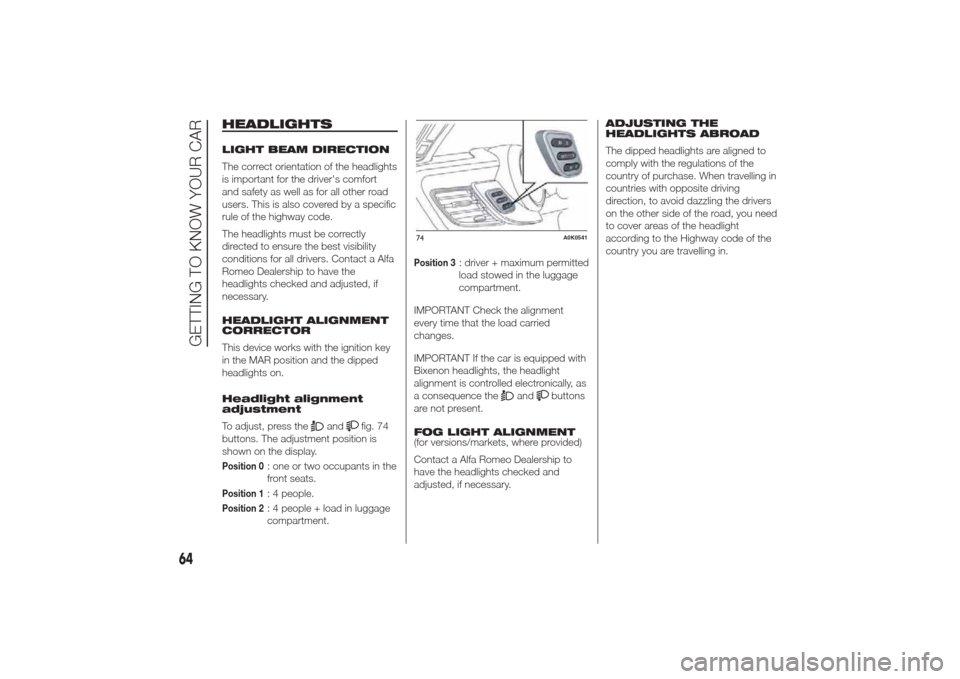
To adjust, press the
and
fig. 74
buttons. The adjustment position is
shown on the display.
Position 0
: one or two occupants in the
front seats.
Position 1
: 4 people.
Position 2
: 4 people + load in luggage
compartment.
Position 3
: driver + maximum permitted
load stowed in the luggage
compartment.
IMPORTANT Check the alignment
every time that the load carried
changes.
IMPORTANT If the car is equipped with
Bixenon headlights, the headlight
alignment is controlled electronically, as
a consequence the
and
buttons
are not present.
FOG LIGHT ALIGNMENT
(for versions/markets, where provided)
Contact a Alfa Romeo Dealership to
have the headlights checked and
adjusted, if necessary.ADJUSTING THE
HEADLIGHTS ABROAD
The dipped headlights are aligned to
comply with the regulations of the
country of purchase. When travelling in
countries with opposite driving
direction, to avoid dazzling the drivers
on the other side of the road, you need
to cover areas of the headlight
according to the Highway code of the
country you are travelling in.
74
A0K0541
64
GETTING TO KNOW YOUR CAR
Page 95 of 280
GEAR SHIFT INDICATOR
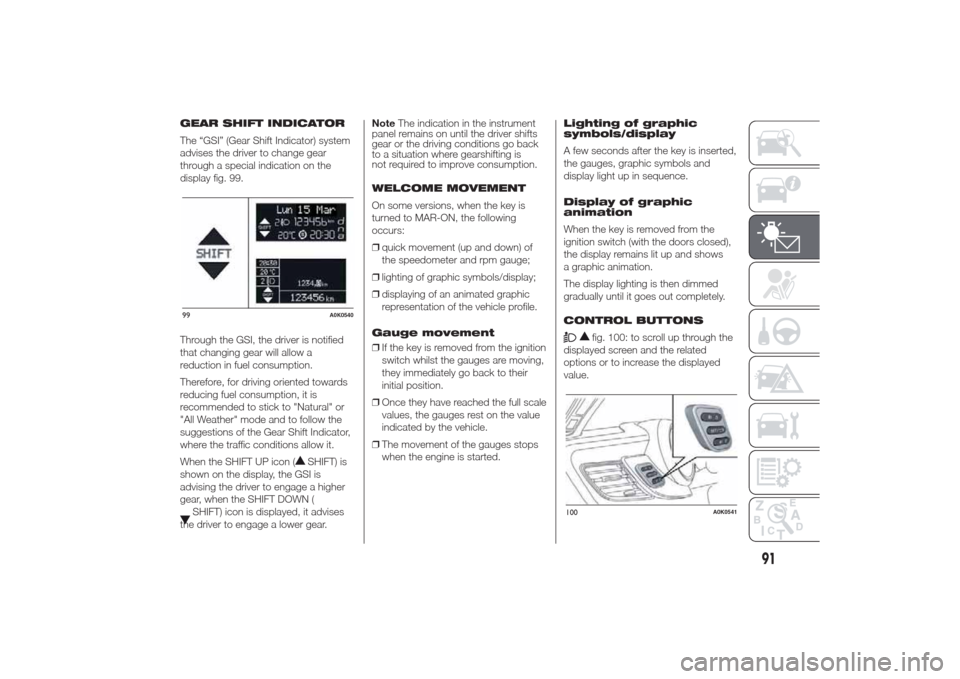
The “GSI” (Gear Shift Indicator) system
advises the driver to change gear
through a special indication on the
display fig. 99.
Through the GSI, the driver is notified
that changing gear will allow a
reduction in fuel consumption.
Therefore, for driving oriented towards
reducing fuel consumption, it is
recommended to stick to "Natural" or
"All Weather" mode and to follow the
suggestions of the Gear Shift Indicator,
where the traffic conditions allow it.
When the SHIFT UP icon (
SHIFT) is
shown on the display, the GSI is
advising the driver to engage a higher
gear, when the SHIFT DOWN (
SHIFT) icon is displayed, it advises
the driver to engage a lower gear.NoteThe indication in the instrument
panel remains on until the driver shifts
gear or the driving conditions go back
to a situation where gearshifting is
not required to improve consumption.
WELCOME MOVEMENT
On some versions, when the key is
turned to MAR-ON, the following
occurs:
❒quick movement (up and down) of
the speedometer and rpm gauge;
❒lighting of graphic symbols/display;
❒displaying of an animated graphic
representation of the vehicle profile.
Gauge movement
❒If the key is removed from the ignition
switch whilst the gauges are moving,
they immediately go back to their
initial position.
❒Once they have reached the full scale
values, the gauges rest on the value
indicated by the vehicle.
❒The movement of the gauges stops
when the engine is started.Lighting of graphic
symbols/display
A few seconds after the key is inserted,
the gauges, graphic symbols and
display light up in sequence.
Display of graphic
animation
When the key is removed from the
ignition switch (with the doors closed),
the display remains lit up and shows
a graphic animation.
The display lighting is then dimmed
gradually until it goes out completely.
CONTROL BUTTONS
fig. 100: to scroll up through the
displayed screen and the related
options or to increase the displayed
value.
99
A0K0540
100
A0K0541
91
Page 96 of 280
SET/
: press briefly to access the
menu and/or go to next screen or
confirm the selection. Hold down to go
back to the standard screen.
: to scroll down through the
displayed menu and the related options
or to decrease the value displayed.
IMPORTANT The
and
buttons activate different
functions according to the following
situations:
❒within the menu, they allow you to
scroll up and down through the
options;
❒during settings operations, they
increase or decrease values.
SETUP MENU
The menu comprises a series of
options which can be selected using
buttons "
" and "
" to access
the different selection and setting
operations (Setup) indicated below.
Some options have a submenu. The
menu can be activated by briefly
pressing the SET/
button.
The menu comprises the following
options:
❒MENU
❒LIGHTING❒SPEED BEEP
❒LIGHT SENSOR (for versions/
markets where provided)
❒RAIN SENSOR (for versions/markets,
where provided)
❒TRIP B ACTIVATION/DATA
❒SET TIME
❒SET DATE
❒FIRST PAGE (for versions/markets
where provided)
❒AUTOCLOSE
❒MEASUREMENT UNIT
❒LANGUAGE
❒BUZZER VOLUME
❒SEAT BELT BEEP/BUZZ
❒SERVICE
❒AIRBAG/PASSENGER BAG
❒DAYTIME RUNNING LIGHTS
❒ADAPTIVE LIGHTS (for versions/
markets, where provided)
❒COURTESY LIGHTS
❒MENU EXIT
NoteOn cars equipped with radio
navigator systems (for versions/
markets, where provided), some menu
items are shown on the navigator
display.Selecting an option from
the main menu without a
submenu:
❒press the SET/
button briefly to
select the main menu setting you
wish to change;
❒press buttons ""or"
" (by
single presses) to select the new
setting;
❒press the SET/
button briefly to
save the new setting and go back to
the previous main menu option.
Selecting an option from
the main menu with a
submenu:
❒briefly press the SET/
button to
display the first submenu option;
❒press buttons "
"or"
"
(with single presses) to scroll through
all the submenu options;
❒briefly press the SET/
button to
select the displayed submenu option
and to open the relevant settings
menu;
❒press buttons "
"or"
" (by
single presses) to select the new
setting for this submenu option;
❒press the SET/
button briefly to
save the new setting and go back to
the previous submenu option.
92
KNOWING THE INSTRUMENT PANEL
Page 102 of 280
Belt reminder
(Reactivation of SBR
buzzer)
(for versions/markets, where provided)
This function can be displayed only
after an Alfa Romeo Dealership has
deactivated the SBR system (see
paragraph “SBR system” in the “Safety”
chapter).
To reactivate this function, proceed as
follows:
❒briefly press the SET/
button, the
display shows "OFF" flashing. Press
the "
"or"
" button and
"On" will be displayed;
❒briefly press the SET/
button to
go back to the previous screen or
hold the button down to go back to
the standard screen without saving.
Service (Scheduled
servicing)
With this function it is possible to view
information on servicing deadlines
depending on kilometres travelled or
daily intervals.
To consult this information, proceed as
follows:❒briefly press the SET/
button: the
display shows when servicing is due
in km or mi according to the previous
setting (see paragraph "Units of
measurement");
❒briefly press the SET/button to
go back to the menu screen or hold
the button down to go back to the
standard screen.
IMPORTANT The “Scheduled Servicing
Plan” includes car maintenance at
fixed intervals, refer to the
"Maintenance and care" chapter. This
message is displayed automatically
when the key is turned to MAR-ON,
starting at 2,000 km (or equivalent
value in miles) from when the
next service is due and reappearing
every 200 km (or equivalent value
in miles). Below 200 km servicing
indications are more frequent. The
display will be in km or mi depending
on the measurement unit settings.
When the next scheduled service is
approaching and the key is turned to
MAR-ON, the word "Service" will
appear on the display, followed by the
number of kilometres or miles left.
Go to an Alfa Romeo Dealership, where
the “Scheduled Servicing Plan”
operations will be performed and the
message will be reset.Passenger airbag/side
bag (front passenger
side airbag and side
bag for pelvis, chest
and shoulder protection
- Side bag -
activation/deactivation)
This function is used to activate/
deactivate the passenger side air bag.
Proceed as follows:
❒press the SET/
button and, after
the message (Bag pass: Off) (to
deactivate) or (Bag pass: On) (to
activate) is displayed by pressing
buttons "
" and "
", press
the SET/
button again;
❒a confirmation request message will
appear on the display;
❒by pressing the "
"or"
"
buttons select "Yes" (to confirm
activation/deactivation) or "No" (to
cancel);
❒press the SET/
button briefly, a
message confirming the selection
will be displayed and you will return
to the menu screen or, pressing
the button for longer, you will return
to the standard screen without
memorising.
98
KNOWING THE INSTRUMENT PANEL
Page 259 of 280
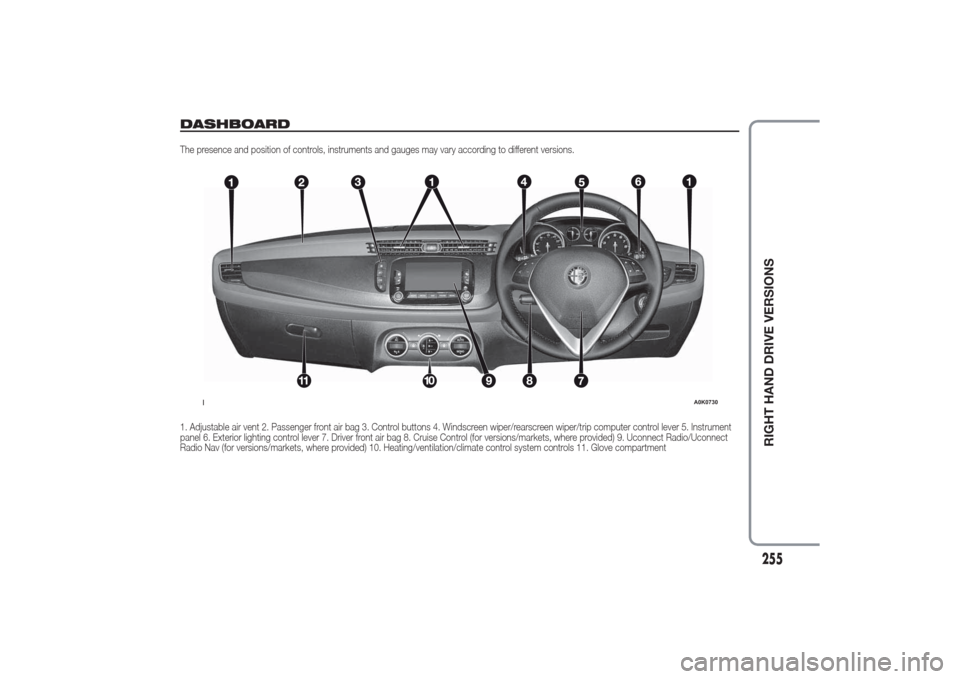
DASHBOARDThe presence and position of controls, instruments and gauges may vary according to different versions.
1. Adjustable air vent 2. Passenger front air bag 3. Control buttons 4. Windscreen wiper/rearscreen wiper/trip computer control lever 5. Instrument
panel 6. Exterior lighting control lever 7. Driver front air bag 8. Cruise Control (for versions/markets, where provided) 9. Uconnect Radio/Uconnect
Radio Nav (for versions/markets, where provided) 10. Heating/ventilation/climate control system controls 11. Glove compartment
1
A0K0730
255
RIGHT HAND DRIVE VERSIONS
Page 274 of 280
INDEX
ABS .............................................. 65
Additional heater ............................ 35
AFS adaptive lights (Adaptive
Frontlight System) ........................ 38
Air cleaner ...................................... 213
Alarm ............................................. 14“Alfa DNA” system ........................ 69
– Driving modes ........................... 70
– Engagement/disengagement
of "All Weather" mode ............... 72
– Engagement/disengagement
of "Dynamic" mode ................... 71
– "Natural" Mode.......................... 70Alfa Romeo Code system ............. 10
ALFA TCT ...................................... 157
Ashtray .......................................... 50
ASR system (Anti-Slip
Regulation) ................................... 66
Automatic dual zone climate
control ......................................... 28Battery .......................................... 214
– advice for extending lifetime ...... 214
– replacement .............................. 214
Battery (recharging) ........................ 196
Bodywork
– maintenance ............................. 218
– protection against
atmospheric agents................... 218
– warranty .................................... 218Bonnet ........................................... 62
– Closing ...................................... 62
– Opening .................................... 62
Brakes ........................................... 233
– brake fluid level.......................... 212
bulb replacement ........................... 184
Bulb replacement
– exterior lights ............................. 183
– interior lights .............................. 186
Bulbs
– types of bulbs ........................... 181
Carrying children safely ................. 139
CBC (Cornering Brake Control)
system ......................................... 66
Central locking ............................... 46
Changing a bulb............................. 179
– General instructions................... 179
Changing a wheel .......................... 171
Checking levels .............................. 208
Cigar lighter.................................... 50
Cleaning and maintenance
– bodywork .................................. 218
– car interior ................................. 220
– front headlights ......................... 219
– leather parts .............................. 221
– leather seats.............................. 220
– plastic and coated parts ............ 221
– seats and fabric parts ................ 220
Climate control ............................... 22– Central air diffusers.................... 22
– Rear air diffuser ......................... 22
– Side air diffusers ........................ 22
– Upper air diffusers ..................... 22
Climatic comfort ............................. 23
– Diffusers .................................... 23
Clutch ............................................ 232
CO2 emissions............................... 252
CODE Card .................................... 11
Control buttons .............................. 91
Control panel and instruments ....... 100
– Multifunction display .................. 100
– Reconfigurable multifunction
display....................................... 101
Controls ......................................... 45
Courtesy light
– bulb replacement ...................... 187
Cruise Control ................................ 41
Daytime running lights (DRL) ......... 36
Diesel filter ..................................... 213
Dimensions .................................... 240
Dipped beam headlights
– bulb replacement ...................... 183
Direction indicators ................... 37-184
– bulb replacement ...................... 184
– “Lane change” function ............. 37
Display ........................................... 90
Doors ............................................. 54
– Child safety device .................... 55