change time Alfa Romeo Giulietta 2016 Owner's Manual
[x] Cancel search | Manufacturer: ALFA ROMEO, Model Year: 2016, Model line: Giulietta, Model: Alfa Romeo Giulietta 2016Pages: 288, PDF Size: 7.34 MB
Page 2 of 288

We really know your car because we invented, designed and built it: we re\
ally know every single detail. At Alfa Romeo Service authorised workshops you can find technicians directly trained by us,
offering quality and professionalism for all service operations.
Alfa Romeo workshops are always close to you for the regular servicing operations, season checks and practical recommendations by our experts.
With Alfa Romeo Genuine Parts you keep the reliability, comfort and performance features of your new car unchanged in time: that's why you bought it for.
Always ask for Genuine Parts for the components used on our cars; we rec\
ommend them because
they come from our steady commitment in research and development of high\
ly innovative technologies. For all these reasons: rely on Genuine Parts, because they are the only ones designed by Alfa Romeo for your car.
SAFETY:
BRAKING SYSTEMENVIRONMENT: PARTICULATE FILTERS, CLIMATE CONTROL MAINTENANCECOMFORT: SUSPENSION
AND WINDSCREEN WIPERS PERFORMANCE: SPARK PLUGS, INJECTORS AND BATTERIESLINEACCESSORI
ROOF RACK BARS, WHEEL RIMS
WHY CHOOSING GENUINE PARTS
Cop Alfa Giulietta EN QUAD 12/03/14 08.33 Pagina 2
Page 14 of 288
SYMBOLS
Some car components have coloured
labels whose symbols indicate
precautions to be observed when using
this component. Under the bonnet
there is also a label that summarises all
the symbols.
ALFA ROMEO CODE
SYSTEM
IN BRIEF
This is an electronic engine locking
system which increases protection
against attempted thefts of the car. It
is automatically activated when the
ignition key is removed.
There is an electronic device in each
key which can identify the signal
emitted, when the engine is started,
from an aerial built into the ignition
switch. The signal, which changes
each time the engine is started, is the
“password” by means of which the
control unit recognises the key and
enables starting.
1)
Operation
Each time the car is started by turning
the ignition key to MAR-ON, the Alfa
Romeo CODE system control unit
sends an acknowledgement code to
the engine management control unit to
deactivate the inhibitor.
The code is sent only if the Alfa Romeo
CODE system control unit has
recognised the code transmitted by the
key.Each time the ignition key is turned to
STOP, the Alfa Romeo CODE system
deactivates the functions of the engine
management control unit.
Irregular operation
If, during starting, the code is not
correctly recognised, the
warning
light (on some versions a message
together with a symbol is shown on the
display) switches on in the instrument
panel.
In this case, turn the key to STOP and
then to MAR-ON; if it is still locked,
try again with the other keys that come
with the car. If it is still not possible to
start the engine, contact an Alfa Romeo
Dealership.
Activation of warning
light while driving
❒If the
warning light (or symbol on
the display) switches on, this means
that the system is running self-
diagnosis (caused, for example, by a
voltage drop).
❒If the
warning light (or symbol on
the display) stays on, contact an Alfa
Romeo Dealership.
10
GETTING TO KNOW YOUR CAR
Page 34 of 288
During automatic operation, you can
change the set temperatures, air
distribution and fan speed at any time
by using the relevant buttons or knobs:
the system will automatically change
the settings to adjust to the new
requirements.
During fully automatic operation
(AUTO), the word AUTO will disappear
if the air distribution and/or flow rate
and/or engagement of the compressor
and/or recirculation settings are
changed.
During fully automatic operation (FULL
AUTO), the word FULL will disappear
if the air distribution and/or flow rate
and/or activation of the compressor
and/or recirculation settings are
changed.
In this way the climate control system
will continue to automatically manage
all functions except for those that have
been manually adjusted. The fan speed
is the same in all the zones of the
passenger compartment.ADJUSTING THE AIR
TEMPERATURE
Turn knob A or L to the right or left to
adjust the air temperature: knob A
for the front left area, knob L for the
front right area of the passenger
compartment. The set temperatures are
shown on the displays.
Press the MONO button to align the air
temperature between the two areas.
Turn knob L to return to the separate
management of air temperatures in the
two areas.
Turn the knobs fully right or left to
engage HI (maximum heating) or LO
(maximum cooling) respectively. To
deactivate these functions, turn the
temperature knob to the desired
temperature.
SETTING THE AIR
DISTRIBUTION
By pressing the buttons (
//), it
is possible to set one of the 7 possible
air distributions manually:
Air flow to the windscreen and
front side window diffusers to
demist/defrost them.
Air flow at central and side
dashboard vents to ventilate the
chest and the face during the hot
season.
Air flow to the front and rear
footwell diffusers. This air
distribution setting heats the
passenger compartment most
quickly, giving a prompt sensation
of warmth.
Air flow distributed between
footwell vents (hotter air) and
central and side dashboard
vents (cooler air). This
distribution setting is useful in
spring and autumn on sunny
days.
Air flow distributed between
footwell diffusers and
windscreen and front side
window defrosting/demisting
diffusers. This distribution
setting allows the passenger
compartment to warm up
efficiently and prevents the
windows from misting up.
Air flow distribution between
windscreen demisting/
defrosting diffusers and side
and central dashboard vents.
This allows air to be sent to
the windscreen in conditions of
strong sunlight.
Air flow distribution to all
vents on the car.
30
GETTING TO KNOW YOUR CAR
Page 36 of 288
❒forced deactivation (air recirculation
always off, air drawn in from the
outside): indicated by the LED on
buttons
switching off and text A
on button B off.
Forced activation/deactivation can be
selected by pressing button
.
When the
button is pressed (button
E off), the climate control system
automatically activates internal air
recirculation (LED on
button A
on). It is still possible to activate outside
air recirculation (LED on the button off)
and vice versa, by pressing button
.
The AQS (Air Quality System) function
(for versions/markets, where provided)
cannot be activated when the
button
is pressed (LED on button E off).
AQS (Air Quality System)
function activation
(for versions/markets, where provided)
The AQS function automatically
activates internal air recirculation when
the outside air is polluted (e.g. in traffic
queues and tunnels).IMPORTANT With the AQS function
active, after a preset time interval of the
internal air recirculation system
functioning, the climate control system
enables the intake of outside air for
approximately one minute to change
the air in the passenger compartment.
This takes place regardless of the
pollution level of the outside air.
IMPORTANT The engagement of the
recirculation system makes it possible
to reach the required heating/cooling
conditions faster. It is, however,
inadvisable to use it on rainy/cold days
as it would considerably increase the
possibility of the windows misting
up inside (especially if the climate
control system is off). When the outside
temperature is low, recirculation is
forced off (air drawn in from the outside)
to prevent the windows from misting
up.
In automatic operation, recirculation is
managed automatically by the system
according to outside environmental
conditions.
IMPORTANT It is advisable not to use
the air recirculation function when
the outside temperature is low to
prevent the windows from rapidly
misting up.CLIMATE CONTROL
COMPRESSOR
Press button C to activate/deactivate
the compressor (activation is indicated
by the lit LED on the button). The
system remembers that the
compressor has been switched off,
even after the engine has stopped.
When the compressor is switched off
the system deactivates air recirculation
to prevent the windows from misting
up and deactivates the AQS function
(for versions/markets, where provided).
In this case, although the climate
control system is capable of
maintaining the required temperature,
the AUTO LED switches off. The
temperatures will flash for a few
seconds if the required temperature
cannot be maintained.
To restore automatic control of
compressor engagement, press again
button C or the AUTO button.
With compressor off:
❒if the outside temperature is higher
than the set one, the system will
not be able to satisfy the request.
The temperature values will then flash
on the display for a few seconds to
indicate this;
❒the fan speed can be reset manually.
32
GETTING TO KNOW YOUR CAR
Page 41 of 288
MAIN BEAM HEADLIGHTS
To activate the main beam headlights,
with ring nut A fig. 31 at
, pull the
stalk towards the steering wheel
beyond the end of travel position. The
warning light switches on in the
instrument panel.
When the stalk is pulled towards the
steering wheel again, beyond the end
of travel position, the main beam
headlights deactivate, the dipped beam
headlights reactivate and the
warning light switches off.
It is not possible to switch on the main
beam headlights constantly if automatic
light control is active.
FLASHING
To do this, pull the stalk towards the
steering wheel (unstable position)
regardless of the position of ring nut A
fig. 31. The
warning light switches
on in the instrument panel.
REAR FOG LIGHTS
For the activation and deactivation of
the rear fog lights, refer to the
"Controls" section.DIRECTION INDICATORS
Bring the stalk to the (stable) position:
❒upwards: activates right direction
indicator;
❒downwards: activates left direction
indicator.
Warning light
orwill blink on the
instrument panel.
The direction indicators are switched off
automatically when the steering wheel
is straightened.
"Lane change" function
If you wish to signal a lane change,
place the left stalk in the unstable
position for less than half a second. The
direction indicator on the side selected
will flash five times and then switch
off automatically.
“FOLLOW ME HOME”
DEVICE
This device allows you to illuminate the
area in front of the car for a certain
amount of time.Activation
With the key turned to STOP or
removed, pull stalk A towards the
steering wheel within 2 minutes from
when the engine is turned off.
Each time the stalk is moved, the lights
stay on for an extra 30 seconds up to
a maximum of 210 seconds; then
the lights are switched off automatically.
Also, each time the stalk is operated,
the
warning light on the
instrument panel switches on. The
display shows the time set for the
function and the corresponding
graphics.
The warning light comes on when the
lever is operated and stays on until
the function is automatically
deactivated. Each movement of the
stalk only increases the amount of time
the lights stay on.
Deactivation
Keep the stalk pulled towards the
steering wheel for more than 2
seconds.
37
Page 43 of 288
AUTOrain sensor activation (for
versions/markets, where
provided) (the windscreen wipers
adapt the operating speed
automatically to suit the intensity
of the rain)
intermittent operation;
continuous slow operation;
continuous fast operation.
Move the stalk upwards (unstable
position) to limit operation to the time
for which the stalk is held in this
position. When released, the stalk will
return to its default position and the
wiper will be automatically stopped.
"Smart washing"
function
Pull the lever towards the steering
wheel (unstable position) to operate the
windscreen washer. Keep the stalk
pulled for more than half a second to
operate the windscreen washer jet and
wiper automatically with a single
movement.
The wiper stops working three strokes
after the stalk is released. A further
stroke after approximately 6 seconds
completes the cycle.RAIN SENSOR
(for versions/markets, where provided)
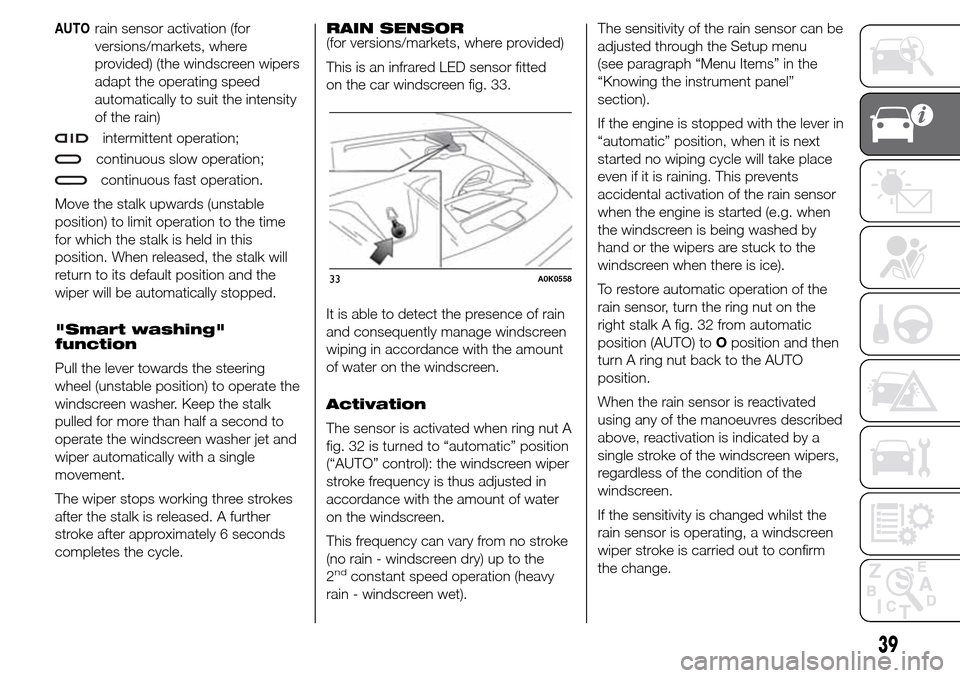
This is an infrared LED sensor fitted
on the car windscreen fig. 33.
It is able to detect the presence of rain
and consequently manage windscreen
wiping in accordance with the amount
of water on the windscreen.
Activation
The sensor is activated when ring nut A
fig. 32 is turned to “automatic” position
(“AUTO” control): the windscreen wiper
stroke frequency is thus adjusted in
accordance with the amount of water
on the windscreen.
This frequency can vary from no stroke
(no rain - windscreen dry) up to the
2
ndconstant speed operation (heavy
rain - windscreen wet).The sensitivity of the rain sensor can be
adjusted through the Setup menu
(see paragraph “Menu Items” in the
“Knowing the instrument panel”
section).
If the engine is stopped with the lever in
“automatic” position, when it is next
started no wiping cycle will take place
even if it is raining. This prevents
accidental activation of the rain sensor
when the engine is started (e.g. when
the windscreen is being washed by
hand or the wipers are stuck to the
windscreen when there is ice).
To restore automatic operation of the
rain sensor, turn the ring nut on the
right stalk A fig. 32 from automatic
position (AUTO) toOposition and then
turn A ring nut back to the AUTO
position.
When the rain sensor is reactivated
using any of the manoeuvres described
above, reactivation is indicated by a
single stroke of the windscreen wipers,
regardless of the condition of the
windscreen.
If the sensitivity is changed whilst the
rain sensor is operating, a windscreen
wiper stroke is carried out to confirm
the change.
33A0K0558
39
Page 65 of 288
HEADLIGHTS
LIGHT BEAM DIRECTION
The correct orientation of the headlights
is important for the driver's comfort
and safety as well as for all other road
users. This is also covered by a specific
rule of the highway code.
The headlights must be correctly
directed to ensure the best visibility
conditions for all drivers. Contact a Alfa
Romeo Dealership to have the
headlights checked and adjusted, if
necessary.
HEADLIGHT ALIGNMENT
CORRECTOR
This device works with the ignition key
in the MAR position and the dipped
headlights on.
Headlight alignment
adjustment
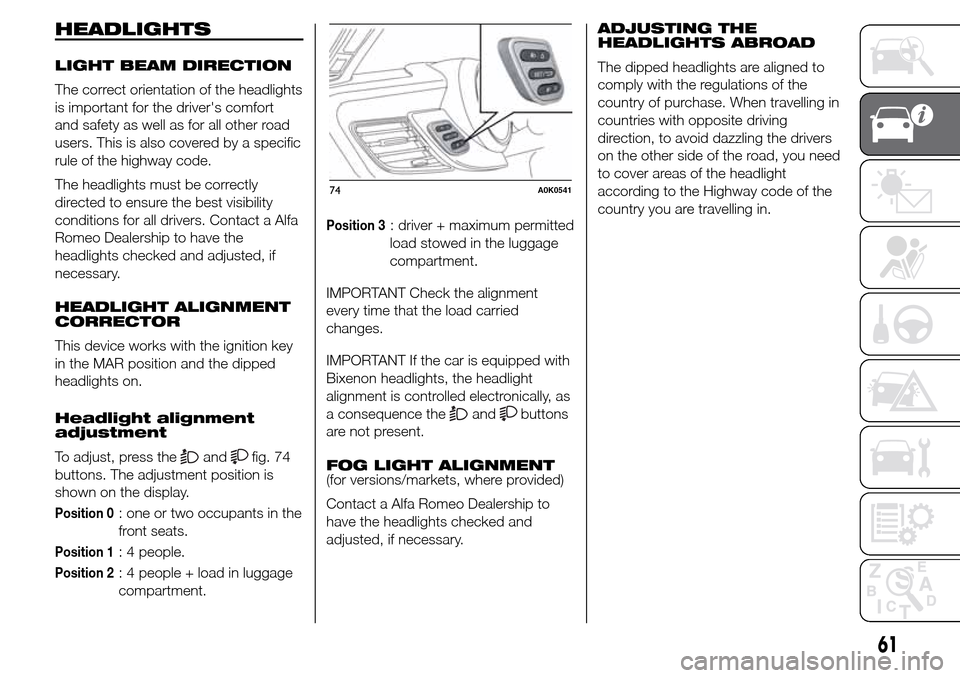
To adjust, press the
andfig. 74
buttons. The adjustment position is
shown on the display.
Position 0: one or two occupants in the
front seats.
Position 1: 4 people.
Position 2: 4 people + load in luggage
compartment.
Position 3: driver + maximum permitted
load stowed in the luggage
compartment.
IMPORTANT Check the alignment
every time that the load carried
changes.
IMPORTANT If the car is equipped with
Bixenon headlights, the headlight
alignment is controlled electronically, as
a consequence the
andbuttons
are not present.
FOG LIGHT ALIGNMENT
(for versions/markets, where provided)
Contact a Alfa Romeo Dealership to
have the headlights checked and
adjusted, if necessary.ADJUSTING THE
HEADLIGHTS ABROAD
The dipped headlights are aligned to
comply with the regulations of the
country of purchase. When travelling in
countries with opposite driving
direction, to avoid dazzling the drivers
on the other side of the road, you need
to cover areas of the headlight
according to the Highway code of the
country you are travelling in.
74A0K0541
61
Page 72 of 288
The activation of the Dynamic mode is
also shown by the change in the
instrument panel lighting that, after
decreasing, reaches the highest
luminosity and then returns to the
previously set values.
Disengagement
To deactivate “Dynamic” mode and
return to “Natural”, repeat the same
movement of the lever within the same
times. In this case, the LED
corresponding to “Natural” mode will
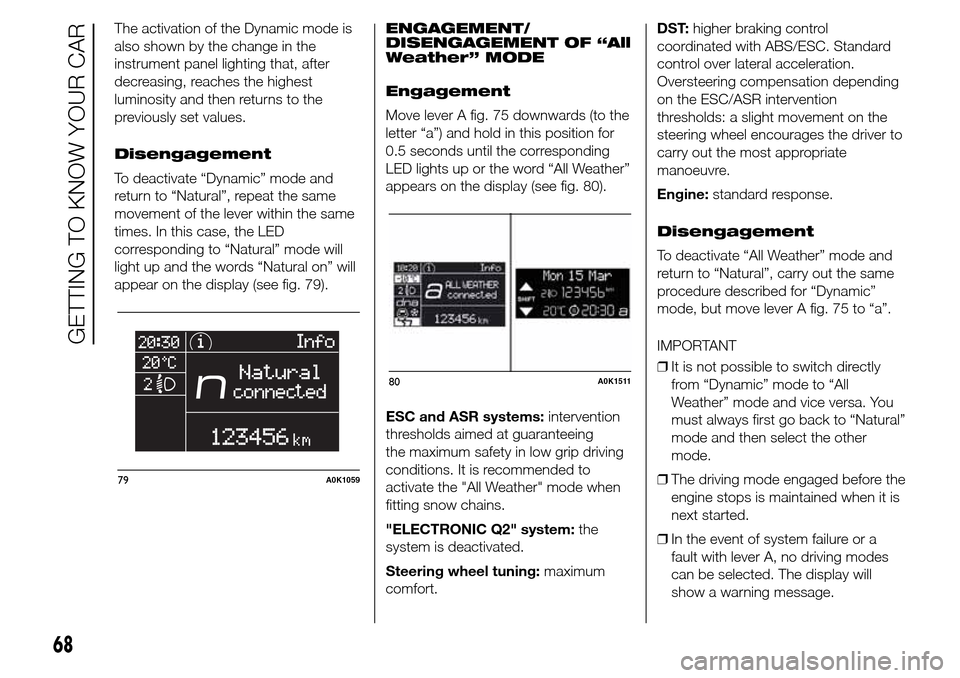
light up and the words “Natural on” will
appear on the display (see fig. 79).ENGAGEMENT/
DISENGAGEMENT OF “All
Weather” MODE
Engagement
Move lever A fig. 75 downwards (to the
letter “a”) and hold in this position for
0.5 seconds until the corresponding
LED lights up or the word “All Weather”
appears on the display (see fig. 80).
ESC and ASR systems:intervention
thresholds aimed at guaranteeing
the maximum safety in low grip driving
conditions. It is recommended to
activate the "All Weather" mode when
fitting snow chains.
"ELECTRONIC Q2" system:the
system is deactivated.
Steering wheel tuning:maximum
comfort.DST:higher braking control
coordinated with ABS/ESC. Standard
control over lateral acceleration.
Oversteering compensation depending
on the ESC/ASR intervention
thresholds: a slight movement on the
steering wheel encourages the driver to
carry out the most appropriate
manoeuvre.
Engine:standard response.
Disengagement
To deactivate “All Weather” mode and
return to “Natural”, carry out the same
procedure described for “Dynamic”
mode, but move lever A fig. 75 to “a”.
IMPORTANT
❒It is not possible to switch directly
from “Dynamic” mode to “All
Weather” mode and vice versa. You
must always first go back to “Natural”
mode and then select the other
mode.
❒The driving mode engaged before the
engine stops is maintained when it is
next started.
❒In the event of system failure or a
fault with lever A, no driving modes
can be selected. The display will
show a warning message.
79A0K1059
80A0K1511
68
GETTING TO KNOW YOUR CAR
Page 90 of 288
SET/: press briefly to access the
menu and/or go to next screen or
confirm the selection. Hold down to go
back to the standard screen.
: to scroll down through the
displayed menu and the related options
or to decrease the value displayed.
IMPORTANT The
and
buttons activate different
functions according to the following
situations:
❒within the menu, they allow you to
scroll up and down through the
options;
❒during settings operations, they
increase or decrease values.
SETUP MENU
The menu comprises a series of
options which can be selected using
the
andbuttons to access
the different selection and setting
(Setup) operations indicated below.
Some options have a submenu. The
menu can be activated by briefly
pressing the SET/
button.
The menu comprises the following
options:
❒MENU
❒LIGHTING❒SPEED BEEP
❒LIGHT SENSOR (for versions/
markets where provided)
❒RAIN SENSOR (for versions/markets,
where provided)
❒TRIP B ACTIVATION/DATA
❒SET TIME
❒SET DATE
❒FIRST PAGE (for versions/markets
where provided)
❒AUTOCLOSE
❒MEASUREMENT UNIT
❒LANGUAGE
❒BUZZER VOLUME
❒SEAT BELT BEEP/BUZZ
❒SERVICE
❒AIRBAG/PASSENGER BAG
❒DAYTIME RUNNING LIGHTS
❒ADAPTIVE LIGHTS (for versions/
markets, where provided)
❒COURTESY LIGHTS
❒MENU EXIT
NoteOn cars equipped with radio
navigator systems (for versions/
markets, where provided), some menu
items are shown on the navigator
display.Selecting an option from
the main menu without a
submenu:
❒press the SET/
button briefly to
select the main menu setting you
wish to change;
❒press buttons
or(with
single presses) to select the new
setting;
❒press the SET/
button briefly to
save the new setting and go back to
the previous main menu option.
Selecting an option from
the main menu with a
submenu:
❒briefly press the SET/
button to
display the first submenu option;
❒press buttons
or(with
single presses) to scroll through all
the submenu options;
❒briefly press the SET/
button to
select the displayed submenu option
and to open the relevant settings
menu;
❒press buttons
or(with
single presses) to select the new
setting for this submenu option;
❒press the SET/
button briefly to
save the new setting and go back to
the previous submenu option.
86
KNOWING THE INSTRUMENT PANEL
Page 93 of 288
IMPORTANT The setting will increase or
decrease by one unit each time the
button
oris pressed. Hold
down the button to increase/decrease
the setting rapidly and automatically.
Complete the adjustment with single
presses of the button when you
approach the desired value.
❒When you select "Format": briefly
pressing the SET/
button makes
the display mode flash on the display;
❒press button
orto select
“24h” or “12h”.
When you have made the required
settings, briefly press the SET/
button to go back to the submenu
screen or hold the button down to go
back to the main menu screen without
saving the new settings.
Hold the SET/
button down again
to return to the standard screen or
to the main menu according to where
you are in the menu.
Set date (Setting the
date)
Using this function it is possible to
change the date (day – month – year).
Proceed as follows to start the update:
❒briefly press the SET/
button:
the "year" starts flashing on the
display;❒press the
orbutton to
make the adjustment;
❒briefly press the SET/
button: the
"month" will flash on the display;
❒press the
orbutton to
make the adjustment;
❒briefly press the SET/
button: the
“day” will flash on the display;
❒press the button
orto
make the adjustment.
IMPORTANT The setting will increase or
decrease by one unit each time the
button
oris pressed. Hold
the button down to increase/decrease
the setting rapidly and automatically.
Complete the adjustment with single
presses of the button when you
approach the desired value.
Briefly press the SET/
button to go
back to the menu screen or hold the
button down to go back to the
standard screen without saving.
First page (Display of
information on the main
screen)
(for versions/markets, where provided)
This function allows you to choose
the information you would like to see on
the main screen. You can view the
date or the trip distance.To make your choice, proceed as
follows:
❒briefly press the SET/
button:
"Initial page" will be displayed;
❒press the SET/
button again
briefly to display the "date" and
"engine info" options;
❒press
orto select the
information you wish to see on the
main page of the display;
❒briefly press the SET/
button to
go back to the menu screen or hold
the button down to go back to the
standard screen without saving.
When the key is turned to MAR-ON
and the initial check stage is over, the
display will show the information
selected via the "First page" menu
function.
Autoclose (Automatic
door lock operation with
car running)
When activated (On), this function locks
the doors automatically when the
vehicle speed exceeds 20 km/h.
Proceed as follows to activate or
deactivate this function:
❒press the SET/
button briefly to
display a submenu;
89