lights Alfa Romeo Giulietta 2018 Service Manual
[x] Cancel search | Manufacturer: ALFA ROMEO, Model Year: 2018, Model line: Giulietta, Model: Alfa Romeo Giulietta 2018Pages: 216, PDF Size: 3.39 MB
Page 129 of 216
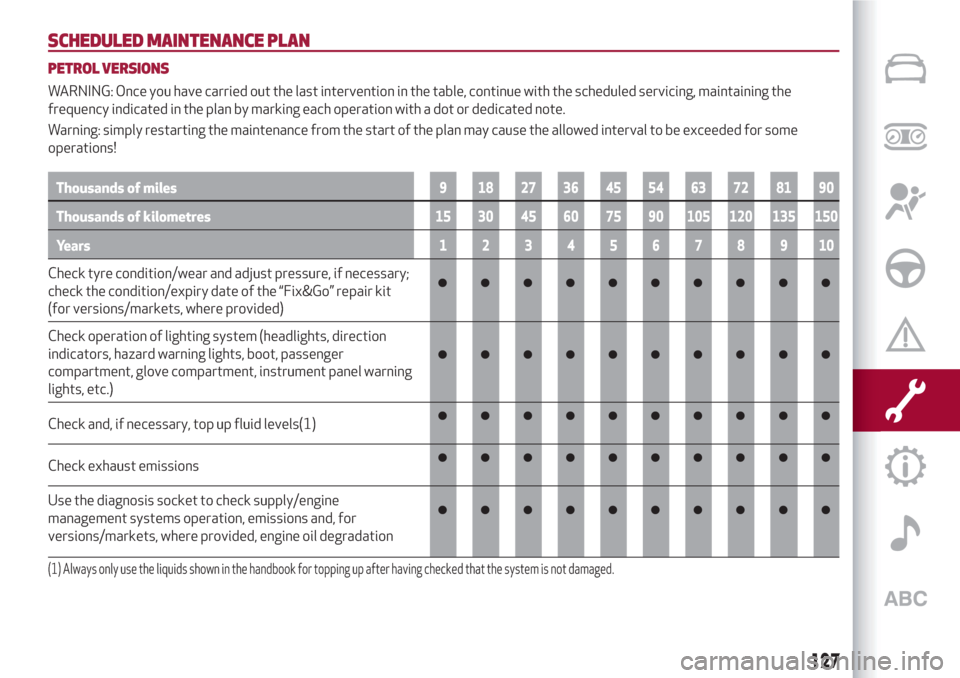
SCHEDULED MAINTENANCE PLAN
PETROL VERSIONS
WARNING: Once you have carried out the last intervention in the table, continue with the scheduled servicing, maintaining the
frequency indicated in the plan by marking each operation with a dot or dedicated note.
Warning: simply restarting the maintenance from the start of the plan may cause the allowed interval to be exceeded for some
operations!
Thousands of miles9 182736455463728190
Thousands of kilometres15 30 45 60 75 90 105 120 135 150
Years12345678910
Check tyre condition/wear and adjust pressure, if necessary;
check the condition/expiry date of the “Fix&Go” repair kit
(for versions/markets, where provided)
Check operation of lighting system (headlights, direction
indicators, hazard warning lights, boot, passenger
compartment, glove compartment, instrument panel warning
lights, etc.)
Check and, if necessary, top up fluid levels(1)
Check exhaust emissions
Use the diagnosis socket to check supply/engine
management systems operation, emissions and, for
versions/markets, where provided, engine oil degradation
(1) Always only use the liquids shown in the handbook for topping up after having checked that the system is not damaged.
127
Page 133 of 216
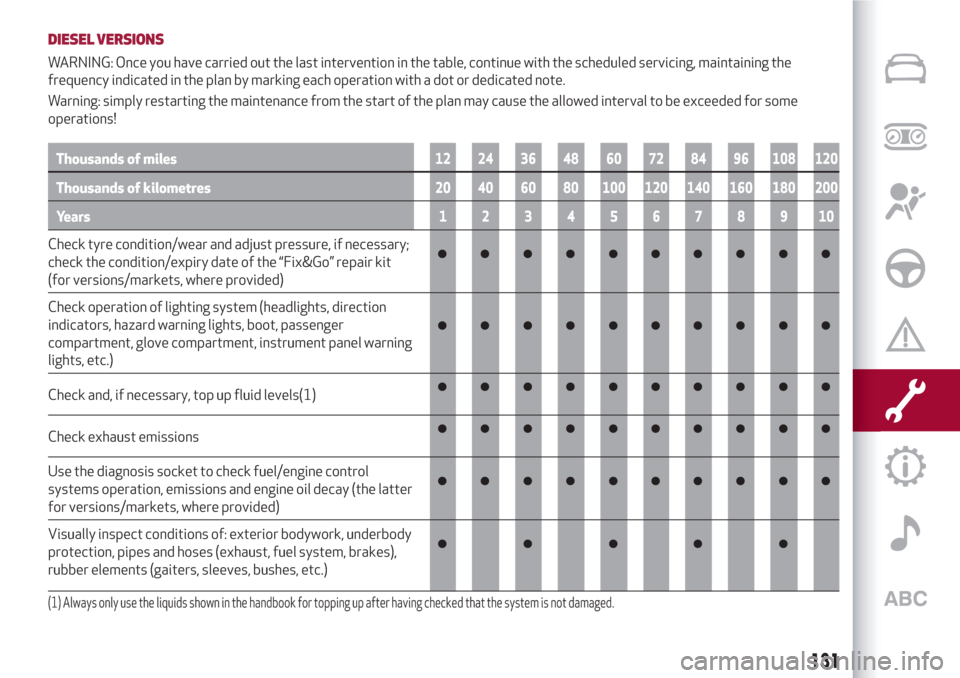
DIESEL VERSIONS
WARNING: Once you have carried out the last intervention in the table, continue with the scheduled servicing, maintaining the
frequency indicated in the plan by marking each operation with a dot or dedicated note.
Warning: simply restarting the maintenance from the start of the plan may cause the allowed interval to be exceeded for some
operations!
Thousands of miles12 24 36 48 60 72 84 96 108 120
Thousands of kilometres20 40 60 80 100 120 140 160 180 200
Years12345678910
Check tyre condition/wear and adjust pressure, if necessary;
check the condition/expiry date of the “Fix&Go” repair kit
(for versions/markets, where provided)
Check operation of lighting system (headlights, direction
indicators, hazard warning lights, boot, passenger
compartment, glove compartment, instrument panel warning
lights, etc.)
Check and, if necessary, top up fluid levels(1)
Check exhaust emissions
Use the diagnosis socket to check fuel/engine control
systems operation, emissions and engine oil decay (the latter
for versions/markets, where provided)
Visually inspect conditions of: exterior bodywork, underbody
protection, pipes and hoses (exhaust, fuel system, brakes),
rubber elements (gaiters, sleeves, bushes, etc.)
(1) Always only use the liquids shown in the handbook for topping up after having checked that the system is not damaged.
131
Page 136 of 216
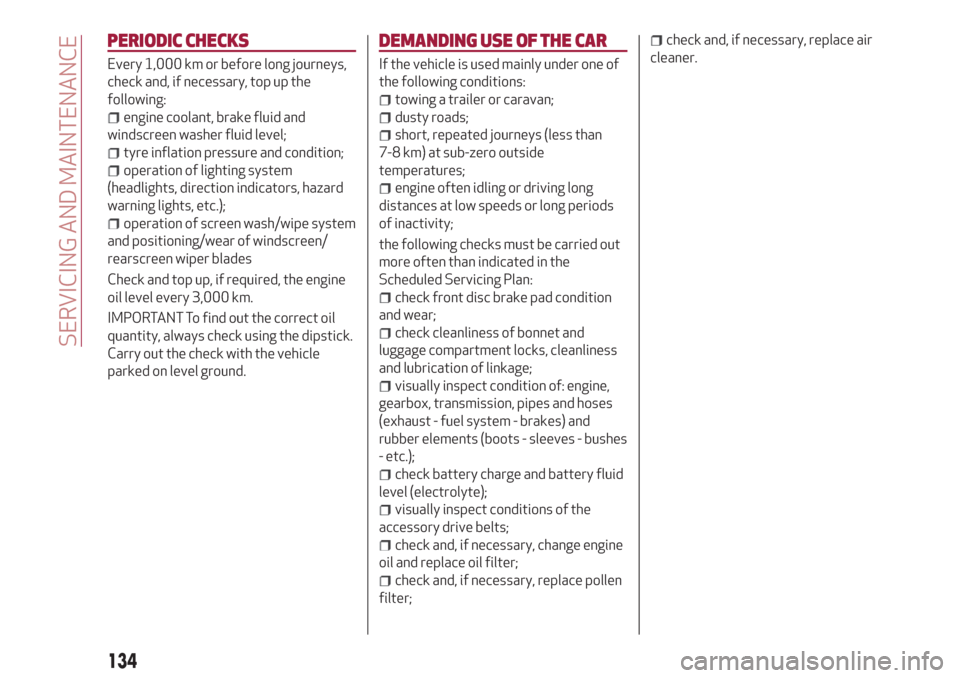
PERIODIC CHECKS
Every 1,000 km or before long journeys,
check and, if necessary, top up the
following:
engine coolant, brake fluid and
windscreen washer fluid level;
tyre inflation pressure and condition;
operation of lighting system
(headlights, direction indicators, hazard
warning lights, etc.);
operation of screen wash/wipe system
and positioning/wear of windscreen/
rearscreen wiper blades
Check and top up, if required, the engine
oil level every 3,000 km.
IMPORTANT To find out the correct oil
quantity, always check using the dipstick.
Carry out the check with the vehicle
parked on level ground.
DEMANDING USE OF THE CAR
If the vehicle is used mainly under one of
the following conditions:
towing a trailer or caravan;
dusty roads;
short, repeated journeys (less than
7-8 km) at sub-zero outside
temperatures;
engine often idling or driving long
distances at low speeds or long periods
of inactivity;
the following checks must be carried out
more often than indicated in the
Scheduled Servicing Plan:
check front disc brake pad condition
and wear;
check cleanliness of bonnet and
luggage compartment locks, cleanliness
and lubrication of linkage;
visually inspect condition of: engine,
gearbox, transmission, pipes and hoses
(exhaust - fuel system - brakes) and
rubber elements (boots - sleeves - bushes
- etc.);
check battery charge and battery fluid
level (electrolyte);
visually inspect conditions of the
accessory drive belts;
check and, if necessary, change engine
oil and replace oil filter;
check and, if necessary, replace pollen
filter;
check and, if necessary, replace air
cleaner.
134
SERVICING AND MAINTENANCE
Page 144 of 216
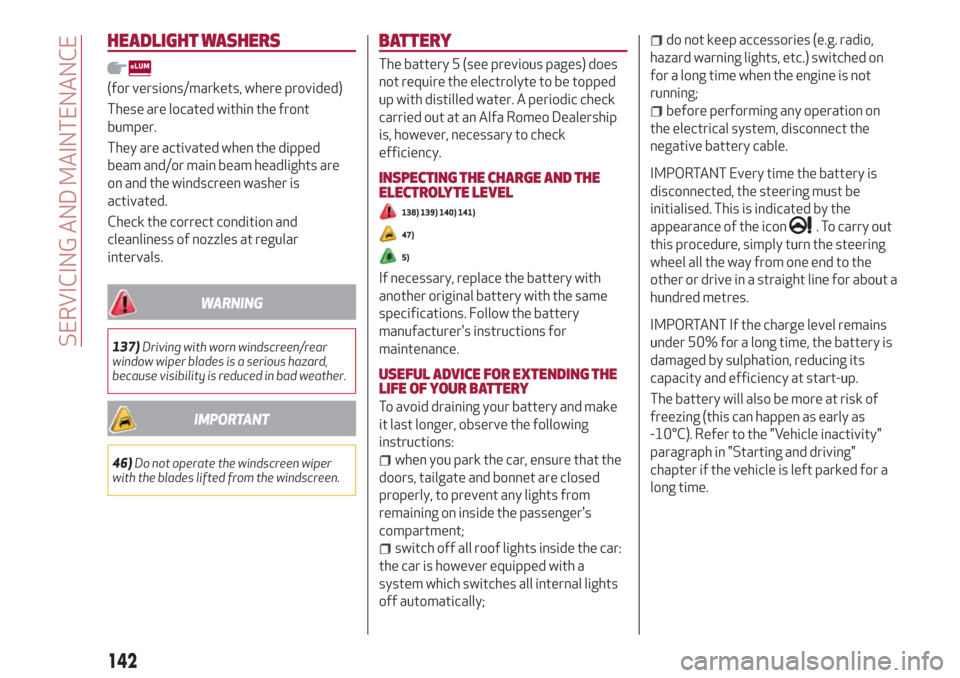
HEADLIGHT WASHERS
(for versions/markets, where provided)
These are located within the front
bumper.
They are activated when the dipped
beam and/or main beam headlights are
on and the windscreen washer is
activated.
Check the correct condition and
cleanliness of nozzles at regular
intervals.
WARNING
137)Driving with worn windscreen/rear
window wiper blades is a serious hazard,
because visibility is reduced in bad weather.
IMPORTANT
46)Do not operate the windscreen wiper
with the blades lifted from the windscreen.
BATTERY
The battery 5 (see previous pages) does
not require the electrolyte to be topped
up with distilled water. A periodic check
carried out at an Alfa Romeo Dealership
is, however, necessary to check
efficiency.
INSPECTING THE CHARGE AND THE
ELECTROLYTE LEVEL
138) 139) 140) 141)
47)
5)
If necessary, replace the battery with
another original battery with the same
specifications. Follow the battery
manufacturer's instructions for
maintenance.
USEFUL ADVICE FOR EXTENDING THE
LIFE OF YOUR BATTERY
To avoid draining your battery and make
it last longer, observe the following
instructions:
when you park the car, ensure that the
doors, tailgate and bonnet are closed
properly, to prevent any lights from
remaining on inside the passenger's
compartment;
switch off all roof lights inside the car:
the car is however equipped with a
system which switches all internal lights
off automatically;
do not keep accessories (e.g. radio,
hazard warning lights, etc.) switched on
for a long time when the engine is not
running;
before performing any operation on
the electrical system, disconnect the
negative battery cable.
IMPORTANT Every time the battery is
disconnected, the steering must be
initialised. This is indicated by the
appearance of the icon
. To carry out
this procedure, simply turn the steering
wheel all the way from one end to the
other or drive in a straight line for about a
hundred metres.
IMPORTANT If the charge level remains
under 50% for a long time, the battery is
damaged by sulphation, reducing its
capacity and efficiency at start-up.
The battery will also be more at risk of
freezing (this can happen as early as
-10°C). Refer to the "Vehicle inactivity"
paragraph in "Starting and driving"
chapter if the vehicle is left parked for a
long time.
142
SERVICING AND MAINTENANCE
Page 146 of 216
BODYWORK
PRESERVING THE BODYWORK
Paint6)48)
Touch up abrasions and scratches
immediately to prevent the formation of
rust.
Maintenance of paintwork consists of
washing the car: the frequency depends
on the conditions and environment where
the car is used. For example, it is
advisable to wash the car more often in
areas with high environmental pollution
or salted roads.
On some versions the car may be
equipped, on request, with an exclusive
opaque paint on the roof which, in order
to be maintained intact, requires special
care: see the instructions in the warning.
49)
To correctly wash the vehicle, follow
these instructions:
if the vehicle is washed remove the
aerial from the roof;
if high pressure jets or cleaners are
used to wash the car, keep a distance of
at least 40 cm from the bodywork to
avoid damage or alteration. Bear in mind
that a build up of water could cause
damage to the car in the long term;
wash the bodywork using a low
pressure jet of water;
wipe a sponge with a slightly soapy
solution over the bodywork, frequently
rinsing the sponge;
rinse well with water and dry with a jet
of air or a chamois leather.
Dry the less visible parts (e.g. door
frames, bonnet, headlight frames, etc.)
with special care, as water may stagnate
more easily in these areas. Do not wash
the car after it has been left in the sun or
with the bonnet hot: this may alter the
shine of the paintwork.
Exterior plastic parts must be cleaned in
the same way as the rest of the vehicle.
IMPORTANT NOTES
Avoid parking under trees; the resin
dropped by trees makes the paintwork
go opaque and increases the possibility
of corrosion.
Bird droppings must be washed off
immediately and thoroughly as the acid
they contain is particularly aggressive.
Windows
Use specific detergents and clean cloths
to prevent scratching or altering the
transparency.
IMPORTANT Wipe the rear window inside
gently with a cloth following the direction
of the filaments to avoid damaging the
heating device.
Front headlights
Use a soft cloth soaked in water and
detergent for washing cars.
IMPORTANT Never use aromatic
substances (e.g. petrol) or ketones (e.g.
acetone) for cleaning the plastic lenses
of the headlights.
IMPORTANT When cleaning with a
pressure washer, keep the water jet at
least 20 cm away from the headlights.
Engine compartment
At the end of every winter, wash the
engine compartment thoroughly, taking
care not to aim the jet of water directly at
the electronic control units or at the
windscreen wiper motors. Have this
operation performed at a specialised
workshop.
IMPORTANT The washing should take
place with the engine cold and the
ignition key in the STOP position. After
the washing operation, make sure that
the various protections (e.g. rubber caps
and guards) have not been removed or
damaged.
144
SERVICING AND MAINTENANCE
Page 188 of 216
When pairing is complete, the connected
services can be accessed by pressing the
Uconnect™LIVEicon on the radio.
Before you can use the connected
services, you must first do the
Bluetooth®pairing, then complete the
activation procedure by following the
instructions that appear in the
Uconnect™LIVEapp.
Settings of the Uconnect™ LIVE
services that can be managed through
the radio
From the dedicated radio menu for
Uconnect™LIVE servicesyou can access
the "Settings" section using the l'icon
In this section you can check the
system options and change them to suit
your own preferences.
System updates
If an update for theUconnect™LIVE
system is available while the
Uconnect™LIVEservices are being used,
the user will be informed with a message
on the radio screen.
Connected services that can be
accessed on the vehicle
The Efficient Drive and my:Car
applications were developed to improve
the customer's driving experience,
therefore they are available in all
markets where theUconnect™LIVE
services can be accessed.If the navigation system is installed in the
radio, accessing theUconnect™LIVE
services enables use of the "Live"
services.
Efficient Drive
The Efficient Drive application allows you
to display your driving behaviour in real
time, in order to help you reach a more
efficient driving style as far as
consumption and emissions are
concerned.
Driving style is evaluated by means of
four indices which monitor the following
parameters: acceleration, deceleration,
gearchange, speed
Display of the Efficient Drive
Press the Efficient Drive button to
interact with the function.
A screen will appear on the radio showing
4 indices: Acceleration, Deceleration,
Speed and Gear. These indices are grey
until the system has enough data to
evaluate the driving style. Once sufficient
data are available, the indices will have
5 colours depending on the evaluation:
dark green (very good), light green,
yellow, orange and red (very bad).
In the event of extended inactivity, the
display will show the average of the
indices until that moment (the "Averageindex"), then the indices will be coloured
again in real time as soon as the vehicle is
restarted.
my:Car
my:Car allows you to keep the "health" of
your vehicle always under control.
my:Car can detect malfunction in real
time and inform the user about the expiry
of the servicing interval. Press the
"my:Car" button to interact with the
application.
The display will show a screen with the
"care:Index" section, which provides all
the detailed information about the status
of the vehicle. Press the "Active
warnings" button to show (if present) the
details of the vehicle's faults which
caused a warning light to switch on.
SETTINGS
Press the SETTINGS button on the front
panel to display the main Settings menu.
NOTE The menu items displayed vary
according to the versions.
Display;
Clock & Date;
Safety/Assistance (for
versions/markets, where provided);
Lights (for versions/markets where
provided);
Doors and Door lock;
Audio;
Phone/Bluetooth;
186
MULTIMEDIA
Page 202 of 216
my:Car
my:Car allows you to keep the "health" of
your vehicle always under control.
my:Car can detect malfunction in real
time and inform the user about the expiry
of the servicing interval. Press the
"my:Car" button to interact with the
application.
The display will show a screen with the
"care:Index" section, which provides all
the detailed information about the status
of the vehicle. Press the "Active
warnings" button to show (if present) the
details of the vehicle's faults which
caused a warning light to switch on.
SETTINGS
Press thebutton on the front panel to
display the main "Settings" menu
NOTE The menu items displayed vary
according to the versions.
Display;
DNA messages;
Clock
Safety & Driving Assist.
Lights;
Doors and Door lock;
Vehicle Shutdown Vehicle;
Audio;
Phone/Bluetooth;
Radio Setup;
System Information.
Restore Default Settings;
Clear personal data;
DRIVING MODE (DNA) INFORMATION
ACTIVATION
This function can be used to select
whether to show Alfa DNA messages
("ON") or not ("OFF") on the display.
VOICE COMMANDS
Using voice commands
The
button on the steering wheel
activates the “Phone” voice recognition
mode, there is a "beep" and the display
shows a suggestion screen inviting the
user to say a command.
If the
button is pressed during a
system voice message, it activates the
“Radio/Media” voice recognition mode
that controls the radio and the USB/SD
players (for versions/markets, where
provided).
You are advised to follow the suggestions
below to be sure that the voice
commands are always recognised by the
system:
speak at a normal volume;
always wait for the "beep" (warning
sound) before speaking;
if possible, try and keep the noise in
the passenger compartment to a
minimum. It is also advisable to close the
windows and sunroof (for
versions/markets, where provided).
for optimum operation, it is advisable
to close the windows and the sun roof
(for versions/markets, where provided)
to avoid external interference;
WARNING Voice commands must always
be given in safe driving conditions, in
compliance with the laws in force in the
country where you are driving and using
the mobile phone correctly.
Multiple choice
In a few specific cases the system cannot
unambiguously identify the given voice
command and asks the user to choose
between a maximum of four alternatives.
The system will propose a numbered list
of the available alternatives, asking the
user to say the associated number.
List of voice commands
GLOBAL voice commands:
HELP
CANCEL
REPEAT
VOICE TUTORIAL
PHONE voice commands:
CALL
DIAL
REDIAL
CALL BACK
DISPLAY THE RECENT CALLS
CALLS MADE
DISPLAY MISSED
CALLS RECEIVED
200
MULTIMEDIA
Page 211 of 216
INDEX
ABS system................60
Active safety systems...........60
AFS adaptive lights (Adaptive
Frontlight System)...........19
Air cleaner.................141
Alarm system................11
Alfa DNA system..............32
Alfa Romeo Code system.........10
ALFATCT..................85
Key removal..............121
ASR (AntiSlip Regulation) system....60
Automatic dual-zone climate
control system.............24
AUX source.............183 ,195
Battery..................142
Battery (recharging)...........140
Bluetooth®..............183 ,194
Bodywork
Boot.....................30
Brakes
brake fluid level............139
Carrying children safely.........68
CBC (Cornering Brake Control)
system..................61
Changing a wheel.............114Checking levels..............135
Cleaning and maintenance
Climate control system..........22
CO
2emissions..............172
Control buttons...............40
Control panel and on-board
instruments...............38
Reconfigurable multifunction
display..................38
Controlli
Front panel control summary
table..................190
Courtesy lights
Front ceiling light............20
Cruise Control...............91
Daytime running lights (DRL)......17
Diesel filter................141
Dimensions................158
Dipped headlights
Direction indicators............19
“Lane change” function........19Display....................40
Doors.....................11
Child safety device...........12
Door central locking/unlocking....11
DST system (Dynamic Steering
Torque)..................60
Dusk sensor . . ...............17
EBD system ................60
Electric sunroof..............28
Electric windows..............26
Controls.................26
Electronic Q2 system ("E-Q2") . .....61
Engine...................150
Engine bonnet . . .............29
Closing..................30
Opening.................29
Engine compartment
Engine oil
ESC (Electronic Stability Control)
system..................60
External courtesy lights..........19
External lights . . .............17
Advice for extending its life.....142
Replacement..............142
Maintenance..............144Bodywork...............144
Car interior...............145
Front headlights ............144
Leather parts..............145
Leather seats..............145
Plastic and coated parts.......145
Seats and fabric parts........145
Bulb replacement...........104Bulb replacement........104 ,105
Engine coolant level.........139
Marking . . ...............149
Washing . . ...............144
Consumption..............139
Level check...............139
Page 212 of 216
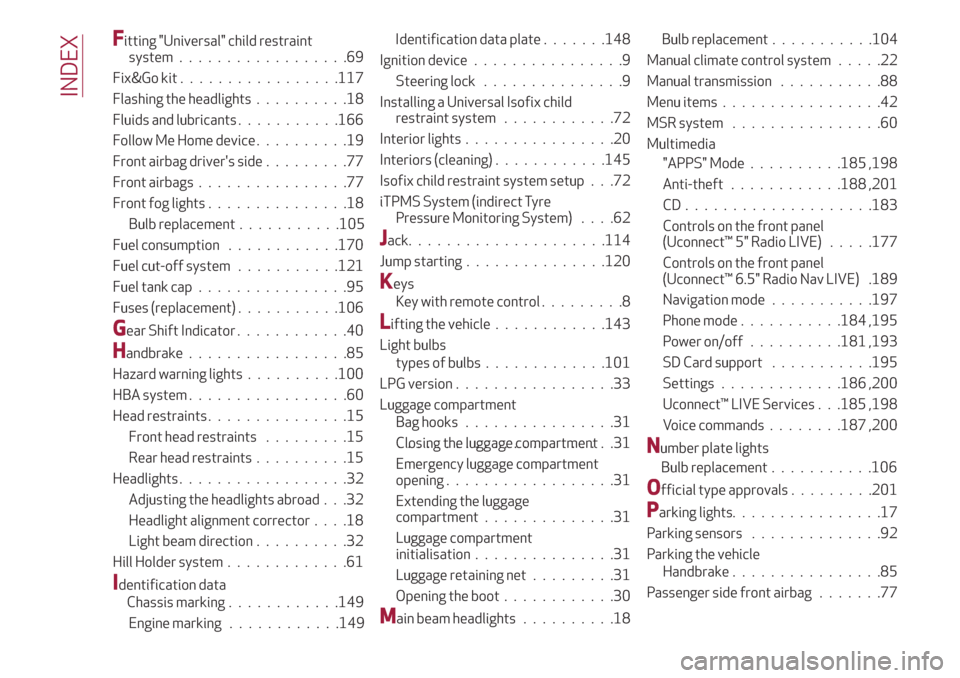
Fitting "Universal" child restraint
system..................69
Fix&Go kit.................117
Flashing the headlights..........18
Fluids and lubricants...........166
Follow Me Home device..........19
Front airbag driver's side.........77
Front airbags................77
Front fog lights...............18
Fuel consumption............170
Fuel cut-off system...........121
Fuel tank cap................95
Fuses (replacement)...........106
Gear Shift Indicator............40
Handbrake.................85
Hazard warning lights..........100
HBA system.................60
Head restraints...............15
Front head restraints.........15
Rear head restraints..........15
Headlights..................32
Adjusting the headlights abroad . . .32
Headlight alignment corrector....18
Light beam direction..........32
Hill Holder system.............61
Identification dataIgnition device................9
Steering lock...............9
Installing a Universal Isofix child
restraint system............72
Interior lights................20
Interiors (cleaning)............145
Isofix child restraint system setup . . .72
iTPMS System (indirect Tyre
Pressure Monitoring System)....62
Jack.....................114
Jump starting...............120
Keys
Key with remote control.........8
Lifting the vehicle............143
Light bulbs
types of bulbs.............101
LPG version.................33
Luggage compartment
Bag hooks................31
Closing the luggage compartment.......................31
Emergency luggage compartment
opening..................31
Extending the luggage
compartment..............31
Luggage compartment
initialisation...............31
Luggage retaining net.........31
Opening the boot............30
Main beam headlights..........18Manual climate control system.....22
Manual transmission...........88
Menu items.................42
MSR system . . ..............60
Multimedia
"APPS" Mode..........185 ,198
Anti-theft............188 ,201
CD....................183
Controls on the front panel
(Uconnect™ 5" Radio LIVE).....177
Controls on the front panel
(Uconnect™ 6.5" Radio Nav LIVE) .189
Navigation mode...........197
Phone mode...........184 ,195
Power on/off..........181 ,193
SD Card support...........195
Settings.............186 ,200
Uconnect™ LIVE Services . . .185 ,198
Voice commands........187 ,200
Number plate lights
Official type approvals.........201
Parkinglights................17
Parking sensors ..............92
Parking the vehicle
Handbrake................85
Passenger side front airbag.......77
INDEX
Bulb replacement...........105
Chassis marking............149
Engine marking............149Bulb replacement...........106 Bulb replacement...........104 Identification data plate.......148
Page 213 of 216
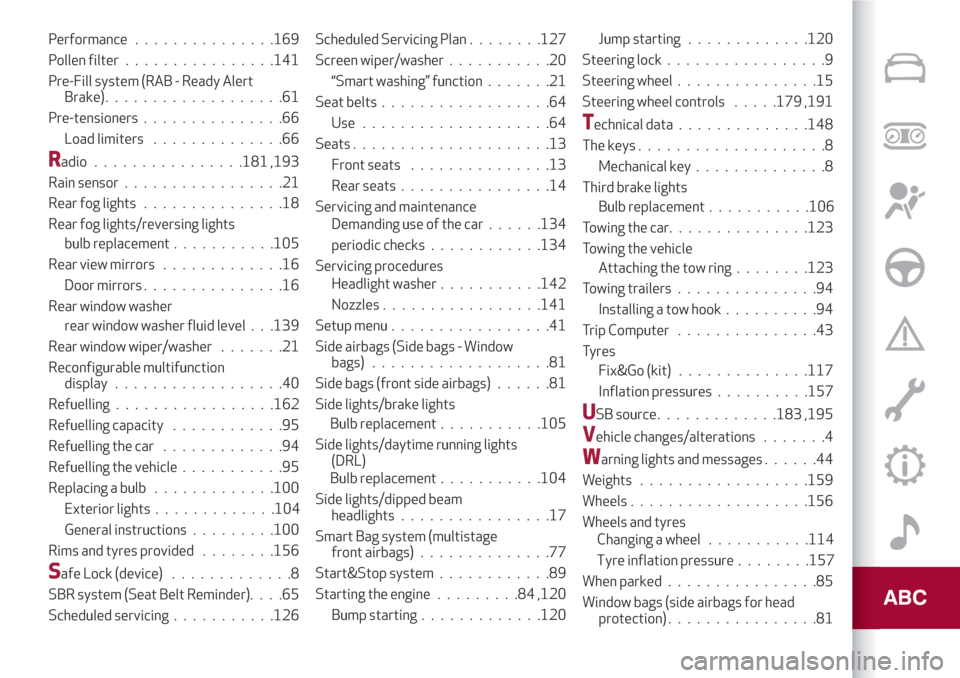
Performance...............169
Pollen filter ................141
Pre-Fill system (RAB - Ready Alert
Brake)...................61
Pre-tensioners...............66
Load limiters..............66
Radio................181 ,193
Rain sensor.................21
Rear fog lights...............18
Rear fog lights/reversing lights
bulb replacement...........105
Rear view mirrors.............16
Door mirrors...............16
Rear window washer
rear window washer fluid level . . .139
Rear window wiper/washer.......21
Reconfigurable multifunction
display..................40
Refuelling.................162
Refuelling capacity............95
Refuelling the car.............94
Refuelling the vehicle...........95
Replacing a bulb.............100
General instructions.........100
Rims and tyres provided........156
Safe Lock (device).............8
SBR system (Seat Belt Reminder)....65
Scheduled servicing...........126Scheduled Servicing Plan........127
Screen wiper/washer...........20
“Smart washing” function.......21
Seat belts..................64
Use....................64
Seats.....................13
Front seats...............13
Rear seats................14
Servicing and maintenance
Demanding use of the car......134
periodic checks............134
Servicing procedures
Headlight washer...........142
Nozzles.................141
Setup menu.................41
Side airbags (Side bags - Window
bags)...................81
Side bags (front side airbags)......81
Side lights/brake lights
Side lights/daytime running lights
(DRL)
Side lights/dipped beam
headlights................17
Smart Bag system (multistage
front airbags)..............77
Start&Stop system............89
Starting the engine.........84,120
Bump starting.............120Jump starting.............120
Steering lock.................9
Steering wheel . . .............15
Steering wheel controls.....179 ,191
Technical data . .............148
The keys....................8
Mechanical key..............8
Third brake lights
Towing the car...............123
Towing the vehicle
Attaching the tow ring........123
Towing trailers . . .............94
Installing a tow hook..........94
Trip Computer . . .............43
Tyres
Fix&Go (kit)..............117
USB source.............183 ,195
Vehicle changes/alterations.......4
Warning lights and messages . .....44
Weights..................159
Wheels...................156
Wheels and tyres
When parked................85
Window bags (side airbags for head
protection)................81
Exterior lights.............104Bulb replacement...........105
Bulb replacement...........104Bulb replacement...........106
Inflation pressures..........157
Changing a wheel...........114
Tyre inflation pressure........157