light Alfa Romeo MiTo 2016 Owners Manual
[x] Cancel search | Manufacturer: ALFA ROMEO, Model Year: 2016, Model line: MiTo, Model: Alfa Romeo MiTo 2016Pages: 280, PDF Size: 8.52 MB
Page 198 of 280
IMPORTANT
Avoid parking under trees; the resin dropped by trees makes the
paintwork go opaque and increases the possibility of corrosion.
Bird droppings must be washed off immediately and thoroughly as the
acid they contain is particularly aggressive.
Windows
Use specific detergents and clean cloths to prevent scratching or
altering the transparency.
IMPORTANT Wipe the rear window inside gently with a cloth following
the direction of the filaments to avoid damaging the heating device.
Front headlights
Use a soft cloth soaked in water and detergent for washing cars.
IMPORTANT Never use aromatic substances (e.g. petrol) or ketenes
(e.g. acetone) for cleaning the plastic lenses of the front headlights.
IMPORTANT When cleaning with a pressure washer, keep the water jet
at least 20 cm away from the headlights.
Engine compartment
At the end of every winter, wash the engine compartment thoroughly,
taking care not to aim the jet of water directly at the electronic control
units or at the windscreen wiper motors. Have this operation
performed at a specialised workshop.
IMPORTANT The washing should take place with the engine cold and
the ignition key in the STOP position. After the washing operation,
make sure that the various protections (e.g. rubber caps and guards)
have not been removed or damaged.INTERIORS
Periodically check for water puddles under the mats that could cause
the panels to rust.
Never use flammable products, such as petrol ether or
rectified petrol to clean the inside of the car. The
electrostatic charges which are generated by rubbing
during the cleaning operation may cause a fire.
Do not keep aerosol cans in the car: they might
explode. Aerosol cans must not be exposed to a
temperature exceeding 50°C. When the car is exposed
to sunlight, the internal temperature can greatly exceed this
value.
SEATS AND FABRIC PARTS
Remove dust with a soft brush or a vacuum cleaner. It is advisable to
use a moist brush on velvet upholstery. Rub the seats with a sponge
soaked in a solution of neutral detergent and water.
CLEANING ALCANTARA SEATS
Alcantara trim can be treated and cleaned easily in the same way as
the other trims. The same indications given for cleaning fabrics are
also therefore applicable for this trim.
194
GETTING TO KNOW
YOUR CAR
SAFETY
STARTING AND
DRIVING
IN AN EMERGENCY
SERVICING AND
MAINTENANCE
TECHNICAL
SPECIFICATIONS
INDEX
Page 199 of 280
LEATHER SEATS
(for versions/markets, where provided)
Remove the dry dirt with a buckskin or slightly damp cloth, without
exercising too much pressure. Remove liquid or oil stains using a dry
absorbent cloth, without rubbing. Then clean with a soft cloth or
buckskin cloth dampened with water and neutral soap. If the stain
persists, use specific products and observe the instructions carefully.
IMPORTANT Never use alcohol. Make sure that the cleaning products
used contain no alcohol or alcohol derivatives, even in small quantities.
PLASTIC AND COATED PARTS
Clean interior plastic parts with a damp cloth (if possible made from
microfibre), and a solution of water and neutral, non-abrasive
detergent. To clean oily or persistent stains, use specific products free
from solvents and designed to maintain the original appearance
and colour of the components.Remove any dust using a microfibre cloth, if necessary moistened with
water. The use of paper tissues is not recommended as these may
leave residues.
Never use alcohol, petrols and derivatives to clean the
dashboard and instrument panel lens.
LEATHER PARTS
(for versions/markets, where provided)
Use only water and neutral soap to clean these parts. Never use
alcohol or alcohol-based products. Before using a specific product for
cleaning interiors, make sure that it does not contain alcohol and/or
alcohol based substances.
195
GETTING TO KNOW
YOUR CAR
SAFETY
STARTING AND
DRIVING
IN AN EMERGENCY
SERVICING AND
MAINTENANCE
TECHNICAL
SPECIFICATIONS
INDEX
Page 225 of 280
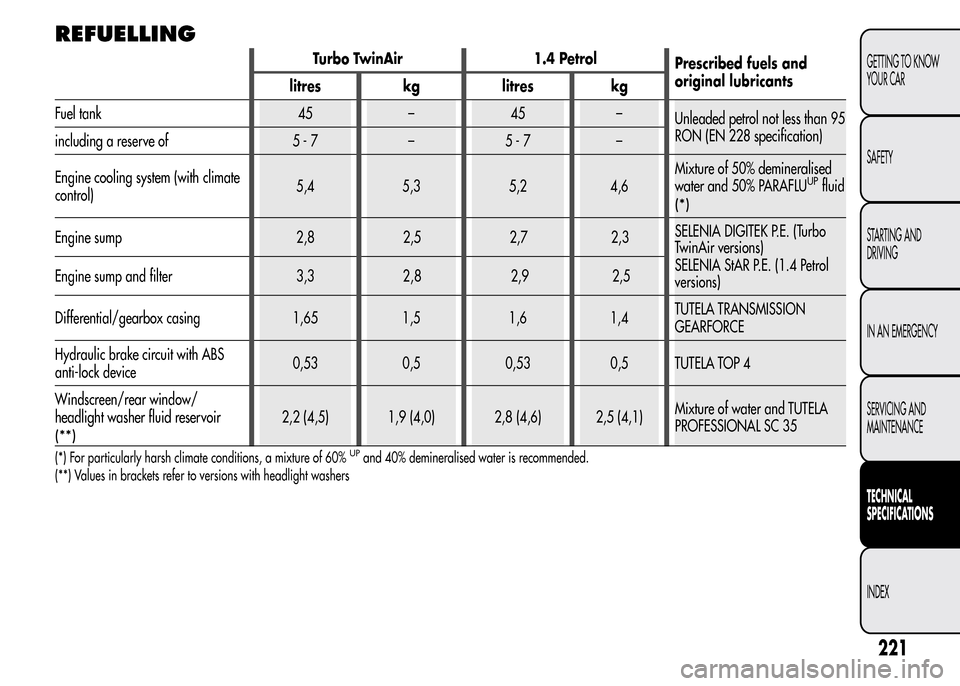
REFUELLING
Turbo TwinAir 1.4 Petrol
Prescribed fuels and
original lubricants
litres kg litres kg
Fuel tank 45 – 45 –
Unleaded petrol not less than 95
RON (EN 228 specification)
including a reserve of 5 - 7 – 5 - 7 –
Engine cooling system (with climate
control)5,4 5,3 5,2 4,6Mixture of 50% demineralised
water and 50% PARAFLU
UPfluid
(*)
Engine sump 2,8 2,5 2,7 2,3SELENIA DIGITEK P.E. (Turbo
TwinAir versions)
SELENIA StAR P.E. (1.4 Petrol
versions) Engine sump and filter 3,3 , 2,9 2,5
Differential/gearbox casing 1,65 1,5 1,6 1,4TUTELA TRANSMISSION
GEARFORCE
Hydraulic brake circuit with ABS
anti-lock device0,53 0,5 0,53 0,5 TUTELA TOP 4
Windscreen/rear window/
headlight washer fluid reservoir
(**)
2,2 (4,5) 1,9 (4,0) 2,8 (4,6) 2,5 (4,1)Mixture of water and TUTELA
PROFESSIONAL SC 35
(*) For particularly harsh climate conditions, a mixture of 60%UPand 40% demineralised water is recommended.
(**) Values in brackets refer to versions with headlight washers
221
GETTING TO KNOW
YOUR CAR
SAFETY
STARTING AND
DRIVING
IN AN EMERGENCY
SERVICING AND
MAINTENANCE
TECHNICAL
SPECIFICATIONS
INDEX
28
Page 226 of 280
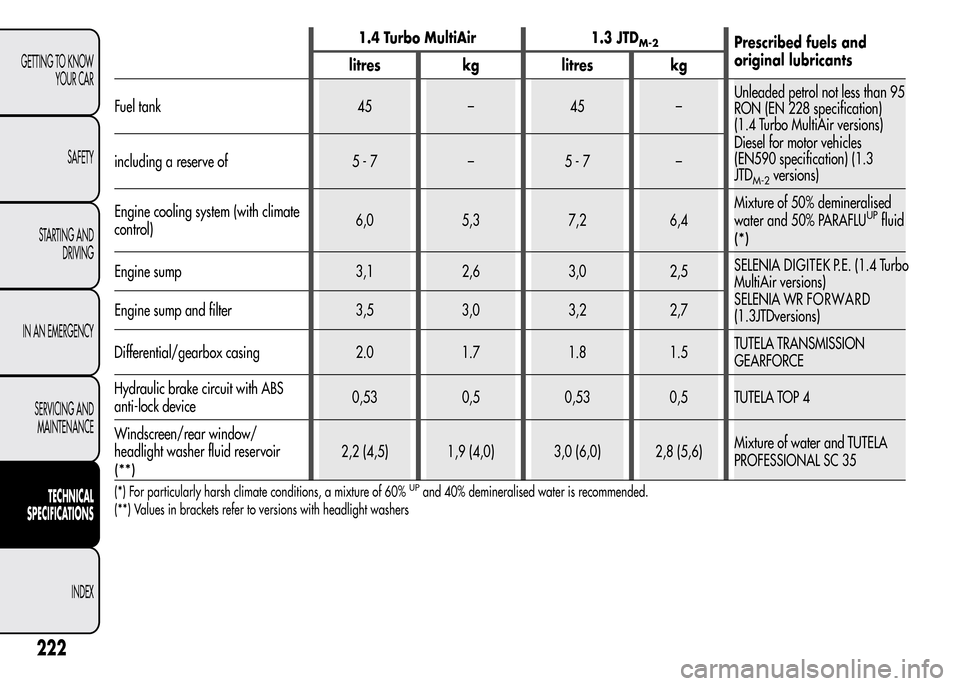
1.4 Turbo MultiAir 1.3 JTDM-2Prescribed fuels and
original lubricants
litres kg litres kg
Fuel tank 45 – 45 –Unleaded petrol not less than 95
RON (EN 228 specification)
(1.4 Turbo MultiAir versions)
Diesel for motor vehicles
(EN590 specification) (1.3
JTD
M-2versions) including a reserve of 5 - 7 – 5 - 7 –
Engine cooling system (with climate
control)6,0 5,3 7,2 6,4Mixture of 50% demineralised
water and 50% PARAFLU
UPfluid
(*)
Engine sump 3,1 2,6 3,0 2,5SELENIADIGITEK P.E. (1.4 Turbo
MultiAir versions)
SELENIA WRFORWARD
(1.3
JTDversions) Engine sump and filter 3,5 3,0 3,2 2,7
Differential/gearbox casing 2.0 1.7 1.8 1.5TUTELA TRANSMISSION
GEARFORCE
Hydraulic brake circuit with ABS
anti-lock device0,53 0,5 0,53 0,5 TUTELA TOP 4
Windscreen/rear window/
headlight washer fluid reservoir
(**)
2,2 (4,5) 1,9 (4,0) 3,0 (6,0) 2,8 (5,6)Mixture of water and TUTELA
PROFESSIONAL SC 35
(*) For particularly harsh climate conditions, a mixture of 60%UPand 40% demineralised water is recommended.
(**) Values in brackets refer to versions with headlight washers
222
GETTING TO KNOW
YOUR CAR
SAFETY
STARTING AND
DRIVING
IN AN EMERGENCY
SERVICING AND
MAINTENANCE
TECHNICAL
SPECIFICATIONS
INDEX
Page 227 of 280
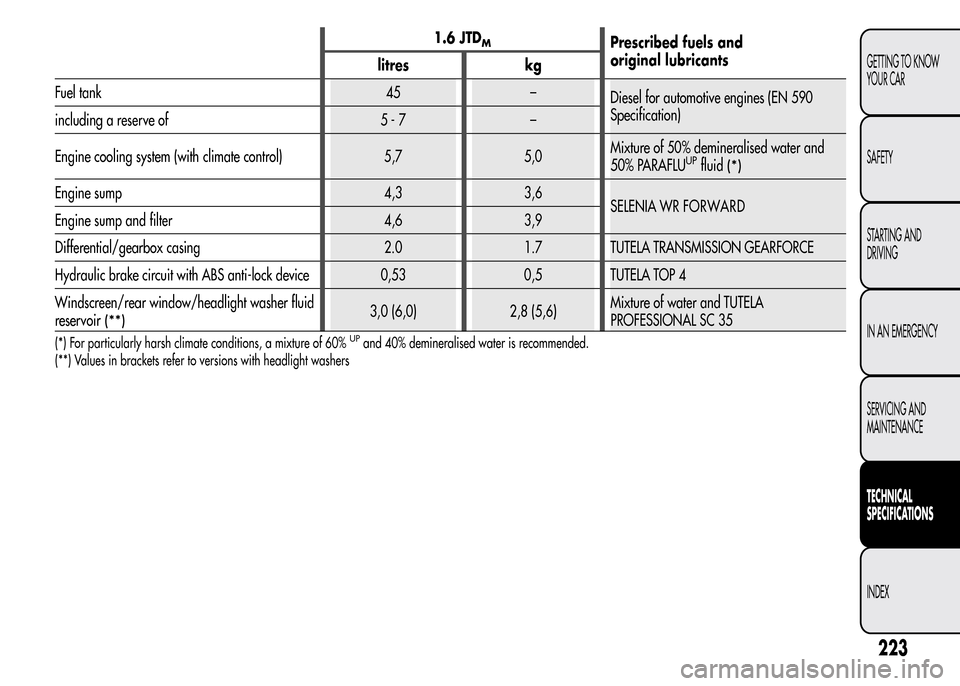
1.6 JTDMPrescribed fuels and
original lubricants
litres kg
Fuel tank 45 –
Diesel for automotive engines (EN 590
Specification)
including a reserve of 5 - 7 –
Engine cooling system (with climate control) 5,7 5,0Mixture of 50% demineralised water and
50% PARAFLU
UPfluid(*)
Engine sump 4,3 3,6
SELENIA WRFORWARD
Engine sump and filter 4,6 3,9
Differential/gearbox casing 2.0 1.7 TUTELA TRANSMISSION GEARFORCE
Hydraulic brake circuit with ABS anti-lock device 0,53 0,5 TUTELA TOP 4
Windscreen/rear window/headlight washer fluid
reservoir
(**)3,0 (6,0) 2,8 (5,6)Mixture of water and TUTELA
PROFESSIONAL SC 35
(*) For particularly harsh climate conditions, a mixture of 60%UPand 40% demineralised water is recommended.
(**) Values in brackets refer to versions with headlight washers
223
GETTING TO KNOW
YOUR CAR
SAFETY
STARTING AND
DRIVING
IN AN EMERGENCY
SERVICING AND
MAINTENANCE
TECHNICAL
SPECIFICATIONS
INDEX
Page 235 of 280
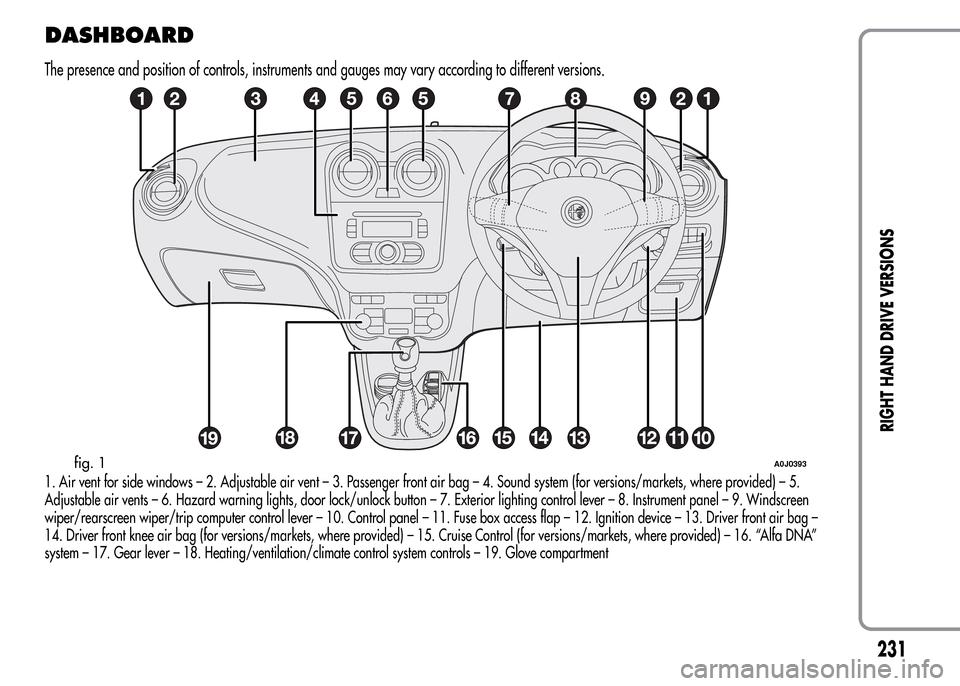
DASHBOARD
The presence and position of controls, instruments and gauges may vary according to different versions.
1. Air vent for side windows – 2. Adjustable air vent – 3. Passenger front air bag – 4. Sound system (for versions/markets, where provided) – 5.
Adjustable air vents – 6. Hazard warning lights, door lock/unlock button – 7. Exterior lighting control lever – 8. Instrument panel – 9. Windscreen
wiper/rearscreen wiper/trip computer control lever – 10. Control panel – 11. Fuse box access flap – 12. Ignition device – 13. Driver front air bag –
14. Driver front knee air bag (for versions/markets, where provided) – 15. Cruise Control (for versions/markets, where provided) – 16. “Alfa DNA”
system – 17. Gear lever – 18. Heating/ventilation/climate control system controls – 19. Glove compartment
fig. 1A0J0393
231
RIGHT HAND DRIVE VERSIONS
Page 236 of 280
CONTROL PANEL AND INSTRUMENTS
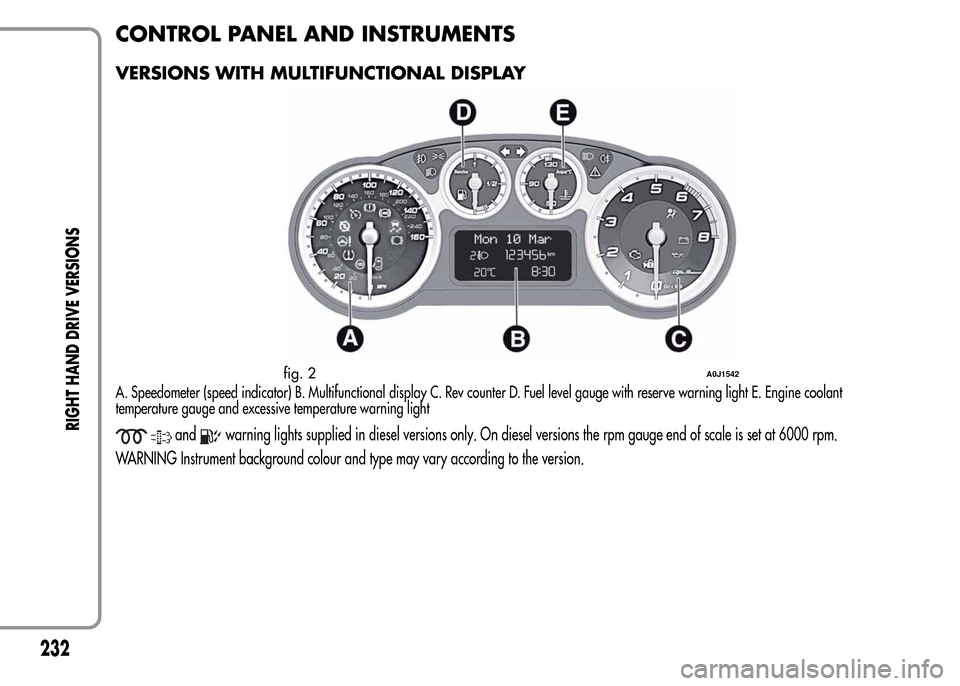
VERSIONS WITH MULTIFUNCTIONAL DISPLAY
A. Speedometer (speed indicator) B. Multifunctional display C. Rev counter D. Fuel level gauge with reserve warning light E. Engine coolant
temperature gauge and excessive temperature warning light
andwarning lights supplied in diesel versions only. On diesel versions the rpm gauge end of scale is set at 6000 rpm.
WARNING Instrument background colour and type may vary according to the version.
fig. 2A0J1542
232
RIGHT HAND DRIVE VERSIONS
Page 237 of 280
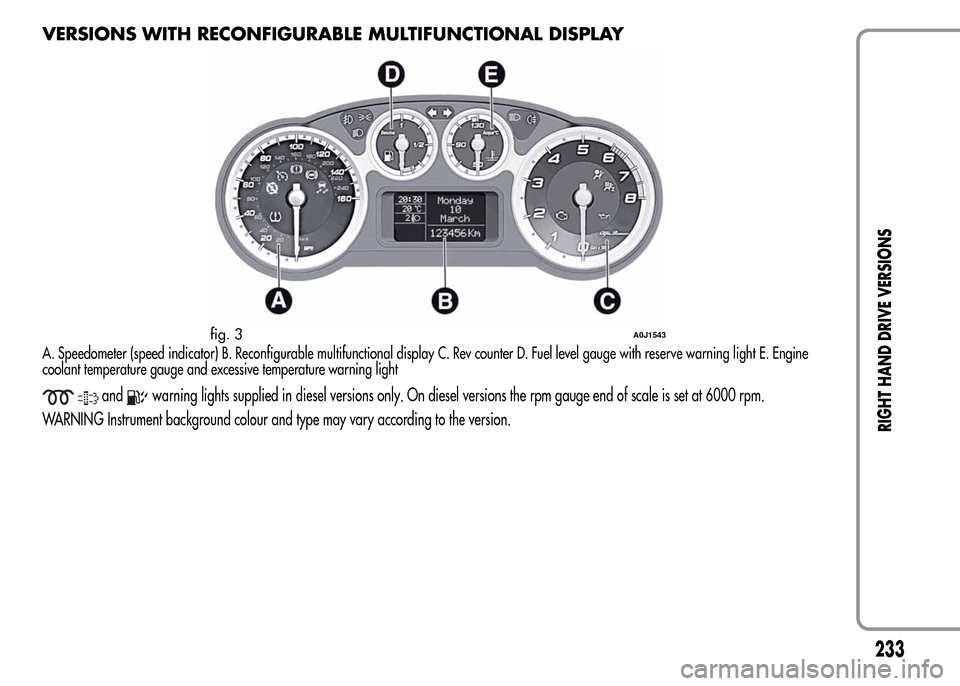
VERSIONS WITH RECONFIGURABLE MULTIFUNCTIONAL DISPLAY
A. Speedometer (speed indicator) B. Reconfigurable multifunctional display C. Rev counter D. Fuel level gauge with reserve warning light E. Engine
coolant temperature gauge and excessive temperature warning light
andwarning lights supplied in diesel versions only. On diesel versions the rpm gauge end of scale is set at 6000 rpm.
WARNING Instrument background colour and type may vary according to the version.
fig. 3A0J1543
233
RIGHT HAND DRIVE VERSIONS
Page 243 of 280
INTRODUCTION
The radio has been designed according to the passenger
compartment's specific characteristics and with a personalised
design that complements the style of the dashboard.
The instructions for use are given below. We recommend that you
read them carefully.
ADVICE
Road safety
Familiarise yourself with the various car radio functions (e.g.
storing radio stations), before starting to drive.
Reception conditions
Reception conditions change constantly while driving. Reception
may be interfered with by the presence of mountains, buildings or
bridges, or when you are far away from the broadcaster.
NoteThe volume may be increased when receiving traffic alerts
and news.
If the volume is too loud this could be
dangerous for the driver and for passengers
when driving in traffic. Always adjust the
volume so that you can still hear background noises.
Maintenance and care
Only clean the cover with a soft, anti-static cloth. Cleaning and
polishing products may damage the surface.
CD
Dirt, scratches or any distortions on CDs may cause skipping
during playback and poor sound quality. Follow these tips for
optimum playback conditions:
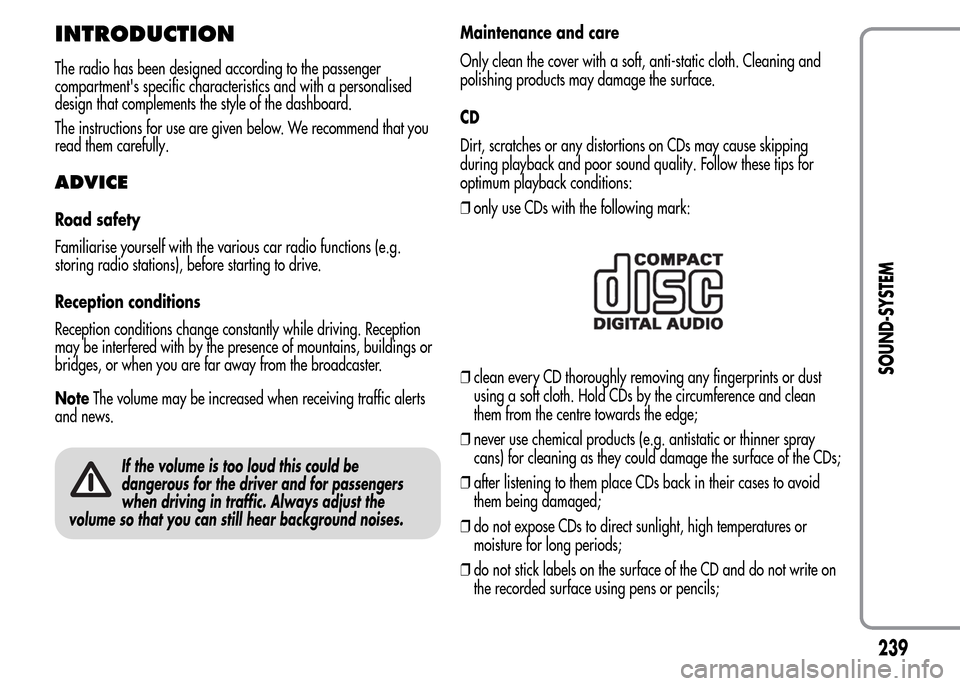
❒only use CDs with the following mark:
❒clean every CD thoroughly removing any fingerprints or dust
using a soft cloth. Hold CDs by the circumference and clean
them from the centre towards the edge;
❒never use chemical products (e.g. antistatic or thinner spray
cans) for cleaning as they could damage the surface of the CDs;
❒after listening to them place CDs back in their cases to avoid
them being damaged;
❒do not expose CDs to direct sunlight, high temperatures or
moisture for long periods;
❒do not stick labels on the surface of the CD and do not write on
the recorded surface using pens or pencils;
239
SOUND-SYSTEM
Page 253 of 280
Select the value “0” to set the same level for the front and
rear audio outputs.
LOUDNESS FUNCTION
The Loudness function improves the volume of the sound whilst
listening at low volumes, increasing the bass and treble.
To activate/deactivate the function, select the Loudness setting of
the AUDIO menu using the
orbuttons.
The condition of the function (on or off) is shown on the display for
a few seconds by the wording “Loudness On” or “Loudness Off”.
PRESET/USER/CLASSIC/ROCK/JAZZ
FUNCTIONS
(equaliser activation/deactivation)
The built-in equaliser can be activated/deactivated. When the
equaliser function is off, the audio settings can only be changed by
adjusting the “Bass” and “Treble” settings, whereas when the
function is on, the acoustic curves can be adjusted.
To deactivate the equaliser, select the “EQ Preset” function using the
buttons
or.
To activate the equaliser, use the
orbuttons to select one of
the adjustments:
❒“FM/AM/CD...EQ User” (adjustment of 7 equaliser bands that
can be changed by the user);
❒“Classic” (equaliser preset for optimal classical music sound);
❒“Rock” (equaliser preset for optimal rock and pop music sound);
❒“Jazz” (equaliser preset for optimal jazz music sound).
When one of the equaliser settings is activated the letters “EQ”
light up.
USER EQ SETTINGS FUNCTION
(equaliser settings only if the USER setting is selected)
To set a personalised equaliser adjustment, set to “User” using the
orbutton and press the MENU button.
A 7-bar graph appears on the display, in which each bar
represents a frequency.
Select the bar to adjust using the
orbuttons; the selected bar
will start to flash and it can be adjusted using the
orbuttons.
To store the setting, press the AUDIO button again. The display will
show the active source at that time followed by the word “USER”. If
the mode is “FM”, for example, the display will show the text “FM
EQ User”.
MENU
MENU button functions
Press the MENU button briefly to activate the Menu function. The
display will show the first menu item that can be adjusted (AF) (“AF
Switching On” on the display).
Use the
orbuttons to scroll through the menu functions. To
change the setting of the function selected use the
orbuttons.
The current status of the function selected will be shown on the
display.
The functions managed by the Menu are:
❒AF SWITCHING (ON/OFF);
❒TRAFFIC INFORMATION (ON/OFF);
❒REGIONAL MODE regional programmes (ON/OFF);
❒MP3 DISPLAY (CD MP3 display settings);
249
SOUND-SYSTEM