start stop button Alfa Romeo MiTo 2016 User Guide
[x] Cancel search | Manufacturer: ALFA ROMEO, Model Year: 2016, Model line: MiTo, Model: Alfa Romeo MiTo 2016Pages: 280, PDF Size: 8.52 MB
Page 83 of 280
ELECTRIC WINDOWS
These are equipped with an automatic function to raise and lower the
driver side front window.
CONTROLS
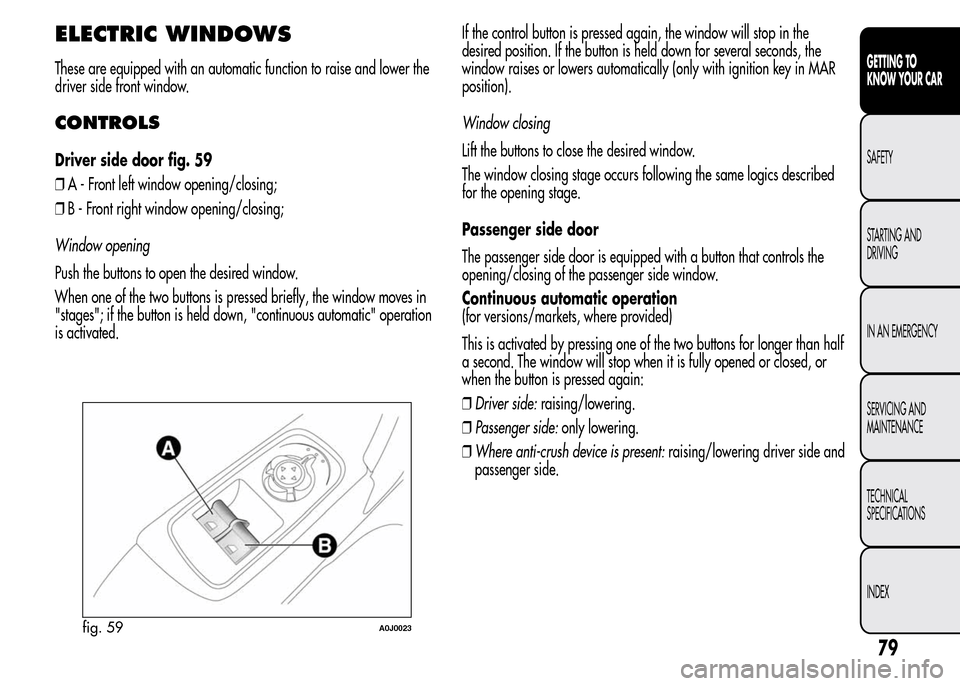
Driver side door fig. 59
❒A - Front left window opening/closing;
❒B - Front right window opening/closing;
Window opening
Push the buttons to open the desired window.
When one of the two buttons is pressed briefly, the window moves in
"stages"; if the button is held down, "continuous automatic" operation
is activated.If the control button is pressed again, the window will stop in the
desired position. If the button is held down for several seconds, the
window raises or lowers automatically (only with ignition key in MAR
position).
Window closing
Lift the buttons to close the desired window.
The window closing stage occurs following the same logics described
for the opening stage.
Passenger side door
The passenger side door is equipped with a button that controls the
opening/closing of the passenger side window.
Continuous automatic operation
(for versions/markets, where provided)
This is activated by pressing one of the two buttons for longer than half
a second. The window will stop when it is fully opened or closed, or
when the button is pressed again:
❒Driver side:raising/lowering.
❒Passenger side:only lowering.
❒Where anti-crush device is present:raising/lowering driver side and
passenger side.
fig. 59A0J0023
79
GETTING TO
KNOW YOUR CAR
SAFETY
STARTING AND
DRIVING
IN AN EMERGENCY
SERVICING AND
MAINTENANCE
TECHNICAL
SPECIFICATIONS
INDEX
Page 84 of 280
Anti-crush safety device
(for versions/markets, where provided)
The car’s anti-crush function is active as the windows are being raised.
This safety system detects the presence of an obstacle during the
window closing travel and intervenes by stopping and reversing the
window travel, depending on its position. This device is also useful
if the windows are activated accidentally by children on board the car.
The anti-crush safety function is active both during the manual and
the automatic operation of the window. When the anti-crush system is
activated, the window travel is immediately interrupted and then
reversed. The window cannot be operated in any way during this time.
IMPORTANT If the anti-crush protection intervenes 5 consecutive times
within a minute or is faulty, the automatic closing operation of the
window is inhibited, only allowing it in steps of half a second with the
button released for the subsequent manoeuvre.
In order to restore the correct operation of the system, the relevant
window must be lowered.
IMPORTANT With ignition key at STOP or removed, the electric
windows remain active for about 3 minutes and are deactivated when
a door is opened.
IMPORTANT With the anti-crush system, when the
button on the
remote control is pressed for longer than 2 seconds the windows will
open, whilst if the
button is pressed for longer than 2 seconds
the windows will close.
The system conforms to the 2000/4/EC standard concerning
the safety of passengers leaning out of the passenger
compartment.
Incorrect use of the electric windows may be
dangerous. Before and during operation, always check
that no passenger is at risk of being injured directly
by the moving window or by objects getting caught in or
dragged by the window. When leaving the car, always remove
the key from the ignition to prevent accidental operation of the
electric windows from being a hazard for those still on board.
Electric window system initialisation
The system must be re-initialised after disconnecting the battery or if
the relevant protection fuse is blown.
Initialisation procedure:
❒fully close the window to initialise with manual operation;
❒after the window has reached the upper end of travel, hold down
the closing control for at least 1 second.
For versions/markets where provided, after a break in power supply
for the control units (battery replaced or disconnected or protective
fuses for the electric window control units replaced), the automatic
operation of the windows must be restored.
The restoration procedure must be performed as described below with
the doors closed:
❒completely open the driver's door window, holding the operating
button down for at least three seconds after the (lower) end of travel
position;
❒completely raise the driver side window and hold the button down
for at least 3 seconds once the (upper) end of travel position has
been reached;
80
GETTING TO
KNOW YOUR CAR
SAFETY
STARTING AND
DRIVING
IN AN EMERGENCY
SERVICING AND
MAINTENANCE
TECHNICAL
SPECIFICATIONS
INDEX
Page 91 of 280
HEADLIGHTS
LIGHT BEAM DIRECTION
The correct orientation of the headlights is important for the driver's
comfort and safety as well as for all other road users. This is also
covered by a specific rule of the highway code.
The headlights must be correctly aligned to ensure the best visibility
conditions for yourself and others when driving with lights on. To check
and, if necessary, adjust, contact Alfa Romeo Authorized Services.
HEADLIGHT ALIGNMENT CORRECTOR
This device works with the ignition key in the MAR position and the
dipped headlights on.
Headlight alignment adjustment
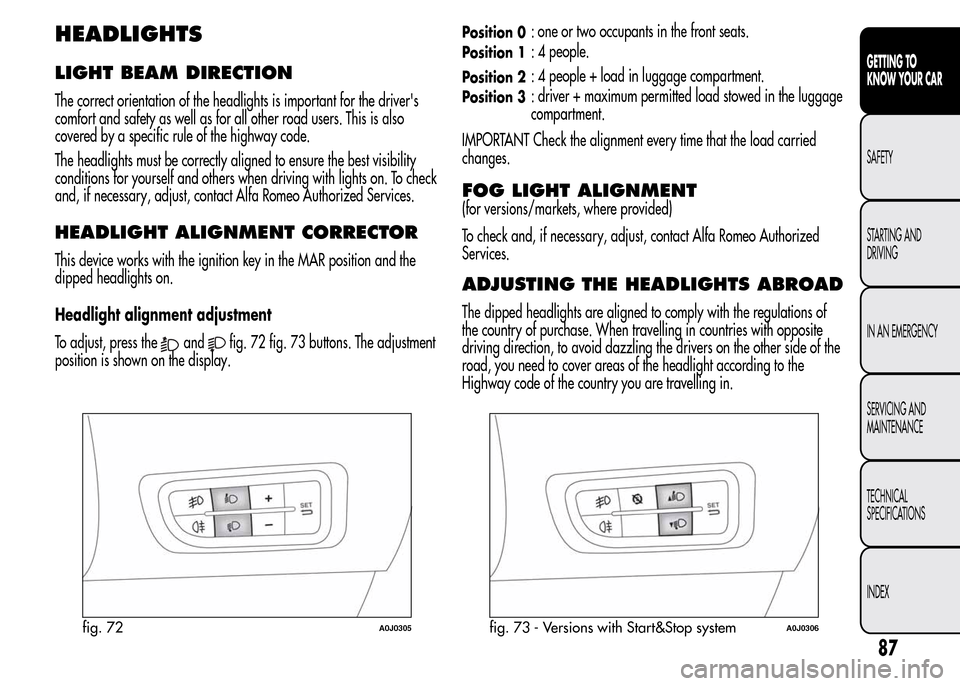
To adjust, press the
andfig. 72 fig. 73 buttons. The adjustment
position is shown on the display.
Position 0: one or two occupants in the front seats.
Position 1: 4 people.
Position 2: 4 people + load in luggage compartment.
Position 3: driver + maximum permitted load stowed in the luggage
compartment.
IMPORTANT Check the alignment every time that the load carried
changes.
FOG LIGHT ALIGNMENT
(for versions/markets, where provided)
To check and, if necessary, adjust, contact Alfa Romeo Authorized
Services.
ADJUSTING THE HEADLIGHTS ABROAD
The dipped headlights are aligned to comply with the regulations of
the country of purchase. When travelling in countries with opposite
driving direction, to avoid dazzling the drivers on the other side of the
road, you need to cover areas of the headlight according to the
Highway code of the country you are travelling in.
fig. 72A0J0305fig. 73 - Versions with Start&Stop systemA0J0306
87
GETTING TO
KNOW YOUR CAR
SAFETY
STARTING AND
DRIVING
IN AN EMERGENCY
SERVICING AND
MAINTENANCE
TECHNICAL
SPECIFICATIONS
INDEX
Page 99 of 280
START&STOP SYSTEM
(for versions/markets, where provided)
The Start&Stop system automatically stops the engine each time the car
is stationary and starts it again when the driver wants to move off.
In this way, the efficiency of the car is increased, by reducing
consumption, emissions of harmful gases and noise pollution.
OPERATING MODES
Engine stopping mode
With the car stopped, the engine stops with gearbox in neutral and
clutch pedal released.
NoteThe engine can only be stopped automatically over about 10
km/h, to prevent the engine from being repeatedly stopped when
driving at walking pace.
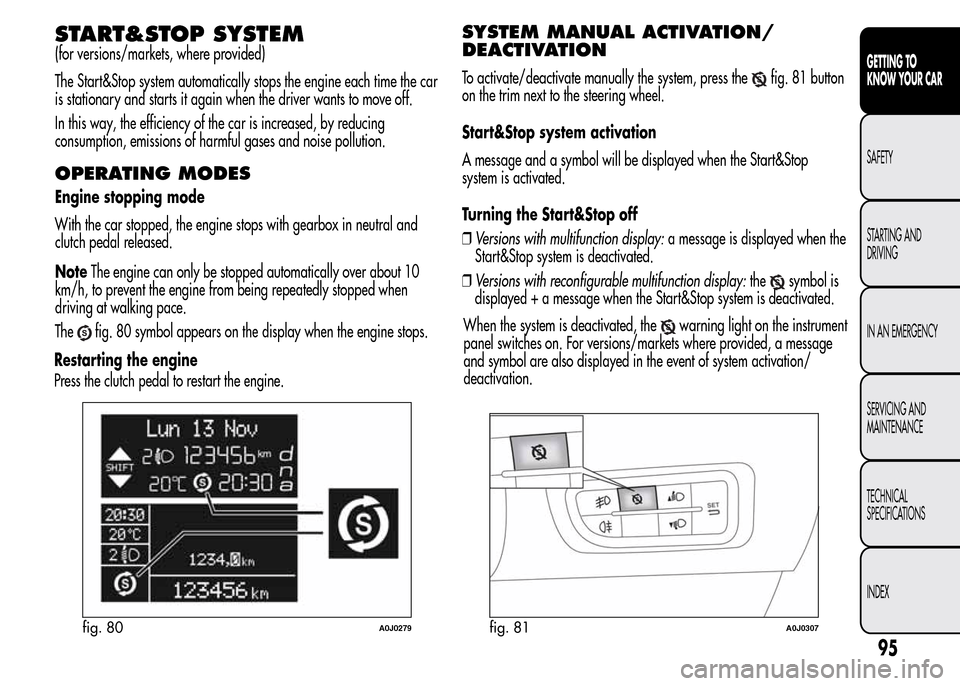
The
fig. 80 symbol appears on the display when the engine stops.
Restarting the engine
Press the clutch pedal to restart the engine.
SYSTEM MANUAL ACTIVATION/
DEACTIVATION
To activate/deactivate manually the system, press thefig. 81 button
on the trim next to the steering wheel.
Start&Stop system activation
A message and a symbol will be displayed when the Start&Stop
system is activated.
Turning the Start&Stop off
❒Versions with multifunction display:a message is displayed when the
Start&Stop system is deactivated.
❒Versions with reconfigurable multifunction display:the
symbol is
displayed + a message when the Start&Stop system is deactivated.
fig. 80A0J0279fig. 81A0J0307
95
GETTING TO
KNOW YOUR CAR
SAFETY
STARTING AND
DRIVING
IN AN EMERGENCY
SERVICING AND
MAINTENANCE
TECHNICAL
SPECIFICATIONS
INDEX
When the system is deactivated, thewarning light on the instrument
panel switches on. For versions/markets where provided, a message
and symbol are also displayed in the event of system activation/
deactivation.
Page 101 of 280
SAFETY FUNCTIONS
When the engine is stopped by the Start&Stop system, if the driver
releases his/her seat belt and opens the driver's or passenger's door,
the engine can be restarted only using the ignition key.
The driver is informed by a buzzer and by the flashing of the symbol
on the display; on some versions, a message is displayed as well.
"ENERGY SAVING" FUNCTION
(for versions/markets, where provided)
If, following automatic engine restarting, the driver does not carry out
any action on the car for over 3 minutes, the Start&Stop system stops
the engine once and for all, to prevent fuel consumption. In these
cases, the engine can be restarted only using the ignition key.
NOTE In any case, it is possible to keep the engine running by
deactivating the Start&Stop system.
IRREGULAR OPERATION
In the event of malfunction, the Start&Stop system is deactivated.
The driver is informed of the fault by the
warning light switching
on in the instrument panel and, for versions/markets where provided,
a message and symbol on the display.
In this case, contact Alfa Romeo Authorized Services.
CAR INACTIVITY
In the event of car inactivity (or if the battery is replaced), special
attention must be paid to the disconnection of the battery power
supply.
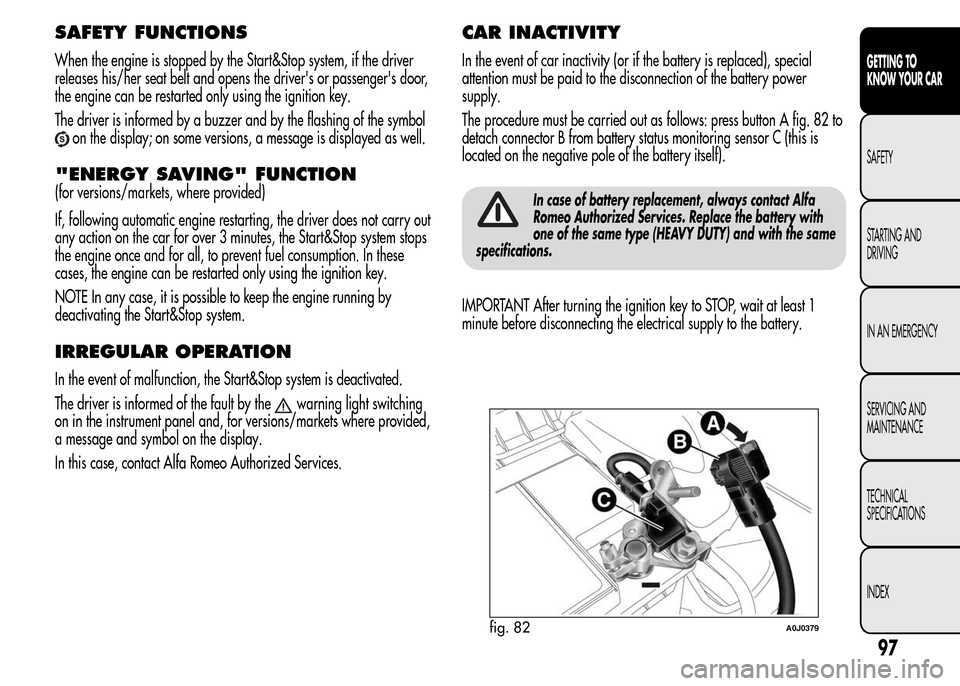
The procedure must be carried out as follows: press button A fig. 82 to
detach connector B from battery status monitoring sensor C (this is
located on the negative pole of the battery itself).
In case of battery replacement, always contact Alfa
Romeo Authorized Services. Replace the battery with
one of the same type (HEAVY DUTY) and with the same
specifications.
IMPORTANT After turning the ignition key to STOP, wait at least 1
minute before disconnecting the electrical supply to the battery.
fig. 82A0J0379
97
GETTING TO
KNOW YOUR CAR
SAFETY
STARTING AND
DRIVING
IN AN EMERGENCY
SERVICING AND
MAINTENANCE
TECHNICAL
SPECIFICATIONS
INDEX
Page 172 of 280
BATTERY RECHARGING
IMPORTANT The battery recharging procedure is given as information
only. Contact Alfa Romeo Authorized Services to carry out this
operation.
IMPORTANT After turning the ignition key to STOP, wait at least 1
minute before disconnecting the battery power supply.
We recommend recharging the battery slowly for approximately 24
hours at low amperage. Charging for a longer time may damage the
battery.
VERSIONS WITHOUT Start&Stop
SYSTEM
(for versions/markets, where provided)
Charge the battery as follows:
❒disconnect the negative battery terminal;
❒connect the charger cables to the battery terminals, observing the
polarity;
❒turn on the battery charger;
❒when it is recharged, turn the charger off before disconnecting it
from the battery;
❒reconnect the negative battery terminal.
VERSIONS WITH Start&Stop SYSTEM
Charge the battery as follows:
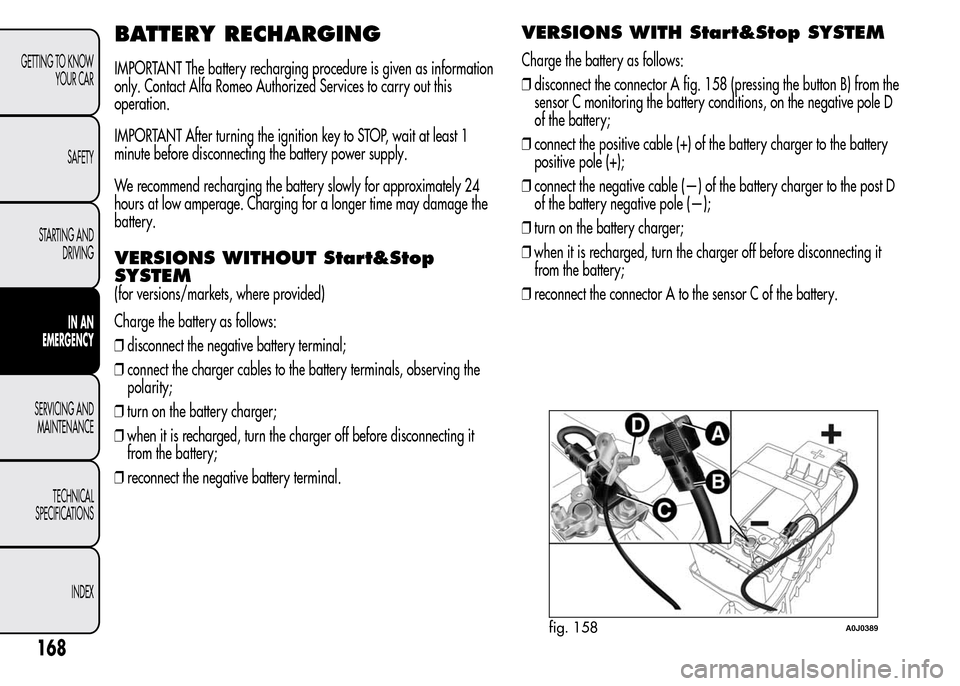
❒disconnect the connector A fig. 158 (pressing the button B) from the
sensor C monitoring the battery conditions, on the negative pole D
of the battery;
❒connect the positive cable (+) of the battery charger to the battery
positive pole (+);
❒connect the negative cable (—) of the battery charger to the post D
of the battery negative pole (—);
❒turn on the battery charger;
❒when it is recharged, turn the charger off before disconnecting it
from the battery;
❒reconnect the connector A to the sensor C of the battery.
fig. 158A0J0389
168
GETTING TO KNOW
YOUR CAR
SAFETY
STARTING AND
DRIVING
IN AN
EMERGENCY
SERVICING AND
MAINTENANCE
TECHNICAL
SPECIFICATIONS
INDEX
Page 248 of 280
STEERING WHEEL CONTROLS
(for versions/markets, where provided)
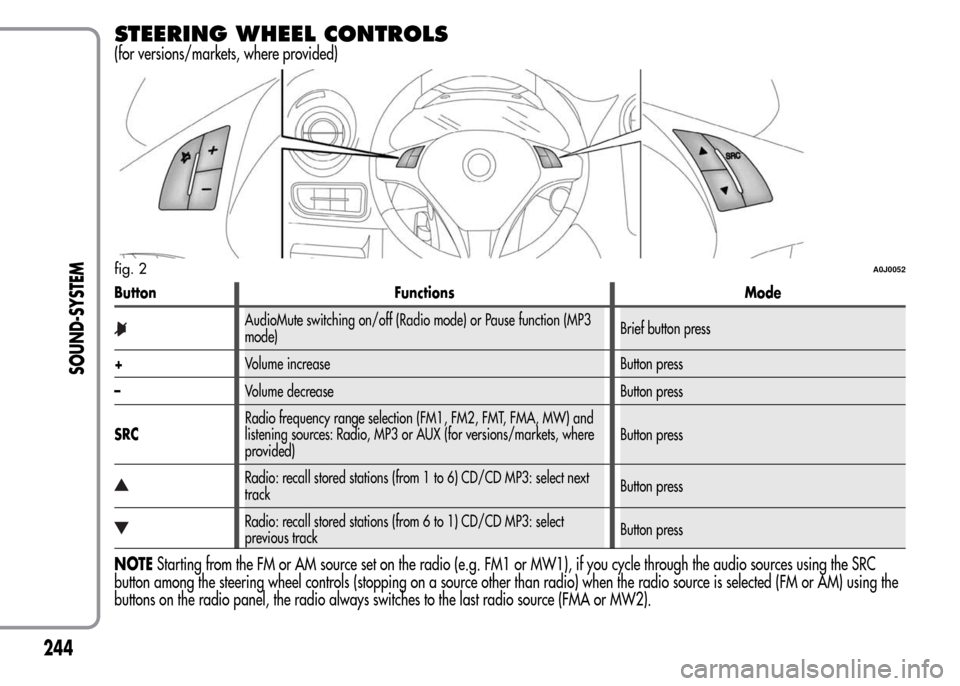
Button Functions Mode
AudioMute switching on/off (Radio mode) or Pause function (MP3
mode)Brief button press
+Volume increase Button press
–Volume decrease Button press
SRCRadio frequency range selection (FM1, FM2, FMT, FMA, MW) and
listening sources: Radio, MP3 or AUX (for versions/markets, where
provided)Button press
Radio: recall stored stations (from 1 to 6) CD/CD MP3: select next
trackButton press
Radio: recall stored stations (from 6 to 1) CD/CD MP3: select
previous trackButton press
NOTEStarting from the FM or AM source set on the radio (e.g. FM1 or MW1), if you cycle through the audio sources using the SRC
button among the steering wheel controls (stopping on a source other than radio) when the radio source is selected (FM or AM) using the
buttons on the radio panel, the radio always switches to the last radio source (FMA or MW2).
fig. 2A0J0052
244
SOUND-SYSTEM
Page 260 of 280
PRESET BUTTONS
The buttons numbered from 1 to 6 are used to set the following
preset stations:
❒18 in the FM band (6 in FM1, 6 in FM2, 6 in FMT or “FMA” (on
some versions));
❒12 in the MW band (6 in MW1, 6 in MW2).
To listen to a preset station, select the desired frequency band and
then briefly press the corresponding preset button (from 1 to 6).
By pressing the preset button for more than 2 seconds, the current
station will be stored.
The storing phase is confirmed by an acoustic signal.
STORING THE LAST STATION LISTENED
TO
The radio automatically stores the last station that was selected for
each reception band, which is then tuned into when the radio is
turned on or when the reception band is changed.
AUTOMATIC TUNING
Briefly press theorbutton to start the automatic tuning
search for the next station that can be received in the selected
direction.
If the
orbutton is pressed down longer, the fast search starts.
When the button is released, the tuner will stop on the next station
that can be received.
If the TA function (traffic alerts) is on, the tuner will only search for
stations that broadcast traffic news and alerts.
MANUAL TUNING
This is used to manually search for stations in the preselected band.
Select the desired frequency band and then press the
or
button briefly and repeatedly to start to the search in the desired
direction.
If the
orbuttons are pressed longer, the fast search will start
and then stop when the button is released.
AUTOSTORE FUNCTION
(automatic station storing)
To activate the AutoSTore function, hold the FM AS button down
until an acoustic signal is heard. With this function, the radio
automatically stores the 6 stations with the strongest signal in
decreasing order on the FMA frequency band.
During the automatic storing process, the word “Autostore” flashes
on the display.
Press the FM AS button again to interrupt the AutoSTore function:
the radio will again tune into the station listened to before the
activation of the function.
When the AutoSTore function has finished, the radio will
automatically tune into the first preset station on the FMA band
stored on the preset side 1.
The stations that have a strong signal in the preselected band at
that moment, are then automatically stored on the buttons
numbered from 1 to 6.
256
SOUND-SYSTEM
Page 263 of 280
DISPLAY INFORMATION
When the CD player is working, the display will show the
following information:
❒“CD Track 5”: indicates the number of the CD track;
❒“03:42”: indicates the time elapsed since the start of the track (if
the relevant Menu function is activated).
TRACK SELECTION (forward/back)
Briefly press thebutton to play the previous CD track and the
button to play the next track.
The tracks are selected cyclically: the first track is selected after the
last track and vice versa.
If the track has been played for more than 3 seconds, pressing the
button will cause the track to be started again from the
beginning.
In this case, if you want to play the previous track, press the button
twice consecutively.
TRACK FAST FORWARD/REWIND
The fast forward/rewind will stop once the button is released.
PAUSE FUNCTION
To pause the CD player, press thebutton. The text “CD Pause”
appears on the display.
To resume listening to the track, press the
button again.
If another audio source is selected, the pause function is
deactivated.
259
SOUND-SYSTEM
Page 276 of 280
– Luggage compartment roof light ....... 68
– Puddle lights ................................... 68
Roof rack/ski rack ................................ 86
Safe Lock device ................................. 37
Saving fuel .......................................... 135
SBR system (Seat Belt Reminder) ............ 110
Scheduled servicing.............................. 171
Scheduled Servicing Plan ...................... 172
Seat belts............................................. 109
– Use ................................................ 109
Seats ................................................... 43
– Easy Entry ...................................... 44
– Front seats ...................................... 43
– Sports configuration front seats......... 44
Setup menu ......................................... 23
Side airbags (Side Bags - Window
Bags) ................................................ 126
Side bags (front side airbags) ............... 127
Side lights/brake lights ......................... 156
Side lights/daytime running lights
(DRL)
– bulb replacement............................. 154
Side lights/dipped beam headlights ...... 60
“Smart Bag” system (Multistage front
airbags) ............................................ 123
Snow chains....................................... 138
Snow tyres ........................................... 137
Spark plugs (type) ................................ 200
Speedometer (speed indicator) .............. 6
Starting the engine ............................... 130
Starting the engine ............................... 139
– Bump starting.................................. 140
– Jump starting .................................. 139
Start&Stop system ................................ 95
Steering lock ........................................ 42
Steering system .................................... 208
Steering wheel ..................................... 46
Storing the car ..................................... 138
Sun visors ............................................ 73
Suspension .......................................... 207
Symbols .............................................. 33
Technical specifications ....................... 196
The keys .............................................. 35
– Code Card...................................... 35
– Key without remote control ............... 35
– Key with remote control.................... 35
Third brake lights
– bulb replacement............................. 157
Towing the car ..................................... 169
– Attaching the tow hook .................... 169Towing trailers ..................................... 136
– Installing a tow hook........................ 137
TPMS (Tyre Pressure Monitoring
System) ............................................. 104
Transmission ........................................ 206
TRIP button .......................................... 32
Trip Computer ...................................... 30
Ty r e s
– correct tyre reading ......................... 209
– Fix&Go Automatic (kit) .................... 146
– inflation pressure ............................. 214
– snow tyres ...................................... 212
– tyres provided ................................. 212
Tyres - maintenance .............................. 188
Using the Gearbox ............................. 133
Warning lights on panel .................... 6
Weights............................................... 218
Welcome movement ............................. 22
Wheel rims
– correct reading of the rim code ......... 211
– dimensions ..................................... 212
– wheels and tyres.............................. 188
272
GETTING TO KNOW
YOUR CAR
SAFETY
STARTING AND
DRIVING
IN AN EMERGENCY
SERVICING AND
MAINTENANCE
TECHNICAL
SPECIFICATIONS
INDEX