key Alfa Romeo MiTo 2016 Owner's Guide
[x] Cancel search | Manufacturer: ALFA ROMEO, Model Year: 2016, Model line: MiTo, Model: Alfa Romeo MiTo 2016Pages: 280, PDF Size: 8.52 MB
Page 41 of 280
REPLACING THE BATTERY IN THE KEY
WITH REMOTE CONTROL
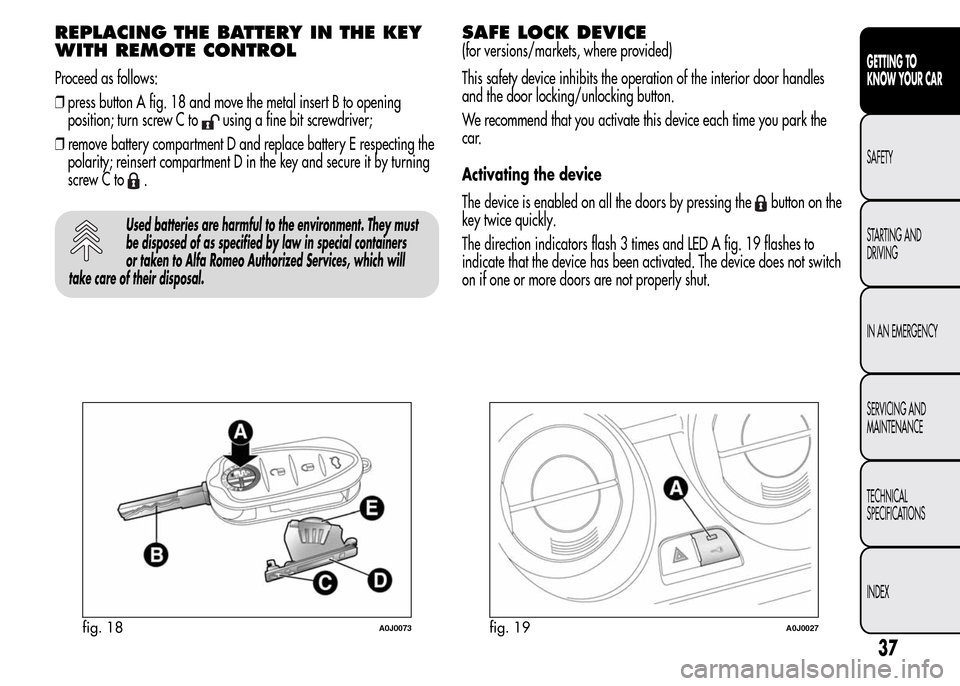
Proceed as follows:
❒press button A fig. 18 and move the metal insert B to opening
position; turn screw C to
using a fine bit screwdriver;
❒remove battery compartment D and replace battery E respecting the
polarity; reinsert compartment D in the key and secure it by turning
screw C to
.
Used batteries are harmful to the environment. They must
be disposed of as specified by law in special containers
or taken to Alfa Romeo Authorized Services, which will
take care of their disposal.
SAFE LOCK DEVICE
(for versions/markets, where provided)
This safety device inhibits the operation of the interior door handles
and the door locking/unlocking button.
We recommend that you activate this device each time you park the
car.
Activating the device
The device is enabled on all the doors by pressing the
button on the
key twice quickly.
The direction indicators flash 3 times and LED A fig. 19 flashes to
indicate that the device has been activated. The device does not switch
on if one or more doors are not properly shut.
fig. 18A0J0073fig. 19A0J0027
37
GETTING TO
KNOW YOUR CAR
SAFETY
STARTING AND
DRIVING
IN AN EMERGENCY
SERVICING AND
MAINTENANCE
TECHNICAL
SPECIFICATIONS
INDEX
Page 42 of 280
Deactivating the device
The device deactivates automatically when:
❒the key insert is turned to opening position in the driver side door;
❒the
button is pressed on the remote control;
❒the ignition key is turned to MAR.
Once the safe lock device is engaged it is impossible to
open the doors from inside the car. Before engaging
the device, check that there is no one left on board. If
the remote control battery is flat, the device can only be
deactivated by using the metal insert in one of the door locks.
38
GETTING TO
KNOW YOUR CAR
SAFETY
STARTING AND
DRIVING
IN AN EMERGENCY
SERVICING AND
MAINTENANCE
TECHNICAL
SPECIFICATIONS
INDEX
Page 43 of 280
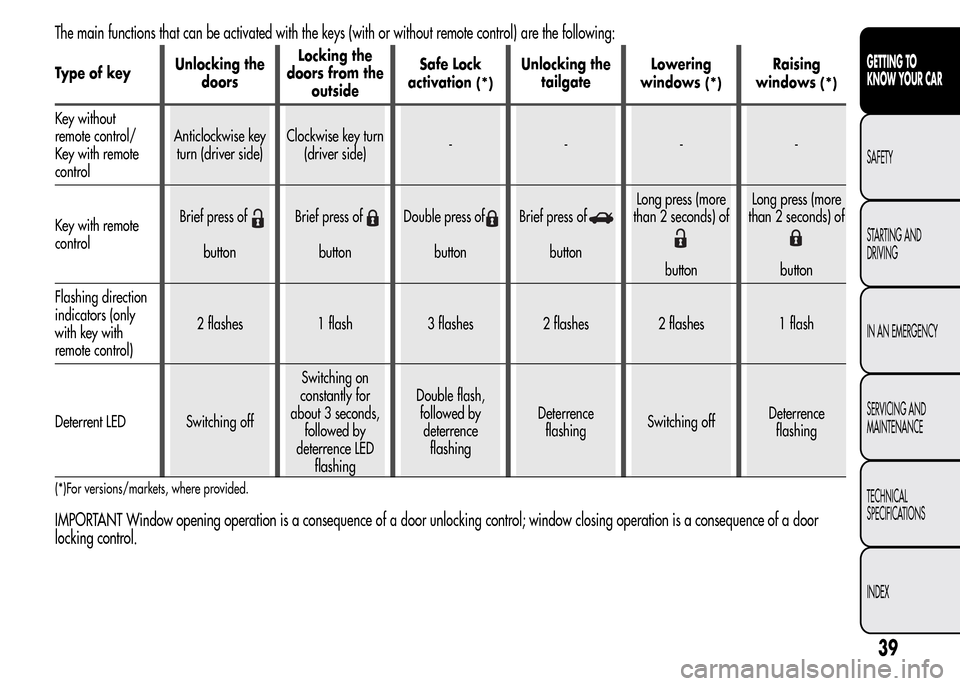
The main functions that can be activated with the keys (with or without remote control) are the following:
Type of keyUnlocking the
doorsLocking the
doors from the
outsideSafe Lock
activation(*)
Unlocking the
tailgateLowering
windows
(*)
Raising
windows
(*)
Key without
remote control/
Key with remote
controlAnticlockwise key
turn (driver side)Clockwise key turn
(driver side)----
Key with remote
controlBrief press of
buttonBrief press ofbuttonDouble press ofbuttonBrief press ofbuttonLong press (more
than 2 seconds) of
buttonLong press (more
than 2 seconds) ofbutton
Flashing direction
indicators (only
with key with
remote control)2 flashes 1 flash 3 flashes 2 flashes 2 flashes 1 flash
Deterrent LED Switching offSwitching on
constantly for
about 3 seconds,
followed by
deterrence LED
flashingDouble flash,
followed by
deterrence
flashingDeterrence
flashingSwitching offDeterrence
flashing
(*)For versions/markets, where provided.
IMPORTANT Window opening operation is a consequence of a door unlocking control; window closing operation is a consequence of a door
locking control.
39
GETTING TO
KNOW YOUR CAR
SAFETY
STARTING AND
DRIVING
IN AN EMERGENCY
SERVICING AND
MAINTENANCE
TECHNICAL
SPECIFICATIONS
INDEX
Page 44 of 280
ALARM
(for versions/markets, where provided)
ALARM ACTIVATION
The alarm activates in the following cases:
❒wrongful opening of a door/bonnet/luggage compartment
(perimeter protection);
❒wrongful operation of the ignition switch (key turned to MAR);
❒cutting of the battery cables;
❒movement inside the passenger compartment (volumetric protection);
❒anomalous lifting/tilting of the car (for versions/markets, where
provided).
Operation of the alarm is indicated by an acoustic and visual signal
(flashing of the direction indicators for several seconds). The alarm
activation modes may vary according to the market. There is a
maximum number of acoustic/visual cycles. When this is reached the
system returns to normal operation.
IMPORTANT The engine locking function is guaranteed by the Alfa
Romeo CODE, which is automatically activated when the ignition key
is extracted from the ignition switch.
IMPORTANT The alarm is adapted to meet requirements in various
countries.
SWITCHING ON THE ALARM
With the doors and bonnet closed and the ignition key either turned to
STOP or removed, direct the key with the remote control towards the
car, then press and release the
button. Except for specific markets,
the system emits a visual and acoustic signal and enables door locking.
A self-diagnosis stage precedes the switching on of the alarm: in the
event of faults, the system will generate a further acoustic and/or
visual signal through the LED on the dashboard.
If after the alarm is switched on, a second acoustic signal is emitted
and/or a visual signal via the LED on the dashboard, wait about
4 seconds and switch off the alarm by pressing the
button, check
that the doors, bonnet and luggage compartment are closed correctly
and then reactivate the system by pressing the
button.
If the alarm emits an acoustic signal even when the doors, bonnet and
boot are correctly closed, a fault has occurred in system operation:
in this case, contact Alfa Romeo Authorized Services.
ALARM SELF-ACTIVATION
(for versions/markets, where provided)
If the alarm has not been activated using the remote control, once
about 30 seconds have elapsed from when the ignition key was turned
to STOP and a door or the tailgate was last opened and then closed,
the alarm activates automatically.
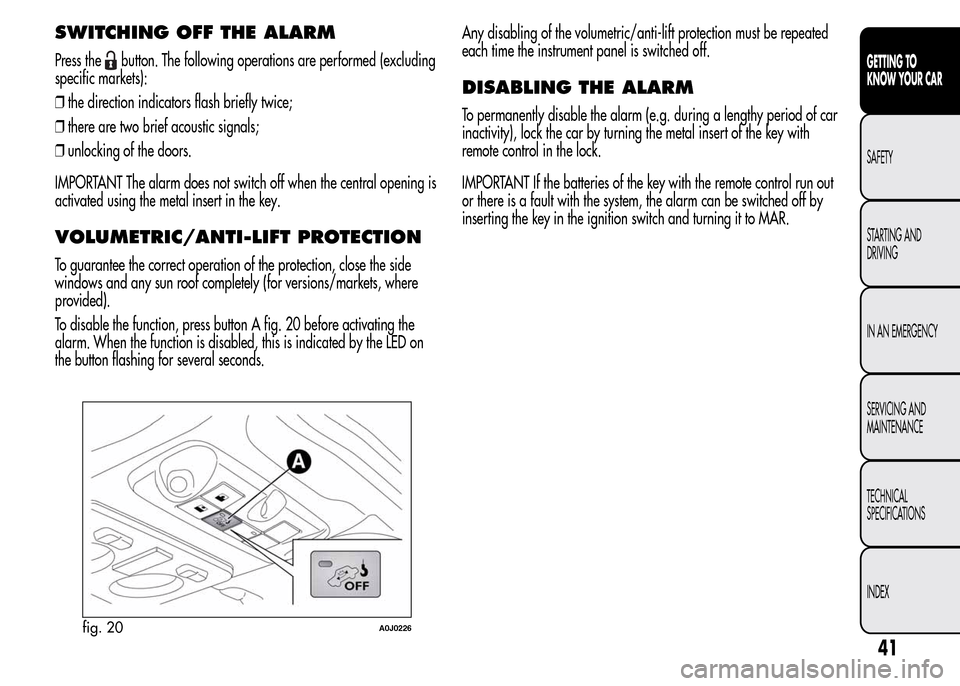
This is indicated by the LED on the button A fig. 20 lighting up
intermittently and the indications of activation described previously.
To deactivate the alarm, press the
button on the remote control.
The alarm also activates when the doors are closed by turning the
metal insert of the key in the driver side door latch. If the system
self-activates, the doors are not locked.
40
GETTING TO
KNOW YOUR CAR
SAFETY
STARTING AND
DRIVING
IN AN EMERGENCY
SERVICING AND
MAINTENANCE
TECHNICAL
SPECIFICATIONS
INDEX
Page 45 of 280
SWITCHING OFF THE ALARM
Press thebutton. The following operations are performed (excluding
specific markets):
❒the direction indicators flash briefly twice;
❒there are two brief acoustic signals;
❒unlocking of the doors.
IMPORTANT The alarm does not switch off when the central opening is
activated using the metal insert in the key.
VOLUMETRIC/ANTI-LIFT PROTECTION
To guarantee the correct operation of the protection, close the side
windows and any sun roof completely (for versions/markets, where
provided).
To disable the function, press button A fig. 20 before activating the
alarm. When the function is disabled, this is indicated by the LED on
the button flashing for several seconds.Any disabling of the volumetric/anti-lift protection must be repeated
each time the instrument panel is switched off.
DISABLING THE ALARM
To permanently disable the alarm (e.g. during a lengthy period of car
inactivity), lock the car by turning the metal insert of the key with
remote control in the lock.
IMPORTANT If the batteries of the key with the remote control run out
or there is a fault with the system, the alarm can be switched off by
inserting the key in the ignition switch and turning it to MAR.
fig. 20A0J0226
41
GETTING TO
KNOW YOUR CAR
SAFETY
STARTING AND
DRIVING
IN AN EMERGENCY
SERVICING AND
MAINTENANCE
TECHNICAL
SPECIFICATIONS
INDEX
Page 46 of 280
IGNITION DEVICE
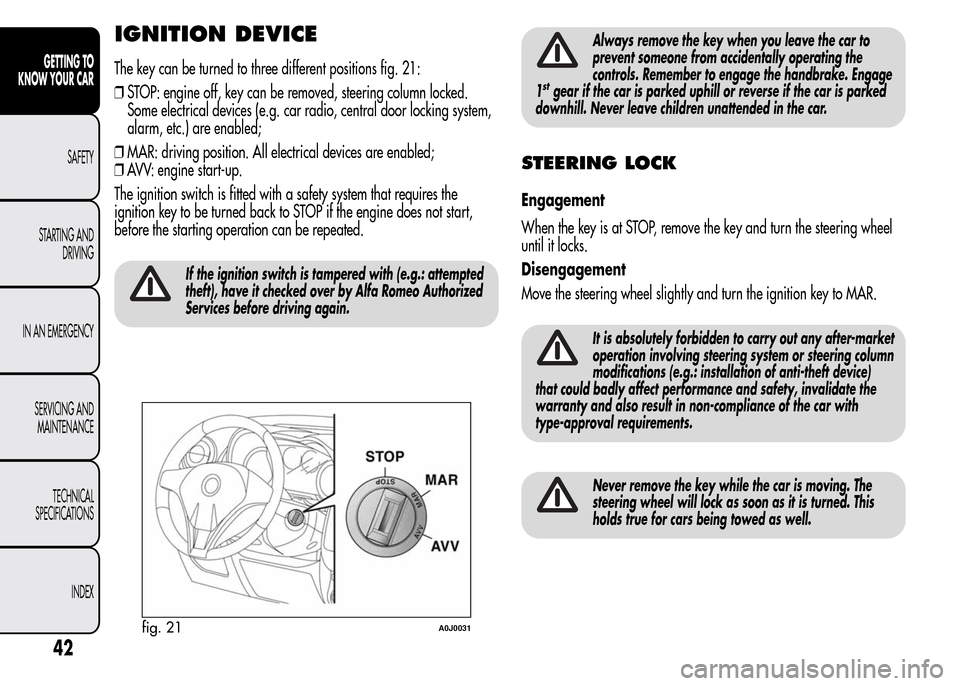
The key can be turned to three different positions fig. 21:
❒STOP: engine off, key can be removed, steering column locked.
Some electrical devices (e.g. car radio, central door locking system,
alarm, etc.) are enabled;
❒MAR: driving position. All electrical devices are enabled;
❒AVV: engine start-up.
The ignition switch is fitted with a safety system that requires the
ignition key to be turned back to STOP if the engine does not start,
before the starting operation can be repeated.
If the ignition switch is tampered with (e.g.: attempted
theft), have it checked over by Alfa Romeo Authorized
Services before driving again.
Always remove the key when you leave the car to
prevent someone from accidentally operating the
controls. Remember to engage the handbrake. Engage
1
stgear if the car is parked uphill or reverse if the car is parked
downhill. Never leave children unattended in the car.
STEERING LOCK
Engagement
When the key is at STOP, remove the key and turn the steering wheel
until it locks.
Disengagement
Move the steering wheel slightly and turn the ignition key to MAR.
It is absolutely forbidden to carry out any after-market
operation involving steering system or steering column
modifications (e.g.: installation of anti-theft device)
that could badly affect performance and safety, invalidate the
warranty and also result in non-compliance of the car with
type-approval requirements.
Never remove the key while the car is moving. The
steering wheel will lock as soon as it is turned. This
holds true for cars being towed as well.
fig. 21A0J0031
42
GETTING TO
KNOW YOUR CAR
SAFETY
STARTING AND
DRIVING
IN AN EMERGENCY
SERVICING AND
MAINTENANCE
TECHNICAL
SPECIFICATIONS
INDEX
Page 48 of 280
Lumbar adjustment
(for versions/markets, where provided)
Turn knob D fig. 22 until the desired position is reached.
Backrest folding
To access the rear seats, pull handle E upwards fig. 22: the backrest
will fold and the seat will slide forwards when you push the backrest.
Moving the backrest backwards will return the seat to its initial
position.
Always check that the seat is firmly locked on the
guides, trying to push it forwards and backwards.
Seat heating
(for versions/markets, where provided)
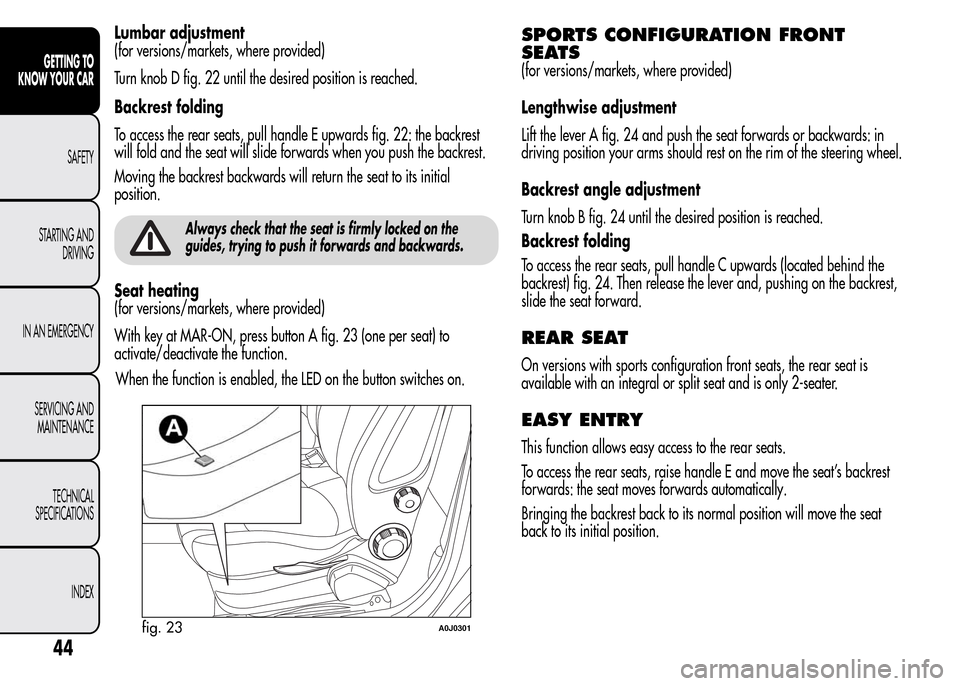
With key at MAR-ON, press button A fig. 23 (one per seat) to
activate/deactivate the function.
When the function is enabled, the LED on the button switches on.
SPORTS CONFIGURATION FRONT
SEATS
(for versions/markets, where provided)
Lengthwise adjustment
Lift the lever A fig. 24 and push the seat forwards or backwards: in
driving position your arms should rest on the rim of the steering wheel.
Backrest angle adjustment
Turn knob B fig. 24 until the desired position is reached.
Backrest folding
To access the rear seats, pull handle C upwards (located behind the
backrest) fig. 24. Then release the lever and, pushing on the backrest,
slide the seat forward.
REAR SEAT
On versions with sports configuration front seats, the rear seat is
available with an integral or split seat and is only 2-seater.
EASY ENTRY
This function allows easy access to the rear seats.
To access the rear seats, raise handle E and move the seat’s backrest
forwards: the seat moves forwards automatically.
Bringing the backrest back to its normal position will move the seat
back to its initial position.
fig. 23A0J0301
44
GETTING TO
KNOW YOUR CAR
SAFETY
STARTING AND
DRIVING
IN AN EMERGENCY
SERVICING AND
MAINTENANCE
TECHNICAL
SPECIFICATIONS
INDEX
Page 63 of 280
ADDITIONAL HEATER
(only diesel versions)
(for versions/markets, where provided)
This allows the passenger compartment to be heated more quickly in
cold weather conditions. The additional heater turns off automatically
after the required comfort conditions are achieved.
Automatic dual zone climate control system
(for versions/markets, where provided)
The additional heater activates automatically when the ignition key is
turned to MAR-ON.
Manual heater and manual climate control
The additional heater activates automatically when knob N is turned to
the end of the red section and the fan is set to at least 1
stspeed.
IMPORTANT The heater only works if the outside temperature and
engine coolant temperature are low. The heater will not activate if the
battery voltage is too low.
EXTERIOR LIGHTS
LEFT STALK
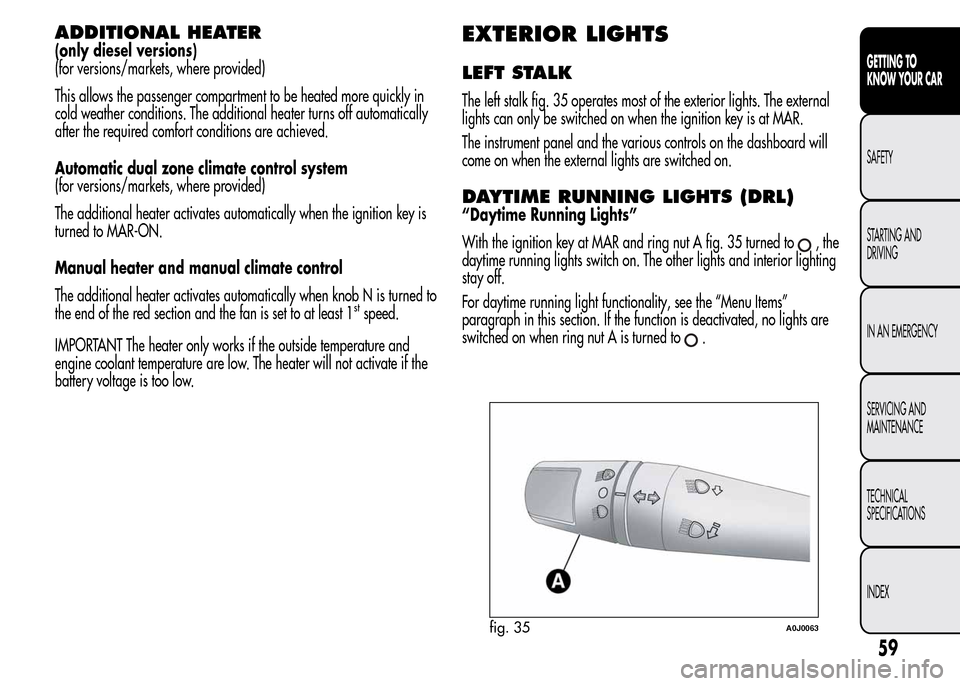
The left stalk fig. 35 operates most of the exterior lights. The external
lights can only be switched on when the ignition key is at MAR.
The instrument panel and the various controls on the dashboard will
come on when the external lights are switched on.
DAYTIME RUNNING LIGHTS (DRL)
“Daytime Running Lights”
With the ignition key at MAR and ring nut A fig. 35 turned to
,the
daytime running lights switch on. The other lights and interior lighting
stay off.
For daytime running light functionality, see the “Menu Items”
paragraph in this section. If the function is deactivated, no lights are
switched on when ring nut A is turned to
.
fig. 35A0J0063
59
GETTING TO
KNOW YOUR CAR
SAFETY
STARTING AND
DRIVING
IN AN EMERGENCY
SERVICING AND
MAINTENANCE
TECHNICAL
SPECIFICATIONS
INDEX
Page 64 of 280
SIDE LIGHTS/DIPPED BEAM
HEADLIGHTS
With the ignition key turned to MAR, turn ring nut A fig. 35 to.
The daytime running lights are switched off and the side lights and
dipped headlights are switched on. The warning light
switches
on on the instrument panel.
PARKING LIGHTS
These lights can only be switched on with ignition key at STOP or
removed, by moving ring nut A first to position
and then to position
.
When the parking lights are switched on, the number plate lights and
the front and rear side lights switch on as well (the daytime running
lights (DRLs) remain off however).
The warning light
switches on on the instrument panel.
When the direction indicator stalk is activated the side for the lights
(left or right) can be selected.
AUTOMATIC LIGHTING CONTROL
(AUTOLIGHT) (Dusk sensor)
(for versions/markets, where provided)
This infrared LED sensor, combined with the rain sensor and located on
the windscreen, detects the variations in outside brightness depending
on the light sensitivity set with the Set-up Menu: the greater the
sensitivity, the less external light is required to activate the exterior
lights.Activation
The dusk sensor activates when ring nut A fig. 35 is turned to
.In
this way the side lights and dipped headlights are activated
automatically according to the external light level.
IMPORTANT The sensor is unable to detect the presence of fog.
Therefore under these circumstances, these lights must be turned on
manually.
When the lights are turned on by the sensor, the fog lights (for
versions/markets, where provided) and the rear fog lights may be
turned on.
When the lights are automatically switched off, the front and rear fog
lights (if activated) are also switched off. The next time the lights are
switched on automatically, the fog lights must be reactivated manually
(if required).
With the sensor active, it is possible to flash the headlights but the
main beam headlights cannot be switched on. If you need to turn these
lights on, turn ring nut A to position
and turn the dipped
headlights on.
When the lights have been activated automatically and are then
switched off by the sensor, the dipped beam headlights are switched
off first, followed by the side lights a few seconds later.
If the sensor is activated but is malfunctioning, the side lights and
dipped beam headlights are switched on irrespective of the outside
light level and the sensor failure is indicated on the instrument panel
display.
It is also possible to deactivate the sensor and switch on these lights if
necessary.
60
GETTING TO
KNOW YOUR CAR
SAFETY
STARTING AND
DRIVING
IN AN EMERGENCY
SERVICING AND
MAINTENANCE
TECHNICAL
SPECIFICATIONS
INDEX
Page 65 of 280
MAIN BEAM HEADLIGHTS
To activate the main beam headlights, with ring nut A at, pull the
stalk towards the steering wheel beyond the end of travel position.
The warning light
switches on on the instrument panel.
When the stalk is pulled towards the steering wheel again, beyond the
end of travel position, the main beam headlights deactivate, the
dipped beam headlights reactivate and the warning light
switches
off.
FLASHING
To do this, pull the stalk towards the steering wheel (unstable position)
regardless of the position of ring nut A.
The warning light
switches on on the instrument panel.
DIRECTION INDICATORS
Bring the stalk into (stable) position:
❒upwards: activates right direction indicator;
❒downwards: activates left direction indicator.
Warning light
orwill flash in the instrument panel.
The indicators are switched off automatically when the steering wheel
is straightened."Lane change" function
If you want to signal that you are changing lane, hold the left stalk in
the unstable position for less than half a second. The direction indicator
on the selected side flashes 3 times and then switches off automatically.
"FOLLOW ME HOME" DEVICE
This device allows you to illuminate the area in front of the car for a
certain amount of time.
Activation
With the ignition key at STOP or removed, pull stalk A towards the
steering wheel and move it within 2 minutes of the engine switching
off.
At each single movement of the stalk, the lights will remain on for an
extra 30 seconds up to a maximum of 210 seconds; then the lights are
switched off automatically.
The
warning light on the instrument panel will light up (and the
corresponding message will appear on the display) as long as the
function is active.
The light comes on when the stalk is first moved and stays on until the
function is automatically deactivated. Each movement of the stalk
only increases the amount of time the lights stay on.
Deactivation
Keep stalk A pulled towards the steering wheel for more than 2
seconds.
61
GETTING TO
KNOW YOUR CAR
SAFETY
STARTING AND
DRIVING
IN AN EMERGENCY
SERVICING AND
MAINTENANCE
TECHNICAL
SPECIFICATIONS
INDEX