park assist Alfa Romeo Stelvio 2018 Owner's Manual
[x] Cancel search | Manufacturer: ALFA ROMEO, Model Year: 2018, Model line: Stelvio, Model: Alfa Romeo Stelvio 2018Pages: 276, PDF Size: 5.79 MB
Page 19 of 276
Door And Liftgate Locking
Briefly pushing the lock button on the key
fob will lock the doors and liftgate, switch
off the internal lights, and flash the turn
signals (if activated in the Information
and Entertainment System).
If one or more doors are open, these
doors will also lock, and this is indicated
by a rapid flashing of the turn signals. The
doors will unlock again only if the key fob
is detected inside the passenger
compartment.
The doors can be locked by using the
emergency key in the driver’s side door
lock.
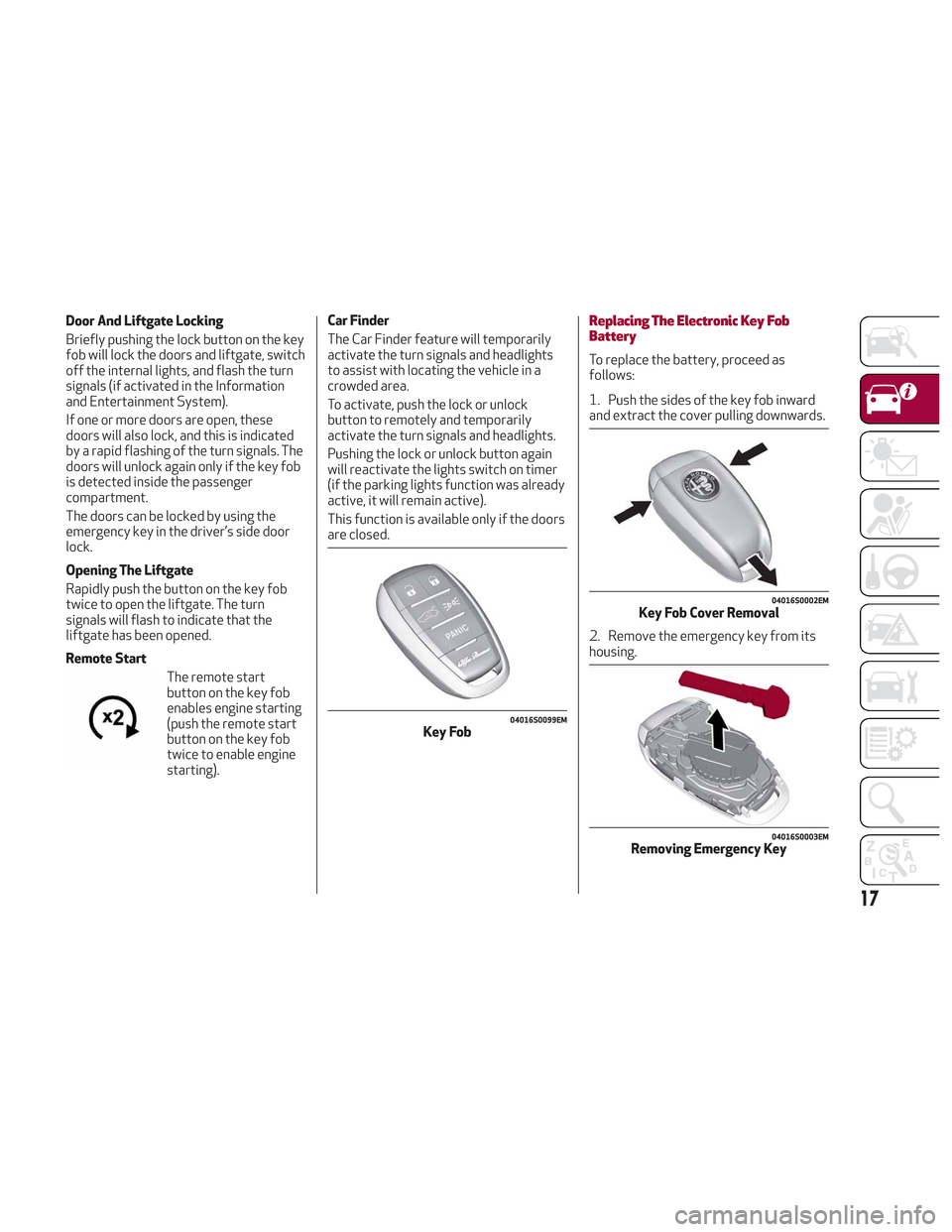
Opening The Liftgate
Rapidly push the button on the key fob
twice to open the liftgate. The turn
signals will flash to indicate that the
liftgate has been opened.
Remote StartThe remote start
button on the key fob
enables engine starting
(push the remote start
button on the key fob
twice to enable engine
starting). Car Finder
The Car Finder feature will temporarily
activate the turn signals and headlights
to assist with locating the vehicle in a
crowded area.
To activate, push the lock or unlock
button to remotely and temporarily
activate the turn signals and headlights.
Pushing the lock or unlock button again
will reactivate the lights switch on timer
(if the parking lights function was already
active, it will remain active).
This function is available only if the doors
are closed.Replacing The Electronic Key Fob
Battery
To replace the battery, proceed as
follows:
1. Push the sides of the key fob inward
and extract the cover pulling downwards.
2. Remove the emergency key from its
housing.
04016S0099EMKey Fob
04016S0002EMKey Fob Cover Removal
04016S0003EMRemoving Emergency Key
17
Page 59 of 276
HOOD
Opening The Hood
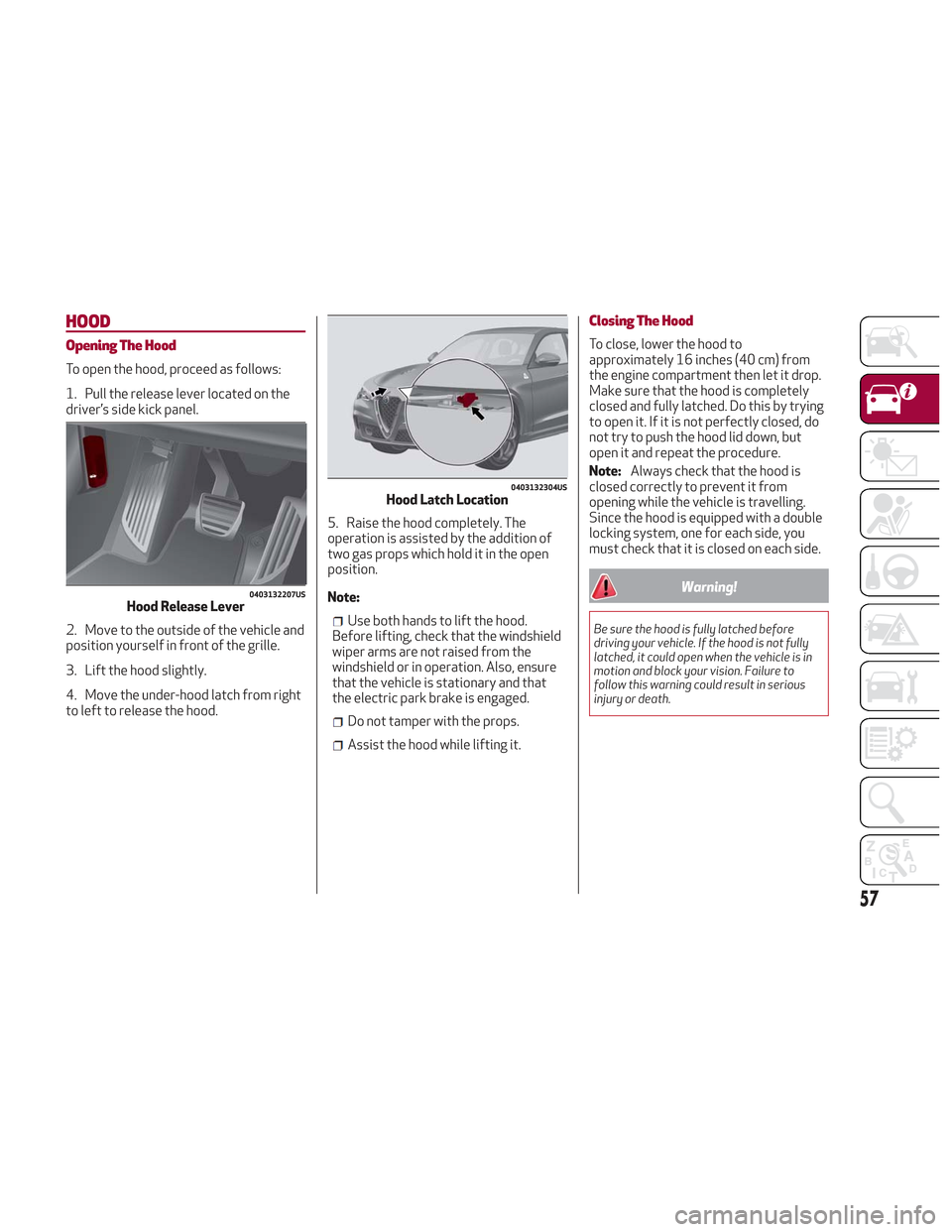
To open the hood, proceed as follows:
1. Pull the release lever located on the
driver’s side kick panel.
2. Move to the outside of the vehicle and
position yourself in front of the grille.
3. Lift the hood slightly.
4. Move the under-hood latch from right
to left to release the hood.5. Raise the hood completely. The
operation is assisted by the addition of
two gas props which hold it in the open
position.
Note:
Use both hands to lift the hood.
Before lifting, check that the windshield
wiper arms are not raised from the
windshield or in operation. Also, ensure
that the vehicle is stationary and that
the electric park brake is engaged.
Do not tamper with the props.
Assist the hood while lifting it.
Closing The Hood
To close, lower the hood to
approximately 16 inches (40 cm) from
the engine compartment then let it drop.
Make sure that the hood is completely
closed and fully latched. Do this by trying
to open it. If it is not perfectly closed, do
not try to push the hood lid down, but
open it and repeat the procedure.
Note: Always check that the hood is
closed correctly to prevent it from
opening while the vehicle is travelling.
Since the hood is equipped with a double
locking system, one for each side, you
must check that it is closed on each side.
Warning!
Be sure the hood is fully latched before
driving your vehicle. If the hood is not fully
latched, it could open when the vehicle is in
motion and block your vision. Failure to
follow this warning could result in serious
injury or death.
0403132207USHood Release Lever
0403132304USHood Latch Location
57
Page 65 of 276
INTERNAL EQUIPMENT
Glove Compartment
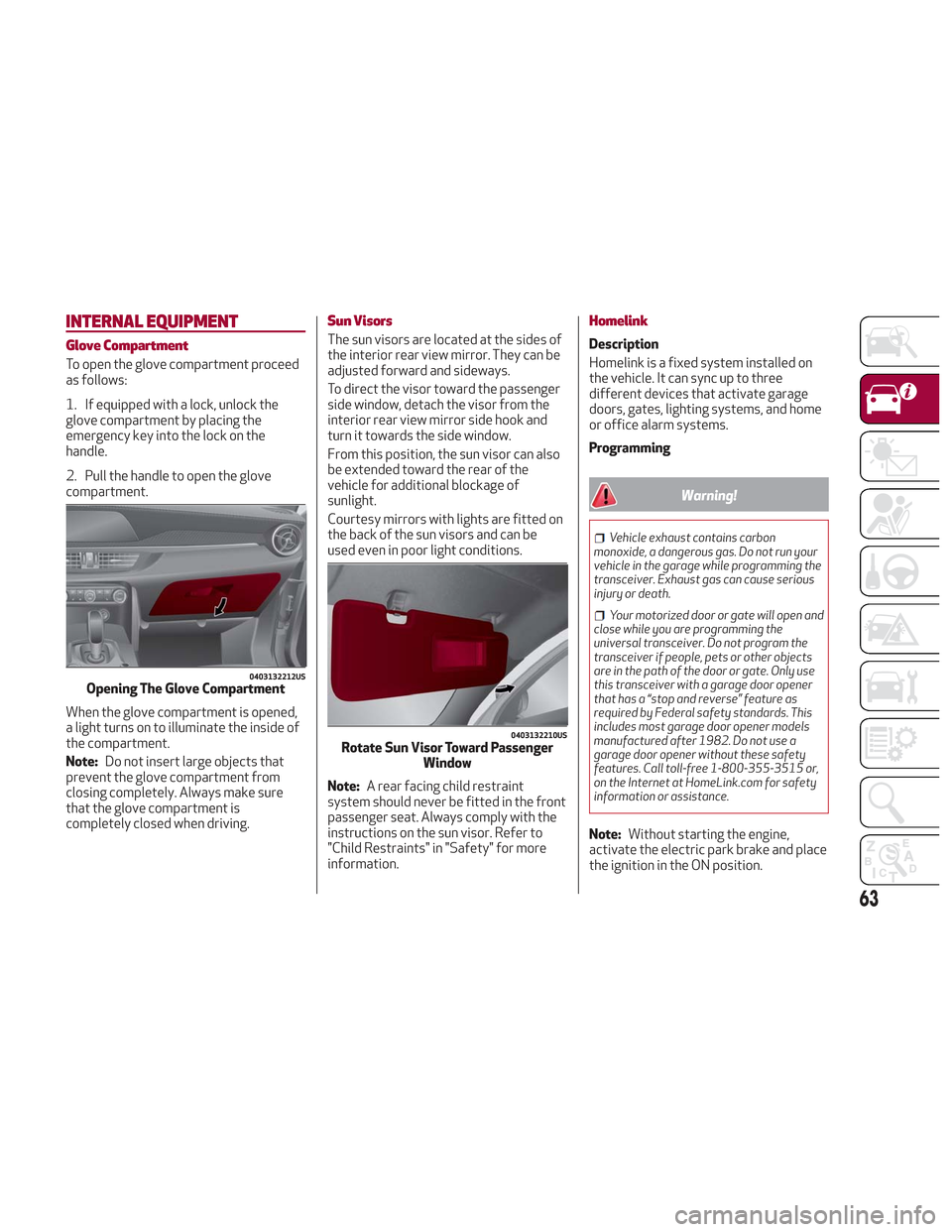
To open the glove compartment proceed
as follows:
1. If equipped with a lock, unlock the
glove compartment by placing the
emergency key into the lock on the
handle.
2. Pull the handle to open the glove
compartment.
When the glove compartment is opened,
a light turns on to illuminate the inside of
the compartment.
Note:Do not insert large objects that
prevent the glove compartment from
closing completely. Always make sure
that the glove compartment is
completely closed when driving.
Sun Visors
The sun visors are located at the sides of
the interior rear view mirror. They can be
adjusted forward and sideways.
To direct the visor toward the passenger
side window, detach the visor from the
interior rear view mirror side hook and
turn it towards the side window.
From this position, the sun visor can also
be extended toward the rear of the
vehicle for additional blockage of
sunlight.
Courtesy mirrors with lights are fitted on
the back of the sun visors and can be
used even in poor light conditions.
Note: A rear facing child restraint
system should never be fitted in the front
passenger seat. Always comply with the
instructions on the sun visor. Refer to
"Child Restraints" in "Safety" for more
information.
Homelink
Description
Homelink is a fixed system installed on
the vehicle. It can sync up to three
different devices that activate garage
doors, gates, lighting systems, and home
or office alarm systems.
Programming
Warning!
Vehicle exhaust contains carbon
monoxide, a dangerous gas. Do not run your
vehicle in the garage while programming the
transceiver. Exhaust gas can cause serious
injury or death.
Your motorized door or gate will open and
close while you are programming the
universal transceiver. Do not program the
transceiver if people, pets or other objects
are in the path of the door or gate. Only use
this transceiver with a garage door opener
that has a “stop and reverse” feature as
required by Federal safety standards. This
includes most garage door opener models
manufactured after 1982. Do not use a
garage door opener without these safety
features. Call toll-free 1-800-355-3515 or,
on the Internet at HomeLink.com for safety
information or assistance.
Note: Without starting the engine,
activate the electric park brake and place
the ignition in the ON position.
0403132212USOpening The Glove Compartment
0403132210USRotate Sun Visor Toward Passenger Window
63
Page 67 of 276
Warning!
Vehicle exhaust contains carbon
monoxide, a dangerous gas. Do not run your
vehicle in the garage while programming the
transceiver. Exhaust gas can cause serious
injury or death.
Your motorized door or gate will open and
close while you are programming the
universal transceiver. Do not program the
transceiver if people, pets or other objects
are in the path of the door or gate. Only use
this transceiver with a garage door opener
that has a “stop and reverse” feature as
required by Federal safety standards. This
includes most garage door opener models
manufactured after 1982. Do not use a
garage door opener without these safety
features. Call toll-free 1-800-355-3515 or,
on the Internet at HomeLink.com for safety
information or assistance.
Note: To program Homelink using an
Alternative Code, the vehicle must be
within range of the garage door. Activate
the electric park brake and turn the
ignition to ON, without starting the
engine.
Proceed as follows: 1. Locate the “Learn” or “Train” button on
the garage door or gate motor. The color
and position may vary depending on the
manufacturer (consult the garage door or
gate manual). Push the “Learn” or “Train”
button (this normally activates the
setting warning light).
2. Push the desired HomeLink button (1,
2 or 3). When the HomeLink indicator
begins to flash slowly, move the portable
remote control one to three inches from
the HomeLink system (keeping the
programmable button pushed down).
3. Within 30 seconds, push the
programmed key (1, 2 or 3) and release it.
Push the programmed button a second
time and release it to conclude the
operation. For some motors, the
operation will probably have to be
repeated a third time to end the setting.
The motor should now be capable of
recognizing the signal transmitted by
HomeLink and then open/close the door
or gate.
Programming A Single Key
It is possible to program another original
remote control on an already
programmed HomeLink key by canceling
the previously stored frequency.
Warning!
Vehicle exhaust contains carbon
monoxide, a dangerous gas. Do not run your
vehicle in the garage while programming the
transceiver. Exhaust gas can cause serious
injury or death.
Your motorized door or gate will open and
close while you are programming the
universal transceiver. Do not program the
transceiver if people, pets or other objects
are in the path of the door or gate. Only use
this transceiver with a garage door opener
that has a “stop and reverse” feature as
required by Federal safety standards. This
includes most garage door opener models
manufactured after 1982. Do not use a
garage door opener without these safety
features. Call toll-free 1-800-355-3515 or,
on the Internet at HomeLink.com for safety
information or assistance.
Note: Activate the electric park brake
and place the ignition to ON without
starting the engine.
Proceed as follows:
1. Push the desired HomeLink button
and keep it pushed (1, 2 or 3). Do not
release the button until the last
operation has been performed.
65
Page 111 of 276
Overtaking Vehicles
If another vehicle is overtaken slowly,
with a difference in speed of less than
approximately 15 mph (25 km/h) and the
vehicle stays in the blind spot for
approximately 1.5 seconds, the warning
light on the door mirror of the
corresponding side illuminates.
If the difference in speed between the
two vehicles is greater than
approximately 15 mph (25 km/h), the
warning light does not illuminate.
Rear Cross Path Detection (RCP)
System
This system assists the driver during
reverse maneuvers in the case of reduced
visibility.
The RCP system monitors the rear
detection areas on both sides of the
vehicle to detect objects moving toward
the sides of the vehicle, with a minimum
speed between approximately 1 mph
(1 km/h) and 2 mph (3 km/h) and objects
moving at a maximum speed of 21 mph
(35 km/h), in areas such as parking lots.
The system activation is signaled to the
driver by an audible warning.
Note:If the sensors are covered by
objects or vehicles, the system may not
work as intended.
Warning!
Rear Cross Path Detection (RCP) is not a
back up aid system. It is intended to be used
to help a driver detect an oncoming vehicle in
a parking lot situation. Drivers must be
careful when backing up, even when using
RCP. Always check carefully behind your
vehicle, look behind you, and be sure to check
for pedestrians, animals, other vehicles,
obstructions, and blind spots before backing
up. Failure to do so can result in serious
injury or death.
Operating Mode
The system may be activated/
deactivated via the Information and
Entertainment System. To access the
function, select the following items on
the main menu in sequence:
1. “Settings.”
2. “Safety.”
3. “Blind Spot Alert.”
"Blind Spot Alert", "Visual" Mode
When the system is enabled, the warning
light within the door mirror on the side of
the detected object illuminates.
The visual warning on the mirror will blink
if the driver activates the turn signals,
thus indicating the intention to change
lane. The warning light will be constant if the
driver stays in the same lane.
"Blind Spot Alert" Function
Deactivation
When the system is deactivated ("Blind
Spot Alert" mode off), the BSM or RCP
systems will not emit neither an acoustic
nor visual warning.
The BSM system will store the operating
mode that was active when the engine
was stopped. Each time the engine is
started, the operating mode last set will
be recalled and used.
General Information
This vehicle has systems that operate on
radio frequency that comply with Part
15 of the Federal Communications
Commission (FCC) rules and with
Industry Canada Standards RSS-
GEN/210/220/310.
Operation is subject to the following two
conditions:
1. The device may not cause harmful
interference.
2. The device must accept any
interference received, including
interference that may cause undesired
operation of the device.
Changes or modifications to any of these
systems by other than an authorized
service facility could void authorization
to use this equipment.
109
Page 152 of 276
Note:Normally, the electric parking
brake is engaged automatically when the
engine is stopped. This function can be
deactivated/activated on the
Information and Entertainment system
by selecting the following items in
sequence on the main menu: "Settings",
"Driver Assistance" and "Automatic
Parking Brake".
In addition to engaging the electric park
brake, along with steering and positioning
chocks in front of the wheels (when on a
steep slope), you must always place the
vehicle in the PARK (P) mode before
leaving.
Should the vehicle battery be faulty, the
battery must be replaced in order to
unlock the electric park brake.
Engaging The Park Brake Manually
Briefly pull the switch located on the
center console to manually engage the
electric park brake when the vehicle is
stationary.
Noise may be heard from the rear of the
vehicle when engaging the electric
parking brake.
A slight movement of the brake pedal
may be detected when engaging the
electric parking brake with the brake
pedal pressed.
With the electric parking brake engaged,
the BRAKE warning light on the
instrument panel and the switch will
illuminate.
Caution!
With the Electronic Parking Brake failure
warning light on, some functions of the
electric parking brake are deactivated. In
this case the driver is responsible for brake
activation and vehicle parking in complete
safety conditions.
If, under exceptional circumstances, the
use of the brake is required with the
vehicle in motion, keep the switch on the
center console pulled as long as the brake
action is necessary.
The BRAKE warning light may turn on
with the hydraulic system temporarily
unavailable; in this case, braking is
controlled by the motors.
The brake lights will also automatically
turn on in the same way as normal braking
with the use of the brake pedal.
Release the switch on the center console
to stop the braking action with the
vehicle in motion.
If, through this procedure, the vehicle is
braked until a speed below 1.9 mph
(3 km/h) is reached and the switch is kept
pulled, the park brake will definitively
engage.
Note: Driving the vehicle with the
electric parking brake engaged, or using
it several times to slow down the vehicle,
may cause severe damage to the braking
system. Disengaging The Electric Park Brake
Manually
In order to manually release the park
brake, the ignition should be in the ON
mode. Press the brake pedal, and then
push the switch on the center console
briefly.
Noise may be heard from the rear of the
vehicle, and a slight movement of the
brake pedal may be detected during
disengagement.
After disengaging the electric parking
brake, the BRAKE warning light on the
instrument panel and the light on the
switch will turn off.
If the BRAKE warning light on the
instrument panel remains on with the
electric parking brake disengaged, this
indicates a fault: in this case, contact an
authorized dealer.
Warning!
Never leave children alone in a vehicle, or
with access to an unlocked vehicle.
Allowing children to be in a vehicle
unattended is dangerous for a number of
reasons. A child or others could be seriously
or fatally injured. Children should be warned
not to touch the park brake, brake pedal or
the gear selector.
150
STARTING AND OPERATING
Page 159 of 276
The automatic activation of PARK (P)
when the engine is stopped can also be
deactivated on the Information and
Entertainment system by selecting the
following functions on the main menu:
"Settings", "Driver Assistance" and
"Automatic Parking Brake".
Important Notes
Failure to comply with what is reported
below may damage the transmission:
Shift into PARK (P) mode only with the
vehicle at a standstill.
Select REVERSE (R) mode, or pass
from REVERSE to another mode only
with the vehicle at a standstill and engine
idling.
Do not change between PARK (P),
REVERSE (R), NEUTRAL (N) or DRIVE (D)
modes with engine running at a speed
above idling.
Before activating any transmission
operating mode, fully depress the brake
pedal.
Note: The unexpected movement of the
vehicle can injure the occupants or
people nearby. Do not leave the vehicle
with engine running: before getting out of
the passenger compartment always
engage the electric park brake, select the
PARK (P) mode, stop the engine.
Warning!
It is dangerous to shift out of PARK or
NEUTRAL if the engine speed is higher than
idle speed. If your foot is not firmly pressing
the brake pedal, the vehicle could
accelerate quickly forward or in reverse.
You could lose control of the vehicle and hit
someone or something. Only shift into gear
when the engine is idling normally and your
foot is firmly pressing the brake pedal.
Unintended movement of a vehicle could
injure those in or near the vehicle. As with all
vehicles, you should never exit a vehicle
while the engine is running. Before exiting a
vehicle, always apply the park brake, shift
the transmission into PARK, and turn the
ignition STOP/OFF. When the ignition is in
the STOP/OFF mode, the transmission is
locked in PARK, securing the vehicle against
unwanted movement.
When leaving the vehicle, always make
sure the ignition is in the STOP/OFF mode,
remove the key fob from the vehicle, and
lock the vehicle.
Never leave children alone in a vehicle, or
with access to an unlocked vehicle. Allowing
children to be in a vehicle unattended is
dangerous for a number of reasons. A child
or others could be seriously or fatally
injured. Children should be warned not to
touch the parking brake, brake pedal or the
transmission gear selector.
Do not leave the key fob in or near the
vehicle (or in a location accessible to
children), and do not leave the ignition in the
AVV or ON mode. A child could operate
power windows, other controls, or move the
vehicle.
Caution!
Only engage the gear with engine at idling
while fully depressing the brake pedal. If the
transmission temperature exceeds the
normal operating limits, the transmission
control unit may change the gear
engagement order and reduce the drive
torque. If the transmission overheats, it
could operate incorrectly until it cools down.
When using the vehicle with extremely
low external temperatures, the
transmission operation may change
depending on the engine and transmission
temperature, as well as vehicle speed.
Activation of the torque converter clutch
and of the eighth gear is inhibited until the
transmission oil is correctly warmed up.
Complete operation of the transmission will
be enabled as soon as the fluid temperature
reaches the predefined value.
157
Page 163 of 276
ALFA ACTIVE SUSPENSION
(AAS)
The vehicle's electronic suspension
management system is aimed at
optimizing the vehicle's performance.
The system continuously monitors the
damping of the suspensions through the
actuator installed on each shock
absorber. This way, the calibration of the
shock absorbers can be adjusted to the
conditions of the road surface and to the
dynamic conditions of the vehicle,
improving its comfort and road holding.
The driver can choose, even while driving,
(only in "Dynamic” mode), between two
types of suspension calibration: a more
sporty or a more comfortable one.
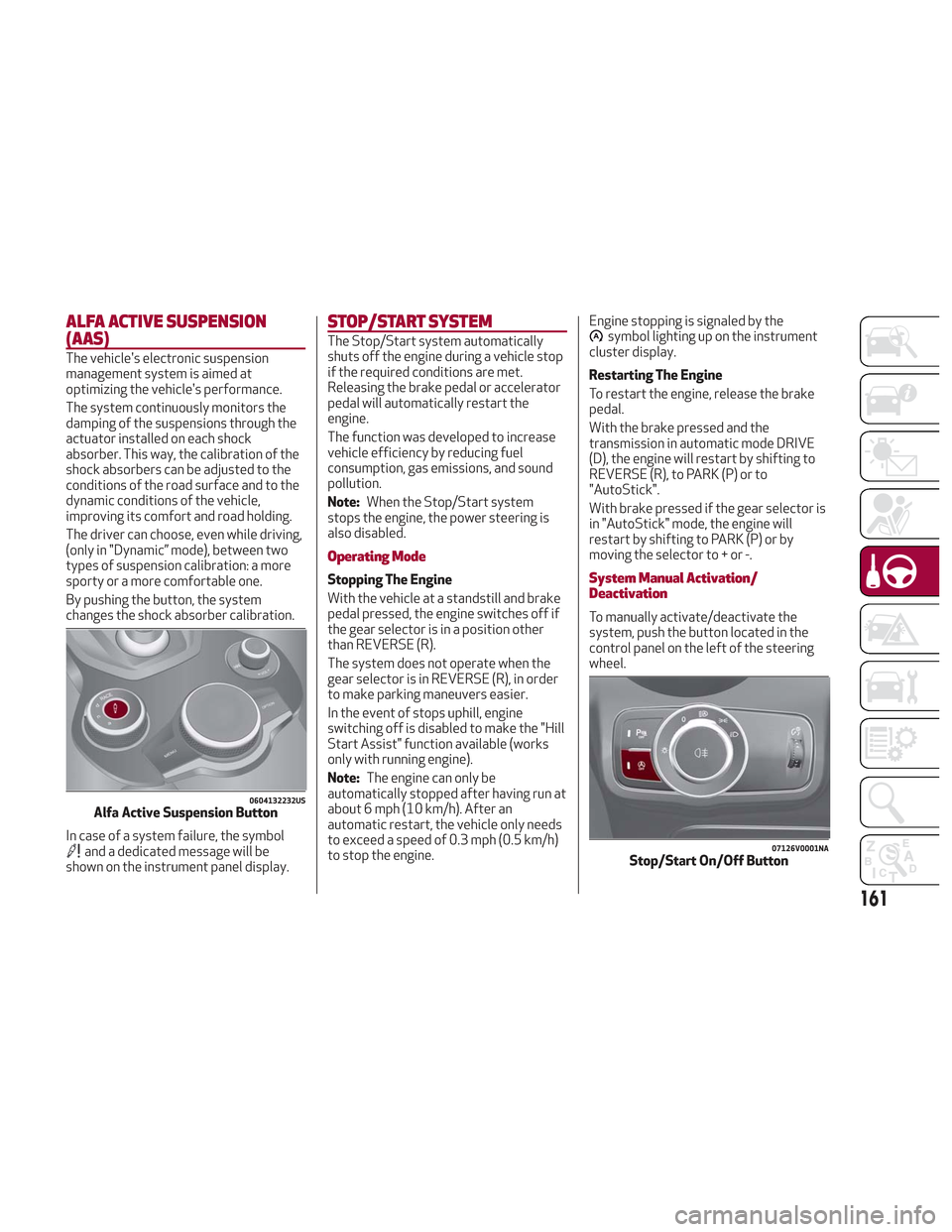
By pushing the button, the system
changes the shock absorber calibration.
In case of a system failure, the symbol
and a dedicated message will be
shown on the instrument panel display.
STOP/START SYSTEM
The Stop/Start system automatically
shuts off the engine during a vehicle stop
if the required conditions are met.
Releasing the brake pedal or accelerator
pedal will automatically restart the
engine.
The function was developed to increase
vehicle efficiency by reducing fuel
consumption, gas emissions, and sound
pollution.
Note:When the Stop/Start system
stops the engine, the power steering is
also disabled.
Operating Mode
Stopping The Engine
With the vehicle at a standstill and brake
pedal pressed, the engine switches off if
the gear selector is in a position other
than REVERSE (R).
The system does not operate when the
gear selector is in REVERSE (R), in order
to make parking maneuvers easier.
In the event of stops uphill, engine
switching off is disabled to make the "Hill
Start Assist" function available (works
only with running engine).
Note: The engine can only be
automatically stopped after having run at
about 6 mph (10 km/h). After an
automatic restart, the vehicle only needs
to exceed a speed of 0.3 mph (0.5 km/h)
to stop the engine. Engine stopping is signaled by the
symbol lighting up on the instrument
cluster display.
Restarting The Engine
To restart the engine, release the brake
pedal.
With the brake pressed and the
transmission in automatic mode DRIVE
(D), the engine will restart by shifting to
REVERSE (R), to PARK (P) or to
"AutoStick".
With brake pressed if the gear selector is
in "AutoStick" mode, the engine will
restart by shifting to PARK (P) or by
moving the selector to + or -.
System Manual Activation/
Deactivation
To manually activate/deactivate the
system, push the button located in the
control panel on the left of the steering
wheel.
0604132232USAlfa Active Suspension Button
07126V0001NAStop/Start On/Off Button
161
Page 168 of 276
you should accelerate until you are close
to that speed. Then, push and release the
RES button.
To Deactivate
Lightly pressing the brake pedal
deactivates the speed control without
deleting the set speed.
The speed control may also be
deactivated by applying the electric park
brake or when the braking system is
operated (e.g. operation of the ESC
system).
The set speed is deleted in the following
cases:
Pushing the on/off button twice
The ignition is cycled to the STOP
position
There is a malfunction with the Speed
Control.
ADAPTIVE CRUISE CONTROL
(ACC) — IF EQUIPPED
System Description
Adaptive Cruise Control (ACC) is a driver
assist system that combines the speed
control functions with maintaining the
distance from the vehicle ahead.
The system allows to set and hold the
vehicle at the desired speed without
needing to press the accelerator. It also
allows to set and hold a distance from the
vehicle ahead (these settings are set by
the driver).
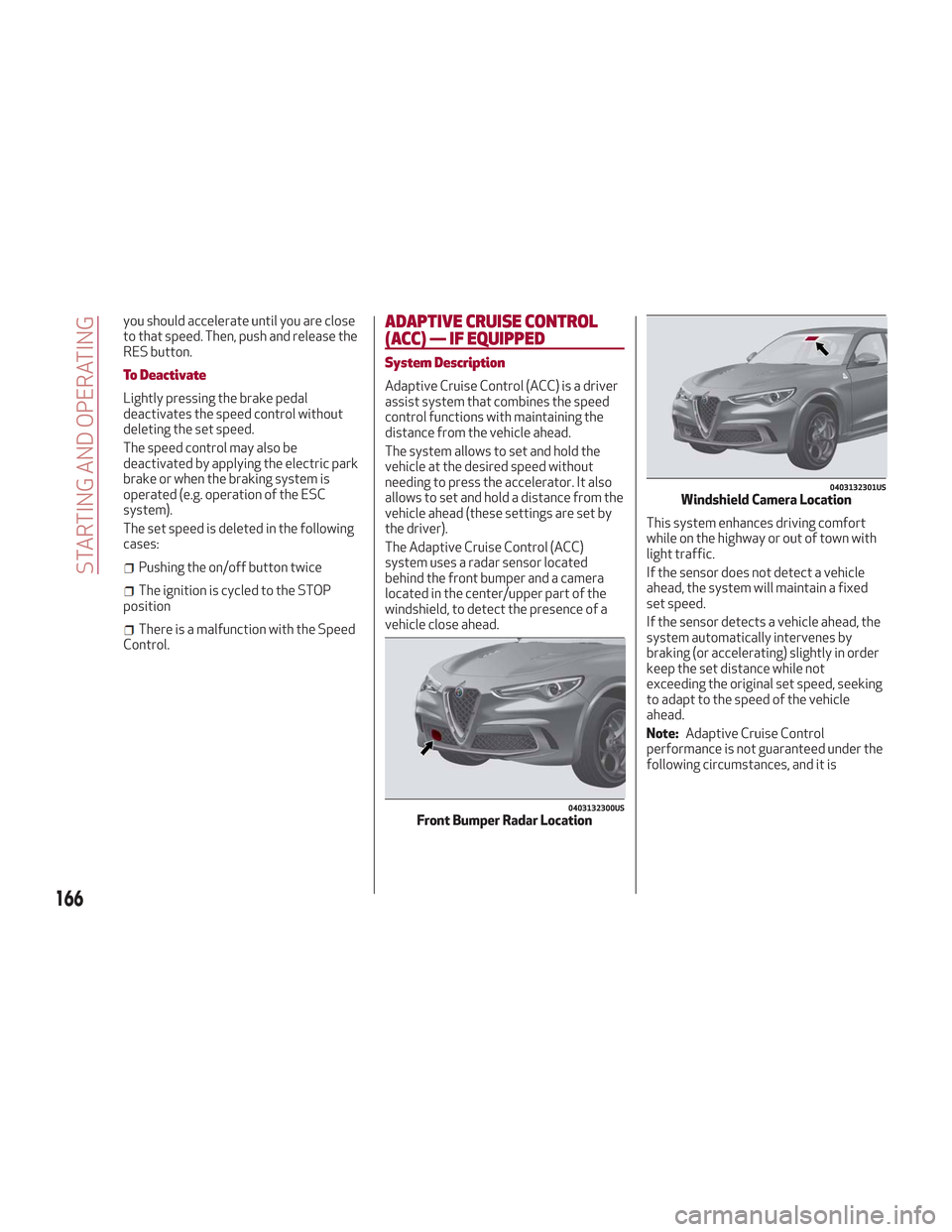
The Adaptive Cruise Control (ACC)
system uses a radar sensor located
behind the front bumper and a camera
located in the center/upper part of the
windshield, to detect the presence of a
vehicle close ahead. This system enhances driving comfort
while on the highway or out of town with
light traffic.
If the sensor does not detect a vehicle
ahead, the system will maintain a fixed
set speed.
If the sensor detects a vehicle ahead, the
system automatically intervenes by
braking (or accelerating) slightly in order
keep the set distance while not
exceeding the original set speed, seeking
to adapt to the speed of the vehicle
ahead.
Note:
Adaptive Cruise Control
performance is not guaranteed under the
following circumstances, and it is
0403132300USFront Bumper Radar Location
0403132301USWindshield Camera Location
166
STARTING AND OPERATING
Page 176 of 276
System Activation/Deactivation
When the REVERSE gear is engaged and
the system is on, the front and rear
sensors are activated. If the vehicle
moves from REVERSE to a forward gear,
the rear sensors are deactivated, while
the front sensors remain active until the
speed of 9 mph (15 km/h) is exceeded.
Note:In certain operating conditions, the
system could start detecting an obstacle
only after the vehicle has moved slightly
(a few inches).
Acoustic Signal
In the presence of an obstacle at the
front or the rear of the vehicle, an
acoustic signal with variable frequency
will sound:
The acoustic signal increases in
frequency as the distance between the
vehicle and the obstacle decreases.
The acoustic signal becomes
continuous when the distance between
the vehicle and the obstacle is less than
11 inches (30 cm), and stops if the
distance increases.
The acoustic signal is constant if the
distance between the vehicle and the
obstacle is unchanged.
Note: If the sensors detect several front
and rear obstacles, the closest obstacle
is considered. An intermittent signal will
sound if the obstacles are at the same
distance (front and rear). When the system emits an acoustic
signal, the volume of the Information and
Entertainment System, if activated, is
automatically lowered.
Indication On Display
The driver can select the type of warning
they would like to be displayed through
the Information and Entertainment
System. To access the function on the
main menu, select in the following order:
1. “Settings.”
2. “Driver Assistance.”
3. “ParkSense.”
4. “Mode.”
5. “Sound-Display.”
Visual Indications
The system indicates the presence of an
obstacle by displaying a single red arc in
the detected areas, in relation to the
distance of the object and the position of
the vehicle.
If the obstacle is detected in the front or
rear central area, a single red arc will be
displayed as the obstacle approaches,
first constant, then flashing, in addition
to an acoustic signal.
If the obstacle is detected in the front or
rear left and/or right area, a single red
flashing arc will be shown in the
corresponding area on the display and
the system will emit an acoustic signal,
either at frequent intervals or constantly.If several obstacles are detected
simultaneously in the front and rear area,
the display will show all of them,
regardless of the area in which they were
detected.
In general, the vehicle is closer to the
obstacle when a single or several flashing
arcs are shown on the display and the
acoustic signal becomes continuous.
It is not possible to exit from the display
screen while the vehicle is in REVERSE.
Fault Indication
Parking sensor faults, if any, will be
indicated by a message on the display on
the instrument cluster. Refer to "Warning
Lights And Messages On The Instrument
Panel" in "Getting To Know Your
Instrument Panel" for further
information.
Messages On The Display
In case of system failure, a dedicated
message appears on the instrument
cluster for about 5 seconds.
Cleaning the front or rear sensors
:If
the display shows a message requiring
the sensors to be cleaned, make sure that
the outer surface and the underside of
the front and rear bumpers are free of
debris (e.g. snow, mud, ice, etc.). Once
these areas are clear, place the ignition in
STOP mode. Then, return it to ON mode.
If the message is still displayed, contact
your authorized dealer.
174
STARTING AND OPERATING