radio Alfa Romeo Stelvio 2019 User Guide
[x] Cancel search | Manufacturer: ALFA ROMEO, Model Year: 2019, Model line: Stelvio, Model: Alfa Romeo Stelvio 2019Pages: 244, PDF Size: 4.95 MB
Page 221 of 244
INTRODUCTION
The system can be controlled through the
Rotary Pad. By turning it, you can
navigate the menus, by pressing it, you
can activate/confirm the selections, and
by pushing it left you go back to the
preceding screen.
RADIO MODE
After the desired radio station has been
selected, the following information is
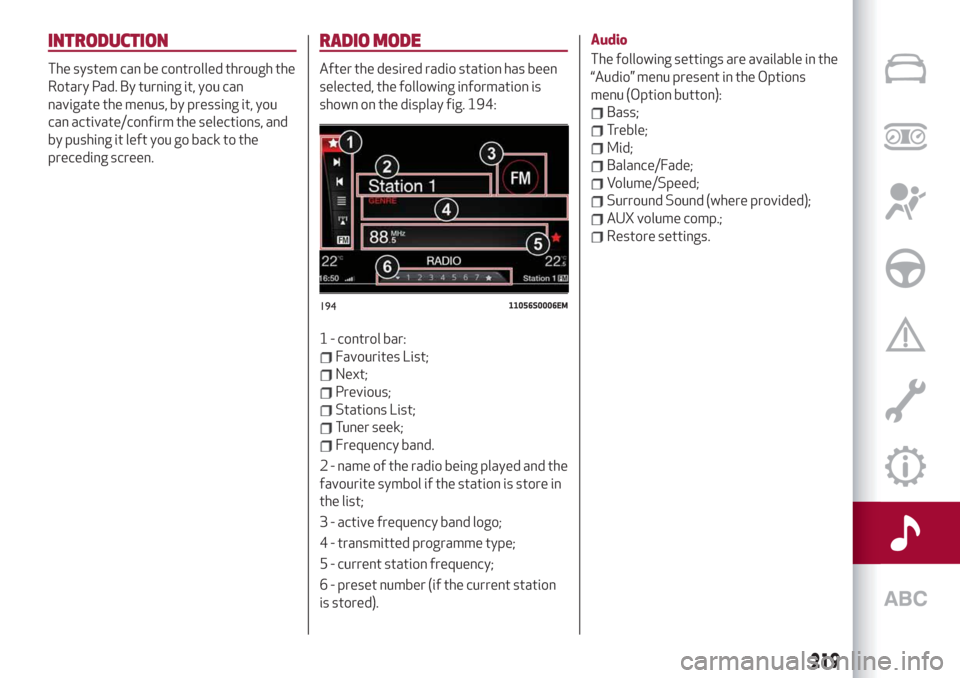
shown on the display fig. 194:
1 - control bar:
Favourites List;
Next;
Previous;
Stations List;
Tuner seek;
Frequency band.
2 - name of the radio being played and the
favourite symbol if the station is store in
the list;
3 - active frequency band logo;
4 - transmitted programme type;
5 - current station frequency;
6 - preset number (if the current station
is stored).Audio
The following settings are available in the
“Audio” menu present in the Options
menu (Option button):
Bass;
Treble;
Mid;
Balance/Fade;
Volume/Speed;
Surround Sound (where provided);
AUX volume comp.;
Restore settings.
19411056S0006EM
219
Page 222 of 244
MEDIA MODE
IMPORTANT Applications used on
portable devices may be not compatible
with the Connect system.
Track selection (Browse)
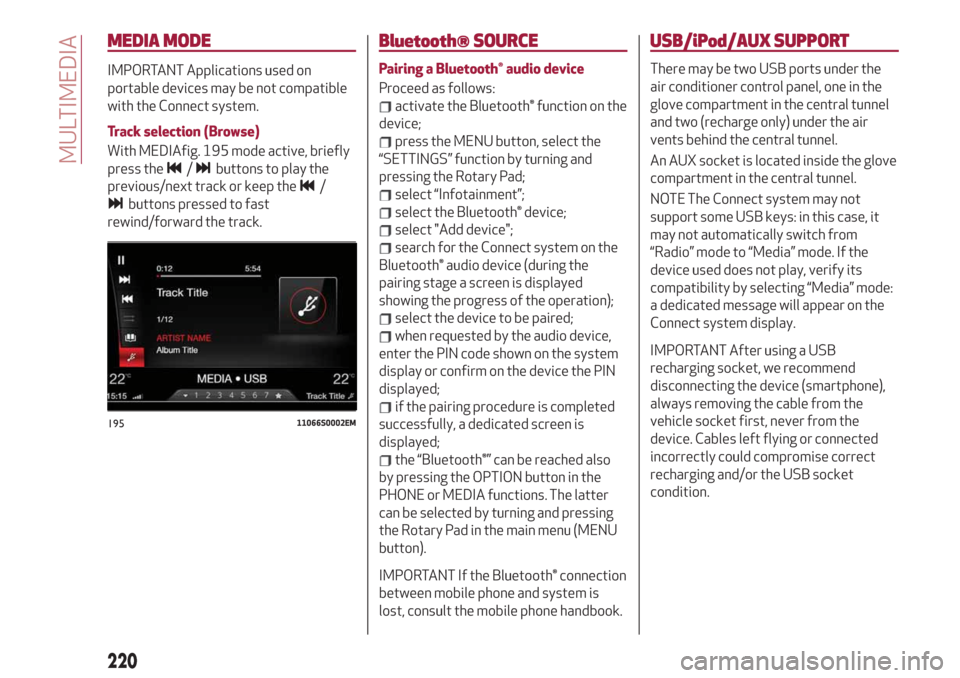
With MEDIAfig. 195 mode active, briefly
press the
/buttons to play the
previous/next track or keep the
/
buttons pressed to fast
rewind/forward the track.
Bluetooth® SOURCE
Pairing a Bluetooth® audio device
Proceed as follows:
activate the Bluetooth® function on the
device;
press the MENU button, select the
“SETTINGS” function by turning and
pressing the Rotary Pad;
select “Infotainment”;
select the Bluetooth® device;
select "Add device";
search for the Connect system on the
Bluetooth® audio device (during the
pairing stage a screen is displayed
showing the progress of the operation);
select the device to be paired;
when requested by the audio device,
enter the PIN code shown on the system
display or confirm on the device the PIN
displayed;
if the pairing procedure is completed
successfully, a dedicated screen is
displayed;
the “Bluetooth®” can be reached also
by pressing the OPTION button in the
PHONE or MEDIA functions. The latter
can be selected by turning and pressing
the Rotary Pad in the main menu (MENU
button).
IMPORTANT If the Bluetooth® connection
between mobile phone and system is
lost, consult the mobile phone handbook.
USB/iPod/AUX SUPPORT
There may be two USB ports under the
air conditioner control panel, one in the
glove compartment in the central tunnel
and two (recharge only) under the air
vents behind the central tunnel.
An AUX socket is located inside the glove
compartment in the central tunnel.
NOTE The Connect system may not
support some USB keys: in this case, it
may not automatically switch from
“Radio” mode to “Media” mode. If the
device used does not play, verify its
compatibility by selecting “Media” mode:
a dedicated message will appear on the
Connect system display.
IMPORTANT After using a USB
recharging socket, we recommend
disconnecting the device (smartphone),
always removing the cable from the
vehicle socket first, never from the
device. Cables left flying or connected
incorrectly could compromise correct
recharging and/or the USB socket
condition.
19511066S0002EM
220
MULTIMEDIA
Page 228 of 244
automatic folding of the mirrors when the
doors are locked/unlocked. The default
setting is “Off”.
Restore settings
This function allows you to delete the
settings from this menu.
Access the functions and select the
setting by turning and pressing the
Rotary Pad.
Doors & Locks
To access the “Doors & Locks” function,
select it by turning the Rotary Pad and
press the control to activate it. The
following settings can be modified when
this mode is selected:
Door lock in motion;
Unlock all doors on exit;
Passive Entry (where provided);
Door Unlock On Entry (where
provided);
Horn w/Remote Start (for
versions/markets where provided);
Sound Horn with Lock (where
provided);
Auto Relock (where provided);
Electric tailgate (where provided);
Automatic tailgate opening (where
provided);
Restore settings.Control panel
To access the “Control panel” function,
select it by turning the Rotary Pad and
press the Rotary Pad to activate. The
following settings can be modified when
this mode is selected:
Warning buzzer volume;
Trip B;
Show telephone info;
Show audio info;
Show Navi info;
Restore settings.
Infotainment
To access the “Infotainment” function,
select it by turning the Rotary Pad and
press the Rotary Pad to activate. The
following settings can be modified when
this mode is selected:
Screen Off;
Splitscreen (where provided);
Audio;
Bluetooth;
Radio;
Media;
Phone;
Navigation (where provided);
Apps.
System
To access the “System” function, select it
by turning the Rotary Pad and press the
Rotary Pad to activate. The followingsettings can be modified when this mode
is selected:
Automatic activation;
Cam Delay;
Update Software;
Map update;
Clear personal data;
Restore settings.
IMPORTANT For further information
about the map update procedure, refer to
the Connect system supplement on the
uLum website.
MAP UPDATE
To ensure optimal performance, the
navigation system must be updated
periodically.
For this, the Mopar Map Care service
offers a new map update every three
months.
The updates can be downloaded from the
maps.mopar.eu website and installed
directly on the Connect system. All
updates are free of charge for 3 years
from the start of the warranty on the car.
The navigation system can also be
updated at the Alfa Romeo Dealership.
NOTE The dealer may charge for
updating the navigation system.
226
MULTIMEDIA
Page 229 of 244
VOICE COMMANDS
IMPORTANT For languages not
supported by the system, voice
commands are not available.
To use the voice commands, press the
button on the steering wheel controls
and say the function you want to activate
aloud.
The following lists give the main word for
each command.
Radio functions
The
button lets you activate the
following functions:
Tune into the station
Tune to the frequency
Add to favourites
Show Available Stations
Show Favourite Stations
FM
AM
DAB (where provided)
SiriusXM (where provided)
Media function
The
button lets you activate the
following functions:
Display Album
Play Album
Display Artist
Play Artist
Display Composer
Play Composer
Display Genre
Play Genre
Display Playlist
Play Playlist
Play song
Play All
Display all the albums
Display all the artists
Display all the composers
Display all the genres
Display all the playlists
View all songs
Activate shuffle
Deactivate shuffle
Change Source to Aux
Change Source to USB 1
Change Source to USB 2
Change Source to Bluetooth
NOTE These controls are valid on devices
connected to the system via USB ports
and not through the
Bluetooth®
system.
Telephone function
The
button lets you activate the
following functions:
Dial
Call
Redial
Show contacts
Show all calls
Show missed calls
SearchNavigation functions
(where provided)
The
button lets you activate the
following functions:
Navigate to
Favourites
Set 2D map
Set detailed 3D map
Set overhead view
Route preview
Start navigation
Stop navigation
Repeat instructions
Show map
Find the nearest
227
Page 230 of 244
OFFICIAL TYPE APPROVALS
All radio equipment supplied with the
vehicle complies with the 2014/53/EU
directive.
For further information visit the
www.mopar.eu/owner or
http://aftersales.fiat.com/elum/
websites.
ALFA CONNECT
(where provided)
These services let you keep your vehicle
under control at all times and receive
assistance in the event of accident, theft
or breakdown. These services may be
present if the Alfa Connect Device is
installed on your vehicle, the services are
available in your country (list available on
the www.alfaromeoconnect.eu website)
and you requested activation by
following the instructions received at the
email address given when your vehicle
was handed over to you.
Download the Alfa Connect App or
access the www.alfaromeoconnect.eu
portal to use the connected services. You
can find all the details about the services
on the www.alfaromeoconnect.eu portal.
PRIVACY MODE
Privacy mode lets you disable the “Find
car”, “Notify Area” and “Notify Speed”
services for a certain time.
IMPORTANT Vehicle position tracing
remains active for the assistance
services, where provided, in the event of
accident or vehicle theft, but is not visible
to the customer.
PRIVACY MODE activation procedure
Proceed as follows:
take note of the total odometer
reading;
make sure that the instrument panel is
off;
send the following text message to
+393424112613: “PRIVACY
ZAR00000ABC001). You can find the
chassis number in the registration
document;
before starting the engine, wait to
receive the text message confirming that
Privacy mode has been activated and
indicating when it expires.
228
MULTIMEDIA