warning Alfa Romeo Stelvio 2019 Owner's Guide
[x] Cancel search | Manufacturer: ALFA ROMEO, Model Year: 2019, Model line: Stelvio, Model: Alfa Romeo Stelvio 2019Pages: 244, PDF Size: 4.95 MB
Page 45 of 244
This section of the handbook gives you all the information you
need to understand, interpret and use
the instrument panel correctly.
KNOWING THE INSTRUMENT PANEL
CONTROL PANEL AND ON-BOARD INSTRUMENTS .........44
DISPLAY....................................46
WARNING LIGHTS AND MESSAGES . ..................51
Page 46 of 244
CONTROL PANEL AND ON-BOARD INSTRUMENTS
VERSIONS WITH 3.5” TFT DISPLAY
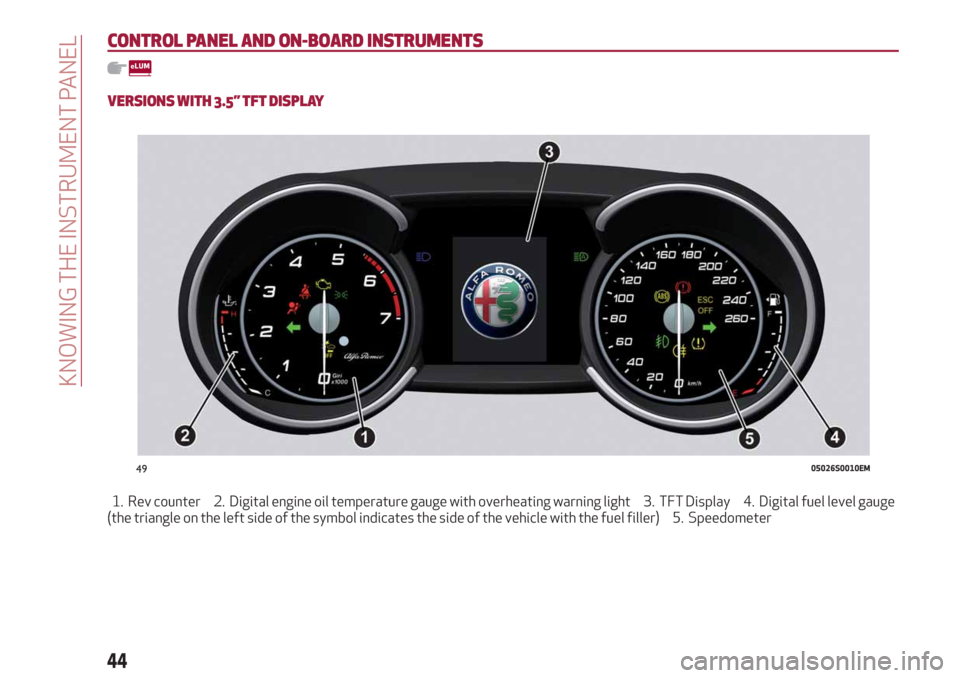
1. Rev counter 2. Digital engine oil temperature gauge with overheating warning light 3. TFT Display 4. Digital fuel level gauge
(the triangle on the left side of the symbol indicates the side of the vehicle with the fuel filler) 5. Speedometer
4905026S0010EM
44
KNOWING THE INSTRUMENT PANEL
Page 47 of 244
VERSIONS WITH 7” TFT DISPLAY
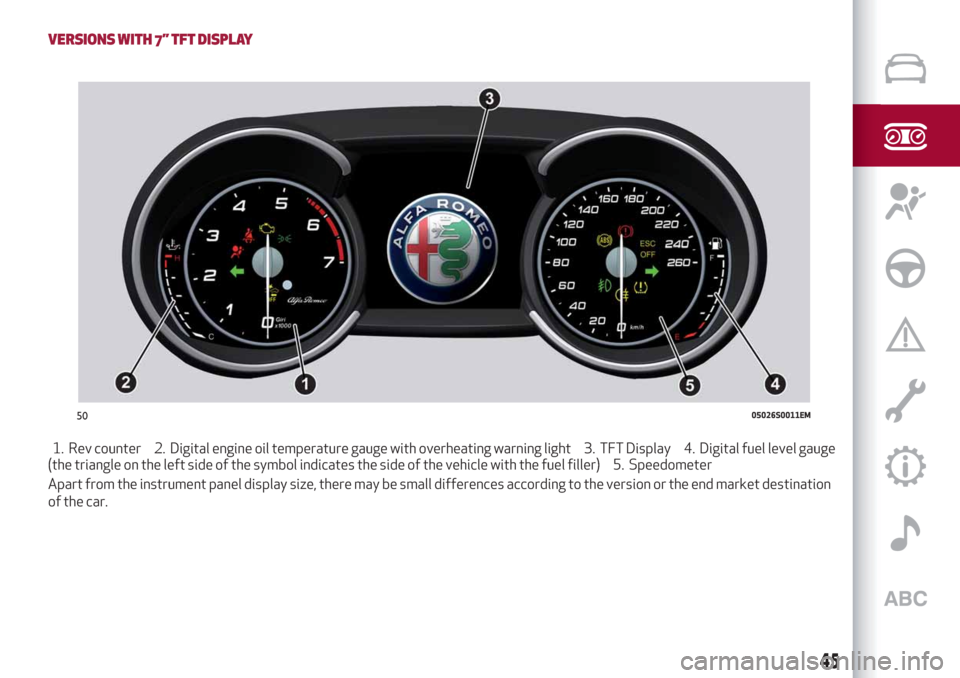
1. Rev counter 2. Digital engine oil temperature gauge with overheating warning light 3. TFT Display 4. Digital fuel level gauge
(the triangle on the left side of the symbol indicates the side of the vehicle with the fuel filler) 5. Speedometer
Apart from the instrument panel display size, there may be small differences according to the version or the end market destination
of the car.
5005026S0011EM
45
Page 48 of 244
DISPLAY
DESCRIPTION
The vehicle can be equipped with a 3.5" or 7" TFT Display.
RECONFIGURABLE TFT DISPLAY
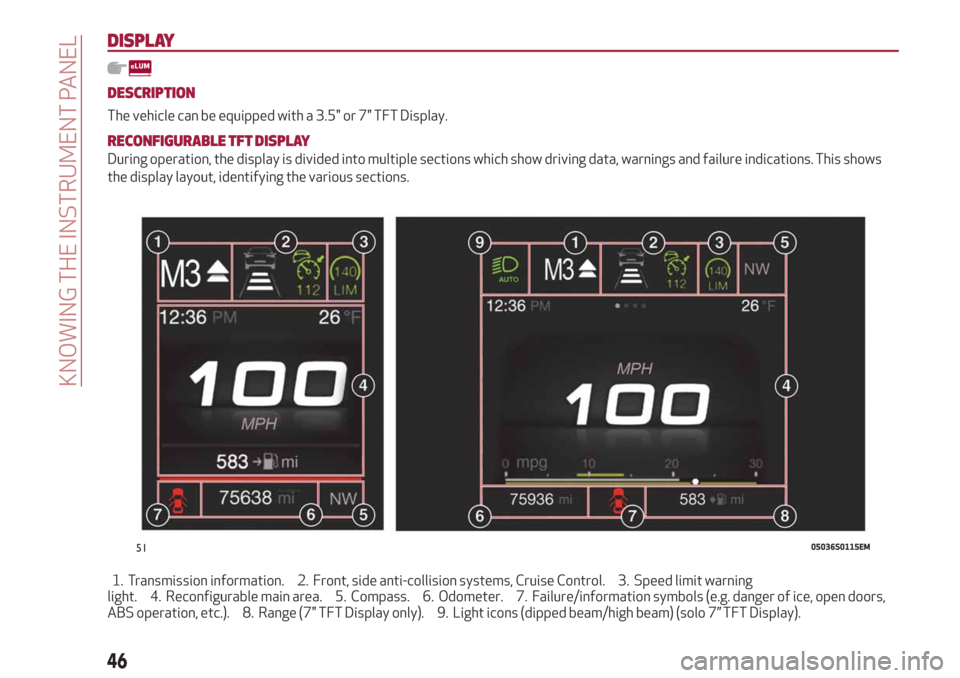
During operation, the display is divided into multiple sections which show driving data, warnings and failure indications. This shows
the display layout, identifying the various sections.
1. Transmission information. 2. Front, side anti-collision systems, Cruise Control. 3. Speed limit warning
light. 4. Reconfigurable main area. 5. Compass. 6. Odometer. 7. Failure/information symbols (e.g. danger of ice, open doors,
ABS operation, etc.). 8. Range (7" TFT Display only). 9. Light icons (dipped beam/high beam) (solo 7” TFT Display).
5105036S0115EM
46
KNOWING THE INSTRUMENT PANEL
Page 49 of 244
1 Transmission Information
Shows the following information related
to the transmission operation mode (M, P,
R, N, D).
If the gear is changed using the steering
wheel lever (where provided), In D mode
or manual M mode, it also displays the
engaged gear.
In M mode, it also shows when to shift
gear up or down.
2 Front, side anti-collision systems,
Cruise Control
Displays the operation the following
modes:
Forward Collision Warning (FCW)
Lane Departure Warning (LDW)
Cruise Control (CC) or Active Cruise
Control (ACC) (where provided)
For further information, see relevant
paragraphs.
3 Speed limit warning light
Shows information regarding the Speed
Limiter function.
For further information, see relevant
paragraph.
4 Reconfigurable main area
Can display the following screens:
Home
Trip A
Trip B (can be activated/deactivated
on the Connect system)
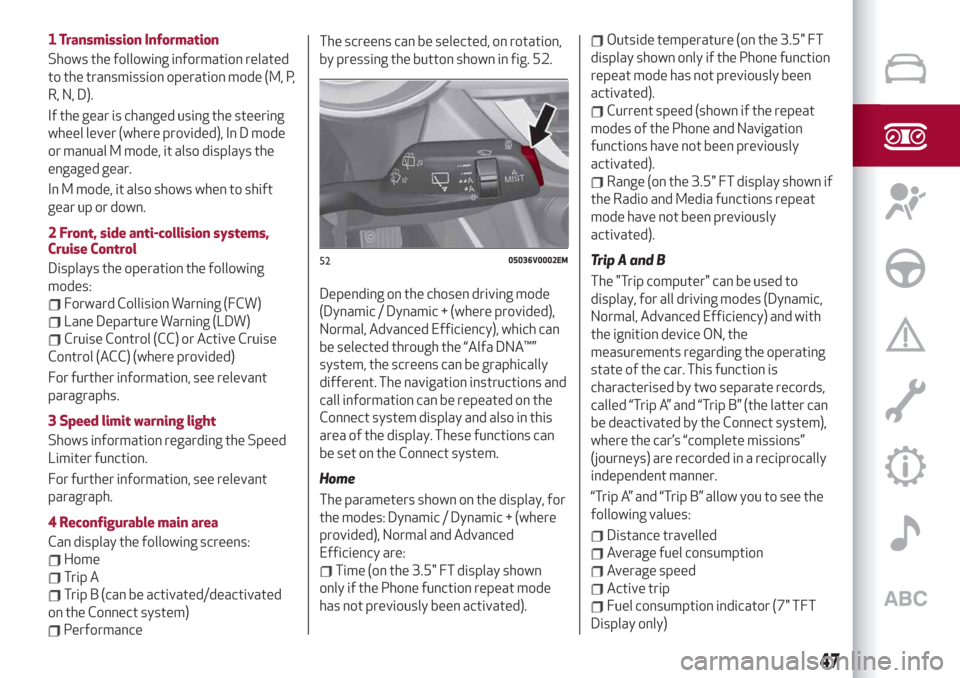
PerformanceThe screens can be selected, on rotation,
by pressing the button shown in fig. 52.
Depending on the chosen driving mode
(Dynamic / Dynamic + (where provided),
Normal, Advanced Efficiency), which can
be selected through the “Alfa DNA™”
system, the screens can be graphically
different. The navigation instructions and
call information can be repeated on the
Connect system display and also in this
area of the display. These functions can
be set on the Connect system.
Home
The parameters shown on the display, for
the modes: Dynamic / Dynamic + (where
provided), Normal and Advanced
Efficiency are:
Time (on the 3.5" FT display shown
only if the Phone function repeat mode
has not previously been activated).
Outside temperature (on the 3.5" FT
display shown only if the Phone function
repeat mode has not previously been
activated).
Current speed (shown if the repeat
modes of the Phone and Navigation
functions have not been previously
activated).
Range (on the 3.5" FT display shown if
the Radio and Media functions repeat
mode have not been previously
activated).
Trip A and B
The "Trip computer" can be used to
display, for all driving modes (Dynamic,
Normal, Advanced Efficiency) and with
the ignition device ON, the
measurements regarding the operating
state of the car. This function is
characterised by two separate records,
called “Trip A” and “Trip B” (the latter can
be deactivated by the Connect system),
where the car’s “complete missions”
(journeys) are recorded in a reciprocally
independent manner.
“Trip A” and “Trip B” allow you to see the
following values:
Distance travelled
Average fuel consumption
Average speed
Active trip
Fuel consumption indicator (7" TFT
Display only)
5205036V0002EM
47
Page 50 of 244
To reset the values, press and hold down
the button on the right stalk fig. 52.
Performance
The displayed parameters are different
in function from the active mode, and the
modes can be selected through the “Alfa
DNA™” system and are as follows:
Normal: The screen graphically
reproduces some parameters closely
linked to the efficiency of the driving
style, with a view to limiting consumption;
Advanced Efficiency: The three central
icons on the screen indicate the
effectiveness of the driving style, linked
to the following parameters:
acceleration, deceleration and gear
shifts, with a view to limiting
consumption. The bar below the icons
shows current consumption and the
green line represents the optimal area.
The globe (7" TFT Display) lights up
gradually according to lower
consumption.
Dynamic / Dynamic + (where
provided): The displayed parameters are
related to car stability, the graphs
illustrate the trend of the
longitudinal/lateral accelerations
(G-meter information), considering
gravity acceleration as a reference unit.
Lateral acceleration peaks are also
indicated.5 Compass
Views the position indicating the cardinal
point.
6 Milometer
Indicates the total kilometres (or miles)
travelled.
7 Failure warning lights
Area dedicated to displaying failures, the
following symbols could be displayed on
rotation:
Low criticality symbols (yellow amber).
High criticality symbols (red).
8 Car range (7" TFT Display only)
Indicates the kilometres (or miles) left
before the fuel tank is empty.
9 Light icons (7” TFT Display only)
Displays the icon related to the active
mode among the following:
dipped beam headlights;
main beam headlights;
Auto low beam headlights;
Auto main beam headlights.PARAMETERS SET BY USER
A series of user-programmable functions
can be set using the Connect system.
The basic settings only are described:
Units & Language
Time & Date
Control panel
To access the list with the
aforementioned items, proceed as
follows: from the main menu, activated
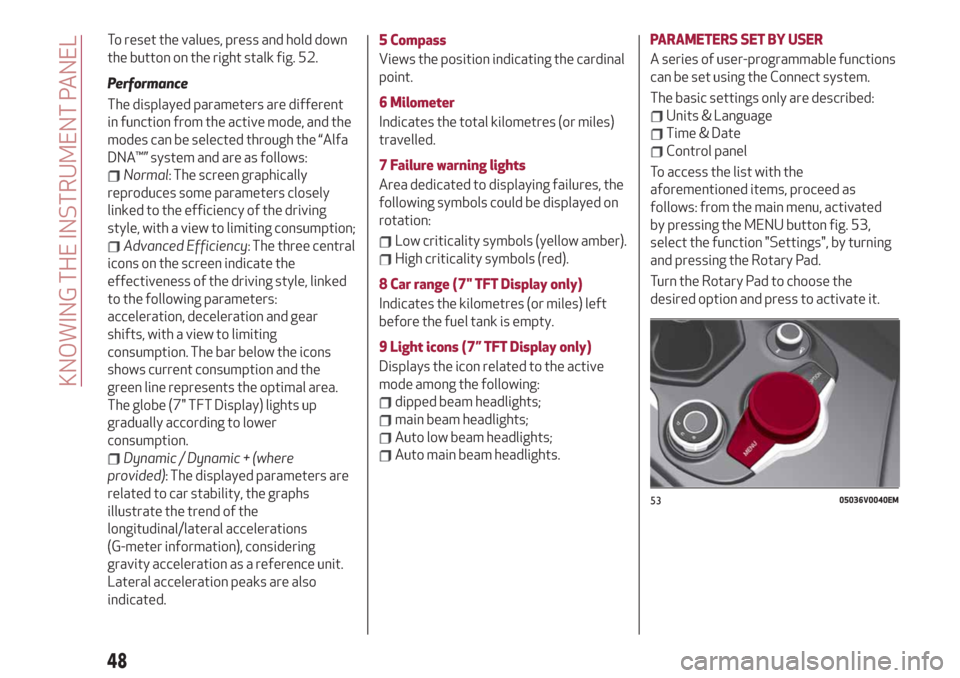
by pressing the MENU button fig. 53,
select the function "Settings", by turning
and pressing the Rotary Pad.
Turn the Rotary Pad to choose the
desired option and press to activate it.
5305036V0040EM
48
KNOWING THE INSTRUMENT PANEL
Page 51 of 244
Units & Language
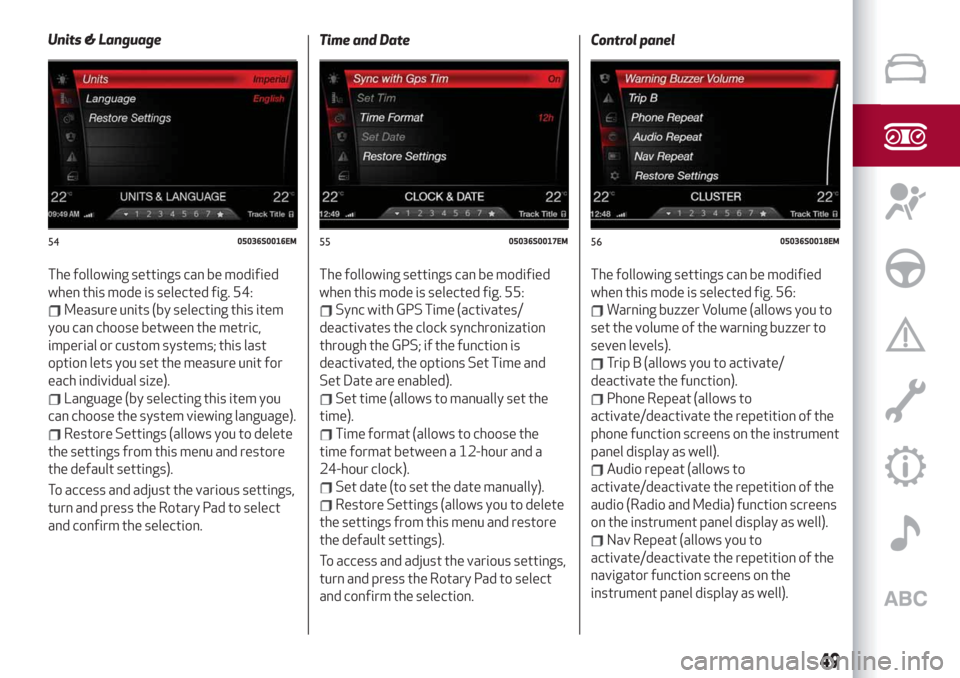
The following settings can be modified
when this mode is selected fig. 54:
Measure units (by selecting this item
you can choose between the metric,
imperial or custom systems; this last
option lets you set the measure unit for
each individual size).
Language (by selecting this item you
can choose the system viewing language).
Restore Settings (allows you to delete
the settings from this menu and restore
the default settings).
To access and adjust the various settings,
turn and press the Rotary Pad to select
and confirm the selection.Time and Date
The following settings can be modified
when this mode is selected fig. 55:
Sync with GPS Time (activates/
deactivates the clock synchronization
through the GPS; if the function is
deactivated, the options Set Time and
Set Date are enabled).
Set time (allows to manually set the
time).
Time format (allows to choose the
time format between a 12-hour and a
24-hour clock).
Set date (to set the date manually).
Restore Settings (allows you to delete
the settings from this menu and restore
the default settings).
To access and adjust the various settings,
turn and press the Rotary Pad to select
and confirm the selection.Control panel
The following settings can be modified
when this mode is selected fig. 56:
Warning buzzer Volume (allows you to
set the volume of the warning buzzer to
seven levels).
Trip B (allows you to activate/
deactivate the function).
Phone Repeat (allows to
activate/deactivate the repetition of the
phone function screens on the instrument
panel display as well).
Audio repeat (allows to
activate/deactivate the repetition of the
audio (Radio and Media) function screens
on the instrument panel display as well).
Nav Repeat (allows you to
activate/deactivate the repetition of the
navigator function screens on the
instrument panel display as well).
5405036S0016EM5505036S0017EM5605036S0018EM
49
Page 53 of 244
WARNING LIGHTS AND MESSAGES
IMPORTANT The warning light switches on together with a dedicated message and/or acoustic signal when applicable. These
indications are indicative and precautionary and as such must not be considered as exhaustive and/or alternative to the information
contained in the Owner Handbook, which you are advised to read carefully in all cases. In the event of a failure indication, always
refer to the contents of this chapter.
IMPORTANT The failure indicators appearing on the display are divided into two categories: very serious and less serious faults.
Serious faults are indicated by a repeated and prolonged warning "cycle". Less serious faults are indicated by a warning "cycle" with a
shorter duration. You can stop the warning cycle in both cases by pressing the button located on the windscreen wiper lever. The
instrument panel warning light will stay on until the cause of the failure is eliminated.
51
Page 54 of 244
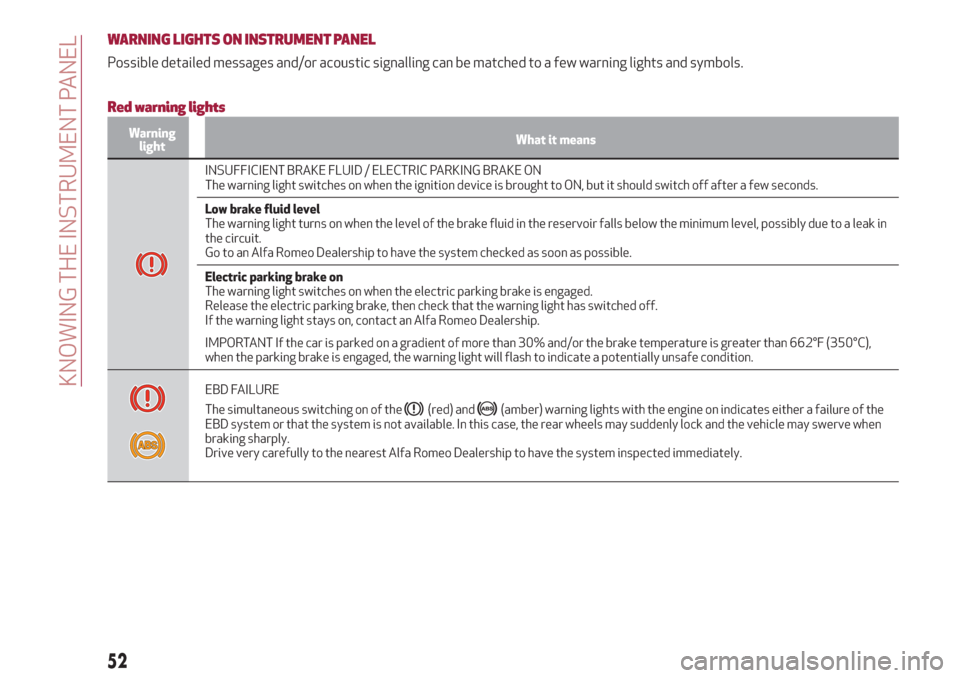
WARNING LIGHTS ON INSTRUMENT PANEL
Possible detailed messages and/or acoustic signalling can be matched to a few warning lights and symbols.
Red warning lights
Warning
lightWhat it means
INSUFFICIENT BRAKE FLUID / ELECTRIC PARKING BRAKE ON
The warning light switches on when the ignition device is brought to ON, but it should switch off after a few seconds.
Low brake fluid level
The warning light turns on when the level of the brake fluid in the reservoir falls below the minimum level, possibly due to a leak in
the circuit.
Go to an Alfa Romeo Dealership to have the system checked as soon as possible.
Electric parking brake on
The warning light switches on when the electric parking brake is engaged.
Release the electric parking brake, then check that the warning light has switched off.
If the warning light stays on, contact an Alfa Romeo Dealership.
IMPORTANT If the car is parked on a gradient of more than 30% and/or the brake temperature is greater than 662°F (350°C),
when the parking brake is engaged, the warning light will flash to indicate a potentially unsafe condition.
EBD FAILURE
The simultaneous switching on of the
(red) and(amber) warning lights with the engine on indicates either a failure of the
EBD system or that the system is not available. In this case, the rear wheels may suddenly lock and the vehicle may swerve when
braking sharply.
Drive very carefully to the nearest Alfa Romeo Dealership to have the system inspected immediately.
52
KNOWING THE INSTRUMENT PANEL
Page 55 of 244
Warning
lightWhat it means
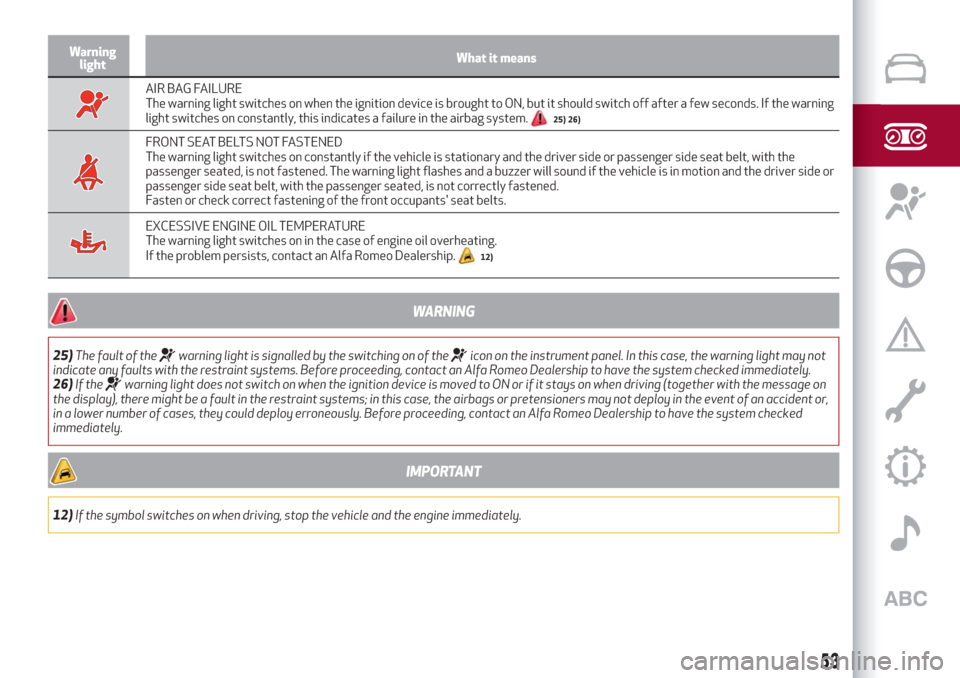
AIR BAG FAILURE
The warning light switches on when the ignition device is brought to ON, but it should switch off after a few seconds. If the warning
light switches on constantly, this indicates a failure in the airbag system.
25) 26)
FRONT SEAT BELTS NOT FASTENED
The warning light switches on constantly if the vehicle is stationary and the driver side or passenger side seat belt, with the
passenger seated, is not fastened. The warning light flashes and a buzzer will sound if the vehicle is in motion and the driver side or
passenger side seat belt, with the passenger seated, is not correctly fastened.
Fasten or check correct fastening of the front occupants' seat belts.
EXCESSIVE ENGINE OIL TEMPERATURE
The warning light switches on in the case of engine oil overheating.
If the problem persists, contact an Alfa Romeo Dealership.
12)
WARNING
25)The fault of thewarning light is signalled by the switching on of theicon on the instrument panel. In this case, the warning light may not
indicate any faults with the restraint systems. Before proceeding, contact an Alfa Romeo Dealership to have the system checked immediately.
26)If the
warning light does not switch on when the ignition device is moved to ON or if it stays on when driving (together with the message on
the display), there might be a fault in the restraint systems; in this case, the airbags or pretensioners may not deploy in the event of an accident or,
in a lower number of cases, they could deploy erroneously. Before proceeding, contact an Alfa Romeo Dealership to have the system checked
immediately.
IMPORTANT
12)If the symbol switches on when driving, stop the vehicle and the engine immediately.
53