light Alfa Romeo Stelvio 2019 Repair Manual
[x] Cancel search | Manufacturer: ALFA ROMEO, Model Year: 2019, Model line: Stelvio, Model: Alfa Romeo Stelvio 2019Pages: 244, PDF Size: 4.95 MB
Page 123 of 244
The device further enhances driving
comfort provided by the electronic
Cruise Control when on the motorway or
out of town with light traffic.
Important notes
If the sensor does not detect any vehicle
ahead, the device will maintain a fixed set
speed.
If the sensor detects a vehicle ahead, the
device automatically intervenes bybraking (or accelerating) slightly in order
not to exceed the original set speed, so
that the vehicle keeps the preset
distance, seeking to adapt to the speed
of the vehicle ahead.
In the cases described below, the system
performance is not guaranteed, it is
therefore advisable to turn the device on
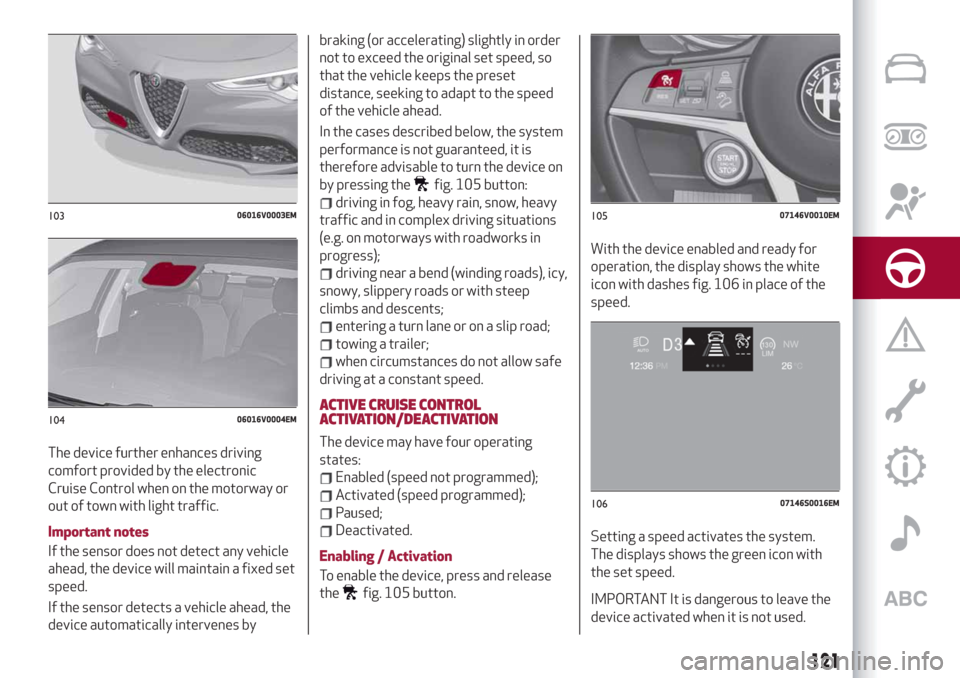
by pressing the
fig. 105 button:
driving in fog, heavy rain, snow, heavy
traffic and in complex driving situations
(e.g. on motorways with roadworks in
progress);
driving near a bend (winding roads), icy,
snowy, slippery roads or with steep
climbs and descents;
entering a turn lane or on a slip road;
towing a trailer;
when circumstances do not allow safe
driving at a constant speed.
ACTIVE CRUISE CONTROL
ACTIVATION/DEACTIVATION
The device may have four operating
states:
Enabled (speed not programmed);
Activated (speed programmed);
Paused;
Deactivated.
Enabling / Activation
To enable the device, press and release
the
fig. 105 button.With the device enabled and ready for
operation, the display shows the white
icon with dashes fig. 106 in place of the
speed.
Setting a speed activates the system.
The displays shows the green icon with
the set speed.IMPORTANT It is dangerous to leave the
device activated when it is not used.
10306016V0003EM
10406016V0004EM
10507146V0010EM
10607146S0016EM
121
Page 125 of 244
until the button is released, then the new
speed will be stored.
Decreasing speed
Once the device has been activated, you
can decrease the speed by lowering the
SET switch. Each time it is operated, the
speed decreases by 1 mph (1 km/h).
By holding the button down, the set
speed will decrease in steps of 6 mph
(10 km/h) until the button is released,
then the new speed will be stored.
IMPORTANT Moving the SET switch
allows you to adjust the speed according
to the selected unit of measurement
("metric" or "imperial") set on the
Connect system (see dedicated
supplement).
Important notes
By keeping the accelerator pedal
depressed, the car can continue to
accelerate beyond the set speed. In this
case, use the SET switch to set the speed
to the vehicle’s current speed.
When the SET button is pressed to
reduce the speed, the braking system
intervenes automatically if the engine
brake does not slow the car down
sufficiently to reach the set speed. The
device holds the set speed uphill and
downhill; however a slight variation is
entirely normal, particularly on slight
gradients.The automatic transmission could change
to a lower gears when driving downhill or
when accelerating. This is normal and
necessary to maintain the set speed.
The device is switched off while driving if
the brakes overheat.
ACCELERATING WHEN OVERTAKING
When driving with the device active and
following a vehicle, the device provides
additional acceleration to facilitate
overtaking, when travelling over a given
speed and switches on the left direction
indicator (of the right indicator for
right-hand drive versions).
In left-hand traffic, the overtaking assist
function is only active when the left-hand
lane is used for overtaking the vehicle
ahead (the opposite activation logic is
used in right-hand traffic countries).
The device detects the direction of
traffic automatically when the vehicle
passes from left-hand traffic to
right-hand traffic. In this case, the
overtaking assist function is only active
when the reference vehicle is overtaken
on the right. The additional acceleration
is activated when the driver uses the
right direction indicator.
In this condition, the device no longer
provides the overtaking assist function
on the left-hand side until it determinesthat the vehicle has returned to left-hand
traffic conditions.
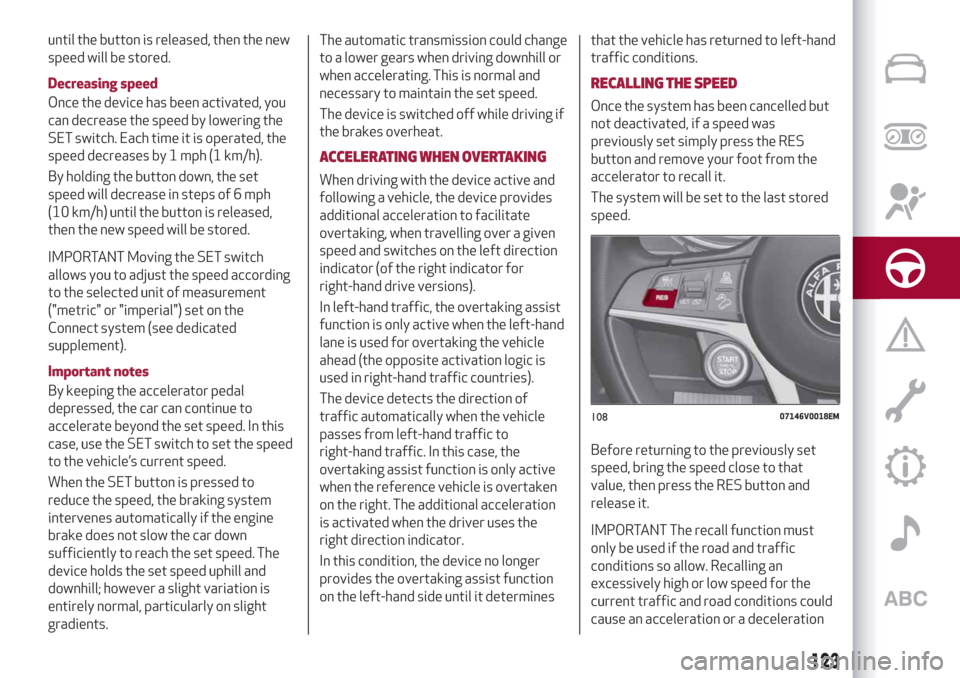
RECALLING THE SPEED
Once the system has been cancelled but
not deactivated, if a speed was
previously set simply press the RES
button and remove your foot from the
accelerator to recall it.
The system will be set to the last stored
speed.
Before returning to the previously set
speed, bring the speed close to that
value, then press the RES button and
release it.
IMPORTANT The recall function must
only be used if the road and traffic
conditions so allow. Recalling an
excessively high or low speed for the
current traffic and road conditions could
cause an acceleration or a deceleration
10807146V0018EM
123
Page 128 of 244
utmost attention at all times and be
always ready to press the brakes if
needed.
Small cars
Some narrow cars (e.g. bicycles and
motorcycles) travelling near the outer
edges of the lane or which enter the lane
from kerbside are not detected until they
are fully in the lane.
Sufficient distance from the cars ahead
may not be guaranteed in these cases.
Stationary objects and vehicles
The device cannot detect the presence of
stationary vehicles or objects. For
example, the device will not operate if
the vehicle ahead leaves the lane and a
vehicle ahead of that one is standing on
the lane. Pay the utmost attention at all
times and be always ready to press the
brakes if needed.
Objects and cars moving in opposite or
crosswise direction
The device cannot detect the presence of
objects or vehicles travelling in opposite
or at right-angles and consequently will
not be operated.
WARNING
114)Pay the utmost attention while driving
at all times and be always ready to press the
brakes if needed.115)The system is an aid for the driver, who
must always pay full attention while driving.
The responsibility always rests with the
driver, who must take into account the
traffic conditions in order to drive in
complete safety. The driver must always
maintain a safe distance from the vehicle in
front.
116)The device is not activated in presence
of pedestrians, oncoming vehicles in the
opposite direction of travel or moving in the
crosswise direction and stationary objects
(e.g. a vehicle standing in a queue or a broken
down vehicle).
117)The device cannot take account of
road, traffic and weather conditions, and
conditions of poor visibility (e.g. fog).
118)The device does not always fully
recognise complex driving conditions that
could cause it to determine the safe distance
to be held incorrectly or not at all.
119)The device cannot apply the maximum
braking force: the car will not be stopped
completely.
IMPORTANT
37)The system may have limited or absent
operation due to weather conditions such as:
heavy rain, hail, thick fog, heavy snow.
38)The section of the bumper before the
sensor must not be covered with adhesives,
auxiliary headlights or any other object.
39)Operation can be adversely affected by
any structural change made to the vehicle,
such as a modification to the front geometry,
tyre change, or a heavier load than the
standard load of the vehicle.40)Incorrect repairs made on the front part
of the vehicle (e.g. bumper, chassis) may alter
the position of the radar sensor, and
adversely affect its operation. Go to an Alfa
Romeo Dealership for any operation of this
type.
41)Do not tamper with nor carry out any
intervention on the radar sensor or on the
camera on the windscreen. In the event of a
sensor failure, contact an Alfa Romeo
Dealership.
42)Do not wash with high-pressure jets in
the bumper lower area: in particular do not
operate on the system's electrical connector.
43)Be careful in the case of repairs and new
paintings in the area around the sensor
(panel covering the sensor on the left side of
the bumper). In the event of a frontal impact
the sensor may automatically deactivate
and display a warning to indicate that the
sensor needs to be repaired. Even without a
malfunction warning, deactivate the system
operation if you think that the position of the
radar sensor has changed (e.g. due to
low-speed frontal impact as during parking
manoeuvres). In these cases, go to an Alfa
Romeo Dealership to have the radar sensor
realigned or replaced.
126
STARTING AND DRIVING
Page 129 of 244
PARK SENSORSSYSTEM
(where provided)
120)
44) 45) 46)
VERSIONS WITH 4/8 SENSORS
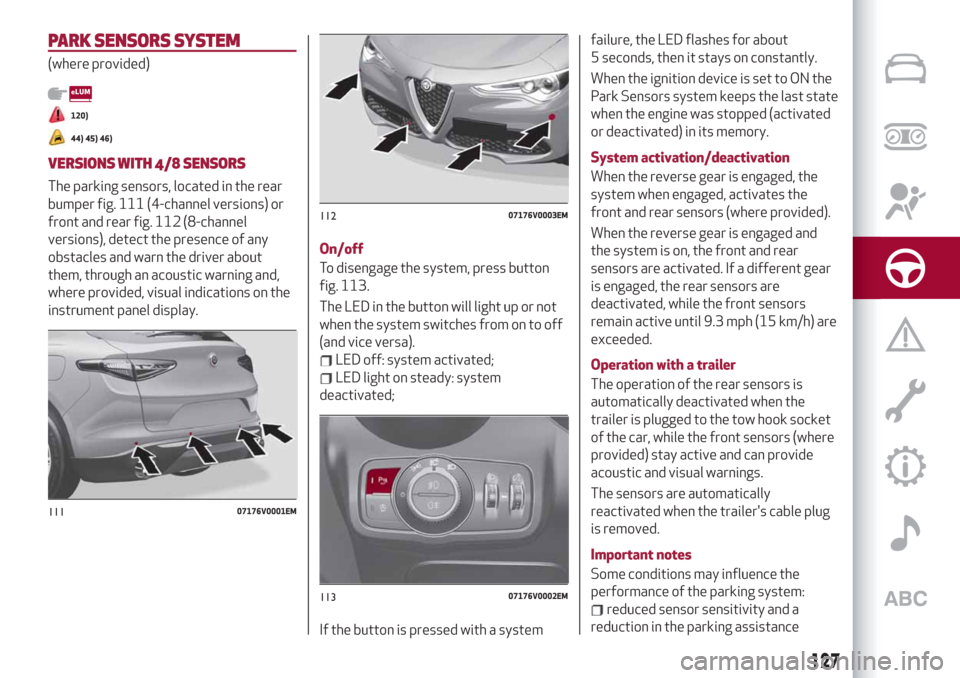
The parking sensors, located in the rear
bumper fig. 111 (4-channel versions) or
front and rear fig. 112 (8-channel
versions), detect the presence of any
obstacles and warn the driver about
them, through an acoustic warning and,
where provided, visual indications on the
instrument panel display.On/off
To disengage the system, press button
fig. 113.
The LED in the button will light up or not
when the system switches from on to off
(and vice versa).
LED off: system activated;
LED light on steady: system
deactivated;
If the button is pressed with a systemfailure, the LED flashes for about
5 seconds, then it stays on constantly.
When the ignition device is set to ON the
Park Sensors system keeps the last state
when the engine was stopped (activated
or deactivated) in its memory.
System activation/deactivation
When the reverse gear is engaged, the
system when engaged, activates the
front and rear sensors (where provided).
When the reverse gear is engaged and
the system is on, the front and rear
sensors are activated. If a different gear
is engaged, the rear sensors are
deactivated, while the front sensors
remain active until 9.3 mph (15 km/h) are
exceeded.
Operation with a trailer
The operation of the rear sensors is
automatically deactivated when the
trailer is plugged to the tow hook socket
of the car, while the front sensors (where
provided) stay active and can provide
acoustic and visual warnings.
The sensors are automatically
reactivated when the trailer's cable plug
is removed.
Important notes
Some conditions may influence the
performance of the parking system:
reduced sensor sensitivity and a
reduction in the parking assistance
11107176V0001EM
11207176V0003EM
11307176V0002EM
127
Page 131 of 244
LANE DEPARTURE WARNING
(LDW) SYSTEM
DESCRIPTION
47) 48) 49) 50) 51) 52)
The Lane Departure Warning system
makes use of a camera located on the
windscreen to detect the lane limits and
calculate the position of the vehicle
within such limits, in order to make sure
that it remains inside the lane.
When one or both lane limits are
detected and the vehicle passes over one
without the driver's say-so (direction
indicator not turned on), the system
emits an acoustic signal.
If the vehicle continues to go beyond the
line of the lane without any intervention
from the driver, the surpassed line will
light up on the display (left or right) to
urge the driver to bring the vehicle back
into the limits of the lane.
SYSTEM ON/OFF
The system is activated/deactivated by
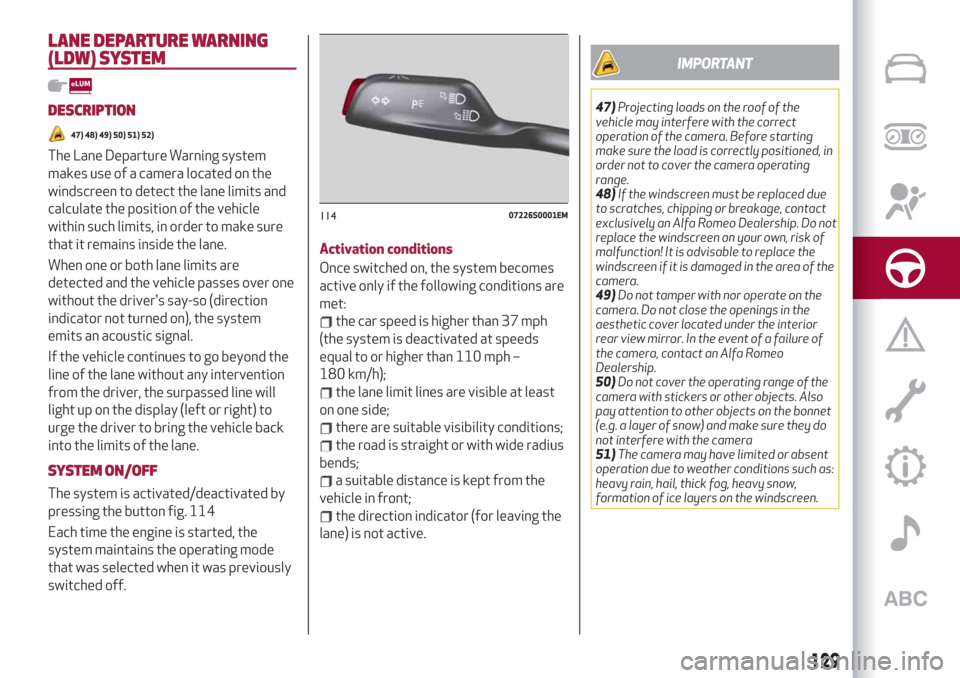
pressing the button fig. 114
Each time the engine is started, the
system maintains the operating mode
that was selected when it was previously
switched off.Activation conditions
Once switched on, the system becomes
active only if the following conditions are
met:
the car speed is higher than 37 mph
(the system is deactivated at speeds
equal to or higher than 110 mph –
180 km/h);
the lane limit lines are visible at least
on one side;
there are suitable visibility conditions;
the road is straight or with wide radius
bends;
a suitable distance is kept from the
vehicle in front;
the direction indicator (for leaving the
lane) is not active.
IMPORTANT
47)Projecting loads on the roof of the
vehicle may interfere with the correct
operation of the camera. Before starting
make sure the load is correctly positioned, in
order not to cover the camera operating
range.
48)If the windscreen must be replaced due
to scratches, chipping or breakage, contact
exclusively an Alfa Romeo Dealership. Do not
replace the windscreen on your own, risk of
malfunction! It is advisable to replace the
windscreen if it is damaged in the area of the
camera.
49)Do not tamper with nor operate on the
camera. Do not close the openings in the
aesthetic cover located under the interior
rear view mirror. In the event of a failure of
the camera, contact an Alfa Romeo
Dealership.
50)Do not cover the operating range of the
camera with stickers or other objects. Also
pay attention to other objects on the bonnet
(e.g. a layer of snow) and make sure they do
not interfere with the camera
51)The camera may have limited or absent
operation due to weather conditions such as:
heavy rain, hail, thick fog, heavy snow,
formation of ice layers on the windscreen.
11407226S0001EM
129
Page 133 of 244
SYMBOLS AND MESSAGES ON THE
DISPLAY
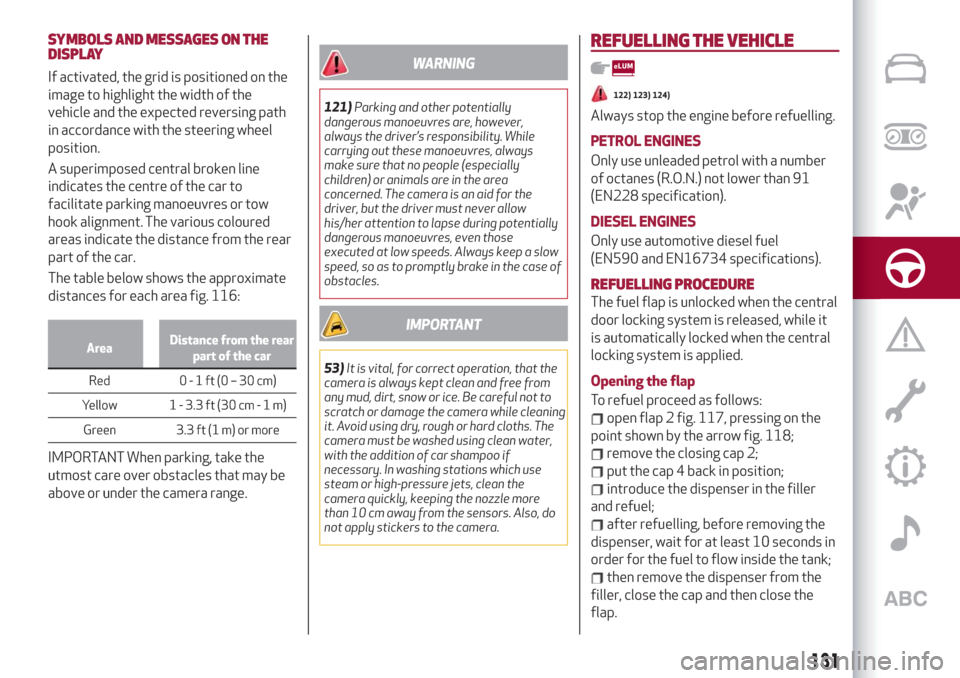
If activated, the grid is positioned on the
image to highlight the width of the
vehicle and the expected reversing path
in accordance with the steering wheel
position.
A superimposed central broken line
indicates the centre of the car to
facilitate parking manoeuvres or tow
hook alignment. The various coloured
areas indicate the distance from the rear
part of the car.
The table below shows the approximate
distances for each area fig. 116:
AreaDistance from the rear
part of the car
Red 0-1ft(0–30cm)
Y
ellow 1 - 3.3 ft (30 cm-1m)
Green 3.3 ft (1 m) or more
IMPORTANT When parking, take the
utmost care over obstacles that may be
above or under the camera range.
WARNING
121)Parking and other potentially
dangerous manoeuvres are, however,
always the driver’s responsibility. While
carrying out these manoeuvres, always
make sure that no people (especially
children) or animals are in the area
concerned. The camera is an aid for the
driver, but the driver must never allow
his/her attention to lapse during potentially
dangerous manoeuvres, even those
executed at low speeds. Always keep a slow
speed, so as to promptly brake in the case of
obstacles.
IMPORTANT
53)It is vital, for correct operation, that the
camera is always kept clean and free from
any mud, dirt, snow or ice. Be careful not to
scratch or damage the camera while cleaning
it. Avoid using dry, rough or hard cloths. The
camera must be washed using clean water,
with the addition of car shampoo if
necessary. In washing stations which use
steam or high-pressure jets, clean the
camera quickly, keeping the nozzle more
than 10 cm away from the sensors. Also, do
not apply stickers to the camera.
REFUELLING THE VEHICLE
122) 123) 124)
Always stop the engine before refuelling.
PETROL ENGINES
Only use unleaded petrol with a number
of octanes (R.O.N.) not lower than 91
(EN228 specification).
DIESEL ENGINES
Only use automotive diesel fuel
(EN590 and EN16734 specifications).
REFUELLING PROCEDURE
The fuel flap is unlocked when the central
door locking system is released, while it
is automatically locked when the central
locking system is applied.
Opening the flap
To refuel proceed as follows:
open flap 2 fig. 117, pressing on the
point shown by the arrow fig. 118;
remove the closing cap 2;
put the cap 4 back in position;
introduce the dispenser in the filler
and refuel;
after refuelling, before removing the
dispenser, wait for at least 10 seconds in
order for the fuel to flow inside the tank;
then remove the dispenser from the
filler, close the cap and then close the
flap.
131
Page 135 of 244
IMPORTANT
DO NOT EXCEED THE MAXIMUM
LEVEL: this could cause damage to the
tank. AdBlue® freezes under 12.2°F
(–11°C). Although the system is
designed to operate below the freezing
point of AdBlue®, it is advisable not to
fill the tank beyond the maximum level
because if the AdBlue® freezes the
system can be damaged. Follow the
instructions in the “Topping up AdBlue®
diesel emissions additive” paragraph in
this chapter.
If AdBlue® is spilled on painted
surfaces or aluminium, immediately
clean the area with water and use
absorbent material to collect the fluid
that has been spilled on the ground.
Do not try to start the engine if
AdBlue® was accidentally added to the
Diesel fuel tank, this can result in
serious engine damage, contact an Alfa
Romeo Dealership.
Do not add additives or other fluids
to AdBlue®, doing so could damage the
system.
The use of non-conforming or
degraded AdBlue® may lead to
indications appearing on the
instrument panel display (see “Warning
lights and messages" paragraph in the
“Knowing the instrument panel”
chapter).
Never pour AdBlue® into another
container: it could be contaminated.
In case of damage to the sewage
system of exhaust gas resulting from
the use of additives / tap water, the
introduction of diesel fuel, or at least
by not fulfilling the requirements, the
warranty expires.
If the AdBlue® runs out, see “Warning
lights and messages" paragraph in the
“Knowing the instrument panel”
chapter to continue using the car
normally.
The AdBlue® level is not updated if
the car is parked on a sloping road.
Fuels - identification of vehicle
compatibility. Graphic symbol for
consumer information in accordance
with EN16942
The symbols, shown below, make it easier
to recognise the correct fuel type to use
with your car.
Before refuelling, check the symbols
(where provided) inside the fuel filler flap
and compare them with the symbols
shown on the fuel pump (where provided).PETROL ENGINES
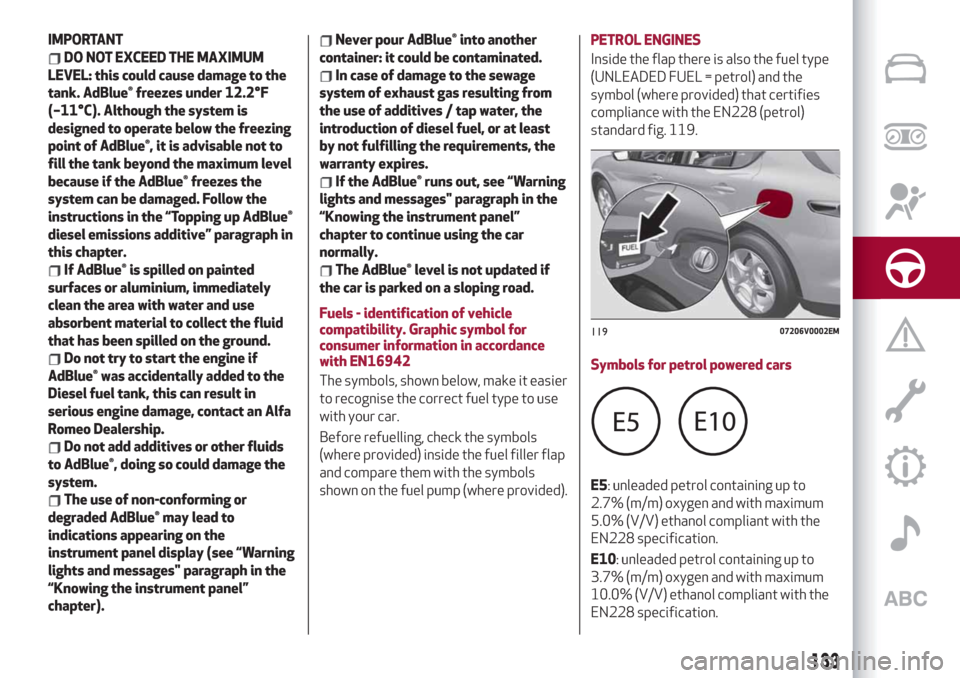
Inside the flap there is also the fuel type
(UNLEADED FUEL = petrol) and the
symbol (where provided) that certifies
compliance with the EN228 (petrol)
standard fig. 119.
Symbols for petrol powered cars
E5: unleaded petrol containing up to
2.7% (m/m) oxygen and with maximum
5.0% (V/V) ethanol compliant with the
EN228 specification.
E10: unleaded petrol containing up to
3.7% (m/m) oxygen and with maximum
10.0% (V/V) ethanol compliant with the
EN228 specification.
11907206V0002EM
133
Page 138 of 244
AdBlue® (UREA) ADDITIVE FOR
DIESEL EMISSIONS
(2.2 JTD versions only)
The car is equipped with an UREA
injection system and Selective Catalytic
Reduction to meet emission standards.
These two systems ensure compliance
with the diesel emissions requirements;
at the same time, they ensure
fuel-efficiency, handling, torque and
power. For messages and system
warnings, refer to the "Warning lights and
messages" paragraph in the "Knowing the
instrument panel" chapter.
AdBlue® (UREA) is considered a very
stable product with a long shelf life.
Stored at temperatures LOWER than
89.6° F (32 °C), it has a shelf life of at
least one year.
For more information on the AdBlue®
liquid type, see the “Fluids and lubricants”
paragraph in the “Technical
specifications” chapter.
The car is provided with an automatic
AdBlue® heating system when the engine
starts allowing the system to work
correctly at temperatures lower
than -11 °C.
IMPORTANT AdBlue® freezes at
temperatures lower than 12.2 °F (-11 °C).
SUGGESTIONS FOR DRIVING
SAVING FUEL
Below are some suggestions which may
help you save fuel and thus lower the
amount of harmful emissions released
into the atmosphere.
Vehicle maintenance
Checks and operations should be carried
out in accordance with the "Scheduled
Servicing Plan" (see chapter
"Maintenance and care").
Tyres
Check the tyre pressures at least once
every four weeks: if the pressure is too
low, consumption levels increase as
resistance to rolling is higher.
Unnecessary loads
Do not travel with an overloaded boot.
The weight of the vehicle and its
arrangement greatly affect fuel
consumption and stability.
Electric devices
Use electrical devices only for the
amount of time needed. The heated rear
window, additional headlights, screen
wipers and heater fan require a
considerable amount of energy;
increasing the current uptake increases
fuel consumption (by up to +25% in an
urban cycle).Climate control system
Using the climate control system will
increase consumption: use standard
ventilation when the temperature
outside permits.
Devices for aerodynamic control
The use of non-certified devices for
aerodynamic control may adversely
affect air drag and consumption levels.
DRIVING STYLE
Starting
Do not warm up the engine at low or high
revs when the vehicle is stationary; this
causes the engine to warm up more
slowly, thereby increasing fuel
consumption and emissions. It is
therefore advisable to move off
immediately, slowly, avoiding high
speeds: in this way the engine will warm
up more quickly.
Unnecessary actions
Avoid revving up when starting at traffic
lights or before stopping the engine. The
latter action, as well as double-
declutching, is unnecessary and causes
increased fuel consumption and
pollution.
Gear selection
Use a high gear when traffic and road
conditions allow it. Using a low gear for
faster acceleration will increase fuel
136
STARTING AND DRIVING
Page 139 of 244
consumption. In the same way, improper
use of a high gear increases consumption,
emissions and engine wear.
Max. speed
Fuel consumption considerably increases
as speed increases. Maintain a constant
speed, avoiding unnecessary braking and
acceleration, which cost in terms of both
fuel consumption and emissions.
Acceleration
Accelerating violently severely affects
consumption and emissions: acceleration
should be gradual and should not exceed
the maximum torque.CONDITIONS OF USE
Cold starting
Short journeys and frequent cold starts
do not allow the engine to reach optimum
operating temperature. This results in a
significant increase in consumption
levels (from +15 to +30% on the urban
cycle) and emissions.
Traffic and road conditions
High fuel consumption is caused by heavy
traffic, for instance when travelling in a
queue with frequent use of low gears or
in cities with many traffic lights. Winding
mountain roads and rough road surfaces
also adversely affect consumption.
Stops in traffic
During prolonged hold-ups (e.g. level
crossings) switch off the engine.
TOWING TRAILERS
126) 127)
TOW HOOK SETUP
Instructions for using the removable
ball head tow hook
IMPORTANT NOTE Before setting off,
checkthat the removable ball head tow
hook islockedcorrectly. To do this, check
the following conditions:
the green mark on the knob must
coincide with the green mark on the tow
hook fixing bracket;
the knob must be at the end of its
travel, resting on the tow hook fixing
bracket (no crack);
the lock on the knob must be locked
with the key removed. The knob cannot
be removed;
the tow hook fixing bracket must be
firmly attached to the mounting pipe on
the car. Check by shaking with a hand.
The installation procedure must be
repeated if any of these requirements is
NOT met.
If even only one of the requirements is
not met the tow hookmust notbe used,
since there is risk of causing accidents.
Contact an Alfa Romeo Dealership.
The ball head tow hook can be
fitted/removed manually without the
need for specific tools.
137
Page 140 of 244
IMPORTANT Never use cars or work
tools: the mechanism may be damaged.
IMPORTANT NOTE Do not release the
tow hook when it is attached to a trailer
or cargo-carrier.
IMPORTANT NOTE When driving without
trailer (or without a cargo-carrier), the
ball head tow hook must be removed and
the closing cap must always be inserted
in the hook mounting pipe. This applies
particularly if the tow hook reduces
visibility of the number plate or the
lighting system.
For the electrical connection, a 13 pin
12 V DC connection is to be used
(CUNA/UNI and ISO/DIN Standards).
Follow the instructions provided by the
vehicle Manufacturer and/or the tow
hook Manufacturer.
Installing the tow hook
Before inserting the tow hook, you must
remove the access cover to the tow hook
fixing position under the rear bumper.
Remove the protection cap from the
tow hook mounting pipe fig. 127;
get the tow hook from the luggage
compartment.When you take out the tow hook, it is
usually in the released position (
). You
can recognise this position by a crack of
about 0.2 in (5 mm) between the knob
and the tow hook fixing bracket. In
addition, the red mark on the knob should
line up with the green mark on the
bracket, see fig. 128.
Only install the tow hook in these
conditions.If the tow hook locking system is NOT
pretensioned before installation, or if it is
in the locked position (
), pretension it
by following the “Hook pretensioning”
procedure described at the end of this
paragraph.
The tow hook is in the locked position
when the knob is resting on the bracket
(no crack) and the green mark on the knob
lines up with the green sign on the
bracket fig. 129.
Position the tow hook so that the delta
inserts on the tow hook fixing bracket are
aligned with the crack between the lower
edge and the mounting pipe on the car
fig. 130;
push the tow hook upwards and the
pretensioned mechanism will
automatically fasten itself in position.
128)
12707216V0001EM
12807216V0002EM
12907216V0003EM
138
STARTING AND DRIVING