light Alfa Romeo Stelvio 2019 Workshop Manual
[x] Cancel search | Manufacturer: ALFA ROMEO, Model Year: 2019, Model line: Stelvio, Model: Alfa Romeo Stelvio 2019Pages: 244, PDF Size: 4.95 MB
Page 104 of 244
Main recommendations to carry
children safely
Install the child restraint systems on
the rear seat, which is the most protected
position in the event of an impact.
Keep children in rearward facing child
restraint systems for as long as possible,
until 3–4 years old if possible.
The rear head restraint or the front
passenger head restraint can be lifted if
needed to install a child restraint system.
The head restraint must always be
present in the vehicle and fitted if the
seat is used by an adult passenger or a
child sitting in a restraint system without
backrest (refer to the procedure
described in ‘’Head restraint’’ paragraph,
‘’Knowing your vehicle’’ chapter).
If the front passenger airbag has been
deactivated, always check that the
warning light on the courtesy light is on
continuously to make sure that it is
effectively deactivated.
Carefully follow the instructions
supplied with the child restraint system.
Keep the instructions in the vehicle along
with the other documents and this
handbook. Do not use second-hand child
seats without instructions.
Only one child is to be strapped into
each restraint system; never carry two
children using one child restraint system.
Always check that the seat belts do
not rest on the child’s neck.
Always check that the seat belt is well
fastened by pulling on it.
While travelling, do not let the child sit
incorrectly or unfasten the belts.
Never allow a child to put the belt's
diagonal section under an arm or behind
their back.
Never carry children on your lap, even
newborns. No-one can hold a child in the
case of a crash.
In the event of an accident, replace the
child restraint system with a new one.
WARNING
74)SEVERE DANGER When a front
passenger airbag is fitted, do not install
rearward facing child restraint systems on
the front passenger seat. Deployment of the
airbag in an accident could cause fatal
injuries to the child regardless of the
severity of the collision. It is advisable to
always carry children in a child restraint
system on the rear seat, which is the most
protected position in the event of a collision.
75)On the sun visor there is a label with
suitable symbols reminding the user that it is
compulsory to deactivate the airbag if a
rearward facing child restraint system is
fitted. Always comply with the instructions
on the passenger side sun visor (see the
"Supplementary Restraint System (SRS) -
Airbag" paragraph).76)Should it be necessary to carry a child on
the passenger side front seat in a rear facing
child restraint system, the passenger side
front airbag and side bag must be
deactivated through the Connect system
main menu (see the Supplementary
Restraint System (SRS) - Airbag"
paragraph), verifying deactivation by
checking whether the
OFFLED has
illuminated on the front ceiling light. Move
the passenger's seat as far back as possible
to avoid contact between the child seat and
the dashboard.
77)Do not move the front or rear seat if a
child is seated on it or on the dedicated child
restraint system
78)Incorrect fitting of the child restraint
system may result in an inefficient
protection system. In the event of an
accident the child restraint system may
become loose and the child may be injured,
even fatally. When fitting a restraint system
for newborns or children, strictly comply
with the instructions provided by the
Manufacturer.
79)When the child restraint system is not
used, secure it with the seat belt or with the
ISOFIX anchorages, or remove it from the
vehicle. Do not leave it unsecured inside the
passenger compartment. In this way, in the
case of sudden braking or an accident, it will
not cause injuries to the occupants.
80)After installing a child restraint system,
do not move the seat: always remove the
child restraint system before making any
adjustment.
102
SAFETY
Page 110 of 244
90)Do not affix rigid objects to the garment
hooks or support handles.
91)Do not rest your head, arms or elbows on
the door, windows or the area in which the
Window bag is located to avoid possible
injury during airbag inflation.
92)Never lean your head, arms or elbows
out of the window.
93)If, when the ignition device is turned to
ON, the
warning light does not switch on
or stays on whilst driving, a fault may have
occurred in the restraint systems. In this
case the airbags or pretensioners may not
be deployed in an impact or, in a lower
number of cases, they may be deployed
accidentally. Before continuing, contact an
Alfa Romeo Dealership immediately to have
the system checked.
94)In case of a LED
OFFfailure (located
on the front courtesy light), thewarning
light appears on the instrument panel.
95)On cars with side bags, do not cover the
front seat backrests with extra covers.
96)Do not travel carrying objects in your
lap, in front of your chest or between your
lips (pipe, pencils, etc.): they could cause
severe injury if the airbag is deployed.
97)If the car has been subject to theft,
attempted theft, vandalism, or flooding,
have the airbag system inspected at an Alfa
Romeo Dealership.
98)Malfunction of the airbag failure
warning light is indicated by the activation
of an airbag failure icon and a dedicated
message on the instrument panel display.
The pyrotechnic charges are not disabled.
Before continuing, contact an Alfa Romeo
Dealership immediately to have the system
checked.99)The airbag deployment threshold is
higher than that of the pretensioners. For
collisions in the range between the two
thresholds, it is normal for only the
pretensioners to be activated.
100)The airbag does not replace seat belts
but increases their efficiency. Because front
airbags are not deployed for low-speed
crashes, side collisions, rear-end shunts or
rollovers, occupants are protected, in
addition to any side bags, only by their seat
belts, which must therefore always be
fastened.
108
SAFETY
Page 113 of 244
IMPORTANT
30)We recommend that during the initial
period, or during the first 1600 km
(1000 miles), you do not drive to full car
performance (e.g. excessive acceleration,
long journeys at top speed, sharp braking,
etc.).
31)When the engine stopped never leave
the ignition device in the ON position to
prevent useless current draw from draining
the battery.
32)Warning light
will flash after starting
or during prolonged cranking to indicate a
fault with the glow plug heating system. If
the engine starts, the vehicle can be regularly
used, but an Alfa Romeo Dealership must be
contacted as soon as possible.
33)A quick burst on the accelerator before
turning off the engine serves absolutely no
practical purpose; it wastes fuel and is
damaging for the engine.
PARKING THE VEHICLE
104) 105) 106)
IMPORTANT In addition to parking the
vehicle with the parking brake always
engaged, the wheels turned, chocks or
stones positioned in front of the wheels
(when on a steep slope), you must always:
engage P (Park) mode;
always take the key with you when
leaving the vehicle.
IMPORTANT Always engage the electric
parking brake before leaving the vehicle.
ELECTRIC PARKING BRAKE
The car is equipped with electric parking
brake to guarantee better use and
optimal performance compared to a
manually operated parking brake.
The electric parking brake features a
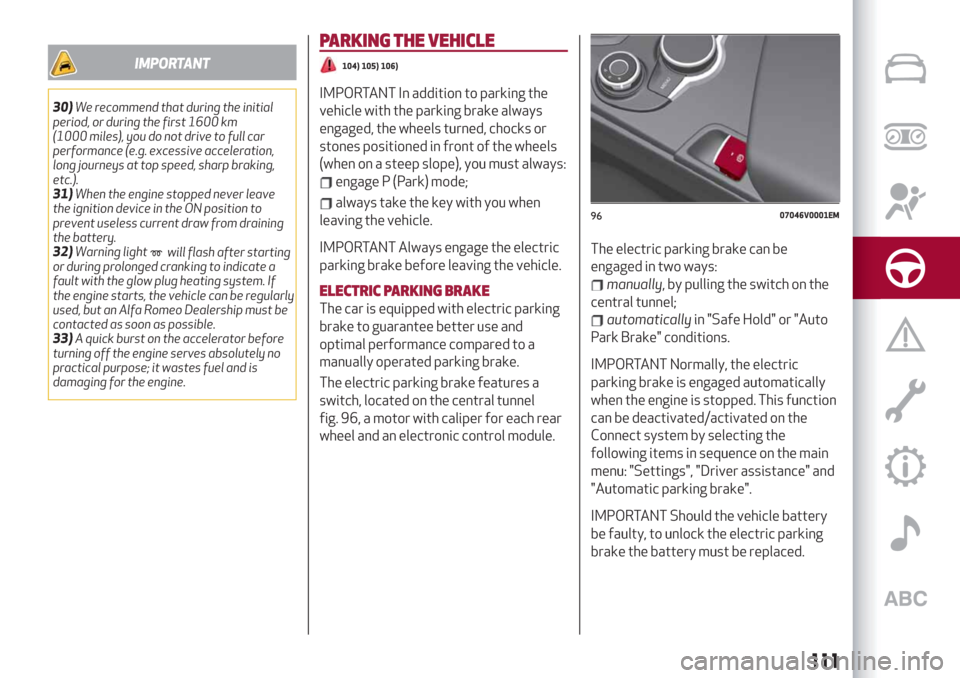
switch, located on the central tunnel
fig. 96, a motor with caliper for each rear
wheel and an electronic control module.The electric parking brake can be
engaged in two ways:
manually, by pulling the switch on the
central tunnel;
automaticallyin "Safe Hold" or "Auto
Park Brake" conditions.
IMPORTANT Normally, the electric
parking brake is engaged automatically
when the engine is stopped. This function
can be deactivated/activated on the
Connect system by selecting the
following items in sequence on the main
menu: "Settings", "Driver assistance" and
"Automatic parking brake".
IMPORTANT Should the vehicle battery
be faulty, to unlock the electric parking
brake the battery must be replaced.
9607046V0001EM
111
Page 114 of 244
Engaging the parking brake manually
Briefly pull the switch located on the
central tunnel to manually engage the
electric parking brake when the car is
stationary.
Noise may be heard from the rear part of
the car when engaging the electric
parking brake.
A slight movement of the brake pedal
may be detected when engaging the
electric parking brake with the brake
pedal pressed.
With the electric parking brake engaged,
the warning light
on the instrument
panel and the LED on the switch
fig. 96 turn on.
IMPORTANT With the Electronic Parking
Brake failure warning light on, some
functions of the electric parking brake
are deactivated. In this case the driver is
responsible for brake activation and
vehicle parking in complete safety
conditions.
If, under exceptional circumstances, the
use of the brake is required with the
vehicle in motion, keep the switch on the
central tunnel pulled as long as the brake
action is necessary.
The
warning light may switch on with
the hydraulic system temporarily
unavailable; in this case braking is
controlled by the motors.The brake lights (stop) will also
automatically switch on in the same way
as for normal braking with the use of the
brake pedal.
Release the switch on the central tunnel
to stop the braking action with the car in
motion.
If, through this procedure, the vehicle is
braked until a speed below 2 mph
(3 km/h) is reached and the switch is kept
pulled, the parking brake will definitively
engage.
IMPORTANT Driving the vehicle with the
electric parking brake engaged, or using
it several times to slow down the vehicle,
may cause severe damage to the braking
system.
Releasing the electric parking brake
manually
In order to manually release the parking
brake, the ignition device should be at ON
position. Moreover, you need to press the
brake pedal, then press the switch on the
central tunnel briefly.
Noise may be heard from the rear of the
vehicle and a slight movement of the
brake pedal may be detected during
disengagement.
After disengaging the electric parking
brake, the
warning light on the
instrument panel and the LED on the
fig. 96 switch turn off.If the
warning light on the instrument
panel remains on with the electric parking
brake disengaged, this indicates a fault:
in this case contact an Alfa Romeo
Dealership.
IMPORTANT Never use gear position P
(Park) instead of the electric parking
brake. Always engage the electric
parking brake when parking the vehicle to
prevent injury or damage caused by the
unexpected movement of the vehicle.
OPERATING THE ELECTRIC PARKING
BRAKE
The electric parking brake can operate in
the following ways:
"Dynamic driving way": this way is
activated by pulling the switch
continuously while driving;
"Static engagement and release
mode": with the car stationary, the
electric parking brake can be activated
by pulling the switch on the central tunnel
once. On the other hand, press the switch
and the brake pedal at the same time to
disengage the brake;
"Drive Away Release": (where
provided) the electric parking brake will
automatically disengage with the driver
side seat belt fastened and the detection
of an action performed by the driver to
move the car (forward gear or reverse
gear);
NOTE If the vehicle is equipped with
112
STARTING AND DRIVING
Page 115 of 244
carbon-ceramic discs, before using “Drive
Away Release” mode and moving the
vehicle, it is necessary to buckle the seat
belts or manually release the electric
handbrake to prevent damage to the
carbon-ceramic discs themselves.
"Safe Hold": if the vehicle speed is
lower than 2 mph (3 km/h), the gear lever
is not in P (Park) position and the driver's
intention of leaving the vehicle is
detected, the electric parking brake will
automatically engage to hold the vehicle
in safety conditions;
"Auto Park Brake": if the vehicle speed
is below 2 mph (3 km/h), the electric
parking break will automatically engage
when the gear lever is in P (Park) position.
When the parking brake is engaged and
applied to the wheels, the LED on the
switch located on the central tunnel
fig. 96 switches on together with the
warning light
on the instrument
panel. Each automatic parking brake
engagement can be cancelled by pressing
the switch on the central tunnel and at
the same time moving the gear lever for
the transmission to position P (Park).
SAFE HOLD
It is a safety function that automatically
engages the electric parking brake in the
event of a dangerous condition for the
car.
If:
the car speed is below 2 mph (3 km/h);
a transmission mode other than P
(Park) is activated;
the driver's seat belt is not fastened;
the driver side door is open;
no attempts to apply pressure on the
brake pedal have been detected;
the car is parked on roads which
gradient higher than 4%;
the electric parking brake engages
automatically to prevent car movement.
The Safe Hold function can be
temporarily disabled by pressing the
switch located on the central tunnel and
the brake pedal at the same time, with
the vehicle stationary and the driver side
door open.
Once disabled, the function will activate
again when the vehicle speed reaches
18 mph (20 km/h) or the ignition device is
moved to STOP and then to ON.
WARNING
104)In the case of parking manoeuvres on
roads on a gradient, the front wheels must
be steered towards the pavement (when
parking downhill), or in the opposite
direction if the vehicle is parked uphill. Block
the wheels with a wedge or a stone if the car
is parked on a steep slope.
105)Never leave children alone in an
unattended vehicle; make sure that when
you move away from the vehicle, you have
the key with you.
106)The electric parking brake must
always be engaged when leaving the vehicle.
113
Page 116 of 244
AUTOMATIC TRANSMISSION
The vehicle is equipped with an 8-speed
automatic transmission.
The transmission can operate in two
different modes: “Automatic” or
“Sequential”.
GEAR LEVER
107) 108) 109)
34) 35)
Gearbox operation is controlled by the
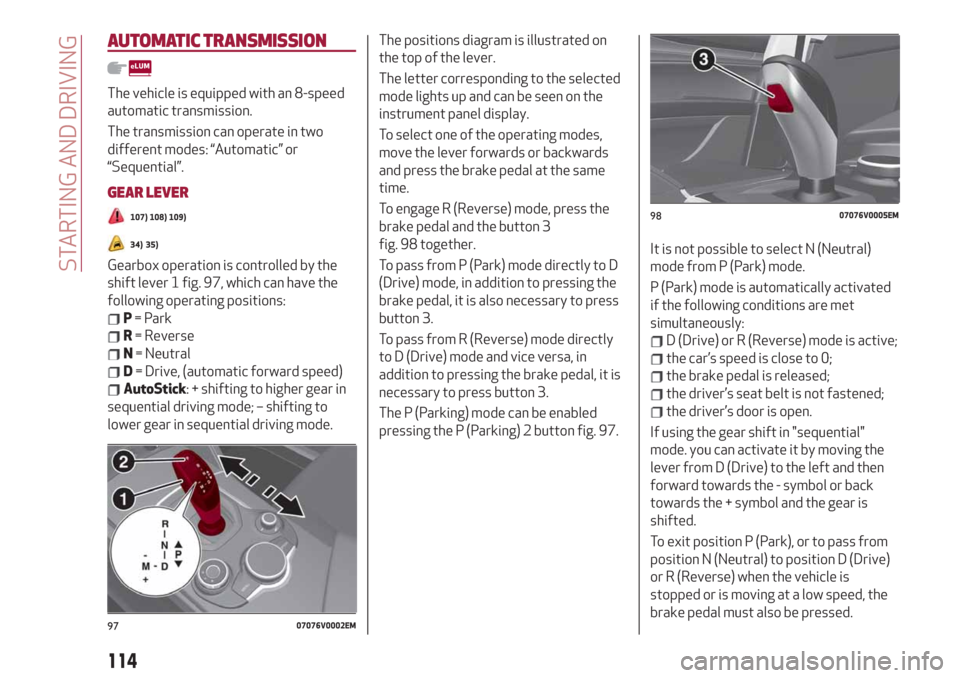
shift lever 1 fig. 97, which can have the
following operating positions:
P= Park
R= Reverse
N= Neutral
D= Drive, (automatic forward speed)
AutoStick: + shifting to higher gear in
sequential driving mode; – shifting to
lower gear in sequential driving mode.The positions diagram is illustrated on
the top of the lever.
The letter corresponding to the selected
mode lights up and can be seen on the
instrument panel display.
To select one of the operating modes,
move the lever forwards or backwards
and press the brake pedal at the same
time.
To engage R (Reverse) mode, press the
brake pedal and the button 3
fig. 98 together.
To pass from P (Park) mode directly to D
(Drive) mode, in addition to pressing the
brake pedal, it is also necessary to press
button 3.
To pass from R (Reverse) mode directly
to D (Drive) mode and vice versa, in
addition to pressing the brake pedal, it is
necessary to press button 3.
The P (Parking) mode can be enabled
pressing the P (Parking) 2 button fig. 97.It is not possible to select N (Neutral)
mode from P (Park) mode.
P (Park) mode is automatically activated
if the following conditions are met
simultaneously:
D (Drive) or R (Reverse) mode is active;
the car’s speed is close to 0;
the brake pedal is released;
the driver’s seat belt is not fastened;
the driver’s door is open.
If using the gear shift in "sequential"
mode. you can activate it by moving the
lever from D (Drive) to the left and then
forward towards the - symbol or back
towards the + symbol and the gear is
shifted.
To exit position P (Park), or to pass from
position N (Neutral) to position D (Drive)
or R (Reverse) when the vehicle is
stopped or is moving at a low speed, the
brake pedal must also be pressed.
9707076V0002EM
9807076V0005EM
114
STARTING AND DRIVING
Page 117 of 244
IMPORTANT DO NOT accelerate while
shifting from position P (or N) to another
position.
IMPORTANT After selecting a gear, wait
a few seconds before accelerating. This
precaution is particularly important with
a cold engine.
AutoStick - Manual (sequential)
shifting mode
In the case of frequent gearshifting (e.g.
for sport driving, when the vehicle is
driven with a heavy load, on slopes, with
strong headwind or when towing heavy
trailers), it is recommended to use the
Autostick (sequential shifting) mode to
select and keep a lower fixed ratio.
In these conditions, the use of a lower
gear improves vehicle performance,
preventing overheating.
It is possible to shift from D mode (Drive)
to sequential mode regardless of vehicle
speed.
Activation
Starting from D (Drive) mode, to activate
the sequential drive mode, move the
lever to the left (– and + indication of the
trim). The gear engaged will be shown on
the display.
Gearshifting is made by moving the gear
lever forwards, towards symbol – or
backwards, towards symbol +.Steering wheel stalks
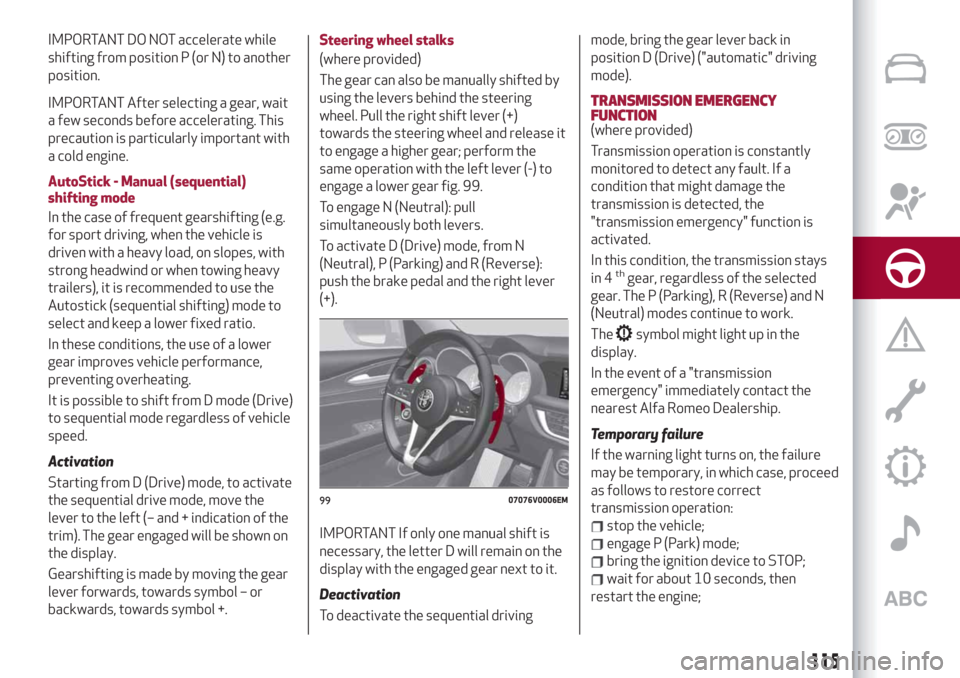
(where provided)
The gear can also be manually shifted by
using the levers behind the steering
wheel. Pull the right shift lever (+)
towards the steering wheel and release it
to engage a higher gear; perform the
same operation with the left lever (-) to
engage a lower gear fig. 99.
To engage N (Neutral): pull
simultaneously both levers.
To activate D (Drive) mode, from N
(Neutral), P (Parking) and R (Reverse):
push the brake pedal and the right lever
(+).
IMPORTANT If only one manual shift is
necessary, the letter D will remain on the
display with the engaged gear next to it.
Deactivation
To deactivate the sequential drivingmode, bring the gear lever back in
position D (Drive) ("automatic" driving
mode).
TRANSMISSION EMERGENCY
FUNCTION
(where provided)
Transmission operation is constantly
monitored to detect any fault. If a
condition that might damage the
transmission is detected, the
"transmission emergency" function is
activated.
In this condition, the transmission stays
in 4
thgear, regardless of the selected
gear. The P (Parking), R (Reverse) and N
(Neutral) modes continue to work.
The
symbol might light up in the
display.
In the event of a "transmission
emergency" immediately contact the
nearest Alfa Romeo Dealership.
Temporary failure
If the warning light turns on, the failure
may be temporary, in which case, proceed
as follows to restore correct
transmission operation:
stop the vehicle;
engage P (Park) mode;
bring the ignition device to STOP;
wait for about 10 seconds, then
restart the engine;
9907076V0006EM
115
Page 119 of 244
DRIVING MODES
"Normal" Mode
On/off
It is activated by rotating the selector to
the letter "n", the displays light up in blue.
To deactivate the Normal mode, move
the selector to another mode ("d" or "a").
"Dynamic" Mode
On/off
It is activated by rotating the selector to
the letter "d", the displays light up in red.
To deactivate the Dynamic mode, move
the selector to "n", Normal mode.
"Advanced Efficiency" Mode
On/off
It is activated by rotating the selector to
the letter "a", the displays light up in
green.
To deactivate the Advanced Efficiency
mode, move the selector to "n", Normal
mode.
IMPORTANT NOTE
The selector will always be positioned
in Normal “n” mode when the engine is
started.
START & STOP EVO
The Stop/Start Evo automatically stops
the engine each time the vehicle is
stationary and starts it again when the
driver wants to move off.
In this way, the vehicle efficiency is
increased, by reducing consumption,
dangerous gas emissions and sound
pollution.
OPERATING MODE
Stopping the engine
With car at a standstill and brake pedal
pressed, the engine switches off if the
gear lever is in a position other than R.
The system does not operate when the
gear lever is in R, for making parking
manoeuvres easier.
In the event of stops uphill, engine
switching off is disabled to make the "Hill
Start Assist" function available (works
only with running engine).
NOTE The engine can only be
automatically stopped after having run at
about 6.2 mph (10 km/h). After an
automatic restart, to stop the engine you
only need to move the car (exceed a
speed of 0.3 mph (0.5 km/h).
Engine stopping is signalled by the
symbol lighting up on the instrument
panel display.Restarting the engine
To restart the engine, release the brake
pedal.
With the brake pressed and the
transmission in automatic mode D
(Drive), the engine will restart by shifting
to R (Reverse), for petrol engine versions
only, to "AutoStick".
With brake pressed, also for versions
with petrol engines, if the gear lever is in
"AutoStick" mode, the engine can be
restarted by moving the lever to + or -.
SYSTEM MANUAL ACTIVATION/
DEACTIVATION
110)
36)
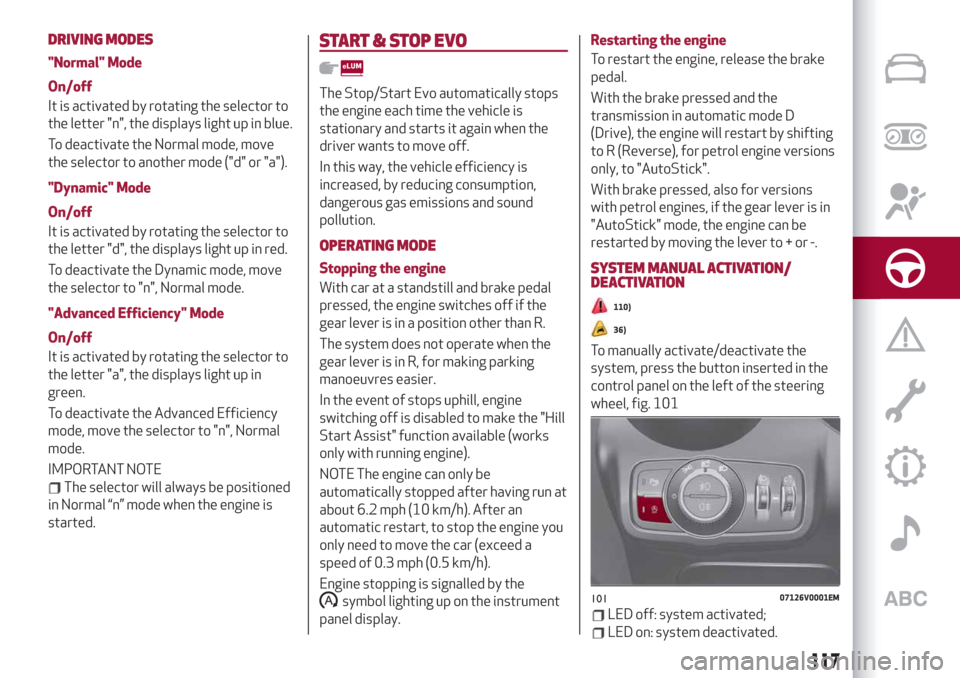
To manually activate/deactivate the
system, press the button inserted in the
control panel on the left of the steering
wheel, fig. 101
10107126V0001EM
117
LED off: system activated;
LED on: system deactivated.
Page 121 of 244
CRUISE CONTROL
This is an electronically controlled driving
assistance device that allows the desired
car speed to be maintained, without
having to press the accelerator pedal.
This device can be used at a speed above
25 mph (40 km/h) on long stretches of
dry, straight roads with few variations
(e.g. motorways).
It is therefore not recommended to use
this device on extra-urban roads with
traffic. Do not use the device in town.
Travelling downhill, the system could
brake the car to keep the set speed
unvaried.
ACTIVATING THE DEVICE
111) 112) 113)
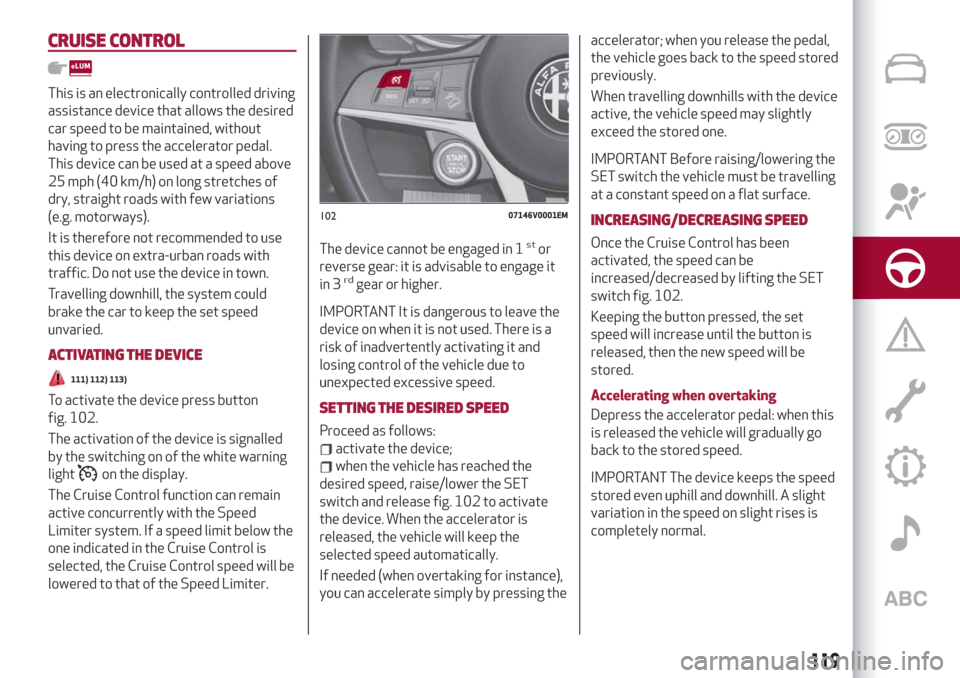
To activate the device press button
fig. 102.
The activation of the device is signalled
by the switching on of the white warning
light
on the display.
The Cruise Control function can remain
active concurrently with the Speed
Limiter system. If a speed limit below the
one indicated in the Cruise Control is
selected, the Cruise Control speed will be
lowered to that of the Speed Limiter.The device cannot be engaged in 1
stor
reverse gear: it is advisable to engage it
in 3
rdgear or higher.
IMPORTANT It is dangerous to leave the
device on when it is not used. There is a
risk of inadvertently activating it and
losing control of the vehicle due to
unexpected excessive speed.
SETTING THE DESIRED SPEED
Proceed as follows:
activate the device;
when the vehicle has reached the
desired speed, raise/lower the SET
switch and release fig. 102 to activate
the device. When the accelerator is
released, the vehicle will keep the
selected speed automatically.
If needed (when overtaking for instance),
you can accelerate simply by pressing theaccelerator; when you release the pedal,
the vehicle goes back to the speed stored
previously.
When travelling downhills with the device
active, the vehicle speed may slightly
exceed the stored one.
IMPORTANT Before raising/lowering the
SET switch the vehicle must be travelling
at a constant speed on a flat surface.
INCREASING/DECREASING SPEED
Once the Cruise Control has been
activated, the speed can be
increased/decreased by lifting the SET
switch fig. 102.
Keeping the button pressed, the set
speed will increase until the button is
released, then the new speed will be
stored.
Accelerating when overtaking
Depress the accelerator pedal: when this
is released the vehicle will gradually go
back to the stored speed.
IMPORTANT The device keeps the speed
stored even uphill and downhill. A slight
variation in the speed on slight rises is
completely normal.
10207146V0001EM
119
Page 122 of 244
SPEED RETURN
For versions with automatic transmission
operating in D mode (Drive - automatic),
press and release the RES
fig. 102 button to recall the previously
set speed.
For versions with manual gearbox or
automatic transmission in Autostick
(sequential) mode, before recalling the
previously set speed you should
accelerate until getting close to it, then
press and release the RES button.
DEACTIVATING THE DEVICE
Lightly pressing the brake pedal
deactivates the Cruise Control without
deleting the stored speed.
The Cruise Control may be deactivated
also by applying the electric parking
brake or when the braking system is
operated (e.g. operation of the ESC
system).
The stored speed is deleted in the
following cases:
pressing the on/off button or
switching off the engine;
if there is a malfunction in the Cruise
Control.
DEACTIVATING THE DEVICE
The Cruise Control is deactivated by
pressing the system on/off button or by
putting the starter switch in the STOP
position.
WARNING
111)When travelling with the device active,
never move the gear lever to neutral.
112)In case of a malfunction or failure of
the device, contact an Alfa Romeo
Dealership.
113)The Cruise Control can be dangerous if
the system cannot keep a constant speed. In
specific conditions speed may be excessive,
resulting in the risk of losing control of the
vehicle and causing accidents. Do not use the
device in heavy traffic or on winding, icy,
snowy or slippery roads.
ACTIVE CRUISE CONTROL
(where provided)
114) 115) 116) 117) 118) 119)
37) 38) 39) 40) 41) 42) 43)
The Active Cruise Control (ACC) is a
driver assist device which combines the
Cruise Control functions with one for
controlling the distance from the vehicle
ahead.
The device allows to hold the vehicle at
the desired speed without needing to
press the accelerator. It also allows to
hold a given distance from the vehicle
ahead (the distance can be set by the
driver).
The Active Cruise Control (ACC) uses a
radar sensor, located behind the front
bumper fig. 103 and a camera, located in
the middle area of the windscreen
fig. 104, to detect the presence of a
vehicle close ahead.
120
STARTING AND DRIVING