Interior Alfa Romeo Stelvio 2019 Owner's Manual
[x] Cancel search | Manufacturer: ALFA ROMEO, Model Year: 2019, Model line: Stelvio, Model: Alfa Romeo Stelvio 2019Pages: 244, PDF Size: 4.95 MB
Page 11 of 244
In-depth knowledge of your new vehicle starts here.
The handbook that you are reading simply and directly explains
how it is made and how it works.
That’s why we advise you to read it seated comfortably on board,
so that you can see immediately what is described for you.
KNOWING YOUR CAR
INSTRUMENT PANEL............................10
DASHBOARD FOR RIGHT-HAND DRIVE VERSION . . ........11
THEKEYS...................................12
IGNITION DEVICE..............................13
ENGINE IMMOBILIZER...........................14
ALARM.....................................15
DOORS.....................................15
SEATS.....................................19
HEAD RESTRAINTS.............................23
STEERING WHEEL..............................23
REAR VIEW MIRRORS...........................24
EXTERNAL LIGHTS .............................26
INTERIOR LIGHTS..............................31
WINDSCREEN WIPER . ...........................31
CLIMATE CONTROL SYSTEM.......................33
WINDOW WINDERS.............................35
ELECTRIC SUNROOF............................36
BONNET....................................38
LUGGAGE COMPARTMENT TAILGATE..................39
Page 19 of 244
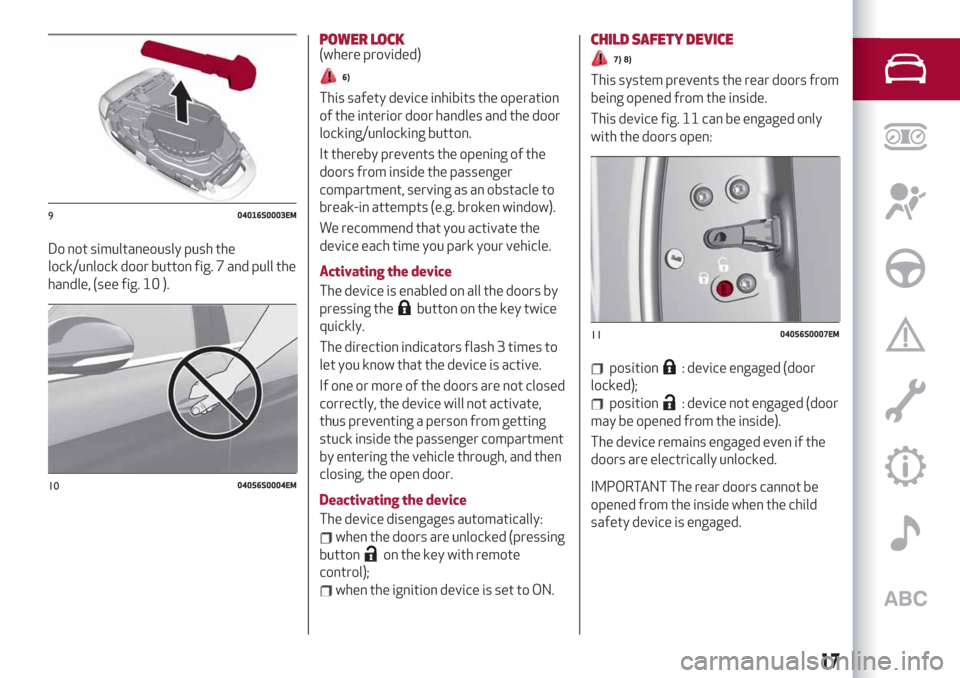
Do not simultaneously push the
lock/unlock door button fig. 7 and pull the
handle, (see fig. 10 ).
POWER LOCK(where provided)
6)
This safety device inhibits the operation
of the interior door handles and the door
locking/unlocking button.
It thereby prevents the opening of the
doors from inside the passenger
compartment, serving as an obstacle to
break-in attempts (e.g. broken window).
We recommend that you activate the
device each time you park your vehicle.
Activating the device
The device is enabled on all the doors by
pressing the
button on the key twice
quickly.
The direction indicators flash 3 times to
let you know that the device is active.
If one or more of the doors are not closed
correctly, the device will not activate,
thus preventing a person from getting
stuck inside the passenger compartment
by entering the vehicle through, and then
closing, the open door.
Deactivating the device
The device disengages automatically:
when the doors are unlocked (pressing
button
on the key with remote
control);
when the ignition device is set to ON.
CHILD SAFETY DEVICE
7) 8)
This system prevents the rear doors from
being opened from the inside.
This device fig. 11 can be engaged only
with the doors open:
position: device engaged (door
locked);
position: device not engaged (door
may be opened from the inside).
The device remains engaged even if the
doors are electrically unlocked.
IMPORTANT The rear doors cannot be
opened from the inside when the child
safety device is engaged.
904016S0003EM
1004056S0004EM
1104056S0007EM
17
Page 26 of 244
To adjust the position bring the lever 1
fig. 22 down to position A, after which the
steering wheel can be adjusted to the
most suitable position and subsequently
locked in this position by bringing lever
1 to position B again.
ELECTRIC STEERING WHEEL HEATING(where provided)
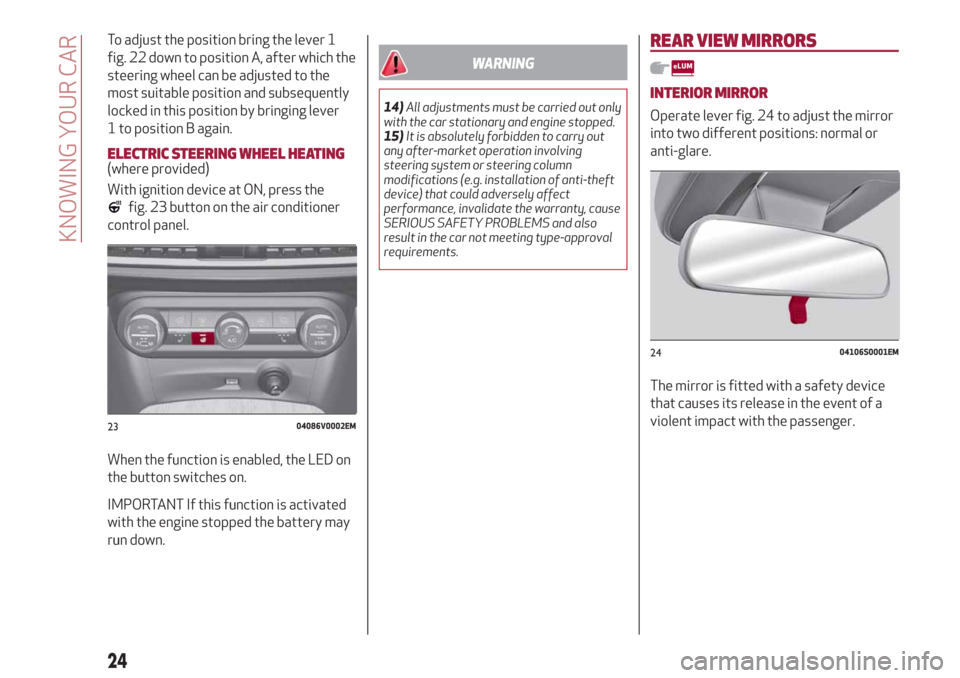
With ignition device at ON, press the
fig. 23 button on the air conditioner
control panel.
When the function is enabled, the LED on
the button switches on.
IMPORTANT If this function is activated
with the engine stopped the battery may
run down.
WARNING
14)All adjustments must be carried out only
with the car stationary and engine stopped.
15)It is absolutely forbidden to carry out
any after-market operation involving
steering system or steering column
modifications (e.g. installation of anti-theft
device) that could adversely affect
performance, invalidate the warranty, cause
SERIOUS SAFETY PROBLEMS and also
result in the car not meeting type-approval
requirements.
REAR VIEW MIRRORS
INTERIOR MIRROR
Operate lever fig. 24 to adjust the mirror
into two different positions: normal or
anti-glare.
The mirror is fitted with a safety device
that causes its release in the event of a
violent impact with the passenger.
2304086V0002EM
2404106S0001EM
24
KNOWING YOUR CAR
Page 27 of 244
ELECTROCHROMIC INTERIOR MIRROR(where provided)
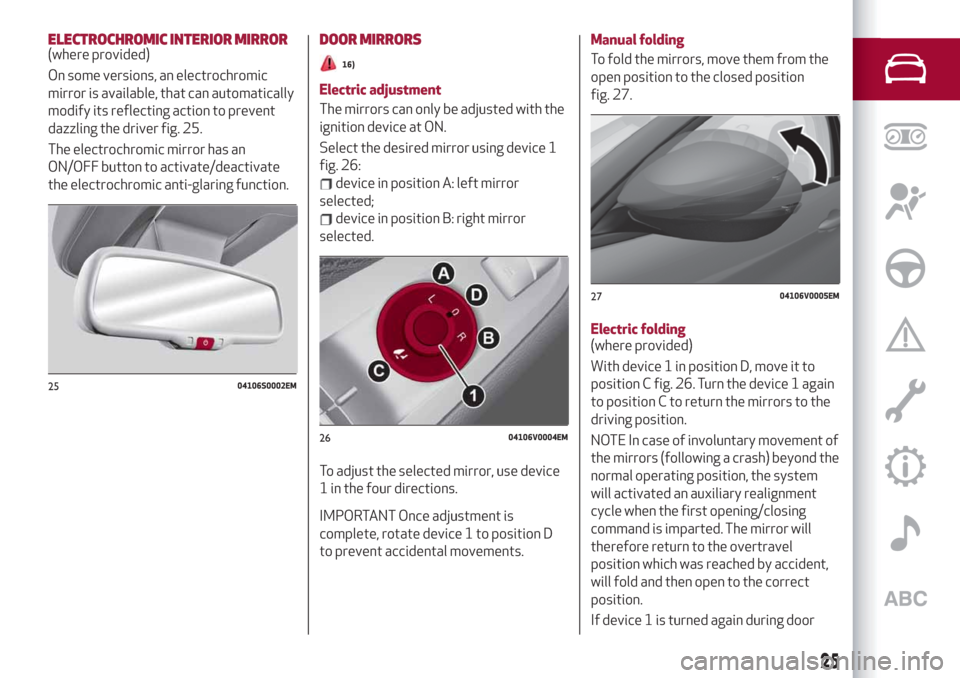
On some versions, an electrochromic
mirror is available, that can automatically
modify its reflecting action to prevent
dazzling the driver fig. 25.
The electrochromic mirror has an
ON/OFF button to activate/deactivate
the electrochromic anti-glaring function.DOOR MIRRORS
16)
Electric adjustment
The mirrors can only be adjusted with the
ignition device at ON.
Select the desired mirror using device 1
fig. 26:
device in position A: left mirror
selected;
device in position B: right mirror
selected.
To adjust the selected mirror, use device
1 in the four directions.
IMPORTANT Once adjustment is
complete, rotate device 1 to position D
to prevent accidental movements.
Manual folding
To fold the mirrors, move them from the
open position to the closed position
fig. 27.
Electric folding
(where provided)
With device 1 in position D, move it to
position C fig. 26. Turn the device 1 again
to position C to return the mirrors to the
driving position.
NOTE In case of involuntary movement of
the mirrors (following a crash) beyond the
normal operating position, the system
will activated an auxiliary realignment
cycle when the first opening/closing
command is imparted. The mirror will
therefore return to the overtravel
position which was reached by accident,
will fold and then open to the correct
position.
If device 1 is turned again during door
2504106S0002EM
2604106V0004EM
2704106V0005EM
25
Page 29 of 244
AUTO FUNCTION (Dusk sensor)
This is implemented by an infrared LED
sensor on the windscreen that works in
conjunction with the rain sensor. It is able
to detect variations in the outside light
level based on the light sensitivity set
through the Connect system.
The dusk sensor sensitivity can be
adjusted according to 3 levels: level
1=minimum sensitivity, level 2=average
sensitivity, level 3=maximum sensitivity.
The higher the sensitivity set, the lesser
is the external light variation needed to
switch the lights on (e.g. with a setting on
level 3 at sunset the headlights come on
earlier than levels 1 and 2).
Function activation
Turn the light switch to the
position.
IMPORTANT The function can only be
activated with the ignition device at ON.
Function deactivation
To deactivate the function, turn the light
switch to a position other than
.
DIPPED HEADLIGHTS
Turn the light switch toto switch on
the side lights, the lights on the
instrument panel and the dipped beam
headlights.
The
warning light switches on in the
instrument panel.
DAYTIME RUNNING LIGHTS (DRL) AND
SIDE LIGHTS (Daytime Running Lights)
(where provided)
17) 18)
With the ignition device turned to ON and
the light switch turned to position
the
daytime running lights are automatically
activated; the other lights and interior
lighting remain off.
Where provided, when the direction
indicators are activated, the
corresponding DRL will be dimmed (on
35W Bi-Xenon Headlamps, the DRL will
be turned off), until the direction
indicators are deactivated.
Where provided, the DRL can be
activated/deactivated from Connect
system, by selecting the following
functions in sequence on the main MENU:
"Settings", "Lights" and "Daytime Running
Lights".
IMPORTANT For markets where DRL use
is not required, these lights work as side
lights and they are switched on and off
jointly with the main beam headlights.
FRONT FOG LIGHTS
(where provided)
The fog light switch is integrated with the
light switch.
Press the
button to turn on the fog
lights with side lights and dipped beam
headlights on.To turn off the fog lights, press the
button again or turn the switch to the
position.
The fog lights are switched on with the
dipped beam headlights or DRL on (the
latter work as side lights) and are
switched on when switching on the main
beam headlights but not when the main
beam headlights are flashed only.
If the fog lights are not switched off
before stopping the engine, the next time
the engine is started they will switch on
again.
Cornering lights
(where provided)
The fog lights perform cornering
function. This function allows to
illuminate the road or a corner better by
lighting the corresponding fog light.
The cornering function can be
deactivated on the Connect system by
selecting the following functions in
sequence on the main menu: "Settings",
"Lights" and "Cornering Lights".
REAR FOG LIGHT
The rear fog light switch is integrated
with the light switch.
Press the
button to switch the light
on/off.
The rear fog light switches on only when
the dipped beam headlights or fog lights
27
Page 33 of 244
INTERIOR LIGHTS
FRONT CEILING LIGHT
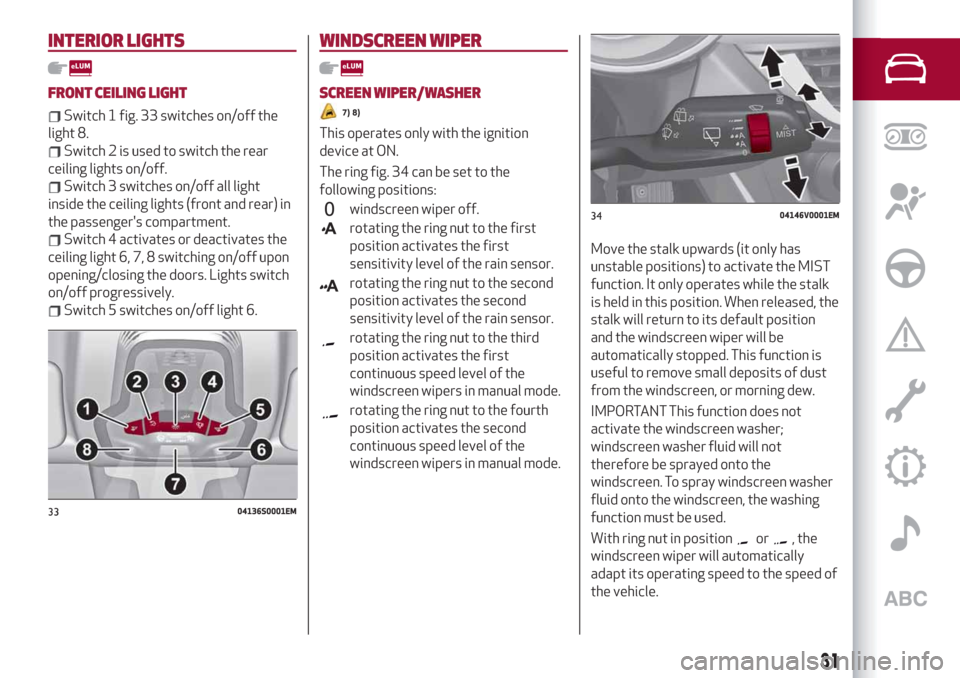
Switch 1 fig. 33 switches on/off the
light 8.
Switch 2 is used to switch the rear
ceiling lights on/off.
Switch 3 switches on/off all light
inside the ceiling lights (front and rear) in
the passenger's compartment.
Switch 4 activates or deactivates the
ceiling light 6, 7, 8 switching on/off upon
opening/closing the doors. Lights switch
on/off progressively.
Switch 5 switches on/off light 6.
WINDSCREEN WIPER
SCREEN WIPER/WASHER
7) 8)
This operates only with the ignition
device at ON.
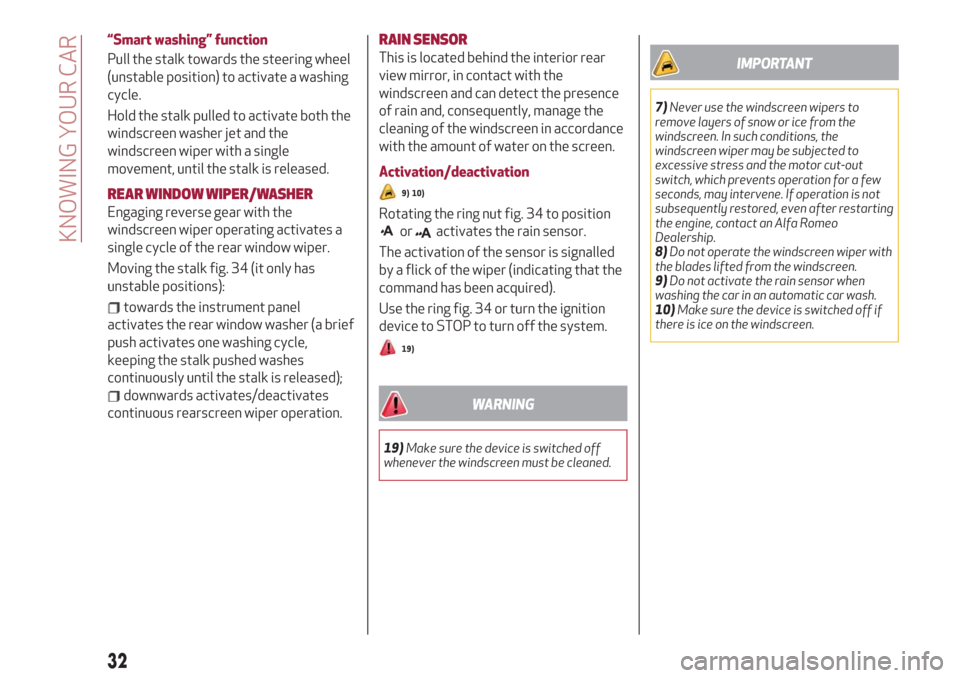
The ring fig. 34 can be set to the
following positions:
windscreen wiper off.
rotating the ring nut to the first
position activates the first
sensitivity level of the rain sensor.
rotating the ring nut to the second
position activates the second
sensitivity level of the rain sensor.
rotating the ring nut to the third
position activates the first
continuous speed level of the
windscreen wipers in manual mode.
rotating the ring nut to the fourth
position activates the second
continuous speed level of the
windscreen wipers in manual mode.
Move the stalk upwards (it only has
unstable positions) to activate the MIST
function. It only operates while the stalk
is held in this position. When released, the
stalk will return to its default position
and the windscreen wiper will be
automatically stopped. This function is
useful to remove small deposits of dust
from the windscreen, or morning dew.
IMPORTANT This function does not
activate the windscreen washer;
windscreen washer fluid will not
therefore be sprayed onto the
windscreen. To spray windscreen washer
fluid onto the windscreen, the washing
function must be used.
With ring nut in position
or, the
windscreen wiper will automatically
adapt its operating speed to the speed of
the vehicle.
3304136S0001EM
3404146V0001EM
31
Page 34 of 244
“Smart washing” function
Pull the stalk towards the steering wheel
(unstable position) to activate a washing
cycle.
Hold the stalk pulled to activate both the
windscreen washer jet and the
windscreen wiper with a single
movement, until the stalk is released.
REAR WINDOW WIPER/WASHER
Engaging reverse gear with the
windscreen wiper operating activates a
single cycle of the rear window wiper.
Moving the stalk fig. 34 (it only has
unstable positions):
towards the instrument panel
activates the rear window washer (a brief
push activates one washing cycle,
keeping the stalk pushed washes
continuously until the stalk is released);
downwards activates/deactivates
continuous rearscreen wiper operation.
RAIN SENSOR
This is located behind the interior rear
view mirror, in contact with the
windscreen and can detect the presence
of rain and, consequently, manage the
cleaning of the windscreen in accordance
with the amount of water on the screen.
Activation/deactivation
9) 10)
Rotating the ring nut fig. 34 to position
oractivates the rain sensor.
The activation of the sensor is signalled
by a flick of the wiper (indicating that the
command has been acquired).
Use the ring fig. 34 or turn the ignition
device to STOP to turn off the system.
19)
WARNING
19)Make sure the device is switched off
whenever the windscreen must be cleaned.
IMPORTANT
7)Never use the windscreen wipers to
remove layers of snow or ice from the
windscreen. In such conditions, the
windscreen wiper may be subjected to
excessive stress and the motor cut-out
switch, which prevents operation for a few
seconds, may intervene. If operation is not
subsequently restored, even after restarting
the engine, contact an Alfa Romeo
Dealership.
8)Do not operate the windscreen wiper with
the blades lifted from the windscreen.
9)Do not activate the rain sensor when
washing the car in an automatic car wash.
10)Make sure the device is switched off if
there is ice on the windscreen.
32
KNOWING YOUR CAR
Page 42 of 244
Opening from the outside
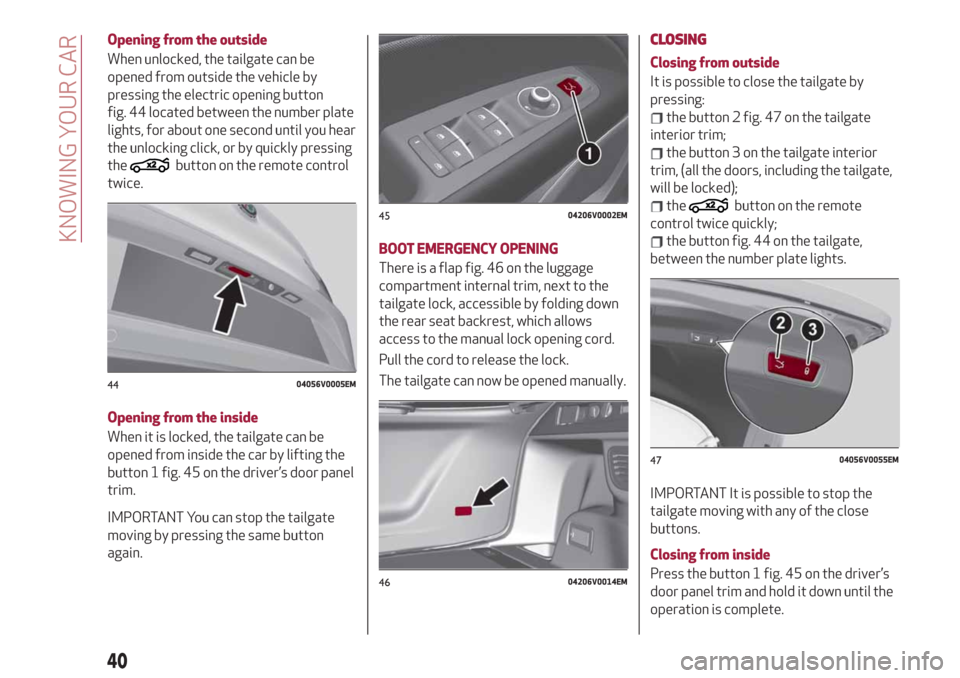
When unlocked, the tailgate can be
opened from outside the vehicle by
pressing the electric opening button
fig. 44 located between the number plate
lights, for about one second until you hear
the unlocking click, or by quickly pressing
the
button on the remote control
twice.
Opening from the inside
When it is locked, the tailgate can be
opened from inside the car by lifting the
button 1 fig. 45 on the driver’s door panel
trim.
IMPORTANT You can stop the tailgate
moving by pressing the same button
again.
BOOT EMERGENCY OPENING
There is a flap fig. 46 on the luggage
compartment internal trim, next to the
tailgate lock, accessible by folding down
the rear seat backrest, which allows
access to the manual lock opening cord.
Pull the cord to release the lock.
The tailgate can now be opened manually.
CLOSING
Closing from outside
It is possible to close the tailgate by
pressing:
the button 2 fig. 47 on the tailgate
interior trim;
the button 3 on the tailgate interior
trim, (all the doors, including the tailgate,
will be locked);
thebutton on the remote
control twice quickly;
the button fig. 44 on the tailgate,
between the number plate lights.
IMPORTANT It is possible to stop the
tailgate moving with any of the close
buttons.
Closing from inside
Press the button 1 fig. 45 on the driver’s
door panel trim and hold it down until the
operation is complete.
4404056V0005EM
4504206V0002EM
4604206V0014EM
4704056V0055EM
40
KNOWING YOUR CAR
Page 112 of 244
STARTING THE ENGINE
STARTING THE ENGINE
Before starting the engine, adjust the
seat, the interior rear view mirrors, the
door mirrors and fasten the seat belt
correctly.
Never press the accelerator pedal for
starting the engine.
If necessary, messages indicating the
starting procedure can be shown on the
display.
101) 102) 103)
30) 31) 33)
Proceed as follows:
engage the electric parking brake and
set the gear lever to P (Park) or N
(Neutral),
fully depress the brake pedal without
touching the accelerator;
briefly press the ignition button;
if the engine doesn't start within a few
seconds, you need to repeat the
procedure.
if the problem persists, contact an Alfa
Romeo Dealership.
PROCEDURE FOR DIESEL VERSIONS
32)
Proceed as follows:
engage the parking brake and set the
gear lever to P (Park) or N (Neutral);
fully depress the brake pedal without
touching the accelerator;
briefly press the ignition button;
if the engine doesn't start within a few
seconds, you need to repeat the
procedure.
If the problem persists, contact an Alfa
Romeo Dealership.
ENGINE STARTING FAILURE
Starting the engine with electronic key
battery (Keyless Start) run down or flat
If the ignition device does not respond
when the relevant button is pressed the
electronic key battery might be run down
or flat. Therefore, the system does not
detect the presence of the electronic key
on board the car and displays a dedicated
message.
In this case, follow the instructions in
paragraph "Starting with flat key battery"
in the "Knowing your car" chapter and
start the engine normally.
STOPPING THE ENGINE
33)
To stop the engine, proceed as follows:
park the car in a position that is not
dangerous for oncoming traffic;
engage P (Park) mode;
with engine idling, press the start
button.
Cars with electronic key (Keyless Start)
If the car speed is above 5 mph (8 km/h),
it is still possible to stop the engine if a
gear operating mode other than P (Park)
is selected. To switch off the engine in
this situation, hold down the ignition
device button for a while or press it
3 times in a row within a few seconds.
WARNING
101)It is dangerous to run the engine in
enclosed areas. The engine takes in oxygen
and releases carbon dioxide, carbon
monoxide and other toxic gases.
102)The electro-hydraulic braking system
is not active until the engine starts running.
So, the brake pedal travel will be longer than
normal. This does not indicate a fault.
103)Do not start the engine by pushing,
towing or driving downhill. These
manoeuvres may damage the catalytic
converter.
110
STARTING AND DRIVING
Page 131 of 244
LANE DEPARTURE WARNING
(LDW) SYSTEM
DESCRIPTION
47) 48) 49) 50) 51) 52)
The Lane Departure Warning system
makes use of a camera located on the
windscreen to detect the lane limits and
calculate the position of the vehicle
within such limits, in order to make sure
that it remains inside the lane.
When one or both lane limits are
detected and the vehicle passes over one
without the driver's say-so (direction
indicator not turned on), the system
emits an acoustic signal.
If the vehicle continues to go beyond the
line of the lane without any intervention
from the driver, the surpassed line will
light up on the display (left or right) to
urge the driver to bring the vehicle back
into the limits of the lane.
SYSTEM ON/OFF
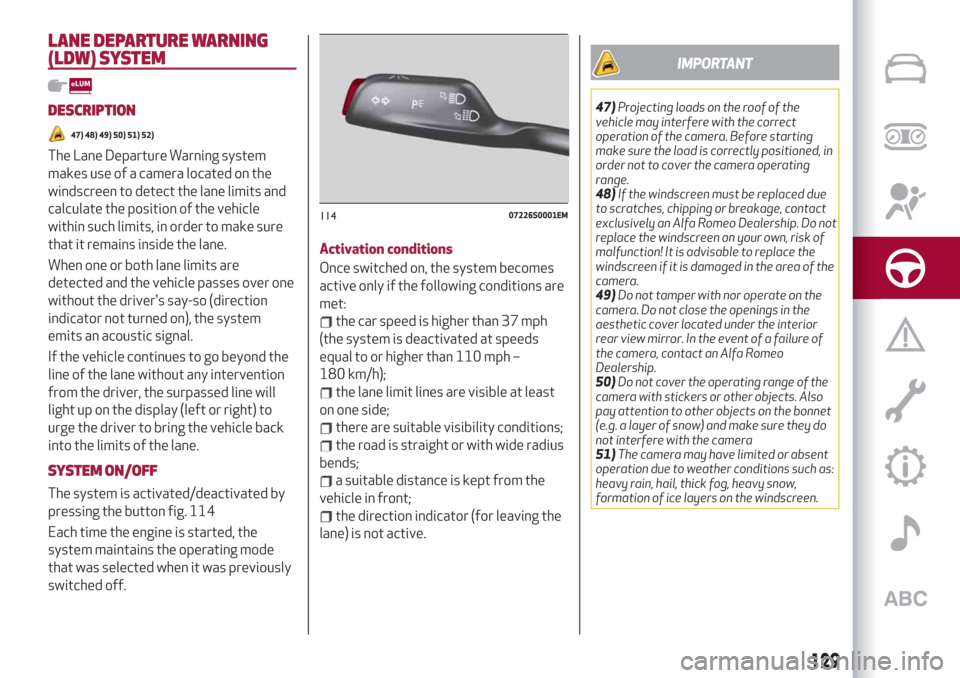
The system is activated/deactivated by
pressing the button fig. 114
Each time the engine is started, the
system maintains the operating mode
that was selected when it was previously
switched off.Activation conditions
Once switched on, the system becomes
active only if the following conditions are
met:
the car speed is higher than 37 mph
(the system is deactivated at speeds
equal to or higher than 110 mph –
180 km/h);
the lane limit lines are visible at least
on one side;
there are suitable visibility conditions;
the road is straight or with wide radius
bends;
a suitable distance is kept from the
vehicle in front;
the direction indicator (for leaving the
lane) is not active.
IMPORTANT
47)Projecting loads on the roof of the
vehicle may interfere with the correct
operation of the camera. Before starting
make sure the load is correctly positioned, in
order not to cover the camera operating
range.
48)If the windscreen must be replaced due
to scratches, chipping or breakage, contact
exclusively an Alfa Romeo Dealership. Do not
replace the windscreen on your own, risk of
malfunction! It is advisable to replace the
windscreen if it is damaged in the area of the
camera.
49)Do not tamper with nor operate on the
camera. Do not close the openings in the
aesthetic cover located under the interior
rear view mirror. In the event of a failure of
the camera, contact an Alfa Romeo
Dealership.
50)Do not cover the operating range of the
camera with stickers or other objects. Also
pay attention to other objects on the bonnet
(e.g. a layer of snow) and make sure they do
not interfere with the camera
51)The camera may have limited or absent
operation due to weather conditions such as:
heavy rain, hail, thick fog, heavy snow,
formation of ice layers on the windscreen.
11407226S0001EM
129