buttons ALFA ROMEO STELVIO 2021 User Guide
[x] Cancel search | Manufacturer: ALFA ROMEO, Model Year: 2021, Model line: STELVIO, Model: ALFA ROMEO STELVIO 2021Pages: 280, PDF Size: 10.02 MB
Page 52 of 280
GETTING TO KNOW YOUR VEHICLE
50
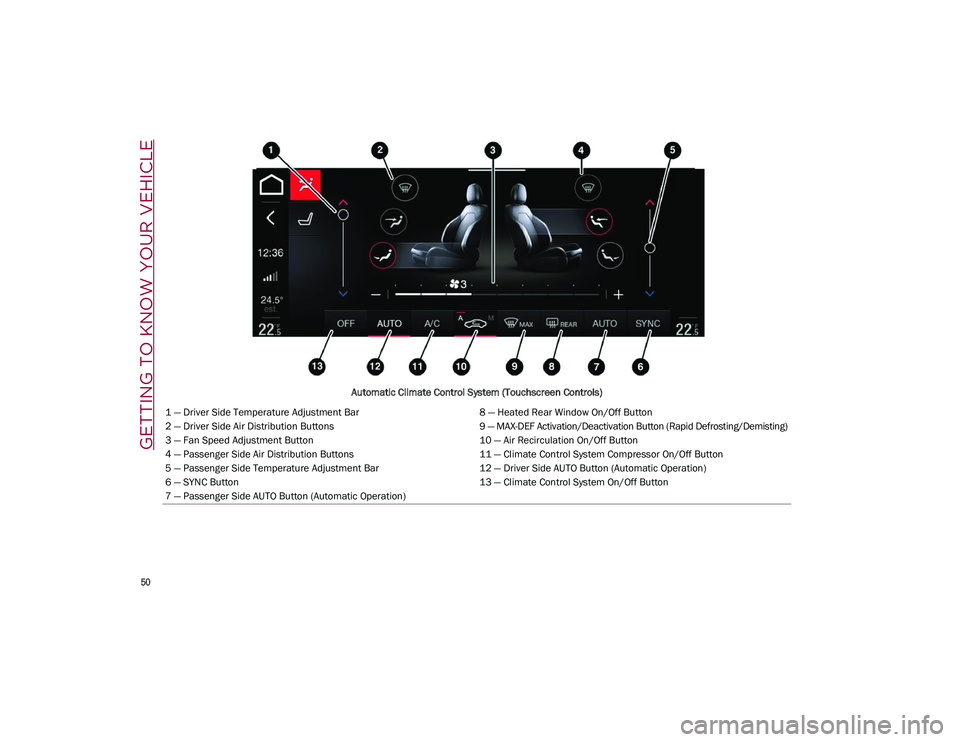
Automatic Climate Control System (Touchscreen Controls)
1 — Driver Side Temperature Adjustment Bar 8 — Heated Rear Window On/Off Button
2 — Driver Side Air Distribution Buttons 9 — MAX-DEF Activation/Deactivation Button (Rapid Defrosting/Demisting)
3 — Fan Speed Adjustment Button 10 — Air Recirculation On/Off Button
4 — Passenger Side Air Distribution Buttons 11 — Climate Control System Compressor On/Off Button
5 — Passenger Side Temperature Adjustment Bar 12 — Driver Side AUTO Button (Automatic Operation)
6 — SYNC Button 13 — Climate Control System On/Off Button
7 — Passenger Side AUTO Button (Automatic Operation)
21_GU_OM_EN_USC_t.book Page 50
Page 53 of 280
51
Description
The Automatic Dual Zone Climate Control
System adjusts the temperature and air distri-
bution independently between the driver and
passenger.
The system maintains the set temperature
inside the passenger compartment and
compensates for outside temperature change.
NOTE:
The reference temperature is 72°F (22°C) for
optimal comfort management.
The automatic setting will adjust the following
to maintain comfort within the passenger
compartment:
Air temperature from the driver/front
passenger side vents
Air distribution from the driver/front
passenger side vents
Fan speed (continuous variation of the air
flow)
Compressor variations (for cooling/dehu -
midifying the air)
Air recirculation
The Climate Control System can also be oper -
ated manually by using the buttons and knobs
on the faceplate.
Manual selections will override the automatic
settings, which are stored until the AUTO
button is pushed. If the system intervenes for
safety reasons, the automatic setting will take
control of the system.
The below operations will not deactivate the
automatic (AUTO) function:
Air Recirculation activation/deactivation
A/C activation/deactivation
SYNC function activation
Rear Window Defrost activation/deactiva -
tion
When in AUTO mode, the vehicle’s internal
temperature is controlled according to the set
temperature.
The following can be manually set or adjusted:
Driver/passenger air temperature
Blower speed (continuous variation)
Air distribution (seven positions for driver
and passenger)
A/C activation
Front Defroster
Air recirculation
Rear Defroster
System deactivation
A/C Compressor
Push the A/C button or the icon to activate or
deactivate the A/C compressor (indicator illu-
minated when activated). The A/C compressor
will remain off even after the engine has
stopped.
When the A/C compressor is turned off, the
system deactivates air recirculation to prevent
the windows from fogging up. If the climate
control system can maintain the temperature,
with the A/C turned off, the AUTO feature will
remain on and the AUTO button indicator light
will not switch off.
To restore automatic control of the A/C
compressor, push the A/C button or the icon or
the AUTO button. With the A/C compressor off,
the air speed can be set manually using the Air
Speed Adjustment Knob.
When the A/C compressor is on, and the
engine is running, air speed cannot be lower
than the minimum speed (only one indicator
light is lit).
CAUTION!
The system uses R1234yf refrigerant,
which does not pollute the environment in
the event of accidental leakage. Under no
circumstances, use R134a and R12 fluids,
which are incompatible with the
components of this system.
21_GU_OM_EN_USC_t.book Page 51
Page 56 of 280
GETTING TO KNOW YOUR VEHICLE
54
the flow of air. The air vanes of the center
outlets and outboard outlets can be moved up
and down or side to side to regulate airflow
direction. There is a shut off wheel located
below the air vanes to shut off or adjust the
amount of airflow from these outlets.
Bi-Level Mode
Air comes from the instrument panel
outlets and floor outlets. A slight
amount of air is directed through the
defrost and side window demister
outlets.
NOTE:
Bi-Level mode is designed under comfort
conditions to provide cooler air out of the
panel outlets and warmer air from the floor
outlets.
Floor Mode
Air comes from the floor outlets. A
slight amount of air is directed
through the defrost and side window
demister outlets. This setting heats
the passenger compartment the quickest.
Mix Mode
Air is directed through the floor,
defrost, and side window demister
outlets. This setting works best in
cold or snowy conditions that require
extra heat to the windshield. This setting is
good for maintaining comfort while reducing
moisture on the windshield.
Front Defrost And Panel Mode
Air flow is distributed between the
windshield demisting/defrosting
vents and side/central dashboard
vents. This setting allows air to flow
to the windshield on sunny days.
Front Defrost And Bi-Level Mode
Air flow is distributed to all vents.
Switching The Climate Control System On/
Off
To Turn Off The Climate Control System
Rotate the Air Speed Adjustment Knob
completely counterclockwise to turn off the
Climate Control system.
With the air conditioner is off:
Air recirculation is on
The A/C compressor is off
The fan is off
The heated rear window can be activated/
deactivated
NOTE:
The Climate Control system stores the previ -
ously set temperatures and resumes opera -
tion when any button on the system is pushed. To Turn On The Climate Control System
To switch the Climate Control system on in
automatic mode, push the AUTO button.
Operating Mode
The Climate Control system can be activated
in different ways. It is recommended to use the
automatic function. Push the AUTO button and
set the desired temperatures.
The automatic system adjusts the tempera
-
ture, quantity, and distribution of air intro -
duced into the passenger compartment. It
also controls air recirculation and the activa -
tion of the air conditioner.
At any time during automatic operation, you
can change the temperature, activate or deac -
tivate the Rear Defrost, activate SYNC, acti -
vate or deactivate the air conditioner, and
activate or deactivate air recirculation. The
system will automatically adjust to the new
settings.
Climate Control Display Settings
The Climate Control settings are visible on the
radio screen.
The display on the radio system is a pop up
window, which is activated by pushing the
buttons or turning the knobs on the Climate
Control system. The indicator lights located on
the buttons and knobs indicate that the
selected feature is on/off. If no operation is
performed for a predetermined time, the
pop-up will close on the display.
21_GU_OM_EN_USC_t.book Page 54
Page 61 of 280
59
To close the window, pull the window switch
up. To stop the window during Auto-Up opera-
tion, push or pull the window switch again.
Auto-Up Feature With Anti-Pinch Protection
The vehicle is equipped with an anti-pinch
safety device for closing the windows.
If the safety system senses any obstacle while
the window is closing, it will stop the window’s
movement and reverse it, depending on its
position.
This device is also useful if the windows are
activated accidentally by children inside the
vehicle.
The anti-pinch safety function is activated both
during the manual and the automatic opera -
tion of the window.
When the anti-pinch system is activated, the
window closing is immediately interrupted.
Then the window closing is automatically reversed and the window lowers by about
8 inches (20 cm) in relation to the first stop
position. The window cannot be operated
during this time.
NOTE:
In the event of an error, or if the anti-pinch
protection is activated three consecutive
times, the automatic closing operation of the
window will be deactivated. In order to restore
the correct operation of the system, the
window must be lowered.
Power Window System Initialization
If power supply is interrupted, the electric
window automatic operation must be reinitial
-
ized.
To perform the initialization procedure, which
must be done on each door with the doors
closed, manually fully close the window to be
initialized.
Wind Buffeting
Wind buffeting can be described as the
perception of pressure on the ears or a heli -
copter-type sound in the ears. Your vehicle
may exhibit wind buffeting with the windows
down, or the sunroof (if equipped) in certain
open or partially open positions. This is a
normal occurrence and can be minimized. If
the buffeting occurs with the rear windows
open, open the front and rear windows together to minimize the buffeting. If the
buffeting occurs with the sunroof open, adjust
the sunroof opening to minimize the buffeting
or open any window.
POWER SUNROOF — IF
EQUIPPED
Power Sunroof
The power sunroof consists of a single glass
panel and is fitted with a power sunshade the
full length of the panel.
Operation of the sunroof is only possible with
the ignition in the ACC or ON/RUN position
Ú
page 20.
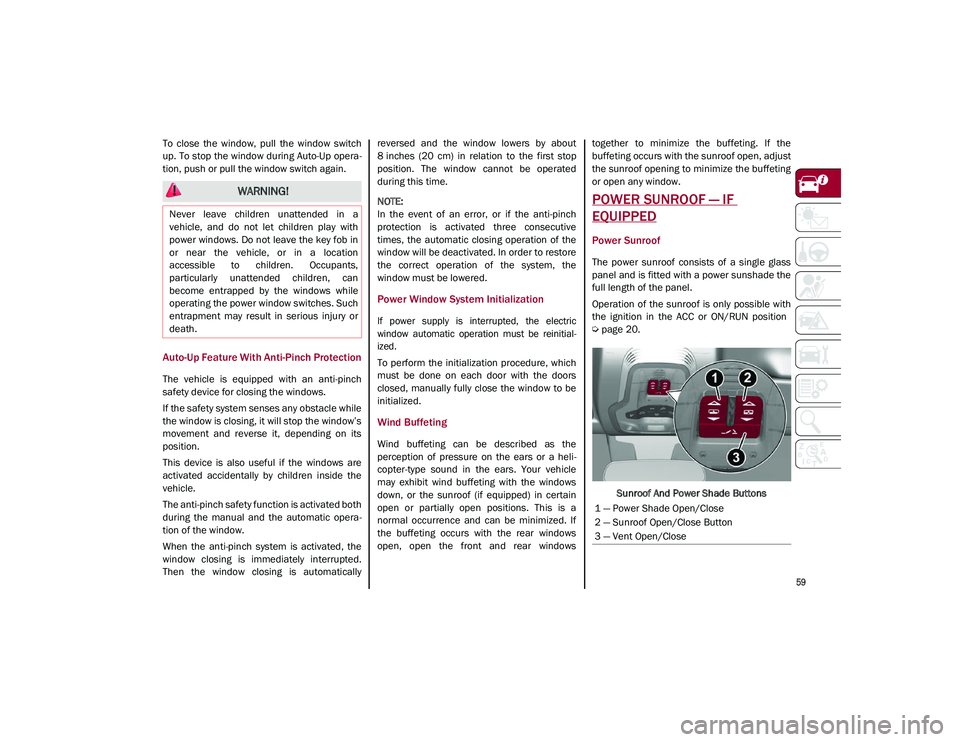
Sunroof And Power Shade Buttons
WARNING!
Never leave children unattended in a
vehicle, and do not let children play with
power windows. Do not leave the key fob in
or near the vehicle, or in a location
accessible to children. Occupants,
particularly unattended children, can
become entrapped by the windows while
operating the power window switches. Such
entrapment may result in serious injury or
death.
1 — Power Shade Open/Close
2 — Sunroof Open/Close Button
3 — Vent Open/Close
21_GU_OM_EN_USC_t.book Page 59
Page 65 of 280
63
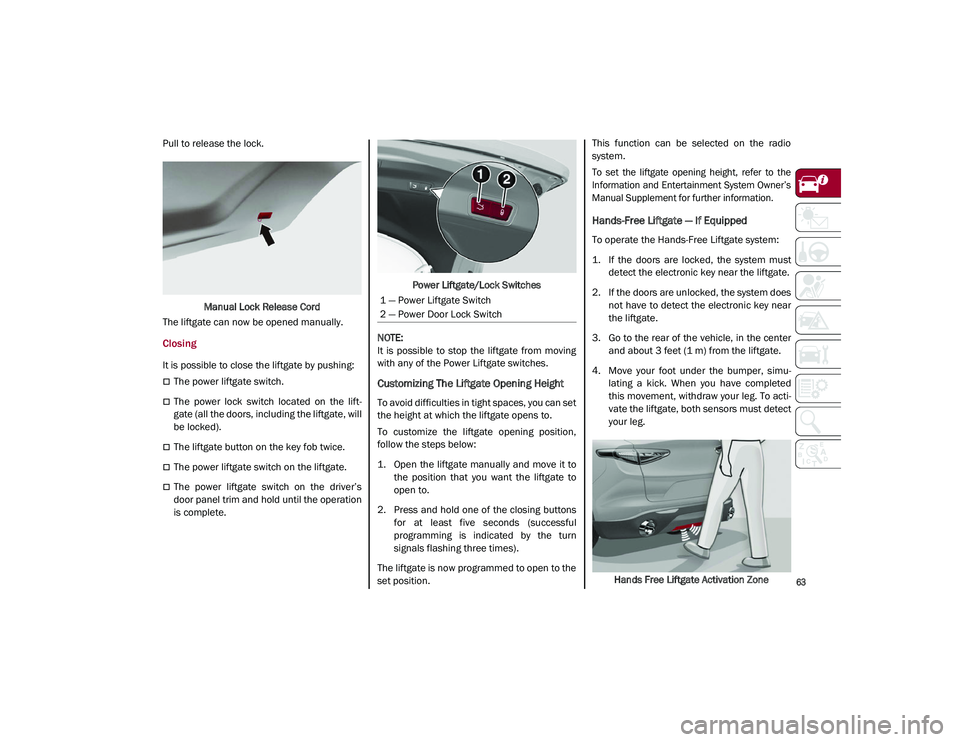
Pull to release the lock.Manual Lock Release Cord
The liftgate can now be opened manually.
Closing
It is possible to close the liftgate by pushing:
The power liftgate switch.
The power lock switch located on the lift -
gate (all the doors, including the liftgate, will
be locked).
The liftgate button on the key fob twice.
The power liftgate switch on the liftgate.
The power liftgate switch on the driver’s
door panel trim and hold until the operation
is complete. Power Liftgate/Lock Switches
NOTE:
It is possible to stop the liftgate from moving
with any of the Power Liftgate switches.
Customizing The Liftgate Opening Height
To avoid difficulties in tight spaces, you can set
the height at which the liftgate opens to.
To customize the liftgate opening position,
follow the steps below:
1. Open the liftgate manually and move it to the position that you want the liftgate to
open to.
2. Press and hold one of the closing buttons for at least five seconds (successful
programming is indicated by the turn
signals flashing three times).
The liftgate is now programmed to open to the
set position. This function can be selected on the radio
system.
To set the liftgate opening height, refer to the
Information and Entertainment System Owner’s
Manual Supplement for further information.
Hands-Free Liftgate — If Equipped
To operate the Hands-Free Liftgate system:
1. If the doors are locked, the system must
detect the electronic key near the liftgate.
2. If the doors are unlocked, the system does not have to detect the electronic key near
the liftgate.
3. Go to the rear of the vehicle, in the center and about 3 feet (1 m) from the liftgate.
4. Move your foot under the bumper, simu -
lating a kick. When you have completed
this movement, withdraw your leg. To acti -
vate the liftgate, both sensors must detect
your leg.
Hands Free Liftgate Activation Zone
1 — Power Liftgate Switch
2 — Power Door Lock Switch
21_GU_OM_EN_USC_t.book Page 63
Page 106 of 280
STARTING AND OPERATING
104
To access the function on the main menu,
select the following items in order:
1. “Driver Assistance”
2. “Speed Limiter - Set Speed”
By turning the Rotary Pad, the speed increases
by 5 mph (5 km/h), from a minimum of
18 mph (30 km/h) to a maximum of 112 mph
(180 km/h).
Exceeding The Programmed Speed
By fully pressing the accelerator pedal, the
programmed speed can be exceeded even
with the device active (e.g. in the event of over-
taking).
The device is disabled until the speed drops
below the set limit, after which it reactivates
automatically.
Programmed Speed Icon Flashing
The programmed speed will flash in the
following scenarios:
When the accelerator pedal has been fully
pressed and the vehicle has exceeded the
programmed speed.
Activating the system after setting a limit
below the effective speed of the vehicle.
In the event of overtake acceleration.
Deactivation
The feature can be activated/deactivated
through the radio system.
Deactivating The Device
To access this feature, select the “Driver Assis -
tance” widget in the radio system, then select
the following items in sequence:
1. “Speed Limiter”
2. “OFF”
Automatic Deactivation Of The Device
The device deactivates automatically in the
event of fault in the system. In this case,
contact an authorized dealer.
Temporary Signal Loss
When the devices loses the signal, the white
symbol without the speed indication illumi -
nates on the display.
System Failure
If there is a system failure, the amber symbol
illuminates on the display.
CRUISE CONTROL SYSTEMS — IF
EQUIPPED
Cruise Control — If Equipped
When engaged, the Cruise Control takes over
accelerator operations at speeds greater than
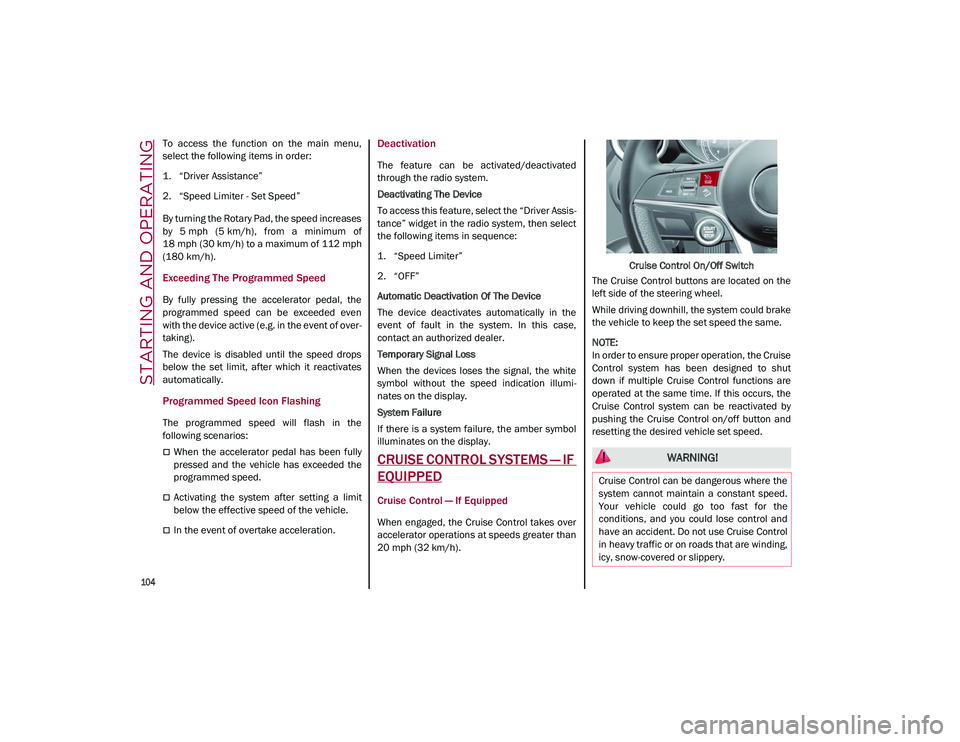
20 mph (32 km/h). Cruise Control On/Off Switch
The Cruise Control buttons are located on the
left side of the steering wheel.
While driving downhill, the system could brake
the vehicle to keep the set speed the same.
NOTE:
In order to ensure proper operation, the Cruise
Control system has been designed to shut
down if multiple Cruise Control functions are
operated at the same time. If this occurs, the
Cruise Control system can be reactivated by
pushing the Cruise Control on/off button and
resetting the desired vehicle set speed.
WARNING!
Cruise Control can be dangerous where the
system cannot maintain a constant speed.
Your vehicle could go too fast for the
conditions, and you could lose control and
have an accident. Do not use Cruise Control
in heavy traffic or on roads that are winding,
icy, snow-covered or slippery.
21_GU_OM_EN_USC_t.book Page 104
Page 229 of 280
227
Fuse Location
The fuses, which can be replaced by the user,
are grouped in two boxes below the passenger
side foot board and inside the luggage
compartment.
Control Unit Under Passenger Side
Footboard
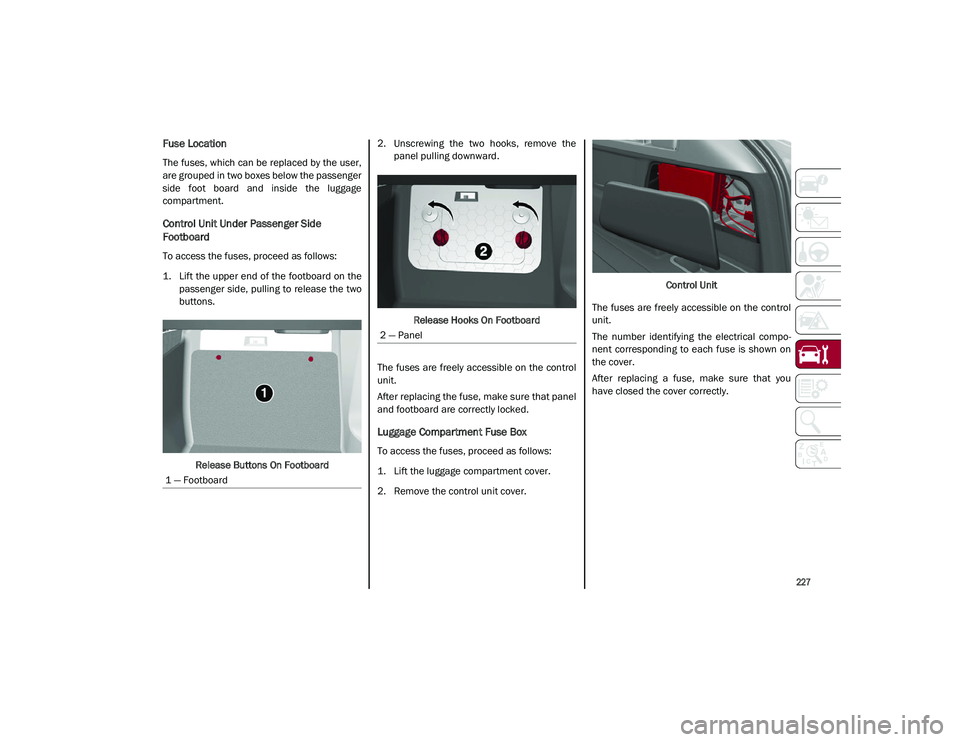
To access the fuses, proceed as follows:
1. Lift the upper end of the footboard on thepassenger side, pulling to release the two
buttons.
Release Buttons On Footboard 2. Unscrewing the two hooks, remove the
panel pulling downward.
Release Hooks On Footboard
The fuses are freely accessible on the control
unit.
After replacing the fuse, make sure that panel
and footboard are correctly locked.
Luggage Compartment Fuse Box
To access the fuses, proceed as follows:
1. Lift the luggage compartment cover.
2. Remove the control unit cover. Control Unit
The fuses are freely accessible on the control
unit.
The number identifying the electrical compo -
nent corresponding to each fuse is shown on
the cover.
After replacing a fuse, make sure that you
have closed the cover correctly.
1 — Footboard
2 — Panel
21_GU_OM_EN_USC_t.book Page 227