manual radio set ALFA ROMEO STELVIO 2022 User Guide
[x] Cancel search | Manufacturer: ALFA ROMEO, Model Year: 2022, Model line: STELVIO, Model: ALFA ROMEO STELVIO 2022Pages: 256, PDF Size: 10.17 MB
Page 109 of 256
107
Suspension Conditions
The following operations will suspend the HAS
system:
Steer manually
Press the brake pedal
Disable the ACC device
Activate the turn signals
Push the ACC activation setting button for two
seconds to activate Cruise Control
Place the gear selector in PARK, REVERSE, or
NEUTRAL
Reactivating the ACC system will reactivate HAS
Ú
page 100.
Automatic Deactivation
The system can be deactivated in the following
situations:
If there are narrow bends
When hands are removed from the steering
wheel
If the left or right turn signal is activated
If the driver intentionally changes lanes
without using the turn signal
If the driver’s seat belt is released
If the gear selector is placed in DRIVE
If the “Active Braking” function is activated
Ú
page 145
If the vehicle exits the highway
If the lane markings are not detected by the
camera
If the ACC device is deactivated
If the vehicle speed exceeds 90 mph
(145 km/h)
NOTE:
When the HAS system is turned off, the symbol
on the display turns red and then grey.
Hands on the steering wheel are detected by a
capacitive sensor installed in it.
When the automatic suspension conditions are
over, HAS will be automatically reactivated.
OPERATION
HAS only operates when the driver’s hands are on
the steering wheel.
If the system detects that the driver’s hands have
been removed from the steering wheel, the
system will alert the driver to place their hands
back on the steering wheel
Ú
page 108.
If the vehicle crosses the lane boundary, the
steering wheel will vibrate and the dedicated
screen will appear in the instrument cluster
display.
NOTE:
HAS may take up to five seconds to turn on once
all conditions are met. During this time, a grey
indicator light will appear on the instrument
cluster display and the system will automatically
activate as soon as all of the conditions are met
with no intervention from the driver.
The following conditions must be met before HAS
turns on:
HAS must be enabled by pushing the button on
the steering wheel
The vehicle must be on a highway
ACC must be activated
The right and left lane boundaries must be
visible
The vehicle speed must be between 0 and
90 mph (0 and 145 km/h)
The camera, radar, and radio system must be
functioning properly
The road lane width must be between 8.5 ft
and 13.7 ft (2.6 m and 4.2 m)
The turn signals must not be activated
HAS must be functioning properly
Other operating limits:
If the speed of ACC can be set to a higher value
(top speed 110 mph (180 km/h), HAS is only
available as long as the vehicle speed is equal
to or less than 90 mph (145 km/h).
When the ACC speed is reduced and the
vehicle speed is less than 90 mph (145 km/h),
the system will automatically reactivate.
If the ACC speed is set to 90 mph (145 km/h),
traveling downhill may increase the vehicle
speed. HAS will deactivate until the speed
returns to 90 mph (145 km/h).
INDICATIONS ON THE DISPLAY
The HAS status can always be viewed in the
instrument cluster display.
The system status is indicated by the color of the
symbol on the display.
HAS uses sensors in the steering wheel to detect
if the driver’s hands are on it.
If the driver’s hands are not on the steering
wheel, a series of warnings will appear in the
instrument cluster display to alert the driver to
reposition their hands on the steering wheel. An
acoustic signal will also sound. After a period of
time, HAS will disable if the driver’s hands do not
return to the steering wheel.
22_GU_OM_EN_USC_t.book Page 107
Page 112 of 256

STARTING AND OPERATING
110
Suspension Conditions
The following operations will suspend the TJA
system:
Pressing the brake pedal
Opening the driver’s door
Disabling ACC
If the vehicle speed exceeds 37 mph
(60 km/h)
Releasing the driver’s seat belt
Placing the gear selector in PARK, REVERSE, or
NEUTRAL
If the Forward Collision Warning system or
Active Braking intervenes
Automatic Deactivation
System operation will be temporarily disabled
under the following conditions:
When traveling around narrow bends
If the lane boundaries are not detected
One of the two lines is interrupted
The sun is low and reflects on the radar
camera
If the turn signals are activated
If the driver intentionally changes lanes
without using the turn signal
If manual steering begins
If the driver’s hands are removed from the
steering wheel
When there is no surrounding traffic and there
are no horizontal lane boundaries
If the system is not functioning properly
If lateral acceleration is high
NOTE:
When TJA is turned off, the symbol in the
instrument cluster display will turn red, and
then grey.
A sensor in the steering wheel detects whether
the driver’s hands are placed on the steering
wheel.
When the automatic suspension conditions are
over, the TJA system will be automatically
reactivated.
OPERATION
The TJA system can only operate when the
driver’s hands are on the steering wheel.
If the system detects that the driver’s hands have
been removed from the steering wheel, a
message will appear in the instrument cluster
display to alert the driver to place their hands
back on the wheel.
NOTE:
If the vehicle begins to cross the lane
boundary, the steering wheel will vibrate and a
dedicated screen will appear in the instrument
cluster display.
The TJA system may take up to five seconds to
become active once all conditions are met.
The following conditions must be met in order to
activate the system:
The TJA system must be enabled
The Adaptive Cruise Control (ACC) system must
be turned on
The right and left lane boundaries must be
recognized by the system
The vehicle must be traveling at a speed
between 0 and 37 mph (0 and 60 km/h)
The camera, radar, and radio system must be
functioning properly
The road lane width must be between 8.5 ft
and 13.7 ft (2.6 m and 4.2 m)
The turn signals must be turned off
The TJA system must be functioning properly
If the ACC speed is set to 37 mph (60 km/h) or
less, traveling downhill may increase the
vehicle speed. The system will remain inactive
until the speed returns to 37 mph (60 km/h)
or less.
INDICATIONS ON THE DISPLAY
The TJA system status is indicated by the color of
the symbol in the instrument cluster display.
The system uses sensors in the steering wheel to
detect if the driver’s hands are present. If the
driver’s hands are removed, a series of warnings
will appear in the instrument cluster display to
alert the driver to reposition their hands on the
steering wheel. Acoustic signals will also be
emitted.
If the driver’s hands are not returned to the
steering wheel after a period of time, the system
will be disabled.
22_GU_OM_EN_USC_t.book Page 110
Page 150 of 256
SAFETY
148
Frontal Collision Alarm With Active Braking — If
Equipped
If this function is selected, the brakes are
operated to reduce the speed of the vehicle in the
event of potential frontal impact.
This function applies an additional braking
pressure if the braking pressure applied by the
driver does not suffice to prevent potential frontal
impact.
The function is active with speed above 2 mph
(4 km/h).
NOTE:
When using an automatic car wash it is recom-
mended to deactivate the system through the
settings of the radio system. The system may
detect the presence of a car, a wall or another
obstacle and activate.
Driving In Special Conditions
In certain driving conditions, system intervention
might be unexpected or delayed. The driver must
therefore be very careful, keeping control of the
vehicle to drive in complete safety.
Driving close to a bend.
The vehicle ahead is leaving a roundabout.
Vehicles with small dimensions and/or not
aligned in the driving lane.
Lane change by other vehicles.
Vehicles traveling at right angles to the vehicle.
NOTE:
In particularly complex traffic conditions, the
driver can deactivate the system manually
through the Information and Entertainment
system.
If the driver presses the brake pedal fully or
makes an excessive steering maneuver during
system operation, the automatic braking
function may deactivate (e.g. to allow a
possible maneuver to avoid the obstacle).
The FCW system is automatically deactivated
when operating in race mode and a warning
message will be displayed on the instrument
cluster.
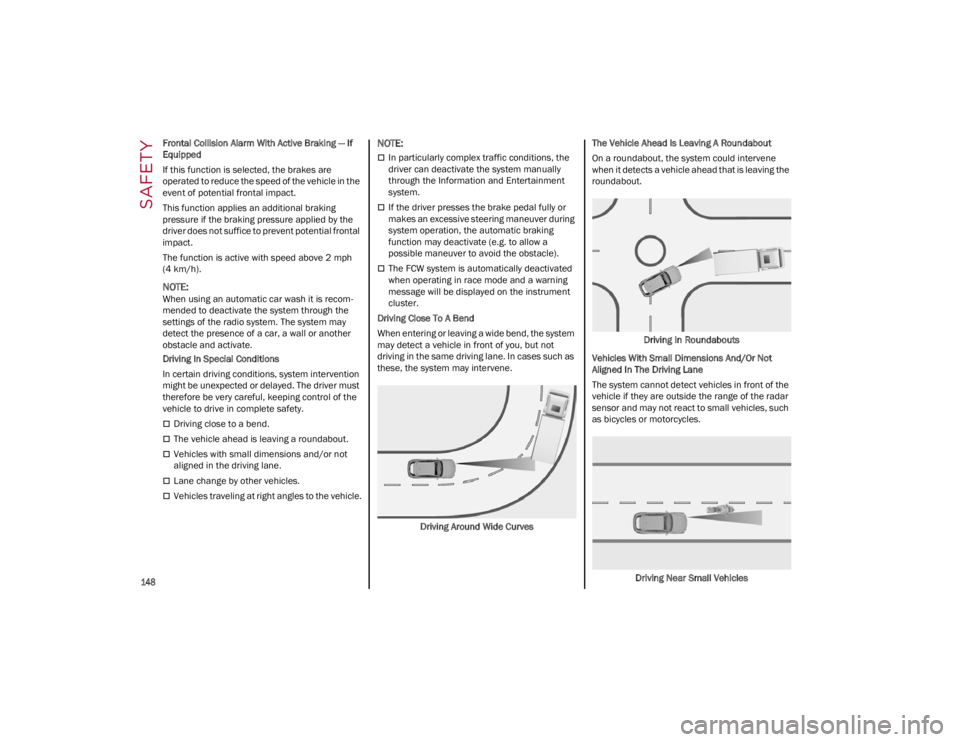
Driving Close To A Bend
When entering or leaving a wide bend, the system
may detect a vehicle in front of you, but not
driving in the same driving lane. In cases such as
these, the system may intervene.
Driving Around Wide Curves The Vehicle Ahead Is Leaving A Roundabout
On a roundabout, the system could intervene
when it detects a vehicle ahead that is leaving the
roundabout.
Driving In Roundabouts
Vehicles With Small Dimensions And/Or Not
Aligned In The Driving Lane
The system cannot detect vehicles in front of the
vehicle if they are outside the range of the radar
sensor and may not react to small vehicles, such
as bicycles or motorcycles.
Driving Near Small Vehicles
22_GU_OM_EN_USC_t.book Page 148
Page 249 of 256
247
PUBLICATION ORDER
FORMS
To order the following manuals, you may use
either the website or the phone numbers listed
below.
Service Manuals
These comprehensive Service Manuals provide a
complete working knowledge of the vehicle,
system, and/or components and is written in
straightforward language with illustrations,
diagrams, and charts.
Diagnostic Procedure Manuals
Diagnostic Procedure Manuals are filled with
diagrams, charts and detailed illustrations. These
manuals make it easy to find and fix problems on
computer-controlled vehicle systems and
features. They show exactly how to find and
correct problems, using step-by-step trouble-
shooting and drivability procedures, proven
diagnostic tests and a complete list of all tools
and equipment.
To order a hard copy of your Service or Diagnostic
Procedure manuals, visit:
www.techauthority.com
(US and Canada).
Owner's Manuals
These Owner's Manuals have been prepared with
the assistance of service and engineering
specialists to acquaint you with specific FCA
vehicles. To access your Owner's Information online, visit
www.mopar.com/om
(US) or
www.owners.mopar.ca
(Canada).
Or
Call Tech Authority toll free at:
1-800-890-4038 (US)
Owner's Manuals, Radio Manuals and Warranty
Information Books can be ordered through
Archway at:
1-800-387-1143 (Canada)
GENERAL INFORMATION
The following regulatory statement applies to all
Radio Frequency (RF) devices equipped in this
vehicle:
This device complies with Part 15 of the FCC
Rules and with Innovation, Science and Economic
Development Canada license-exempt RSS
standard(s). Operation is subject to the following
two conditions:
1. This device may not cause harmful interfer -
ence, and
2. This device must accept any interference received, including interference that may
cause undesired operation.
Le présent appareil est conforme aux CNR
d`Innovation, Science and Economic
Development applicables aux appareils radio
exempts de licence. L'exploitation est autorisée
aux deux conditions suivantes:
1. l'appareil ne doit pas produire de brouillage, et
2. l'utilisateur de l'appareil doit accepter tout brouillage radioélectrique subi, même si le brouillage est susceptible d'en compromettre
le fonctionnement.
La operación de este equipo está sujeta a las
siguientes dos condiciones:
1. es posible que este equipo o dispositivo no cause interferencia perjudicial y
2. este equipo o dispositivo debe aceptar cual -
quier interferencia, incluyendo la que pueda
causar su operación no deseada.
RF Exposure Requirements
To comply with FCC RF exposure compliance
requirements, the device must be installed and
operated to provide a separation distance of at
least 20 cm from all persons.
This equipment complies with Canada radiation
exposure limits set forth for an uncontrolled
environment. This equipment should be installed
and operated with minimum distance 20 cm
between the radiator and your body.
NOTE:Changes or modifications not expressly approved
by the party responsible for compliance could void
the user’s authority to operate the equipment.
Déclaration d’exposition aux radiations
Cet équipement est conforme aux limites
d’exposition aux rayonnements ISED établies
pour un environnement non contrôlé. Cet
équipement doit être installé et utilisé avec un
minimum de 20 cm de distance entre la source
de rayonnement et votre corps
NOTA:
Des changements ou des modifications n’ayant
pas été expressément approuvés par la partie
responsable de la conformité pourraient révoquer
l’autorisation d’utilisation de l’équipement.
22_GU_OM_EN_USC_t.book Page 247
Page 253 of 256

251
PowerMirrors ...................................................... 38
Outlet (Auxiliary Electrical Outlet) ........... 54
Seats......................................................... 33
Sunroof ..................................................... 57
Windows ................................................... 56
Power Seats Forward.............................................. 31, 33
Rearward ........................................... 31, 33
Recline ............................................... 31, 33
Power Supply ..............................................234
Pregnant Women And Seat Belts ..............155
Pretensioners Seat Belts ...............................................155
Prolonged Vehicle Inactivity ......................230
R
Radial Ply Tires ...........................................224
Radio Transmitters And Mobile Phones ....... 4
Rear Camera ..............................................122
Rear Cross Path .........................................139
Reformulated Gasoline .............................. 239
Refueling Procedure ..................................124
Refueling The Vehicle ................................ 124
Reminder, Seat Belt ...................................152
Remote Control Starting System........................................ 23
Remote Keyless Entry .................................. 19
Remote Starting Exit Remote Start Mode .......................... 23
Remote Starting System ....................... 23, 81
Replacement Tires ..................................... 225
Reporting Safety Defects ...........................246
Restraints, Child .........................................164
Restraints, Head .......................................... 35 Rims And Tires ........................................... 216
Roll Over Warning ........................................... 3
S
Safety Checks Inside Vehicle .................... 173
Safety Checks Outside Vehicle ................. 174
Safety Defects, Reporting ......................... 246
Safety Information, Tire............................. 216
Safety Tips ................................................. 173
Safety, Exhaust Gas .................................. 174
Saving Fuel ................................................ 132
Scheduled Servicing .................................. 191
Scheduled Servicing Program
(2.0L T4 MAir Engine Versions) ................ 192
Scheduled Servicing Program
(2.9L V6 Gasoline Engine Versions) ......... 194
Seat Belt Reminder ......................................71
Seat Belts.......................................... 152, 173
Adjustable Shoulder Belt ...................... 154Adjustable Upper Shoulder Anchorage.......................................... 154
Adjustable Upper Shoulder Belt Anchorage.......................................... 154
Child Restraints ..................................... 164
Energy Management Feature ............... 155
Front Seat .............................................. 152
Inspection .............................................. 173
Lap/Shoulder Belt Untwisting .............. 154
Lap/Shoulder Belts ............................... 152
Pregnant Women................................... 155
Pretensioners ........................................ 155
Rear Seat ............................................... 152
Reminder ............................................... 152
Seat Belt Pretensioner .......................... 155
Untwisting Procedure ............................ 154 Seats.......................................................31, 33
Adjustment .........................................31, 33
Head Restraints ....................................... 35
Heated...................................................... 34Height Adjustment ................................... 33
Power........................................................ 33
Tilting ........................................................ 33
Security Alarm .............................................. 24
Service Assistance ..................................... 245
Service Contract......................................... 245
Service Manuals ........................................ 247
Servicing Procedures ................................. 201
Shoulder Belts............................................ 152
Signals, Turn .................................44, 74, 174
Snow Chains .............................................. 228
Snow Tires .................................................. 228
Spare Tires ........................................ 226, 227
Speed Control Accel/Decel .............................................. 99
Accel/Decel (ACC Only) ......................... 102
Cancel..................................................... 100Distance Setting (ACC Only) .................. 103
Resume .................................................... 99
Set ............................................................ 99
Speed Control (Cruise Control) ................... 98
Starting ....................................................... 187 Button....................................................... 22Cold Weather ........................................... 82
Remote ..................................................... 23
Starting And Operating .............................. 187
Starting Procedures ................................... 187
Starting The Engine ..................................... 81
Steering ...................................................... 235 Wheel, Heated ......................................... 30
Wheel, Tilt ................................................ 29
22_GU_OM_EN_USC_t.book Page 251