fuel ALFA ROMEO STELVIO 2022 Owners Manual
[x] Cancel search | Manufacturer: ALFA ROMEO, Model Year: 2022, Model line: STELVIO, Model: ALFA ROMEO STELVIO 2022Pages: 256, PDF Size: 10.17 MB
Page 4 of 256
2
READ THIS CAREFULLY
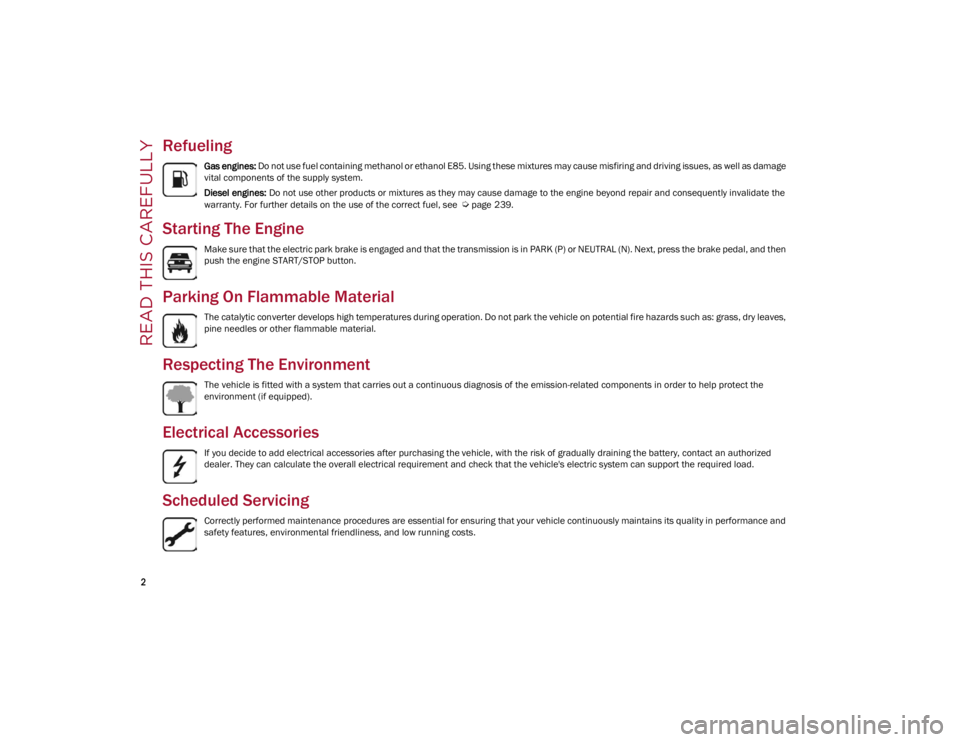
Refueling
Gas engines: Do not use fuel containing methanol or ethanol E85. Using these mixtures may cause misfiring and driving issues, as well as damage
vital components of the supply system.
Diesel engines: Do not use other products or mixtures as they may cause damage to the engine beyond repair and consequently invalidate the
warranty. For further details on the use of the correct fuel, see
Ú
page 239.
Starting The Engine
Make sure that the electric park brake is engaged and that the transmission is in PARK (P) or NEUTRAL (N). Next, press the brake pedal, and then
push the engine START/STOP button.
Parking On Flammable Material
The catalytic converter develops high temperatures during operation. Do not park the vehicle on potential fire hazards such as: grass, dry leaves,
pine needles or other flammable material.
Respecting The Environment
The vehicle is fitted with a system that carries out a continuous diagnosis of the emission-related components in order to help protect the
environment (if equipped).
Electrical Accessories
If you decide to add electrical accessories after purchasing the vehicle, with the risk of gradually draining the battery, contact an authorized
dealer. They can calculate the overall electrical requirement and check that the vehicle's electric system can support the required load.
Scheduled Servicing
Correctly performed maintenance procedures are essential for ensuring that your vehicle continuously maintains its quality in performance and
safety features, environmental friendliness, and low running costs.
22_GU_OM_EN_USC_t.book Page 2
Page 10 of 256
8
READ THIS CAREFULLY
Refueling..................................................... 2
Starting The Engine .................................... 2
Parking On Flammable Material ............... 2
Respecting The Environment .................... 2
Electrical Accessories ................................ 2
Scheduled Servicing .................................. 2
Rollover Warning ........................................ 3
VEHICLE CHANGES /
ALTERATIONS
Accessories Purchased By The Owner ...... 4
Installing Electrical/Electronic Devices .... 4
Radio Transmitters And Mobile Phones ... 4
HOW TO USE THIS MANUAL
Operating Instructions ............................... 5
Warnings And Cautions.............................. 5
Symbols Key ............................................... 6
Symbols ..................................................... 6
SYMBOL GLOSSARY .................................14
GETTING TO KNOW YOUR
VEHICLE
KEYS..........................................................19
Key Fob................................................... 19
ENGINE IMMOBILIZER SYSTEM ..............21 IGNITION SWITCH .................................... 22
Keyless Push Button Ignition ................ 22
REMOTE START — IF EQUIPPED .............. 23
How To Use Remote Start ..................... 23
To Exit Remote Start Mode ................... 23
Remote Start Comfort Systems —
If Equipped ............................................. 23
VEHICLE SECURITY
SYSTEM — IF EQUIPPED .......................... 24
To Arm The System................................ 24
To Disarm The System .......................... 24
Volumetric/Anti-Lift Protection —
If Equipped ............................................. 24
DOORS ...................................................... 25
Power Door Locks.................................. 25
Locking The Doors With A Depleted
Battery .................................................... 25 Passive Entry System ........................... 26
Power Lock Safety Device..................... 28
Automatic Door Locks — If Equipped .. 28
Child-Protection Door Lock System —
Rear Doors ............................................. 28
STEERING WHEEL.................................... 29
Manual Tilt/Telescoping Steering
Column ................................................... 29 Heated Steering Wheel —
If Equipped ............................................ 30
DRIVER MEMORY SETTINGS —
IF EQUIPPED ............................................ 30
Programming The Memory Feature ..... 30
Memory Position Recall ........................ 31
SEATS .......................................................31
Sparco Racing Seats (Quadrifoglio
Vehicles) — If Equipped .........................31 Split Folding Rear Seat ..........................32
Power Adjustment (Front Seats) ...........33
Heated Seats — If Equipped .................34
Head Restraints .....................................35
MIRRORS .................................................37
Automatic Dimming Mirror ....................37
Vanity Mirror ...........................................37
Outside Power Mirrors ...........................38
Power Folding Outside Mirrors ..............38
Outside Automatic Dimming
Mirrors — If Equipped............................. 38 Heated Mirrors .......................................38
UNIVERSAL GARAGE DOOR OPENER
(HOMELINK®)
S....................................39
Before You Begin Programming
HomeLink® ............................................39 Erasing All The HomeLink® Channels ..39
Identifying Whether You Have A
Rolling Code Or Non-Rolling Code
Device .....................................................39 Programming HomeLink® To A
Garage Door Opener ..............................40 Programming HomeLink® To A
Miscellaneous Device ............................ 40 Reprogramming A Single HomeLink®
Button .....................................................41 Canadian/Gate Operator
Programming .......................................... 41 Security ...................................................41
Troubleshooting Tips..............................41
22_GU_OM_EN_USC_t.book Page 8
Page 13 of 256
11
LANE KEEPING ASSIST (LKA) SYSTEM —
IF EQUIPPED .......................................... 119
Turning Lane Keeping Assist On
Or Off .................................................... 120 Lane Keeping Assist Warning
Message ...............................................120
REAR BACK UP CAMERA / DYNAMIC
GRIDLINES ............................................ 122
REFUELING THE VEHICLE ..................... 124
Refueling Capacity ............................... 124
Refueling Procedure ...........................124
VEHICLE LOADING ................................. 126
Certification Label................................ 126
TRAILER TOWING................................... 127
Common Towing Definitions ...............127
Trailer Hitch Classification .................. 128
Trailer Towing Weights (Maximum
Trailer Weight Ratings) ........................ 128 Trailer And Tongue Weight ................. 129
Towing Requirements..........................129
Towing Tips ..........................................131
Installing The Receiver ........................ 131
Connecting The Electrical System ......132
Removing The Receiver ....................... 132
SUGGESTIONS FOR DRIVING................ 132
Saving Fuel ...........................................132
Driving Style .........................................132
Conditions Of Use ................................ 133
Performance — Quadrifoglio ...............133
SAFETY
ACTIVE SAFETY SYSTEMS ..................... 135
Anti-Lock Brake System (ABS) ........... 135
Active Torque Vectoring (ATV)
System — If Equipped ......................... 135 Dynamic Steering Torque (DST)
System ................................................. 136 Drive Train Control (DTC) System....... 136
Electronic Stability Control (ESC)
System ................................................. 136 Hill Descent Control (HDC) System —
If Equipped .......................................... 137 Hill Start Assist (HSA) System ............ 138
Panic Brake Assist (PBA) System ....... 138
Traction Control System (TCS)............ 139
AUXILIARY DRIVING SYSTEMS .............. 139
Blind Spot Monitoring (BSM)
System — If Equipped ......................... 139 Active Blind Spot Assist (ABSA)
System — If Equipped ........................ 141 Driver Attention Assist (DAA)
System — If Equipped ......................... 144 Forward Collision Warning Plus
(FCW+) System — If Equipped ........... 145 Tire Pressure Monitoring System
(TPMS).................................................. 149
OCCUPANT RESTRAINT SYSTEMS ....... 151
Occupant Restraint Systems
Features .............................................. 151 Important Safety Precautions............. 151
Seat Belt Systems .............................. 152
Supplemental Restraint Systems
(SRS)..................................................... 156 Child Restraints ................................... 164
SAFETY TIPS ........................................... 173
Transporting Passengers .................... 173
Transporting Pets ................................ 173
Connected Vehicles ............................. 173
Safety Checks You Should Make
Inside The Vehicle .............................. 173 Periodic Safety Checks You Should
Make Outside The Vehicle .................. 174 Exhaust Gas ........................................ 174
Carbon Monoxide Warnings................ 175
IN CASE OF EMERGENCY
HAZARD WARNING FLASHERS ............ 176
SOS — EMERGENCY CALL ..................... 176JACKING AND TIRE CHANGING ............. 178
General Instructions............................ 179
Jack Information And Usage
Precautions .......................................... 179 Changing Procedure ............................ 179
TIRE SERVICE KIT — IF EQUIPPED ....... 181
Description ........................................... 181
Inflation Procedure .............................. 182
Checking And Restoring Tire
Pressure ............................................... 184
22_GU_OM_EN_USC_t.book Page 11
Page 15 of 256
13
FUEL REQUIREMENTS........................... 239
Reformulated Gasoline ....................... 239
Gasoline/Oxygenate Blends................ 239
CNG And LP Fuel System
Modifications ....................................... 240 MMT In Gasoline ..................................240
Materials Added To Fuel .....................240
Fuel System Cautions ..........................240
FLUID CAPACITIES ................................. 241
ENGINE FLUIDS AND LUBRICANTS ...... 242
CHASSIS FLUIDS AND LUBRICANTS..... 243PERFORMANCE ..................................... 244
CUSTOMER ASSISTANCE
SUGGESTIONS FOR OBTAINING
SERVICE FOR YOUR VEHICLE .............. 245
Prepare For The Appointment ............ 245
Prepare A List ...................................... 245
Be Reasonable With Requests........... 245
IF YOU NEED ASSISTANCE .................... 245
Alfa Romeo Customer Center............. 245
Alfa Romeo Customer Care
(Canada) .............................................. 245 Customer Assistance For The Hearing
Or Speech Impaired (TDD/TTY) .......... 245 Service Contract ................................. 245
WARRANTY INFORMATION ................... 246REPORTING SAFETY DEFECTS .............. 246
In The 50 United States And
Washington, D.C. ................................. 246 In Canada ............................................. 246
PUBLICATION ORDER FORMS .............. 247
GENERAL INFORMATION....................... 247
22_GU_OM_EN_USC_t.book Page 13
Page 16 of 256
SYMBOL GLOSSARY
14
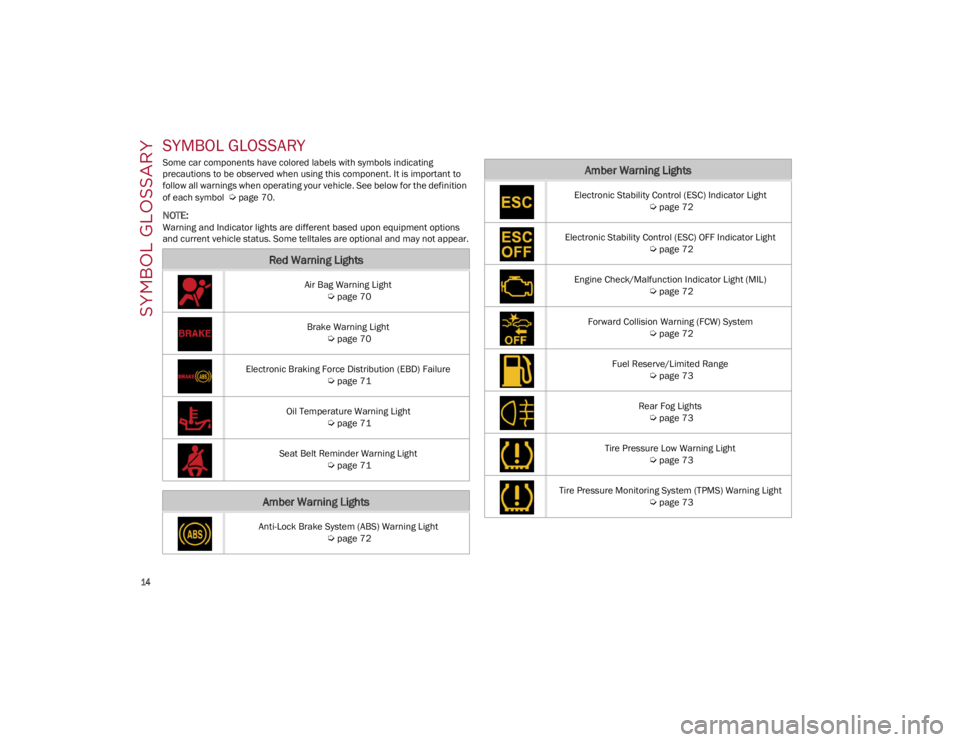
SYMBOL GLOSSARY
Some car components have colored labels with symbols indicating
precautions to be observed when using this component. It is important to
follow all warnings when operating your vehicle. See below for the definition
of each symbol
Ú
page 70.
NOTE:
Warning and Indicator lights are different based upon equipment options
and current vehicle status. Some telltales are optional and may not appear.
Red Warning Lights
Air Bag Warning Light
Ú
page 70
Brake Warning Light
Ú
page 70
Electronic Braking Force Distribution (EBD) Failure
Ú
page 71
Oil Temperature Warning Light
Ú
page 71
Seat Belt Reminder Warning Light
Ú
page 71
Amber Warning Lights
Anti-Lock Brake System (ABS) Warning Light
Ú
page 72
Electronic Stability Control (ESC) Indicator Light
Ú
page 72
Electronic Stability Control (ESC) OFF Indicator Light
Ú
page 72
Engine Check/Malfunction Indicator Light (MIL)
Ú
page 72
Forward Collision Warning (FCW) System
Ú
page 72
Fuel Reserve/Limited Range
Ú
page 73
Rear Fog Lights
Ú
page 73
Tire Pressure Low Warning Light
Ú
page 73
Tire Pressure Monitoring System (TPMS) Warning Light
Ú
page 73
Amber Warning Lights
22_GU_OM_EN_USC_t.book Page 14
Page 18 of 256
SYMBOL GLOSSARY
16
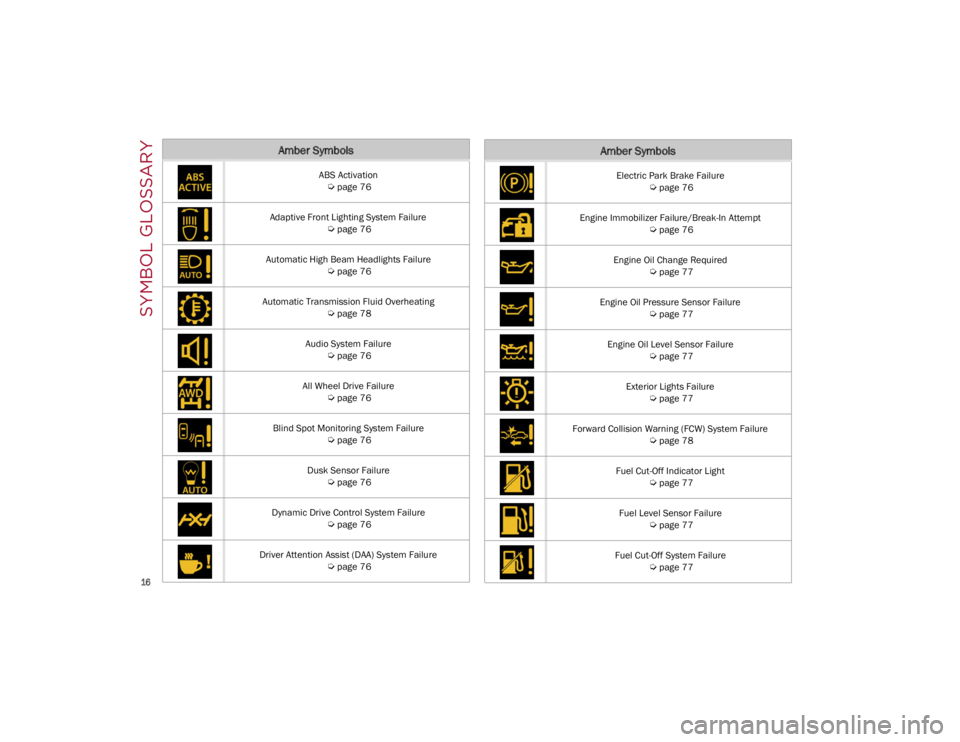
Amber Symbols
ABS Activation
Ú
page 76
Adaptive Front Lighting System Failure
Ú
page 76
Automatic High Beam Headlights Failure
Ú
page 76
Automatic Transmission Fluid Overheating
Ú
page 78
Audio System Failure
Ú
page 76
All Wheel Drive Failure
Ú
page 76
Blind Spot Monitoring System Failure
Ú
page 76
Dusk Sensor Failure
Ú
page 76
Dynamic Drive Control System Failure
Ú
page 76
Driver Attention Assist (DAA) System Failure
Ú
page 76
Electric Park Brake Failure
Ú
page 76
Engine Immobilizer Failure/Break-In Attempt
Ú
page 76
Engine Oil Change Required
Ú
page 77
Engine Oil Pressure Sensor Failure
Ú
page 77
Engine Oil Level Sensor Failure
Ú
page 77
Exterior Lights Failure
Ú
page 77
Forward Collision Warning (FCW) System Failure
Ú
page 78
Fuel Cut-Off Indicator Light
Ú
page 77
Fuel Level Sensor Failure
Ú
page 77
Fuel Cut-Off System Failure
Ú
page 77
Amber Symbols
22_GU_OM_EN_USC_t.book Page 16
Page 19 of 256
17
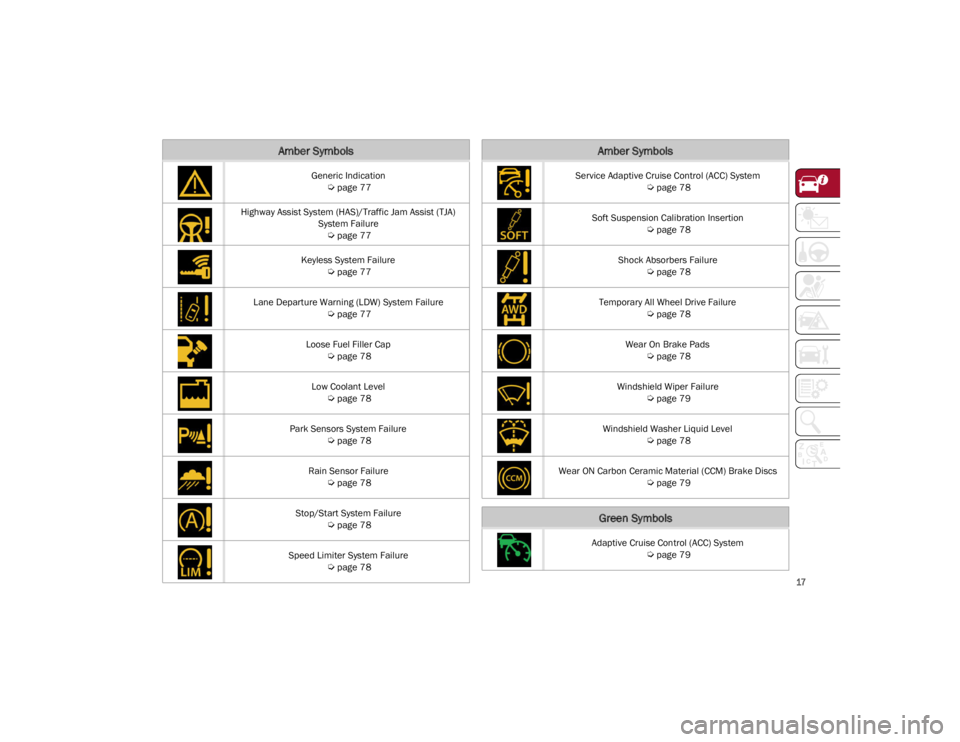
Generic Indication
Ú
page 77
Highway Assist System (HAS)/Traffic Jam Assist (TJA) System Failure
Ú
page 77
Keyless System Failure
Ú
page 77
Lane Departure Warning (LDW) System Failure
Ú
page 77
Loose Fuel Filler Cap
Ú
page 78
Low Coolant Level
Ú
page 78
Park Sensors System Failure
Ú
page 78
Rain Sensor Failure
Ú
page 78
Stop/Start System Failure
Ú
page 78
Speed Limiter System Failure
Ú
page 78
Amber Symbols
Service Adaptive Cruise Control (ACC) System
Ú
page 78
Soft Suspension Calibration Insertion
Ú
page 78
Shock Absorbers Failure
Ú
page 78
Temporary All Wheel Drive Failure
Ú
page 78
Wear On Brake Pads
Ú
page 78
Windshield Wiper Failure
Ú
page 79
Windshield Washer Liquid Level
Ú
page 78
Wear ON Carbon Ceramic Material (CCM) Brake Discs
Ú
page 79
Green Symbols
Adaptive Cruise Control (ACC) System
Ú
page 79
Amber Symbols
22_GU_OM_EN_USC_t.book Page 17
Page 25 of 256
23
REMOTE START —
IF EQUIPPED
This system uses the key fob to start the
engine conveniently from outside the
vehicle while still maintaining security.
NOTE:
Obstructions between the vehicle and key fob
may reduce this range
Ú
page 247.
HOW TO USE REMOTE START
Push the Remote Start button on the key fob
twice within five seconds. The vehicle doors will
lock, the turn signals will flash twice, and the horn
will chirp twice. Pushing the Remote Start button
a third time shuts the engine off.
NOTE:
With Remote Start, the engine will only run for
15 minutes.
Remote Start can only be used twice.
If an engine fault is present or fuel level is low,
the vehicle will start and then shut down in 10
seconds.
The parking lights will turn on and remain on
during Remote Start mode.
For security, power window and power sunroof
(if equipped) operation is disabled when the
vehicle is in the Remote Start mode.
The ignition must be placed in the ACC position
before the Remote Start sequence can be
repeated for a third cycle.
All of the following conditions must be met before
the engine will remote start:
Gear selector in PARK
Doors closed
Hood closed
Liftgate closed
Hazard switch off
Brake switch inactive (brake pedal not
pressed)
Battery at an acceptable charge level
PANIC button not pushed
System not disabled from previous Remote
Start event
Vehicle Security system indicator flashing
Ignition in OFF position
Fuel level meets minimum requirement
Vehicle Security system is not signaling an
intrusion
Malfunction Indicator Light (MIL) is not
illuminated
TO EXIT REMOTE START MODE
To drive the vehicle after starting the Remote
Start system, either push and release the unlock
button on the key fob to unlock the doors, or
unlock the vehicle using Passive Entry via the
door handles, and disarm the Vehicle Security
system (if equipped). Then, prior to the end of the
15 minute cycle, push and release the START/
STOP ignition button while pressing the brake
pedal.
The Remote Start system will turn the engine off
if the Remote Start button is pushed again, or if
the engine is allowed to run for the entire
15 minute cycle.
REMOTE START COMFORT SYSTEMS —
I
F EQUIPPED
When Remote Start is activated, the heated
steering wheel and front heated seat features will
automatically activate when ambient
temperature is less than 39°F (4°C). These
features will stay on through the duration of
Remote Start.
NOTE:
This feature can be activated through the radio
system. Refer to the Information and Entertain -
ment System Owner’s Manual Supplement for
further information.
WARNING!
Do not start or run an engine in a closed
garage or confined area. Exhaust gas
contains Carbon Monoxide (CO) which is
odorless and colorless. Carbon Monoxide is
poisonous and can cause serious injury or
death when inhaled.
Keep key fobs away from children. Operation
of the Remote Start system, windows, door
locks or other controls could cause serious
injury or death.
22_GU_OM_EN_USC_t.book Page 23
Page 55 of 256
53
To Turn On The Climate Control System
To switch the Climate Control system on in
automatic mode, push the AUTO button.
Operating Mode
The Climate Control system can be activated in
different ways. It is recommended to use the
automatic function. Push the AUTO button and
set the desired temperatures.
The automatic system adjusts the temperature,
quantity, and distribution of air introduced into
the passenger compartment. It also controls air
recirculation and the activation of the air
conditioner.
At any time during automatic operation, you can
change the temperature, activate or deactivate
the Rear Defrost, activate SYNC, activate or
deactivate the air conditioner, and activate or
deactivate air recirculation. The system will
automatically adjust to the new settings.
Climate Control Display Settings
The Climate Control settings are visible on the
radio screen.
The display on the radio system is a pop up
window, which is activated by pushing the
buttons or turning the knobs on the Climate
Control system. The indicator lights located on
the buttons and knobs indicate that the selected
feature is on/off. If no operation is performed for
a predetermined time, the pop-up will close on
the display.
Humidity Sensor
The Humidity Sensor helps prevent the windows
from fogging up. The AUTO function (indicator
illuminated) must be on for the Humidity Sensor
to function.
When outside temperature is low, the system may
turn the compressor on and turn air recirculation
off for safer driving.
Stop/Start
The Stop/Start system shuts off the engine when
the vehicle speed is 0 mph (0 km/h), as a fuel
conservation measure.
In order to maintain comfort in the cabin, the
Stop/Start feature will not activate if any of the
following conditions exist:
The Climate Control system is in AUTO mode
(indicator illuminated), and the vehicle has yet
to reach the set temperature
The Climate Control system is in LO maximum
cooling
The Climate Control system is in HI maximum
heating
The Climate Control system is in the MAX-DEF
status
When the Stop/Start system is active, the engine
will restart if the inside temperature changes
significantly, or if the LO setting, or MAX-DEF
setting, is activated. With Stop/Start system on (engine is OFF), air
flow is reduced to keep the compartment comfort
conditions for longer.
Until the temperature drastically changes within
the cabin, the climate control system will
continue to maintain the temperature while the
engine is off. By deactivating the Stop/Start
system with the button (located by the
headlight switch), the climate control system
operates normally according to the settings.
NOTE:
In harsh climate conditions, limit the use of the
Stop/Start system to prevent the compressor
from continuously switching on and off. This
will cause rapid misting of the windows and the
accumulation of humidity in the passenger
compartment.
When the Stop/Start system is on, the climate
control system will always take air in from
outside, reducing the probability of the
windows fogging up.
System Maintenance
In winter months, the Climate Control system
must be turned on at least once a month for
approximately 10 minutes.
Have the system inspected at an authorized
dealer before the summer.
22_GU_OM_EN_USC_t.book Page 53
Page 68 of 256
GETTING TO KNOW YOUR INSTRUMENT PANEL
66
3. Instrument Cluster Display•The instrument cluster display features a
driver interactive display
Ú
page 66.
4. Fuel Gauge •The digital bar gauge shows the amount of
fuel in the tank.
• The fuel reserve/limited range warning
light turns on, a message is displayed and
there is an acoustic signal when about 2.4 gallons (9 liters) of fuel are left in the tank.
• The fuel pump symbol points to the
side of the vehicle where the fuel door is
lo cated.
• Proceeding further, the second white
notch will go off and the last one will become red, together with the indication "E" present at the bottom of the tank. Fuel Level Gauge
NOTE:
If the low fuel warning light switches on, refuel at
the earliest opportunity.
5. Speedometer
•Indicates vehicle speed.
NOTE:
The hard telltales will illuminate for a bulb check
when the ignition is first cycled.
INSTRUMENT CLUSTER
DISPLAY
INSTRUMENT CLUSTER DISPLAY
D
ESCRIPTION
This vehicle is equipped with a driver interactive
display that is located in the instrument cluster.
When one or more of the doors have been
opened or closed and the ignition is in the OFF
position, the instrument cluster will display the
vehicle mileage for a few seconds.
RECONFIGURABLE INSTRUMENT CLUSTER
D
ISPLAY
During operation, the instrument cluster display
is divided into multiple sections which show
driving data, warnings, and failure indications.
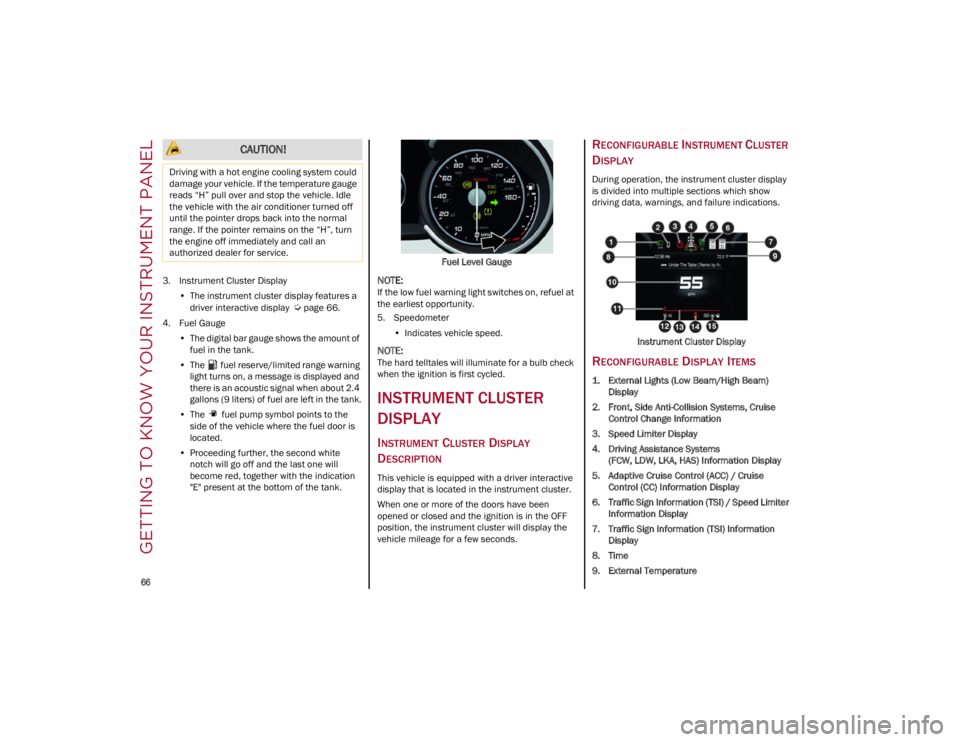
Instrument Cluster Display
RECONFIGURABLE DISPLAY ITEMS
1. External Lights (Low Beam/High Beam)Display
2. Front, Side Anti-Collision Systems, Cruise Control Change Information
3. Speed Limiter Display
4. Driving Assistance Systems (FCW, LDW, LKA, HAS) Information Display
5. Adaptive Cruise Control (ACC) / Cruise Control (CC) Information Display
6. Traffic Sign Information (TSI) / Speed Limiter Information Display
7. Traffic Sign Information (TSI) Information Display
8. Time
9. External Temperature
CAUTION!
Driving with a hot engine cooling system could
damage your vehicle. If the temperature gauge
reads “H” pull over and stop the vehicle. Idle
the vehicle with the air conditioner turned off
until the pointer drops back into the normal
range. If the pointer remains on the “H”, turn
the engine off immediately and call an
authorized dealer for service.
22_GU_OM_EN_USC_t.book Page 66