brake sensor ALFA ROMEO STELVIO 2023 User Guide
[x] Cancel search | Manufacturer: ALFA ROMEO, Model Year: 2023, Model line: STELVIO, Model: ALFA ROMEO STELVIO 2023Pages: 268, PDF Size: 10.36 MB
Page 122 of 268
STARTING AND OPERATING
120
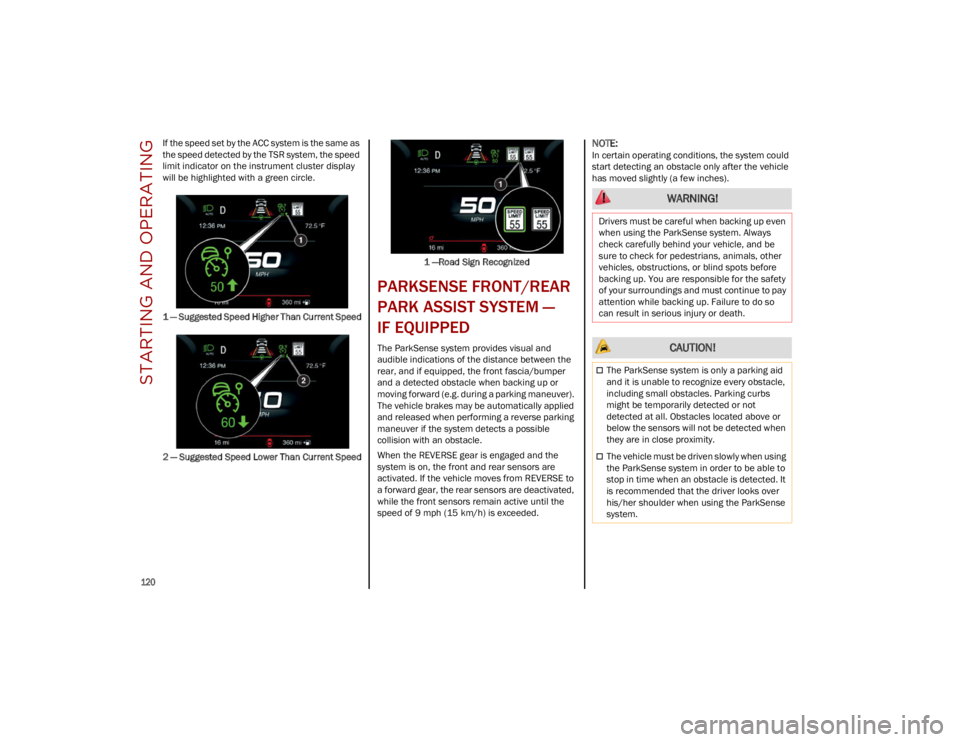
If the speed set by the ACC system is the same as
the speed detected by the TSR system, the speed
limit indicator on the instrument cluster display
will be highlighted with a green circle.
1 — Suggested Speed Higher Than Current Speed
2 — Suggested Speed Lower Than Current Speed1 —Road Sign Recognized
PARKSENSE FRONT/REAR
PARK ASSIST SYSTEM —
IF EQUIPPED
The ParkSense system provides visual and
audible indications of the distance between the
rear, and if equipped, the front fascia/bumper
and a detected obstacle when backing up or
moving forward (e.g. during a parking maneuver).
The vehicle brakes may be automatically applied
and released when performing a reverse parking
maneuver if the system detects a possible
collision with an obstacle.
When the REVERSE gear is engaged and the
system is on, the front and rear sensors are
activated. If the vehicle moves from REVERSE to
a forward gear, the rear sensors are deactivated,
while the front sensors remain active until the
speed of 9 mph (15 km/h) is exceeded.
NOTE:
In certain operating conditions, the system could
start detecting an obstacle only after the vehicle
has moved slightly (a few inches).
WARNING!
Drivers must be careful when backing up even
when using the ParkSense system. Always
check carefully behind your vehicle, and be
sure to check for pedestrians, animals, other
vehicles, obstructions, or blind spots before
backing up. You are responsible for the safety
of your surroundings and must continue to pay
attention while backing up. Failure to do so
can result in serious injury or death.
CAUTION!
The ParkSense system is only a parking aid
and it is unable to recognize every obstacle,
including small obstacles. Parking curbs
might be temporarily detected or not
detected at all. Obstacles located above or
below the sensors will not be detected when
they are in close proximity.
The vehicle must be driven slowly when using
the ParkSense system in order to be able to
stop in time when an obstacle is detected. It
is recommended that the driver looks over
his/her shoulder when using the ParkSense
system.
23_GU_OM_EN_USC_t.book Page 120
Page 125 of 268
123
(Continued)
PARKSENSE SYSTEM USAGE
P
RECAUTIONS
NOTE:
Some conditions may influence the performance
of the ParkSense system:
Reduced sensor sensitivity could be due to the
presence of ice, snow, mud, or thick paint on
the surface of the sensor.
The sensors may detect a false obstacle (echo
interference) due to mechanical interference,
for example when washing the vehicle or in
extreme weather.
The signals sent by the sensors can be
altered by the presence of ultrasonic systems
(e.g. pneumatic brake systems of trucks or
pneumatic drills) near the vehicle.
System performance can be influenced by the
position of the sensors. For example, due to a
change in the ride setting (caused by wear to
the shock absorbers or suspension), by
changing tires, overloading the vehicle or
operations that require the vehicle to be
lowered.
Be sure not to place bumper stickers or other
adhesives over the sensors as this will affect
system performance.
The presence of a trailer hitch without a trailer.
This may interfere with the operation of the
parking sensors. Before using the ParkSense
system, it is recommended to remove or close
the trailer hitch assembly when the vehicle is
not being used for towing.
LANE DEPARTURE
WARNING (LDW) SYSTEM
LANE DEPARTURE WARNING OPERATION
The Lane Departure Warning system uses a
forward looking camera located on the
windshield to detect lane markings and measure
vehicle position within the lane boundaries.
When one or both lane limits are detected and
the vehicle passes over one without an activated
turn signal, the system emits a visual as well as
an acoustic signal.
If the vehicle continues to go beyond the line of
the lane without any intervention from the driver,
the surpassed line will light up on the display
(left or right) to urge the driver to bring the vehicle
back into the limits of the lane.
CAUTION!
Projecting loads on the roof of the vehicle
may interfere with the correct operation of
the camera. Before starting, make sure the
load is correctly positioned in order not to
cover the camera operating range.
Do not cover the operating range of the
camera with stickers or other objects.
Do not tamper with nor operate on the
camera. Do not close the openings in the
aesthetic cover located under the interior
rearview mirror. In the event of a failure of
the camera, contact an authorized dealer.
The camera may have limited or absent
operation due to weather conditions such as:
heavy rain, hail, thick fog, heavy snow, or
formation of ice layers on the windshield.
Camera operation may also be compromised
by the presence of dust, condensation, dirt
or ice on the windshield, by traffic conditions
(e.g. vehicles that are driving not aligned with
yours, vehicle driving in a transverse or
opposite way on the same lane, bend with a
small radius of curvature), by road surface
conditions and by driving conditions (e.g.
off-road driving). Make sure the windshield is
always clean. Use specific detergents and
clean cloths to avoid scratching the
windshield. The camera operation may also
be limited or absent in some driving, traffic
and road surface conditions.
If the windshield must be replaced due to
scratches, chipping or breakage, contact
exclusively an authorized dealer. Do not
replace the windshield on your own. It is
advisable to replace the windshield if it is
damaged in the area of the camera.
CAUTION!
23_GU_OM_EN_USC_t.book Page 123
Page 143 of 268
141
(Continued)
DYNAMIC STEERING TORQUE (DST)
S
YSTEM
DST uses the integration of the Electronic
Stability Control (ESC) system with the electric
power steering to increase the safety level of the
whole vehicle.
In critical situations (e.g. braking on surfaces with
different grip conditions), the ESC system
influences the steering through the DST function
to implement an additional torque contribution
on the steering wheel in order to suggest the
most correct maneuver to the driver.
The coordinated action of the brakes and steering
increases the safety and control of the vehicle.
NOTE:
The DST feature is only meant to help the driver
realize the correct course of action through small
torques on the steering wheel, which means the
effectiveness of the DST feature is highly depen -
dent on the driver’s sensitivity and overall reac -
tion to the applied torque. It is very important to
realize that this feature will not steer the vehicle,
meaning the driver is still responsible for steering
the vehicle.
DRIVE TRAIN CONTROL (DTC) SYSTEM
Some models of this vehicle are equipped with an
All-Wheel Drive (AWD) system, which offers an
optimal drive for countless driving conditions and
road surfaces. The system reduces tire slipping to
a minimum, automatically redistributing the
torque to the front and rear wheels as needed. To maximize fuel savings, the vehicle with AWD
automatically passes to Rear-Wheel Drive (RWD)
when the road and environmental conditions are
such that they wouldn't cause the tires to slip.
When the road and environmental conditions
require better traction, the vehicle automatically
switches to AWD mode.
NOTE:
There may be a brief delay in shifting to
AWD mode after a tire slipping event occurs.
If the system failure symbol switches on, after
starting the engine or while driving, it means
that the AWD system is not working properly. If
the warning message activates frequently, it is
recommended to carry out the maintenance
operations.
ELECTRONIC STABILITY CONTROL (ESC)
S
YSTEM
The ESC system improves the directional control
and stability of the vehicle in various driving
conditions.
The ESC system corrects the vehicle’s understeer
and oversteer, distributing the brake force on the
appropriate wheels. The torque supplied by the
engine can also be reduced in order to maintain
control of the vehicle.
The ESC system uses sensors installed on the
vehicle to determine the path that the driver
intends to follow and compares it with the
vehicle’s effective path. When the real path
deviates from the desired path, the ESC system
intervenes to counter the vehicle’s oversteer or
understeer.
Oversteer occurs when the vehicle is turning
more than it should according to the angle of
the steering wheel.
Understeer occurs when the vehicle is turning
less than it should according to the angle of the
steering wheel.
System Intervention
The intervention of the system is indicated by the
flashing of the ESC Warning Light on the
instrument panel, to inform the driver that the
vehicle stability and grip are critical.
WARNING!
Electronic Stability Control (ESC) cannot
prevent the natural laws of physics from
acting on the vehicle, nor can it increase the
traction afforded by prevailing road
conditions. ESC cannot prevent accidents,
including those resulting from excessive
speed in turns, driving on very slippery
surfaces, or hydroplaning. ESC also cannot
prevent accidents resulting from loss of
vehicle control due to inappropriate driver
input for the conditions. Only a safe,
attentive, and skillful driver can prevent
accidents. The capabilities of an ESC
equipped vehicle must never be exploited in
a reckless or dangerous manner which could
jeopardize the user’s safety or the safety of
others.
23_GU_OM_EN_USC_t.book Page 141
Page 146 of 268
SAFETY
144
The PBA system is deactivated when the brake
pedal is released.
TRACTION CONTROL SYSTEM (TCS)
The TCS automatically operates in the event of
slipping, loss of grip on wet roads (hydroplaning),
and acceleration on one or both drive wheels on
roads that are slippery, snowy, icy, etc.
Depending on the slipping conditions, two
different control systems are activated:
If the slipping involves both drive wheels, the
system intervenes, reducing the power
transmitted by the engine.
If the slipping only involves one of the drive
wheels, the Brake Limited Differential (BLD)
function is activated, automatically braking the
wheel which is slipping (the behavior of a
self-locking differential is simulated). This will
increase the engine torque transferred to the
wheel which isn't slipping.System Intervention
The intervention of the system is indicated by the
flashing of the ESC Warning Light on the
instrument panel, to inform the driver that the
vehicle stability and grip are critical.
AUXILIARY DRIVING
SYSTEMS
The following auxiliary driving systems may be
available in this vehicle:
Blind Spot Monitoring (BSM) — if equipped
Active Blind Spot Assist (ABSA) — if equipped
Forward Collision Warning Plus (FCW+)
Tire Pressure Monitoring System (TPMS)
The vehicle may also be fitted with the following
driving assistance systems:
Driver Attention Assist (DAA)
Lane Departure Warning (LDW)
Lane Keeping Assist (LKA)
Highway Assist System (HAS)
Traffic Jam Assist (TJA)
Adaptive Cruise Control (ACC)
Intelligent Speed Control (ISC)
Traffic Sign Recognition (TSR)
For the operation of the DAA, LDW, LKA, HAS, TJA,
ACC, ISC, or TSR systems, see
Ú
page 86.
NOTE:
When driving on two-way roads where there is no
lane dividing center line (e.g. on unpaved roads),
the use of the ABSA, HAS, TJA, and LKA systems is strongly discouraged as the system could
detect the entire road as single-lane dividing
lines.
NOTE:
The driving assistance systems are designed to
aid in driving the car. The driver must always
maintain a sufficient level of attention to the
traffic and road conditions and control the
trajectory of the car.
BLIND SPOT MONITORING (BSM)
S
YSTEM — IF EQUIPPED
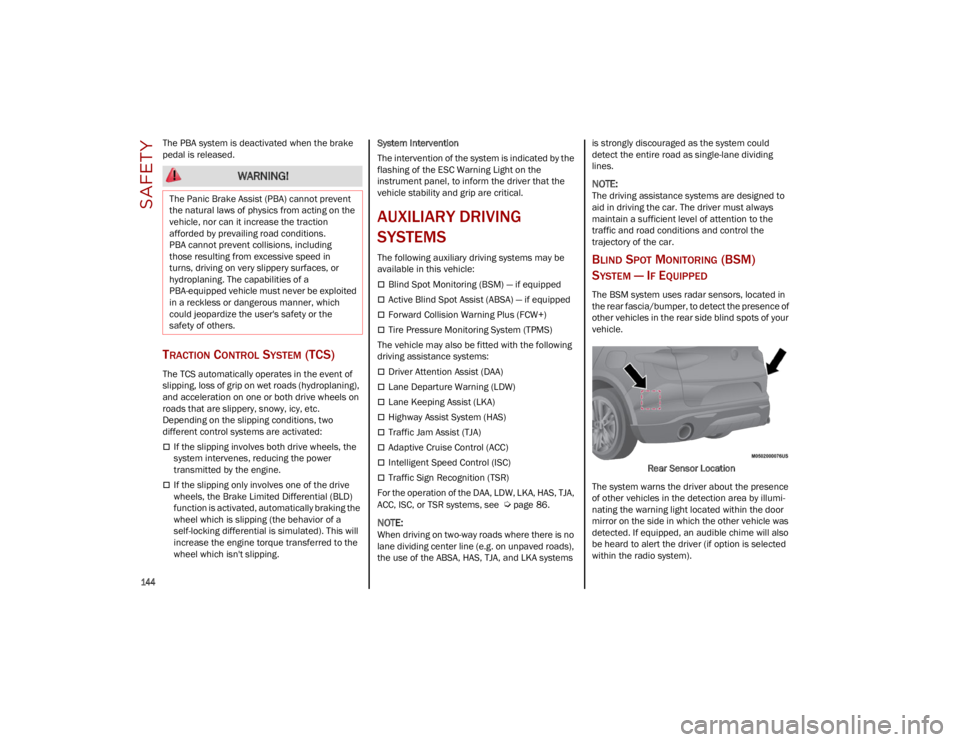
The BSM system uses radar sensors, located in
the rear fascia/bumper, to detect the presence of
other vehicles in the rear side blind spots of your
vehicle.
Rear Sensor Location
The system warns the driver about the presence
of other vehicles in the detection area by illumi -
nating the warning light located within the door
mirror on the side in which the other vehicle was
detected. If equipped, an audible chime will also
be heard to alert the driver (if option is selected
within the radio system).
WARNING!
The Panic Brake Assist (PBA) cannot prevent
the natural laws of physics from acting on the
vehicle, nor can it increase the traction
afforded by prevailing road conditions.
PBA cannot prevent collisions, including
those resulting from excessive speed in
turns, driving on very slippery surfaces, or
hydroplaning. The capabilities of a
PBA-equipped vehicle must never be exploited
in a reckless or dangerous manner, which
could jeopardize the user's safety or the
safety of others.
23_GU_OM_EN_USC_t.book Page 144
Page 149 of 268
147
(Continued)
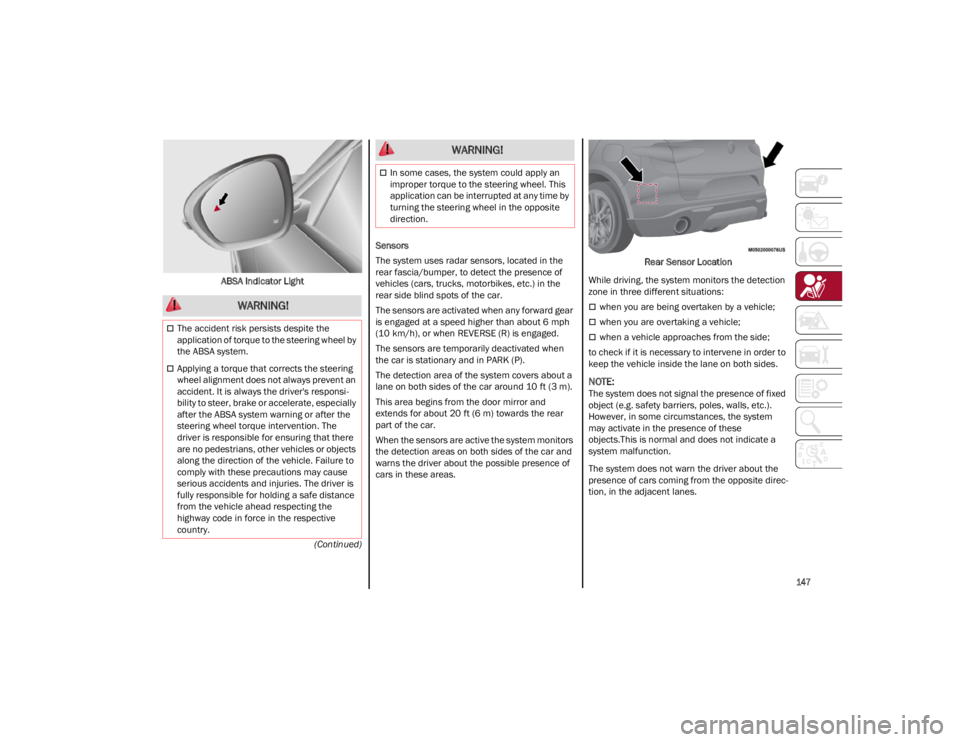
ABSA Indicator Light
Sensors
The system uses radar sensors, located in the
rear fascia/bumper, to detect the presence of
vehicles (cars, trucks, motorbikes, etc.) in the
rear side blind spots of the car.
The sensors are activated when any forward gear
is engaged at a speed higher than about 6 mph
(10 km/h), or when REVERSE (R) is engaged.
The sensors are temporarily deactivated when
the car is stationary and in PARK (P).
The detection area of the system covers about a
lane on both sides of the car around 10 ft (3 m).
This area begins from the door mirror and
extends for about 20 ft (6 m) towards the rear
part of the car.
When the sensors are active the system monitors
the detection areas on both sides of the car and
warns the driver about the possible presence of
cars in these areas. Rear Sensor Location
While driving, the system monitors the detection
zone in three different situations:
when you are being overtaken by a vehicle;
when you are overtaking a vehicle;
when a vehicle approaches from the side;
to check if it is necessary to intervene in order to
keep the vehicle inside the lane on both sides.
NOTE:
The system does not signal the presence of fixed
object (e.g. safety barriers, poles, walls, etc.).
However, in some circumstances, the system
may activate in the presence of these
objects.This is normal and does not indicate a
system malfunction.
The system does not warn the driver about the
presence of cars coming from the opposite direc -
tion, in the adjacent lanes.
WARNING!
The accident risk persists despite the
application of torque to the steering wheel by
the ABSA system.
Applying a torque that corrects the steering
wheel alignment does not always prevent an
accident. It is always the driver's responsi -
bility to steer, brake or accelerate, especially
after the ABSA system warning or after the
steering wheel torque intervention. The
driver is responsible for ensuring that there
are no pedestrians, other vehicles or objects
along the direction of the vehicle. Failure to
comply with these precautions may cause
serious accidents and injuries. The driver is
fully responsible for holding a safe distance
from the vehicle ahead respecting the
highway code in force in the respective
country.
In some cases, the system could apply an
improper torque to the steering wheel. This
application can be interrupted at any time by
turning the steering wheel in the opposite
direction.
WARNING!
23_GU_OM_EN_USC_t.book Page 147
Page 155 of 268

153
When the conditions limiting the system
functions end, this will go back to normal and
complete operation. Should the fault persist,
contact an authorized dealer.
System Failure Signaling
If the system turns off and a dedicated message
is shown on the display, it means that there is a
fault with the system.
In this case, it is still possible to drive the vehicle,
but you are advised to contact an authorized
dealer as soon as possible.
Radar Indication Not Available
If conditions are such that the radar cannot
detect obstacles correctly, the system is
deactivated and a dedicated message appears
on the display. This generally occurs in the event
of poor visibility, such as when it is snowing or
raining heavily.
The function of this system can also be
temporarily reduced due to obstructions such as
mud, dirt or ice on the fascia/bumper. In such
cases, a dedicated message will be shown on the
display and the system will be deactivated. This
message can sometimes appear in conditions of
high reflectivity (e.g. tunnels with reflective tiles or
ice or snow). When the conditions limiting the
system functions end, it will go back to normal
and complete operation.
In certain cases, this dedicated message could
be displayed when the radar is not detecting any
vehicles or objects within its view range.
If atmospheric conditions are not the reason
behind this message, check if the sensor is dirty.
It could be necessary to clean or remove any
obstructions in the area.If the message appears frequently, even in the
absence of atmospheric conditions such as snow,
rain, mud or other obstructions, contact an
authorized dealer for a sensor alignment check.
In the absence of visible obstructions, manually
removing the decorative cover trim and cleaning
the radar surface could be required. Have this
operation performed at an authorized dealer.
NOTE:
It is recommended that you do not install devices,
accessories or aerodynamic attachments in front
of the sensor or darken it in any way, as this can
compromise the correct functioning of the
system.
Frontal Collision Alarm With Active Braking —
If Equipped
If this function is selected, the brakes are
operated to reduce the speed of the vehicle in the
event of potential frontal impact.
This function applies an additional braking
pressure if the braking pressure applied by the
driver does not suffice to prevent potential frontal
impact.
The function is active with speed above 2 mph
(4 km/h).
NOTE:
When using an automatic car wash it is recom
-
mended to deactivate the system through the
settings of the radio system. The system may
detect the presence of a car, a wall or another
obstacle and activate. Driving In Special Conditions
In certain driving conditions, system intervention
might be unexpected or delayed. The driver must
therefore be very careful, keeping control of the
vehicle to drive in complete safety.
Driving close to a bend.
The vehicle ahead is leaving a roundabout.
Vehicles with small dimensions and/or not
aligned in the driving lane.
Lane change by other vehicles.
Vehicles traveling at right angles to the vehicle.
NOTE:
In particularly complex traffic conditions, the
driver can deactivate the system manually
through the Information and Entertainment
system.
If the driver presses the brake pedal fully or
makes an excessive steering maneuver during
system operation, the automatic braking
function may deactivate (e.g. to allow a
possible maneuver to avoid the obstacle).
The FCW system is automatically deactivated
when operating in race mode and a warning
message will be displayed on the instrument
cluster.
23_GU_OM_EN_USC_t.book Page 153
Page 216 of 268
SERVICING AND MAINTENANCE
214
AUTOMATIC TRANSMISSION
Use only a transmission oil with the character-
istics indicated
Ú
page 252.
Special Additives
Do not use any type of additive with the
automatic transmission oil. The automatic
transmission oil is a product designed especially
for this vehicle and its performance may be
compromised through the use of further
additives. Frequency of Oil Changes
In normal vehicle operating conditions, it is not
necessary to change the transmission oil.
REPLACING THE BATTERY
If necessary, replace the battery with another
battery with the same specifications. It is advised
to contact an authorized dealer for replacement.
NOTE:
Each time the 12 Volt battery is reconnected,
cycle the steering wheel all the way to the left.
Then cycle the steering wheel all the way to the
right to allow the steering angle sensor to learn
the steering angle thresholds.
Follow the battery manufacturer's instructions for
maintenance.
NOTE:
It will not be possible to open the liftgate with a
key or by pushing the button in the passenger
compartment when the battery is disconnected. Always position the manual liftgate opening strap
on the liftgate lock before disconnecting the
battery. The procedure is described in the
“Liftgate Emergency Opening”
Ú
page 62.
FUSES
General Information
The fuses protect electrical systems against
excessive current.
When a device does not work, you must check the
electrical circuit inside of the fuse for a break/
melt.
Also, please be aware that using power outlets for
extended periods of time with the engine off may
result in vehicle battery discharge.
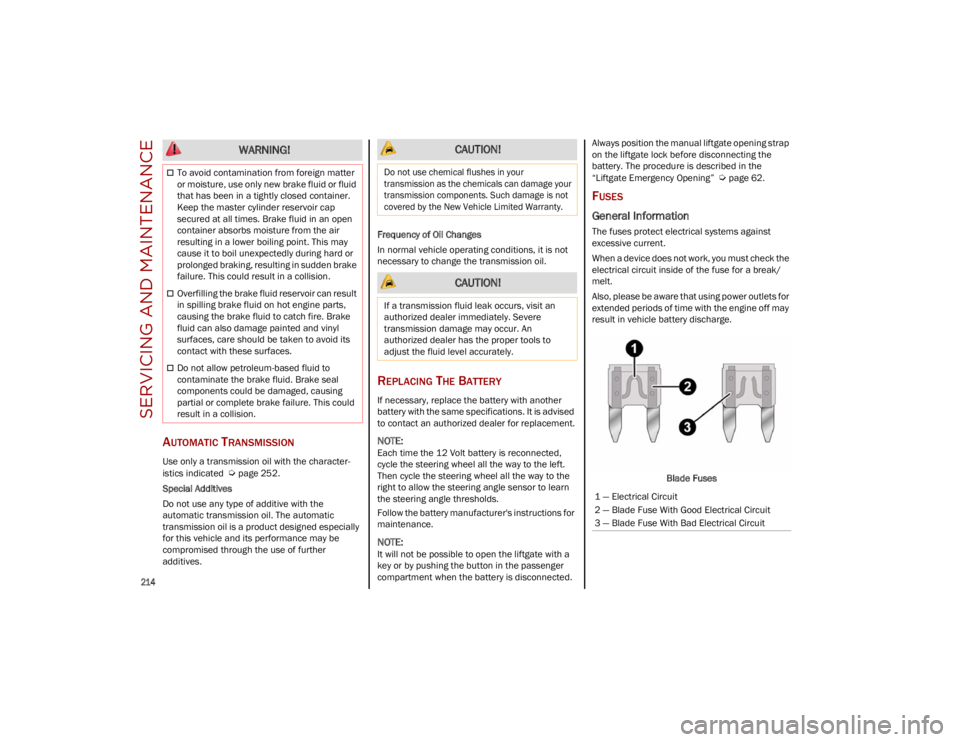
Blade Fuses
To avoid contamination from foreign matter
or moisture, use only new brake fluid or fluid
that has been in a tightly closed container.
Keep the master cylinder reservoir cap
secured at all times. Brake fluid in an open
container absorbs moisture from the air
resulting in a lower boiling point. This may
cause it to boil unexpectedly during hard or
prolonged braking, resulting in sudden brake
failure. This could result in a collision.
Overfilling the brake fluid reservoir can result
in spilling brake fluid on hot engine parts,
causing the brake fluid to catch fire. Brake
fluid can also damage painted and vinyl
surfaces, care should be taken to avoid its
contact with these surfaces.
Do not allow petroleum-based fluid to
contaminate the brake fluid. Brake seal
components could be damaged, causing
partial or complete brake failure. This could
result in a collision.
WARNING! CAUTION!
Do not use chemical flushes in your
transmission as the chemicals can damage your
transmission components. Such damage is not
covered by the New Vehicle Limited Warranty.
CAUTION!
If a transmission fluid leak occurs, visit an
authorized dealer immediately. Severe
transmission damage may occur. An
authorized dealer has the proper tools to
adjust the fluid level accurately.
1 — Electrical Circuit
2 — Blade Fuse With Good Electrical Circuit
3 — Blade Fuse With Bad Electrical Circuit
23_GU_OM_EN_USC_t.book Page 214