brake sensor ALFA ROMEO STELVIO 2023 Owners Manual
[x] Cancel search | Manufacturer: ALFA ROMEO, Model Year: 2023, Model line: STELVIO, Model: ALFA ROMEO STELVIO 2023Pages: 268, PDF Size: 10.36 MB
Page 12 of 268

10
STARTING AND OPERATING
STARTING THE ENGINE ............................86
Starting Procedure................................. 86
Remote Starting System ....................... 86
Cold Weather Operation ........................ 87
Extended Park Starting.......................... 87
If Engine Fails To Start .......................... 87
After Starting — Warming Up The
Engine ..................................................... 88 Stopping The Engine.............................. 88
Turbocharger Cool Down ....................... 88
ENGINE BLOCK HEATER —
IF EQUIPPED ............................................88
ENGINE BREAK-IN
RECOMMENDATIONS ...............................89
Engine Break-In...................................... 89
ELECTRIC PARK BRAKE (EPB) .................89
Electric Park Brake (EPB)
Operating Modes ................................... 91 Safe Hold ................................................ 91
AUTOMATIC TRANSMISSION....................91
Display .................................................... 92
Gear Selector ......................................... 92
Transmission Operating Modes ............ 93
Automatic Transmission Limp
Home Mode ............................................ 95 Brake Transmission Shift
Interlock (BTSI) System ......................... 95 Important Notes ..................................... 96
ALFA DNA SELECTOR ...............................97
Alfa DNA System .................................... 97
Driving Modes ........................................ 97
ALFA ACTIVE SUSPENSION (AAS) —
IF EQUIPPED............................................. 99
STOP/START SYSTEM............................ 100
Operating Mode ................................... 100
System Manual Activation/
Deactivation ......................................... 100 Possible Reasons The Engine
Does Not Autostop .............................. 100 Engine Restarting Conditions ............. 101
Safety Functions .................................. 101
Energy Saving Function....................... 101
Irregular Operation .............................. 101
Vehicle Inactivity .................................. 101
SPEED LIMITER ...................................... 101
Description ........................................... 101
Activation ............................................. 101
Speed Limit Programming .................. 102
Exceeding The Programmed Speed ... 102
Programmed Speed Icon Flashing ..... 102
Deactivation ......................................... 102
CRUISE CONTROL SYSTEMS —
IF EQUIPPED .......................................... 102
Cruise Control ...................................... 103
Adaptive Cruise Control (ACC) ........... 105
HIGHWAY ASSIST SYSTEM (HAS) —
IF EQUIPPED........................................... 111
To Activate/Deactivate........................ 111
Operation ............................................. 112
Indications On The Display ................. 112
System Status...................................... 113
Limited System Availability/
Operation ............................................. 114
TRAFFIC JAM ASSIST (TJA) SYSTEM —
IF EQUIPPED .......................................... 114
To Activate/Deactivate ....................... 115
Operation ............................................. 115
Indications On The Display ................. 116
System Status ..................................... 116
Limited System Availability/
Operation ............................................. 117
TRAFFIC SIGN RECOGNITION (TSR)
SYSTEM — IF EQUIPPED........................ 117
To Activate/Deactivate ....................... 118
Indications On The Display ................. 118
INTELLIGENT SPEED CONTROL (ISC)
SYSTEM — IF EQUIPPED........................ 119
To Activate/Deactivate ....................... 119
Indications On The Display ................. 119
Acceptance/Rejection Of
The Suggested Speed ......................... 119
PARKSENSE FRONT/REAR PARK
ASSIST SYSTEM —
IF EQUIPPED ......................................... 120
ParkSense Sensors............................. 121
ParkSense Display .............................. 121
Enabling And Disabling
ParkSense ........................................... 122 ParkSense Warning Display ............... 122
Operation With A Trailer...................... 122
ParkSense System Usage
Precautions ......................................... 123
23_GU_OM_EN_USC_t.book Page 10
Page 18 of 268
SYMBOL GLOSSARY
16
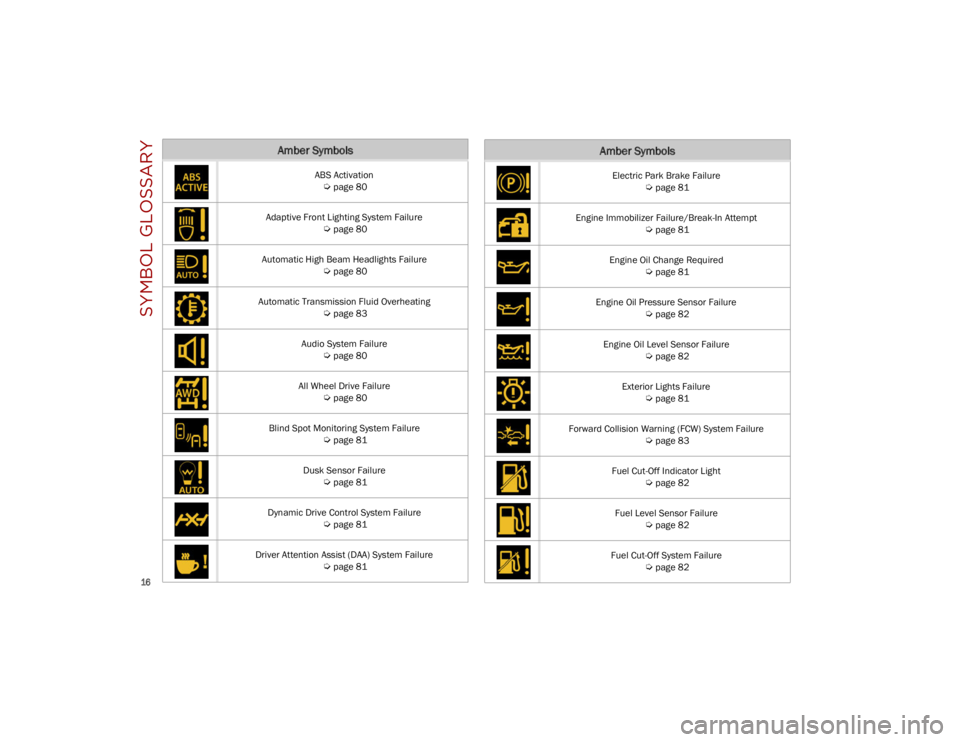
Amber Symbols
ABS Activation
Ú
page 80
Adaptive Front Lighting System Failure
Ú
page 80
Automatic High Beam Headlights Failure
Ú
page 80
Automatic Transmission Fluid Overheating
Ú
page 83
Audio System Failure
Ú
page 80
All Wheel Drive Failure
Ú
page 80
Blind Spot Monitoring System Failure
Ú
page 81
Dusk Sensor Failure
Ú
page 81
Dynamic Drive Control System Failure
Ú
page 81
Driver Attention Assist (DAA) System Failure
Ú
page 81
Electric Park Brake Failure
Ú
page 81
Engine Immobilizer Failure/Break-In Attempt
Ú
page 81
Engine Oil Change Required
Ú
page 81
Engine Oil Pressure Sensor Failure
Ú
page 82
Engine Oil Level Sensor Failure
Ú
page 82
Exterior Lights Failure
Ú
page 81
Forward Collision Warning (FCW) System Failure
Ú
page 83
Fuel Cut-Off Indicator Light
Ú
page 82
Fuel Level Sensor Failure
Ú
page 82
Fuel Cut-Off System Failure
Ú
page 82
Amber Symbols
23_GU_OM_EN_USC_t.book Page 16
Page 19 of 268

17
Generic Indication
Ú
page 82
Highway Assist System (HAS)/Traffic Jam Assist (TJA) System Failure
Ú
page 82
Keyless System Failure
Ú
page 82
Lane Departure Warning (LDW) System Failure
Ú
page 82
Loose Fuel Filler Cap
Ú
page 82
Low Coolant Level
Ú
page 82
Park Sensors System Failure
Ú
page 82
Rain Sensor Failure
Ú
page 82
Stop/Start System Failure
Ú
page 83
Amber Symbols
Speed Limiter System Failure
Ú
page 83
Service Adaptive Cruise Control (ACC) System
Ú
page 82
Soft Suspension Calibration Insertion
Ú
page 83
Shock Absorbers Failure
Ú
page 83
Temporary All Wheel Drive Failure
Ú
page 83
Wear On Brake Pads
Ú
page 83
Windshield Wiper Failure
Ú
page 83
Windshield Washer Liquid Level
Ú
page 82
Amber Symbols
23_GU_OM_EN_USC_t.book Page 17
Page 83 of 268
81
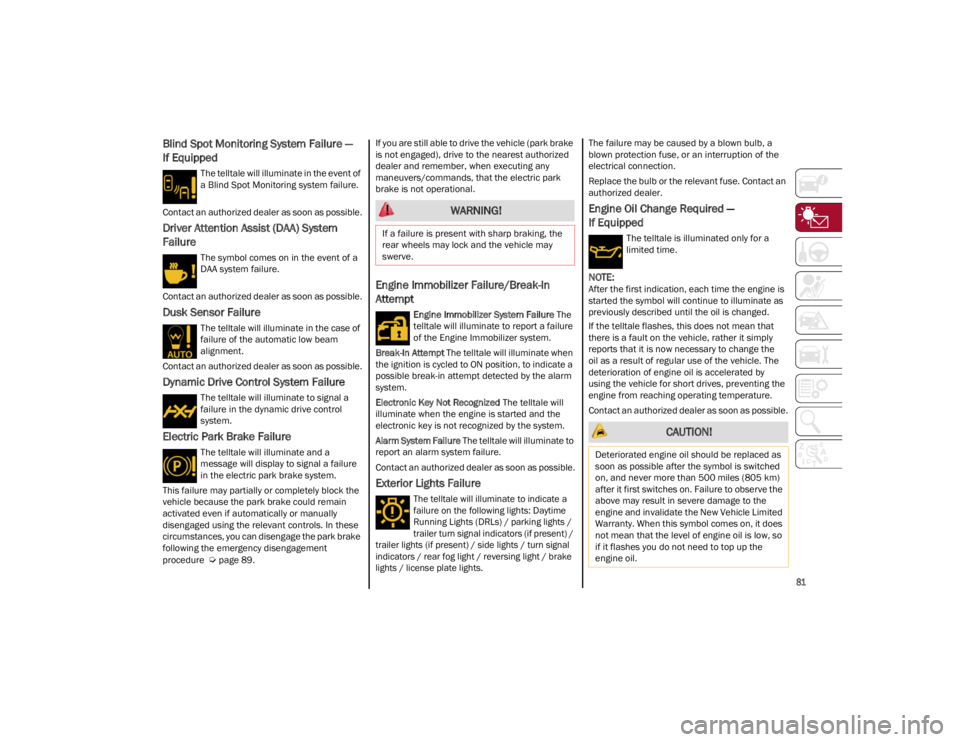
Blind Spot Monitoring System Failure —
If Equipped
The telltale will illuminate in the event of
a Blind Spot Monitoring system failure.
Contact an authorized dealer as soon as possible.
Driver Attention Assist (DAA) System
Failure
The symbol comes on in the event of a
DAA system failure.
Contact an authorized dealer as soon as possible.
Dusk Sensor Failure
The telltale will illuminate in the case of
failure of the automatic low beam
alignment.
Contact an authorized dealer as soon as possible.
Dynamic Drive Control System Failure
The telltale will illuminate to signal a
failure in the dynamic drive control
system.
Electric Park Brake Failure
The telltale will illuminate and a
message will display to signal a failure
in the electric park brake system.
This failure may partially or completely block the
vehicle because the park brake could remain
activated even if automatically or manually
disengaged using the relevant controls. In these
circumstances, you can disengage the park brake
following the emergency disengagement
procedure
Ú
page 89. If you are still able to drive the vehicle (park brake
is not engaged), drive to the nearest authorized
dealer and remember, when executing any
maneuvers/commands, that the electric park
brake is not operational.
Engine Immobilizer Failure/Break-In
Attempt
Engine Immobilizer System Failure
The
telltale will illuminate to report a failure
of the Engine Immobilizer system.
Break-In Attempt The telltale will illuminate when
the ignition is cycled to ON position, to indicate a
possible break-in attempt detected by the alarm
system.
Electronic Key Not Recognized The telltale will
illuminate when the engine is started and the
electronic key is not recognized by the system.
Alarm System Failure The telltale will illuminate to
report an alarm system failure.
Contact an authorized dealer as soon as possible.
Exterior Lights Failure
The telltale will illuminate to indicate a
failure on the following lights: Daytime
Running Lights (DRLs) / parking lights /
trailer turn signal indicators (if present) /
trailer lights (if present) / side lights / turn signal
indicators / rear fog light / reversing light / brake
lights / license plate lights.
The failure may be caused by a blown bulb, a
blown protection fuse, or an interruption of the
electrical connection.
Replace the bulb or the relevant fuse. Contact an
authorized dealer.
Engine Oil Change Required —
If Equipped
The telltale is illuminated only for a
limited time.
NOTE:
After the first indication, each time the engine is
started the symbol will continue to illuminate as
previously described until the oil is changed.
If the telltale flashes, this does not mean that
there is a fault on the vehicle, rather it simply
reports that it is now necessary to change the
oil as a result of regular use of the vehicle. The
deterioration of engine oil is accelerated by
using the vehicle for short drives, preventing the
engine from reaching operating temperature.
Contact an authorized dealer as soon as possible.
WARNING!
If a failure is present with sharp braking, the
rear wheels may lock and the vehicle may
swerve.
CAUTION!
Deteriorated engine oil should be replaced as
soon as possible after the symbol is switched
on, and never more than 500 miles (805 km)
after it first switches on. Failure to observe the
above may result in severe damage to the
engine and invalidate the New Vehicle Limited
Warranty. When this symbol comes on, it does
not mean that the level of engine oil is low, so
if it flashes you do not need to top up the
engine oil.
23_GU_OM_EN_USC_t.book Page 81
Page 103 of 268
101
ENGINE RESTARTING CONDITIONS
Due to comfort, emission control, and safety
reasons, the engine can restart automatically
without any action by the driver, under special
conditions, such as:
Battery not sufficiently charged.
Reduced braking system vacuum (e.g. if the
brake pedal is pressed repeatedly).
Vehicle moving (e.g. when driving on roads
with a grade).
Engine stopping by the Stop/Start system for
more than approximately three minutes.
With the automatic climate control active, an
adjustment in cabin heating or cooling is made
or with MAX-DEF function active.
SAFETY FUNCTIONS
When the engine is stopped through the Stop/
Start system, if the driver releases their seat belt,
opens the driver's or passenger's door, or opens
the hood from inside the vehicle, the engine can
be restarted only by using the ignition.
This condition is indicated to the driver both
through a buzzer and a message on the
instrument cluster display.
ENERGY SAVING FUNCTION
If the driver does not carry out any action for more
than three minutes after the automatic engine
restart, the Stop/Start system will switch off the
engine in order to prevent fuel consumption.
In this situation, the engine can only be restarted
using the ignition device.
NOTE:
It is possible to keep the engine running by deac-
tivating the system.
IRREGULAR OPERATION
In the event of malfunction, the Stop/Start
system is deactivated.
For failure indications
Ú
page 74.
VEHICLE INACTIVITY
In the event of vehicle inactivity (or if the battery
is replaced), special attention must be paid to the
disconnection of the battery power supply.
Proceed as follows:
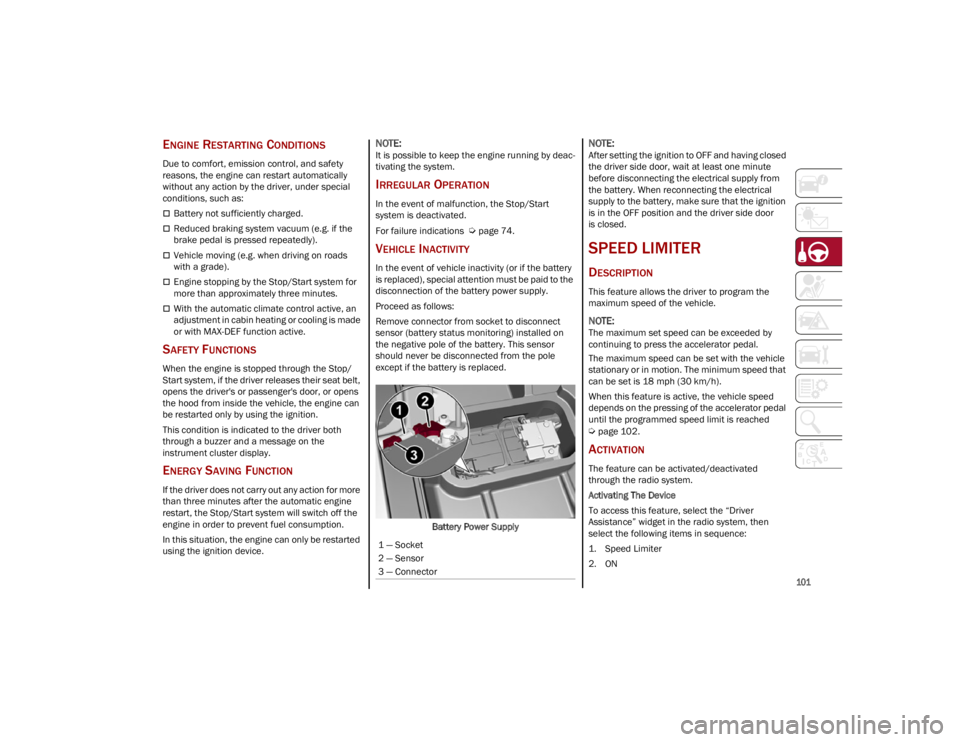
Remove connector from socket to disconnect
sensor (battery status monitoring) installed on
the negative pole of the battery. This sensor
should never be disconnected from the pole
except if the battery is replaced.
Battery Power Supply
NOTE:
After setting the ignition to OFF and having closed
the driver side door, wait at least one minute
before disconnecting the electrical supply from
the battery. When reconnecting the electrical
supply to the battery, make sure that the ignition
is in the OFF position and the driver side door
is closed.
SPEED LIMITER
DESCRIPTION
This feature allows the driver to program the
maximum speed of the vehicle.
NOTE:
The maximum set speed can be exceeded by
continuing to press the accelerator pedal.
The maximum speed can be set with the vehicle
stationary or in motion. The minimum speed that
can be set is 18 mph (30 km/h).
When this feature is active, the vehicle speed
depends on the pressing of the accelerator pedal
until the programmed speed limit is reached
Ú
page 102.
ACTIVATION
The feature can be activated/deactivated
through the radio system.
Activating The Device
To access this feature, select the “Driver
Assistance” widget in the radio system, then
select the following items in sequence:
1. Speed Limiter
2. ON
1 — Socket
2 — Sensor
3 — Connector
23_GU_OM_EN_USC_t.book Page 101
Page 107 of 268
105
(Continued)
ADAPTIVE CRUISE CONTROL (ACC)
The Adaptive Cruise Control (ACC) is a driver
assist system that combines the Cruise Control
functions with controlling the distance from the
vehicle ahead. ACC will adjust the vehicle speed
up to the preset speed to maintain a distance
with the vehicle ahead. ACC increases the driving
convenience provided by Cruise Control while
traveling on highways and major roadways.
However, it is not a safety system and not
designed to prevent collisions. The Cruise Control
function performs differently
Ú
page 103.
ACC will allow you to keep Cruise Control engaged
in light to moderate traffic conditions without the
constant need to reset your Cruise Control. ACC
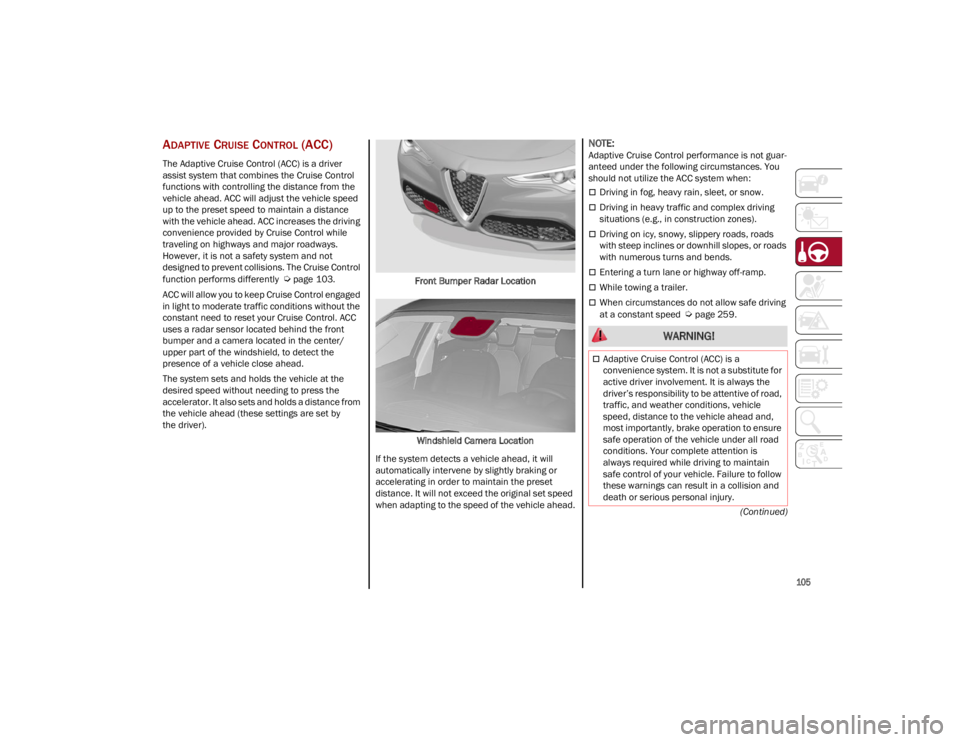
uses a radar sensor located behind the front
bumper and a camera located in the center/
upper part of the windshield, to detect the
presence of a vehicle close ahead.
The system sets and holds the vehicle at the
desired speed without needing to press the
accelerator. It also sets and holds a distance from
the vehicle ahead (these settings are set by
the driver). Front Bumper Radar Location
Windshield Camera Location
If the system detects a vehicle ahead, it will
automatically intervene by slightly braking or
accelerating in order to maintain the preset
distance. It will not exceed the original set speed
when adapting to the speed of the vehicle ahead.
NOTE:
Adaptive Cruise Control performance is not guar -
anteed under the following circumstances. You
should not utilize the ACC system when:
Driving in fog, heavy rain, sleet, or snow.
Driving in heavy traffic and complex driving
situations (e.g., in construction zones).
Driving on icy, snowy, slippery roads, roads
with steep inclines or downhill slopes, or roads
with numerous turns and bends.
Entering a turn lane or highway off-ramp.
While towing a trailer.
When circumstances do not allow safe driving
at a constant speed
Ú
page 259.
WARNING!
Adaptive Cruise Control (ACC) is a
convenience system. It is not a substitute for
active driver involvement. It is always the
driver’s responsibility to be attentive of road,
traffic, and weather conditions, vehicle
speed, distance to the vehicle ahead and,
most importantly, brake operation to ensure
safe operation of the vehicle under all road
conditions. Your complete attention is
always required while driving to maintain
safe control of your vehicle. Failure to follow
these warnings can result in a collision and
death or serious personal injury.
23_GU_OM_EN_USC_t.book Page 105
Page 108 of 268
STARTING AND OPERATING
106
Activating Adaptive Cruise Control (ACC)
The minimum set speed for the ACC system is
19 mph (30 km/h) and the maximum is 110 mph
(180 km/h).
The system cannot be activated:
When pressing the brake pedal.
When the brakes are overheated.
When the Electric Park Brake has been
operated.
When either PARK, REVERSE or NEUTRAL is
engaged.
When the engine RPM is above a maximum
threshold.
When the vehicle speed is not within the
operational speed range.
When the Electronic Stability Control (ESC)
(or Anti-Lock Brake System (ABS) or other
stability control systems) are operating or
have just operated.
When the ESC system is off.
When the Forward Collision Warning system
(if equipped) is braking automatically.
In the event of a system failure.
When the engine is off.
In case of obstruction of the radar sensor (in
this case the bumper area where it is located
must be cleaned).
If the system is set, the conditions described
above also cause a cancellation or deactivation
of the system. These situations may vary
according to the conditions.
NOTE:
The system will not be deactivated when speeds
higher than those set are reached by pressing the
accelerator pedal above 110 mph (180 km/h). In
these situations, the system may not work
correctly and it is recommended to deactivate it.
The driver should always obey traffic laws and
speed limits. Never drive above applicable speed
limit restrictions.
To Activate/Deactivate
The system has four operating states:
Enabled (speed not set)
Activated (speed set)
Paused
Deactivated
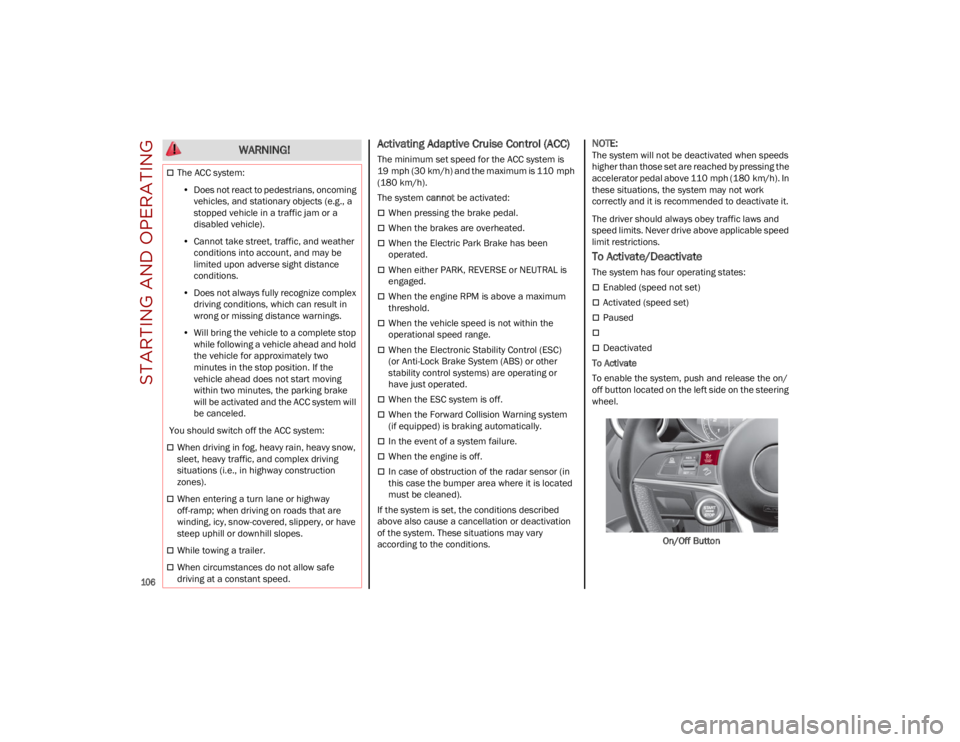
To Activate
To enable the system, push and release the on/
off button located on the left side on the steering
wheel.
On/Off Button
The ACC system:• Does not react to pedestrians, oncoming
vehicles, and stationary objects (e.g., a stopped vehicle in a traffic jam or a disabled vehicle).
• Cannot take street, traffic, and weather
conditions into account, and may be limited upon adverse sight distance conditions.
• Does not always fully recognize complex
dri ving conditions, whi c
h can result in
wrong or missing distance warnings.
• Will bring the vehicle to a complete stop
while following a vehicle ahead and holdthe vehicle for approximately twominutes in the stop position. If thevehicle ahead does not start movingwithin two minutes, the parking brakewill be activated and the ACC system will be canceled.
You should switch off the ACC system:
When driving in fog, heavy rain, heavy snow,
sleet, heavy traffic, and complex driving
situations (i.e., in highway construction
zones).
When entering a turn lane or highway
off-ramp; when driving on roads that are
winding, icy, snow-covered, slippery, or have
steep uphill or downhill slopes.
While towing a trailer.
When circumstances do not allow safe
driving at a constant speed.
WARNING!
23_GU_OM_EN_USC_t.book Page 106
Page 110 of 268
STARTING AND OPERATING
108
(Continued)
To Resume
Once the system has been canceled but not
deactivated, to resume a previously set speed,
simply push the RES/SET switch upward and
remove your foot from the accelerator to recall it.
The system will be set to the last stored speed.
Setting The Distance Between Vehicles
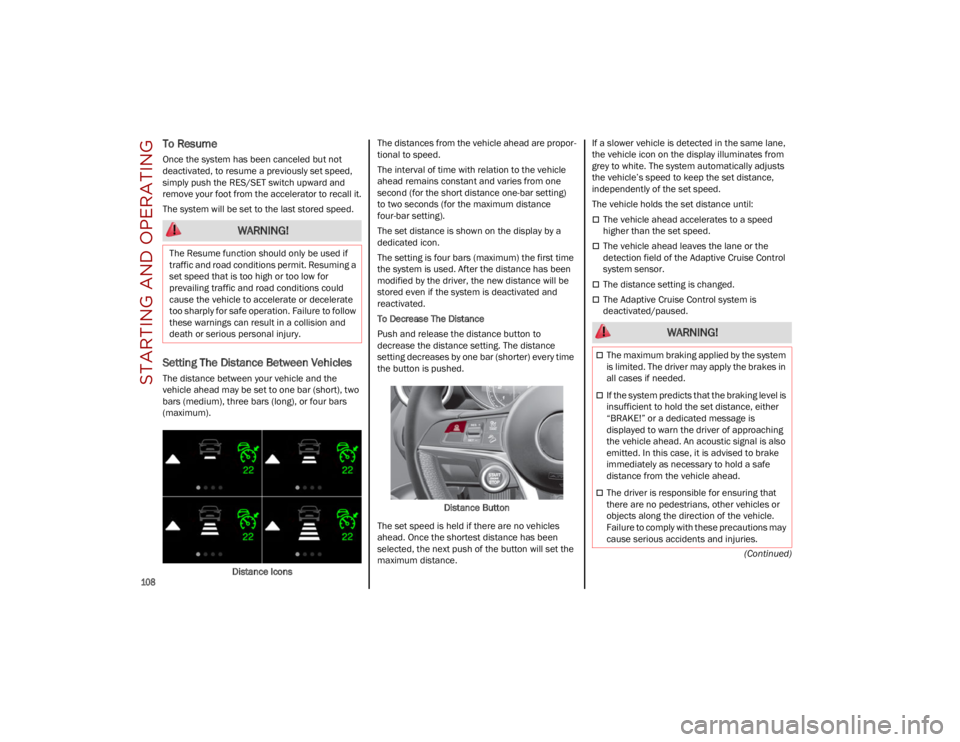
The distance between your vehicle and the
vehicle ahead may be set to one bar (short), two
bars (medium), three bars (long), or four bars
(maximum).Distance Icons The distances from the vehicle ahead are propor
-
tional to speed.
The interval of time with relation to the vehicle
ahead remains constant and varies from one
second (for the short distance one-bar setting)
to two seconds (for the maximum distance
four-bar setting).
The set distance is shown on the display by a
dedicated icon.
The setting is four bars (maximum) the first time
the system is used. After the distance has been
modified by the driver, the new distance will be
stored even if the system is deactivated and
reactivated.
To Decrease The Distance
Push and release the distance button to
decrease the distance setting. The distance
setting decreases by one bar (shorter) every time
the button is pushed.
Distance Button
The set speed is held if there are no vehicles
ahead. Once the shortest distance has been
selected, the next push of the button will set the
maximum distance. If a slower vehicle is detected in the same lane,
the vehicle icon on the display illuminates from
grey to white. The system automatically adjusts
the vehicle’s speed to keep the set distance,
independently of the set speed.
The vehicle holds the set distance until:
The vehicle ahead accelerates to a speed
higher than the set speed.
The vehicle ahead leaves the lane or the
detection field of the Adaptive Cruise Control
system sensor.
The distance setting is changed.
The Adaptive Cruise Control system is
deactivated/paused.
WARNING!
The Resume function should only be used if
traffic and road conditions permit. Resuming a
set speed that is too high or too low for
prevailing traffic and road conditions could
cause the vehicle to accelerate or decelerate
too sharply for safe operation. Failure to follow
these warnings can result in a collision and
death or serious personal injury.
WARNING!
The maximum braking applied by the system
is limited. The driver may apply the brakes in
all cases if needed.
If the system predicts that the braking level is
insufficient to hold the set distance, either
“BRAKE!” or a dedicated message is
displayed to warn the driver of approaching
the vehicle ahead. An acoustic signal is also
emitted. In this case, it is advised to brake
immediately as necessary to hold a safe
distance from the vehicle ahead.
The driver is responsible for ensuring that
there are no pedestrians, other vehicles or
objects along the direction of the vehicle.
Failure to comply with these precautions may
cause serious accidents and injuries.
23_GU_OM_EN_USC_t.book Page 108
Page 111 of 268
109
Overtake Aid
When driving with ACC engaged and following a
vehicle at a speed greater than 45 mph
(70 km/h), the system will provide an additional
acceleration up to the ACC set speed to assist in
passing the vehicle. This additional acceleration
is triggered when the driver utilizes the left turn
signal and will only be active when passing on the
left hand side.
The system detects the direction of traffic
automatically when the vehicle passes from left
hand traffic to right hand traffic. In this case, the
overtaking assist function is only active when the
reference vehicle is overtaken on the right. The
additional acceleration is deactivated when the
driver uses the right direction indicator and
returns to the original lane.
Stop And Go Function
The Stop and Go operating strategy allows you to
maintain a safe distance from the vehicle ahead
until the vehicle has completely stopped.
In the event that the ACC system brings your
vehicle to a standstill while following the vehicle
in front, if the vehicle in front starts moving within
two seconds of your vehicle coming to a
standstill, your vehicle will resume motion without
the need for any driver action.If the vehicle in front does not start moving within
two seconds of your vehicle coming to a
standstill, the driver will have to push the RES/
SET switch upward to restart.
Deactivation
The system is deactivated and the set speed is
canceled if:
The on/off button is pushed (when the system
is on or paused)
The ignition is placed in the OFF position
RACE mode is activated (Quadrifoglio models)
The system is canceled (the set speed and
distance are stored):
When the system is paused
Ú
page 106
When the conditions shown in the “Activating
Adaptive Cruise Control (ACC)” section occur
Ú
page 106
Limited Operation Warning
If the dedicated message is shown on the display,
a condition limiting the Adaptive Cruise Control
operation may have occurred.
This could be due to an obstruction of the
vehicle’s sensor or camera. It could also be due to
a fault in the system. If an obstruction is detected,
clean the area of the windshield opposite the
interior rearview mirror, where the camera is located, as well as the area of the front fascia/
bumper where the sensor is located. Then check
that the message has disappeared.
When the conditions limiting the system
functions end, normal operation will resume.
Should the fault persist, contact an authorized
dealer.
Precautions While Driving With ACC
In certain driving situations, ACC may have
detection issues. In these cases, ACC may brake
late or unexpectedly. The driver needs to stay
alert and may need to intervene. The following
are examples of these types of situations:
Towing A Trailer
Towing a trailer is not recommended when using
ACC.
Offset Driving
ACC may not detect a vehicle in the same lane
that is offset from your direct line of travel, or a
vehicle merging in from a side lane. There may
not be sufficient distance to the vehicle ahead.
The offset vehicle may move in and out of the line
of travel, which can cause your vehicle to brake or
accelerate unexpectedly.
Turns And Bends
When driving on a curve with ACC engaged, the
system may increase or decrease the vehicle
speed for stability, with no vehicle ahead
detected. Once the vehicle is out of the curve, the
system will resume your original set speed. This is
a part of normal ACC system functionality.
NOTE:
On tight turns ACC performance may be limited.
The driver is fully responsible for holding a
safe distance from the vehicle ahead
respecting the highway code in force in the
respective country.
WARNING!
WARNING!
When the ACC system is resumed, the driver
must ensure that there are no pedestrians,
vehicles or objects in the path of the vehicle.
Failure to follow these warnings can result in a
collision and death or serious personal injury.
23_GU_OM_EN_USC_t.book Page 109
Page 117 of 268
115
NOTE:
Do not use the TJA system while driving in urban
areas.
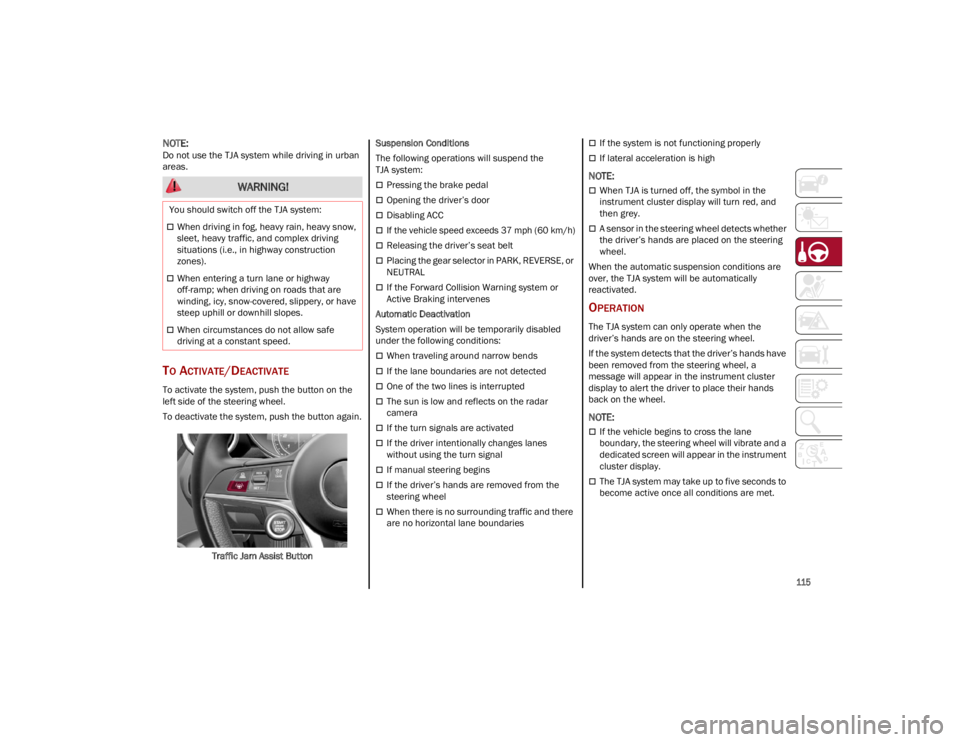
TO ACTIVATE/DEACTIVATE
To activate the system, push the button on the
left side of the steering wheel.
To deactivate the system, push the button again.Traffic Jam Assist Button Suspension Conditions
The following operations will suspend the
TJA system:
Pressing the brake pedal
Opening the driver’s door
Disabling ACC
If the vehicle speed exceeds 37 mph (60 km/h)
Releasing the driver’s seat belt
Placing the gear selector in PARK, REVERSE, or
NEUTRAL
If the Forward Collision Warning system or
Active Braking intervenes
Automatic Deactivation
System operation will be temporarily disabled
under the following conditions:
When traveling around narrow bends
If the lane boundaries are not detected
One of the two lines is interrupted
The sun is low and reflects on the radar
camera
If the turn signals are activated
If the driver intentionally changes lanes
without using the turn signal
If manual steering begins
If the driver’s hands are removed from the
steering wheel
When there is no surrounding traffic and there
are no horizontal lane boundaries
If the system is not functioning properly
If lateral acceleration is high
NOTE:
When TJA is turned off, the symbol in the
instrument cluster display will turn red, and
then grey.
A sensor in the steering wheel detects whether
the driver’s hands are placed on the steering
wheel.
When the automatic suspension conditions are
over, the TJA system will be automatically
reactivated.
OPERATION
The TJA system can only operate when the
driver’s hands are on the steering wheel.
If the system detects that the driver’s hands have
been removed from the steering wheel, a
message will appear in the instrument cluster
display to alert the driver to place their hands
back on the wheel.
NOTE:
If the vehicle begins to cross the lane
boundary, the steering wheel will vibrate and a
dedicated screen will appear in the instrument
cluster display.
The TJA system may take up to five seconds to
become active once all conditions are met.
WARNING!
You should switch off the TJA system:
When driving in fog, heavy rain, heavy snow,
sleet, heavy traffic, and complex driving
situations (i.e., in highway construction
zones).
When entering a turn lane or highway
off-ramp; when driving on roads that are
winding, icy, snow-covered, slippery, or have
steep uphill or downhill slopes.
When circumstances do not allow safe
driving at a constant speed.
23_GU_OM_EN_USC_t.book Page 115