break ALFA ROMEO STELVIO 2023 Owners Manual
[x] Cancel search | Manufacturer: ALFA ROMEO, Model Year: 2023, Model line: STELVIO, Model: ALFA ROMEO STELVIO 2023Pages: 268, PDF Size: 10.36 MB
Page 12 of 268

10
STARTING AND OPERATING
STARTING THE ENGINE ............................86
Starting Procedure................................. 86
Remote Starting System ....................... 86
Cold Weather Operation ........................ 87
Extended Park Starting.......................... 87
If Engine Fails To Start .......................... 87
After Starting — Warming Up The
Engine ..................................................... 88 Stopping The Engine.............................. 88
Turbocharger Cool Down ....................... 88
ENGINE BLOCK HEATER —
IF EQUIPPED ............................................88
ENGINE BREAK-IN
RECOMMENDATIONS ...............................89
Engine Break-In...................................... 89
ELECTRIC PARK BRAKE (EPB) .................89
Electric Park Brake (EPB)
Operating Modes ................................... 91 Safe Hold ................................................ 91
AUTOMATIC TRANSMISSION....................91
Display .................................................... 92
Gear Selector ......................................... 92
Transmission Operating Modes ............ 93
Automatic Transmission Limp
Home Mode ............................................ 95 Brake Transmission Shift
Interlock (BTSI) System ......................... 95 Important Notes ..................................... 96
ALFA DNA SELECTOR ...............................97
Alfa DNA System .................................... 97
Driving Modes ........................................ 97
ALFA ACTIVE SUSPENSION (AAS) —
IF EQUIPPED............................................. 99
STOP/START SYSTEM............................ 100
Operating Mode ................................... 100
System Manual Activation/
Deactivation ......................................... 100 Possible Reasons The Engine
Does Not Autostop .............................. 100 Engine Restarting Conditions ............. 101
Safety Functions .................................. 101
Energy Saving Function....................... 101
Irregular Operation .............................. 101
Vehicle Inactivity .................................. 101
SPEED LIMITER ...................................... 101
Description ........................................... 101
Activation ............................................. 101
Speed Limit Programming .................. 102
Exceeding The Programmed Speed ... 102
Programmed Speed Icon Flashing ..... 102
Deactivation ......................................... 102
CRUISE CONTROL SYSTEMS —
IF EQUIPPED .......................................... 102
Cruise Control ...................................... 103
Adaptive Cruise Control (ACC) ........... 105
HIGHWAY ASSIST SYSTEM (HAS) —
IF EQUIPPED........................................... 111
To Activate/Deactivate........................ 111
Operation ............................................. 112
Indications On The Display ................. 112
System Status...................................... 113
Limited System Availability/
Operation ............................................. 114
TRAFFIC JAM ASSIST (TJA) SYSTEM —
IF EQUIPPED .......................................... 114
To Activate/Deactivate ....................... 115
Operation ............................................. 115
Indications On The Display ................. 116
System Status ..................................... 116
Limited System Availability/
Operation ............................................. 117
TRAFFIC SIGN RECOGNITION (TSR)
SYSTEM — IF EQUIPPED........................ 117
To Activate/Deactivate ....................... 118
Indications On The Display ................. 118
INTELLIGENT SPEED CONTROL (ISC)
SYSTEM — IF EQUIPPED........................ 119
To Activate/Deactivate ....................... 119
Indications On The Display ................. 119
Acceptance/Rejection Of
The Suggested Speed ......................... 119
PARKSENSE FRONT/REAR PARK
ASSIST SYSTEM —
IF EQUIPPED ......................................... 120
ParkSense Sensors............................. 121
ParkSense Display .............................. 121
Enabling And Disabling
ParkSense ........................................... 122 ParkSense Warning Display ............... 122
Operation With A Trailer...................... 122
ParkSense System Usage
Precautions ......................................... 123
23_GU_OM_EN_USC_t.book Page 10
Page 18 of 268
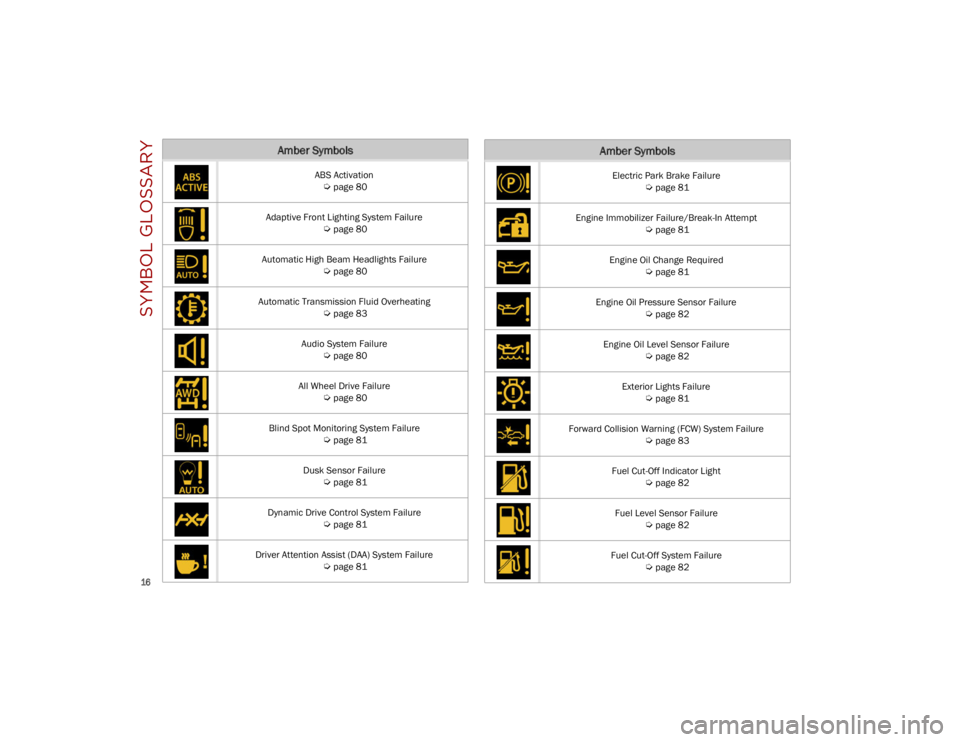
SYMBOL GLOSSARY
16
Amber Symbols
ABS Activation
Ú
page 80
Adaptive Front Lighting System Failure
Ú
page 80
Automatic High Beam Headlights Failure
Ú
page 80
Automatic Transmission Fluid Overheating
Ú
page 83
Audio System Failure
Ú
page 80
All Wheel Drive Failure
Ú
page 80
Blind Spot Monitoring System Failure
Ú
page 81
Dusk Sensor Failure
Ú
page 81
Dynamic Drive Control System Failure
Ú
page 81
Driver Attention Assist (DAA) System Failure
Ú
page 81
Electric Park Brake Failure
Ú
page 81
Engine Immobilizer Failure/Break-In Attempt
Ú
page 81
Engine Oil Change Required
Ú
page 81
Engine Oil Pressure Sensor Failure
Ú
page 82
Engine Oil Level Sensor Failure
Ú
page 82
Exterior Lights Failure
Ú
page 81
Forward Collision Warning (FCW) System Failure
Ú
page 83
Fuel Cut-Off Indicator Light
Ú
page 82
Fuel Level Sensor Failure
Ú
page 82
Fuel Cut-Off System Failure
Ú
page 82
Amber Symbols
23_GU_OM_EN_USC_t.book Page 16
Page 81 of 268
79
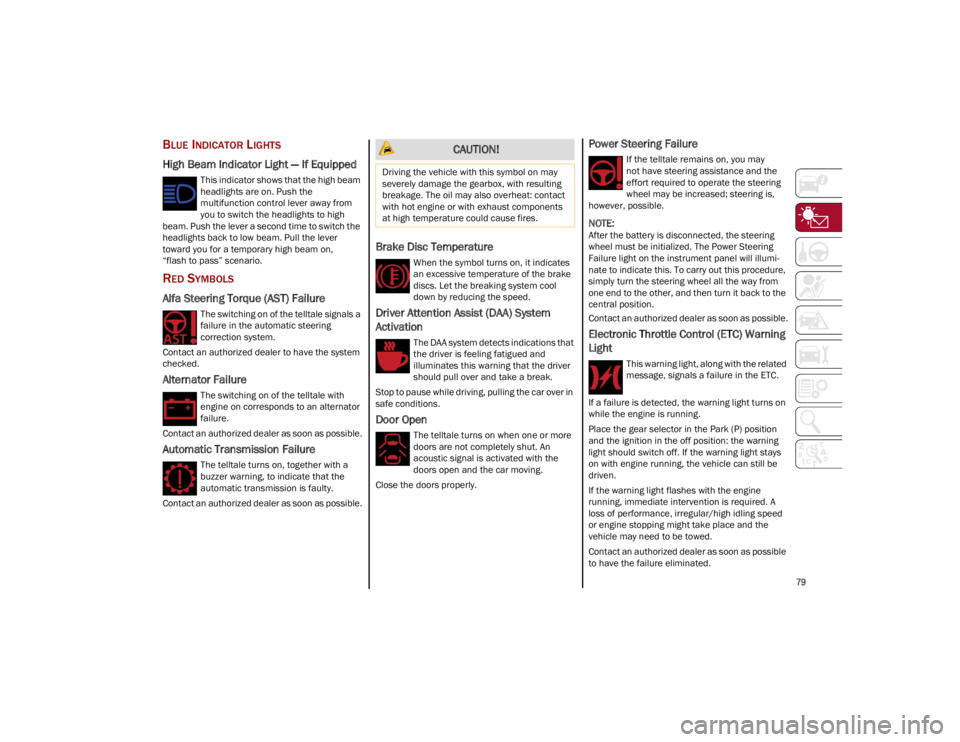
BLUE INDICATOR LIGHTS
High Beam Indicator Light — If Equipped
This indicator shows that the high beam
headlights are on. Push the
multifunction control lever away from
you to switch the headlights to high
beam. Push the lever a second time to switch the
headlights back to low beam. Pull the lever
toward you for a temporary high beam on,
“flash to pass” scenario.
RED SYMBOLS
Alfa Steering Torque (AST) Failure
The switching on of the telltale signals a
failure in the automatic steering
correction system.
Contact an authorized dealer to have the system
checked.
Alternator Failure
The switching on of the telltale with
engine on corresponds to an alternator
failure.
Contact an authorized dealer as soon as possible.
Automatic Transmission Failure
The telltale turns on, together with a
buzzer warning, to indicate that the
automatic transmission is faulty.
Contact an authorized dealer as soon as possible.
Brake Disc Temperature
When the symbol turns on, it indicates
an excessive temperature of the brake
discs. Let the breaking system cool
down by reducing the speed.
Driver Attention Assist (DAA) System
Activation
The DAA system detects indications that
the driver is feeling fatigued and
illuminates this warning that the driver
should pull over and take a break.
Stop to pause while driving, pulling the car over in
safe conditions.
Door Open
The telltale turns on when one or more
doors are not completely shut. An
acoustic signal is activated with the
doors open and the car moving.
Close the doors properly.
Power Steering Failure
If the telltale remains on, you may
not have steering assistance and the
effort required to operate the steering
wheel may be increased; steering is,
however, possible.
NOTE:
After the battery is disconnected, the steering
wheel must be initialized. The Power Steering
Failure light on the instrument panel will illumi -
nate to indicate this. To carry out this procedure,
simply turn the steering wheel all the way from
one end to the other, and then turn it back to the
central position.
Contact an authorized dealer as soon as possible.
Electronic Throttle Control (ETC) Warning
Light
This warning light, along with the related
message, signals a failure in the ETC.
If a failure is detected, the warning light turns on
while the engine is running.
Place the gear selector in the Park (P) position
and the ignition in the off position: the warning
light should switch off. If the warning light stays
on with engine running, the vehicle can still be
driven.
If the warning light flashes with the engine
running, immediate intervention is required. A
loss of performance, irregular/high idling speed
or engine stopping might take place and the
vehicle may need to be towed.
Contact an authorized dealer as soon as possible
to have the failure eliminated.
CAUTION!
Driving the vehicle with this symbol on may
severely damage the gearbox, with resulting
breakage. The oil may also overheat: contact
with hot engine or with exhaust components
at high temperature could cause fires.
23_GU_OM_EN_USC_t.book Page 79
Page 83 of 268
81
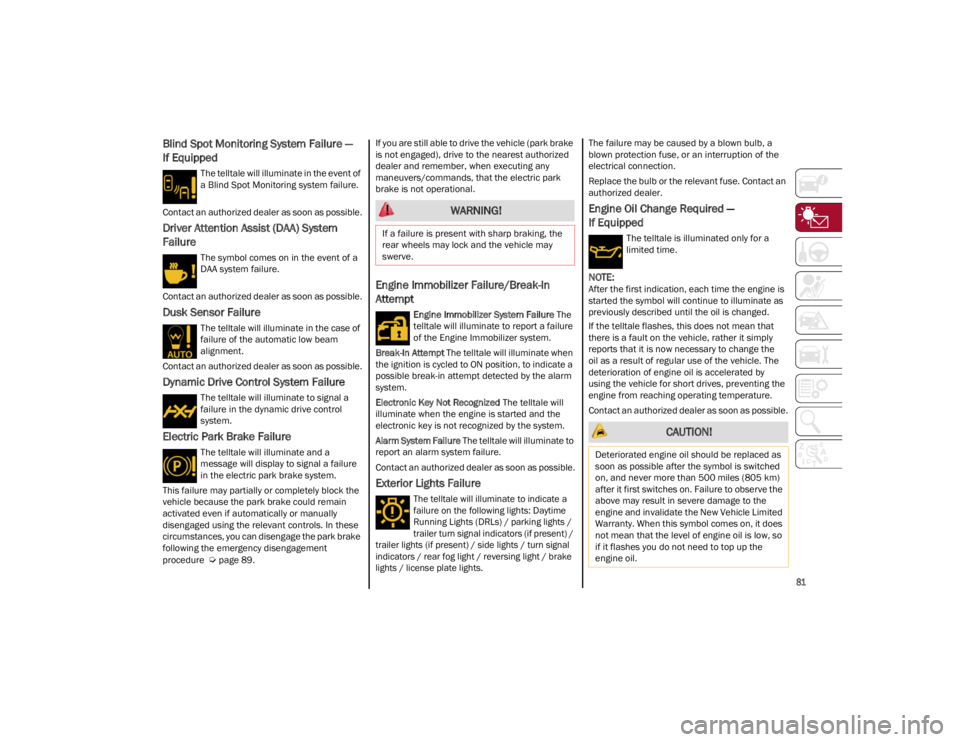
Blind Spot Monitoring System Failure —
If Equipped
The telltale will illuminate in the event of
a Blind Spot Monitoring system failure.
Contact an authorized dealer as soon as possible.
Driver Attention Assist (DAA) System
Failure
The symbol comes on in the event of a
DAA system failure.
Contact an authorized dealer as soon as possible.
Dusk Sensor Failure
The telltale will illuminate in the case of
failure of the automatic low beam
alignment.
Contact an authorized dealer as soon as possible.
Dynamic Drive Control System Failure
The telltale will illuminate to signal a
failure in the dynamic drive control
system.
Electric Park Brake Failure
The telltale will illuminate and a
message will display to signal a failure
in the electric park brake system.
This failure may partially or completely block the
vehicle because the park brake could remain
activated even if automatically or manually
disengaged using the relevant controls. In these
circumstances, you can disengage the park brake
following the emergency disengagement
procedure
Ú
page 89. If you are still able to drive the vehicle (park brake
is not engaged), drive to the nearest authorized
dealer and remember, when executing any
maneuvers/commands, that the electric park
brake is not operational.
Engine Immobilizer Failure/Break-In
Attempt
Engine Immobilizer System Failure
The
telltale will illuminate to report a failure
of the Engine Immobilizer system.
Break-In Attempt The telltale will illuminate when
the ignition is cycled to ON position, to indicate a
possible break-in attempt detected by the alarm
system.
Electronic Key Not Recognized The telltale will
illuminate when the engine is started and the
electronic key is not recognized by the system.
Alarm System Failure The telltale will illuminate to
report an alarm system failure.
Contact an authorized dealer as soon as possible.
Exterior Lights Failure
The telltale will illuminate to indicate a
failure on the following lights: Daytime
Running Lights (DRLs) / parking lights /
trailer turn signal indicators (if present) /
trailer lights (if present) / side lights / turn signal
indicators / rear fog light / reversing light / brake
lights / license plate lights.
The failure may be caused by a blown bulb, a
blown protection fuse, or an interruption of the
electrical connection.
Replace the bulb or the relevant fuse. Contact an
authorized dealer.
Engine Oil Change Required —
If Equipped
The telltale is illuminated only for a
limited time.
NOTE:
After the first indication, each time the engine is
started the symbol will continue to illuminate as
previously described until the oil is changed.
If the telltale flashes, this does not mean that
there is a fault on the vehicle, rather it simply
reports that it is now necessary to change the
oil as a result of regular use of the vehicle. The
deterioration of engine oil is accelerated by
using the vehicle for short drives, preventing the
engine from reaching operating temperature.
Contact an authorized dealer as soon as possible.
WARNING!
If a failure is present with sharp braking, the
rear wheels may lock and the vehicle may
swerve.
CAUTION!
Deteriorated engine oil should be replaced as
soon as possible after the symbol is switched
on, and never more than 500 miles (805 km)
after it first switches on. Failure to observe the
above may result in severe damage to the
engine and invalidate the New Vehicle Limited
Warranty. When this symbol comes on, it does
not mean that the level of engine oil is low, so
if it flashes you do not need to top up the
engine oil.
23_GU_OM_EN_USC_t.book Page 81
Page 91 of 268
89
ENGINE BREAK-IN
RECOMMENDATIONS
ENGINE BREAK-IN
For both engines, use the following engine
break-in recommendations:
NOTE:
A new engine may consume some oil during its
first few thousand miles (kilometers) of opera-
tion. This should be considered a normal part of
the break-in period and not interpreted as an indi -
cation of a problem. Please monitor your oil level
during the break-in period and add oil as
required.
It is recommended for the operator to observe the
following driving behaviors during the new vehicle
break-in period:
0 to 100 miles (0 to 160 km):
Do not allow the engine to operate at idle for an
extended period of time.
Press the accelerator pedal slowly and not
more than halfway to avoid rapid acceleration.
Avoid aggressive braking.
Drive with the engine speed less than
3,500 RPM.
Maintain vehicle speed below 55 mph
(88 km/h) and observe local speed limits. 100 to 300 miles (160 to 483 km):
Press the accelerator pedal slowly and not
more than halfway to avoid rapid acceleration
in lower gears (FIRST to THIRD gears).
Avoid aggressive braking.
Drive with the engine speed less than
5,000 RPM.
Maintain vehicle speed below 70 mph
(112 km/h) and observe local speed limits.
300 to 500 miles (483 to 805 km):
Exercise the full engine RPM range, shifting
manually (paddles or gear shift) at higher RPM
when possible.
Do not perform sustained operation with the
accelerator pedal at wide open throttle.
Maintain vehicle speed below 85 mph
(136 km/h) and observe local speed limits.
For the first 1,500 miles (2,414 km):
Do not participate in track events, sport driving
schools, or similar activities during the first
1,500 miles (2,414 km).
NOTE:
Monitor engine oil with every refueling and add if
necessary. Oil and fuel consumption may be
higher through the first oil change interval.
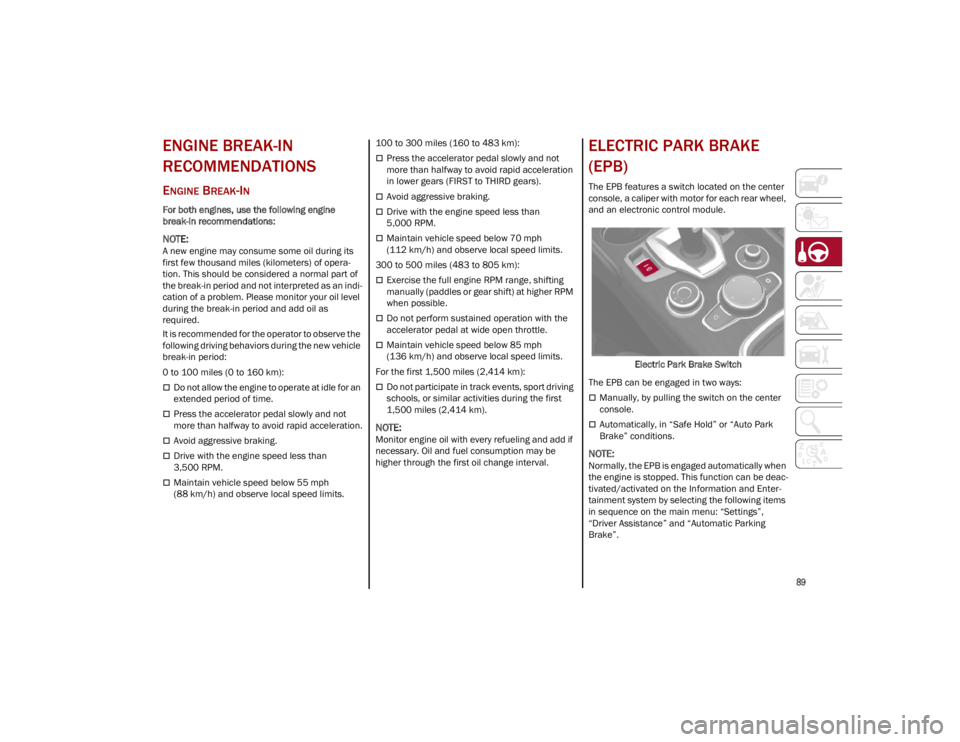
ELECTRIC PARK BRAKE
(EPB)
The EPB features a switch located on the center
console, a caliper with motor for each rear wheel,
and an electronic control module.
Electric Park Brake Switch
The EPB can be engaged in two ways:
Manually, by pulling the switch on the center
console.
Automatically, in “Safe Hold” or “Auto Park
Brake” conditions.
NOTE:
Normally, the EPB is engaged automatically when
the engine is stopped. This function can be deac -
tivated/activated on the Information and Enter -
tainment system by selecting the following items
in sequence on the main menu: “Settings”,
“Driver Assistance” and “Automatic Parking
Brake”.
23_GU_OM_EN_USC_t.book Page 89
Page 125 of 268
123
(Continued)
PARKSENSE SYSTEM USAGE
P
RECAUTIONS
NOTE:
Some conditions may influence the performance
of the ParkSense system:
Reduced sensor sensitivity could be due to the
presence of ice, snow, mud, or thick paint on
the surface of the sensor.
The sensors may detect a false obstacle (echo
interference) due to mechanical interference,
for example when washing the vehicle or in
extreme weather.
The signals sent by the sensors can be
altered by the presence of ultrasonic systems
(e.g. pneumatic brake systems of trucks or
pneumatic drills) near the vehicle.
System performance can be influenced by the
position of the sensors. For example, due to a
change in the ride setting (caused by wear to
the shock absorbers or suspension), by
changing tires, overloading the vehicle or
operations that require the vehicle to be
lowered.
Be sure not to place bumper stickers or other
adhesives over the sensors as this will affect
system performance.
The presence of a trailer hitch without a trailer.
This may interfere with the operation of the
parking sensors. Before using the ParkSense
system, it is recommended to remove or close
the trailer hitch assembly when the vehicle is
not being used for towing.
LANE DEPARTURE
WARNING (LDW) SYSTEM
LANE DEPARTURE WARNING OPERATION
The Lane Departure Warning system uses a
forward looking camera located on the
windshield to detect lane markings and measure
vehicle position within the lane boundaries.
When one or both lane limits are detected and
the vehicle passes over one without an activated
turn signal, the system emits a visual as well as
an acoustic signal.
If the vehicle continues to go beyond the line of
the lane without any intervention from the driver,
the surpassed line will light up on the display
(left or right) to urge the driver to bring the vehicle
back into the limits of the lane.
CAUTION!
Projecting loads on the roof of the vehicle
may interfere with the correct operation of
the camera. Before starting, make sure the
load is correctly positioned in order not to
cover the camera operating range.
Do not cover the operating range of the
camera with stickers or other objects.
Do not tamper with nor operate on the
camera. Do not close the openings in the
aesthetic cover located under the interior
rearview mirror. In the event of a failure of
the camera, contact an authorized dealer.
The camera may have limited or absent
operation due to weather conditions such as:
heavy rain, hail, thick fog, heavy snow, or
formation of ice layers on the windshield.
Camera operation may also be compromised
by the presence of dust, condensation, dirt
or ice on the windshield, by traffic conditions
(e.g. vehicles that are driving not aligned with
yours, vehicle driving in a transverse or
opposite way on the same lane, bend with a
small radius of curvature), by road surface
conditions and by driving conditions (e.g.
off-road driving). Make sure the windshield is
always clean. Use specific detergents and
clean cloths to avoid scratching the
windshield. The camera operation may also
be limited or absent in some driving, traffic
and road surface conditions.
If the windshield must be replaced due to
scratches, chipping or breakage, contact
exclusively an authorized dealer. Do not
replace the windshield on your own. It is
advisable to replace the windshield if it is
damaged in the area of the camera.
CAUTION!
23_GU_OM_EN_USC_t.book Page 123
Page 130 of 268
STARTING AND OPERATING
128
(Continued)
System Failure Signaling
If the system turns off and appears on the
display, it means that there is a system fault.
In this case, it is still possible to drive the vehicle,
but you are advised to contact an authorized
dealer as soon as possible.
REAR BACK UP CAMERA /
DYNAMIC GRIDLINES
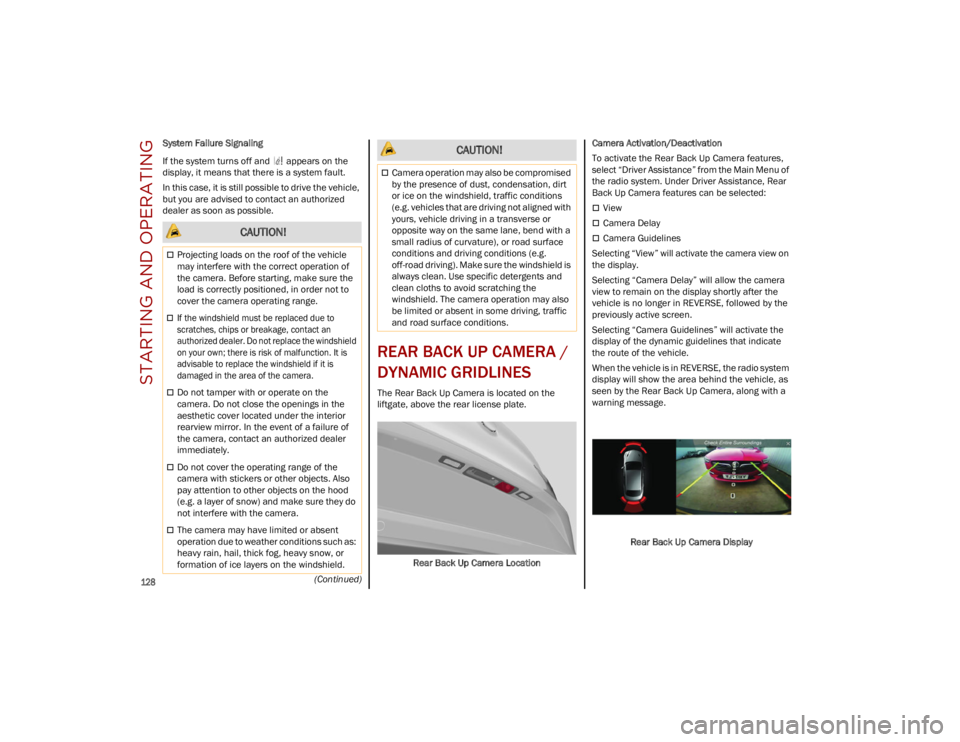
The Rear Back Up Camera is located on the
liftgate, above the rear license plate.
Rear Back Up Camera Location Camera Activation/Deactivation
To activate the Rear Back Up Camera features,
select “Driver Assistance” from the Main Menu of
the radio system. Under Driver Assistance, Rear
Back Up Camera features can be selected:
View
Camera Delay
Camera Guidelines
Selecting “View” will activate the camera view on
the display.
Selecting “Camera Delay” will allow the camera
view to remain on the display shortly after the
vehicle is no longer in REVERSE, followed by the
previously active screen.
Selecting “Camera Guidelines” will activate the
display of the dynamic guidelines that indicate
the route of the vehicle.
When the vehicle is in REVERSE, the radio system
display will show the area behind the vehicle, as
seen by the Rear Back Up Camera, along with a
warning message.
Rear Back Up Camera Display CAUTION!
Projecting loads on the roof of the vehicle
may interfere with the correct operation of
the camera. Before starting, make sure the
load is correctly positioned, in order not to
cover the camera operating range.
If the windshield must be replaced due to
scratches, chips or breakage, contact an
authorized dealer. Do not replace the windshield
on your own; there is risk of malfunction. It is
advisable to replace the windshield if it is
damaged in the area of the camera.
Do not tamper with or operate on the
camera. Do not close the openings in the
aesthetic cover located under the interior
rearview mirror. In the event of a failure of
the camera, contact an authorized dealer
immediately.
Do not cover the operating range of the
camera with stickers or other objects. Also
pay attention to other objects on the hood
(e.g. a layer of snow) and make sure they do
not interfere with the camera.
The camera may have limited or absent
operation due to weather conditions such as:
heavy rain, hail, thick fog, heavy snow, or
formation of ice layers on the windshield.
Camera operation may also be compromised
by the presence of dust, condensation, dirt
or ice on the windshield, traffic conditions
(e.g. vehicles that are driving not aligned with
yours, vehicle driving in a transverse or
opposite way on the same lane, bend with a
small radius of curvature), or road surface
conditions and driving conditions (e.g.
off-road driving). Make sure the windshield is
always clean. Use specific detergents and
clean cloths to avoid scratching the
windshield. The camera operation may also
be limited or absent in some driving, traffic
and road surface conditions.
CAUTION!
23_GU_OM_EN_USC_t.book Page 128
Page 134 of 268
STARTING AND OPERATING
132
VEHICLE LOADING
CERTIFICATION LABEL
As required by National Highway Traffic Safety
Administration regulations, your vehicle has a
certification label affixed to the driver's side door
or pillar.
This label contains the month and year of
manufacture, Gross Vehicle Weight Rating
(GVWR), Gross Axle Weight Rating (GAWR) front
and rear, and Vehicle Identification Number
(VIN). A Month-Day-Hour (MDH) number is
included on this label and indicates the Month,
Day and Hour of manufacture. The bar code that
appears on the bottom of the label is your VIN.
Gross Vehicle Weight Rating (GVWR)
The GVWR is the total permissible weight of your
vehicle including driver, passengers, vehicle,
options and cargo. The label also specifies
maximum capacities of front and rear axle
systems (GAWR). Total load must be limited so
GVWR and front and rear GAWR are not
exceeded.
Payload
The payload of a vehicle is defined as the
allowable load weight a truck can carry, including
the weight of the driver, all passengers, options
and cargo.
Gross Axle Weight Rating (GAWR)
The GAWR is the maximum permissible load on
the front and rear axles. The load must be
distributed in the cargo area so that the GAWR of
each axle is not exceeded.
Each axle GAWR is determined by the
components in the system with the lowest load
carrying capacity (axle, springs, tires or wheels).
Heavier axles or suspension components
sometimes specified by purchasers for increased
durability do not necessarily increase the
vehicle's GVWR.
Tire Size
The tire size on the Vehicle Certification Label
represents the actual tire size on your vehicle.
Replacement tires must be equal to the load
capacity of this tire size.
Rim Size
This is the rim size that is appropriate for the
tire size listed.
Inflation Pressure
This is the cold tire inflation pressure for your
vehicle for all loading conditions up to full GAWR.
Curb Weight
The curb weight of a vehicle is defined as the total
weight of the vehicle with all fluids, including
vehicle fuel, at full capacity conditions, and with
no occupants or cargo loaded into the vehicle.
The front and rear curb weight values are
determined by weighing your vehicle on a
commercial scale before any occupants or
cargo are added.
Loading
The actual total weight and the weight of the front
and rear of your vehicle at the ground can best be
determined by weighing it when it is loaded and
ready for operation.
The entire vehicle should first be weighed on a
commercial scale to ensure that the GVWR has
not been exceeded. The weight on the front and
rear of the vehicle should then be determined
separately to be sure that the load is properly
distributed over the front and rear axle. Weighing
the vehicle may show that the GAWR of either the
front or rear axles has been exceeded but the
total load is within the specified GVWR. If so,
weight must be shifted from front to rear or rear
to front as appropriate until the specified weight
limitations are met. Store the heavier items down
low and be sure that the weight is distributed
equally. Stow all loose items securely before
driving.
Improper weight distributions can have an
adverse effect on the way your vehicle steers and
handles and the way the brakes operate.
WARNING!
Do not load your vehicle any heavier than the
GVWR or the maximum front and rear GAWR. If
you do, parts on your vehicle can break, or it
can change the way your vehicle handles. This
could cause you to lose control. Overloading
can shorten the life of your vehicle.
23_GU_OM_EN_USC_t.book Page 132
Page 137 of 268
135
(Continued)
(Continued)
TRAILER AND TONGUE WEIGHT
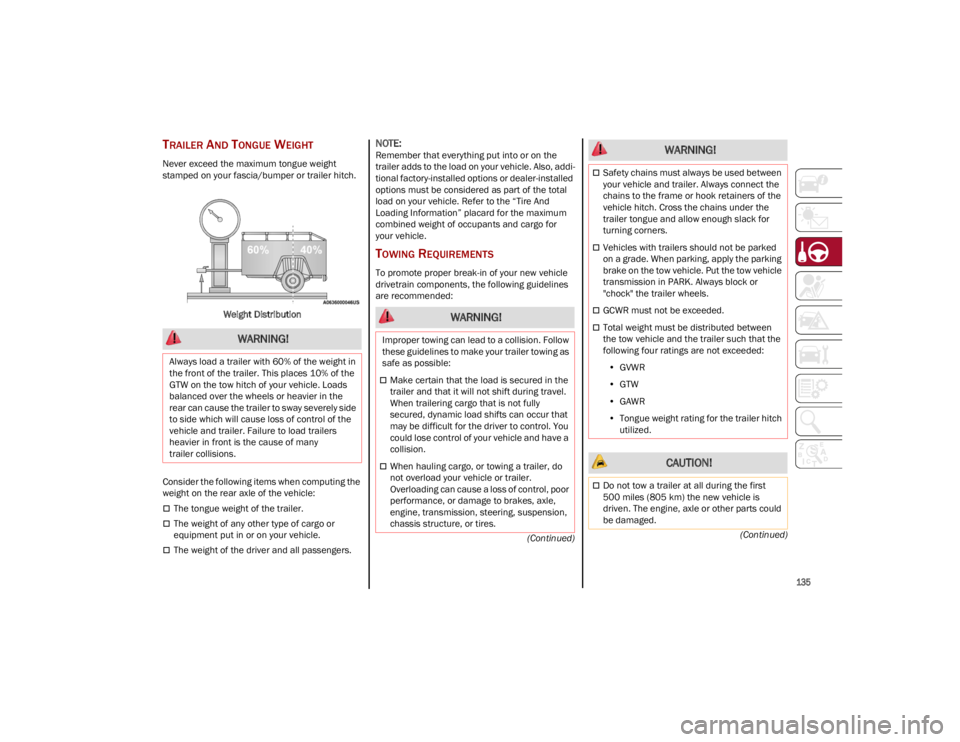
Never exceed the maximum tongue weight
stamped on your fascia/bumper or trailer hitch.
Weight Distribution
Consider the following items when computing the
weight on the rear axle of the vehicle:
The tongue weight of the trailer.
The weight of any other type of cargo or
equipment put in or on your vehicle.
The weight of the driver and all passengers.
NOTE:
Remember that everything put into or on the
trailer adds to the load on your vehicle. Also, addi -
tional factory-installed options or dealer-installed
options must be considered as part of the total
load on your vehicle. Refer to the “Tire And
Loading Information” placard for the maximum
combined weight of occupants and cargo for
your vehicle.
TOWING REQUIREMENTS
To promote proper break-in of your new vehicle
drivetrain components, the following guidelines
are recommended:
WARNING!
Always load a trailer with 60% of the weight in
the front of the trailer. This places 10% of the
GTW on the tow hitch of your vehicle. Loads
balanced over the wheels or heavier in the
rear can cause the trailer to sway severely side
to side which will cause loss of control of the
vehicle and trailer. Failure to load trailers
heavier in front is the cause of many
trailer collisions.
WARNING!
Improper towing can lead to a collision. Follow
these guidelines to make your trailer towing as
safe as possible:
Make certain that the load is secured in the
trailer and that it will not shift during travel.
When trailering cargo that is not fully
secured, dynamic load shifts can occur that
may be difficult for the driver to control. You
could lose control of your vehicle and have a
collision.
When hauling cargo, or towing a trailer, do
not overload your vehicle or trailer.
Overloading can cause a loss of control, poor
performance, or damage to brakes, axle,
engine, transmission, steering, suspension,
chassis structure, or tires.
Safety chains must always be used between
your vehicle and trailer. Always connect the
chains to the frame or hook retainers of the
vehicle hitch. Cross the chains under the
trailer tongue and allow enough slack for
turning corners.
Vehicles with trailers should not be parked
on a grade. When parking, apply the parking
brake on the tow vehicle. Put the tow vehicle
transmission in PARK. Always block or
"chock" the trailer wheels.
GCWR must not be exceeded.
Total weight must be distributed between
the tow vehicle and the trailer such that the
following four ratings are not exceeded:
• GVWR
• GTW
• GAWR
• Tongue weight rating for the trailer hitch
utilized.
CAUTION!
Do not tow a trailer at all during the first
500 miles (805 km) the new vehicle is
driven. The engine, axle or other parts could
be damaged.
WARNING!
23_GU_OM_EN_USC_t.book Page 135
Page 151 of 268
149
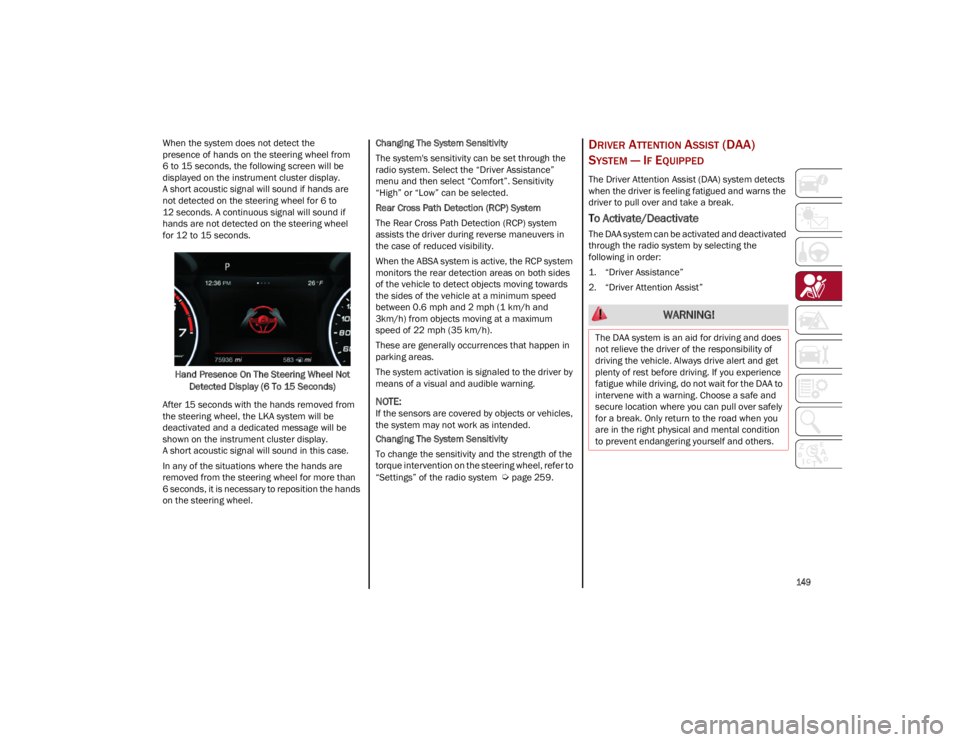
When the system does not detect the
presence of hands on the steering wheel from
6 to 15 seconds, the following screen will be
displayed on the instrument cluster display.
A short acoustic signal will sound if hands are
not detected on the steering wheel for 6 to
12 seconds. A continuous signal will sound if
hands are not detected on the steering wheel
for 12 to 15 seconds.Hand Presence On The Steering Wheel Not Detected Display (6 To 15 Seconds)
After 15 seconds with the hands removed from
the steering wheel, the LKA system will be
deactivated and a dedicated message will be
shown on the instrument cluster display.
A short acoustic signal will sound in this case.
In any of the situations where the hands are
removed from the steering wheel for more than
6 seconds, it is necessary to reposition the hands
on the steering wheel. Changing The System Sensitivity
The system's sensitivity can be set through the
radio system. Select the “Driver Assistance”
menu and then select “Comfort”. Sensitivity
“High” or “Low” can be selected.
Rear Cross Path Detection (RCP) System
The Rear Cross Path Detection (RCP) system
assists the driver during reverse maneuvers in
the case of reduced visibility.
When the ABSA system is active, the RCP system
monitors the rear detection areas on both sides
of the vehicle to detect objects moving towards
the sides of the vehicle at a minimum speed
between 0.6 mph and 2 mph (1 km/h and
3km/h) from objects moving at a maximum
speed of 22 mph (35 km/h).
These are generally occurrences that happen in
parking areas.
The system activation is signaled to the driver by
means of a visual and audible warning.
NOTE:
If the sensors are covered by objects or vehicles,
the system may not work as intended.
Changing The System Sensitivity
To change the sensitivity and the strength of the
torque intervention on the steering wheel, refer to
“Settings” of the radio system
Ú
page 259.
DRIVER ATTENTION ASSIST (DAA)
S
YSTEM — IF EQUIPPED
The Driver Attention Assist (DAA) system detects
when the driver is feeling fatigued and warns the
driver to pull over and take a break.
To Activate/Deactivate
The DAA system can be activated and deactivated
through the radio system by selecting the
following in order:
1. “Driver Assistance”
2. “Driver Attention Assist”
WARNING!
The DAA system is an aid for driving and does
not relieve the driver of the responsibility of
driving the vehicle. Always drive alert and get
plenty of rest before driving. If you experience
fatigue while driving, do not wait for the DAA to
intervene with a warning. Choose a safe and
secure location where you can pull over safely
for a break. Only return to the road when you
are in the right physical and mental condition
to prevent endangering yourself and others.
23_GU_OM_EN_USC_t.book Page 149