service AUDI A3 2011 Owner´s Manual
[x] Cancel search | Manufacturer: AUDI, Model Year: 2011, Model line: A3, Model: AUDI A3 2011Pages: 320, PDF Size: 75.79 MB
Page 51 of 320
Power windows
Controls
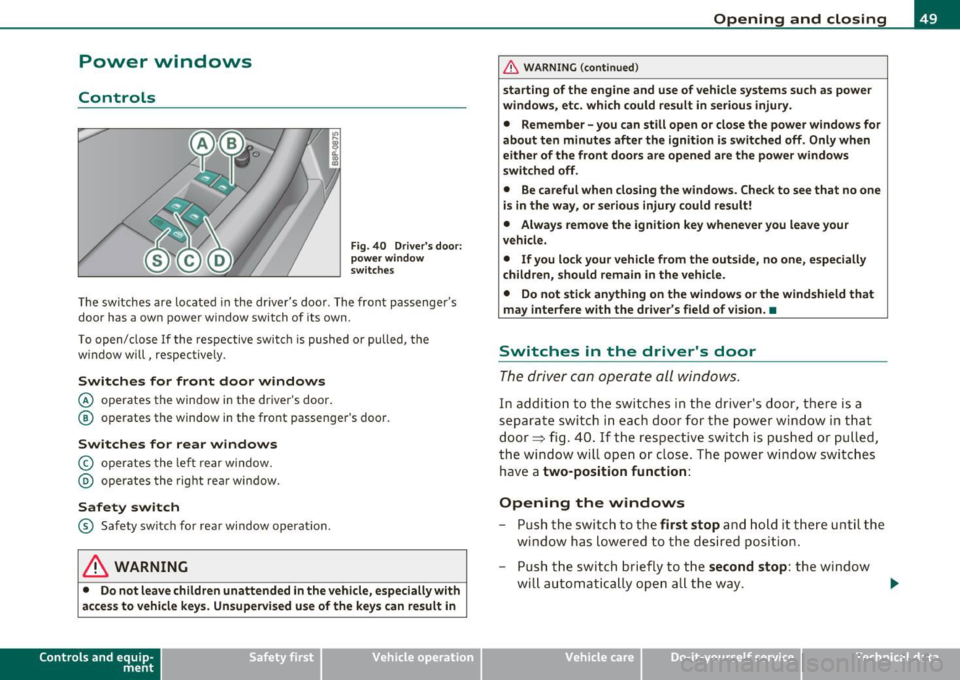
Fig. 40 Dri ver's door:
power wind ow
swit ches
T he switches are located in the dr iver 's doo r. The front passenger's
door has a own power w indow switch of its own .
T o open/ close If the respective swi tch is pu shed or pulled, the
window will, respectively .
Switches for front door windows
© operates the window in the driver's door .
@ operates the window in the front passenger's door.
Switches for rear windows
© operates the lef t r ear w indow.
@ operates the rig ht rea r window.
Safety switch
® Safety switch for rea r window operat ion .
& WARNING
• Do not leave children unattended in the vehicle, esp ecially with
ac ce ss to vehicle key s. Unsupervi sed use of the keys can re sult in
Con tro ls a nd e quip
m en t Vehicle
OP-eration
Opening and closing
& WARNI NG (continued )
starting of the engine and use of vehicle systems such as power
windows, et c. whi ch could result in seriou s injury.
• Remember -you can still open or clo se the power windows for
about ten minutes after the ignition is swit ched off . Only when
eithe r of the front doors are opened are the powe r windows
s witched off .
• Be ca reful when closing the windows . Chec k to see that no one
is in the way, or serious injury could result!
• Alway s remo ve the ignition key whene ver you leave your
veh icle.
• If you lo ck your vehicle from the out side, no one, e specially
children, should remain in the vehicle .
• Do not stick anything on the windows or the windshield that
may interfere w ith the driver 's field of vision. •
Switches in the driver 's door
The d riv er can operate all windo ws.
In additi on to th e switches i n the driver's d oor, t here is a
separate switch in each door fo r th e po wer wi ndow in that
door~ fig. 40. If the respective switc h is pus hed or p ulled ,
the window will open or c lose. The power window switc hes
have a
two-position function:
Opening the windows
- Push th e switch to th e first stop an d h old it there until the
window has l owere d to the d esired position.
- Push t he swi tch briefly to t he
second stop : the window
wi ll automati ca lly op en all th e way .
Vehicle care Do-it-yourselt service iTechnical data
Page 53 of 320
Reactivating the system after battery
disconnection
Reactiva ting the convenience close/open feature
If the vehicle bat tery is disconnected and then reconnec ted,
t h e automatic closing and op ening f unctio n will not work
u ntil it is r eactiva ted. To reactivat e this feature, perform the
fo llowing ste ps:
Reactivating close /open feature
- Pull and hold the power window switch until the window is
com pletely closed.
- Release the switch .
- Pull the switch again for o ne second. The a utomatic
closing/opening is now reactivated .•
Panoramic sliding sunroof
A pp lies to vehicles : w ith panoramic sliding sunroof
Description
The pa no ram ic s lid ing sunroof is opera ted wi th t he toggle switc h
=> fig. 42 when the ignit ion in on.
T he panoramic sliding sun roof can sti ll be opened or closed for about
1 0 m in utes after the ig nition has been switched off. However , as
soon as the driver's or passenger 's door is opened, the sw itch for the
roof is inoperat ive. •
Con tro ls a nd e quip
m en t Vehicle
OP-eration
Opening and closing
Applies to vehicles : with pano ram ic sliding sunroof
Opening and closing panoramic sliding
sunroof
............... ...... ....................... .
;;;;;;;;;; ;;;;;::: ::::· ::;:;;::;;;;;;;;;; ;;;;i
1·············~1
.............. . ............. . ............. . .............. . ............ ..
• •
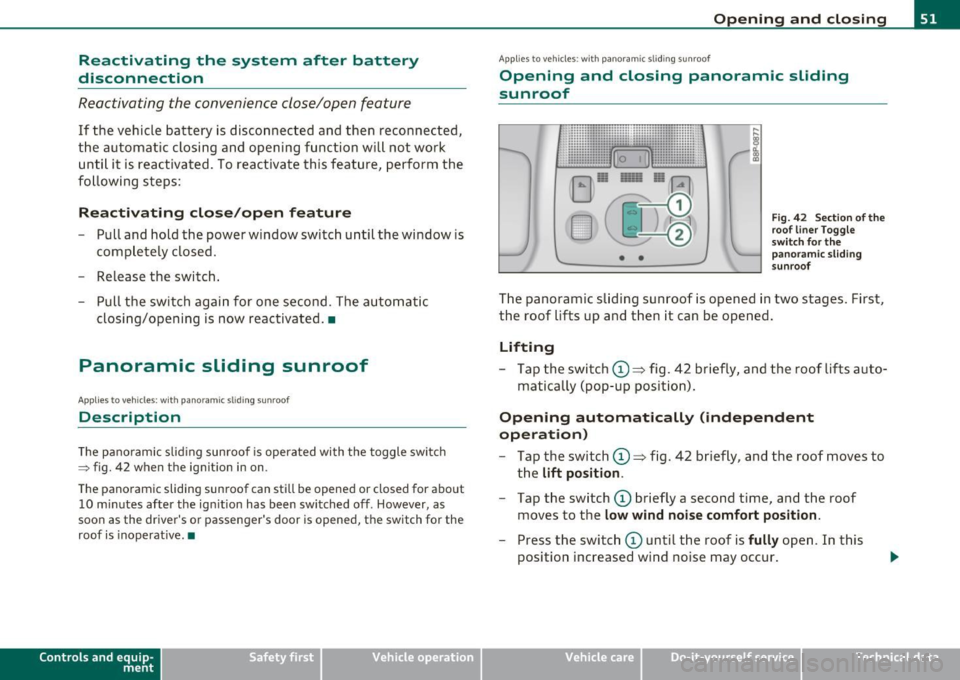
Fig. 42 Sectio n o f th e
roo f line r To gg le
s wit ch fo r the
p anora mic sli ding
s u nro of
Th e panoramic slid ing sunroof is opened in two stages. First,
the roof lifts up and t hen it can be opened .
Lifting
-Tap the switc h@ ~ fig. 42 b riefly, an d the roof lifts a uto-
matically (pop -u p position) .
Opening automatically (independent
operation)
-Tap t he switch (D ~ fig. 42 b riefly , and the roof moves to
t h e
lift position .
-Tap the switch (D briefly a second time , and the roof
moves to the
low wind noise comfort position .
- Press the switch (D until the roof is fully open. In this
position increased wind no ise may occur .
Vehicle care Do-it-yourselt service iTechnical data
Page 55 of 320
Emergency mechanical closing for
the panoramic sliding sunroof
Ap plie s to vehicl es: w ith panor am ic sli d ing sunr oof
Uncovering the light unit
In an emergency, the panoramic sliding sun roof can be
closed manually. Removal of the light unit requires some
dexterity .
i d.
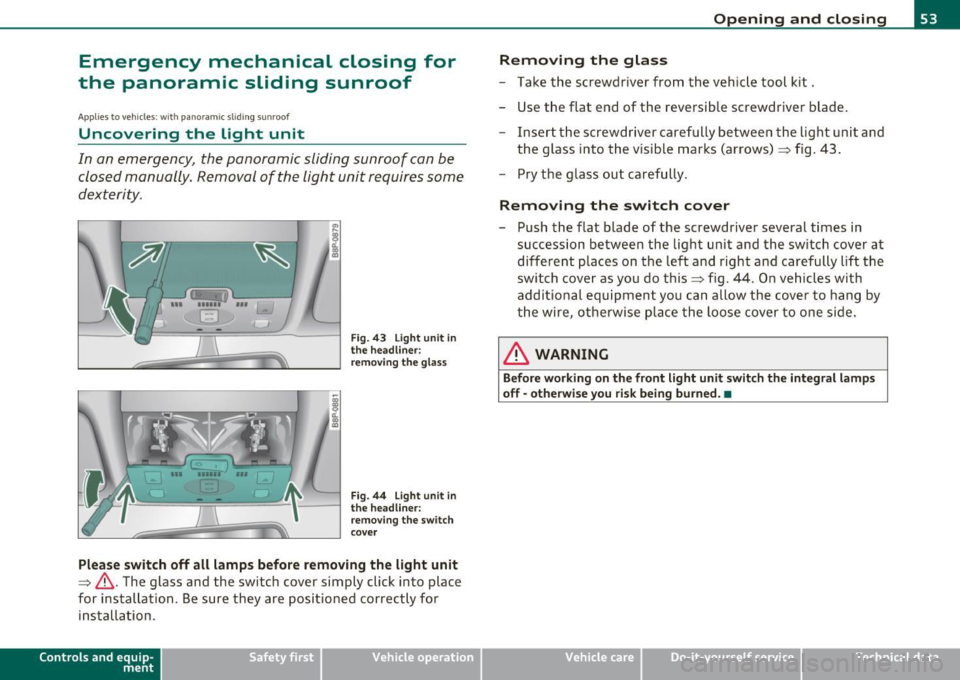
co
m
F ig . 4 3 Li ght unit in
the h eadliner :
re mov ing the gla ss
Fi g. 44 Light un it in
th e headliner :
r em oving th e switch
cove r
Please sw itch off all lamps before removing the light unit
~ & .The glass and the switch cover simply click into place
for i nstal lation . Be sure they are positioned correct ly for
installation .
Control s and equ ip
m ent Vehicle
OP-eration
Opening and closing
Removing the glass
- Take t he sc rewdriver from the vehicle tool kit.
- Use the flat end of the reversib le screwdriver blade.
- Inse rt th e screwdriver carefully between the light un it and
the glass into the v isible marks (arrows)~ fig. 43 .
- Pry the glass out care fu lly.
Removing the switch cover
- Push the flat blade o f the screwdriver several times in
succession between the light unit and the switch cover at
different places on the left and righ t and carefu lly lift the
switch cove r as you do this~ fig . 44. O n ve hicles with
additio nal equipment you can allow the cover to hang by
the wire, otherw ise plac e th e loose cov er to one side.
& WARNING
Before working on th e front light unit switch th e integr al lamp s
off -otherwi se yo u risk being burned. •
Vehicle care Do-it-yourselt service iTechnical data
Page 61 of 320

instrument pane l illum in ation w ill autom at ically be com e dimm er
as the d ay light fade s away and eventu ally will g o out c ompletel y
wh en outside light i s very low . This is to r emind you, the drive r, to
s witch on the headlight s before it gets too dark .
• Canada model s: in strument pan el illum ination will stay bright
r e g ardle ss of the inten sity of ambient light . Alwa ys be awar e of
c hanges in o utside light conditions w hile you ar e dri ving. R espond
in time to fading da ylight by tu rning the light switch t o po sit ion
io
(or "AUTO" if your car is equipped with this feature) to turn on y our
headl ights .•
Emergency flasher ~
The emergency flasher makes other motorists aware that
you or your vehicle are in an emergency situation .
Fig. 53 Ce nter
conso le : eme rgenc y
fla sh e r sw it c h
- Press the switch~:::::> fig. 53, to switch the emergency
flasher on or off.
When the eme rgency flasher is o n, all four tu rn s ignal b link at the
same time . The turn signa l indicator lights¢¢ in the instrument
cluster , as well as the light in the emerg ency flasher switch~ blink
likewise.
T he emergency flasher will autom atically sw itch on if you are in an
acc ident where the airbag has deployed.
Con tro ls a nd e quip
m en t Vehicle
OP-eration
Clear vision
(I) Tips
You should swi tch on the emergency flasher when :
• you a re the last ve hicle stand ing in a traffic jam so that any ot her
vehicles com ing can see you , or when
• your vehicle has b roken down or you are in an eme rgency s itua
tion , or when
• your vehicle is being towed by a tow tr uck or if yo u are tow ing
another vehicle behind you. •
Turn signals -¢¢ and high beam [D lever
The lever on the le~ side of the steering column is used to
operate the turn signals and the high beam as well as the
headlight flasher.
-"' M
-w .., a,
Fig . 54 Tu rn sign al
a nd h igh b eam lever
The turn signal and high beam lever has the following func
tions :
Turn signals ¢ ¢
- Lift the lever up all the way:::::> fig. 54 (D, to use the r ight
turn signals , or push the lever down all the way@ to use
the left turn signals. .,,.
Vehicle care Do-it-yourselt service iTechnical data
Page 63 of 320
Forward dome light off
-Move the switch to position 0. The light will not go on
regardless o f door positio n.
Glove compartment light
Open the glove compartment - the light in t he glove
compartme nt automatically illum inates as long as the
side marker lights or headlights a re on. When you close
the glove compartme nt, the light goes o ff.
With the interior light sw itch at the doo r contact (center) position,
t he forward dome light illum ina tes wheneve r you unlo ck the vehi cle
or open a door . The dome light goes out after approx imately 30
se conds after yo u have closed the door. L ikewise , whe n yo u lock your
vehicle or switc h on the ignition, the dome light goes out.
If yo u leave a door open , the dome light w ill go out after ten minutes
to conserve battery charge .
A dimmer automatically controls the br ightness of the lights when
t hey are swi tched on. •
Contro ls a nd e quip
m en t Vehicle
OP-eration
Clear vision
App lies to veh icles : w ith light packag e
Interior Lights and forward reading Lights
The interior lights include the both reading lights for the
driver and the front passenger .
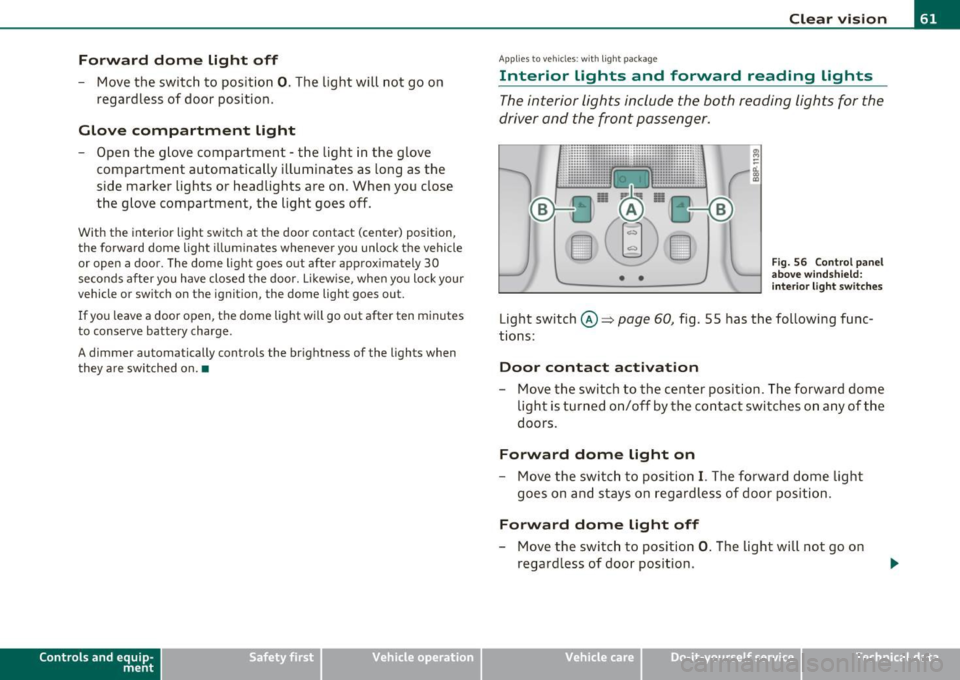
Fig. 56 Co nt ro l pane l
a bove wind sh ield :
int erior li g ht swi tch es
Light switch ©~ page 60, fig. 5 5 has the fol low ing f unc
t ions:
Door contact activation
- Move the switch to th e center pos ition. The forward dome
light is turned on/off by the co ntac t swi tches o n any of the
doors.
Forward dome light on
- Move the switc h to position I. The fo rward dome light
goes on and stays on regardl ess of door pos it ion.
Forward dome light off
- Move the switc h to position 0. The light will not go on
regard less of door position .
Vehicle care Do-it-yourselt service Technical data
Page 65 of 320
Rear reading light
Press the switch "<~ to turn on and off the reading light .•
Luggage compartment light
A dome light in the rear roof liner illuminates the luggage
compartment. An additional light is provided on the
inside of the rear lid .
The light is located on the left side of the trunk .
With the switch at the center position, the rear dome light is auto matically switched on as soon as the rear lid is opened. The rear dome
light goes out 30 seconds after the rear lid is closed .
If the rear lid is left open for more than 10 minutes, both the rear
dome light and the light in rear lid are switched off to conserve the
battery charge. •
Vision
Applie s to veh icl es: w ith lig ht p ackag e or illum inated vanity mirror
Sun visors
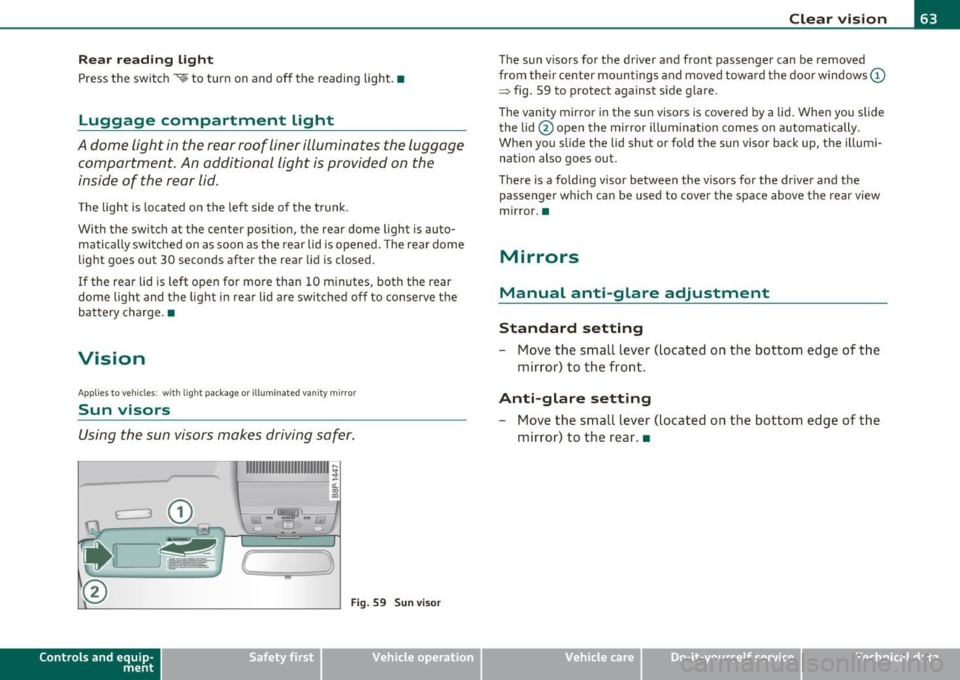
Using the sun visors makes driving safer.
n,ISJ_
G
(
-
1
Fig. 59 Sun visor
Contro ls a nd e quip
m en t Vehicle
OP-eration
Clear vision
The sun visors for the driver and front passenger can be removed
from their center mountings and moved toward the door windows
(D
=> fig. 59 to protect against side glare .
The vanity mirror in the sun visors is covered by a lid. When you slide
the lid @open the mirror illumination comes on automatically.
When you slide the lid shut or fold the sun visor back up, the illumi
nation also goes out.
There is a folding visor between the visors for the driver and the passenger which can be used to cover the space above the rear view
mirror .•
Mirrors
Manual anti-glare adjustment
Standard setting
- Move the small lever (located on the bottom edge of the
mirror) to the front.
Anti-glare setting
- Move the small lever (located on the bottom edge of the
mirror) to the rear. •
Vehicle care Do-it-yourselt service iTechnical data
Page 67 of 320
Outside mirrors
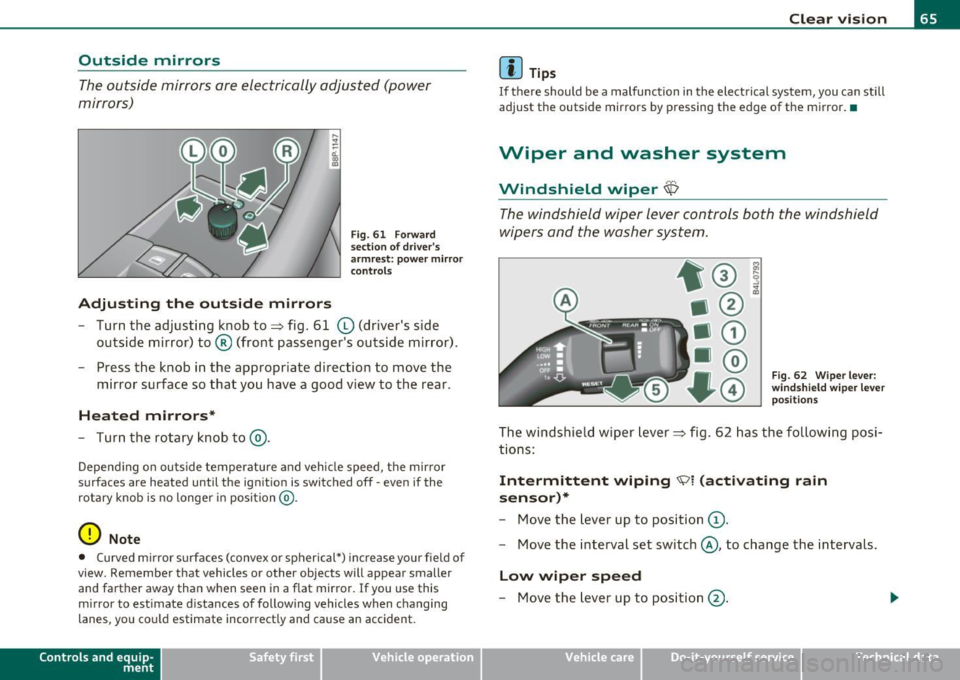
The outside mirrors are electrically adjusted (power
mirrors)
Adjusting the outside mirrors
F ig . 61 Fo rward
s ecti on of dr iv er 's
a rmr est: powe r mirror
con trol s
Turn the adjusting k nob to~ fig. 61 (D (driver's side
outside mirror) to ® (front passenger's outside mirror) .
- Press the knob in the appropriate direction to move the
mirror surface so that you have a good view to the rear .
Heated mirrors*
- Turn the rotary knob to@).
Depend ing o n ou tside te mperature and veh icle speed, the mirror
surfaces are heated until the ign it ion is switched off -even if the
rotary knob is no longer in position @.
0 Note
• Curved mirror s urfaces (convex or spherical*) in crease your field of
view. Remember that vehicles or other objects will appear smaller and farther away than when seen in a flat mirror.
If you use this
mirror to est imate d istances of following vehicles when changing
lanes, you co uld estimate incorrect ly and ca use an accident.
Con tro ls a nd e quip
m en t Vehicle
OP-eration
Clear vision
(I) Tips
If there should be a malfunction in the elect rical system, you can still
adjust the outside mirrors by pressing the edge of the m irror . •
Wiper and washer system
Windshield wiper~
The windshield wipe r lever controls both the windshield
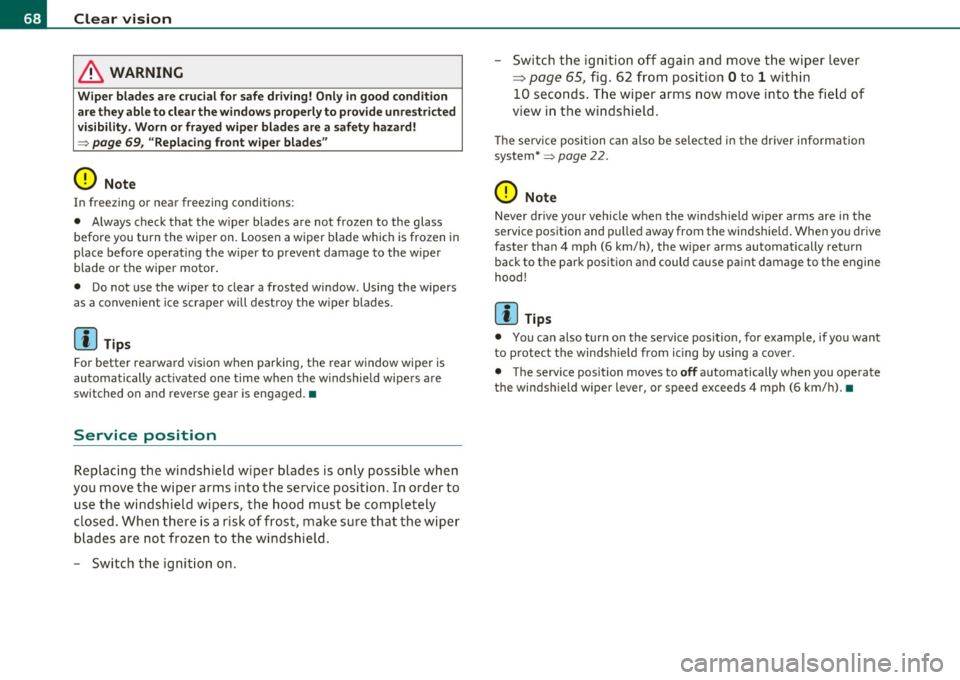
wipers and the washer system.
F ig. 62 Wiper lev er:
win dsh ie ld wi per l ev er
p osit ion s
The windshield wiper Lever => fig . 62 has the follow ing posi
t ions:
Intermittent wiping ~ i (activat ing rain
sensor)*
- Move the Lever up to position (D .
- Move the interval set switch@, to change the intervals.
Low wiper speed
- M ove the lever up to p osi tio n @ .
Vehicle care Do-it-yourselt service iTechnical data
Page 69 of 320
![AUDI A3 2011 Owner´s Manual (]] Tips
• The w indshield wipers are switched off when the ign ition is tu rned
off . Activate the windshield wipers after the ignition is switched back
on by mov ing the w i](/img/6/40268/w960_40268-68.png "AUDI A3 2011 Owner´s Manual (]] Tips
• The w indshield wipers are switched off when the ign ition is tu rned
off . Activate the windshield wipers after the ignition is switched back
on by mov ing the w i")
(]] Tips
• The w indshield wipers are switched off when the ign ition is tu rned
off . Activate the windshield wipers after the ignition is switched back
on by mov ing the w indshield wipe r leve r to any pos ition.
• Worn or dirty windshield w iper blades cause smearing, which can
affect the operat io n of the l ight/rain sensor*. Check t he condi tion of
your windshield wiper b lades regularly.
• The rain sensor is part of the inte rval wiping system . Turning off
the ignition will also deactivate the rain sensor. To reactivate the
sensor, switch off the inte rval wiping funct ion, the n switch it back on
again .
• Applies to veh icles with light/ra in sensor: When the w ipers are
switched on manually and in rain conditions, the automatic head
lights* turn on~
page 56, "Switching the headlights on and off ·f!: "
or off during the day when the wipers are no longer operating. The
au tomatic headlights* func tion is available in t his case only when the
light switch is in the "AUTO" position~
page 56, fig. 49.
• Make su re the washe r fl ui d reservoir in the eng ine compartment is
topped off before going on a long trip. Look up::::)
page 243 for
check ing and fill ing t he washer conta iner.
• The wipers only operate with the hood completely closed. •
Contro ls a nd e quip
m en t Vehicle
OP-eration
Clear vision
Rear window wiper cs;J
The wiper lever is also used to operate the rear windo w
w iper and the automatic wiper/ washer function .
Fig . 63 Wi per lev er:
a ct iva ting the rear
w indow wi per an d
w ashe r
The rear window w iper and t he au tomatic wiper/washer func
tions are activated as follows:
Intermittent wiping
- P ush the wipe r lever forward towards the dashboard and
to the
first position ©~ fig. 63 . T he rear window wiper
w ill wipe the win dow approx. every four seco nds.
Automatic wiper/washer function
- Push the wiper lever forward to the second stop, position
0 , and ho ld it there for as long as you want the rear
wiper/washer to operate.
- Release the lever aga in. T he wiper w ill keep run ning for
app rox . four seco nds .
Switching intermittent wiper action off
- Pull the lever a ll the way back to the original posi tion.
Vehicle care Do-it-yourselt service iTechnical data
Page 70 of 320
Clear vision
in. WARNING
Wiper blades are crucial for safe driving! Only in good condition are they able to clear the windows properly to provide unrestricted
visibility. Worn or frayed wiper blades are a safety hazard!
=> page 69, "Replacing front wiper blades"
(D Note
In freezing or near freezing conditions:
• Always check that the wiper blades are not frozen to the glass
before you turn the wiper on. Loosen a wiper blade which is frozen in
place before operating the wiper to prevent damage to the wiper
blade or the wiper motor.
• Do not use the wiper to clear a frosted window . Using the wipers
as a convenient ice scraper will destroy the wiper blades.
[I) Tips
For better rearward vision when parking, the rear window wiper is
automatically activated one time when the windshield wipers are
switched on and reverse gear is engaged. •
Service position
Replacing the windshield wiper blades is only possible when
you move the wiper arms into the service position. In order to
use the windshield wipers, the hood must be completely
closed. When there is a risk of frost, make sure that the wiper
blades are not frozen to the windshield.
- Switch the ignition on. - Switch the
ignition off again and move the wiper lever
=:> page 65, fig. 62 from position Oto 1 within
10 seconds. The wiper arms now move into the field of
view in the windshield.
The service position can also be selected in the driver information
system*=>
page 22 .
(D Note
Never drive your vehicle when the windshield wiper arms are in the
service position and pulled away from the windshield. When you drive
faster than 4 mph (6 km/h) , the wiper arms automatically return
back to the park position and could cause paint damage to the engine
hood!
[I) Tips
• You can also turn on the service position, for example, if you want
to protect the windshield from icing by using a cover.
• The service position moves to
off automatically when you operate
the windshield wiper lever, or speed exceeds 4 mph (6 km/h). •
Page 71 of 320
Replacing front wiper blades
Wiper blades in good condition help keep the windshield
clear .
Removing the wiper blade
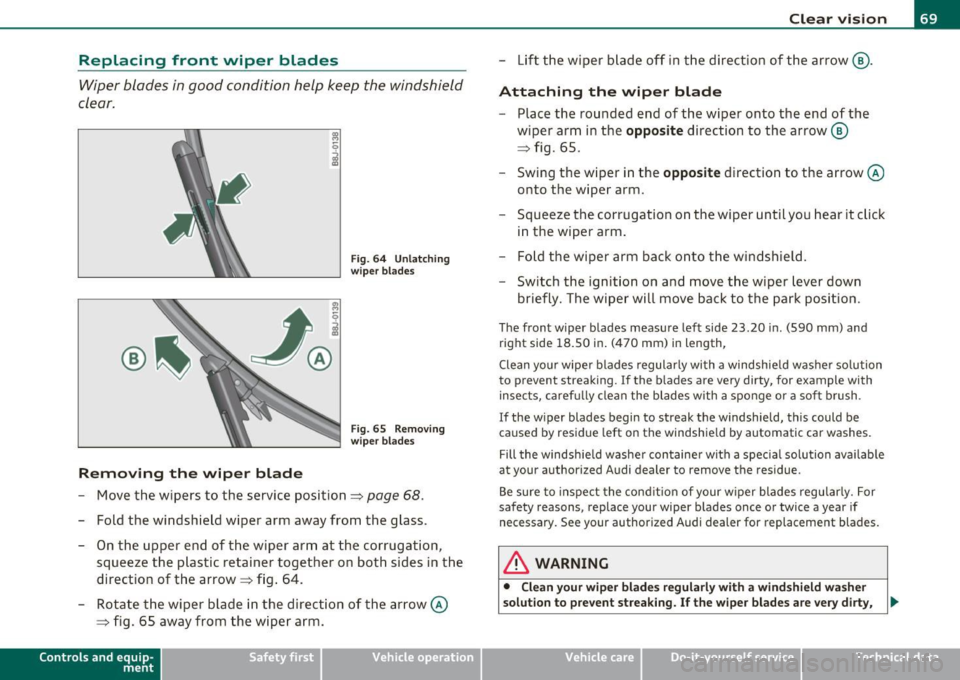
Fig. 6 4 Un lat chin g
wi per bla des
F ig . 65 Removi ng
wip er b lad es
- Move the wipers to the service position~ page 68.
-Fold the windshield wiper arm away from the glass .
- On the uppe r end of the wiper arm at the corrugat ion ,
squeeze the plastic retainer together on both sides in the
direction of the arrow~ fig . 64.
- Rotate the wiper blade in the direction of the arrow @
~ fig. 65 away from the w ip er arm.
Con tro ls a nd e quip
m en t Vehicle
OP-eration
Clear vision
- Lift the wiper b lade off in t he direction of the arrow @.
Attaching the wiper blade
- Place the ro unded end of the wiper onto the end of the
wiper arm i n the
opposite direction to the arrow @
~ fig. 65.
- Swing the w iper in the
opposite direction to the arrow@
onto the wiper arm .
- Squeeze the corr ugation o n the wiper until you hear it click
in the wiper arm .
- Fold the wiper arm back o nto t he windshie ld .
- Switch the ignit ion on and move t he wiper lever down
briefly . The wiper will move back to the park posi tion .
The front wiper blades measure lef t side 23 .20 in . ( 590 mm) and
right s ide 18.50 in . (470 mm) in length ,
Clean yo ur wipe r blades regularly with a windshie ld washer so lu tion
to prevent st reaking. If the blades are very dirty, for example with
insec ts, caref ully clean the blades with a spo nge or a sof t brush .
I f the w iper blades begin to streak the windshield, this could be
caused by residue left on the windsh ie ld by automatic car washes.
Fill the windsh ie ld washe r con taine r with a spec ial solu tion ava ilab le
at your authori zed Audi dealer to remove the residue .
Be sure to inspe ct the cond it io n of your w iper blades regu larly . F or
safety reasons, replace your wiper b lades once or twice a year if
necessary. See your authorized Audi dealer for replacement blades.
& WARNING
• Clean your wiper blades regularl y with a wind shield wa sher
solut ion to pre vent streaking. If the wiper blades are very dirty , .,,_
Vehicle care Do-it-yourselt service iTechnical data