ECO mode AUDI A3 2012 Owner´s Manual
[x] Cancel search | Manufacturer: AUDI, Model Year: 2012, Model line: A3, Model: AUDI A3 2012Pages: 280, PDF Size: 70.11 MB
Page 32 of 280
30 Driver in formation d ispl ay
Fue l economy messages are displayed when
fuel consumption is increased by certa in con
d itions. If you follow these fuel economy mes
sage s, you can reduce your vehicle's consump
t ion of fuel. The messages appear automati
cally and a re o nly disp layed in the eff iciency
program . The fuel economy messages turn off
automatically after a certain period of time .
.,. To turn a fuel economy message off imme-
diately after it appears, press the
I RES ET I
button ~ page 26, fig . 11 @ , or
.,. Press the function selection switch
¢ page 26, fig. 11 @ .
(D Tips
-Once you have t urned a fue l eco nomy
message off, it will only appear again af
te r you turn the ignition on aga in.
- The fuel economy messages are not dis
played in every insta nce, bu t rathe r in in
te rv al s over a period o f ti me .
Service interval display
The service interval display reminds you when
your next service is due.
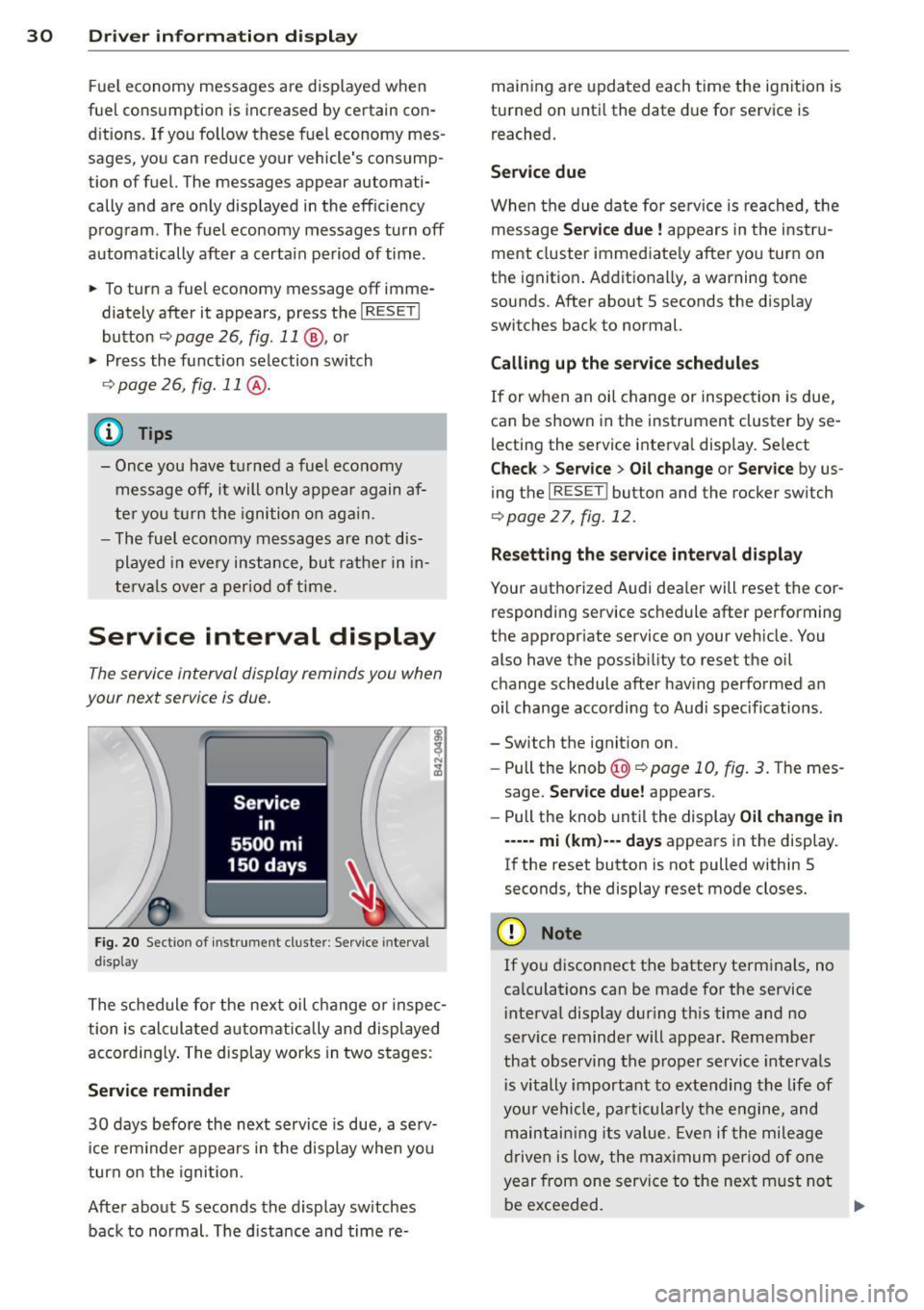
F ig. 2 0 Sectio n of inst rume nt cl uster : Serv ice inte rv al
d isplay
The schedule for the nex t oil change o r inspec
tion is calculated a utomatically and displayed
according ly . The display works in two stages :
Service reminder
30 days befo re the next service is due, a se rv
i ce rem inder appears in the d isplay when you
turn on the igni tion.
After abo ut 5 seconds the display sw itches
back to normal. The d ista nce and time re- main
ing are upda ted each time the ig nition is
turned on unti l the date d ue for service is
reached.
Service due
When the d ue da te for service is reached, t he
message
Service due! appears in the i nstr u
ment cluster imme diate ly after yo u turn on
the ignit io n. Add itiona lly, a warning tone
sounds. After about 5 seconds the disp lay
switches back to normal.
Calling up the service schedules
If or when an oil change or inspec tion is due,
can be shown in the instrument cluster by se
lecting the service interva l disp lay . Select
Chec k > Service > Oil change or Service by us
ing the
I RESE T! button and the rocker sw itch
¢ page 27, fig. 12 .
Resetting the ser vic e interval di splay
Your a uthorized Audi dea ler w ill reset the cor
responding service sc hedule after performing
the appropr iate service on you r veh icle. You
also have the possib ility to rese t the oil
change schedule after hav ing performed an
o il change acco rding to Aud i specif ications .
- Switch the ignit ion on.
- Pull the knob@~
page 10, fig. 3. The mes -
sage.
Se rvice due! appears .
- Pull the knob unt il the display
Oil change in
----- mi (km )--- days appears in the disp lay.
If the reset button is not pulled within 5
seconds, the display reset mode closes.
(D Note
If yo u disconnect the battery te rm inals , no
ca lculations can be made for the service
i nterval disp lay dur ing th is time and no
se rv ice reminder will appear. Remember
that observ ing the proper service intervals
i s vitally important to extending t he life of
your ve hicle, pa rticula rly t he e ngine, and
maint ain ing its value. Eve n if the mileage
drive n is low, the max imum per iod of one
year from one service to the next m ust no t
be exceeded.
II>-
Page 33 of 280
@ Tips
-If a malfunction is present (red symbol),
the distance remaining cannot be called
up.
- Do not reset the display between service
interva ls. Doing so will result in an incor
rect display.
- If the battery is disconnected, the Serv
ice Interval Display values are retained.
- On vehicles with the Driver Information
System, you can also call up the service
i nterval display
¢page 27.
-If service was not performed at the cor
rect time or the service interval display
was not reset after service was per
formed, the add itiona l mi leage driven or
the elapsed days will be shown as nega
tive numbers.
Engine oil temperature
display
A ppl ies to vehicles : wit h engin e temperat ure cont rol dis
p lay
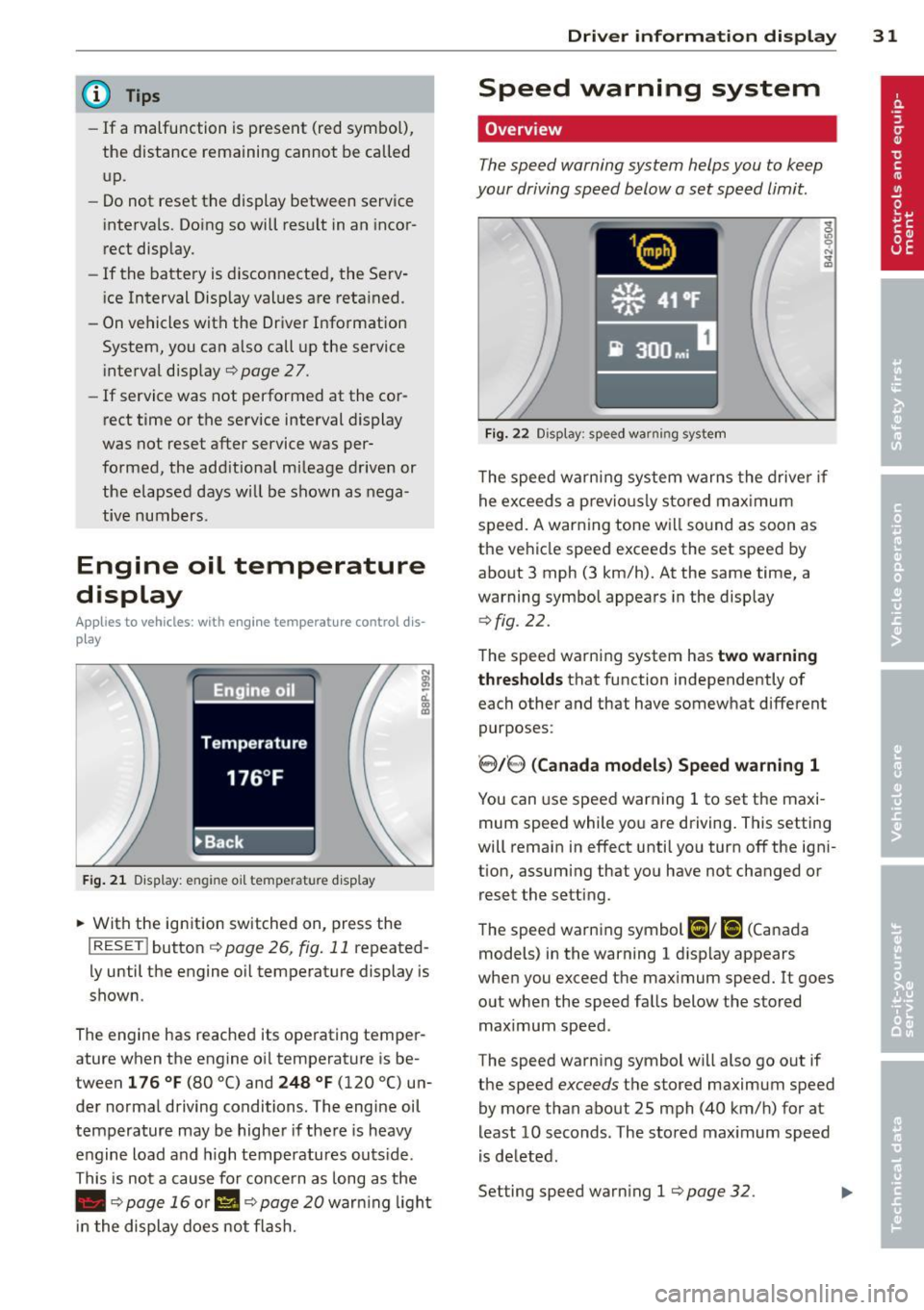
F ig . 21 Display: engine oil temperatu re disp lay
• With the ignition switched on, press the
I RESET I button ¢ page 26, fig. 11 repeated
l y until the engine o il temperature display is
shown.
The engine has reached its operating temper
ature when the engine oil temperature is be
tween
1 76 ° F (80 °() and 248 °F (120 °() un
der normal driving conditions. The engine oil
temperature may be higher if the re is heavy
engine load and h igh temperatures outs ide .
This is not a cause for concern as long as the
• ¢
page 16 or II ¢ page 20 war ning light
i n the display does not flash.
Dri ver inform ation di spl ay 31
Speed warning system
Overview
The speed warning system helps you to keep
your driving speed below a set speed limit.
Fi g. 22 Display: speed warning system
The speed warning system warns the drive r if
he exceeds a previo usly stored max imum
speed. A warning tone will sound as soon as
the vehicle speed exceeds the set speed by
about 3 mph (3 km/h). At the same time, a
warning symbol appears in the display
q fig. 22.
The speed warning system has two warning
t hr es hol ds
that function independently of
each other and that have somewhat different
purposes:
' 8/8 ( Canad a model s) Sp eed warn ing 1
You can use speed warning 1 to set the maxi
mum speed while you are driving. This setting
will remain in effect until you turn
off the igni
tion, assuming that you have not changed or reset the setting.
The speed warning symbol
Ci] ; [i (Canada
models) in the warning 1 disp lay appears
when you exceed the maximum speed.
It goes
out when the speed falls below the stored
maximum speed .
The speed warning symbol will also go out if
the speed
exceeds the stored maximum speed
by more than about 25 mph (40 km/h) for at
least 10 seconds. The stored maximum speed
is de leted.
Setting speed warning 1
¢ page 32. .,.
Page 34 of 280
32 Driver information display
8.18, (Canada models) Speed warning 2
Storing warning 2 is recommended if you al
ways
want to be reminded of a certain speed,
for example when you are traveling in a coun
try that has a general maximum speed limit,
or if you do not want to exceed a specified
speed for winter tires.
The speed warning 2 symbol ,
[I/ [9] (Canada
models) appears in the display when you ex
ceed the stored speed limit. Unlike warning 1, it will not go out until the vehicle speed drops
below the stored speed limit .
Setting speed warning 2
¢ pag e 32.
@ Tips
Even though your vehicle is equipped with
a speed warning system, you shou ld still
watch the speedometer to make sure you
are not driving faster than the speed limit.
Speed warning 1: setting a speed limit
Warning threshold 1 is set by the button.
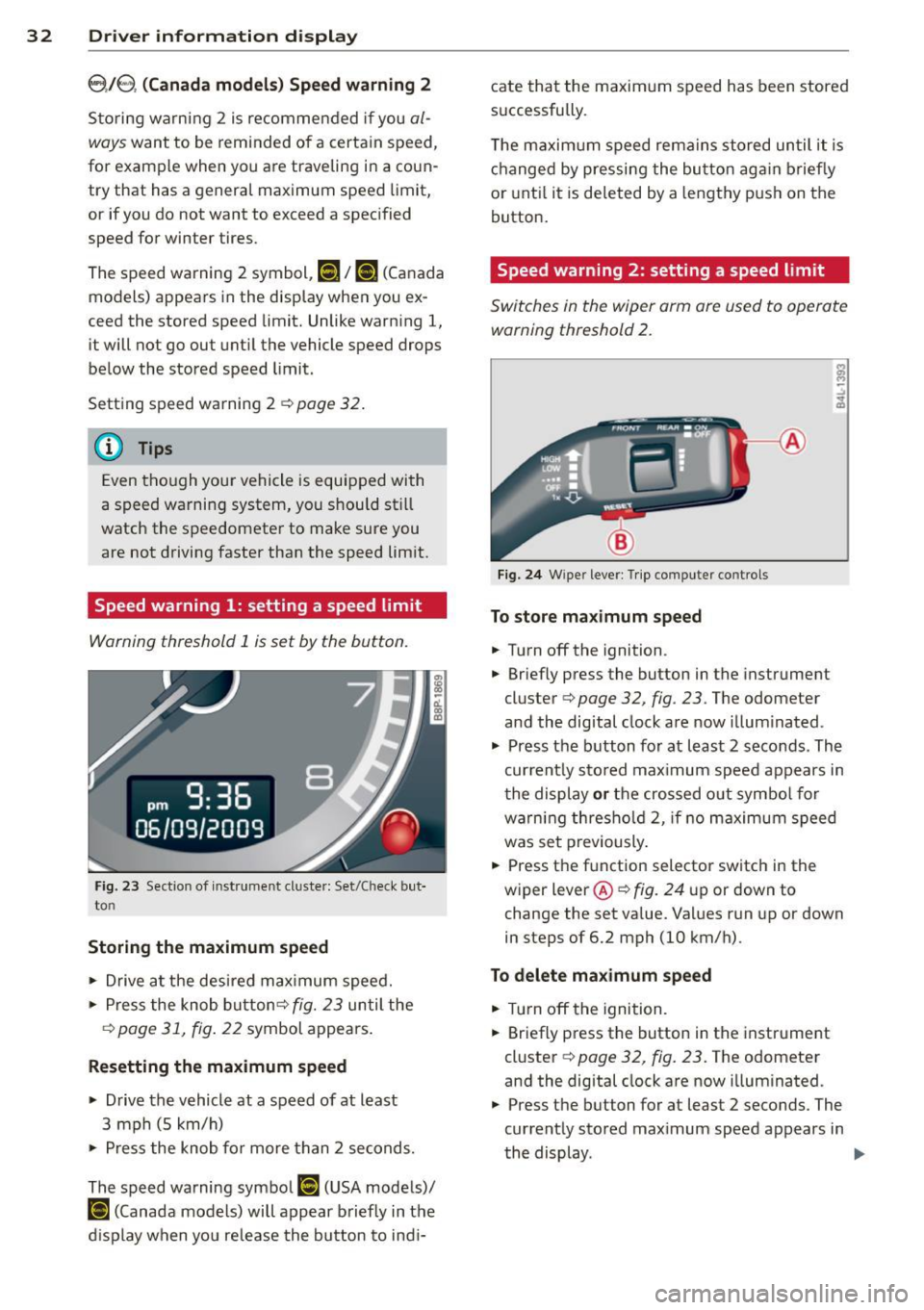
Fig. 23 Sectio n of inst rume nt cl uste r: Set/Check but
to n
Storing the maximum speed
11o-Drive at the desired maximum speed.
11o-Press the knob button ¢ fig. 23 until the
q page 31, fig. 22 symbol appears.
Resetting the maximum speed
.. Drive the vehicle at a speed of at least
3 mph (S km/h)
11o-Press the knob for more than 2 seconds.
The speed warning symbol
[I (USA models)/
ISl (Canada models) will appear briefly in the
d isplay when you release the button to indi- cate that
the maximum speed has been stored
successfully .
T he maximum speed remains stored until it is
changed by pressing the button again briefly
or until it is deleted by a lengthy push on the
button.
Speed warning 2: setting a speed limit
Switches in the wiper arm ore used to operate
warning threshold
2.
Fig. 24 W ipe r leve r: Trip compute r co ntrols
To store maximum speed
.. Turn off the ignition .
11o-Briefly press the button in the instrument
cluster ¢
page 32, fig . 23. The odometer
and the dig ital clock are now illuminated .
11o-Press the button for at least 2 seconds . The
current ly sto red max imum speed appears in
the display or the crossed out symbol for
warn ing thresho ld 2, if no maximum speed
was set previously .
.. Press the function selector switch in the
wiper
lever @qfig. 24 up or down to
change the set value. Va lues run up or down
in steps of 6.2 mph (10 km/h).
To delete maximum speed
.. Turn off the ignition.
.. Briefly press the button in the instrument
cluster ¢
page 32, fig. 23. The odometer
and the digital clock are now illuminated .
.. Press the button for at least 2 seconds. The
currently stored max imum speed appears in
the display .
II>
Page 38 of 280
36 Openin g and clo sing
in the cover. Correct po larity is shown on the
cover .
.. Place the cover with the new battery on the
key base and press both parts together.
@ For the sa ke of the environment
Dispose of dead batteries properly so as
not to po llute the environment.
(D Tips
The replacement battery must be the
same specification as the original.
Electronic immobilizer
The immobilizer helps to prevent unauthor
ized use of your vehicle .
A computer chip inside your key automat ica lly
deactivates the e lectronic immobilizer when
you insert the key in the ignition lock . When
you remove the key from the ignition lock, the e lectronic immobilizer is a utomatica lly acti
vated once again.
@ Tips
- The vehicle cannot be started if an unau
thorized key is used. The vehicle may not
start if another radio device such as a key
for another vehicle or transponder is lo
cated on the key ring.
- For Declaration of Compliance to United
States FCC and Industry Canada regula
tions
¢ page 262.
Power locking system
General description
The power Locking system Locks or unlocks all
doors and the rear lid simultaneously.
The power lock ing system in your veh icle in
corporates the fo llow ing funct ions:
- Central locking function
- Remote control feature¢
page 35.
- Anti-theft alarm system ¢ page 42.
All the doo rs and the rea r lid a re locked by the
central locking system when you lock the vehi
cle .
T he unlo ck ing and locking mode * can be
changed in the drive r information system
¢page 27.
Unlocking the vehicle
You can unlock t he vehicle from outside either
by us ing the remote contro l
or by inserting
and tu rning the key in the driver's door lock.
When you
unlock your vehicle:
- The ant i-theft a larm system is deactivated
b riefly .
- The vehicle i nte rio r lights i llum inate fo r ap
proxima tely 30 seconds .
- All turn s ignal lights w ill flash tw ice when
the ca r is u nlocked.
- After unlocking the vehicle, you have 30 sec
onds to open a door or the rear lid. After 30
seconds, the vehicle automat ically locks and
the anti -t h eft alarm system act ivates ag ain.
The rear lid can be locked o r unlocked either
by us ing the remote cont ro l
or by inserting
and tu rning the key in the drive r's door lock.
Unlocking the vehicle wi th the remo te contro l
c;:::::::5 will only unlock the rear lid, to open i t , the
lid handle needs to be pressed.
Locking the vehicle
You can lock the veh icle from outs ide either by
u sing the remote con trol
or by inse rting and
tu rning the key in the drive rs 's door lock .
When you
lock the veh icle:
- All doors a nd the rear lid are loc ked.
- All turn s ignal lights will flash once when
the car is locked.
- The ant i- theft a larm system is activated .
The horn of the anti-theft alarm system w ill
sound and the ant i-theft a la rm system read
iness l ight , loca ted in the center of the in
s trumen t panel be low the w indshield on the
r ight side of the ai r vent , will start to blink.
- The vehi cle i nte rior ligh ts turn
off. .,.
Page 51 of 280

:l:D Front fog lights
Use the light switch to turn on the front fog
lights.
Fig. 45 Fog light act ivat ion: light sw itc h pos it ion o n ve
h icles WITHO UT sensor light
}D Switching on the front fog lights
.. Do not turn the light switch -"t;.. -<=> fig. 45 to-
ward the fog light symbol
.. Turn the light switch to
coo: or to @:D.
.. Pull the light switch to the first stop (D.
When the front fog lights are on, the sym
bol
:iO next to the light switch will illuminate.
C:t:t Instrument panel illumination
The illumination of the instruments, displays
and the center console can be adjusted .
Fig. 46 In st rum ent pa nel illum inat ion
0
"' d. .. m
You regulate the brightness of the instru
ments with the left thumbwhee l
Co/<=> fig. 46 .
@ Ignition ON, light switch.
With the ignition switched ON, the glow of in
strument needles
can be adjusted to appear
brighter or d immer.
Clear vision 49
:oo: or io Ignition ON, light switch.
With the lights swit ched on, the brightness of
instrument cluste r (i.e. needles, gauges and
displays) and center console illumination can
be adjusted.
(D Note
The instrument cluster and center console
ill umination (gauges and need les) comes
on when you switch on the ignition and the
vehicle headlights are off . Be aware of the
follow ing difference between models built
to US or Canadian specifications:
-USA models: illumination of the instru
ment cluster (gauges and needles),
dash and center console around the
gearshift lever is controlled by a light
sensor located in the instrument panel.
The instrument panel illumination will
automatically become dimmer as the
daylight fades away and eventually will
go out completely when outside light is
very low. This is to remind you, the driv
er, to switch on the headlights before it
gets too dark.
- Canada models: instrument panel illu·
mination will stay bright regardless of
the intensity of ambient light. Always be aware of changes in outside light
conditions while you are driving. Re
spond in time to fading daylight by
turning the light switch to position
gD
(or "AUTO " if your car is equipp ed with
th is feature)
to turn on your headlights.
Page 57 of 280
-Automat ic dimming for the m irror only
operates p roperly if the lig ht striking the
i ns ide mirror is not hindered in any way.
Wiper and washer
system
{sf) Windshield wiper
The windshield wiper lever controls both the
windshield wipers and the washer system.
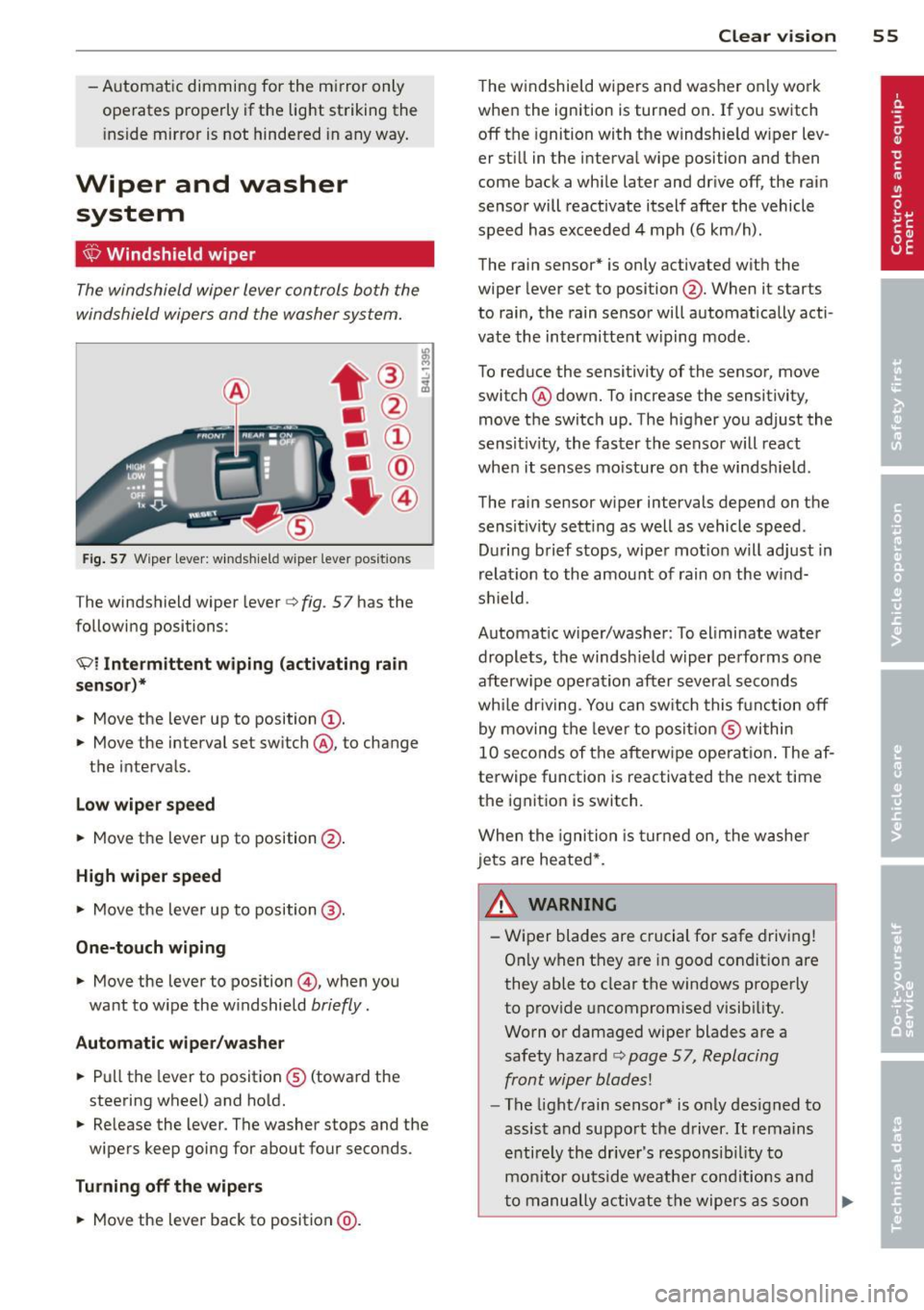
F ig . 57 Wiper lever: w inds hie ld w iper lever positions
The windshield wiper lever c> fig. 57 has the
following positions:
Ql Intermittent wiping (activating rain
senso r)*
.. Move the lever up to position@.
.. Move the interval set sw itch @, to change
t h e interva ls.
Low wiper speed
.. Move the lever up to position@.
High wiper speed
.,. Move the lever up to position @.
One-touch wiping
.. Move the lever to position @, when you
want to w ipe the w indshield
briefly .
Automatic wiper /w asher
.. Pu ll the lever to posit ion ® (toward the
steering wheel) and ho ld.
.. Re lease the lever . The washer stops and the
wipers keep going for about four seconds.
Turning off th e wiper s
.. Move the lever back to position @ .
Clear vi sion 55
The w indshield wipers and washe r only work
whe n the ignition is turned on . If you switch
off the ignition with the w indshie ld w iper lev
er st ill in the interva l wipe position and then
come back a whi le later and drive off, the rai n
senso r will reactivate itsel f after the vehicle
speed has exceeded 4 mph (6 km/h) .
The rain sensor* is only activated with the
wiper lever set to position @. When it starts
to rain, the rain sensor will automat ically acti
vate the intermittent w iping mode.
To reduce the sensitivity of the sensor, move
switch ® down. To increase the sensitivity,
move t he switch up. The h igher you adjust the
sens it ivity, the faster the senso r will react
when it senses mo isture on the windsh ield .
The rain sensor w iper intervals depend on the
sensit ivity sett ing as well as vehicle speed.
D uring brief s tops, wipe r mot io n will adjust in
r elat ion to the amou nt of rain on the w ind
shield .
Automat ic w iper/was her : To eliminate water
drople ts, t he windsh ield wiper pe rforms o ne
afterw ipe ope ra tion after severa l seconds
whi le dr iv ing . You ca n sw itch this f unct ion off
by moving the leve r to posit io n ® within
10 seconds of the afterw ipe operat io n. The af
terwipe function is reactivated the next time
the ignitio n is switch.
When the igni tio n i s tur ned on, the washe r
jets are heated*.
& WARNING ~
- Wiper blades are crucial for safe drivi ng!
On ly when they are in good condit io n are
they able to clear the windows properly
to prov ide uncompromised visib ility.
Worn o r damaged wiper blades are a
safety haza rd
c> page 57, Replacing
front wip er blades!
- The light/rain senso r* is only des igned to
assis t and suppo rt the driver.
It rema ins
e ntire ly th e drive r's respo nsib il ity to
m onitor outside weathe r cond itions and
t o manu ally a ctiv ate the wipe rs as soo n
Page 62 of 280
60 Clear vis ion
Setting the magnetic deflection zone
A ppl ies to vehicles: with digital compass
The correct magnetic deflection zone must be
set in order to display the directions correctly.
©
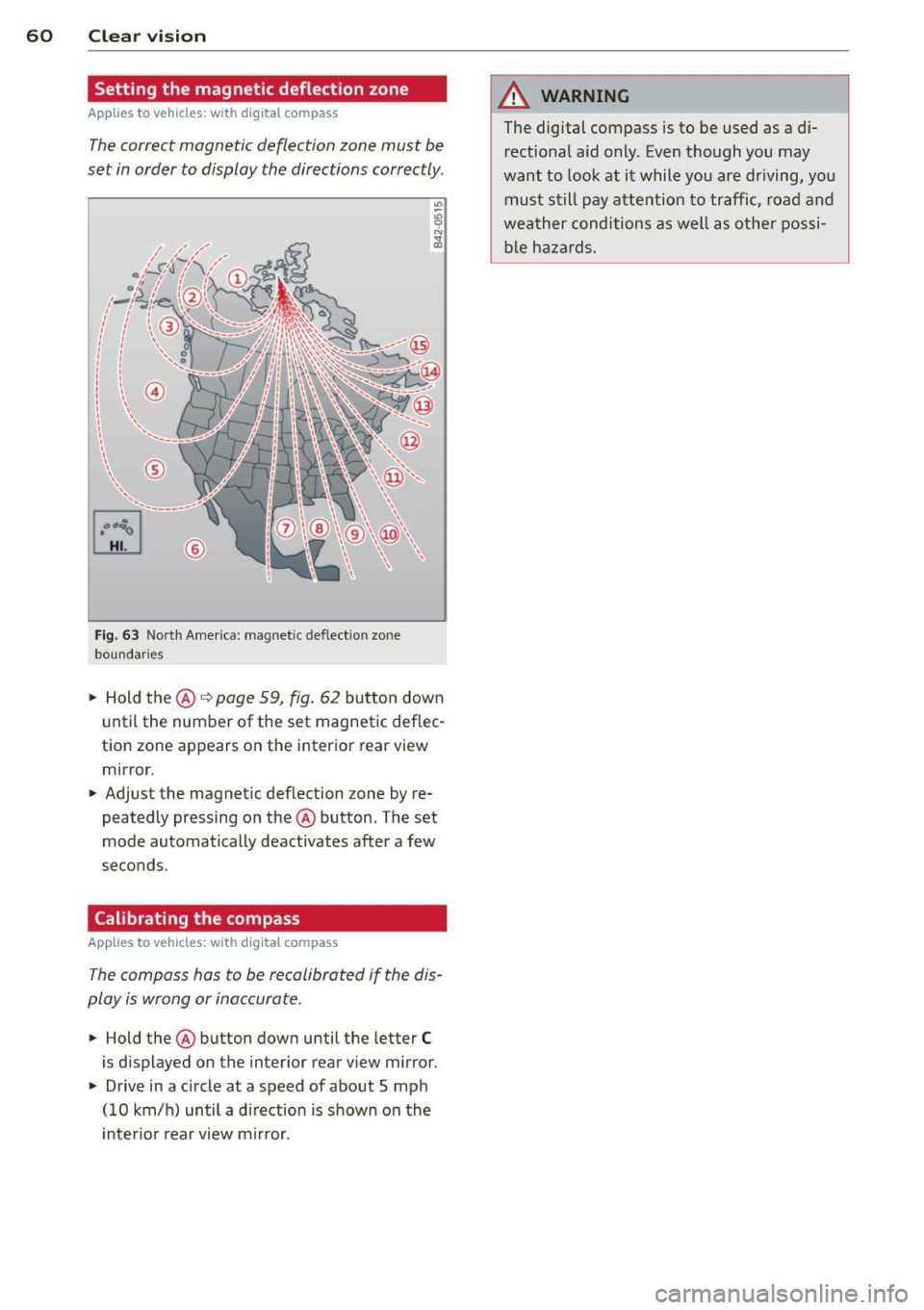
Fig. 63 North America: magnet ic def lect ion zone
boundaries
• Hold the@~ page 59, fig. 62 button down
u ntil the number of the set magnetic deflec
tion zone appears on the interior rear view
mirror .
• Adjust the magnetic deflection zone by re
peatedly pressing on the @button. The set
mode automatically deactivates after a few
seconds .
Calibrating the compass
Applies to vehicles: with digital compass
The compass has to be recalibrated if the dis
play is wrong or inaccurate.
• Hold the@ button down until the letter C
is displayed on the interior rear view m irror .
• Drive in a circle at a speed of about 5 mph
(10 km/h) until a d irection is shown on the
i nterior rear view m irror.
A WARNING
-
The digital compass is to be used as a di-
rectional aid only. Even though you may
want to look at it while you are driving, you
must still pay attent ion to traffic, road and
weather conditions as well as othe r possi
b le ha zards.
Page 64 of 280
62 Seats and storage
case of sudden braking or an accident, you
would not be ab le to brake or acce lerate!
Front passenger's seat
Always move the front passenger seat into
the rearmost position.
To avo id contact with the airbag wh ile i t is de
p loying, do not sit a ny closer to the inst ru
ment panel than necessary and always wear
the three-point safety be lt provided adjusted
correctly. We recommend that you adjust the passenger's seat in the following manner:
... Move the front passenger seat into the rear
most position of the fore and aft adjustment
range
¢ .&.. in Why is your seat adjustment
so important? on page
61.
... Bring the backrest up to an (almost) upright
pos it ion .
Do not ride w ith the seat reclined.
... Adjust the head restraint so the upper edge
i s as
even as possible with the top of your
head. If that is not possib le, try to adjust
the head rest raint so that it is as close to
t h is position as possible
¢ page 65.
... Place your feet on the f loor in front of the
passenger's seat.
Adjusting front seats manually
Adjustment controls
Applies to vehicles: with manual seat adjustme nt
Various controls on the manual seats provide
a wide range for individual adjus tments.
==""" -®
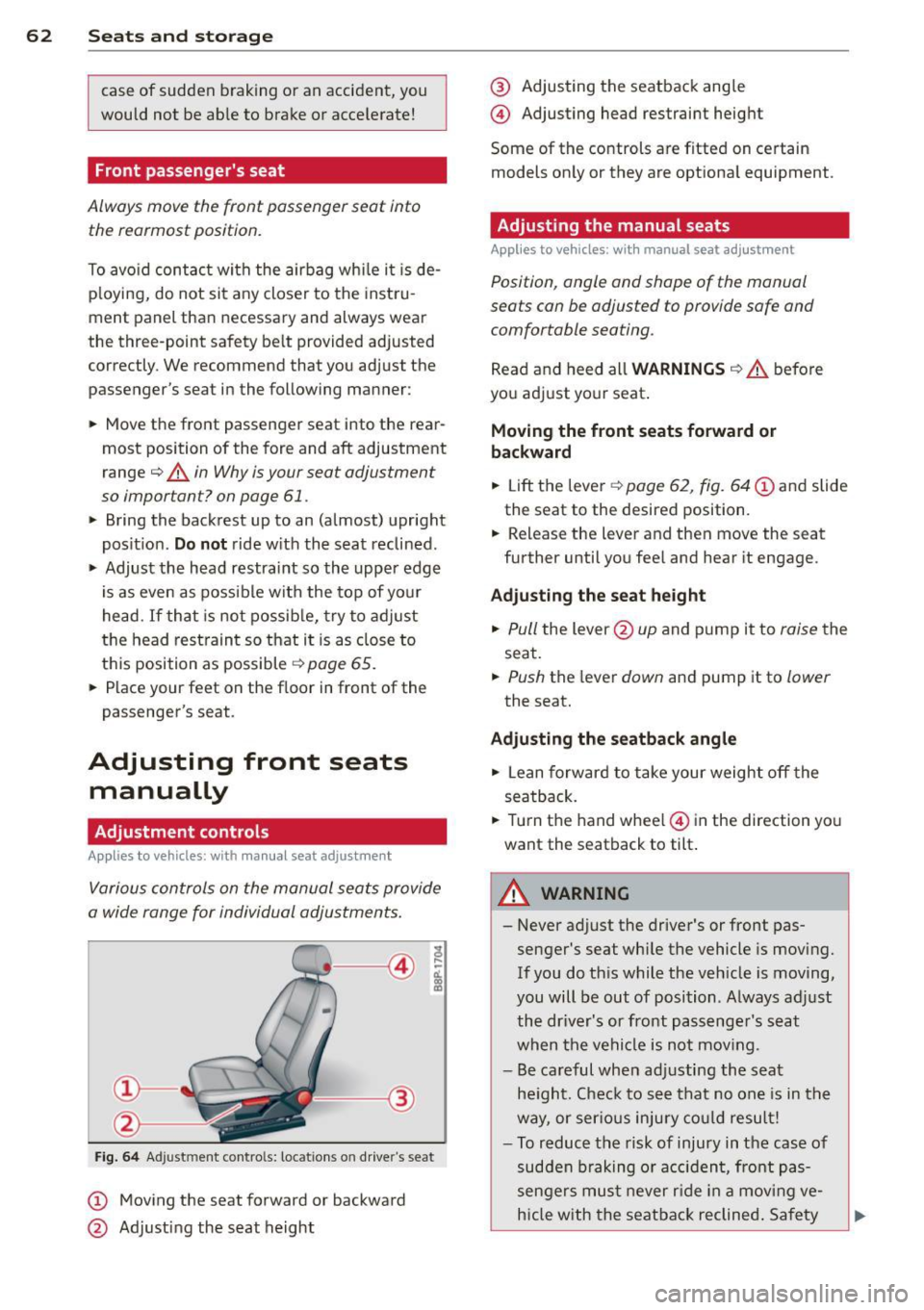
Fig . 6 4 Ad just ment contro ls: locat ions on drive r"s seat
CD Moving the seat forward or backward
@ Adjusting the seat height
@ Adjusting the seatback ang le
@ Adjusting head restraint height
Some of the co ntrols are fitted on certain
models on ly or they are optiona l equipment.
Adjusting the manual seats
Applies to vehicles: with manual seat adjust ment
Position, angle and shape of the manual
seats can be adjusted to provide safe and
comfortable seating.
Rea d and heed all WARNINGS ¢.&.. befo re
you adjust yo ur seat .
Moving the front seats forward or
backward
"' Lift the leve r¢ page 62, fig. 64 CD and slide
the seat to the desired position .
... Release the lever and then move the seat
further until you feel and hear it engage .
Ad justing the seat height
... Pull the lever @up and pump it to raise the
seat.
... Push the lever down and pump it to lower
the seat.
Adjusting the seatback angle
... Lean forward to take your weight off the
seatback .
... Tur n the hand wheel@ in the di rection yo u
want the seatback to tilt.
A WARNING
- Never adjust the driver's or front pas
senger's seat whi le the vehicle is moving.
If you do th is while the veh icle is moving,
you will be out of position . Always adjust
the dr iver's or front pass enge r's seat
when the vehi cle is not mov ing.
- Be careful when adj usting the seat
he ight. Check to see that no one is in t he
way, or ser io us inju ry co ul d result!
- To reduce the risk of injury in the case of
sudden b raking o r acciden t, front pas
senge rs mus t never r ide in a mov ing
ve
h icle with the seatback reclined . Sa fety
Page 81 of 280
Warm and cold Climate controls
Description
The air conditioner is fully automatic and is
designed to maintain a comfortable and uni
form climate inside the vehicle .
We recommend the following settings:
... Se lect and set a temperature between 64 °F
(+ 22 °C) and 84 °F (+28 °C).
... Press the
!AU TO ! button.
With this setting, you attain maximum com
fort in the least amount of time. Change this
setting, as desired, to meet your personal
needs.
The climate controls are a combination of
heating, ventilation and cooling systems,
which automatically reduce humidity and cool the air inside your vehicle.
The air temperature, air flow and air distribu
tion are automatica lly regulated to achieve
and maintain the desired passenger compart
ment temperature as quickly as possib le.
The system automatically compensates for
changes in the outside temperature and for
the intensity of the sunlight entering the vehi
cle. We recommend you use the
Automatic
mode c> page 81 for year-round comfort.
Please note the following:
Turn on the air conditioner to reduce humidity
in the vehicle. This also p revent the windows
from fogging up .
When the outside temperature is high and the
air is very hum id,
condensation from the
evaporator may drip under the vehicle . This is
normal and does not indicate a leak.
If the outside temperature is low, the fan nor
mally only switches to a h igher speed once
the engine coolant has warmed up sufficient
ly.
Warm and cold 79
T he air conditioner temporari ly switches off
when you drive off from a standstill using full
throttle to save engine power.
T he compressor also switches off if the cool
ant temperature is too high so that the engine
can be adequately cooled under extreme
l oads.
Air pollutants filter
T he air pollutants filter (a combined particle
filter and activated charcoa l filter) reduces or
eliminates outside air pollution (dust, or pol
l en) from entering the vehicle .
T he air pollutants filter must be changed at
the interva ls specified in yo ur Warranty
&
Maintenance booklet, so that the air condi
tioner can properly work.
If you drive your vehicle in an area with high
air pollution, the filter may need to be
changed more frequently than specified in
your Audi Warranty
& Maintenance booklet. If
in doubt, ask your authorized Audi Service Ad
visor for advice.
Energy management
To prevent the battery from being discharged
and to restore the ba lance of energy, compo
nents which require large amounts of energy
are temporarily cut back or switched off c> page 167. Heating systems in particular re
quire a great deal of energy. If you notice, for
example, that the rear window heater is not
heating, then it has been temporarily cut back
o r switched off by
energy management.
These systems are available again as soon as
the energy balance has been restored.
_& WARNING
.-----
Reduced visibility is dangerous and can
cause accidents .
- For safe driving it is very important that
all windows be free of ice, snow and con-
densation.
- Fully familiarize yourself with the proper
use and function of the heating and ven
tilation system and especia lly how to de
fog and defrost the windows.
Page 83 of 280
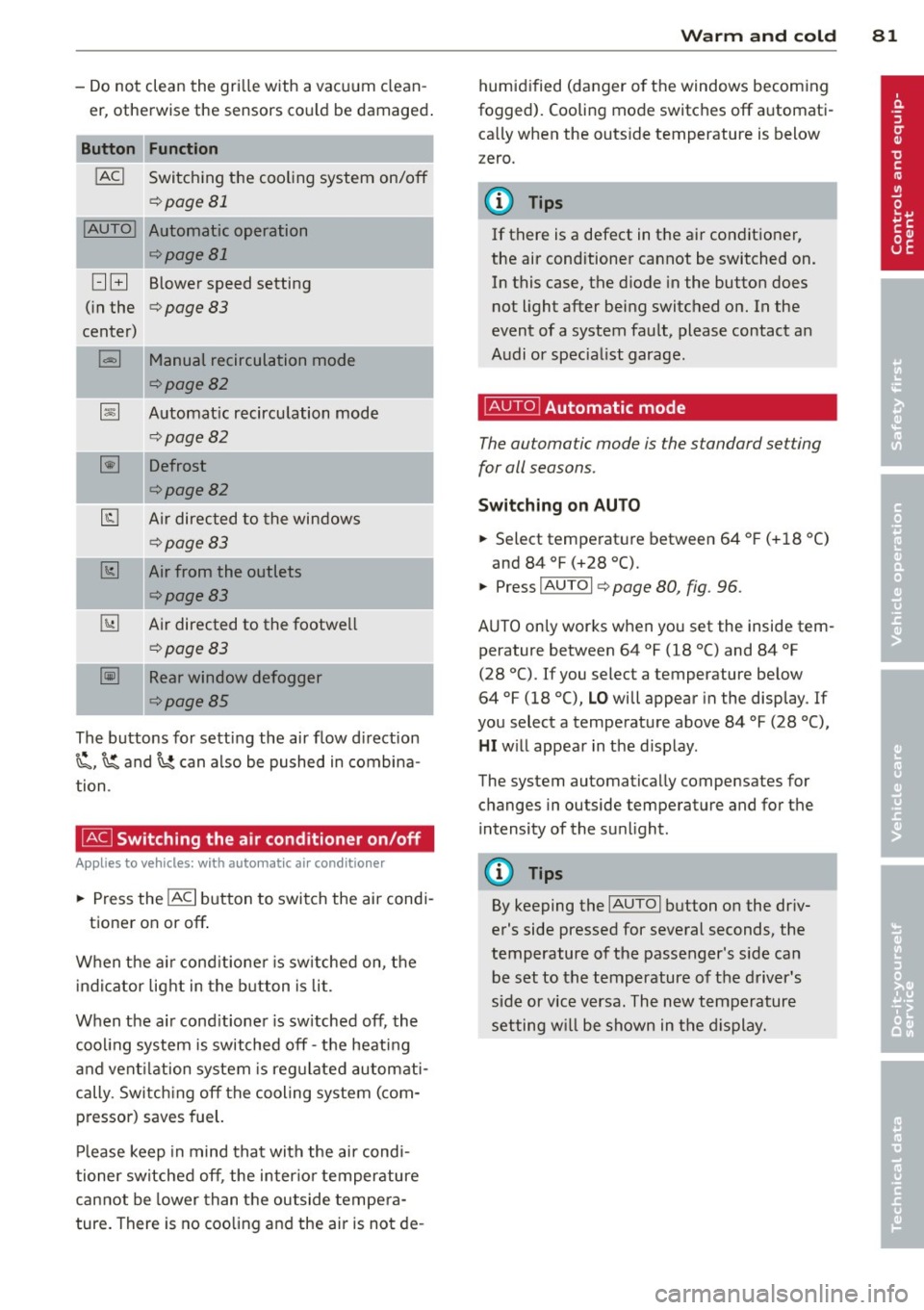
-Do not clean the gri lle with a vacuum clean
er, otherwise the sensors cou ld be damaged .
Function
!ACI Switching the cooling system on/off
q page 81
!AUTO I Automatic operation
qpage 81
[:] B Blower speed setting
( in the
q page 83
center)
l=I Manual recirculation mode
qpage82
~ Automat ic recircu lation mode
q page 82
~ Defrost
qpage82
@J Air directed to the windows
¢page83
[1;] Air from the outlets
qpage83
~ Air directed to the footwe ll
~page83
-= -·--~ Rear window defogger
¢page85
The buttons for sett ing the air flow d irection
~. ~and~ can also be pushed in combina
tion .
~ Switching the air conditioner on/off
Applies to vehicles: with a utomat ic a ir conditioner
... Press the !AC I button to switch the air cond i
tioner on or off .
When the a ir cond it ione r is sw itched on, t he
i ndicator light in the b utton is lit.
When the a ir cond it ioner is sw itched off, the
cooling system is switched off -th e heat ing
an d vent ilation system is reg ulated automati
cally. Sw itch ing off the cooling system ( com
pressor) saves fuel.
Pl ease keep in mind that with the air cond i
tioner switched off , the inter io r temperature
cannot be lower than the outside tempe ra
ture. There is no coo ling and the air is not de -
Warm and cold 81
humid ified (danger o f the windows becom ing
fogged). Cooling mode switches off a utomati
ca lly when the outs ide temperature is below
zero.
(D Tips
If there is a defect in the a ir conditioner,
the air conditioner cannot be switched on. In this case, the d iode in the button does
not light after being switched on. In the
event of a system fault, please contact an
A udi or specia list garage.
~ Automatic mode
The automatic mode is the standard setting
for all seasons .
Switching on AUTO
... Select tempe rat ure between 64 ° F (+ 18 °()
and 84 °F (+28 °C).
... Press
IAUTOI q page 80, fig. 96 .
AUTO on ly works when you set the inside tem
perature between 64 °f (18 °C) and 84 °f
(28 °C). If you select a temperature be low
64 °F (18 °(),
LO will appear in the display . If
you select a temperat ure above 84 °F (28 °C),
HI w ill appea r in t he d isp lay.
The system automatically compensates for changes in outside temperature and for the
i ntensity of the su nlight.
(D Tips
By keeping the IAUTOI button on the dr iv
er's side pressed for several seconds, the
temperature of the passenger's s ide ca n
be set to the temperature o f th e d river's
side or vice v ersa. The new temperature
setting w ill be shown in the d isplay.