ESP AUDI A3 2012 Owner´s Manual
[x] Cancel search | Manufacturer: AUDI, Model Year: 2012, Model line: A3, Model: AUDI A3 2012Pages: 280, PDF Size: 70.11 MB
Page 161 of 280
-Never attach two child restraint systems
to one tether strap or tether anchorage.
- Never attach a tether strap to a tie-down
hook in the luggage compartment.
- Never use child restraint tether ancho
rages to secure safety belts or other
kinds of occupant restraints.
- Never secure or attach any luggage or
other items to the LATCH lower ancho
rages or to the tether anchors.
-If a tether or other strap is used to at
tach a child restraint to the front passen ger seat, make sure that it is not so
t ight , that it causes the weight-sensi ng
mat to measure more weight than is ac
tually on the seat .
- The heav ier weight reg istered can make
the Advanced Airbag System work as
though an adult were on the seat and de
ploy the Advanced Ai rbag when it must
be s uppressed causing serious o r even
f atal injury to the child.
- If you mus t install a rearward facing
child safe ty seat o n the fron t passenger
seat beca use of exceptional circ ums tan
ces and the
PASSENGER AIR BAG OFF
light does not come on and stay on , im
med iately install the rear -facing child
safety seat in a rear seating position and
have the a irbag system inspected by you r
Audi dealer.
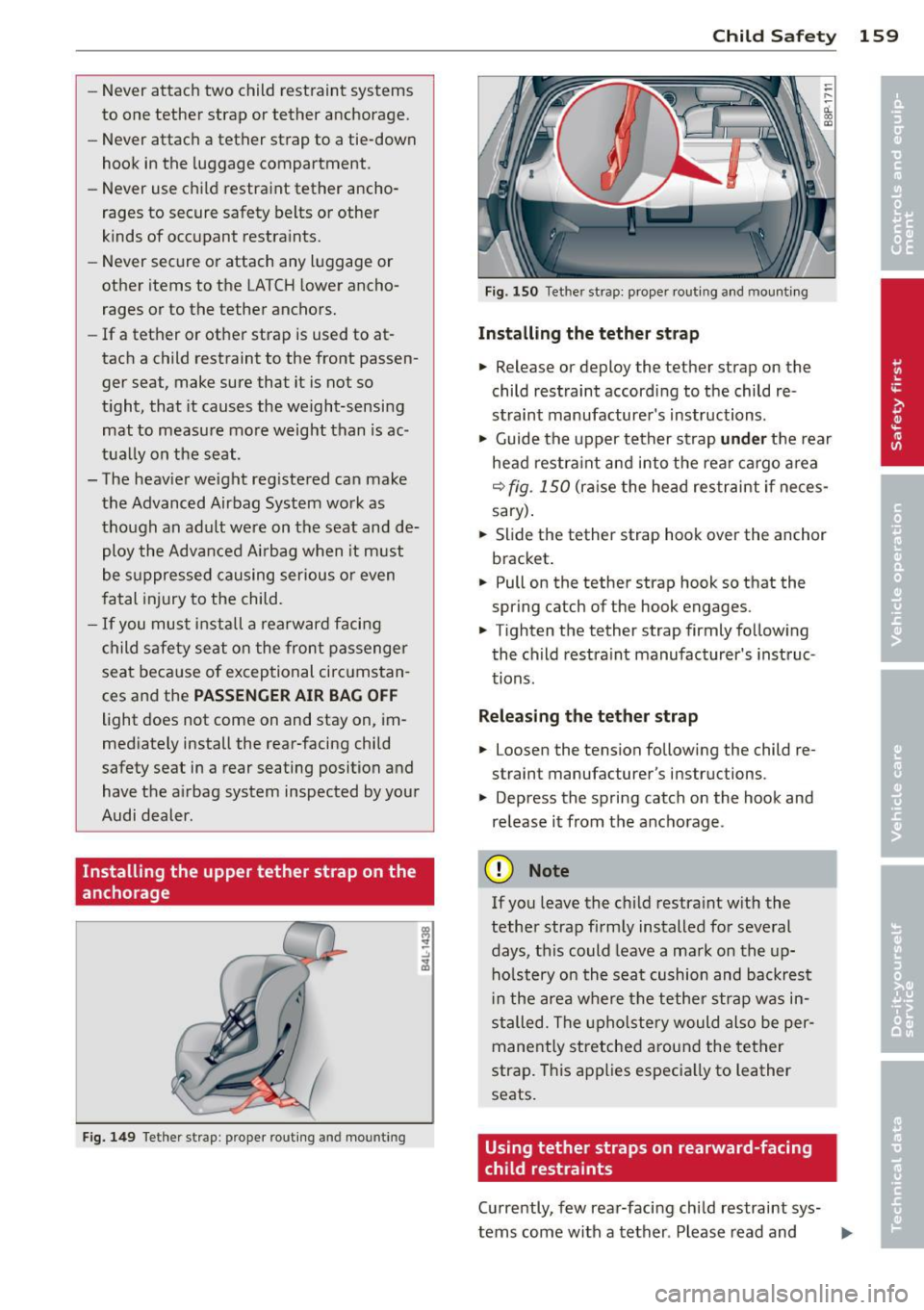
Installing the upper tether strap on the
anchorage
F ig. 1 49 Tether strap : prope r ro utin g and mountin g
Child S afety 159
Fig. 1 50 Tet her st rap: prope r routing an d mounti ng
Installing the tether str ap
.. Release or deploy the te ther s trap on the
child restraint according to the child re
straint manufacture r's instructions .
.. Guide the upper tether st rap
und er the rear
head restra int and into the rea r cargo a rea
r=;, fig . 150 (ra ise the head restraint if neces
sary) .
.. Slide the tether strap hook over the anchor
bracket.
.. Pull on the tether st rap hook so th at the
spring cat ch of the hook engages .
.. Tighten the tether strap firmly follow ing
the child restra int manufacturer's inst ruc
tions.
Relea sing the tether strap
.. Loosen the tension following the ch ild re
strain t manufac turer 's ins truc tions .
.. Depress the spring catch on the hook and
release it from the anchorage .
(D Note
If you leave the child restraint w ith the
tether strap firm ly installed for several
days, this could leave a ma rk on the up
ho lstery on the seat cushion and backrest
i n the area where the tether strap was in
stalled. The upholstery would also be per
mane ntly stretched a round the tether
strap. T his app lies especia lly to leather
seats.
Using tether straps on rearward-facing
child restraints
Cu rrently, few rear-facing child restraint sys-
tems come with a tether . Please read and ...,
Page 163 of 280
Intelligent technology Notice about data
recorded by vehicle
control modules
Your vehicle is not equipped with an Event Da
ta Recorder (EDR), installed by some manu
facturers for the express purpose of capturing
data for retrieval after an accident or crash
event. EDR's are sometimes called "crash re
corders".
Some state laws restrict the retr ieval or down
loading of data stored by EDR's that were in
stalled in a vehicle for the express purpose of
retrieving data after an accident or crash
event without the owner's consent.
Although your vehicle is not equipped with an
EDR, it is equipped with a number of electron
ic control modules for various vehicle systems
such as, for examp le, engine function, emis
sion control, as well as for the airbags and
safety belts.
These electronic control modules also record
vehicle-related data during norma l vehicle op
eration for diagnostic and repair purposes.
The recording capacity of the electronic con
trol modules is limited to data (no sound is re
corded) and only a small amount of data is ac
tually recorded over a very limited period of
time and stored when a system fault or other
condition is sensed by a control unit. Some of
the data then stored may relate to vehicle
speed, direction, braking as we ll as restraint
system use and performance in the event of a
crash or other condition. Stored data can only be read and downloaded with special equip
ment.
Electronic Stabilization
Program (ESP)
Description
ESP helps to improve road holding and vehicle
dynamics to help reduce the probability of
skidding and loss of veh icle control. It works
only when the engine is running. ESP detects
Intelligent technology 161
certain difficult driving situations, including
when the vehicle is beginning to spin (yaw)
out of control and helps you to get the veh icle
back under control by se lectively braking the
wheels, and/or reducing engine power and
providing steering ass istance to help hold the
vehicle on the driver's intended course. The in
dicator light
G] in the instrument cluster
blinks when ESP is taking action to help you
control the vehicle.
ESP has limitations. It is important to remem
ber that ESP cannot overcome the laws of
physics.
It will not always be able to help out
under all conditions you may come up against.
For example, ESP may not always be able to
help you master situations where there is a
sudden change in the coefficient of friction of
the road surface. When there is a section of dry road that is suddenly covered with water,
slush or snow, ESP cannot perform the same
way it would on the dry surface . If the vehicle
hydroplanes (rides on a cushion of water in
stead of the road surface), ESP will not be
able to help you steer the vehicle because con
tact with the pavement has been interrupted
and the vehicle cannot be braked or steered .
During fast cornering, particularly on winding
roads, ESP cannot always deal as effectively
with difficult driving situations as at lower
speeds. When towing a trailer, ESP is not able
to help you regain control as it would if you
were not tow ing a trailer.
A lways adjust your speed and driving style to
road, traffic; and weather conditions. ESP can
not override the vehicle's physical limits, in
crease the available traction, or keep a vehicle
on the road if road departure is a result of
driver inattention. Instead, ESP improves the
poss ibility of keeping the vehicle under con
trol and on the road dur ing extreme maneu
vers by using the driver's steering inputs to
help keep the vehicle going in the intended di
rection. If you are traveling at a speed that
causes you to run off the road before ESP can
provide any assistance, you may not experi
ence the benefits of ESP .
•
•
Page 164 of 280
162 Intelligent technology
ESP includes and/or works together with the
anti-lock brake system (ABS), brake assist sys
tem and anti-slip regulation (ASR). ESP is
switched on all the time. In certain situations
when you need less tract ion, you ca n sw itch
off ESP by pressing the button [g] _ Be sure to
switch ESP on again when you no longer need l ess traction .
Anti-lock b raking system (ABS)
ABS prevents the wheels from locking up
when braking. The vehicle can still be steered
even during hard braking. Apply steady pres
sure to the brake pedal. Do not pump the ped
al. A puls ing in the b rake pedal ind icates that
the system is he lp ing you to b ra ke the vehicle.
Br ake a ssist system
The brake assist system can decrease braking
d istance. It increases braking power when the
d river presses the brake pedal quick ly in eme r
gency situations. You must press and hold the
brake peda l until the si tuation is over .
Anti-slip regulation (ASR)
ASR reduces engine power when the drive
wheels begin to spin and adapts the fo rce to
the road co ndit io ns. This makes it easier to
start, ac celerate and drive up hills.
Electronic differential loc k (EDL )
The EDL brakes wheels that are spinn ing and
transfers the drive power to the other drive
wheel or whee ls if the vehicle is equipped with
a ll-wheel d rive*. This funct ion is available up
to abo ut 60 mph (100 km/h).
In extreme cases, EDL automat ically switches
off to help keep the brake on the braked whee l
from ove rheating . EDL w il l switch on aga in au
tomatically when conditions have returned to
n o rmal.
& WARNING
- ESP, A BS, ASR an d EDL cannot ove rcome
the laws of physics . This is espec ially im
portant on slippery or wet roads. If the
systems begin act ing to stab ilize your ve
hicle, you should immediately cha nge your speed to matc
h the road and t raffic
conditions. Do not let the increased safe
ty provided by these systems tempt you
to take risks. Do ing so w ill increase the
ris k of a loss of veh icle control , co llision
and serious pe rsonal inj uries .
- Always adapt your speed to road, traffic and weather conditions. The risk of los
ing control of the vehicle inc reases when
d riving too fast, espec ially through
curves and on slippe ry or wet roads, and
when dr iv ing too close to vehicles up
ahead. ESP, ABS, the brake assist system, EDL an d ASR cannot prevent collisions.
- Always accelera te with special care on
even, smooth s urfaces such as those that
are wet or covered with ice and snow.
The drive wheels can spin even w ith
these assistance systems that cannot al
ways he lp to red uce the risk of loss of ve
h icle control.
(D Tips
- ABS and ASR only work correct ly when
all four wheels are equipped with identi
cal tires. Diffe rent tire sizes can lead to a
reduction in engine powe r.
- You may hear noises when the systems
descr ibed are working .
- If the indicator light
D] or m (USA
mode ls)/ KC] (Canada models) appears,
t here may be a malfunction~
page 18,
~page 18.
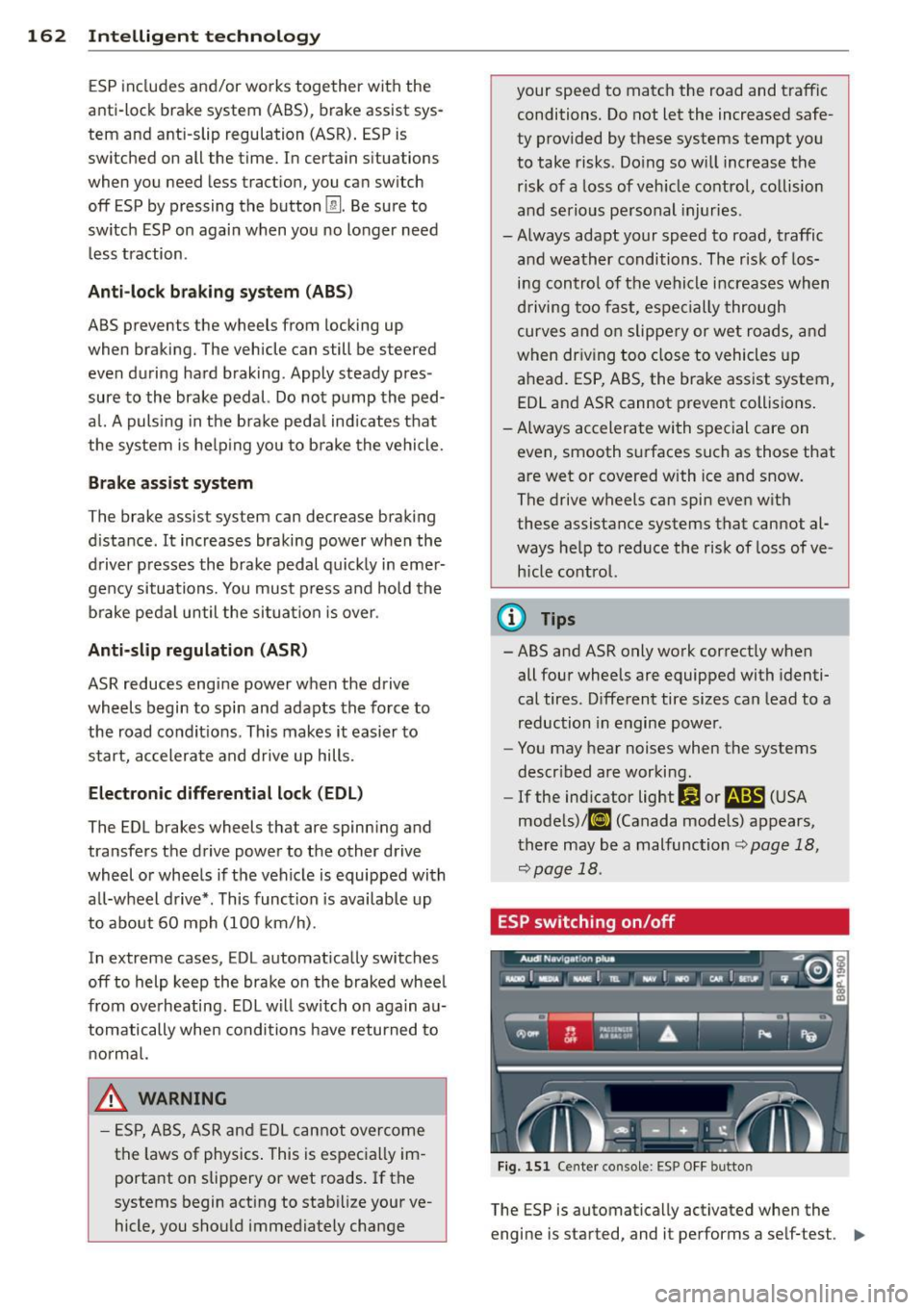
ESP switching on/off
Fig. 151 Ce nter conso le: ESP O FF butto n
The ESP is automat ically activated whe n the
engine is started, and it performs a se lf-test .
II>
Page 165 of 280

As soon as the test is completed, the system
is in normal operating mode.
Switching off
E SP should normally be activated at all times
because this ensures optimum vehicle stabil i
ty. In certa in situations, it might make sense
to a llow some slip . For example:
- Rocking the vehicle to free it when it is stuck
- Driving in deep snow or on loose ground
- Driving with snow cha ins
Press the
[!I button . The ESP indicator light I)
turns on and S tabil isat ion prog ram off ap
pears in the d isp lay. ASR deact ivates com
pletely and the stab ilizat ion effects from the
ESP system are lim ited.
S wi tc hing on
Press the [!I button again. The message S tab i·
li sa tion p rogram on
appears briefly in the dis
play.
A WARNING
You should only sw itch the ESP off if your
driving ability and the traffic s ituation per
m it. Please note that when ESP/ASR is de
act ivated, the drive whee ls can sp in on icy
and slippe ry roads and the vehi cle can
break away - danger of skidding!
(j) Tips
If A udi magnetic ride* is malfunctioning,
the ESP may not switch off or it may
sw itch off automatically.
Braking
General information
What affects braking efficiency?
Operating condit ions and d riving habit s
The brakes on today's automobi les are st ill
subject to wear, depending largely on operat
ing cond itions and dr iving habits
q .&. . On ve
hicles that are either driven mostly in stop
and -go city traffic or are driven hard, the
brake pads should be checked by your author-
Int ellig ent technolog y 163
ized Audi dea ler more often than specified in
the
W arra nty & M aintenance booklet. Failure
to have your brake pads inspected can result
in reduced brake performance.
On steep slopes, you sho uld use the b raking
effect of the engine. This way, you prevent un
necessary wear on the brake system. If you
must use your brakes, do not hold the brakes
down cont inuously. Pump the brakes at inter
vals.
Noises may occur when braking depending on
speed, braking force and outs ide cond it ions
such as temperature and humidity.
Mo isture o r road sal t
If you are driving faster than SO mph (80 km/
h) and the windshield wipers are on, the brake
pads will briefly touch the brake discs in regu
lar intervals so as to improve react ion time
when brak ing on wet surfaces. You, the driver,
will not not ice anything.
Under certain conditions, for example, when
driv ing through water or very heavy ra in, or
even after washing your veh icle, the braking
effect can be reduced due to moisture (or in
freez ing cond itions ice) on the brake pads. A
few cautious brake applications should dry off
the b ra ke pads or remove any ice coatings.
The effectiveness of the brakes ca n be reduced
when the vehicle is driven on a salt-cove red
road and the brakes are not used. l ikewise,
you clean off accumulated salt coating from brake d iscs and pads w ith a few cautio us ap
plications o f the b ra ke
¢ .&, .
Corrosion
T here may be a tendency for di rt to b uild up
o n the brake pads and corros ion to fo rm on
the d iscs if the car is not d riven regu larly or
o nly for short tr ips w ith litt le use of the
brakes.
If the brakes a re not used frequently, o r if cor
ros ion has formed on the discs, it is adv isable
to clean off t he pads and d iscs by braking
firmly a few times from a moderately high
speed ~.&. . .,.
•
•
Page 167 of 280

However, do not expect that the ABS shortens
braking distance under
all circumstances.
When driving on grave l or on newly fallen
snow on top of icy surfaces, braking distance may be even longer, therefore, under these
circumstances, it is especially important that
you dr ive slowly and with great care .
How th e ABS syste m work s
An automatic check is made when a speed of
about 4 mph (6 km/h) is reached. When this
happens, a pumping noise can be heard .
If an individua l wheel begins to rotate too
slowly in relation to vehicle speed and tends
to lock, the ABS automatically reduces brake
pressure to prevent that wheel from locking.
This automatic adjustment process will cause
a
s light vib ration of the brake pedal and some
noises to alert you that vehicle speed must be
adapted to existing road and traff ic condi
tions .
A WARNING
Although the ABS is very effective, always
remember that bra king capability is limit
ed by t ire traction. Always adjust your dr iv
ing speed according to the road and traffic
conditions . Do not let the extra sa fe ty af
forded bytheABStemptyou into taking
extra r isks. The ABS cannot overcome the
laws of physics.
(D Tips
- If ABS is not functioning properly, a
warning light will come on. See
¢ page 18.
- If a fault occurs in the ABS, the EDL is al
so not functioning . This is indicated by
the ABS warning light.
Brake assistant
The broke assistant is designed to achieve the
optimum broking effect .
The brake assistan t helps to increase the ef
fective
b raking power and thus to achieve a
shorter stopping distance . If the driver
Int ellig ent technolog y 165
presses the brake peda l very quick ly, the brake
assistant automatically boosts the braking
force to the max imum level, up to the po int
where the anti-lock brake function (ABS) inter
venes to stop the whee ls from locking. You
shou ld then keep the brake peda l pressed un
t il the vehicle has braked to the required
speed. The brake assistant switches itself off
as soon as you release the b ra ke peda l.
The brake ass istant wi ll not be operative if
there is a ma lfunction in the ABS.
A WARNING
P lease remember that the acc ident risk a l
ways increases if you drive too fast, espe
cially in corners or on a slippe ry road, o r if
you follow the vehicle ahead of yo u too
closely . An increased accident risk cannot
be compensated even by the brake assis
tant, so always mainta in a safe speed.
Electro-mechanical
power assist
The electro-mechanical power assist helps
the driver when steering .
The degree of power assist is electronically
matched to vehicle speed .
The power steering system assists the driver
so that he can steer the vehicle with reduced physical effort.
Power steering will not work if t he engine is
off . As a result, the steering wheel will be hard
to turn .
A WARNING
If the system deve lops a problem, you
must seek qualified professiona l assis
tance.
(D Note
If there is an e lectronic malfunction, ser
votronic
will still function like a conven-
tiona l power steering system, providing a
constant steering support force that is no
-
l onge r proportionate to the vehicle speed. ..,.
•
•
Page 168 of 280
166 Intelligent technolog y
This is most noticeab le when turning the
steering whee l at low speeds (for examp le
when parking), -more effort will be re
quired than usual.
- Be aware of the different than usual
steering response and adjust your steer
i ng force accord ingly.
- Have the problem checked and set right
by an author ized Audi dealer as soon as
possible.
- If a steering malfunct ion occurs, this is
s ignaled with the
ts ~ or .• indicator
li ghts and a warning tone, see.
(D Tips
- If the power steering system shou ld fail,
or if the eng ine is not running (for exam
ple, while being towed), you will st ill be
able to steer the veh icle. However, more
effort will be req uired to do so.
- If the power steering system is not func
tioning properly, co ntact your authorized
A udi dealer immediate ly.
Driving with your
quattro ®
Appl ies to vehicles: with All Whee l Drive
With All Wheel Drive, all four wheels are driv
en.
General information
W ith All Whee l Dr ive, power is d istributed to
a ll fo ur wheels . This happens automa tic a lly
depending on your driv ing sty le and the road
conditions at the time . See also
¢ page 161.
Winter tires
When dr iv ing in the w inte r, your ve hicle w it h
A ll Whee l Drive has an advantage, even wi th
reg ular t ires. In win ter road condi tions it may
be adv isable to mo unt winter tires (o r all-sea
son tires) for improved driveability and b rak
ing: these tires must be mounted on all four
wheels. See also ¢ page 22 7, Winter tires.
Snow chains
Where snow chains are manda to ry on ce rtain
roads, this norma lly also app lies to ve hicles
with all-wheel drive¢
page 228, Snow
chains.
Replacing wheels /tires
Vehicles with A ll Wheel D rive must a lways
have t ires o f the same s ize. A lso avoi d tires
with different t read depths . For deta ils see
page
¢ page 223, New tires and replacing
tires and wheels .
Off-Road driving?
Your Audi does no t have enough g round clea r
ance to be used as an off-road vehicle .
It is
therefore bes t to avoid rough tracks a nd un
even terrain as much as possib le . Also refer to
¢ page 171.
A WARNING
-
Always ad just your dr iv ing to road and traf-
f ic conditions. Do not let the extra safety
afforded by the all-wheel dr ive tempt you
i nto ta king extra risks.
- Although the quattro ®all-wheel dr ive is
very effect ive, a lways remember that
b rak ing capac ity is limited by tire trac
tion . You should therefore not d rive at
excessive speeds on icy or slippe ry road
sur faces.
- On wet road surfa ces, be careful not to
d rive too fast because the front whee ls
could begin to slide on top of the water
(hydroplaning). If this sho uld occ ur, you
will have no warning from a s udden in
crease in eng ine speed as w it h a front
wheel d rive veh icle. Always drive at
speeds which are adjusted to the road
conditions - risk of c rash!
Page 170 of 280
168 Intelligent technology
If starting capability is jeopa rdized due to en
ergy consumption, a message appears in the
driver information disp lay.
You have to start the eng ine to charge the
battery.
With the engine running
A lthough electrical energy is generated when
the vehicle is be ing driven, the battery can be
come discha rged. This happens mos tly when
little e nergy is be ing generated and a great
dea l consumed and the battery's state o f
charge is not optima l.
To br ing the energy balance back into equili
brium, cons umers which require especia lly
l arge amo unts of energy are temporari ly c ut
back or switched off. Heating systems in par
ticular requ ire a great dea l of energy. If you
notice, for example, that the heated seats* or
the heated rear window are not heating, they have been temporar ily cut back or switched
off. These systems will be ava ilable again as
soon as the energy ba lance has bee n restored.
You will a lso notice that engine idle speed has
been increased s lightly . This is norma l and not
a cause fo r co ncern . By increas ing engine idle
speed the add itiona l ene rgy required is gene r
ated and the ba tte ry is charged.
Driver notification in the instrument
cluster display
If batte ry power drops into the range w here it
can limit the ab ility of the engine to start, th is
is shown in the instrument cluster display
with the following driver message:
(•) Low batter y charge : batte ry will be
charged while dr iving
This notif ication reminds you tha t the s tarti ng
capability of the engine may be limited. As
soon as you start d riving again, the battery
will be recharged and the notification wi ll go
out.
Driver notification appears and goes out
again
If this driver notif ication appears after the ig
nition is t urned on or whi le driving and it goes
out again after a while, the battery has been
adequately recharged.
Driver notification appea rs and doe s not
go out again
If this driver notif ication appears after the ig
nition is turned on or whi le driving and does
not go out again, the battery 's state of charge
is not in the optima l range. Starting ab ility is
rest ricted . H ave t he battery chec ked as soon
as possib le by an autho rized Aud i dea le r o r
qualified wo rks hop.
Page 173 of 280
-Have your vehicle maintained properly
and in accordance with the service rec
ommendations in your Warranty
&
Maintenance booklet.
- Lack of proper maintenance as well as
improper use of the vehicle will impair
the function of the emission control
system and could lead to damage.
@ For the sake of the environment
Even when the Emission Control System is
operating properly, the exhaust gas can
have a sulfur-like exhaust gas smell under
some operating states. This depends on
the sulfur content of the fuel being used .
Using a different brand of fuel may help,
or filling the tank w ith lead-free super
grade gasoline.
Diesel particulate filter
Ap plies to vehicles: with diesel partic ul ate filter
The diesel particulate filter filters nearly al l of
the soot part icles out of the exhaust. The fi l
ter cleans itse lf automatically under normal
driving conditions . If the fi lter cannot clean it
self (for example, because you are only driving
short distances), the filter becomes clogged
with soot and the
II symbol for the diesel
particulate filter illuminates
c> page 22.
A WARNING
- Do not park your vehicle over flammable
materials such as grass or leaves because
the high temperature of the diesel par
t icu late filter could start a fire .
- Do not apply an underbody protectant in
the exhaust system a rea or a fire could
start.
(D Tip s
-When the diesel particulate filter be
comes saturated, the engine speed in
creases to approximate ly 1,500 rpm
while the vehicle is in motion to init iate
the cleaning of the diesel particulate fil
ter a utomatically without the warning
l amp lighting up . If the warning lamp
Dri vin g and en vironm ent 171
Ill sti ll appears, you shou ld drive to a
qualified workshop .
Avoid damaging the
vehicle
When you are driving on poor roads, or over
curbs, steep ramps, etc., make certain that
low -lying parts such as spo ilers and exhaust
system parts do not bottom out and get dam
aged.
This is espec ially true for veh icles with low
slung chassis (sports chassis) and fully loaded
vehicles.
Operate your vehicle
economically and minimize pollution
General
Your personal style of driving will determine
the economy of your vehicle, as well as ex
haust and noise Levels.
Fuel economy, env ironmenta l impact, and
wear on your eng ine, brakes and tires largely
depend on three facto rs:
- your personal driving style
- operating conditions
- technical limitations
If you ant ic ipate wha t you need to do next and
drive economically, you can easily cut your
fuel consumptio n by 10-15 percent . This sec
tion wi ll give you some tips on how you can
help the env ironment and your pocketbook.
(D Tips
The consumption estimates as published
by ENVIRONMENTAL PROTECTION AGENCY
(EPA) and Transport Canada may not corre
spond to your actual consumption on the road, which will vary depending upon vehi
cle load and speed, road and weather con
dit ions, trip length, etc.
•
•
Page 174 of 280
172 Driving and en vironm ent
Drive smoothly and keep a lookout
ahead
Vehicles use the most fuel when they are ac
celerating.
Avoid unnecessary accelerating and braking .
Vehicles use the most fuel when they are ac
celerati ng. If you anticipate what is go ing to
happen next, you will need to brake less and,
thus , accelerate less . let the vehicle coast
whenever poss ible -fo r example whe n you see
th at the next traffic ligh t is red.
Avoid full throttle
Driving at moderate speeds saves fuel and
improves your mileage.
,. Try and keep well be low your car's max i-
mum speed .
Accelerating gently reduces fuel consump
tion, engine wear, and does not disturb the
env ironment.
Fuel consumption, ex ha ust em issions and en
g ine no ise increase d isproportiona tely at hig h
speeds . If you dr ive at approximately three
qua rters of top speed, fuel consumption will
be reduced by one ha lf . Never dr ive faster
tha n the posted speed limit a nd weather con
d it ions permit.
Reducing unnecessary idling
E ven when your car is just idling it burns up
fuel.
,. Shut the engine off when you a re not dr iv
ing the vehicle.
,. Do not warm up the veh icle by letting the
engi ne run at idle.
It makes sense to shut off the eng ine in traff ic
jams, when waiting for trai ns to pass at ra il
road cros sings, or at t raffic ligh ts that have
l ong wa its on red. Turning the engine o ff fo r
just 30 -40 seconds saves more fue l than is
bu rne d starting the engine again.
It takes a long t ime for the engine to warm up
fully when it is running at id le . However, wea r
and noxious emissions are espec ia lly high
when the eng ine is wa rm ing up. So you shou ld
drive away as soon as yo u start the engine and
avo id running at high RPMs w hile the eng ine
i s s till warm ing up .
(D Note
Do not leave engine idling unattended af
ter start ing . If warni ng lig hts sho uld come
o n t o indicate improper ope ration, they
would go unheeded . Extended idli ng also
produ ces heat , w hich could result in ove r
hea ting or other dam age to the veh icle or
other property .
Regular maintenance
A badly tuned engine unne cessarily wastes a
lo t of fuel.
,. Have your ve hicle serviced at reg ular inter-
vals.
By havi ng your ve hicle regu larly serv iced by an
a utho rized Aud i deale r helps to ensure that it
runs properly and econom ica lly. The cond it io n
of your ve hicle not only affe cts i ts safety and
abili ty to ho ld i ts va lue , it al so a ffects
fuel
con sumption .
Check your oil each time you fill your tank .
The amount of oi l used is re lated to engine
load and speed .
It is normal for the oil consumption of a new
engine to reach its lowest value after a certa in
mileage has bee n driven .
You must drive your vehicle about 3,000 mi les
(S,000 kilometers) before you can properly
assess oil consumpt ion.
T his also app lies to fue l cons umption and en
gine o utp ut.
Q) Note
- Have your veh icle ma inta ined proper ly
and i n acco rdance with the service rec
ommendations in your Warranty
&
Page 177 of 280
must install extended mirrors. I t is important
that you
always have clear vision to the rear.
A WARNING -
After removing the tra ile r hitch, do not
store it in your vehicle. In case of s udden
braking , the hitch could fly forward and in
jure you or your passengers .
Operating instructions
Maximum trailer weight
A trailer for your ve hicle is limited to a typica l
class 1 o r class 2 trailer.
Trailer l oad di stribut ion
Be s ure the load in the trai ler is he ld sec urely
in place to guard aga inst shift ing, be it for
ward, backward or sideways.
Never allow a passenger to ride in a trailer
~ &. in Driving instructions on page 176 .
Tire pressure
When tow ing a tra ile r, i nflate the ti res of yo ur
ve hicl e to the co ld tire pressure listed u nder
"Full load" on the sticker on the r igh t door
jamb . Inflate trai ler ti res to trai ler and tire
manufacturers' specifications.
Lights
The he adlig ht setti ngs should be che cked w ith
the trailer a ttached be fore dr iv ing off . Adjus t
as necessary so that you can see the road
a h ead but not blind o ncoming traff ic .
C hec k prope r wo rking of vehicle a nd t ra ile r
lights.
Safety chains
B e s ure tra ile r safe ty cha ins are p roperly con
nected from the t railer to the hitch on the ve
hicl e. Leave e no ugh s lack in the chains to pe r
mi t turning corners . Whe n you ins tall safe ty
ch ains, m ake s ure they w ill not drag on the
road when yo u are driving .
The c ha ins shou ld cross un der th e tra ile r
t ongue to prevent it from droppi ng in case of
separat ion from the h itch.
Trailer towin g 175
Driving instructions
Driving with a trailer always requires extra
care and consideration .
To obtain the best possible handli ng of vehicle
and trailer, please note the fo llow ing:
... Do not tow a loaded t railer w hen you r ca r it
self is not loaded .
... Be especially caref ul when pass ing other ve
hicles .
... Obse rve speed lim its .
... Do not dr ive at the maximum permissib le
speed.
... Always app ly brakes e arly .
... Mon itor the tempe rature g auge.
Weight distribution
Towing a loaded t railer w ith an em pty car re
su lts in a highly unstab le distrib ution of
weig ht. If th is cannot be avoided d rive at very
l ow speed s on ly t o a void t he ri sk of losi ng
stee ring cont rol.
A "ba lanced " rig is easier to operate and con
tr ol. Th is means t hat the tow vehicle should
b e lo ade d to t he e xten t possible and per miss i
ble while keep ing t he tr ailer a s light as possi
ble under the c ircu mstances . Wheneve r poss i
ble, transfe r some ca rgo to the lugga ge com
partment of the tow vehicle w hile obse rv in g
tong ue load requ irements and vehicle load ing
consideratio ns.
Speed
The higher the speed, the mo re di fficu lt it be
comes for the driver to contro l the rig . Do not
drive at the maximum permissib le speed. Re
duce your speed even more under unfavo rable
load, weather or wind conditions - partic ularly
whe n going downhill .
Red uce veh icle speed
immediately if the trail
er shows t he slig htest s ign of sway ing.
Do not
try to stop the swaying by accelerating .
Observe speed limits . In some a reas speeds
f or vehicles tow ing tra ile rs a re lower than for
r egular veh icles .
•
•