mirror AUDI A3 2012 Owner´s Manual
[x] Cancel search | Manufacturer: AUDI, Model Year: 2012, Model line: A3, Model: AUDI A3 2012Pages: 280, PDF Size: 70.11 MB
Page 11 of 280
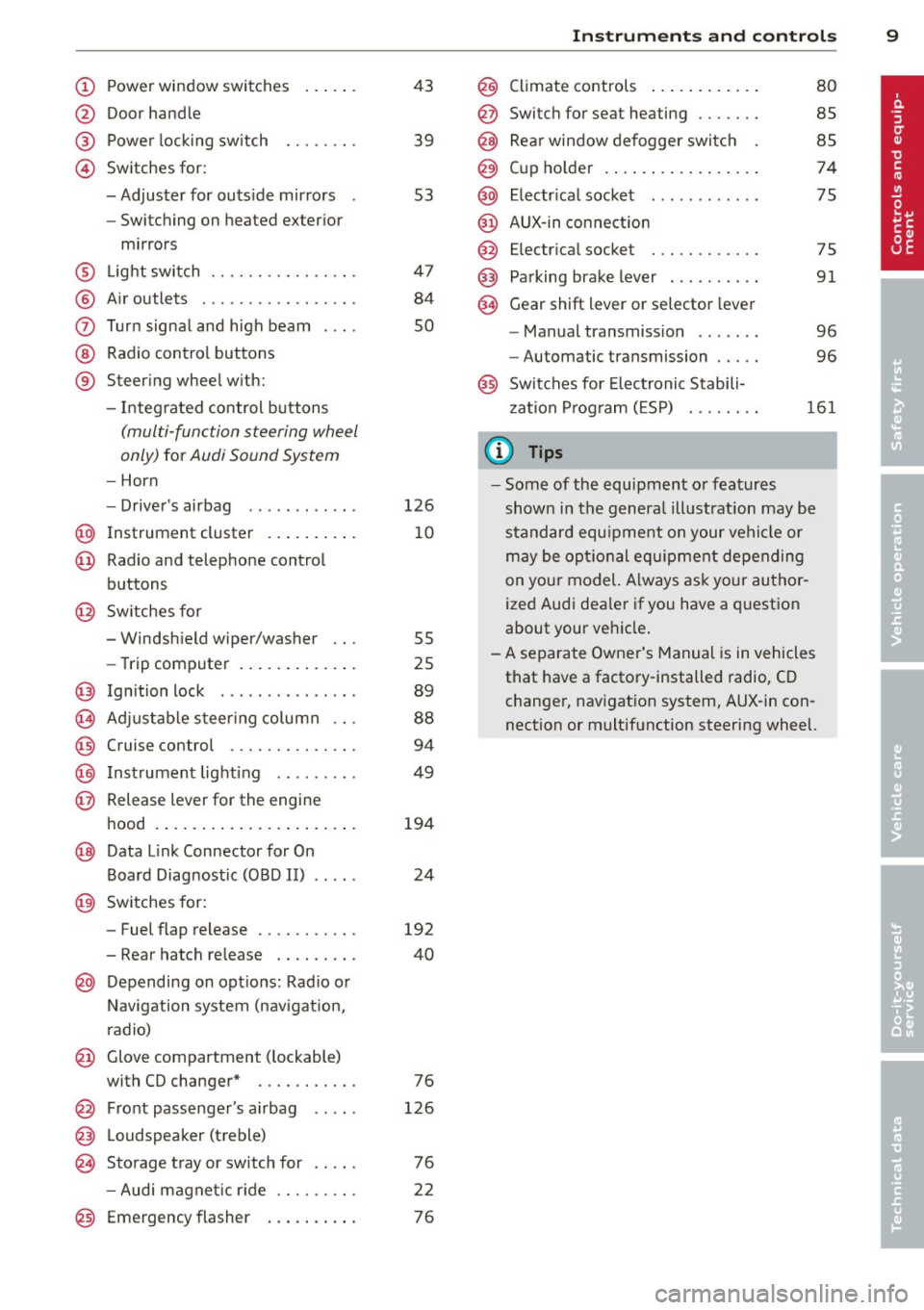
(!) Power window switches
@
®
©
Door handle
Power locking switch
Switches for:
- Adjuster for outs ide mirrors
- Switching on heated exter ior
mirrors
® L ight switch ............... .
® Air outlets ............ .... .
(J) Turn signal and high beam
@ Radio control buttons
® Steer ing wheel w ith:
- Integ rated control buttons
(multi -function steering wheel
only)
for Audi Sound System
- Horn
- Drive r's airbag ........... .
@ Instrument cluster .. ... .. .. .
@ Radio and telephone control
buttons
@ Sw itches for
- Windsh ield wiper/washer
- Trip computer ..... ... .. .. .
@ Ign ition lock .............. .
(8) Adjustable s teer ing column .. .
@) Cruise control ............. .
@) Inst rument lighting ........ .
@ Release lever for the engine
hood .... .. ... ..... ... .. .. .
@ Data Link Connector for On
Board Diagnostic (OBD II)
@ Sw itches for:
- Fuel flap release
43
39
53
47
84
so
126
10
55
25
89
88
94
49
194
24
192
- Rear hatch re lease . . . . . . . . . 40
@ Depending on opt ions: Rad io or
N avigation system (nav igat ion,
r adio)
@ Glove compartment ( lockable)
with CD changer * . . . . . . . . . . . 76
@ Front passenger's a irbag
@ L oudspeaker (treble)
~ Storage tray or sw itch for
126
76
- Audi magnet ic r ide . . . . . . . . . 22
@) Emergency flasher . . . . . . . . . . 76
Instrument s and control s 9
@ Climate controls .. .. .. ..... .
@ Switch for seat heating ...... .
@ Rear window defogger switc h
@ Cup ho lder ....... .. .. ..... .
@ Electr ica l socket .. .. .... ... .
@ AUX -in connect ion
@ E lectr ica l socket ........... .
@) Pa rking brake lever .... .. .. . .
@ Gear shift lever or selector lever
- Manual transmission ...... .
- Automatic transmission .... .
80
85
85
74
75
75
91
96
96
@ Switches for Electronic Stabili
z ation P rog ram (ESP)
161
@ Tips
- Some of the equ ipment o r features
shown in the genera l ill ustrat ion may be
standard equ ipment on your vehi cle or
m ay be opt ional eq uipment depending
on your model. A lways ask your author
ized Aud i dea le r i f you have a quest ion
about your vehicle .
-A separate Owner's Manual is in vehicles
that have a factory-installed radio, CD
change r, nav igat ion system, AUX-in con
nection or multifunction steering wheel.
Page 55 of 280
Luggage compartment light
A dome light in the rear roof liner illuminates
the luggage comportment. An additional
light is provided on the inside of the rear lid.
The light is located on the left side of the
trunk.
With the switch at the center position, the
rear dome light is automatically switched on
as soon as the rear lid is opened. The rear
dome light goes out 30 seconds after the rear
lid is closed .
If the rear lid is left open for more than 10 mi
nutes, both the rear dome light and the light
i n rear lid are switched off to conse rve the
battery charge.
Vision
Sun visors
Applies to vehicles: with lig ht package o r ill umin ated va n
ity m irror
Using the sun visors makes driving safer.
l
-
Fig. 5 3 Sun visor
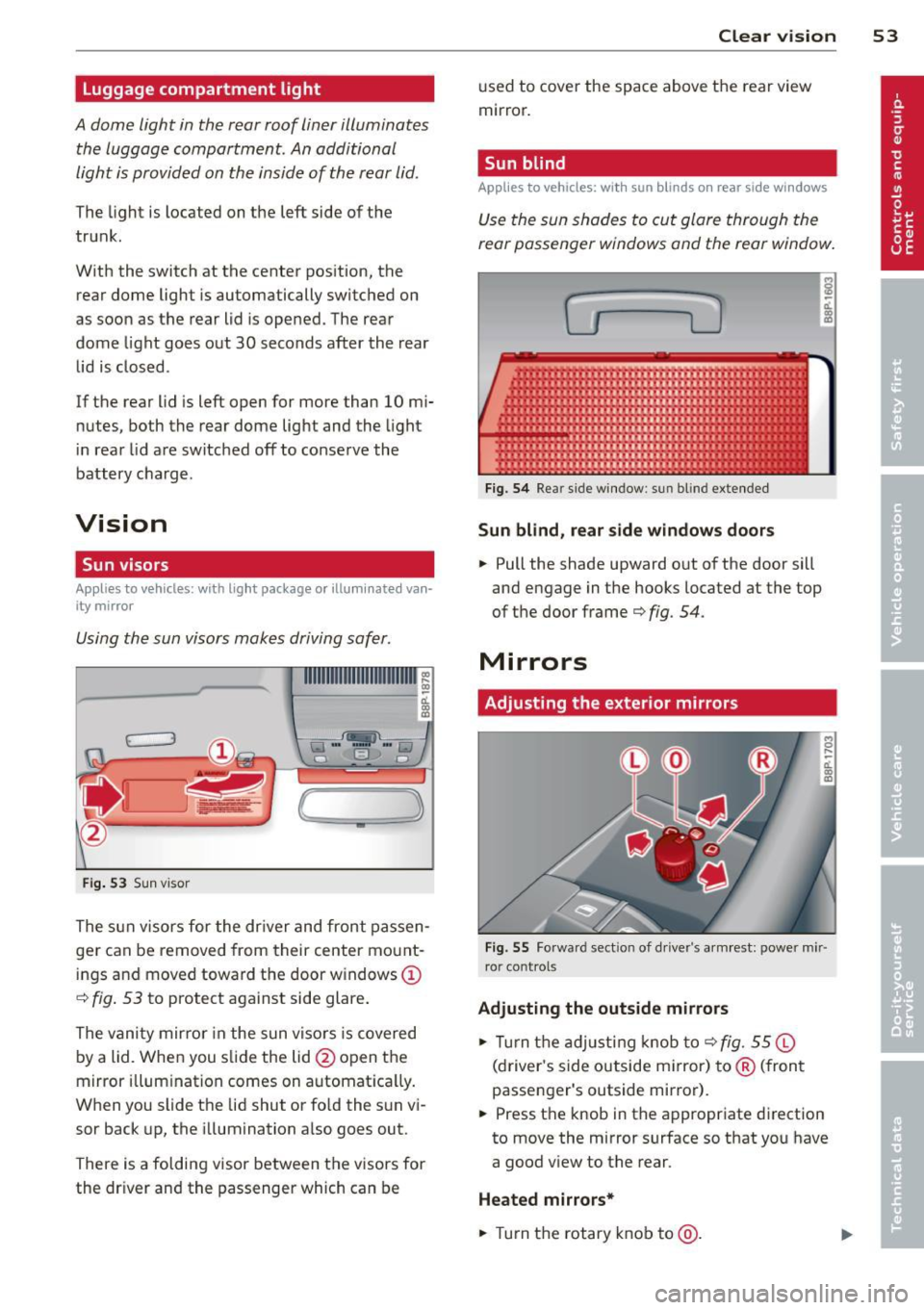
The s un visors for the dr iver and front passen
ger can be removed from their center mo unt
ings and moved toward the door w indows
(D
~ fig . 53 to protect against side glare .
The vani ty mir ror in the sun viso rs is covered
by a lid. When you s lide the lid @open the
mirror illum ination comes on automat ica lly.
W hen you slide the lid shut or fold the su n vi
sor back up, the illumination also goes out.
There is a folding visor between the visors for
the driver and the passenger which can be
Clear vi sion 5 3
used to cover the space above the rear view
mirror.
Sun blind
Applies to veh icles: w ith sun blinds o n rear side windows
Use the sun shades to cut glare through the
rear passenger windows and the rear window .
.,
F ig. 5 4 Rear side window : sun blind extended
Sun blind, rear side windows door s
.. Pull the shade upward out o f the door sill
and engage in the hooks located at the top
of the door frame
q fig. 54.
Mirrors
Adjusting the exterior mirrors
Fig. 55 Fo rwa rd sect ion of d river's a rm rest: power mir
ror cont rols
Adjusting the outside mirrors
.. Tur n the ad justing knob to q fig. 55 ©
(driver's s ide outside m irror) to ® (fron t
passenger's outside mirror).
.. Press the knob in the appropriate direction
to move the mirror surface so that you have
a good view to the rear.
Heated mirrors*
.. Tur n the rotary k nob to @.
Page 56 of 280
54 Clear vis ion
Depending on outside temperature and vehi
cle speed, the mirror surfaces are heated until
the ignition is switched off -even if the rotary
knob is no longer in position@.
You are well-advised to fold the exterior mir
rors in when maneuvering in tight spaces or
when leaving the car parked close to other ve
hicles.
(D Note
- Cu rved mirror surfaces (convex or spheri
ca l*) increaseyourf ield of view. Remem
ber that vehicles or other objects wi ll ap
pear smaller and farther away than when
seen in a flat mirror. If yo u use this mir
r or to est imate distances of following ve
hicles when changing lanes, you could
estima te incorrect ly and cause an acci
dent.
(D Tips
I f the re should be a malfunction in the
e lec trical system, you can still adjust the
exterior m irrors by pres sing the edge of
the mirror.
Dimming the mirrors
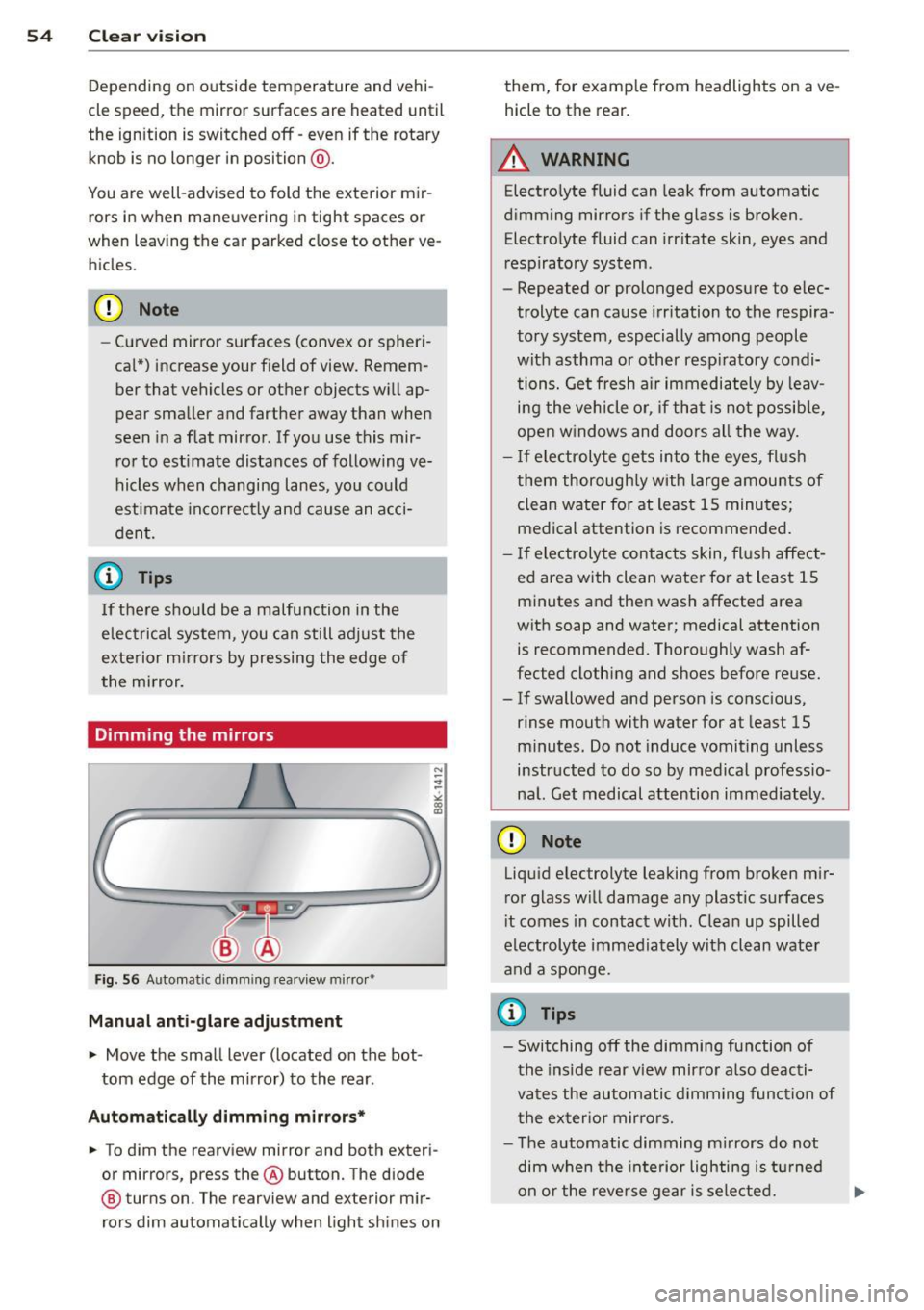
F ig. 56 Automatic dimm ing rearview mirror•
Manual anti-glare adjustment
• Move the small lever (located on the bot
tom edge of the mirror) to the rear.
Automatically dimm ing mirror s*
• To dim the rearview mirror and both exteri
or mirrors, press the® button. The diode
@ turns on. The rearview and exterior m ir
rors dim automatically when light sh ines on them, for
example from headlights on ave
hicle to the rear.
A WARNING
Electro lyte fluid can leak from automatic
dimming mirrors if the glass is broken.
Electro lyte fluid can irr itate skin, eyes and
respiratory system.
- Repeated or prolonged exposure to elec
trolyte can cause irr itation to the respira
tory system, especially among people
with asthma or other resp iratory condi
tions. Get fresh air immediately by leav i n g the vehicle o r, if that is not possib le,
open windows and doors all the way.
- I f electrolyte gets into the eyes, flus h
them thoroughly with large amounts of clean water fo r at least 1 5 minutes;
medical attention is recommended.
- I f electrolyte contac ts skin, fl ush affect
ed area with clean water for at least 15
minutes and the n wash affected area
with soap and water; medical attention
is recommended. Thoroughly wash af
fected clothing and shoes before reuse.
- If swallowed and person is conscious,
rinse mouth with water for at least 15
minutes. Do not induce vomiting unless
instructed to do so by medical professio
nal. Get medical attention immediately.
(D Note
Liqu id electrolyte leaking from broken m ir
r or glass w ill damage any plastic surfaces
i t comes in contact with. Clean up spilled
electrolyte imme diately with clean water
and a sponge.
(D Tips
- Switching off the dimming function of
the ins ide rear view mir ro r also deacti
vates the automatic dimming function of
the exter io r mir ro rs.
- The automatic dimming m irrors do not
dim when the inte rior lighting i s tur ned
on or the reverse ge ar is sele cted. .,.
Page 57 of 280
-Automat ic dimming for the m irror only
operates p roperly if the lig ht striking the
i ns ide mirror is not hindered in any way.
Wiper and washer
system
{sf) Windshield wiper
The windshield wiper lever controls both the
windshield wipers and the washer system.
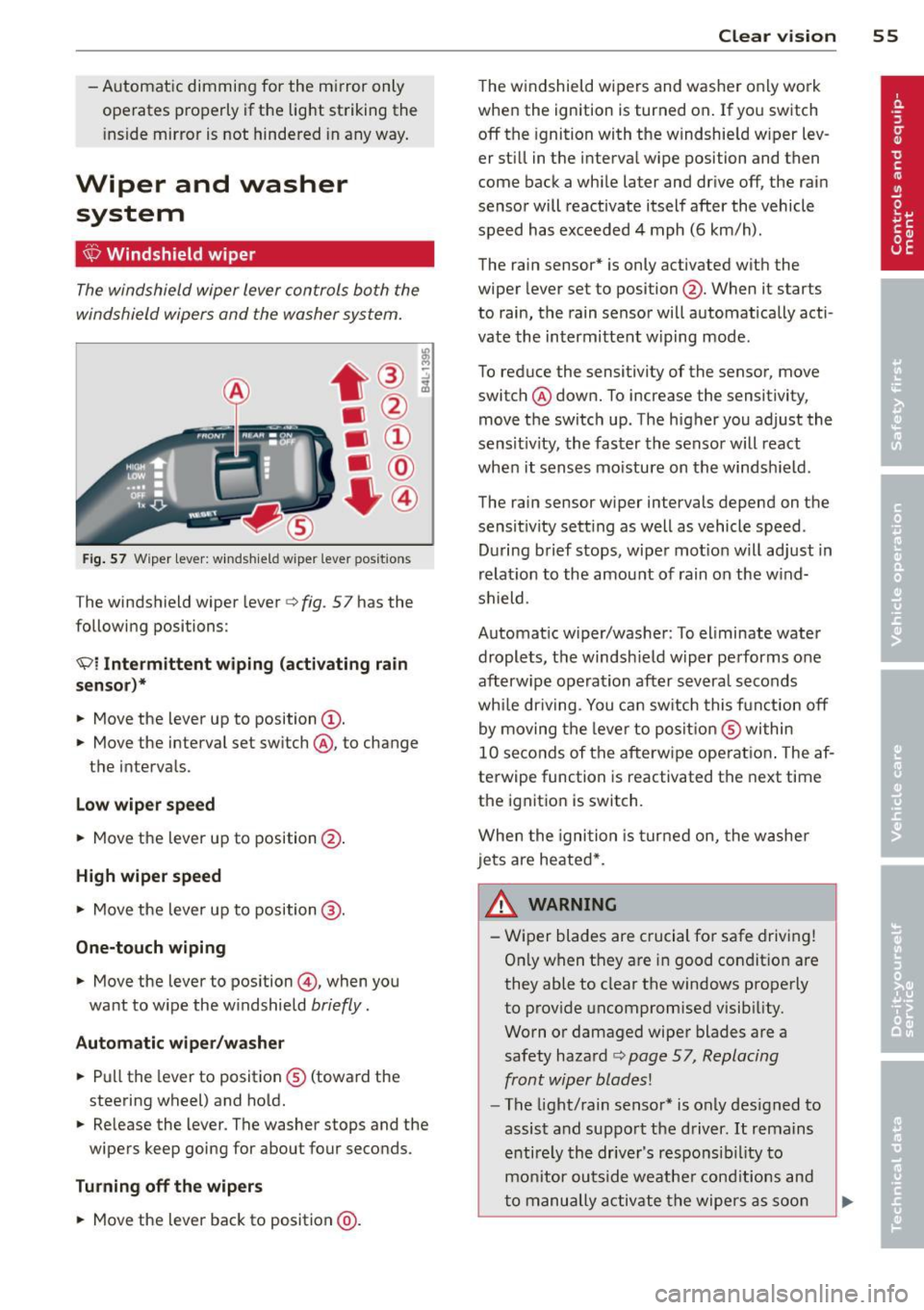
F ig . 57 Wiper lever: w inds hie ld w iper lever positions
The windshield wiper lever c> fig. 57 has the
following positions:
Ql Intermittent wiping (activating rain
senso r)*
.. Move the lever up to position@.
.. Move the interval set sw itch @, to change
t h e interva ls.
Low wiper speed
.. Move the lever up to position@.
High wiper speed
.,. Move the lever up to position @.
One-touch wiping
.. Move the lever to position @, when you
want to w ipe the w indshield
briefly .
Automatic wiper /w asher
.. Pu ll the lever to posit ion ® (toward the
steering wheel) and ho ld.
.. Re lease the lever . The washer stops and the
wipers keep going for about four seconds.
Turning off th e wiper s
.. Move the lever back to position @ .
Clear vi sion 55
The w indshield wipers and washe r only work
whe n the ignition is turned on . If you switch
off the ignition with the w indshie ld w iper lev
er st ill in the interva l wipe position and then
come back a whi le later and drive off, the rai n
senso r will reactivate itsel f after the vehicle
speed has exceeded 4 mph (6 km/h) .
The rain sensor* is only activated with the
wiper lever set to position @. When it starts
to rain, the rain sensor will automat ically acti
vate the intermittent w iping mode.
To reduce the sensitivity of the sensor, move
switch ® down. To increase the sensitivity,
move t he switch up. The h igher you adjust the
sens it ivity, the faster the senso r will react
when it senses mo isture on the windsh ield .
The rain sensor w iper intervals depend on the
sensit ivity sett ing as well as vehicle speed.
D uring brief s tops, wipe r mot io n will adjust in
r elat ion to the amou nt of rain on the w ind
shield .
Automat ic w iper/was her : To eliminate water
drople ts, t he windsh ield wiper pe rforms o ne
afterw ipe ope ra tion after severa l seconds
whi le dr iv ing . You ca n sw itch this f unct ion off
by moving the leve r to posit io n ® within
10 seconds of the afterw ipe operat io n. The af
terwipe function is reactivated the next time
the ignitio n is switch.
When the igni tio n i s tur ned on, the washe r
jets are heated*.
& WARNING ~
- Wiper blades are crucial for safe drivi ng!
On ly when they are in good condit io n are
they able to clear the windows properly
to prov ide uncompromised visib ility.
Worn o r damaged wiper blades are a
safety haza rd
c> page 57, Replacing
front wip er blades!
- The light/rain senso r* is only des igned to
assis t and suppo rt the driver.
It rema ins
e ntire ly th e drive r's respo nsib il ity to
m onitor outside weathe r cond itions and
t o manu ally a ctiv ate the wipe rs as soo n
Page 61 of 280
-You cannot activate the service position
when the hood is open.
- The front wiper blades a re different
l engths; the blade on the driver's side is
l onger.
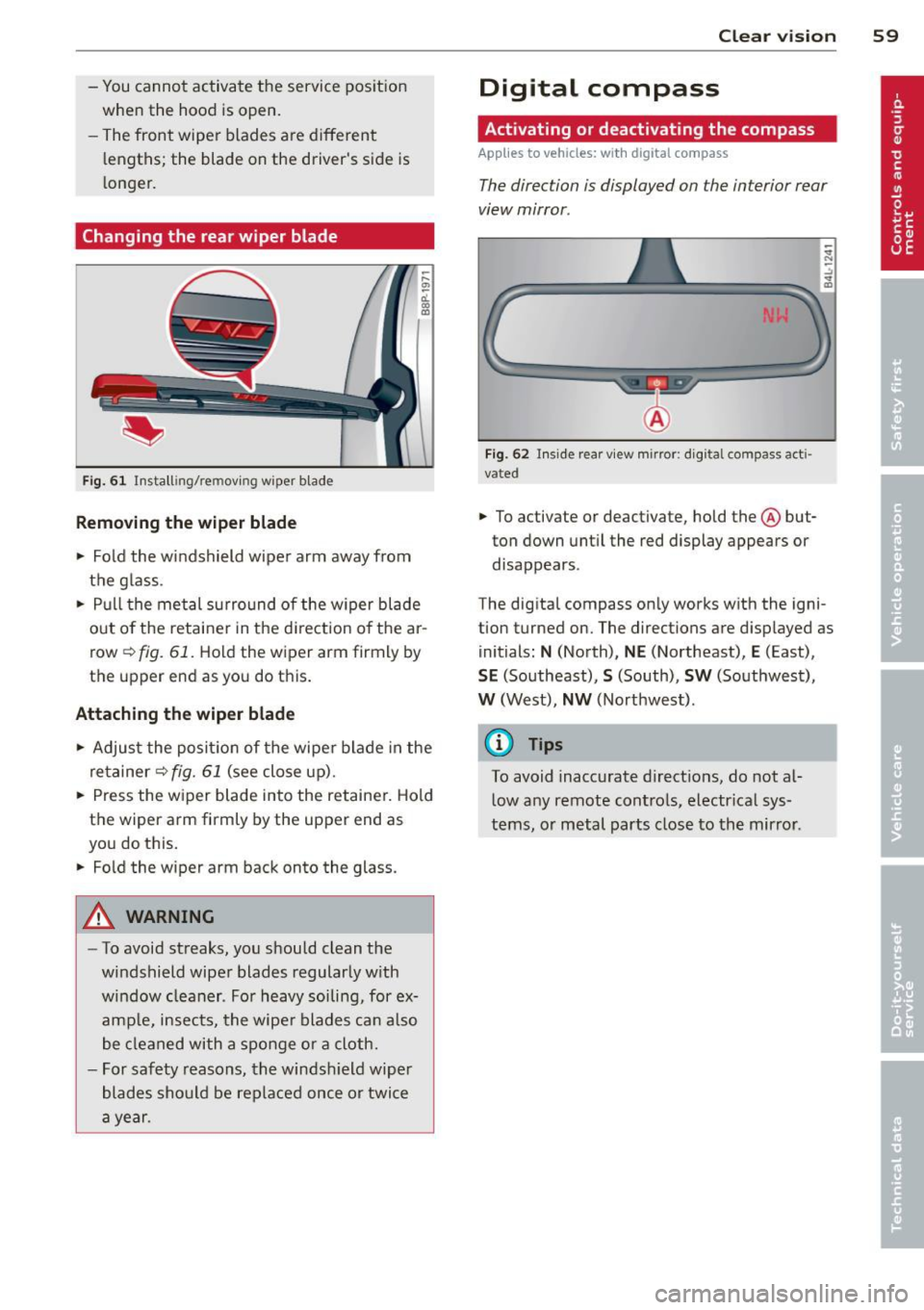
Changing the rear wiper blade
F ig . 6 1 Insta lling/re moving wiper blade
Removing the wiper b lade
.. Fo ld the windshield wipe r arm away from
the g lass .
.. Pull the met al surround of the w iper blade
out o f the retaine r in the d irection o f the ar
row
r=> fig. 61. Hold the wiper arm firmly by
the upper end as you do this.
Attaching the wiper blade
.. Adjus t the posi tion of the wipe r blade in the
retainer
r=> fig. 61 (see close up).
.. Press the w iper blade into the retainer. Hold
t h e wiper arm firmly by the upper end as
you do this .
.. Fo ld the wiper arm back onto the glass.
A WARNING
- To avoid streaks, you should clean the
windshield wiper blades regular ly w ith
w indow cleaner. Fo r heavy soiling, for ex
ample, insects, the wipe r blades can also
be cleaned with a sponge or a cloth.
- For safety reasons, the windsh ield wiper
blades sho uld be replaced once or twice
a year .
Clear vision 59
Digital compass
Activating or deactivating the compass
App lies to vehicles: wi th digi tal co mpass
The direction is displayed on the interior rear
view mirror .
Fig. 62 Inside rear v iew mirror : d ig ita l compass act i
vated
.. To activate or deactivate, hold the@ but
ton down unt il the red display appears or
disappears .
The dig ital compass only works w ith the igni
tion turned on. The directions are displayed as
initials :
N (North), NE (Northeast), E (East),
SE (So utheast), S (South), SW (Southwest),
W (West), NW (Northwest) .
(0 Tips
To avoid inaccurate d irect io ns, do not al
l ow any remote contro ls, electr ica l sys
tems, o r metal parts close to the mir ror.
Page 62 of 280
60 Clear vis ion
Setting the magnetic deflection zone
A ppl ies to vehicles: with digital compass
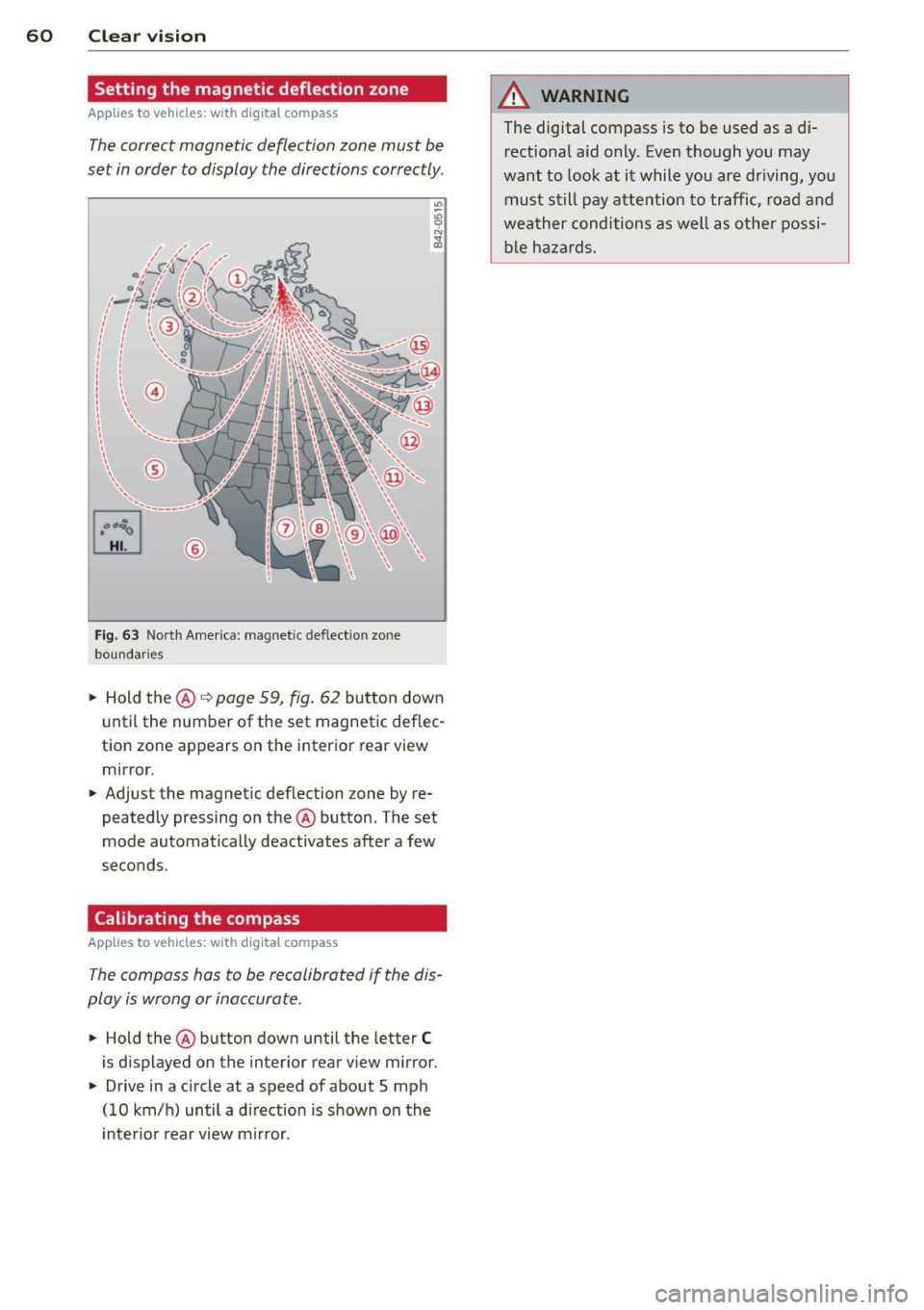
The correct magnetic deflection zone must be
set in order to display the directions correctly.
©
Fig. 63 North America: magnet ic def lect ion zone
boundaries
• Hold the@~ page 59, fig. 62 button down
u ntil the number of the set magnetic deflec
tion zone appears on the interior rear view
mirror .
• Adjust the magnetic deflection zone by re
peatedly pressing on the @button. The set
mode automatically deactivates after a few
seconds .
Calibrating the compass
Applies to vehicles: with digital compass
The compass has to be recalibrated if the dis
play is wrong or inaccurate.
• Hold the@ button down until the letter C
is displayed on the interior rear view m irror .
• Drive in a circle at a speed of about 5 mph
(10 km/h) until a d irection is shown on the
i nterior rear view m irror.
A WARNING
-
The digital compass is to be used as a di-
rectional aid only. Even though you may
want to look at it while you are driving, you
must still pay attent ion to traffic, road and
weather conditions as well as othe r possi
b le ha zards.
Page 176 of 280
174 Trailer towing
Trailer towing Driving with a trailer
General information
Your Audi was designed primarily for passen
ger transportation .
If you plan to tow a tra iler, p lease remember
that the addit ional load will affect durability,
economy and performance.
T railer towing not on ly places more stress on
the vehicle, it also calls for more concentra
tion from the driver.
F or this reasons, always follow the operating
and drivi ng in str uctions provided and use
common sense.
Technical requirements
Traile r hitch
Use a weight-carrying hitch conforming to the
gross trailer weight. The hitch must be suita
b le for your veh icle and trailer and must be
mounted securely on the ve hicle's chassis at a
technically sound location. Use only a trailer
h itch with removable ba ll mount. Always
check with the tr ailer hitch manufac turer to
make sure tha t you are using t he cor rect
hitch.
Do not us e a bumper hitch .
The hitch must be installed in such a way that
it does not interfere with the impact-absorb
ing bumper syst em. No modifications should
be made to the vehi cle exhaust and brake sys
tems. From time to time, check th at a ll hitch
mo unt ing bo lts remain securely fastened.
When you are not towing a trailer, remove the
tra iler hitch ball mount. This prevents the
h itch from causing damage sho uld your ve hi
cle be str uck from behind
¢ A .
Tire pressure
When tow ing a traile r, inflate the t ires of your
ve hicle to the co ld tire pressure listed under
"Full load"on the stick er on the rig ht doo r- jamb. Inflate trailer tires to trailer and tire
manufacturers' specifications.
Lights
T he headlight set tings sho uld be checked with
t h e trai le r attached before d riving o ff. Have
the headlights adjusted as necessary so tha t
yo u can see t he road ahead b ut not blind on
coming traffic.
Check to make sure bo th ve hicle and tr ailer
lights are wo rk ing properly .
Engine cooling system
T owing a t railer makes the engine work hard
er.
It i s impo rtant that the cooling system's
performance stands up to the additional
stra in. Make sure tha t the cooling sys tem has
enough fluid.
Trailer brakes
If your trailer is equipped with a brak ing sys
tem, c heck to be sure t hat it conforms to all
regula tions.
The trailer hyd raulic brake system must not be
directly connected to the vehicle's hydraulic
brake system.
Safety ch ains
Be sure trailer safety chains are properly con
nected from the trailer to the hitch on the ve
hicle. Leave enough slack in the cha ins to per
mit turning co rne rs. When yo u in stall safety
c h ains, ma ke sure they will not drag on the
r oad when you a re driving.
The chains should cross under the t railer
tong ue to prevent it from dropping in case of
separation from the h itch.
Trailer lights
Trai ler lights must meet all regulations. Be
sure to check w ith your authorized Audi dealer
for correct w ir in g, sw itches and re lays .
Mir rors
If you are unable to see the traffic behind you
us ing the regular outside mirrors, then you
Page 177 of 280
must install extended mirrors. I t is important
that you
always have clear vision to the rear.
A WARNING -
After removing the tra ile r hitch, do not
store it in your vehicle. In case of s udden
braking , the hitch could fly forward and in
jure you or your passengers .
Operating instructions
Maximum trailer weight
A trailer for your ve hicle is limited to a typica l
class 1 o r class 2 trailer.
Trailer l oad di stribut ion
Be s ure the load in the trai ler is he ld sec urely
in place to guard aga inst shift ing, be it for
ward, backward or sideways.
Never allow a passenger to ride in a trailer
~ &. in Driving instructions on page 176 .
Tire pressure
When tow ing a tra ile r, i nflate the ti res of yo ur
ve hicl e to the co ld tire pressure listed u nder
"Full load" on the sticker on the r igh t door
jamb . Inflate trai ler ti res to trai ler and tire
manufacturers' specifications.
Lights
The he adlig ht setti ngs should be che cked w ith
the trailer a ttached be fore dr iv ing off . Adjus t
as necessary so that you can see the road
a h ead but not blind o ncoming traff ic .
C hec k prope r wo rking of vehicle a nd t ra ile r
lights.
Safety chains
B e s ure tra ile r safe ty cha ins are p roperly con
nected from the t railer to the hitch on the ve
hicl e. Leave e no ugh s lack in the chains to pe r
mi t turning corners . Whe n you ins tall safe ty
ch ains, m ake s ure they w ill not drag on the
road when yo u are driving .
The c ha ins shou ld cross un der th e tra ile r
t ongue to prevent it from droppi ng in case of
separat ion from the h itch.
Trailer towin g 175
Driving instructions
Driving with a trailer always requires extra
care and consideration .
To obtain the best possible handli ng of vehicle
and trailer, please note the fo llow ing:
... Do not tow a loaded t railer w hen you r ca r it
self is not loaded .
... Be especially caref ul when pass ing other ve
hicles .
... Obse rve speed lim its .
... Do not dr ive at the maximum permissib le
speed.
... Always app ly brakes e arly .
... Mon itor the tempe rature g auge.
Weight distribution
Towing a loaded t railer w ith an em pty car re
su lts in a highly unstab le distrib ution of
weig ht. If th is cannot be avoided d rive at very
l ow speed s on ly t o a void t he ri sk of losi ng
stee ring cont rol.
A "ba lanced " rig is easier to operate and con
tr ol. Th is means t hat the tow vehicle should
b e lo ade d to t he e xten t possible and per miss i
ble while keep ing t he tr ailer a s light as possi
ble under the c ircu mstances . Wheneve r poss i
ble, transfe r some ca rgo to the lugga ge com
partment of the tow vehicle w hile obse rv in g
tong ue load requ irements and vehicle load ing
consideratio ns.
Speed
The higher the speed, the mo re di fficu lt it be
comes for the driver to contro l the rig . Do not
drive at the maximum permissib le speed. Re
duce your speed even more under unfavo rable
load, weather or wind conditions - partic ularly
whe n going downhill .
Red uce veh icle speed
immediately if the trail
er shows t he slig htest s ign of sway ing.
Do not
try to stop the swaying by accelerating .
Observe speed limits . In some a reas speeds
f or vehicles tow ing tra ile rs a re lower than for
r egular veh icles .
•
•
Page 184 of 280
182 Cleaning and protection
• Wipe the windows dry with a clean piece of
cloth or kitchen paper towel.
The best way to remove snow from w indows
and mir rors is to use a brush. Use a non -abra
sive
pla stic ice scraper -better still, a spray
deicer -to remove
ic e from windows and mir
rors.
The windows must not be cleaned with insect remover or wax since these can interfere with
the function of the windshield wiper blades (chatter).
O il, grease or silicone residue can be removed
with
glass cle aner or silicone remo ver. How
ever, wax residue req uires the use of a specia l
ly form ulated solvent. P lease contact your au
thor ized Audi dealer for adv ice on safe prod
ucts for wax removal.
Windows sho uld a lso be cleaned on the inside
at regular interva ls.
Never dry windows with the same chamois
that you use to dry painted s urfaces. Wax resi
due on the chamois can impair vision thro ugh
the windows.
A WARNING
- The windshie ld m ust not be treated with
water-repellent materials. They can i n
c rease glare under poor visib ility condi
t ions such as wetness, darkness, o r whe n
the sun is low on the hori zon. In addi
t io n, they ca n cause the wi ndshield wip
ers to chatter .
- Always read and heed all WARN INGS and
othe r inform ation
Qpage 178.
0 Note
- Never use warm or hot water to remove
s now and ice from windows a nd mirrors.
This cou ld cause the g lass to c ra ck .
- To prevent damage to the wi res of the
r ear defogger, do not place any adhesive
sticke rs o n the inside of t he rear w indow
ove r the wires.
- To he lp prevent d irt from s cratch ing the
window, always scrape i n a forwar d di- rec
tion -pushing the sc raper away from
you -never bac k and fort h.
Steel wheels
Applies to vehicles: with steel wheels (e .g. if refitted with
winter tires)
The wheels also have to be cleaned.
• Always include the hub caps and wheel rims
when wash ing your vehicle to remove road
dirt, sa lt sprays and brake dust .
If necessary, use a commercial whee l cleaner
to remove accumulated brake dust.
The wheel rims are easier to keep clean i f they
are regularly coated with liq uid wax.
Paint scra tches shou ld be touched up as soon
as possib le to prevent corrosion
¢ page 181,
Touch-up paint.
A WARNING .....__
- Moisture and ice on brakes may affect
brak ing eff ic iency-
q page 163, General
information . Test the brakes ca refully af
ter each vehicle wash .
- Always read a nd heed a ll WARNINGS and
the information
q page 178.
Cast (light) alloy wheels
Applies to vehicles : with Cast alloy wheels
-
Cast (light) alloy wheels require special care.
• Wash the w heels with a sponge or hose
brush every other week .
• For deep cleaning afterwards, use on ly a
ded icated acid-free cast alloy wheel cleaner.
• Rub a coat of
liquid wa x onto the rims every
three month. Be sure to reach and treat all
parts of the rim .
To preserve the decorative appearance of the cast alloy w heels, some special care is neces
sary. In addition to road dirt and salt, brake dust is also co rrosive . If left on fo r too long,
brake d ust can cause pitting.
U se only spec ial
acid -free cleaners formulated
fo r alloy r ims . Safe products are ava ilab le at ..,_
Page 246 of 280
244 Fuses and bulbs
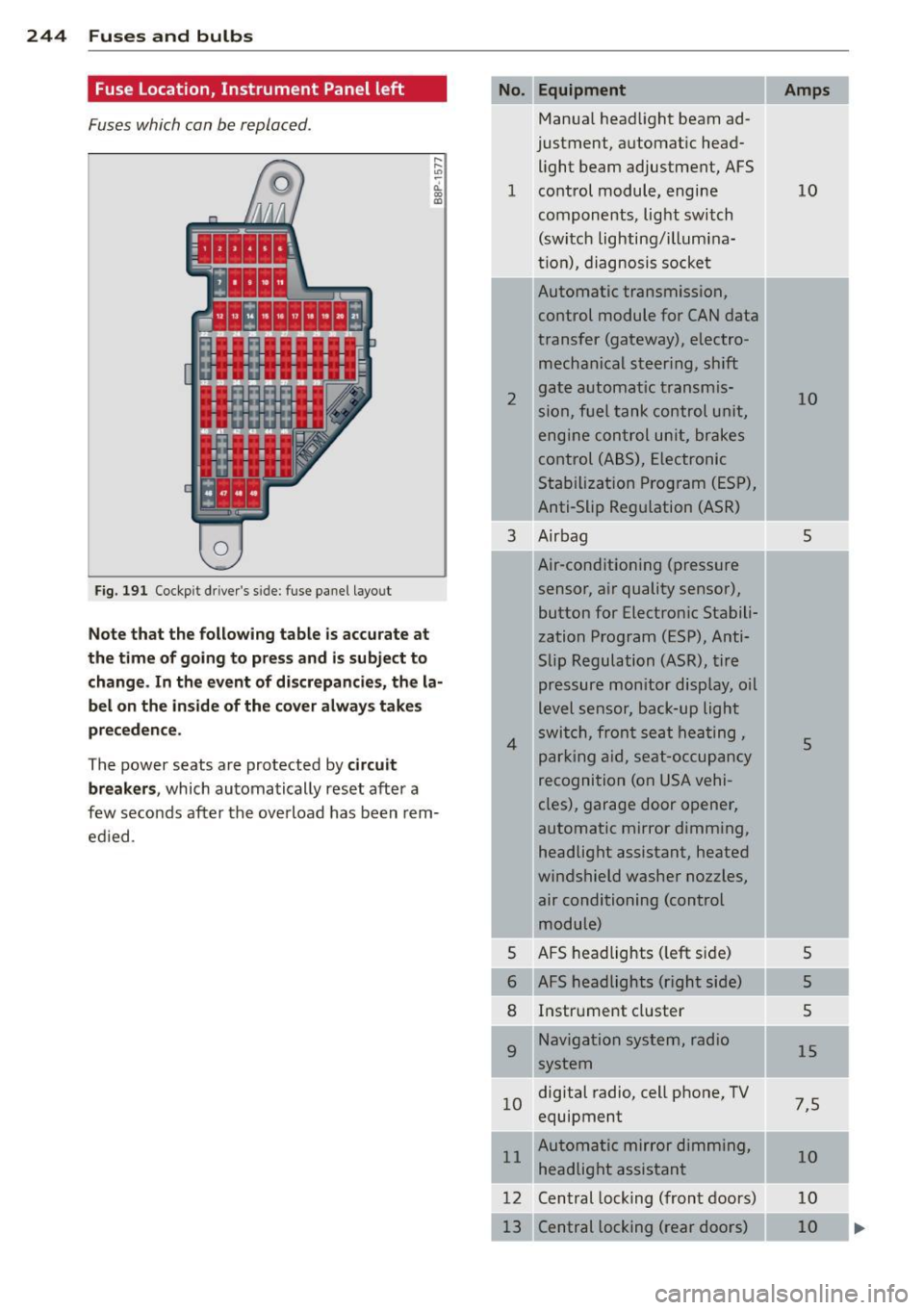
Fuse Location, Instrument Panel left
Fuses which can be replaced.
Fig. 191 Cockp it driver 's s ide: fuse pane l layout
Note that the following table is accurate at
the time of going to pr ess and i s subject to
change . In the event of d iscrepancies, the la
bel on the in side of the cover always take s
pr eceden ce .
The power seats are protected by circuit
break ers,
which automatically reset after a
few seconds after the ove rload has been rem
ed ied .
Equipment
Manua l head light beam ad
justment, a utomat ic head
light beam adjustment, AFS
1 co ntrol m odule, engine
components, light switch
(switch lighting/illumina
ti on), diagnosis socke t
2
3
4
5
6
8
9
Automatic transmission,
control module for CAN data
transfer (gateway), electro
mechanical steering, shift
gate automatic transmis
sion, fuel tank control unit,
engine control unit, brakes
control (A BS), Electronic
Stabili zation Program (ESP) ,
Anti-Slip Regulation (ASR)
Air bag
Air-conditioning (pressure
sensor, air quality sensor), button for Electronic Stabili
zation Program (ESP), Anti
Slip Regulat ion
(ASR), tire
pressure monitor display, oil
level senso r, back-up ligh t
s w itch, front se at he ati ng ,
p ark ing aid, sea t-occupancy
recognition (on USA vehi
cles), garage door opener,
automa tic mirror dimming,
headlight assistant, heated
windshield washer nozzles, air conditioning (control
module)
AFS headlights ( left si de)
AFS headlights (right side) Instr ument cluster
Navigation system, radio
system
1 0 digital
radio, cell phone, TV
equipment
11 Automatic mirror dimming,
headlight assistant
12 Central lock ing (front doors)
Central locking ( rear doors)
Amps
10
10
5
5
5
5
5
15
7 ,5
10
10
10