window AUDI A3 2015 User Guide
[x] Cancel search | Manufacturer: AUDI, Model Year: 2015, Model line: A3, Model: AUDI A3 2015Pages: 288, PDF Size: 71.46 MB
Page 67 of 288
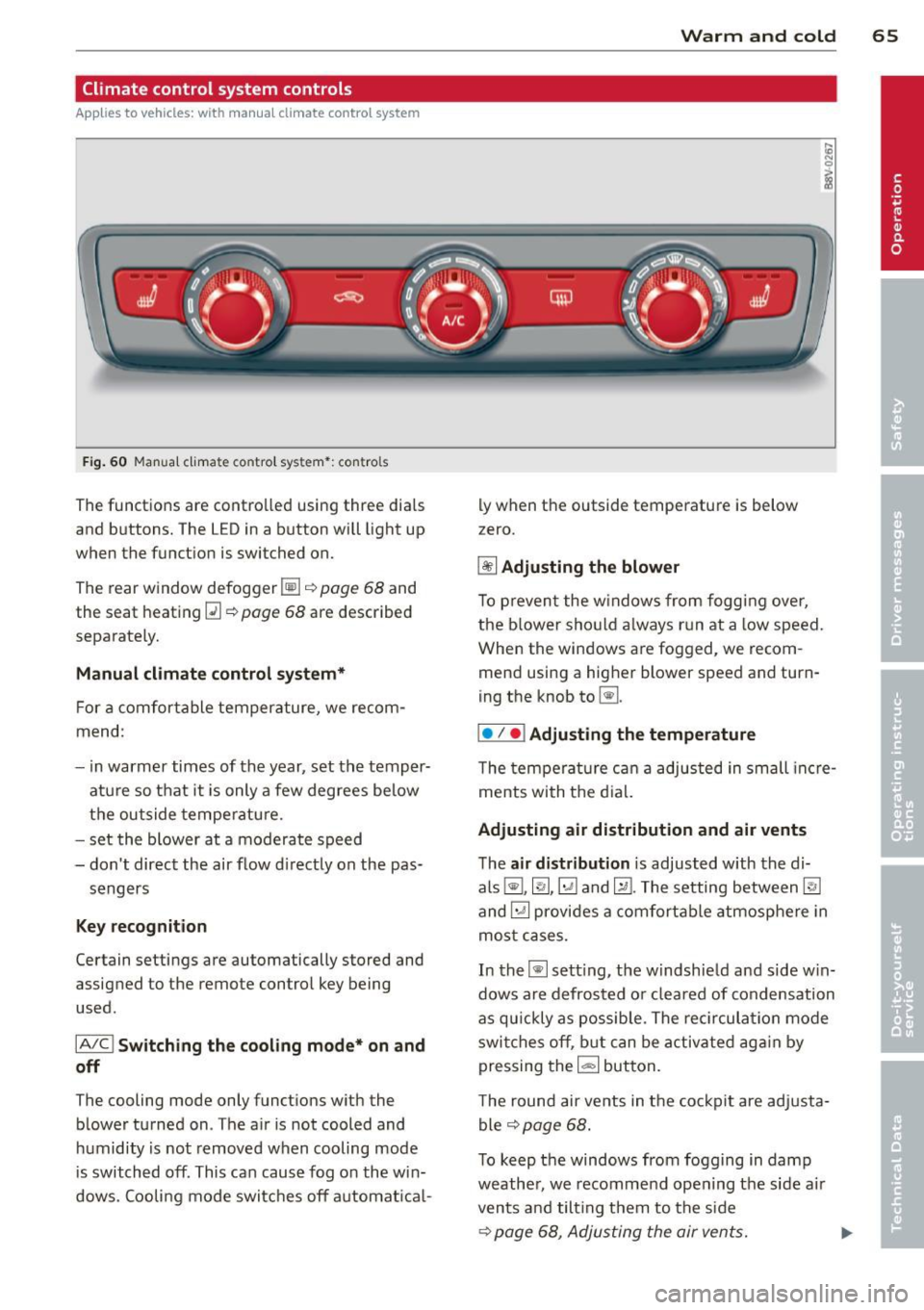
Climate control system controls
Applies to vehicles: with manual climate control system
F ig . 60 Man ual cl ima te con tro l sy ste m•: con tro ls
The functions are contro lled using three dia ls
and buttons. The L ED in a button will light up
when the function is switched on.
The rear window defogger~ ¢
page 68 and
the seat heating~¢
page 68 are described
separate ly.
Manual climat e control system*
For a comfortable temperature, we recom
mend:
- in warmer times of the year, set the temper
atu re so that it is only a few degrees be low
the outside tempe ratu re.
- set the blower at a moderate speed
- don't direct the air flow d irectly on the pas-
sengers
Key recognition
Certain setting s are automatically stored and
assigned to the remote control key being
used.
IA /C l Switching the co oling mode* on and
off
The cooling mode only functions w ith the
b lower turned on . The a ir is not cooled and
h umidity is not removed when cooling mode
is switched off . This can caus e fog on the win
dows. Cooli ng mode switches off a utomat ica l-
W arm and cold 65
ly when the outside temperatu re is below
z ero.
~ Adjusting the blower
To p reven t the w indows from fogg ing over,
the b lower sho uld a lways r un at a low speed.
When the windows are fogged , we recom
mend using a higher blower speed and turn
ing the knob to~ -
I• I • I Adjusting the temperature
T he tem pe ra tu re c an a adjusted in small incre
ments with the d ial.
Adjusting air distribution and air vents
T he air distribution is adjusted w ith the di
als ~, ~,~ and~-The setting between~
and ~ provides a comfortable atmosphere in
mo st cases.
In the~ setting, the w indshie ld and side w in
dows are defrosted o r cleared of condensation
as qu ickly as possib le . The rec ircula tion mode
swi tches off, b ut can be activate d ag ain by
pressing the
1- 1 button.
T he round air ve nts in t he co ckpit are adj usta
ble ¢
page 68.
To keep the windows from fogg ing in damp
weathe r, we recomme nd ope ning t he side a ir
vents and tilt ing them to the side
¢ page 68 , Adjusting the air vents. ..,.
Page 68 of 288
66 Warm and cold
Foot vents are located under the front seats
to heat the rear of the vehicle.
l= I Switching recirculation mode on and
off
I n recirculation mode, the air inside the vehi
cle is circu lated and filtered. This prevents the
unfiltered air outside the vehicle from enter
ing the vehicle interior. We recommend
switching recirculation mode on when driving
through a tunnel or when sitt ing in traffic
~ & .
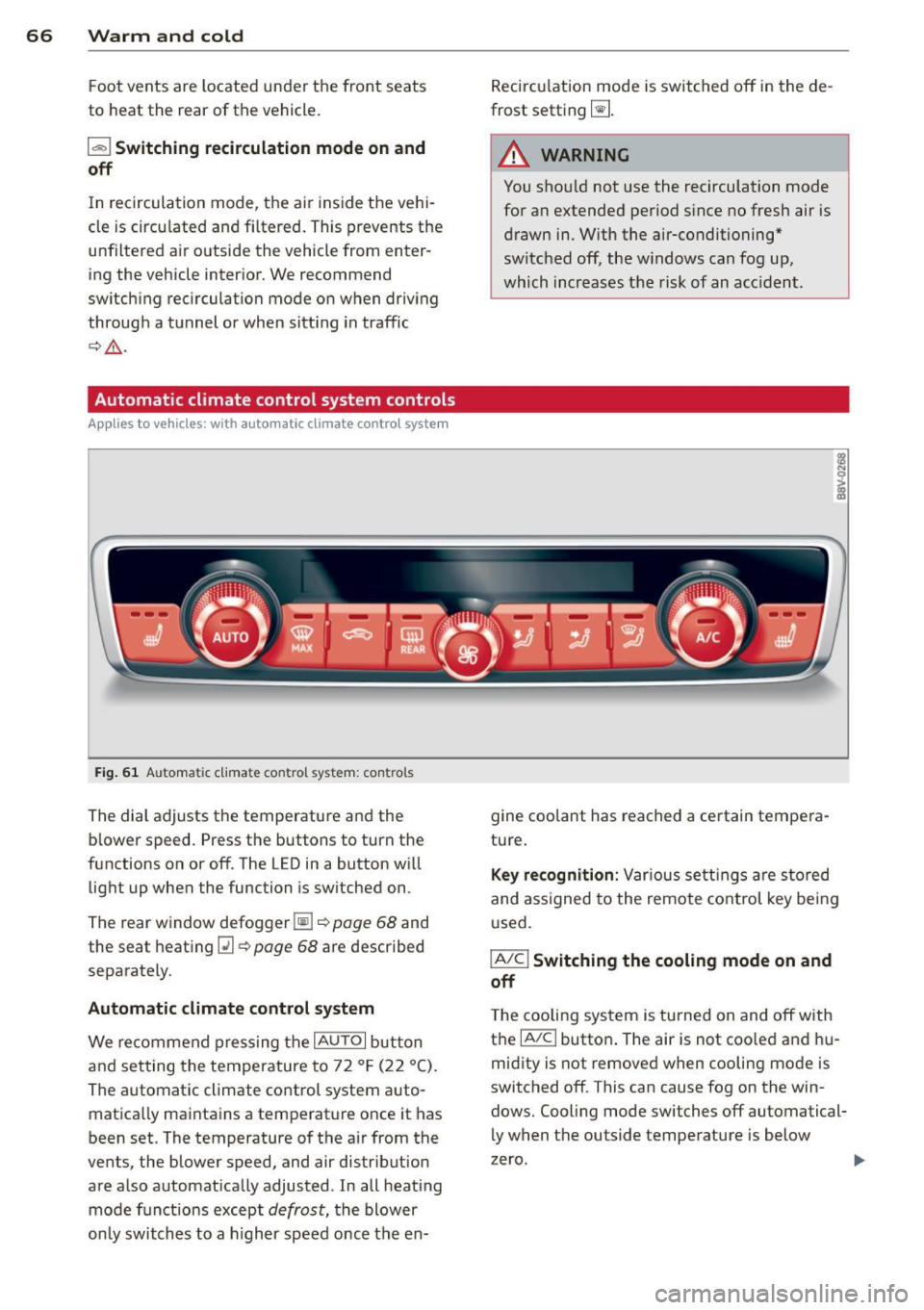
Automatic climate control system controls
Ap plies to vehicles: with a uto mat ic climate contro l system
Fig. 61 Au toma tic climate contro l system : cont rols
The dial adjusts the temperature and the
blower speed. Press the buttons to turn the
functions on or off. The LED in a button will
light up when the function is switched on .
The rear window defogger~~
page 68 and
the seat heating
[ii~ page 68 are described
separately.
Automatic climate control system
We recommend pressing the IAU TO I button
and setting the temperature to 72 °F (22 °C).
The automatic climate control system auto
matically maintains a temperature once it has
been set. The temperature of the air from the
vents, the blower speed, and air distr ibution
are also automatically adjusted . In all heat ing
mode funct ions except
defrost, the blower
only switches to a higher speed once the en- Recirculation
mode is switched off in the de
frost setting ~-
.&_ WARNING
-
You shou ld not use the recirculation mode
for an extended period s ince no fresh air is
drawn in. With the air-conditioning*
switched off, the w indows can fog up,
which increases the risk of an acc ident.
gine coolant has reached a certain tempera
ture.
Key recognition: Var ious settings are stored
and assigned to the remote control key being
used.
IA/CI Switching the cooling mode on and
off
T he cooling system is turned on and off with
the
IA/Cl button . The air is not coo led and hu
midity is not removed when cooling mode is
switched off . This can cause fog on the win
dows. Cooling mode switches off automatical
ly when the outside temperature is below
zero .
Page 69 of 288
IAUTO I Switching automatic mode on and
off
The automatic mode is turned on using the
IAUTOI button. AUTO mode switches off once
a button in the climate control system is pressed. Automatic mode maintains a con
stant temperature inside the vehicle . Air tem
perature, a irflow and air distribution are con
trolled automat ica lly. When automatic mode
is act ive, p ress ing the
IAUTOI button briefly
activates "eco" mode*
1>. In "eco" mode*, all
settings are lowered slightly to save fue l.
When in "eco" mode*, eco is shown in the dis
p lay. To exit "eco" mode*, press the
!AUTO I
button again.
I• I • I Setting the temperature
The temperature can be adjusted individually
for the driver and front passenger using the
dials . Temperatures between 60 ° F (+16 °C)
and 84 °F (+28 °C) can be set. Outside of this
range,
Lo or Hi will appear in the climate con
trol system display. In both settings, the cli mate control runs with constantly at the max
imum cooling or heati ng level. The tempera
ture is not regu lated .
Synchronization: By pressing the !AU TO I but
ton for two seconds, the temperature setting
for the driver is transferred to the front pas
senger's side. This applies a temperature
change to the front passenge r's side.
~ Adjusting the blower
To prevent the windows from fogging over,
the blower should always run at a low speed.
You can adjust the volume of air generated by
the blower to your preference. To have the
blower regulated automatically, press the
IAUTOI button.
Adjusting the air distribution
The air distribution is adjusted with the 121, ~
and IE:! buttons. To have the air distribut ion
regulated automatically, press the
!AU TO I but
ton .
l) This fu nct io n is not availab le in all coun tries.
Warm and cold 67
T he round air vents in the cockpit are adjusta
ble ¢ page 68.
T o keep the windows from fogging in damp
weathe r, we recommend open ing the side air
vents and tilting them to the side
¢ page 68, Adjusting the air vents .
Foot vents are located under the front seats
and adjustable vents on the end of the center
console to heat the rear of the vehicle.
I "" MAX ! Switching the defroster on and off
The windshield and side windows are defrost
ed or cleared of condensation as quickly as
possible. The maximum amount of air flows
main ly from the vents below the windshield.
Recircu lation mode switches off. The tempera
ture is controlled automatically . In the ~ set
ting, the
! A/C l cooling mode switches on auto
matically, depending on the outside air tem
perature.
The
! AUTO I button switches the defroster off.
l"""I Switching recirculation mode on and
off
The recircu lation mode can be turned on man
ually or automatically* .
- Switching manual rec irculat ion mode on and
off: Press the
1 - 1 button. The LED light up
when switched on .
- Automatic* recircu lation mode: The recircu
lation mode must be activated in the MMI.
Select:
! MENUI button> Systems contro l
button or
Car systems > AC > Auto recircu
lation .
The air quality sensor that is de
signed for diesel and gasoline exhaust auto
matically switches the recirculation mode
on or off depending on the level of pollu
tants in the outside air.
In recirculation mode, the air inside the vehi-
cle is circulated and filtered. This prevents the unfiltered air outside the veh icle from enter-
i ng the veh icle interior . We recommend
switching recirculation mode on when driving
IJ,-•
Page 70 of 288
68 Warm and cold
through a t unnel or when sitting in traffic
c:;> &. .
The 1- 1 button, IAUTO I or the~ button
sw itches recircu lation mode off.
The system switches to recircu lat ion mode
when dr iving in reverse when the engine is
cold .
.8, WARNING
You should not use the rec irculat ion mode
for an extended period since no fresh air is drawn in. With the air -conditioning sw itch
ed off, the windows can fog up, which in
creases the risk of an accident.
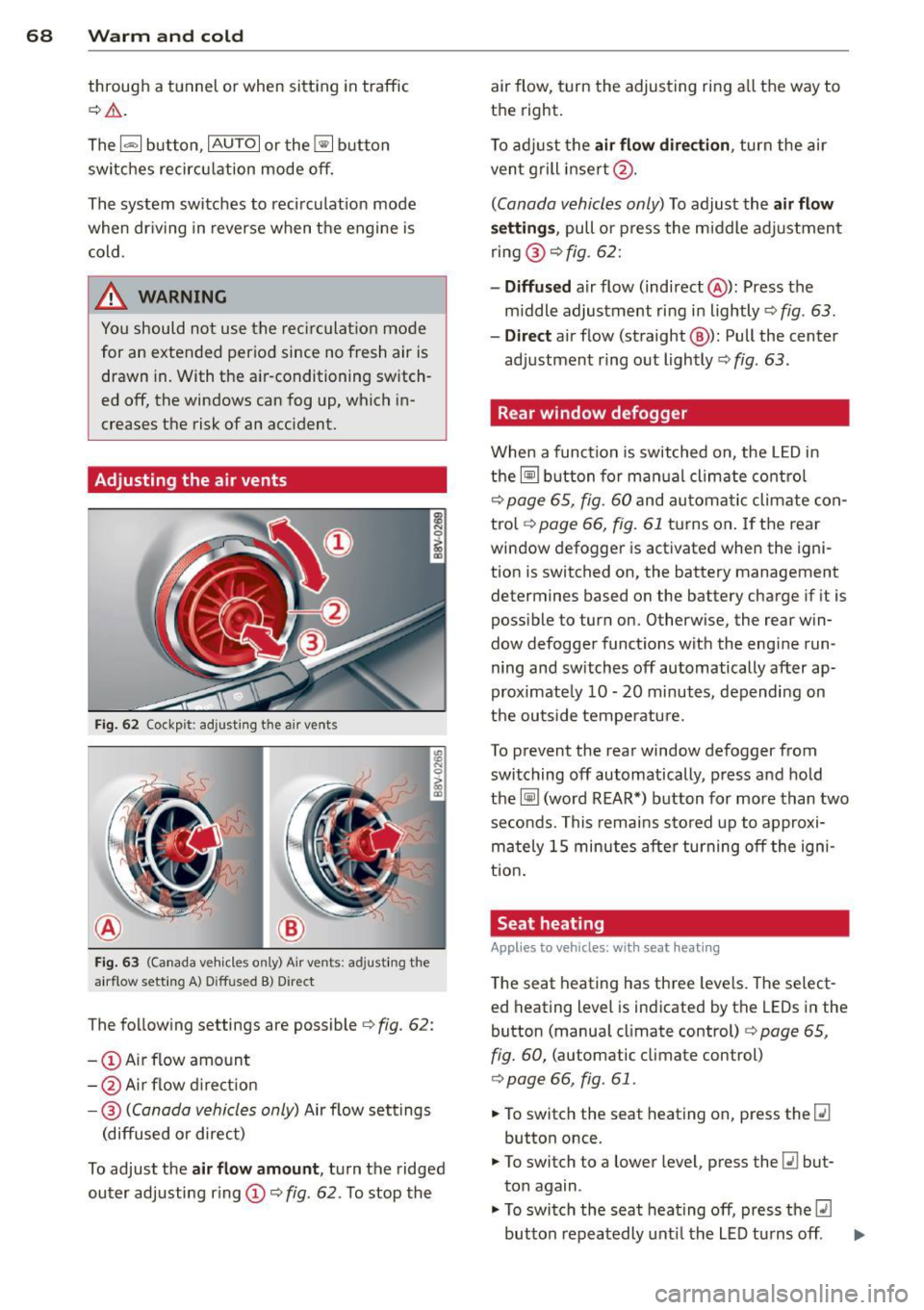
Adjusting the air vents
Fi g. 62 Cockp it: adjust ing the air vents
Fig. 6 3 (Ca nada ve hicles on ly) A ir ve nts: ad justing the
a irflow sett ing A) D iffused B) Direct
The follow ing settings are possibler=> fig. 62:
- @ Air flow amount
- @ Air flow d irect io n
- @
(Canada vehicles only) Air flow settings
(diffused or direct)
To adjust the
air flow amount , turn the ridged
outer adjusting r ing (D r=>
fig. 62. To stop the air flow, turn the adjusting ring a
ll the way to
the right.
T o adj ust the
air flow direction , turn the air
ven t grill insert @.
(Canada vehicles only) To adjust the air flow
se tting s,
pull o r press the m iddle adjustment
ring @
c::> fig. 62:
-Diffu sed air flow (indirect @): Press the
m iddle adjustment ring in lightly
c::> fig . 63.
- Dir ect
air flow (straight @): Pull the center
adjustment ring out lightly
c::> fig . 63 .
Rear window defogger
When a funct ion is switched on, the L ED in
the~ button for ma nual climate co ntrol
c::> page 65, fig. 60 and au toma tic climate con
tro l
c::>page 66, fig. 61 tu rns on . If the rear
window defogger is act ivated when the igni
tion is switched on, the battery management
determines based on the battery charge if it is
poss ible to turn on. Otherw ise, the rear win
dow defogger funct ions with the eng ine run
ning and switches off automatically after ap
proximate ly 10 -20 minutes, depending on
the outside temperatu re.
To p revent the rear window defogger from
switching off automatically, press and hold
the~ (word REAR*) button for more than two
seconds. This remains s to red up to approxi
mately 15 minutes after turning off the igni
tio n.
Seat heating
Applies to veh icles : w it h sea t heat ing
The seat heating has three leve ls. T he select
ed heating level is indicated by the LEDs in the
button (manua l climate control)
c::> page 65,
fig. 60,
(automatic climate control)
c::> page 66, fig . 61 .
.,. To switch the seat heating on, press the [li
button once .
.,. To switch to a lower level , press the
[li but
ton again .
.,. To switch the seat heating off, press the
lll
button repeatedly unt il the LED turns off . ..,.
Page 73 of 288
~ To engage the steering wheel lock, turn the
whee l until it locks when the ignition key is
removed .
~ To release the steering wheel lock, insert
the key in the ignition lock and turn the key
in the -direction of the arrow- while turning
the steering wheel.
Switching the ignition on and off
~ To switch the ignition on, turn the ignition
key to position
(D .
~ To switch the ignition off, turn the ignition
key to position @.
Starting the engine
Your vehicle is equipped with launch contro l.
As soon as you have turned the ign ition key to
position @, the engine will start automatical
ly.
~ Press the brake peda l and move the se lector
l ever to the P or N pos ition.
~ Turn the key briefly to position @. The igni
t ion key automatically returns to position
@. Do not press the accelerator pedal when
doing this.
Major electrical equ ipment switches off tem
porarily when starting the engine.
If the engine does not start immediately, stop
the starting procedure by turning the ignit ion
key to position @and repeat after 30 sec
onds .
Automatic start malfunction
If the Ila indicator light turns on (gasoline en
gine) and the message
Engine start system
malfunction. Please contact Service
appears,
there is an automatic start malfunction.
To start the engine, hold the ignition key in position @until the engine runs.
D rive to an autho rized Audi dea ler or qualified
repair facility immediately to have the ma l
function corrected.
A WARNING
- Never allow the engine to run in confined
spaces -there is a r isk of asphyxiation.
Driving 71
- Never remove the ignition key from the
ignit ion lock while the vehicle is mov ing.
Otherwise the steering lock will engage
and you will not be able to steer the vehi
cle.
- The brake booster and power steering
only work when the eng ine is running. If
the engine is off, you have to use more
force when stee ring or braking. Because
you cannot steer and bra ke as you usual
ly would, this could lead to crashes and
serious inju ries .
- Always take the vehicle key with you
when leaving the vehicle, even for a
short period of time . This applies partic
ular ly when c hildren remain in the vehi
cle. Otherwise the children could start
the engine or operate electrical equip
ment such as power windows.
(D Note
- Avoid high engine speed, full th rottle,
and heavy engine load as long as the en
gine has not reached operating tempera
ture yet. You could damage the engine.
- The engine cannot be started by pushing or towing the vehicle.
@ For the sake of the environment
Do not let the engine run while parked to
warm up. Begin driving immediately. This
reduces unnecessary emissions.
(D Tips
-If it is difficult to turn the key to position
(D, turn the steering wheel back and
forth slightly to release the steer ing
wheel lock.
-After starting a cold engine, there may be a brief period of increased no ise be
cause the oil pressure must first build up
in the hydraulic valve adjusters. This is
normal and not a cause for concern.
- If the battery is disconnected and recon
nected, you have to hold t he ignition key
in posit ion
(D for five seconds fo r the en-
gine to start.
Ill>
•
Page 74 of 288
72 Driving
-Vehicles with an automatic transmission:
After switching the ignition off, you can
only remove the key when the selector
lever is in the "P" (Park) position. After
that, the selector lever is locked.
Stopping the engine with the key
Applies to vehicles: with mechanical ignition lock
Stopping the engine
... Bring the vehicle to a full stop .
... Turn the key to position @.
Engaging the steering wheel lock
Requirement: The selector lever must be in
the P position (automatic transmission*).
... Remove the ignition key in position @
¢page 73, fig. 66 ¢,& .
... Turn the steering wheel until you hear the
steering wheel lock.
The locked steering helps prevent vehicle
theft.
A WARNING
- Never turn off the engine before the ve
hicle has come to a complete stop. The
full function of the brake booster and the
power steering is not guaranteed. You
must use more force to turn or brake, if
necessary . Because you cannot steer and
brake as you usually would, this could
lead to accidents and serious injuries.
- Never remove the ignition key from the
ignition lock while the vehicle is moving.
Otherwise, the steering lock could sud
denly engage and you would not be able
to steer the vehicle.
- The brake booster and power steering
only work when the engine is running. If
the engine is off, you have to use more
force when steering or braking. Because
you cannot steer and brake as you usual ly would, this could lead to crashes and
serious injuries.
- Always take the vehicle key with you
when leaving the vehicle, even for a
short period of time . This applies partic- ularly when children remain
in the vehi
cle. Otherwise the children could start
the engine or operate electrical equip ment such as power windows.
- For safety reasons, you should always
park your vehicle with the selector lever
in P. Otherwise, the vehicle could inad
vertently roll away.
- After the engine has been switched off,
the radiator fan can continue to run for
up to 10 minutes -even with the ignition
switched off.
It can also switch on again
after some time if the coolant tempera
ture rises as the result of a heat buildup
or if the engine is hot and the engine
compartment is additionally heated by
the sun's rays .
(D Note
-If the engine has been under heavy load
for an extended period of time, heat builds up in the engine compartment af
ter the engine is switched off -there is a
risk of damaging the @ngin@ . For this
reason, let the engine run for at idle for
approximately two minutes before shut
ting it off.
(D Tips
-After the engine has been switched off,
the radiator fan can continue to run for
up to 10 minutes -even with the ignition
switched off. It can also switch on again
after some time if the coolant tempera
ture rises as a result of heat buildup or if
the engine compartment is heated by
sunlight and the engine is hot.
Page 75 of 288
Starting and stopping
the engine (vehicles
with a convenience key)
St t· th · ith the
button
Applies to vehicles: with convenience key
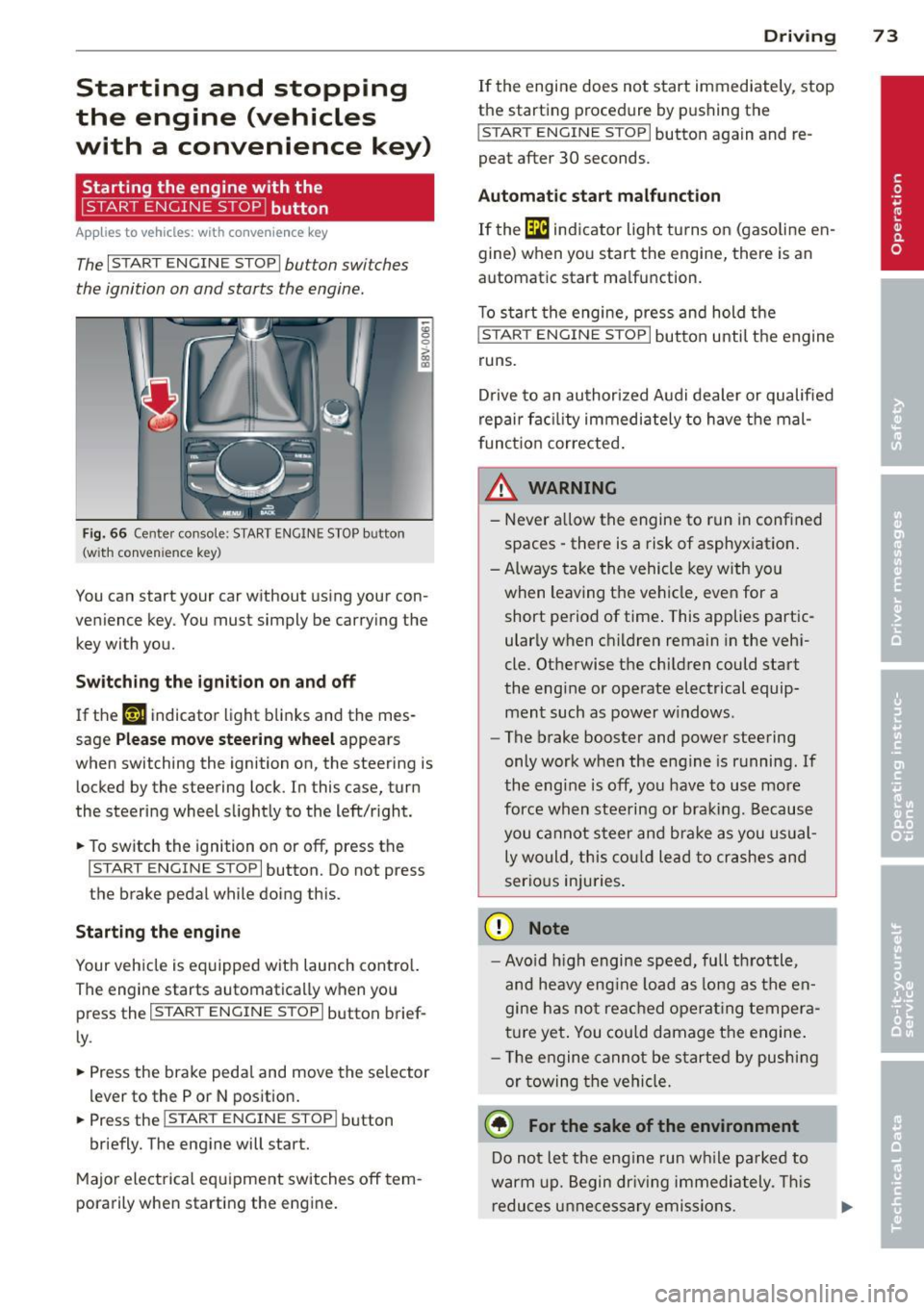
The I START ENGINE STOPI button switches
the ignition on and starts the engine.
Fig. 66 Cente r console: START ENGINE STOP button
(w ith conven ience key)
You can start your car without using your con
venience key. You must simply be carrying the
key with you.
Switching the ignition on and off
If the '-r, ij indicator light blinks and the mes
sage
Please move steering wheel appears
when switching the ignition on, the steering is
locked by the steering lock. In this case, turn
the steering wheel slightly to the left/right.
.. To switch the ignition on or
off, press the
I START ENGINE STOP I button. Do not press
the brake pedal while doing this.
Starting the engine
Your vehicle is equipped with launch control.
The engine starts automatically when you
press the
I START ENGINE STOP I button brief
ly.
.. Press the brake pedal and move the selector
lev er to the P or N position .
.. Press the
I START ENGINE STOPI button
briefly. The engine will start.
Major electrical equipment switches
off tem
porarily when starting the engine.
Driving 73
If the engine does not start immediately, stop
the starting procedure by pushing the
I START ENGINE STOP I button again and re
peat after 30 seconds.
Automatic start malfunction
If the [m ind icator light turns on (gasoline en
gine) when you start the engine, there is an
automat ic start ma lfunction.
To start the engine, press and hold the
I START ENGINE STOP I button until the engine
runs.
Drive to an authorized Audi dealer or qualified
repair fac ility immediately to have the mal
function corrected.
_& WARNING
-Never allow the engine to run in confined
spaces -there is a risk of asphyxiation.
- Always take the vehicle key with you
when leaving the vehicle, even for a short period of time . This applies partic
ularly when children remain in the vehi
cle. Otherwise the children could start
the engine or operate electrical equip ment such as power windows.
- The brake booster and power steering
only work when the engine is running.
If
the eng ine is off, you have to use more
force when steering or braking. Because
you cannot steer and brake as you usual
ly would, this could lead to crashes and
serious injuries.
(D Note
- Avoid high engine speed, full throttle,
and heavy eng ine load as long as the en
gine has not reached operating tempera
ture yet. You could damage the engine.
- Th e engine cannot be started by pushing
or towing the vehicle.
@ For the sake of the environment
Do not let the eng ine run while parked to
warm up. Begin driv in g immediately . This
reduces unnecessary emissions.
Page 76 of 288
74 Driving
(D Tips
-After starting a cold engine, there may
be a brief period of increased noise be
cause the oil pressure must first build up in the hydraulic valve adjusters. This is
normal and not a cause for concern.
- If the . indicator light blinks in the in
strument cluster before switching the ig
nition off, the ignition will not switch on
again
Qpage 189.
-If you leave your vehicle with the ignition
switched on, the ignition will switch off
after a certain amount of time. Make
sure that electrical equipment such as
the exterior lights are switched off.
Turning th n ine off using the
button
Applies to vehicles: with conven ience key
.. Bring the vehicle to a fu ll stop.
.. Automatic transmission: Move the selector
lever into the P position.
.. Press the !START ENGINE STOPI button
Q page 73, fig. 66.
If the engine does not stop, proceed as fol
lows
q page 75, Starting the engine if there
is a malfunction .
Steering wheel lock1
)
The steering locks when you turn the engine
off using the
I START ENGINE STOP !* button,
move the selector lever into the P position
(automatic transmission*) and open the driv
er's door.
The locked steering helps prevent vehicle
theft.
Emergency off function
If it is necessary in unusua l circumstances, the
engine can be switched off while the vehicle is
moving at speeds less than 6 mph (10 km/h).
If you press the
I START ENGINE STOP I* but
ton while driving, the message
Pressing
start/stop button again will switch off en-
l) This function is not availa ble in all coun tries.
gine! appears . To switch the engine off, press
the
I START ENGINE STOP !* button twice in a
row briefly or press and hold for longer than
two seconds.
A WARNING
- Never turn off the engine before the ve
hicle has come to a complete stop . The
full function of the brake booster and the
power steering is not guaranteed . You
must use more force to turn or brake, if
necessary. Because you cannot steer and
b rake as you usually would, this could
lead to accidents and serious injuries.
- The brake booster and power steering
only work when the engine is running . If
the engine is off, you have to use more
force when steering or braking. Because
you cannot steer and brake as you usual
ly would, this could lead to crashes and
serious injuries .
- Always take the vehicle key with you
when leaving the vehicle, even for a
short period of time . This applies partic
ularly when children remain in the vehi
cle. Otherwise the children could start
the engine or operate electrical equip
ment such as power windows.
- For safety reasons, you should always
park your vehicle with the selector lever
in P. Otherwise, the vehicle could inad
vertently roll away.
-After the eng ine has been switched off,
the radiator fan can continue to run for
up to 10 minutes -even with the ignition
switched off. It can also switch on again
after some time if the coolant tempera
ture rises as the result of a heat buildup or if the engine is hot and the engine
compartment is additionally heated by
the sun's rays.
0 Note
If the engine has been under heavy load
for an extended period of time, heat builds up in the engine compartment after the ..,_
Page 79 of 288
& WARNING
-Do not press the accelerator pedal inad
vertently when the vehicle is stationary and the engine is running and a gear is
selected. Otherwise the vehicle will start
to move immediately and could result in
a crash.
- If the power supply fails, the released
parking brake can no longer engage. In
this case, park the vehicle on level ground and secure it by placing these
lector lever in the P position (automatic
transmission). See your authorized Audi dealer or qualified repair facility.
(D Note
If the symbol . in the display or the indi
cator light. (USA models)/ . (Canada
models) in the instrument cluster flashes,
there is a malfunction in the brake system.
Please refer to the detailed description of
the indicator lights¢
page 18.
-If the indicator light . (USA models)/
• (Canada models) or
Ill turns on,
there may be a malfunction in the park
ing brake ¢
page 19.
(D Tips
-You can set the parking brake at any time
-even with the ignition turned
off. To re-
lease the parking brake, the ignition
must be turned on and the brake pedal
must be pressed.
- If driver 's door is opened while the igni
tion is switched on, the parking brake
sets automatically. This prevents unin
tended rolling of the vehicle .
- Occasional noises when the parking
brake is set and released are normal and
are not a cause for concern.
- When the vehicle is parked, the parking
brake goes through a self -test cycle at
regular intervals. Any noises associated
with this are normal.
- If there is a power failure, the parking
brake will not set if it is released, and it
will not release if it is set ¢,&. . See your
Driving 77
authorized Audi dealer or qualified repair
facility.
· Parking
.. Press the brake ped al to stop the vehicle .
.. Pull the switch @ ¢
page 76 , fig . 68 to set
the parking brake.
.. Place the selector lever in the P position .
.. Turn the engine off¢.&_ .
.,. Turn the steering wheel when parking on in
clines so that the wheels will roll into the
curb if the vehicle starts moving.
& WARNING ~ -
-Always take the vehicle key with you
when leaving the vehicle, even for a short period of time. This applies partic
ularly when children remain in the vehi
cle. Otherwise children could start the
engine, release the parking brake or op
erate electrical equipment such as power
windows, which increases the risk of an
accident .
- No one should remain in the vehicle
when it is locked, especially children.
Locked doors make it more difficult for
emergency workers to get into the vehi
cle, which puts lives at risk.
Starting from a stop
The start assist function ensures that the
parking brake is released automatically upon starting.
Stopping and applying the parking brake
.. Pull the switch@¢ page 76, fig . 68 to set
the parking brake.
Starting and automatically releasing the
parking brake
Requirement: The driver's door must be
locked and the driver's safety belt must be
fastened.
.. When you press the accelerator pedal , the
parking brake is automatically released and
your vehicle begins to move.
•
Page 92 of 288
90 Audi pre sense
Audi pre sense
Introduction
Applies to vehicles: with Audi pre sense basic or Audi pre
sense front
Within the limits of the system, pre sense ba
sic and pre sense front can initiate steps to
protect vehicle occupants in certain danger
ous situations.
Critical driving situations can be recognized by
the pre sense front via a network of different
vehicle systems and can take steps to prepare
the vehicle occupants for a potential collision.
The pre sense front works with a radar sensor
and a video camera*.
It also functions within
the limits of the system when adaptive cruise
control* is switched
off.
General information
General information
App lies to vehicles: with Audi pre sense front or Audi
adaptive cruise control
A WARNING
Also follow the general information found
on
~ page 82, General information.
Audi pre sense basic
Descript ion
Applies to vehicles: with Audi pre sense basic
The function of the pre sense basic is activat
ed at a speed of 10 mph (30 km/h) or higher.
The following functions can be triggered un
der certain conditions within the limits of the
system:
- Tensioning of the safety belts (for example,
during heavy braking) : The front safety belts
have reversible belt pretensioners. If a colli
sion does not occur, the safety belts loosen
slightly and are ready to trigger again .
- Closing the windows and the sunroof* (for
example, when over- or understeering): The
windows and the sunroof" close until there is only a small gap open. Audi drive select:
The deployment time is
adapted in dynamic mode.
A WARNING
-The pre sense basic cannot overcome natu- ral physical laws.
It is a system designed to
assist and it cannot prevent a collision. Do not let the increased safety provided
tempt you into taking risks. This could in
crease your risk of a collision.
- The system can deploy incorrectly due to system-specific limits .
(D Tips
-Certain pre sense basic functions switch
off when ESC is switched off (sport
mode) or when driving in reverse .
- The pre sense basic functions may not be
available if there is a malfunction in the
ESC system or the airbag control mod
ule .
- Note that with pre sense basic, the rever
sible safety belt pretensioner on the
front passenger's side deactivates when
the front passenger's a irbag is deactivat
ed.
Audi pre sense front
Description
Applies to vehicles: with Audi pre sense front or Audi
adapt ive cru ise control
Pre sense front informs you if the distance to
the vehicle ahead falls below the safe distance
for an extended period of time. It can warn of a possible collision and initiate braking ma
neuvers, within the limits of the system .
When detected in time, the system can assess
dangerous situations where an object ahead
brakes suddenly or if your own vehicle is trav
eling at a high speed and approaching an ob
ject that is moving more slow ly . If detection is
not possible, then pre sense front does not re
act.