108 AUDI A3 2016 Owner´s Manual
[x] Cancel search | Manufacturer: AUDI, Model Year: 2016, Model line: A3, Model: AUDI A3 2016Pages: 328, PDF Size: 81.78 MB
Page 22 of 328

Instruments and indicator lights
If the indicator light blinks and the message ap
pears, there is not enough braking power to se
cure the vehicle. The brakes have overheated. The
veh icle could roll away even on a small incline.
11J;J:t :);J;1:0 (USA models) / ¢@'A
If this message appears, press the brake pedal
first and then release the parking brake if neces
sary .
{D) Tips
For additional information on the parking
brake, refer to¢
page 85.
-L Cooling system
• Switch off engine and check coolant level!
• Park vehicle and check coolant level!
The coolant level is too low.
Do not continue driving and switch the engine
off.
Plug-in hybrid drive *: refer to
c!;> page 108.
Check the coolant leve l¢ page 244.
- If the coolant level is too low, add coolant
¢
page 245. Only cont inue driving once the in
dicator light turns off.
• Coolant temperature too high! Let engine
run with vehicle stationary
Let the engine run at idle for a few minutes to
coo l off, until the indicator light turns off.
- If the indicator light does not turn off, do not
continue driving the vehicle. See an authorized
Audi dealer or authorized A udi Service Faci lity
for assistance.
A WARNING
- Never open the hood if you can see or hear
steam or coolant escaping from the engine
compartment. This inc reases the risk of
burns. Wait until you no longer see or hea r
steam or coolant escaping.
- The engine compartment in any veh icle can
be a dangerous area. Stop the engine and
20
allow it to cool befo re working in the engine
compartment. Always follow the informa
tion found in ¢
page 236, Working in the
engine compartment .
Cl) Note
Do not continue driving if the . indicator
light turns on -this increases the risk of en
gine damage.
"l=7: Engine oil pressure
• Switch off engine! Oil pressure too low
Stop the engine and do not continue driving.
Check the eng ine oil level¢
page 242.
-If the eng ine oi l level is too low, add engine oil
¢
page 240. Only continue driving once the in
dicator light turns off .
- If the engine oi l level is correct and the indica
tor ligh t still turns on, turn the engine off and
do not cont inue driving. See an authorized Aud i
dea ler or authorized Audi Service Facility for as
sistance .
(D Tips
The oil pressure warning is not an oil level in
dicator. Always check the oil level regularly.
D Alternator/battery
• Alternator fault : battery is not being charg
ed
There is a ma lfunction in the a lternator or the ve
hicle electrical system.
Drive to an authorized A udi dealer or authorized
Audi Service Facility immediate ly. Because the ve
hicle battery is dra ining, turn off all unnecessary
electrical equ ipment such as the MMI. See your
authorized Aud i dealer or authorized Audi Serv ice
Facil ity if the battery cha rge level is too low.
(•) Low battery charge: Battery will be charged
while driving
The starting ability may be impaired .
If this message turns off after a litt le whi le, t he
battery ch a rged enough while driv ing.
liJJ,
Page 104 of 328

e-tron
overhangs, carports or similar structures . Switch
the ignition
off. Have the problem corrected by
an author ized Audi dealer or authorized A udi
Serv ice Facility .
• Elec tric s ystem: o verheated. Safel y park ve
hicle and check coo lant
The coolan t leve l is too low or the coolant tem
pera ture is too high .
S top the vehicle in the outdoo rs as soon as it is
safe ly possible . Switch the ignition off.
Read the important safety precautions ¢.&.
in
Coolant on page 109 and check the coolant level
¢page 108.
If the coolant level is OK, the malfunction may be
caused by the system overheating . Let the vehi
cle's electric drive system cool down for some
time .
If the message turns
off after cooling down and
sw itching the ign ition back on, you ca n continue
driving. Contact an author ized Audi dealer or au
thor ized A udi Se rvice Facility immed iate ly to have
the ma lf u nction co rrected.
If the indicator lig ht stays on, contact an author
ized A ud i dealer or authorized Aud i Serv ice Faci li
ty .
Bil Drive system : sys tem fault! Pleas e contact
work shop
There is a malfunction in the plug-in hybrid sys
tem. Drive to an authorized Audi dealer or au
thor ized Audi Service Facility immediate ly to have
the ma lfunction corrected .
II Drive sy stem: system fault! Restart not po s·
sible. Ple ase contact wo rkshop
There is a mal func tion in the plug -in hybrid sys
tem . Do not open the engine compartment lid .
Drive to an a uth orized Aud i dea le r or authorized
Aud i Serv ice Facility immediately to have the
malfunct io n corrected.
II Batter y temperature too low . Engine start
not possible . See owner's manual
The outside temperature is too low. The vehicle
can no longer start at temperat ures below -18 °F
102
(- 28 °C) . Contact your author ized Audi dealer or
autho rized Audi Service Facility.
POWER LIMIT Warning! Limited power
If the indicator l ight turns on and this message
appears , there may be an engine cont rol mal
funct ion. The
(m ind icator light in t he instr u
ment clus ter a lso turns on. The e ng ine o utput is
reduced. Dr ive to an a utho rized Audi dea ler or
autho rized Audi Service Facility immedia tely to
have the malfunction corrected.
II e -tron mode : EV curr ently unavailable
This message appears w hen the 1-,$ 1 button is
pressed and the conditions for e lectric drive
mode are no t me t.
IIJ Vehicle sound: malfunction! Pedestrians
cannot h ear vehicle. P lease contact Service
if the indicator light t urns on and this message
appears, pedestrians and bicyclists can no longer
hear the vehicle when it is driving in electric
mode. Turn off the veh icle and switch to dr iv ing
with the gasoline e ngine . To activate the gasoli ne
engine, select the
Charge batt ery mode
¢page 103 with the kl"I button. Drive to a n au
tho rized Audi dea le r or a uthorized Audi Service
Facility immediate ly to have the malfunction cor
rected.
Range display
Applies to vehicles: wit h pl ug-in hy brid drive
Fig. 89 Ins trument cluster example image: range disp lay
The range can be d isplayed in the on -board com
p uter ¢
page 29.
Depend ing o n the selected p lug-in hybrid mode,
the d isp lay disp lays the follow ing informa tion:
Ill>
Page 110 of 328
e-tron
Additional information about the vehicle tool kit may be found under
c::, page 280 and informa
tion about the tire mobility kit under
c:> poge281 .
(D Tips
The vehicle must not be operated without the
tire repair set.
Vehicle transport
Applies to veh icles: w ith plug- in hybrid drive
The following contains information you should
know about transporting your vehicle.
The MQB-A lithium-ion battery system equipped
in your vehicle is composed of SANYO 12 U F 261
591 type batteries and has it passed test 38.3 in
accordance with the UN Tests and Criteria hand book. The vehicle may be transported with the
battery installed as conventional class 9 hazard
ous materials without additional offic ial consent
for air and sea transportation (current law ICAO
TI and IMDG-Code 01.01.2012) .
Jump starting and 12 volt battery
Applies to veh icles: with plug -in hybrid drive
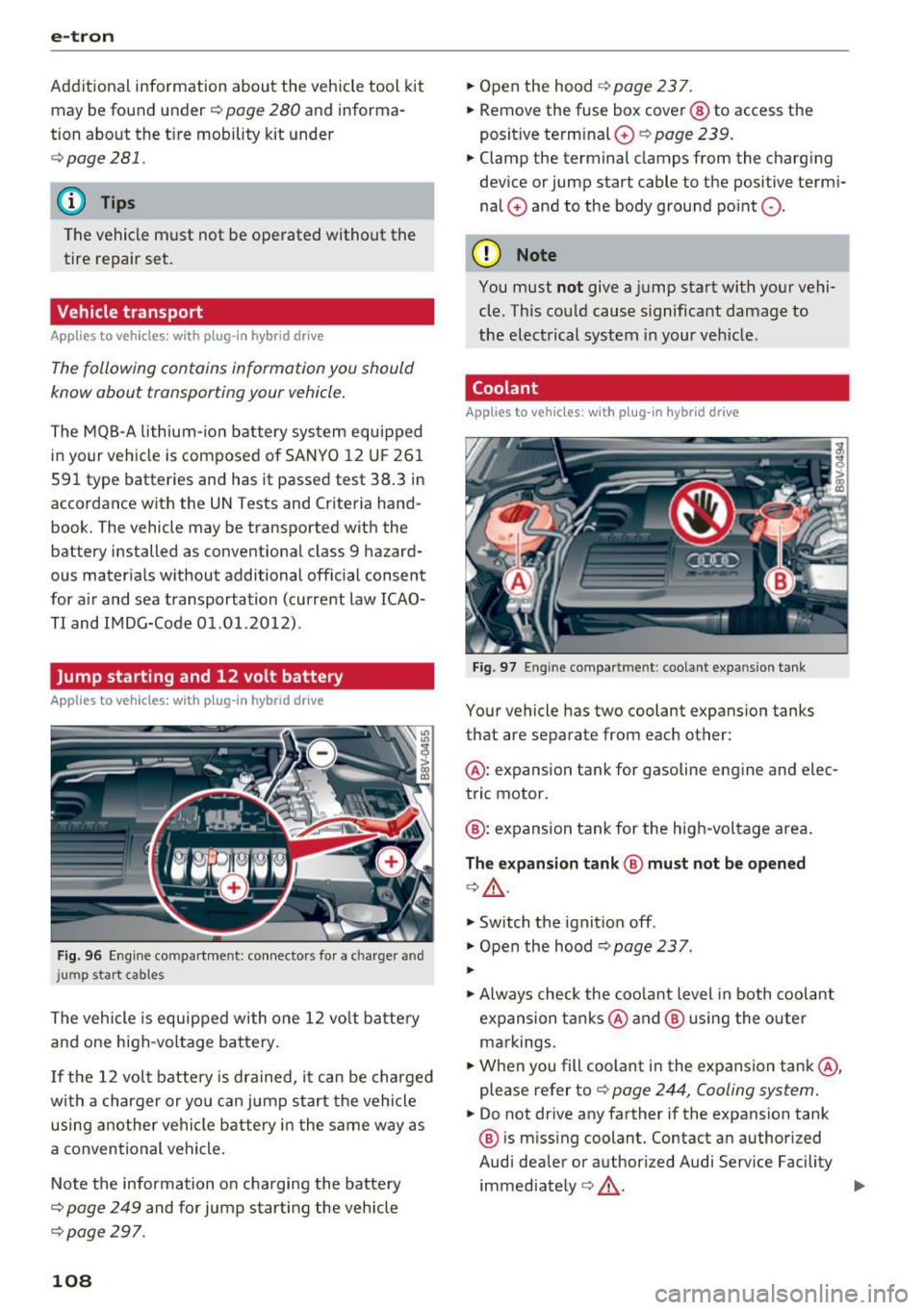
Fig. 96 Engine compartment: connectors for a charger and
j ump start cables
The vehicle is equipped with one 12 vo lt battery
and one high-voltage battery.
If the 12 volt battery is drained, it can be charged
with a charger or you can jump start the vehicle
using another vehicle battery in the same way as
a conventional vehicle .
Note the information on charging the battery
¢
page 249 and for jump starting the vehicle
c:>poge297 .
108
.,. Open the hood¢ page 23 7.
.,. Remove the fuse box cover @ to access the
positive terminal
0 c::> page 239.
.,. Clamp the terminal clamps from the charging
device or jump start cable to the positive termi
nal
0 and to the body ground point 0-
(D Note
You must not give a jump start with your vehi
cle. This could cause s ignificant damage to
the electrical system in your veh icle.
Coolant
App lies to vehicles: with plug-in hybrid drive
Fig. 97 Engine compartme nt: coolant expa nsion tank
Your vehicle has two coolant expansion tanks
that are separate from each other:
@ : expansion tank for gasoline engine and elec
tric motor.
@ : expansion tank for the high-voltage area .
The expansion tank@ must not be opened
c:>&_ .
.,. Switch the ignition off .
.,. Open the hood
c:> poge 237.
...
.,. Always check the coolant level in both coolant
expansion tanks @ and @ using the outer
markings.
.,. When you fill coolant in the expansion tank@,
please refer to
c::> page 244, Cooling system.
.,. Do not drive any farther if the expansion tank
@ is missing coolant. Contact an authorized
Audi dealer or authorized Audi Service Facility immediately ¢&_ . ..,.
Page 114 of 328
e-tron
-The vehicle radio and TV systems may have
limited reception when charging the vehi
cle.
Charging at public
charging stations
App lies to vehicles: w ith plug-in hybrid drive and special
charging cable
Use the charging cable supplied at the public
charging station for charging. Contact an author
ized Audi dealer or authorized Audi Service Facili
ty for more information.
• Read the operating instructions at the charging
station to charge the battery.
• Unl ock the vehicle if necessary¢
page 35.
• Make sure that the selector lever is in the P po
sition and drive ready mode is switched off .
• Turn the lock until it is vertical to open the
cov
er on the charging unit r:;> page 115, fig . 108.
• Slide the cover carefully to the side if necessa
ry .
• Remove the lock on the charging port
¢page 115, fig. 109 .
• Remove the cap from the charging cable if nec
essary .
• Connect the cable to the veh icle charging port .
• If a charg ing timer is not set, the charging
process will start automatically depending on
the charging station¢
page 116, Setting the
charging timer.
• The vehicle operating status is indicated by the
status LED@¢
table on page 119.
• Refer to the information under¢ page 117,
After charging
or ¢ page 121 , Vehicle charg
ing connector emergency release.
@ Tips
-It is not possible to charge using the charg
ing timer at some charging stations .
- You can use your Audi e-tron charging sys
tem if there is a household or industrial con
nection availab le at the charging station.
112
Charging the battery
with the Audi e-tron
charging system
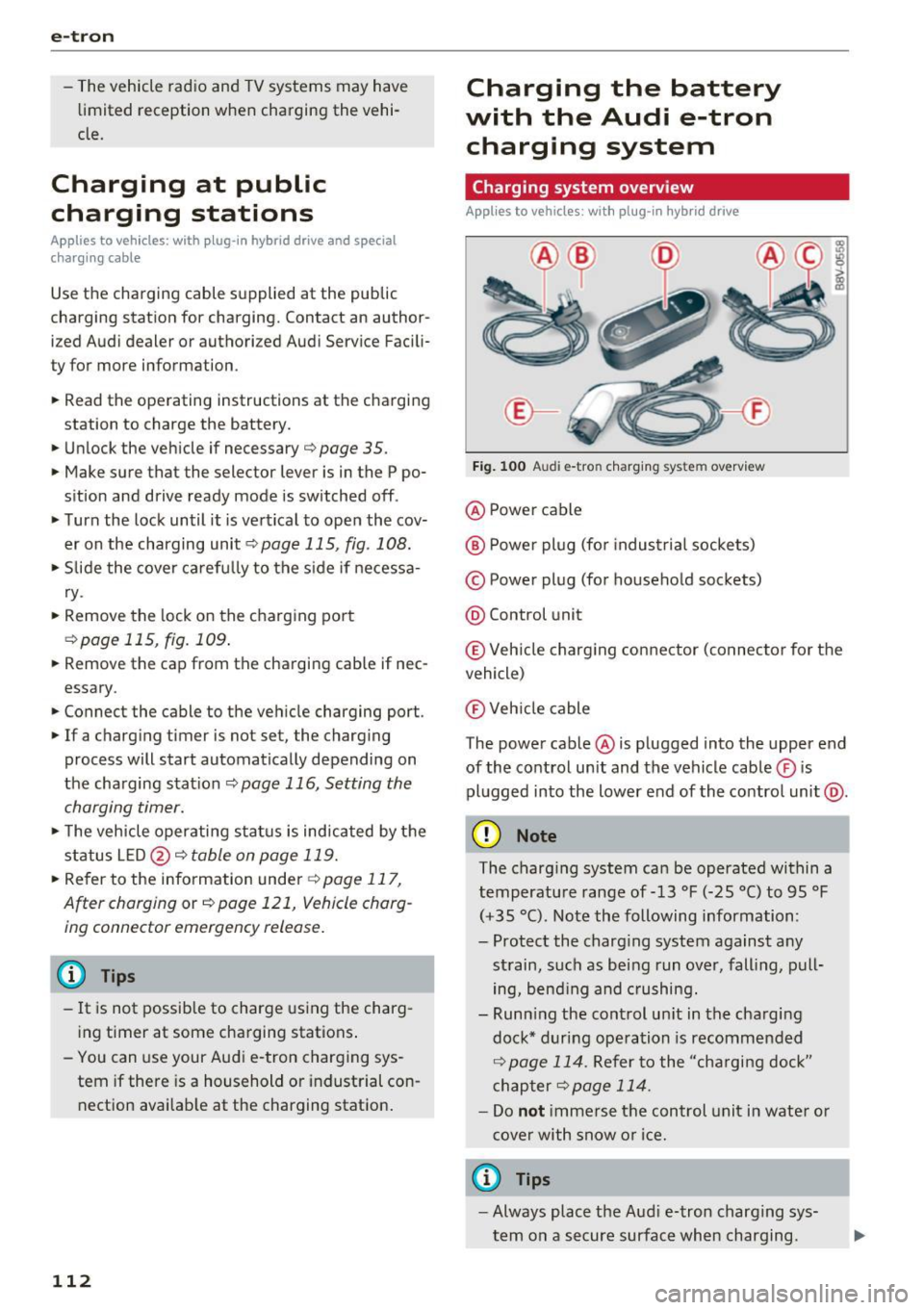
Charging system overview
Applies to vehicles : with plug -in hybrid drive
Fig. 100 Audi e-tron c harging system overview
@ Power cable
@ Power plug (for industrial sockets)
© Power plug (for household sockets)
@ Control unit
© Veh icle charging connector (connector for the
vehicle)
® Vehicle cable
The power cable @ is plugged into the upper end
of the control unit and the vehicle cable ® is
plugged into the lower end of the contro l unit @.
(D Note
The charging system can be operated within a
temperature range of-13 °F (-25 °C) to 95 °F
(+35 °C). Note the following information:
- Protect the charg ing system against any
strain, such as being run over, falling, pull
ing, bend ing and crushing.
- Runn ing the control un it in the charging
dock* during operation is recommended
¢ page 114. Refer to the "cha rging dock"
chapter
¢page 114.
-Do not immerse the control unit in water or
cover with snow or ice.
a) Tips
-Always place the Aud i e-tron charging sys
tem on a secure surface when charging.
Page 117 of 328
.... N
0 > CX)
rl I.Cl U"I ,....,
I.Cl ....
-Never transport the Audi e-tron charging
system or the special charg ing cab le* unse
cured.
- Store the Audi e-tron charging system or
the spec ial charging cable* in the storage
bag in the luggage compartment.
- Always transport the storage bag in the lug
gage compartment and never in the passen ger compartment (for example the seats or
in front of them).
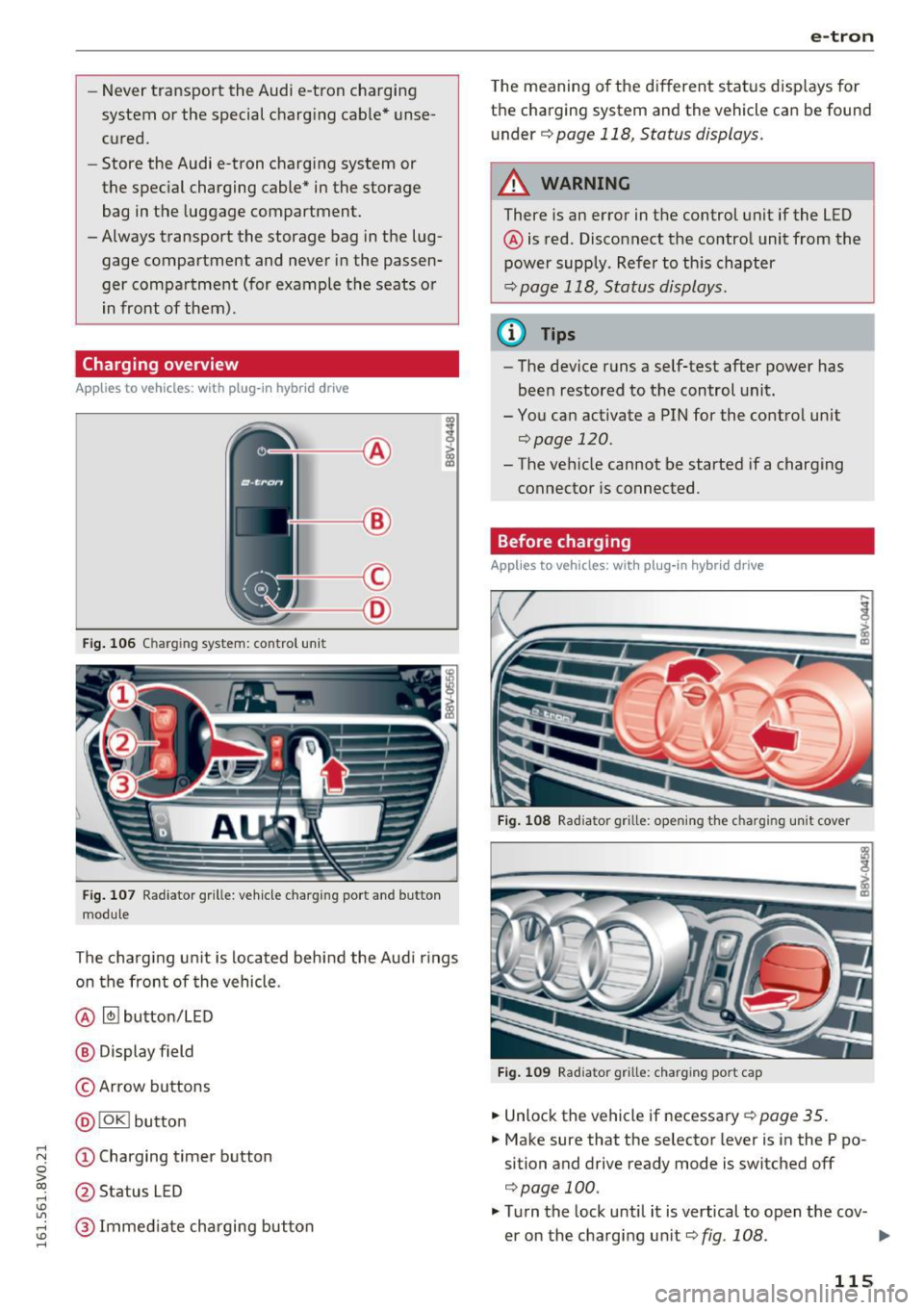
Charging overview
App lies to vehicles: with plug-in hybrid drive
Fig. 106 Charging system: control un it
Fig. 107 Radiator grille: ve hicle charging port a nd button
modu le
The charg ing unit is located behind the Audi r ings
on the front of the vehicle .
@
~ button/LED
® Display field
© Arrow buttons
@ !OK ! button
(D Charging timer button
@ Status LED
@ Immed iate charging button
e-tron
T he meaning of the different status displays for
the charging system and the vehicle can be found
u nder ¢ page 118, Status displays.
_& WARNING
-
There is an error in the control unit if the LED
@ is red . Disconnect the control unit from the
power supply. Refer to th is chapter
¢ page 118, Status displays.
@ Tips
- The device runs a self-test after power has
been restored to the control unit.
- You can activate a PIN for the control unit qpage 120.
- The vehicle cannot be started if a charging connector is connected.
Before charging
Applies to vehicles: with pl ug-in hybrid drive
Fig. 108 Radiator grille: open ing the c harging uni t cover
Fig. 10 9 Radiator grille: charging port cap
.. Unlock the vehicle if necessa ry¢ page 35.
.. Make sure that the selector lever is in the P po
sition and drive ready mode is switched off
qpage 100.
"' Turn the lock until it is vertical to open the cov -
er on the charging un it qfig. 108. ..,.
115
Page 119 of 328
...... N
0 > CX)
...... I.Cl U"I
...... I.Cl ......
can set whether you would like to charge with the
full or half of the charging power.
• Press the I OKI @¢ page 115, fig. 106 button
on the cont rol unit .
• Enter the P IN if necessary.
• PO WER and SET P IN appear on the disp lay
field.
• Select
POWER using the arrow button@.
• Press the IOKI @ button.
• The charging power display appears . The cur
re nt set value (50% or 100%) is marked w ith a
frame .
• If necessary, change the sett ing us ing the ar
row button © to move downward or upward.
• Press the IOKI @ but ton .
(D Tips
- If a ho usehold socket is used fo r the charg
i ng process, the charging powe r leve l is au
tomatically set to 100% . If multiple electri
ca l cons umers are connected to a circuit,
the charging power may be limited to 50%
when charging with a household socket in
order to relieve the load on the electrical in
stallation. This does not apply to 100/110 V
household sockets since the charging power
would be too low and this would cause the
chargi ng p rocess to end.
- If an industr ial socket is used for the charg
i ng process, the charging power leve l is au
tomatically set to 50% . To receive the max i
mum charging power, the value must be set
to 100% .
- A selected val ue rema ins set unt il the power
cable is connected again .
e-tron
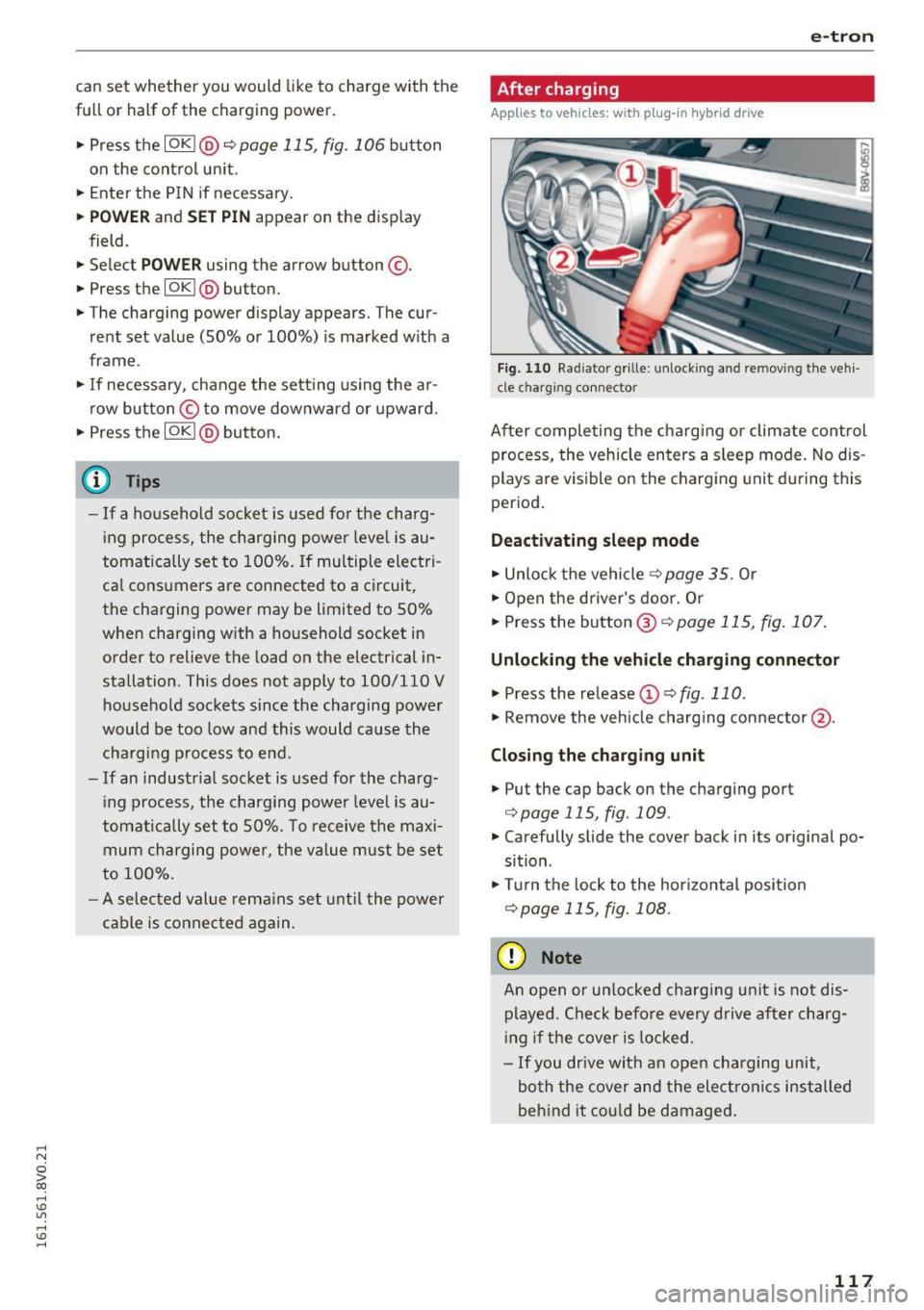
After charging
Applies to vehicles: with plug -in hybrid drive
Fig. 110 Rad iator grille : unlock ing and removing the vehi
c le charging connector
After completing the cha rgi ng or climate cont rol
process, the vehicle enters a sleep mode. No dis
plays are visible on the charging unit du ring this
period .
Deacti vating sleep mode
• Unlo ck the vehicle ~ page 35. Or
• Open the driver's door. Or
• Press the button @ ¢page 115, fig. 107 .
Unlocking the vehicl e charging connector
• Press the release (!)¢ fig. 110.
• Remove the veh icle charg ing connector @.
Closing the ch arging unit
• Put the cap back on the charging port
¢ page 115, fig. 109.
• Carefully slide the cover back in its original po
sition .
• Tu rn the lock to the hor izontal position
¢ page 115, fig. 108.
(D Note
An open or un locked cha rging unit is not dis
played . Check befo re every drive after charg
i ng if the cover is locked .
- If you dr ive with an ope n charging unit,
both the cover and the electronics installed
beh ind it cou ld be damaged .
117
Page 124 of 328
e-tron
You can release cover using the emergency re
lease.
.,. Turn the lock to the horizontal position .
.,. Unlock the veh icle.
.,. Open the hood
r:!;> page 23 7, Opening the hood .
.,. Carefully pull on the knob @until there is re-
s istance .
.,. Turn the lock to the vertical position
r:!;> page 115, fig . 108 .
.,. Slide the cover carefully to the side if necessa
ry .
Climate control
Description
Applies to vehicles: with plug- in hybrid drive
Your vehicle has either auxiliary heating or auxili
ary heat ing/ air conditioning*.
The auxiliary heating or the auxi liary heating/ air
conditioning* switches on depending on the out
side temperature and the temperature set on the
climate control unit .
Switching on/off immediately
.,. You can switch the climate control on and off
immediately in the MMI*
¢page 123. Or
.,. Switch off the blower with the~ button
¢ page 72, fig. 72.
Setting the timer
.,. You can set the time when your vehicle should
reach the desired temperature. Your set tem
perature and the outside temperature deter
mine when the climate control switches on.
@ Tips
- The temperature that the climate control
system adjusts to depends on the last tem
perature you set in the climate control unit
c;;,page 72.
-The climate control system does not auto
matically switch on or off earlier if the vehi
cle battery charge or the fuel level is too low.
122
· Auxiliary climate control
Applies to vehicles: with plug-in hybrid drive without auxiliary
hea ting
The aux iliary climate control controls the tem
perature in the vehicle inter ior ent irely with elec
tric power. It turns on only if the high-voltage
battery charge level is sufficient and there is
enough fuel in the tank.
Auxiliary heating / air conditioning
Applies to vehicles: with plug-in hybrid drive and auxiliary
heat ing
The aux iliary heating/ air conditioning controls
the temperature in the vehicle interior if the
high-voltage battery charge level is suff icient and
there is eno ugh fuel in the tank.
The
.ill. symbo l blinks in the climate contro l unit
whe n auxiliary heating is switched on.
When the auxiliary heating/ air conditioning t im
er is programmed, the Ill symbol stays turned on
until the departure t ime is reached.
& WARNING
- To reduce the risk of poisoning, the auxiliary
heating/ air conditioning must not run in
confined spaces .
- To redu ce the risk of fires, the auxiliary
heating/ air conditioning must not run
when refueling.
- Due to the high temperatures that result
from operating the auxiliary heating/ air
conditioning, the vehicle must be parked in
a way so that the hot exhaust can escape at
the bottom of the engine cover without ob
struction. The exhaust must not come into
direct contact with highly flammab le mate
r ials.
(D Tips
Water vapor can build up near the engine
compartment when outside temperatures are low. This is a natural phenomenon and is no
cause for concern.
Page 241 of 328
.... N
0 > CX)
.... I.Cl U"I
.... I.Cl ....
Checking and Filling
Gasoline engine compartment overview
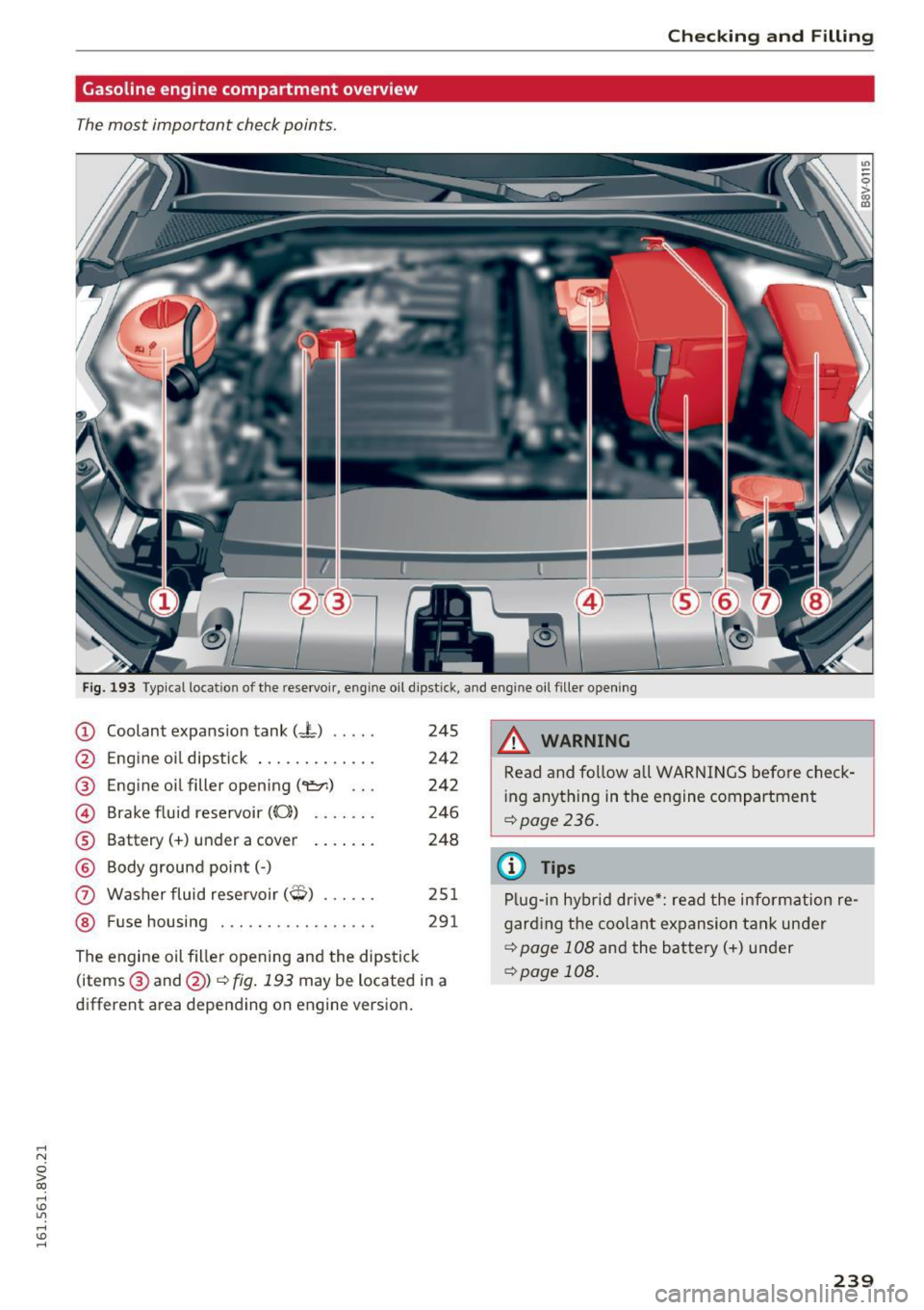
The most important check points .
Fig. 193 Typical location of the rese rvoir , engine oil dipst ick, and engine oil filler opening
CD
@
®
©
®
©
(J)
®
Coolant expansion tank (-L) .... .
Engine oil dipstick ............ .
Engine oil filler opening(~) .. .
Brake fluid reservoir (0))
Battery(+) under a cover ..... . .
Body ground point(-)
Washer fluid reservoir
(O) ..... .
Fuse housing . .... .... ....... .
245
242
242
246
248
251 291
The engine oil filler opening and the dipstick
(items ® and @)
q fig. 193 may be located in a
different area depending on engine version .
_& WARNING
=
Read and follow all WARNINGS before check-
i ng anything in the engine compartment
¢page 236.
(D Tips
Plug-in hybrid drive*: read the information re
garding the coolant expansion tank under
¢page 108 and the battery(+) under
¢ page 108 .
239
Page 247 of 328

.... N
0 > CX)
.... I.Cl U"I
.... I.Cl ....
corrosion can cause a loss of coolant and
serious engine damage .
- Do not add any type of radiator leak sealant
to your vehicle's engine coolant . Adding ra
diator repair fluid may adversely affect the
function and performance of your cooling
system and could result in damage not cov
ered by your New Vehicle Limited Warranty.
Adding coolant
F ig . 198 Engine compa rtment: mark in gs on t he coo lant
expa nsion tank
Read and follow the WARNINGS before check
ing anything in the engine compartment
¢ page 236, Working in the engine compart
ment.
Checking the engine coolant level
• Park your vehicle on a level surface .
• Switch the ignition off .
• Read the coolant level on the coolant expansion
tank
¢ fig. 198 . The coolant level must be be
tween the markings when the engine in cold .
When the engine is warm it can be slightly above the upper marking.
Adding coolant
Plug-in hybrid drive*: your vehicle has two cool
ant expansion tanks that are separate from each
other. The smaller of the two expansion tanks
must not be opened
¢ page 108. Read and fol
low the important safety precautions ¢
A in
Coolant on page 109.
Requirement: there must be a residual amount of
coolant in the expansion tank ¢(D .
• Let the engine cool down .
Checking and Filling
• Place a cloth over the coolant expansion tank
cap and unscrew the cap counterclockwise
¢ A .
• Add coolant mixed in the correct ratio
¢
page 244 up to the upper marking.
• Make sure that the fluid level remains stable.
Add more coolant if necessary.
• Close the cap securely .
A coolant loss suggests a leak. Immediately drive
your vehicle to an authorized Audi dealer or au
thorized Audi Service Facility and have the cool
i ng system inspected. If the cooling system is not
leak ing, a loss can come from the coolant boiling
through overheat ing and being pushed out of the
cooling system .
,&_ WARNING
-= -The cooling system is pressurized and can be
come very hot. To reduce the risk of burns
from hot coolant:
- Do not open the coolant expansion tank cap
with the engine hot. There is a risk of burns.
- Stop the engine and allow it to cool.
- Protect your face, hands and arms from es-
caping coolant and steam by covering the
coo lant tank cap with a large, thick cloth.
- Turn the coolant tank cap counterclockwise
slowly and keep light pressure on the cap.
- To reduce the risk of burns, do not allow any
antifreeze or coolant to drip onto the ex
haust system or hot engine components.
The ethylene glycol in engine coo lant can
catch fire under certain circumstances .
- The coolant additive and the coolant can be
dangerous to your health . For th is reason,
keep the coolant in the original container
away from children. There is a risk of poi
soning .
- When working in the engine compartment,
remember that the radiator fan can switch
on even if the ignition is switched off, wh ich
increases the risk of persona l injury.
(J) Note
Do not add coolant if the expansion tank is
empty . Air could enter the cooling system and
damage the eng ine.
If this is the case, do not ..,_
245
Page 251 of 328
.... N
0 > CX)
.... I.Cl U"I
.... I.Cl ....
-Always wear gloves and eye protection. Do
not tilt the battery because acid could leak
out of the ventilation openings.
- If you get battery acid in your eyes or on
your skin, immediately rinse with cold wa
ter for several minutes and get medical at
tention .
- If you should ingest any battery acid, seek
medical attention immediately.
- Do not expose the battery to an open flame,
electric sparks or an open light.
- Do not smoke.
- Do not interchange the positive and nega-
tive cab les.
- When working on the battery, be sure not to
short-circuit the terminals with tools or oth
er metal objects. This wou ld cause the bat
tery to heat up very quickly, which could
lead to damage or explosion and personal
injury.
- When a battery is charged, it produces hy
drogen gas which is explosive and could
cause personal injury.
- Always keep the battery well out of the
reach of children.
- Before work is done on the electrical sys
tem, disconnect the negative ground cable.
- Before performing any work on the electri
cal system, switch off the engine and igni
tion as well as any electrical equipment . The
negative cable on the battery must be dis
connected. If you are just going to replace a
light bulb, then it is enough to switch off
the lights.
- Before disconnecting the battery, switch off
the anti-theft alarm system! Otherwise you
will set off the a larm.
- When disconnecting the battery, first dis
connect the negative cable and then the
posit ive cab le.
- Before reconnecting the battery, make sure
all electrical consumers are switched off.
Reconnect the positive cab le first and then
the negative cable . Never interchange the
cables - th is could start a fire!
- Never charge a frozen o r a thawed-out bat
tery. It could explode! If a battery has fro-
Checking and Filling
zen, then it must be replaced. A discharged
battery can freeze over at 32 °F (0 °C).
- Make sure the vent hose is always attached
to the opening on the side of the battery.
- Never use batteries which are damaged.
There is the danger of an exp losion! Always
replace a damaged battery.
_8 WARNING ~
California Proposition 65 Warning:
- Battery posts, term inals and related acces
sories contain lead and lead compounds,
chemicals known to the State of California
to cause cancer and reproductive problems.
Wash hands after handling.
(D Note
-Do not disconnect the vehicle battery when
the ignition is on or when the engine is run
ning, otherwise, you will damage electronic
components in the electrical system.
- If your vehicle is going to stand for a long
period of time without being driven, protect
the battery from "freezing", otherwise it
w ill be damaged and will then have to be re
placed .
Battery charging
Starting the engine requires a well charged bat
tery.
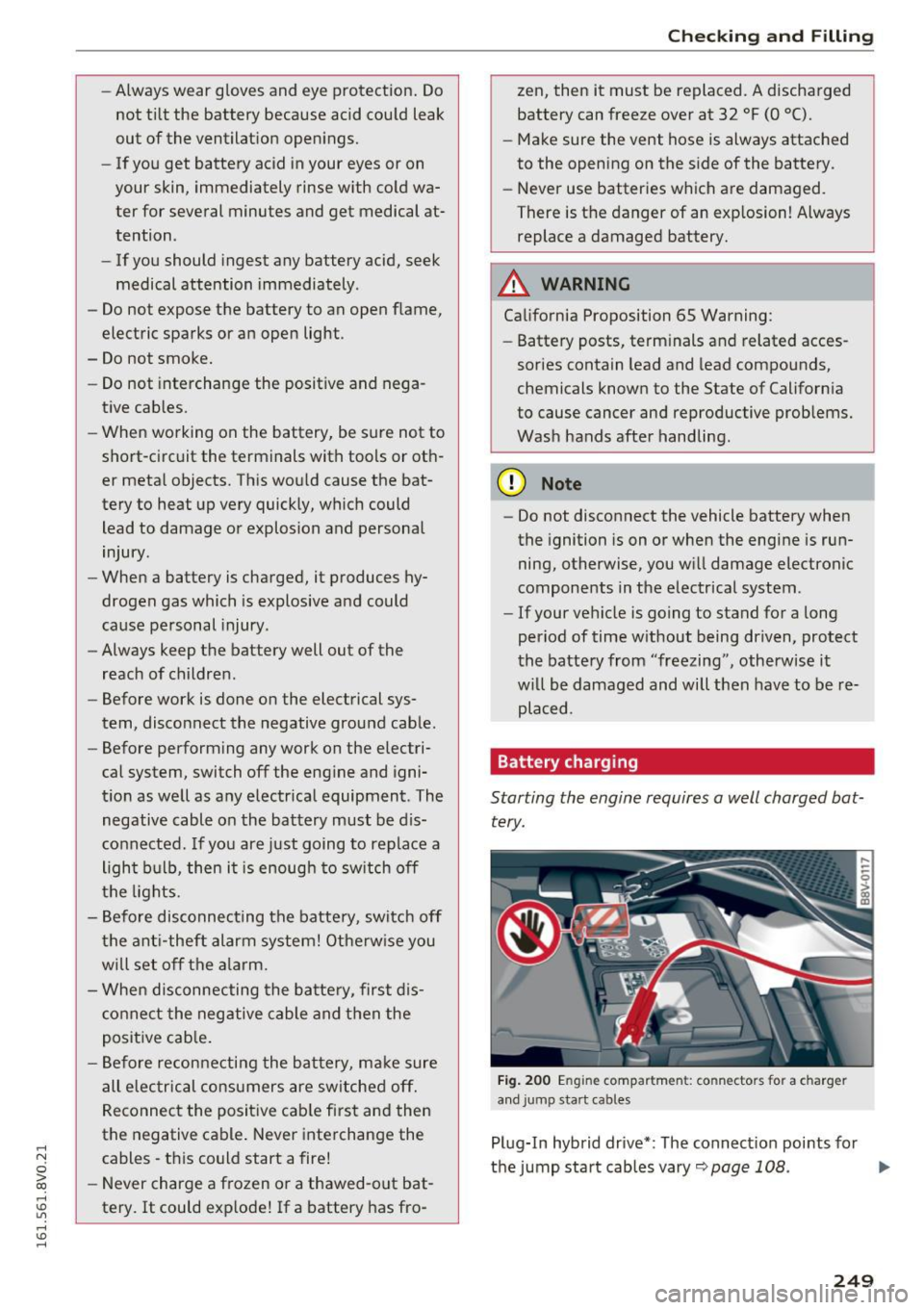
Fig. 200 Eng ine compartmen t: co nnectors fo r a charger
a n d jump start cab les
Plug-In hybrid drive* : The connect ion points for
the jump start cables vary~
page 108. .,.
249