warning AUDI A3 2016 Owner´s Manual
[x] Cancel search | Manufacturer: AUDI, Model Year: 2016, Model line: A3, Model: AUDI A3 2016Pages: 328, PDF Size: 81.78 MB
Page 135 of 328

.... N
ci > CX)
.... I.Cl U"I
.... I.Cl ....
General information
Appl ies to vehicles: with Audi adaptive cruise contro l an d Audi
p re se nse front
Fig. 116 Front o f ve hicle: sensor
The general information applies to adaptive
cruise control* and pre sense front*¢
page 139.
The radar sensor area¢ fig. 116 must not be cov
ered with stickers, deposits or any other obstruc
tions as it may impair the function of the adap
tive cruise control and the pre sense front. For in
formation on cleaning, refer to
c:> page 2 74. The
same applies for any modifications made in the
front area .
The function of the adaptive cruise control sys tem and pre sense front is limited in some condi
tions :
- Objects can only be detected when they are
within the sensor range
¢ page 132, fig. 115.
- The system has a limited ability to detect ob
jects that are a short distance ahead, off to the side of your vehicle or moving into your lane.
- Objects that are difficult to detect such as mo
torcycles, vehicles with high ground clearance
or an overhanging load are detected late or not detected at all.
- When driving through curves
c:> page 134.
-With stationary objects c!;> page 134.
A WARNING
Always pay attention to traffic when adaptive
cruise control is switched on and the pre
sense front is active
c:> page 139 . As the driv
er, you are still responsible for starting and
for maintaining speed and distance to other objects. The pre sense front is used to assist
you. The driver must always take action to
Assist
avoid a collision. The driver is always responsi ble for braking at the correct time.
- Using adaptive cruise control incorrectly can
cause collisions, other accidents and serious
injuries.
- For safety reasons, do not use adaptive
cruise control when driving on roads with
many curves, when the road surface is in
poor condition and/or in bad weather (such
as ice, fog, gravel, heavy rain and hydroplan
ing) . Using the system under these condi
tions could result in a collision.
- Switch adaptive cruise control off tempora
rily when driving in turning lanes, on ex
pressway exits or in construction zones. This
prevents the vehicle from accelerating to
the set speed when in these situations.
- The adaptive cruise control system will not
brake by itself if you put your foot on the ac
celerator pedal. Doing so can override the
speed and distance regulation.
- When approaching stationary objects such
as stopped traffic, adaptive cruise control
will not respond and pre sense front will
have limited function.
- The adaptive cruise control system and pre
sense front do not react to people, animals,
objects crossing the road or oncoming ob
jects.
- The function of the radar sensors can be af
fected by reflective objects such as guard
rails, the entrance to a tunnel, heavy rain or
ice .
- Always maintain enough distance from
vehicles ahead so that you can still brake
your vehicle safely . The adaptive cruise con
trol cannot safely slow your vehicle or brake it to a stop if you are driving too close be
hind a vehicle. Please note that the auto
matic braking function cannot brake sud
denly or apply the brakes fully under these
conditions.
- To reduce the risk of unintended actions,
switch the ACC off when you a re not actively
using it.
~
133
Page 137 of 328
,....,
N
0 > co ,....,
"' Pull the lever toward you into position @
¢fig. 119 . ACC: stan dby appears in the instru
ment cluster disp lay .
Saving the speed and activating regulati on
"'T o save the c urrent speed , press the ISETI
¢fig. 119 button. The stored speed is shown in
t h e tachomete r LED line @and appears briefly
in the information line @¢
fig. 120.
"' To activate the regu lation whi le stationary, you
must press the brake pedal.
Sw itching adaptiv e cruis e control off
"' Push the lever away from you into position @
until it clicks i nto place. The message
AC C: off
appears .
The stored speed in the LED line is erased.
@ Indicato r lights
II -adaptive cruise control is switched on. No
objects are detected ahead. The stored speed is
maintained.
• -An object a head was detected . The adaptive
cruise control system regulates the speed and
d istance to the object ahead and brakes/acce ler
ates automatica lly.
fij -adaptive cru ise control is switched on. An
object ahead was detected. Your vehicle remains
stopped and w ill not start driving automatica lly.
• -T he automatic bra king is no t enough to
maintain a sufficient distance to a n object ahead.
You must intervene ¢
page 138, Request for
driver intervention.
© Instrument clu ster display
If adaptive cruise control is not shown in the in
s trument cluster disp lay, yo u can call it up using
the mu ltifunction steering wheel b uttons
¢ page 29 .
Based on the g raph ics in the d isp lay, you can de
termine if the system is m ainta ining a distance to
a vehicle ahead and what that distance to this ve
hicle is:
No vehi cle -No object ahead was detected.
Assist
White vehicl e -An object ahead was de tected .
Red vehicl e -Request for the dr iver to take action
¢page 138.
Both arrows on the scal e© indicate the d istance
to the object ahead . No arrow appears when the
vehicle is on an open road and t here is no object
ahead. If an object is detec ted ahead, the a rrow
moves on the sca le.
T he green zone o n the scale indicates the store
distance. For informat ion on changing the dis
t a nce, refer to ¢
page 13 7. If the distance se
l ected is exceeded or not reached, the arrow
moves into the red zone on the scale.
A WARNING
- Using adaptive cruise control incorrectly can
cause collisions, other accidents and ser ious
in ju ries.
- If you press the
!SET ! button w hen driving at
speeds be low 20 mph (30 km/h), the vehi
cle acce lerates automatically up to 20 mph
(30 km/h), wh ich is the minimum speed
that can be set.
{!) Tips
- If you switch the ignit ion or the adaptive
cruise control system off, the set speed is
erased for safety reason.
- The Electronic Stabilization Control (ESC) and Anti-S lip Regulat ion (ASR) both sw itch
on when the adaptive cruise control is
switched on . ESC and ASR ca nnot be switch
ed off when adapt ive cruise control is
switched on.
- With the adaptive cruise control act ivated
t he ESC spo rt mode cannot be activated.
135
Page 138 of 328
Ass is t
Changing the speed
Applies to vehicles: with Audi adaptive cruise contro l
0
f
•
0
Fig. 121 Operating lever : c han gin g th e speed
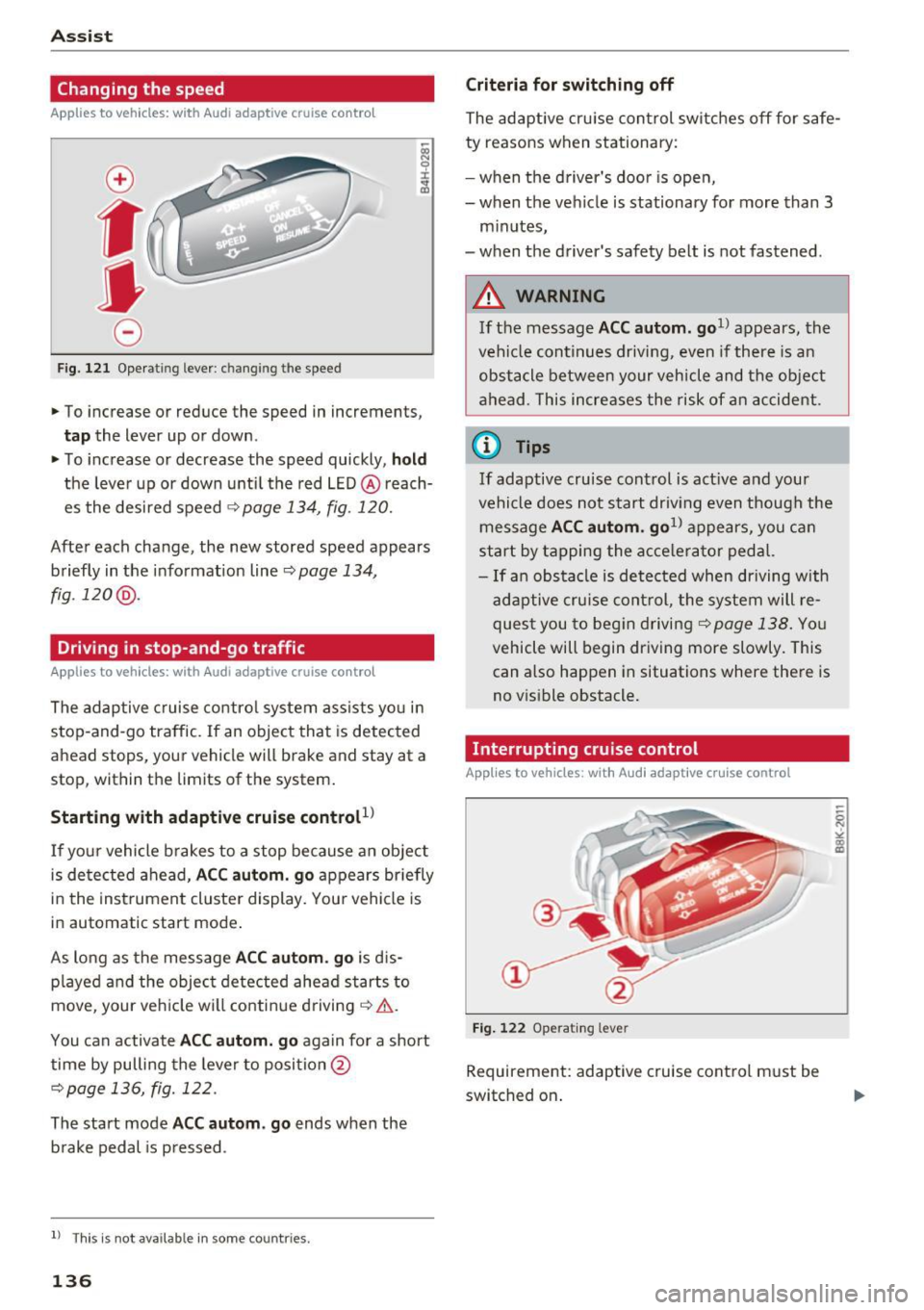
.,. To increase or reduce the speed in increments,
tap the lever up or down .
.,. To increase or decrease the speed quickly , hold
the leve r up or down until the red LED @ reach
es the desired speed
¢ page 134 , fig . 120.
After each change, the new stored speed appears
briefly in the informat ion line ¢
page 134 ,
fig .120 @.
Driving in stop-and-go traffic
Applies to vehicles: with Audi adaptive cruise control
The adaptive c ruise control system assists yo u in
stop-and-go traffic. If an object that is detected
ahead stops, your vehicle will brake and stay at a
stop, within the limits of the system.
Starting with adaptive cru ise control
l)
If yo ur vehicle b rakes to a stop because an object
is de tected ahead,
AC C autom. go appears br iefly
in the instrument cluste r display. You r vehicle is
in automat ic start mode .
As long as the message
A CC au tom . go is d is
p layed and the object detected ahead starts to
move , your veh icle wi ll continue driving¢& .
You can activate
AC C autom. go again for a short
time by pulling the lever to posi tion @
¢page 136, fig. 122.
The start mode ACC autom . go ends when the
b rake pedal is p ressed .
l) Th is is no t ava ila b le in s ome c ountries .
136
Criteria for switching off
The adaptive cru ise con trol switches off for safe
ty reasons when stationary:
- when the d river 's doo r is open,
- when the vehicle is stationary for more than 3
minutes,
- when the driver's safety belt is not fastened .
A WARNING
If the message ACC autom. go1> appears, the
vehicle continues driving , even if there is an
obstacle between your vehicle and the ob je ct
ahead . This increases the risk of an accident .
@ Tips
If adaptive cruise control is act ive and your
vehicle does not start driv ing even though the
message
AC C autom . go1> appears, you ca n
start by tapping the a cce le ra tor ped al.
- If an obstacle is detected when dr iving with
adaptive cruise con trol, the system will re
ques t you to beg in d riving
¢page 138. You
vehicle will begin dr iving more slowly. This
can also happen in situations where there is
no v is ible obstacle.
Interrupting cruise control
Applies to vehicles: with Audi adaptive cruise control
Fi g. 12 2 Ope rating leve r
Requ irement: adaptive cruise cont rol must b e
switched on .
Page 139 of 328
,....,
N
0 > co ,....,
Ove rriding means ex ceeding the selected speed
when adaptive cruise control is active, for exam
p le when pressing the accelerator peda l when
passing.
"'T o accelerate manua lly, p ull the lever toward
you into position @and ho ld it there. The mes
sage
ACC : over ride appears . Or
"' press the accelerator pedal.
"' To resume cruise control, release the lever or
take your foot off the acce lerator pedal.
Inte rrupting cruise contr ol w hil e driving
"'Move the lever into position @. The message
ACC: standb y appears. Or
"' press the brake pedal.
"' To resume the stored speed, move the lever in
to posit ion @.
Int errupting c rui se contr ol wh en stopped
"' Push the lever away from you into position @.
The message
ACC : stan dby appears.
"' To resume cruise control, press the brake pedal
and pull the lever toward you into position@.
A WARNING
It is dangerous to activate cruise control and
resume the stored speed when the current
road, traffic or weather conditions do not pe r
m it this. This could result in a crash.
Setting the distance
A ppl ies to v ehicles: with Audi a daptive cruise co ntro l
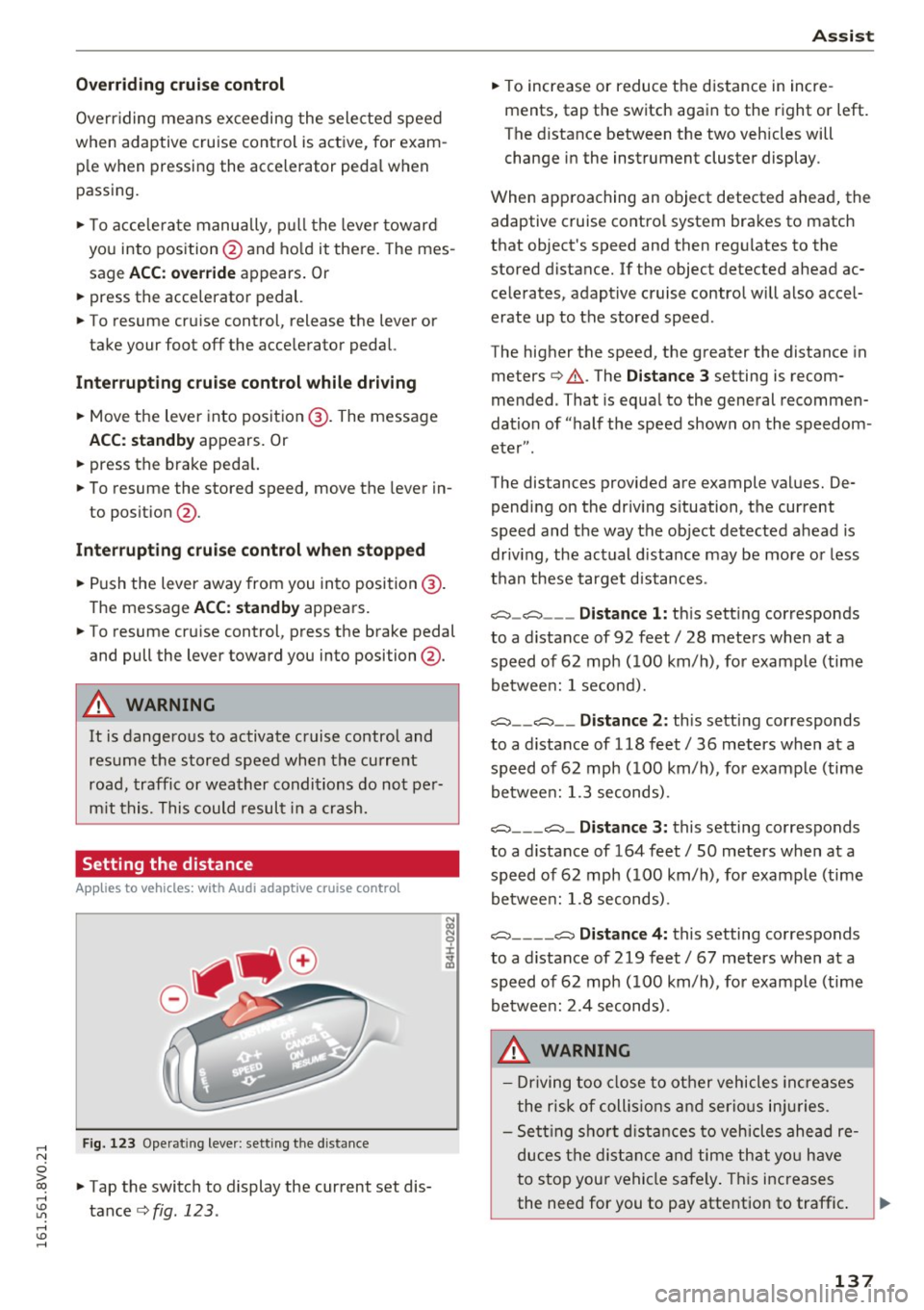
Fig. 123 Operat ing lever: setting the distance
"' Tap the switch to display the current set dis
tance
c>fig. 123 .
Assist
"'To increase or reduce the d istance in incre
ments, tap the switch again to the right or left.
The distance between the two veh icles will
change in the instrument cluster display.
When approaching an object detected ahead, the adaptive cruise contro l system brakes to match
that object's speed and then regu lates to the
stored distance. If the object detected ahead ac celerates, adaptive cruise control will also accel
erate up to the stored speed.
The higher the speed, the greater the distance in
meters
c> & . The Distance 3 setting is recom
mended. That is equa l to the general recommen
dation of "half t he speed shown on the speedom
eter" .
The distances provided are example values. De pending on the driv ing s ituation, the current
speed and the way the object detected ahead is
driv ing, the actual d ista nce may be more or less
t h an these target d istances .
o::::::::,_o::::::::, ___ Distance 1: th is sett ing corresponds
to a distance of 92 feet/ 28 meters when at a speed of 62 mph ( 100 km/h), for example (time
betwee n: 1 second).
o::::::::, __ o::::::::, __ Distanc e 2: this setting corresponds
to a distance of 118 feet/ 36 meters when at a speed of 62 mph ( 100 km/h), for example (time
betwee n: 1.3 seconds) .
o::::::::, ___ o::::::::,_ Distance 3: this setting corresponds
to a distance of 164 feet
I SO meters when at a
speed of 62 mph ( 100 km/h), for example (time
betwee n: 1.8 seconds) .
o::::::::, ____ o::::::::, Distance 4: this setting corresponds
to a distance of 219 feet
I 67 meters when at a
speed of 62 mph ( 100 km/h), for example (time
betwee n: 2.4 seconds) .
A WARNING
-Driving too close to other vehicles increa ses
the risk of collis ions an d serio us inj uries.
- Se ttin g sho rt d istances to vehicles ahead re
duces the dis tance an d time th at you have
to stop you r vehicle safe ly . Th is increases
the need for you to pay attention to traffic . ..,.
137
Page 141 of 328
,....,
N
0 > co ,....,
switches
off automatically .
ill ACC off: manual control!
This message appears if the veh icle rolls back
when sta rting on a slight incl ine, even though
ACC is act ive. Press the brake pedal to p revent
the veh icle from ro lling or starting to move.
ill ACC: engine speed
This message appears if the driver has not shift
ed up or down in time when the adapt ive cruise
control is braking or accelerating, caus ing the ve
h icle to exceed or to not reach the permitted en
g ine speed . The adaptive cru ise cont rol turns
off.
A chime sounds as a remi nder.
•••
Three white dots appear if a sett ing cannot be se
lected with the operating lever. For example, this
happens if adaptive cruise control cannot be acti
vated when stopped because the dr iver has not
fastened the safety belt.
Doo r open
Adapt ive cruise control cannot be switched on
when the vehicle is stationary and the driver's
door is open.
Audi pre sense
Introduction
Applies to vehicles: with Audi pre sense basic or Audi pre sense front
With in the limits of the system, p re sense basic
and pre sense front can in it iate steps to protect
vehicle occupants in certain dangerous s itua
tions .
Critical driving situat ions can be recogn ized by
the pre sense front via a network of different ve hi cle systems and can take steps to prepare the
ve hicl e o ccupants for a potential collis ion.
The pre sense front works w ith a radar sensor
and a video camera*. It also functions within the limits of the system when adaptive c ruise con
tro l* is switched off .
Assist
General information
General information
Applies to vehicles: with Audi pre sense front or Audi adaptive
cruise control
_&. WARNING
Also fo llow the gene ral in format ion found on
~ page 133, General information.
Audi pre sense basic
Description
Applies to vehicles: with Audi pre sense basic
The function of the pre sense basic is activated at
a speed of 20 mph (30 km/h) or h igher .
The following functions can be triggered under certain condit ions w ith in the lim its of the sys
tem:
- Tensioning of the safety belts (for examp le,
during heavy braking): the front safety belts have reversib le be lt tens ioners. If a collision
does not occur, the safety belts loosen slightly
and are ready to tr igger aga in.
- Closing the windows and the sunroof* (for ex
ample when over- or understeering): the win
dows close until the re is only a small gap open
and the s unroof* closes all the way .
Audi drive select: the deployment time is adapt ed in dynam ic mode.
_&. WARNING ~
The pre sense basic cannot overcome natural
physical laws. It is a system desig ned to ass ist
and it cannot p revent a collision. Do not let
the increa sed safe ty p rovided tempt you into
t aking r is ks. This co uld in crease yo ur risk of a
collis ion .
- The system can dep loy inco rre ctly due to
system-specif ic limits.
(D Tips
- Certa in p re sense basic functions switch off
when ESC is swi tched off (sport mode) or
w hen driving in reverse. .,.
139
Page 142 of 328
Ass is t
- The pre sense b asic functions may not be
available if there is a ma lfunction in the ESC
system or the airbag contro l module.
- Note that with pre sense basic, the reversi
ble safety belt pretensioner on the front
passenger 's s ide deact ivates when the front
passenger's airbag is deactivated.
Audi pre sense front
Description
A pp lies to veh icles: with Audi pre sense front or Audi adapt ive
cr uise control
Pre sense front informs you if the distance to the
vehicle ahead falls below the safe distance for an
extended period of time.
It c an warn of a poss i
b le co llision and initiate braki ng maneuve rs,
within the limits of the system.
When detected in time, the system can assess
dangerous s ituations where an object ahead
b rakes suddenly or if your own vehi cle is t raveling
at a high speed and approaching an object that is
mov ing more slowly. If detect ion is not possible,
then pre sense front does not react.
Warnings
Applies to veh icles: with Audi p re se nse front o r Aud i ada ptive
cr uise con trol
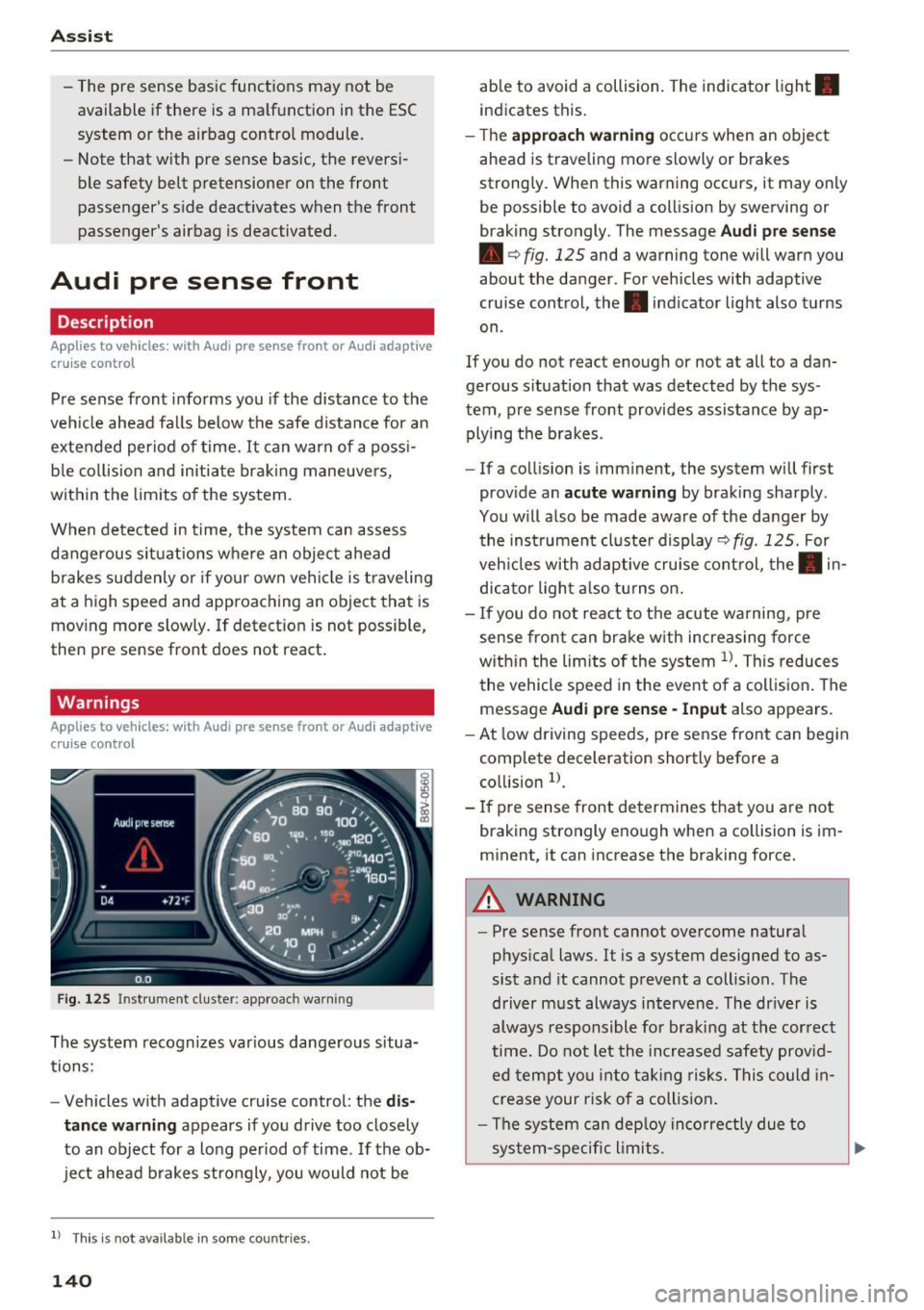
F ig . 12 5 Instrument cluster: app roach wa rning
The system recognizes var ious dange rous situa
tions:
- Vehicles with adapt ive cruise control: the
dis
tance warning
appears if yo u drive too closely
to an object for a long period of time. If the ob
ject ahead b rakes strongly, you would not be
l ) Thi s is not ava ilab le in some co un tri es .
140
able to avoid a collision. The indicator light .
indicates this.
- T he
approach w arning occurs when an object
ahead is traveling more slowly or brakes
strong ly. When this warning occurs, it may only
be possible to avoid a coll is ion by swerving or
braking strongly. The message
Aud i p re sense
• c:> fig. 125 and a warning tone will warn you
about the danger. For vehicles with adaptive
cruise control, the. indicator light also turns
on .
If you do not react enough or not at all to a da n
gerous s ituation that was detected by the sys
tem , pre sense front provides assistance by ap
plying t he b rakes .
- If a collision is imminent, the system will first
prov ide an
acute w arning by braking sharply .
You will also be made aware of the danger by the ins trument cluste r display
c:> fig . 125. For
veh icles with adaptive cru ise cont rol, the . in
dic ator light a lso tu rns on .
- If you do not react to the acute warning, pre
sense front can brake w ith increasing force
w it hi n the lim its of the system
l )_ This reduces
the vehicle speed in the event o f a collis ion . The
message
Audi pre sense -Input also appears.
- At low driving speeds, pre sense front can begin
complete deceleration shortly before a
co llision
l).
- If p re sense front determines t hat you are not
braking strongly enough when a co llision is im
m inent, it can increase the braking force.
A WARNING
-
- Pre sense front cannot overcome natura l
phys ica l laws. It is a system designed to as
sist and it cannot prevent a collision . The
driver m ust always intervene . The dr iver is
always responsible fo r braki ng at the correct
time . Do not let the in crease d sa fety prov id
ed tempt you into ta king risks. This could in
crease your risk of a collision .
- The system can dep loy inco rre ctly due to
sys tem-specific li mits.
Page 143 of 328

,....,
N
0 > co ,....,
detect all objects. This increases the risk of
a collision.
- Pre sense front does not react to people or
animals or objects that are crossing the ve
hicle's path or are difficult to detect
¢ page 133.
-Reflective objects such as guard rails or the
entrance to a tunnel, heavy rain and ice can
affect the function of the radar sensor and
the system's ability to detect a collision risk.
- Lack of attention can lead to collisions, oth
er accidents and serious injuries. pre sense
front is an assistance system and cannot
prevent a collision by itself. The driver must
always intervene. The driver is always re
sponsible for braking at the right time.
- Always pay attention to traffic, even when
pre sense front is switched on. Always be
ready to intervene and take over complete
control of the vehicle whenever it is neces
sary. Always follow traffic laws regarding
maintaining a safe distance between your
vehicle and vehicles ahead.
- pre sense front works within certain limits
and cannot react to situations that are out
side of the system limits, such as when ap
proaching a stationary vehicle or a station
ary obstacle (the end of a traffic jam or ave
hicle that has broken down).
- Always keep in mind that the radar sensor
for pre sense front only works within de
fined detection zones, which means other
vehicles may not always be detected cor
rectly.
- The function and range of the radar sensor
can be impaired by rain, snow and heavy
mist. Vehicles ahead may not be detected
right away, or not detected at all.
- Reflective surfaces such as guard rails or en
trances to tunnels may impair the function
of the radar sensor.
(D Note
The sensor can be disp laced by impacts or
damage to the bumper, wheel housing and
underbody. Pre sense front can be impaired
by this. Have an authorized Audi dea ler or au-
Assist
thorized Audi Service Facility check their func
tion.
(D Tips
- You can cancel the bra king with increas ing
force that is initiated by the system by brak
ing yourself, by acce lerating noticeably or
by swerving.
- For information on driver messages about
pre sense, refer to¢
page 142.
- Keep in mind that pre sense front can brake
unexpectedly. Always secure any cargo or
objects that you are transporting to reduce
the risk of damage or injury.
- Certain pre sense front functions switch off
when ESC is switched off (sport mode) or
when driving in reverse.
- The pre sense front functions are not availa
ble if there is a malfunction in the adaptive
cruise control* system¢
page 138 or
¢page 142.
-Keep in mind that pre sense front can brake
abruptly. Always secure cargo or objects
that you transport to reduce the risk of
damage or injury .
Settings in the Infotainment system
Applies to vehicles: with Audi pre sense front or Audi adaptive
cruise control
.,. In the MMI, select: the I MENU I button >Car>
Systems*
control button > Driver assistance >
Audi pre sense .
Switching the system on and off
Audi pre sense (Syste m): if the system is turned
off, it automatically turns on again once the igni
tion is switched on.
System -switch Audi pre sense On/Off. With
this, you can switch the prewarning and the brak
ing intervention from Audi pre sense on or off.
Early warning -the distance and approach warn
ings can be switched
On /Off .
(D Tips
-If you restrict or switch off the ESC, the pre
sense also switches itse lf off¢
page 160.
141
Page 144 of 328

Ass is t
- Switch the pre sense off when you are load
ing the vehicle onto a vehicle carrier, train,
sh ip or other type of transportation. This
can prevent undesired warnings from the pre sense system.
Driver messages
A pp lies to ve hicles: w ith Audi p re se nse or A ud i adapt ive
cr uise con trol
Audi p re sense cu rre ntly una va ilable. N o sensor
visi on
This message appears if the sensor view is ob
structed, fo r example by leaves, snow, heavy
spray or dirt. C lean the sensor~
page 133,
fig. 116.
Audi pre se nse : o ff
This message appears when the ESC is switched
to sport mode, for example
~ page 160 .
Audi pre sen se: sys te m f ault!
This message appears when the pre sense func
tion is aff ected. For example, this could be
caused by a faulty sensor.
If the message stays on , drive to an authorized
Audi dealer or authorized Aud i Service Facility to
have the ma lfunction corrected .
Audi active lane assist
Description
App lies to veh icles: w ith Aud i active lane assis t
Active lane assist detects lane marker lines with
in the l imits of the system us ing a came ra in the
windshie ld. If you are approaching a detected
lane marker line and it appears likely that you
will leave the lane, the system will warn you with
corr ective steering. You can overrid e this st eering
at any time . If you pass over a line, the steering
wheel will vibrate lightly. In order for this warn ing vibration to occur, it must first be switched
on in the MMI. Active lane assist is operable
when the lane marker line is detected on at least
one side of the veh icle.
l) Th is fun ction is not avail able in al l countrie s.
142
The system will not warn you before crossing a
l ane marker line if you have activated the turn
s ignal. In this case, it assumes that you are
changing lanes intentionally.
The system is designed for driving on express
ways and highways and therefore on ly activates
at speeds above approximately 40 mph (65 km/
h).
A WARNING
-
- The system warns the driver that the vehicle
is leaving the lane using correct ive steering .
The driver is always responsible for keeping
the vehicle within the lane .
- The system can help you keep the vehicle in the lane, but it does not drive by itself . Al
ways keep your hands on the steering wheel.
- Corrective steering may not occur in certain
situations, such as du ring heavy braking.
- There may be cases where the camera does
not recognize all lane marker lines. Correc
tive stee ring can only take place on the s ide
of the vehicle where lane marker lines are
detected.
- Other road structures or objects could poss i
bly be identified un intent ionally as lane
marker lines . As a result, corrective steering
may be unexpected or may not occur.
- The camera view can be restricted, for ex
ample by vehicles driving ahead or by rain,
snow, heavy spray light shining into the
camera or by dirt on the window . This can
result in active lane assist not detecting the
lane marker lines or detect ing them incor
rectly .
- In certain situations where visibility is low,
the vehicle may switch from "early" to "late"
corrective steer ing
1> .
- Under certain cond it ions such as ruts in the
road, an inclined roadway or crosswinds, the
corrective steer ing alone may not be enough
to keep the vehicle in the m iddle of the lane .
~
Page 146 of 328
Assist
The lane assist display can be called up using the
buttons in the
multifunction steering wheel
c::>page29 .
Monochrome display
Refer to c::> fig. 128
® Solid lines: active lane assist is switched
on and ready to provide warnings on the
side that is ind icated.
® Blinking lines (left or right): using vi bra-
tions in the steering whee l, active lane as-
sist is warning you that you are leaving
the lane.
® Unfilled line(s): active lane assist is
switched on but is not ready to provide
warn ings.
No lines: active lane assist is sw itched off.
Multi-Color Display
Refer to q fig. 129
® Solid white lines: active lane ass ist is
sw itched on and ready to provide warn-
ings on the side that is indicated.
® Red lines (left or right) : using vibrations in
the steering wheel, active lane assist is
warn ing you that you are leaving the lane.
® Solid gray lines: active lane assist is
switched on but is not ready to provide
warn ings.
No lines: active lane assist is switched off.
Messages in the instrument cluster display
If the active lane ass ist has a malfunction , the
rm indicator light in the instrument cluster dis
p la y turns off and one of the following messages
appears:
Audi active lane assist: currently not available.
No camera view
This message appears if the camera is unable to
detect the lines . Th is could happen if :
l) This fun ction is not availab le in all coun tries.
144
-The camera fie ld of view c;,page 143, fig . 127 is
dirty or covered in ice. Clean this area on the
w indshield.
- The camera fie ld of view is fogged over . Wait
until the fog has cleared before switching the
active lane assist on again.
- The system has been unable to detect the lanes
for an extended period of time due to road con
ditions . Switch the act ive lane assist back on
when the lines are more visible .
Audi active lane assist: Currently unavailable
There is a temporary active lane assist malfunc
tion. Try switching the active lane ass ist on again
l ater.
Audi active lane assist: System fault!
Drive to an authorized Audi dealer or authorized
Audi Service Fac ility immed iately to have the
malfunction corrected.
rm Audi active lane assist: Please continue
steering vehicle!
This message appears if you are not steering by
yourself .
If this is the case, active lane assist does
not switch off, but it is "not ready" to provide a
warning . The system can help you keep the vehi
cle in the lane. However, you are responsible for
driv ing the veh icle and must steer it yourse lf .
Adjusting the steering time and vibration
warning
Applies to vehicles: with Audi active lane assist
You can adjust individual active lane assist set
tings in the MMI.
.,. Select: the I MENU I button> Car> Systems *
control button > Driver assistance > Audi ac
tive lane assist .
Steering time
1 >
Early: in this setting, the corrective steering hap
pens continuously to help keep the veh icle in the
center of the lane .
IJII>
Page 147 of 328

.... N
0 > CX)
.... I.Cl U"I
.... I.Cl ....
Late: in this set ting, t he system provides correc
tive steering just before a vehicle whee l touches a
detected lane marker line.
Vibrat ion warning
You can switch the additional vibrating warning
i n the steering wheel on or
off.
& WARNING
With the vibration warning switched off, no
visible warning will appear in the instr ument
cluster display when crossing a lane marker.
@ Tips
Market-specific: your sett ings are stored au
tomatically and assigned to the remote con
trol key in use.
Audi side assist
Description
A pp lies to vehicles: with Audi side assist
Fig. 130 Sensor detectio n range
Fig. 131 D isplay on the exterior mirro r
Side assist he lps you monitor your blind spot and
traffic behind your vehicle. Within the limits of
the system, it warns you about vehicles that are
com ing closer or that are traveling with yo u with-
A ss ist
in senso r range (D ¢ fig. 130 : if a lane change is
classified as critical, the display @ in the exterior
mirror¢
fig. 131 turns on .
T he displ ay in the left exterior mirror p rovides as
sistance when making a lane change to the le ft,
whi le the display in the right exterior mirror pro
vides ass istance when making a lane ch ange to
the right.
Information stag e
As long as you do not a ct ivate the tu rn signal,
side assist
informs you about vehicles that are
detected and classified as critical. The display in
the mirror turns on, but is dim .
T he disp lay remains dim i n the information stage
so that your view toward the front is not distur
bed.
Warning stage
If you activate the turn s ignal, side assist warns
yo u about vehicles that are detected and classi
fied as crit ica l. T he d isp lay in the respective mir
ror blinks bright ly. If this happens, check traffic
by glancing in the rearview mirror and over your
shou lder ¢.&.
in General information on
page 146.
(D Tips
- You can adjust the brightness on of the dis
play on the rearview mirror¢
page 147.
145