steering wheel AUDI A3 2016 Owner´s Manual
[x] Cancel search | Manufacturer: AUDI, Model Year: 2016, Model line: A3, Model: AUDI A3 2016Pages: 328, PDF Size: 81.78 MB
Page 88 of 328
Driving
brake provides various convenience and safety
functions.
When starting from a stop
- The integral hill start assist helps you when
driving by automatically releasing the parking
brake
c:;, page 87, Starting from a stop.
- When starting on inclines, the hill start assist
prevents the vehicle from unintentionally roll
ing back. The braking force of the parking brake
is not released until the wheels build up
enough driving force.
Emergency brake function
The emergency braking function ensures that the
vehicle can be slowed down even if the
standard
brakes fail c:;, page 87, Emergency braking
function.
A WARNING
- Do not press the accelerator pedal inadver
tently when the vehicle is stationary and the engine is running and a gear is selected.
Otherwise the vehicle will start to move im
mediately and could result in a crash.
- If the power supply fails, the released park
ing brake can no longer engage. In this
case, park the vehicle on level ground and
secure it by placing the selector lever in the
P position . See an authorized Audi dealer or
authorized Audi Service Facility for assis
tance.
(D Note
If the . or .. (USA models) /. (Canada
models) indicator light in the instrument
cluster blinks, there is a malfunction in the
brake system. Refer to the detailed descrip
tion of the indicator lights
c:;, page 18.
-If the - (USA models) /. (Cana-
da models) or
Ill indicator light turns on,
there is a malfunction in the parking brake
c;, page 19.
@ Tips
-If the parking brake is set while the ignition
is switched off, the
¢~jj indicator light in the
button and in the instrument cluster dis-
86
play - (USA models) /. (Canada mod
els) will turn off after a certain amount of
time.
- If driver's door is opened while the ignition
is switched on, the parking brake sets auto
matically. This prevents unintended rolling
of the vehicle.
- Occasional noises when the parking brake is
set and released are normal and are not a
cause for concern.
- When the vehicle is parked, the parking
brake goes through a self-test cycle at regu
lar intervals. Any noises associated with this
are normal.
- If there is a power failure, the parking brake
will not set if it is released, and it will not release if it is set
c:;, I!:::,. . See an authorized
Audi dealer or authorized Audi Service Fa cility for assistance.
· Parking
.,. Press the brake pedal to stop the vehicle.
.,. Pull the switch @
c:;, page 85, fig. 80 to set the
parking brake.
.,. Place the selector lever in the P position.
.,. Turn the engine off
c:;, & -
.,. Turn the steering wheel when parking on in
clines so that the wheels will roll into the curb
if the vehicle starts moving.
A WARNING
- Always take the vehicle key with you when
leaving the vehicle, even for a short period
of time . This applies particularly when chil
dren remain in the vehicle. Otherwise chil
dren could start the engine, release the
parking brake or operate electrical equip
ment such as power windows, which in
creases the risk of an accident.
- When the vehicle is locked, no one -particu
larly not children -should remain in the ve
hicle. Locked doors make it more difficult
for emergency workers to get into the vehi
cle, which puts lives at risk.
Page 97 of 328
,....,
N
0 > co ,....,
Applies to vehicles: with launch control
The Launch Control Program enables maximum
acceleration .
Requirement: the engine must be at operating
temperature and the steering wheel must not be
turned .
.. With the engine running, press the
l~OFF ! but
ton briefly one time
ll .
.. Pull the selector lever back out of the D/S posi
tion briefly to select the S position, or press it
toward the right into the tiptronic pos ition or
select the
D ynami c driving mode in drive se
lect*
~page 148.
.. Press the b rake peda l firmly wi th you r left foot
and hold it all the way down for at least 1 sec
ond.
.. At the same time, press the gas pedal all the
way down with your right foot until the engine
reaches and stays at a high RPM level.
.. Remove your left foot from the brake.
A WARNING
-Always adapt yo ur driv ing to the traffic flow.
- Only use Launch Control when road and traf-
fic cond itions allow it and other dr ivers will
not be endangered or impacted by you r d riv
ing and the vehicle's accele ration.
- Please note that the drive whee ls can sp in
and the vehicle can break away when sport
mode is swit ched o n, especia lly when the
road is s lippery.
- Once t he vehicle has sta rted moving, press
the
I $? OFF ! button briefly to t urn the sport
mode off.
(D Tips
- The transmiss ion temperature may increase
s ignificantly after using the lau nch cont rol
program.
If that happe ns, the program m ay
l) In vehicles w ith a d river information system, an ESC light
in the instrument cluster stays o n continuous ly and the
message
Stabili za tion contro l (E SC ): sport . Warning! Re·
stricted st abi lity
appears temporar ily.
Autom atic tran sm iss ion
not be ava ilab le for a few minutes. It will be
avai lab le again after a cool-down period.
- Whe n accelerating using the launch contro l
program, all vehicle parts a re su bject to
heavy loads. This can lead to increased
wear.
Emergency mode
Applies to vehicles: wit h S tronic transmiss ion
In the event of o system mo/function, there is on
emergency program.
If all of the selector lever positions are hig hlight
ed with a light background in the instrument
cluster disp lay, there is a system malfunction and
the S tronic transmission is running in the emer
gency program. The vehicle can still be driven in
emergency mode, but only with reduced speed
and not in all gears . In some cases, the vehicle
cannot drive in rever se .
(D Note
If the transm ission runs in emergency mode,
drive to an authorized A udi dealer or author
iz ed Audi Se rvice Facility immed iate ly to have
the malfunc tion corrected.
Transmission malfunction
• Tran smi ssion malfunction ! Pl ea se stop the
vehicle and select P
The re is a ma lfunction in the transmission. Park
the vehi cle secure ly and do not cont in u e driv ing.
See a n author ized Audi dealer or au thori zed A udi
Service Facility for assis tance.
• Tran smission overheating! Plea se stop the
vehicle!
The transmiss ion is too hot and can become dam
aged. Stop and let the transmiss ion cool w ith the
engi ne r unning (at idle) in the P se lector lever po
s it ion. Then the ind icator lig ht and the message .,.
95
Page 137 of 328
,....,
N
0 > co ,....,
"' Pull the lever toward you into position @
¢fig. 119 . ACC: stan dby appears in the instru
ment cluster disp lay .
Saving the speed and activating regulati on
"'T o save the c urrent speed , press the ISETI
¢fig. 119 button. The stored speed is shown in
t h e tachomete r LED line @and appears briefly
in the information line @¢
fig. 120.
"' To activate the regu lation whi le stationary, you
must press the brake pedal.
Sw itching adaptiv e cruis e control off
"' Push the lever away from you into position @
until it clicks i nto place. The message
AC C: off
appears .
The stored speed in the LED line is erased.
@ Indicato r lights
II -adaptive cruise control is switched on. No
objects are detected ahead. The stored speed is
maintained.
• -An object a head was detected . The adaptive
cruise control system regulates the speed and
d istance to the object ahead and brakes/acce ler
ates automatica lly.
fij -adaptive cru ise control is switched on. An
object ahead was detected. Your vehicle remains
stopped and w ill not start driving automatica lly.
• -T he automatic bra king is no t enough to
maintain a sufficient distance to a n object ahead.
You must intervene ¢
page 138, Request for
driver intervention.
© Instrument clu ster display
If adaptive cruise control is not shown in the in
s trument cluster disp lay, yo u can call it up using
the mu ltifunction steering wheel b uttons
¢ page 29 .
Based on the g raph ics in the d isp lay, you can de
termine if the system is m ainta ining a distance to
a vehicle ahead and what that distance to this ve
hicle is:
No vehi cle -No object ahead was detected.
Assist
White vehicl e -An object ahead was de tected .
Red vehicl e -Request for the dr iver to take action
¢page 138.
Both arrows on the scal e© indicate the d istance
to the object ahead . No arrow appears when the
vehicle is on an open road and t here is no object
ahead. If an object is detec ted ahead, the a rrow
moves on the sca le.
T he green zone o n the scale indicates the store
distance. For informat ion on changing the dis
t a nce, refer to ¢
page 13 7. If the distance se
l ected is exceeded or not reached, the arrow
moves into the red zone on the scale.
A WARNING
- Using adaptive cruise control incorrectly can
cause collisions, other accidents and ser ious
in ju ries.
- If you press the
!SET ! button w hen driving at
speeds be low 20 mph (30 km/h), the vehi
cle acce lerates automatically up to 20 mph
(30 km/h), wh ich is the minimum speed
that can be set.
{!) Tips
- If you switch the ignit ion or the adaptive
cruise control system off, the set speed is
erased for safety reason.
- The Electronic Stabilization Control (ESC) and Anti-S lip Regulat ion (ASR) both sw itch
on when the adaptive cruise control is
switched on . ESC and ASR ca nnot be switch
ed off when adapt ive cruise control is
switched on.
- With the adaptive cruise control act ivated
t he ESC spo rt mode cannot be activated.
135
Page 144 of 328

Ass is t
- Switch the pre sense off when you are load
ing the vehicle onto a vehicle carrier, train,
sh ip or other type of transportation. This
can prevent undesired warnings from the pre sense system.
Driver messages
A pp lies to ve hicles: w ith Audi p re se nse or A ud i adapt ive
cr uise con trol
Audi p re sense cu rre ntly una va ilable. N o sensor
visi on
This message appears if the sensor view is ob
structed, fo r example by leaves, snow, heavy
spray or dirt. C lean the sensor~
page 133,
fig. 116.
Audi pre se nse : o ff
This message appears when the ESC is switched
to sport mode, for example
~ page 160 .
Audi pre sen se: sys te m f ault!
This message appears when the pre sense func
tion is aff ected. For example, this could be
caused by a faulty sensor.
If the message stays on , drive to an authorized
Audi dealer or authorized Aud i Service Facility to
have the ma lfunction corrected .
Audi active lane assist
Description
App lies to veh icles: w ith Aud i active lane assis t
Active lane assist detects lane marker lines with
in the l imits of the system us ing a came ra in the
windshie ld. If you are approaching a detected
lane marker line and it appears likely that you
will leave the lane, the system will warn you with
corr ective steering. You can overrid e this st eering
at any time . If you pass over a line, the steering
wheel will vibrate lightly. In order for this warn ing vibration to occur, it must first be switched
on in the MMI. Active lane assist is operable
when the lane marker line is detected on at least
one side of the veh icle.
l) Th is fun ction is not avail able in al l countrie s.
142
The system will not warn you before crossing a
l ane marker line if you have activated the turn
s ignal. In this case, it assumes that you are
changing lanes intentionally.
The system is designed for driving on express
ways and highways and therefore on ly activates
at speeds above approximately 40 mph (65 km/
h).
A WARNING
-
- The system warns the driver that the vehicle
is leaving the lane using correct ive steering .
The driver is always responsible for keeping
the vehicle within the lane .
- The system can help you keep the vehicle in the lane, but it does not drive by itself . Al
ways keep your hands on the steering wheel.
- Corrective steering may not occur in certain
situations, such as du ring heavy braking.
- There may be cases where the camera does
not recognize all lane marker lines. Correc
tive stee ring can only take place on the s ide
of the vehicle where lane marker lines are
detected.
- Other road structures or objects could poss i
bly be identified un intent ionally as lane
marker lines . As a result, corrective steering
may be unexpected or may not occur.
- The camera view can be restricted, for ex
ample by vehicles driving ahead or by rain,
snow, heavy spray light shining into the
camera or by dirt on the window . This can
result in active lane assist not detecting the
lane marker lines or detect ing them incor
rectly .
- In certain situations where visibility is low,
the vehicle may switch from "early" to "late"
corrective steer ing
1> .
- Under certain cond it ions such as ruts in the
road, an inclined roadway or crosswinds, the
corrective steer ing alone may not be enough
to keep the vehicle in the m iddle of the lane .
~
Page 145 of 328
.... N
0 > CX)
.... I.Cl U"I
.... I.Cl ....
-For safety reasons, active lane assist must
not be used when there are poor road and/
or weather conditions such as slippery
roads, fog, gravel, heavy ra in, snow and the
potent ial for hydroplaning . Using active lane
assist under these conditions may increase
the risk of a c rash.
Switching on and off
Applies to vehicles: with Audi active lane assist
•
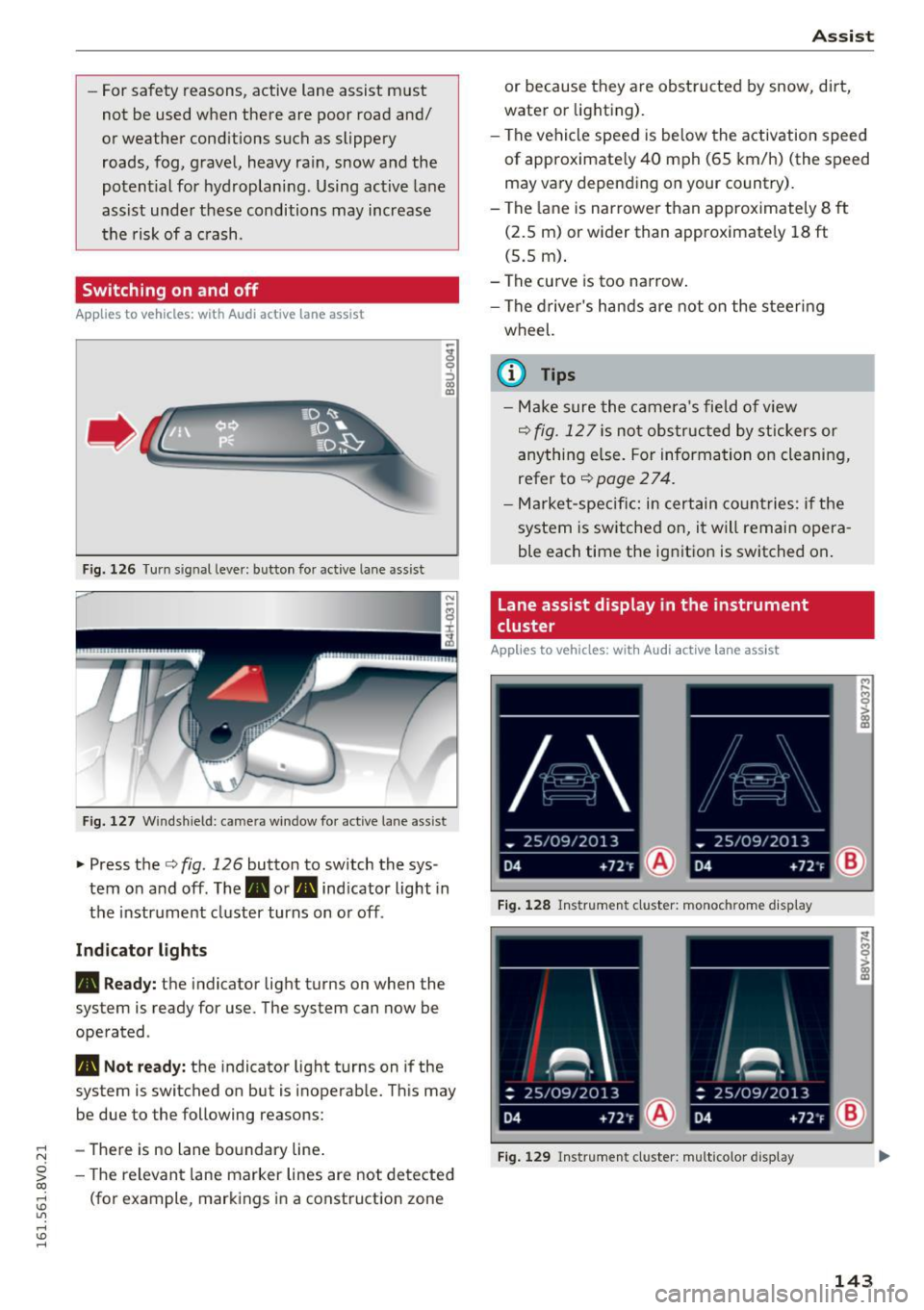
F ig. 1 26 Turn s ig n al leve r: button for active lane as sist
F ig. 127 W ind sh ield: c ame ra win dow fo r act ive lane ass is t
~ Press the c::> fig. 126 button to sw itch the sys
tem on and off . The . or. indicator light in
the instrument cluster turns on o r off .
Ind icator light s
• Read y :
the indicator light turns on when the
system is ready for use. The system can now be
operated .
• Not ready: the indicator light turns on if the
system is switched on but is inoperable. Th is may
be due to the following reasons:
- There is no lane bo undary line .
- The relevant lane marker lines are not de tected
(fo r example, markings in a const ruction zone
A ss ist
or because they are obstructed by snow, dirt,
water or lighting).
- The vehicle speed is be low the activation speed
of approximate ly 40 mph (65 km/h) (the speed
may va ry depend ing on your country).
- The lane is narrowe r th an approximately 8
ft
(2.5 m) or wider than approximate ly 18 ft
(5.5 m) .
- The curve is too narrow .
- The d river's hands are not on the steering
wheel.
(0 Tips
- Make sure the camera's field o f view
c::> fig . 12 7 is not obs tructed by st ickers or
anything e lse. For informa tion on clea nin g,
refer to
c::> page 2 7 4.
- Market-specifi c: in certain co untries: if the
system is switched on, it will remain opera
ble each time the ig nitio n is switched on .
Lane assist display in the instrument
cluster
Applies to vehicles: with Audi act ive lane assist
Fig. 1 28 Ins trumen t cl uster: monoc hrom e disp lay
F ig . 12 9 Instru men t cl uster: multicolor display
143
Page 146 of 328
Assist
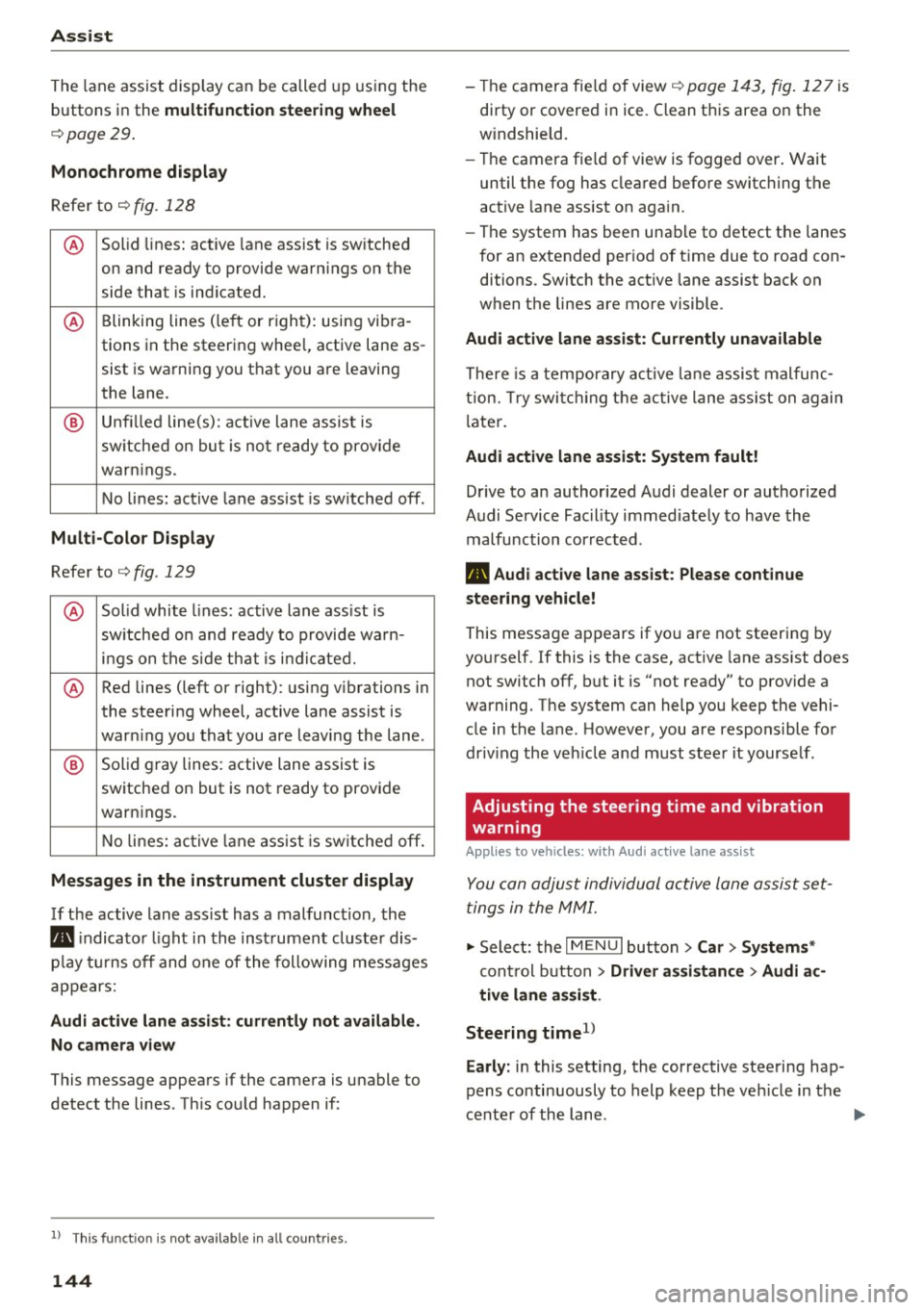
The lane assist display can be called up using the
buttons in the
multifunction steering wheel
c::>page29 .
Monochrome display
Refer to c::> fig. 128
® Solid lines: active lane assist is switched
on and ready to provide warnings on the
side that is ind icated.
® Blinking lines (left or right): using vi bra-
tions in the steering whee l, active lane as-
sist is warning you that you are leaving
the lane.
® Unfilled line(s): active lane assist is
switched on but is not ready to provide
warn ings.
No lines: active lane assist is sw itched off.
Multi-Color Display
Refer to q fig. 129
® Solid white lines: active lane ass ist is
sw itched on and ready to provide warn-
ings on the side that is indicated.
® Red lines (left or right) : using vibrations in
the steering wheel, active lane assist is
warn ing you that you are leaving the lane.
® Solid gray lines: active lane assist is
switched on but is not ready to provide
warn ings.
No lines: active lane assist is switched off.
Messages in the instrument cluster display
If the active lane ass ist has a malfunction , the
rm indicator light in the instrument cluster dis
p la y turns off and one of the following messages
appears:
Audi active lane assist: currently not available.
No camera view
This message appears if the camera is unable to
detect the lines . Th is could happen if :
l) This fun ction is not availab le in all coun tries.
144
-The camera fie ld of view c;,page 143, fig . 127 is
dirty or covered in ice. Clean this area on the
w indshield.
- The camera fie ld of view is fogged over . Wait
until the fog has cleared before switching the
active lane assist on again.
- The system has been unable to detect the lanes
for an extended period of time due to road con
ditions . Switch the act ive lane assist back on
when the lines are more visible .
Audi active lane assist: Currently unavailable
There is a temporary active lane assist malfunc
tion. Try switching the active lane ass ist on again
l ater.
Audi active lane assist: System fault!
Drive to an authorized Audi dealer or authorized
Audi Service Fac ility immed iately to have the
malfunction corrected.
rm Audi active lane assist: Please continue
steering vehicle!
This message appears if you are not steering by
yourself .
If this is the case, active lane assist does
not switch off, but it is "not ready" to provide a
warning . The system can help you keep the vehi
cle in the lane. However, you are responsible for
driv ing the veh icle and must steer it yourse lf .
Adjusting the steering time and vibration
warning
Applies to vehicles: with Audi active lane assist
You can adjust individual active lane assist set
tings in the MMI.
.,. Select: the I MENU I button> Car> Systems *
control button > Driver assistance > Audi ac
tive lane assist .
Steering time
1 >
Early: in this setting, the corrective steering hap
pens continuously to help keep the veh icle in the
center of the lane .
IJII>
Page 147 of 328

.... N
0 > CX)
.... I.Cl U"I
.... I.Cl ....
Late: in this set ting, t he system provides correc
tive steering just before a vehicle whee l touches a
detected lane marker line.
Vibrat ion warning
You can switch the additional vibrating warning
i n the steering wheel on or
off.
& WARNING
With the vibration warning switched off, no
visible warning will appear in the instr ument
cluster display when crossing a lane marker.
@ Tips
Market-specific: your sett ings are stored au
tomatically and assigned to the remote con
trol key in use.
Audi side assist
Description
A pp lies to vehicles: with Audi side assist
Fig. 130 Sensor detectio n range
Fig. 131 D isplay on the exterior mirro r
Side assist he lps you monitor your blind spot and
traffic behind your vehicle. Within the limits of
the system, it warns you about vehicles that are
com ing closer or that are traveling with yo u with-
A ss ist
in senso r range (D ¢ fig. 130 : if a lane change is
classified as critical, the display @ in the exterior
mirror¢
fig. 131 turns on .
T he displ ay in the left exterior mirror p rovides as
sistance when making a lane change to the le ft,
whi le the display in the right exterior mirror pro
vides ass istance when making a lane ch ange to
the right.
Information stag e
As long as you do not a ct ivate the tu rn signal,
side assist
informs you about vehicles that are
detected and classified as critical. The display in
the mirror turns on, but is dim .
T he disp lay remains dim i n the information stage
so that your view toward the front is not distur
bed.
Warning stage
If you activate the turn s ignal, side assist warns
yo u about vehicles that are detected and classi
fied as crit ica l. T he d isp lay in the respective mir
ror blinks bright ly. If this happens, check traffic
by glancing in the rearview mirror and over your
shou lder ¢.&.
in General information on
page 146.
(D Tips
- You can adjust the brightness on of the dis
play on the rearview mirror¢
page 147.
145
Page 150 of 328

Ass is t
Driver messages
Applies to vehicles: with Audi side assist
If the side assist switches off automatically, a
message appears i n the ins trument cluster dis
p lay .
@j Audi side assist : cur rentl y unav ailable No
s en so r vi sion
The radar senso rs ' vision is affected. Do not cover
the area in front of the sensors with b ike wheels,
stickers, dirt or other objects. Clean the area in
front of the sensors, if necessary~
page 146,
fig. 133.
@j Audi side a ssi st : cur rentl y una vailable
Side assist cannot be switched on tempo rar ily be
cause there is a malfunction (for example, the
battery charge level may be too low).
@j Audi side a ssist: System fault!
The system cannot guarantee that it wi ll detect
ve hicles co rrectly and it is switched off. The sen
sors have been d isp laced or are faulty. Have the
system checked by an authorized Audi dea ler or
authorized Audi Service Facility soon.
Audi drive select (drive settings)
Introduction
Applies to vehicles: with Audi drive select
Audi drive select makes it possible to experience
different types of vehicle settings in one vehicle .
The driver can select from three
C omfort , Auto
and Dynamic modes using the r.1:a button in the
center console or the MMI to switch between a
sporty and a comfortable dr iving mode, for ex
ample . In the
In div idual * mode, the vehicle set
tings can be adjusted to your personal preferen
ces. This makes it possible to combine settings
such as a sporty eng ine set ting with smooth
s teer ing .
A WARNING
Using Audi drive select incorrectly can lead to
collisions, othe r accidents and serious inju
ries .
148
· Description
Applies to vehicles: with Audi drive select
The vehicle setup in each mode depends on the
vehicle's features. However, the eng ine and
steering are a lways affected.
Engine and automatic tr ansmiss ion
Depend ing on the mode, the engine and auto
matic transmission* respond more qu ickly or in a
more ba lanced manner to acce lerato r pedal
movements.
Adaptive damper s (Audi magnetic ride )*
The adaptive dampers use sensors to record in
formation regarding steering movements, brak
i ng and acce le ration operations by the dr iver,
r oad su rface, driving speed, and load. W it h Aud i
drive select you can adjust the adaptive dampers
spo rty (dynamic), comfortable (comfort) or ba l
anced (auto).
Steering
The steering adapts in terms of steering ass is
tance. There are d ifferent modes
c;;:> page 149.
Ind irect steering that moves easi ly as in comfort
mode is especia lly suited to long drives on a high
way. The dynamic mode provides sporty, direct
steering .
For vehicles with progress ive steering* the steer
ing performance is more agi le .
Corn ering light *
The cornering light adjusts when driv ing on
cu rves at speeds between 6 mph (10 km/h) and
68 mp h (110 km/h). The pivoting act ion and the
li gh ting are also adapted to the mode.
Adaptive cruise control*
The behavio r whe n accelerating can be adjusted
from comfortable to sporty, depending on the
Audi drive select mode. Adaptive cr uise control
also responds to the dr iving beh avior of the vehi
cle ahead in a more conservative or sporty man-
ner .
1111>
Page 156 of 328
Parking system s
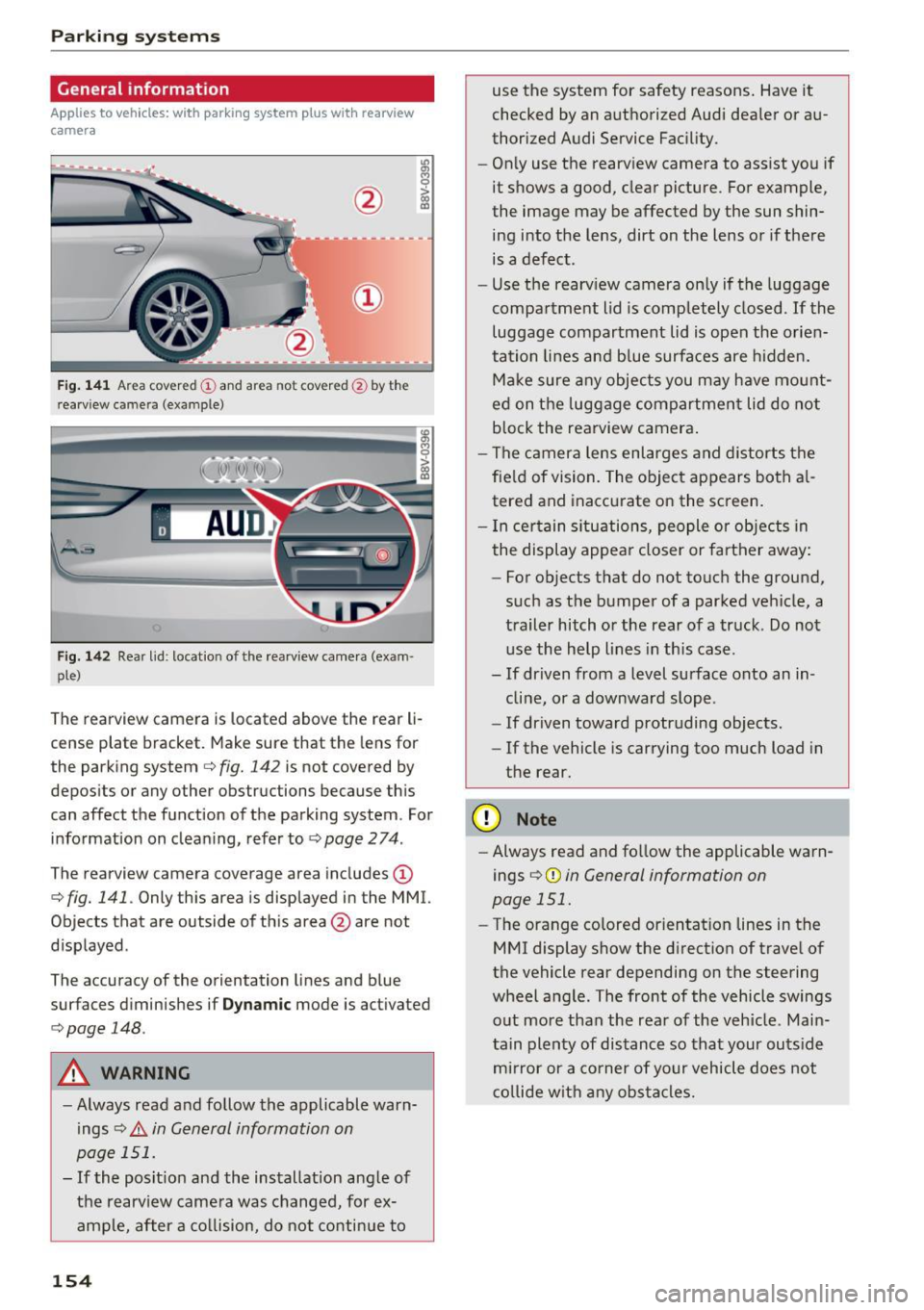
General information
Applies to veh icles: w ith park ing system p lus with rearview
camera
F ig . 14 1 Area covered © and area not covered @by the
r earv iew came ra (example)
Fig. 142 Rear lid : locat io n of the rearview camera (exam ·
ple)
The rearview camera is located above the rear li
cense plate bracket. Make sure that the lens for
the parking system
c.:> fig. 142 is not covered by
depos its or any other obstructions because th is
can affect the function of the parking system . For
information on cleaning, refer to
c.:> page 2 74 .
The rearview camera coverage area includes(!)
c.:> fig. 141. Only this area is displayed in the MMI.
Objects that are outside of th is area @are not
displayed .
The accuracy of the orientation lines and b lue
surfaces d iminishes if
D ynamic mode is activated
¢ page 148.
A WARNING
-Always read and follow the applicable warn
ings
c.:> .&. in General information on
page 151.
- If the posit ion and the installation ang le of
the rearv iew camera was changed, for ex
ample, after a co llision, do not continue to
154
use the system for safety reasons . Have it
checked by an a uthorized Audi dea ler or au
thorized Audi Service Fac ility.
- Only use the rearv iew camera to assist you if
it shows a good, clear picture . For example,
the image may be affected by the sun shin
ing into the lens, dirt on the lens or if there is a defect.
- Use the rearv iew camera on ly if the luggage
compa rtment lid is completely closed.
If the
luggage compartment lid is open the orien
tation lines and b lue surfaces are hidden.
Ma ke sure a ny objec ts you may h ave mo unt
ed on t he luggage compartmen t lid do not
b lock the rearview camera .
- The camera lens enlarges and distorts the
fie ld of vision. The object appears both a l
tered and inaccurate on the screen .
- I n cer tain s itu ations, people or objects in
the display appea r closer or farther away:
- For objects that do not touch the ground,
such as the bumper of a parked vehicle, a
trailer hitch or the rear of a truck . Do not
use the help lines in th is case.
- If dr iven from a level surface onto an in
cline, or a downward slope .
- If driven toward protruding objects.
- If the vehicle is carrying too much load in
the rear .
(D Note
-Always read and fo llow the applicable warn
ings
c.:> (D in General information on
page 151.
- The orange colored orientat ion lines in the
MMI display show the direction of trave l of
the vehicle rear depending on the steering
wheel a ng le . The front of the vehicle swings
o ut more than the rea r of the veh icle. Main
tain plenty of dis tance so that your outs ide
m ir ror or a co rner of your vehicle does not
c o llide w it h any obstacle s.
Page 157 of 328
.... N
0 > CX)
rl I.Cl U"I
rl I.Cl ....
Switching on/off
A ppl ies to vehicles: with park ing system plus w it h rea rv iew
camera
S wi tc hing on
• Shift into reverse, or
• Press the
Pw.A button in the center console
¢ page 153, fig . 137 . A short conf irmat ion
tone sounds and the LED in the button turns
on.
S wi tching betwe en th e re ar view came ra and
optical displa y
• Press the Gr aphic control button ®
r::!.> page 155, fig . 143 to see the optica l display .
• Press the
Rear view control button to see the
rea rview camera image .
Switching off
• Drive faster than 6 mph (10 km/h), or
• Press the
P•1A button, or
• Switch the ign ition off .
@ Tips
The visual display in the left part of the d is
play should help you detect the c ritical ve hicle
areas.
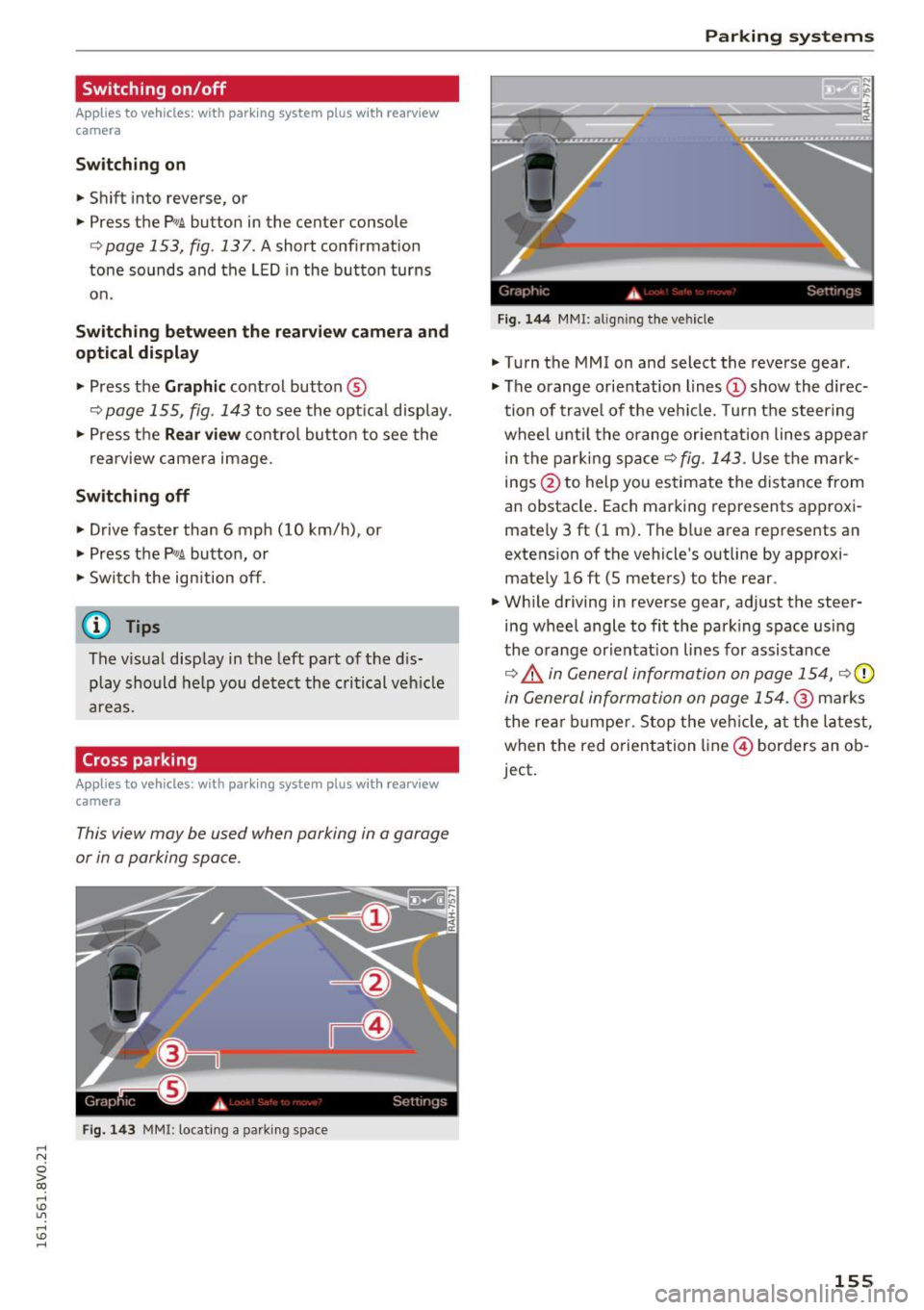
Cross parking
A ppl ies to vehicles: with pa rk in g system p lus w it h rearv iew
camera
This view may be used when parking in a garage
or in a parking space .
Fig. 143 MM I: locating a park ing space
Parking systems
Gr,11;t I( i._ S,·T .. 1',lJ',
Fig. 144 MMI: a lig ni ng t he veh icle
• Turn the MMI on and select the reverse gear .
• The orange orientation lines
(D show the direc
tion of trave l of the vehicle. Turn the steering
wheel until the o range orientation lines appea r
in the parki ng space ¢
fig. 143. Use the mark
ings @to help you estimate the distance from
an obstacle . Each marking represents approxi
mately 3 ft (1 m) . The blue area represents an
extens ion of the vehicle 's outline by approxi
mate ly 16
ft (5 meters) to the rear.
• Wh ile driving in reverse gear, adjust the steer
ing wheel angle to fit the park ing space using
the o range or ientat ion lines for assistance
¢ &. in General information on page 154, r::!.>0
in General information on page 154 .@ ma rks
t he rea r bu mpe r. Stop the ve hicle, a t the la test,
when the red o rientation line @) borders an ob
ject.
155