safety AUDI A3 2016 Owner´s Manual
[x] Cancel search | Manufacturer: AUDI, Model Year: 2016, Model line: A3, Model: AUDI A3 2016Pages: 328, PDF Size: 81.78 MB
Page 65 of 328
.... N
0 > CX)
.... I.Cl U"I
.... I.Cl ....
A WARNING
Spilled hot liquid can increase the risk of acci
dents and injuries.
- Never drive with containers that contain hot
liquid such as coffee or tea. The hot liquid
could spill and cause burns during a colli
sion, sudden braking or other vehicle move
ment. Spilled hot liquid can also increase
the risk of accidents and injuries.
- Only use soft containers in the cup holders .
Hard cups and glasses can increase the risk
of injury during a collision.
- Never use the cup holder or the adapter as
an ashtray - this is a fire hazard.
(D Note
Beverage containers in the cup holders should
always have a lid . Otherwise, beverages could
spill and cause damage to vehicle equipment
or stain the seat covers.
Glove compartment
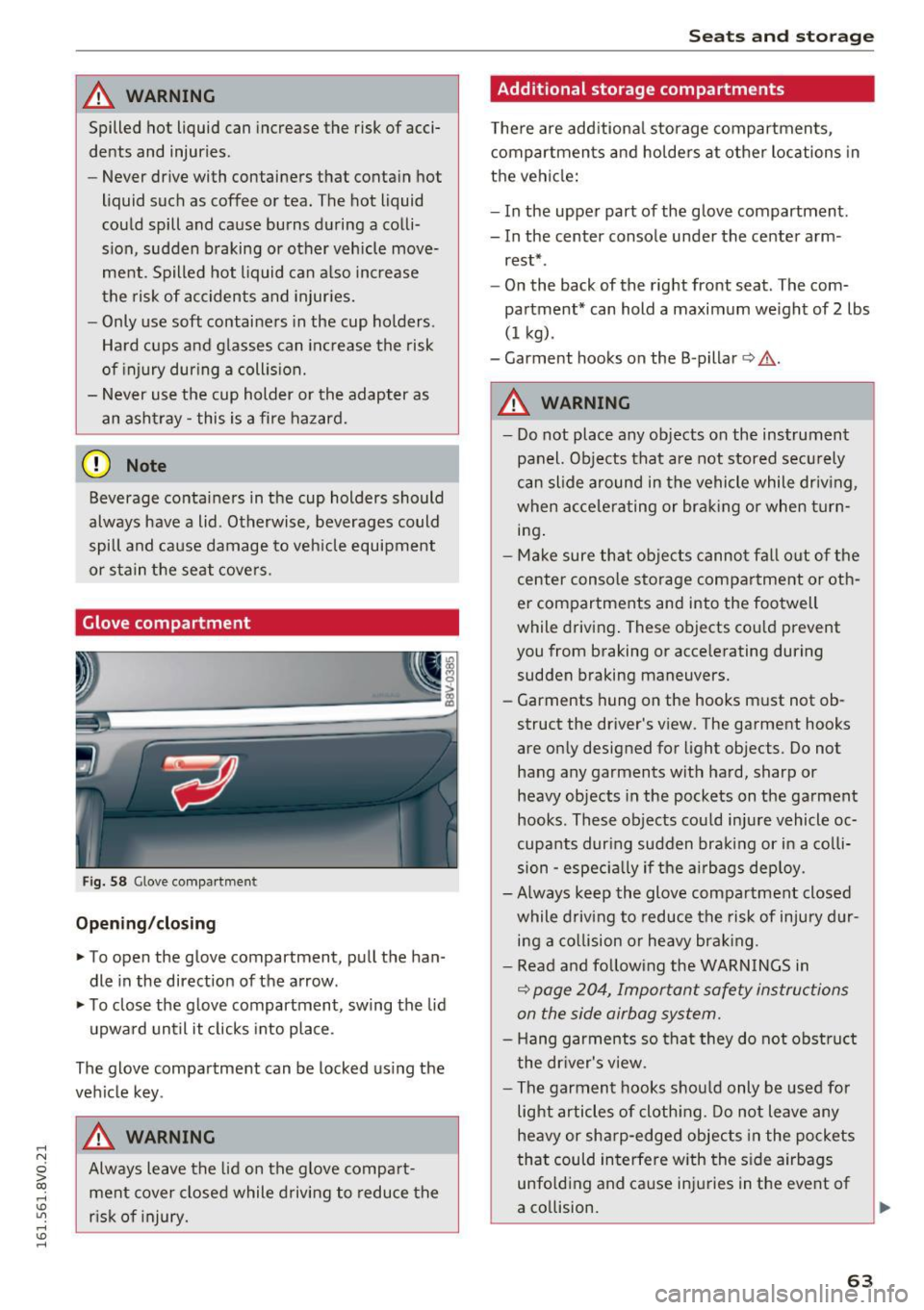
Fig. 58 Glove compartmen t
Opening/closing
.. To open the glove compartment, pull the han
dle in the direction of the arrow.
.. To close the glove compartment , swing the lid
upward until it clicks into place .
The glove compartment can be locked using the
vehicle key .
A WARNING
Always leave the lid on the glove compart
ment cover closed while driving to reduce the
risk of injury.
Seats and storage
Additional storage compartments
There are additional storage compartments,
compartments and holders at other locations in
the vehicle:
- In the upper part of the glove compartment.
- In the center console under the center arm -
rest* .
- On the back of the right front seat . The com
partment* can hold a maximum weight of 2 lbs
(1 kg) .
- Garment hooks on the B -pillar
c:> ,& .
A WARNING ,~ -- Do not place any objects on the instrument
panel. Objects that are not stored securely
can slide around in the vehicle while driving ,
when accelerating or braking or when turn
ing.
- Make sure that objects cannot fall out of the
center console storage compartment or oth
er compartments and into the footwell
while driving. These objects could prevent
you from braking or accelerating during
sudden braking maneuvers.
- Garments hung on the hooks must not ob
struct the driver's view . The garment hooks
are only designed for light objects. Do not hang any garments with hard, sharp or
heavy objects in the pockets on the garment
hooks . These objects could injure vehicle oc
cupants during sudden braking or in a colli
sion -especially if the airbags deploy .
-Always keep the glove compartment closed
while driving to reduce the risk of injury dur
ing a collision or heavy braking .
- Read and following the WARNINGS in
¢ page 204, Important safety instructions
on the side airbag system.
- Hang garments so that they do not obstruct
the driver's view .
- The garment hooks should only be used for
light articles of clothing. Do not leave any
heavy or sharp-edged objects in the pockets
that could interfere with the side airbags
unfolding and cause injuries in the event of
a collision.
63
Page 66 of 328
Sea ts and stor age
- Do not use coat hangers to hang garments,
because th is could reduce the effect iveness
of the side curtain airbags.
- Do not hang any heavy objects on the gar
ment hooks, because they could cause injury
during heavy braking.
- Beca use of their load capac ity, the hooks
should only be used to secure objects that
weigh a maximum of 10 lbs (5 kg). Heavy
objects w ill not be secured suff ic iently, and
this increases the risk of injury.
Luggage compartment
Loading luggage compartment
Luggage items must be stowed securely.
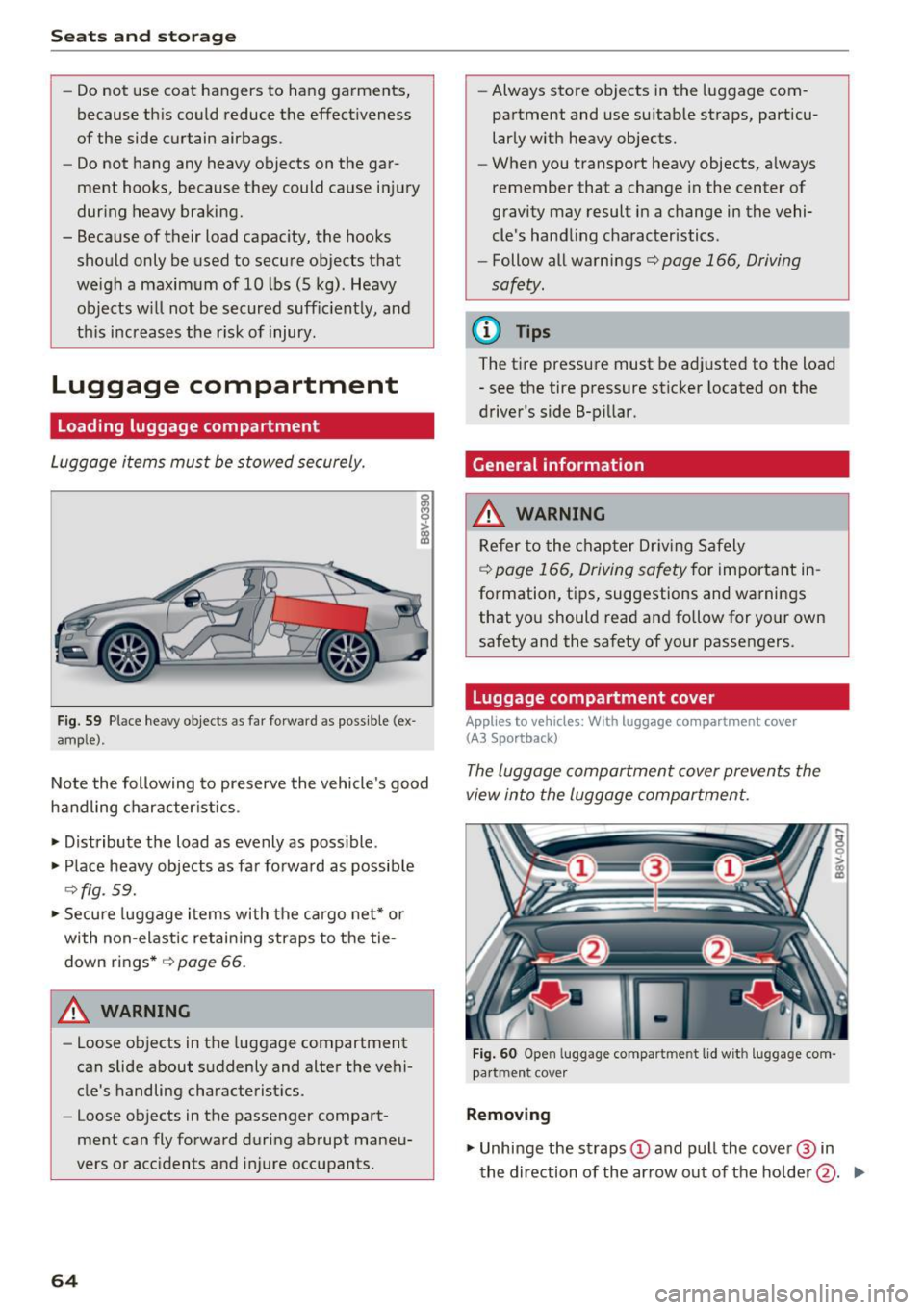
F ig. 59 Place heavy objects as far forward as poss ible (ex
amp le).
Note the following to preserve the vehicle's good
handling character istics .
• Distribute t he load as evenly as possible.
• Place heavy objects as far forward as possib le
¢ fig. 59.
• Secure luggage i tems with the cargo net* or
with non-elastic retai ning straps to the tie
down rings *
¢page 66.
A WARNING
-
-Loose objects in the luggage compartment
can slide about suddenly and alter the vehi
cle's handling characterist ics.
- Loose objects in the passenger compart
ment can fly forward during abrupt maneu
vers or acc idents and injure occupants.
64
- Always store objects in the luggage com
partment and use su itab le straps, particu
larly w ith heavy objects.
- When you transport heavy objects, always
remember that a change in the center of
gravity may result in a change in the vehi
cle's handling characteristics.
- Follow all warnings¢
page 166, Driving
safety.
@ Tips
The tire pressure must be adjusted to the load
- see the tire pressure sticker located on the
driver's side 8-pillar.
General information
_&. WARNING
Refer to the chapter Dr iv ing Safely
¢
page 166, Driving safety for important in
formation, tips, suggestions and warnings that you should read and follow for your own
safety and the safety of your passengers.
Luggage compartment cover
Applies to vehicles: With luggage co mpa rtment cover
(A3 Spo rtback)
The luggage compartment cover prevents the
view into the luggage compartment.
Fig . 60 Open luggage compartme nt lid wit h luggage com
pa rtment cove r
Removin g
• Unhinge the straps (D and pull the cover @in
the direction of the arrow out of the holder @. .,..
Page 67 of 328
Installing
• Slide the cover@ hor izontally into the desig
nated ho lder @in the side bracket until the
cover is lined up.
• Hook the straps into the l uggage compartment
lid @ ¢
A.
A WARNING
-To prevent accidents, never install the lug
gage compartment cove r unsec ured.
- The luggage compartment cover is not a
surface for storing objects. Objects placed
on the cover increase the r isk of injury to all
vehicle occupa nts dur ing sudden bra king
mane uvers o r when i nvo lved in an accident .
Increasing the size of the luggage
compartment
-
The rear seat backre sts can be folded forward ei
ther separately or together.
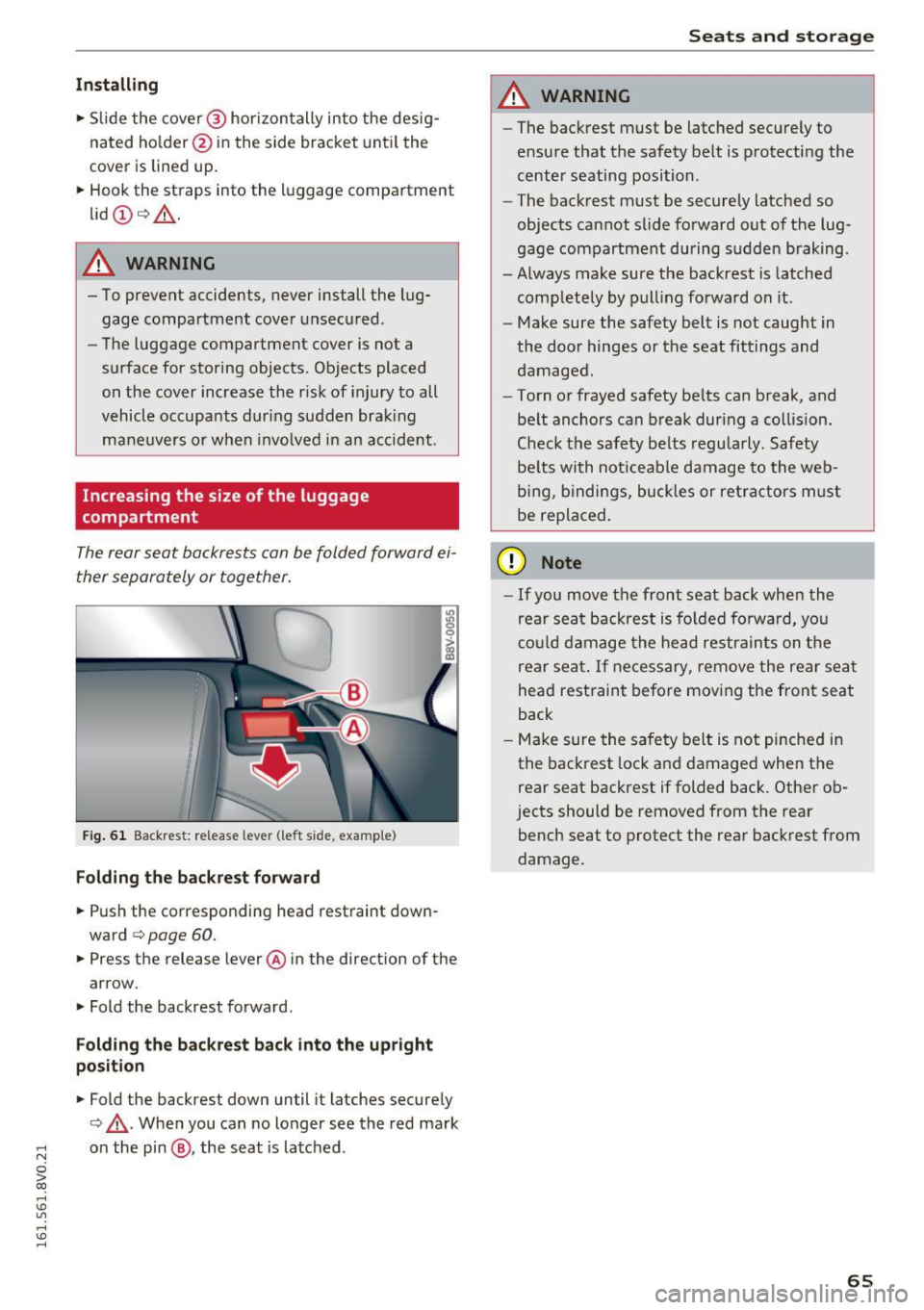
F ig. 61 Backrest: re lease lever (le ft s ide, examp le)
Folding the backr est forward
• Push the corresponding head restraint down
ward
¢ page 60.
• Press the release lever @ in the direct ion of the
arrow .
• Fold the backrest forward .
Folding the backrest back into the upright
position
• Fold the backrest down until it latches secure ly
¢ ,& .When you can no longer see the red mark
;::: on the pin @, the seat is la tched .
0 > CX)
rl I.Cl U"I
rl I.Cl rl
Seats and storag e
A WARNING
-~
-The backrest must be latched securely to
e nsu re that the safety belt is p rotecti ng the
center seating position .
- The bac krest must be securely latched so
objects cannot slide fo rward out of the lug
gage compartment during sudde n braking .
- Always make su re the backrest is latched
completely by pull ing fo rwa rd on it .
- Make sure the safety belt is not caught in
the door hinges or the seat fittings and
damaged.
- To rn or frayed safety be lts can break, and
be lt anchors can b reak dur ing a col lision .
C heck the safety be lts regu la rly. Safety
be lts wi th noticeable damage to the we b
b in g, b indings, bu ckles or ret ra cto rs m ust
be repla ced.
(D Note
- If you move the front seat back when the
rear seat backrest is fo lded fo rwa rd, yo u
c o ul d d am age the head restra in ts on t he
rear sea t. If necessary, remove the rear sea t
head restraint be fore mov ing the front seat
back
- Make sure the sa fe ty belt is not pinche d in
the back rest lock a nd damage d when the
rear seat backrest if folded back . Othe r ob
jects should be removed from the rear
bench seat to protect the rear backrest from
damage .
65
Page 68 of 328
Sea ts and stor age
Lowering the cargo floor
Applies to veh icles: w ith adj ustable cargo f loor
The cargo floor can lower to expand the storage
area in the luggage compartment.
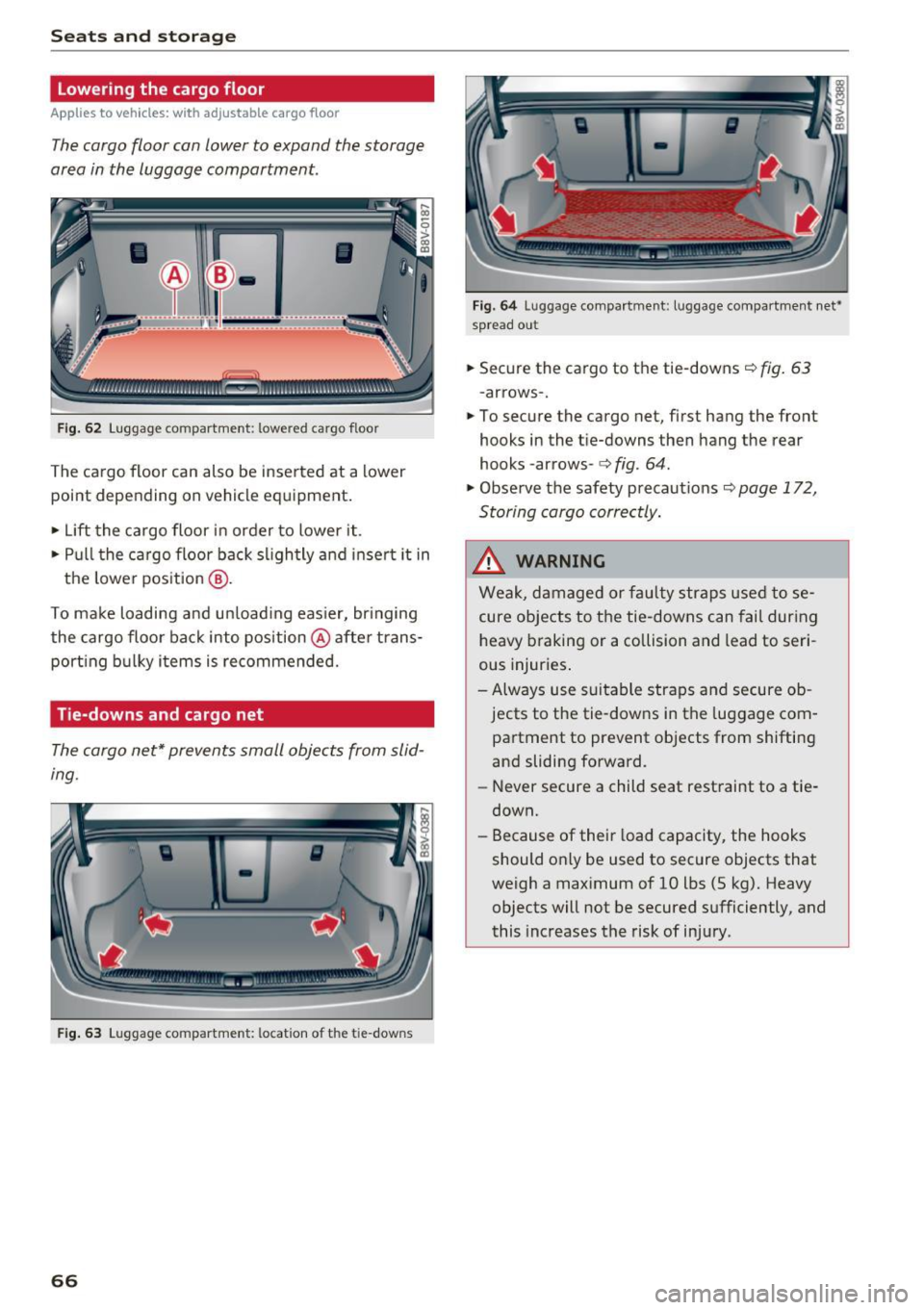
F ig. 62 L uggage compartment: lowered cargo floor
The cargo floor can also be inse rted at a lower
point depending on vehicle eq uipment .
., Lift the cargo floor in order to lower it.
., Pull the cargo floor back slightly a nd insert it in
the lowe r pos it ion
@ .
To make loading and un load ing eas ier, br inging
the cargo floo r back into position @ afte r trans
port ing b ulky i tems is recommended.
Tie-downs and cargo net
The cargo net* prevents small objects from slid
ing.
F ig . 63 Luggage compartment: location of the tie -downs
66
F ig. 6 4 Luggage compartment: luggage compartment net•
spread out
., Secure the cargo to the tie-downs c::> fig. 63
-arrows- .
., To secure the cargo net, first hang the front
hooks in the tie-downs then hang the rear
hooks -arrows-
c::> fig. 64.
., Obse rve
the safety precaut ions c::> page 172,
Storing cargo correctly .
.&_ WARNING
Weak, damaged or fau lty straps used to se
cure objects to the tie-downs can fail during
heavy braking or a co llision and lead to seri
ous injur ies .
- Always use s uitable straps and secure ob
jects to the tie-downs in the luggage com
partment to prevent objects from shifting
and sliding forward.
- Never secure a child seat restraint to a tie
down.
- Because of their load capacity, the hooks
should only be used to secure objects that
weigh a maximum of 10 lbs (5 kg). Heavy
objects will not be secured sufficiently, and
this increases the risk of inju ry.
-
Page 78 of 328
Warm and cold
outlet, regardless of whether it is protected
against a short circuit or not.
- Always disconnect the connector cable and
close the cover
(D before starting the engine.
.&_ WARNING
Using the engine preheater incorrectly can
cause short circuits, electric shocks, fire, seri
ous injuries and death.
- The connector cable must always be con
nected to a grounded 120 Volt socket that
is equipped with a GFI circuit breaker . Al
ways protect the sockets from water, mois
ture and other fluids .
- Never plug the engine preheater into a con
ventional outlet, regardless of whether it is protected against a short circuit or not .
.&_ WARNING
-
Short circuiting, fire, serious injuries and life
threatening or lethal electric shock can result
from using unsuitable or damaged sockets and connector cables/extension cords, using
electrical equipment incorrectly, and/or disre
garding general safety precautions.
- Always plug the extension cord into a 120 V
socket that is properly functioning, ground
ed, equipped with a GFI circuit breaker and
is protected against water, moisture and
other fluids.
- Never connect the engine preheater to a
conventional socket, even if the socket is
protected by a fuse.
- Always check the fuse on the 120 Volt GFI
socket before connecting the connector ca
ble to the engine preheater on the vehicle.
- Only use highly durable extension cords that
are class 12 or better and can be properly grounded to a three-prong wall socket with
a GFI circuit breaker . The extension cord
must not be longer than 100 feet (30 me
ters).
- Never use damaged connector cables, ex
tension cords or sockets . Always check the
connector cable, extension cord and sockets
for damage before using them. Damaged
parts must be replaced. If damaged, replace
76
the engine preheater connector cable at an
authorized Audi dealer or authorized Audi
service facility .
- Only use the connector cable provided to
connect the vehicle socket to a suitable
power source. Use a suitable extension cord
if necessary .
- Always disconnect the connector cable from
the vehicle socket before starting the en
gine. Switch off the power supply to the
connector cable and to the extension cord if necessary, or disconnect the cable or exten
sion cord from the 120 Volt socket equip
ped with a GFI circuit breaker. Never leave
the connector cable or extension cord con
nected to a live power source.
- Never make alterations or repairs to the
connector cables or extension cords that
supply power to the engine preheater or to
any components that affect the engine pre
heater.
- Always protect the connections from water,
moisture and other fluids. Always store the
connector cable and extension cord securely
and in a dry place when they are not being
used, and disconnect them from the power
source before storing .
(D Tips
Test the GFI circuit breaker once a month if
you use the engine preheater occasionally, and test it weekly if you use it regularly.
Page 80 of 328
Driving
If you anticipate what you need to do next and
drive economically, you can easily cut your fuel
consumption by 10-15 percent. This section will
give you some tips on how you can help the envi ronment and your pocketbook.
(D Tips
The consumption estimates as published by ENVIRONMENTAL PROTECTION AGENCY
(EPA) and Transport Canada may not corre
spond to your actual consumption on the
road, which will vary depending upon vehicle
load and speed, road and weather conditions,
trip length, etc.
Drive smoothly and keep a lookout ahead
Vehicles use the most fuel when they are acceler
ating.
.. Avoid unnecessary accelerating and braking .
Vehicles use the most fuel when they are acceler
ating. If you anticipate what is going to happen next, you will need to brake less and, thus, accel
erate less. Let the vehicle coast whenever possi
ble -for example when you see that the next traf
fic light is red.
Avoid full throttle
Driving at moderate speeds saves fuel and im
proves your mileage.
.. Try and keep well below your car's maximum
speed .
Accelerating gently reduces fuel consumption,
engine wear, and does not disturb the environ ment.
Fuel consumption, exhaust emissions and engine
noise increase disproportionately at high speeds.
If you drive at approximately three quarters of
top speed, fuel consumption will be reduced by
one half . Never drive faster than the posted
speed limit and weather conditions permit.
78
· Reducing unnecessary idling
Even when your car is just idling it burns up fuel .
.. Shut the engine off when you are not driving
the vehicle .
.,. Do not warm up the vehicle by letting the en-
gine run at idle .
It is efficient to switch off the engine when stop
ped at railroad crossings and long red lights.
Turning the engine off for just 30 -40 seconds
saves more fuel than is burned by starting the
engine again .
It takes a long time for the engine to warm up
fully when it is running at idle . However, wear
and noxious emissions are especially high when
the engine is warming up . So you should drive
away as soon as you start the engine and avoid running at high rpms while the engine is still
warming up .
@ Note
Do not leave engine idling unattended after
starting. If warning lights should come on to
indicate improper operation, they would go
unheeded. Extended idling also produces
heat, which could result in overheating or
other damage to the vehicle or other proper
ty.
Regular maintenance
A badly tuned engine unnecessarily wastes a lot
of fuel.
.. Have your vehicle serviced at regular intervals.
By having your vehicle regularly serviced by an
Audi dealer helps to ensure that it runs properly
and economically. The condition of your vehicle
not only affects its safety and ability to hold its
value, it also affects
fuel consumption.
Check your oil each time you fill your tank.
The amount of oil used is related to engine load
and speed.
It is normal for the oil consumption of a new en
gine to reach its lowest value after a certain mile -
age has been driven . ..,.
Page 83 of 328
,....,
N
0 > co ,....,
tion look while the vehicle is moving . Other
wise the steering lock will engage and you
will not be able to steer the vehicle .
- Please note that the brake booster and pow
er steering only work when the engine is
running . When the engine off, you must use
more force to steer or brake the vehicle. Be
cause the usual steering and braking capa
bility is not available, the risk of accidents or
injuries increases.
- Always take the vehicle key with you when
leaving the vehicle, even for a short period
of time. This applies particularly when chil
dren remain in the vehicle. Otherwise the
children could start the engine or operate
electrical equipment such as power win
dows .
- Avoid high engine speed, full throttle, and
heavy engine load as long as the engine has
not reached operating temperature yet . You
could damage th@ engine.
-The engine cannot be started by pushing or
towing .
@ For the sake of the environment
Do not let the engine run while parked to
warm up. Begin driving immediately. This re
duces unnecessary emissions.
(D Tips
- If it is difficult to turn the key to position
(D, turn the steering wheel back and forth
slightly to release the steering wheel lock .
- Some noise after starting the engine is nor
mal and is no cause for concern.
- If the battery is disconnected and recon
nected, you have to hold the ignition key in
position
(D for five seconds for the engine
to start.
- After switching the ignition off, you can only
remove the key when the selector lever is in
the "P" (Park) position. After that, the selec
tor lever is locked.
Driving
Stopping the engine with the key
App lies to vehicles : wi th ignition lock
Stopping the engine
.,. Bring the vehicle to a full stop.
.,. Turn the key to position @. The needle in the
tachometer moves into the
OFF position.
Releasing the steering lock
Requirement: the selector lever must be in P.
.,. Remove the ignition key in position @
¢ page 82, fig. 78 ¢ .&_.
.,. Turn the steering wheel until you hear the
steering wheel lock .
The locked steering helps prevent vehicle theft.
A WARNING
.--
- Never turn off the engine before the vehicle
has come to a complete stop . The full func
tion of the brake booster and the power
steering is not guaranteed. You must use
more force to turn or brake if. Because you
cannot steer and brake as you usually
would, this could lead to accidents and seri
ous injuries.
- Never remove the ignition key from the igni
tion look while the vehicle is moving. Other
wise, the steering lock could suddenly en
gage and you would not be able to steer the
vehicle.
- Please note that the brake booster and pow
er steering only work when the engine is
running. When the engine off, you must use
more force to steer or brake the vehicle. Be
cause the usual steering and braking capa
bility is not available, the risk of accidents or
injuries increases .
- Always take the vehicle key with you when
leaving the vehicle, even for a short period
of time. This applies particularly when chil
dren remain in the vehicle. Otherwise the
children could start the engine or operate
electrical equipment such as power win
dows.
- For safety reasons, always park the vehicle
with the selector lever in the P position.
81
Page 86 of 328
Driving
_& WARNING
- Never turn off the engine before the vehicle
has come to a complete stop. The full func
tion of the brake booster and the power
steering is not guaranteed. You must use
more force to turn or brake if. Because you
cannot steer and brake as you usually
would, this could lead to accidents and seri
ous injuries.
- Please note that the brake booster and pow
er steering only work when the engine is
running. When the engine off, you must use
more force to steer or brake the vehicle. Be
cause the usual steering and brak.ing capa
bility is not available, the risk of accidents or
injuries increases .
- Always take the vehicle key with you when
leaving the vehicle, even for a short period
of time. This applies particularly when chil
dren remain in the vehicle . Otherwise the
children could start the engine or operate
electrical equipment such as power win
dows.
- For safety reasons, always park the vehicle
with the selector lever in the P position.
Otherwise, there is the risk that the vehicle
could roll.
- After the engine has been switched off, the
radiator fan can continue to run for up to 10
minutes -even with the ignition switched
off. It can also switch on again after some
time if the coolant temperature rises as the result of heat buildup or if the engine com
partment is heated by the sun's rays and the
engine is hot.
(D Note
If the engine has been under heavy load for
an extended period of time, heat builds up in
the engine compartment after the engine is
switched off- there is a risk of damaging the
engine. For this reason, let the engine run for
at idle for approximately two minutes before
shutting it off.
84
Starting the engine if there is a
malfunction
Applies to vehicles: with convenience key
It may not be possible to start the engine under
certain circumstances, for example if the battery
in the vehicle key is drained, if interference is af
fected the key or if there is a system malfunc
tion.
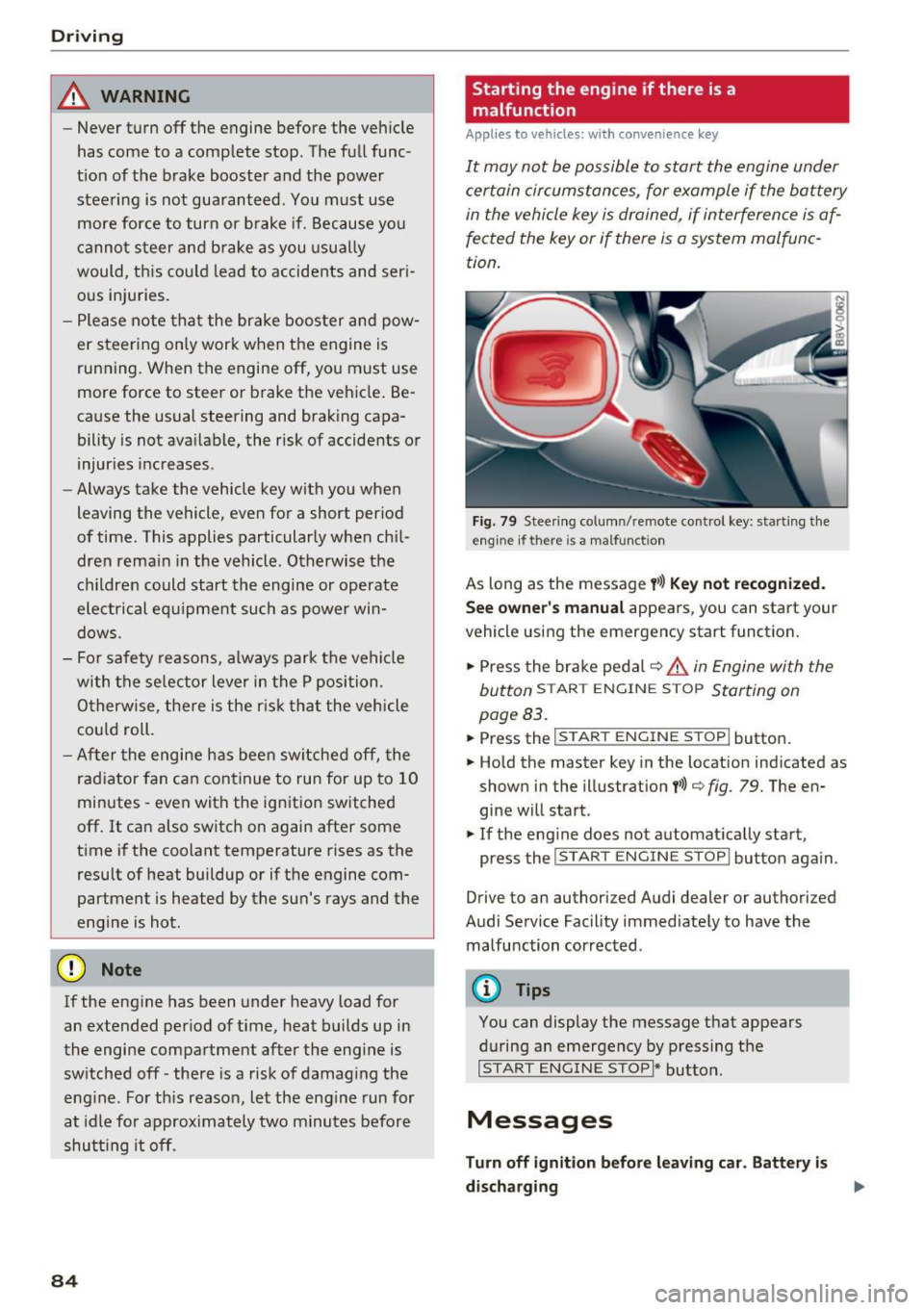
Fig. 79 Steering column/remote control key: starting the
e ngin e if there is a malfunct ion
As long as the message y>>) Key not recognized.
See owner's manual
appears, you can start your
vehicle using the emergency start function.
.,. Press the brake pedal¢ ,&.
in Engine with the
button
START ENGINE S TOP Starting on
page 83.
.,. Press the ~1s=T-A~R~T~E-N~G=r-N~E~S~T~O~P~ I button.
.,. Hold the master key in the location indicated as
shown in the illustration
t>>) ¢ fig. 79. The en
gine will start.
.,. If the engine does not automatically start,
press the
I START ENGINE STOPI button again .
Drive to an authorized Audi dealer or authorized
Audi Service Facility immediately to have the
malfunction corrected .
@ Tips
You can display the message that appears
during an emergency by pressing the
I START ENGINE STOPI* button.
Messages
Turn off ignition before leaving car. Battery is
discharging .,.
Page 87 of 328
.... N
0 > CX)
rl I.Cl U"I
rl I.Cl ....
This message appears and a warning tone sounds if you open the driver's door when the ignition is
switched on. Switch the ign ition off so that the
battery will not d ischarge.
Pressing start/stop button again will switch off
engine!
This message appears when you press the
ISTART ENGINE STOPI* button while driving
¢ page 83, Emergency off function.
Engine start system malfunction. Please con
tact Service
The engine automatic start system has a mal
function . Drive to an author ized Audi dealer or
author ized Audi Service Facility immediate ly to
have the malf uncti on corrected. To start the en
g ine, press and hold the
!START ENGINE STOPI
button.
DJ Key not recognized. See owner's manual
This message appears if there is no convenience
key inside the vehicle or if the system does not
recognize the key. The conven ience key may not
be recognized, for example, if it is covered by an
object that
disrupts the signal (such as a brief
case), o r if the key battery is weak. Electronic de
vices such as cell phones can also interfere with
the signal.
To still be able to start or stop the engine, refer
to "Cor rect ing a malfunction" ¢
page 84.
Ill Key not in vehicle?
The Ill indicator light turns on and this message
appears if the convenience key was removed from
the vehicle when the eng ine was running . If the
conven ience key is no longer in the vehicle, you
cannot switch the ignition on o r start the engine
once yo u stop it. In addition, you cannot lock the
ve hicl e from the outside .
Press brake pedal
This message appears if you do not press the
brake pedal when starting the eng ine .
Please engage N or P
This message appears when starting or s topping
the engine if the selector lever is not in the Nor P
position . The engine will not start/stop .
Driving
Shift to P, vehicle can roll away . Doors can only
be locked in P
T his message appears for safety reasons along
with a warning tone. It appears if the selec to r
lever for the automat ic transmission is not in the
P position when switching the ignition off with
the
I START ENGINE STOPI * button. Shift these
lector lever to the P position. Otherwise, the vehi
cle could roll. You also cannot lock the vehicle us
ing the locking sensor o n the door hand le or us
ing the conven ience key.
Electromechanical
parking brake
Operating
The electromechanical parking brake replaces
the hand brake.
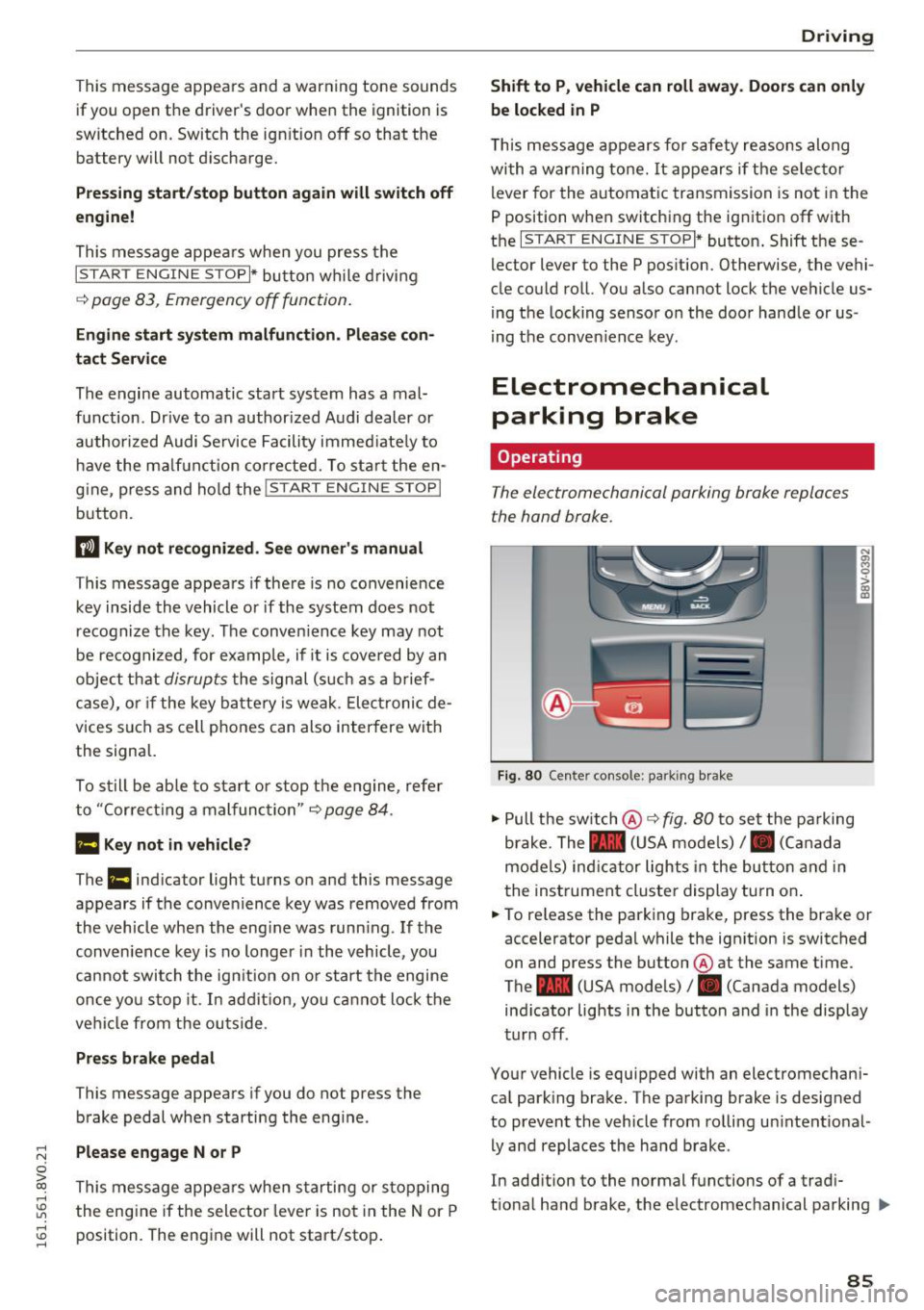
Fig . 80 Center console : pa rk ing brake
" Pull the switch @¢ fig. 80 to set the parking
brake. The - (USA models),. (Canada
models) ind icator lights in the button and in
the instrument cluster display turn on .
" To release the parking brake, press the brake or
accelerator pedal while the ign ition is switched
on and press the button @at the same time.
The - (USA models), . (Canada models)
ind icator lights in the button and in the display
turn off.
Your vehicle is equipped with an electromechani
cal park ing brake. The parking brake is designed
to prevent the vehicle from rolling un intent io nal
ly and replaces the hand brake .
In addition to the normal functions of a tradi
t ional hand brake, the electromec hanical parking ..,.
85
Page 88 of 328
Driving
brake provides various convenience and safety
functions.
When starting from a stop
- The integral hill start assist helps you when
driving by automatically releasing the parking
brake
c:;, page 87, Starting from a stop.
- When starting on inclines, the hill start assist
prevents the vehicle from unintentionally roll
ing back. The braking force of the parking brake
is not released until the wheels build up
enough driving force.
Emergency brake function
The emergency braking function ensures that the
vehicle can be slowed down even if the
standard
brakes fail c:;, page 87, Emergency braking
function.
A WARNING
- Do not press the accelerator pedal inadver
tently when the vehicle is stationary and the engine is running and a gear is selected.
Otherwise the vehicle will start to move im
mediately and could result in a crash.
- If the power supply fails, the released park
ing brake can no longer engage. In this
case, park the vehicle on level ground and
secure it by placing the selector lever in the
P position . See an authorized Audi dealer or
authorized Audi Service Facility for assis
tance.
(D Note
If the . or .. (USA models) /. (Canada
models) indicator light in the instrument
cluster blinks, there is a malfunction in the
brake system. Refer to the detailed descrip
tion of the indicator lights
c:;, page 18.
-If the - (USA models) /. (Cana-
da models) or
Ill indicator light turns on,
there is a malfunction in the parking brake
c;, page 19.
@ Tips
-If the parking brake is set while the ignition
is switched off, the
¢~jj indicator light in the
button and in the instrument cluster dis-
86
play - (USA models) /. (Canada mod
els) will turn off after a certain amount of
time.
- If driver's door is opened while the ignition
is switched on, the parking brake sets auto
matically. This prevents unintended rolling
of the vehicle.
- Occasional noises when the parking brake is
set and released are normal and are not a
cause for concern.
- When the vehicle is parked, the parking
brake goes through a self-test cycle at regu
lar intervals. Any noises associated with this
are normal.
- If there is a power failure, the parking brake
will not set if it is released, and it will not release if it is set
c:;, I!:::,. . See an authorized
Audi dealer or authorized Audi Service Fa cility for assistance.
· Parking
.,. Press the brake pedal to stop the vehicle.
.,. Pull the switch @
c:;, page 85, fig. 80 to set the
parking brake.
.,. Place the selector lever in the P position.
.,. Turn the engine off
c:;, & -
.,. Turn the steering wheel when parking on in
clines so that the wheels will roll into the curb
if the vehicle starts moving.
A WARNING
- Always take the vehicle key with you when
leaving the vehicle, even for a short period
of time . This applies particularly when chil
dren remain in the vehicle. Otherwise chil
dren could start the engine, release the
parking brake or operate electrical equip
ment such as power windows, which in
creases the risk of an accident.
- When the vehicle is locked, no one -particu
larly not children -should remain in the ve
hicle. Locked doors make it more difficult
for emergency workers to get into the vehi
cle, which puts lives at risk.