heating AUDI A3 2020 Owner´s Manual
[x] Cancel search | Manufacturer: AUDI, Model Year: 2020, Model line: A3, Model: AUDI A3 2020Pages: 400, PDF Size: 107.47 MB
Page 69 of 400

8V2012721BK
Warm and cold
85/ 29/ @3 Air distribution and vents
The air distribution can adjusted with the but-
tons. To have the air distribution regulated auto-
matically, press the AUTO button.
The round air vents in the cockpit are adjustable
> page 68.
To keep the front side windows from fogging up
in damp weather, we recommend opening the
side air vents and tilting them to the side.
Foot vents are located under the front seats and
adjustable vents on the end of the center console
to heat the rear of the vehicle.
& Defrosting
The windshield and side windows are defrosted
or cleared of condensation as quickly as possible.
The maximum amount of air flows mainly from
the vents below the windshield. Recirculation
mode switches off. The temperature should be
set at +72°F (22°C) or higher. The temperature is
controlled automatically. In the & setting, the
A/C cooling mode switches on automatically, de-
pending on the outside air temperature.
The AUTO button switches the defroster off.
<> Recirculation mode
The recirculation mode can be turned on manual-
ly or automatically*.
— Switching manual recirculation mode on and
off: press the > button.
— Automatic* recirculation mode: auto recircula-
tion needs to be activated in the Infotainment
system. Select in the Infotainment system:
MENU] button > Vehicle > left control button >
Air conditioning > Auto recirculation. The air
quality sensor that is designed for diesel and
gasoline exhaust automatically switches the re-
circulation mode on or off depending on the
level of pollutants in the outside air.
In recirculation mode, the air inside the vehicle is
circulated and filtered. This prevents the unfil-
tered air outside the vehicle from entering the
vehicle interior. Switching recirculation mode on
when driving through a tunnel or when sitting in
traffic is recommended > A.
Pressing the <> button, AUTO or the ® button
switches recirculation mode off.
@ Rear window heating
If the rear window defogger is activated when
the ignition is switched on, the battery manage-
ment determines based on the battery charge if
it is possible to turn on. Otherwise, the rear win-
dow defogger functions with the engine running
and switches off automatically after approxi-
mately 10 - 20 minutes, depending on the out-
side temperature.
To prevent the rear window defogger from
switching off automatically, press and hold the
® button for more than two seconds.
#/ Seat heating*
Pressing the a button switches the seat heating
on at the highest setting (level 3). The LEDs indi-
cate the temperature level. To reduce the tem-
perature, press the button again. To switch the
seat heating off, press the button repeatedly un-
til the LED turns off.
After approximately 10 minutes, the seat heating
automatically switches from level 3 to level 2.
Z\ WARNING
— You should not use the recirculation mode
for an extended period of time, because no
fresh air is drawn in and the windows can
fog when cooling mode is switched off. This
increases the risk of an accident.
— Individuals with reduced sensitivity to pain
or temperature could develop burns when
using the seat heating function. To reduce
the risk of injury, these individuals should
not use seat heating.
@) Note
To reduce the risk of damage to the seat heat-
ing elements, do not kneel on the seats or
place heavy pressure on one area of the seat.
G) Tips
If the front passenger's seat heating is turned
on, it will not turn on again automatically if
more than 10 minutes have passed between
67
>
Page 70 of 400
Warm and cold
switching the ignition off and switching it on
again.
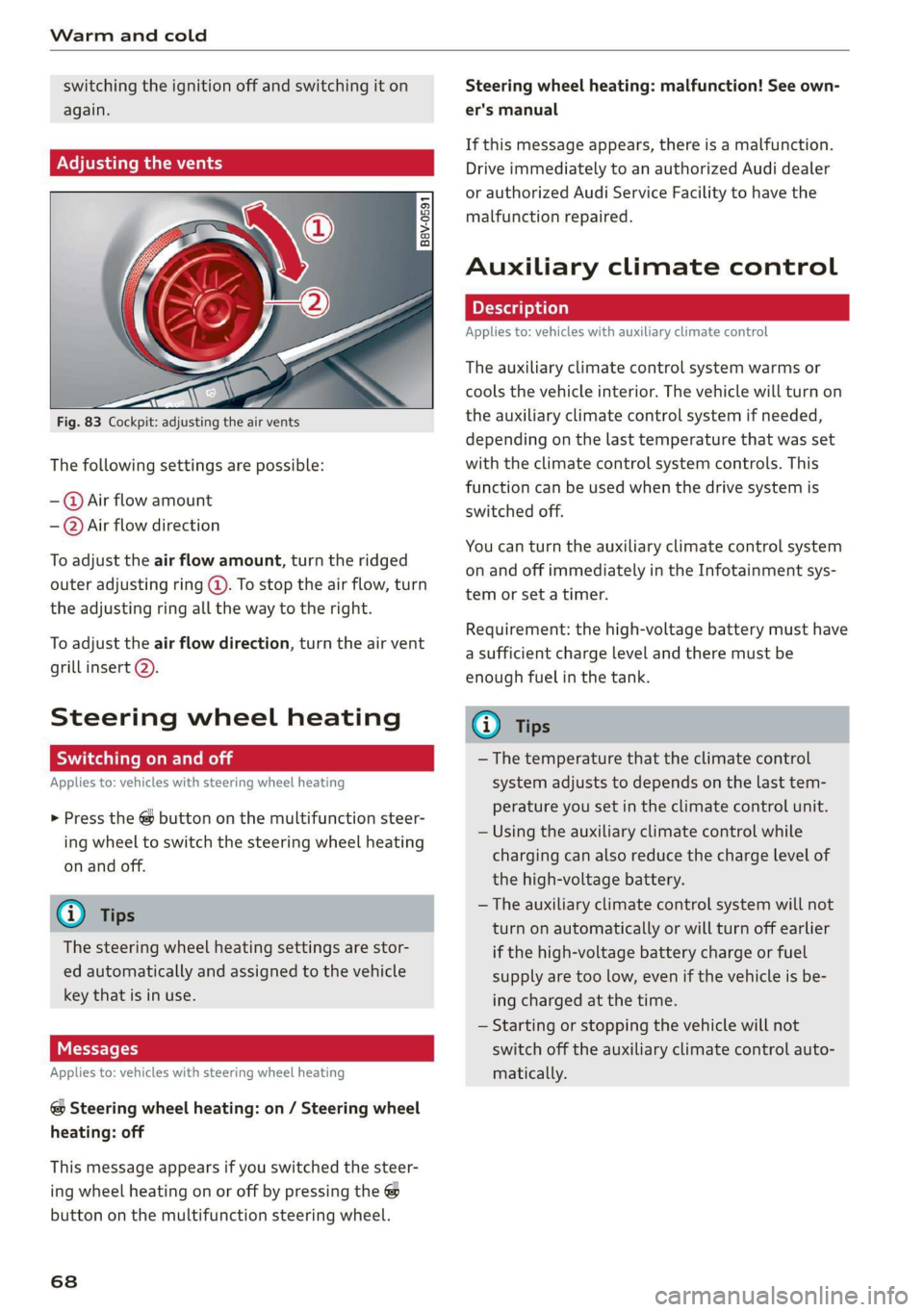
Adjusting the vents
Fig. 83 Cockpit: adjusting the air vents
The following settings are possible:
-@ Air flow amount
-—@Air flow direction
To adjust the air flow amount, turn the ridged
outer adjusting ring @. To stop the air flow, turn
the adjusting ring all the way to the right.
To adjust the air flow direction, turn the air vent
grill insert 2).
Steering wheel heating
Scale Rie mola
Applies to: vehicles with steering wheel heating
> Press the @ button on the multifunction steer-
ing wheel to switch the steering wheel heating
on and off.
G@) Tips
The steering wheel heating settings are stor-
ed automatically and assigned to the vehicle
key that is in use.
Messages
Applies to: vehicles with steering wheel heating
@ Steering wheel heating: on / Steering wheel
heating: off
This message appears if you switched the steer-
ing wheel heating on or off by pressing the @
button on the multifunction steering wheel.
68
Steering wheel heating: malfunction! See own-
er's manual
If this message appears, there is a malfunction.
Drive immediately to an authorized Audi dealer
or authorized Audi Service Facility to have the
malfunction repaired.
Auxiliary climate control
Applies to: vehicles with auxiliary climate control
The auxiliary climate control system warms or
cools the vehicle interior. The vehicle will turn on
the auxiliary climate control system if needed,
depending on the last temperature that was set
with the climate control system controls. This
function can be used when the drive system is
switched off.
You can turn the auxiliary climate control system
on and off immediately in the Infotainment sys-
tem or set a timer.
Requirement: the high-voltage battery must have
a sufficient charge level and there must be
enough fuel in the tank.
@) Tips
— The temperature that the climate control
system adjusts to depends on the last tem-
perature you set in the climate control unit.
— Using the auxiliary climate control while
charging can also reduce the charge level of
the high-voltage battery.
— The auxiliary climate control system will not
turn on automatically or will turn off earlier
if the high-voltage battery charge or fuel
supply are too low, even if the vehicle is be-
ing charged at the time.
— Starting or stopping the vehicle will not
switch off the auxiliary climate control auto-
matically.
Page 71 of 400
![AUDI A3 2020 Owner´s Manual 8V2012721BK
Warm and cold
Switching on and off
Applies to: vehicles with auxiliary climate control
Switching the auxiliary climate control on/
off:
> Select the [MENU] button > Vehicle > lef](/img/6/40265/w960_40265-70.png "AUDI A3 2020 Owner´s Manual 8V2012721BK
Warm and cold
Switching on and off
Applies to: vehicles with auxiliary climate control
Switching the auxiliary climate control on/
off:
> Select the [MENU] button > Vehicle > lef")
8V2012721BK
Warm and cold
Switching on and off
Applies to: vehicles with auxiliary climate control
Switching the auxiliary climate control on/
off:
> Select the [MENU] button > Vehicle > left con-
trol button > Auxiliary air conditioning > Turn
on auxiliary air conditioning or Turn off auxili-
ary air conditioning.
@) Tips
The auxiliary climate control can also be
switched on and off immediately when a tim-
er is set.
Setting the timer
Applies to: vehicles with auxiliary climate control
By setting the departure time, you determine
when your vehicle should reach the desired tem-
perature. You can set the timer in the auxiliary air
conditioning menu in the Infotainment system.
Auxiliary climate control: setting the timer
> Select: [MENU] button > Vehicle > left control
button > Auxiliary A/C > right control button >
Program timer.
> Set the time and the date.
> Press the [BACK] button.
> Confirm the setting with the control knob to ac-
tivate the timer. A V appears in the box.
Error messages
(ZA - The high-voltage battery charge level is too
low to heat/air condition the vehicle using only
electric power. Vehicles with auxiliary heating/air
conditioning* can continue to be heated or
cooled using the fuel in the tank.
If one of the following symbols appears in the
display, then you cannot switch on the auxiliary
climate control system or auxiliary heating/air
conditioning*:
2— - There is a system malfunction.
A - The fuel level is too low.
@) Tips
— If you switch the ignition off, the timer set-
tings will appear in the Infotainment sys-
tem display. You can still adjust the settings
for several minutes. The climate control sys-
tem can be started immediately, which will
maintain the desired climate control condi-
tions while you are not in the vehicle.
— You can set the timer a maximum of seven
days in advance.
— You can operate the climate control in the
vehicle interior when the high-voltage bat-
tery is charging using the charging timer
= page 106. The target climate control out-
put depends on the power supply capacity.
— Make sure the time and date match in the
Infotainment system settings so that the
timer can function correctly > page 230.
— The auxiliary climate control can continue to
run after the departure time is reached.
Fluids in the A/C system
Refrigerant in the A/C system
The sticker in the engine compartment provides
information about the type and amount of refrig-
erant used in the vehicle’s A/C system. The stick-
er is located in the front section of the engine
compartment or at the front or back of the hood.
Symbol
A
Meaning
Warning: the A/C system must only
be serviced by qualified technicians.
Refrigerant type
Lubricant type
a
tt
Refer to the service information
(only available for authorized Audi
dealers or authorized Audi Service
Facilities)
The A/C system must only be serv-
e
Bi) iced by qualified technicians. >
69
Page 84 of 400
Driving
— Turn off electrical equipment that is not need-
ed, for example seat heating*.
— Anticipate upcoming traffic situations while
driving to avoid unnecessary acceleration and
braking.
— Avoid driving at high speeds.
— Avoid adding extra weight to the vehicle if pos-
sible, for example by not leaving roof racks or
bike racks installed when they are not needed.
— Make sure the tire pressure is correct.
— Have maintenance performed regularly on the
vehicle.
— Do not drive with winter tires during the summ-
er.
— Do not let the engine run while the vehicle
parked.
— Use the Start/Stop system.
— Utilize the engine braking effect.
— Avoid driving short distances when possible.
— Plug-in hybrid drive: brake early and evenly to
use the recuperation function.
@) Tips
The amount of noise produced by the vehicle
can increase significantly when driving with a
sporty style. Show respect to others around
you and the environment with the way you op-
erate your vehicle, especially at night.
Energy management
Your vehicle is equipped with an intelligent ener-
gy management system for distributing electrici-
ty. This significantly improves the starting ability
and increases the vehicle battery life.
G) Tips
— If you drive short distances frequently, the
vehicle battery may not charge enough
while driving. As a result, convenience func-
tions for electrical equipment may be tem-
porarily unavailable.
— The vehicle battery will gradually drain if
the vehicle is not driven for long periods of
time, or if electrical equipment is used
when the engine is not running. To ensure
that the vehicle can still be started, the
82
electrical equipment will be limited or
switched off.
S Engine stopped: power steering and brake
booster not possible
There is a malfunction in the engine or the fuel
supply. More force is needed to steer and brake
the moving vehicle when the engine is stopped.
If the vehicle is rolling, try to bring it to a stop off
to the side from moving traffic. See an author-
ized Audi dealer or authorized Audi Service Facili-
ty for assistance.
EB EB Drive system: malfunction! Safely stop
vehicle
There is a malfunction in the plug-in hybrid sys-
tem. The brake booster and the power steering
may stop working. Stop the vehicle immediately
at a suitable location or as soon as possible. Park
the vehicle in a safe place outdoors that is not
near buildings, roof overhangs, carports or simi-
lar structures. Switch the ignition off. Have the
problem corrected by an authorized Audi dealer
or authorized Audi Service Facility.
B i B Electric drive: overheated! Safely stop
vehicle and check coolant
The coolant level is too Low or the coolant tem-
perature is too high. Stop the vehicle in the out-
doors as soon as it is safely possible. Switch the
ignition off.
Read the important safety precautions > A in
Coolant on page 312 and check the coolant level
= page 312. If the coolant level is OK, the mal-
function may be caused by the system overheat-
ing. Let the vehicle's electric drive system cool
down for some time.
— If the message turns off after cooling down and
switching the ignition back on, you can contin-
ue driving. Contact an authorized Audi dealer or
authorized Audi Service Facility immediately to
have the malfunction corrected.
— If the indicator light stays on, contact an au-
thorized Audi dealer or authorized Audi Service
Facility.
Page 96 of 400
Driving dynamic
Electronic Differential Lock (EDL)
The EDL applies the brakes to wheels that are
slipping and transfers the drive power to the oth-
er wheels. This function is not available at higher
speeds.
In extreme cases, EDL automatically switches off
to keep the brake on the braked wheel from over-
heating. The vehicle is still functioning correctly.
EDL will switch on again automatically when con-
ditions have returned to normal.
Power steering
The ESC can also support vehicle stability
through steering.
Selective wheel torque control
Selective wheel torque control is used when driv-
ing on curves. Braking is targeted toward the
wheels on the inside of the curve as needed. This
allows more precise driving in curves.
Automatic post-collision braking system
The automatic post-collision braking system can
help to reduce the risk of sliding and of addition-
al collisions after an accident. If the airbag con-
trol module detects a collision, the vehicle is
braked by the ESC.
The vehicle does not brake automatically if one of
the following occurs:
— The driver presses the accelerator pedal, or
— The braking force generated by the pressed
brake pedal is greater than the braking force
that
would be initiated by the system
— The ESC, the brake system, or the vehicle elec-
trical system is not functioning
ing risks. This could increase your risk of a
collision.
— Please note the risk of a collision increases
when driving fast, especially through curves
and on slippery or wet roads, and when driv-
ing too close to objects ahead. There is still
a risk of accidents because the ESC and its
integrated systems cannot always prevent
collisions.
— Accelerate carefully when driving on
smooth, slippery surfaces such as ice and
snow. The drive wheels can spin even when
these control systems are installed and this
can affect driving stability and increase the
risk of a collision.
ZA\ WARNING
— The ESC and its integrated systems cannot
overcome the limits imposed by natural
physical laws. This is especially important on
slippery or wet roads. If the systems begin
acting to stabilize your vehicle, you should
immediately alter your speed to match the
road and traffic conditions. Do not let the in-
creased safety provided tempt you into tak-
94
G) Tips
— The ABS and ASR only function correctly
when all four wheels have a similar wear
condition. Different tire sizes can lead toa
reduction in engine power.
— You may hear noises when the systems de-
scribed are working.
The 0 button is located above the selector lev-
er in the center console.
The ESC is automatically switched on when the
ignition is switched on. It may make sense in
some situations to limit the ESC so that the
wheels can spin:
— Rocking the vehicle to free it when it is stuck
— Driving in deep snow, on unpaved ground, or
with snow chains
Limiting ESC (sport mode)
—To limit the ESD, press the 0 button briefly.
The B indicator light turns on.
— To completely reactivate the ESC stabilization
function, press the button again. The indicator
light turns off.
Switching off ESC
—To switch off the ESC, press and hold the oF
button for more than three seconds. The B
and Ea indicator lights turn on.
Page 103 of 400
8V2012721BK
High-voltage system
> Remove the cap from the charging cable.
> Connect the cable to the vehicle charging port.
> If a charging timer is not set, the charging proc-
ess will start automatically depending on the
charging station > page 106.
> The vehicle operating status is indicated by the
status LED > page 107.
> Also read the information found in > page 106,
After charging.
@) Tips
Only charge your vehicle at charging stations
that conform to the following standards, de-
pending on the country:
— GB/T 18487.1 and GB/T 20234 (China)
— IEC 61851 and IEC 62196 (Europe)
— SAE J1772 (North America, Japan)
G) Tips
— It is not possible to charge using the charg-
ing timer at some charging stations.
— You can use your Audi charging system if
there is a household or industrial* connec-
tion available at the charging station.
Charging the battery
with the Audi charging
system
CET Ute Ret LAC hi
Applies to: vehicles with plug-in hybrid drive
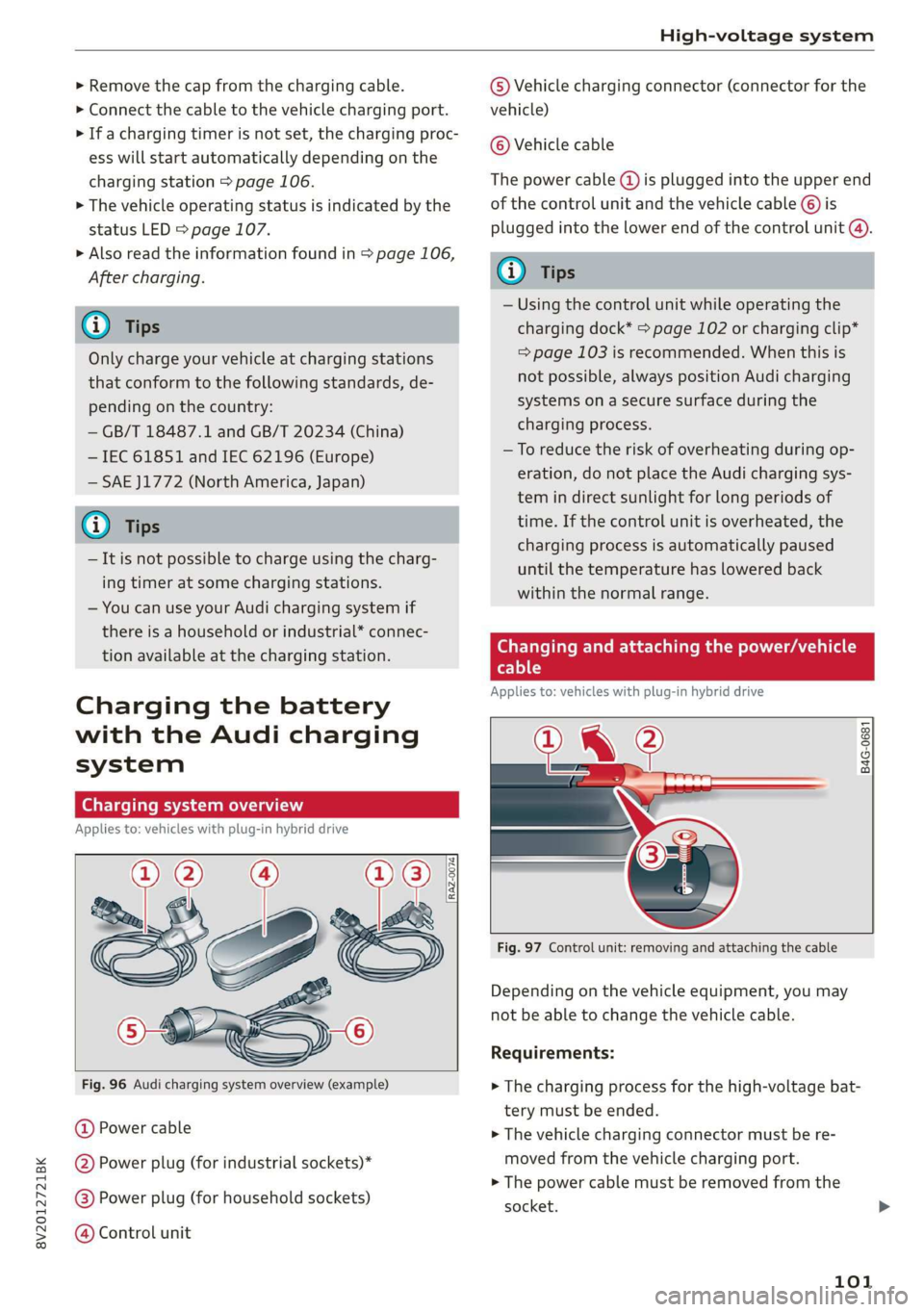
Fig. 96 Audi charging system overview (example)
@ Power cable
@ Power plug (for industrial sockets)*
@®) Power plug (for household sockets)
@ Control unit
© Vehicle charging connector (connector for the
vehicle)
© Vehicle cable
The power cable (@) is plugged into the upper end
of the control unit and the vehicle cable ©) is
plugged into the lower end of the control unit @).
@ Tips
— Using the control unit while operating the
charging dock* > page 102 or charging clip*
=> page 103 is recommended. When this is
not possible, always position Audi charging
systems on a secure surface during the
charging process.
—To reduce the risk of overheating during op-
eration, do not place the Audi charging sys-
tem in direct sunlight for long periods of
time. If the control unit is overheated, the
charging process is automatically paused
until the temperature has lowered back
within the normal range.
Changing and attaching the power/vehicle
cable
Applies to: vehicles with plug-in hybrid drive
PI @
B4G-0681
Fig. 97 Control unit: removing and attaching the cable
Depending on the vehicle equipment, you may
not be able to change the vehicle cable.
Requirements:
> The charging process for the high-voltage bat-
tery must be ended.
> The vehicle charging connector must be re-
moved from the vehicle charging port.
> The power cable must be removed from the
socket.
101
Page 108 of 400
High-voltage system
Setting the charging timer
You can delay the charging time with the charg-
ing timer in the Infotainment system )). You can
set two different timers.
> If a timer has been set, press the button @)
=> page 105, fig. 105. The LED in the button
will turn on.
> To set a charging timer, select: [MENU] button >
Vehicle > left control button > Charge > right
control button > Program timer.
> Select Individual timer or Repeat timer.
> Set the departure time, the date or day of the
week.
> You can specify a preferred charging time with
the charging timer, for example if you would
like to use the off-peak rate.
> You can activate the auxiliary air conditioning
with the charging timer while charging by se-
lecting Air conditioning with the control knob.
AV appears in the box. This activation is sepa-
rate from the Infotainment system settings in
the climate control menu > page 68.
> Press the [BACK] button.
> To activate the desired timer, confirm the set-
ting with the control knob. A ¥ appears in the
box.
@ Tips
— Auxiliary climate control is powered electri-
cally if you select climate control using the
charging timer. This may also be used in
confined spaces such as garages.
— Using the auxiliary climate control while
charging can also reduce the charge level of
the high-voltage battery.
—The charging process can be interrupted at
any time. Press the active button on the ve-
hicle to do this > page 105, fig. 105.
— The climate control output while charging
depends on the capacity of the electrical
connection. Additional information on cli-
mate control can be found under > page 68.
D_ Not available in all Infotainment systems.
106
Setting the charging power level
Applies to: vehicles with plug-in hybrid drive
The control unit automatically recognizes the
voltage and the available current strength. You
can set whether you would like to charge with full
or reduced charging power. The last setting that
was selected will be saved and used again the
next time the vehicle is charged. If multiple
items are connected to the power circuit, the
charging current may be reduced when charging
at a power outlet. This can help to prevent the
electrical equipment from overheating.
Before charging, always check if the charging
power setting that was selected last is still suita-
ble.
> To set the charging power level, press and hold
the @ button @ > page 105, fig. 104 for at
least two seconds.
After the charging power level is set, the status
LEDs ©, iand {) will flash green one time. The
selected value (50% or 100%) is displayed on the
left or right side of the ® button.
Name lee ale]
Applies to: vehicles with plug-in hybrid drive
After
completing the charging or climate control
process, the vehicle enters a sleep mode. No dis-
plays are visible on the charging unit during this
period. Always remove the vehicle charging con-
nector first after charging.
The vehicle charging connector is locked during
and after charging. You must unlock the connec-
tor to remove it.
Unlocking the vehicle charging connector
when the vehicle is locked
> Unlock the vehicle. The connector will unlock
for 30 seconds.
> Remove the connector.
> If the connector is not removed within 30 sec-
onds, it will lock again automatically.
Page 118 of 400
Assist systems
Switching the system on
Applies to: vehicles with cruise control system
@ #
©
f°
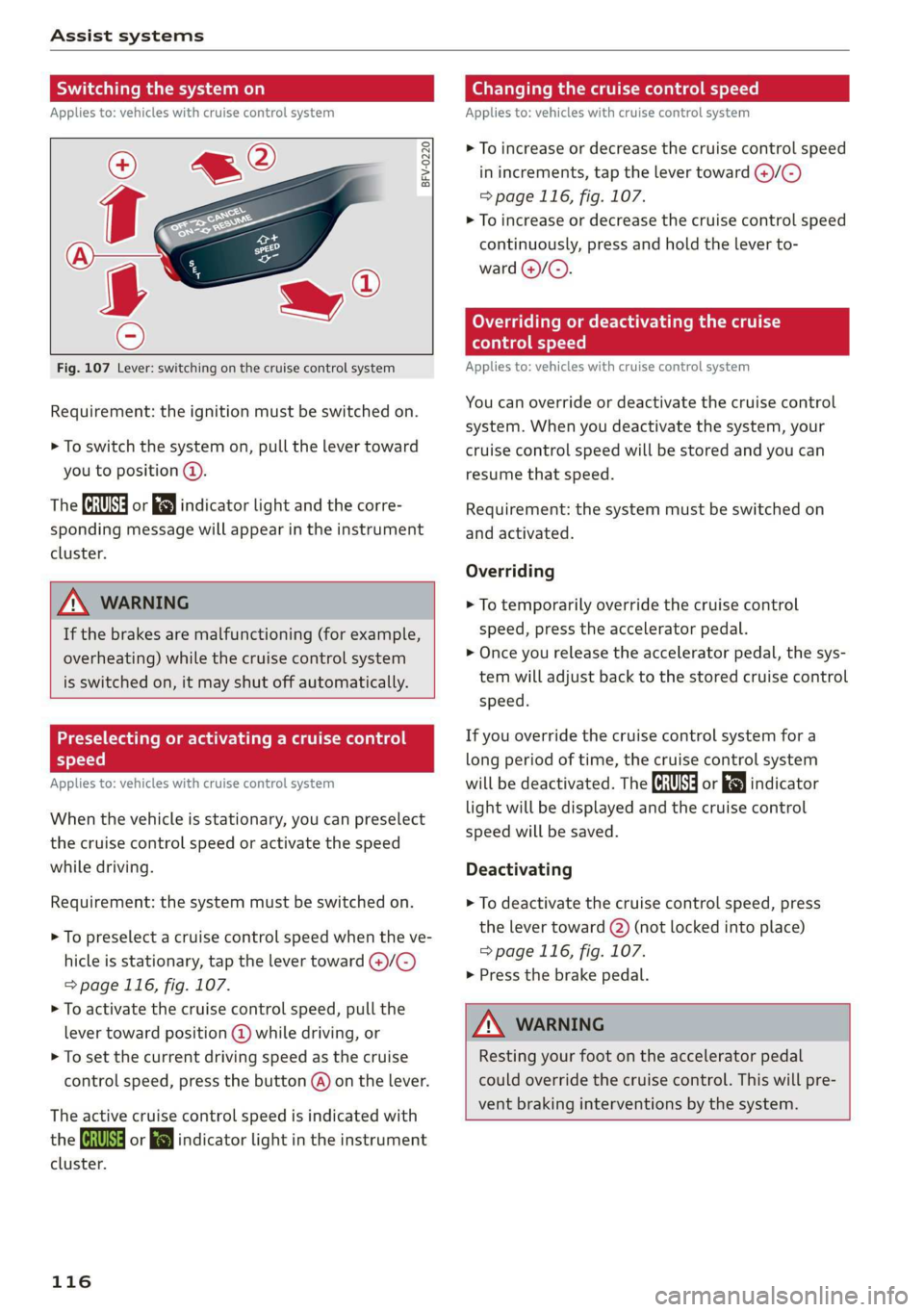
Fig. 107 Lever: switching on the cruise control system
Requirement: the ignition must be switched on.
> To switch the system on, pull the lever toward
you to position @).
The (a or 8] indicator light and the corre-
sponding message will appear in the instrument
cluster.
ZA WARNING
If the brakes are malfunctioning (for example,
overheating) while the cruise control system
is switched on, it may shut off automatically.
Preselecting or activating a cruise control
Cy ey-t-te)
Applies to: vehicles with cruise control system
When the vehicle is stationary, you can preselect
the cruise control speed or activate the speed
while driving.
Requirement: the system must be switched on.
> To preselect a cruise control speed when the ve-
hicle is stationary, tap the lever toward @)/G)
=> page 116, fig. 107.
> To activate the cruise control speed, pull the
lever toward position @ while driving, or
> To set the current driving speed as the cruise
control speed, press the button @) on the lever.
The active cruise control speed is indicated with
the ICRUISE| or i=} indicator light in the instrument
cluster.
116
Changing the cruise control speed
Applies to: vehicles with cruise control system
> To increase or decrease the cruise control speed
in increments, tap the lever toward @)/G)
=> page 116, fig. 107.
> To increase or decrease the cruise control speed
continuously, press and hold the lever to-
ward @/@).
Overriding or deactivating the cruise
control speed
Applies to: vehicles with cruise control system
You can override or deactivate the cruise control
system. When you deactivate the system, your
cruise control speed will be stored and you can
resume that speed.
Requirement: the system must be switched on
and activated.
Overriding
> To temporarily override the cruise control
speed, press the accelerator pedal.
> Once you release the accelerator pedal, the sys-
tem will adjust back to the stored cruise control
speed.
If you override the cruise control system for a
long period of time, the cruise control system
will be deactivated. The ICRUISE| or indicator
light will be displayed and the cruise control
speed will be saved.
Deactivating
> To deactivate the cruise control speed, press
the lever toward (2) (not locked into place)
=> page 116, fig. 107.
> Press the brake pedal.
ZA WARNING
Resting your foot on the accelerator pedal
could override the cruise control. This will pre-
vent braking interventions by the system.
Page 119 of 400

8V2012721BK
Assist systems
Switching the system off
Applies to: vehicles with cruise control system
When you switch the system off completely, the
cruise control speed will be deleted.
Requirement: the system must be switched on.
> To switch the system off, press the lever toward
@ (locked into place) > page 116, fig. 107, or
> Switch the ignition off.
Applies to: vehicles with cruise control system
ICRUISE| / 3) Speed control system: currently un-
available. See owner's manual
If the indicator light turns on and this message
appears, the cruise control system has been deac-
tivated. There is a temporary malfunction, for ex-
ample the brakes are overheating. Switch the
cruise control system on again later.
Lap timer
Applies to: vehicles with lap timer
You can measure and analyze lap times with the
lap timer in the display.
Opening the lap timer
> Open the first Vehicle tab (trip computer) using
the |<>] button on the multifunction steering
wheel.
> Applies to: vehicles with analog instrument
cluster: Press the [=] button on the multifunc-
tion steering wheel and select Lap timer in the
menu.
> Applies to: vehicles with Audi virtual cockpit:
On the multifunction steering wheel, select:
left control button > Lap times.
Operating the lap timer
> On the multifunction steering wheel, turn the
left thumbwheel @) > page 17 or @ > page 20
until the desired menu item is displayed in the
instrument cluster.
> Press the left thumbwheel to confirm the selec-
tion.
ZX WARNING
Your focus should always be on driving your
vehicle safely. As the driver, you have com-
plete responsibility for safety in traffic. Only
use the functions such as the lap timer in such
a way that you always maintain complete con-
trol over your vehicle in all traffic situations.
(i) Tips
You can retrieve information from the trip
computer while the lap timer stopwatch is
running.
times and timing
Applies to: vehicles with lap timer
Requirement: the lap timer must be open
=> page 117.
Timing laps
> To start timing, select Lap 1 - press OK or Start
lap 1 in the menu.
> Applies to: vehicles with Audi virtual cockpit: To
start timing automatically when you start driv-
ing, select Start lap 1 by driving off or Start by
driving off in the menu.
> To measure the lap time, select New lap - press
OK or New lap in the menu. This starts timing
the next lap at the same time.
After completing, the difference between the last
lap and the previous best lap time will be indicat-
ed witha “—"@ or “"/.
Pausing timing and displaying a split time
> To insert a pause i select Pause in the menu.
> To continue timing, select Press OK to resume
or Resume in the menu.
> To display a split time, select Split time in the
menu. The split time {@] appears for approxi-
mately 10 seconds in the instrument cluster.
The timing of the current lap continues.
Resetting timing
> Using the multifunction steering wheel, select
Reset or Reset times in the menu. >
117
Page 305 of 400
8V2012721BK
Checking and Filling
The fuel tank is almost empty. You must antici-
pate a significant power loss. Drive immediately
to a gas station.
Ey Beet Warning! Limited performance
The gasoline engine is no longer available be-
cause there is not enough fuel. Drive immediately
to agas station.
Fuel filler door emergency release
Applies to: vehicles with plug-in hybrid drive
You must use the emergency release to open the
fuel filler door when there is a malfunction
=> page 301.
The tank is not vented. You can only fill a small
amount of fuel in the tank.
> Fill only until the automatic fuel pump nozzle
turns off for the first time when it is operated
correctly.
Drive to an authorized Audi dealer or authorized
Audi Service Facility immediately to have the
malfunction corrected.
@ Tips.
Pressure can escape if you open the tank cap
after using the emergency release. This can
create noises.
Emissions control
system
(ee eileen)
ZX WARNING
The temperature of the exhaust system is
high, both when driving and after stopping
the engine.
— Never touch the exhaust tail pipes once they
have become hot. This could result in burns.
— Do not park your vehicle over flammable
materials such as grass or leaves because
the high temperature of the emissions sys-
tem could start a fire.
— Do not apply underbody protectant in the
exhaust system area, because this increases
the risk of fire.
(el e-] Nad (mcl akg
Follow the safety precautions > page 303, Gener-
al information.
The vehicle may only be driven with unleaded
gasoline, or the catalytic converter will be de-
stroyed.
Never drive until the tank is completely empty.
The irregular supply of fuel that results from that
can cause engine misfires. Uncombusted fuel
could enter the exhaust system, which could
cause overheating and damage to the catalytic
converter.
On Board Diagnostic System (OBD)
The On Board Diagnostic System monitors the
engine and transmission components that influ-
ence emissions.
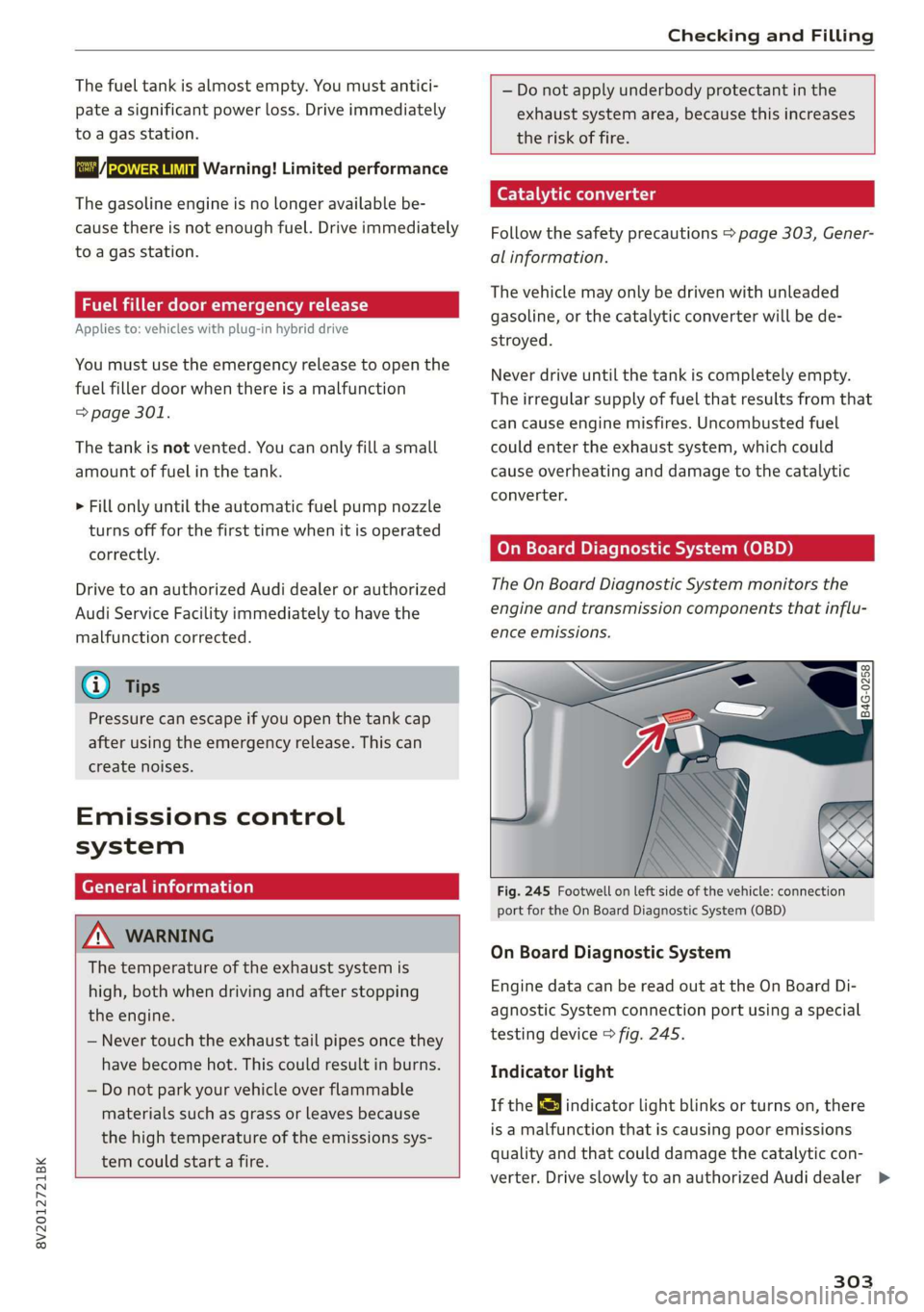
Fig. 245 Footwell on left side of the vehicle: connection
port for the On Board Diagnostic System (OBD)
On Board Diagnostic System
Engine data can be read out at the On Board Di-
agnostic System connection port using a special
testing device > fig. 245.
Indicator light
If the S indicator light blinks or turns on, there
is a malfunction that is causing poor emissions
quality and that could damage the catalytic con-
verter. Drive slowly to an authorized Audi dealer >
303