rear parking AUDI A3 2020 Owner´s Manual
[x] Cancel search | Manufacturer: AUDI, Model Year: 2020, Model line: A3, Model: AUDI A3 2020Pages: 400, PDF Size: 107.47 MB
Page 139 of 400

8V2012721BK
Parking aid
Parking system plus
Description
Applies to: vehicles with parking system plus/park assist
B8V-0686
RAH-8914
Fig. 131 Infotainment system: visual distance display
The parking system plus uses audio and visual
warnings to help you avoid obstacles when park-
ing.
Sensors are located in the front and rear bump-
ers. If these detect an obstacle, audible and visu-
al signals warn you.
Make sure the sensors are not covered by stick-
ers, deposits or any other obstructions as it may
impair the function of the system. For informa-
tion on cleaning, see > page 342.
The display field begins approximately at:
@ 4 ft (1.20 m)
@ 3 ft (0.90 m)
® 5.2 ft (1.60 m)
@ 3 ft (0.90 m)
©* 3 ft (0.90 m)®
@) Applies to: vehicles with park assist
Audio signals
The closer your vehicle gets to a detected obsta-
cle, the shorter the time between the audible sig-
nals. A continuous tone sounds when an obstacle
is less than approximately 1 foot (0.30 m) away
from the front or rear of the vehicle. A continu-
ous tone sounds when an obstacle is less than
approximately 0.7 feet (0.20 m) away from the
sides* of the vehicle. Do not continue driving for-
ward or in reverse >@ in General information on
page 136.
Visual warnings
The visual warnings in the Infotainment system
display help you to detect the critical vehicle area
and to estimate the distance to an obstacle
> fig. 131.
Red segments show identified obstacles that are
in your vehicle's path. The red lines mark the ex-
pected direction of travel according to the steer-
ing angle. A white segment indicates an identi-
fied obstacle that is outside of the vehicle's path.
As your vehicle comes closer to the obstacle, the
segments move closer to the vehicle. The colli-
sion area has been reached when the next to last
segment is displayed. Obstacles in the collision
area, including those outside of the vehicle's
path, are shown in red. Do not continue driving
forward or in reverse > A\ in General information
on page 136, >@ in General information on
page 136!
G) Tips
— The segments in the side area* are detected
and analyzed when passing. If you switch
the ignition off and on again or open the
door, or if the vehicle is stationary for a peri-
od of time, the surrounding area may have
changed in the meantime. Therefore, the
side area* will be displayed in black.
— If the distance to an obstacle remains con-
stant, the volume of the distance warning
gradually lowers after a few seconds until it
is muted (this does not apply to the continu-
ous tone). If the obstacle comes closer than
it was before the sound was muted, the
tone will sound again. If the obstacle be-
comes farther away than it was before the
sound was muted, no tone will sound. Pay
attention to the vehicle's surroundings
when you start to drive.
137
Page 140 of 400

Parking aid
Switching on and off
Applies to: vehicles with parking system plus/park assist
2 + 3
S| 2 ©
a.
Fig. 132 Center console: parking aid button
Switching on and off
Requirement: the vehicle speed must be under
approximately 6 mph (10 km/h).
> Press the Pvt button in the center console. A
short confirmation tone sounds and the LED in
the button turns on.
Switching on automatically
The system switches on automatically when re-
verse gear is engaged while the engine is run-
ning. A brief tone will sound.
If Activate automatically is switched on in the
Infotainment system and if the vehicle ap-
proaches an obstacle at speeds under approxi-
mately 6 mph (10 km/h), the parking aid will
switch on automatically. Audible signals will
sound once the obstacle is within the sensor de-
tection area.
Switching off automatically
The system switches off automatically when driv-
ing forward faster than 6 mph (10 km/h).
@ Tips
If you press the Ps button to switch the park-
ing aid off, it can only be reactivated automat-
ically when one of the following conditions is
met:
— The vehicle speed exceeds 6 mph (10 km/h)
— The ignition is switched off and back on
again
— The parking brake is set and then released
138
—The "P" selector lever position is engaged
and released again
Rearview camera
Introduction
Applies to: vehicles with rearview camera
B8V-0629
Fig. 133 Illustration: cross parking
The rearview camera helps you to park or maneu-
ver using the orientation lines.
Cee Mc Lo)
Applies to: vehicles with rearview camera
B8V-0522
Fig. 134 Area covered @ and area not covered (2) by the
rearview camera (example)
'8V-0099 Bi
Fig. 135 Luggage compartment lid: location of the rear-
view camera (example)
Page 141 of 400

8V2012721BK
Parking aid
The rearview camera is located above the rear li-
cense plate bracket. Make sure that the lens for
the parking system > fig. 135 is not covered by
deposits or any other obstructions because this
can affect the function of the parking system. For
information on cleaning, see > page 342.
The rearview camera coverage area includes ()
> fig. 134. Only this area is shown in the Info-
tainment display. Objects that are in area Q),
which is not covered, are not displayed.
Z\ WARNING
— Always read and follow the applicable warn-
ings > A\ in General information on
page 136.
— If the position and the installation angle of
the rearview camera was changed, for exam-
ple after a collision, do not continue to use
the system for safety reasons. Have it
checked by an authorized Audi dealer or au-
thorized Audi Service Facility.
— Only use the rearview camera to assist you if
it shows a good, clear picture. For example,
the image may be affected by the sun shin-
ing into the lens, dirt on the lens, or if there
is a malfunction.
— Use the rearview camera only if the luggage
compartment lid is completely closed. If the
luggage compartment lid is open the orien-
tation lines and blue surfaces are hidden.
Make sure any objects you may have mount-
ed on the luggage compartment lid do not
block the rearview camera.
— The camera lens enlarges and distorts the
field of vision. The object appears both al-
tered and inaccurate on the screen.
—Incertain situations, people or objects in
the display appear closer or farther away:
— For objects that do not touch the ground,
such as the bumper of a parked vehicle, a
trailer hitch or the rear of a truck. Do not
use the
orientation lines in this case.
—If driven from a level surface onto an in-
cline, or a downward slope.
— If driven toward protruding objects.
— If the vehicle is carrying too much load in
the rear.
CG) Note
— Always read and follow the applicable warn-
ings >@ in General information on
page 136.
— The orange-colored orientation lines in the
Infotainment display show the vehicle path
based on the steering wheel angle. The
front of the vehicle swings out more than
the rear of the vehicle. Maintain plenty of
distance so that an exterior mirror or a cor-
ner of the vehicle does not collide with any
obstacles.
Sct Remo
Applies to: vehicles with rearview camera
Switching on and off
Requirement: the vehicle speed must be under
approximately 6 mph (10 km/h).
> Press the Pv button in the center console. A
short confirmation tone sounds and the LED in
the button turns on.
Switching on automatically
The system switches on automatically when re-
verse gear is engaged while the engine is run-
ning.
Switching off automatically
The system switches off automatically when driv-
ing forward faster than 6 mph (10 km/h).
@) Tips
— The visual display* in the right section of the
display should help you detect the critical
vehicle area.
— You can change the volume of the signals
and the display > page 144.
139
Page 142 of 400

Parking aid
Applies to: vehicles with rearview camera
This view may be used when parking in a garage
or ina parking space.
Fig. 137 Infotainment system: aligning the vehicle
> Turn the Infotainment system on and shift into
reverse gear.
> The orange orientation lines @ show the direc-
tion of travel of the vehicle. Turn the steering
wheel until the orange orientation lines align
with the parking space > fig. 136. Use the
markings (2) to help you estimate the distance
from an obstacle. Each marking represents ap-
proximately 3 feet (1 meter). The blue area rep-
resents an extension of the vehicle's outline by
approximately 16 feet (5 meters) to the rear.
> While driving in reverse gear, adjust the steer-
ing wheel angle to fit the parking space using
the orange orientation lines for assistance > A\
in General information on page 139, >@) in
General information on page 139
sents the rear bumper. Stop the vehicle, at the
latest, when the red orientation line @) borders
an object.
repre-
140
Park assist
Applies to: vehicles with park assist
Fig. 138 Diagram: street parking options
Park assist helps you to locate suitable parking
spaces and to park in them. You can back into
parallel @) and perpendicular (2) parking spaces
and also drive forward out of parallel parking
spaces. You can also drive forward into perpen-
dicular parking spaces if you have already started
driving and the front of the vehicle is in the space
(4), or if you have already driven past it @). In sit-
uation @), the vehicle will back up, move into the
correct position, and then start to drive forward
into the parking space.
The parking space can be between two vehicles or
behind a vehicle. The driver parks as usual with
park assist controlling the steering.
The parking system plus functions > page 137
that assist you when parking are a component of
the park assist.
The park assist sensors are on the sides of the
front and rear bumper. Make sure the sensors are
not covered by stickers, deposits or any other ob-
structions as it may impair the function of the >
Page 146 of 400
Parking aid
The ESC took action to stabilize the vehicle. Take
over steering. Complete parking without using
park assist or drive out of the parking space.
Park assist: currently unavailable. Stabiliza-
tion control (ESC) off
The ESC was switched off. The ESC must be
switched on to use park assist.
Park assist: malfunction! Please contact
Service.
Park assist: malfunction! Take over steering!
Please contact Service.
Contact an authorized Audi dealer or authorized
Audi Service Facility. You cannot park with park
assist if there is a system malfunction.
Park assist: currently unavailable.
Park assist: currently unavailable. Please
take over steering!
Parking with park assist is not possible. Try park-
ing again or switch the ignition off and back on
again if necessary.
Park assist: ended. Please take over steering
and continue driving.
The process of exiting the parking space with
park assist has ended. Please take over steering.
Park assist: canceled. Parking space too
small. Please take over steering!
Parking in this space with park assist is not possi-
ble. Park without using park assist or find a larger
parking space.
Park assist: canceled. Obstacle detected.
Please take over steering!
Parking with park assist was stopped because the
vehicle could collide with an obstacle.
Park assist: ended
Park assist: ended. Please take over steer-
ing!
Parking with park assist has ended.
Park assist: unavailable in current Audi drive
select mode
144
roo" Park assist: canceled. Unavailable in current
Audi drive select mode. Please take over steer-
ing!
Park assist is not available in certain Audi drive
select modes. Select a different mode in drive se-
lect > page 91.
Park assist: stabilization control (ESC) input
The displayed parking space was rejected because
the ESC took action to stabilize the vehicle.
a=] Park assist: not stopped long enough
After engaging the reverse gear, park assist must
stop briefly in order to activate the steering. Fol-
low the instructions in the display.
ro="| Park assist: canceled. Unable to leave park-
ing space automatically. Parking space too
small.
The parking space is too small for the vehicle to
automatically leave the space. Leave the parking
space without using park assist.
roo} Park assist: canceled. Please take over steer-
ing!
Parking with park assist was stopped.
Adjusting the parking aid
Applies to: vehicles with parking system plus/rearview cam-
era/park assist
The functions are adjusted in the Infotainment
system.
> Select in the Infotainment system: [MENU] but-
ton > Vehicle > left control button > Driver as-
sistance > Parking aid. Or
> When the parking aid is active, select in the In-
fotainment system: right control button*.
End system* - Stop the parking aid
Activate automatically - Switch automatic activa-
tion on/off
Front volume* - Volume for the front and side*
area
Rear volume - Volume for the rear area
Page 147 of 400

8V2012721BK
Parking aid
Entertainment fader - The volume of the audio/
video source is Lowered when the parking system
is turned on.
G) Tips
— Several menus can be accessed with the
right control button only when the parking
aid is active.
— The new level is demonstrated briefly* when
the volume is adjusted.
— Certain settings are automatically stored
and assigned to the remote control key be-
ing used.
Error messages
Applies to: vehicles with parking system plus/rearview cam-
era/park assist
wm Rear parking aid: malfunction! Obstacles
cannot be detected
w Front parking aid: malfunction! Obstacles
cannot be detected
ww Parking aid: malfunction! Obstacles cannot
be detected
When one of these messages appears, there is a
system malfunction. The LED in the Pa button al-
so blinks when switching it on. The relevant mes-
sage only appears again when you manually acti-
vate the parking aid with the button.
Rear parking aid: obstacle detection restrict-
ed
The rear cross-traffic assist* > page 134, Rear
cross-traffic assist is not available. Either the ESC
is switched off, or the radar sensors may be cov-
ered by a bike rack, stickers, leaves, snow or other
objects. Switch the ESC on, or clean the area in
front of the sensors if necessary > page 132,
fig. 127. If this message continues to be dis-
played, drive immediately to an authorized Audi
dealer or authorized Audi Service Facility to have
the malfunction repaired.
Parking system plus*/Park assist*
If a sensor or speaker is faulty, the P4 symbol
will appear in front of/behind the vehicle in the
Infotainment system display. If a rear sensor is
faulty, only obstacles that are in areas @ and (2)
are shown > page 137, fig. 130. If a front sensor
is faulty, only obstacles that are in areas (3) and
@ are shown.
145
Page 237 of 400

8V2012721BK
System settings
police and fire sirens, can be heard easily at all
times.
@) Tips
The volume is automatically adjusted to a pre-
set level when the MMI is switched on.
Adjusting the system volume
> Select: [MENU] button > Sound > left control
button.
Telephone
Applies to: vehicles with telephone
Mute telephone: messages and ringtones are set
to mute.
Ringtone: see > page 180, Ringtone and volume
settings.
Ringtone volume: you can adjust the volume of
the selected ringtone by turning the control
knob.
Message volume: you can adjust the volume of
the notification for an incoming text message by
turning the control knob.
Microphone input level: you can adjust the call
volume during a phone call by turning the control
knob.
Navigation
Applies to: vehicles with navigation system
Voice guidance: see > page 198.
Voice guidance during phone call: see
=> page 198.
Voice guidance volume: you can adjust the voice
guidance volume by turning the control knob or
you can adjust it while route guidance is active by
turning the On/Off knob.
Entertainment fader: the volume of audio play-
back can be temporarily lowered when the park-
ing system or voice guidance is active.
Voice recognition system
Applies to: vehicles with voice recognition system
Command display: see > page 231.
Short dialog: see > page 231.
Speech dialog system volume: see > page 231.
Individual speech training: see > page 231.
Parking aid*
You can adjust the volume of the signal tone by
turning the control knob.
— Adjusting the Front volume: select and con-
firm High, Medium or Low.
— Adjusting the Rear volume: select and confirm
High, Medium or Low.
MMI touch*
Turn the control knob to adjust the volume of the
spoken prompts from the MMI touch*.
Restarting the MMI
wv
RAH-8611
= 5
Fig. 197 MMI control panel: button combination for re-
start
> Briefly press the control knob and both buttons
at the same time to immediately open the
menu upward > fig. 197.
Software License
information
Information on MMI software and licensing
agreements
> Select: [MENU] button > Settings > left control
button > System maintenance > Version infor-
mation, or:
> online at www.audi.com/softwareinfo.
235
Page 350 of 400

Emergency assistance
sistance Equipment
Trunk escape latch
Applies to: vehicles with trunk escape latch (Sedan and Cab-
riolet)
In case of an emergency, the rear lid can be
opened from the inside using the trunk escape
latch.
2 3 S
ne = & yo
B8V-0379
Fig. 262 Luggage compartment: vehicle tool kit, tire mobi-
lity kit and vehicle jack* placement
Fig. 261 Luggage compartment: Trunk escape latch
B8V-0609
> Push the latch in the direction of the arrow un-
til the lock releases.
The trunk escape latch inside the rear lid is made
of fluorescent material to glow in the dark.
Z\ WARNING
The trunk escape latch is to be used only in an
emergency.
General information
> Park the vehicle as far as possible from moving
traffic in the event of a breakdown. In the event
of a flat tire, park the vehicle on a level surface.
If you are ona steep hill, be especially careful.
» Set the parking brake. Fig. 263 Luggage compartment: cargo floor folded up
> Place the selector lever in the “P” position. (versions 1 and 2)
> Switch the emergency flashers on.
> Have the passengers exit the vehicle. They
should move to a safe place, for example be-
hind a guard rail.
Vehicle tool kit, cargo floor cover and side
panel
Applies to: vehicles with version 1
_ The vehicle tool kit, tire mobility kit* and the
A WARNING compressor® are located in the luggage compart-
ment, separated in the side panels @)
) > fig. 262.
Pay attention to the steps above. They are for
your protection and the for the safety of other
drivers. > To open the side panel, turn the lock and re-
move the cover @)* / (
der the cargo floor cover (
348
Page 363 of 400
8V2012721BK
Fuses and bulbs
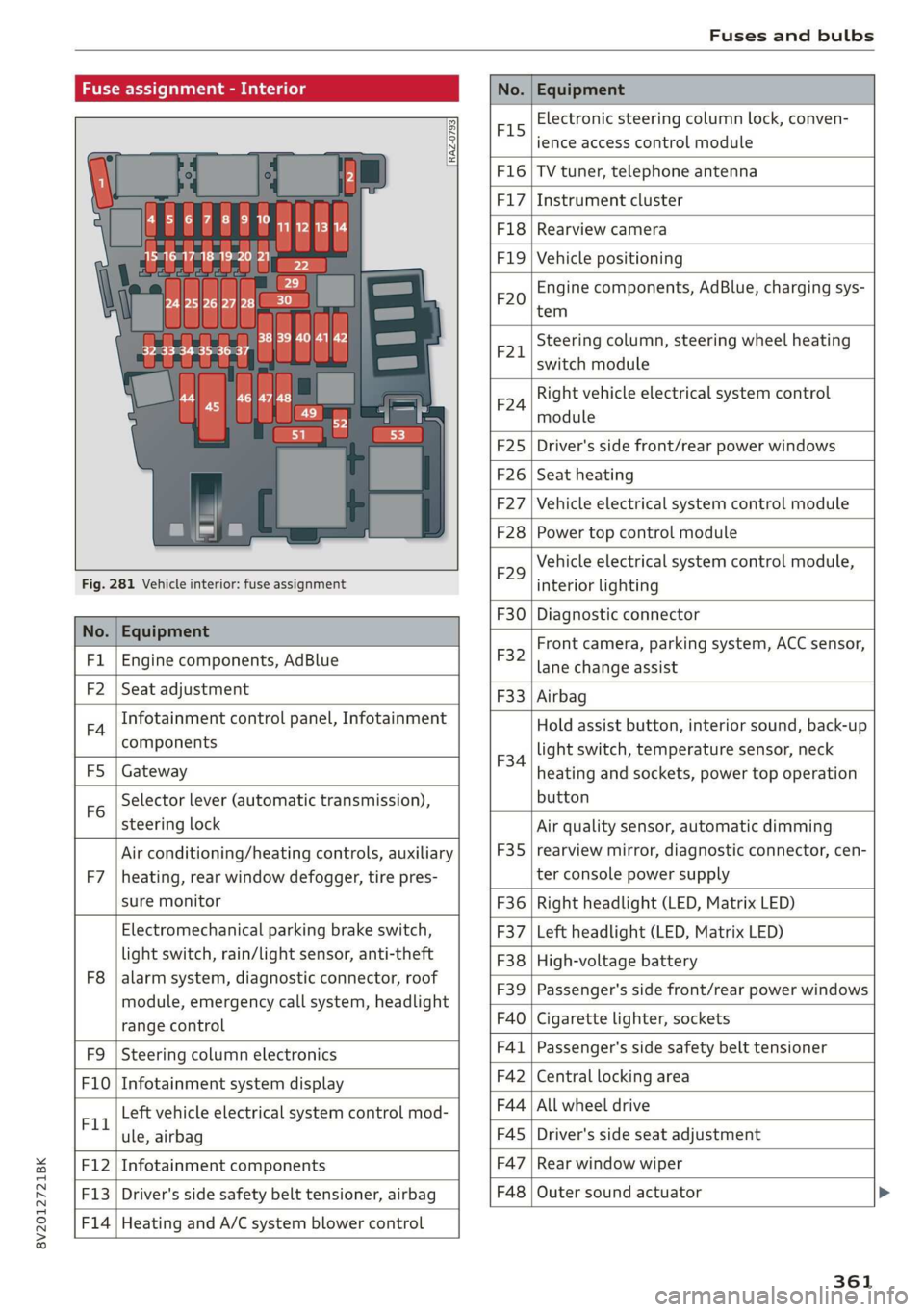
Fuse assignment - Interior
No. Equipment
RAZ-0793,
PO ee
15°16°17-18 19 20 21
PZ ply lip y ips}
ei Hes ole” So}
32°33 34 35 36 37
F15
Electronic steering column lock, conven-
ience access control module
F16 TV tuner, telephone antenna
F17 Instrument cluster
F18 Rearview camera
F1I9 Vehicle positioning
F20
Engine components, AdBlue, charging sys-
tem
F221
Steering column, steering wheel heating
switch module
F24
Right vehicle electrical system control
module
F25 Driver's side front/rear power windows
F26 Seat heating
F27 Vehicle electrical system control module
F28 Power top control module
Fig. 281 Vehicle interior: fuse assignment
F29
Vehicle electrical system control module,
interior lighting
No. Equipment
F30 Diagnostic connector
FL Engine components, AdBlue
F2 Seat adjustment
F32
Front camera, parking system, ACC sensor,
lane change assist
F4
Infotainment control panel, Infotainment
components
F33 Airbag
FS Gateway
Fo
Selector lever (automatic transmission),
steering lock
F34
Hold assist button, interior sound, back-up
light switch, temperature sensor, neck
heating and sockets, power top operation
button
Air conditioning/heating controls, auxiliary F35
Air quality sensor, automatic dimming
rearview mirror, diagnostic connector, cen-
F7 |heating, rear window defogger, tire pres- ter console power supply
sure monitor F36 | Right headlight (LED, Matrix LED)
Electromechanical parking brake switch, F37 | Left headlight (LED, Matrix LED)
light switch, rain/light sensor, anti-theft F38 | High-voltage battery
ae ene eee dent F39 | Passenger's side front/rear power windows
range control F40 | Cigarette lighter, sockets
F9 |Steering column electronics F41 | Passenger's side safety belt tensioner
F10 | Infotainment system display F42 | Central locking area
Tl Left vehicle electrical system control mod- F44 al ee
ule, airbag FAS | Driver's side seat adjustment
F12 | Infotainment components F47 | Rear window wiper
F13 | Driver's side safety belt tensioner, airbag F48 | Outer sound actuator
F14 | Heating and A/C system blower control
361
Page 364 of 400
Fuses and bulbs
No. | Equipment No. | Equipment
Clutch sensor, engine start, high-voltage
F49 3
battery, power electronics
F52 F53 Level control system control module
Rear window defogger
The power seats* are protected via circuit break-
ers that automatically switch on after a few sec-
onds after the overload has been reduced.
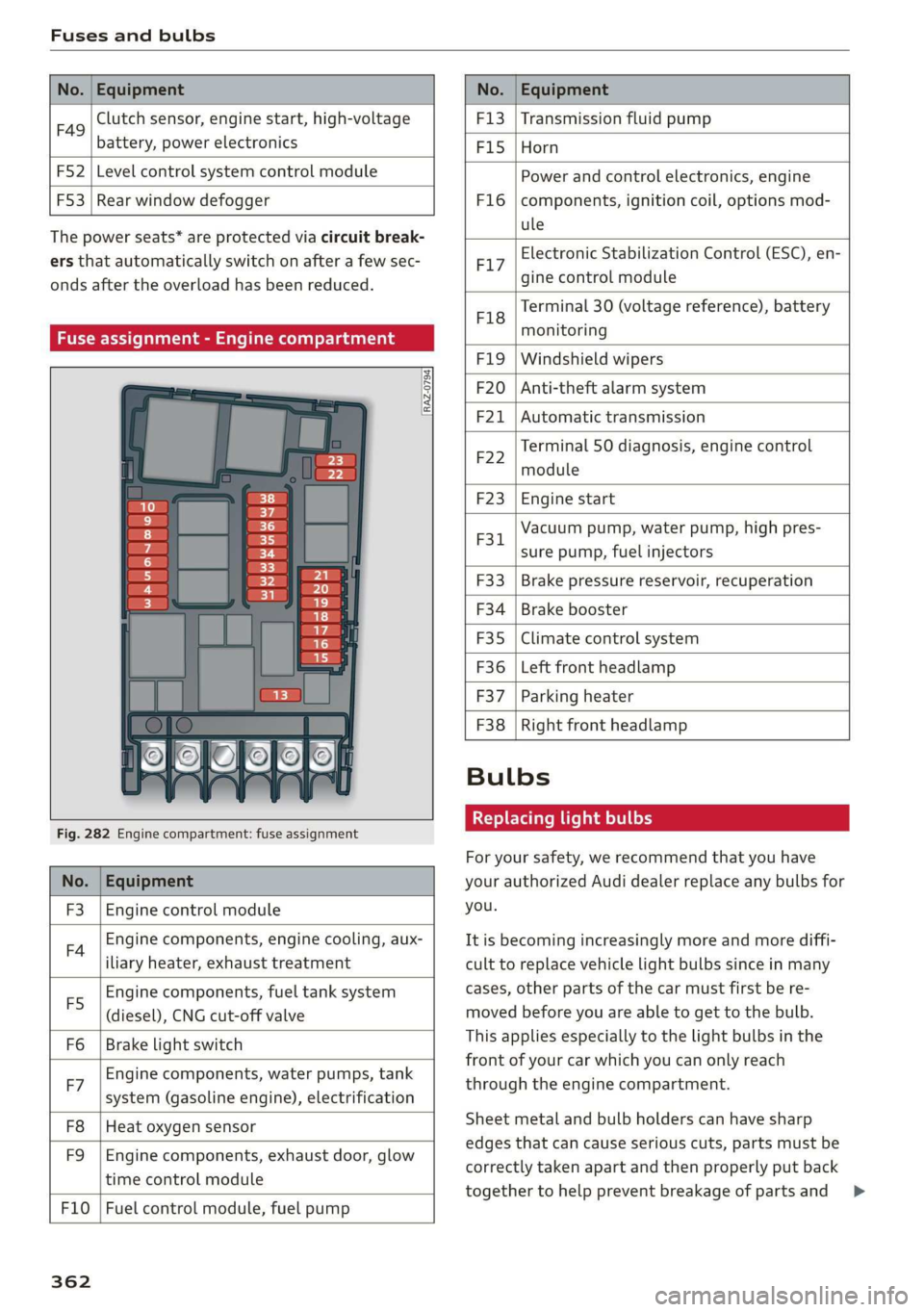
Fuse assignment - Engine compartment
RAZ-0794)
1 0
&
F:}
vi
6
5
4
5}
Fig. 282 Engine compartment: fuse assignment
No. | Equipment
F3 | Engine control module
FA Engine components, engine cooling, aux-
iliary heater, exhaust treatment
Engine components, fuel tank system
(diesel), CNG cut-off valve
Brake light switch
E5
Fo
Engine components, water pumps, tank
F7 ; . ee cae
system (gasoline engine), electrification
F8
F9
Heat oxygen sensor
Engine components, exhaust door, glow
time control module
F10 | Fuel control module, fuel pump
362
F13 | Transmission fluid pump
F15 |Horn
Power and control electronics, engine
components, ignition coil, options mod-
ule
F1l6
Electronic Stabilization Control (ESC), en-
F17
gine control module
Terminal 30 (voltage reference), battery
F18
es
monitoring
FIO F20
F21
Windshield wipers
Anti-theft alarm system
Automatic transmission
Terminal 50 diagnosis, engine control
F22
module
F23 | Engine start
Vacuum pump, water pump, high pres-
F31. 2
sure pump, fuel injectors
F33
F34
F35
F36
F37
Brake pressure reservoir, recuperation
Brake booster
Climate control system
Left front headlamp
Parking heater
F38 | Right front headlamp
Bulbs
Replacing light bulbs
For your safety, we recommend that you have
your authorized Audi dealer replace any bulbs for
you.
It is becoming increasingly more and more diffi-
cult to replace vehicle light bulbs since in many
cases, other parts of the car must first be re-
moved before you are able to get to the bulb.
This applies especially to the light bulbs in the
front of your car which you can only reach
through the engine compartment.
Sheet metal and bulb holders can have sharp
edges that can cause serious cuts, parts must be
correctly taken apart and then properly put back
together to help prevent breakage of parts and >