transmission AUDI A3 2020 Owner´s Manual
[x] Cancel search | Manufacturer: AUDI, Model Year: 2020, Model line: A3, Model: AUDI A3 2020Pages: 400, PDF Size: 107.47 MB
Page 174 of 400

Telephone
— The mobile device may become hot during
wireless charging. Pay attention to the tem-
perature of your mobile device and be care-
ful when removing it from the Audi phone
box.
—An alternating magnetic field is used for
wireless charging. Maintain a minimum dis-
tance of approximately 2.4 in (6 cm) to the
Audi phone box charging plate. The thresh-
olds for prolonged exposure at this distance
comply with ICNIRP1998. Therefore, inter-
actions such as irritation of sensory organs,
malfunctions of active implants (such as
pacemakers, infusion pumps, or neurosti-
mulators) or effects on passive implants
(such as prosthetic limbs) is highly unlikely.
If you have an implant, consult a medical
specialist if you have any questions.
@) Note
Applicable to U.S.A.
Operation of the Audi phone box is subject to
the following requirements of the Federal
Communications Commission:
— This is a CONSUMER device.
— BEFORE USE, you MUST REGISTER THIS DE-
VICE with your wireless provider and have
your provider’s consent. Most wireless pro-
viders consent to the use of signal boosters.
Some providers may not consent to the use
of this device on their network. If you are
unsure, contact your service provider.
— You MUST operate this device with approved
antennas and cables as specified by the
manufacturer. Antennas MUST be installed
at least 20 cm (8 inches) from any person.
— You MUST cease operating this device im-
mediately if requested by the FCC or a li-
censed wireless service provider.
— WARNING: E911 location information may
not be provided or may be inaccurate for
calls served by using this device.
@) Note
Applicable to Canada
In Canada, operation of a Zone Enhancer,
such as an Audi Phone Box, is subject to the
following requirements of the Innovation,
172
Science and Economic Development Canada
(ISED):
—This is a CONSUMER device.
— BEFORE USE, you MUST meet all require-
ments set out in CPC-2-1-05.
— You MUST operate this device with approved
antennas and cables as specified by the
manufacturer. Antennas MUST NOT be in-
stalled within 20 cm of any person.
— You MUST cease operating this device im-
mediately if requested by ISED or a licensed
wireless service provider.
— WARNING: £911 location information may
not be provided or may be inaccurate for
calls served by using this device.
G) Tips
— Placing the mobile device in a bag or protec-
tive sleeve inside the Audi phone box can in-
terfere with the connection to the external
antenna”.
— Metallic objects in the Audi phone box block
the wireless charging of your mobile device
and calls made using the exterior antenna”*.
—The charging time and temperature will vary
depending on the mobile device being used.
— Your mobile device can only be charged in
the Audi phone box when the ignition is
switched on.
— To reduce the risk of malfunctions, make
sure the mobile device is positioned correct-
ly in the Audi phone box.
—The maximum charging output is 5 W.
— Strong transmission quality* cannot be
guaranteed if more than one mobile device
is in the box.
— Only one mobile device at a time can be
charged wirelessly in the Audi phone box.
— Audi recommends using Audi Genuine Ac-
cessories. Audi has verified their reliability,
safety, and suitability.
— You can purchase a USB adapter from an au-
thorized Audi dealer or authorized Audi
Service Facility, or at specialty stores.
— If you place your remote control key togeth-
er with your mobile device in the Audi phone
box, it may cause your mobile device to stop
charging if wireless charging is active.
Page 305 of 400
8V2012721BK
Checking and Filling
The fuel tank is almost empty. You must antici-
pate a significant power loss. Drive immediately
to a gas station.
Ey Beet Warning! Limited performance
The gasoline engine is no longer available be-
cause there is not enough fuel. Drive immediately
to agas station.
Fuel filler door emergency release
Applies to: vehicles with plug-in hybrid drive
You must use the emergency release to open the
fuel filler door when there is a malfunction
=> page 301.
The tank is not vented. You can only fill a small
amount of fuel in the tank.
> Fill only until the automatic fuel pump nozzle
turns off for the first time when it is operated
correctly.
Drive to an authorized Audi dealer or authorized
Audi Service Facility immediately to have the
malfunction corrected.
@ Tips.
Pressure can escape if you open the tank cap
after using the emergency release. This can
create noises.
Emissions control
system
(ee eileen)
ZX WARNING
The temperature of the exhaust system is
high, both when driving and after stopping
the engine.
— Never touch the exhaust tail pipes once they
have become hot. This could result in burns.
— Do not park your vehicle over flammable
materials such as grass or leaves because
the high temperature of the emissions sys-
tem could start a fire.
— Do not apply underbody protectant in the
exhaust system area, because this increases
the risk of fire.
(el e-] Nad (mcl akg
Follow the safety precautions > page 303, Gener-
al information.
The vehicle may only be driven with unleaded
gasoline, or the catalytic converter will be de-
stroyed.
Never drive until the tank is completely empty.
The irregular supply of fuel that results from that
can cause engine misfires. Uncombusted fuel
could enter the exhaust system, which could
cause overheating and damage to the catalytic
converter.
On Board Diagnostic System (OBD)
The On Board Diagnostic System monitors the
engine and transmission components that influ-
ence emissions.
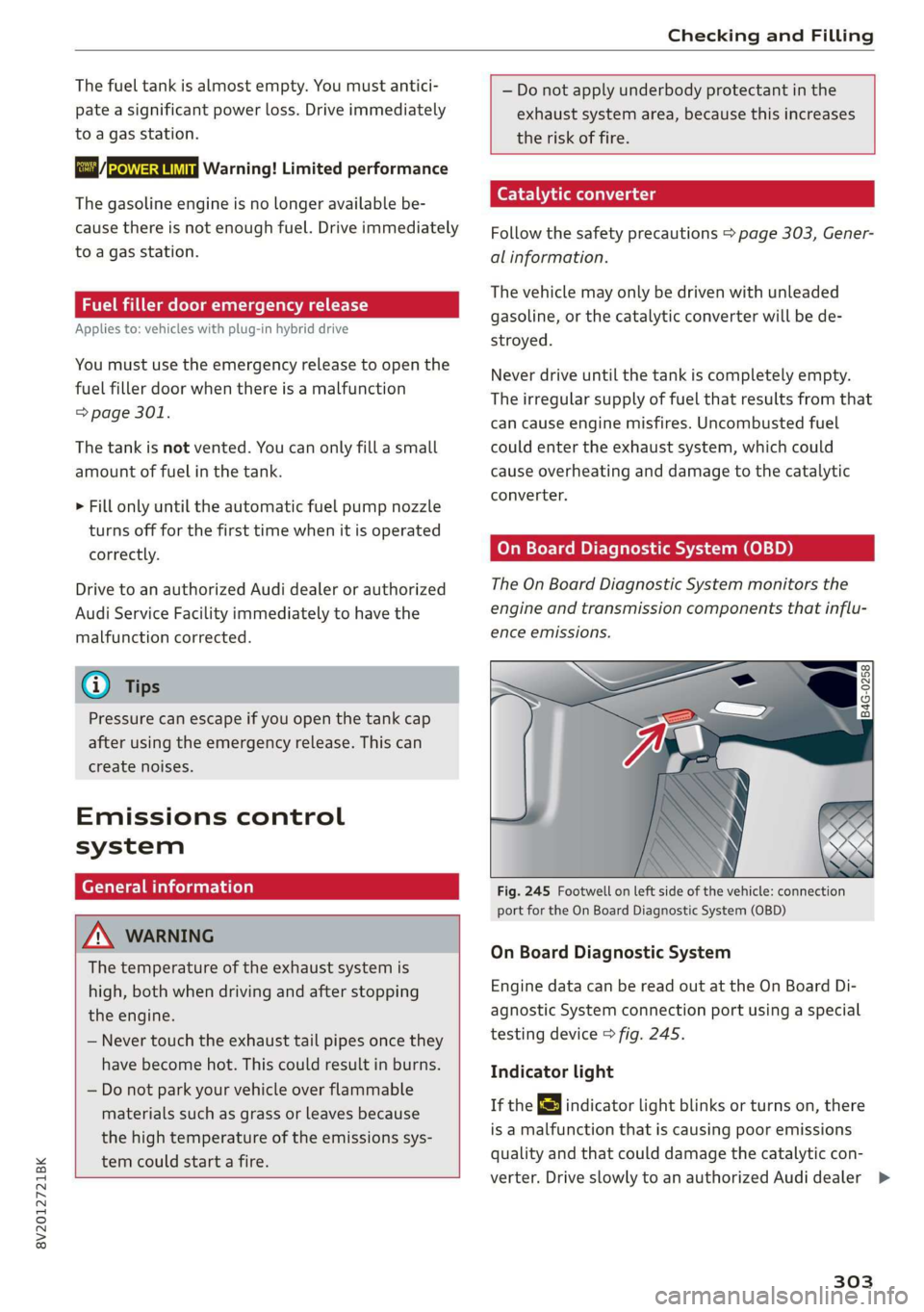
Fig. 245 Footwell on left side of the vehicle: connection
port for the On Board Diagnostic System (OBD)
On Board Diagnostic System
Engine data can be read out at the On Board Di-
agnostic System connection port using a special
testing device > fig. 245.
Indicator light
If the S indicator light blinks or turns on, there
is a malfunction that is causing poor emissions
quality and that could damage the catalytic con-
verter. Drive slowly to an authorized Audi dealer >
303
Page 324 of 400
Wheels
Glossary of tire and loading
terminology
Accessory weight
means the combined weight (in
excess of those standard items
which may be replaced) of auto-
matic transmission, power steer-
ing, power brakes, power win-
dows, power seats, radio, and
heater, to the extent that these
items are available as factory-in-
stalled equipment (whether in-
stalled or not).
Aspect ratio
means the ratio of the height to
the width of the tire in percent.
Numbers of 55 or lower indicate a
low sidewall for improved steer-
ing response and better overall
handling on dry pavement.
Bead
means the part of the tire that is
made of steel wires, wrapped or
reinforced by ply cords and that is
shaped to fit the rim.
Bead separation
means a breakdown of the bond
between components in the bead.
322
Cord
means the strands forming the
plies in the tire.
Cold tire inflation pressure
means the tire pressure recom-
mended by the vehicle manufac-
turer for a tire of a designated
size that has not been driven for
more than a couple of miles (kilo-
meters) at low speeds in the three
hour period before the tire pres-
sure is measured or adjusted.
Curb weight
means the weight of a motor ve-
hicle with standard equipment in-
cluding the maximum capacity of
fuel, oil, and coolant, air condi-
tioning and additional weight of
optional equipment.
Extra load tire
means a tire designed to operate
at higher loads and at higher in-
flation pressures than the corre-
sponding standard tire. Extra load
tires may be identified as “XL”,
“xl”, “EXTRA LOAD”, or “RF” on
the sidewall.
Page 354 of 400
Emergency assistance
Replacing wheels
Before changing a wheel
Observe the following precautions for your own
and your passenger's safety when changing a
wheel.
>» After you experience a tire failure, pull the car
well away from moving traffic and try to reach
level ground before you stop > A\.
> All passengers should leave the car and move
toa safe location (for instance, behind the
guardrail) > A\.
> Engage the parking brake to prevent your vehi-
cle from rolling unintentionally > A\.
> Move selector lever to position P > /\.
> If you are towing a trailer, unhitch the trailer
from your vehicle.
> Take the jack* > page 348 and the spare tire*
=> page 357 out of the luggage compartment.
ZA\ WARNING
You or your passengers could be injured while
changing a wheel if you do not follow these
safety precautions:
— If you have a flat tire, move a safe distance
off the road. Turn off the engine, turn the
emergency flashers on and use other warn-
ing devices to alert other motorists.
— Make sure that passengers wait in a safe
place away from the vehicle and well away
from the road and traffic.
—To help prevent the vehicle from moving
suddenly and possibly slipping off the jack*,
always fully set the parking brake and block
the front and back of the wheel diagonally
opposite the wheel being changed. When
one front wheel is lifted off the ground,
placing the Automatic Transmission in P
(Park) will not prevent the vehicle from mov-
ing.
— Before you change a wheel, be sure the
ground is level and firm. If necessary, use a
sturdy board under the jack”.
— Always store the vehicle tool kit, the jack*
and the replaced tire in the luggage com-
partment > page 60.
352
G) Tips
Obey all laws.
Changing a wheel
When you change a wheel, follow the sequence
described below step-by-step and in exactly that
order.
1. Remove the decorative wheel cover*. For
more details see also > page 353, Decorative
wheel covers or > page 353, Wheels with
wheel bolt caps.
2. Loosen the wheel bolts > page 353.
3. Locate the proper mounting point for the
jack* and align the jack* below that point
=> page 354.
4. Raise the car with the jack* > page 354.
Remove the wheel with the flat tire and then
install the spare > page 355.
6. Tighten all wheel bolts lightly.
Lower the vehicle with the jack*.
8. Use the wheel bolt wrench and firmly tighten
all wheel bolts > page 353.
9. Replace the decorative wheel cover*.
wn
=
ZA WARNING
Always read and follow all WARNINGS and in-
formation > A\ in Raising the vehicle on
page 355 and > page 356.
After changing a wheel
A wheel change is not complete without the do-
ing the following.
> Always store the vehicle tool kit, the jack* and
the replaced tire in the luggage compartment
=> page 60.
> Check the tire pressure on the spare wheel im-
mediately after mounting it.
> As soon as possible, have the tightening tor-
ques on all wheel bolts checked with a torque
wrench. The correct tightening torque is
90 ft lb (120 Nm).
> Have the flat tire replaced as soon as possible.
Page 363 of 400
8V2012721BK
Fuses and bulbs
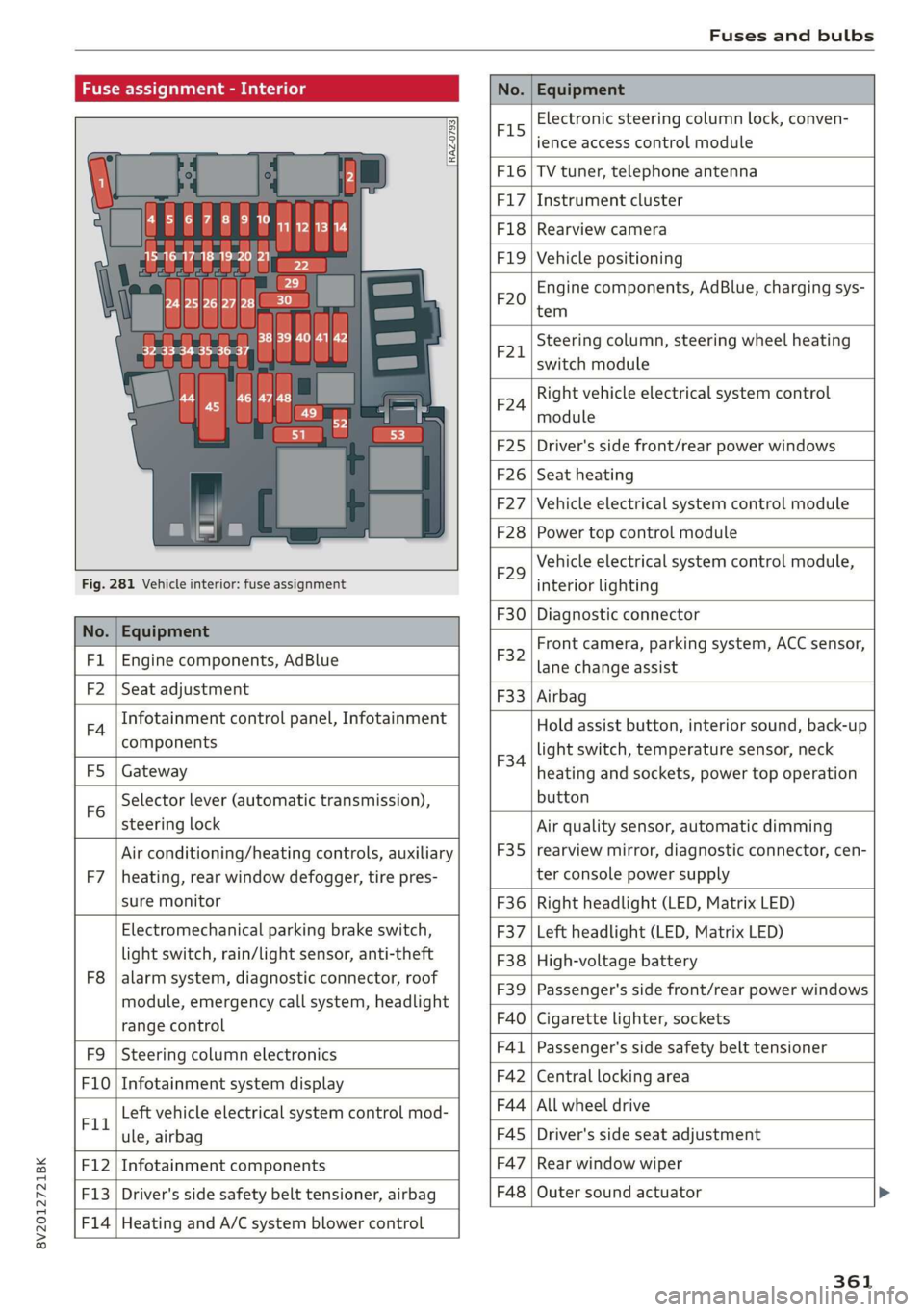
Fuse assignment - Interior
No. Equipment
RAZ-0793,
PO ee
15°16°17-18 19 20 21
PZ ply lip y ips}
ei Hes ole” So}
32°33 34 35 36 37
F15
Electronic steering column lock, conven-
ience access control module
F16 TV tuner, telephone antenna
F17 Instrument cluster
F18 Rearview camera
F1I9 Vehicle positioning
F20
Engine components, AdBlue, charging sys-
tem
F221
Steering column, steering wheel heating
switch module
F24
Right vehicle electrical system control
module
F25 Driver's side front/rear power windows
F26 Seat heating
F27 Vehicle electrical system control module
F28 Power top control module
Fig. 281 Vehicle interior: fuse assignment
F29
Vehicle electrical system control module,
interior lighting
No. Equipment
F30 Diagnostic connector
FL Engine components, AdBlue
F2 Seat adjustment
F32
Front camera, parking system, ACC sensor,
lane change assist
F4
Infotainment control panel, Infotainment
components
F33 Airbag
FS Gateway
Fo
Selector lever (automatic transmission),
steering lock
F34
Hold assist button, interior sound, back-up
light switch, temperature sensor, neck
heating and sockets, power top operation
button
Air conditioning/heating controls, auxiliary F35
Air quality sensor, automatic dimming
rearview mirror, diagnostic connector, cen-
F7 |heating, rear window defogger, tire pres- ter console power supply
sure monitor F36 | Right headlight (LED, Matrix LED)
Electromechanical parking brake switch, F37 | Left headlight (LED, Matrix LED)
light switch, rain/light sensor, anti-theft F38 | High-voltage battery
ae ene eee dent F39 | Passenger's side front/rear power windows
range control F40 | Cigarette lighter, sockets
F9 |Steering column electronics F41 | Passenger's side safety belt tensioner
F10 | Infotainment system display F42 | Central locking area
Tl Left vehicle electrical system control mod- F44 al ee
ule, airbag FAS | Driver's side seat adjustment
F12 | Infotainment components F47 | Rear window wiper
F13 | Driver's side safety belt tensioner, airbag F48 | Outer sound actuator
F14 | Heating and A/C system blower control
361
Page 364 of 400
Fuses and bulbs
No. | Equipment No. | Equipment
Clutch sensor, engine start, high-voltage
F49 3
battery, power electronics
F52 F53 Level control system control module
Rear window defogger
The power seats* are protected via circuit break-
ers that automatically switch on after a few sec-
onds after the overload has been reduced.
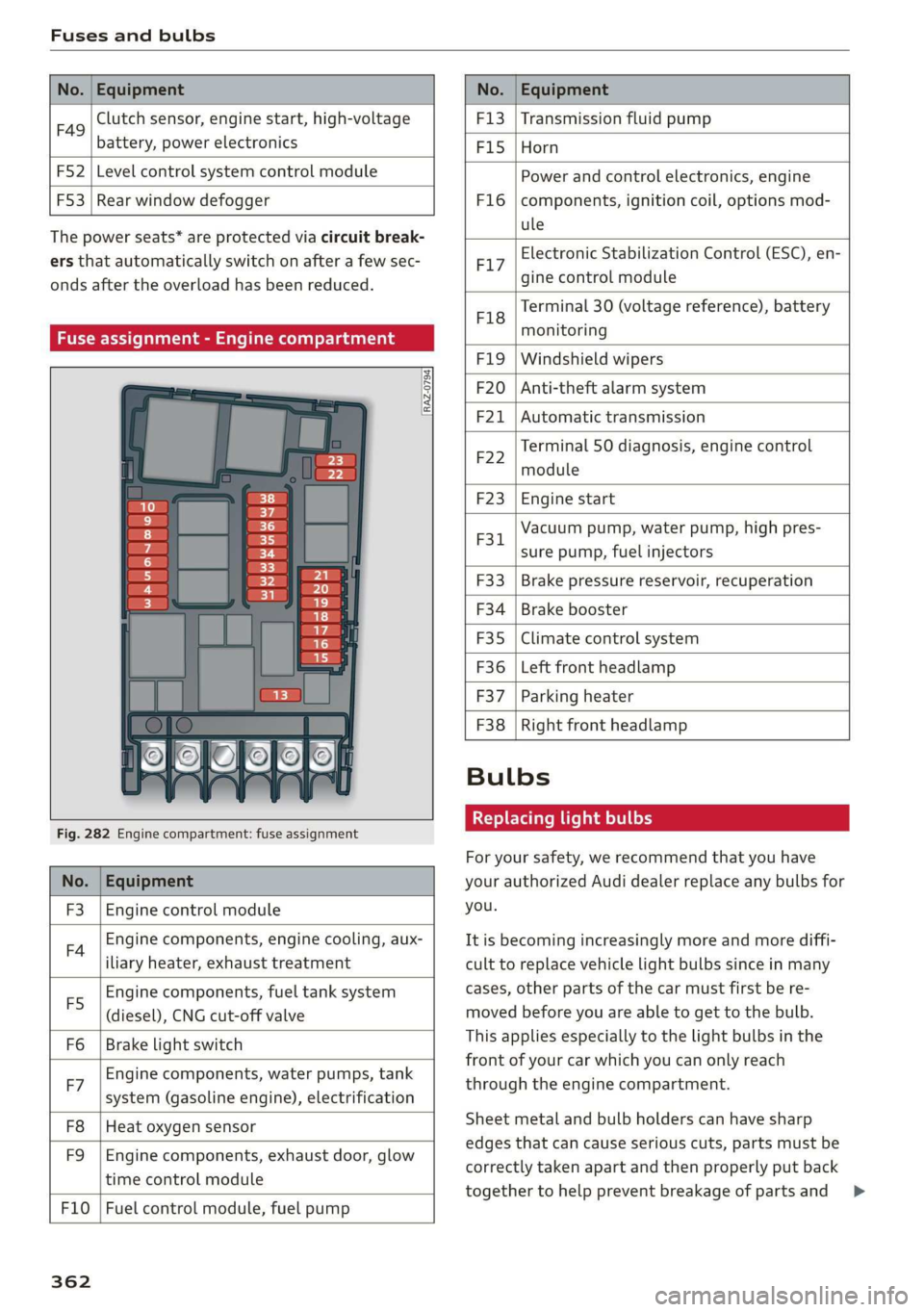
Fuse assignment - Engine compartment
RAZ-0794)
1 0
&
F:}
vi
6
5
4
5}
Fig. 282 Engine compartment: fuse assignment
No. | Equipment
F3 | Engine control module
FA Engine components, engine cooling, aux-
iliary heater, exhaust treatment
Engine components, fuel tank system
(diesel), CNG cut-off valve
Brake light switch
E5
Fo
Engine components, water pumps, tank
F7 ; . ee cae
system (gasoline engine), electrification
F8
F9
Heat oxygen sensor
Engine components, exhaust door, glow
time control module
F10 | Fuel control module, fuel pump
362
F13 | Transmission fluid pump
F15 |Horn
Power and control electronics, engine
components, ignition coil, options mod-
ule
F1l6
Electronic Stabilization Control (ESC), en-
F17
gine control module
Terminal 30 (voltage reference), battery
F18
es
monitoring
FIO F20
F21
Windshield wipers
Anti-theft alarm system
Automatic transmission
Terminal 50 diagnosis, engine control
F22
module
F23 | Engine start
Vacuum pump, water pump, high pres-
F31. 2
sure pump, fuel injectors
F33
F34
F35
F36
F37
Brake pressure reservoir, recuperation
Brake booster
Climate control system
Left front headlamp
Parking heater
F38 | Right front headlamp
Bulbs
Replacing light bulbs
For your safety, we recommend that you have
your authorized Audi dealer replace any bulbs for
you.
It is becoming increasingly more and more diffi-
cult to replace vehicle light bulbs since in many
cases, other parts of the car must first be re-
moved before you are able to get to the bulb.
This applies especially to the light bulbs in the
front of your car which you can only reach
through the engine compartment.
Sheet metal and bulb holders can have sharp
edges that can cause serious cuts, parts must be
correctly taken apart and then properly put back
together to help prevent breakage of parts and >
Page 366 of 400
Emergency situations
Emergency situations
General
This chapter is intended for trained emergency
crews and working personnel who have the nec-
essary tools and equipment to perform these
operations.
Starting by pushing or
towing
@) Note
Vehicles with an automatic transmission can-
not be started by pushing or towing.
Jump starting
If needed, the engine can be jump started by an-
other vehicle battery.
Applies to: vehicles with plug-in hybrid drive: The
connection points for the jump start cable are
different > page 365.
If the engine does not start because the vehicle
battery is drained, you can jump start your vehi-
cle using another vehicle. Jump start cables are
needed to do this.
Both vehicle batteries must have 12 V nominal
voltage. The voltage capacity (Ah) of the vehicle
battery that is giving power must not be less
than the capacity of the drained vehicle battery.
Jump start cable
Only use a jump start cable with a large enough
diameter. Note the manufacturer's specifica-
tions.
Only use a jump start cable with insulated termi-
nal clamps.
Positive cable - usually red.
Negative cable - usually black.
A WARNING
— A drained battery can freeze at tempera-
tures around 32 °F (0 °C). If the vehicle bat-
364
tery is frozen, it must be thawed before con-
necting the jump start cables. If it is not,
the risk of an explosion and chemical burns
increases. After jump starting the vehicle,
drive to an authorized Audi dealer or author-
ized Audi Service Facility immediately to
have the vehicle battery checked.
— Read the warnings when working in the en-
gine compartment > page 304.
— Handling the jump start cables incorrectly
may cause the vehicle battery to explode
and lead to serious injuries.
— Applies to: vehicles with plug-in hybrid
drive: You must not give a jump start with
your vehicle. This could cause significant
damage to the electrical system in your ve-
hicle > page 365.
— Applies to: vehicles with the battery in the
engine compartment: To reduce the risk of
chemical burns, do not bend over the vehicle
battery.
@) Note
Jump start cables can cause considerable
damage to the vehicle electrical system if
they are connected incorrectly.
G@) Tips
— There must be no contact between the
vehicles, or else voltage could flow when
connecting the positive terminal and drain
the vehicle battery of the vehicle providing
the jump start.
— The drained vehicle battery must be con-
nected correctly to the electrical system.
— Switch off electrical equipment that is not
needed.
Page 369 of 400
8V2012721BK
Emergency situations
Follow the information about the vehicle battery
=> page 315.
Preparations
1. Read the following carefully > page 364,
Preparation.
2. Set the parking brake and place the selector
lever in the "P" position.
3. Turn the ignition and electrical equipment off
in both vehicles.
Connecting/disconnecting the jump start
cable
4. Open the cover on the positive terminal.
5. Clamp the end of the red jump start cable to
the positive terminal @ > page 365, fig. 284
on your vehicle >@) in Preparation on
page 364.
6. Clamp the other end of the red jump start ca-
ble to the positive terminal (2) on the vehicle
battery providing the current.
7. Clamp the black end of the jump start cable
preferably to the ground point, or to the
negative terminal of the vehicle battery @)
on the vehicle providing the current.
8. Clamp the other end of the black jump start
cable only to the ground point (4) on your ve-
hicle.
9. Route the jump start cables so they cannot
get caught in the moving parts in the engine
compartment.
Starting the engine
10. First start the engine in the vehicle giving the
charge and let it run at idle.
11. Now start the engine in the vehicle with the
drained vehicle battery and wait two to three
minutes until it “runs smoothly”.
12. If the engine does not start, stop the starting
procedure after 10 seconds and then repeat
it after approximately 30 seconds.
13. In the vehicle that is being jump started,
switch the heater fan and rear window de-
froster on to reduce any voltage peaks that
may occur when disconnecting the jumper ca-
bles. The headlights must be switched off.
14. While the engines are running, remove the
cables in reverse order from the way they
were installed, as described in > page 365.
Make sure the cables do not get caught in
moving engine components.
15. Close the cap on the positive terminal.
16. Switch the heater fan and rear window de-
froster off.
ZA\ WARNING
— Never connect the jump start cable directly
to your vehicle battery. Only use the connec-
tions in the engine compartment.
— Do not touch the non-insulated parts of the
terminal clamps. The cable must also not
come into contact with vehicle components
that conduct electricity when it is connected
to the positive vehicle battery terminal. This
can cause a short circuit.
— The plugs on the battery cells must not be
opened.
— Keep ignition sources (such as open flames,
burning cigarettes, etc.) away from the vehi-
cle batteries to reduce the risk of an explo-
sion.
— Route the jump start cables so they cannot
get caught in the moving parts in the other
vehicle's engine compartment.
@) Note
Please note that the connecting process previ-
ously described for the jump start cables is in-
tended for when your vehicle is being jump
started.
(i) Tips
Make sure that the connected jump start ca-
bles have sufficient contact with metal.
Towing with a tow truck
General hints
Your Audi requires special handling for towing.
The following information is to be used by com-
mercial tow truck operators who know how to op-
erate their equipment safely.
— Never tow your Audi. Towing will cause dam-
age to the engine and transmission. >
367
Page 372 of 400
Emergency situations
such as the engine block or transmission
are removed.
— When removing heavy components like
these, anchor vehicle to hoist or add corre-
sponding weights to maintain the center of
gravity. Otherwise, the vehicle might tilt or
slip
off the hoist, causing serious personal
injury.
@ Note
— Be aware of the following points before Lift-
ing the vehicle:
— The vehicle should never be lifted or
jacked up from underneath the engine oil
pan, the transmission housing, the front
or rear axle or the body side members.
This could lead to serious damage.
—To avoid damage to the underbody or
chassis frame, a rubber pad must be in-
serted between the floor jack and the lift
points.
— Before driving over a workshop hoist,
check that the vehicle weight does not
exceed the permissible lifting capacity of
the hoist.
— Before driving over a workshop hoist, en-
sure that there is sufficient clearance be-
tween the hoist and low parts of the ve-
hicle.
370
Page 374 of 400

Data privacy
These data can help provide a better understand-
ing of the circumstances in which crashes and in-
juries occur. NOTE: EDR data are recorded by your
vehicle only if a non-trivial crash situation occurs;
no data are recorded by the EDR under normal
driving conditions and no personal data (e.g.
name, gender, age, and crash location) are re-
corded. However, other parties, such as law en-
forcement, could combine the EDR data with the
type of personally identifying data routinely ac-
quired during a crash investigation.
To read data recorded by an EDR, special equip-
ment is required, and access to the vehicle or the
EDR is needed. In addition to the vehicle manu-
facturer, other parties, such as law enforcement,
that have the special equipment, can read the in-
formation if they have access to the vehicle or the
EDR.
Data usage
Audi can read out the information stored in the
data memories or similar data, or give this infor-
mation to third parties, especially in the follow-
ing situations:
— If the vehicle owner or lessee agrees
—If there is an official request from the police
— Ifa court or authorities request it
If legally permitted, Audi can also use the data
for analysis of vehicle operation and safety per-
formance or provide this data to third parties for
research purposes.
Transmitted information
Applies to: vehicles with Audi connect
> Select: [MENU] button > Audi connect > right
control button > Privacy.
Requirement: the ignition must be switched on.
Location, vehicle, and personal data are transmit-
ted when using Audi connect services.
Allowing sending of data
— Select and confirm Activate data connection.
The data module for the use of all Audi connect
services will be active.
372
Restricting sending of data
— Select and confirm Activate privacy. The data
connection is limited or deactivated depending
on the equipment. The majority of Audi connect
services will not be available.
The following interfaces are not affected by this
setting: Bluetooth, Bluetooth Low Energy (BLE),
Wi-Fi connection, Audi smartphone interface
(ASI), Near Field Communication (NFC), charging
communication (high-voltage system), Electronic
Toll Collect (ETC), On-Board Diagnostic System
(OBD) if equipped.
C) Note
You are responsible for all precautions taken
for data protection, anti-virus protection, and
protection against loss of data on mobile de-
vices that are used to access the Internet
through the Wi-Fi hotspot.
@ Tips
If the transmission of data is limited, data
will still be transmitted to verify subscrip-
tions.
Applies to: vehicles with Audi connect Infotainment
AUDI AG collects, uses, stores and shares your
personal information, such as contact data, vehi-
cle data, usage data, driving data and precise ge-
olocation, in order to provide you with the prod-
ucts and services you have purchased or request-
ed, and for a number of other purposes, for ex-
ample, to track quality issues, to performance
and safety, to meet our internal compliance or le-
gal requirements and to market to customers
and potential customers. For a more complete
list of the data we collect, how we use it and with
whom we share it, please visit your Audi nation-
al/sales region website at www.audi.com.
The collection, use and sharing may vary depend-
ing on your model and model year, your subscrip-
tion status, or the service offering. For example,
collection, use and sharing may vary between
Audi connect services, if you have designated a
key user, or if you are driving a model equipped >