brakes AUDI A3 2020 Owner´s Manual
[x] Cancel search | Manufacturer: AUDI, Model Year: 2020, Model line: A3, Model: AUDI A3 2020Pages: 400, PDF Size: 107.47 MB
Page 136 of 400

Assist systems
G) Tips
— Side assist is not active while you are mak-
ing the adjustment.
— Your settings are automatically stored and
assigned to the remote control key being
used.
RET oa ar lie 4
Applies to: vehicles with rear cross-traffic assist
1. S 2
= + oO
Fig. 128 Example display
Fig. 129 Infotainment system: rear cross-traffic assist dis-
play
Activating rear cross-traffic assist
The rear cross-traffic assist is activated automati-
cally if you turn on the parking aid > page 136 or
shift into reverse gear.
The rear cross-traffic assist can warn the driver of
a potential collision with approaching cross-traf-
fic when driving in reverse at speeds up to ap-
proximately 7 mph (12 km/h). Within its limits,
the system monitors the areas behind and next
to the vehicle using the radar sensors when leav-
ing a parking space > page 132, fig. 127. Moving
objects that are approaching, such as cars, are
detected > fig. 128.
If the system detects critical cross traffic when
backing out of a parking space, it will react as fol-
lows:
134
— Visual indicator: an indicator appears in the In-
fotainment system display with a red arrow
symbol. The arrow points in the direction from
which the object is approaching > fig. 129.
— Audible warning signal: a continuous tone may
sound as an additional indicator when driving in
reverse.
— Automatic brake activation: a brief activation
of the brakes may also warn you of a potential
collision with an approaching object.
The audible warning signal and the automatic
brake activation occur only when driving in re-
verse.
iN WARNING
—The rear cross-traffic assist is an assist sys-
tem and cannot prevent a collision by itself.
The driver must always intervene. The driver
is always responsible for braking at the cor-
rect
time.
— Please note that the rear cross-traffic assist
may activate the brakes unexpectedly. Se-
cure any cargo that you are transporting to
reduce the risk of damage or injury.
— An additional brake activation may be trig-
gered within 10 seconds after an automatic
brake activation.
—If there is an acoustic warning signal from
the rear cross-traffic assist, then the parking
system may not warn you of detected obsta-
cles under certain circumstances.
— The view of the radar sensors may be im-
paired by leaves, snow, heavy spray or dirt.
Clean the area in front of the sensors
=> page 132, fig. 127.
ZA WARNING
— The rear cross-traffic assist will not provide
alerts about people and cannot warn you
about every type of approaching objects,
such as cyclists. Always monitor the traffic
as well as the vehicle's surroundings with di-
rect eye contact.
— The rear cross-traffic assist will not provide
alerts if your vehicle is parallel or diagonally
Page 137 of 400

8V2012721BK
Assist systems
parked or if your vehicle is pulled too far in-
to the parking space so that it is hidden by
adjacent vehicles.
@) Note
Also read the information in >@ in General
information on page 133.
@ Tips
— You can cancel the automatic brake activa-
tion with increasing braking force if you ap-
ply the brakes yourself or accelerate consid-
erably.
—In some situations, rear cross-traffic assist
may warn you even if there is no cross traffic
in a critical area, for example when backing
into a parking space or maneuvering.
— The rear cross-traffic assist also switches off
when you switch off the ESC.
— For an explanation on conformity with the
FCC regulations in the United States and the
Industry Canada regulations, see
=> page 377.
Applies to: vehicles with Audi side assist
& Audi side assist: malfunction! Please contact
Service
The system cannot guarantee that it will detect
vehicles correctly and it has switched off. The
sensors have been moved or are faulty. Have the
system checked by an authorized Audi dealer or
authorized Audi Service Facility soon.
Audi side assist: currently unavailable. No
sensor view
Audi side assist: currently unavailable. Sen-
sor vision restricted due to surroundings. See
owner's manual
The radar sensor vision is impaired. Do not cover
the area in front of the sensors with bike wheels,
stickers, dirt or other objects. Clean the area cov-
ering the sensors, if necessary > page 132,
fig. 127.
Audi side assist: currently unavailable
Side assist cannot be switched on at this time be-
cause there is a malfunction (for example, the
battery charge level may be too low).
Rear parking aid: obstacle detection restrict-
ed
The rear cross-traffic assist is not available. Ei-
ther the ESC is switched off, or the radar sensors
may be covered by a bike rack, stickers, leaves,
snow or other objects. Switch the ESC on, or
clean the area in front of the sensors if necessary
= page 132, fig. 127. If this message continues
to be displayed, drive immediately to an author-
ized Audi dealer or authorized Audi Service Facili-
ty to have the malfunction repaired.
135
Page 316 of 400
Checking and Filling
Message
EG / @ Brakes: stop vehicle and check brake
fluid level
Stop the vehicle and check the brake fluid level.
See an authorized Audi dealer or authorized Audi
Service Facility for assistance.
Changing the brake fluid
Brake fluid should be changed at regular inter-
vals. Have the brake fluid changed by an author-
ized Audi dealer or authorized Audi Service Facili-
ty. The authorized Audi dealer or authorized Audi
Service Facility will inform you of the replace-
ment intervals.
Z\ WARNING
— If the brake fluid level is below the MIN
marking, it can impair the braking effect and
driving safety, which increase the risk of an
accident. Do not continue driving. See an au-
thorized Audi dealer or authorized Audi
Service Facility for assistance.
— If the brake fluid is old, bubbles may form in
the brake system during heavy braking. This
could impair braking performance and driv-
ing safety, which increases the risk of an ac-
cident.
— The brake fluid in your vehicle must meet
the standard VW 501 14 and is available at
an authorized Audi dealer or authorized
Audi Service Facility. If this brake fluid is not
available, another high-grade brake fluid of
equivalent quality may be used, and it must
meet the U.S. Federal Motor Vehicle Stand-
ard (FMVSS) 116 DOT 4, Class 6.
© Note
— If the brake fluid level is above the MAX
marking, brake fluid may leak out over the
edge of the reservoir and result in damage
to the vehicle.
— Do not allow any brake fluid to come into
contact with the vehicle paint, because it
will corrode the paint.
314
Electrical system
If the | or = indicator light turns on, there is a
malfunction in the generator, the battery, or the
vehicle electrical system.
z= Electrical system: malfunction! Battery is
not charging
Safely stop your vehicle, do not continue driving
and switch the ignition off > A\. See an author-
ized Audi dealer or authorized Audi Service Facili-
ty for assistance.
=} Electrical system: malfunction! Restart not
possible. Please contact Service
It will not be possible to restart the engine once
you turn it off. Vehicle functions/driving stability
may be limited. Drive to an authorized Audi deal-
er or authorized Audi Service Facility immediate-
ly.
z= Electrical system: malfunction! Please con-
tact Service
Switch off all electrical equipment that is not
needed. Vehicle functions/driving stability may
be limited. Drive to an authorized Audi dealer or
authorized Audi Service Facility immediately.
= Electrical system: low battery charge. Bat-
tery will be charged while driving
The starting ability may be impaired.
If this message turns off after a little while, the
vehicle battery has charged enough while driving.
If this message does not turn off, drive immedi-
ately to an authorized Audi dealer or authorized
Audi Service Facility.
ZA\ WARNING
When there is an electrical system malfunc-
tion, vehicle functions may not work and driv-
ing stability may be limited, which increases
the risk of an accident. Do not continue driv-
ing and switch the ignition off. See an author-
ized Audi dealer or authorized Audi Service Fa-
cility for assistance.
Page 324 of 400
Wheels
Glossary of tire and loading
terminology
Accessory weight
means the combined weight (in
excess of those standard items
which may be replaced) of auto-
matic transmission, power steer-
ing, power brakes, power win-
dows, power seats, radio, and
heater, to the extent that these
items are available as factory-in-
stalled equipment (whether in-
stalled or not).
Aspect ratio
means the ratio of the height to
the width of the tire in percent.
Numbers of 55 or lower indicate a
low sidewall for improved steer-
ing response and better overall
handling on dry pavement.
Bead
means the part of the tire that is
made of steel wires, wrapped or
reinforced by ply cords and that is
shaped to fit the rim.
Bead separation
means a breakdown of the bond
between components in the bead.
322
Cord
means the strands forming the
plies in the tire.
Cold tire inflation pressure
means the tire pressure recom-
mended by the vehicle manufac-
turer for a tire of a designated
size that has not been driven for
more than a couple of miles (kilo-
meters) at low speeds in the three
hour period before the tire pres-
sure is measured or adjusted.
Curb weight
means the weight of a motor ve-
hicle with standard equipment in-
cluding the maximum capacity of
fuel, oil, and coolant, air condi-
tioning and additional weight of
optional equipment.
Extra load tire
means a tire designed to operate
at higher loads and at higher in-
flation pressures than the corre-
sponding standard tire. Extra load
tires may be identified as “XL”,
“xl”, “EXTRA LOAD”, or “RF” on
the sidewall.
Page 326 of 400
Wheels
Production options weight
means the combined weight of
those installed regular production
options weighing over 5 lbs.
(2.3 kg) in excess of those stand-
ard items which they replace, not
previously considered in curb
weight or accessory weight, in-
cluding heavy duty brakes, ride
levelers, roof rack, heavy duty
battery, and special trim.
Radial ply tire
means a pneumatic tire in which
the ply cords that extend to the
beads are laid at substantially
90 degrees to the centerline of
the tread.
Recommended inflation
pressure
see > page 322, Cold tire infla-
tion pressure.
Reinforced tire
means a tire designed to operate
at higher loads and at higher in-
flation pressures than the corre-
sponding standard tire. Rein-
forced tires may be identified as
“XL”, “xl”, “EXTRA LOAD”, or “RF”
on the sidewall.
324
Rim
means a metal support for a tire
ora tire and tube assembly upon
which the tire beads are seated.
Rim diameter
means nominal diameter of the
bead seat. If you change your
wheel size, you will have to pur-
chase new tires to match the new
rim diameter.
Rim size designation
means rim diameter and width.
Rim width
means nominal distance between
rim flanges.
Sidewall
means that portion of a tire be-
tween the tread and bead.
Speed rating (letter code)
means the speed at which a tire is
designed to be driven for extend-
ed periods of time. The ratings
range from 93 mph (150 km/h)
to 186 mph (298 km/h) > table
on page 320. You may not find
this information on all tires be-
cause it is not required by law.
The speed rating letter code,
where applicable, is molded on
the tire sidewall and indicates the >
Page 335 of 400
8V2012721BK
Wheels
installed accessories, a full tank
of fuel, oil, coolant and other flu-
ids plus maximum load. The max-
imum Load includes the number
of passengers that the vehicle is
intended to carry (“seating ca-
pacity”) with an assumed weight
of 150 lbs. (68 kg) for each pas-
senger at a designated seating
position and the total weight of
any luggage in the vehicle. If you
tow a trailer, the weight of the
trailer hitch and the tongue
weight of the loaded trailer must
be included as part of the vehicle
load.
The Gross Axle Weight Rating
(“GAWR”) is the maximum load
that can be applied at each of the
vehicle’s two axles.
The fact that there is an upper
limit to your vehicle’s Gross Vehi-
cle Weight Rating means that the
total weight of whatever is being
carried in the vehicle (including
the weight of a trailer hitch and
the tongue weight of the loaded
trailer) is limited. The more pas-
sengers in the vehicle or passen-
gers who are heavier than the
standard weights assumed mean
that less weight can be carried as
luggage.
The Gross Vehicle Weight Rating
and the Gross Axle Weight Rating
are listed on the safety compli-
ance sticker label located on the
driver’s side B-pillar.
Z\, WARNING
Overloading a vehicle can cause
loss of vehicle control, a crash
or other accident, serious per-
sonal injury, and even death.
—Carrying more weight than
your vehicle was designed to
carry will prevent the vehicle
from handling properly and in-
crease the risk of the loss of
vehicle control.
—The brakes on a vehicle that
has been overloaded may not
be able to stop the vehicle
within a safe distance.
—Tires ona vehicle that has
been overloaded can fail sud-
denly, including a blowout and
sudden deflation, causing loss
of control and a crash.
—Always make sure that the to-
tal load being transported -
including the weight of a trail-
er hitch and the tongue
weight of a loaded trailer -
does not make the vehicle
333
Page 345 of 400
8V2012721BK
Care and cleaning
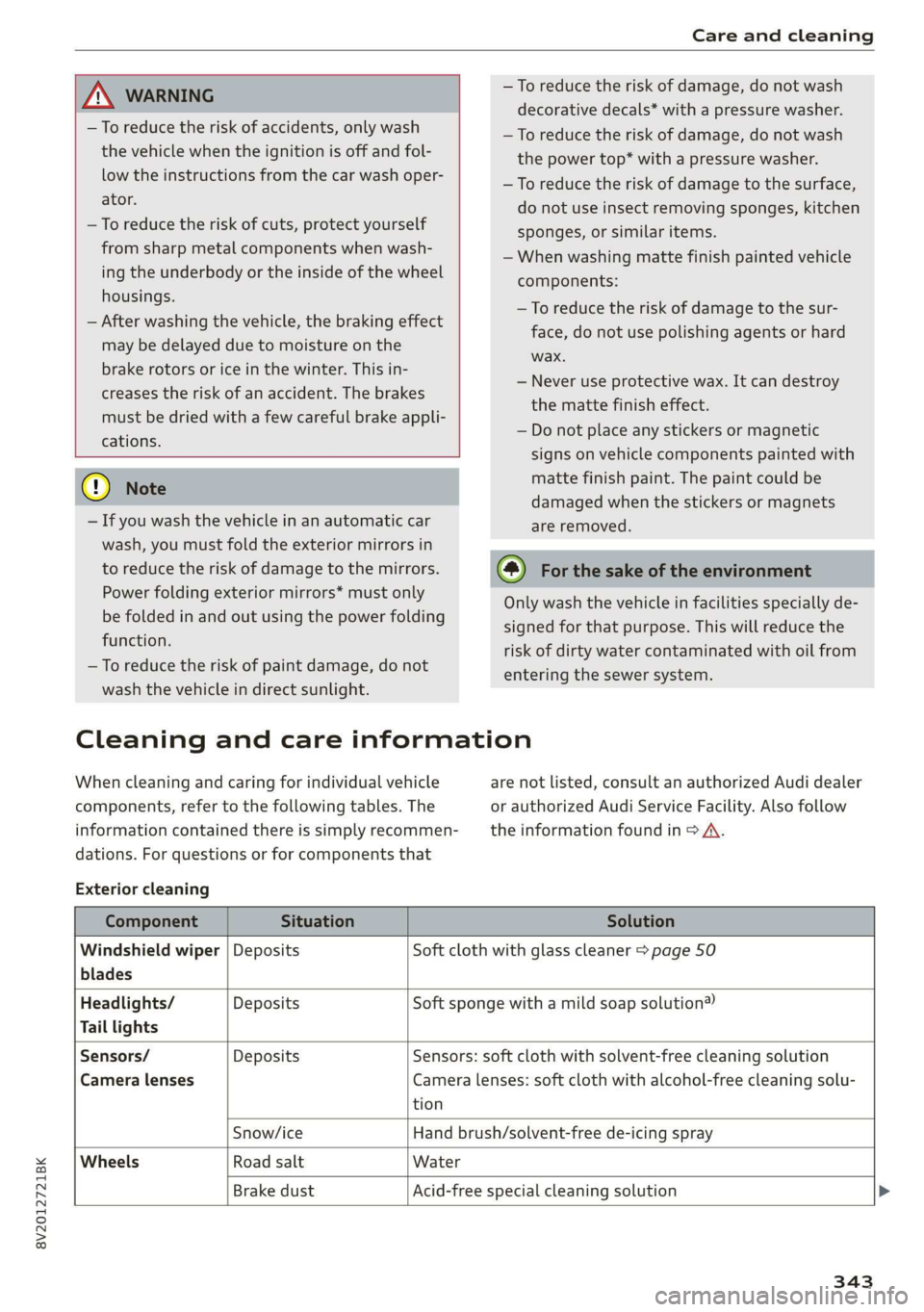
ZA\ WARNING
—To reduce the risk of accidents, only wash
the vehicle when the ignition is off and fol-
low the instructions from the car wash oper-
ator.
—To reduce the risk of cuts, protect yourself
from sharp metal components when wash-
ing the underbody or the inside of the wheel
housings.
— After washing the vehicle, the braking effect
may be delayed due to moisture on the
brake rotors or ice in the winter. This in-
creases the risk of an accident. The brakes
must be dried with a few careful brake appli-
cations.
() Note
— If you wash the vehicle in an automatic car
wash, you must fold the exterior mirrors in
to reduce the risk of damage to the mirrors.
Power folding exterior mirrors* must only
be folded in and out using the power folding
function.
—To reduce the risk of paint damage, do not
wash the vehicle in direct sunlight.
—To reduce the risk of damage, do not wash
decorative decals* with a pressure washer.
—To reduce the risk of damage, do not wash
the power top* with a pressure washer.
—To reduce the risk of damage to the surface,
do not use insect removing sponges, kitchen
sponges, or similar items.
— When washing matte finish painted vehicle
components:
— To reduce the risk of damage to the sur-
face, do not use polishing agents or hard
wax.
— Never use protective wax. It can destroy
the matte finish effect.
— Do not place any stickers or magnetic
signs on vehicle components painted with
matte finish paint. The paint could be
damaged when the stickers or magnets
are removed.
(@) For the sake of the environment
Only wash the vehicle in facilities specially de-
signed for that purpose. This will reduce the
risk of dirty water contaminated with oil from
entering the sewer system.
Cleaning and care information
When cleaning and caring for individual vehicle
components, refer to the following tables. The
information contained there is simply recommen-
dations. For questions or for components that
Exterior cleaning
are not listed, consult an authorized Audi dealer
or authorized Audi Service Facility. Also follow
the information found in > A.
Component Situation Solution
Windshield wiper | Deposits Soft cloth with glass cleaner > page 50
blades
Headlights/ Deposits Soft sponge with a mild soap solution®
Tail lights
Sensors/ Deposits Sensors: soft cloth with solvent-free cleaning solution
Camera lenses Camera lenses: soft cloth with alcohol-free cleaning solu-
tion
Snow/ice Hand brush/solvent-free de-icing spray
Wheels Road salt Water
Brake dust Acid-free special cleaning solution >
343
Page 384 of 400
Index
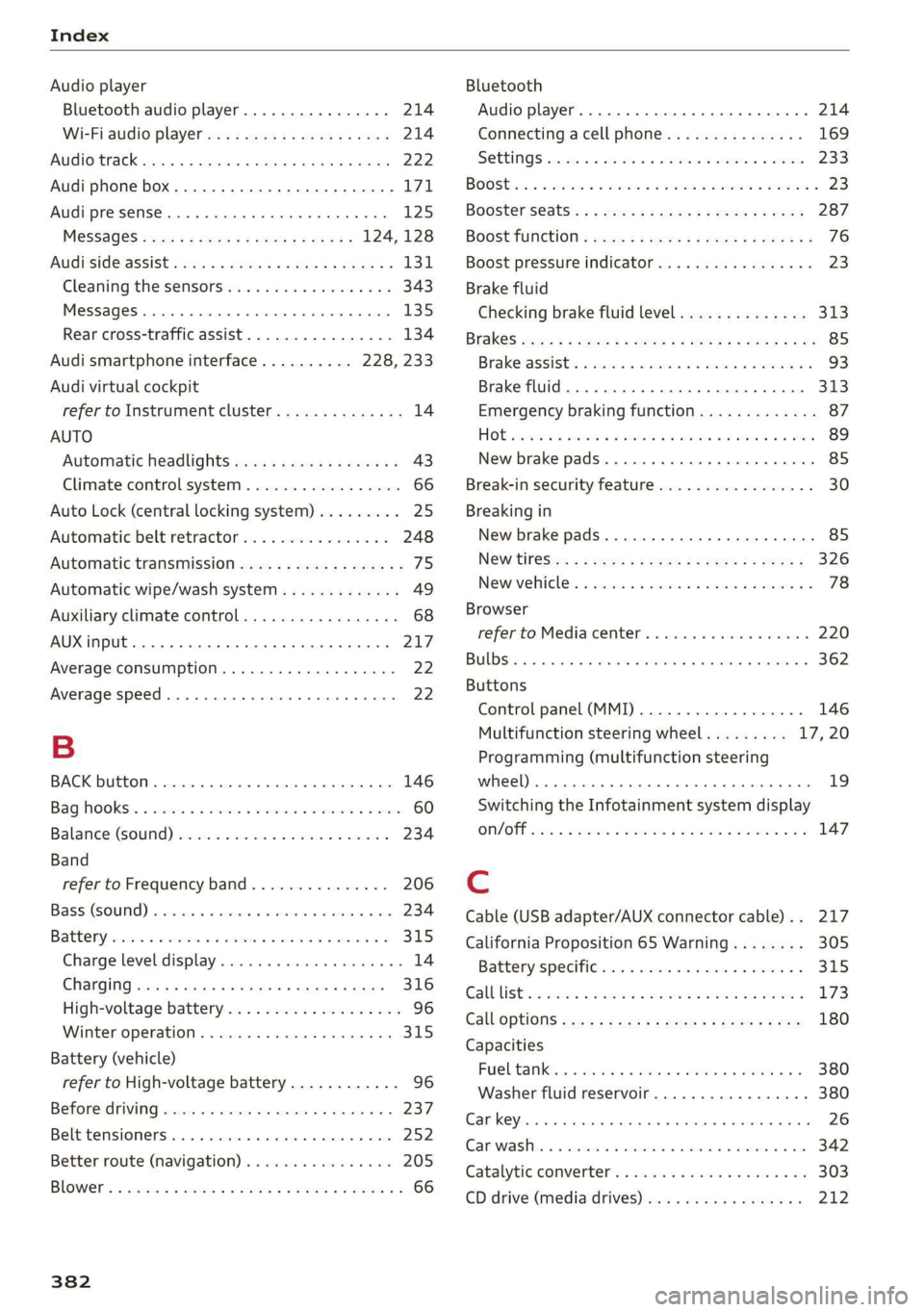
Audio player
Bluetooth audio player................ 214
Wi-Fi audio player...............00005 214
AUGIOTISCK san 4 2 wees 2 a wea.8 2 Aas a ¢ 222
Audi phone box......... 0. ce eee eee eee 171
Audi presense......... 0.00. c eee eee 125
MESSAGES saree 5 x sens 5 x seme 5 e ewe = 124,128
AUGISIGGIASSISE sivas ¢ < wacom 3 § suas 4 § Sac & 131
Cleaning the sensors...............004 343
MGSSAGES caszass » « annsoice & 0: cones @ 0 ornare « 6 cnene 135
Rear cross-traffic assist................ 134
Audi smartphone interface.......... 228, 233
Audi virtual cockpit
refer to Instrument cluster.............. 14
AUTO
Automatic headlights .................. 43
Climate control system ...........-.000. 66
Auto Lock (central locking system) ......... 25
Automatic belt retractor... .......0...05 248
Automatic transmission............-...0- 75
Automatic wipe/wash system............. 49
Auxiliary climate control................. 68
AUX input... 06. eee eee 217
Average consumption................005 22
Average speed... 1... cece eee eee 22
B
BACKIBUTEOM « seseins
Bag hOoks®. « csssiecs «a seams ve connate vm eevee © # sees 60
Balance:(SOund) aii os weve av owe va neues « 234
Band
refer to Frequency band............... 206
Bassi(SOunG) «axes wo swivius 0 a awaweie w stamens oY nae 234
Battery, scorn so sccm 6 2 serene © x aor 6 MEER oo 315
Charge level display.................00. 14
CHANGING scx ¢ < sacs x § anes & ¢ Same Fk eR 316
High-voltage battery...............008. 96
Winter operation.............2.00 eee 315
Battery (vehicle)
refer to High-voltage battery............ 96
Before driving............-.0 eee eens 237
Belt temsiomensten «+ serene a axnuoe a 0 acme 0 0 ae 252
Better route (navigation)................ 205
BOWED. i seiiss a somunse a & anosans & % wwe Ho omemaun & 8 66
382
Bluetooth
Audio player... ..... cece eee eee eee 214
Connecting acell phone............... 169
SOEIAGS wines sx sesame vo arene cee a a comes 233
BOOStiis «een oo eer oo sore os ee ©» eee Y 23
Boosterséats.. « « can 2 ¢ ees os eeu ee ees 287
BOOSETUNGtION = wee < 2 seme 2 2 eee 2 e sees 76
Boost pressure indicator................. 23
Brake fluid
Checking brake fluid level
BRAKES cyecy: 2 aqme 2 ¢ atone go tem ye eee ye
Brake assist
Brake fluid
Emergency braking function
HOE ssicoes + a avo 3 orem oa Ta oe Ra BTR
New brake pads
Break-in security feature................. 30
Breaking in
New brake pads........... 00. c ee eee eee 85
NEW TIRES sc « = cows « 2 cares & eee ¢ v een 326
Newevelicles. « css: sv wns se wesc a 2 amenes 3 6 78
Browser
refer to Media center...............00. 220
BUDS: a i cconine 2 os cesnors & awanawe so avai 8 ans He 362
Buttons
Control panel (MMI)................-. 146
Multifunction steering wheel......... 17,20
Programming (multifunction steering
wheel)... 0.0.0... cece eee eee eee eens 19
Switching the Infotainment system display
ON/OFF iccen xo meron oo ee ae Se oo poe © 8 147
Cable (USB adapter/AUX connector cable).. 217
California Proposition 65 Warning........ 305
Battery specitt@inss + sccmss ux suas a 6 onawents x a 315
Galblists s secs 2 2 semen 2 waew v anor ee eR 173
Calloptions ess s seca ss pen & x dees 5 eee 180
Capacities
Fureltanke: « 2 wc 2s wise + meni os mie a oo 380
Washer fluid reservoir...............-5 380
Car key... cece eee eee eee 26
Care washes x sass i a seesiice 6 0 arovacs 6 w waneane 0 ane 342
Catalytic Converters « sesci ss wave a 8 eres 6 6 303
CD drive (media drives)................. 212