brakes AUDI A3 2020 Owner´s Manual
[x] Cancel search | Manufacturer: AUDI, Model Year: 2020, Model line: A3, Model: AUDI A3 2020Pages: 400, PDF Size: 107.47 MB
Page 116 of 400
Trailer towing
Exterior lighting
Follow the legal regulations regarding the light-
ing equipment on your trailer. Contact an author-
ized Audi dealer or authorized Audi Service Facili-
ty for more information.
Before you start driving, check all lighting equip-
ment on the trailer while it is hitched to the vehi-
cle.
The headlight range control automatically ad-
justs the light range of the headlights.
Safety chains
Make sure the safety chains are correctly applied
when pulling a trailer. The chains should hang
enough so that the trailer can drive around
curves. However, they must not touch the
ground.
G) Tips
— Block the wheels with chocks when parking
on inclines if the trailer is loaded.
— Having the vehicle inspected between the
inspection intervals is recommended if you
tow a trailer frequently.
— Avoid driving with a trailer during the vehi-
cle break-in period.
Driving with a trailer
Driving with a trailer requires extra caution.
Speed
Adhere to the legal speed limits. Follow the legal
regulations specific to the country.
As the speed increases, the driving stability of
the trailer decreases. Therefore you should not
exceed the maximum legal speed limit when
there are unfavorable road, weather, and/or wind
conditions. This especially applies when driving
downhill.
Hill
When you start driving uphill or downhill, trailers
may tilt or sway sooner than when driving ona
level surface. If small swaying movements have
already occurred, you can stabilize the trailer by
114
firmly braking immediately. Never attempt to
“straighten out” the trailer by accelerating.
Downshift before driving on hills to utilize the en-
gine braking effect > A\.
Brakes
When using a trailer with overrun brakes, first
brake gently then quickly. This reduces the risk of
jerking while braking if the trailer wheels lock up.
Engine coolant temperature
Pay attention specifically to the coolant tempera-
ture display when there are high outside temper-
atures, and when driving on long inclines
=> page 15. Shift to a higher gear in a timely man-
ner.
Z\ WARNING
Constant braking causes the brakes to over-
heat and can substantially reduce braking per-
formance, increase braking distance, or cause
complete failure of the brake system.
Page 117 of 400
8V2012721BK
Assist systems
Assist systems
Speed warning system
Applies to: vehicles with speed warning system
The speed warning system helps you to stay be-
low a specified maximum speed that can be set,
changed or deleted in the Infotainment system.
The speed warning system warns you if you are
exceeding the maximum speed that you have set.
A warning tone will sound as soon as your speed
exceeds the stored value slightly. The ow in-
dicator light will appear at the same time in the
instrument cluster display along with a message.
The fe) indicator light and the message turn
off if the speed falls back below the stored maxi-
mum speed.
Setting a threshold is recommended if you would
like to be reminded when you reach a certain
maximum speed. Situations where you may want
to do so include driving in a country with a gener-
al speed limit or if there is a specified maximum
speed for winter tires.
Setting the warning threshold
> Select in the Infotainment system: [MENU] but-
ton > Vehicle > left control button > Driver as-
sistance > Speed warning > Manual.
G) Tips
Regardless of the speed warning system, you
should always monitor your speed using the
speedometer and make sure you are following
the legal speed limit.
Messages
Applies to: vehicles with speed warning system
Manually set speed limit XX mph
(km/h) exceeded
The stored speed was exceeded.
Cruise control system
Applies to: vehicles with cruise control system
The cruise control system assists the driver in
maintaining a constant speed above approxi-
mately 15 mph (20 km/h). The system maintains
the desired speed by braking and accelerating.
ZA WARNING
— Always pay attention to the traffic around
your vehicle when the cruise control system
is in operation. As the driver, you are always
responsible for controlling your vehicle
speed and the distance between your vehicle
and
other vehicles.
— For safety reasons, cruise control should not
be used in the city, in stop-and-go traffic, on
winding roads, and when road conditions are
poor (such as ice, fog, gravel, heavy rain,
and conditions that could lead to hydroplan-
ing), because this increases the risk of an ac-
cident.
— Switch the cruise control off temporarily
when driving in turning lanes, highway exits,
or in construction zones.
—To reduce the risk of an accident, you should
only resume the stored speed if it is suitable
for the current traffic conditions.
@) Note
— Conventional drive system: before driving
downhill a long distance on a steep hill, de-
crease your speed and select a lower gear.
This makes use of the engine braking effect
and reduces the load placed on the brakes.
— Plug-in hybrid drive: before driving downhill
a long distance on a steep hill, decrease
your speed and use the recuperation braking
effect > page 78. This reduces the load on
the brakes.
(i) Tips
The brake lights turn on when the brakes are
applied automatically.
115
Page 118 of 400
Assist systems
Switching the system on
Applies to: vehicles with cruise control system
@ #
©
f°
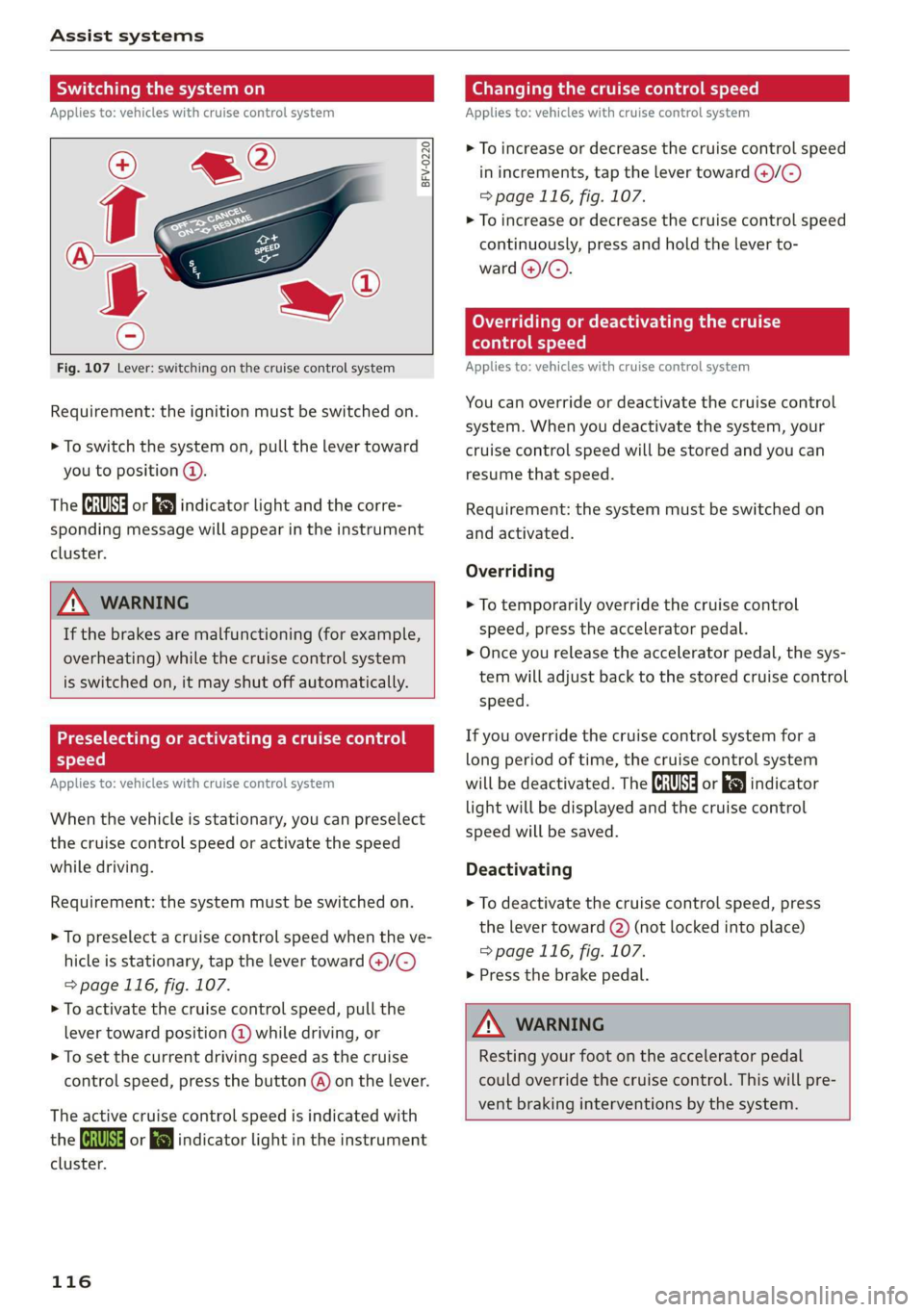
Fig. 107 Lever: switching on the cruise control system
Requirement: the ignition must be switched on.
> To switch the system on, pull the lever toward
you to position @).
The (a or 8] indicator light and the corre-
sponding message will appear in the instrument
cluster.
ZA WARNING
If the brakes are malfunctioning (for example,
overheating) while the cruise control system
is switched on, it may shut off automatically.
Preselecting or activating a cruise control
Cy ey-t-te)
Applies to: vehicles with cruise control system
When the vehicle is stationary, you can preselect
the cruise control speed or activate the speed
while driving.
Requirement: the system must be switched on.
> To preselect a cruise control speed when the ve-
hicle is stationary, tap the lever toward @)/G)
=> page 116, fig. 107.
> To activate the cruise control speed, pull the
lever toward position @ while driving, or
> To set the current driving speed as the cruise
control speed, press the button @) on the lever.
The active cruise control speed is indicated with
the ICRUISE| or i=} indicator light in the instrument
cluster.
116
Changing the cruise control speed
Applies to: vehicles with cruise control system
> To increase or decrease the cruise control speed
in increments, tap the lever toward @)/G)
=> page 116, fig. 107.
> To increase or decrease the cruise control speed
continuously, press and hold the lever to-
ward @/@).
Overriding or deactivating the cruise
control speed
Applies to: vehicles with cruise control system
You can override or deactivate the cruise control
system. When you deactivate the system, your
cruise control speed will be stored and you can
resume that speed.
Requirement: the system must be switched on
and activated.
Overriding
> To temporarily override the cruise control
speed, press the accelerator pedal.
> Once you release the accelerator pedal, the sys-
tem will adjust back to the stored cruise control
speed.
If you override the cruise control system for a
long period of time, the cruise control system
will be deactivated. The ICRUISE| or indicator
light will be displayed and the cruise control
speed will be saved.
Deactivating
> To deactivate the cruise control speed, press
the lever toward (2) (not locked into place)
=> page 116, fig. 107.
> Press the brake pedal.
ZA WARNING
Resting your foot on the accelerator pedal
could override the cruise control. This will pre-
vent braking interventions by the system.
Page 119 of 400

8V2012721BK
Assist systems
Switching the system off
Applies to: vehicles with cruise control system
When you switch the system off completely, the
cruise control speed will be deleted.
Requirement: the system must be switched on.
> To switch the system off, press the lever toward
@ (locked into place) > page 116, fig. 107, or
> Switch the ignition off.
Applies to: vehicles with cruise control system
ICRUISE| / 3) Speed control system: currently un-
available. See owner's manual
If the indicator light turns on and this message
appears, the cruise control system has been deac-
tivated. There is a temporary malfunction, for ex-
ample the brakes are overheating. Switch the
cruise control system on again later.
Lap timer
Applies to: vehicles with lap timer
You can measure and analyze lap times with the
lap timer in the display.
Opening the lap timer
> Open the first Vehicle tab (trip computer) using
the |<>] button on the multifunction steering
wheel.
> Applies to: vehicles with analog instrument
cluster: Press the [=] button on the multifunc-
tion steering wheel and select Lap timer in the
menu.
> Applies to: vehicles with Audi virtual cockpit:
On the multifunction steering wheel, select:
left control button > Lap times.
Operating the lap timer
> On the multifunction steering wheel, turn the
left thumbwheel @) > page 17 or @ > page 20
until the desired menu item is displayed in the
instrument cluster.
> Press the left thumbwheel to confirm the selec-
tion.
ZX WARNING
Your focus should always be on driving your
vehicle safely. As the driver, you have com-
plete responsibility for safety in traffic. Only
use the functions such as the lap timer in such
a way that you always maintain complete con-
trol over your vehicle in all traffic situations.
(i) Tips
You can retrieve information from the trip
computer while the lap timer stopwatch is
running.
times and timing
Applies to: vehicles with lap timer
Requirement: the lap timer must be open
=> page 117.
Timing laps
> To start timing, select Lap 1 - press OK or Start
lap 1 in the menu.
> Applies to: vehicles with Audi virtual cockpit: To
start timing automatically when you start driv-
ing, select Start lap 1 by driving off or Start by
driving off in the menu.
> To measure the lap time, select New lap - press
OK or New lap in the menu. This starts timing
the next lap at the same time.
After completing, the difference between the last
lap and the previous best lap time will be indicat-
ed witha “—"@ or “"/.
Pausing timing and displaying a split time
> To insert a pause i select Pause in the menu.
> To continue timing, select Press OK to resume
or Resume in the menu.
> To display a split time, select Split time in the
menu. The split time {@] appears for approxi-
mately 10 seconds in the instrument cluster.
The timing of the current lap continues.
Resetting timing
> Using the multifunction steering wheel, select
Reset or Reset times in the menu. >
117
Page 120 of 400
Assist systems
—A maximum of 30 lap times (analog instru-
ment cluster) or 99 lap times (Audi virtual
cockpit*) can be measured.
— If timing is paused, you can continue it later
even if you switch the ignition off.
— Saved lap times cannot be individually de-
leted from the total results.
— The saved lap timer values will remain after
switching the ignition off.
Lap statistics
Applies to: vehicles with lap timer
Tips
Displaying lap statistics
You can display the number of laps driven, the
fastest lap “+”, the slowest lap “—”, and the aver-
age time “®” in the instrument cluster.
> Applies to: vehicles with analog instrument
cluster: Select Statistics in the menu using the
multifunction steering wheel.
» Applies to: vehicles with Audi virtual cockpit:
On the multifunction steering wheel, select:
left control button > Lap statistics or Statis-
tics.
> Turn the thumbwheel down or up to display the
individual lap times.
> To return to the lap timing that was begun,
press the left thumbwheel.
Resetting lap statistics
Applies to: vehicles with Audi virtual cockpit
> On the multifunction steering wheel, select:
the right control button > Reset statistics.
— The lap statistics list the lap times for the
last 30 laps.
— Applies to: vehicles with Audi virtual cock-
pit: The fastest and slowest lap times from
up to 99 timed laps will be displayed.
118
Audi adaptive cruise
control
Applies to: vehicles with Audi adaptive cruise control
B8V-0126
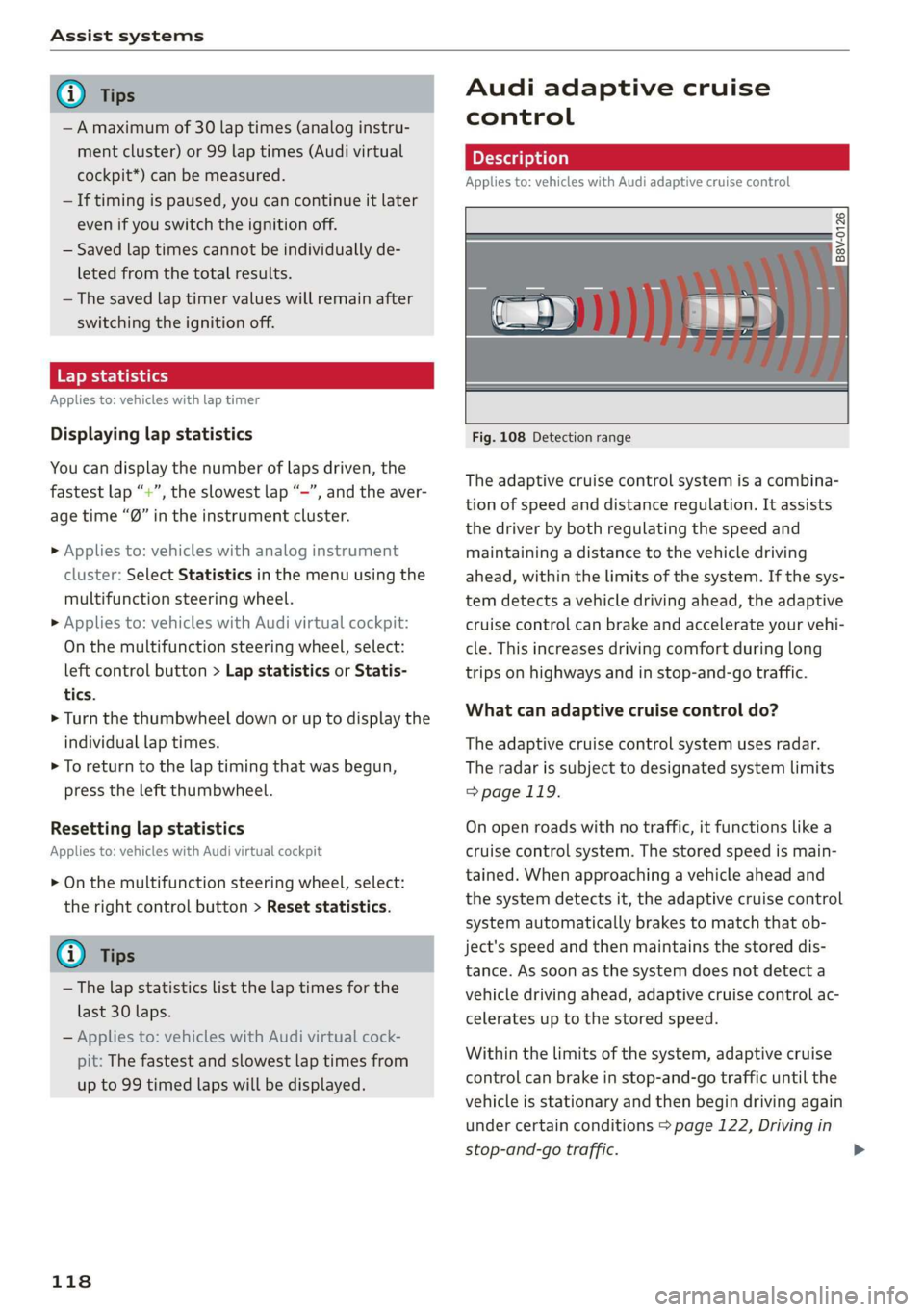
Fig. 108 Detection range
The adaptive cruise control system is a combina-
tion of speed and distance regulation. It assists
the driver by both regulating the speed and
maintaining a distance to the vehicle driving
ahead, within the limits of the system. If the sys-
tem detects a vehicle driving ahead, the adaptive
cruise control can brake and accelerate your vehi-
cle. This increases driving comfort during long
trips on highways and in stop-and-go traffic.
What can adaptive cruise control do?
The adaptive cruise control system uses radar.
The radar is subject to designated system limits
=> page 119.
On open roads with no traffic, it functions like a
cruise control system. The stored speed is main-
tained. When approaching a vehicle ahead and
the system detects it, the adaptive cruise control
system automatically brakes to match that ob-
ject's speed and then maintains the stored dis-
tance. As soon as the system does not detect a
vehicle driving ahead, adaptive cruise control ac-
celerates up to the stored speed.
Within the limits of the system, adaptive cruise
control can brake in stop-and-go traffic until the
vehicle is stationary and then begin driving again
under certain conditions > page 122, Driving in
stop-and-go traffic.
Page 122 of 400
Assist systems
In curves
Applies to: vehicles with Audi adaptive cruise control/Audi pre
sense front
Fig. 110 Example: driving into a curve
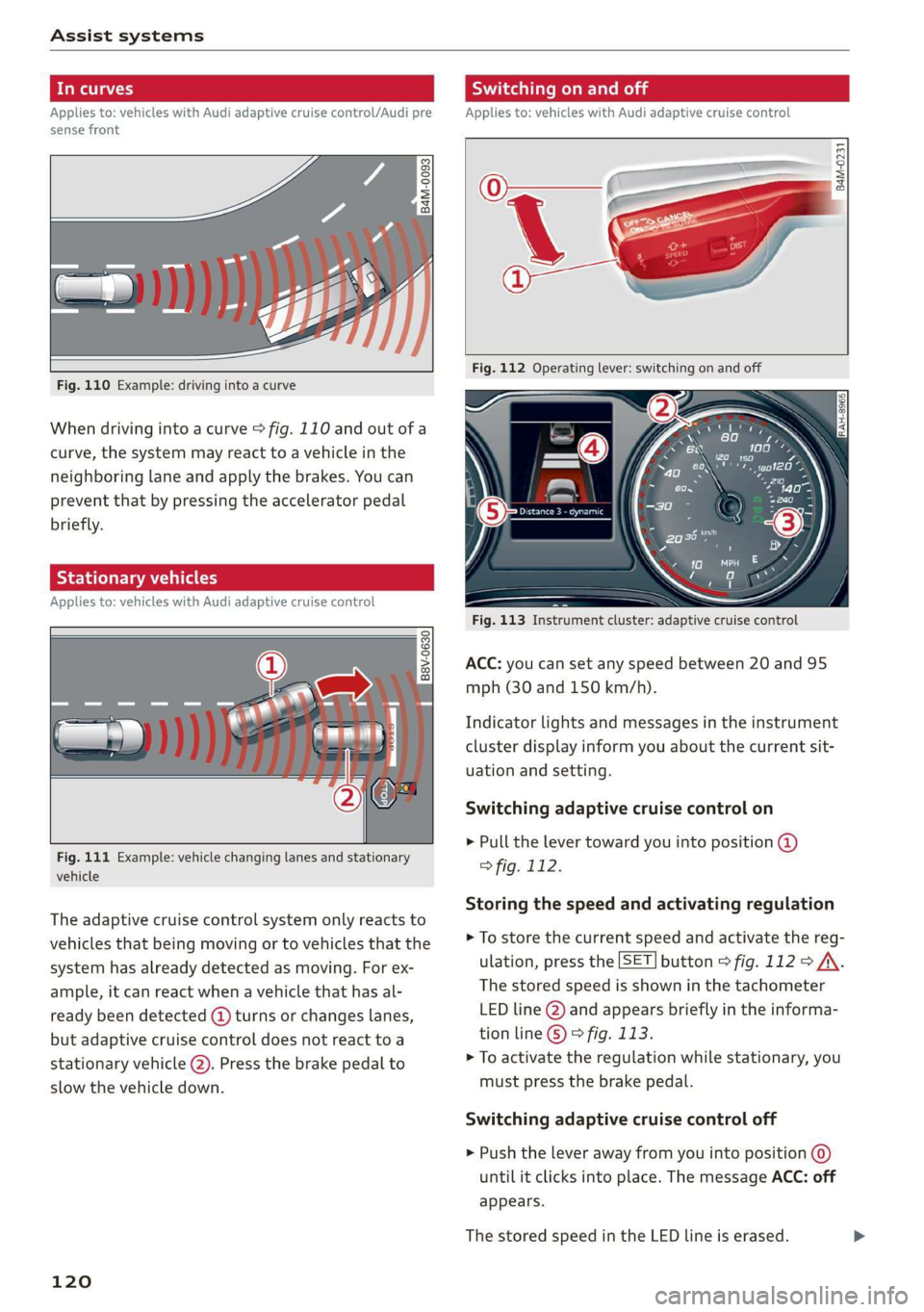
When driving into a curve > fig. 110 and out of a
curve, the system may react to a vehicle in the
neighboring lane and apply the brakes. You can
prevent that by pressing the accelerator pedal
briefly.
Stationary vehicles
Applies to: vehicles with Audi adaptive cruise control
B8V-0630
Fig. 111 Example: vehicle changing lanes and stationary
vehicle
The adaptive cruise control system only reacts to
vehicles that being moving or to vehicles that the
system has already detected as moving. For ex-
ample, it can react when a vehicle that has al-
ready been detected (@ turns or changes lanes,
but adaptive cruise control does not react toa
stationary
vehicle @). Press the brake pedal to
slow the vehicle down.
120
Switching on and off
Applies to: vehicles with Audi adaptive cruise control
B4M-0231
Fig. 113 Instrument cluster: adaptive cruise control
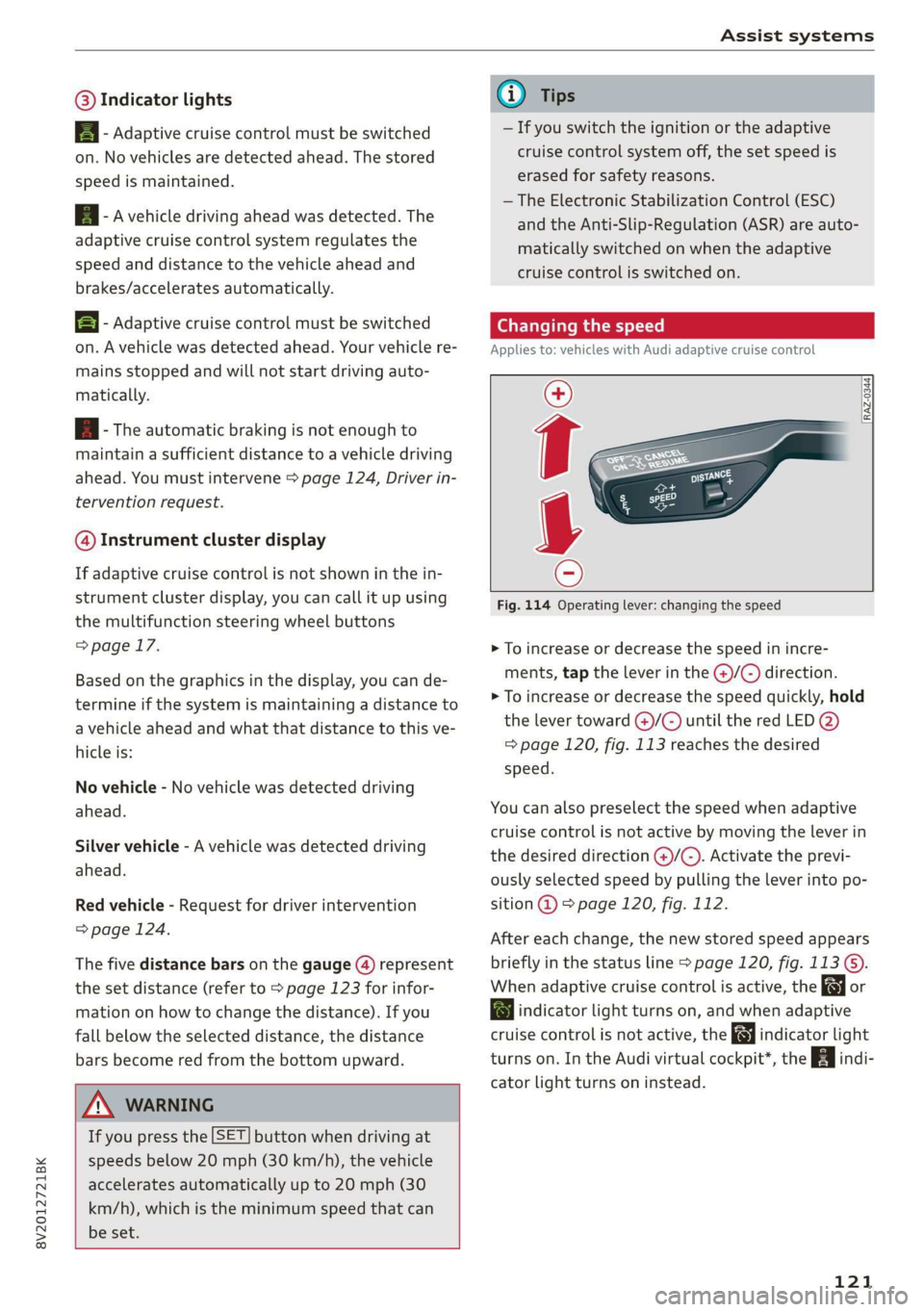
ACC: you can set any speed between 20 and 95
mph (30 and 150 km/h).
Indicator lights and messages in the instrument
cluster display inform you about the current sit-
uation and setting.
Switching adaptive cruise control on
> Pull the lever toward you into position @)
> fig. 112.
Storing the speed and activating regulation
> To store the current speed and activate the reg-
ulation, press the [SET] button > fig. 112 > /\.
The stored speed is shown in the tachometer
LED line @) and appears briefly in the informa-
tion line © © fig. 113.
> To activate the regulation while stationary, you
must press the brake pedal.
Switching adaptive cruise control off
> Push the lever away from you into position @
until it clicks into place. The message ACC: off
appears.
The stored speed in the LED line is erased.
Page 123 of 400
8V2012721BK
Assist systems
@® Indicator lights
B - Adaptive cruise control must be switched
on. No vehicles are detected ahead. The stored
speed is maintained.
B - Avehicle driving ahead was detected. The
adaptive cruise control system regulates the
speed and distance to the vehicle ahead and
brakes/accelerates automatically.
B - Adaptive cruise control must be switched
on. A vehicle was detected ahead. Your vehicle re-
mains stopped and will not start driving auto-
matically.
B - The automatic braking is not enough to
maintain a sufficient distance to a vehicle driving
ahead. You must intervene > page 124, Driver in-
tervention request.
@ Instrument cluster display
If adaptive cruise control is not shown in the in-
strument cluster display, you can call it up using
the multifunction steering wheel buttons
=> page 17.
Based on the graphics in the display, you can de-
termine if the system is maintaining a distance to
a vehicle ahead and what that distance to this ve-
hicle is:
No vehicle - No vehicle was detected driving
ahead.
Silver vehicle - A vehicle was detected driving
ahead.
Red vehicle - Request for driver intervention
=> page 124.
The five distance bars on the gauge (4) represent
the set distance (refer to > page 123 for infor-
mation on how to change the distance). If you
fall below the selected distance, the distance
bars become red from the bottom upward.
ZA\ WARNING
If you press the [SET] button when driving at
speeds below 20 mph (30 km/h), the vehicle
accelerates automatically up to 20 mph (30
km/h), which is the minimum speed that can
be set.
@) Tips
— If you switch the ignition or the adaptive
cruise control system off, the set speed is
erased for safety reasons.
— The Electronic Stabilization Control (ESC)
and the Anti-Slip-Regulation (ASR) are auto-
matically switched on when the adaptive
cruise control is switched on.
Changing the speed
Applies to: vehicles with Audi adaptive cruise control
[RAZ-0344
Fig. 114 Operating lever: changing the speed
> To increase or decrease the speed in incre-
ments, tap the lever in the @/G) direction.
> To increase or decrease the speed quickly, hold
the lever toward )/G) until the red LED @)
=> page 120, fig. 113 reaches the desired
speed.
You can also preselect the speed when adaptive
cruise control is not active by moving the lever in
the desired direction @)/©). Activate the previ-
ously selected speed by pulling the lever into po-
sition @ > page 120, fig. 112.
After each change, the new stored speed appears
briefly in the status line > page 120, fig. 113 ©.
When adaptive cruise control is active, the or
a indicator light turns on, and when adaptive
cruise control is not active, the gy indicator light
turns on. In the Audi virtual cockpit*, the indi-
cator light turns on instead.
121
Page 125 of 400
8V2012721BK
Assist systems
> Press the brake pedal.
> To resume the stored speed, move the lever in-
to position @).
Interrupting cruise control when stopped
> Push the lever away from you into position @).
The message ACC: standby appears.
> To resume cruise control, press the brake pedal
and pull the lever toward you into position (2).
Z\ WARNING
It is dangerous to activate cruise control and
resume the stored speed when the current
road, traffic or weather conditions do not per-
mit this. This increases the risk of an accident.
Setting the distance
Applies to: vehicles with Audi adaptive cruise control
B4M-0234
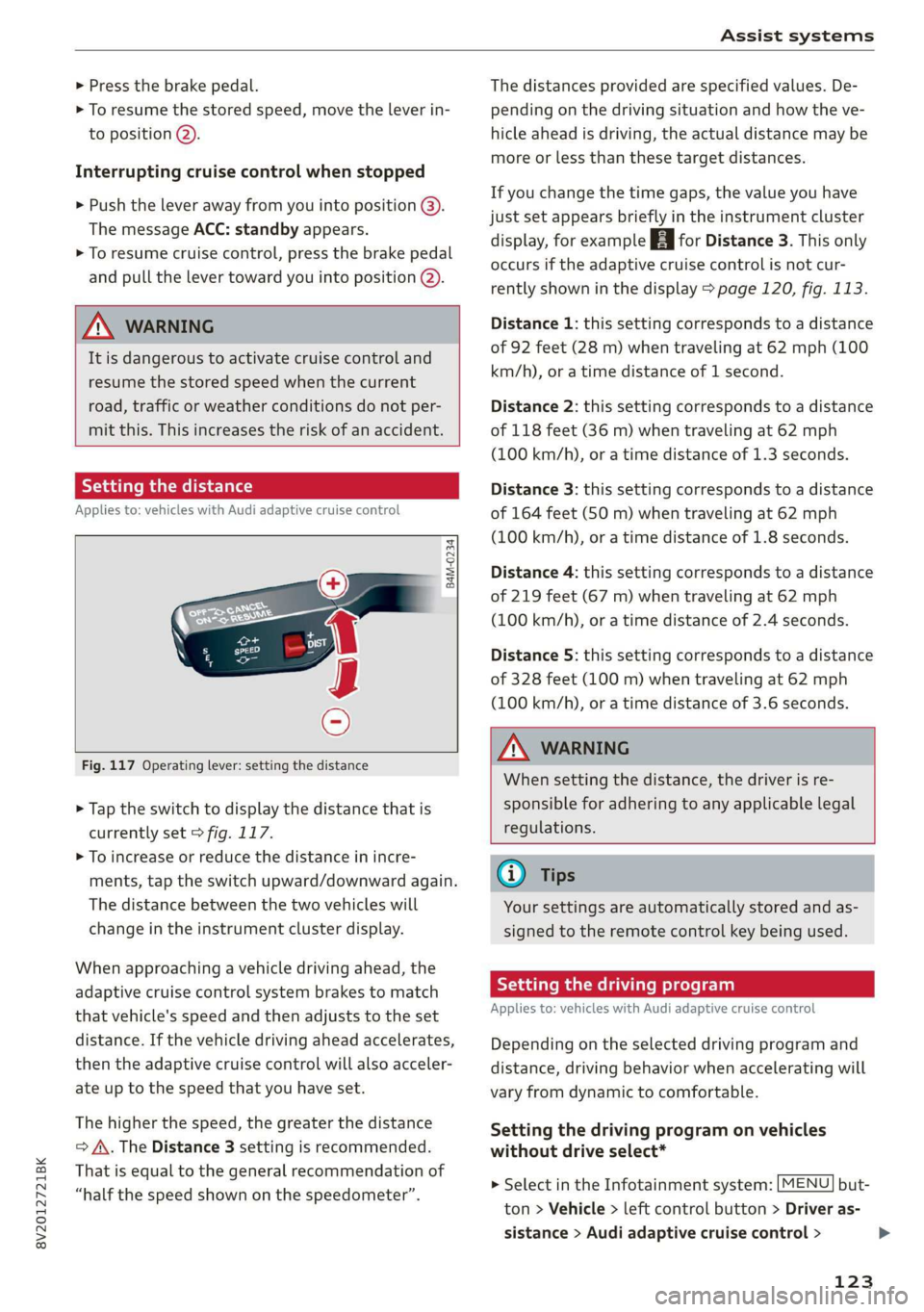
Fig. 117 Operating lever: setting the distance
> Tap the switch to display the distance that is
currently set > fig. 117.
> To increase or reduce the distance in incre-
ments, tap the switch upward/downward again.
The distance between the two vehicles will
change in the instrument cluster display.
When approaching a vehicle driving ahead, the
adaptive cruise control system brakes to match
that vehicle's speed and then adjusts to the set
distance. If the vehicle driving ahead accelerates,
then the adaptive cruise control will also acceler-
ate up to the speed that you have set.
The higher the speed, the greater the distance
=> A\. The Distance 3 setting is recommended.
That is equal to the general recommendation of
“half the speed shown on the speedometer”.
The distances provided are specified values. De-
pending on the driving situation and how the ve-
hicle ahead is driving, the actual distance may be
more or less than these target distances.
If you change the time gaps, the value you have
just set appears briefly in the instrument cluster
display, for example [Eg for Distance 3. This only
occurs if the adaptive cruise control is not cur-
rently shown in the display > page 120, fig. 113.
Distance 1: this setting corresponds to a distance
of 92 feet (28 m) when traveling at 62 mph (100
km/h), or a time distance of 1 second.
Distance 2: this setting corresponds to a distance
of 118 feet (36 m) when traveling at 62 mph
(100 km/h), or a time distance of 1.3 seconds.
Distance 3: this setting corresponds to a distance
of 164 feet (SO m) when traveling at 62 mph
(100 km/h), or a time distance of 1.8 seconds.
Distance 4: this setting corresponds to a distance
of 219 feet (67 m) when traveling at 62 mph
(100 km/h), or a time distance of 2.4 seconds.
Distance 5: this setting corresponds to a distance
of 328 feet (100 m) when traveling at 62 mph
(100 km/h), or a time distance of 3.6 seconds.
ZA WARNING
When setting the distance, the driver is re-
sponsible for adhering to any applicable legal
regulations.
(i) Tips
Your settings are automatically stored and as-
signed to the remote control key being used.
Setting the driving program
Applies to: vehicles with Audi adaptive cruise control
Depending on the selected driving program and
distance, driving behavior when accelerating will
vary from dynamic to comfortable.
Setting the driving program on vehicles
without drive select*
MENU > Select in the Infotainment system: but-
ton > Vehicle > left control button > Driver as-
sistance > Audi adaptive cruise control >
123
>
Page 127 of 400
8V2012721BK
Assist systems
This message appears if the sensor view is ob-
structed, for example by leaves, snow, heavy
spray or dirt. Clean the sensor > page 119,
fig. 109.
ACC: currently unavailable. Incline too steep
The road exceeds the maximum possible angle
for safe adaptive cruise control operation. The
adaptive cruise control cannot be switched on.
ACC: only available in D, Sor M
The adaptive cruise control system only works in
the specified selector lever position. Select the
respective selector lever position.
ACC: parking brake applied
The adaptive cruise control system switches off
automatically if the parking brake is set. The
adaptive cruise control is available again after re-
leasing the parking brake.
ACC: currently unavailable. Stabilization
control input
This message appears if the Electronic Stabiliza-
tion Control (ESC) is taking action to stabilize the
vehicle. In this case, adaptive cruise control
switches off automatically.
ACC: Please take over!
This message appears if the vehicle rolls back
when starting on a slight incline, even though
ACC is active. Press the brake pedal to prevent
the vehicle from rolling or starting to move.
ACC: currently unavailable. Park assist active
The systems switch off when Park assist* is ac-
tive. The systems are available again after com-
pleting the parking process.
Distance warning: malfunction! Please contact
Service
The system cannot guarantee that it will detect
vehicles correctly and it has switched off. The ra-
dar sensor was moved or is faulty. Drive to an au-
thorized Audi dealer or authorized Audi Service
Facility immediately to have the malfunction cor-
rected.
Distance warning: currently unavailable. Sensor
view limited due to surroundings.
This message appears if the sensor view is ob-
structed, for example by leaves, snow, heavy
spray or dirt. Clean the sensor > page 119,
fig. 109.
Distance warning: currently unavailable. See
owner's manual
This message appears if the system has a tempo-
rary failure. If this occurs multiple times, drive to
an authorized Audi dealer or authorized Audi
Service Facility immediately to have the malfunc-
tion corrected.
Fasten seat belt
The system is not completely available if the driv-
er's seat belt is unfastened.
Stat. obj. ahead
This message appears if you would like to switch
the system on and there is a stationary object di-
rectly in front of your vehicle.
Door open
The system is not available when the vehicle is
stationary and the driver's door is open.
Audi pre sense
Introduction
Applies to: vehicles with Audi pre sense
Within the limits of the system, the pre sense
functions can initiate measures in particularly
dangerous situations to protect the vehicle pas-
sengers and other road users.
— Due to the interlinking of various vehicle sys-
tems, critical driving situations can be detected
by pre sense basic and measures for preventa-
tive occupant protection are can be initiated.
— The pre sense front uses the data from the ra-
dar sensors and calculates the probability of an
accident > page 119. An impending collision
with vehicles can be detected within the limits
of the system. In this case, the system warns
the driver visually, acoustically and with a jerk
on the brakes if necessary. If needed, it can ini-
tiate a partial or full deceleration to reduce the
collision speed or to avoid the collision under
certain circumstances. In conjunction with pre >
125
Page 128 of 400
Assist systems
sense basic, the front safety belts are also re-
versibly tensioned when needed. The pre sense
front is also active when adaptive cruise con-
trol* is switched off.
ZA\ WARNING
Also follow the general instructions found in
= A in General information on page 119.
G) Tips
— Certain pre sense functions switch off when
driving in reverse.
— The pre sense functions may not be availa-
ble if there is a malfunction in the ESC sys-
tem or the airbag control module.
— Note that the reversible belt tensioner on
the front passenger's side deactivates when
the front passenger's airbag is deactivated.
— Certain Audi pre sense front functions are
unavailable or have limited availability for
approximately 20 seconds after starting the
vehicle (may be longer depending on the
driving situation).
— Switch the pre sense off when you are not
using public streets or when loading the ve-
hicle onto a vehicle carrier, train, ship, or
other type of transportation. This can pre-
vent an undesired intervention from the pre
sense system.
ONT ees
Applies to: vehicles with Audi pre sense basic
The pre sense basic functions are activated at a
speed of approximately 20 mph (30 km/h) or
higher.
The following functions can be triggered under
certain conditions within the limits of the sys-
tem:
—Tensioning of the safety belts (for example,
during heavy braking): the front safety belts
have reversible belt tensioners. If a collision
does not occur, the safety belts loosen slightly
and are ready to trigger again.
— Initiating the closing of the windows and the
panoramic glass roof* (for example when un-
der- or oversteering).
126
Audi drive select*: the trigger times are adjusted
depending on the mode selected.
Audi pre sense front
Applies to: vehicles with Audi pre sense front
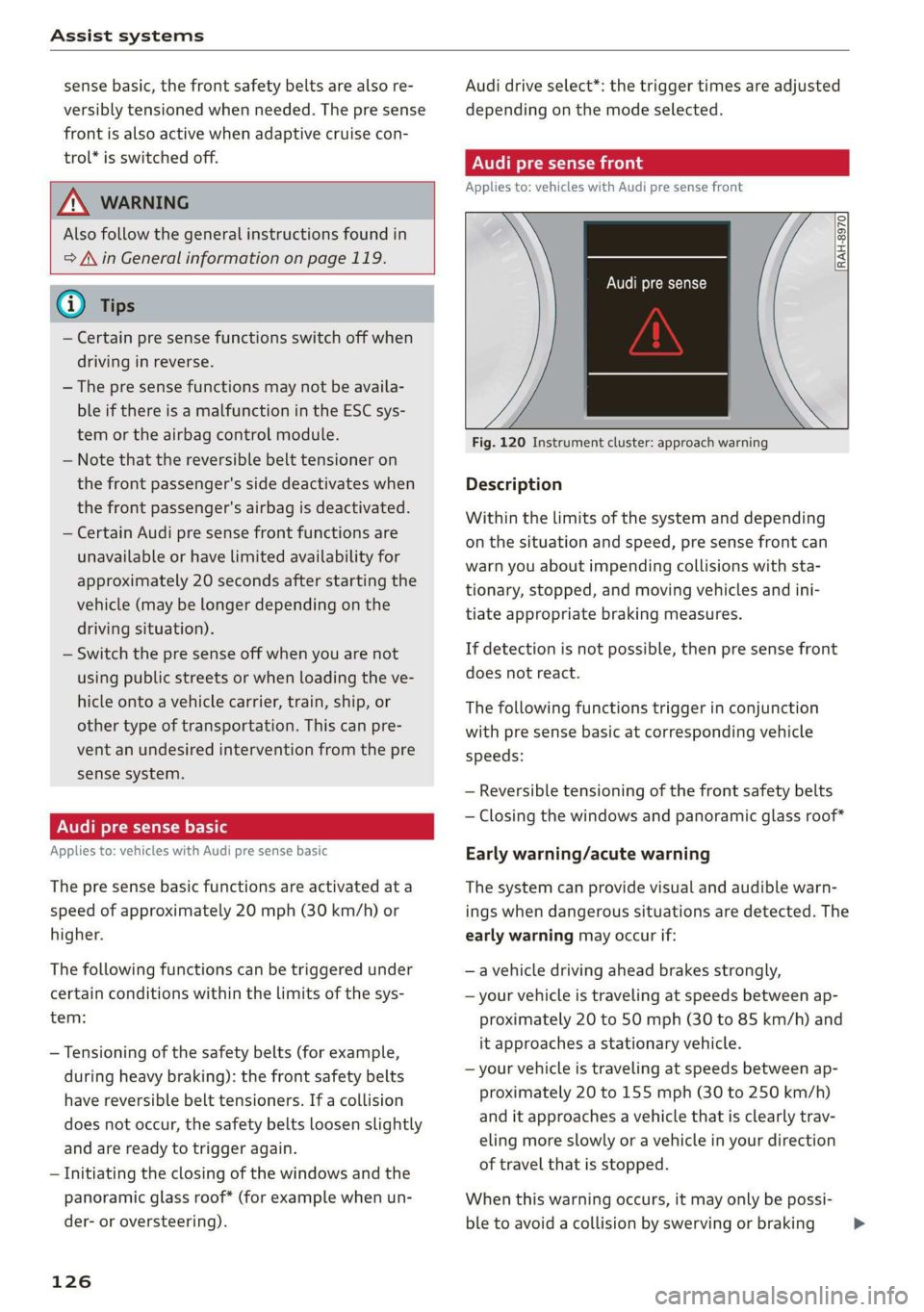
RAH-8970
Audi pre sense
Fig. 120 Instrument cluster: approach warning
Description
Within the limits of the system and depending
on the situation and speed, pre sense front can
warn you about impending collisions with sta-
tionary, stopped, and moving vehicles and ini-
tiate appropriate braking measures.
If detection is not possible, then pre sense front
does not react.
The following functions trigger in conjunction
with pre sense basic at corresponding vehicle
speeds:
— Reversible tensioning of the front safety belts
— Closing the windows and panoramic glass roof*
Early warning/acute warning
The system can provide visual and audible warn-
ings when dangerous situations are detected. The
early warning may occur if:
—a vehicle driving ahead brakes strongly,
— your vehicle is traveling at speeds between ap-
proximately 20 to 50 mph (30 to 85 km/h) and
it approaches a stationary vehicle.
— your vehicle is traveling at speeds between ap-
proximately 20 to 155 mph (30 to 250 km/h)
and it approaches a vehicle that is clearly trav-
eling more slowly or a vehicle in your direction
of travel that is stopped.
When this warning occurs, it may only be possi-
ble to avoid a collision by swerving or braking >