park assist AUDI A3 2020 Owner´s Manual
[x] Cancel search | Manufacturer: AUDI, Model Year: 2020, Model line: A3, Model: AUDI A3 2020Pages: 400, PDF Size: 107.47 MB
Page 145 of 400
8V2012721BK
Parking aid
> Pay attention to the path of the vehicle. When
the traffic situation allows, press the accelera-
tor pedal accordingly > A\ in Description on
page 141, >@) in Description on page 141.
> Follow the visual instructions and the warning
tones until the parking process has ended. The
arrows on the vehicle indicate the necessary di-
rection of travel.
Park assist automatically steers the vehicle into
the parking space while the driver presses the
pedals. The maximum parking speed is 4 mph
(7 km/h).
Interrupting the park assist
If the speed is too high and you take over steer-
ing, park assist switches off. To continue parking,
press the Pe button again. The park assist indica-
tor appears again in the display.
G) Tips
You can also cancel the direction of travel
specified by the system by switching between
forward and reverse gears. Based on the posi-
tion of the vehicle, the system then calculates
the additional steering and driving directions
for maneuvering.
Driving out of a parallel parking space
Applies to: vehicles with park assist
The responsibility is with the driver when leaving
a parking space.
If you parked the vehicle in a parallel parking
space, park assist can help you drive out of it.
> Start the engine.
> Press the Pe button > page 141, fig. 139.
> Wait until a message appears that requests the
direction to travel in for exiting the parking
space.
> Activate the appropriate turn signal. The mes-
sage Start automatic unparking procedure ap-
pears.
» Remove your hands from the steering wheel.
> Press the control knob to start the procedure
for exiting the parking space.
> Pay attention to the path of the vehicle. When
the traffic situation allows, press the accelera-
tor pedal accordingly > A\ in Description on
page 141, >@) in Description on page 141.
> Follow the visual instructions > page 143 and
the warning tones until the vehicle has finished
exiting the parking space.
> Drive in the direction indicated by the arrows on
the vehicle.
> The procedure has ended when additional cor-
rective movements are no longer necessary.
Take over steering.
Park assist automatically steers the vehicle out of
the parking space while the driver presses the
pedals. The maximum speed for exiting a parking
space is 3 mph (5 km/h).
Interrupting the park assist
If the speed is too high and you take over steer-
ing, park assist switches off. To continue exiting
the parking space, switch the engine off and on.
Then press the Pe button again. Otherwise, leave
the parking space without using park assist.
Messages
Applies to: vehicles with park assist
Park assist: canceled. Steering input by driv-
er. Please take over steering!
Park assist was canceled because the driver took
over steering. To continue parking, press the
button again.
ro" Park assist: time limit exceeded
& Park assist: canceled. Time limit exceeded.
Take over steering!
The parking process was not completed within
approximately six minutes of activating park as-
sist. To continue parking, press the Pe button
again.
Park assist: canceled. Speed too high. Please
take over steering!
The speed entering the parking space is too high.
Drive no faster than 4 mph (7 km/h).
Park assist: canceled. Stabilization control
(ESC) input. Please take over steering!
143
Page 146 of 400
Parking aid
The ESC took action to stabilize the vehicle. Take
over steering. Complete parking without using
park assist or drive out of the parking space.
Park assist: currently unavailable. Stabiliza-
tion control (ESC) off
The ESC was switched off. The ESC must be
switched on to use park assist.
Park assist: malfunction! Please contact
Service.
Park assist: malfunction! Take over steering!
Please contact Service.
Contact an authorized Audi dealer or authorized
Audi Service Facility. You cannot park with park
assist if there is a system malfunction.
Park assist: currently unavailable.
Park assist: currently unavailable. Please
take over steering!
Parking with park assist is not possible. Try park-
ing again or switch the ignition off and back on
again if necessary.
Park assist: ended. Please take over steering
and continue driving.
The process of exiting the parking space with
park assist has ended. Please take over steering.
Park assist: canceled. Parking space too
small. Please take over steering!
Parking in this space with park assist is not possi-
ble. Park without using park assist or find a larger
parking space.
Park assist: canceled. Obstacle detected.
Please take over steering!
Parking with park assist was stopped because the
vehicle could collide with an obstacle.
Park assist: ended
Park assist: ended. Please take over steer-
ing!
Parking with park assist has ended.
Park assist: unavailable in current Audi drive
select mode
144
roo" Park assist: canceled. Unavailable in current
Audi drive select mode. Please take over steer-
ing!
Park assist is not available in certain Audi drive
select modes. Select a different mode in drive se-
lect > page 91.
Park assist: stabilization control (ESC) input
The displayed parking space was rejected because
the ESC took action to stabilize the vehicle.
a=] Park assist: not stopped long enough
After engaging the reverse gear, park assist must
stop briefly in order to activate the steering. Fol-
low the instructions in the display.
ro="| Park assist: canceled. Unable to leave park-
ing space automatically. Parking space too
small.
The parking space is too small for the vehicle to
automatically leave the space. Leave the parking
space without using park assist.
roo} Park assist: canceled. Please take over steer-
ing!
Parking with park assist was stopped.
Adjusting the parking aid
Applies to: vehicles with parking system plus/rearview cam-
era/park assist
The functions are adjusted in the Infotainment
system.
> Select in the Infotainment system: [MENU] but-
ton > Vehicle > left control button > Driver as-
sistance > Parking aid. Or
> When the parking aid is active, select in the In-
fotainment system: right control button*.
End system* - Stop the parking aid
Activate automatically - Switch automatic activa-
tion on/off
Front volume* - Volume for the front and side*
area
Rear volume - Volume for the rear area
Page 147 of 400

8V2012721BK
Parking aid
Entertainment fader - The volume of the audio/
video source is Lowered when the parking system
is turned on.
G) Tips
— Several menus can be accessed with the
right control button only when the parking
aid is active.
— The new level is demonstrated briefly* when
the volume is adjusted.
— Certain settings are automatically stored
and assigned to the remote control key be-
ing used.
Error messages
Applies to: vehicles with parking system plus/rearview cam-
era/park assist
wm Rear parking aid: malfunction! Obstacles
cannot be detected
w Front parking aid: malfunction! Obstacles
cannot be detected
ww Parking aid: malfunction! Obstacles cannot
be detected
When one of these messages appears, there is a
system malfunction. The LED in the Pa button al-
so blinks when switching it on. The relevant mes-
sage only appears again when you manually acti-
vate the parking aid with the button.
Rear parking aid: obstacle detection restrict-
ed
The rear cross-traffic assist* > page 134, Rear
cross-traffic assist is not available. Either the ESC
is switched off, or the radar sensors may be cov-
ered by a bike rack, stickers, leaves, snow or other
objects. Switch the ESC on, or clean the area in
front of the sensors if necessary > page 132,
fig. 127. If this message continues to be dis-
played, drive immediately to an authorized Audi
dealer or authorized Audi Service Facility to have
the malfunction repaired.
Parking system plus*/Park assist*
If a sensor or speaker is faulty, the P4 symbol
will appear in front of/behind the vehicle in the
Infotainment system display. If a rear sensor is
faulty, only obstacles that are in areas @ and (2)
are shown > page 137, fig. 130. If a front sensor
is faulty, only obstacles that are in areas (3) and
@ are shown.
145
Page 164 of 400
Voice recognition system
Voice recognition system
General information
Applies to: vehicles with voice recognition system
You can operate many functions in the vehicle
easily using voice commands.
Using the voice recognition system optimally
> Speak clearly and distinctly at a normal volume.
Speak louder when driving faster.
> Emphasize the words in the commands evenly
and do not leave long pauses.
> Close the doors, the windows, and the sunroof*
to reduce background noise. Make sure that
passengers are not speaking when you are giv-
ing a voice command.
> Do not direct the vents toward the hands-free
microphone, which is in the roof headliner near
the front interior lights.
> Only the driver should speak to the system, be-
cause the handsfree microphone is aimed to-
ward this seating position.
ZA\ WARNING
— Direct your full attention to driving. As the
driver, you have complete responsibility for
safety in traffic. Only use the functions in
such a way that you always maintain com-
plete control over your vehicle in all traffic
situations.
— Do not use the voice recognition system in
emergencies because your voice may change
in stressful situations. The system may take
longer to dial the number or may not be
able to dial it at all. Dial the emergency
number manually.
G) Tips
There are no voice guidance* prompts when a
dialog is active.
Operating
Applies to: vehicles with voice recognition system
Requirement: the ignition and the MMI must be
switched on. A system language supported by
the voice recognition system must be set. There
162
must be no phone calls in progress and the park-
ing aid must not be active.
> Switching on: press the [2] button (2)
> page 19, fig. 13 or @) > page 20, fig. 15
briefly on the multifunction steering wheel and
say the desired command after the Beep.
> Switching off: press and hold the |] button,
‘OF:
> Press the |] button.
> Pausing: say the command Pause. To resume,
press the |%] button.
> Correcting: say the command Correction.
Input assistance
The system guides you through the input with
visual and audio feedback.
— Visual input assistance: after switching on
voice recognition, a display with a selection of
possible commands appears. This command
display can be switched on or off. Select:
MENU] button > Settings > left control button
> MMI settings > Speech dialog system.
— Audio input assistance: to have the possible
commands read, turn the voice recognition sys-
tem on and say Help.
Additional settings
See > page 235.
@) Tips
— The dialog pauses when there is an incom-
ing phone call and will continue if you ig-
nore the call. The dialog ends if you answer
the call.
— You can select an item in the list using ei-
ther the voice recognition system or the
control knob.
Command overview
information
Applies to: vehicles with voice recognition system
The following overviews describe the commands
that can be used to operate the MMI using the
voice recognition system.
Page 188 of 400
Audi connect
the price of Audi connect vehicle control
services. The cell phone network, for exam-
ple, must be available to use these services.
Applies to: vehicles with plug-in hybrid drive and Audi connect
Requirement: your mobile devices must be com-
patible.
> An authorized Audi dealer must complete a
one-time activation of Audi connect e-tron serv-
ices for your vehicle before you can register on-
line.
> Register at etron.audiusa.com
If you require assistance with your Audi connect
e-tron services, please contact an authorized
Audi dealer or authorized Audi Service Facility.
Using the myAudi app
— Install the myAudi app on your mobile device
and log in with your access information.
Services
Applies to: vehicles with plug-in hybrid drive and Audi connect
Depending on the country and the vehicle equip-
ment, the following services may be available:
Trip data
Depending on the vehicle equipment, certain
driver information system data is transmitted to
a server. An overview of your trips with the values
from the short-term memory/long-term memory
can be displayed, for example, the driving dura-
tion. The values may differ from the values dis-
played in the vehicle.
Vehicle status report
This service transfers driver information system
data to a server. Depending on the vehicle equip-
ment, certain data may be accessed, such as the
remaining range or mileage. The values may dif-
fer from the values displayed in the vehicle.
Car Finder
This service transmits the parking location to a
server when the ignition is switched off. The vehi-
cle location, your location, or the route to your
186
vehicle can be displayed. The new parking loca-
tion cannot be determined with this service if the
vehicle is moved after shutting the vehicle off
and without switching the ignition on and off
again, for example if the vehicle is towed or sto-
len.
Remote charging
Requirement: the ignition must be switched off
when changing the charging mode.
You can control and monitor the charging process
remotely with the service.
— Charging mode: immediate charging or delayed
charging (timer)
— Program the timer
— Deactivate or activate the timer
For additional information, see > page 101,
Charging the battery with the Audi charging sys-
tem.
Temperature control
Requirement: the ignition must be switched off
when starting or stopping climate control.
You can control the climate control in your vehi-
cle remotely using these services.
— Start or stop climate control
— Program the timer
— Deactivate or activate the timer
For additional information, see > page 101,
Charging the battery with the Audi charging sys-
tem.
ZA\ WARNING
— Do not ignore messages and warning or indi-
cator lights that turn on in the vehicle be-
cause of the information in the vehicle sta-
tus report. This could lead to break downs in
on the road, accidents and serious injuries.
— Only perform the climate control functions
if your vehicle was shut off correctly and the
ignition is switched off.
— Only perform charging functions on the
high-voltage battery if the vehicle is shut off
correctly, is connected to a suitable socket
and if the ignition is switched off.
Page 350 of 400

Emergency assistance
sistance Equipment
Trunk escape latch
Applies to: vehicles with trunk escape latch (Sedan and Cab-
riolet)
In case of an emergency, the rear lid can be
opened from the inside using the trunk escape
latch.
2 3 S
ne = & yo
B8V-0379
Fig. 262 Luggage compartment: vehicle tool kit, tire mobi-
lity kit and vehicle jack* placement
Fig. 261 Luggage compartment: Trunk escape latch
B8V-0609
> Push the latch in the direction of the arrow un-
til the lock releases.
The trunk escape latch inside the rear lid is made
of fluorescent material to glow in the dark.
Z\ WARNING
The trunk escape latch is to be used only in an
emergency.
General information
> Park the vehicle as far as possible from moving
traffic in the event of a breakdown. In the event
of a flat tire, park the vehicle on a level surface.
If you are ona steep hill, be especially careful.
» Set the parking brake. Fig. 263 Luggage compartment: cargo floor folded up
> Place the selector lever in the “P” position. (versions 1 and 2)
> Switch the emergency flashers on.
> Have the passengers exit the vehicle. They
should move to a safe place, for example be-
hind a guard rail.
Vehicle tool kit, cargo floor cover and side
panel
Applies to: vehicles with version 1
_ The vehicle tool kit, tire mobility kit* and the
A WARNING compressor® are located in the luggage compart-
ment, separated in the side panels @)
) > fig. 262.
Pay attention to the steps above. They are for
your protection and the for the safety of other
drivers. > To open the side panel, turn the lock and re-
move the cover @)* / (
der the cargo floor cover (
348
Page 351 of 400

8V2012721BK
Emergency assistance
> Lift the cargo floor using the plastic handle @)
until the cargo floor engages behind the tabs
@ in both side panels > fig. 263 (upper image).
> Fold the cargo floor back before closing the
luggage compartment lid.
Vehicle tool kit and cargo floor cover
Applies to: vehicles with version 2
The vehicle tool kit, tire mobility kit* and com-
pressor* are stored in the luggage compartment
under the cargo floor cover @) > fig. 262.
> Engage the plastic hook () in the luggage com-
partment seal > fig. 263.
> Fold the cargo floor back before closing the
luggage compartment lid.
Z\ WARNING
Applies to: vehicles with jack
Improper use of the vehicle jack can cause se-
rious personal injuries.
— Never use the screw driver hex head to tight-
en wheel bolts, since the bolts cannot attain
the necessary tightening torque if you use
the
hex head, potentially causing an acci-
dent.
— The factory-supplied jack is intended only
for your vehicle model. Under no circum-
stances
should it be used to lift heavy
vehicles or other loads; you risk injuring
yourself.
— Never start the engine when the vehicle is
raised, which could cause an accident.
— Support the vehicle securely with appropri-
ate stands if work is to be performed under-
neath the vehicle; otherwise, there is a po-
tential risk for injury.
— Never use the jack supplied with your Audi
on another vehicle, particularly on a heavier
one. The jack is only suitable for use on the
vehicle it came with.
G) Tips
The vehicle jack* does not require any mainte-
nance.
Vehicle tool kit/tire mobility kit/
eyes
Applies to: vehicles with plug-in hybrid drive
0) Bb + 3
> i a
Fig. 264 Luggage compartment: side trim panel
The vehicle tool kit, tire mobility kit and the com-
pressor are located in the side trim panel @) and
in the luggage compartment.
G) Tips
The vehicle must not be operated without the
tire repair set.
Tire mobility kit
Applies to: vehicles with tire mobility kit
> Read and follow the important safety precau-
tions in > page 348.
> Set the parking brake.
> Move the selector lever into the "P" position.
> Check if a repair with the tire mobility kit is pos-
sible > page 349.
Using the tire mobility kit
Applies to: vehicles with tire mobility kit
B8K-1475
Fig. 265 Tire: tire damage that cannot be repaired
349
Page 354 of 400
Emergency assistance
Replacing wheels
Before changing a wheel
Observe the following precautions for your own
and your passenger's safety when changing a
wheel.
>» After you experience a tire failure, pull the car
well away from moving traffic and try to reach
level ground before you stop > A\.
> All passengers should leave the car and move
toa safe location (for instance, behind the
guardrail) > A\.
> Engage the parking brake to prevent your vehi-
cle from rolling unintentionally > A\.
> Move selector lever to position P > /\.
> If you are towing a trailer, unhitch the trailer
from your vehicle.
> Take the jack* > page 348 and the spare tire*
=> page 357 out of the luggage compartment.
ZA\ WARNING
You or your passengers could be injured while
changing a wheel if you do not follow these
safety precautions:
— If you have a flat tire, move a safe distance
off the road. Turn off the engine, turn the
emergency flashers on and use other warn-
ing devices to alert other motorists.
— Make sure that passengers wait in a safe
place away from the vehicle and well away
from the road and traffic.
—To help prevent the vehicle from moving
suddenly and possibly slipping off the jack*,
always fully set the parking brake and block
the front and back of the wheel diagonally
opposite the wheel being changed. When
one front wheel is lifted off the ground,
placing the Automatic Transmission in P
(Park) will not prevent the vehicle from mov-
ing.
— Before you change a wheel, be sure the
ground is level and firm. If necessary, use a
sturdy board under the jack”.
— Always store the vehicle tool kit, the jack*
and the replaced tire in the luggage com-
partment > page 60.
352
G) Tips
Obey all laws.
Changing a wheel
When you change a wheel, follow the sequence
described below step-by-step and in exactly that
order.
1. Remove the decorative wheel cover*. For
more details see also > page 353, Decorative
wheel covers or > page 353, Wheels with
wheel bolt caps.
2. Loosen the wheel bolts > page 353.
3. Locate the proper mounting point for the
jack* and align the jack* below that point
=> page 354.
4. Raise the car with the jack* > page 354.
Remove the wheel with the flat tire and then
install the spare > page 355.
6. Tighten all wheel bolts lightly.
Lower the vehicle with the jack*.
8. Use the wheel bolt wrench and firmly tighten
all wheel bolts > page 353.
9. Replace the decorative wheel cover*.
wn
=
ZA WARNING
Always read and follow all WARNINGS and in-
formation > A\ in Raising the vehicle on
page 355 and > page 356.
After changing a wheel
A wheel change is not complete without the do-
ing the following.
> Always store the vehicle tool kit, the jack* and
the replaced tire in the luggage compartment
=> page 60.
> Check the tire pressure on the spare wheel im-
mediately after mounting it.
> As soon as possible, have the tightening tor-
ques on all wheel bolts checked with a torque
wrench. The correct tightening torque is
90 ft lb (120 Nm).
> Have the flat tire replaced as soon as possible.
Page 356 of 400

Emergency assistance
Loosening
> Slide the wheel wrench onto the wheel bolt as
far as it will go.
> Take tight hold of the end of the wrench handle
and turn the wheel bolts counter-clockwise
about one single turn in the direction of arrow
> fig. 270.
Tightening
> Slide the wheel wrench onto the wheel bolt as
far as it will go.
> Take tight hold of the end of the wrench handle
and turn each wheel bolt clockwise until it is
seated.
Z\ WARNING
— Do not use force or hurry when changing a
wheel - you can cause the vehicle to slip off
the jack* and cause serious personal injuries.
— Do not loosen the wheel bolts more than
one turn before you raise the vehicle with
the jack*. - You risk an injury.
@® Tips
— Never use the hexagonal socket in the han-
dle of the screwdriver to loosen or tighten
the wheel bolts.
— If a wheel bolt is very tight, you may find it
easier to loosen by carefully pushing down
on the end of the wheel bolt wrench with
one foot only. As you do so, hold on to the
car to keep your balance and take care not
to slip.
354
Raising the vehicle
Applies to: vehicles with jack
The vehicle must be lifted with the jack first be-
fore the wheel can be removed.
Fe) D 8
<4 = @
oO
Fig. 272 Sill: positioning the vehicle jack
> Engage the parking brake to prevent your vehi-
cle from rolling unintentionally.
> Move the selector lever to position P.
>» Find the marking (imprint) on the sill that is
nearest the wheel that will be changed
=> fig. 271. Behind the marking, there is a lift-
ing point on the sill for the vehicle jack.
> Vehicles with a sill: Note the position of the sill
when positioning the vehicle jack > fig. 272.
>» Place the vehicle jack (vehicle tool kit) on a firm
surface. Use a flat, stable support if necessary.
On a slippery surface such as tile, you should
use a non-slip pad (such as a rubber mat) > A\.
> Turn the vehicle jack located under the lifting
point on the sill to raise the jack until its arm @)
> fig. 272 is located under the designated plas-
tic mount > A\, >@.
> Align the jack so that its arm @) ® fig. 272 en-
gages in the designated lifting point in the door
sill and the movable base (8) lies flat on the
ground. The base (8) must be vertical under the
lifting point @).
Page 363 of 400
8V2012721BK
Fuses and bulbs
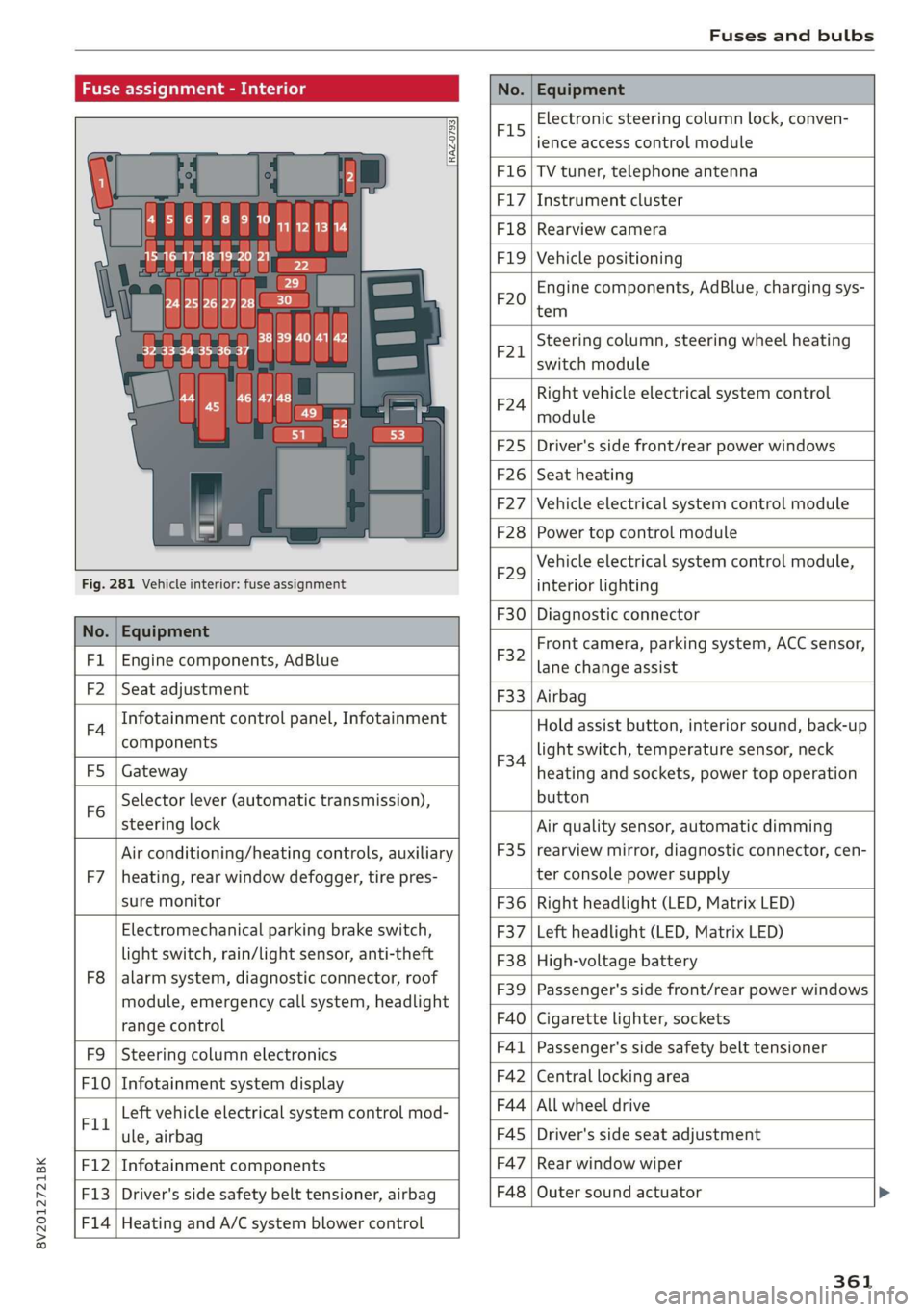
Fuse assignment - Interior
No. Equipment
RAZ-0793,
PO ee
15°16°17-18 19 20 21
PZ ply lip y ips}
ei Hes ole” So}
32°33 34 35 36 37
F15
Electronic steering column lock, conven-
ience access control module
F16 TV tuner, telephone antenna
F17 Instrument cluster
F18 Rearview camera
F1I9 Vehicle positioning
F20
Engine components, AdBlue, charging sys-
tem
F221
Steering column, steering wheel heating
switch module
F24
Right vehicle electrical system control
module
F25 Driver's side front/rear power windows
F26 Seat heating
F27 Vehicle electrical system control module
F28 Power top control module
Fig. 281 Vehicle interior: fuse assignment
F29
Vehicle electrical system control module,
interior lighting
No. Equipment
F30 Diagnostic connector
FL Engine components, AdBlue
F2 Seat adjustment
F32
Front camera, parking system, ACC sensor,
lane change assist
F4
Infotainment control panel, Infotainment
components
F33 Airbag
FS Gateway
Fo
Selector lever (automatic transmission),
steering lock
F34
Hold assist button, interior sound, back-up
light switch, temperature sensor, neck
heating and sockets, power top operation
button
Air conditioning/heating controls, auxiliary F35
Air quality sensor, automatic dimming
rearview mirror, diagnostic connector, cen-
F7 |heating, rear window defogger, tire pres- ter console power supply
sure monitor F36 | Right headlight (LED, Matrix LED)
Electromechanical parking brake switch, F37 | Left headlight (LED, Matrix LED)
light switch, rain/light sensor, anti-theft F38 | High-voltage battery
ae ene eee dent F39 | Passenger's side front/rear power windows
range control F40 | Cigarette lighter, sockets
F9 |Steering column electronics F41 | Passenger's side safety belt tensioner
F10 | Infotainment system display F42 | Central locking area
Tl Left vehicle electrical system control mod- F44 al ee
ule, airbag FAS | Driver's side seat adjustment
F12 | Infotainment components F47 | Rear window wiper
F13 | Driver's side safety belt tensioner, airbag F48 | Outer sound actuator
F14 | Heating and A/C system blower control
361