steering wheel AUDI A3 2020 Owner´s Manual
[x] Cancel search | Manufacturer: AUDI, Model Year: 2020, Model line: A3, Model: AUDI A3 2020Pages: 400, PDF Size: 107.47 MB
Page 82 of 400

Driving
If you need to brake additionally, brake in
intervals and not continuously.
nce md Cua SEN
Applies to: vehicles with plug-in hybrid drive
B8V-0675
Fig. 89 Instrument cluster: energy flow display
An energy flow display can be shown in the in-
strument cluster display/Infotainment system )).
The image is animated in the Infotainment sys-
tem).
Display of energy flow indicator in the
instrument cluster display
> Open the first Vehicle tab (trip computer) using
the [<>] button on the multifunction steering
wheel.
> Applies to: vehicles with Audi virtual cockpit:
Select on the multifunction steering wheel: left
control button > Energy flow.
Comfort
Auto
DES
Biante
Fig. 90 Infotainment system*: energy flow display
> Applies to: vehicles with analog instrument
cluster: Open the Energy flow indicator by
turning the left thumbwheel on the multifunc-
tion steering wheel.
Image in the Infotainment display”)
> In the Infotainment system, select: [MENU
button > Vehicle > left control button > Audi
drive select.
Component Color Meaning
@ Gasoline engine Orange The gasoline engine is running
Gray The gasoline engine is off
@ High-voltage battery Green High-voltage battery charge level
Green The high-voltage battery is charging
(animated in the
Infotainment sys-
tem?)
Gray
The vehicle is not in drive ready mode >
))_ Not available in all Infotainment systems.
80
Page 93 of 400
8V2012721BK
Driving dynamic
Driving dynamic
Audi drive select
Introduction
Applies to: vehicles with Audi drive select
Drive select makes it possible to experience dif-
ferent types of vehicle characteristics in one vehi-
cle. With different driving modes, the driver can
switch the setting, for example from sporty to
comfortable. This allows you to adjust the set-
tings to your personal preferences. This makes it
possible to combine settings such as a sporty
drivetrain setting with comfortable steering.
Selecting an Audi drive select mode
Applies to: vehicles with Audi drive select
The ssise button is located above the selector lever
in the center console.
> Press the sis@ button repeatedly until the de-
sired mode appears in the instrument cluster or
center display, or:
> In the Infotainment system, select: [MENU
button > Vehicle > left control button > Audi
drive select.
You can change the driving mode when the vehi-
cle is stationary or while driving. If traffic per-
mits, briefly remove your foot from the accelera-
tor pedal after changing modes so that the mode
you have selected will be activated for the drive
system.
The following modes may be available depending
on the equipment:
comfort - Provides a comfort-oriented vehicle
setup and is suited for long drives on highways.
auto - Provides an overall comfortable yet dy-
namic driving feel and is suited for everyday use.
dynamic - Gives the driver a sporty driving feel
and is suited to a sporty driving style.
individual - Provides the option for personalized
vehicle settings > page 91.
@) Tips
When the ignition is being switched on, indi-
vidual systems, such as the drive system, will
be reset to a balanced setting. Select the cur-
rent mode again to attain its full configura-
tion.
Adjusting the “individual” mode
> Select in the Infotainment system: [MENU] but-
ton > Vehicle > Audi drive select> Individual >
right control button.
The equipment in your vehicle will determine
which settings you can adjust.
Engine/transmission
The drive system will react to accelerator pedal
moves more quickly or in a more balanced man-
ner. The shift points are Located in higher or low-
er engine speed ranges on vehicles with automat-
ic transmissions.
Steering
The power steering will adapt. Light steering is
suitable for long trips on highways or smooth
driving around curves, for example.
quattro
The all wheel drive system controls balanced to
sporty profiles.
Engine sound
The engine sound adapts and can be subtle to
sporty.
ACC
The driving behavior of the adaptive cruise con-
trol adjusts based on the acceleration and reac-
tion to vehicles driving ahead.
Suspension control
The suspension adjusts to be tighter or more
comfort-oriented when it comes to compensat-
ing for uneven spots on the road.
91
Page 94 of 400

Driving dynamic
Suspension
CET NRC Ld
Applies to: vehicles with suspension control
The adaptive dampers are an electronically-con-
trolled damping system. The firmness of the sus-
pension will adapt to the driving conditions and
the driving situation. The settings are dependent
on the selected Audi drive select* mode.
Ground clearance
The vehicle height and clearance can be influ-
enced by the following factors:
— Change in temperature
— Change in load
Z\ WARNING
To reduce the risk of injury, make sure no one
gets pinched when the vehicle level is chang-
ing, for example when cleaning the under-
body or the wheel housings.
@) Note
Always make sure there is enough clearance
above and below the vehicle. This is especially
important for entrances with height restric-
tions, for example, before driving into under-
ground garages. You could also scrape the
ground when driving over the edges of curbs
or on steep ramps, which could damage your
vehicle.
EET
| 8 | Suspension: malfunction! You can continue
driving
There is a malfunction. See an authorized Audi
dealer or authorized Audi Service Facility for as-
sistance.
Steering
Electromechanical steering supports the driver's
steering movements by electronically adapting
the power steering depending on the vehicle
92
speed. The settings are dependent on the select-
ed Audi drive select* mode.
Progressive steering
Applies to: vehicles with progressive steering
The driving dynamic and driving stability are in-
creased by the steering ratio based on the steer-
ing wheel angle. The steering is very direct when
the steering wheel angle is sharp, and indirect
when the angle is low. This enables comfortable
maneuvering and a precise steering response at
higher driving speeds.
Messages
a Steering: malfunction! Please stop vehicle
The power steering may have failed. Adapt your
driving style immediately to compensate for the
fact that it may be more difficult to turn the
steering wheel, and stop your vehicle in a safe lo-
cation as soon as possible. Do not continue driv-
ing. See an authorized Audi dealer or authorized
Audi Service Facility for assistance.
|2—| Steering: malfunction! Please stop vehicle
There is a malfunction in the electronic steering
lock. You cannot turn the ignition on. Do not tow
your vehicle because it cannot be steered. See an
authorized Audi dealer or authorized Audi Service
Facility for assistance.
a Steering: malfunction! You can continue
driving
There is a malfunction. Steering may be more dif-
ficult or more sensitive. Adapt your driving style.
Have the steering system checked immediately
by an authorized Audi dealer or authorized Audi
Service Facility. Please note that the red indicator
light may turn on after restarting the engine. Do
not continue driving if it does.
& Steering lock: malfunction! Please contact
Service
There is a malfunction in the electronic steering
lock. Drive immediately to an authorized Audi
dealer or authorized Audi Service Facility to have
the malfunction repaired.
Page 95 of 400
8V2012721BK
Driving dynamic
ZA\ WARNING
Do not tow your vehicle if there is a malfunc-
tion in the electronic steering lock because
this increases the risk of an accident.
@) Tips
If the & or El indicator light only stays on
for a short time, then you may continue driv-
ing.
ALL wheel drive (quattro)
Applies to: vehicles with all wheel drive
The all-wheel drive system distributes the driving
power variably to the front and rear axle to im-
prove the driving characteristics. It works togeth-
er with selective wheel torque control, which can
activate when driving around curves > page 94.
The all-wheel drive system is designed for high
engine power. Your vehicle is exceptionally pow-
erful and has excellent driving characteristics
both under normal driving conditions and on
snow and ice. Always read and follow safety pre-
cautions > A\.
Z\ WARNING
— Even in vehicles with all wheel drive, you
should adapt your driving style to the cur-
rent road and traffic conditions to reduce
the risk of an accident.
— The braking ability of your vehicle is limited
to the traction of the wheels. In this way, it
is not different from a two wheel drive vehi-
cle. Do not drive too fast because this in-
creases the risk of an accident.
— Note that on wet streets, the front wheels
can “hydroplane’” if driving at speeds that
are too high. Unlike front wheel drive
vehicles, the engine RPM does not increase
suddenly when the vehicle begins hydro-
planing. Adapt your speed to the road condi-
tions to reduce the risk of an accident.
Electronic Stabilization
Control
Electronic Stabilization Control (ESC) supports
driver safety. It reduces the risk of slipping and
improves driving stability. ESC detects critical sit-
uations, such as if the vehicle is oversteering or
understeering, or if the wheels are spinning. The
brakes are applied or the engine torque is re-
duced in order to stabilize the vehicle.
If the I indicator light blinks while driving, the
ESC is actively regulating.
If the BB indicator light turns on, the system has
switched the ESC off. In this case, you can switch
the ignition off and then on to switch the ESC on
again. The indicator light turns off when the sys-
tem is fully functional.
If the BB indicator light turns on, ESC was limit-
ed or switched off manually > page 94.
The following systems are integrated in the ESC:
Anti-lock braking system (ABS)
ABS prevents the wheels from locking when brak-
ing. The vehicle can still be steered even during
hard braking. Apply steady pressure to the brake
pedal. Do not pump the pedal. A pulsing in the
brake pedal indicates that the system is acting to
stabilize the vehicle.
Brake assist
The brake assist system can decrease braking dis-
tance. It increases braking power when the driver
presses the brake pedal quickly in emergency sit-
uations. You must press and hold the brake pedal
until the dangerous situation is over. Depending
on the activated driver assistance systems, the
brake assist system may react with increased sen-
sitivity.
Anti-Slip Regulation (ASR)
ASR reduces drive power when the wheels begin
spinning and adapts the power to the road condi-
tions. This will increase the driving stability.
93
Page 96 of 400
Driving dynamic
Electronic Differential Lock (EDL)
The EDL applies the brakes to wheels that are
slipping and transfers the drive power to the oth-
er wheels. This function is not available at higher
speeds.
In extreme cases, EDL automatically switches off
to keep the brake on the braked wheel from over-
heating. The vehicle is still functioning correctly.
EDL will switch on again automatically when con-
ditions have returned to normal.
Power steering
The ESC can also support vehicle stability
through steering.
Selective wheel torque control
Selective wheel torque control is used when driv-
ing on curves. Braking is targeted toward the
wheels on the inside of the curve as needed. This
allows more precise driving in curves.
Automatic post-collision braking system
The automatic post-collision braking system can
help to reduce the risk of sliding and of addition-
al collisions after an accident. If the airbag con-
trol module detects a collision, the vehicle is
braked by the ESC.
The vehicle does not brake automatically if one of
the following occurs:
— The driver presses the accelerator pedal, or
— The braking force generated by the pressed
brake pedal is greater than the braking force
that
would be initiated by the system
— The ESC, the brake system, or the vehicle elec-
trical system is not functioning
ing risks. This could increase your risk of a
collision.
— Please note the risk of a collision increases
when driving fast, especially through curves
and on slippery or wet roads, and when driv-
ing too close to objects ahead. There is still
a risk of accidents because the ESC and its
integrated systems cannot always prevent
collisions.
— Accelerate carefully when driving on
smooth, slippery surfaces such as ice and
snow. The drive wheels can spin even when
these control systems are installed and this
can affect driving stability and increase the
risk of a collision.
ZA\ WARNING
— The ESC and its integrated systems cannot
overcome the limits imposed by natural
physical laws. This is especially important on
slippery or wet roads. If the systems begin
acting to stabilize your vehicle, you should
immediately alter your speed to match the
road and traffic conditions. Do not let the in-
creased safety provided tempt you into tak-
94
G) Tips
— The ABS and ASR only function correctly
when all four wheels have a similar wear
condition. Different tire sizes can lead toa
reduction in engine power.
— You may hear noises when the systems de-
scribed are working.
The 0 button is located above the selector lev-
er in the center console.
The ESC is automatically switched on when the
ignition is switched on. It may make sense in
some situations to limit the ESC so that the
wheels can spin:
— Rocking the vehicle to free it when it is stuck
— Driving in deep snow, on unpaved ground, or
with snow chains
Limiting ESC (sport mode)
—To limit the ESD, press the 0 button briefly.
The B indicator light turns on.
— To completely reactivate the ESC stabilization
function, press the button again. The indicator
light turns off.
Switching off ESC
—To switch off the ESC, press and hold the oF
button for more than three seconds. The B
and Ea indicator lights turn on.
Page 119 of 400

8V2012721BK
Assist systems
Switching the system off
Applies to: vehicles with cruise control system
When you switch the system off completely, the
cruise control speed will be deleted.
Requirement: the system must be switched on.
> To switch the system off, press the lever toward
@ (locked into place) > page 116, fig. 107, or
> Switch the ignition off.
Applies to: vehicles with cruise control system
ICRUISE| / 3) Speed control system: currently un-
available. See owner's manual
If the indicator light turns on and this message
appears, the cruise control system has been deac-
tivated. There is a temporary malfunction, for ex-
ample the brakes are overheating. Switch the
cruise control system on again later.
Lap timer
Applies to: vehicles with lap timer
You can measure and analyze lap times with the
lap timer in the display.
Opening the lap timer
> Open the first Vehicle tab (trip computer) using
the |<>] button on the multifunction steering
wheel.
> Applies to: vehicles with analog instrument
cluster: Press the [=] button on the multifunc-
tion steering wheel and select Lap timer in the
menu.
> Applies to: vehicles with Audi virtual cockpit:
On the multifunction steering wheel, select:
left control button > Lap times.
Operating the lap timer
> On the multifunction steering wheel, turn the
left thumbwheel @) > page 17 or @ > page 20
until the desired menu item is displayed in the
instrument cluster.
> Press the left thumbwheel to confirm the selec-
tion.
ZX WARNING
Your focus should always be on driving your
vehicle safely. As the driver, you have com-
plete responsibility for safety in traffic. Only
use the functions such as the lap timer in such
a way that you always maintain complete con-
trol over your vehicle in all traffic situations.
(i) Tips
You can retrieve information from the trip
computer while the lap timer stopwatch is
running.
times and timing
Applies to: vehicles with lap timer
Requirement: the lap timer must be open
=> page 117.
Timing laps
> To start timing, select Lap 1 - press OK or Start
lap 1 in the menu.
> Applies to: vehicles with Audi virtual cockpit: To
start timing automatically when you start driv-
ing, select Start lap 1 by driving off or Start by
driving off in the menu.
> To measure the lap time, select New lap - press
OK or New lap in the menu. This starts timing
the next lap at the same time.
After completing, the difference between the last
lap and the previous best lap time will be indicat-
ed witha “—"@ or “"/.
Pausing timing and displaying a split time
> To insert a pause i select Pause in the menu.
> To continue timing, select Press OK to resume
or Resume in the menu.
> To display a split time, select Split time in the
menu. The split time {@] appears for approxi-
mately 10 seconds in the instrument cluster.
The timing of the current lap continues.
Resetting timing
> Using the multifunction steering wheel, select
Reset or Reset times in the menu. >
117
Page 120 of 400
Assist systems
—A maximum of 30 lap times (analog instru-
ment cluster) or 99 lap times (Audi virtual
cockpit*) can be measured.
— If timing is paused, you can continue it later
even if you switch the ignition off.
— Saved lap times cannot be individually de-
leted from the total results.
— The saved lap timer values will remain after
switching the ignition off.
Lap statistics
Applies to: vehicles with lap timer
Tips
Displaying lap statistics
You can display the number of laps driven, the
fastest lap “+”, the slowest lap “—”, and the aver-
age time “®” in the instrument cluster.
> Applies to: vehicles with analog instrument
cluster: Select Statistics in the menu using the
multifunction steering wheel.
» Applies to: vehicles with Audi virtual cockpit:
On the multifunction steering wheel, select:
left control button > Lap statistics or Statis-
tics.
> Turn the thumbwheel down or up to display the
individual lap times.
> To return to the lap timing that was begun,
press the left thumbwheel.
Resetting lap statistics
Applies to: vehicles with Audi virtual cockpit
> On the multifunction steering wheel, select:
the right control button > Reset statistics.
— The lap statistics list the lap times for the
last 30 laps.
— Applies to: vehicles with Audi virtual cock-
pit: The fastest and slowest lap times from
up to 99 timed laps will be displayed.
118
Audi adaptive cruise
control
Applies to: vehicles with Audi adaptive cruise control
B8V-0126
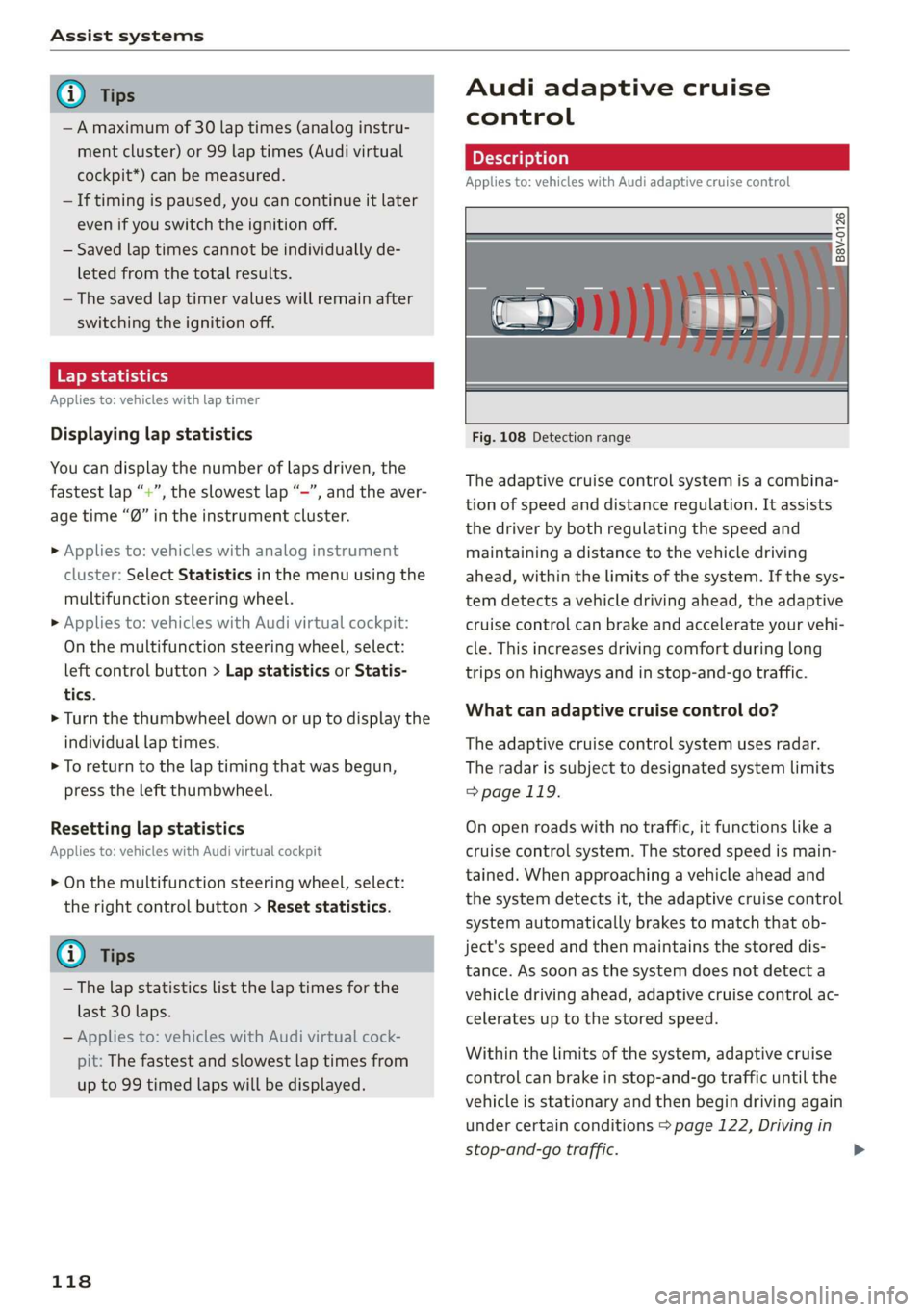
Fig. 108 Detection range
The adaptive cruise control system is a combina-
tion of speed and distance regulation. It assists
the driver by both regulating the speed and
maintaining a distance to the vehicle driving
ahead, within the limits of the system. If the sys-
tem detects a vehicle driving ahead, the adaptive
cruise control can brake and accelerate your vehi-
cle. This increases driving comfort during long
trips on highways and in stop-and-go traffic.
What can adaptive cruise control do?
The adaptive cruise control system uses radar.
The radar is subject to designated system limits
=> page 119.
On open roads with no traffic, it functions like a
cruise control system. The stored speed is main-
tained. When approaching a vehicle ahead and
the system detects it, the adaptive cruise control
system automatically brakes to match that ob-
ject's speed and then maintains the stored dis-
tance. As soon as the system does not detect a
vehicle driving ahead, adaptive cruise control ac-
celerates up to the stored speed.
Within the limits of the system, adaptive cruise
control can brake in stop-and-go traffic until the
vehicle is stationary and then begin driving again
under certain conditions > page 122, Driving in
stop-and-go traffic.
Page 123 of 400
8V2012721BK
Assist systems
@® Indicator lights
B - Adaptive cruise control must be switched
on. No vehicles are detected ahead. The stored
speed is maintained.
B - Avehicle driving ahead was detected. The
adaptive cruise control system regulates the
speed and distance to the vehicle ahead and
brakes/accelerates automatically.
B - Adaptive cruise control must be switched
on. A vehicle was detected ahead. Your vehicle re-
mains stopped and will not start driving auto-
matically.
B - The automatic braking is not enough to
maintain a sufficient distance to a vehicle driving
ahead. You must intervene > page 124, Driver in-
tervention request.
@ Instrument cluster display
If adaptive cruise control is not shown in the in-
strument cluster display, you can call it up using
the multifunction steering wheel buttons
=> page 17.
Based on the graphics in the display, you can de-
termine if the system is maintaining a distance to
a vehicle ahead and what that distance to this ve-
hicle is:
No vehicle - No vehicle was detected driving
ahead.
Silver vehicle - A vehicle was detected driving
ahead.
Red vehicle - Request for driver intervention
=> page 124.
The five distance bars on the gauge (4) represent
the set distance (refer to > page 123 for infor-
mation on how to change the distance). If you
fall below the selected distance, the distance
bars become red from the bottom upward.
ZA\ WARNING
If you press the [SET] button when driving at
speeds below 20 mph (30 km/h), the vehicle
accelerates automatically up to 20 mph (30
km/h), which is the minimum speed that can
be set.
@) Tips
— If you switch the ignition or the adaptive
cruise control system off, the set speed is
erased for safety reasons.
— The Electronic Stabilization Control (ESC)
and the Anti-Slip-Regulation (ASR) are auto-
matically switched on when the adaptive
cruise control is switched on.
Changing the speed
Applies to: vehicles with Audi adaptive cruise control
[RAZ-0344
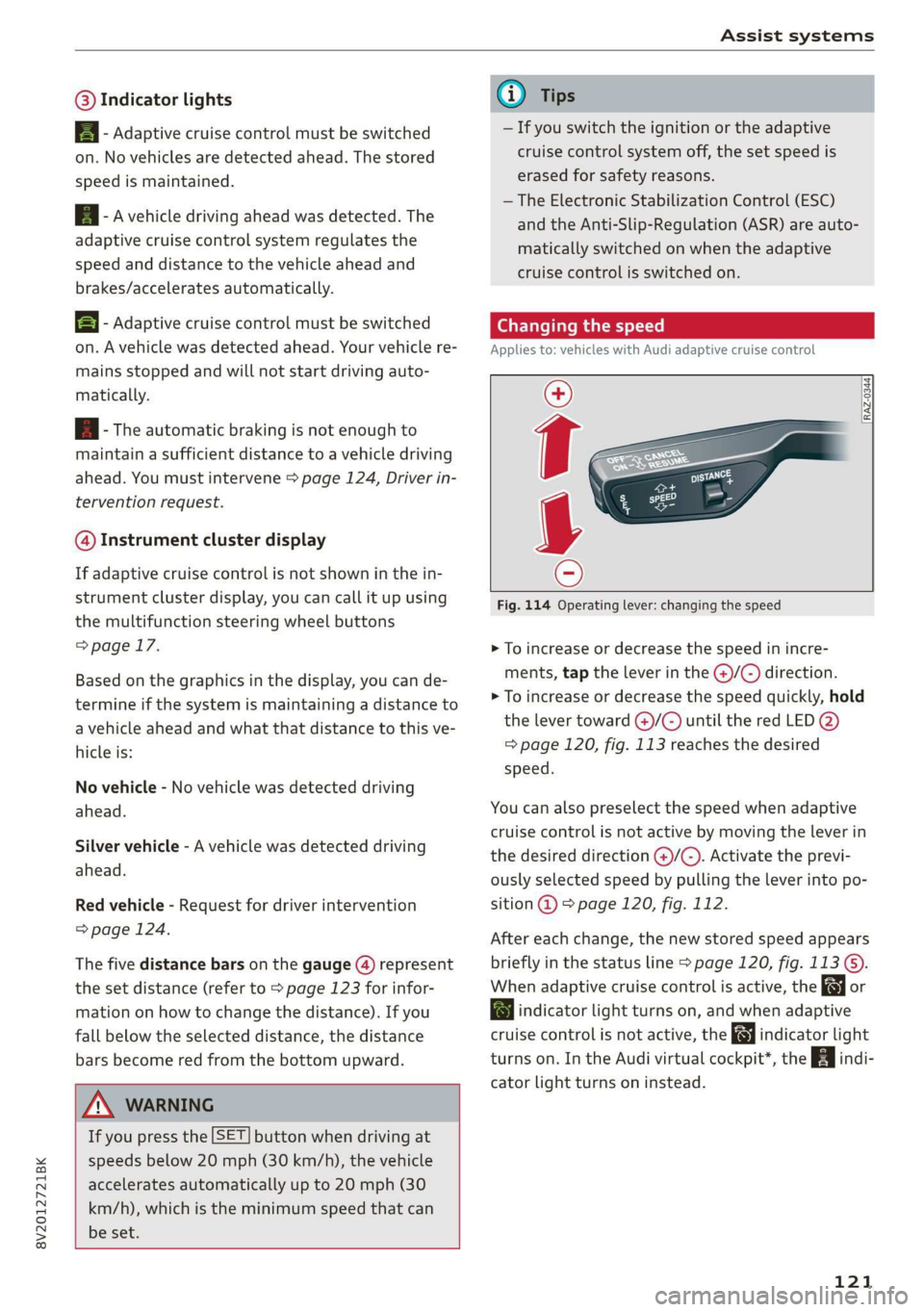
Fig. 114 Operating lever: changing the speed
> To increase or decrease the speed in incre-
ments, tap the lever in the @/G) direction.
> To increase or decrease the speed quickly, hold
the lever toward )/G) until the red LED @)
=> page 120, fig. 113 reaches the desired
speed.
You can also preselect the speed when adaptive
cruise control is not active by moving the lever in
the desired direction @)/©). Activate the previ-
ously selected speed by pulling the lever into po-
sition @ > page 120, fig. 112.
After each change, the new stored speed appears
briefly in the status line > page 120, fig. 113 ©.
When adaptive cruise control is active, the or
a indicator light turns on, and when adaptive
cruise control is not active, the gy indicator light
turns on. In the Audi virtual cockpit*, the indi-
cator light turns on instead.
121
Page 130 of 400
![AUDI A3 2020 Owner´s Manual Assist systems
Settings in the Infotainment system
Applies to: vehicles with Audi pre sense
> Select in the Infotainment system: [MENU] but-
ton > Vehicle > left control button > Driver](/img/6/40265/w960_40265-129.png "AUDI A3 2020 Owner´s Manual Assist systems
Settings in the Infotainment system
Applies to: vehicles with Audi pre sense
> Select in the Infotainment system: [MENU] but-
ton > Vehicle > left control button > Driver")
Assist systems
Settings in the Infotainment system
Applies to: vehicles with Audi pre sense
> Select in the Infotainment system: [MENU] but-
ton > Vehicle > left control button > Driver as-
sistance > Audi pre sense.
System - The pre sense functions can be switched
on and off.
If the system is switched off, it switches on again
automatically once the ignition is switched on
again.
Prewarning - The early warning can be switched
off permanently or the pre sense front warning
point can be set (Early/Medium/Late).
Set the warning time for the early warning to
Early at first. If this causes undesired early warn-
ings to appear, then set the warning time to Me-
dium. The Late warning time should only be set
in special circumstances.
@ Tips
If the system is switched off, it switches on
again automatically once the ignition is
switched on again.
Messages
Applies to: vehicles with Audi pre sense
& Audi pre sense: malfunction! Please contact
Service
This message appears when the pre sense func-
tion
is affected. For example, this could be
caused by a faulty sensor. If the message stays
on, drive immediately to an authorized Audi deal-
er or authorized Audi Service Facility to have the
malfunction corrected.
Audi pre sense: currently limited. Sensor
view limited due to surroundings.
This message appears if the sensor view is ob-
structed, for example by leaves, snow, heavy
spray or dirt. Clean the sensor if necessary
=> page 119, fig. 109.
Audi pre sense: currently limited
This message appears if the ESC is restricted or
switched off, for example.
128
udi pre sense: currently limited. See own-
er's manual
This message appears when there is a temporary
failure in a subsystem, such as the ESC. If this
message appears repeatedly, drive to an author-
ized Audi dealer or authorized Audi Service Facili-
ty to have the malfunction corrected.
Audi pre sense: emergency braking system
off
This message appears if the pre sense functions
are switched off through the Infotainment sys-
tem or if the system is not ready.
Audi active lane assist
Applies to: vehicles with Audi active lane assist
Active lane assist (lane departure warning) de-
tects lane marker lines within the limits of the
system using a camera in the windshield. If you
are approaching a detected lane marker line and
it appears likely that you will leave the lane, the
system will warn you with corrective steering.
You can override this steering at any time. If you
pass over a line, the steering wheel will vibrate
lightly. In order for this warning vibration to oc-
cur, it must first be switched on in the Infotain-
ment system. Active lane assist is ready for oper-
ation when the lane marker line is detected on at
least one side of the vehicle.
The system is designed for driving on express-
ways and highways and therefore only activates
at speeds above approximately 40 mph (65
km/h).
Applies to: vehicles with Audi side assist
If you activate a turn signal when active lane as-
sist is ready and it classifies a lane change as crit-
ical because of vehicles traveling alongside you or
approaching you, there will be noticeable correc-
tive steering shortly before you leave the lane.
This will attempt to keep your vehicle in the lane.
Applies to: vehicles without Audi side assist
The system will not warn you before crossing a
lane marker line if you have activated the turn >
Page 131 of 400

8V2012721BK
Assist systems
signal. In this case, it assumes that you are
changing lanes intentionally.
Z\ WARNING
— The system warns the driver that the vehicle
is leaving the lane using corrective steering.
The driver is always responsible for keeping
the vehicle within the lane.
— The system can help you keep the vehicle in
the lane, but it does not drive by itself. Al-
ways keep your hands on the steering wheel.
— Corrective steering may not occur in certain
situations, such as during heavy braking.
— There may be cases where the camera does
not recognize all lane marker lines. Correc-
tive steering can only take place on the side
of the vehicle where lane marker lines are
detected.
— Other road structures or objects could possi-
bly be identified unintentionally as lane
marker lines. As a result, corrective steering
may be unexpected or may not occur.
— The camera view can be restricted, for exam-
ple by vehicles driving ahead or by rain,
snow, heavy spray light shining into the
camera or by dirt on the window. This can
result in active lane assist not detecting the
lane marker lines or detecting them incor-
rectly.
— Under certain conditions such as ruts in the
road, an inclined roadway or crosswinds, the
corrective steering alone may not be enough
to keep the vehicle in the middle of the lane.
— For safety reasons, active lane assist must
not be used when there are poor road and/or
weather conditions such as slippery roads,
fog, gravel, heavy rain, snow and the poten-
tial for hydroplaning. Using active lane as-
sist under these conditions may increase the
risk of a crash.
SY iicealiaremelilie Rela
Applies to: vehicles with Audi active lane assist
B4M-0064|
Fig. 121 Turn signal lever: switching Active lane assist on
and off (example)
B4M-0090
Fig. 122 Windshield: camera window for active lane assist
> Press the button to switch the system on and
off > fig. 121. The indicator light in the instru-
ment cluster turns on or off.
129