phone AUDI A3 2020 Owner´s Manual
[x] Cancel search | Manufacturer: AUDI, Model Year: 2020, Model line: A3, Model: AUDI A3 2020Pages: 400, PDF Size: 107.47 MB
Page 209 of 400
![AUDI A3 2020 Owner´s Manual 8V2012721BK
Radio
Radio functions
etme) aati]
Applies to: vehicles with free text search
aa ea
WIBI-FM HD4
aaa ele}
Fig. 183 Infotainment system: input field and results list
for free](/img/6/40265/w960_40265-208.png "AUDI A3 2020 Owner´s Manual 8V2012721BK
Radio
Radio functions
etme) aati]
Applies to: vehicles with free text search
aa ea
WIBI-FM HD4
aaa ele}
Fig. 183 Infotainment system: input field and results list
for free")
8V2012721BK
Radio
Radio functions
etme) aati]
Applies to: vehicles with free text search
aa ea
WIBI-FM HD4
aaa ele}
Fig. 183 Infotainment system: input field and results list
for free text search
Using the free text search, you can select the or-
der that the search terms are entered in the input
field. Search in all frequency bands for a station
name or program type, such as News.
— Opening the free text search: when in a station
list, keep turning the control knob to the left
until the free text search input field is dis-
played.
— Using the free text search: see > page 154,
Free text search.
You can also search for frequencies.
Stations from the presets () are displayed in the
results list @ 9 fig. 183. The symbol @) indicates
which station list you switched to based on the
station selection.
Additional options
>» Select: [RADIO] button > right control button.
The following options are available depending on
the frequency band:
— Sound settings: see > page 234.
— Store as preset: see > page 209, Presets.
— Tag this song for iTunes*: connect your Apple
device to the Audi music interface* on your
MMI. Select and confirm Tag this song for
iTunes. The track that is currently playing is
stored on your Apple device. Synchronize your
Apple device with iTunes. The tagged track will
display the next time you open your iTunes me-
dia center. If there is no Apple device connect-
ed, the tagged tracks are stored temporarily in
the MMI (maximum of 50 tracks). Once you
connect your Apple device to the Audi music in-
terface, the tags are stored on the device.
— Manage SiriusXM alerts: see > page 208, Sir-
iusXM alerts.
— Store artist as favorite/Store track as favorite:
see > page 208, SiriusXM alerts.
— Manual tuning: the frequency bars are dis-
played. Select and confirm the desired frequen-
ry.
— Seek: the radio tunes to the previous or next re-
ceivable station.
— Scan: all stations are played for several seconds
each.
— Radio settings: see > page 209.
> Select: [RADIO] button > left control button >a
frequency band (such as FM) > a station.
> Select: right control button > Radio text.
Information that accompanies the program (such
as artist, composer, track) is displayed.
Browsing through radio text entries: turn the
control knob to the left or right.
Requirement: a radio text entry must be dis-
played and the station must be broadcasting a
phone number, a navigation destination or a text
message number as Radio Text Plus information.
If a location, a phone number or a text message
number is included with a radio text entry, the ra-
dio text will be shown with a colored border. You
have the following options:
Call*/Start route guidance*/Write text mes-
sage*:
— Select a radio text entry with Radio Text Plus in-
formation and press the control knob.
— Select and confirm Call*/Start route guid-
ance*/Write text message*. Press the [BACK
button to cancel.
(i) Tips
The availability of radio text and RadioText
Plus depends on the radio station.
207
Page 216 of 400
Media
— The status of the deleting process is shown in
the MMI. Jukebox playback stops during the de-
leting process and starts again automatically
once the deletion is complete.
@) Note
Do not import audio/video files when the en-
gine is turned off because this will drain the
vehicle battery.
@ Tips
— Tracks from audio CDs cannot be imported
to the Jukebox for legal reasons.
— Files that have already been imported are
automatically recognized and cannot be
copied to the Jukebox again.
— It is not possible to play audio/video* files
in the CD/DVD* drive while importing them.
— The Jukebox does not provide an export
function due to legal reasons.
— Files or tracks without additional stored in-
formation are listed as Unknown. Audi rec-
ommends adding additional information
(such as ID3 tags) to audio files.
— Reset the Jukebox to the factory default set-
tings when selling your vehicle > page 231.
Bluetooth audio player
Applies to: vehicles with Bluetooth audio player
With the Bluetooth audio player, you can play
music wirelessly from your Bluetooth-capable de-
vice (such as a cell phone) through the MMI.
Requirement: the vehicle must be stationary and
the ignition must be switched on. The Bluetooth
settings will open on your mobile device during
the connection setup. The Bluetooth function and
visibility of the MMI S page 233 and mobile de-
vice must be switched on. The Bluetooth audio
player > page 233 must be switched on in the
MMI.
— Connecting a Bluetooth device: press the
[MEDIA] button. Press the left control button
until the sources overview is displayed. Select
and confirm Bluetooth audio player @)
=> page 219, fig. 192.
214
— If necessary, select and confirm Not connected
> Connect Bluetooth audio player. The Blue-
tooth device search starts. Follow the instruc-
tions in the MMI.
— Select and confirm the desired Bluetooth device
from the list. The MMI generates a PIN for the
connection.
— Select and confirm Yes.
— Enter the PIN for connecting on your Bluetooth
device, or if the PIN is already displayed on your
Bluetooth device, confirm it on the Bluetooth
device. The time allowed for entering the PIN is
limited to approximately 30 seconds.
The media is started and operated through the
mobile device or the MMI, depending on the de-
vice being used.
G) Tips
— Check for any connection requests on your
Bluetooth device.
— Multiple Bluetooth audio players can be
connected to the MMI, but only one mobile
device can be active.
— Bluetooth protocols AVRCP (1.0/1.3/1.4)
and A2DP are supported.
— Note the volume setting on your Bluetooth
device. Audi recommends setting your mo-
bile device to the maximum volume when
using it as a Bluetooth audio player.
— The supported media functions (such as
shuffle) depend on the Bluetooth device be-
ing used.
—Aselection of supported Bluetooth devices
can be found in the database for tested mo-
bile devices at www.audi.com/bluetooth.
Wi-Fi audio player
Applies to: vehicles with Wi-Fi audio player
Using the Wi-Fi audio player media source on the
MMI, you can connect and operate your Wi-Fi-ca-
pable media player (such as a smartphone) to
wirelessly play music from your media player Li-
brary. The media player is connected through the
vehicle's Wi-Fi hotspot. A UPnP Server app or an
integrated UPnP/DLNA server on your media
player is required to access your media player Li-
brary.
Page 217 of 400

8V2012721BK
Media
Requirement: the Wi-Fi function on your media
player must be switched on. The myAudi app or a
UPnP server app is installed on your media play-
er, or your media player has an integrated UPnP/
DLNA server.
— Connecting a media player: press the [MEDIA
button. Press the left control button until the
sources overview > page 219 is displayed. Se-
lect and confirm Wi-Fi audio player 7)
=> page 219, fig. 192.
— If necessary, select and confirm Wi-Fi turned
off > Turn on Wi-Fi to activate Wi-Fi in the
MMI. Select Wi-Fi settings, if necessary. Select
the same settings on the wireless media player
that are used for the Wi-Fi hotspot.
— Starting the Wi-Fi audio player: start the
myAudi app or a UPnP server app, or set media
permissions on your media player.
Operating the media player: the media player is
operated through the MMI.
— Press the left control button repeatedly until
the Folders menu item appears. Select and con-
firm
Folders.
— Playing music from the media player: select
and confirm Media center.
Web radio: see > page 215.
ZA\ WARNING
— As the driver, do not allow usage of the Wi-
Fi hotspot to distract you from driving, as
this could increase the risk of an accident.
—To reduce the risk of an accident, only use
Audi connect services and the Wi-Fi hotspot
only if the traffic situation permits it. Read
and follow the guidelines provided in
=> page 146, Traffic safety information.
— It is only safe to use tablets, laptops, mobile
devices and other similar devices when the
vehicle is stationary because, like all loose
objects, they could be thrown around the in-
side of the vehicle in a crash and cause seri-
ous injuries. Store these types of devices se-
curely while driving. Also read the warnings
in the chapter > page 257, Front airbags.
CG) Note
Always follow the information found in >@ in
General information on page 182.
@) Tips
— Always read the chapter > page 182, Audi
connect.
— Please note that a Wi-Fi connection does
not automatically make it possible to use
the Internet. For additional information,
see > page 182.
—To avoid interruptions during playback, de-
activate the power saving function on the
media player or connect it to a charger.
—The loading times for the audio data depend
on the media player used and the number of
files
that it contains.
—A maximum of 2,000 entries per directory
are displayed in the MMI.
— Songs downloaded for offline use using mu-
sic streaming services are stored on your
mobile device (such as a smartphone) and
may be DRM protected. The Wi-Fi audio
player will not play DRM protected files.
— Contact an authorized Audi dealer or au-
thorized Audi Service Facility for additional
information on the Wi-Fi audio player.
Online media and
Internet radio
Applies to: vehicles with Audi connect Infotainment
sh
Fig. 189 Infotainment system: online media
You can playback and operate various online me-
dia services and Internet radio using the MMI.
> Press the [MEDIA] button. Press the left control
button until the sources overview > fig. 189 is
displayed.
215
>
Page 219 of 400
8V2012721BK
Media
— Depending on the mobile device being used,
there may be interruptions during media
playback and when using the myAudi app.
To prevent interruptions when using a mo-
bile device, do not lock the screen on your
mobile device and keep the myAudi app in
the foreground.
— Contact an authorized Audi dealer or au-
thorized Audi Service Facility for additional
information about online media.
Multimedia connections
USB adapter for Audi music interface
oe ®
S2
<&
7
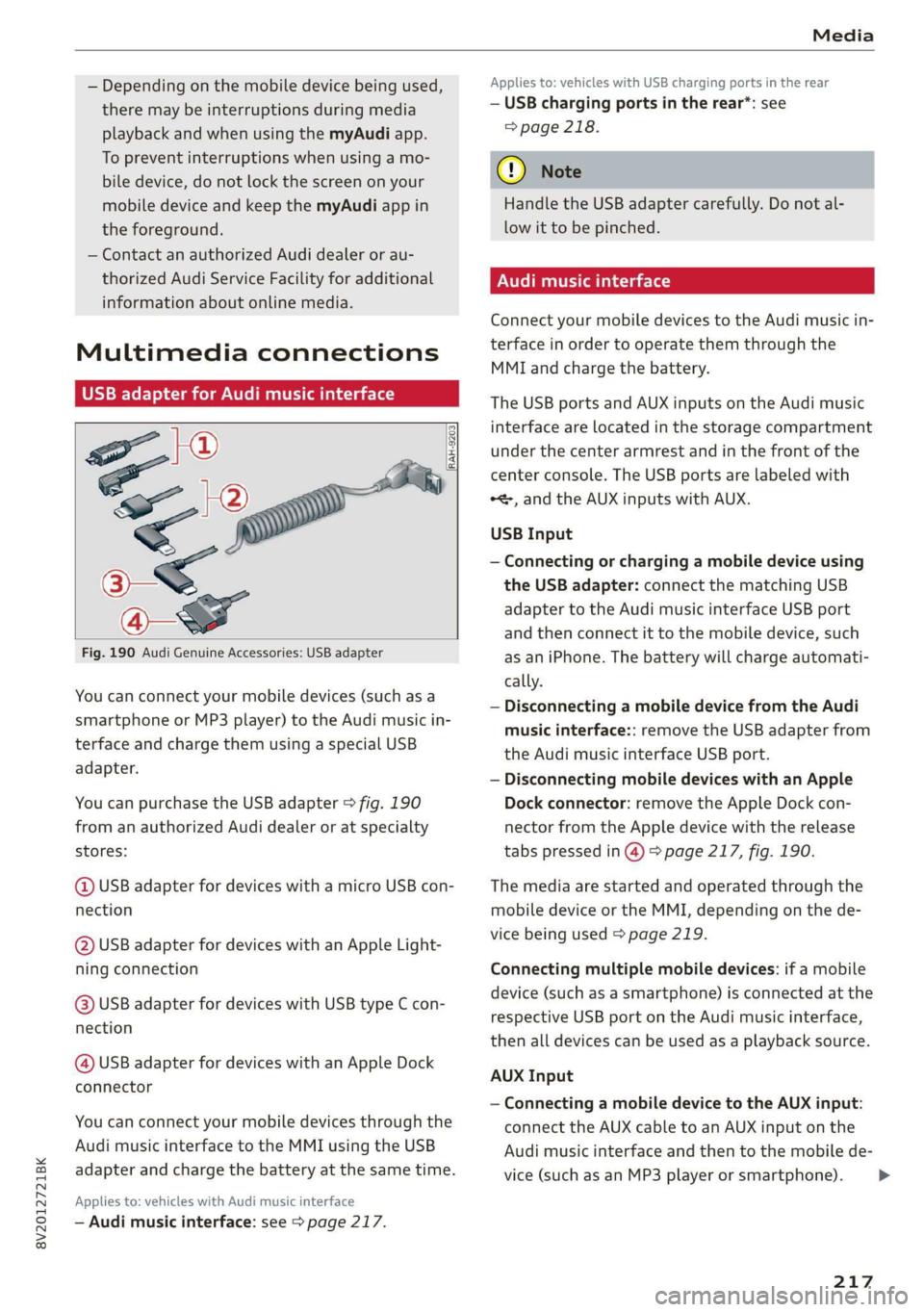
Fig. 190 Audi Genuine Accessories: USB adapter
[RAH-9203]
You can connect your mobile devices (such as a
smartphone or MP3 player) to the Audi music in-
terface and charge them using a special USB
adapter.
You can purchase the USB adapter > fig. 190
from an authorized Audi dealer or at specialty
stores:
@ USB adapter for devices with a micro USB con-
nection
@ USB adapter for devices with an Apple Light-
ning connection
@ USB adapter for devices with USB type C con-
nection
@ USB adapter for devices with an Apple Dock
connector
You can connect your mobile devices through the
Audi music interface to the MMI using the USB
adapter and charge the battery at the same time.
Applies to: vehicles with Audi music interface
— Audi music interface: see > page 217.
Applies to: vehicles with USB charging ports in the rear
— USB charging ports in the rear*: see
=> page 218.
@) Note
Handle the USB adapter carefully. Do not al-
low it to be pinched.
Audi music interface
Connect your mobile devices to the Audi music in-
terface in order to operate them through the
MMI and charge the battery.
The USB ports and AUX inputs on the Audi music
interface are located in the storage compartment
under the center armrest and in the front of the
center console. The USB ports are labeled with
*<, and the AUX inputs with AUX.
USB Input
— Connecting or charging a mobile device using
the USB adapter: connect the matching USB
adapter to the Audi music interface USB port
and then connect it to the mobile device, such
as an iPhone. The battery will charge automati-
cally.
— Disconnecting a mobile device from the Audi
music interface:: remove the USB adapter from
the Audi music interface USB port.
— Disconnecting mobile devices with an Apple
Dock connector: remove the Apple Dock con-
nector from the Apple device with the release
tabs pressed in @) > page 217, fig. 190.
The media are started and operated through the
mobile device or the MMI, depending on the de-
vice being used > page 219.
Connecting multiple mobile devices: if a mobile
device (such as a smartphone) is connected at the
respective USB port on the Audi music interface,
then all devices can be used as a playback source.
AUX Input
— Connecting a mobile device to the AUX input:
connect the AUX cable to an AUX input on the
Audi music interface and then to the mobile de-
vice (such as an MP3 player or smartphone).
217
Page 220 of 400
Media
— Disconnecting a mobile device from the AUX
input: remove the AUX cable from the AUX
input on the Audi music interface.
— Operation: select and confirm the External au-
dio player source G) > page 219, fig. 191. Me-
dia is started and operated on the mobile de-
vice.
ZX WARNING
Driving requires your complete and undivided
attention. As the driver, you have complete re-
sponsibility for safety in traffic. Never operate
mobile devices while driving, because this in-
creases the risk of an accident.
@) Note
— Use a USB extension cable to connect devi-
ces that have an integrated USB connector
(such as a USB stick) to prevent damage to
your USB device and the Audi music inter-
face.
— Extremely high or low temperatures that
can occur inside vehicles can damage mobile
devices and/or impair their performance.
Never leave mobile devices in the vehicle in
extremely high or low temperatures.
G) Tips
— Always follow the information found in
=> page 59.
—When you switch the ignition off, the USB
ports are still supplied with power until the
energy management intervenes.
— Do not use an additional adapter or USB ex-
tension cable to connect mobile devices to
the Audi music interface that already have a
cable or that must be connected with a USB
adapter (= page 217). Using an additional
adapter or US extension cable may impair
functionality.
— You can purchase the AUX connector cable
from an authorized Audi dealer or at spe-
cialty stores.
)) Applies only to MTP devices. Does not apply to Apple devi-
ces and USB mass storage devices.
218
— Audi recommends setting the volume of a
mobile device connected to the AUX input to
approximately 70% of the maximum vol-
ume.
— Functionality is not guaranteed for mobile
devices that do not conform to the USB 2.0
specification.
— USB hubs are not supported.
— Some versions of the iPod such as the iPod
shuffle cannot be connected to the USB
adapter for devices with Apple Dock connec-
tor. Connect these devices using a AUX con-
nector cable.
— Changed content on a mobile device )) that
is connected to the Audi music interface
may not be displayed in the media center. In
this case, reset the Media settings back to
Factory settings > page 231.
— Video playback through the Audi music in-
terface is only supported if the connected
device is recognized as a USB storage device
(for example a USB stick). Apple devices and
MTP devices (such as smartphones) are not
recognized as USB storage devices.
— iPod or iPhone malfunctions also affect the
operation of the MMI. Reset your iPod or
iPhone if this happens.
— For important information on operating
your iPod or iPhone, refer to the user guide
for the device. Audi recommends updating
the iPod or iPhone software to the latest
version.
— For more information about the Audi music
interface and supported devices, check the
Audi database for mobile devices at www.
audi.com/mp3 or contact an authorized
Audi dealer or authorized Audi Service Fa-
cility.
USB charging ports in the rear
Applies to: vehicles with USB charging ports in the rear
You can charge the battery on your mobile device
through a USB charging port.
Page 221 of 400
8V2012721BK
Media
Two USB charging ports* are located at the back
of the center console.
— USB adapter: refer to > page 217, USB adapter
for Audi music interface.
— Charging a mobile device using the USB
adapter: connect your mobile device to a USB
charging port using a suitable USB adapter.
— Disconnecting a mobile device from the charg-
ing port: remove the USB adapter from the USB
charging port.
— Disconnecting mobile devices with an Apple
Dock connector: remove the Apple Dock con-
nector from the Apple device with the release
tabs pressed in.
ZA\ WARNING
Driving requires your complete and undivided
attention. As the driver, you have complete re-
sponsibility for safety in traffic. Never operate
your mobile devices while driving, because
this increases the risk of an accident.
@ Note
Extremely high or low temperatures that can
occur inside vehicles can damage mobile devi-
ces and/or impair their performance. Never
leave mobile devices in the vehicle in ex-
tremely high or low temperatures.
G) Tips
— Always follow the information found in
=> page 59.
— When you switch the ignition off, the USB
ports are still supplied with power until the
energy management intervenes.
— Do not use any additional USB extension ca-
bles or adapters to connect mobile devices
to the USB charging port that have already
been connected by a USB adapter. Using an
additional adapter or US extension cable
may impair functionality.
— USB hubs are not supported.
— Refer to the manufacturer's operating man-
ual for important information regarding the
operation of your mobile device.
— Correct function of all mobile devices can-
not be guaranteed.
— The vehicle battery drains when mobile de-
vices are turned on but the engine is off.
Playing media
\ La Coton
(2
©-«n ei]
So
eTocs
yee Per
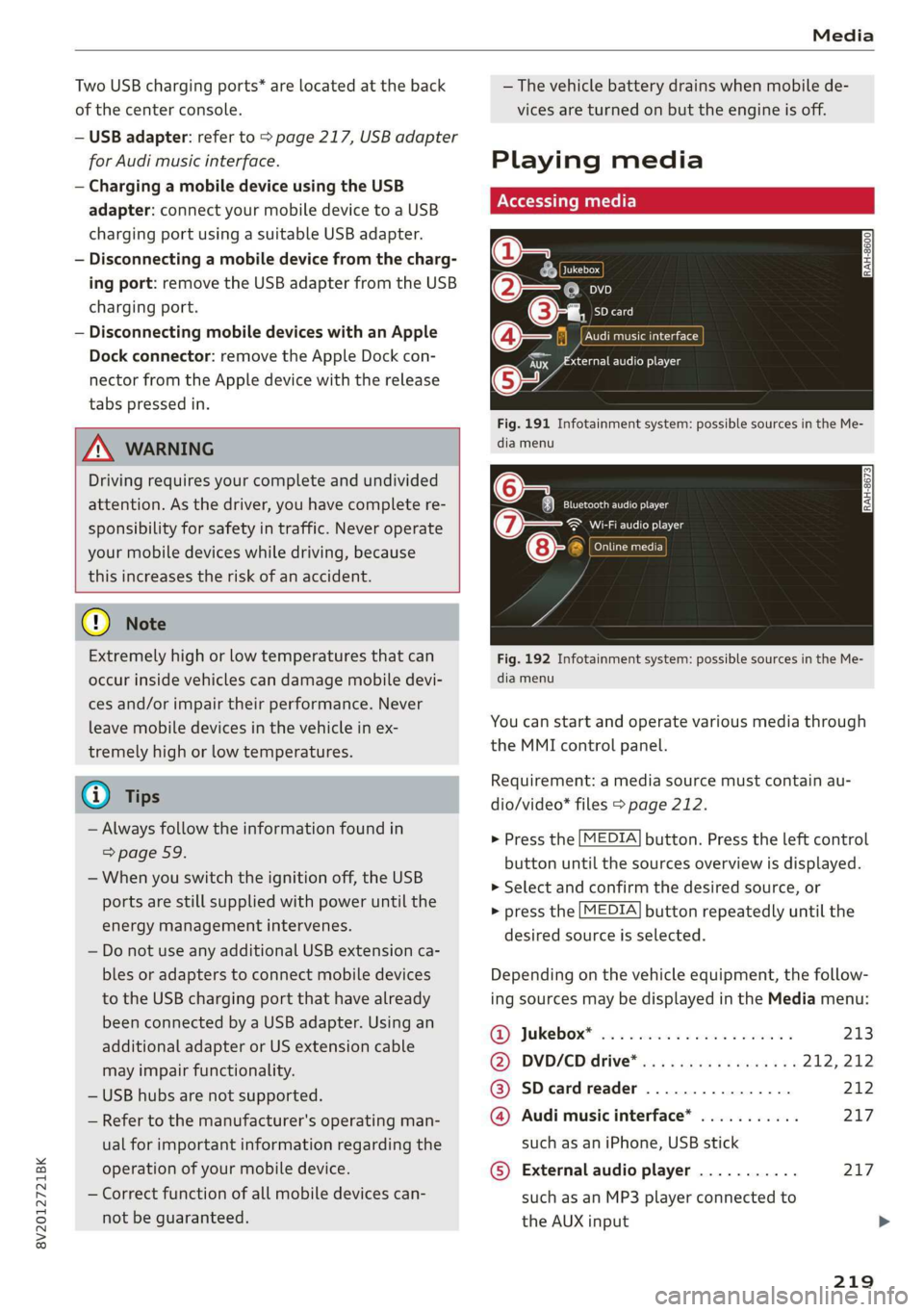
Fig. 191 Infotainment system: possible sources in the Me-
dia menu
o~ Se eC e Ng
Cela ttn ant)
Eitan en Ns
7:
Fig. 192 Infotainment system: possible sources in the Me-
dia menu
You can start and operate various media through
the MMI control panel.
Requirement: a media source must contain au-
dio/video* files > page 212.
> Press the [MEDIA] button. Press the left control
button until the sources overview is displayed.
> Select and confirm the desired source, or
> press the [MEDIA] button repeatedly until the
desired source is selected.
Depending on the vehicle equipment, the follow-
ing sources may be displayed in the Media menu:
GD) Jukebox? sc. so secose so series ween ns 213
@) DVD/CD drive® ss ¢ « seas: eames ne 212, 212
@ SDeardreader ................ 212
@ Audi music interface* ........... 217
such as an iPhone, USB stick
© External audio player ........... 217
such as an MP3 player connected to
the AUX input >
219
Page 222 of 400

Media
© Bluetooth audio player* ........ 214
@ Wi-Fi audio player* ............ 214
Online media* and Internet radio” . 215
— Playing audio/video files: select a source in the
Media menu > category (such as artists > al-
bum > track).
— Moving one level up in the folder structure:
press the [BACK] button, or select and confirm
Folder up.
— Selecting the previous or next track/chap-
ter*)): press the On/Off knob on the MMI con-
trol panel briefly to the left Kd or right Pe.
— Fast-forwarding and rewinding audio/video*
files: press and hold the On/Off knob on the
MMI control panel to the left Kd or right Pol for
a longer time.
— Pausing or resuming playback: press the
On/Off knob on the MMI control panel briefly.
@ Tips
— You can scroll through long lists quickly by
turning the control knob quickly. The scroll-
ing speed depends on the number of list en-
tries.
— For safety reasons, the video image is only
displayed when the vehicle is stationary. On-
ly the sound from the video plays while driv-
ing.
Fig. 193 Infotainment system: USB flash drive categories
)) Depending on the DVD, this may not be possible during
playback.
220
Track
Folders Oa
Se aaeytses
Videos
Fig. 194 Infotainment system: USB flash drive categories
Various categories for selecting audio/video” files
are available in the media center.
> Press the [MEDIA] button. Press the left control
button until the sources overview is displayed.
Select and confirm the desired source.
@ Active source
The active source is highlighted. The active
source symbol @) may change depending on the
connected device, the online media service* or
Internet radio*. The device name may be dis-
played (for example: myPhone). As an example, a
USB stick is shown > fig. 193 connected to the
Audi music interface*.
Depending on the active source, you can select
audio/video files* from the following categories
and add them to the playlist:
@ Favorites
The Favorites category appears if at least one en-
try is stored in the favorites list. > page 222.
@ Artists
All available artists are displayed. Select and con-
firm
an artist, an album and then a track.
@ Albums
All available albums are displayed. Select and
confirm an album and then a track.
© Genres
All available genres are displayed. Select and con-
firm
a genre (such as Pop), an artist, an album
and then a song.
Page 223 of 400
8V2012721BK
Media
© Tracks
All available tracks are displayed. Select and con-
firm
a track.
@ Folders
The folder structure or track/chapter list is dis-
played. Select a folder, if necessary. Select and
confirm a track.
Playlists
All available playlists from the source and the
smart playlists are displayed. Select and confirm
a playlist and then a track.
Smart playlists:
— Last played tracks: the last tracks played in the
selected source are displayed.
— Most played: the most played tracks in the se-
lected source are displayed.
— 5 stars to 1 star: tracks from the selected
source are displayed according to their rating.
— Unrated: all files from the selected source
without rating information (for example, in the
ID3 tag) are displayed.
© Videos*
All available video files are displayed. Select and
confirm a video file.
@ Tips
— Only the categories supported by the medi-
um are available. For example, CD/DVD-
ROM tracks cannot be selected with catego-
ries such as Artists, Albums or Genres.
With an iPod/iPhone (source: Audi music in-
terface* > page 217), the Podcasts, Audio
books and Composers categories are also
available.
— For safety reasons, the video image is only
displayed when the vehicle is stationary. On-
ly the sound from the video plays while driv-
ing.
—When synchronizing a portable device with
"Cloud“ services, playlists may display incor-
rectly
in the MMI. Use the media center in
the device.
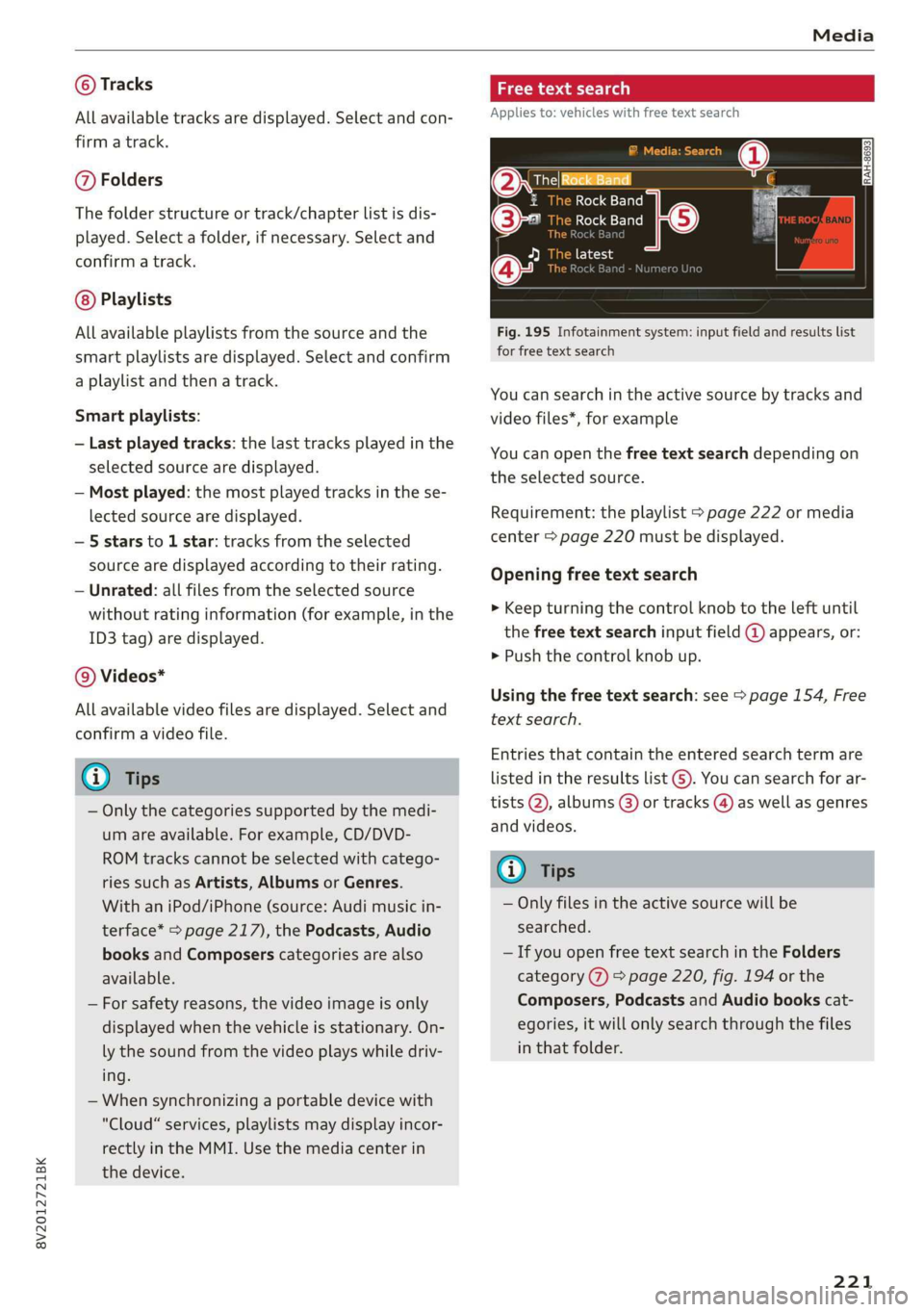
a \ey dary tLe)
Applies to: vehicles with free text search
Oxree Rock Band
Rock Band
©- Rock Band
Fig. 195 Infotainment system: input field and results list
for free text search
You can search in the active source by tracks and
video files*, for example
You can open the free text search depending on
the selected source.
Requirement: the playlist > page 222 or media
center > page 220 must be displayed.
Opening free text search
> Keep turning the control knob to the left until
the free text search input field @ appears, or:
> Push the control knob up.
Using the free text search: see > page 154, Free
text search.
Entries that contain the entered search term are
listed
in the results list G). You can search for ar-
tists @, albums (8) or tracks @) as well as genres
and videos.
(i) Tips
— Only files in the active source will be
searched.
— If you open free text search in the Folders
category (7) > page 220, fig. 194 or the
Composers, Podcasts and Audio books cat-
egories, it will only search through the files
in that folder.
221
Page 225 of 400
8V2012721BK
Media
Rewind/Fast forward
Turn the control knob to the left or right, or move
your finger on the MMI touch control pad* from
the left to the right.
Shuffle!)
With the function switched on, all files in the
playlist are played and shown in random order.
Repeat track!)
When the function is switched on, the current
track repeats.
Back to 'Playback'
The options menu is closed. The track currently
playing appears in the playlist.
Play similar music*
The track currently playing is quickly analyzed for
features such as artist, genres, mood, and beat,
and a smart playlist with similar tracks will be
shown.
Play more...
A smart playlist is shown based on the track cur-
rently playing. You can select between a playlist
with more tracks by this artist, from this album
or of this genre.
Copy to jukebox*
See > page 213, Adding files to the Jukebox.
Set as ringtone*
Requirement: a mobile device must be connected
to the MMI. The track currently playing must be
in the Jukebox* > page 213.
The selected track will be used as the ringtone
for incoming calls.
Gracenote online database*
Requirement: the MMI must be connected to the
Internet.
) The function automatically switches off when the source is
changed.
2) This function is not available for all cell phones.
Depending on availability, various information
will load about the track currently playing when
this function is switched on™.
Favorites
See > page 222.
Additional options
Requirement: the vehicle must be stationary and
a video file* or a DVD* must be playing.
Parental control*
Playback of video DVDs can be restricted using
parental control.
Enter the password for parental control. Pass-
word set at the factory: 1234. You have the fol-
lowing options:
— Protection level: select and confirm the protec-
tion level (for example, Level 5). Eight different
protection levels can be set for parental con-
trol. If you set the parental control level at Lev-
el 5, all DVDs from levels 1-5 can be played.
Video DVDs with a higher level will not play. Se-
lect Unrestricted to remove all of the restric-
tions.
— Change password: edit the current password.
Switch to full screen
The video image is displayed. Turn the control
knob to display the playlist, or press the [BACK
button.
Replay video)
When this function is switched on, the current
video will replay.
Show DVD menu
The DVD main menu opens in the Infotainment
system display.
223
Page 228 of 400
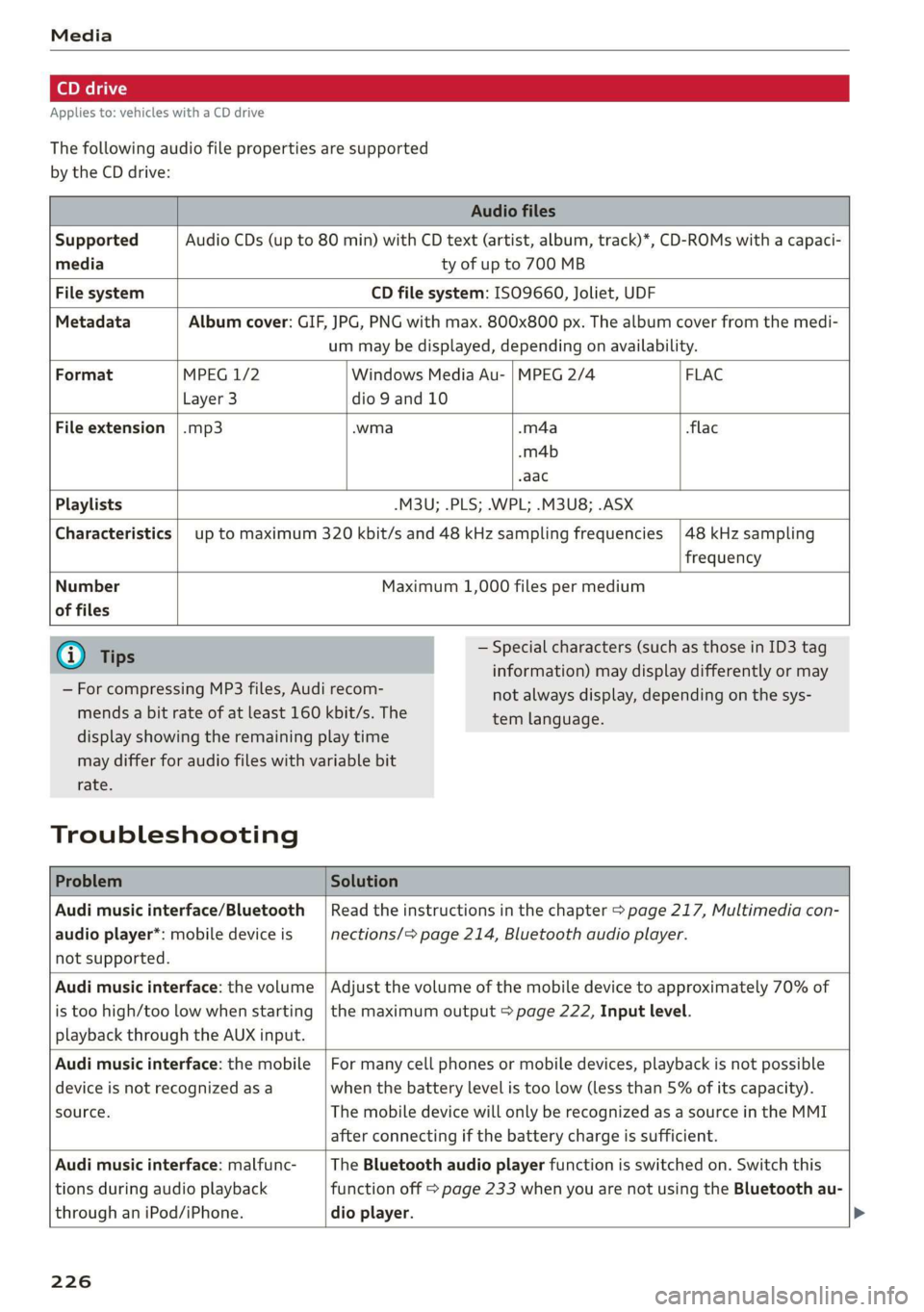
Applies to: vehicles with a CD drive
The following audio file properties are supported
by the CD drive:
Audio files
Supported Audio CDs (up to 80 min) with CD text (artist, album, track)*, CD-ROMs with a capaci-
media ty of up to 700 MB
File system CD file system: ISO9660, Joliet, UDF
Metadata Album cover: GIF, JPG, PNG with max. 800x800 px. The album cover from the medi-
um may be displayed, depending on availability.
Format MPEG 1/2 Windows Media Au- | MPEG 2/4 FLAC
Layer 3 dio 9 and 10
File extension |.mp3 -wma -m4a flac
-m4b
aac
Playlists -M3U; .PLS; .WPL; .M3U8; .ASX
Characteristics up to maximum 320 kbit/s and 48 kHz sampling frequencies 48 kHz sampling
frequency
Number
of files
Maximum 1,000 files per medium
@ Tips
— For compressing MP3 files, Audi recom-
mends a bit rate of at least 160 kbit/s. The
— Special characters (such as those in ID3 tag
information) may display differently or may
not always display, depending on the sys-
tem language.
display showing the remaining play time
may differ for audio files with variable bit
rate.
Troubleshooting
Problem Solution
Audi music interface/Bluetooth
audio player*: mobile device is
not supported.
Read the instructions in the chapter > page 217, Multimedia con-
nections/> page 214, Bluetooth audio player.
Audi music interface: the volume
is too high/too low when starting
playback through the AUX input.
Adjust the volume of the mobile device to approximately 70% of
the maximum output > page 222, Input level.
Audi music interface: the mobile
device is not recognized asa
source.
For many cell phones or mobile devices, playback is not possible
when the battery level is too low (less than 5% of its capacity).
The mobile device will only be recognized as a source in the MMI
after connecting if the battery charge is sufficient.
Audi music interface: malfunc-
tions during audio playback
through an iPod/iPhone.
The Bluetooth audio player function is switched on. Switch this
function off > page 233 when you are not using the Bluetooth au-
dio
player.
226