instrument panel AUDI A3 2020 Owner´s Manual
[x] Cancel search | Manufacturer: AUDI, Model Year: 2020, Model line: A3, Model: AUDI A3 2020Pages: 400, PDF Size: 107.47 MB
Page 45 of 400
8V2012721BK
Lights and Vision
Lights and Vision
Exterior lighting
Stare MUL Las eal
B8V-0430
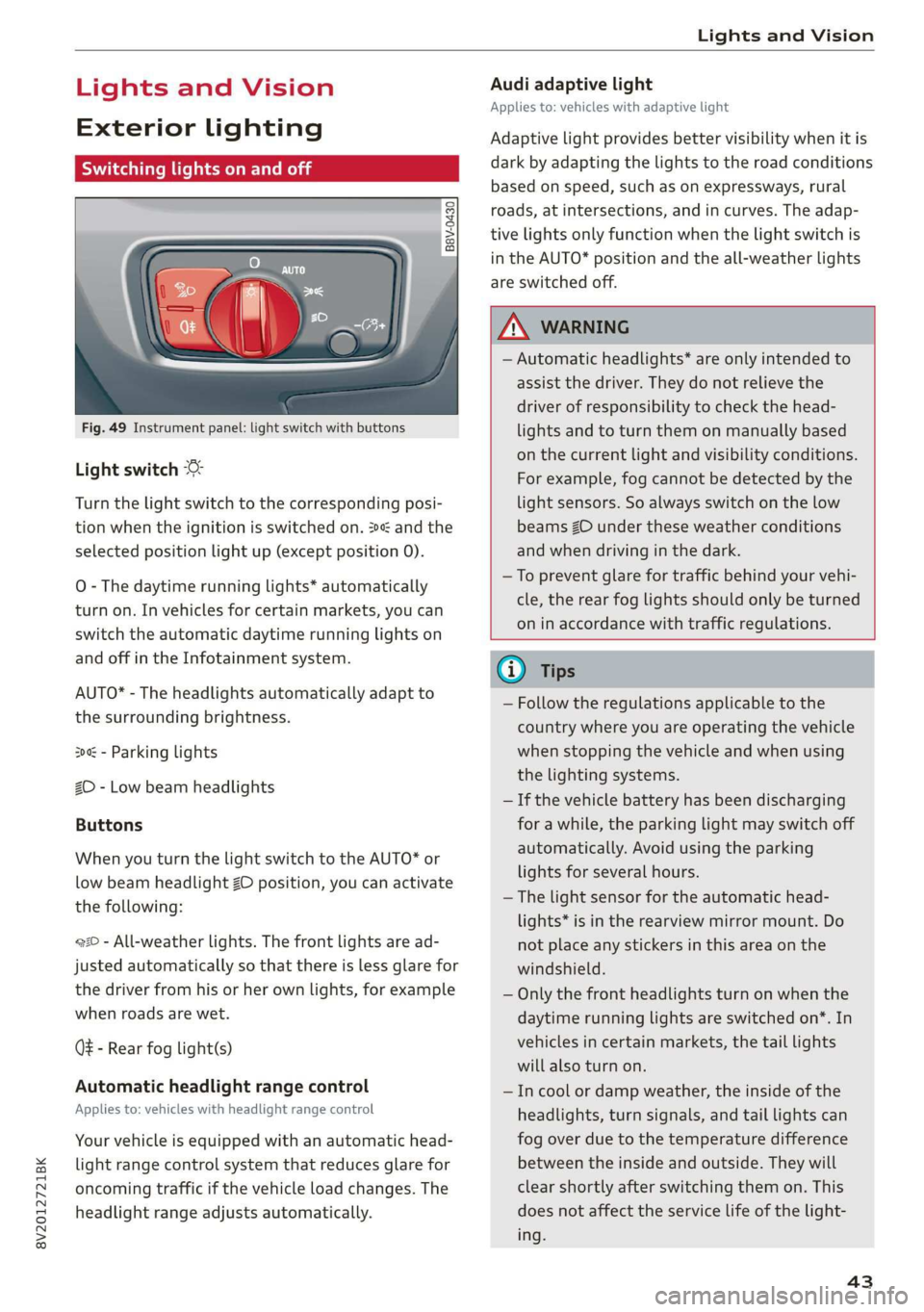
Fig. 49 Instrument panel: light switch with buttons
Light switch
Turn the light switch to the corresponding posi-
tion when the ignition is switched on. 2 and the
selected position light up (except position 0).
O
- The daytime running lights* automatically
turn on. In vehicles for certain markets, you can
switch the automatic daytime running lights on
and off in the Infotainment system.
AUTO* - The headlights automatically adapt to
the surrounding brightness.
300 - Parking lights
2D - Low beam headlights
Buttons
When you turn the light switch to the AUTO* or
low beam headlight ZO position, you can activate
the following:
220 - All-weather lights. The front lights are ad-
justed automatically so that there is less glare for
the driver from his or her own lights, for example
when roads are wet.
Q - Rear fog light(s)
Automatic headlight range control
Applies to: vehicles with headlight range control
Your vehicle is equipped with an automatic head-
light range control system that reduces glare for
oncoming traffic if the vehicle load changes. The
headlight range adjusts automatically.
Audi adaptive light
Applies to: vehicles with adaptive light
Adaptive light provides better visibility when it is
dark by adapting the lights to the road conditions
based on speed, such as on expressways, rural
roads, at intersections, and in curves. The adap-
tive lights only function when the light switch is
in the AUTO* position and the all-weather lights
are switched off.
Z\ WARNING
— Automatic headlights* are only intended to
assist the driver. They do not relieve the
driver of responsibility to check the head-
lights and to turn them on manually based
on the current light and visibility conditions.
For example, fog cannot be detected by the
light sensors. So always switch on the low
beams ZO under these weather conditions
and when driving in the dark.
—To prevent glare for traffic behind your vehi-
cle, the rear fog lights should only be turned
on in accordance with traffic regulations.
G) Tips
— Follow the regulations applicable to the
country where you are operating the vehicle
when stopping the vehicle and when using
the lighting systems.
— If the vehicle battery has been discharging
for a while, the parking light may switch off
automatically. Avoid using the parking
lights for several hours.
— The light sensor for the automatic head-
lights* is in the rearview mirror mount. Do
not place any stickers in this area on the
windshield.
— Only the front headlights turn on when the
daytime running lights are switched on*. In
vehicles in certain markets, the tail lights
will also turn on.
—Incool or damp weather, the inside of the
headlights, turn signals, and tail lights can
fog
over due to the temperature difference
between the inside and outside. They will
clear shortly after switching them on. This
does not affect the service life of the light-
ing.
43
Page 47 of 400
8V2012721BK
Lights and Vision
manually depending on light and visibility
conditions. It may be necessary to operate
them manually in situations such as:
— In adverse weather conditions such as fog,
heavy rain, blowing snow or spraying water.
— On roads where oncoming traffic may be
partially obscured, such as expressways.
— If there are road users with poor lighting,
such as bicyclists.
— In tight curves and on steep hills.
—In poorly lit areas.
— With strong reflectors, such as signs.
— If the area of the windshield near the sensor
is fogged over, dirty, icy or covered with a
sticker.
Adjusting the exterior lighting
You can adjust the exterior lighting separately.
The settings depend on the vehicle equipment.
The functions are adjusted in the Infotainment
system.
> Select in the Infotainment system: [MENU] but-
ton > Vehicle > left control button > Vehicle
settings > Exterior lighting.
Automatic headlights
You can adjust the following settings in the Auto-
matic
headlights menu:
Activation time - You can adjust if the headlights
switch on Early, Medium or Late according to the
sensitivity of the light sensor.
Headlight assistant - You can switch the high
beam assistant* on and off.
Entry/exit lighting
When it is dark, the Entry/exit lighting illumi-
nates the area around the vehicle when unlocking
the vehicle and after switching off the ignition
and opening the driver's door.
The entry/exit lighting only works when it is dark
and the light switch is in the AUTO* position.
)_ This function is not available in all countries.
Daytime running lights!)
The daytime running lights can be turned on and
off. When daytime running lights are turned on,
the lights will stay on continuously whenever the
ignition is switched on.
Emergency flashers
B8V-0210
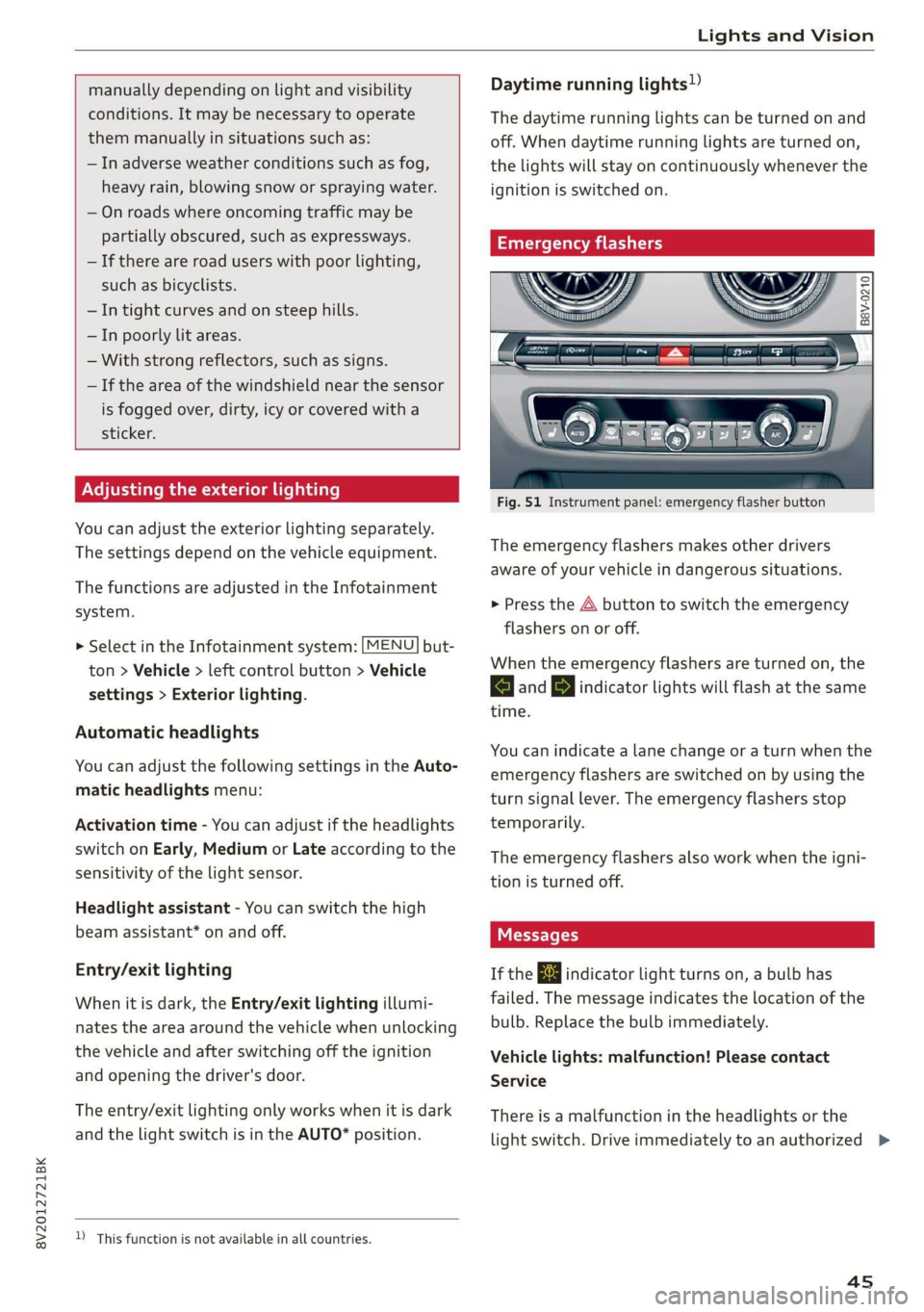
Fig. 51 Instrument panel: emergency flasher button
The emergency flashers makes other drivers
aware of your vehicle in dangerous situations.
> Press the A button to switch the emergency
flashers on or off.
When the emergency flashers are turned on, the
a and BY indicator lights will flash at the same
time.
You can indicate a lane change or a turn when the
emergency flashers are switched on by using the
turn signal lever. The emergency flashers stop
temporarily.
The emergency flashers also work when the igni-
tion is turned off.
If the ka indicator light turns on, a bulb has
failed. The message indicates the location of the
bulb. Replace the bulb immediately.
Vehicle lights: malfunction! Please contact
Service
There is a malfunction in the headlights or the
light switch. Drive immediately to an authorized >
45
Page 109 of 400
8V2012721BK
High-voltage system
Deactivating sleep mode
> Unlock the vehicle > page 25. Or
> Open the driver's door. Or
> Press the button © > page 105, fig. 105.
Unlocking the vehicle charging connector
when the vehicle is unlocked
> If necessary, deactivate sleep mode.
> Press the button with the illuminated LED @) or
© > page 105, fig. 105. Or
> Press the {@ button in the driver's door
= page 29, fig. 22 or the & button on the re-
mote control key.
> The connector will unlock for 30 seconds.
> Remove the connector.
> If the connector is not removed within 30 sec-
onds, it will lock again automatically.
Closing the charging unit
> Put the cap back on the charging port
=> page 104, fig. 103.
> Carefully slide the cover back in its original po-
sition.
> Turn the lock to the horizontal position
=> page 104, fig. 102.
@) Note
If you drive with an open charging unit, both
the cover and the electronics installed behind
it could be damaged.
G) Tips
The instrument cluster will indicate if the
charging unit is open while driving. Check be-
fore every drive after charging if the cover is
locked.
Semele
Applies to: vehicles with plug-in hybrid drive
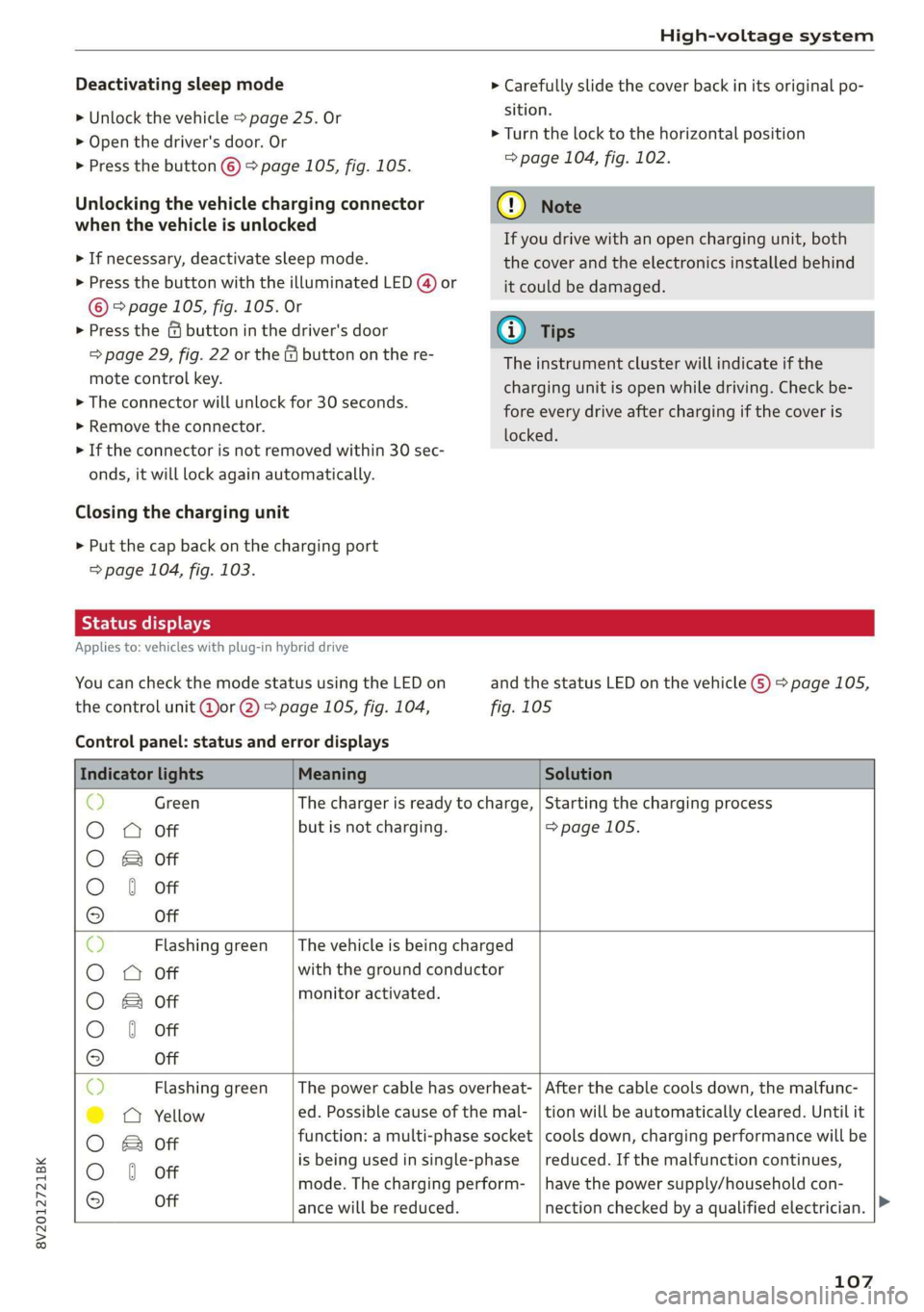
You can check the mode status using the LED on
the control unit @or @) > page 105, fig. 104,
Control panel: status and error displays
and the status LED on the vehicle G) > page 105,
fig. 105
Indicator lights Meaning Solution
© Green The charger is ready to charge, | Starting the charging process
O 0 Off but is not charging. => page 105.
O B&B off
O 0 of
9 Off
c) Flashing green __| The vehicle is being charged
O O off with the ground conductor
O Bor monitor activated.
O 0 Off
9 Off
Sy Flashing green _| The power cable has overheat- | After the cable cools down, the malfunc-
©) a Yellow ed. Possible cause of the mal- | tion will be automatically cleared. Until it
O B otf function: a multi-phase socket | cools down, charging performance will be
O 6 off is being used in single:phase reduced. If the malfunction continues,
mode. The charging perform- | have the power supply/household con-
© Off ance will be reduced. nection checked by a qualified electrician.
107
Page 159 of 400

8V2012721BK
Multifunction steering wheel
Multifunction steering
wheel
Introduction
Applies to: vehicles with multifunction steering wheel
In the driver information system display, you can
control numerous Infotainment functions using
the multifunction steering wheel plus* > page 17
or the multifunction steering wheel* > page 20.
You can control additional Infotainment func-
tions using the MMI control panel > page 146 in
the Infotainment system display.
ZA WARNING
Direct your full attention to driving. As the
driver, you have complete responsibility for
safety in traffic. Only use the functions in such
a way that you always maintain complete con-
trol over your vehicle in all traffic situations.
Radio
Applies to: vehicles with multifunction steering wheel and ra-
dio
Requirement: radio mode must be started
= page 206 and the radio/media tab must be dis-
played.
> Press either the =lIbutton or the left control
button > page 18, depending on vehicle equip-
ment.
Depending on vehicle equipment, the following
functions
may be available in the driver informa-
tion system.
— Selecting the frequency band: select and con-
firm a frequency band.
— Selecting a station from the presets list*: se-
lect: Presets > the desired radio station.
— Selecting a station from the station list*: se-
lect and confirm a radio station.
— Selecting a station from the presets list: se-
lect: Presets > the desired radio station.
— Opening a media source: select and confirm To
media.
Additional settings
Applies to: vehicles with Audi virtual cockpit
— Select: right control button > desired entry.
Depending on the function selected, the follow-
ing additional settings may be possible:
— Show "Now Playing" screen: see > page 210.
Media
Applies to: vehicles with multifunction steering wheel and
media
Requirement: a media drive must contain audio/
video files > page 212 and the radio/media tab
must be displayed.
> Press either the [=lbutton or the left control
button > page 18, depending on vehicle equip-
ment.
Depending on vehicle equipment, the following
functions may be available in the driver informa-
tion system.
— Selecting a media source: select and confirma
source such as the “SD card”.
— Playing an audio/video file: select and confirm
a track/file.
— Pausing/resuming playback: press the right
thumbwheel @) > page 19, fig. 13. To resume
playback, press the right thumbwheel again.
Applies to: vehicles with analog instrument cluster
— Switching to radio: select and confirm a fre-
quency band (such as FM).
Applies to: vehicles with Audi virtual cockpit
— Switching to the radio: select and confirm
Switch to radio.
— Opening additional track information: select:
right
control button > Show "Now Playing"
screen. For additional information, see
=> page 222.
@) Tips
— The media drives do not play files that are
protected by DRM and that are identified
with the symbol ff.
— Please note that within a media source in
the driver information system, only playlists
that were selected through the MMI control
panel can be played = page 220.
157
>
Page 160 of 400
Multifunction steering wheel
— Always pay attention to the Infotainment
system display. Additional operation
through the MMI control panel may be nec-
essary, depending on the selected function.
Telephone
Applies to: vehicles with multifunction steering wheel and
telephone
Requirement: a cell phone must be connected to
the MMI > page 169 and the telephone tab must
be displayed.
> Press either the =lbutton or the left control
button > page 18, depending on vehicle equip-
ment.
Depending on vehicle equipment, the following
functions may be available in the driver informa-
tion system.
— Accessing a contact: select and confirm Call
list / Favorites / Directory. Select and confirm a
contact.
— Directory contacts: the driver information sys-
tem only displays directory contacts that have a
phone number stored. If several phone num-
bers are stored with a contact, the list of stored
numbers is displayed first when the entry is se-
lected. For more information about the dis-
played symbols, refer to > page 178.
— Recent calls: the recent calls list contains all in-
coming, outgoing and missed calls.
— Caller information*: the name, phone number
or Unknown appears in the driver information
system display depending on whether the caller
has been stored in the directory and if the
phone number has been transmitted.
Functions during an incoming call
— Accepting a call: press the left thumbwheel
when there is an incoming call.
— Declining a call: select and confirm Decline
when there is an incoming call.
— Ending a phone call: select and confirm End
call.
Functions during a phone call
158
Applies to: vehicles with analog instrument cluster
— Making an additional phone call: select Hold >
button > Directory or Call list > an entry in
the list.
— Accepting an incoming call when there is an
active call and a call on hold: select and con-
firm Replace. The active call is replaced with
the incoming call.
Applies to: vehicles with Audi virtual cockpit
— Making an additional phone call: select: Hold
call > left control button > Directory or Call list
>anentry.
— Accepting an incoming call when there is an
active call and a call on hold: select and con-
firm Answer. The active call is replaced with the
incoming call.
Additional functions include:
Mute: if you select and confirm this function, the
other person on the phone cannot hear you. You
will still be able to hear the other person.
Holding/resuming a call: you can place the exist-
ing call on hold and resume it again.
Swap call: you can alternate between two phone
calls at the same time. One of the calls will be on
hold. Selecting End call will end the active phone
call. A call that was placed on hold stays on hold
and can be taken off hold with Resume held call.
Conference call: a call on hold and up to five ac-
tive parties (depending on the cell phone service
provider) can be added to a conference call. To
make an additional call, put all participants in
the current conference call on hold using Hold
conference. By pressing the left control button,
you can make additional calls from the directory
or the call list. Resume conference takes all par-
ticipants off hold.
@) Tips
— The phone functions can only be controlled
with the multifunction steering wheel if the
phone equipment was installed at the fac-
tory.
— The telephone functions depend on the cell
phone and whether they are supported by
your cell phone service provider or not.
Page 241 of 400

8V2012721BK
Driving safety
> Always keep both feet in the footwell so that
you are in control of the vehicle at all times.
For detailed information on how to adjust the
driver's seat, see > page 54.
ZA WARNING
Drivers who are unbelted, out of position or
too close to the airbag can be seriously injured
by an airbag as it unfolds. To help reduce the
risk of serious personal injury:
— Always adjust the driver's seat and the
steering wheel so that there are at least
10 inches (25 cm) between your breastbone
and the steering wheel.
— Always adjust the driver's seat and the
steering wheel so that there are at least
4 inches (10 cm) between the knees and the
lower part of the instrument panel.
— Always hold the steering wheel on the out-
side of the steering wheel rim with your
hands at the 9 o'clock and 3 o'clock posi-
tions to help reduce the risk of personal in-
jury if the driver's airbag inflates.
— Never hold the steering wheel at the
12 o'clock position or with your hands at
other positions inside the steering wheel
rim or on the steering wheel hub. Holding
the steering wheel the wrong way can cause
serious injuries to the hands, arms and head
if the driver's airbag inflates.
— Pointing the steering wheel toward your
face decreases the ability of the supplemen-
tal driver's airbag to protect you in a colli-
sion.
— Always sit in an upright position and never
lean against or place any part of your body
too close to the area where the airbags are
located.
— Before driving, always adjust the front seats
properly and make sure that all passengers
are properly restrained.
— For adjustable head restraints: before driv-
ing, always also adjust the head restraints
properly.
— Never adjust the seats while the vehicle is
moving. Your seat may move unexpectedly
and you could lose control of the vehicle.
— Never drive with the backrest reclined or tilt-
ed far back! The farther the backrests are
tilted
back, the greater the risk of injury due
to incorrect positioning of the safety belt
and improper seating position.
— Children must always ride in child seats
=> page 278. Special precautions apply when
installing a child seat on the front passenger
seat > page 253.
Proper seating position for the front
passenger
The proper front passenger seating position is
important for safe, relaxed driving.
For your own safety and to reduce the risk of in-
jury in the event of an accident, we recommend
that you adjust the seat for the front passenger
to the following position:
> Adjust the angle of the seatback so that it is in
an upright position and your back comes in full
contact with it whenever the vehicle is moving.
> For adjustable head restraints: adjust the head
restraint so the upper edge is as even as possi-
ble with the top of your head. If that is not pos-
sible, try to adjust the head restraint so that it
is as close to this position as possible
=> page 57. Move the head restraint so that it is
as close to the back of the head as possible.
> Keep both feet flat on the floor in front of the
front passenger seat.
> Fasten and wear safety belts correctly
=> page 248.
For detailed information on how to adjust the
front passenger's seat, see > page 54.
ZA\ WARNING
Front seat passengers who are unbelted, out
of position or too close to the airbag can be
seriously injured or killed by the airbag as it
unfolds. To help reduce the risk of serious per-
sonal injury:
— Passengers must always sit in an upright po-
sition and never lean against or place any
part of their body too close to the area
where the airbags are located. >
239
Page 242 of 400
Driving safety
— Passengers who are unbelted, out of posi-
tion or too close to the airbag can be seri-
ously injured by an airbag as it unfolds with
great force in the blink of an eye.
— Always make sure that there are at least
10 inches (25 cm) between the front pas-
senger‘s breastbone and the instrument
panel.
— Always make sure that there are at least
4 inches (10 cm) between the front passen-
ger‘s knees and the lower part of the instru-
ment panel.
— Each passenger must always sit on a seat of
their own and properly fasten and wear the
safety belt belonging to that seat.
— Before driving, always adjust the front pas-
senger seat properly.
— For adjustable head restraints: before driv-
ing, always also adjust the head restraints
properly.
— Always keep your feet on the floor in front of
the seat. Never rest them on the seat, in-
strument panel, out of the window, etc. The
airbag system and safety belt will not be
able to protect you properly and can even in-
crease the risk of injury in a crash.
— Never drive with the backrest reclined or tilt-
ed far back! The farther the backrests are
tilted
back, the greater the risk of injury due
to incorrect positioning of the safety belt
and improper seating position.
— Children must always ride in child seats
= page 278. Special precautions apply when
installing a child seat on the front passenger
seat > page 253.
Proper seating positions for passengers in
israel -r- 1}
Rear seat passengers must sit upright with both
feet on the floor consistent with their physical
size and be properly restrained whenever the ve-
hicle is in use.
To reduce the risk of injury caused by an incorrect
seating position in the event of a sudden braking
maneuver or an accident, your passengers on the
rear bench seat must always observe the follow-
ing:
240
> For adjustable head restraints: adjust the head
restraint so the upper edge is as even as possi-
ble with the top of your head. If that is not pos-
sible, try to adjust the head restraint so that it
is as close to this position as possible
=> page 57.
> Keep both feet flat in the footwell in front of
the rear seat.
> Fasten and wear safety belts properly
=> page 248.
> Make sure that children are always properly re-
strained in a child restraint that is appropriate
for their size and age > page 278.
ZA WARNING
Passengers who are improperly seated on the
rear seat can be seriously injured in a crash.
— Each passenger must always sit on a seat of
their own and properly fasten and wear the
safety belt belonging to that seat.
— Safety belts only offer maximum protection
when the safety belts are properly posi-
tioned on the body and securely latched. By
not sitting upright, a rear seat passenger in-
creases the risk of personal injury from im-
properly positioned safety belts!
— For adjustable head restraints: always adjust
the head restraint properly so that it can
give maximum protection.
Examples of improper seating positions
The occupant restraint system can only reduce
the risk of injury if vehicle occupants are properly
seated.
Improper seating positions can cause serious in-
jury or death. Safety belts can only work when
they are properly positioned on the body. Im-
proper seating positions reduce the effectiveness
of safety belts and will even increase the risk of
injury and death by moving the safety belt to crit-
ical areas of the body. Improper seating positions
also increase the risk of serious injury and death
when an airbag deploys and strikes an occupant
who is not in the proper seating position. A driver
is responsible for the safety of all vehicle occu-
pants and especially for children. Therefore: >
Page 243 of 400
8V2012721BK
Driving safety
> Never allow anyone to assume an incorrect
seating position when the vehicle is being used
>.
The following bulletins list only some sample po-
sitions that will increase the risk of serious injury
and death. Our hope is that these examples will
make you more aware of seating positions that
are dangerous.
Therefore, whenever the vehicle is moving:
— never stand up in the vehicle
— never stand on the seats
— never kneel on the seats
— never ride with the seatback reclined
— never lie down on the seats
— never lean up against the instrument panel
— never sit on the edge of the seat
— never sit sideways
— never lean out the window
— never put your feet out the window
— never put your feet on the instrument panel
— never rest your feet on the seat cushion or back
of the seat
— never ride in the footwell
— never ride in the cargo area
ZA WARNING
Improper seating positions increase the risk
of serious personal injury and death whenever
a vehicle is being used.
— Always make sure that all vehicle occupants
stay in a proper seating position and are
properly restrained whenever the vehicle is
being used.
Driver's and front
passenger's footwell
eae mesa
Applies to: vehicles with knee airbags
ZA WARNING
Always make sure that the knee airbag can in-
flate without interference. Objects between
yourself and the airbag can increase the risk
of injury in an accident by interfering with the
way the airbag deploys or by being pushed in-
to you as the airbag deploys.
— No persons or animals should ride in the
footwell in front of the passenger seat. If
the airbag deploys, this can result in serious
or fatal injuries.
— No objects of any kind should be carried in
the footwell area in front of the driver's or
passenger's seat. Bulky objects (shopping
bags, for example) can hamper or prevent
proper deployment of the airbag. Small ob-
jects can be thrown through the vehicle if
the airbag deploys and injure you or your
passengers.
Pedal area
The pedals must always be free to move and
must never be interfered with by a floor mat or
any other object.
Make sure that all pedals move freely without in-
terference and that nothing prevents them from
returning to their original positions.
Only use floor mats that leave the pedal area free
and can be secured with floor mat fasteners.
If a brake circuit fails, increased brake pedal trav-
el is required to bring the vehicle to a full stop.
ZA WARNING
Pedals that cannot move freely can cause loss
of vehicle control and increase the risk of seri-
ous injury.
— Never place any objects in the driver's foot-
well. An object could get into the pedal area
and interfere with pedal function. In case of
sudden braking or an accident, you would
not be able to brake or accelerate!
— Always make sure that nothing can fall or
move into the driver's footwell.
241
Page 250 of 400

Safety belts
A tunlSelae eta mide aa (elare delet at Lila
ey lh ay
Safety belts must always be correctly positioned
across the strongest bones of your body.
> Always wear safety belts as illustrated and de-
scribed in this chapter.
> Make sure that your safety belts are always
ready for use and are not damaged.
ZA\ WARNING
Not wearing safety belts or wearing them im-
properly increases the risk of serious personal
injury and death. Safety belts can work only
when used correctly.
— Always fasten your safety belts correctly be-
fore driving off and make sure all passen-
gers are correctly restrained.
— For maximum protection, safety belts must
always be positioned properly on the body.
— Never strap more than one person, including
small children, into any belt.
— Never place a safety belt over a child sitting
on your lap.
— Always keep feet in the footwell in front of
the seat while the vehicle is being driven.
— Never let any person ride with their feet on
the instrument panel or sticking out the
window or on the seat.
— Never remove a safety belt while the vehicle
is moving. Doing so will increase your risk of
being injured or killed.
— Never wear belts twisted.
— Never wear belts over rigid or breakable ob-
jects in or on your clothing, such as eye
glasses, pens, keys, etc., as these may cause
injury.
— Never allow safety belts to become dam-
aged by being caught in door or seat hard-
ware.
— Do not wear the shoulder part of the belt
under your arm or otherwise out of position.
— Several layers of heavy clothing may inter-
fere with correct positioning of belts and re-
duce the overall effectiveness of the system.
248
— Always keep belt buckles free of anything
that may prevent the buckle from latching
securely.
— Never use comfort clips or devices that cre-
ate slack in the shoulder belt. However, spe-
cial clips may be required for the proper use
of some child restraint systems.
—Torn or frayed safety belts can tear, and
damaged belt hardware can break in an acci-
dent. Inspect belts regularly. If webbing,
bindings, buckles, or retractors are dam-
aged, have belts replaced by an authorized
Audi dealer or qualified workshop.
— Safety belts that have been worn and loaded
in an accident must be replaced with the
correct replacement safety belt by an au-
thorized Audi dealer. Replacement may be
necessary even if damage cannot be clearly
seen. Anchorages that were loaded must al-
so be inspected.
— Never remove, modify, disassemble, or try
to repair the safety belts yourself.
— Always keep the belts clean. Dirty belts may
not work properly and can impair the func-
tion of the inertia reel > table Interior
cleaning on page 344.
Safety belts
Fastening safety belts
Safety first - everybody buckle up!
Fig. 209 Belt buckle and tongue on the driver's seat
To provide maximum protection, safety belts
must always be positioned correctly on the wear-
er's body.
> Adjust the front seat and head restraint proper-
ly > page 54, Front seats.
Page 255 of 400
8V2012721BK
Airbag system
Airbag system
Important information
area e eo MIT a a Lee)
sitting properly
Airbags are only supplemental restraints. For
airbags to do their job, occupants must always
properly wear their safety belts and be in a prop-
er seating position.
For your safety and the safety of your passen-
gers, before driving off, always:
> Adjust the driver's seat and steering wheel
properly > page 238,
> Adjust the front passenger's seat properly
=> page 239,
> Wear safety belts properly > page 248,
> Always properly use the proper child restraint
to protect children > page 278.
Ina collision, airbags must inflate within the
blink of an eye and with considerable force. The
supplemental airbags can cause injuries if the
driver or the front seat passenger is not seated
properly. Therefore in order to help the airbag to
do its job, it is important, both as a driver and as
a passenger to sit properly at all times.
By keeping room between your body and the
steering wheel and the front of the passenger
compartment, the airbag can inflate fully and
completely and provide supplemental protection
in certain frontal collisions > page 238, Correct
passenger seating positions. For details on the
operation of the seat adjustment controls
=> page 54.
It's especially important that children are proper-
ly restrained > page 278.
There is a lot that the driver and the passengers
can and must do to help the individual safety fea-
tures installed in your Audi work together as a
system.
Proper seating position is important so that the
front airbag on the driver side can do its job. If
you have a physical impairment or condition that
prevents you from sitting properly on the driver
seat with the safety belt properly fastened and
reaching the pedals, or if you have concerns with
regard to the function or operation of the Ad-
vanced Airbag System, please contact your au-
thorized Audi dealer or qualified workshop, or
call Audi Customer Relations at 1-800-822-2834
for possible modifications to your vehicle.
When the airbag system deploys, a gas generator
will fill the airbags, break open the padded cov-
ers, and inflate between the steering wheel and
the driver and between the instrument panel and
the front passenger. The airbags will deflate im-
mediately after deployment so that the front oc-
cupants can see through the windshield again
without interruption.
All of this takes place in the blink of an eye, so
fast that many people don't even realize that the
airbags have deployed. The airbags also inflate
with a great deal of force and nothing should be
in their way when they deploy. Front airbags in
combination with properly worn safety belts slow
down and limit the occupant's forward move-
ment. Together they help to prevent the driver
and front seat passenger from hitting parts of
the inside of the vehicle while reducing the forces
acting on the occupant during the crash. In this
way they help to reduce the risk of injury to the
head and upper body in the crash. Airbags do not
protect the arms or the lower parts of the body.
Both front airbags will not inflate in all frontal
collisions. The triggering of the airbag system de-
pends on the vehicle deceleration rate caused by
the collision and registered by the electronic con-
trol unit. If this rate is below the reference value
programmed into the control unit, the airbags
will not be triggered, even though the car may be
badly damaged as a result of the collision. Vehi-
cle damage, repair costs or even the lack of vehi-
cle damage is not necessarily an indication of
whether an airbag should inflate or not.
Since the circumstances will vary considerably
between one collision and another, it is not possi-
ble to define a range of vehicle speeds that will
cover every possible kind and angle of impact
that will always trigger the airbags. Important
factors include, for example, the nature (hard or
soft) of the object which the car hits, the angle of
impact, vehicle speed, etc. The front airbags will >
253