ECU AUDI A3 CABRIOLET 2015 User Guide
[x] Cancel search | Manufacturer: AUDI, Model Year: 2015, Model line: A3 CABRIOLET, Model: AUDI A3 CABRIOLET 2015Pages: 302, PDF Size: 73.83 MB
Page 99 of 302
M N
" > co ,...., \!) ..,.,
,...., ..,., ,....,
it is necessary. Always follow traffic laws
regarding mainta ining a safe distance
between your vehicle and veh icles ahead.
- pre sense front works within certain lim
its and cannot react to situations that
are outside of the system lim its, such as
when approaching a stationary vehicle or
a stationary obstacle (the end of a traffic
jam or a vehicle that has broken down) .
-Always keep in m ind that the radar sen
sor for pre sense front only works within defined detection zones, which means
other vehicles may not alw ays be detect
ed correct ly.
- T he function and range of the radar sen
sor c an be impaired by rain, snow and
heavy mist. Vehicles ahead may not be
detected right away, o r not detected at
all .
- Reflective surfaces such as guard rails or
entrances to t unnels may impair the
function of the radar sensor .
(D Note
The sensor can be disp laced by impacts or
damage to the bumper, whee l housing and
underbody . The pre sense front sensor can
be damaged by this . Have an authorized
Aud i dea ler or a uthori zed Audi Service Fa
cility check their function.
(D} Tips
- You can cance l the braking with increas
ing fo rce that is initiated by the system
by braking yo urself, by accelerating no
ticeab ly or by swerving.
- For information on dr iver messages
about pre sense, refer to<=> page 97.
- Keep in mind that pre sense front can brake unexpectedly . Always secure any
cargo or objects that you are transport
i ng to reduce the risk of damage o r in
Jury .
- Certain pre sense front funct ions switch
off when ESC is sw itched off (sport
mode) or when driving in reverse .
Audi pre sense 97
- T he p re sense front functions are not
available if there is a ma lfunction in the
adaptive cru ise cont ro l* system
¢ page
93 or ¢page 97.
- Keep i n mind t hat pre sense front can
brake abruptly. Always secure cargo or
objects that you transport to reduce the
r isk of damage or injury.
Settings in the Infotainment system
App lies to vehicles: with Aud i pre sense front or Aud i
adapt ive cruise control
.. Select in the MMI: I MENU I button > Ca r >
S y stems *
control button > Dri ver assistance
> Audi pre sense .
Switching the syst em on and off
Audi pre sense (System ): If the system is
switched off, it switches on again automati
ca lly once the ign ition is switched on aga in.
S ys tem -Switch Audi pre sense on-off. W ith
this, yo u can switch the p rewarning and the
braking intervention from Audi pre sense on
or off .
Prewarning -The distance and approach
warnings can b e switched
on/ off .
(D Tips
-If you res trict or sw itch off the ESC, the
pre sense also sw itches itself off
¢ page
189.
- Switch the pre sense off when you a re
loading the vehicle onto a ve hicle carrier,
train, ship o r other type of transporta
tion. This can prevent undesired warn
ings from the pre sense system.
Driver messages
Applies to vehicles: with Aud i pre sense or Aud i adapt ive
cruise control
Audi pre sen se curr entl y un av a ilabl e. No se n
so r vis ion
T h is message appears if the senso r view is ob
structed, for exam ple by leaves, snow, heavy
spray or d irt. Clean the sensor¢ page
87,
rg .84 . ~
•
Page 118 of 302
116 Automatic tran smi ssio n
Launch Control-Program
Ap plies to vehicles: with launch co ntrol
The Launch Control Program enables maxi
mum acceleration .
Requirement: The engine must be at operat
ing temperature and the steering wheel must
not be turned .
• With the engine running, press the
l~ OFFI
button briefly one time ll .
• Pull the selector lever back out of the D/S
position briefly to select the S position, or
press it toward the rig ht into the tipt ronic
pos it ion or select the
dynami c driving mode
in drive select*
~ page 107.
• Press the brake peda l firmly with your left
f oot and hold it all the way down for at least
1 second .
.. At the same time, press the gas peda l all the
way down with your right foot unti l the en
gine reaches and stays at a high RPM level.
• Remove your left foot from the brake.
A WARNING
- Always adapt your driving to the traffic
flow.
- Only use Launch Contro l when road and
t raff ic conditions a llow it and othe r driv
ers w ill not be endangered or impacted
by you r driv ing and the veh icle's acceler
ation.
- Please note that the drive whee ls can
spin and the vehicle can brea k away
when sport mode is sw itched on, espe
cially when the road is slippery.
- Once the vehicle has s tarted moving,
press the
I ~ OFF ! button br iefly to turn
the sport mode off.
@ Tips
- The transm ission tempera ture may in
crease significantly after using the
l ) In vehicles with a drive r inform ation system, an ESC
l ig ht in t he in strume nt cl us te r stays on cont inuously
and the m essage
Stabili zatio n co ntrol (ESC): spo rt.
W arn ing! Restricted st ability
appears te mpo rarily.
Launch Control Program . If that hap
pens, the program may not be availab le
for a few minutes . It will be ava ilable
again after a cool-down period.
- When accelerating using the Launch
Contro l Program, all vehicle parts are
subject to heavy loads. Th is can lead to
increased wear.
Emergency mode
Applies to vehicles: wit h S tronic transm issio n
In the event of a system malfunction, there is
an emergency program.
If all of the selector lever positions are high
li ghted with a light background in the instru
ment cluster d isp lay, there is a system mal
funct ion and the S tronic transmission is run
ning in the emergency program . The vehicle
can still be driven in emergency mode, but on
ly w it h reduced speed and not in all gears. In
some cases, the ve hicl e
cann ot driv e in re
v e rs e .
d) Note
If the transmission runs in emergency
mode, drive to your author ized Audi dealer
or q ualified repa ir fa cility immed iate ly to
have the ma lf u nct ion corrected.
Transmission malfunction
• Tran smi ssion m alfu ncti on! Please st op
the vehicle and select P
T he re is a malfunction in the transmiss ion .
Park the ve hicle securely and do not continue
driv ing. See an authorized A udi dealer or au
thorized Audi Service Facility for assistance.
• Tran smi ssion o verheating! Plea se stop
the vehicle!
The transm iss ion is too hot and can become
damaged . Stop and let the t ransmission cool .,.
Page 119 of 302
....,
N
r--. > co
rl I.O
"' rl
"' rl
with the engine running (at id le) in the P se
l ecto r lever positio n. The n the indicator light
and the message turn off , d rive to an author
i z ed A udi dealer or qualified repair facility im
mediately to have the malfunct ion corrected.
If the i ndicator light and the drive r message
do not tur n off, do not cont inue dr iv ing. See
an author ized Audi dealer or authori zed A udi
S ervi ce Fa cility for assis tan ce.
DD Transmiss ion malfunction: you can con
tinue driving
Drive to an authori zed Aud i dea ler or a uthor
ized Audi Service Facility immed iate ly to have
the ma lfunction corrected .
DD Transmission malfunction: no reverse
gear (you can continue driving )
Drive to an aut ho rized Aud i dea le r o r a uthor
ized A udi Service Facility immed iate ly to have
the ma lfunction cor rected .
DD Transmi ssion malfunction: You can con
tinue dri ving in D until engine off
D rive t he ve hicle away from mov ing t raff ic and
par k. See an au thori zed A ud i d ealer or au tho r
iz ed A udi Service Faci lity for assis tance .
DD Transmi ssion overheating! Please adapt
driving style
Continue dr iving moderate ly . W hen t he indi
cator light tur ns off, you can continue dr iving
normally .
DD Transmiss ion : Please press brake pedal
and select gear again
I f the tra nsmission mal functions beca use the
temperature is too high , a message appears
when the transmission is cooled.
Autom atic transm ission 11 7
Selector lever emergency release
Applies to vehicles: with S tronic transmission
If the vehicle's power supply fails , the selec
tor lever can be released in an emergency .
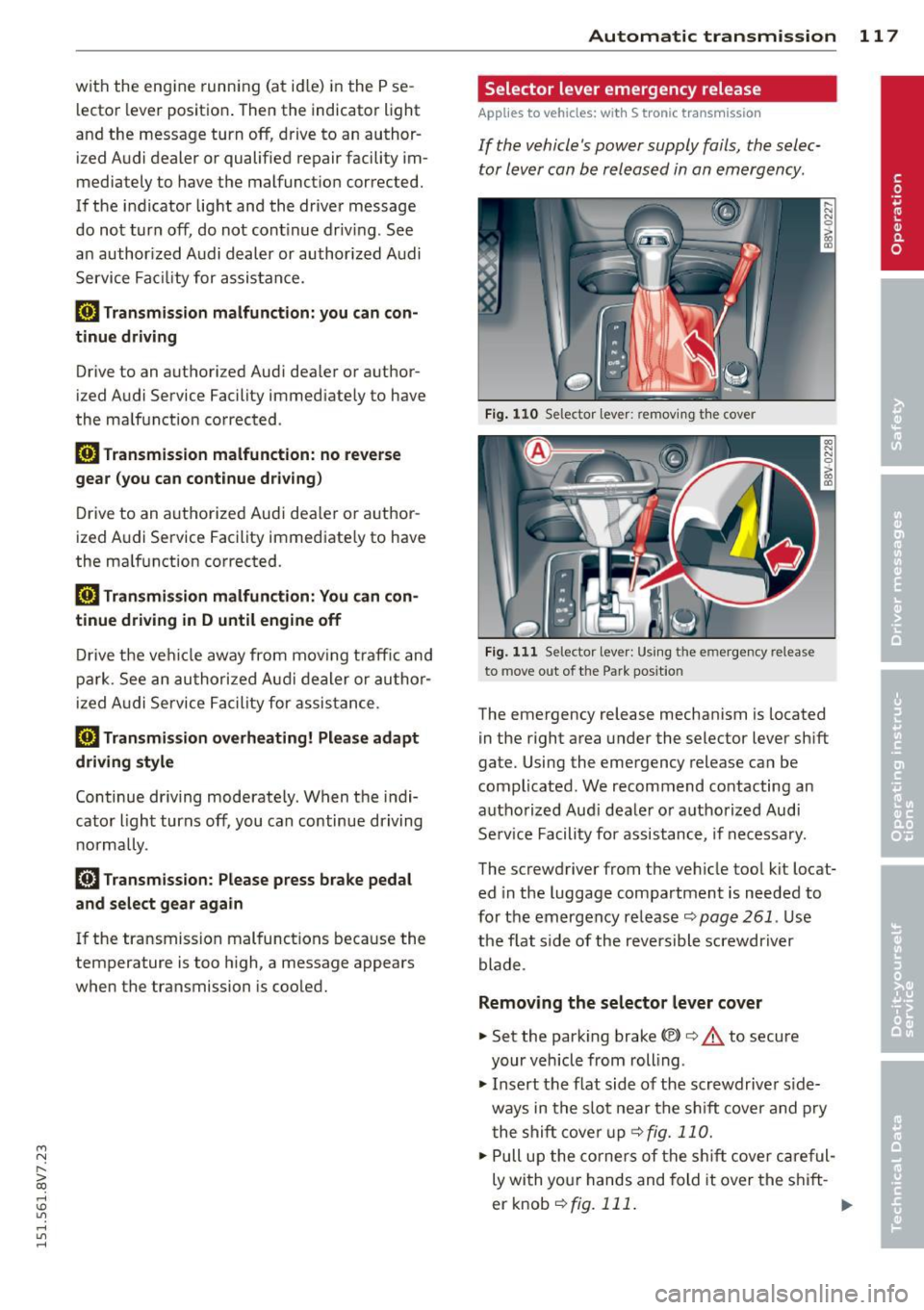
Fig. 110 Se lector leve r: remov ing t he cover
Fig . 1 11 Se lector lev er: Us ing t he e mergency re lea se
to move out of the Park pos it io n
The emergency release mechanism is located
in the right area under the selector lever sh ift
gate. Using the emergency release ca n be
complicated. We recommend contacting an
autho rized Aud i dea le r or a uthorized Audi
Se rv ice Facili ty for assistance, if necessa ry.
The screwdriver from the ve hicle too l kit locat
ed in the luggage compa rtment is needed to
fo r the em ergency re lease <=:>
page 261 . Use
the flat side of the reversible screwdriver
blade .
Removing the selector lever cover
... Set the park ing brake «e)) <=:> &. to secure
your veh icle from rolling .
... Insert t he flat side of the scr ewdrive r side
ways in the s lot near the s hift cover a nd p ry
t he shift cove r up
<=>fig. 11 0 .
... Pull u p the co rners of the s hift cove r ca reful
ly wi th yo ur hands and fold it over the s hift-
er knob
r::!) fig. 111 . ..,.
Page 120 of 302
118 Automatic transmission
Selector lever emergency release
.. Press and hold the yellow release button
with the screwdriver
r=>fig. 111 .
.. Press the release button in the selector lever
® and move the lever into the N position .
.. Clip the shift cover back into the shift gate
after using the emergency release.
If the vehic le must be pushed or towed due to
a power failure (for example, the battery is
dead), the selector lever must f irst be moved
to the N position using the emergency release
mechanism .
A WARNING
Only move the selector lever out of the P
position when the parking brake is set. If
that does not work, secure the vehicle with
the brake pedal. Otherwise, the vehicle
could start to move unintentiona lly when
the selector lever is moved out of the P po
sition.
Page 129 of 302
....,
N
r--. > co
rl I.O
"' rl
"' rl
.. Secure all luggage and other items carefully
r=> page 65, r::!;>page 65.
.. Make sure that nothing can interfere w ith
the pedals .
.. Adjust front seat, head restraint and mirrors
correct ly for your height .
.. Instruct passengers to adjust the head re
stra ints according to their height .
.,. Make sure to use the right child restraint
correctly to protect children
r=> page 169 ,
Child Safety .
.. Sit properly in your seat and make sure that
your passengers do the same
r=:>page 60,
Front seats .
.. Fasten your safety belt and wear it proper ly.
Also instruct your passengers to fasten their
safety belts properly
r=> page 138 .
What impairs driving safety?
Safe driving is directly related to the condi
tion of the vehicle , the driver as well as the
driver's ability to concentrate on the road
without being distracted.
The driver is responsible for the safety of the
vehicle and all of its occupants. If your ability
to drive is impaired, safety r isks for everybody
in the vehicle increase and you a lso become a
hazard to everyone else on the road
r=> ,&..
Therefore:
.,. Do not let you rself be dist racted by passen
gers or by us ing a cellular telephone .
.. NEVE R dr ive when yo ur dr iv ing ability is im
paired (by medicat ions, alcohol, drugs, etc.).
.. Observe all traffic laws, ru les of the road
and speed limits and plain common sense.
.. ALWAYS adjust your speed to road, traffic
and weather conditions .
.. Take frequent breaks on long trips. Do not
drive for more than two hours at a stretch.
.. Do NOT drive when you are t ired, under
pressure or when you are stressed .
A WARNING
Impaired driving safety increases the risk
of serious personal injury and death when
ever a veh icle is being used.
Driving safety 127
Proper occupant
seating positions
Proper seating position for the driver
The proper driver seating position is impor
tant for safe, relaxed driving .
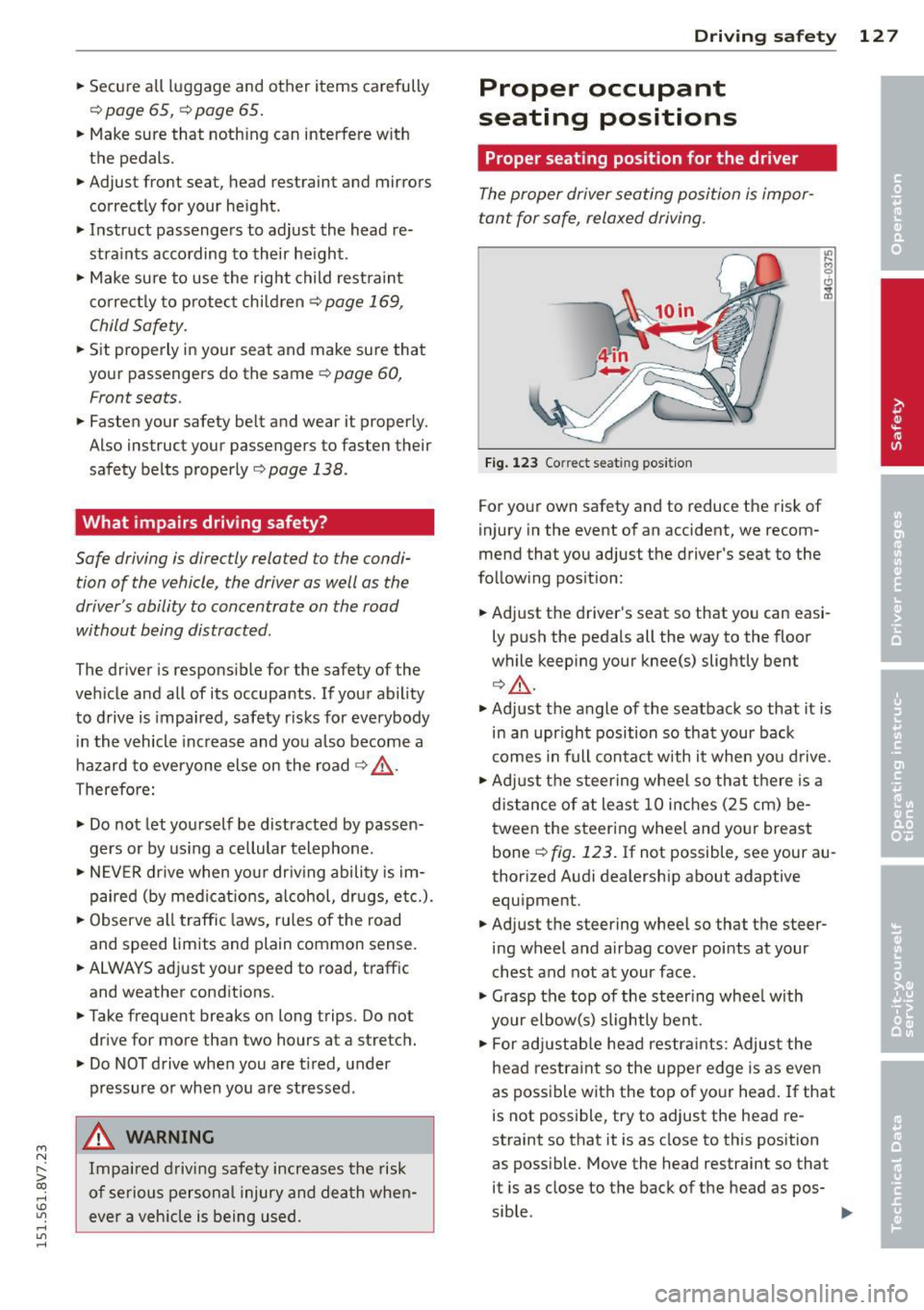
Fig. 123 Correct seat ing pos it ion
For your own safety and to reduce the risk of
injury in the event of an accident, we recom
mend that you adjust the driver's seat to the
follow ing position:
.. Adjust the driver's seat so that you can easi
ly push the pedals all the way to the floor
wh ile keeping your knee(s) slightly bent
r::!;> &,.
.. Adjust the angle of the seatback so that it is
in an upr ight position so that your back
comes in full contact w ith it when you drive.
.. Adjust the steering wheel so that th ere is a
distance of at least 10 inches (25 cm) be
tween the steering wheel and yo ur breast
bone r=:>
fig. 123. If not possible, see your au
thorized Audi dealership about adaptive
equipment .
.. Adjust the steering wheel so that the steer
ing wheel and airbag cover points at your
chest and not at your face .
.,. Grasp the top of the steer ing whee l with
your elbow(s) slightly bent.
.. For adjustable head restra ints: Adjust the
head restraint so the upper edge is as even
as possible with the top of your head. If that
is not possible, try to adjust the head re
straint so that it is as close to this position
as poss ible. Move the head restraint so that
it is as close to the back of the head as pos-
sible . .,.
Page 131 of 302
M N
" > co ,...., \!) 1.1'1 ,...., 1.1'1 ,....,
A WARNING ,~ ~
Front seat passengers who are unbelted,
out of posit ion or too close to the airbag
can be seriously injured or k illed by the air
bag as it unfolds. To help reduce the r isk of
ser ious personal inju ry:
- Passengers must always s it in an upr ight
posit ion and never lean against o r place
any part of their body too close to the
area where the airbags are located.
- Passengers who are unbelted, out of po
sit ion or too close to the airbag can be
seriously injured by an airbag as it un
f olds with great force in the blink of an
eye.
- Always make sure that there are at leas t
10 inches (25 cm) between the front
passenger's breastbone and the instru
ment pane l.
- Always make sure that there are at least
4 inches (10 cm) between the front pas
senger's knees and the lower part of the
instrument panel.
- Each passenger m ust always s it on a seat
of the ir own and properly fasten and
wea r the safety belt be long ing to that
seat .
- Before driv ing, a lways adjust the front
passenger seat properly .
- For adjustable head restraints : before
dr iv ing, always a lso adjust the head re
straints properly .
- Always keep your feet on the f loor in
front of the seat . Never rest them on the
seat, instrument panel, out of the win
dow, etc. The airbag system and safety
belt w ill not be ab le to protec t you prop
e rl y and can even incre ase the ris k of in
jury in a crash .
- Never drive wi th the backrest recl ined o r
t il ted far bac k! T he farther the backrests
are t ilted back , the greater the ris k of in
jury d ue to incorrect positioning of the
safety belt and improper seating posi
t ion.
- Children must always ride in child seats
¢
page 169. Special precautions apply
Dri ving s afe ty 129
when instal ling a child seat on the front
passenger seat¢
page 146.
Proper seating positions for passengers
in rear seats
Rear sea t passengers mus t sit uprigh t wi th
both fee t on the floor consistent wi th their
physical size and be properly restrained whenever the vehicle is in use .
To reduce the risk of injury caused by an incor
rect seating posit ion in the event of a sudde n
braking maneuver or an accident, your pas
sengers on the rear bench sea t must always
obse rve the following:
... For ad justab le head restra ints: adjust the
head restra int so the uppe r edge is as even
as poss ible with the top of your head . If that
is not poss ible, try to adjus t the head re
s tr aint so that it is as close to this position
as poss ible
¢ page 130 .
... Keep both feet flat in the footwell in front of
the rear seat .
... Fasten and wea r safety be lts proper ly
¢ page 141 .
... Make sure that children are always properly
restrained in a child restraint that is appro
pr iate for the ir size and age
¢ page 169.
A WARNING
Passengers w ho are imp roperly seated on
the rea r seat can be se rio usly in jured in a
cr ash.
- Each passenge r must always si t on a seat
of their own and properly fa sten and
wear the safe ty belt belonging to that
seat.
- Safety belts only o ffer maximum pro tec
tion when the sa fety belts are properly
positioned on the body and securely
latched. By not sitting upr ight, a rear
seat passenger increases the r is k of per
sonal injury from imp roperly pos itioned
safety belts!
- For ad justab le head restra ints: always
ad just the head restraint properly so that
it can g ive maximum protect ion .
•
•
•
Page 133 of 302
M N
" > co ,...., \!) ..,.,
,...., ..,., ,....,
-never lie down on the rear seat
- never lean up against the instrument pane l
- never sit on the edge of the seat
- never sit s ideways
- never lean out the w indow
- never put your feet out the window
- never put your feet on the instrument panel
- never rest your feet on the seat cushion or
back of the seat
- never ride in the footwell
- never ride in the cargo area
A WARNING
Imprope r seat ing positions increase the
risk of serious personal injury and death
whenever a vehicle is being used.
- Always make sure that all vehicle occu
pants stay in a proper seating position
and are properly restra ined whenever the
vehicle is being used.
Driver and passenger
side footwell
Important safety instructions
Applies to vehicles: with knee airbags
A WARNING
Always make sure that the knee airbag can
inflate without interference . Objects be
tween yourself and the airbag can increase
the risk of inju ry in an acc ident by interfer
ing w ith the way the a irbag deploys or by
being p ushed into you as the airbag de
ploys .
- No persons (ch ild ren) or animals should
ride in the footwell in front of the pas
senger seat. If the airbag deploys, this
can res ult in serious or fata l injuries .
- No objects of any k ind sho uld be carried
in the footwe ll area in front of the driv
er's or passenger's seat . Bulky objects
(shopping bags, for example) can ham
per or prevent proper deployment of the
airbag . Small objects can be thrown
through the vehicle if the airbag deploys and injure you or your passengers .
-
Driving s afe ty 131
Pedal area
Pedals
The pedals must always be free to move and
must never be interfered with by a floor mat
or any other object.
Make sure that a ll peda ls move free ly without
interfe rence and that nothing prevents them
from return ing to their orig inal positions .
Only use floor mats that leave the pedal area
free and can be secured with floor mat fasten ers .
If a brake circ uit fai ls, increased brake pedal
trave l is required to bring the vehicle to a fu ll
stop.
A WARNING
Pedals that cannot move free ly can cause
loss of vehicle control and increase the risk
of ser ious injury.
- Never p lace any objects in the driver's
footwell. An object cou ld get into the
pedal area and inte rfere with pedal func
tion. In case of sudde n brak ing o r an ac
cident, yo u wo uld not be able to brake or
accelerate!
- Always ma ke s ure that no thing can fall
or move into the driver's footwel l.
Floor mats on the driver side
Always use floor mats that can be securely
attached to the floor mat fasteners and do
not interfere with the free movement of the
pedals.
"' Ma ke sure t hat the floor mats are prope rly
secured and cannot move and in terfere with
t he peda ls ¢ ..&_ .
Use only floor mats that leave the peda l area
u nobst ructed and th at are firmly secu red so
that they c annot slip o ut of position. You c an
obtain suitab le floor mats from you r autho r
ized Audi Dealer.
Floor mat fastene rs a re insta lled in your Aud i.
1111>
•
•
•
Page 134 of 302
132 Driving safety
Fl oor mats used in your vehicle must be at
tached to these fasteners. Properly securing
the floor mats will prevent them from sliding into positions that could interfere with the
pedals or impair safe operation of your vehicle
in other ways .
A WARNING
Pedals that cannot move freely can result
in a loss of vehicle contro l and increase the
r isk of serious personal injury.
- Always make sure that floor mats are
properly secured.
- Never place or install floor mats or other
floor coverings in the vehicle that cannot
be properly secured in place to prevent
them from slipping and interfering with
the pedals or the ability to control the
vehicle.
- Never place or insta ll floor mats or other
floor coverings on top of a lready instal
led floor mats. Additional floor mats and
other coverings will reduce the s ize of
the pedal area and interfere with the pedals.
- Always properly reinstall and secure floor
mats that have been taken out for clean
ing.
- Always make sure that objects cannot
fall into the driver footwell wh ile the ve
hicle is moving. Objects can become
trapped under the brake pedal and accel erator pedal causing a loss of veh icle
control.
Stowing luggage
Loading the luggage compartment
All luggage and other objects must be prop
erly stowed and secured in the luggage com
partment.
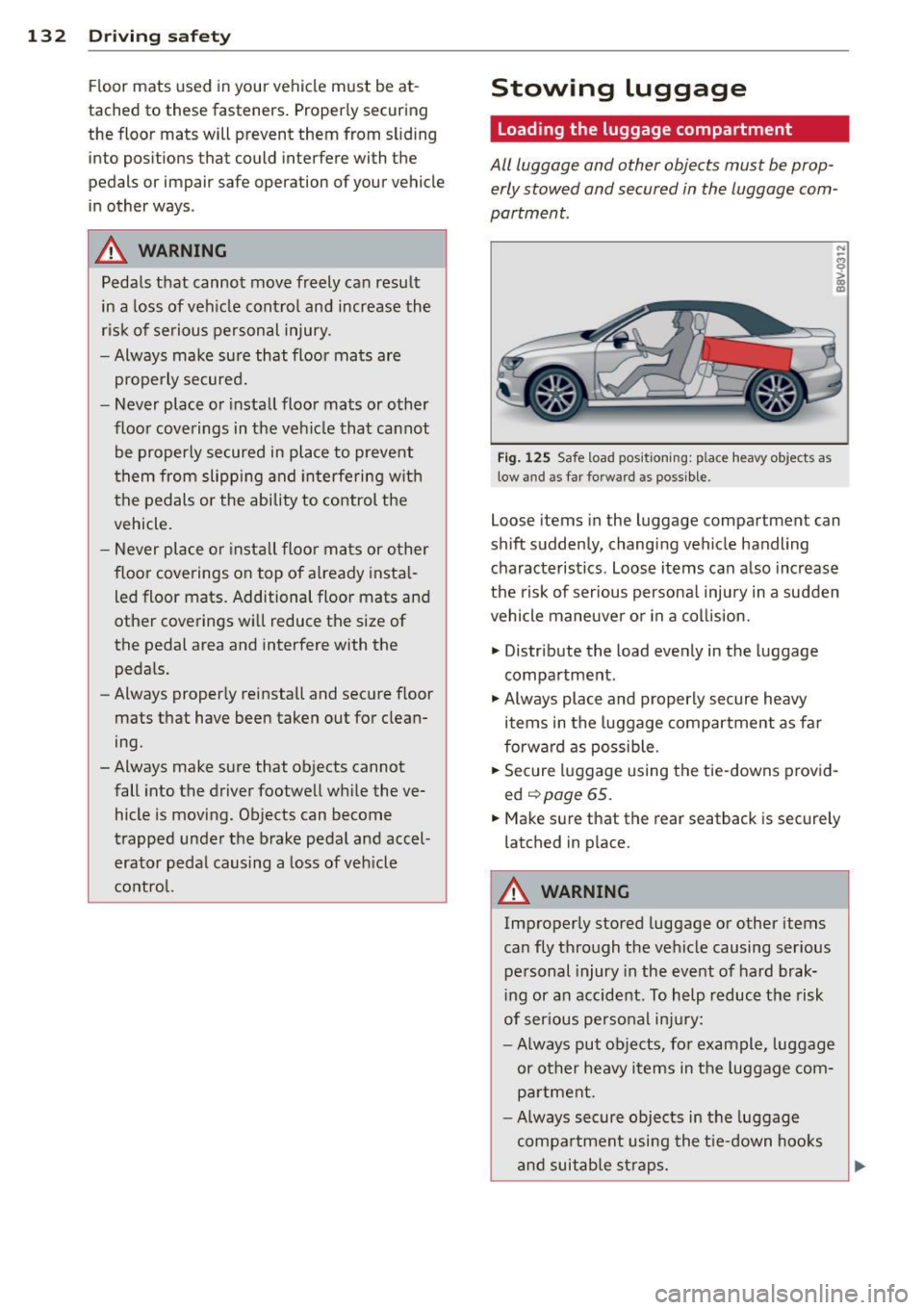
Fig. 125 Safe load positio nin g: place heavy objects as
low and as far forwa rd as possible .
N
-..,
~ C0 m
Loose items in the luggage compartment can
shift suddenly, changing vehicle handling
characteristics. Loose items can also increase
the risk of serious persona l injury in a sudden
vehicle maneuver or in a collis ion.
.,. Distribute the load evenly in the luggage
compartment.
.,. Always place and properly secure heavy
items in the luggage compartment as far
forward as possible.
.,. Secure luggage using the tie-downs prov id
ed
.::,page 65.
.,. Make sure that the rear seatback is securely
latched in place.
A WARNING
-Improperly stored luggage or other items
can fly through the vehicle causing ser ious
personal injury in the event of hard brak
i ng or an accident. To help reduce the risk
of ser ious personal inju ry:
- Always put objects, fo r example, luggage
or other heavy items in the luggage com
partment.
- Always secure objects in the luggage
compartment using the tie-down hooks
and suitable straps.
Page 135 of 302
M N
" > co ,...., \!) 1.1'1 ,...., 1.1'1 ,....,
A WARNING ,~
Heavy loads will influence the way your ve
hicle handles. To help reduce the r isk of a
loss of control leading to ser ious personal
injury:
-Always keep in m ind when transporting
heavy objects, that a change in the cen
ter of gravity can also cause changes in
vehicle handling:
- Always distr ibute the load as even ly as
possible.
- Place heavy objects as far forward in
the luggage compartment as poss ible.
- Never exceed the Gross Ax le Weight Rat
ing or the Gross Vehicle Weight Rating
specified on the safety compliance stick
er on the left do or jamb. Exceeding per
missib le we ight standards can cause the
vehicle to s lide and handle differently.
- Please observe information on safe driv
ing co
page 126.
A WARNING
To help prevent poisonous exhaust gas
from be ing drawn into the veh icle, always
keep the rea r lid closed while dr iving.
- Never transport objects larger than those fitting completely into the luggage
area because the rear lid cannot be fully
cl osed.
- If you absolutely must drive w ith the rear
l id ope n, observe the follow ing notes to
reduce the risk of poisoning:
- Close all windows,
- Close the power top,
- Open all air ou tlets in the instrument
panel,
- Sw itch off the air recircu lation,
- Set the fresh ai r fan to the h ighest
speed.
A WARNING
Alw ays m ake s ure th at the doors, all win
dows, the power top an d the re ar lid are
securely closed and locked to reduce th e
Dri ving s afe ty 133
risk of injury when the vehicle is not being
used .
- After closing the rear lid, always make
sure that it is properly closed and loc ked.
- Never leave your vehicle unattended es
pecially with the rear lid left open. A
child cou ld craw l into the vehicle thro ugh
the luggage compartment and close the
rea r lid becoming t rapped and unable to
get out. Being trapped in a vehicle can
lead to serious pe rsonal inj ury.
- Never let ch ildren play in or around the
veh icle.
- Never let passengers ride in the luggage
compa rtment. Vehicle occupants must
always be properly restra ined in one of
the vehicle's seating pos it ions.
(D Tips
- Air circulati on helps to reduce window
fogging . S tale a ir escapes to the outside
through ven ts in the t rim panel. Be sure
t o keep these slots free an d ope n.
- T he tire pressure m ust correspond to the
load. The tire pressure is shown on the
t ire pressure label. T he tire pressure la
bel is located on the driver's side B-pilla r.
T he tire pressure label lists the recom
mended co ld tire inflation pressures fo r
the vehicle at its maxim um capacity
weight and the tires that were on your
vehicle at the time it was manufactured.
For recommended tire pressures f or nor
ma l load cond itions, p lease see chapter
co
page 235.
Tie-downs
The luggage compartment is equipped with
four tie-downs to secure luggage and other
items .
Use the t ie-downs to secure your cargo prop
erly co
page 132, Loading the luggage com
partment.
In a collision, the laws of physics mean th at
even smaller items that are loose in the vehi-
cle w ill become heavy m issiles that can cause .,.. •
•
Page 136 of 302
134 Driving saf ety
serious injury . Items in the vehicle possess en
ergy which vary with vehicle speed and the
weight of the item. Vehicle speed is the most
significant factor.
F or example, in a frontal collision at a speed
of 30 mph (48 km/h), the forces acting on a 10- lb (4.5 kg) object are about 20 times the
norma l weight of the item. Th is means that
the we ight of the item would suddenly be
about 200 lbs. (90 kg). You can imagine the
i njuries that a 200 lbs . (90 kg) item flying
freely through the passenger compartm ent
could cause in a collision like t his.
_& WARNING
Weak, damaged or improper straps used
to secure i tems to tie-downs can fail du r
ing hard braking or in a collision and cause
ser ious personal injury .
- Always use suitab le mounting straps and
properly secure items to the tie-downs in
the luggage compartment to help pre
vent items from shifting or flying for
ward as dangerous miss iles.
- When the rear seat backrest is folded
down, always use su itab le mounting
straps and properly secure items to the
t ie-downs in the luggage compartment
to help prevent items from flying for
ward as dangerous miss iles into the pas
senger compartment.
- Never attach a child safety seat tether
strap to a tie-down.
Reporting Safety
Defects
Applicable to U.S.A.
If y ou beli eve that your vehi cle
h as a def ect whi ch could cause
a cra sh or could cau se injur y or
d eath, yo u should immediatel y
inform the N ati onal High way
Tr affic S afe ty Admini stration (
NHTSA) in addition to notif y
in g Audi of Am eric a, Inc .
If NHTSA r ecei ves similar com
plaints, it may open an inve sti
gation , and if it finds that a
s afety defect s ex is ts in a group
of vehicles , it may order a recall
and r emed y campaign . Howe v
er, NHTSA cannot become in
vol ved in indi vidual problems
bet ween you, your dealer , or
Audi of A merica, Inc.
To c onta ct the NHTSA, you ma y
e ither c all:
Tel.: 1-888-3 27-4236 (TTY :
1-800-424-9153) or
1-800-424-9393
or you ma y write to:
NHTSA
U .S . D epartm ent of Tr ansport a
tion 1200 New Jer sey A ve ., S . E .
W est Building
W ashin gton , D C 20590
You can al so obtain other infor
mation about motor vehicle
s afety from:
h ttp: / /www .s af ercar.g ov