door lock AUDI A3 CABRIOLET 2015 User Guide
[x] Cancel search | Manufacturer: AUDI, Model Year: 2015, Model line: A3 CABRIOLET, Model: AUDI A3 CABRIOLET 2015Pages: 302, PDF Size: 73.83 MB
Page 44 of 302
42 Power top
-Make sure no one will be injured by the
power top supports and other moving
components when opening and closing
the top.
- The headroom in the rear is reduced
when opening and closing the power top. Make sure the rear passengers keep
enough distance from the power top to
reduce the risk of injury.
- When operating the power top, visibility
to the rear is limited . Avoid operating the
top while driving in reverse.
(D Note
-To prevent damage to the power top:
- do not store any objects in the power
top storage compartment.
- make sure there is enough space above
the vehicle when opening or closing
the power top.
- To reduce the risk of damage, make sure
there are no sensitive objects in the pow
er top storage compartment's range of motion.
@ Tips
- To prevent the battery from draining un
necessarily, do not open or close the
power top repeatedly when the engine is
switched off.
- A message will appear in the instrument
cluster if there is a malfunction in the
power top c:>
page 43.
-The power top can also be operated
manually temporarily if there is a mal
function c:>
page 45, Power top emer
gency operation.
An authorized Audi
dealer or authorized Audi Service Facility
should diagnose and correct the cause of
the malfunction as soon as possible .
- If the vehicle is parked with the power
top open, the vehicle interior is not pro
tected from damaging weather or unau
thorized access. Lock any items you leave
behind in the luggage compartment.
Close the power top before leaving the
vehicle. - The
side windows automatically lower
slightly when opening or closing the
power top.
Power top convenience opening and
closing
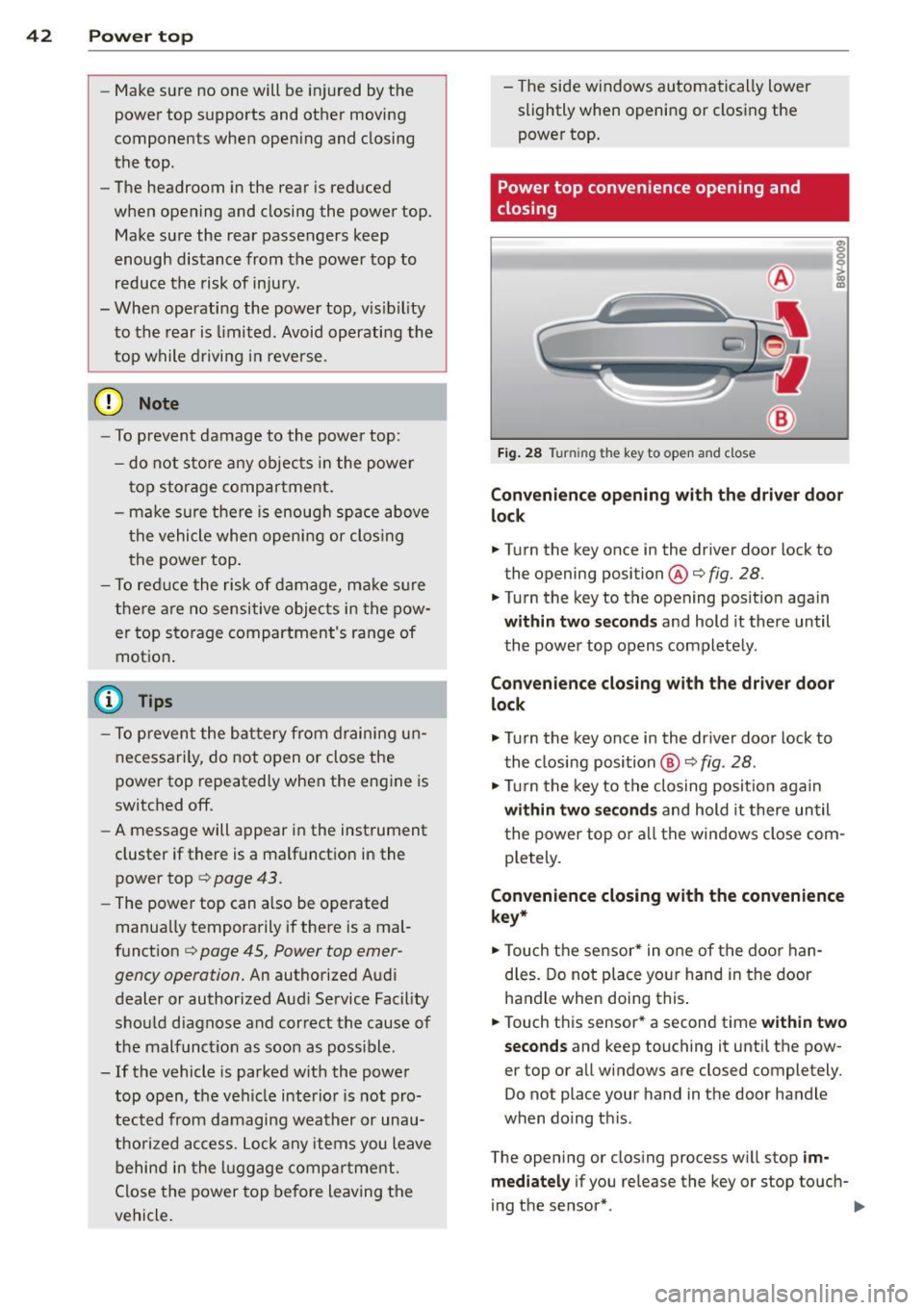
Fig. 28 Tu rnin g the key to open and close
Convenience opening with the driver door
lock
.. Turn the key once in the driver door lock to
the opening position@c:>
fig. 28.
.. Turn the key to the opening position again
within two seconds and hold it there until
the power top opens completely.
Convenience closing with the driver door
lock
.,. Turn the key once in the driver door lock to
the closing position @
c:> fig. 28.
.,. Turn the key to the closing position again
within two seconds and hold it there until
the power top or all the windows close com
pletely .
Convenience closing with the convenience
key*
.. Touch the sensor* in one of the door han
dles. Do not place your hand in the door
handle when doing this.
.. Touch this sensor* a second time
within two
seconds
and keep touching it until the pow
er top or all windows are closed completely .
Do not place your hand in the door handle
when doing this .
The opening or closing process will stop
im
mediately
if you release the key or stop touch-
ing the sensor*. ..,.
Page 57 of 302
....,
N
r--. > co
rl I.O
"' rl
"' rl
Removing the wiper blade
• Fold the windshield wiper arm away from
the windshie ld .
• Press the locking knob@¢
fig. 50 on the
wiper blade. Hold the wiper blade firm ly.
• Remove the wiper blade in the direction of
the arrow.
In sta ll ing th e wiper blade
• Insert the new wiper blade into the mount
on the wiper arm @until you hear it latch
into place.
• Place the wiper arm back on the windshie ld.
• Turn the service pos ition
off.
A WARNING
For safety reasons, the windshield wiper
blades should be replaced once or twice
each year.
(D Note
- The windshield wiper blades must only
be folded away when in the serv ice posi
tion. Otherw ise, you risk damaging the
paint on the hood or the wi ndshield wip
er motor.
- You should not drive your veh icle or
press the w indshield w iper lever when
the w iper arms are folded away from the
windsh ield . The w indshield w ipers would
move back into their origina l position
and could damage the hood and wind
shield.
- To prevent damage to the windshield
washer system, always loosen w iper
blades that have frozen to the wind
s h ield before turning the wipers on.
- To prevent damage to the wiper blades,
do not apply gasoline, petroleum, thin
ning agents or other solvents on the wip
er blades or near them.
- To prevent damage to the wiper arms or
other components, do not try to move
the windshie ld w ipers by hand .
-
Lights and Visi on 55
@ Tips
-Commercial hot wax such as t he types
used by car washes make it more d ifficult
to clean t he windshie ld.
- Yo u can also use the service position, for
example, if yo u want to protect the
w indshield from icing by using a cover .
- Yo u cannot activate the serv ice position
when the hood is open.
Outside mirror
Adjusting the exterior mirrors
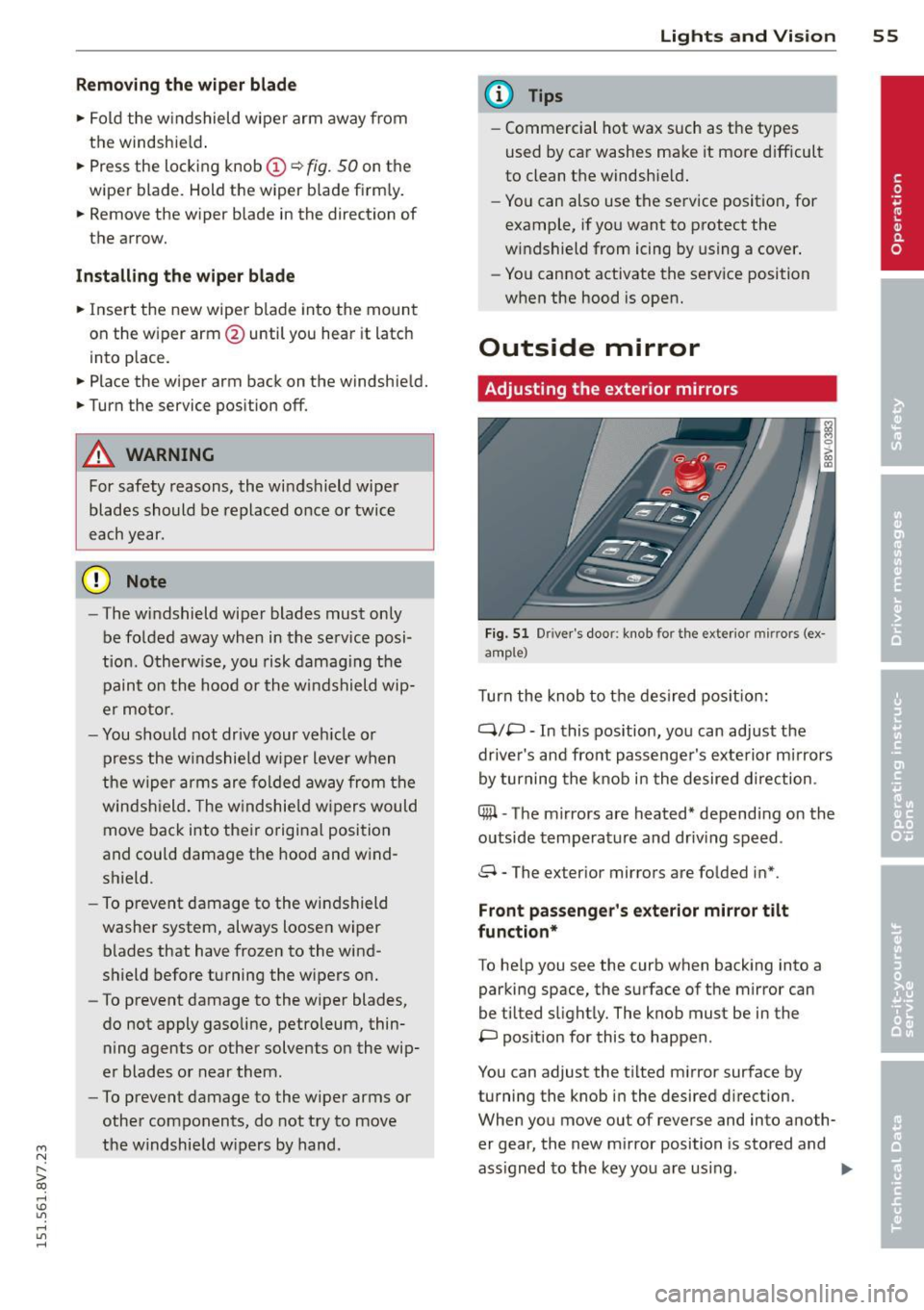
Fi g. 51 Dr iver's door : knob for the ex te ri or mi rrors (ex
a m ple)
T urn the knob to t he des ired pos it io n:
Q/P -In this position, you can adjust the
driver's and front passenge r's exte rior mirrors
by turning the knob i n the desired d irection .
C@ -The mirrors are heated* depend ing on the
outside temperature and driv ing speed .
8 - The exterior mirrors are folded in* .
Front passeng er's exterior mirror tilt
fun ction*
To he lp you see the curb when backing into a
parking space, the surface of the mirror can
be tilted s light ly. The knob must be in the
P pos ition for this to happen .
You can adjust the t ilted mirror surface by
turning the knob i n the desired d irection.
When you move out of reverse and into anoth
er gear, the new m irror position is sto red and
ass igned to the key you are using .
II>
Page 82 of 302
80 Driving
Steering lock1
)
The steering locks when you turn the engine
off using the
I START ENGINE STOPI* button,
move the selector lever into the P position
and open the driver's door.
The locked steering helps prevent vehicle
theft.
Emergency off function
If it is absolutely necessary, the engine can al
so be turned off while driving at speeds lower
than 6 mph (10 km/h).
If you press the
I START ENGINE STOPI* button while driving,
the message
Pressing start/stop button
again will switch off engine!
appears. To
switch the engine off, press the
I STAR T ENGINE STO PI* button twice in a row
briefly or press and hold for longer than two
seconds.
A WARNING
- Never turn off the engine before the ve
hicle has come to a complete stop. The
full function of the brake booster and the power steering is not guaranteed. You
must use more force to turn or brake, if
necessary. Because you cannot steer and
brake as you usually would, this could
lead to accidents and serious injuries .
- Please note that the brake booster and
power steering only work when the en
gine is running. When the engine off, you
must use more force to steer or brake
the vehicle. Because the usual steering and braking capability is not available,
the risk of accidents or injuries increases.
- Always take the vehicle key with you when leaving the vehicle, even for a
short period of time. This applies partic ularly when children remain in the vehi
cle. Otherwise the children could start
the engine or operate electrical equip
ment such as power windows.
- For safety reasons, always park the vehi
cle with the selector lever in the P posi-
ll This function is not available in all cou ntr ies.
tion. Otherwise, there is the risk that the
vehicle could roll.
- After the engine has been switched off,
the radiator fan can continue to run for
up to 10 minutes - even with the ignition
switched off. It can also switch on again
after some time if the coolant tempera
ture rises as a result of heat buildup or if
the engine compartment is heated by sunlight and the engine is hot.
(D Note
If the engine has been under heavy load
for an extended period of time, heat builds
up in the engine compartment after the
engine is switched off - there is a risk of
damaging the engine. For this reason, let
the engine run for at idle for approximate
ly two minutes before shutting it off.
Starting the engine if there is a
malfunction
Applies to vehicles: with convenience key
It may not be possible to start the engine un
der certain circumstances, for example if the
battery in the vehicle key is drained, if inter
ference is affected the key or if there is a sys
tem malfunction.
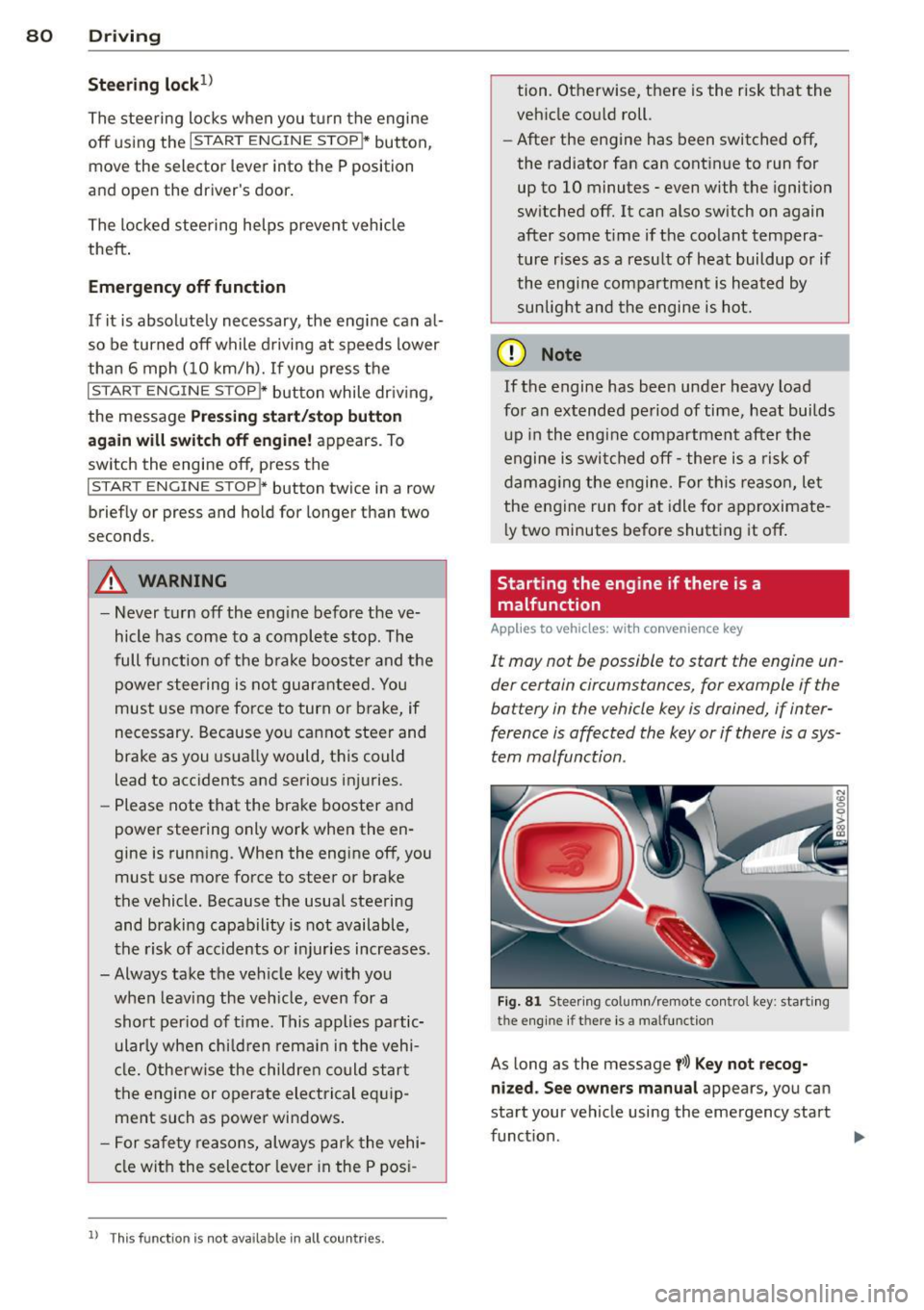
Fig. 81 Steer ing colum n/remote control key : start ing
the e ngine
if t h ere is a malfu nction
As long as the message y>l) Key not recog
nized. See owners manual
appears, you can
sta rt your vehicle using the emergency start
function . .,.
Page 83 of 302
M N
" > co ,...., \!) ..,.,
,...., ..,., ,....,
~ Press the brake pedal¢ A in Starting the
engine with the
S TAR T ENGINE STOP but
ton on page 79.
~ Press the l ~ s =T ~A~R=T~E~N-G~I~N~E~s=T~O~P~I button .
~ Hold the maste r key as shown in the illustra
t ion in the location indicated
y>l) ¢ fig . 81 .
The eng ine will start .
~ If the engine does not automatically start,
press the
I STAR T E NGINE STOP! button
again.
Drive to an authorized Aud i dea ler or author
i zed Audi Service Fac ility immed iate ly to have
the ma lfunction co rrected .
(D Tips
You can disp lay the message that appears
during an eme rgency by p ressing the
!S TART EN GINE STOPI* button.
Driver messages
Turn off ig nition befor e leaving car . Batter y
is disc har ging
This message appears and a warn ing tone
sounds if yo u ope n the dr ive r's door when the
i gnit ion is switched on. Sw itch the ignition off
so that the batte ry wi ll not discharge.
Pr ess ing start/stop button again will sw it ch
off engin e!
This message appears when you press the
I STAR T ENGIN E STOP !* button while dr iv ing
¢ page 80, Emergency off function.
E ngine start s ystem malfunction. Please
contact Service
The engine automatic start system has a mal
function. Drive to an authorized Audi dealer or
author iz ed Audi Serv ice Facility immediately
to have the ma lfunction corrected . To start
t he eng ine, press and hold the
I STAR T ENGIN E STOP ! button .
DJ Key not recognized . See owne r's manual
This message appea rs i f the re is no conven
ience key inside the vehicle or if the system
does not recognize the key. The convenience key may not be recognized, for examp le, if it is
Dri vin g 81
cove red by an object that disrupts the s ignal
(such as a briefcase), or if the key battery is
weak. E lectronic devices such as ce ll phones
can a lso interfere with the signa l.
T o still be ab le to start or stop the engine, re
fer to "Correcting a malfunction"¢
page 80.
Ill Key not in vehi cle?
The Ill in dicator light turns on and th is mes
sage appears if the co nvenience key was re
moved from the vehicle when the engi ne was
run ning . If the convenience key is no longer in
the ve hicl e, you cannot switch the igni tion on
o r start the engine once yo u stop it . You also
cannot lock the vehicle from the outside .
Press brake pedal
Th is message appears if you do not p ress the
brake pedal when sta rting the eng ine .
Please eng age N or P
This message appears when starting or stop
ping the engine if the se lector l ever is not in
the N or P position. The engine will not start/
stop.
Shift to P , othe rwi se vehicle can roll away.
Door s do not lock if le ver is not in P
T h is mess age appears for safety reasons
along wi th a warn ing tone.
It appea rs if the
selector lever for the automatic transm ission
is not in the P pos it ion when switching the ig
nition off with the
I S TAR T ENGINE STOP !*
button. Shift the se lec tor lever to the P posi
tion . Otherw ise, the vehicle could roll . You al
so cannot lock the vehicle us ing the loc king
senso r o n the door hand le or using the con
venience key.
•
Page 85 of 302
M N
" > co ,...., \!) ..,.,
,...., ..,., ,....,
-Occasiona l noises when the parking
brake is set and re leased are norma l and
are not a ca use for concern .
- When the vehicle is parked, the parking
brake goes through a se lf-test cycle at
regular intervals. Any noises associated
with th is are normal.
- If there is a power failure, the parking
brake will not set if it is released, and it
will not release if it is set c::>
,&. See an
authorized Audi dea ler or authorized
Audi Service Facility for assistance .
Parking
"'Press the bra ke peda l to stop the vehicle.
"' Pull the switch@c::>
page 82, fig. 82 to set
t h e parking bra ke.
"' Place the selector lever in the P position .
"'T urn the eng ine
off c::> _& .
"'Turn the steering whee l when parking on in
clines so that the whee ls will ro ll into the
curb if the vehicle starts moving.
A WARNING
-Always take the vehicle key with you when leaving the veh icle, even for a
short per iod of t ime. This applies partic
u larly when ch ild ren remain in the vehi
cl e. Otherwise chi ld ren could sta rt the
engine, re lease the par king brake or op
erate electrical eq uipment such as powe r
w indows, which increases the risk of an
acc ident.
- No one sho uld remain in the vehicle
when it is locked, especia lly children.
Locked doors make it more diffic ult for
emergency workers to get into the vehi
cle, which puts lives at risk.
Dri vin g 83
Starting from a stop
The start assist function ensures that the
parking brake is released automatically upon starting .
Stopping and setting the parking brake
"' Pull the sw itch @c::> page 82 , fig. 82 to set
the parking brake.
Sta rting and automatically rel easi ng the
parking brake
Req uirement: The dr iver's door must be
locked and the driver's safety belt must be
fastened.
"' When you press the accelerator peda l, the
parking brake is automatically re leased and
your vehicle begins to move.
When stopping at a traffic signal or stopping in city traff ic, the parking brake can be ap
plied . The vehicle does not have to be held
with the brake pedal. The parking brake elimi nates the tendency to creep when a selector
lever pos it io n is engaged. As soon as you
press the accelerato r peda l, the par king b rake
r eleases a utomat ica lly and the vehicle starts
to move.
Starting on slopes
When sta rting on incl ines, the hill start assist
prevents the vehicle from un intent ionally roll
i ng ba ck. The bra kin g fo rce of the par kin g
brake is not re leased unt il su ff ic ient d riving
f o rce has been built up a t the wheels.
(D Tips
Fo r safety reaso ns, t he pa rking bra ke is re
l eased automatic ally o nly when the d riv
er's safety bel t is fa stened an d the driver's
d oor is locked.
•
Page 86 of 302
84 Driving
Emergency braking function
This is used if the conventional brake system
fails or locks up.
... To brake your veh icle in an emergency, pu ll
the @switch ¢
page 82, fig. 82 and hold it
pulled .
... As soon as you releas e the @ switch or ac-
cele rate, the braking p rocess stops.
Pulling and holding the @switch while driv
in g at a speed of about 2 mph (3 km/h) or
h igher in itiates the emergency b rak ing func
tion . The vehi cle is braked at all fou r whee ls
by activat ing the brak ing hydrau lics. The brake
performance is s imilar to heavy bra ki ng. ¢.&.
To help prevent act ivat ing the emergency
b rak ing by mis take, an audib le wa rning tone
(b uzzer) sounds when the @switch is pulled.
E me rgency braking s tops as soo n as the @
switch is released or the accelerator peda l is
p ressed.
&_ WARNING
Emergency braking shou ld only be used in
an emergency, when the normal brake
pedal has failed or the brake pedal is ob
structed . Du ring emergency braking, your
vehicle will brake similar to heavy braking.
ESC and the assoc iated components (ABS,
ASR, EDL) cannot overcome the laws of
physics. In corners and w hen road or
weather conditions are bad, a full brake
application can cause the vehicle to skid or
the rear end to b reak away, which increas
es the risk of an acc ident.
Hill hold
Applies to vehicles: with H ill Hold
Hill hold makes it easier to start on hills .
Requirement: The driver door must be closed
and the engine must be r unning .
The system is act iva ted when the brake pedal
i s pressed wh ile the veh icle is s ta tionary .
To prevent the vehicle from ro ll ing back when
start ing , the bra ke power is he ld for a br ief moment afte
r releasing the brake pedal. D ur
ing t his time, you can easi ly begin to move
you r vehicle .
A WARNING
"---
-The intelligent technology of Hi ll Hold
cannot overcome the limitations im posed by natural physical laws . The in
creased comfort offered by H ill Hold
should not cause you to take safety r is ks.
- Hill Hold cannot hold the vehicle in all
h ill sta rt situations (fo r example, if the
g round is slippery o r icy).
- If you do not beg in moving immediately
after releasing the brake pedal, the vehi
cle could begi n to roll ba ckward unde r
certain ci rc u ms tances. Press the brake
pedal or set the pa rk ing brake immedi
ately.
- If the eng ine "stalls", press the b ra ke
pedal or set the pa rking brake immedi
ately.
- Starting on inclines in stop-and-go t ra f
fic: To help prevent the vehicle from ro ll
in g back when starting, press and ho ld
the brake pedal fo r several seconds when
the vehicle is stationary.
(D Tips
You can find o ut if yo ur vehicle is equ ipped
with Hill Hold by checking at an a uthorized
A udi dealer or qualified repair facility.
Speed warning system
Introduction
The speed warning system helps you to stay
under a specified maximum speed .
The speed warning system war ns you if you
are exceeding the maximum speed that you
have set . You will hear a warning tone when
yo ur speed exceeds the stored value by ap
proximate ly 3 mph (3 km/h). The . (U SA
models)/ . (Canada models) ind icator light
and the message
Speed limit e xceeded! ap
pear in the instrument cluster display at the
same time. The./. indicator light turns ..,.
Page 114 of 302
112 Autom atic tr an smi ssion
position longer than approximately 2 seconds
when th e brake pedal is not pressed.
Inter lock butt on
The interlock button in the selector lever han
d le prevents you from moving the selector
lever inadvertently while in some se lecto r lev
er positions. The positions that require the in
terlock button to be pressed are marked in
color in the illustration
c::> fig. 106 .
Ignition k ey s afe ty inte rloc k*
You can only remove the key from the ignition
after switching the ignition off if the se lector
lever is in the P position. The selector lever
will be locked in the P position as long as the
key is not in the ign ition.
_&. WARNING
Read and following all WARNINGS. c::> .& in
Selector lever positions on page 110.
(D Tips
- If the se lector lever does not engage,
there is a malfunction. The engine is dis
abled to prevent the vehicle from driving
off unintentionally. Press the brake pedal briefly to allow the selector lever lock to
engage aga in .
- If the vehicle does not move forward or
in reverse even though a drive position is
se lected, proceed as follows:
- >If the veh icle does not move in the de
s ired direction, the system may not have
engaged the dr ive position co rrectly.
Press the brake pedal and select the
drive position again.
- >If the veh icle st ill does not move in the
desired direction, there is a system mal
f u nct ion . See an a uthorized Aud i dea ler
or authorized Audi Service Facility for as
sistance to have the system checked.
Driving tips
Applies to vehicles: with S tronic transmission
The transmission shifts up and down auto
matically when in the driving gears .
Fig . 107 Sect io n of the cente r co nsole: se lector leve r
w ith interlock b utto n
The eng ine will only be able start when these
lector lever is in the P or N positions. At low
temperatures (below 14 °F ( -10 °C)), the en
gine can only be started when the selector
lever is in the P pos it ion.
St arting from a stop
.,. Press and hold the brake pedal.
.,. Press and hold the interlock button in the
selector lever handle, select the desired se
lector lever pos ition such as D
c::> page 11 0
and release the lock button.
.,. Wa it a moment until the transmission
shifts . You will notice a slight movement
when the gear engages .
.. Release the b rake peda l and press the acce l
erator pedal
c::> _A .
Stopping t emporarily
.,. Keep the veh icle stat iona ry using the brak
ing pedal, fo r example at traffic lig hts.
.,. Do not press the accelerator peda l when do
ing this.
.,. To prevent the vehicle from ro lling when you
start driv ing, set the parking brake when
stopping on steep inclines
c::> _A .
.,. The parking brake will release automat ically
and the vehicle will start mov ing once you
press the acce lerator pedal. Requ irement:
The driver's safety belt must fastened and
the dr iver's door must be closed . .,._
Page 115 of 302
Stopping /p ar kin g
If the se lector lever is not in the P position
when you open the driver's door, the vehicle
could ro ll. In vehicles with a convenience key* ,
the following message appears:
S hift to P,
othe rwise veh icle c an roll away. Door s do not
lock if leve r is not in P .
You will also hear a
warn ing tone.
~ Press and ho ld the brake pedal c:> _& .
~ Set the parking brake.
~ Select the P selector lever pos ition.
Stopp ing on an inclin e
~ Always press the brake pedal to hold the ve
hicle in p lace and prevent it from "rolling
back"
c:> _& . Do not try to prevent the vehi
cle from "rolling back" when a gear is en
gaged by increasing the eng ine speed
c:> Q).
Starting on an incline in vehicle s wi thout
Hill Hold*
~ Set the parking brake.
~ With the driving gear se lected, press the ac
celerator pedal carefully. The parking brake
will release automat ically if your safety belt
is fastened .
Starting on an incline i n vehicle s with Hill
Hold*
~ With the driving gear selected, remove your
foot from the brake pedal and press the ac
celerato r pedal
c:> page 84, Hill hold.
Under certain circumstances, (such as driving
in the mountains or towing a tra iler), it may
be usefu l to switch temporarily to the manual
shift p rogram in order to adjust the gears to
the dr iving condit ions by hand
c:> page 115.
When parking on a level surface, simply place
the selector leve r in the P pos ition. On in
clines, activate the parking bra ke first and
then move the selector lever to the P posit ion
q page 82. This prevents the loc king mecha
nism from being loaded too heavily and wi ll
~ make it easier to move the selector lever out
" iii of the P position.
,...., \!) 1.1"1 ,...., 1.1"1 ,....,
Automa tic tran sm iss ion 113
A WARNING
- The vehicle can roll even when the en
gine is sw itched off.
- Unintended vehicle movement can lead
to serious injuries.
- Never leave your vehicle with the engine running while in gear. If you must leave
your veh icle when the engine is running,
set the parking brake and move these
lector lever to the P position.
- Power is still transferred to the wheels
when the engine is running at idle . To
prevent the vehicle from "c reeping", you
must keep your foot on the brake when
the engine is running and the se lector
lever is in the D, Sor R position or "tip
tronic" mode is selected .
- Do not inadvertently press the accelera
tor peda l when the vehicle is stationary.
Otherwise the vehicle wi ll start to move
immed iate ly, even if the parking brake is
set. Th is could resu lt in a crash.
- Do not press the accelerator pedal when
changing the selector lever position
while the vehicle is stationary and the engine is running.
- Never engage the R or P selector leve l
positions while dr iv ing. It could cause a
crash.
- Before driving down a steep slope, re
duce your speed and shift into a lower
gear with "tiptronic". -
- Do not ride the brakes or press the brake
pedal too often or too long when driving
downhill . Constant braking causes the
brakes to overheat and substantially re
duces braking pe rformance, increases
b ra ki ng distance or causes complete fa il
ure of the brake system.
- I f you must stop on an in cl ine, always
hold the vehicle in place with the foot
bra ke or parking brake to p reven t it from
rolling back .
- Neve r hold the vehicle on an incline with
a slipping clutch . The clutch opens a uto -
matica lly when it becomes too hot from
~
•
Page 116 of 302
114 Automatic tran smi ssion
the overload. The ml indicator light
turns on and a message appears
¢ page 116 when the clutch is overload
ed .
- If the engine must run while you are
working in the eng ine compartment with
the hood open, make sure a gear is not
engaged. The selector lever must be
firmly in the
P pos it ion and locked in
place and the pa rking brake must be set
¢ page 214. Otherwise, the veh icle
cou ld beg in moving when the eng ine
speed is high, even with the parking
brake set.
@ Note
- When stopping on an incline, do not try
to hold the vehicle in place by pressing
the accelerator peda l while a driving gear
i s selected. This can cause the automatic
transmission to overheat and can dam
age it. Set the park ing brake or press the
brake pedal to prevent t he veh icle from
r o lli ng .
- Allow ing the vehicle to roll when the en
gine is stopped and the selector lever is
i n the N pos ition will damage the auto
matic transmission beca use it is not lu
bricated unde r those circu mstances.
- The transm ission can ove rheat and be
damaged under certa in driving and traf
fic conditions such as frequent starts,
creeping for a long time, or s top-and -go
traff ic. W hen the
ml or . indicator
li ght turns on, stop the vehicle at the
next oppo rtunity and let the transmis
s ion coo l
¢ page 116 .
- Allow ing the ve hicle to roll when the en
gine is stopped w ill damage the 5 tron ic
transmission because it is not lubricated
¢ page 2 75, Emergency towing with
commercial tow truck.
(D Tips
For safety reasons, the park ing brake re
leases automatically only when the driver's
door is closed and dr iver's safety be lt is
fastened.
Hill descent control
Applies to veh icles: w ith S tronic transm iss io n
Hill descent control assists the driver when
driving down hills .
Hill descent contro l is activated when these
lector lever is in the Dor 5 position and you
press the brake pedal. The transm ission auto
matically selects a gear that is su itab le for the
incl ine. Hill descent cont ro l tries to ma inta in
t h e speed ac hieved at the t ime of b raking,
within physica l and tec hni cal limitations. If
may sti ll be necessary to ad just the speed
with the brakes . Because hill descent control
cannot shift down farther than 3rd gea r, it
may be necessary to sh ift into t iptronic mode
i n very steep areas . In this case, shift into 1st
or 2nd gear in t iptron ic mode to use the en
gine's brak ing force to relieve the brakes .
Hill descent contro l sw itches off once the h ill
levels out or you press the accelerator pedal.
On vehicles with a cruise contro l system*
¢ page 85, hill descent control is also activat
ed when the speed is set.
A WARNING
--
H ill descent control cannot overcome
physical lim itations, so it may not be ab le
to maintain a constant speed unde r a ll
conditions. A lways be ready to apply the
b rakes.
Page 135 of 302
M N
" > co ,...., \!) 1.1'1 ,...., 1.1'1 ,....,
A WARNING ,~
Heavy loads will influence the way your ve
hicle handles. To help reduce the r isk of a
loss of control leading to ser ious personal
injury:
-Always keep in m ind when transporting
heavy objects, that a change in the cen
ter of gravity can also cause changes in
vehicle handling:
- Always distr ibute the load as even ly as
possible.
- Place heavy objects as far forward in
the luggage compartment as poss ible.
- Never exceed the Gross Ax le Weight Rat
ing or the Gross Vehicle Weight Rating
specified on the safety compliance stick
er on the left do or jamb. Exceeding per
missib le we ight standards can cause the
vehicle to s lide and handle differently.
- Please observe information on safe driv
ing co
page 126.
A WARNING
To help prevent poisonous exhaust gas
from be ing drawn into the veh icle, always
keep the rea r lid closed while dr iving.
- Never transport objects larger than those fitting completely into the luggage
area because the rear lid cannot be fully
cl osed.
- If you absolutely must drive w ith the rear
l id ope n, observe the follow ing notes to
reduce the risk of poisoning:
- Close all windows,
- Close the power top,
- Open all air ou tlets in the instrument
panel,
- Sw itch off the air recircu lation,
- Set the fresh ai r fan to the h ighest
speed.
A WARNING
Alw ays m ake s ure th at the doors, all win
dows, the power top an d the re ar lid are
securely closed and locked to reduce th e
Dri ving s afe ty 133
risk of injury when the vehicle is not being
used .
- After closing the rear lid, always make
sure that it is properly closed and loc ked.
- Never leave your vehicle unattended es
pecially with the rear lid left open. A
child cou ld craw l into the vehicle thro ugh
the luggage compartment and close the
rea r lid becoming t rapped and unable to
get out. Being trapped in a vehicle can
lead to serious pe rsonal inj ury.
- Never let ch ildren play in or around the
veh icle.
- Never let passengers ride in the luggage
compa rtment. Vehicle occupants must
always be properly restra ined in one of
the vehicle's seating pos it ions.
(D Tips
- Air circulati on helps to reduce window
fogging . S tale a ir escapes to the outside
through ven ts in the t rim panel. Be sure
t o keep these slots free an d ope n.
- T he tire pressure m ust correspond to the
load. The tire pressure is shown on the
t ire pressure label. T he tire pressure la
bel is located on the driver's side B-pilla r.
T he tire pressure label lists the recom
mended co ld tire inflation pressures fo r
the vehicle at its maxim um capacity
weight and the tires that were on your
vehicle at the time it was manufactured.
For recommended tire pressures f or nor
ma l load cond itions, p lease see chapter
co
page 235.
Tie-downs
The luggage compartment is equipped with
four tie-downs to secure luggage and other
items .
Use the t ie-downs to secure your cargo prop
erly co
page 132, Loading the luggage com
partment.
In a collision, the laws of physics mean th at
even smaller items that are loose in the vehi-
cle w ill become heavy m issiles that can cause .,.. •
•