park assist AUDI A3 CABRIOLET 2015 User Guide
[x] Cancel search | Manufacturer: AUDI, Model Year: 2015, Model line: A3 CABRIOLET, Model: AUDI A3 CABRIOLET 2015Pages: 302, PDF Size: 73.83 MB
Page 116 of 302
114 Automatic tran smi ssion
the overload. The ml indicator light
turns on and a message appears
¢ page 116 when the clutch is overload
ed .
- If the engine must run while you are
working in the eng ine compartment with
the hood open, make sure a gear is not
engaged. The selector lever must be
firmly in the
P pos it ion and locked in
place and the pa rking brake must be set
¢ page 214. Otherwise, the veh icle
cou ld beg in moving when the eng ine
speed is high, even with the parking
brake set.
@ Note
- When stopping on an incline, do not try
to hold the vehicle in place by pressing
the accelerator peda l while a driving gear
i s selected. This can cause the automatic
transmission to overheat and can dam
age it. Set the park ing brake or press the
brake pedal to prevent t he veh icle from
r o lli ng .
- Allow ing the vehicle to roll when the en
gine is stopped and the selector lever is
i n the N pos ition will damage the auto
matic transmission beca use it is not lu
bricated unde r those circu mstances.
- The transm ission can ove rheat and be
damaged under certa in driving and traf
fic conditions such as frequent starts,
creeping for a long time, or s top-and -go
traff ic. W hen the
ml or . indicator
li ght turns on, stop the vehicle at the
next oppo rtunity and let the transmis
s ion coo l
¢ page 116 .
- Allow ing the ve hicle to roll when the en
gine is stopped w ill damage the 5 tron ic
transmission because it is not lubricated
¢ page 2 75, Emergency towing with
commercial tow truck.
(D Tips
For safety reasons, the park ing brake re
leases automatically only when the driver's
door is closed and dr iver's safety be lt is
fastened.
Hill descent control
Applies to veh icles: w ith S tronic transm iss io n
Hill descent control assists the driver when
driving down hills .
Hill descent contro l is activated when these
lector lever is in the Dor 5 position and you
press the brake pedal. The transm ission auto
matically selects a gear that is su itab le for the
incl ine. Hill descent cont ro l tries to ma inta in
t h e speed ac hieved at the t ime of b raking,
within physica l and tec hni cal limitations. If
may sti ll be necessary to ad just the speed
with the brakes . Because hill descent control
cannot shift down farther than 3rd gea r, it
may be necessary to sh ift into t iptronic mode
i n very steep areas . In this case, shift into 1st
or 2nd gear in t iptron ic mode to use the en
gine's brak ing force to relieve the brakes .
Hill descent contro l sw itches off once the h ill
levels out or you press the accelerator pedal.
On vehicles with a cruise contro l system*
¢ page 85, hill descent control is also activat
ed when the speed is set.
A WARNING
--
H ill descent control cannot overcome
physical lim itations, so it may not be ab le
to maintain a constant speed unde r a ll
conditions. A lways be ready to apply the
b rakes.
Page 118 of 302
116 Automatic tran smi ssio n
Launch Control-Program
Ap plies to vehicles: with launch co ntrol
The Launch Control Program enables maxi
mum acceleration .
Requirement: The engine must be at operat
ing temperature and the steering wheel must
not be turned .
• With the engine running, press the
l~ OFFI
button briefly one time ll .
• Pull the selector lever back out of the D/S
position briefly to select the S position, or
press it toward the rig ht into the tipt ronic
pos it ion or select the
dynami c driving mode
in drive select*
~ page 107.
• Press the brake peda l firmly with your left
f oot and hold it all the way down for at least
1 second .
.. At the same time, press the gas peda l all the
way down with your right foot unti l the en
gine reaches and stays at a high RPM level.
• Remove your left foot from the brake.
A WARNING
- Always adapt your driving to the traffic
flow.
- Only use Launch Contro l when road and
t raff ic conditions a llow it and othe r driv
ers w ill not be endangered or impacted
by you r driv ing and the veh icle's acceler
ation.
- Please note that the drive whee ls can
spin and the vehicle can brea k away
when sport mode is sw itched on, espe
cially when the road is slippery.
- Once the vehicle has s tarted moving,
press the
I ~ OFF ! button br iefly to turn
the sport mode off.
@ Tips
- The transm ission tempera ture may in
crease significantly after using the
l ) In vehicles with a drive r inform ation system, an ESC
l ig ht in t he in strume nt cl us te r stays on cont inuously
and the m essage
Stabili zatio n co ntrol (ESC): spo rt.
W arn ing! Restricted st ability
appears te mpo rarily.
Launch Control Program . If that hap
pens, the program may not be availab le
for a few minutes . It will be ava ilable
again after a cool-down period.
- When accelerating using the Launch
Contro l Program, all vehicle parts are
subject to heavy loads. Th is can lead to
increased wear.
Emergency mode
Applies to vehicles: wit h S tronic transm issio n
In the event of a system malfunction, there is
an emergency program.
If all of the selector lever positions are high
li ghted with a light background in the instru
ment cluster d isp lay, there is a system mal
funct ion and the S tronic transmission is run
ning in the emergency program . The vehicle
can still be driven in emergency mode, but on
ly w it h reduced speed and not in all gears. In
some cases, the ve hicl e
cann ot driv e in re
v e rs e .
d) Note
If the transmission runs in emergency
mode, drive to your author ized Audi dealer
or q ualified repa ir fa cility immed iate ly to
have the ma lf u nct ion corrected.
Transmission malfunction
• Tran smi ssion m alfu ncti on! Please st op
the vehicle and select P
T he re is a malfunction in the transmiss ion .
Park the ve hicle securely and do not continue
driv ing. See an authorized A udi dealer or au
thorized Audi Service Facility for assistance.
• Tran smi ssion o verheating! Plea se stop
the vehicle!
The transm iss ion is too hot and can become
damaged . Stop and let the t ransmission cool .,.
Page 119 of 302
....,
N
r--. > co
rl I.O
"' rl
"' rl
with the engine running (at id le) in the P se
l ecto r lever positio n. The n the indicator light
and the message turn off , d rive to an author
i z ed A udi dealer or qualified repair facility im
mediately to have the malfunct ion corrected.
If the i ndicator light and the drive r message
do not tur n off, do not cont inue dr iv ing. See
an author ized Audi dealer or authori zed A udi
S ervi ce Fa cility for assis tan ce.
DD Transmiss ion malfunction: you can con
tinue driving
Drive to an authori zed Aud i dea ler or a uthor
ized Audi Service Facility immed iate ly to have
the ma lfunction corrected .
DD Transmission malfunction: no reverse
gear (you can continue driving )
Drive to an aut ho rized Aud i dea le r o r a uthor
ized A udi Service Facility immed iate ly to have
the ma lfunction cor rected .
DD Transmi ssion malfunction: You can con
tinue dri ving in D until engine off
D rive t he ve hicle away from mov ing t raff ic and
par k. See an au thori zed A ud i d ealer or au tho r
iz ed A udi Service Faci lity for assis tance .
DD Transmi ssion overheating! Please adapt
driving style
Continue dr iving moderate ly . W hen t he indi
cator light tur ns off, you can continue dr iving
normally .
DD Transmiss ion : Please press brake pedal
and select gear again
I f the tra nsmission mal functions beca use the
temperature is too high , a message appears
when the transmission is cooled.
Autom atic transm ission 11 7
Selector lever emergency release
Applies to vehicles: with S tronic transmission
If the vehicle's power supply fails , the selec
tor lever can be released in an emergency .
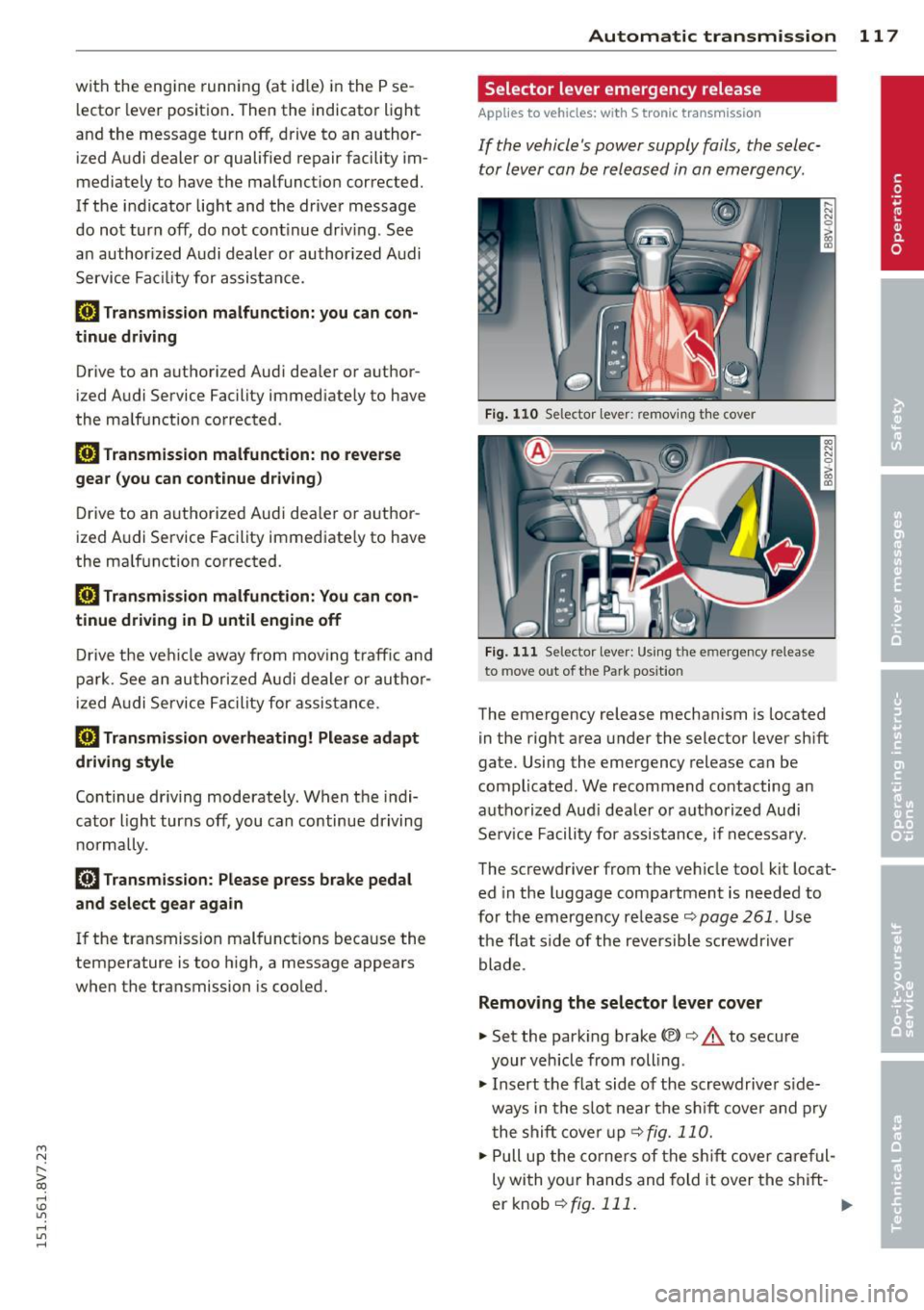
Fig. 110 Se lector leve r: remov ing t he cover
Fig . 1 11 Se lector lev er: Us ing t he e mergency re lea se
to move out of the Park pos it io n
The emergency release mechanism is located
in the right area under the selector lever sh ift
gate. Using the emergency release ca n be
complicated. We recommend contacting an
autho rized Aud i dea le r or a uthorized Audi
Se rv ice Facili ty for assistance, if necessa ry.
The screwdriver from the ve hicle too l kit locat
ed in the luggage compa rtment is needed to
fo r the em ergency re lease <=:>
page 261 . Use
the flat side of the reversible screwdriver
blade .
Removing the selector lever cover
... Set the park ing brake «e)) <=:> &. to secure
your veh icle from rolling .
... Insert t he flat side of the scr ewdrive r side
ways in the s lot near the s hift cover a nd p ry
t he shift cove r up
<=>fig. 11 0 .
... Pull u p the co rners of the s hift cove r ca reful
ly wi th yo ur hands and fold it over the s hift-
er knob
r::!) fig. 111 . ..,.
Page 121 of 302
M N ,....
> co ,...., \!) 1.1"1 ,...., 1.1"1 ,....,
Parking systems
General information
Appl ies to vehicles: with rea r parking sys te m s/park ing
system pl us/rearv iew camera
Depending on your vehicle's equipment, vari
ous parking aids w ill help you when parking
and maneuvering.
The
r ea r p arking sys te m is an audible parking
aid that warns you of obstacles
behind the ve
hicle
~ page 120 .
T he
p ar kin g syste m plus assists you when
parking by audibly and visually indicat ing ob
jects detected
in front of and behind the vehi
cle
~ page 120.
T he
re ar view came ra shows the area behind
the veh icle in the MMI display . This display as
sists you when you are cross or para llel park
ing. The park ing system plus functions are al
so available
r::!;> page 121.
A WARNING ,-
- Always look for traff ic and check the area
around your vehicle by looking at it di
rectly as well. The parking system cannot
replace the driver 's attent ion. The driver
is always respons ible when entering or
leaving a parking space and during simi
lar maneuvers .
- Please note that some surfaces, such as
clothing, are not detected by the system .
- Sensors and cameras have blind spots in
wh ich people and objects cannot be de
tected . Be especially cautious of small
children and animals.
- Always pay attention to the area around
the vehicle -using the rearview mirror,
too .
- The sensors can be displaced by impacts
or damage to the radiator grille, bumper ,
wheel housing and the unde rbody . The
par king system may become impai red as
a result. Have an authorized Aud i dealer
or authorized Audi Service Facility check
their function .
Parking system s 119
-Make sure the sensors are not obstructed
by st ickers, deposits or other materials.
If they are, the sensor function could be impaired. For additional information on
cleaning, refer to~
page 204 .
(D Note
-Some objects are not detected or dis
played by the system under certain cir
cumstances:
- Objects such as ba rrier chains, trailer
draw bars, vertical po les or fences
- Objects above the senso rs such as wall
extensions
- Objects w ith specific surfaces or st ruc
tures such as chain link fences or pow der snow
- If you continue d riving closer to a low-ly
ing object, it may disappear from the
sensor range . Note that you wi ll no lon
ger be warned about this obstacle.
- T he sensors can be displaced by impacts
or damage to the radiato r grille, bumper,
wheel housing and the underbody. The park ing system may become impaired as
a result. Have an authori zed Audi dealer
or authorized Audi Service Facility check
their function .
{!) Tips
- The system may provide a warning even
though there are no obstacles in the cov
erage area in some situations, such as:
- certain road su rfaces or for long grass.
- externa l ult rason ic sources e.g. from
clean ing vehicles.
- heavy ra in , snow, or thick vehicle ex
haust.
- We recommend that you practice park
ing in a traff ic-free location or par king
lot to become familiar w ith the system.
When doing this , the re should be good
light and weather cond itions.
- Yo u can change the vo lume and pitch of
the signals as we ll as the disp lay
r::!;> page 125.
Page 122 of 302
120 Park in g s ystems
- What appears in the MM I display is
somewhat time -de layed .
- The sensors must be kept clean and free
of snow and ice for the park assist to op
erate.
Rear parking system
Description
App lies to vehicles: wit h rear parking system
The rear parking system is an audible parking
aid .
Descri pti on
There is a sensor in the rear bumper cover. If
these detect an obstacle, audible signals warn
you.
Make sure the sensors are not covered by
stickers, deposits or any other obstructions as it may impair the sensor function. For infor
mat ion on cleaning, refer to
c:::> page 204.
The range at which the sensors begin to meas
ure is approximately:
S ide rear 3 ft (0.90
m)
Side center 5.2 ft (1.60 m)
The closer you get to the obstacle, the shorter
the interval between the audib le signals. A
continuous tone sounds when the obstacle is
l ess than approximate ly
l foot (0.30 meters)
away. Do not cont inue backing up
c:::> & in Gen
eral information on page 119,
c:::> (D in General
information on page 119!
If the distance to an obstacle remains con
stant, the volume of the d istance warning
gradually drops after about four seconds (th is
is not apply in the continuous tone range).
Act ivating
The parking system activates automatically
when the reverse gear is selected . You will
hear a brief confirmation tone.
Parking system plus
Description
Applies to veh icles: w ith park ing system pl us
The parking system plus provides audio and
visual signals when parking.
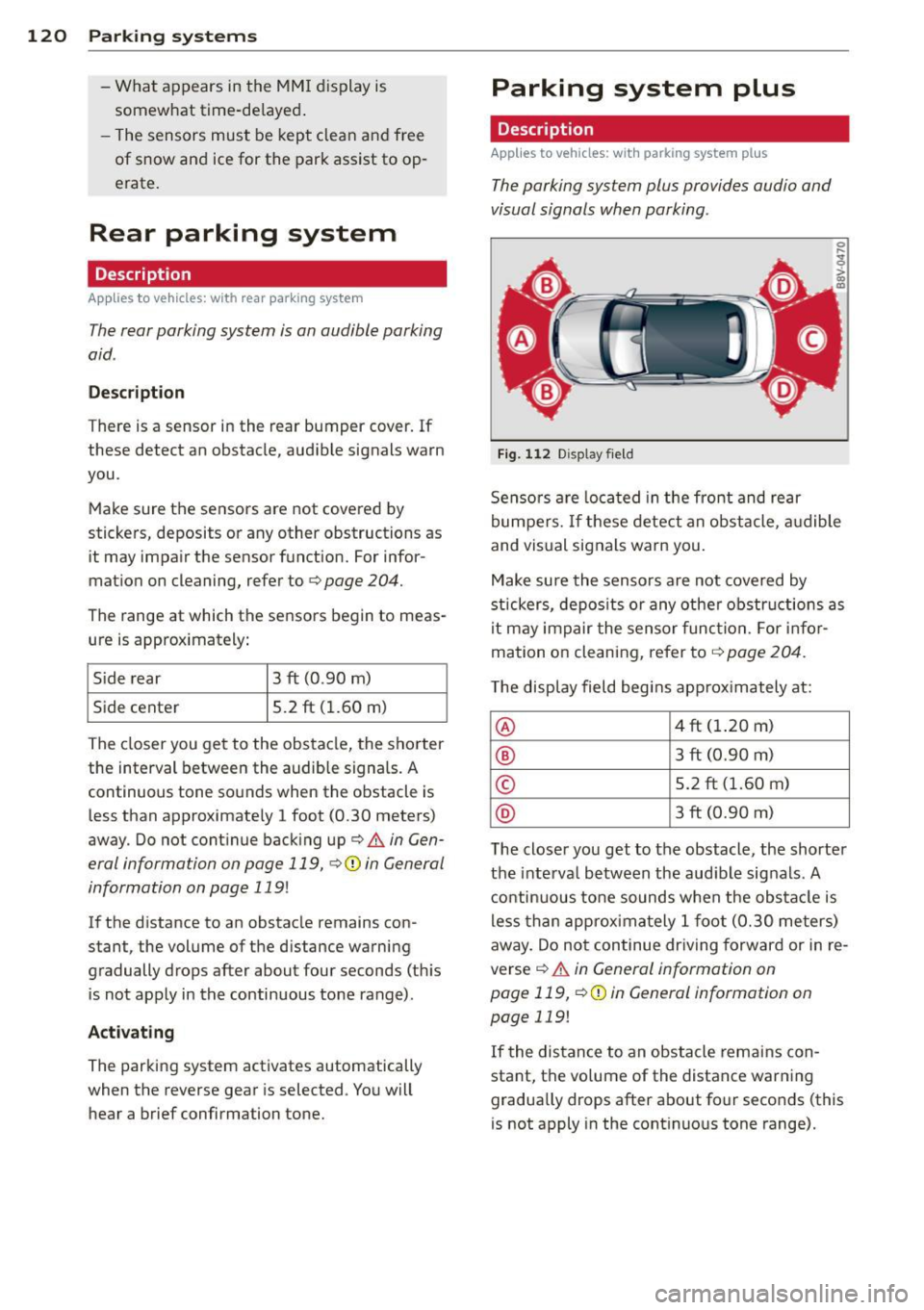
Fig. 112 Display fie ld
Senso rs a re loca ted in the front and rear
bumpers. If these detect an obstacle, a udible
and vis ual signals warn you.
Make su re the sensors are not covered by
stickers, depos its o r any othe r obstructions as
it may impair the sensor func tion. For infor
mation on cleaning, refer to
c:::> page 204 .
The display field begins app rox imately at:
@ 4 ft (1.20 m)
® 3 ft (0.90 m)
© 5.2 ft (1.60 m)
@ 3 ft (0.90 m)
T he close r you get to the obstacle, the shorte r
the interva l between the audible sig nals . A
c ontinuous to ne sounds when the obs ta cl e is
less than approxima tely
l foot (0.30 me ters)
away. Do not continue dr iving forward or in re
verse
c:::> & in General information on
page 119,
c:::> Q) in General information on
page 119!
If the distance to an obstacle remains con
stant, the vo lume of the distance war ning
gradua lly drops after about four seconds (this
is not apply in the cont inuous tone range).
Page 124 of 302
122 Parking systems
General information
Applies to vehicles: with par king system p lus w it h rear
view ca mera
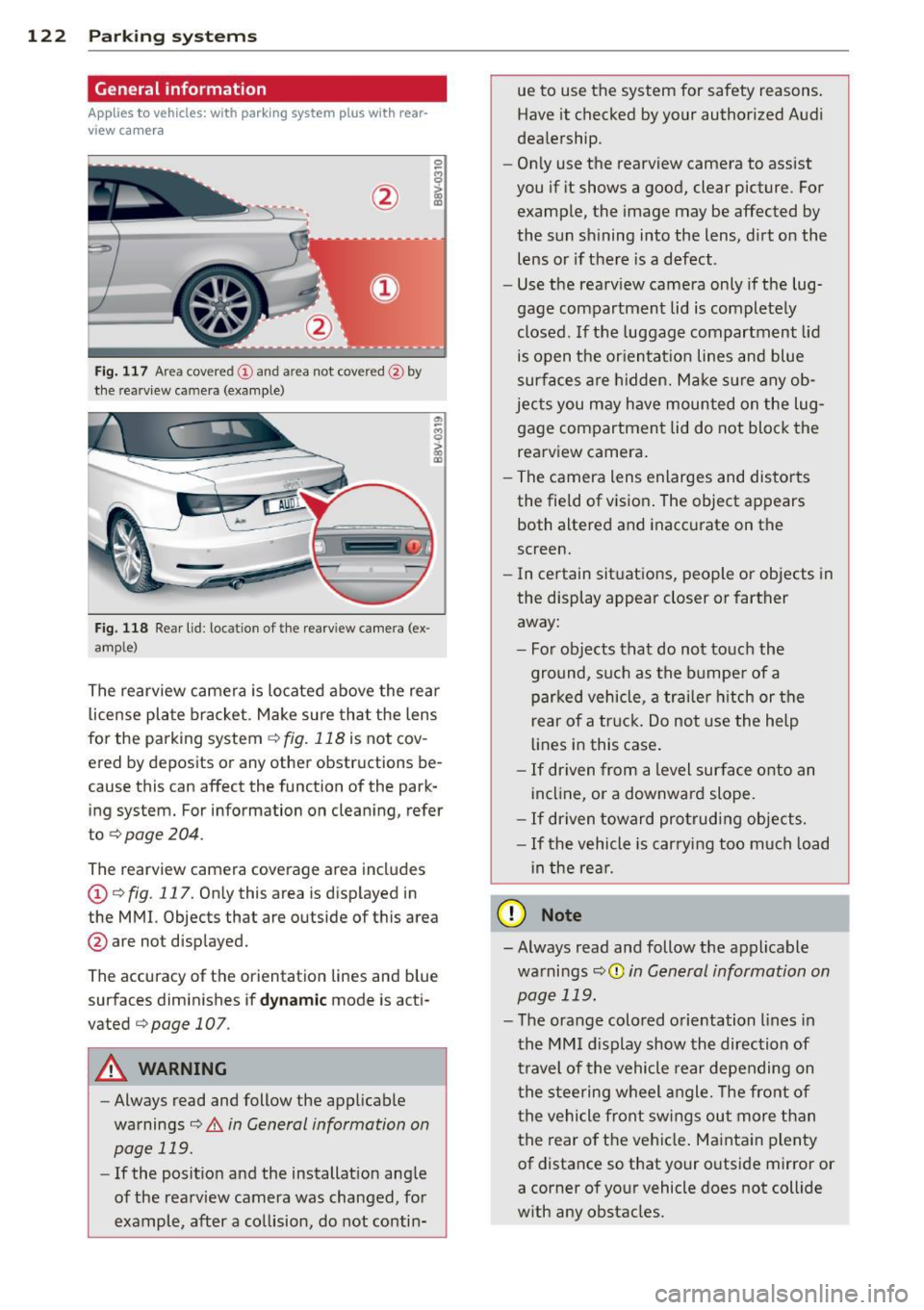
Fig. 117 Area covered
(D and area not covered @by
the rea rview camera (example)
Fig. 118 Rear lid : locat ion of the rearview camera (ex
ample)
0
-8 > "' m
"' §
> «> m
The rearview camera is located above the rear
license plate bracket . Make sure that the lens
for the parking system ¢
fig. 118 is not cov
ered by deposits or any other obstructions be
cause this can affect the function of the park
ing system. For information on clean ing, refer
to
¢ page 204.
The rearview camera coverage area includes
(D ¢ fig. 117. Only this area is displayed in
the MMI. Objects that are outside of this area
@ are not displayed.
The accuracy of the orientation lines and blue
surfaces diminishes if
dynamic mode is acti
vated
¢ page 107 .
_&. WARNING
-Always read and follow the applicable
warnings¢
& in General information on
page
119.
- If the position and the installation ang le
of the rearview camera was changed, for
example, after a collision, do not contin-
-
ue to use the system for safety reasons.
Have it checked by your authorized Audi
dealership.
- Only use the rearview camera to assist
you if it shows a good, clear picture . For
example, the image may be affected by
the sun shining into the lens, dirt on the lens or if there is a defect .
- Use the rearview camera only if the lug
gage compartment lid is completely
closed.
If the luggage compartment lid
is open the orientation lines and blue
surfaces are hidden. Make sure any ob
jects you may have mounted on the lug
gage compartment lid do not block the
rearview camera.
- The camera lens enlarges and distorts
the field of vision. The object appears
both altered and inaccurate on the
screen.
- In certain situations, people or objects in
the display appear closer or farther
away:
- For objects that do not touch the
ground, such as the bumper of a
parked vehicle, a trailer hitch or the
rear of a truck. Do not use the help
lines in this case.
-If driven from a level surface onto an
incline, or a downward slope.
- If driven toward protruding objects.
- If the vehicle is carrying too much load
in the rear.
Q) Note
- Always read and follow the applicable
warnings
¢ (D in General information on
page
119.
- The orange colored orientation lines in
the MMI display show the direction of
travel of the vehicle rear depending on
the steering wheel angle. The front of
the vehicle front swings out more than
the rear of the vehicle. Maintain plenty
of distance so that your outside mirror or
a corner of your vehicle does not collide
with any obstacles.
Page 127 of 302
M N
" > co ,...., \!) ..,.,
,...., ..,., ,....,
Adjusting the display and the warning tones
App lies to vehicles: with pa rk in g system p lus/ rearv iew
camera
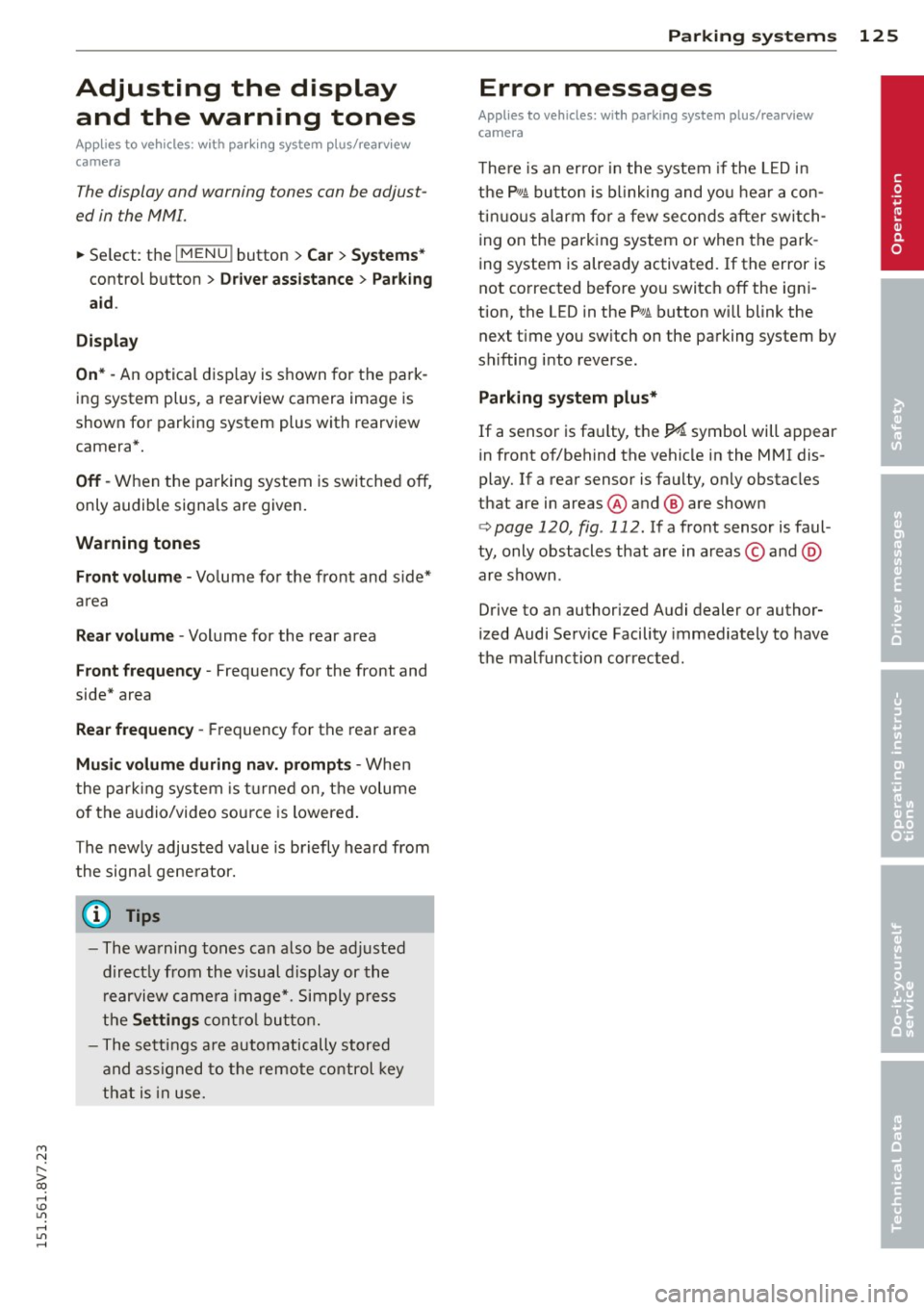
The display and warning tones can be adjust
ed in the MMI.
~ Select: the I MENU ! button >Car > Systems *
control button > Drive r assistance > Parking
aid .
Display
On* -An op tical d isp lay is s hown fo r t he park
ing system plus, a rearview camera image is
shown fo r parking system plus with rearview
camera*.
Off -When the parking system is sw itched off,
only audib le signa ls are given.
Warning tones
Front volume -Volume fo r the fro nt and s ide*
a rea
Rear volume -Volume for the rear area
Front frequency -Frequency for the front and
side* area
Rear frequency -Frequency for the rear area
Music volume during nav. prompts -When
the par king system is tu rne d on, the volume
of the a udio/video sou rce is lowered .
The new ly adjust ed value is bri efly heard from
the signa l ge ne rator.
- The wa rning tones can also be a djusted
dir ect ly from the visual display or the
r earview came ra image*. Simply press
the
Settings cont rol button .
- The settings a re autom atically stored
and ass igned to the remote control key
tha t is in use.
Parking systems 125
Error messages
App lies to vehicles : wi th parking syste m plus/ rea rview
camera
T he re is an error i n the system if the LED i n
t h e P
1#A bu tton is b link ing and yo u hear a con
t inu ous alarm for a few se conds after sw itch
ing on the park ing system or when the park
ing system is already activated. If the error is
not co rrected before yo u switch off the ign i
tion, the LED in the
P '#.A. button will blink the
next t ime you sw itch on the parking system by
shifting into reverse .
Parking system plus*
If a sensor is fa ulty, th e~ symbol will a ppear
in front of/behind the vehicle in the MMI dis
play. If a rear sensor is faulty, only obstacles
that are in areas @ and @ are shown
<=>page 120, fig . 112. If a fro nt sensor is faul
ty, only obstacles that are in areas © and @
ar e shown .
Drive to an authorized Audi dealer or author
ized Audi Serv ice Facility immediately to have
the malfunction corrected.
•
Page 292 of 302
290 Index
E
ECO mode (automatic climate control sys -
tem) . ..... .. ................ ..... ..
72
Efficiency program . . . . . . . . . . . . . . . . . . . 28
Description .............. .... .. .. .. 28
Fu el economy messages . . . . . . . . . . . . . 29
Other equipment . . . . . . . . . . . . . . . . . . . 29
Electrical accessor ies
refer to Socket . . . . . . . . . . . . . . . . . . . . . 64
Electromechanical parking brake
refer to Parking brake ......... .... .. 82
Electromechanical steering ....... ... . 192
Indicator lights ................... 192
Electronic diffe rent ial loc k ... .. .. .. .. . 188
Indicator light . . . . . . . . . . . . . . . . . . . . . 21
Electronic immobilizer ...... .... .... .. 36
also refer to Immobilizer . . . . . . . . . . . . 31
Electronic speed limiter . . . . . . . . . . . . . . . 30
Electronic stabilization control (ESC)
I ndicator light . . . . . . . . . . . . . . . . . . . . .
21
Sport mode ................ ..... . 189
Electronic Stabilization Control (ESC) . . . 188
Emergency assistance ....... ... .... . 261
Emergency flasher . . . . . . . . . . . . . . . . . . . 50
Emergency flashers
Indicator light . . . . . . . . . . . . . . . . . . . . .
25
Emergency operation
Emergency braking function .... .... ..
84
Front passenger's door ...... .. .. .. . . 37
Luggage compartment lid .. .... .... . 261
Power top . . . . . . . . . . . . . . . . . . . . . . . . . 45
·th ' k
w1 convenience ey . . . . . . . . . . . . . . . . 80
Emergency release
Fuel filler door ........... .........
213
Selector lever . . . . . . . . . . . . . . . . . . . . . 117
Emergency starting ......... ... .... . 273
Emergency towing ... .. .... .. .. .. .. . 275
Energy management ....... .. .. .. .. . 193
Indicator light . . . . . . . . . . . . . . . . . . . . . 20
Engine
Coolant
.. .. ................ ..... . 220
Starting with jumper cables . ..... .. . 273
starting (button) ............. .... .. 78
Starting (driver messages with conven-
ience key) .. ........ ..... .. ........
81
start ing (key) . .. ...... .... ... .. .. .. 76
stopping (button) ............. ..... 79
stopping (key) ... ................ .. 78
Engine compartment
Closing the hood .............. .. ..
216
Open ing the hood ................. 215
Overview . ..... .. ................ . 216
Safety precautions ............. .... 214
Engine control (indicator light) ...... .. . 22
Engine coolant .. .. ............. .... 220
Radiator fan ... .. ... .......... .... 221
Engine oil . ..... .. ................ . 217
adding ....... .. ................ . 218
Changing ........................ 219
Checking the oil level ............... 218
Dipstick. .. .. .. .. ............ 216, 218
Indicator light . .. ... ......... ... .. . 20
Oil consumption .. ..... ..... ... .. .. 217
Specification and viscosity ... .. .. .. .. 217
Use ...... .... ................... 218
Engine speed limitation (indicator light) . 23
Environment
Break-in period . . . . . . . . . . . . . . . . . . . .
196
Catalytic converter ............. .. .. 197
Disposing of your vehicle battery . .. .. 226
Driving at high speeds ............ .. 198
Driving to minimize pollution and noise 198
Fuel economy . ... ....... ...... .. .. 198
Letting the vehicle stand and warm up. 199
Proper disposal of drained brake fluid . 222
Proper disposal of drained eng ine oil .. 219
Unleaded fuel .... ................ . 210
What should I do with an o ld battery? . 226
EPC (engine contro l) . . . . . . . . . . . . . . . . . . 22
ESC
Automatic post-collision braking sys-
tem .. ... ... .. .. .. ...... ....... ..
189
Electronic stabilizat ion control . .. .. .. 188
Sport mode . .. .. ... ....... ... .. .. 189
Event Data Recorder (EDR) . . . . . . . . . . . . 194
Exterior lighting . .. ... .......... ..... 49
Exterior m irrors
Adjusting . . . . . . . . . . . . . . . . . . . . . . . . .
55
D. . 1mming .. .. ...... .. ... ... ... ..... 56
folding ... ................... ..... 55
Heating . .. ................... .... . 55
Page 294 of 302
292 Index
How often should I check my tire pres -
sures? . ..... ... ............. ..... .
241
How safety belt pretensioners work ... . 144
Hydroplaning ................. .... . 248
I
Ignition
Indicator light . . . . . . . . . . . . . . . . . . . . .
21
switching on and off (with button) ..... 78
Ignition key safety interlock . . . . . . . . . . . 76
Ignition lock mechanical . . . . . . . . . . . . . . . . . . . . . . . . 76
Immobili zer . . . . . . . . . . . . . . . . . . . . . . . .
31
Important things to do before driving .. 126
Improperly worn safety belts ....... .. . 144
Indicator lights ...................... 13
Infant seats . . . . . . . . . . . . . . . . . . . . . . . 17 5
Installing child safety seats Safety belts . . . . . . . . . . . . . . . . . . . . . .
180
Installing the upper tether strap on the
anchorage . .. ............. .. .. .. ...
186
Instrument cluster ......... .... .... .. 10
Instruments .... .... ...... .. .. .. .. .. 10
Adjusting the lighting ......... .. .... 53
Interior lighting .............. ..... .. 52
Intermittent (windshield wipers) . . . . . . . 53
]
Jump-starting
Jump start cables 273
274
K
Key
..... .... ................ ..... .. 31
Checking the number ....... ... .... .. 31
Driver messages (mechanical ignition
key) . .. .. .. .. . .......... .. .. .... ..
81
Driver messages (with convenience key) . 81
Key not recognized . . . . . . . . . . . . . . . . . . 80
Key replacement . . . . . . . . . . . . . . . . . . . 31
Replacing the battery ..... .. .. .. .. .. 33
unlocking/locking . . . . . . . . . . .
33, 34, 35
Key recognition
Climate control system . . . . . . . . . . . . . . 70
Kick-down Automatic transmission ... .. .. .....
115
Knee airbags .... .. ............. .... 163
Description . ..... ................ . 163
How they work ... ................ . 164
Important safety instructions ........ 165
L
Lane assist
refer to Active lane assist ........... . 99
LATCH ... .. .. .. .. ............. .. ..
183
Description .. .. .. .. .............. . 184
Installing a child restraint ........ ... 185
Location . . . . . . . . . . . . . . . . . . . . . . . . . 184
Mounting and releasing the anchorage
hook ..... .... .. .. ........... ....
185
Launch Control-Program (automatic t rans-
m1ss1on) ....... .. .. .............. .
116
Leather care/cleaning ............... . 207
Leaving home .................... .. .
51
LED headlights
All-weather lights ................ .. 49
Left hand drive . . . . . . . . . . . . . . . . . . . . . .
52
Lifting jack . .... ............... .... 266
Lifting vehicle . .. .. .. ........... .. .. 277
Light adaptive light . . . . . . . . . . . . . . . . . . . . . . SO
Adjusting automatic headlights ...... .
51
Coming/Leaving home .......... .... . 51
Fog lights/rear fog light(s) .... ...... . 49
Headl ight flasher .... .......... .. .. .
51
Headlights . . . . . . . . . . . . . . . . . . . . 49, 51
Highway light .... ................ .. SO
Low beams . ..... ................ .. 49
Parking light .................... .. . 49
Switching daytime running lights on and
off . .. ... ... .. .. .. ..... ...... .. .. .
52
Travel mode . . . . . . . . . . . . . . . . . . . . . . . 52
Light/rain sensor
Headlights .... .. ................. . 49
Indicator light ... ............. .....
24
Intermittent (windshield wipers) ..... . 53
Lighting
Exterior . . . . . . . . . . . . . . . . . . . . . . . . . . . 49
Interior . . . . . . . . . . . . . . . . . . . . . . . . . . .
52
Lights
Ambient lighting . . . . . . . . . . . . . . . . . . .
52
Headlight range control system ... ... . 49
Interior/reading . . . . . . . . . . . . . . . . . . . .
52