warning AUDI A3 CABRIOLET 2015 User Guide
[x] Cancel search | Manufacturer: AUDI, Model Year: 2015, Model line: A3 CABRIOLET, Model: AUDI A3 CABRIOLET 2015Pages: 302, PDF Size: 73.83 MB
Page 32 of 302
30 Driver in formation sy ste m
On-Board Diagnostics
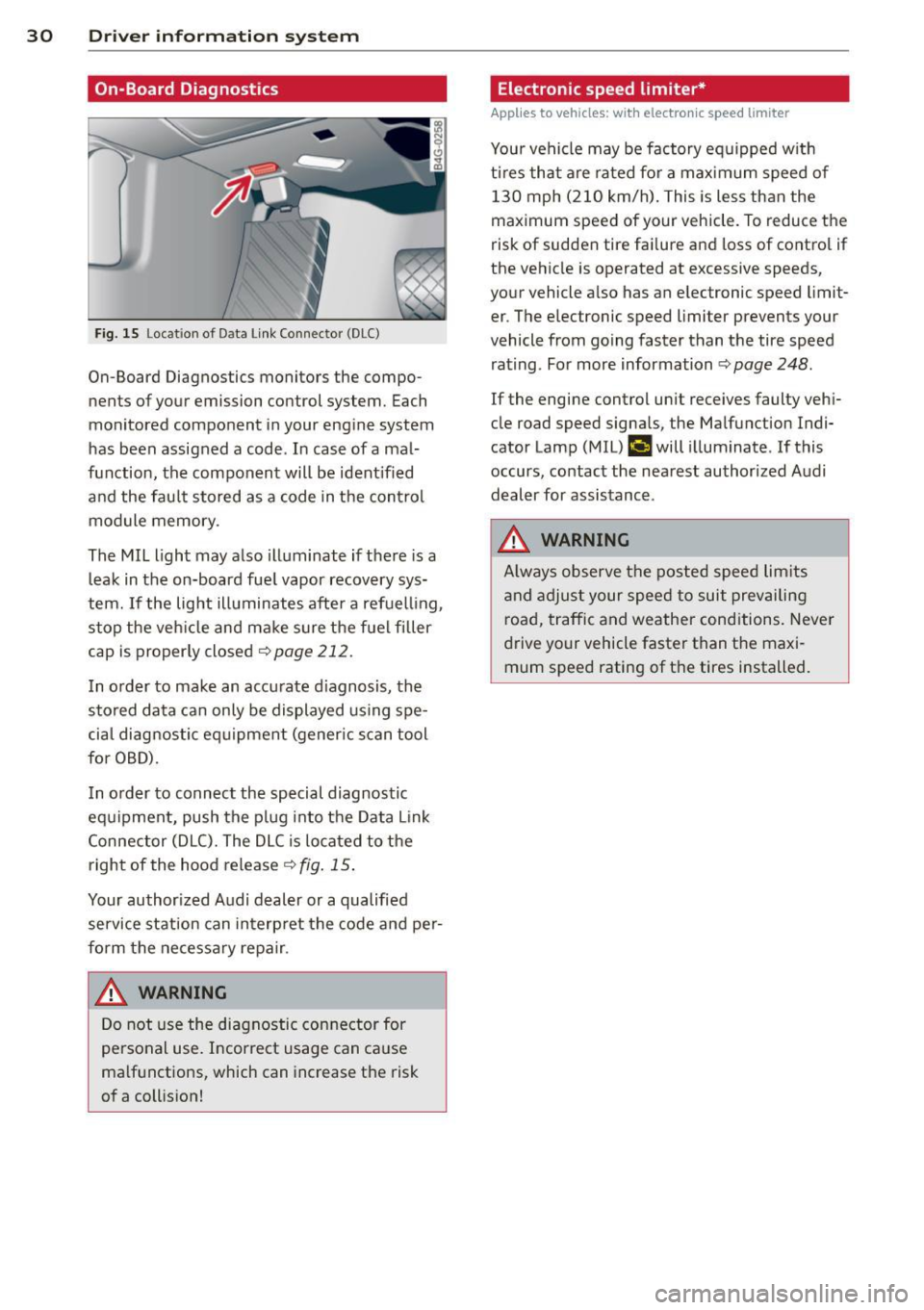
Fig. 15 Lo cat ion of D ata Link Connec tor (D LC)
On-Board Diagnostics monitors the compo
nents of your emission con trol system. Each
monitored component in your engine system
has been assigned a code . In case of a mal
function, the component will be ident ified
and the fau lt stored as a code in the control
module memory .
The MIL light may also illuminate if there is a
leak in the on-board fue l vapor recovery sys
tem.
If the lig ht illuminates after a refuelling ,
stop the veh icle and ma ke sure the fuel filler
cap is proper ly closed
<> page 212.
I n o rder to make an accurate d iagnosis, the
stored data can only be displayed using spe
cia l diagnostic eq uipment (gener ic s can tool
for OBD).
I n o rder to connect the special diagnostic
equipment, push the p lug i nto the Data Link
Connector (DLC). The DLC is located to the
right of the hood release¢
fig. 15 .
Your author ized A udi dealer or a qualified
service station can interp ret the code and pe r
form the necessary repa ir .
A WARNING
Do not use the diagnostic con nector for
personal use. Incorrect usage can ca use
ma lf u nctions, which can increase the risk
of a coll ision!
-
Electronic speed limiter*
Applies to vehicles: with electronic speed limiter
Your vehicle may be factory eq uipped w ith
t ir es that are rated fo r a max imum speed of
130 mph (210 km/h) . This is less than the
maximum speed of your vehicle. To reduce the
risk of sudden tire fa ilure and loss of contro l if
the vehicle is operated at excessive speeds,
your vehicle a lso has an electronic speed limit
er . The elec tronic speed limi ter prevents your
vehicle from going faster than the tire speed rating . For more information ¢
page 248.
If the engine control unit receives faulty veh i
cle road speed signa ls, the Malfunction Ind i
cator Lamp (M IL)
¢..fi will illuminate . If this
occurs, contact the nea rest authorized A udi
dealer for assistance .
A WARNING
Always observe the posted speed lim its
a nd adjust your speed to suit prevai ling
road, traffic and weather cond itions. Never
d rive your vehicle faster than the maxi
mum speed rating of the tires installed. -
Page 33 of 302
M N
" > co ,...., \!) ..,.,
,...., ..,., ,....,
Opening and closing
Central locking
Key set
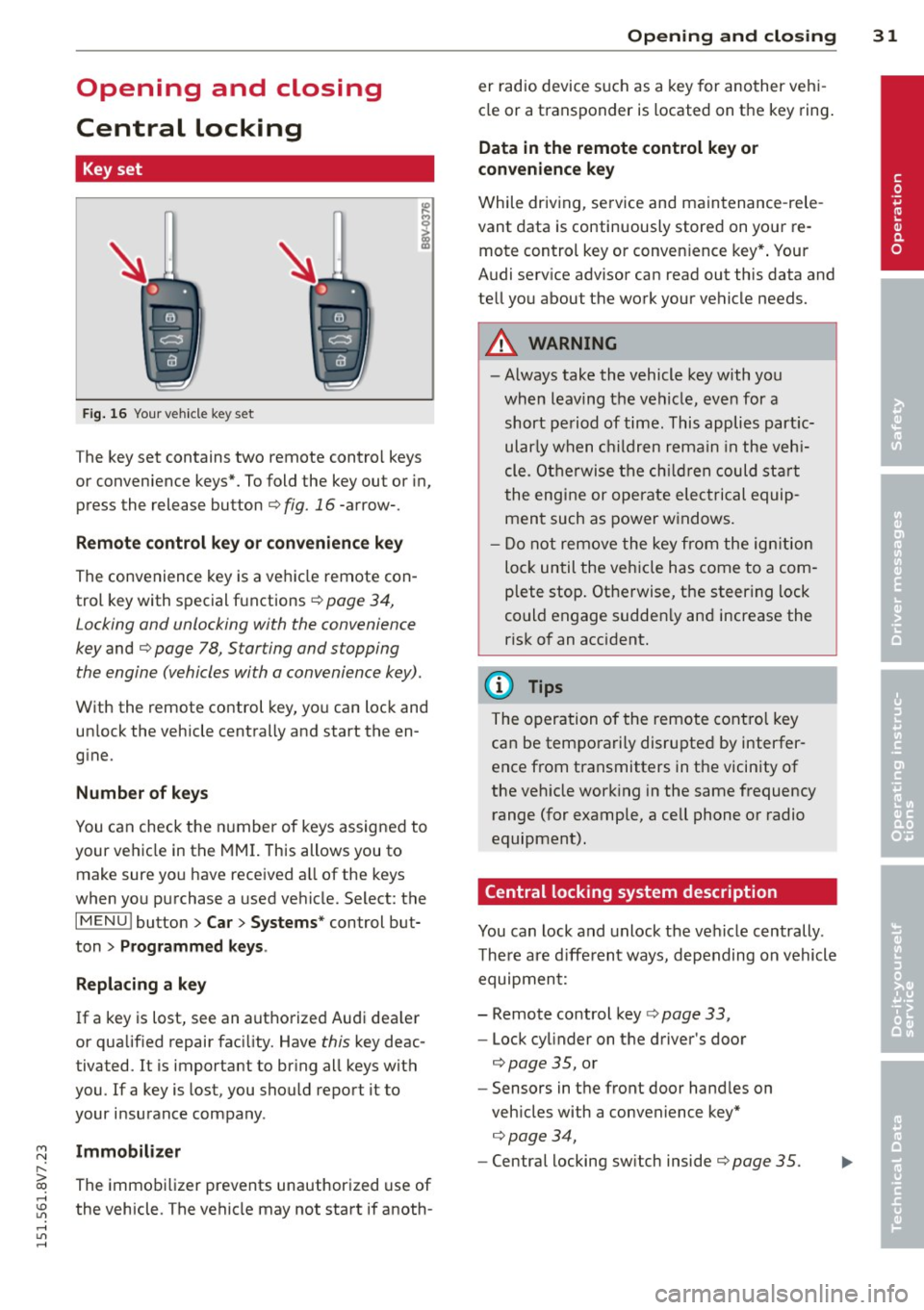
Fig . 16 Your vehicle key set
The key set contains two remote contro l keys
or convenience keys*. To fold the key out or in,
press the release button
q fig. 16 -arrow-.
Remote control key or convenience key
The convenience key is a vehicle remote con
trol key with special functions
q page 34,
Locking and unlocking with the convenience
key and q page 78, Star ting and stopping
the engine (vehicles with a convenience key).
With the remote control key, you can lock and
un lock the vehicle centrally and start the en
gine.
Number of keys
You can check the number of keys assigned to
your vehicle in the MMI. This allows you to
make sure you have received a ll of the keys
when you purchase a used vehicle. Select: the
I MENU I button > Car> Systems* control but
ton
> Programmed keys.
Replacing a key
If a key is lost, see an authorized Audi dea ler
or qualified repair facility. Have this key deac
tivated. It is important to bring all keys with
you.
If a key is lost, you should report it to
your insurance company .
Immobilizer
The immobilizer prevents unauthorized use of
the vehicle . The vehicle may not start if anoth -
Opening and closing 31
er radio device such as a key for another veh i
cle or a transponder is located on the key ring.
Data in the remote control key or
convenience key
While driving , service and maintenance -rele
vant data is continuously stored on your re
mote control key or convenience key*. Your
Audi serv ice advisor can read out this data and
tell you about the work your vehicle needs.
_& WARNING
- Always take the vehicle key with you
when leaving the vehicle, even for a
short period of time. This applies partic
ularly when children remain in the vehi
cle . Otherwise the children could start
the engine or operate electrical equip
ment such as power windows.
- Do not remove the key from the ignition
lock until the vehicle has come to a com
plete stop. Otherwise, the steering lock
could engage sudden ly and increase the
risk of an accident.
{i) Tips
The operation of the remote control key
can be temporarily disrupted by interfer
ence from transmitters in the vicinity of
the veh icle working in the same frequency
range (for example, a cell phone or radio
equipment).
Central locking system description
You can lock and unlock the vehicle centrally .
There are different ways, depending on vehicle
equipment:
- Remote control key
q page 33,
- Lock cylinder on the driver's door
q page 35, or
- Sensors in the front door handles on
veh icles with a convenience key*
q page 34,
- Central locking sw itch inside q page 35.
•
Page 34 of 302
32 Opening and closing
Selective unlocking
The doors and rear lid lock when they close.
You can set in the MMI whether
only the driv
er's door or the entire vehicle should unlock
when unlocking
¢ page 36.
Automatic locking (Auto Lock)
The Auto Lock funct ion locks all doors and the
l uggage compartment lid once the speed has
exceeded approximately 9 mph (15 km/h) .
The car is un locked again once the ignition key
is removed. In addition, the vehicle can be un
l ocked if the opening function in the power
locking system switch is used or one of the
door handles is pulled. The Auto Lock function
can be turned on or off* in the MMI
c::>page36.
In the event of a crash with airbag dep loy
ment, the doors automatically unlock to allow
access to the vehicle.
Anti -theft alarm system*
If the anti-theft alarm system detects a vehi
cle break-in, audio and visual warning signa ls
are triggered .
The anti-theft alarm system turns on auto mat ically when you lock the vehicle.
It deacti
vates when un locking using the remote con
trol key or by touching the sensor on the door
handle (convenience key) .
To switch the alarm off, press them button on
the remote control key or convenience key or
switch the ignition on . The alarm also stops
automatically after a certain amount of time.
Turn signals
The turn signals flash twice when you unlock
the vehicle and once when yo u lock the vehi
cle.
If they do not flash, one of the doors, the lug
gage compartment lid or the hood is not
lock ed or the ignition is still sw itched on (the
latter applies to vehicles with a convenience
key) .
Unintentionally locking yourself out
The following situations prevent you from
locking your remote control key in the vehicle:
- The vehicle does not lock w ith the cent ral
lock ing switc h if the driver's door is open
c::> page 3 5.
-On veh icles with a convenience key* , the lug
gage compartment lid unlocks again after
clos ing if the most recent ly used key is in
the luggage compartment.
Do not lock your veh icle w ith the remote con
trol key or convenience key* until all doors and
the luggage compartment lid are closed. This
helps to prevent from locking yourself out ac
cidentally .
(D Tips
-Do not leave va luab les unattended in the
vehicle. A locked vehicle is not a safe!
- If the LED in the upper edge of the driv
er's door turns on for about 30 seconds
after the vehicle is locked, there is a mal
function in the power locking or the anti
theft alarm system* . Have the problem
corrected by an authorized Audi dea ler or
authorized Audi Service Facility.
Page 36 of 302

34 Openin g and clo sing
• To open the luggage compartment lid, press
and hold the~ button © for at least one
second .
• To tr igger the alarm , press the red
iPANICI
button @. The vehicle horn and emergency
flashers turn on .
• To turn off the alarm, press the red
IPANICI
button @again .
If the vehicle is unlocked and a door or the luggage compartment lid are not opened
within 45 seconds, the vehicle locks aga in au
tomatically. This feature prevents the vehicle
from being ac cidentally left un locked over a
l ong period of time. This does not apply if you
p ress the
i""' I button © button for at least one
second.
F o r vehi cles with
sa fet y c entr al loc king (selec
tive unlocking) ¢
page 37, only the driver's
door and the fue l filler door are opened by
pressing the~ button @ once, and the ent ire
vehicle unlocks wh en the button is pressed
twice.
A WARNING
Read and following all WARNINGS. ¢ Lo_ in
Key set on page 31
@ Tips
- Only use the remote control key or con
venience key w ith in v iew of the veh icle.
- Do not use the remote control when you
are inside the vehicle. Otherwise, you
could unintentionally lock the veh icle. If
you then tried to start the engine or
open a door, the a la rm would be trig
gered. If this happens, press the un lock
button@.
- The vehicle can only be locked when the
se lector lever is in the P posit ion .
- Only use the panic function in an emer
gency .
- For information on add itiona l remote
control key o r convenience key functions,
r efer to ¢
page 39, Convenience open
ing/closing.
Locking and unlocking with the
convenience key
Applies to vehicles: with convenience key
The front doors and the luggage compart
ment lid can be unlocked and locked without using the remote control key.
F ig . 20 D river 's doo r: locking the vehicle w ith the co n
ven ie n ce key
0 0
I
• To unlock the door automatically, grasp the
driver's or front passenger's door handle
¢ fig. 20 .
• To open the door, pull the door hand le.
• To unlock or open the luggage compartment
lid, press the handle in the luggage com
partment lid
¢ page 38, fig. 24 .
• To lock the veh icle, bring the selector lever
into the P position, close the door and touch
the sensor on the dr iver 's door handle
o ne
time. Do not hold the door handle while do
ing this.
Only the front doors and luggage compart
ment lid can be unlocked or locked . The re
mote control key must be w ith in a range of
abo ut 5 ft (1.5 m) from the door o r the rear
li d. It ma kes no d ifference whethe r the re
mote control key is in your jacket pocket,
purse or briefcase.
If you ho ld the door hand le wh ile loc king, th is
c a n p revent the lo ck ing f unct ion.
The door cannot be opened for a brief period directly after locking it . Th is allows you the
oppo rtun ity to check that the driver's door is
locked.
The sett ings in the MMI specify if the entire
vehicle or one of the doors is unlocked when
unlocking the vehicle ¢
page 36.
Page 37 of 302
....,
N
r--. > co
rl I.O
"' rl
"' rl
WARNING
----Read and following all WARNINGS. ¢ & in
Key set on page 31
@ Tips
If your vehicle is left standing for a long
period of time, note the following:
- The proximity sensor switches off after a
few days to save energy. You then have
to pull once on the door handle to unlock
the vehicle and a second time to open it.
- To prevent the battery from draining and
to retain the starting ability of yo ur vehi
cle as long as possible, the energy man
agement system gradua lly tuns off un
necessary convenience functions You
may not be able to unlock your vehicle
using the convenience key .
- For an explanation on conformity with
the FCC regulations in the United States
and the Industry Canada regulations, re
fer to¢
page 285.
Unlocking/locking with the key
In the event that the power locking system
fails, the driver's door can locked and un
locked using the door lock .
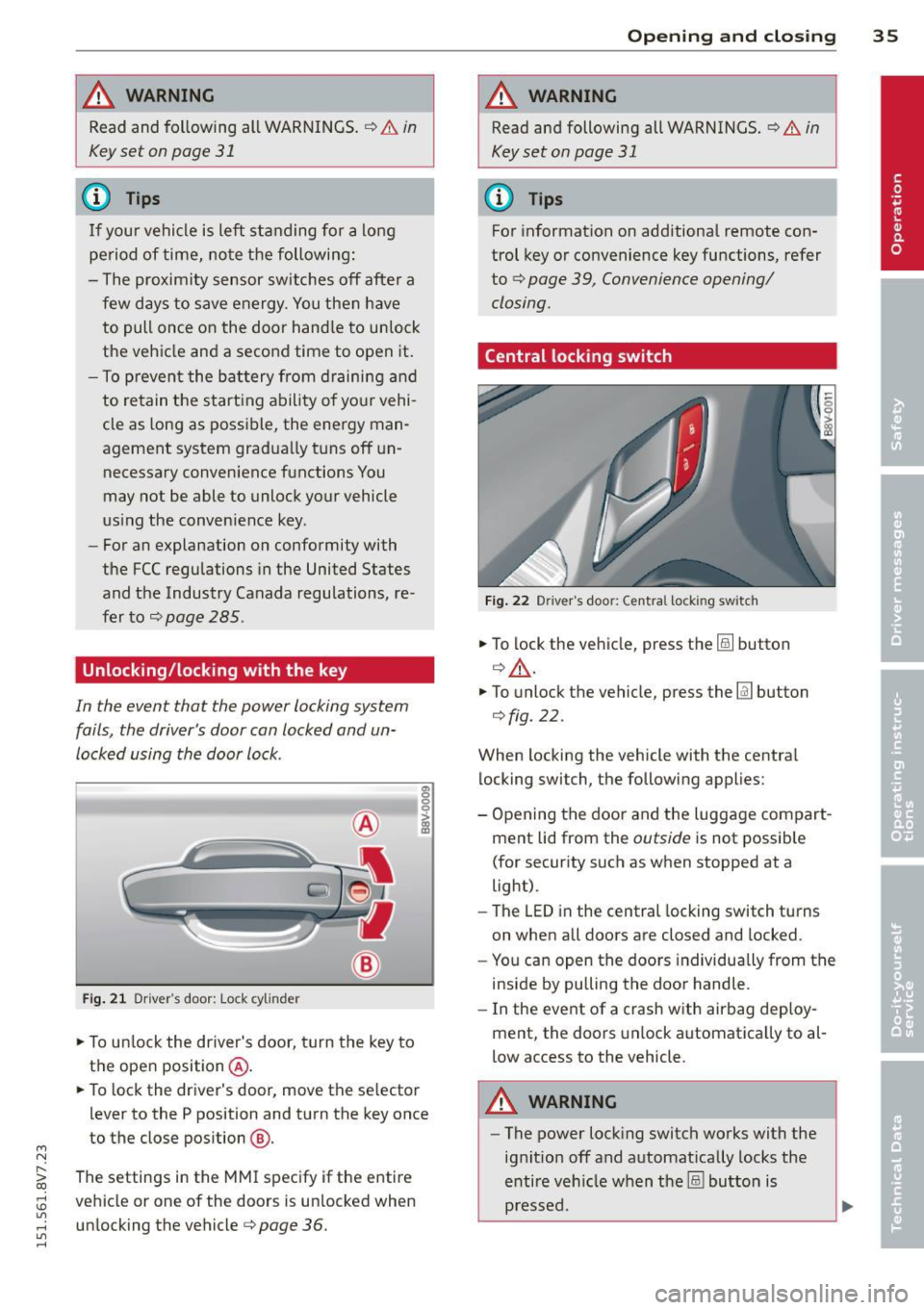
Fig. 21 Driver 's door: Lock cy linder
.,. To unlock the driver's door, turn the key to
the ope n position @ .
en 0 g
~
.,. To lock the driver's door, move the se lector
lever to the P position and turn the key once
to the close position
@ .
The settings in the MMI specify if the entire
vehicle or one of the doors is un locked when
unlocking the vehicle¢
page 36.
Opening and closing 35
A WARNING
Read and following all WARNINGS. ¢ & in
Key set on page 31
(D Tips
For information on additional remote con
trol key or convenience key functions, refer
to ¢
page 39, Convenience opening/
closing.
Central locking switch
Fig. 22 Drive r's doo r: Centra l locki ng sw itch
.,. To lock the vehicle, press the@! button
¢.&, .
.,. To unlo ck the vehicle, press the @J button
¢fig. 22.
When locking the vehicle with the central
locking switch, the following applies:
- Opening the door and the Luggage compart
ment lid from the
outside is not possible
(for security such as when stopped at a
light).
- The
LED in the central locking switch turns
on when all doors are closed and locked .
- You can open the doors individually from the
inside by pulling the door handle.
- In the event of a crash with airbag deploy
ment, the doors unlock automatica lly to al
low access to the vehicle.
A WARNING
- The power locking switch works with the
ignit ion off and automat ically locks the
entire vehicle when the@! button is
pressed.
Page 38 of 302
36 Opening and closing
-The central locking switch is inoperative
when the vehicle is locked from the out
side .
- Locked doors make it more difficult for
emergency workers to get into the vehi
cle, which puts lives at risk . Do not leave
anyone beh ind in the vehicle, especially
children.
(D Tips
Your vehicle will lock automatically at a
speed of 9 mph (15 km/h) ¢
page 31. You
can unlock the vehicle again using the cen
tral locking opening function .
Setting central locking
Applies to ve hicles: wit h dr ive r info rmatio n system
Various settings can be adjusted in the MMI:
Adjusting door unlocking
You can determine which doors should unlock
when opening the vehicle .
"' Se lect : the
I MENU ! button >Car> Systems *
control button > Vehicle settings > Central
locking > Door unlocking.
Selecting All and pressing the~ button on
the remote control key unlocks the entire ve
hicle.
If you select
Driver and then press the~ but
ton on the remote control key, only the driv
er's door will unlock. In vehicles with a con
venience key, only the front door whose han
dle you pull will unlock. If you press the
~ button twice, the entire vehicle will unlock.
If you press the
l@l button, the entire vehicle
will always lock .
Adjusting Auto Lock
"'Se lect : the I MENU ! button >Car > Systems*
control bu tton > Vehicle settings > Lock
when driving .
l) Thi s func tion is not available in all co untries.
If you se lect On , the entire vehicle wi ll lock
automatica lly when the speed reaches 9 mph
(15 km/h).
If the opening function is triggered by the
power lock ing system or a door hand le, the
vehicle unlocks again.
Folding* the exterior mirrors
"'Select: the I MENU I button > Car> Systems*
control button > Vehicle settings> Central
locking > Fold mirrors.
For more informa
tion , refer to¢
page 55, Adjusting the ex
ter ior mirrors .
If you select On , the outside mirrors will fo ld
in automat ica lly when you press the~ button
on the remote contro l key
¢ page 55.
Tone when locking
"'Select: the I MENU I button> Car> Systems*
contro l button > Vehicle settings > Central
lo ck ing > Tone when locking .
When checked off../, a tone will sound when
you lock the vehicle .
If you press the l@l button twice , the entire ve
hicle will lock . There is a lock ing tone at the
same t ime
l )_
Electronic immobilizer
The immobilizer prevents unauthorized use of
your vehicle .
A microchip in the key automatically deacti
vates the electronic immobilizer when the key
is located in the vehicle . If you remove the key
from the vehicle, the electronic immobilizer
activates again automatically.
_&. WARNING
A lways take the key with you whenever you
l eave your vehicle. The e lectronic immobil-
izer can be deactivated with the key, so
~
Page 40 of 302
38 Opening and closing
Luggage compartment
lid
Opening and closing the luggage
compartment lid
AUD .
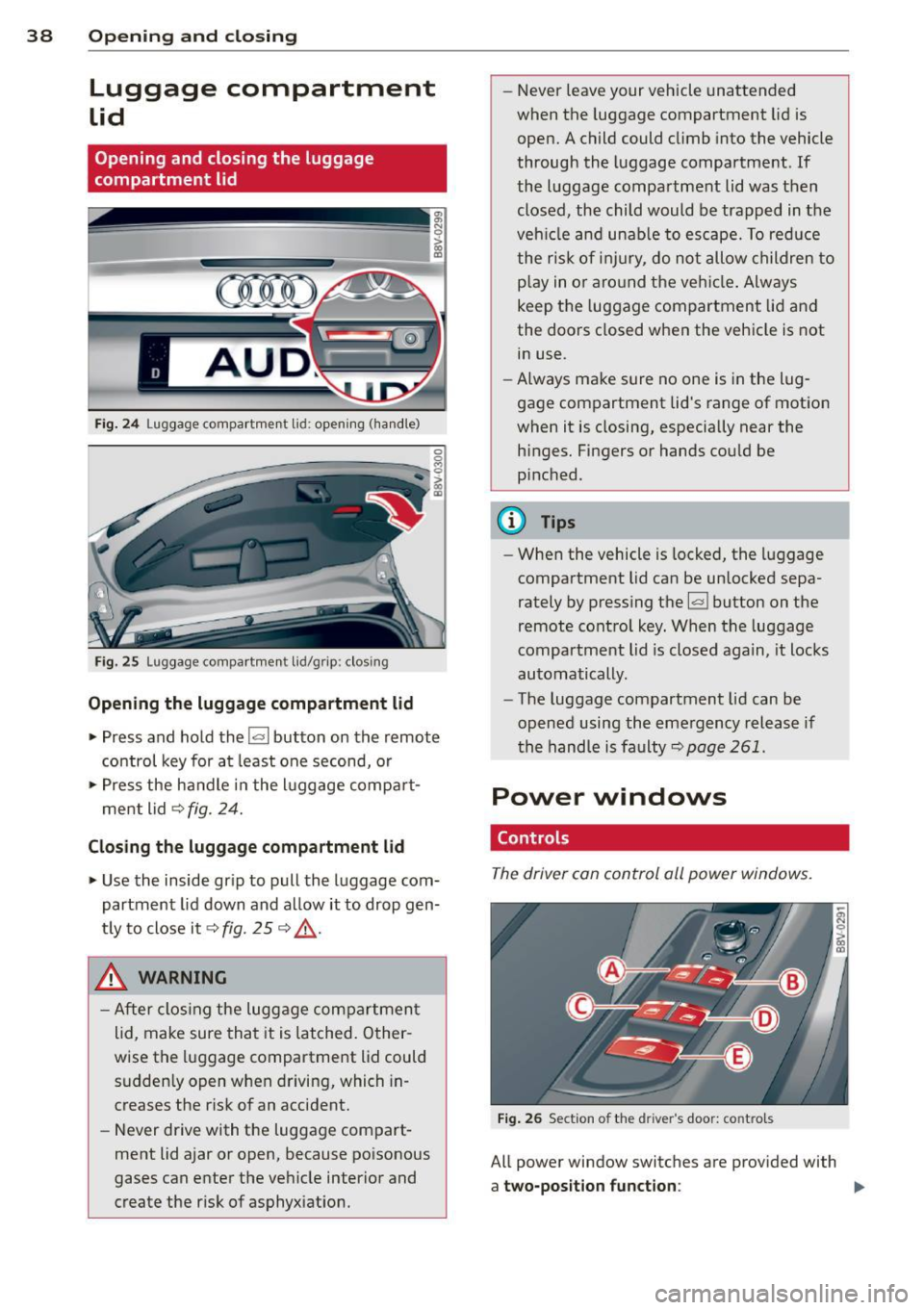
Fig. 24 Luggage compartment lid: opening (ha ndle)
Fig. 25 Luggage compartment lid/grip: clos ing
Opening the luggage compartment lid
.,. Press and hold the !a l button on the remote
control key for at least one second, or
.,. Press the handle in the luggage compart
ment lid ¢
fig. 24.
Closing the luggage compartment lid
.,. Use the inside grip to pull the luggage com
partment lid down and al low it to drop gen
t ly to close it¢
fig. 25 ¢ .&_.
& WARNING
-After clos ing the luggage compartment
lid, make sure that it is latched. Other
wise the luggage compartment lid could sudden ly open when driving, which in
creases the risk of an accident.
- Never drive with the luggage compart
ment lid ajar or open, because poisonous
gases can enter the vehicle interior and
create the r isk of asphyx iation. -
Never leave your vehicle unattended
when the luggage compartment lid is
open. A child could climb into the vehicle
through the luggage compartment. If
the luggage compartment lid was then closed, the child would be trapped in the
veh icle and unable to escape. To reduce
the risk of injury, do not allow children to
p la y in o r aro und the vehicle. Always
keep the luggage compartment lid and
the doors closed when the vehicle is not
in use.
- Always make sure no one is in the lug
gage compartment lid's range of motion
when it is closing, especia lly near the
h inges. Fingers or hands could be
p inched.
{!) Tips
- When the vehicle is locked; the luggage
compartment lid can be unlocked sepa
rately by pressing the~ button on the
remote control key. When the luggage
compartment lid is closed again, it locks
automatically.
- The luggage compartment lid can be
opened using the emergency release if
the hand le is faulty~
page 261.
Power windows
. Controls
The driver can control all power windows .
Fig. 26 Section of the dri ver 's doo r: contro ls
All power window switches are prov ided with
a two-position function : ""
Page 41 of 302
M N
" > co ,...., \!) ..,.,
,...., ..,., ,....,
Opening th e windows
"' Press the sw itch to the fir st sto p and hold i t
until the window reaches the desi red posi
tion .
"' Press the switch briefly to the
se cond stop
to automatically open the window .
Clos ing th e windows
"' Pull the swi tch to t he fir st sto p and hold it
until the window reaches the desi red posi
tion .
"' Pull the switch briefly to the
sec on d s top to
automatica lly close the window.
P ow er wi nd ow switch es
@ Sw itch c::> fig. 26 for the window in the
driver's door.
@ Sw itch for the window in the front pas-
senger's door.
© Switch for the left rear w indow.
@ Sw itch for the right rear window.
© Centra l switch for opening or clos ing a ll
side windows at the same time
_& WARNING
- Always remove the ignition key when you
leave your vehicle, even for a short peri
od of time . This applies particularly when
children remain in the vehicle . Otherw ise
the chi ldren could start the engine or op
erate electrical equ ipment such as power
windows. The power windows continue
to function unt il the driver's door or
front passenger's door has been opened .
- Pay carefu l attent ion when closing the
window.
It could cause injury by pinch
ing.
- When locking the veh icle from outs ide,
the vehicle must be unoccupied s ince the
windows can no longer be opened in an eme rgency.
(D Tips
After turning the ignition off you can still
open and close the windows for approxi
mate ly 10 seconds. The powe r windows
are not switc hed off until the dr iver's door
Opening and clo sin g 39
or front passenger's door has been
opened.
· Convenience opening /closing
With the convenience opening/closing func
tion, you can centrally and easily open the
windows from the outside.
Con ven ience opening
"' Press the Iii button on the remote contro l
key until all windows have reached the de
sired position or
"' Hold the key in the driver's door lock unt il all
w indows have reached the desired position.
Convenience clo sing
"' Ho ld the key in the driver's door lock in the
lock posit ion unti l all windows are closed .
Convenienc e closing with the convenience
ke y*
"'Touch the sensor* in one of the door handles
until all windows are closed. Do not p lace
your hand in the door handle when do ing
this.
Adju sting the conv enience opening in the
MM I
"'Select: the I MENU I button >Ca r> Sys tem s*
control button > Vehicle setting s > Central
lo cking
> Long-press to open windows
To enable convenience opening of the win-
dows, the
Front windows and Rear window s
functions must be switched On.
_& WARNING
- Never close the w indows carelessly or in
a n uncontrolled manner, because this in
creases the risk of inju ry.
- For secur ity reasons, the w indows can
only be opened with the remote control
key at a ma ximum d istance of approxi
mate ly 6 fee t (2 meters) from the vehi
cle.
- Always watch the windows while they are
clos ing using the loc k cylinder so that no
one is pinched in the window. C losing
•
Page 43 of 302

....,
N
r--. > co
rl I.O
"' rl
"' rl
Power top
Automatic power top
General information
The power top opens and closes automatical ly . When open, the power top is stored com
pletely in the power top compartment. The
power top can be opened or closed at speeds
up to 30 mph (SO km/h).
Under normal conditions, the power top is
wind and waterproof. In rare cases, small
droplets of water may form under extreme
weather conditions such as torrential or pro longed rain. That is normal and no cause for
concern.
Follow the care instructions to keep the power
top free of leaks and to maintain its appear
ance
c::> page 204, Core and cleaning. Also ob
serve the following:
- Op en and stow the power top only when it is
clean and dry . Sharp-edged dirt particles can
cause damage to the rear window and the
power top. Stowing the power top when it is
damp can create imprints in it, and if it is
left that way for long periods of time, mil
dew and other damage can form.
- Do not leave the power top open for several
weeks or the creases in it may become dis
colored.
- Remove ice and snow before opening the
power top. Do not use any sharp edged ob
jects to remove ice and snow or the power
top could be scratched or damaged. The rear
window may be cleared with a standard ice
scraper.
- Do not open the power top when the tem
perature is below 32 °F (0 °C). The fabric in
the power top loses elasticity in sub-ze ro
temperatures.
_& WARNING
- When positioning the power top, avoid
contact with the supports or other mov
ing parts. Make sure all of the windows
.
Power top 41
are lowered. Otherwise you could pinch
your hands.
- Never drive when the power top is not
locked correctly. The wind from driving
could cause the power top to open. This
can result in injuries and damage to the
vehicle.
Opening and closing the power top
Fig. 27 Center console: power top switch
Requirement: The power top storage com
partment must be lowered
c::> page 43 and
the luggage compartment lid must be closed.
.. Switch the ignition on.
.. To open or close the power top, pull or press
the button @during the entire process.
T he status of the power top is shown in the in
strument cluster display when operating the
power top switch.
You can close the power top when the wind
deflector is installed
~ page 44.
A message will appear in the instrument clus
ter if the power top cannot be opened or
closed
c::> page 43.
A WARNING
- When operating the power top, make
sure the function is not affected by wind
or other factors and that it does not in
terfere with other drivers.
- Never drive when the power top is not
locked correctly. The wind from driving
could cause the power top to open. This
can result in injuries and damage to the
vehicle.
-
Page 45 of 302

....,
N
r--. > co
rl I.O
"' rl
"' rl
,&_ WARNING
Read and follow the im po rt an t sa fety p re
cautions i n
c::> & in Opening and closing
the power top on page 41 .
Power top storage compartment
Fig. 2 9 Luggage compar tm en t: powe r to p sto rage
co mpa rt ment lowe red
F ig. 30 Luggage compart men t: power top storage
compartme nt ra ised
The power top storage compa rtment must b e
l owe red to open the power top . To avo id dam
a ge, make sure that a re no sensi tive o bje cts in
the s tor age compartmen t's range of mo tion .
Raising the power top storage
compartment
"P ress the trim on the hand le in the d irect io n
of the arrow to raise t he power top s torage
compartment
c::> fig. 2 9.
Lowering the power top storage
compartment
" Press the trim on the handle in the direct io n
of the arrow to lower the power top s torage
compartment
c::> fig. 30 .
The power top storage comp artmen t can be
ra ised when the
power top i s closed . This pro-
Power top 43
vides more cargo space in the luggage com
partment.
T he
open power top is sto red and pr otec ted in
t he power top s torage compar tment . The
power top storage compa rtment cannot be
raised when the power top is open. Because of
th is, the cargo area in the luggage compart
ment is smaller when the powe r top is open
than when it is closed.
Messages
Soft top: pl ease close trunk lid
This message appears in the instrument cl us
ter display if the luggage compartment is not closed w hen the power top is operated . Close
the luggage compart ment lid.
Soft top : please lower soft top compartment
T his mess age ap pears if the power top stor
age compartment is not lowered when ope n
ing t he power top. Lower the power top stor
age compartment ¢
page 43.
Soft top: operation not pos sible
T h is message appears w hen t here is a mal
func tion. T he powe r top can be o pe ra ted man
u ally
c::> page 4 5 .
Soft top: operation not pos sible at pres ent
If the power top is operated continually for a
long period of time, the overload protect ion
activates for app rox imately 15 to 30 mi nutes .
You can o pen or close the powe r top aga in af
te r that.
Soft top: operation not possible at present .
Engine must be running
The power top is a utomat ica lly deactivated if
the battery vo ltage is low. Yo u can open or
close t he power top again after start ing the
engine.
Soft top : operation not possible at present .
Outside temperature too low
The powe r top w ill not open when the tem per-
atu re is be low - 15
°C. ~