service AUDI A3 CABRIOLET 2016 User Guide
[x] Cancel search | Manufacturer: AUDI, Model Year: 2016, Model line: A3 CABRIOLET, Model: AUDI A3 CABRIOLET 2016Pages: 272, PDF Size: 67.88 MB
Page 23 of 272
Instruments and indicator lights
fast acceleration) and have the malfunction cor
rected . See an authorized Audi dealer or
author ized Audi Service Facility .
The indica tor may turn on if the electronic speed
limiter is fau lty. For additional information, refer
to
¢ page 88, Electronic speed limiter .
The MIL may also turn on if the fuel filler cap is
not closed correctly
¢ page 186.
On-Board Diagnostics
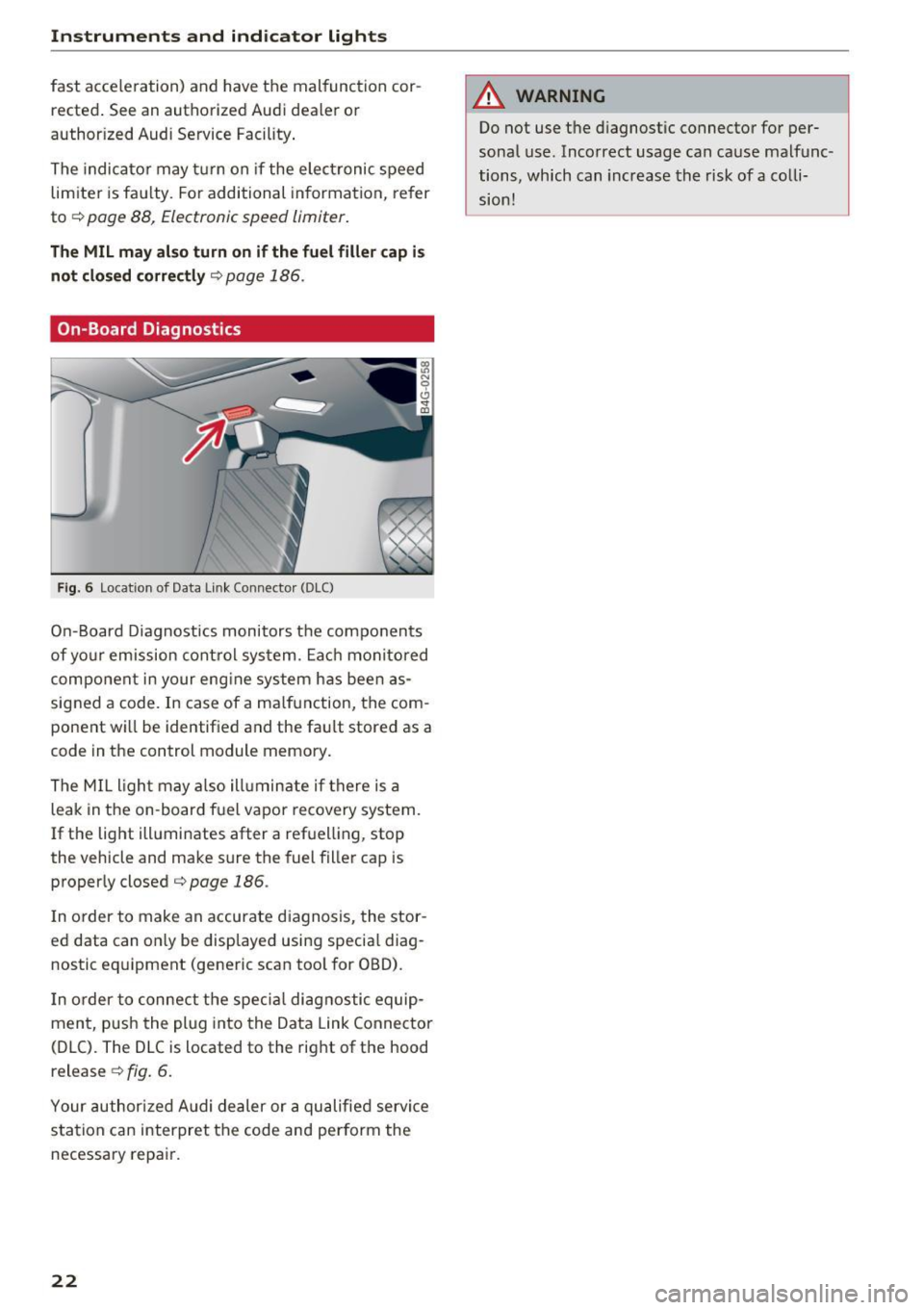
F ig. 6 Location of Data Link Connecto r (DLC)
On-Board Diagnostics monitors the components
of yo ur emission control system. Each monitored
component in your eng ine system has been as
signed a code. In case of a ma lfunction, the com
ponent wi ll be identified and the fault stored as a
code in the control module memory.
The MIL light may also ill uminate if there is a
leak in the on -board fuel vapor recovery system.
If the light illuminates after a refuelling, stop
the vehicle and make sure the fuel filler cap is
properly closed¢
page 186.
In order to make an accurate diagnosis, the stor
ed data can on ly be displayed using specia l diag
nostic eq uipment (generic scan tool for OBD).
I n order to connect the specia l diagnostic equip
ment, push the plug into the Data Link Connector
(DLC). The DLC is located to the right of the hood
release ¢
fig. 6.
Your authorized Audi dealer or a qualified servi ce
station can interpret the code and perform the
necessary repair.
22
A WARNING
Do not use t he diagnostic connector for per
sonal use. Incorrect usage can cause malfunc
tions, which can increase the risk
of a colli
sion!
Page 24 of 272
<( co ..... N
" N ..... 0 r--. > 00
Driver information
system
Overview
Applies to: ve hicles with driver information system
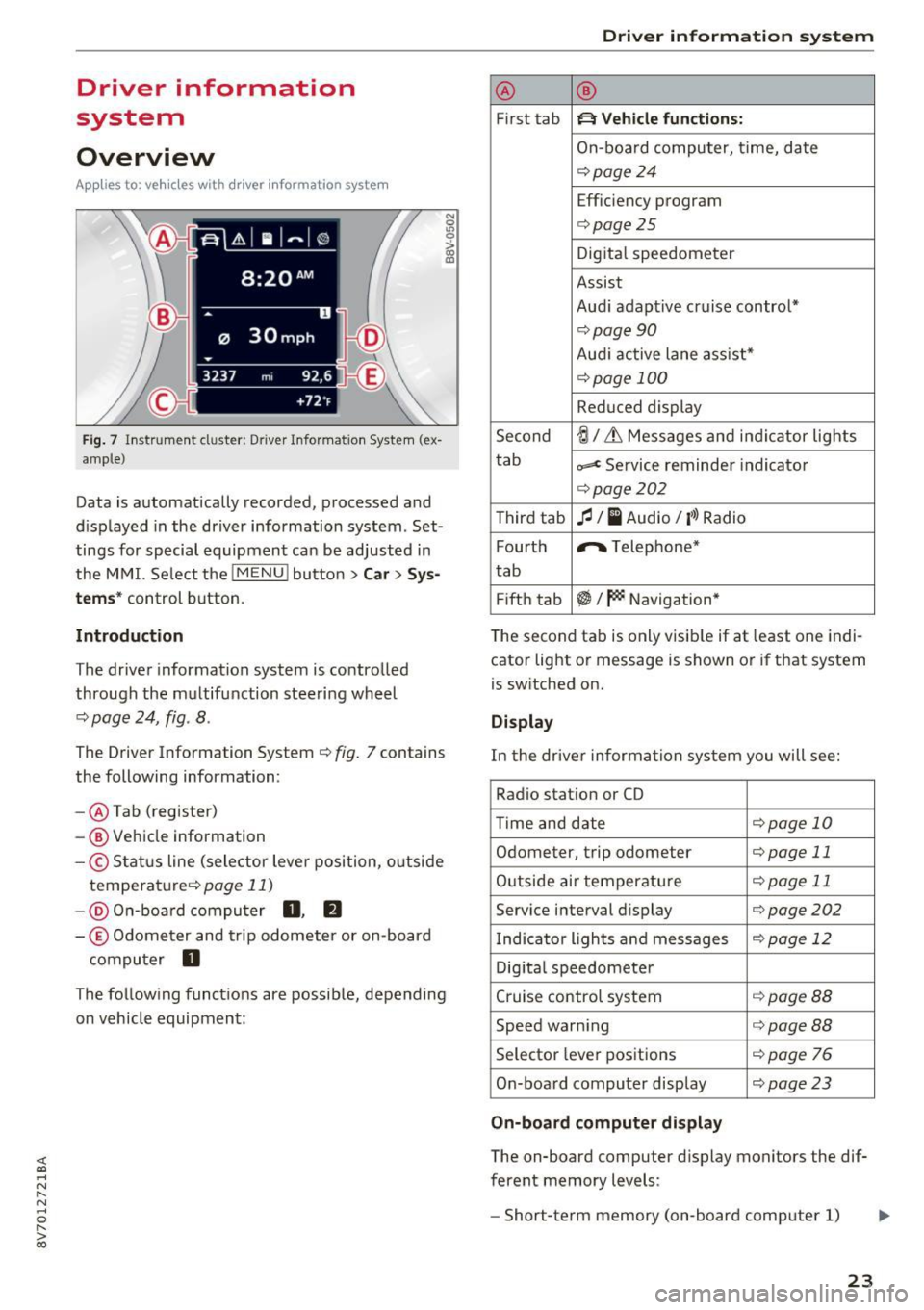
Fig. 7 Instrument cluster : Driver Information System (ex
ample)
Data is automatically recorded, processed and
displayed in the driver information system . Set·
tings for special equipment can be adjusted in
the MMI. Select the
I MENU I button >Car > Sys
tems*
control button.
Introduction
The driver information system is controlled
through the multifunction steering wheel
¢ page 24, fig . 8 .
The Driver Information System ¢ fig. 7 contains
the following information:
- @ Tab (register)
- @ Vehicle information
-© Status line (selector lever position, outside
temperat ure¢ page
11)
-@ On-board computer D , fJ
-© Odometer and trip odometer or on-board
computer
D
The following functions are possible, depending
on vehicle equipment:
Driver in forma tion system
@ ®
First tab ~ Vehicle functions:
On-boa rd computer, time, date
¢page24
Efficiency program
¢page25
Digital speedometer
Assist
Aud i adaptive cruise control*
¢page 90
Audi active lane ass ist*
¢ page 100
Reduced display
Second
ti/ & Messages and indicator lights
tab
c,,,d Service reminder indicator
¢ page202
Third tab fl I I Audio/ I'>) Radio
Fourth ,.,.
Telephone*
tab
Fifth tab
$I~ Navigation*
The second tab is only visible if at least one indi
cator light or message is shown or if that system
is switched on.
Display
In the driver information system you will see:
Radio station or CD
Time and date
¢page 10
Odometer, trip odomete r ¢page 11
Outside air temperature ¢page 11
Service interval display ¢page202
Indicator lights and messages ¢ page 12
Digital speedometer
Cruise control system
¢page BB
Speed warning <=:>page BB
Selector lever positions ¢ page 76
On-board computer display ¢page 23
On-board computer display
The on-board computer display monitors the dif
ferent memory levels :
- Short-term memory (on-board computer 1)
23
Page 28 of 272
<( co .... N r--N .... 0 r--> co
Opening and closing
Central locking
Key set
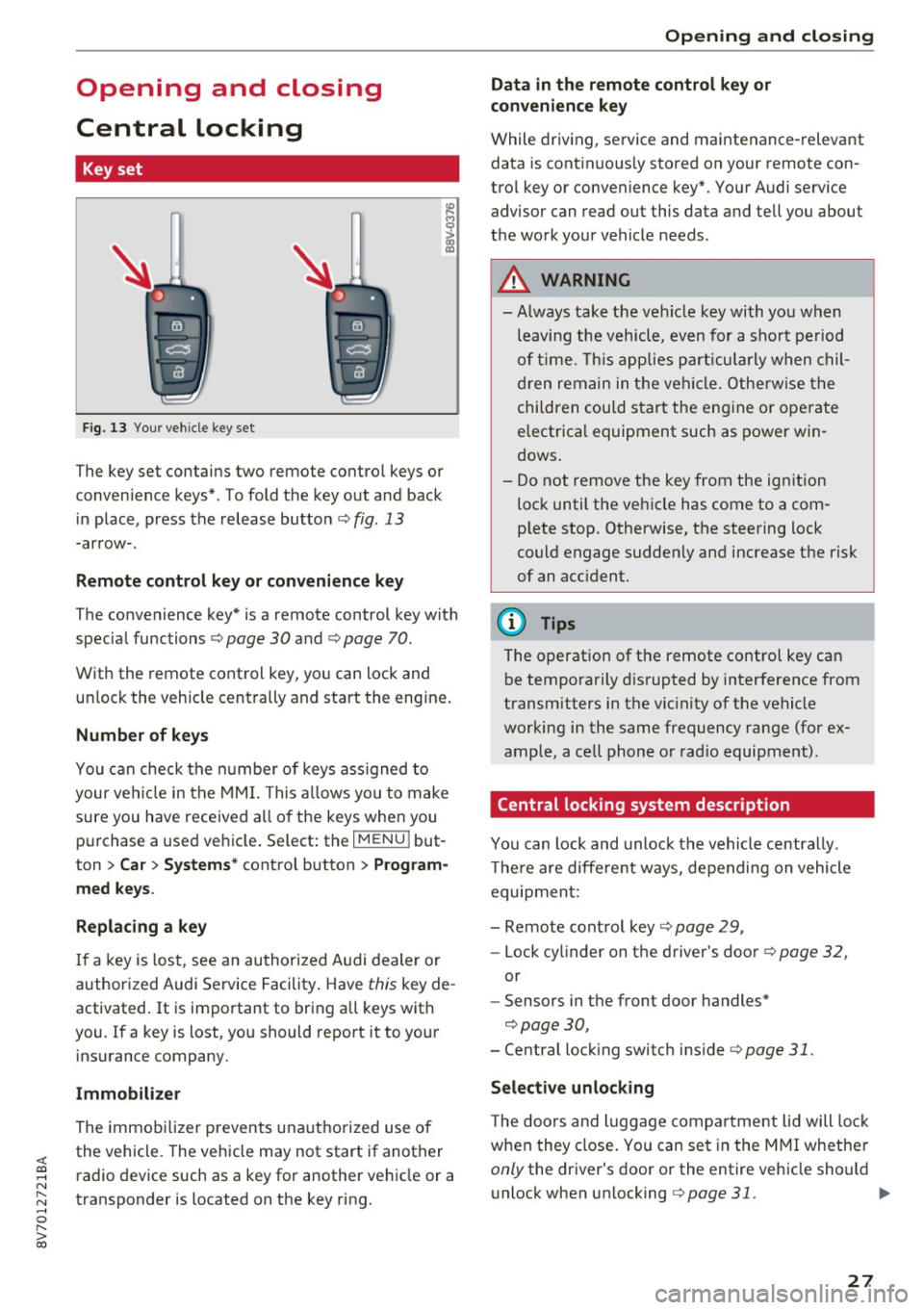
Fig. 13 Your vehicle key set
The key set contains two remote control keys or
conven ience keys*. To fold the key out and back
in place, press the release button ¢
fig. 13
-arrow-.
Remote control key or convenience key
The convenience key* is a remote control key with
special functions ¢
page 30 and¢ page 70.
With the remote control key, you can lock and
unlock the vehicle centrally and start the engine.
Number of keys
You can check the number of keys ass igned to
your vehicle in the MMI. This allows you to make
sure you have received all of the keys when you
purchase a used vehicle . Select: the
I MENU I but
ton
> Car > Systems* control button > Program
med keys.
Replacing a key
If a key is lost, see an authorized Audi dealer or
authorized Audi Service Facility. Have
this key de
activated.
It is important to bring all keys with
you . If a key is lost, you should report it to your
insurance company.
Immobilizer
The immobilizer prevents unauthorized use of
the vehicle . The vehicle may not start if another
radio device such as a key for another vehicle or a
transponder is located on the key ring.
Opening and closing
Data in the remote control key or
convenience key
While driving, service and maintenance-relevant
data is continuous ly stored on your remote con
trol key or convenience key*. Your Audi service advisor can read out this data and tell you about
the work your vehicle needs.
A WARNING
--- Always take the vehicle key with you when
leaving the vehicle, even for a sho rt period
of tim e. This applies particularly when chil
dren remain in the vehicle. Otherwise the
children could start the engine o r operate
electrica l equipment such as power win
dows .
- Do not remove the key from the ignition
lock until the veh icle has come to a com
p lete stop. Otherwise, the steering lock
could engage suddenly and increase the risk
of an acc ident.
(D Tips
The operation of the remote control key can
be temporarily disrupted by interference from
transmitters in the vicinity of the vehicle
working in the same frequency range (for ex
ample, a cell phone or rad io equipment) .
Central locking system description
You can lock and unlock the vehicle centrally.
T here are different ways, depending on vehicle
equipment:
- Remote control key¢
page 29,
-Lock cylinder on the driver's door ¢page 32,
or
- Sensors in the front door handles*
¢page 30,
- Central locking switch inside¢ page 31.
Selective unlocking
The doors and luggage compartment lid will lock
when they close. You can set in the MMI whether
only the dr iver 's door or the entire vehicle should
unlock when un locking
¢ page 31. .,..
27
Page 29 of 272
Opening and clo sin g
Autom atic locking (Auto L ock )
The Auto Lock funct ion locks all doors and the
luggage compartment lid once the speed has ex
ceeded approximately 9 mph (15 km/h).
The car is unlocked again once the ign ition key is
removed. In addition, the vehicle can be un locked
if the opening function in the power locking sys
tem switch is used or one of the door handles is
pu lled .
I n t he event of a crash with airbag deployment,
the doors automat ica lly unlock to allow access to
the v ehicle .
Anti-theft alarm system*
If t he anti- theft alarm system detects a vehicle
b reak-in, a udio and v isua l warning signals are
tr iggered.
The ant i-theft alarm system turns on automati
cally when you lock the vehicle .
It deactivates
when unlocking using the remote con trol key or
by to uch ing the sensor on the door handle (con
venience key) .
To sw itch the a la rm off, press the@ button on
the remote con trol key or convenience key or
sw itch the ignition on. The a la rm also stops auto
matica lly after a certain amou nt of time.
Turn signals
The turn s ignals flash tw ice when you un lock the
ve hicl e and flash once when you lock the vehicle .
I f the blinking continues, one of the doors or the
luggage compartment lid/hood is not closed or
the ignition is still switc hed on .
Unintentionall y locking your self out
There are safeguard s under the fo llow ing cond i
tions, which prevent you from lock ing your re
mote control key in the ve hicle:
- The vehicle will not lock when the driver 's door
is open
c> page 31.
- When locking using the~ button in the centra l
locking switch, the vehicle will not lock if a door
is open
c> page 31 .
-On vehicles with a convenience key*, the lug
gage compartment lid un locks aga in after do s-
28
ing if the most recent ly used key is in the lug
gage compartment.
Do no t lock your ve hicle w ith the remote cont rol
key or convenience key* until all doors and the
l uggage compartment li d are closed. This helps
to prevent you from locking yourself out acciden
ta lly.
{i) Tips
- Do not leave va luables unattended i n the ve
hicle. A locked ve hicle is not a safe!
- If the LED in the upper edge of the drive r's
door turns on for about 30 seconds after
the vehicle is locked, there is a malfunction
in the power locking or the anti-theft a larm
system* . Have the problem corrected by an
authorized Audi dealer or authorized Aud i
Service Facility.
LED and batteries in the remote control key
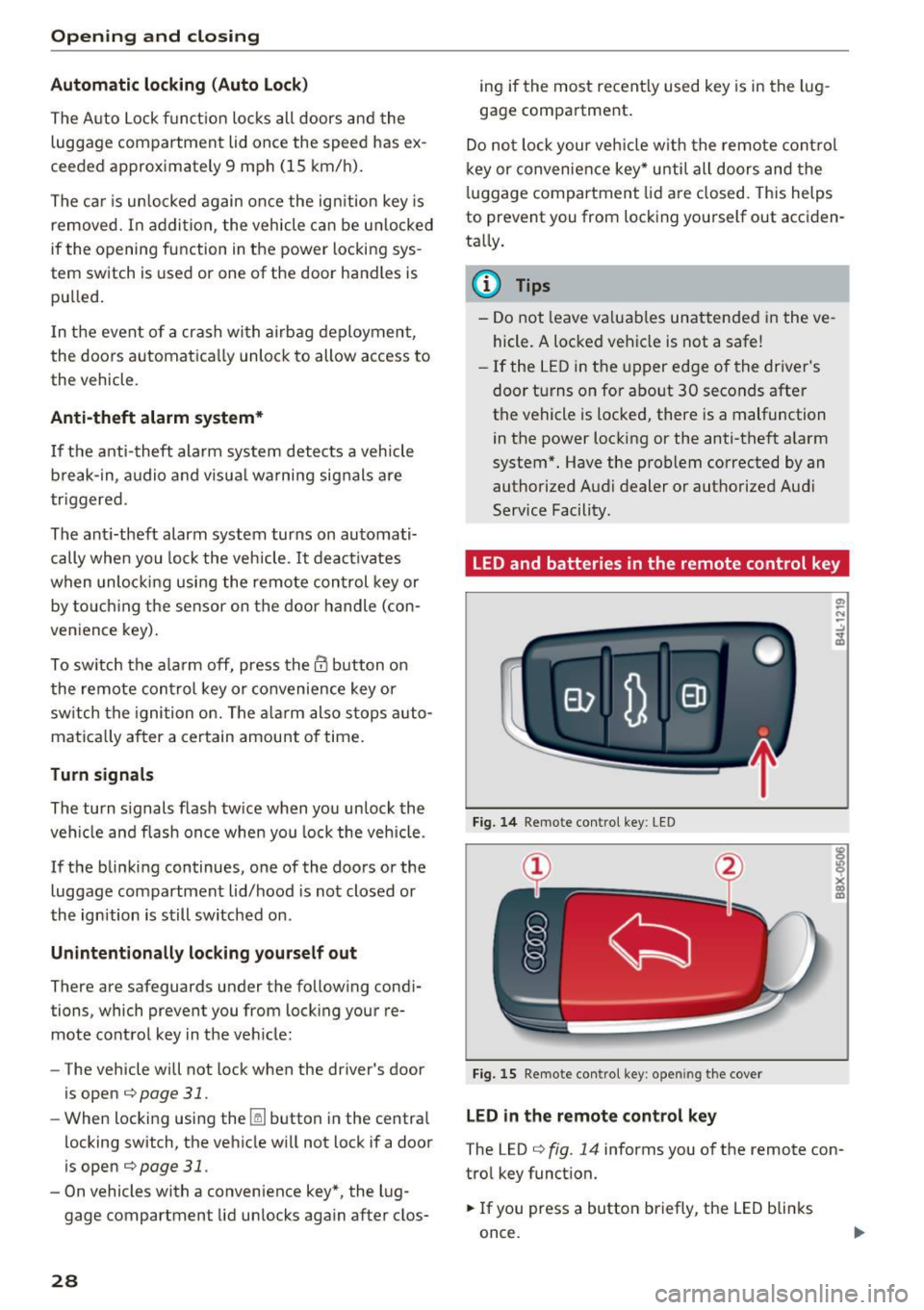
Fig. 14 Remote control key : LED
Fig. 15 Remote con tro l key : o penin g the cover
LED in the remote control ke y
The LED c> fig. 14 info rms you of the remote con
tro l key funct ion.
.,. If you press a button briefly, the LED blinks
once.
Page 30 of 272
<( co ..... N
" N ..... 0 r--. > 00
.. If you press a button longer (convenience open
ing*), the LED blinks several times .
.. If the LED does not blink, the remote control
key battery is dead. The message
Ill Please
change key battery
may also appear in the in
strument cluster display . Replace the battery .
Replacing the remote control key battery
.. Pry the cover @off of the key (Dusing a coin
¢fig . 15 .
.,. Insert the new battery with the "+" facing up .
.. Press the cover back onto the key until it clicks
into place .
We recommend having the battery replaced by
an authorized Audi dealer or authorized Audi
Service Facility .
@ For the sake of the environment
Dead batteries must be disposed of using
methods that will not harm the env ironment.
Do not dispose of them in household trash .
@ Tips
The replacement battery must meet the same
specifications as the orig inal battery.
Remote control key synchronization
The remote control key must be synchronized if
the vehicle does not lock and unlock with the re
mote control.
.. Press the remote control key button~-
1> Insert the key in the driver's door lock within 30
seconds .
.,. Press the~ button or~ button .
Open ing and closing
Unlocking/locking by remote control
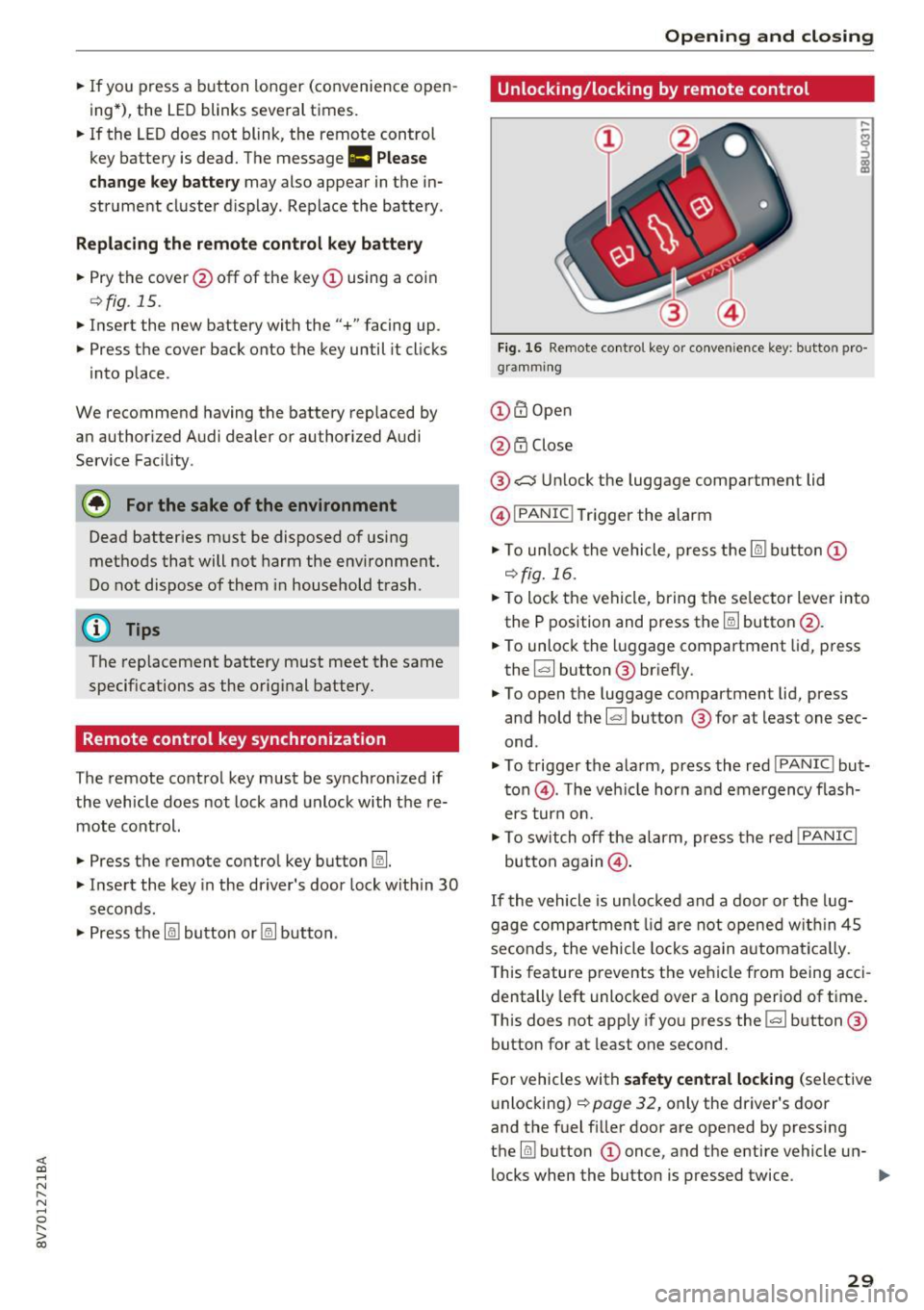
Fig. 16 Remote control key or conve nien ce key : button pro
gramm ing
(D m Open
@ i'.D Close
® .:::::$Unlock the luggage compartment lid
@ I
PANIC ! Trigger the alarm
... To unloc k the vehicle , press the~ but ton (D
c::>fig.16 .
.. To lock the vehicle, bring the selector lever into
the P position and press the~ button @.
.. To unlock the luggage compartment lid, press
the ~ button ® briefly.
.,. To open the luggage compartment lid, press
and hold the~ but ton ® for at least one sec
ond .
... To trigger the alarm, press the red I
PANIC ! but
ton @. T he veh icle horn and emergency flash
ers turn on.
.. To switch off the alarm, press the red
!PANIC I
button again@.
If the vehicle is unlocked and a door or the lug
gage compartment lid are not opened w ithin 45
seconds, the vehicle locks again automat ically.
This feature prevents the vehicle from being acci
dentally left unlocked over a long period of time.
This does not apply if you press the~ button ®
button for at least one second.
For vehicles with
safety central locking (selective
unlocking)
c::> page 32, only the driver's door
and the fuel f iller door are opened by pressing
the ~ button (D once, and the entire vehicle un-
locks when the button is pressed twice .
Ill>
29
Page 38 of 272
<( co ..... N
" N ..... 0 r--. > 00
distance from the power top to reduce the
risk of injury.
- When operating the power top, visibility to
the rear is limited. Avoid operating the top
while driving in reverse .
(D Note
- To prevent damage to the power top:
- do not store any objects in the power top
storage compartment.
- make sure there is enough space above
the vehicle when opening or closing the
power top.
- To reduce the risk of damage, make sure
there are no sensitive objects in the power
top storage compartment's range of mo
tion.
(D Tips
- To prevent the battery from draining unnec
essarily, do not open or close the power top
repeatedly when the engine is switched off.
- A message will appear in the instrument cluster if there is a malfunction in the power
top
~ page 38.
- The power top can also be operated manual ly temporari ly if there is a malfunction
~ page 40, Power top emergency opera
tion.
An authori zed A udi dealer or au thor
i zed Audi Service Facility should diag nose
and correct the cause of the malfunction as
soon as possib le .
- If the vehicle is parked with the power top open, the vehicle interior is not protected
from damaging weather or unauthorized ac
cess. Lock any items you leave behind in the
luggage compartment. Close the power top
before leaving the vehicle.
- The side windows automat ically lower
slightly when opening or closing the power
top.
P owe r top
Power top convenience opening and closing
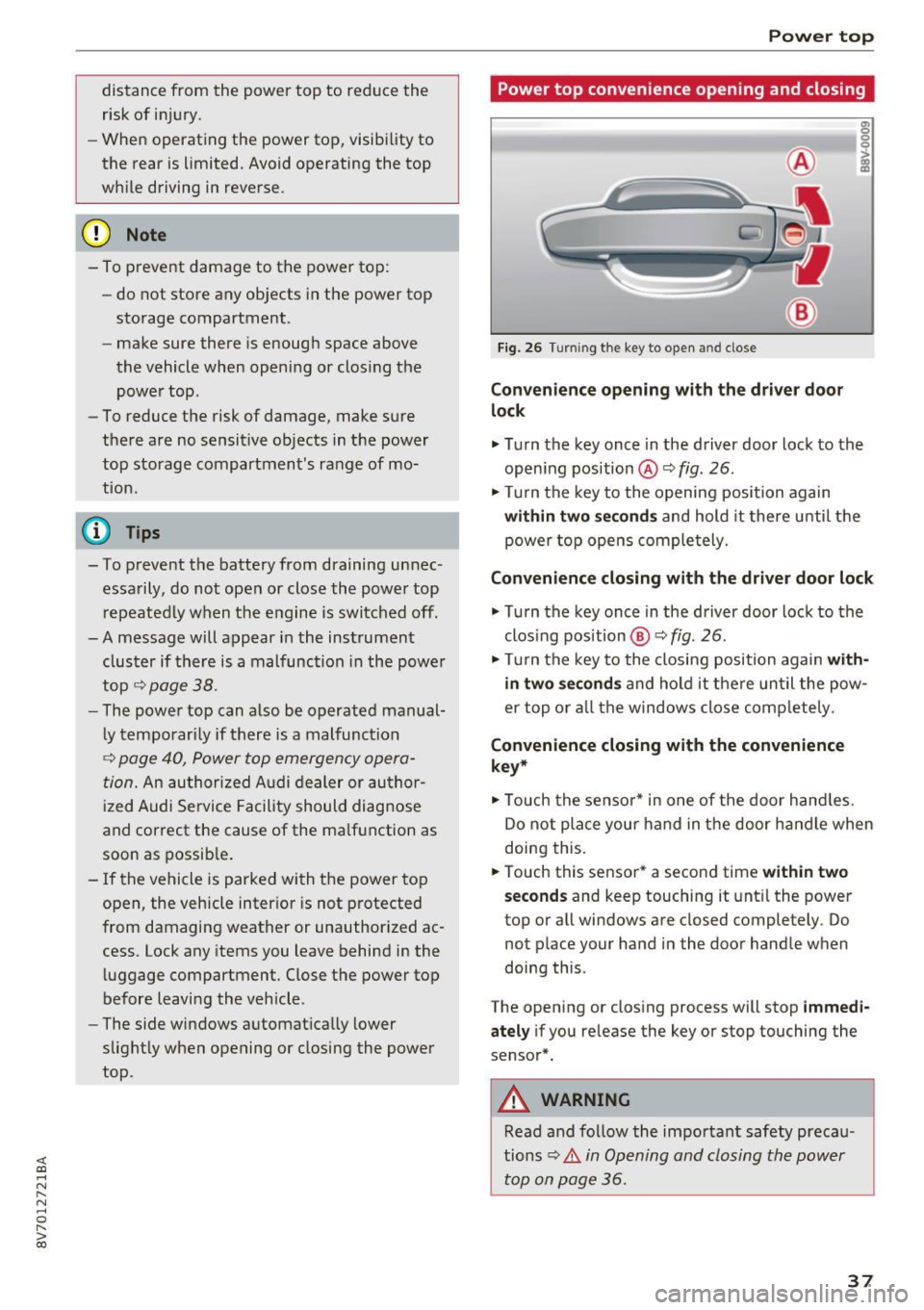
Fig. 26 Turning the key to open and close
Con ven ien ce opening with the dri ver door
lock
g: 0
0
>
18
.,. Turn the key once in the driver door lock to the
open ing position @ Q
fig. 26.
.,. Turn the key to the opening position again
within tw o seconds and hold it there unti l the
power top opens comple tely.
Conven ienc e closing with the driver door lock
.,. Turn the key once in the driver door lock to the
clos ing pos ition @Q
fig. 26.
.,. Turn the key to the closing position again w ith
in two second s
and ho ld it there un til the pow
er top or a ll the windows close comp letely .
Convenience closing with the convenience
ke y*
.,. Touch the senso r* in one of the door hand les.
Do not place your hand in the door handle when
doing this.
.,. Touch this sensor * a second time
w ith in tw o
sec ond s
and keep touching it unt il the power
top or a ll windows are closed completely. Do
not place your hand in the door handle when
doing this .
The opening or closing process will stop
imm ed i
ate ly
if you re lease the key or stop touching the
sensor*.
A WARNING
Read and follow the important safety precau
tions
~ .&. in Opening and closing the power
top on page 36 .
37
Page 40 of 272
<( co ..... N
" N ..... 0
" > 00
the vehicle speed and operate the power top
again.
Soft top system malfunction! You can continue
driving
This message appears if there is a malfunction in
the system. Try to open or close the power top
again .
If the message still appears, have the mal
function corrected by an authorized Aud i dealer
or authorized Audi Service Facility.
Soft top system malfunction! You can continue
driving
This message appears if there is a malfunction in
the system . Try to open or close the power top
again. If the message st ill appea rs, then have an
authorized Audi dealer or authorized Audi Se rvice
F acility correct the malfunction. Do not dr ive
more than 30 mph (SO km/h) until it is correct
ed .
A WARNING
Never drive when the power top is not locked
correctly. The w ind from driving cou ld cause
the power top to open. This can result in inju
r ies and damage to the vehicle.
Wind deflector
A ppl ies to: ve hicles with wind defl ecto r
The wind deflector reduces air movement in the
passenger comportment in order to make driving more comfortable.
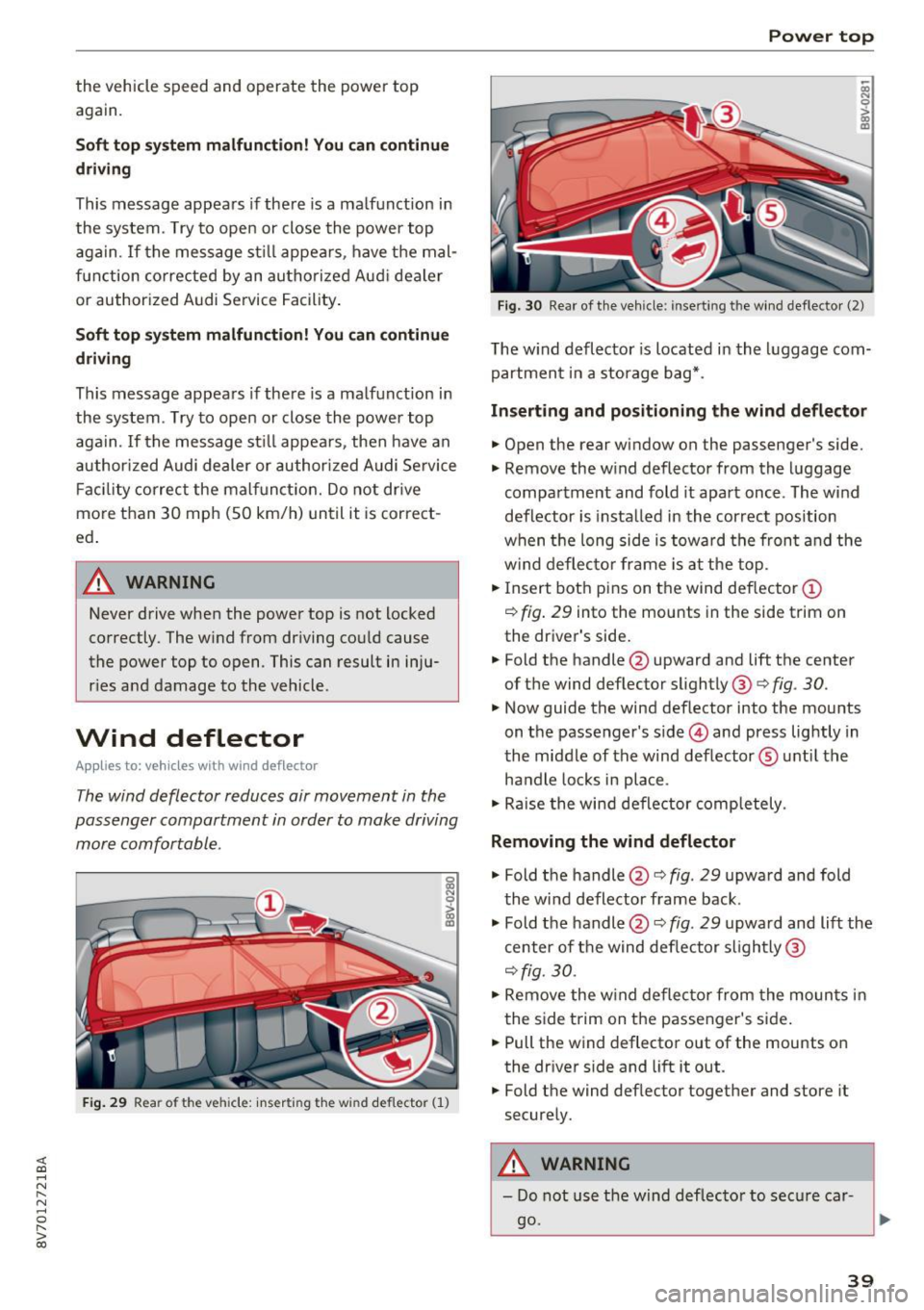
F ig . 29 Rea r of the vehicle: inse rting t he wind deflector (1)
Power top
~ a, N 0 > a, m
Fig. 30 Rear of the vehicle: inserting the wind deflecto r (2)
The wind deflector is located in the luggage com
partment in a storage bag*.
Inserting and positioning the wind deflector
.,. Open the rear window on the passenger's side.
.,. Remove the wind deflector from the luggage
compartment and fold it apart once . The w ind
deflector is installed in the correct position
when the long side is toward the front and the
w ind deflec tor frame is at the top.
.,. Insert both pins on the wind deflector
(D
c> fig. 29 into the mounts in the side trim on
the driver's side.
.. Fold the handle @upward and lift the center
of the wind deflector slightly @ c>
fig. 30.
.,. Now guide the wind deflector into the mounts
on the passenger's side © and press lightly in
the middle of the wind deflector ® until the
handle locks in place .
.,. Raise the wind deflector completely.
Removing the wind deflector
.,. Fold the handle @c> fig. 29 upward and fold
the wind deflector frame back .
.,. Fold the handle@c>
fig. 29 upward and lift the
center of the wind deflector sligh tly @
c>
fig. 30 .
"Remove the wind deflector from the mounts in
the side trim on the passenger's side .
.. Pull the wind deflector out of the mounts on
the dr iver side and lift it out .
.. Fold the wind deflector together and store it
securely.
A WARNING
- Do not use the wind deflector to secure car-
go.
~
39
Page 41 of 272
Power top
-Be careful when installing so you do not
pinch your fingers.
- Pay attention to the traffic when installing
the wind def lector. Install the w ind deflec
tor from the s ide of the vehicle that is away
from traffic.
(D Note
Do not lean against the veh icle when instal
ling the wind deflector. Hard objects and dec
orations on clothing such as belt buckles can
scratch the pa int.
{!) Tips
- The wind deflector works best when a ll of
the w indows are rolled up wh ile driving.
- Only store the wind deflector in the storage
bag* when it is dry.
Power top emergency
operation
General information
The power top con be closed manually if there is
o malfunction.
• Set the parking brake.
• Open all windows.
• Switch the ignition off.
• Pull the button@ for approximately 10 to
15 seconds to reduce th e pressure in the power
top hydraulics ¢
page 36, fig. 25.
Only close the power top m anually in an eme r
gency . Have a second person assist . Drive to an
author ized Audi dealer or author ized Audi Service
Facility immediately to have the malfunction cor
rected.
A WARNING
- There is a r isk of pinching the hands or othe r
people during all of the power top emergen
cy operat ion steps.
- Make sure a ll windows are lowered during
emergency ope ration.
- Do not reach into the power top suppor ts
or other moving components .
40
-Never drive when the power top is not
locked correct ly. The wind from driving
could cause the power top to open. This can
result in injur ies and damage to the vehicle .
{!) Tips
The power top storage compartment cover is
not latched after the emergency operation is
complete. Dr ive to an authorized Audi dealer
or authorized Audi Service Facility immediate
l y to have the malfu nction corrected.
Step 1: Release the power top storage
compartment cover
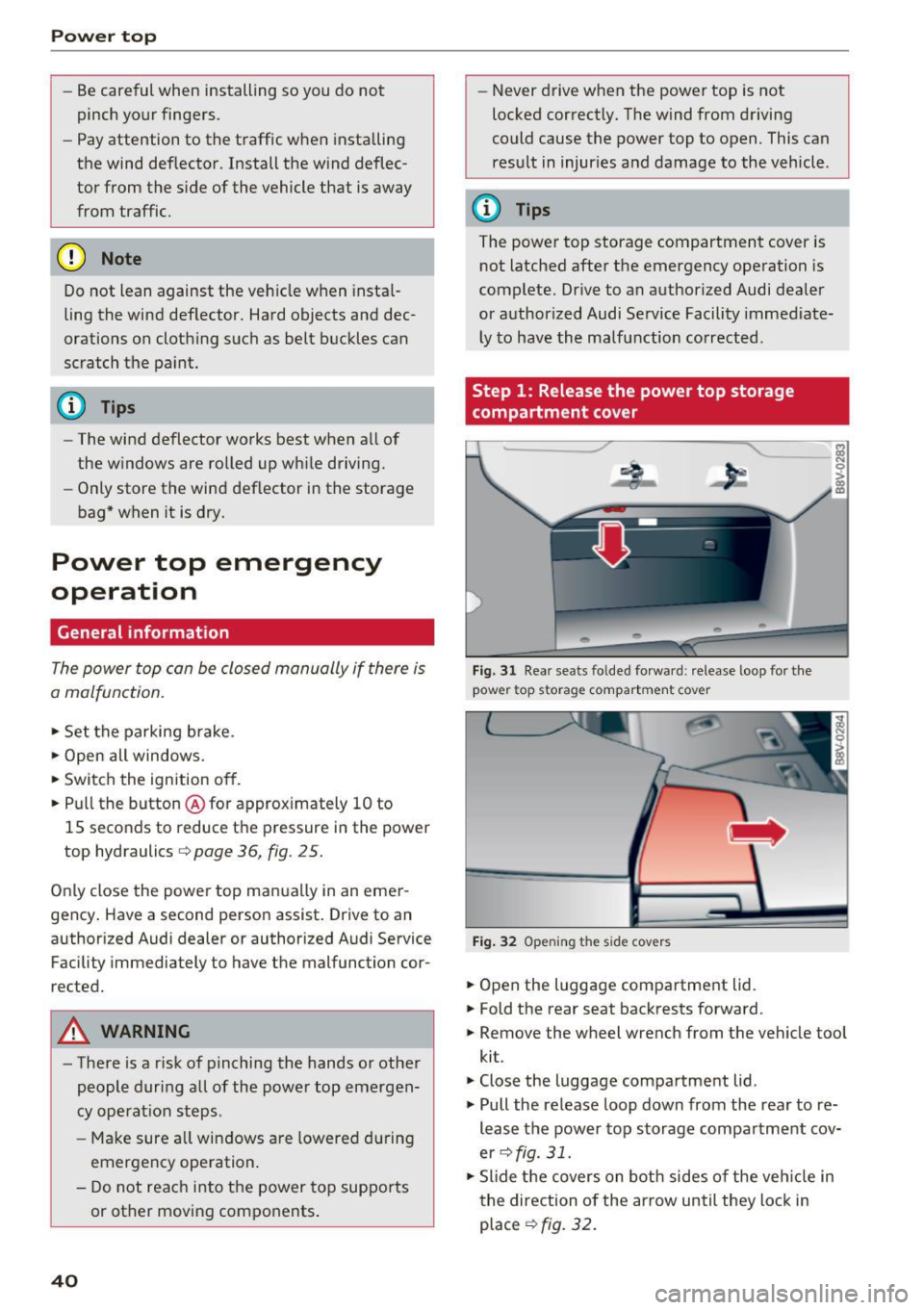
Fig. 31 Rear seats fo lded forward : release loop for the
power top storage compartment cover
Fig. 32 Open ing the s ide covers
• Open the luggage compartment lid.
• Fold the rear seat backrests forward.
• Remove the wheel wrench from the vehicle tool
kit.
• Close the luggage compartment lid .
• Pull the release loop down from the rear to re
lease the power top storage compartment cov
er
¢ fig. 31.
• Slide the covers on both sides of the veh icle in
the direction of the arrow until they lock in
place
¢fig. 32.
Page 45 of 272
Lights and Vision
When switched on, adaptive light adjusts to
curves depending on the vehicle speed and steer
ing wheel angle. This provides better lighting
through the curve. The system operates in a
speed range from approximately 6 mph (10 km/
h) to 68 mph (110 km/h) .
Static cornering light* -the cornering light
switches on automatically when the steering
wheel is turned at a ce rtain angle at speeds up to
approximately 44 mph (70 km/h) and when the
turn signal is activated at speeds up to approxi
mately 25 mph (40 km/h) . The area to the side of
the vehicle is illuminated better when turning.
Speed dependent light distribution* -The speed
dependent light distribution adapts the light in
towns and on highways or expressways . Intersec
tions can also be illuminated on vehicles with a
navigation system* .
Highway light function*
This function adapts the lighting for highway
driving based on vehicle speed .
A WARNING
-Automatic headlights* are only intended to
assist the driver. They do not relieve the
driver of responsibility to check the head
lights and to turn them on manually accord
ing to the current light and visibility condi
tions. For example, fog cannot be detected by the light sensors . So always switch on the
low beam under these weather conditions
and when driving in the dark ~D.
- Accidents could occur if you can not see the road ahead of you well and if others on the
road cannot see you . Always switch your
headlights on so that you can see the road
ahead of you and others can see your vehicle
from behind.
- The rear fog lights should only be turned on
in accordance with traffic regulations, to
prevent glare for traffic behind your vehicle.
-If the battery has been discharging for a
while, the parking light may switch off auto
matically. Always make sure your vehicle is
parked and adequately lit according to the
44
laws. Avoid using the parking lights for sev
eral hours.
- Please observe legal regulations when using
the lighting systems described.
(D Tips
- The light sensor for the automatic head
lights* is in the rearview mirror mount.
Therefore , do not place any stickers in this
area on the windshield.
- Some exterior lighting functions can be ad
justed
Q page 45.
- If you turn off the ignition while the exterior lights are on and open the door, you will
hear a warning tone.
- In some market-specific versions, the tail
lights do not turn on when switching on the
daytime running lights .
- In cool or damp weather, the inside of the
headlights, turn signals and tail lights can
fog over due to the temperature difference between the inside and outside. They will
clear shortly after switching them on . This
does not affect the service life of the light
ing.
-A message will appear in the instrument
cluster if there is a malfunction in the light
sensor
Q page 21 .
Emergency flasher
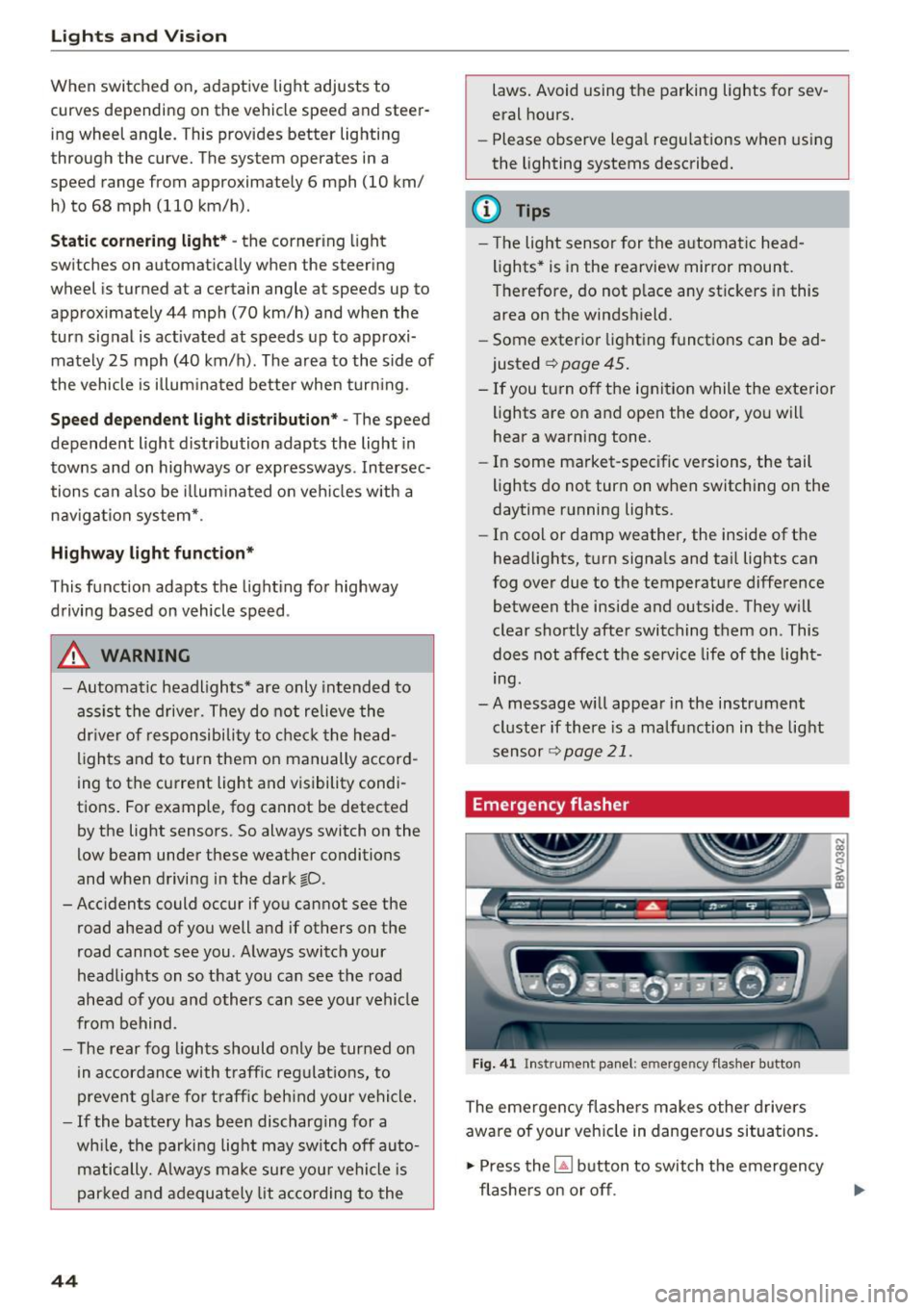
Fig. 41 Ins trumen t panel: e merge ncy flasher butto n
The emergency flashers makes other drivers
aware of your vehicle in dangerous situations.
.,. Press the~ button to switch the emergency
flashers on or off .
Page 51 of 272
Lights and Vi sion
- Do not use the windshield wipers to clear ice
off the windshield. If you switch the wind
sh ield wipers on when the w indshield is icy,
the w iper blades w ill be damaged .
@ Tips
-The windshield wipers switch off when the
i gnition is turned off . You can activate the
windsh ield wipers after the ign ition is
switched back on by moving the windsh ield
wiper lever to any pos it ion.
- Worn or dirty windshield wiper blades result
i n streak ing. This can affect the ra in sensor
funct ion . Check your windshield wiper
blades regularly.
- The washer fluid nozzles in the w indshield
washer system are heated* at low tempera
tures when the ignition is on .
- When stopp ing tempora rily, such as at a
traffic light, the speed of the windshie ld
wipers automat ically reduces by one leve l.
- In vehicles with an MMI, you can switc h the
rain sensor on or
off in the Dr iver a ssistance
menu.
Cleaning windshield wiper blades
C le an the w iper blades when you see wipe r
strea ks. Use a soft clot h and a glass cleaner.
.,. Place the w indshield wipe r arms i n the se rvice
pos it ion ,=:,
page 50.
.,. Fo ld the w indshield wipe r arms away from the
winds hield.
A WARNING
Dirty windshield wipe r blades can impair vi
sion, which increases the risk of an accident .
CJ) Note
If you see st reaks aga in a fter cleaning the
wiper blades, the blades must be replaced ,=:,
page 50.
so
-
· Replacing front windshield wiper blades
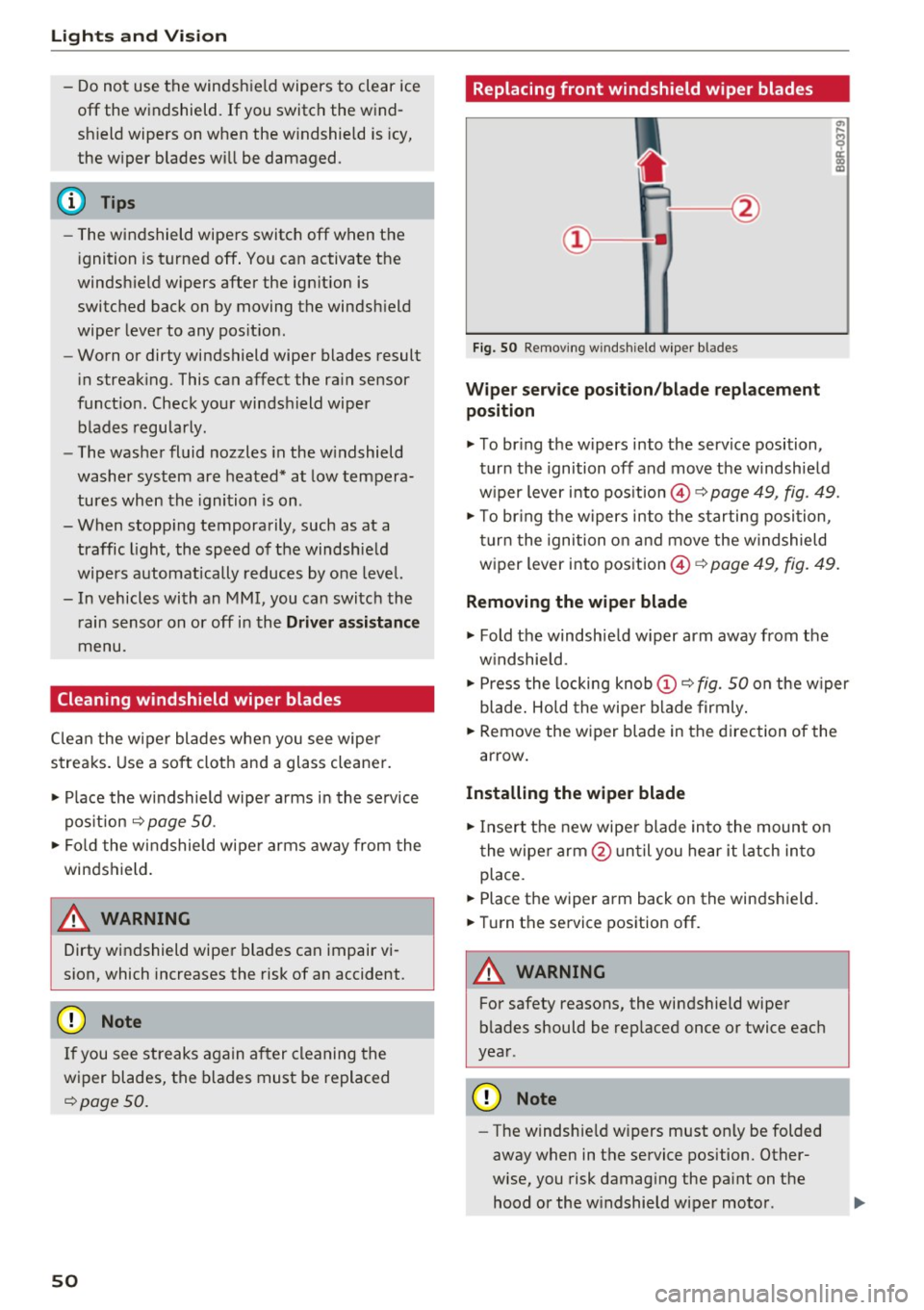
Fi g. 50 Remov ing w indsh ie ld w iper bl ades
Wipe r serv ice position /blade replacement
position
.,. To br ing the w ipers into the service position,
tur n the ignition off and move t he w indshie ld
w iper lever i nto pos ition @,=:,
page 49, fig. 49.
.,. To br ing t he w ipers into the starting posi tion ,
tu rn t he ignition o n and move the w indshield
w iper lever into pos ition ©
c:> page 49, fig. 49.
Removing the wiper blade
.,. Fold the windshie ld w iper arm away from the
w indshield .
.,. Press the locking knob
(D ,=:, fig. 50 on the w iper
blade . Ho ld the wipe r blade firmly .
.,. Remove the wiper blade in the direction of the
arrow .
Installing the wipe r blade
.,. Insert t he new wipe r blade in to the mount on
t he wipe r arm @ un ti l you hear it latch in to
place .
.,. Place the wiper arm back on the winds hield.
.,. Tur n the service position off .
A WARNING
-
For safety reasons, the windshield wipe r
b lades should be rep laced once or twice eac h
year .
Q) Note
-The w indshie ld w ipers must on ly be folded
away when in t he service position. Other
wise, you risk damag ing the pa int on the
hood or the w indshield wiper motor .