brake light AUDI A3 CABRIOLET 2016 Owner's Manual
[x] Cancel search | Manufacturer: AUDI, Model Year: 2016, Model line: A3 CABRIOLET, Model: AUDI A3 CABRIOLET 2016Pages: 272, PDF Size: 67.88 MB
Page 87 of 272
Trailer mod e
load" on the la bel located on the driver's side B
pillar (visib le when the door is open) . Inflate
tra iler tires to trailer and tire manufacturers'
specif ications.
Lights
Check to make sure both vehicle and t railer lights
are working p roper ly.
Safety chains
Be sure t railer safety chains are properly connect
ed from the trai le r to the hi tch on the veh icle.
L eave enough sla ck in the cha ins to permi t turn
ing corners. When yo u install safety chains, ma ke
sure they wi ll not drag on the road when yo u are
driving .
The cha ins s hou ld cross under the trailer tongue
t o prevent it from dropping in case of separation
from the h itch .
Driving instructions
Driving with a trailer always requires extra care
and consideration .
To obtain t he best poss ible handling of vehicle
and traile r, please note the fo llow ing :
.,. Do not tow a loaded trailer when your car itself
is not loaded.
.. Be especi ally ca ref ul when pass ing othe r
vehicles.
.. Observe speed limi ts .
.. Do not d rive at the maximum permissible
speed.
.. Always apply brakes early.
.. Monitor the temperature gauge .
Weight distribution
Towing a loaded t railer w ith an empty car res ults
in a high ly unstable distribution of weight . If this
cannot be avoided, drive at very low speeds on ly
to avoid the risk of losing steering control.
A "balanced" rig is easie r to operate and cont rol.
This means that the tow vehi cle should be loaded
to the extent possible and permissible, while
keep ing the tra iler as light as possib le under the
circumstances. Whenever possible, transfer
some cargo to the l uggage compartment of the
86
tow veh icle wh ile observing tong ue load require
ments and vehicle loading considerations.
Speed
The higher the speed, the mo re diff icu lt i t be
comes for the driver to con trol the r ig. Do not
drive at t he maxim um permissible speed. Reduce
you r speed even more if load, weather or wind
con dit ions are unfavorab le - partic ularly when
go ing downh ill.
Reduce vehicle speed
immediately if the trailer
shows the slightest sign of swaying.
Do not try
to stop the swaying by accelerating.
Observe speed limi ts. In some areas, s peeds fo r
vehicles towing trailers are lower than for regular
vehicles .
A lways apply bra kes early. Whe n driving down
hill, shift in to a lower gea r to use the engine
b raki ng effect to slow the vehi cle. Use of the
brakes alone ca n cause them to over heat and fai l.
Coolant temperature
The coolant temperature gauge 9 page 12 must
be obse rved caref ully. The coolant temperature
c a n incre ase if yo u drive o n long incl ines in a low
gear a t high engine speeds . Red uce your speed
immediately if the LE Ds in the top part of the dis
play turn on .
Fo r more info rm ation abou t indicator lights, re
fer to .
¢ page 16 .
A WARNING
-
Anyone not prope rly restrai ned in a moving
vehicle is at a much greate r risk in an acci
dent. Never let anyone ride in your car who is
not properly wear ing the restraints provided
by Aud i.
Trailer mode notes
Important to know
Your vehicle handles differen tly when towing a
trailer because o f the additiona l weight and di f
ferent weight distribution. Safety, performance
and economy will g reatly depend on how caref ul-
l y you load your trai ler and operate you r rig. ..,_
Page 90 of 272
<( co ..... N
" N ..... 0 r--. > 00
-Please note that unconsciously "resting"
your foot on the accelerator pedal prevents the cruise control from braking. This is be
cause pressing the accelerator pedal over
rides the cruise control system .
-If there is a brake system malfunction such
as overheating when the speed warning sys
tem is switched on, the braking function in
the system will be deactivated. The remain
ing speed warning system functions will re
main active , as long as the~ (USA mod
els) /
fil (Canada models) indicator light is
on.
{i) Tips
- The cruise control system is ideal for
stretches with speed limits. The driver is re
sponsible for adhering to the correct speed.
- The cruise control remains active when
shifting gears.
- The brake lights turn on when the brakes
are activated.
Switching on
A pp lies to: ve hicles with c ru ise control system
0
f
®t
0
Fig. 86 Operat ing lever: c ru ise control syste m
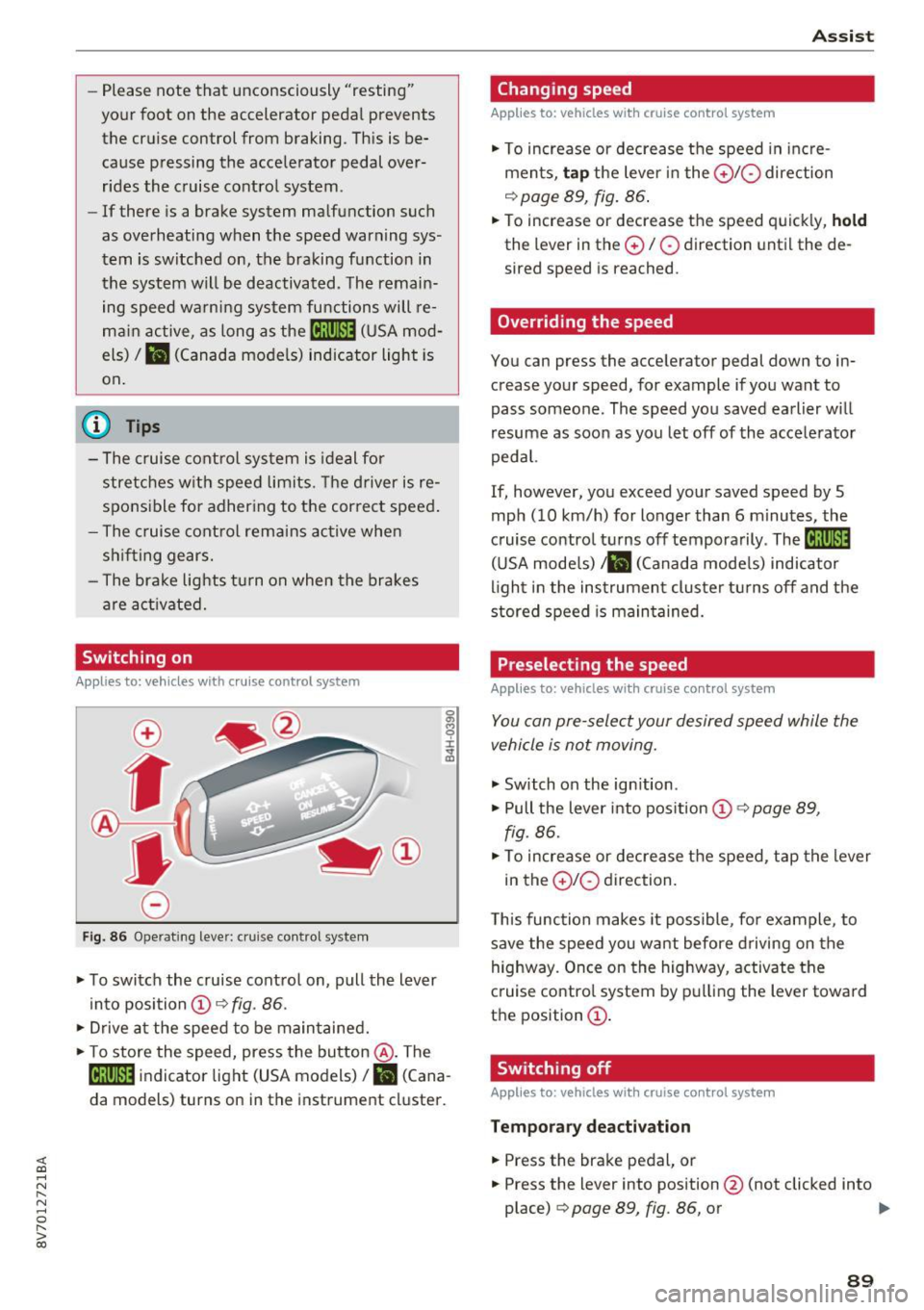
.. To switch the cruise control on, pull the lever
into position @~
fig. 86 .
.. Drive at the speed to be maintained .
.. To store the speed, press the button @. The
@;\1)~14 indicator light (USA models)/ fil (Cana
da models) turns on in the instrument cluster.
Assist
Changing speed
Applies to : vehicles wit h cruise co ntrol sys tem
., To increase or decrease the speed in incre
ments,
tap the lever in the 010 direction
~ page 89, fig. 86.
.. To increase or decrease the speed quickly, hold
the lever in the 0 / 0 direction until the de
sired speed is reached.
Overriding the speed
You can press the acce lerator pedal down to in
crease your speed, for example if you want to
pass someone. The speed you saved earlier will
resume as soon as you let off of the accelerator
pedal.
If, however, you exceed your saved speed by 5
mph (10 km/h) for longer than 6 minutes, the
cruise control turns off temporarily .
The@;\!)~14
(USA models) ;fil (Canada models) indicator
light in the instrument cluster turns off and the
stored speed is maintained.
Preselecting the speed
Appl ies to: vehicles wi th cruise co ntrol sys te m
You can pre-select your desired speed while the
vehicle is not moving.
., Switch on the ignition .
.. Pull the lever into position
(D 9 page 89,
fig. 86 .
.. To increase or decrease the speed, tap the lever
in the
0 10 direction.
This function makes it possible, for example, to
save the speed you want before driving on the
highway. Once on the highway, activate the
cruise control system by pulling the lever toward
the position
(D .
Switching off
Applies to : vehicles wi th cruise co ntrol syste m
Temporary deactivation
.. Press the brake pedal, or
.. Press the lever into position @ (not clicked into
place)
~ page 89, fig. 86, or ..,
89
Page 93 of 272
Ass is t
(D Note
The sensor can be displaced by impacts or
damage to the bumper, whee l housing and
underbody. The adaptive cruise control and
pre sense front may become impa ired as a re
sult . Have an authorized Audi dealer or au
thorized Audi Service Fac il ity check their func
tion.
In curves
Applies to: ve hicles w ith Aud i adapt ive cru ise co ntro l and Audi
pre se nse front
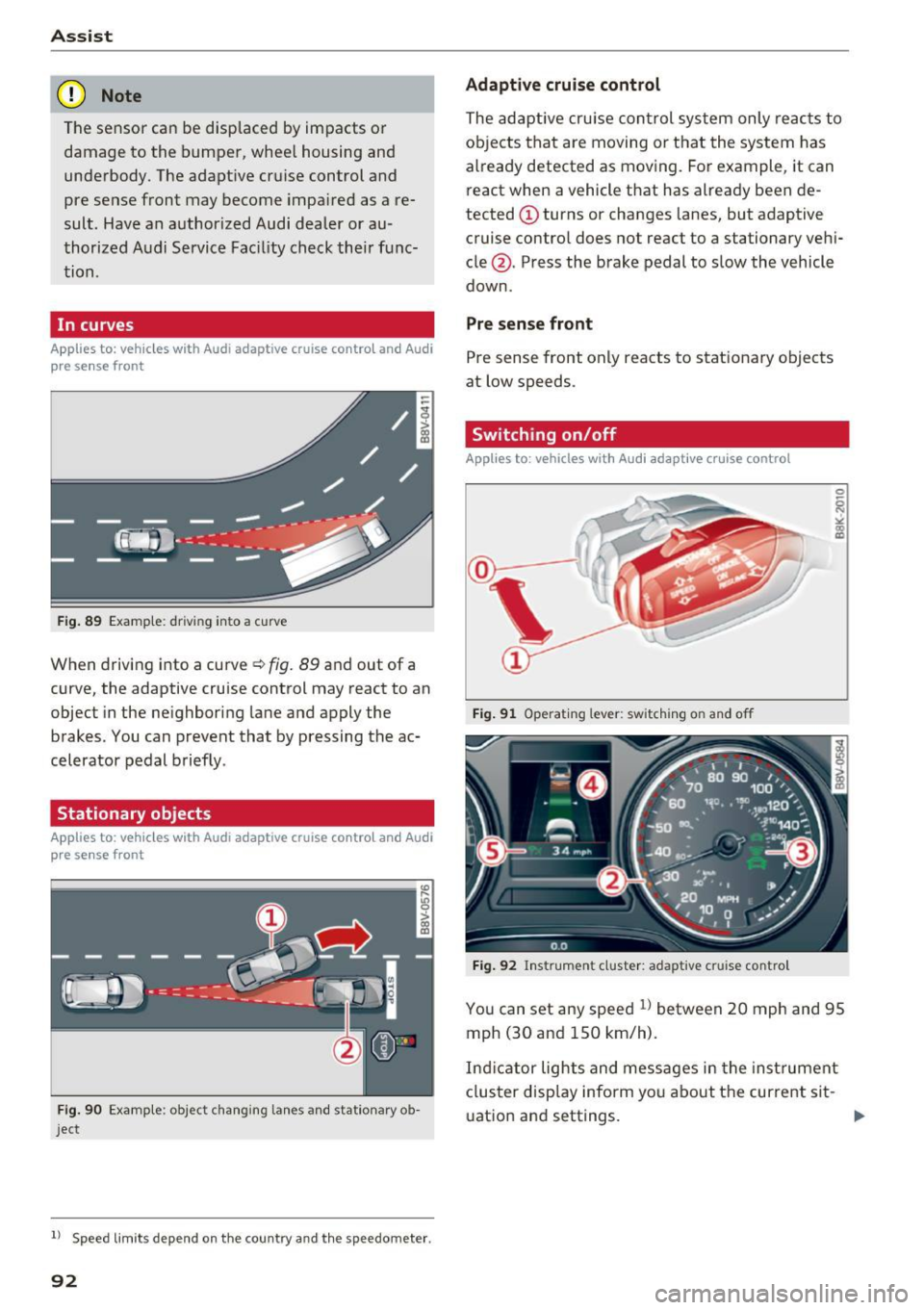
F ig . 89 Examp le: driv ing into a cu rve
When driving into a curve ¢ fig. 89 and out of a
curve, the adaptive cruise control may react to an
object in the neighboring lane and apply the
brakes . You can prevent that by pressing the ac
celerator pedal briefly .
Stationary objects
Applies to: vehicles with Aud i adapt ive cruise co ntro l and Audi
p re se nse front
Fig . 90 Examp le : object changing lanes and stationary ob
j ect
l ) Speed lim it s depend on t he country a nd the speedomete r.
92
Adaptive cruise cont rol
The adaptive cru ise con trol system only reac ts to
ob jects that are moving or t hat the system has
already detected as moving . For example, it can
react when a vehicle that has already been de
tected @turns or changes lanes, but adaptive
cruise contro l does not react to a stationary vehi
cle @. Press the brake pedal to slow the vehicle
down .
Pre sense front
Pre sense front only reacts to stat ionary objects
at low speeds .
Switching on/off
Applies to : vehicles wit h Audi adapt ive cruise control
Fig . 91 Operat ing lever: switch ing on and off
Fig . 92 Instrument cluster: adaptive cru ise contro l
You can set any speed l) between 20 mph and 95
mph (30 and 150 km/h) .
Ind icator lights and messages in the inst rument
cluster disp lay inform yo u about the curre nt sit -
uat ion and settings. .,.
Page 94 of 272

Switching adaptive crui se control on
"' Pull the lever toward you into position @
¢
fig. 91. A CC: s tandby appea rs in the instru
ment cluster disp lay .
Saving the speed and activating regulati on
"'T o save the c urrent speed , press the ISETI
¢ fig. 91 button . The stored speed is shown in
t h e tachomete r LED line @and appears briefly
in the information line ®¢
fig. 92 .
"' To activate the regulation whi le stationary, you
must press the brake pedal.
Sw itching adaptiv e cruise control off
"' Push the lever away from you into position @
until it clicks i nto place ¢
fig. 91 . The message
AC C: off appears.
The stored speed in the LED line is e rased.
@ Indicato r lights
II -adaptive cruise control is switched on. No
objects are detected ahead. The stored speed is
maintained.
• -An object a head was detected . The adaptive
cruise control system regulates the speed and
d istance to the object ahead and brakes/acce ler
ates automatica lly.
fij -adaptive cru ise control is switched on. An
object ahead was detected. Your vehicle remains
stopped and w ill not start driving automatica lly.
• -T he automatic bra king is no t enough to
maintain a sufficient distance to a n object ahead.
You must intervene ¢
page 96, Request for
driver intervention.
© Instrument cluster display
I f adaptive cruise control is not shown in the in
s trument cluster disp lay, yo u can call it up using
the mu ltifunction steering wheel b uttons
¢ page 24.
Based on the g raph ics in the d isp lay, you can de
termine if the system is m ainta ining a distance to
;;!; a vehicle ahead and what that distance to this ve-....
~ hide is: N ....
R No vehi cle -No object ahead was detected.
> 00
Assist
White vehicl e -An object ahead was de tected .
Red vehicl e -Request for the dr iver to take action
¢page 96.
Both
arrows on t he scal e@ indicate the d istance
to the object ahead . No arrow appears when the
vehicle is on an open road and t here is no object
ahead. If an object is detec ted ahead, the a rrow
moves on the sca le.
T he green zone o n the scale indicates the store
distance. For informat ion on changing the dis
t a nce, refer to ¢
page 95. If the dis tance se
l ected is exceeded or not reached, the arrow
moves into the red zone on the scale.
A WARNING
- Using adaptive cruise control incorrectly can
cause collisions, other accidents and ser ious
in ju ries.
- If you press the
!SET ! button w hen driving at
speeds be low 20 mph (30 km/h), the vehi
cle acce lerates automatically up to 20 mph
(30 km/h), wh ich is the minimum speed
that can be set.
{!) Tips
- If you switch the ignit ion or the adaptive
cruise control system off, the set speed is
erased for safety reason.
- The Elect ronic Stabilization Control (ESC)
and Anti-S lip Regulat ion (ASR) both sw itch
on when the adaptive cruise control is
switched on . ESC and ASR ca nnot be switch
ed off when adapt ive cruise control is
switched on.
- With the adaptive cruise control act ivated
t he ESC spo rt mode cannot be activated.
93
Page 97 of 272
Ass is t
- Always follow applicable traffic laws, use
common sense and select a distance to
vehicles ahead that takes the current traffic,
road and weather conditions into account .
(D Tips
Distan ce 3
is set automatically each time you
switch the ignition on. If you would like to set
another d istance as the standard setting, you
can have the
Ad apti ve cruis e control menu
added/ enabled by an authorized Aud i dealer
or authorized Audi Service Fac ility.
Setting the driving program
Applies to: vehicles with Audi adaptive cruise control
A ad aptive cru ise cont rol d riving program is ad
justable on veh icles w ithout A udi drive selec t*.
• In the MMI, se lect: the
I MENU I b utton > C ar >
Sy stem s*
cont rol button > Drive r assi st >
Adaptiv e crui se c ontrol > Driving program >
Comfort /Standard /Dynamic .
Selecting the driving mode
Applies to: vehicles with Audi adaptive cruise control
The adaptive cruise contro l dr iving program is ad
justable for vehicles with Audi drive select usi ng
the driving mode.
• Se lect the des ired dr iving mode
C o mfort , Auto ,
Dynamic or Indi vidual *
with the knob
~page 106 .
Request for driver intervention
Applies to: vehicles with Audi adaptive cruise control
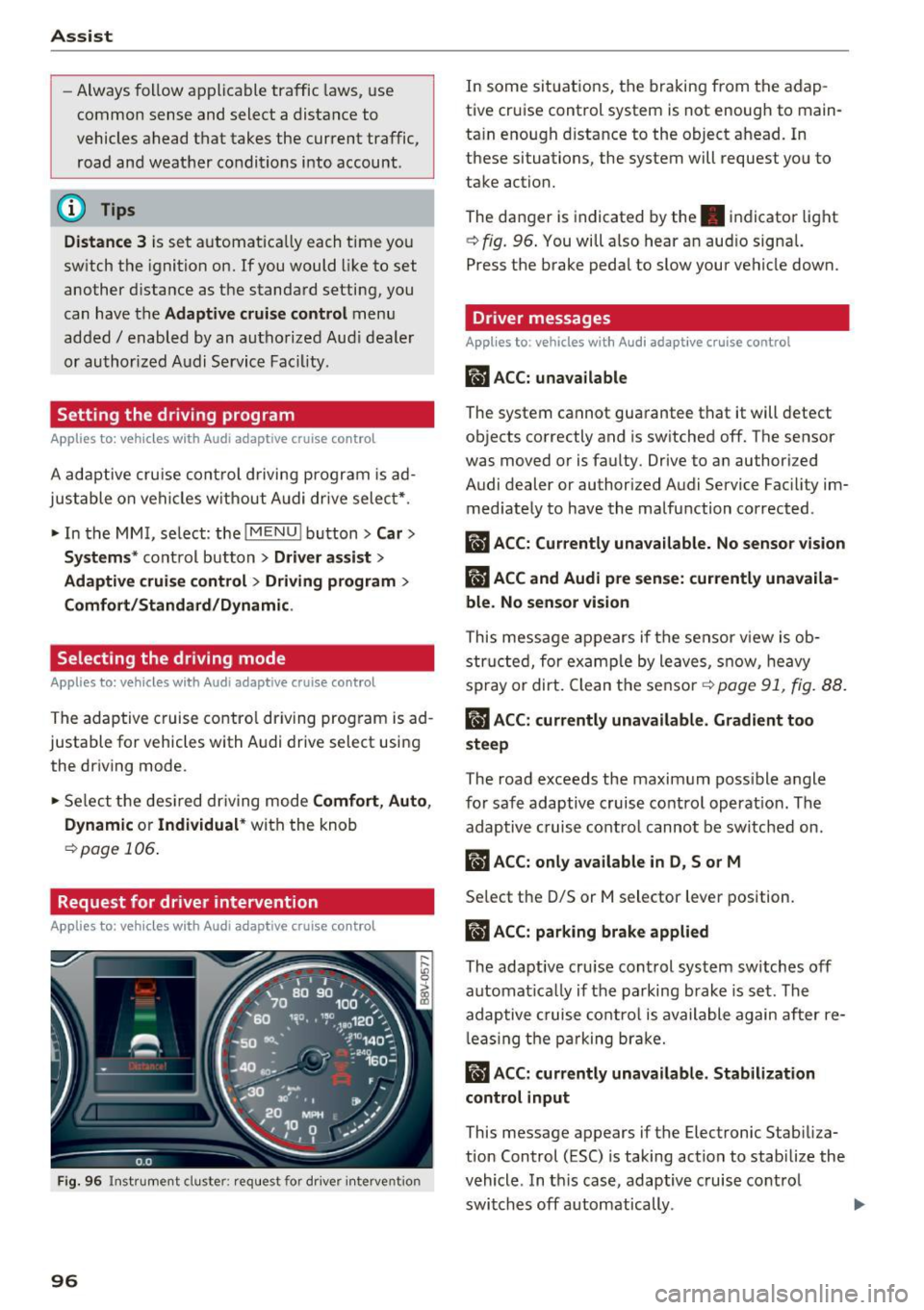
Fig. 96 Instrument d uster : req uest for d river intervention
96
In some sit uations, the braking from the adap
tive cruise control system is not enough to main
ta in enough d istance to the object ahead. In
these situations, the system will request you to
take action.
The danger is indicated by the. indicator light
~fig. 96 . You will also hear an aud io signa l.
Press the brake pedal to slow your vehicle down.
Driver messages
Applies to : vehicles with Audi adaptive cruise control
m'J ACC: unava ilable
The system cannot guarantee that it will detect
objects correctly and is switched off. The sensor
was moved or is faulty. Drive to an author ized
Audi dealer or authorized Audi Service Fac ility im
med iate ly to have the malfunction corrected.
ilJ A CC: Cur rentl y una vailable. No sensor vision
ilJ ACC and Audi pre sense: currently unavaila
ble. No sensor vi sion
This message appears if the sensor v iew is ob
struc ted, for examp le by leaves, snow, heavy
spray or dirt. Clean the se nsor
r=.> page 91, fig. 88.
II ACC: currentl y una vailable . Gradient too
steep
The road exceeds the maxim um poss ible angle
fo r safe adaptive cruise control operat ion. The
adaptive cruise contro l cannot be sw itched on.
rlJ ACC: onl y available in D, Sor M
Select the D/S or M selector lever position.
ii ACC: parking brake applied
The adaptive cru ise control system sw itches off
automat ica lly if the parking brake is set. The
adap tive cruise co ntro l is available again after re
l eas ing the p arking brake.
ii ACC: curr ently unavailable . Stabilization
control input
This message appears if the Electronic Stab iliza
tion Control (ESC) is taking action to stab ilize the
vehicle . In th is case, adaptive cruise co ntrol
switches off automatically .
Page 98 of 272
<( co .... N r--N .... 0 r--> co
llJ ACC off: manual control!
This message appears if the vehicle rolls back
when starting on a slight incline, even though
ACC is active. Press the brake pedal to prevent
the vehicle from rolling or starting to move.
Ill ACC: engine speed
This message appears if the driver has not shift
ed up or down in time when the adaptive cruise
control is braking or accelerating, causing the ve
hicle to exceed or to not reach the permitted en
gine speed . The adaptive cruise control turns off.
A chime sounds as a reminder.
•••
Three white dots appear if a setting cannot be se
lected with the operating lever. For example, this
happens if adaptive cruise control cannot be acti
vated when stopped because the driver has not fastened the safety belt.
Door open
Adaptive cruise control cannot be switched on
when the vehicle is stationary and the driver's
door is open.
Audi pre sense
Introduction
Applies to: vehicles with Audi pre sense basic or Audi pre
sense front
Within the limits of the system, pre sense basic
and pre sense front can initiate steps to protect
vehicle occupants in certain dangerous situa
tions.
Critical driving situations can be recognized by
the pre sense front via a network of different ve
hicle systems and can take steps to prepare the
vehicle occupants for a potential collision.
The pre sense front works with a radar sensor
and a video camera*. It also functions within the
limits of the system when adaptive cruise con
trol* is switched off.
Assist
General information
General information
Applies to: vehicles with Audi pre sense front or Audi adaptive
cruise control
A WARNING
Also follow the general information found on
~ page 91, General information.
Audi pre sense basic
Description
Applies to: vehicles with Audi pre sense basic
The function of the pre sense basic is activated at
a speed of 20 mph (30 km/h) or higher.
The following functions can be triggered under
certain conditions within the limits of the sys
tem:
- Tensioning of the safety belts (for examp le,
during heavy braking): the front safety belts have reversible belt tensioners. If a collision
does not occur, the safety belts loosen slightly
and are ready to trigger again.
- Closing the windows (for example when over
or understeering): the windows close until
there is a small gap open.
Audi drive select: the deployment time is adapt ed in dynamic mode.
A WARNING
-The pre sense basic cannot overcome natural
physical laws. It is a system designed to assist
and it cannot prevent a collision. Do not let
the increased safety provided tempt you into
taking risks. This could increase your risk of a
collision.
- The system can dep loy incorrectly due to
system-specific limits.
@ Tips
-Certain pre sense basic functions switch off
when ESC is switched off (sport mode) or
when driving in reverse.
97
Page 116 of 272
Intelligent Technology
Intelligent Technology
Electronic stabilization
control (ESC)
Description
The Electronic Stabilization Control (ESC) rein for
ces driver safety . It reduces the risk of slipping
and improves driving stability. ESC detects crit i
cal s ituations such as the vehicle oversteering
and understeering or the wheels are spinning.
The vehicle is stabilized by applying the brakes or reducing eng ine torq ue. When the ESC engages,
the
D1 ind icator light blinks in the instrument
cluste r.
The fo llow ing systems are integrated in the ESC :
Ant i-loc k braking system (ABS)
ABS p revents the whee ls from locking whe n brak
ing. The vehicle can sti ll be steered even during
hard brak ing. Apply steady press ure to the brake
pedal. Do not pump the pedal. A puls ing in t he
b rake pedal indicates that the system is acting to
s tabilize the vehicle .
Brake assist system
The brake assist system can decrease brak ing dis
tance . It increases braking power when the d river
presses the brake pedal quick ly in emergency sit
uations . You must press and hold t he b rake pedal
until the dangerous situat io n is over . In veh icles
with adapt ive c ruise control*, the bra ke as sist
sy stem is more sensitive if t he di sta nce detec ted
t o the vehicle ahea d is too sm all.
Anti-slip regulation (ASR)
ASR reduces eng ine power when the drive wheels
beg in sp inning a nd adapts the force to the road
conditions . This makes it easie r to start, acceler
a te and dr ive u p in clines.
Electronic differential lock (EDL )
The EDL brakes w heels that a re spinning and
transfers the drive power to the other drive
wheel or whee ls if t he ve hicle is equipped with a ll
wheel drive*) . T his funct ion is not av ailable at
h igher speeds.
116 I
n extreme cases, ED L automat ically swi tches off
to keep the brake on the braked whee l from over
heating. The veh icle is still working correct ly. ED L
will switc h on again automatically when condi
tions have returned to normal.
Steering recommendation
The ESC he lps to stabili ze the vehicle by cha nging
the steering torque.
Selective wheel torque control
Se lective w hee l to rque cont rol is used when d riv
i ng o n curves. The fron t whee l on the inside of
the curve or bo th whee ls on the inside of the
cu rve are braked se lective ly as needed. This al
l ows mo re precise driving in cu rves.
Automatic post-collision braking system
The "A utomat ic pos t-coll is io n braking sy stem"
c a n hel p to reduce t he risk of sliding and o f othe r
collisions after an accident . If the a irbag cont rol
module detects a collision a bove a certain vehicle
speed, the vehicle is bra ked by the ESC.
The vehicle does not bra ke automatically if:
- the dr ive r presses the acce lerator pedal, or
- the braking force generated by the pressed
brake pedal is grea ter than the braking force
that wo uld be i nitiated by the system, or
- the ESC, the brake system o r the ve hicle elect ri
cal system are not func tioning .
A WARNING
- The ESC and its integ rated syste ms can not
o vercome the lim its posed by natural physi
c a l la ws. Thi s is espe cial ly import ant on sli p
pe ry o r we t roads. If the systems beg in act
ing to stabilize your ve hicle, yo u should im
mediately a lter your speed to matc h the
road and traffic condit ions. Do not let the
increased safety pr ovided tempt you into
taking risks . This cou ld increase your risk of
a co llision .
- Please note the r isk of a collis ion increases
when dr iv ing fast, especia lly t hrough c urves
and on slippery or wet roads, and when dr iv
ing too close to objects ahead. The ESC and
i t s in tegr ated systems cannot always .,..
Page 118 of 272
Intelligent Technology
(D Tips
-ESC/ASR cannot be switched off or sport
mode cannot be switched on if the cruise
control system* or the adaptive cruise con
trol* is switched on.
- Malfunctions in the Audi magnetic ride may make it impossible to switch the ESC/ASR
off or to switch sport mode on.
Brakes
New brake pads
New brake pads do not achieve their full braking
effect during the first 250 mi (400 km). They must be "broken in" first. However, you can com
pensate for the slightly reduced braking force by
pressing firmly on the brake pedal. Avoid heavy
braking during the break-in period .
Wear
Brake pad
wear depends largely on the way the
vehicle is driven and on operating conditions .
This is especially true if you are driving frequently
in the city and on curves or with a sporty driving
style .
Operating noise
Noises may occur when braking depending on the
speed, braking force and outside conditions such
as temperature and humidity .
Effect of water and road salt
In certain situations, for example after driving
through water, in heavy rain, after overnight con densation or after washing your car, the braking
effect can be reduced by moisture or ice on the
brake rotors and brake pads. The brakes must be
"dried" first with a few careful brake applica
tions.
At higher speeds and with the windshield wipers
turned on, the brake pads press against the brake
rotors for a short amount of time. This action
which is not felt by the driver happens at regular
intervals and facilitates a better reaction time for
the brakes in wet weather .
The braking effect can also be reduced if you are
driving on salted roads and you do not apply the
118
brakes for long periods of time. The layer of salt
on the brake rotors and pads must be worn off
first when the brakes are applied.
Corrosion
Leaving the vehicle parked for long periods of
time , low mileage and avoiding heavy braking
can contribute to corrosion on the brake rotors
and dirty brake pads.
If you usually avoid heavy braking or if there is
corrosion present, occasional heavy braking at
high speeds is recommended to clean the brake
rotors and pads¢.&. .
Brake system malfunction
if you notice that the brake pedal travel has sud
denly gotten larger, then a brake circuit may have
failed. Drive to an authorized Audi dealer or au
thorized Audi Service Facility immediately to have
the problem corrected. On the way there, drive
with reduced speed and keep in mind that a long
braking distance and increased pressure on the
brake pedal will be necessary.
Low brake fluid level
When the brake fluid level is low, malfunctions in
the brake system may occur. The brake fluid level
is electronically monitored.
Brake booster
The brake booster amplifies the pressure you ap
ply to the brake pedal.
It only works when the en
gine is running.
A WARNING
- New brake pads do not achieve their full
braking effect during the first 250 mi
(400 km). They must be "broken in" first.
However, you can compensate for the
slightly reduced braking force by pressing
firmly on the brake pedal. Avoid heavy brak
ing during the break-in period.
- Only apply the brakes for the purpose of
cleaning the brake system when road and
traffic conditions permit. You must not en
danger other road users. This increases the
risk of an accident.
Page 119 of 272
<( co .... N r--N .... 0 r--> co
-On steep slopes, reduce the speed and se
lect a lower gear or lower selector lever po
sition. Dr ive as little as possible while press
ing the brake pedal and avoid putt ing your
left foot on the brake pedal while driving.
Th is co uld cause the brakes to overheat and
impai r the efficiency of the brakes.
- Do not let the brakes "g rind " by a lways
keeping your foot on the brake pedal. This
can cause the br akes to overhea t, i ncrease
wea r and incre ase braking dis tance unneces
sari ly.
- Certa in wea ther an d operat ing co ndi tio ns
s u ch as dr iving through wate r, d riving in
heavy ra in or d riving after washing your ve
hicle can impair the effectiveness of the
brakes . In the w inte r, ice may b uild up on
the brake pads, rotors and drums. Check
these components by braking ca refu lly . Ap
plying the brakes carefu lly severa l times
dr ies the brakes and removes ice bu ild-up .
- The effic iency of the brakes can also be im
paired by driving for long st retches on roads
cove red w ith salt without using the b rakes .
Yo u can remove sa lt deposits from the
bra ke rotors and pads by caref ully app lying
the brakes severa l t imes .
-If the front spoiler is damaged or you ins tall
ano ther spoiler, m ake sure the front wheel
bra kes are vent ilated p roper ly. O therwise,
the b rake system could overheat, whic h re
duces the ir effectiveness.
- Failure of a brake circuit impai rs b raking
performance, which increases braking dis
tance . Avoid driving the vehicle . Have it tow
ed to the nearest authorized Aud i dealer or
authorized Audi Service Fac ility .
- Never let the vehicle roll while the engine is
stopped because this increases the risk of an
acc ident.
- If the brake booster is not working, you will
have to press m uch ha rder on the brake
peda l to compensate for the lack o f the
booster .
0 Note
-Never let the bra kes " rub" by pressing the
pedal lightly when braking is not really nee-
Intellig ent Technology
essary . This causes the b rakes to overheat
and increases braking distance and causes
wear .
- Before driving on a long st retch with steep
slopes, reduce your speed and shift to the
next lower gear Th is makes use of the en
gine braking effect and relieves the brakes.
If you need to brake additionally, brake in
intervals and not continuously .
(D Tips
-If the brake booster is not work ing, you
must press the brake peda l with much more
force than normal.
- If you retrof it your vehicle with a front spo il
er, wheel covers or sim ilar items, make sure
that the air flow to the fro nt wheels is not
inter rupted . Otherwise the b rake system
can become too hot.
Electromechanical
steering
The electromechanical steering supports the
driver's steering movement s.
Power steering adapts electronically based on
the ve hicle speed .
T he veh icle st ill has f ull s teer ing f unct iona lity if
t h e power steering fails or when the engine is
stopped (towing) . To steer, you must app ly m uch
more force than usual.
Indicator lights and messages
• Do not driv e vehicle : steering defective
If this indicator light turns on and stays on and
t hi s message appears , the power steering may
have failed .
Do
not continue dr iv ing . See an author ized Audi
dealer or authorized A udi Se rvice Fac ility for as
s istance .
• Do not dr ive vehicle: steering defecti ve
There is a ma lfunction in the e lectronic steering
l ock. You cannot turn the ignition on. ..,.
119
Page 122 of 272
Intelligent Technology
With the engine running
A lthough electrical energy is generated whi le
driving, the battery can drain . This can happen
when little energy is generated, and much is used
and the charge leve l of the battery is not optima l.
To restore the balance o f energy, components
that requ ire large amounts o f energy are tempo
rari ly scaled back o r switched off . Heating sys
tems in particu lar require a great deal of energy.
If you notice, for example, that the seat heating*
or rear window defroster is not working, then it has bee n temporarily reduced or switched off.
These systems are available again as soon as the
energy supp ly has been restored.
In addition, you may notice that the idle speed
has slightly increased. T hat is norma l and no
cause for concern. Due to the increased idling
speed, the add itiona l requ ired e ne rgy w ill be
generated and the battery w ill be cha rged.
Notice about data recorded by the Event
Data Recorder and vehicle control modules
E vent Data Recorder
This vehicle is equipped wi th an Event Da ta Re
corde r (EDR) . The main purpose of an EDR is to
record, in certain crash o r near crash-like situa
tions, such as an a irbag deployment or h itting a
road obstacle, data that will assist in understand
ing how a veh icle's systems performed . The EDR
is designed to record data related to veh icle dy
namics and safe ty systems for a sho rt pe riod of
time, typically 30 seconds or less. The EDR in this
veh icle is designed to reco rd s uch data as:
- How various systems in your vehicle were oper
at ing;
- Whether or not the driver and passenger safety belts we re buckled/fastened;
- How far ( if at all) the driver was depress ing the
acce lerator and/or brake peda l; and,
- How fast the ve hicle was trave ling.
These data can help provide a better understand ing of the circ umstances in which crashes and in
juries occur. NOTE: EDR data are recorded by your veh icle only if a non-trivia l crash situat ion occurs;
no data are recorded by the EDR under norma l
122
driving cond itions and no personal data (e .g .,
name, gender, age, and crash location) are re
corded. However, other parties, such as law en
fo rcement, co uld comb ine the EDR data with the
type of persona lly identifying data rout inely ac
quired du ring a crash investigation .
To read data recorded by an EDR, spec ial eq uip
ment is required, and access to the vehicle or the
EDR is needed. In addition to the ve hicle manu
facturer, other part ies, such as law enforcement,
t h at have the spec ial eq uipment, can read the in
fo rmat io n if they have access to the vehicle or the
EDR .
Some state laws restrict the retrieval or down
l oad ing of data stored by ED Rs ins talled in a ve hi
cle for the exp ress p urpose of ret riev ing data af
te r an accident or c rash event withou t the own
e r's consent.
Audi will not access the EDR and/or simi la r data
or g ive i t to others -
- unless the ve hicle owner (or lessee if the vehi
cle has been leased) agrees; o r
- upon the offic ial request by the police; or
- upon the order of a court o f law or a govern -
ment agency; or
- for the defense of a lawsuit thro ugh the judicia l
discovery process.
- Audi may a lso use the data for research about
veh icle operation and safety perfo rmance or
prov ide the data to a third party for research
purposes without identify ing the specific vehi
cle or information about the ident ity of its own
er or lessee and only afte r the recorded vehicle
data has been accessed.
Vehicle control modules
You r vehicle is also eq uipped with a number of
electronic control modules for various vehicle
systems, such as e ngine management, em iss ion
contro l, airbags, and safety be lts.
These elect ronic contro l modules record data
dur ing norma l vehicle operation that may be
needed by trained techn ic ians for d iagnost ic and
r epa ir purposes. The recording capab ility of these
modules is lim ited to data (no sound is record
ed). Only a sma ll am ount of data is actually