battery AUDI A3 CABRIOLET 2016 Owners Manual
[x] Cancel search | Manufacturer: AUDI, Model Year: 2016, Model line: A3 CABRIOLET, Model: AUDI A3 CABRIOLET 2016Pages: 272, PDF Size: 67.88 MB
Page 5 of 272
<( co .... N ,.__
N .... 0 ,.__
> co
All w hee l drive ( quattro) . . . . . . . . . . . . . . 120
Ene rgy management 121
Safety .. .. .. .. .. .. .... ... .. .. .... . 124
Driving safety . . . . . . . . . . . . . . . . . . . . 124
Basics . . . . . . . . . . . . . . . . . . . . . . . . . . . . . 124
Co rrect p assenge r seating positions . . . . . 125
Driver 's and front passenger 's footwell . . 129
Pedal area . . . . . . . . . . . . . . . . . . . . . . . . . . 129
S toring cargo co rrectly . . . . . . . . . . . . . . . 130
Repo rting Safe ty Defects . . . . . . . . . . . . . . 132
Active rollove r protect io n system 133
Safety belts . . . . . . . . . . . . . . . . . . . . . . 135
Ge neral notes . . . . . . . . . . . . . . . . . . . . . . . 13 5
Why use safety belts? . . . . . . . . . . . . . . . . 136
S afety bel ts . . . . . . . . . . . . . . . . . . . . . . . . 138
B el t tensione rs . . . . . . . . . . . . . . . . . . . . . . 1 41
Airbag system . . . . . . . . . . . . . . . . . . . . 143
I mpor tant info rm ation . . . . . . . . . . . . . . . 14 3
Fr ont airbags . . . . . . . . . . . . . . . . . . . . . . . 1 47
M oni toring th e Advanced Airbag System . 155
K nee airbags . . . . . . . . . . . . . . . . . . . . . . . . 159
Side airbags . . . . . . . . . . . . . . . . . . . . . . . . 161
Child safety . . . . . . . . . . . . . . . . . . . . . . 165
Important info rmation . . . . . . . . . . . . . . . 165
C hi ld seats . . . . . . . . . . . . . . . . . . . . . . . . . 171
Secur ing ch ild seats . . . . . . . . . . . . . . . . . . 176
L ATCH system ( Lowe r anchorages and
tethers for chi ldren) . . . . . . . . . . . . . . . . . 179
Addit io nal i nfo rmat ion . . . . . . . . . . . . . . . 183
Maintenance and Care . . . . . . . . . . . 184
Checking and Filling . . . . . . . . . . . . . 184
G asoline fuel . . . . . . . . . . . . . . . . . . . . . . . 184
Refueling . . . . . . . . . . . . . . . . . . . . . . . . . . 18 5
Cata lytic converter . . . . . . . . . . . . . . . . . . . 187
Eng ine compartment . . . . . . . . . . . . . . . . . 188
Eng in e oi l . . . . . . . . . . . . . . . . . . . . . . . . . . 191
Cooling system . . . . . . . . . . . . . . . . . . . . . . 195
Brake fluid . . . . . . . . . . . . . . . . . . . . . . . . . 197
Battery (12 V) . . . . . . . . . . . . . . . . . . . . . . . 198
W indshield was her system . . . . . . . . . . . . 202
Service inte rval display . . . . . . . . . . . . . . . 202
Table of contents
Tires and wheels . . . . . . . . . . . . . . . . .
204
Whee ls . . . . . . . . . . . . . . . . . . . . . . . . . . . . 204
Tire p ressure monitoring ind icator . . . . . . 222
Care and cleaning . . . . . . . . . . . . . . . . 224
G enera l information . . . . . . . . . . . . . . . . . 224
Car washes . . . . . . . . . . . . . . . . . . . . . . . . . 224
Cleaning and ca re i nformat ion . . . . . . . . . 225
Plac ing you r vehicle out of serv ice . . . . . . 228
Do It Yourself . . . . . . . . . . . . . . . . . . . . 230
Emergency assistance . . . . . . . . . . . 230
T ru nk escape latch . . . . . . . . . . . . . . . . . . . 230
Genera l information . . . . . . . . . . . . . . . . . 230
E q ui pment . . . . . . . . . . . . . . . . . . . . . . . . . 230
T ire mobility kit . . . . . . . . . . . . . . . . . . . . . 231
Sp are tire . . . . . . . . . . . . . . . . . . . . . . . . . . 233
Replacing w heels . . . . . . . . . . . . . . . . . . . . 2 34
Fuses and bulbs . . . . . . . . . . . . . . . . . . 240
El ec trica l fuses . . . . . . . . . . . . . . . . . . . . . . 2 40
B ul bs . . . . . . . . . . . . . . . . . . . . . . . . . . . . . . 2 42
Emergency situations . . . . . . . . . . . . 244
Genera l . . . . . . . . . . . . . . . . . . . . . . . . . . . . 2 44
Starting by p ush ing o r towing . . . . . . . . . . 244
Start ing with jumpe r cab les . . . . . . . . . . . 244
U sing jump sta rt cab les . . . . . . . . . . . . . . . 24S
Tow ing with a tow truck . . . . . . . . . . . . . . 246
Raising the vehicle . . . . . . . . . . . . . . . . . . . 248
Technical Data . . . . . . . . . . . . . . . . . . . 250
Technical data . . . . . . . . . . . . . . . . . . . . 250
Vehicle ident ification . . . . . . . . . . . . . . . . . 250
Weig hts . . . . . . . . . . . . . . . . . . . . . . . . . . . 250
Di mens io ns .. .. . .......... ... ..... .. 251
C apaci ties . . . . . . . . . . . . . . . . . . . . . . . . . . 251
Gasoline e ng ines . . . . . . . . . . . . . . . . . . . . 2S2
Consumer information . . . . . . . . . . 2S3
Warr anty cove rages . . . . . . . . . . . . . . . . . . 253
Operat ing yo ur vehicle outside the U.S.A.
o r Canada . . . . . . . . . . . . . . . . . . . . . . . . . . 253
Audi Se rvice Repair Manuals and
Literat ure . . . . . . . . . . . . . . . . . . . . . . . . . . 253
Maintenance. . . . . . . . . . . . . . . . . . . . . . . . 253
3
Page 16 of 272
Instruments and indicator lights
y>))
14
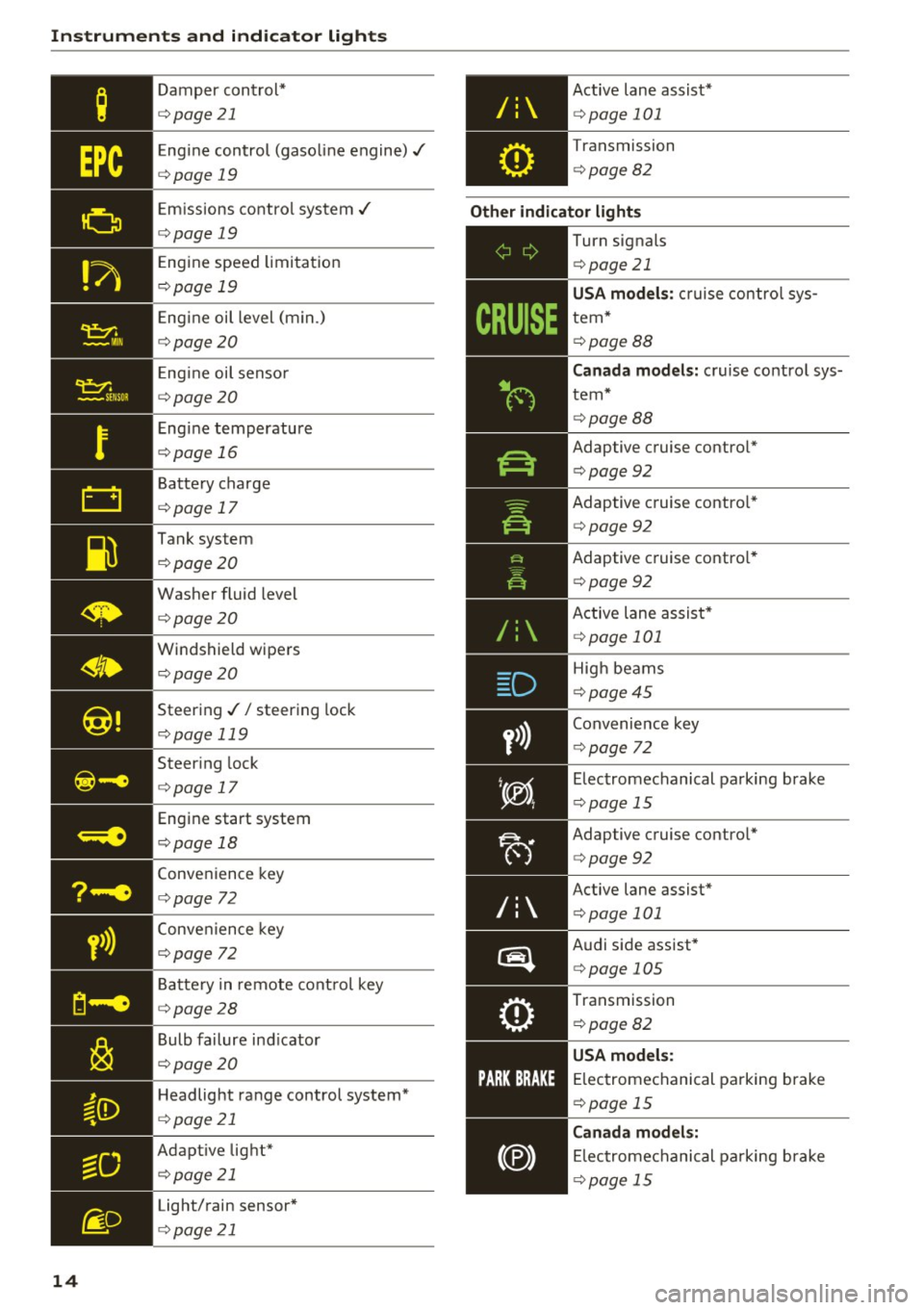
Damper cont rol*
¢ page21
Engine control (gaso line engine)./
¢ page 19
Emiss ions control system./
¢ page 19
Eng ine speed limitat ion
¢ page 19
Engine oil level (min.)
¢page20
Engine oil senso r
¢page 20
Engine temperature
¢page 16
Battery charge
¢page 17
Tank system
¢ page20
Washer fluid level
¢page20
Windshield wipe rs
¢ page20
Steering .// steering lock
¢page 119
Steering lock
¢ page 17
Engine start system
¢page 18
Convenience key
¢page 72
Conve nience key
¢page 72
Batte ry in remote cont rol key
¢ page28
Bulb failure ind icator
¢ page20
Headlight ra nge control system*
¢ page 21
Adaptive light*
¢page 21
Light/rain sensor*
¢ page 21
Active lane assist*
¢page 101
Transmission
¢ page 82
Other indicator light s
/:
~-------------
Turn signals
¢page 21
USA model s: c ruise con tro l sys
tem*
¢ page 88
Canada model s: cruise contro l sys
tem*
¢ page 88
Adaptive cruise contro l*
¢ page 92
Adaptive c ruise contro l*
¢ page 92
Adaptive cruise contro l*
¢ page 92
Active lane assist*
¢ page 101
High beams
¢ page45
Convenie nce key
¢ page 72
Electromechanical parking brake
¢page 15
Adaptive cruise contro l*
¢ page 92
Active lane assist*
¢page 101
Audi side assist*
¢page 105
Transmission
¢page 82
USA model s:
E lec tromechanical parking brake
¢ page 15
Canada model s:
El ectromechanical pa rking brake
¢ page 15
Page 19 of 272
<( co .... N ,.__
N .... 0 ,.__
> co
Stop the engine and do not continue driving.
Check the engine oil leve l
~page 193.
- If
the engi ne oil level is too low, add engine oil
~page 191. Only cont inue driving once the in
dicato r light turns off.
-If the engine oil level is correct and the indica
tor light sti ll turns on, turn the eng ine off and
do not continue driving. See an authorized Audi
dealer or authorized Audi Service Facility for as
sistance.
The oil pressure warning is not an oi l level in
dicator. Always check the oil level regu larly.
0 Alternator/battery
• Alternator fault: battery is not being charg
ed
There is a malfunction in the alternator or the ve
hicle electrical system .
Drive to an authorized Aud i dea ler o r authorized
Audi Servic e Facility immediately. Turn off all un
necessary electrical equipment because it wi ll
drain the battery. See your authorized A udi deal
er or authori zed Audi Service Facility if the bat
tery charge level is too low.
(•) Low battery charge : Battery will be charged
while driving
The start ing ability may be impaired .
I f th is message turns off after a little while , the
battery charged enough while d riving.
If the message does not turn off, have and au
thor ized Audi dealer or authorized Audi Service
Faci lity repair the malfunction .
~/ !{' Safety systems
The II (USA models) Im (Canada mode ls) indi
cato r light monitors the safety systems.
Safety system
If the II (USA models) Im (Canada models) in
d icator light turns on or blinks, there is a mal
function in a safety system.
Instruments and indicator lights
Drive to an authorized Audi dealer or authorized
Audi Service Facility immediate ly to have the
malfunction corrected.
A WARNING ~ -
Have the safety systems inspected immedi
ately. Otherwise, there is a r isk that the sys
tems may not activate during a collision,
which increases the risk of serious injury or
death .
4'-Front safety belt
The . indicator light stays on until the dr iver's
and front passenge r's safety belts are buckled.
Above a certa in speed , there will also be a warn
ing tone .
(D Tips
For additional informat ion on safety belts, re
fer to~
page 135 .
@-e Steering lock
• Do not drive vehicle: steering defective
There is a malf u nction in the electron ic steering
lock. You cannot turn the ignition on.
Do
not tow your vehicle because it cannot be
steered . See an authorized Audi dealer or author
ized Audi Service Facility for assistance.
!II Steering lock: system fault! Please contact
Service
There is a malfunction in the electron ic steering
lock.
Drive to an authorized Audi dealer or authorized
Audi Service Facility immediate ly to have the
malfunction corrected.
A WARNING ~ -Do not tow your vehicle when there is a mal
function in the electronic steering lock -this
in creases the risk of an acc ident.
17
Page 25 of 272
Driver information system
-Long-term memory (on-board computer 2)
- Efficiency program
The follow ing information can be displayed con
secutively in the on-board computer:
- Time
- Date
- Estimated range based on current fue l level
- Travel time
- Average consumpt ion
- Average speed
- Distance
- Current fuel consumption
On-board computer
O (short-term memory)
The short-term memory collects driving informa tion from the time the ignition is switched on un
til it is switched off. If you continue driving
with
in two hours
after switching the ignition off, the
new values are included when calculating the cur
rent tr ip informat ion. If stopped for more the
two hours, the short term memory is automati
cally erased once you begin driving.
On-board computer
fl (long-term memory)
Unlike the short-term memory, the long-term
memory is not erased automatically. You can se
lect the time period for evaluating trip informa
tion yourself .
Efficiency program
ii
The efficiency program can help you to use less
fuel
c::;,page 25.
(D Tips
- For information on using the other button
fields, such as the audio, telephone* and
navigation* functions, see the MMI owner's
manual.
- Disconnecting the battery causes all the
memory data to be erased.
24
Operation
Applies to: vehicles wit h driver information system
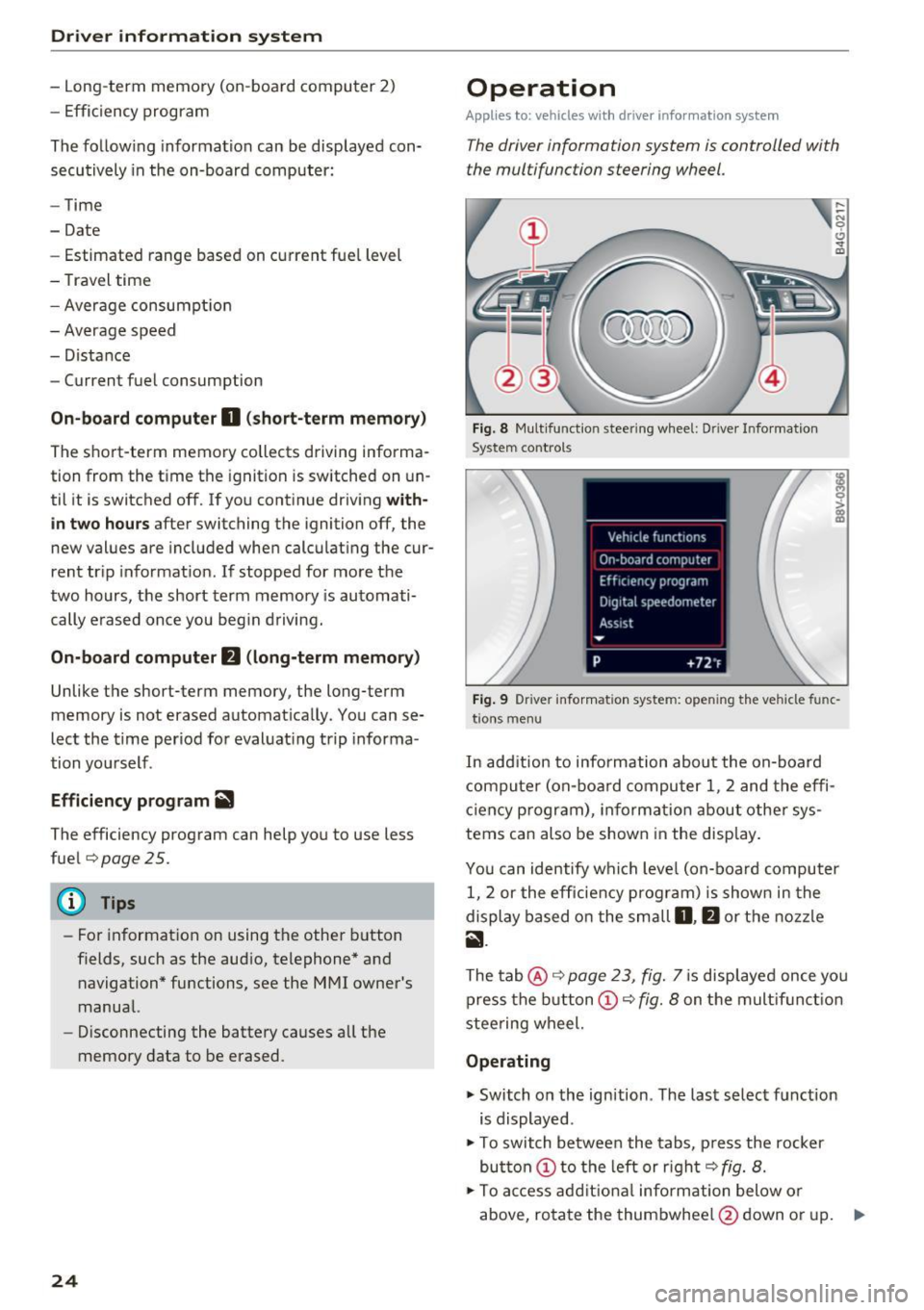
The driver information system is controlled with
the multifunction steering wheel.
Fig. 8 Mult ifunction steering wheel: Dr iver Info rmation
System controls
Fig. 9 Dr iver infor mation system: open ing the vehicle func
t ions menu
In add it ion to information about the on-board
computer (on-board computer 1 , 2 and the effi
c iency p rogram), informa tion about other sys
tems can also be shown in the display.
You can identify which level (on-board computer
1, 2 or the efficiency program) is shown in the
display based on the small
D, fJ or the nozzle
ii.
The tab@ c::;, page 23, fig. 7 is displayed once yo u
press the button(!)¢
fig. 8 on the multifunct ion
steering wheel.
Operating
"' Switch on the ignition . The last select function
is displayed .
"' To switch between the tabs, press the rocker
button
(D to the left or right c::;, fig. 8.
"'To access additional information below or
above, rotate the thumbwheel @down or up. ""
Page 30 of 272
<( co ..... N
" N ..... 0 r--. > 00
.. If you press a button longer (convenience open
ing*), the LED blinks several times .
.. If the LED does not blink, the remote control
key battery is dead. The message
Ill Please
change key battery
may also appear in the in
strument cluster display . Replace the battery .
Replacing the remote control key battery
.. Pry the cover @off of the key (Dusing a coin
¢fig . 15 .
.,. Insert the new battery with the "+" facing up .
.. Press the cover back onto the key until it clicks
into place .
We recommend having the battery replaced by
an authorized Audi dealer or authorized Audi
Service Facility .
@ For the sake of the environment
Dead batteries must be disposed of using
methods that will not harm the env ironment.
Do not dispose of them in household trash .
@ Tips
The replacement battery must meet the same
specifications as the orig inal battery.
Remote control key synchronization
The remote control key must be synchronized if
the vehicle does not lock and unlock with the re
mote control.
.. Press the remote control key button~-
1> Insert the key in the driver's door lock within 30
seconds .
.,. Press the~ button or~ button .
Open ing and closing
Unlocking/locking by remote control
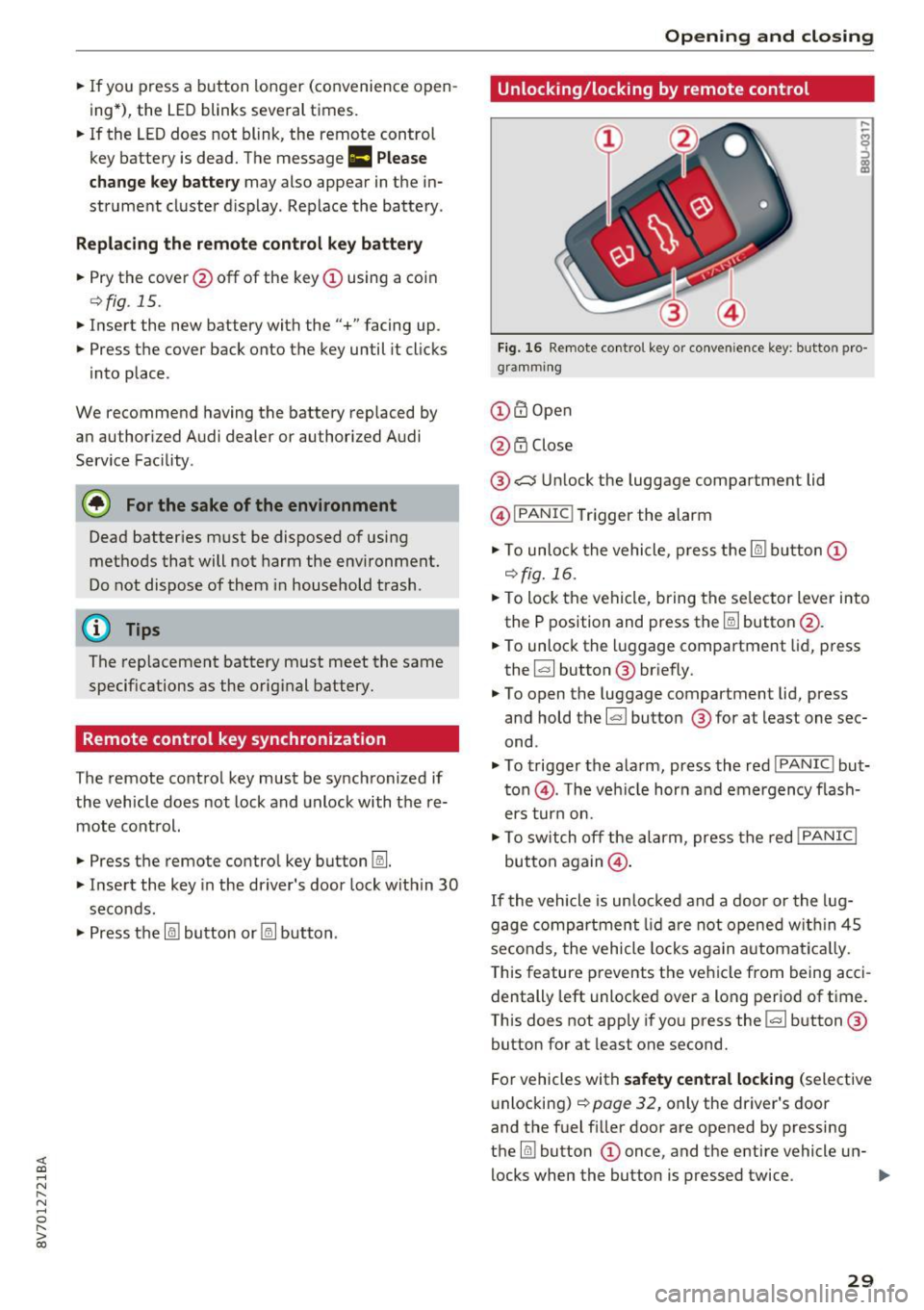
Fig. 16 Remote control key or conve nien ce key : button pro
gramm ing
(D m Open
@ i'.D Close
® .:::::$Unlock the luggage compartment lid
@ I
PANIC ! Trigger the alarm
... To unloc k the vehicle , press the~ but ton (D
c::>fig.16 .
.. To lock the vehicle, bring the selector lever into
the P position and press the~ button @.
.. To unlock the luggage compartment lid, press
the ~ button ® briefly.
.,. To open the luggage compartment lid, press
and hold the~ but ton ® for at least one sec
ond .
... To trigger the alarm, press the red I
PANIC ! but
ton @. T he veh icle horn and emergency flash
ers turn on.
.. To switch off the alarm, press the red
!PANIC I
button again@.
If the vehicle is unlocked and a door or the lug
gage compartment lid are not opened w ithin 45
seconds, the vehicle locks again automat ically.
This feature prevents the vehicle from being acci
dentally left unlocked over a long period of time.
This does not apply if you press the~ button ®
button for at least one second.
For vehicles with
safety central locking (selective
unlocking)
c::> page 32, only the driver's door
and the fuel f iller door are opened by pressing
the ~ button (D once, and the entire vehicle un-
locks when the button is pressed twice .
Ill>
29
Page 31 of 272
Opening and clo sin g
&_ WARNING
Read and follow all WARNINGS¢.& in Key
set on page 2 7
@ Tips
- Only use the remote control key or conven
ience key within view of the vehicle.
- Do not use the remote contro l when you are
inside the vehicle. Otherwise, you could un
i ntent ionally lock the vehicle. If you then
tried to start the engine or open a door, the
alarm would be triggered . If this happens,
press the un lock button@ .
- The vehicle can only be locked when these
lector lever is in the P posit ion.
- Only use the panic function in an emergen
cy.
Locking and unlocking with the
convenience key
App lies to : ve hicles with conve nien ce key
The front doors and the luggage compartment
lid can be unlocked and locked without using the
remote control key.
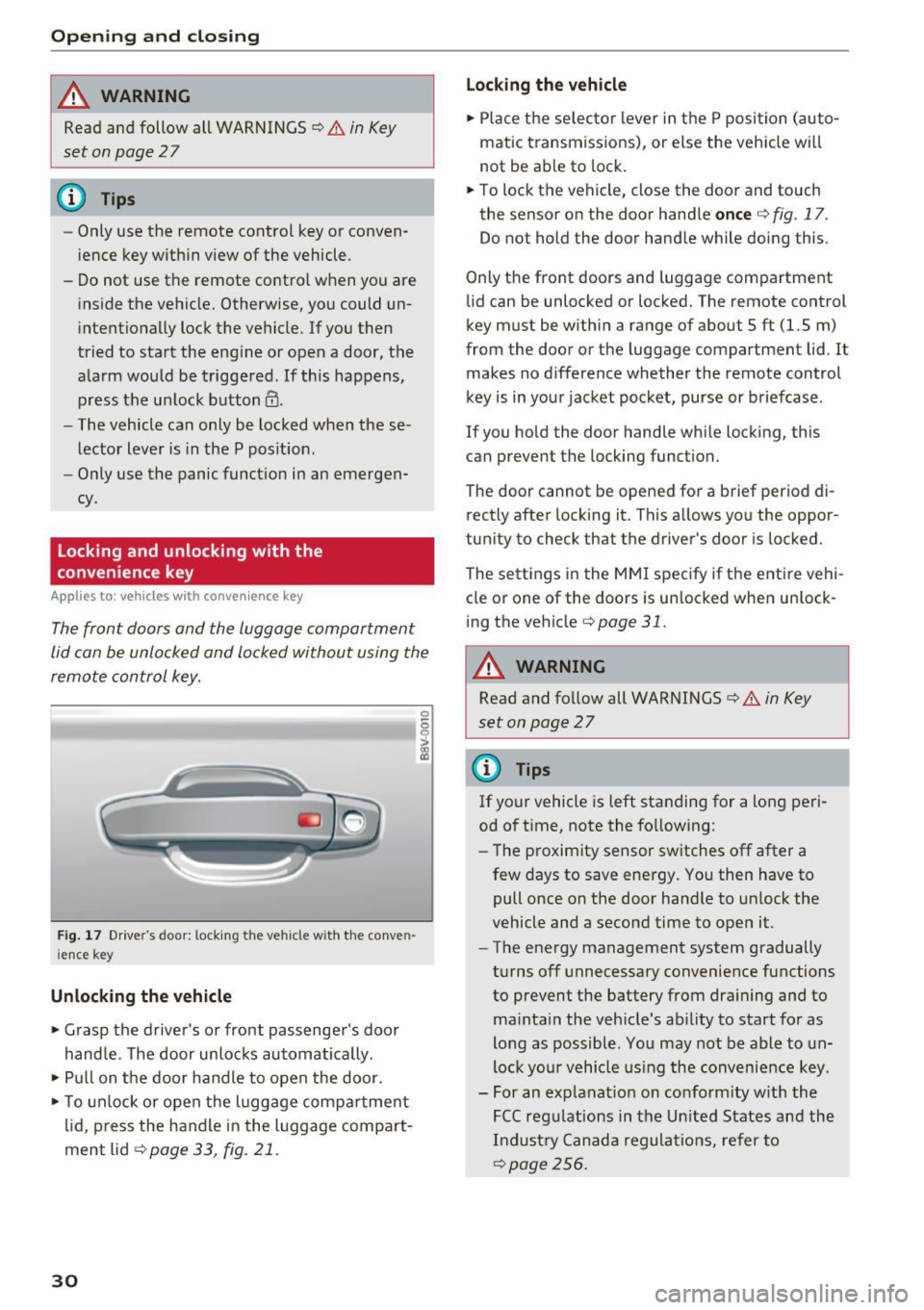
Fig . 17 Dr ive r's door: locking the ve hicle with the conve n
i ence key
Unlocking the vehicle
• Grasp the driver's or front passenge r's door
handle . The door unlocks automatically .
• Pull on the door handle to open the door.
• To unlock or open the luggage compa rtment
lid, p ress the handle in the luggage compart
ment lid ¢
page 33, fig. 21.
30
Lo cking the v ehicle
• Place the selecto r lever in t he P position (auto
matic transmiss ions), or else the veh icle wi ll
not be ab le to lock .
• To lock the vehicle, close the door and touch
the sensor on the door hand le
once ¢ fig. 17.
Do not hold the door handle while doing this.
Only the front doors and luggage compartment
li d can be unlocked or locked. The remote control
key must be within a range of about 5 ft (1.5 m)
from the door or the luggage compartment lid . It
makes no d ifference whether the remote control
key is in your jacket pocket, purse or briefcase .
If you ho ld the door handle wh ile locking, this
can prevent the locking function.
The door cannot be opened for a brief period di
rectly after locking it. This allows you the oppor
tun ity to check that the driver's door is locked .
The settings i n the MMI specify if the entire vehi
cle or one of the doors is un locked when un lock
ing the vehicle¢
page 31.
&_ WARNING
Read and follow all WARNINGS¢.& in Key
set on page
2 7
(D Tips
If your vehicle is left standing for a long peri
od of time, note the fo llowing:
- The proximity sensor switches off after a
few days to save energy. You then have to
pull once on the door handle to un lock the
vehicle and a second time to open it.
- The energy management system gradually
turns off unnecessary convenience functions
to prevent the battery from dra ining and to
ma inta in the vehicle's ab ility to start for as
long as possible. You may not be able to un
lock yo ur vehicle us ing the convenience key.
- For an explanat ion on co nfo rm ity w ith the
FCC reg ulations in the Un ited States and the
Industry Canada regulat ions, refer to
¢page 256.
Page 36 of 272
<( co .... N ,.__
N .... 0 ,.__
> co
To enable convenience opening of the windows,
the
Front wi ndows and Rea r windo ws functions
must be switched
On .
A WARNING
- Never close the windows careless ly or in an
uncontrolled manner, because this increas
es the r isk of injury.
- For security reasons, the windows can only
be opened w ith the remote control key at a
maximum distance of approximately 6 feet
(2 mete rs) from the vehicle .
- Always watch the windows while they are
closing using the lock cylinder so that no
one is pinched in the w indow . Closing stops
when the key is moved into the start ing po
sit ion.
Correcting power window malfunctions
After disconnecting the vehicle battery, the one
touch up and down feature must be activated
again.
~ Pull the power window sw itch until the w indow
is comp lete ly ra ised.
~ Release the switch and pull it aga in for at least
one second.
Op ening and cl osing
35
Page 38 of 272
<( co ..... N
" N ..... 0 r--. > 00
distance from the power top to reduce the
risk of injury.
- When operating the power top, visibility to
the rear is limited. Avoid operating the top
while driving in reverse .
(D Note
- To prevent damage to the power top:
- do not store any objects in the power top
storage compartment.
- make sure there is enough space above
the vehicle when opening or closing the
power top.
- To reduce the risk of damage, make sure
there are no sensitive objects in the power
top storage compartment's range of mo
tion.
(D Tips
- To prevent the battery from draining unnec
essarily, do not open or close the power top
repeatedly when the engine is switched off.
- A message will appear in the instrument cluster if there is a malfunction in the power
top
~ page 38.
- The power top can also be operated manual ly temporari ly if there is a malfunction
~ page 40, Power top emergency opera
tion.
An authori zed A udi dealer or au thor
i zed Audi Service Facility should diag nose
and correct the cause of the malfunction as
soon as possib le .
- If the vehicle is parked with the power top open, the vehicle interior is not protected
from damaging weather or unauthorized ac
cess. Lock any items you leave behind in the
luggage compartment. Close the power top
before leaving the vehicle.
- The side windows automat ically lower
slightly when opening or closing the power
top.
P owe r top
Power top convenience opening and closing
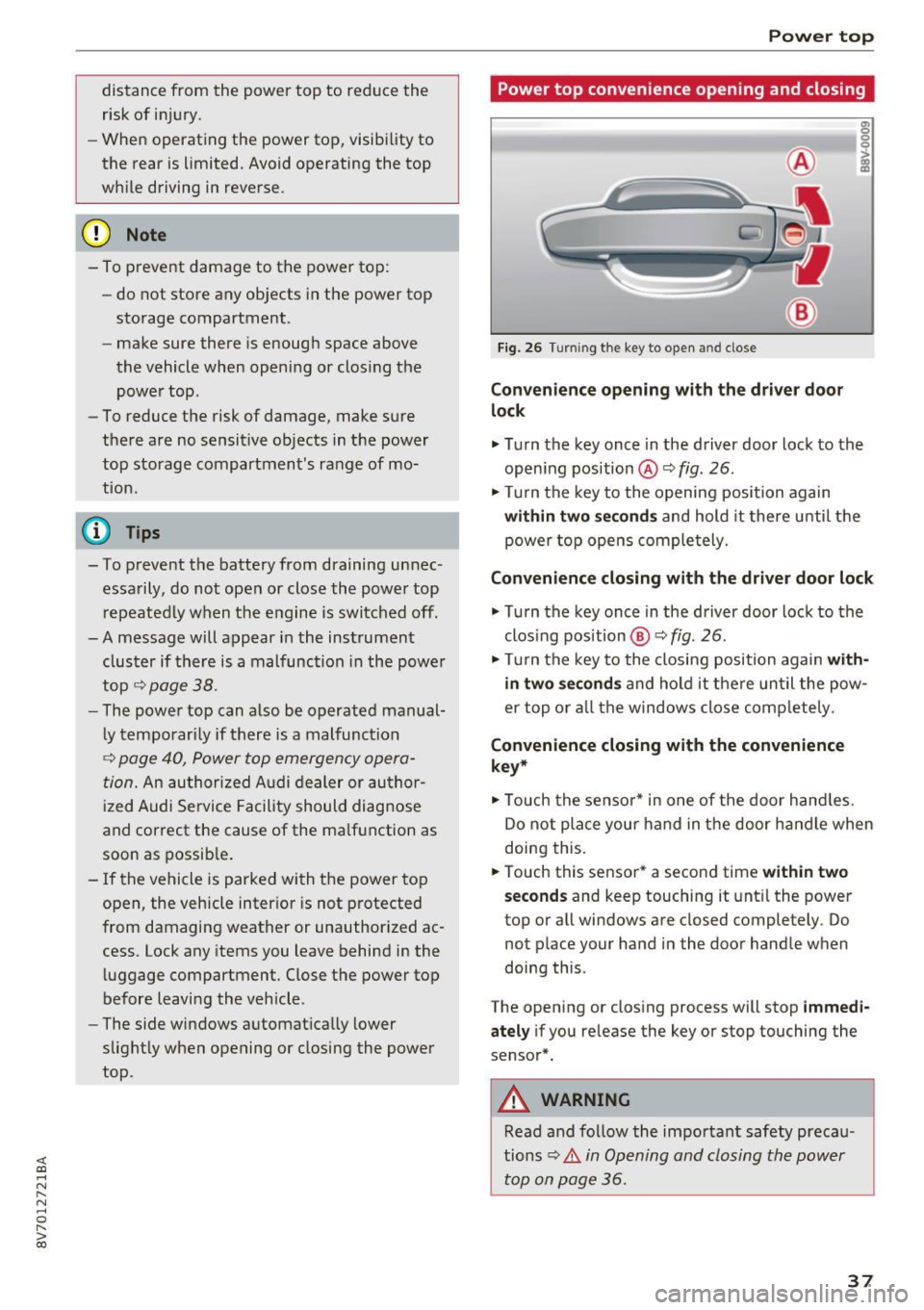
Fig. 26 Turning the key to open and close
Con ven ien ce opening with the dri ver door
lock
g: 0
0
>
18
.,. Turn the key once in the driver door lock to the
open ing position @ Q
fig. 26.
.,. Turn the key to the opening position again
within tw o seconds and hold it there unti l the
power top opens comple tely.
Conven ienc e closing with the driver door lock
.,. Turn the key once in the driver door lock to the
clos ing pos ition @Q
fig. 26.
.,. Turn the key to the closing position again w ith
in two second s
and ho ld it there un til the pow
er top or a ll the windows close comp letely .
Convenience closing with the convenience
ke y*
.,. Touch the senso r* in one of the door hand les.
Do not place your hand in the door handle when
doing this.
.,. Touch this sensor * a second time
w ith in tw o
sec ond s
and keep touching it unt il the power
top or a ll windows are closed completely. Do
not place your hand in the door handle when
doing this .
The opening or closing process will stop
imm ed i
ate ly
if you re lease the key or stop touching the
sensor*.
A WARNING
Read and follow the important safety precau
tions
~ .&. in Opening and closing the power
top on page 36 .
37
Page 45 of 272
Lights and Vision
When switched on, adaptive light adjusts to
curves depending on the vehicle speed and steer
ing wheel angle. This provides better lighting
through the curve. The system operates in a
speed range from approximately 6 mph (10 km/
h) to 68 mph (110 km/h) .
Static cornering light* -the cornering light
switches on automatically when the steering
wheel is turned at a ce rtain angle at speeds up to
approximately 44 mph (70 km/h) and when the
turn signal is activated at speeds up to approxi
mately 25 mph (40 km/h) . The area to the side of
the vehicle is illuminated better when turning.
Speed dependent light distribution* -The speed
dependent light distribution adapts the light in
towns and on highways or expressways . Intersec
tions can also be illuminated on vehicles with a
navigation system* .
Highway light function*
This function adapts the lighting for highway
driving based on vehicle speed .
A WARNING
-Automatic headlights* are only intended to
assist the driver. They do not relieve the
driver of responsibility to check the head
lights and to turn them on manually accord
ing to the current light and visibility condi
tions. For example, fog cannot be detected by the light sensors . So always switch on the
low beam under these weather conditions
and when driving in the dark ~D.
- Accidents could occur if you can not see the road ahead of you well and if others on the
road cannot see you . Always switch your
headlights on so that you can see the road
ahead of you and others can see your vehicle
from behind.
- The rear fog lights should only be turned on
in accordance with traffic regulations, to
prevent glare for traffic behind your vehicle.
-If the battery has been discharging for a
while, the parking light may switch off auto
matically. Always make sure your vehicle is
parked and adequately lit according to the
44
laws. Avoid using the parking lights for sev
eral hours.
- Please observe legal regulations when using
the lighting systems described.
(D Tips
- The light sensor for the automatic head
lights* is in the rearview mirror mount.
Therefore , do not place any stickers in this
area on the windshield.
- Some exterior lighting functions can be ad
justed
Q page 45.
- If you turn off the ignition while the exterior lights are on and open the door, you will
hear a warning tone.
- In some market-specific versions, the tail
lights do not turn on when switching on the
daytime running lights .
- In cool or damp weather, the inside of the
headlights, turn signals and tail lights can
fog over due to the temperature difference between the inside and outside. They will
clear shortly after switching them on . This
does not affect the service life of the light
ing.
-A message will appear in the instrument
cluster if there is a malfunction in the light
sensor
Q page 21 .
Emergency flasher
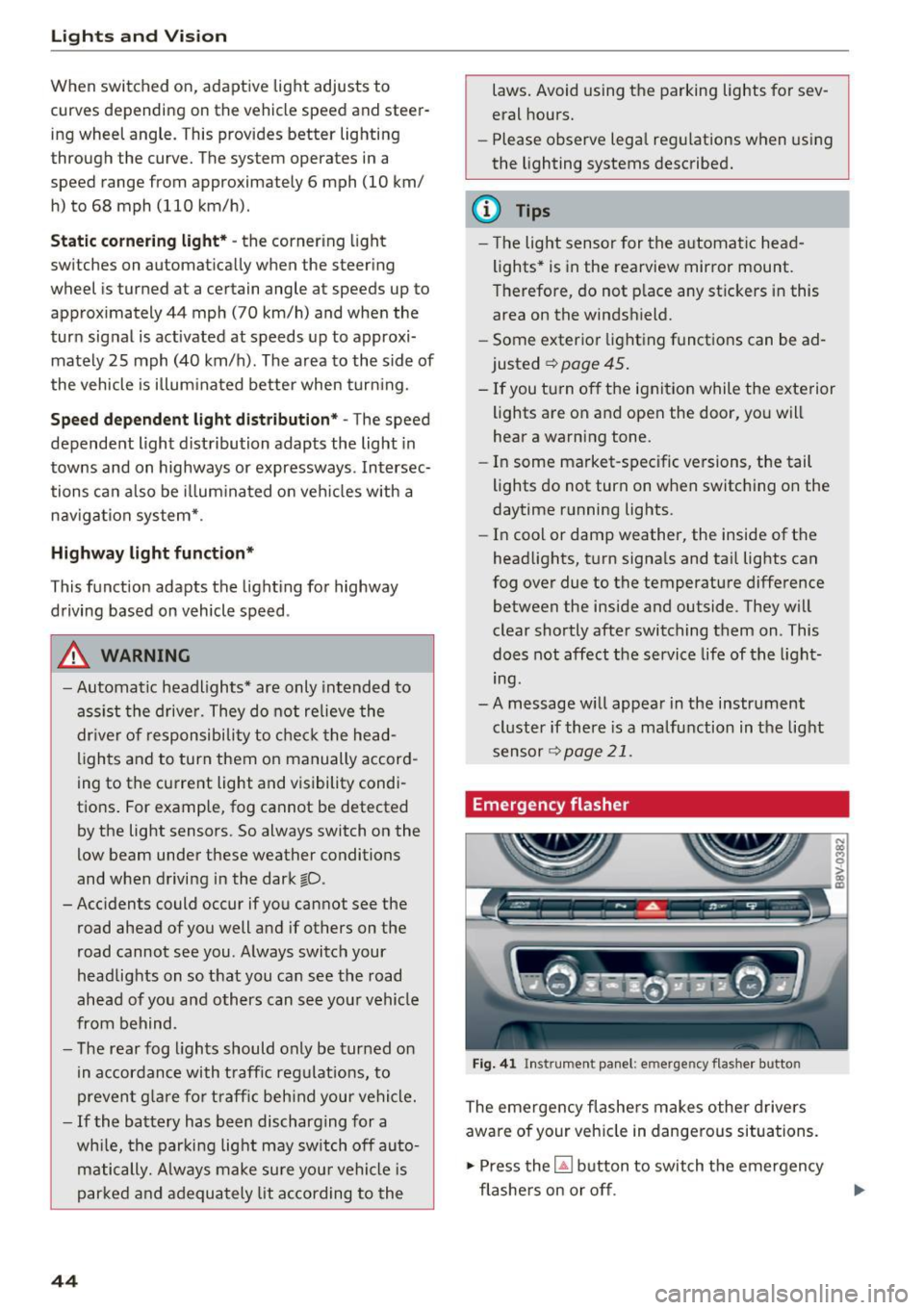
Fig. 41 Ins trumen t panel: e merge ncy flasher butto n
The emergency flashers makes other drivers
aware of your vehicle in dangerous situations.
.,. Press the~ button to switch the emergency
flashers on or off .
Page 58 of 272
<( co ..... N
" N ..... 0 r--. > 00
-Never connect devices that generate elect ri
ca l power such as solar panels or a battery
charger to the 12 volt socket . They can dam
age the vehicle electrical system.
(D Tips
The vehicle battery drains when accessories
are turned on but the engine is off.
Storage
Beverage holders
F ig. 62 Sect io n of the rear bench seat: rea r cup ho lders •
I
Your veh icle has cup holders in the front center
console, in the door pockets and in the rear cen
ter armrest* .
A WARNING
-
-Do not p ut any hot beverages in the cup
holder while the vehicle is moving . Ho t bev
erages could spill, wh ich can cause injury.
- Do not use any breakable beverage cont ain
ers ( for example, m ade out of glass or po r
celain). You cou ld be injured by them in the
event of an accident.
(D Note
Beverage containers in the cup holders should
always have a lid. Otherwise, beverages could
spill and cause damage to veh icle equipment
or stain the seat cove rs.
Seats and storag e
Glove compartment
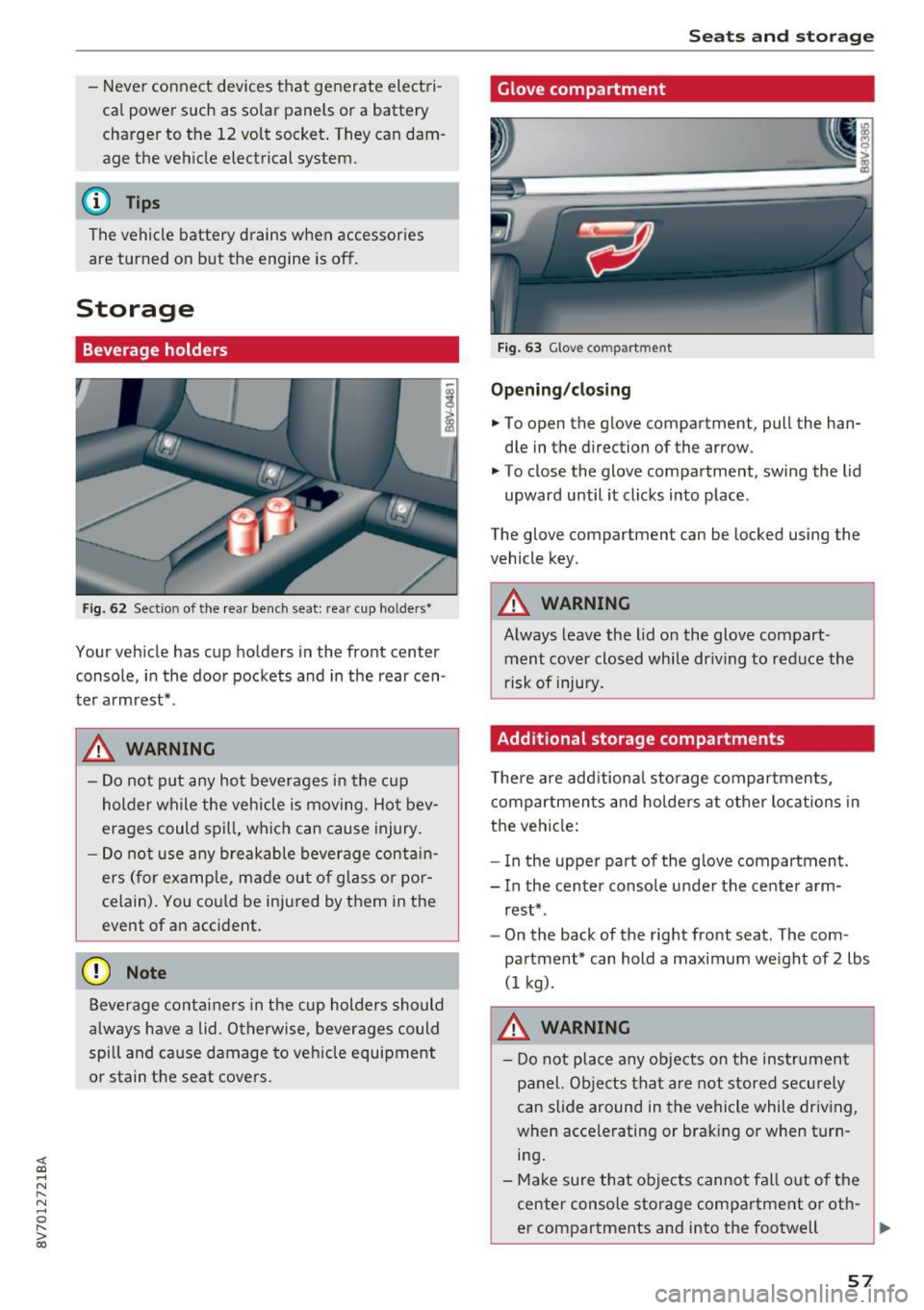
Fig. 63 G love co mpart m ent
Opening /closing
• To open the glove compartment, pull the han
dle in the d irection of the arrow .
"' To close the glove compartment, swing the lid
upward until it clicks into place .
The glove compartment can be locked using the
vehicle key.
A WARNING
-Always leave the lid on the glove compart- ment cover closed while dr iving to reduce the
r isk of injury.
Additional storage compartments
T he re are add itiona l storage compartmen ts,
compartments and holders at other locations in
the vehicle:
- In the uppe r part of the glove compartment.
- In the center console under the center arm -
rest* .
- On the back of the right front seat. The com
partment* can hold a maximum we ight of
2 lbs
(1 kg) .
A WARNING
-Do not place any objects on the instrument
panel. Objects that are not stored secu rely
can slide around in the vehicle while driving,
when accele rating or braking or when turn
i n g .
- Make sure that objects cannot fa ll out of the
center console storage compartment or oth-
er compartments and into the footwell
~
57