automatic transmission AUDI A3 SEDAN 2017 User Guide
[x] Cancel search | Manufacturer: AUDI, Model Year: 2017, Model line: A3 SEDAN, Model: AUDI A3 SEDAN 2017Pages: 400, PDF Size: 67.32 MB
Page 93 of 400
CXl CXl .... N ,.__
N
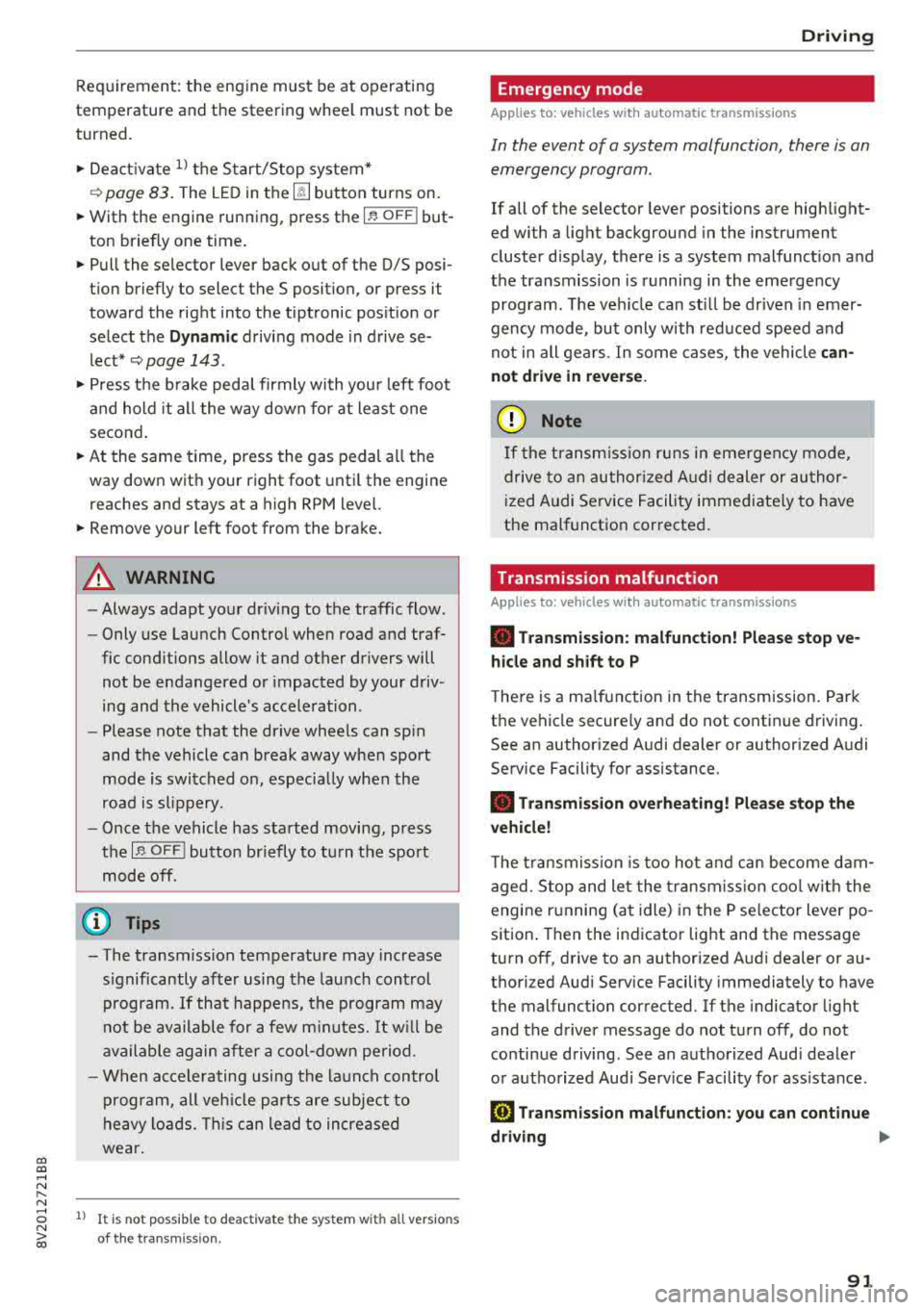
Requirement: the engine must be at operating
temperature and the steering whee l must not be
turned.
.,. Deact ivate ll the Start/Stop system*
¢ page 83. The LED in the ~ button turns on.
.,. With the engine running, press the l.t, O FFj but
ton briefly one time .
.,. Pull the selector lever back out of the D/S posi
t ion briefly to select the S posit ion, or press it
toward the right into the tiptronic pos ition or
select the
D ynamic driving mode in drive se
lect*
¢ page 143 .
.,. Press the b rake peda l firmly with you r left foot
and hold it all the way down for at least one
second .
.,. At the same time, press the gas pedal all the
way down with your right foot unti l the engine
reaches and stays at a high RPM level.
.,. Remove your left foot from the brake.
A WARNING
- Always adapt yo ur driv ing to the traffic flow .
- Only use Launch Control when road and traf-
fic cond itions allow it and other dr ivers will
not be endangered or impacted by your driv
ing and the vehicle's acceleration .
- Please note that the drive whee ls can sp in
and the vehicle can break away when sport
mode is switched on, especially when the
road is s lippery.
- Once the vehicle has started moving, press
the
I ~ OFF j button briefly to tu rn the sport
mode off.
@ Tips
-The transmiss ion temperature may increase
s ignificantly after us ing the launch cont rol
program.
If that happens, the program may
not be available for a few m inutes. It w ill be
available again after a cool-down pe riod.
-When accelerating using the la unch control
program, all veh icle parts are subject to
heavy loads. Th is can lead to increased
wear .
8 1
> It is not pos sib le to deact iv a te t he system w it h all vers io n s N iii of th e tran sm is s ion.
D riv ing
Emergency mode
Applies to: vehicles with automatic transmissions
In the event of a system malfunction, there is an
emergency program .
If all of the selector lever positions are highlight
ed with a light background in the instrument
cluster display, there is a system malfunct ion and
the transmission is running i n the emergency
program. The veh icle can sti ll be driven in emer
gency mode, but only with red uced speed and
not in all gears . In some cases, the vehicle
can
not d riv e in revers e .
([) Note
If the transm ission runs in eme rgency mode,
drive to a n author ized A udi dealer or author
i zed Audi Se rvice Facility immed iate ly to have
the malfunction corrected .
Transmission malfunction
Applies to: vehicles with automatic transmissions
• Tran smission: malfunction! Please stop ve
hicle and shift t o P
There is a ma lfunction in the transm ission. Park
the vehicle secure ly and do not continue driving.
See an author ized Audi dealer or authorized Audi
Service Facility for assistance .
• Transmis sion overheat ing! Plea se stop the
ve hicle!
The tra nsmission is too hot and can become dam
aged. Stop and le t the transmiss ion cool w ith the
engine r unning (at idle) in the P se lector lever po
sition . Then the indicator light and the message
turn off, drive to an authorized A udi dealer or au
thori zed Audi Serv ice Facility immediately to have
the malfunction corrected. If the indicator light
and the driver message do not turn off, do not
continue driving . See an authorized Aud i dealer
or authorized Audi Serv ice Facility for ass istance.
[!l Tran smiss ion malfunction : you can continu e
driving
.,,.
91
Page 94 of 400
Driving
Drive to an a uth o rized Audi dea ler or authorized
Audi Service Facility immediately to have the
malfunct ion corrected .
rm Transmis sion malfunction : no reverse ge ar
( you can continue driving )
Drive to an a uthorized Aud i dea le r or aut horized
Aud i Serv ice Facility immediately to have the
malfunct io n corrected.
[O] Tran smis sion malfunction: You can continue
driving in D until engine off
Drive the vehicle away from moving traffic and
park. See an authorized Audi dealer or autho rized
Aud i Serv ice Facility for assistance .
rm Transmission : too hot. Pleas e adapt d riving
style
Continue driving mode rately. When the indicator
light turns off , you can continue driving normal
ly .
rm Transmis sion : please p ress brake pedal and
select gear ag ain
If the transmission malfu nctions be ca u se the
temperature is too high, a message appears
when the transmission is cooled.
Selector lever emergency release
Applies to: vehicles with automatic transmissions
If the vehicle's power supply fails, the selector
lever can be released in an emergency .
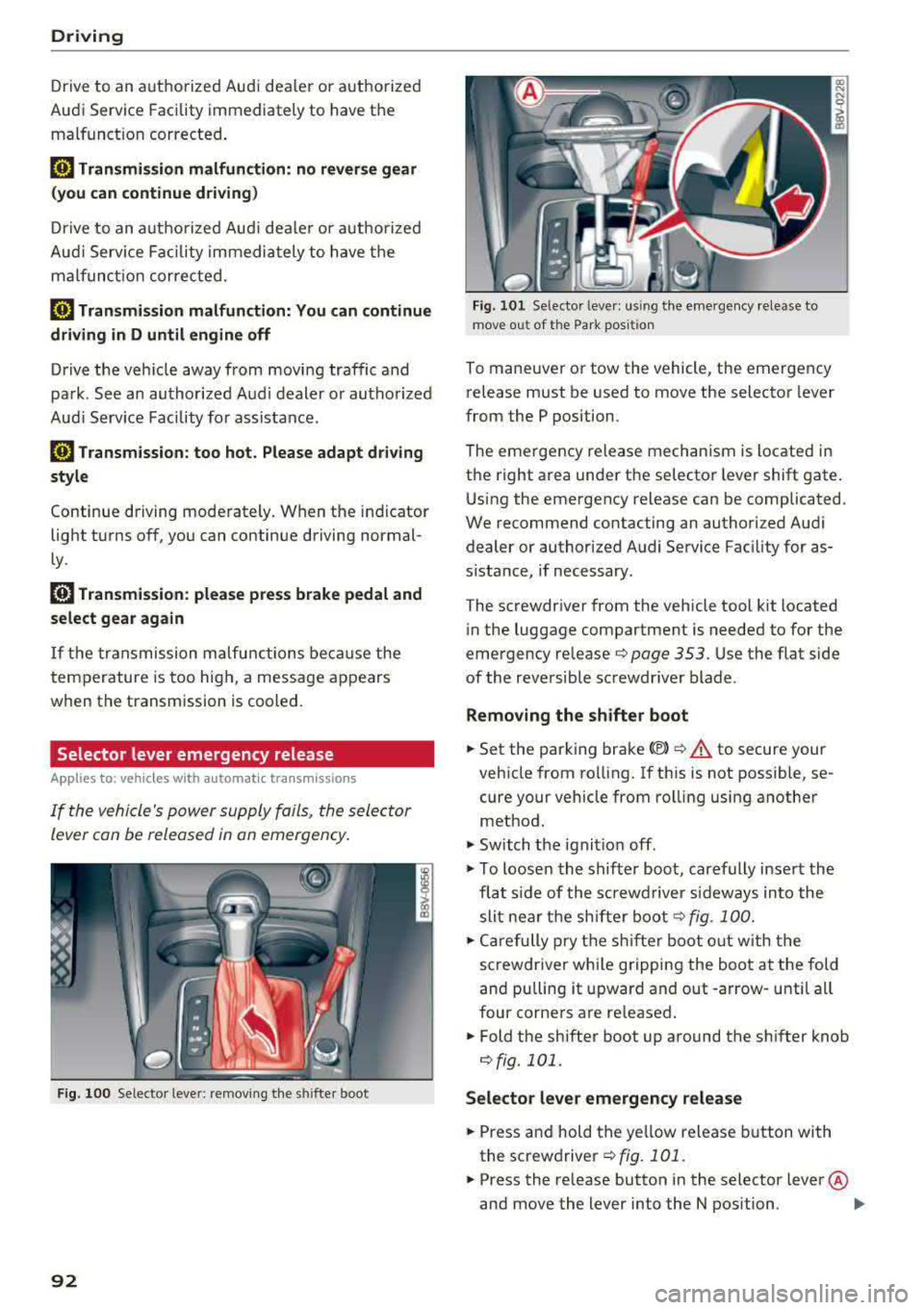
Fig. 100 Selecto r leve r: remov ing the s hifter boot
92
Fig . 101 Se lector leve r: u si ng the eme rgency release to
mov e out of the Park pos iti on
To maneuver or tow the vehicle, the emergency
release must be used to
move the selector lever
from the P position.
The emergency release mechanism is located in
the right area unde r the selector lever shift gate .
Using the emergency release can be complicated .
We recommend contacting an authorized Audi
dealer or author ized Audi Service Fac ility for as
s ista nce, if necessary .
The screwdr iver from the vehicle tool kit located
i n the luggage compartment is needed to for the
emergency re lease
r::;, page 353 . Use the flat side
of the reversible sc rewdriver blade .
Removing the shifter boot
.. Set the park ing brake <®> r::;, .&. to secure your
vehicle from ro lling. If th is is not possible, se
cure your vehicle from rolling using another
method.
.,. Sw itch the ignit ion off .
.,. To loosen the shifter boot, carefully inse rt the
fla t side of the s crewd river si deways in to the
slit nea r the sh ifte r boot
r::;, fig. 100 .
.,. Care fully p ry t he sh ifter boot o ut w ith t he
screwdriver wh ile gripping the boot at the fold
and pulling it upward and out -arrow -unti l all
four corne rs are re leased .
.. Fold the shifter boot up around the sh ifter knob
¢fig. 101.
Selector lever emergency release
.. Press and hold the ye llow release b utton with
the screwdriver
¢ fig. 101 .
.. Press the release button in the selector lever @
and move the lever into the N position .
II>
Page 98 of 400
e-tron
for the high-voltage battery can lead to serious damage and/or a decrease of the capacity
void coverage under the New Vehicle Limited
Warranty.
Starting/driving the vehicle
Applies to: ve hicles w ith plug -in hybrid drive
The vehicle is started and stopped with the
I START STOP I button. Please also read the in
formation under
c::> page 78, Starting the engine .
Establishing drive ready mode
See c::> A in Introduction on page 94.
Requirement: a charging cable must not be con
nected to the vehicle
c::> page 117 and the selec
tor lever must be in the P or N position.
- Press the brake pedal.
- Press the
I STAR T STOPI button .
When the vehicle enters drive ready mode, the
status message
e-tron READY appears briefly in
the instrument cluster display and the needle in
the power meter points to
READY c::> page 97.
Driving
The vehicle starts with the electric motor after
establishing the dr ive ready mode and if the con
ditions for electric drive mode have been met
c::> page 100.
The conditions to drive are essentially the same
as for the automatic transmission
c::> page 85 .
You and your passengers should anticipate the
possibility of a sporty acce leration.
Ending drive ready mode
- Place the selector lever in the P position.
- Switch the ignition off with the
I STAR T STOPI
button.
Vehicle sound
The vehicle generates an electronic engine sound
so that your vehicle can be heard from the out
side when in electr ic drive mode. The veh icle
sound automatically fades out at higher speeds
when the sounds from the tires and wind start in
creasing.
96
Switching the ignition on/off
You can switch the ignition on without establish
ing drive ready mode.
- Press the
I START STOP ! button to switch the
ign ition on and off. Do not press the brake ped
al whi le doing this.
When the ignition is sw itched on, the needle
points at
OFF @c::>page 97, fig. 103 or OFF is
displayed @c::>page97, fig .103.
No indicator lights stay turned on when the igni
tion is switched off .
Ignition is switched off automatically
To prevent the vehicle battery from draining, the
ignition will switch off automatically under the
follow ing cond it ions:
- The vehicle must have already been driven.
- The vehicle is stationary.
- The gasoline engine must not be runn ing .
- The driver's door must be open.
- The driver's safety belt must be unbuckled .
- The brake pedal must not be pressed.
In this case, the activated low beam is replaced
by the parking light. The message
Side marker
lights automatically shut off in
30 minutes. See
owner's manual
appears in the instrument clus
ter display . The parking lights w ill switch off af
ter approx imately 30 minutes or when you lock
the veh icle.
If the gasoline engine was not stopped, the mo
tor continues runn ing and the ignit ion does not
automat ica lly switch off
c::> A .
A WARNING
To reduce the risk of poisoning, never allow
the eng ine to run in confined spaces.
(D Tips
The vehicle cannot start when outs ide tem
peratures are below-18 °F (-28 °C)
c::> page 98.
-
Page 145 of 400
@ Tips
-You can cance l the automatic brake activa
tion w ith increasing bra king fo rce if you ap
ply the brakes y ourse lf or accelerate cons id
erab ly.
- In some sit uations, rea r cross-traffic assist
may warn yo u even if there is no cross traffic
i n a cr itical a rea , for examp le w hen back ing
i nto a parki ng space or ma neuver ing.
- The rea r cross-traffic ass ist also switches off
whe n you switch off the ESC.
- The rea r cross traffic assist switches on and
off thro ugh the pa rking aid
qpage 146.
- The system is not available when towin g a
trailer.
Messages
A ppl ies to: ve hicles with Audi side assist
If t he side assist switches off automatically, a
message appea rs in the ins trumen t clus ter dis
pl ay.
@j Aud i side assist: System fault!
The system can not guarantee that it wi ll detect
ve hicles co rrectly and it has switched off. The
sensors have been moved o r are faulty. Have t he
system checked by an authorized Audi dea ler or
author ized Audi Service Facility soon .
@j Audi side assist: currently unavailable. No
sensor vision
@j Audi side assist: currently unavailable. Sen
sor vision restricted due to surroundings . See
owner 's manual
The radar senso r vis io n i s im paire d. Do not cove r
the area i n front of t he senso rs with bike wheels,
stickers, dirt o r othe r objects. C lean the area in
fron t of t he senso rs, if necessary
q page 140,
fig. 147.
@j Audi side assist: currently unavailable
S ide assis t cann ot be swi tched o n at thi s time be
c a use t here is a mal func tion (fo r ex amp le, the
~ ba ttery ch arge level may be too low) .
....
~ @j Audi side assist: unavailable in towing mode
....
~ @j Audi side assist: unavailable in towing mode
00
Assistance systems
Sid e ass ist swi tches off automatically a fter a
s h ort time when a factory -insta lled tra ile r h itch
i s connected to the e lectrica l connecto r on the
t railer . T here is no gua rantee the system will
switch off when using a retrofitted trailer h itch.
Do not use side assist when tow ing a trailer .
Ill Rear parking aid : obstacle detection restrict
ed
T he rea r cross -tra ffic ass is t is not available. Ei
t h er th e ESC is sw itched off, or the rada r senso rs
may be cove red by a bike rack, st icke rs, leaves,
snow o r other objects. Switch the ESC on, or
clean the area in front of the senso rs if necessa ry
q page 140, fig . 147. If t his message continues
to be displayed , dr ive immed ia tely to a n author
iz ed Audi dea ler or author ized Audi S ervic e Facili
ty to ha ve the m alfunc tion re paire d.
Audi drive select
Introduction
Applies to : vehicles wit h Audi drive se lec t
Audi dr ive select makes it poss ible to experience
diffe rent types of vehicle settings in one vehicle.
T he dr iver can select from three modes,
Comfort ,
Auto
and Dynamic , using t he r:;~, bu tton in the
c en te r c onsole o r by usin g the Info ta in m ent sys
te m. T hi s a llow s yo u t o swi tch between a sporty
and a com fo rt ab le driv ing mode, fo r ex am ple. In
t h e
Individual* mode , the settin gs ca n be adjus t
ed to yo ur persona l preferences . T his makes it
p oss ible to com bine settings such as a spo rty en
gine setting with light steer ing.
Description
App lies to : vehicles wi th Audi drive se lect
The veh icle set up i n eac h mode depends on the
vehicle's features. However, the eng ine a nd
stee ring are always affec ted .
Engine and automatic transmission
Depend ing on the mode, the engine an d auto
matic transm ission* respond more q uickly o r in a
more ba la nced manner to acce lerato r pedal
movements . In the sporty dynam ic mode, th e
t ransm iss io n shifts at higher spe ed ranges .
..,.
143
Page 359 of 400
a, a, ..... N
" N ..... 0 N > 00
_& WARNING
You or your passengers could be injured while
changing a wheel if you do not follow these
safety precautions:
- If you have a flat tire, move a safe distance
off the road. Turn off the engine, turn the emergency flashers on and use other warn
ing devices to alert other motorists.
- Make sure that passengers wait in a safe
place away from the vehicle and well away
from the road and traffic.
- To help prevent the vehicle from moving
suddenly and possibly slipping off the jack,
always fully set the parking brake and block
the wheel diagonally opposite the wheel be
ing changed. When one front wheel is lifted
off the ground, placing the Automatic
Transmission in P (Park) will
not prevent the
vehicle from moving.
- Before you change a wheel, be sure the
ground is level and firm. If necessary, use a
sturdy board under the jack.
- Always store the vehicle tool kit, the jack
and the replaced tire in the luggage com
partment
c:> page 253.
Changing a wheel
When you change a wheel, follow the sequence
described below step-by-step and in exactly that
order.
1. Remove the decorative wheel cover*. For
more details see also
c:> page 357, Decora-
tive wheel covers
or c:> page 358, Wheels
with wheel bolt caps.
2. Loosen the wheel bolts c:> page 358.
3 . Locate the proper mounting point for the
jack and align the jack below that point
c:> page359.
4. Raise the car with the jack c:> page 359.
5. Remove the wheel with the flat tire and then
install
the spare c:> page 360.
6. Tighten all wheel bolts lightly.
7. Lower the vehicle with the jack .
8 . Use the wheel bolt wrench and firmly tighten
all wheel bolts
c:> page 358 .
9. Replace the decorative wheel cover* .
Emergency assistance
_& WARNING
-Always read and follow all WARNINGS and in-
formation
c:> .&. in Raising the vehicle on
page 359
and c:> page 361.
After changing a wheel
A wheel change is not complete without the do
ing the following.
.. Always store the vehicle tool kit, the jack* and
the replaced tire in the lugg age compartment
c:> page 253.
.. Check the tire pressure on the spare wheel im
mediately after mounting it .
.. As soon as possible, have the tightening tor
ques
on all wheel bolts checked with a torque
wrench. The correct tightening torque is
90 ft lb (120 Nm).
.. Have the flat tire replaced as soon as possible.
@ Tips
-If you notice that the wheel bolts are cor
roded and difficult to turn while changing a
tire, they should be replaced before you
check the tightening torque.
- Drive at reduced speed until you have the tightening torques checked.
- After changing a wheel, the tire pressure in
all four tires must be checked/corrected and
the tire pressure monitoring indicator must
be stored in the MMI
c:>page 346.
Decorative wheel covers
Applies to : vehicles wit h decorative w heel covers
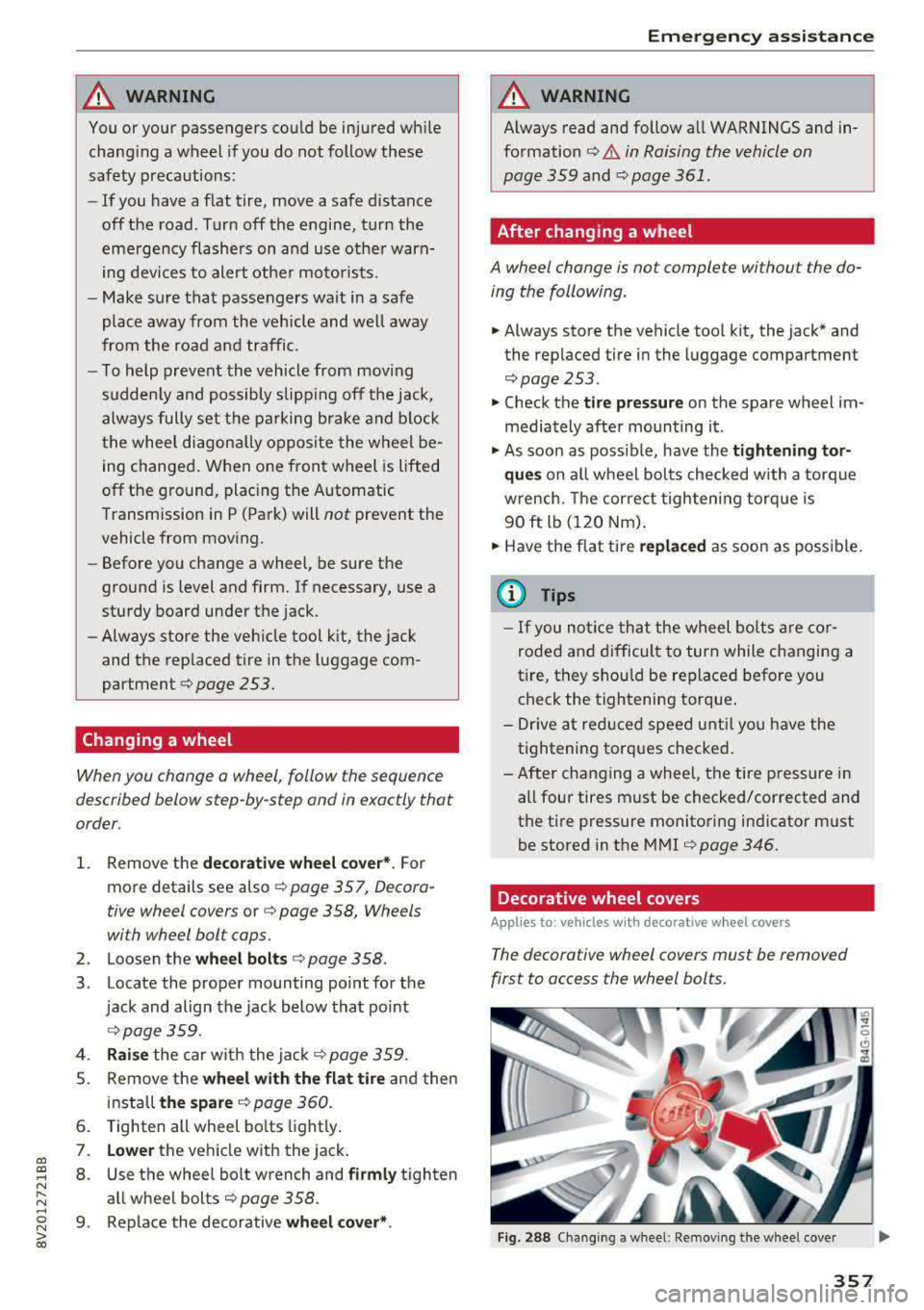
The decorative wheel covers must be removed
first to access the wheel bolts.
Fig. 288 Changing a wheel: Removing the wheel cover
357
Page 367 of 400
a, co ..... N
" N ..... 0 N > 00
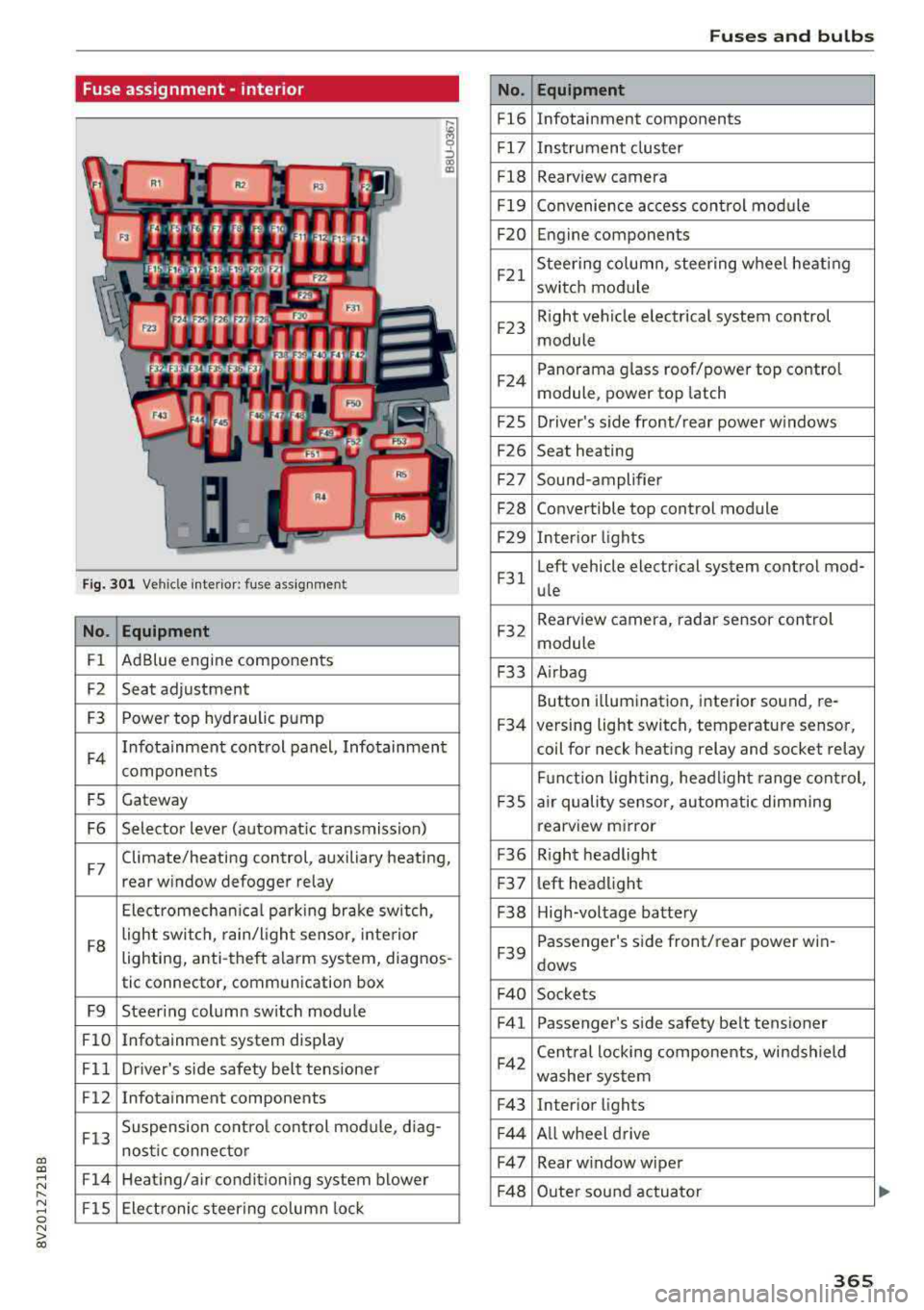
Fuse assignment -interior
Fig. 301 Vehicle interior: fuse assignment
No. Equipment
Fl Ad
Blue engine components
F2 Seat adjustment
F3 Power top hyd
raulic pump
F4 Infotainment control panel, Infotainment
components
FS Gateway
F6 Selector lever (automat ic transmission)
F7 Climate/heating control, auxiliary heating,
rear window defogger relay
Electromechan ica l parking brake sw itch,
F8 light switch,
rain/light sensor, inte rior
lighting, anti-theft alarm system, diagnos -
tic connector, communication box
F9 Steering column sw itch module
Fl0 Infotainment system display
Fll Dr iver's side safety belt tens ioner
F12 Infotainment components
F13 Suspension
control control module, diag-
nostic connector
F14 Heating/air conditioning system blower
FlS Electronic steering column lock
No .
Fl6
F 17
Fl8
F 19
F20
F21
F2 3
F24
F 2S
F26
F 27
F28
F2 9
F 31
F32
F33
F34
F 3S
F36
F3 7
F38
F39
F 40
F41
F42
F43
F44
F47
F4 8
Fuses and bulbs
Equipment
Infotainment components
Instrument cluster
Rearview camera
Convenience access cont rol module
Engine components
Steering column, steering wheel heating
switch module
Right vehicle electrical system control
module
Panorama glass roof/power top control
module, power top latch
Driver's s ide front/rear power w indows
Seat heating
Sound-amplifier
Convertible top control module
Interior lights
Left vehicle electrical system control mod-
ule
Rearview camera, radar sensor control
module
A irbag
Button i llumination, interior sound, re-
versing light switch, temperature sensor,
coil for neck heating relay and socket relay
Fu nct ion lighting, headl ight range control,
a ir quality sensor, automatic dimming
rearview mirror
R ight headlight
l eft headlight
High-voltage battery
Passenger's s ide front/rear power win -
dows
Sockets Passenger's side safety belt tensioner
Cen tral locking components, windshield
washer system
Interior lights
Al l wheel drive
Rear w indow wiper
Outer sound actuator
365
Page 368 of 400
Fuses and bulbs
No . Equipment
F49 Starter, clutch sensor, high-voltage bat-
tery, power electronics
FS3 Rear window defogger
The power seats* are protected via
circuit break
ers
that automatically switch on after a few sec
onds after the overload has been reduced.
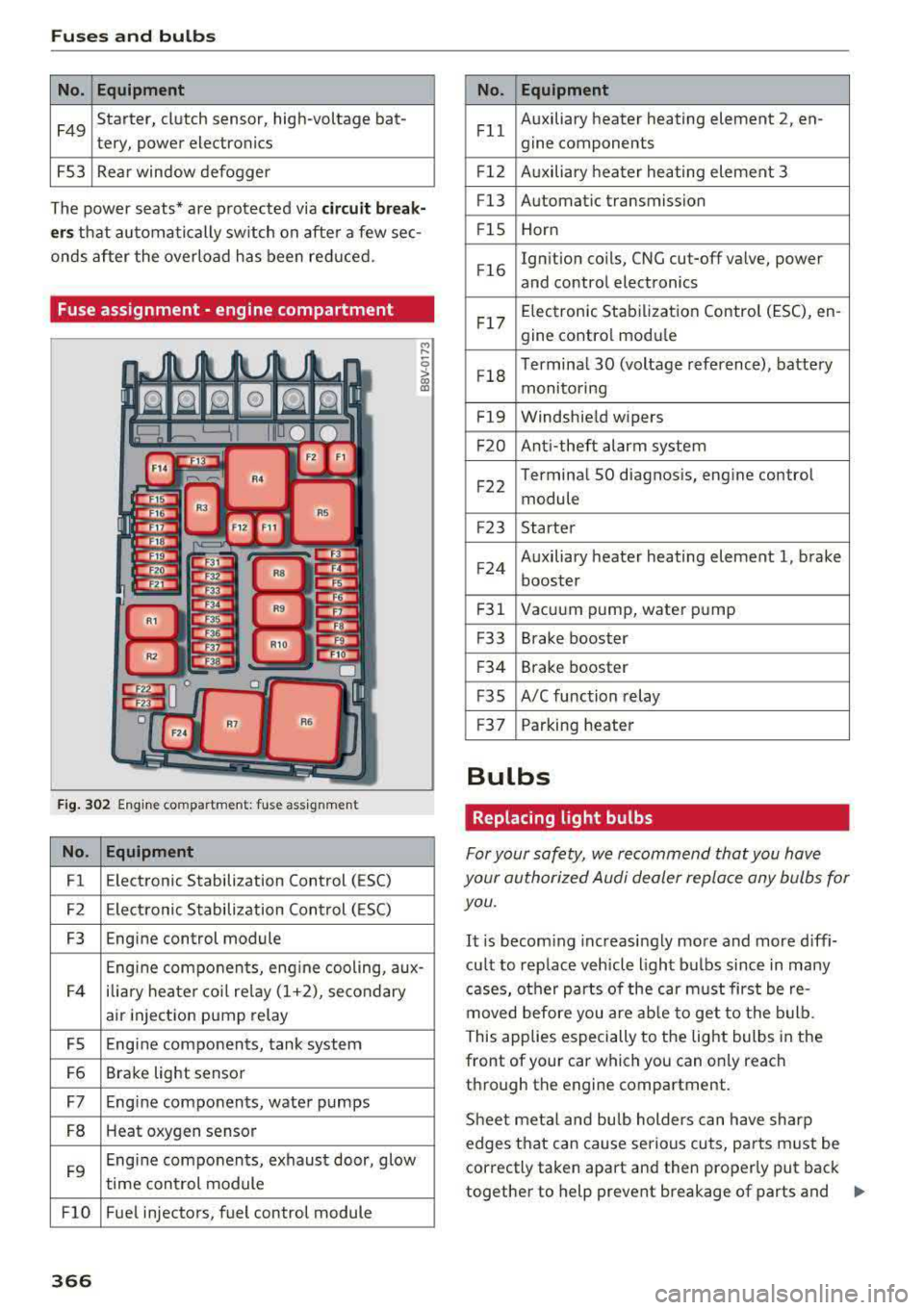
Fuse assignment - engine compartment
F ig . 302 Engine co mpa rtment: fuse assignmen t
No. Equipment
Fl E
lectronic Stabilization Control (ESC)
F2 Electronic Stabilization Control ( ESC)
F3 Engine control module
Engine components, eng ine cooling, aux-
F4 ilia
ry heater coil relay (1+2), secondary
air injection pump relay
FS Engine components, tank system
F6 Brake light sensor
F7 Engine components, water pumps
FB Heat oxygen sensor
F9 Engine components, exhaust door, glow
time control module
FlO Fue l injectors, fuel control module
366
No . Equipment
Fll Auxiliary heater heating element 2
, en-
gine components
F l2 Auxiliary heater heating element 3
Fl3 Automatic transmission
F lS Horn
F l6 Ignition coils, CNG cut-off valve, power
and control electronics
Fl7 Elec
tronic Stabilization Control (ESC), en -
gine contro l module
Fl8 Terminal 30 (voltage
reference), battery
monitoring
F19 Windshield wipers
F20 Anti-theft alarm system
F 22 Terminal SO diagnosis, engine control
module
F2 3 Starter
F 24 Auxiliary heater heating element 1, brake
booster
F31 Vacuum pump, water pump
F33 Brake booster
F34 Brake booster
F35 A/C function relay
F37 Parking heater
Bulbs
Replacing light bulbs
For your safety, we recommend that you have
your authorized Audi dealer replace any bulbs for you.
It is becoming increasingly more and more diffi
cu lt to replace vehicle light bulbs since in many
cases, other parts of the car must first be re
moved before you are able to get to the bulb.
This applies especially to the light bulbs in the
front of your car which you can only reach
through the engine compartment.
Sheet meta l and bulb holders can have sharp
edges that can cause serious cuts, parts must be
correctly taken apa rt and then properly put back
together to help prevent breakage of parts and
..,.
Page 381 of 400
CXl CXl .... N ,.__
N .... 0 N > 00
today's automobiles, have steadily reduced the
scope of maintenance and repairs which can be
carried out by vehicle owners.
Also, safety and
environmental
concerns place very strict limits
on the nature of repairs and adjustments to en
gine and transmission parts which an owner can perform .
Maintenance, adjustments and repairs usually re
quire special tools, testing devices and other
equipment available to specially trained work
shop personnel in order to assure proper per
formance, reliability and safety of the vehicle and its many systems.
Improper maintenance, adjustments and repairs
can impair the operation and reliability of your
vehicle and even void your vehicle warranty .
Therefore, proof of servicing in accordance with
the maintenance schedule may be a condition for upholding a possible warranty claim made within
the warranty period.
Above all , operational safety can be adversely af
fected, creating unnecessary risks for you and
your passengers.
If in doubt about any servicing, have it done by
your authorized Audi dealer or any other properly equipped and qualified workshop. We strongly urge you to give your authorized Audi dealer the
opportunity to perform all scheduled mainte nance and necessary repairs. Your dealer has the
facilities, original parts and trained specialists to keep your vehicle running properly .
Performing limited maintenance yourself
The following pages describe a limited number of
procedures which can be performed on your vehi
cle with ordinary tools, should the need arise and
trained personnel be unavailable. Before per
forming any of these procedures, always thor
oughly read all of the applicable text and careful ly follow the instructions given . Always rigorously
observe the
WARNINGS provided .
Before you check anything in the engine com
partment, always read and heed all WARNINGS
c::> .&. and c::> page 316 .
Consumer information
A WARNING
-Serious personal injury may occur as a result
of improperly performed maintenance, ad
justments or repairs .
- Always be extremely careful when working
on the vehicle. Always follow commonly ac
cepted safety practices and general com mon sense. Never risk personal injury.
- Do not attempt any of the maintenance,
checks or repairs described on the following pages if you are not fully familiar with these
or other procedures with respect to the ve hicle, or are uncertain how to proceed.
- Do not do any work without the proper tools
and equipment. Have the necessary work
done by your authorized Audi dealer or an
other properly equipped and qualified work
shop.
- The engine compartment of any motor vehi cle is a potentially hazardous area. Never
reach into the area around or touch the radi
ator fan.
It is temperature controlled and
can switch on suddenly - even when the en
gine is off . The radiator fan switches on au
tomatically when the coolant reaches a cer
tain temperature and will continue to run
until the coolant temperature drops.
- Always switch off the ignition before anyone
gets under the vehicle.
-Always support your vehicle with safety
stands if it is necessary to work underneath
the vehicle . The jack supplied with the vehi
cle is not adequate for this purpose and
could collapse causing serious personal in
jury.
- If you must work underneath the vehicle
with the wheels on the ground, always make
sure the vehicle is on level ground, that the
wheels are always securely blocked and that
the engine cannot be started.
- Always make sure the transmission selector
lever (automatic transmission) is in P (Park
position) and the park brake is applied .
II>
379
Page 390 of 400
Index
Immobilizer
refer to Electronic immobilizer . . . . . . . . . . 35
I mportant things to do before driving . . . . 247
Importing and exporting (contacts) . . . . . . 187
I mproperly worn safety belts . . . . . . . . . . . 264
Indicator lights . . . . . . . . . . . . . . . . . . . . . . . . 24
Airbag system . . . . . . . . . . . . . . . . . . . . . . 279
PASSENGER AIR BAG OFF . . . . . . . . . . . . . 279
Indica tor lights (plug-in hybrid drive) . . . . . . 98
I nfant seats . . . . . . . . . . . . . . . . . . . . . . . . . 298
Input Using the MMI touch . . . . . . . . . . . . . . . . . 161
Using the speller . . . . . . . . . . . . . . . . . . . . 165
Inpu t level (media) . . . . . . . . . . . . . . . . . . . . 233
Inspection interval . . . . . . . . . . . . . . . . . . . . 327
Installing the upper tether strap on the an
chorage . . . . . . . . . . . . . . . . . . . . . . . . . . . . . 310
Instrument cluster . . . . . . . . . . . . . . . . . . . . . 10
Cleaning . . . . . . . . . . . . . . . . . . . . . . . . . . . 349
Messages . . . . . . . . . . . . . . . . . . . . . . . . . . . 24
Plug-in hybrid drive . . . . . . . . . . . . . . . . . . . 97
Instruments Adjusting illumination . . . . . . . . . . . . . . . . . 55
I nterior lighting . . . . . . . . . . . . . . . . . . . . . . . 54
Internet
refer to Audi connect (Infotainment) . . . . 190
Internet radio . . . . . . . . . . . . . . . . . . . . . . . . 227
I nterval mode (windshield wipers) . . . . . . . . 57
iPod
refer to Audi music interface . . . . . . . 228, 229
iTunes tagging . . . . . . . . . . . . . . . . . . . . . . . 217
]
Jukebox . . . . . . . . . . . . . . . . . . . . . . . . . . . . . 224
Jump start cables . . . . . . . . . . . . . . . . . . . . . 369
Jump starting . . . . . . . . . . . . . . . . . . . . 104, 368
K
Key...... ... .... ................ ..... 35
Key not recognized . . . . . . . . . . . . . . . . . . . 81
Key recognition . . . . . . . . . . . . . . . . . . . . . . 70
Messages . . . . . . . . . . . . . . . . . . . . . . . . . . . 80
Kick -down (automatic transmission) . . . . . . . 90
388
Knee airbags . . . . . . . . . . . . . . . . . . . . . . . . . 283
Description . . . . . . . . . . . . . . . . . . . . . . . . . 283
How they work . . . . . . . . . . . . . . . . . . . . . . 284
Important safety instructions . . . . . . . . . . 28S
L
Lane assist
refer to Audi active lane assist
136
Lap timer. . . . . . . . . . . . . . . . . . . . . . . . . . . . 125
LA TCH ........ ... ... ............. ... 306
Description . . . . . . . . . . . . . . . . . . . . . . . . . 307
Installing a child restraint . . . . . . . . . . . . . 308
Location . . . . . . . . . . . . . . . . . . . . . . . . . . . 307
Mounting and releasing the anchorage
hook ....... .. .. .. .. ... .......... .. 308
Launch control program . . . . . . . . . . . . . . . . . 90
Left control button . . . . . . . . . . . . . . . . . . . . . 14
L icense agreement (MMI) . . . . . . . . . . . . . . 246
Lifting jack . . . . . . . . . . . . . . . . . . . . . . . . . . 359
Light/rain sensor Automatic headlights . . . . . . . . . . . . . . . . . 51
Switching the rain sensor on/off. . . . . . . . . 57
Light ing
Exterior . . . . . . . . . . . . . . . . . . . . . . . . . . . . . 51
Interior . . . . . . . . . . . . . . . . . . . . . . . . . . . . . 54
Lights . . . . . . . . . . . . . . . . . . . . . . . . . . . . . . . 51
Interior/read ing lights . . . . . . . . . . . . . . . . 54
Listening to music
refer to Media . . . . . . . . . . . . . . . . . . 222, 230
Locking/unlocking
refer to Unlocking/locking . . . . . . . . . . 36 , 37
Low beam headlights . . . . . . . . . . . . . . . . . . . 51
Lowering the cargo floor . . . . . . . . . . . . . . . . 66
Luggage compartment . . . . . . . . . . . . . . . . . . 66
Luggage compartment lid . . . . . . . . . . . . . . 39
Socket....... ... .. .. ................ 64
Storing cargo correctly . . . . . . . . . . . . . . . 253
Stowing luggage . . . . . . . . . . . . . . . . . . . . 253
Luggage rack . . . . . . . . . . . . . . . . . . . . . . . . . . 68
Lumbar support . . . . . . . . . . . . . . . . . . . . . . . 61
M
Magnetic ride
refer to Suspension control . . . . . . . . . . . . 143
Maintenance . . . . . . . . . . . . . . . . . . . . . . . . . 378
Maintenance interval . . . . . . . . . . . . . . . . . . 327
Page 392 of 400
Index
Opening/closing
re fer to Unlocking/locking
36,37
Operating Multifunction steering wheel . . . . . . . . 13, 16
Multi Media Interface . . . . . . . . . . . . . . . . 159
Voice recognition system . . . . . . . . . . . . . 170
Options menu .. .. ............. 14, 160, 164
Outside temperatu re display . . . . . . . . . . . . . 10
Overview (Cockpit) . . . . . . . . . . . . . . . . . . . . . . 8
p
Paint damage . . . . . . . . . . . . . . . . . . . . . . . . 349
Paint number .. ...... .... ..... .... ... 374
Panorama glass roof. . . . . . . . . . . . . . . . . . . . 43
also refer to Convenience opening/closing 42
Parental control
DVD ... .. .. .. ... ..... ....... .... .. . 233
Parking aid Cleaning sensors/camera . . . . . . . . . . . . . 348
Parking brake
r e fer to Electromechanical parking brake . 83
Parking lights . . . . . . . . . . . . . . . . . . . . . . . . . 51
p k" ar ing systems . . . . . . . . . . . . . . . . . . . . . . 146
Malfunct ion . . . . . . . . . . . . . . . . . . . . . . . . 150
Rearview camera . . . . . . . . . . . . . . . . . . . . 148
Sett ings . . . . . . . . . . . . . . . . . . . . . . . . . . . 150
Parking (automatic transmission) . . . . . . . . . 88
Parts replacement . . . . . . . . . . . . . . . . . . . . 380
Pass -through . . . . . . . . . . . . . . . . . . . . . . . . . 68
PASSENGER AIR BAG OFF light . . . . . . . . . . 279
Paths (Owner's Manual) . . . . . . . . . . . . . . . . 160
Pause (audio/video file) . . . . . . . . . . . . . . . . 230
Pedals . . . . . . . . . . . . . . . . . . . . . . . . . . . . . . 252
Personal route assistance . . . . . . . . . . . . . . 206
Phonebook
refer to Contacts . . . . . . . . . . . . . . . . . . . . 185
Physical principles of a frontal collision . . . 259
Picture format (v ideo) . . . . . . . . . . . . . . . . . 233
Playback (media) . . . . . . . . . . . . . . . . . . . . . 230
Playlist . . . . . . . . . . . . . . . . . . . . . . . . . . . . . 232
Plug-in hybrid drive . . . . . . . . . . . . . . . . . . . . 94
12 Volt battery . . . . . . . . . . . . . . . . . . . . . . 104
Auxiliary climate control . . . . . . . . . . . . . . 118
Boost . . . . . . . . . . . . . . . . . . . . . . . . . . . . . 10 1
Charging . . . . . . . . . . . . . . . . . . . . . . . . . . . 106
Charging clip . . . . . . . . . . . . . . . . . . . . . . . 110
390
Charging dock . . . . . . . . . . . . . . . . . . . . . . 110
Charging system PIN . . . . . . . . . . . . . . . . . 117
Charging the high-voltage battery . . . . . . 108
Charging time . . . . . . . . . . . . . . . . . . . . . . 116
Cleaning the charging system . . . . . . . . . . 119
Climate control . . . . . . . . . . . . . . . . . . . . . 118
Coasting . . . . . . . . . . . . . . . . . . . . . . . . . . . 101
Coolant . . . . . . . . . . . . . . . . . . . . . . . . . . . . 104
Driving . . . . . . . . . . . . . . . . . . . . . . . . . . . . . 96
E-max (power availability) . . . . . . . . . . . . . 102
Efficient driving . . . . . . . . . . . . . . . . . . . . . 101
Ending drive ready mode . . . . . . . . . . . . . . . 96
Energy flow disp lay . . . . . . . . . . . . . . . . . . 102
E stablishing drive ready mode . . . . . . . . . . 96
EV mode .... .. .. .. .. ............. .. 100
High-voltage battery .. ......... 94 , 95, 117
High -voltage system . . . . . . . . . . . . . . . . . . 94
Indicator lights . . . . . . . . . . . . . . . . . . . . . . 98
Jump starting . . . . . . . . . . . . . . . . . . . . . . . 104
Power meter . . . . . . . . . . . . . . . . . . . . . . . . . 97
Range and statistics . . . . . . . . . . . . . . . . . . . 99
Range display . . . . . . . . . . . . . . . . . . . . . . . . 99
Recuperation . . . . . . . . . . . . . . . . . . . . . . . 101
Refueling . . . . . . . . . . . . . . . . . . . . . . . . . . 105
Setting the modes . . . . . . . . . . . . . . . . . . . 100
Starting the vehicle . . . . . . . . . . . . . . . . . . . 96
Sta tus dis plays . . . . . . . . . . . . . . . . . . . . . . 114
Switching the ignition on/off . . . . . . . . . . . 96
Tachometer . . . . . . . . . . . . . . . . . . . . . . . . . 97
T ire mobility kit . . . . . . . . . . . . . . . . . . . . . 103
Vehicle sound . . . . . . . . . . . . . . . . . . . . . . . . 96
Vehicle tool kit . . . . . . . . . . . . . . . . . . . . . . 103
Vehicle transport . . . . . . . . . . . . . . . . . . . . 104
Point of interest . . . . . . . . . . . . . . . . . . . . . . 203
Point of interest search . . . . . . . . . . . . . . . . 203
also refer to Point of interest . . . . . . . . . . 203
Polishing . . . . . . . . . . . . . . . . . . . . . . . . . . . . 349
Pollen filter
refer to Pollutant filter . . . . . . . . . . . . . . . . 70
Pollutant filter . . . . . . . . . . . . . . . . . . . . . . . . 70
Power meter . . . . . . . . . . . . . . . . . . . . . . . . . . 97
Power seat adjustment . . . . . . . . . . . . . . . . . 61
Power top . . . . . . . . . . . . . . . . . . . . . . . . . . . . 44
Cleaning . . . . . . . . . . . . . . . . . . . . . . . . . . . 349
Power windows . . . . . . . . . . . . . . . . . . . . . . . . 41
Child safety lock . . . . . . . . . . . . . . . . . . . . . . 41
Malfunction . . . . . . . . . . . . . . . . . . . . . . . . . 42