tow AUDI A3 SEDAN 2017 Owners Manual
[x] Cancel search | Manufacturer: AUDI, Model Year: 2017, Model line: A3 SEDAN, Model: AUDI A3 SEDAN 2017Pages: 400, PDF Size: 67.32 MB
Page 4 of 400
Table of content s
About this Owne r's Manual . .. .. .
6
Cockpi t ... .. ............... .... .. . 8
Cockpit overview . . . . . . . . . . . . . . . . . 8
Controls at a glance . . . . . . . . . . . . . . . . . . 8
Instrument cluster . . . . . . . . . . . . . . . . . . . 10
Mu ltifunction steering wheel plus . . . . . . 13
Mu ltifunction steering wheel . . . . . . . . . . 16
Driver information system . . . . . . . . . . . . . 17
On Board Diagnostic System (OBD) . . . . . 23
Indicato r lights . . . . . . . . . . . . . . . . . . . . . 24
Start ing and dr iving . . . . . . . . . . . . . 34
Opening and closing . . . . . . . . . . . . . 34
Central lock ing . . . . . . . . . . . . . . . . . . . . . . 34
L uggage compartment lid . . . . . . . . . . . . . 39
Ch ild safety lock . . . . . . . . . . . . . . . . . . . . . 41
Power w indows . . . . . . . . . . . . . . . . . . . . . 41
Panorama glass roof . . . . . . . . . . . . . . . . . 43
Power top . . . . . . . . . . . . . . . . . . . . . . . . 44
Automatic power top . . . . . . . . . . . . . . . . . 4 4
Wind deflector . . . . . . . . . . . . . . . . . . . . . . 47
Power top emergency operation . . . . . . . . 48
Lights and Vision .. ..... ... .. .. .. .
Exterior lighting ... .. ...... ... .. .. .. .
Interior lighting ... ........... .... .. .
V1s1on ... .. .. ... ............ .... .. .
W indshield wipers ............... ... .
Dig ital compass ........... ...... ... . 51
5 1
54
55
57
59
Seats and storage . . . . . . . . . . . . . . . . 61
General information . . . . . . . . . . . . . . . . . 61
Front seats . . . . . . . . . . . . . . . . . . . . . . . . . 61
H ead restra ints . . . . . . . . . . . . . . . . . . . . . 63
So ckets . . . . . . . . . . . . . . . . . . . . . . . . . . . . 64
S to ring . . . . . . . . . . . . . . . . . . . . . . . . . . . . 65
L uggage compar tment . . . . . . . . . . . . . . . 66
R oof rack . . . . . . . . . . . . . . . . . . . . . . . . . . 68
Warm and cold . . . . . . . . . . . . . . . . . . . 70
Climate control system . . . . . . . . . . . . . . . 70
Driving . . . . . . . . . . . . . . . . . . . . . . . . . . . . 74
General in formation . . . . . . . . . . . . . . . . . 74
Steering . . . . . . . . . . . . . . . . . . . . . . . . . . . 76
2
Starting and stopping the eng ine
(vehicles with an ignition lock) . . . . . . . . . 77
Start ing and stopping the eng ine
(vehicles with conven ience key) . . . . . . . . 78
Messages . . . . . . . . . . . . . . . . . . . . . . . . . . 80
Start ing the engine whe n there is a
malfunction . . . . . . . . . . . . . . . . . . . . . . . . 81
Start/Stop system . . . . . . . . . . . . . . . . . . . 81
El ectromechanical parking brake . . . . . . . 83
Start ing from a stop . . . . . . . . . . . . . . . . . 8S
Automa tic transmission . . . . . . . . . . . . . . 8S
e-tron ...... .. .. .. .. .. ........... .. 94
P lu g- in hybrid drive . . . . . . . . . . . . . . . . . . 94
Re fueling . . . . . . . . . . . . . . . . . . . . . . . . . . lOS
Charging . . . . . . . . . . . . . . . . . . . . . . . . . . . 106
Charging at pub lic charging stations . . . . 108
Charging the battery with the Aud i e-tron
charg ing system . . . . . . . . . . . . . . . . . . . . . 108
Ind icator lights and messages ......... 117
Charg ing unit cover emergency release . . 118
Climate contro l . . . . . . . . . . . . . . . . . . . . . 118
Cleaning/ma intenance information 119
Trailer towing . . . . . . . . . . . . . . . . . . . . 120
D rivi ng with a tra ile r .. ... ........... .
T ra ile r t owing information .......... . .
D . . nver assi
stance .. ... ... .... ... . .
Assis tance systems ............ . .
El ectron ic speed limite r ............. . .
Speed warning system ... .. .. .... ... . . 120
1 2 1
123
123
1 23
123
Cruise control system . . . . . . . . . . . . . . . . 123
Lap timer . . . . . . . . . . . . . . . . . . . . . . . . . . 125
Audi adaptive cruise contro l . . . . . . . . . . . 126
Distance disp lay and distance warning . . . 132
Messages . . . . . . . . . . . . . . . . . . . . . . . . . . 133
Audi pre sense . . . . . . . . . . . . . . . . . . . . . . 133
Audi pre sense basic . . . . . . . . . . . . . . . . . . 134
Audi pre sense front . . . . . . . . . . . . . . . . . 134
Messages . . . . . . . . . . . . . . . . . . . . . . . . . . 136
Audi active lane assist . . . . . . . . . . . . . . . . 136
Audi s ide ass ist . . . . . . . . . . . . . . . . . . . . . 139
Audi drive select . . . . . . . . . . . . . . . . . . . . . 143
Parking systems . . . . . . . . . . . . . . . . . 146
Genera l information . . . . . . . . . . . . . . . . . 146
Parking system plus . . . . . . . . . . . . . . . . . . 147
Page 7 of 400
CXl CXl .... N ,.__
N .... 0 N > 00
Fuses and bulbs . . . . . . . . . . . . . . . . . . 364
F uses .. .. .. .. .. .. .. .... ... .. .. .... . 364
Bulbs .. .. .. .. .. ... . .... ... .. .. .. .. . 366
Emergency situations . . . . . . . . . . . . 368
G ene ral . . . . . . . . . . . . . . . . . . . . . . . . . . . . 368
St art ing by pu shing o r tow ing . . . . . . . . . . 368
S tar ting w it h jumpe r cables . . . . . . . . . . . 368
Using jump start cables . . . . . . . . . . . . . . . 369
Towing w ith a tow tr uck . . . . . . . . . . . . . . 370
Ra is ing the veh icle . . . . . . . . . . . . . . . . . . . 372
Technical data and accessories . . 374
Technical data . . . . . . . . . . . . . . . . . . . . 374
Ve hicl e data . . . . . . . . . . . . . . . . . . . . . . . . 374
N otes about tec hnica l data . . . . . . . . . . . . 374
We igh ts . . . . . . . . . . . . . . . . . . . . . . . . . . . 374
Di mensions ... .. ... . .... ... .. .. .... . 375
Capac it ies . . . . . . . . . . . . . . . . . . . . . . . . . . 375
Gasoline engin es . . . . . . . . . . . . . . . . . . . . 375
Consumer information ... .. .... . 378
Warran ty cov erag es . . . . . . . . . . . . . . . . . . 378
Operat ing you r veh icle outs ide the U .S.A.
o r Can ada . . . . . . . . . . . . . . . . . . . . . . . . . . 378
Aud i Se rv ic e Repa ir Ma nu als and
Literature . . . . . . . . . . . . . . . . . . . . . . . . . . 37 8
M aintenance .................... ... . 378
Acc esso ries and technical changes . . . . . . 380
D eclarat io n of Complia nce,
T elecommun ic a tion and Elect ronic
Sys tems . . . . . . . . . . . . . . . . . . . . . . . . . . . 38 1
Index ... .. .. .... ...... ..... .. .. .. . 38 2
Table of contents
5
Page 20 of 400
Cockpit over view
Resetting values to zero
Req uirement: the Fuel consumption , Short- term
m emor y or Long-term memo ry
display must be
selected .
~ To reset the value for the respective memo ry to
zero, press and hold the left th umbwheel
Q)
c:> page 13, fig. 7 on the m ultifunction steering
whee l for one second. Or
~ On the multifunction steering whee l, select:
the right control button
> Re set values *.
Adjusting th e additional di splay
~ On the m ultif unct ion steer ing whee l, select the
right control button
> Additional di sp la y .
~ Se lect the desired additiona l display.
Opening the vehicle funct ions
~ Open the first Vehicle tab (trip computer) using
the
l<1 t>I button on t he mult if u nct ion steer ing
whee l.
The fo llow ing displays a re available, depending
on vehicle equipmen t:
- Date and
time ¢ page 241
-Plug- in hybrid drive : Range c:> page 99
- Average consumption
- Short-term memory overview
- Long-term memory overview
- Energy cons umers
c:> page 18
- Driver assistance ¢ page 123
The short-term memory collects driving informa
tion from the t ime the ignition is switched on un
til it is switc hed off. If you cont inue driv ing with
in two hours after switching the ignition off, the
new values are in clu ded when calculat ing the cur
rent tr ip informat ion.
Unlike the short-term memory, the long-term memory is not erased automat ica lly . You can se
lect the time period fo r evaluat ing trip informa
tion you rself .
Fuel consumption
The cu rrent fuel consumption can be shown us
ing a bar graph
c:> fig. 14 . The average consump
tion stored in the short-te rm memory is also dis-
18
played. If the bar is green, your vehicle is saving
fuel through the following function:
- Re cup eration : electrical energy can be stored in
the vehicle battery when the vehicle is coast ing
or dr iving downh il l. T he bar will move toward
0.
Energy consumers*
The Energ y consum ers v iew lists othe r equip
ment that is cu rrent ly affecting fue l cons ump
tion . The d isplay shows up to three energy con
s u mers . The equipment using the most power is
li sted first . If more than three items using power
are switched on, the equipment that is current ly
us ing the most power is displayed. A chart also
shows you the current total of all other consum
ers .
(D Tips
The date, time of day and time and date for
mat can be set in the Infota inment system
¢ page 241.
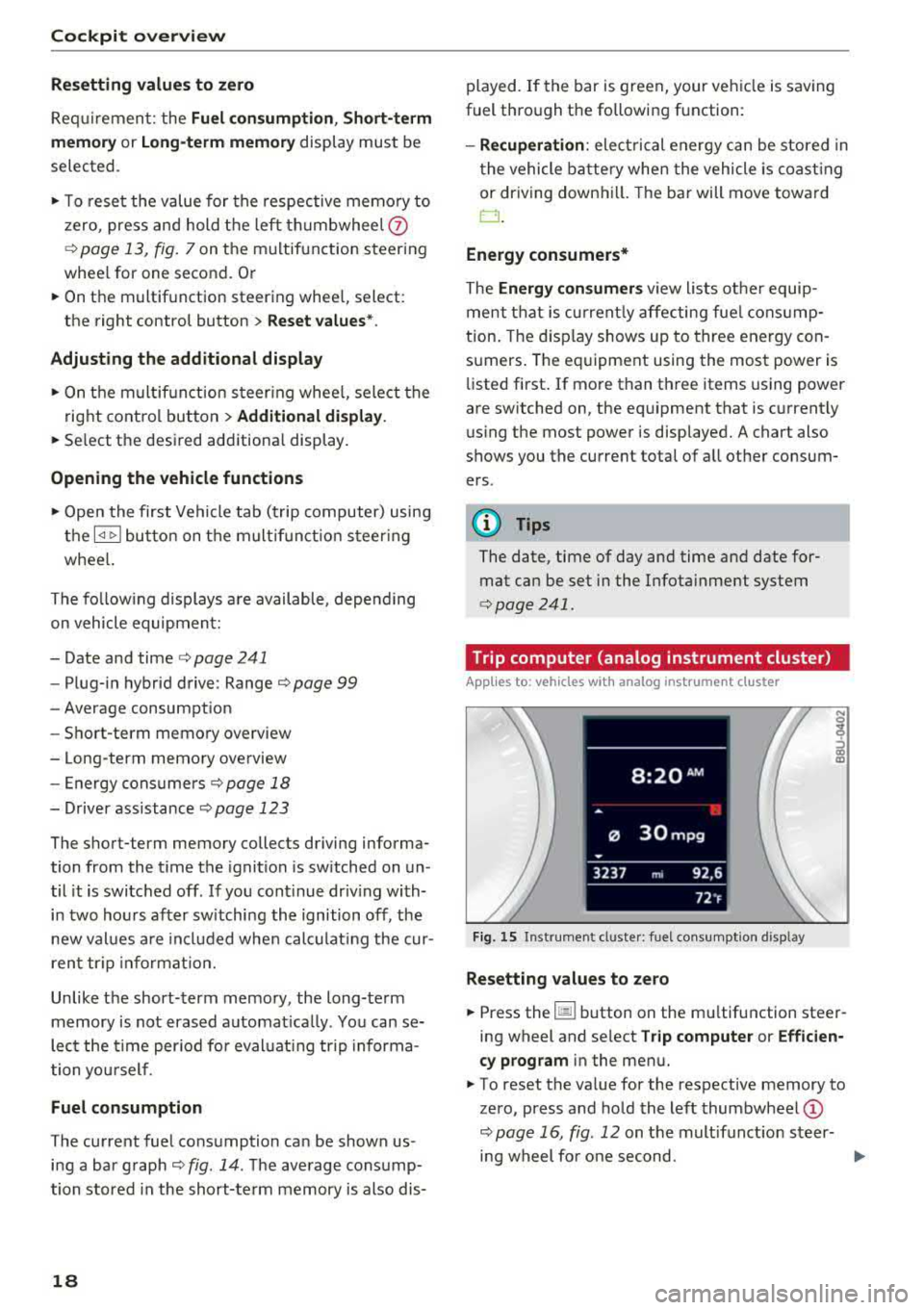
· Trip computer (analog instrument cluster)
Applies to: vehicles with analog instrument cluster
Fig. 15 Inst rument cluster : fuel consumpt ion d isp lay
Resetting values to zero
~ Press the 1§11 button on the mu ltifunction steer
ing wheel and se lect
Tr ip computer or Efficien
c y prog ram
in the menu.
~ To reset the value for the respective memory to
zero, press and hold the left
thumbwheel @
c:>page 16, fig. 12 on the multifunct io n steer-
ing wheel fo r one second.
..,.
Page 32 of 400
Cockpit over view
A WARNING
Have the safety systems i nspected immed i
ately . Otherw ise, there is a risk that the sys
tems may not activate during a collision,
wh ich increases the risk of serious injury or
death.
~ Safety belt
The . indicator light stays on unti l the d rive r's
and fron t passenger's safety be lts are buckled .
Above a certain speed, there will also be a wa rn
ing tone.
(D Tips
For add it iona l information on safety be lts ,
see
~ page 258.
@ -Steering lock
• Do not d rive vehicle: steering defecti ve
There is a malfunc tion in the elect ronic stee ring
loc k. You ca nnot t urn the ignition on .
D o
not tow your veh icle because it cannot be
steered . See an authorized A udi dealer or au tho r
i z ed A udi Servi ce Fa cili ty for assistance.
1;11 Steering lock: sy stem fault! Pleas e contact
Servic e
There is a malfunction in the elec tronic steering
lock .
Drive to an a uthor ized Audi dea ler or authori zed
Aud i Serv ice Fa cili ty immediately to have the
malfunct io n corrected.
A WARNING
Do not tow your veh icle when there is a mal
function in the electronic stee ring lock
-this
increases the risk of an accident.
....e Engine start system
M ·I t-:ngin e start system ma lfun ction! Plea se
c ontact Servic e
Do not switch the ignit ion off because you may
not be able to switc h it o n aga in .
30
Drive to an au thorized A udi dealer or authori zed
Audi Se rvice Facility immediate ly to have the
malfunction corrected.
IIJ Engine s tart system malfunction! Plea se
contact Service
There is a ma lf u nction in the engine sta rting sys
tem.
Drive to an authorized Audi dealer or authorized
Audi Se rvice Facility immed iate ly to have the
malfunction corrected .
~ Engine stop while driving
• Engine stopped: brake servo and power
steering not po ssible
There is a ma lfunction in the engine or in t he fuel
s u pp ly system.
More force is needed to steer and brake the mov
i ng vehicle whe n the engi ne is stopped . If the ve
hicle is rolling, t ry to bring it to a stop off to the
s ide from moving traffic. See an author ized Audi
dealer or authori zed A udi Service Fac ility for as
s istance .
A WARNING -
If the engine stops while driving, you will
need to use more force to brake the vehicle.
This increases the risk of an acc ident . There
will still be powe r steering if the ignition is
switched on while the vehicle is ro lling and
there is suff ic ient veh icle battery charge . Oth
e rw ise, you must use greate r force when
steering .
c:::::::> Hood
• Warning! Hood i s no t lo cked. Stop vehicle
and che ck the lo ck
If the indicator light turns on and the message
appears , the hood lock ing mechan ism is not en
gaged co rrectly .
Stop immediately and close the hood
~ page 318 .
Page 46 of 400
Power top
Power top
Automatic power top
General information
Applies to: veh icles with power top
The power top opens and closes automatically.
When open, the power top is stored complete ly
in the power top compartmen t. The power top
can be opened or closed at speeds up to 30 mph
(SO km/h).
Under normal conditions, the powe r top is wind
and waterproof. In rare cases, small droplets of
water may form under extreme weather condi
tions such as torrential or prolonged rain. That is norma l and no cause for concern .
Follow the care instruct ions to keep the power
top free of leaks and to maintain its appearance
¢ page 347, Care and cleaning. Also observe the
following:
-Open and stow the power top only when it is
clean and dry. Sharp-edged dirt particles ca n
cause damage to the rear window and the pow
er top . Stowing the power top when it is damp
can create imprints in it, and if it is left that
way for long periods of time, mildew and other
damage can form .
- Do not leave the power top open for severa l
weeks or the creases in it may become discol
ored.
- Remove ice and snow before opening the power
top. Do not use any sharp edged objects to re
move ice and snow or the power top could be
scratched or damaged . The rear window may be
cleared with a standard ice scraper.
- Do not open the power top when the tempera
ture is be low 32 °F (0 °C) . The fabric in the
power top loses elasticity in sub- zero tempera
tures.
44
Opening /closing the power top
Applies to: vehicles with power top
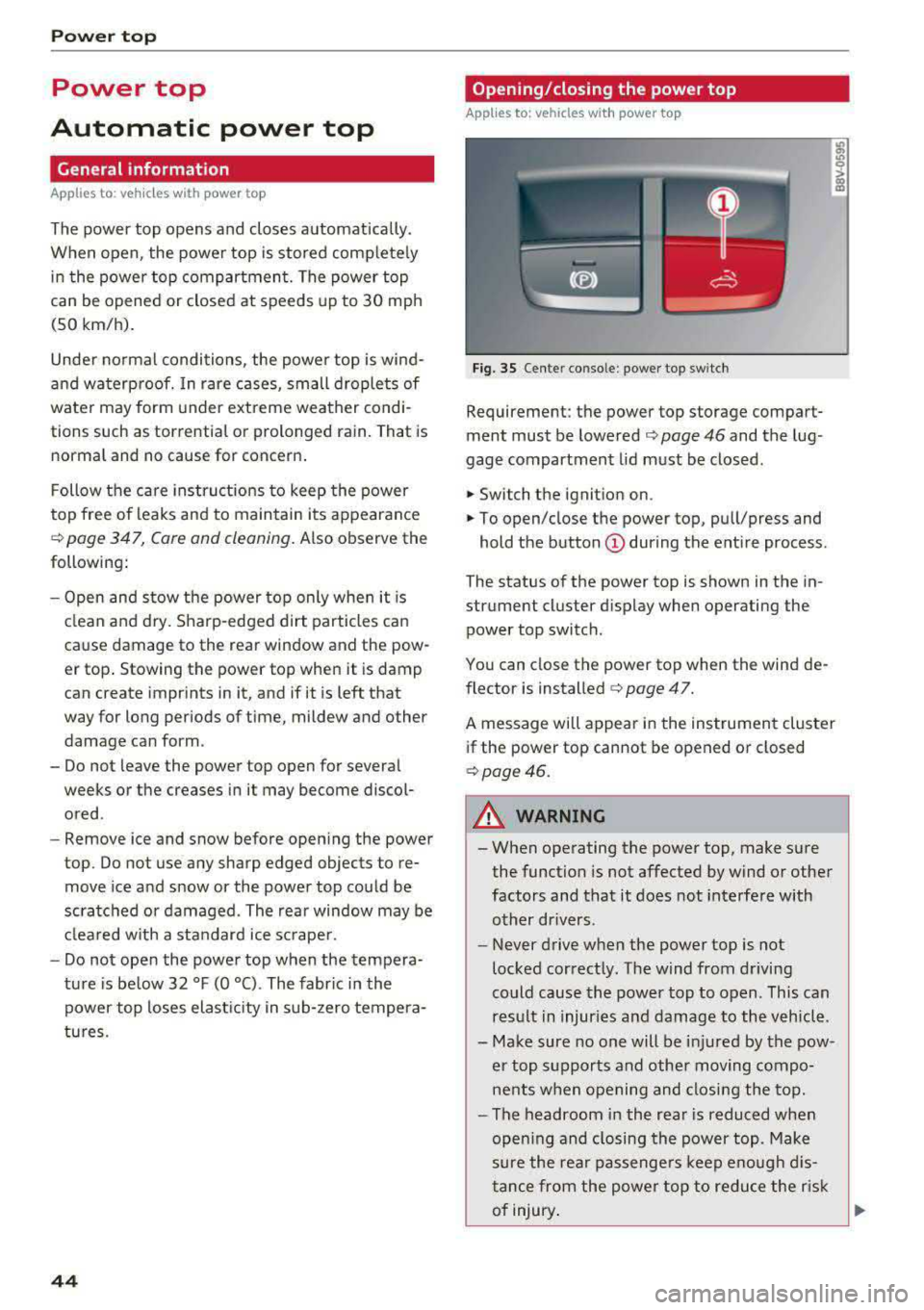
Fig. 35 Cente r conso le : power top sw itch
Requirement: the power top storage compart
ment must be lowered
¢ page 46 and the lug
gage compartment lid must be closed .
.,. Switch the ignition on .
.,. To open/close the power top, pull/press and
hold the button
(D during the ent ire process .
The status of the power top is shown in the in
strument cluster d isplay when operating the
power top switch .
You can close the power top when the wind de
flector is
installed ¢ page 47.
A message will appear in the instrument cluster
if the power top cannot be opened or closed
¢page 46.
A WARNING
-- When operating the power top, make sure
the function is not affected by wind or other
factors and that it does not interfe re with
other drivers.
- Never drive when the power top is not
locked correctly. The wind from driving
could cause the power top to open. This can
res ult in injuries and damage to the vehicle .
- Make sure no one will be injured by the pow
er top supports and other moving compo
nents when opening and closing the top.
- The headroom in the rea r is reduced when
open ing and closing the power top . Make
sure the rea r passenge rs keep enou gh dis
tance from the powe r top to reduce the risk
of injury .
Ill>-
Page 49 of 400
a, a, ..... N
" N ..... 0 N > 00
Power top: operation currently not possible.
Outside temperature too low
The power top will not open whe n the te mpe ra
ture iS belOW
-5 Of ( - 15 ° ( ).
Power top: operation currently not po ssible .
Speed too high
If yo u go above 30 mph (SO km/h), t he power
top ca nnot be operated d ue to safety reaso ns.
Reduce the vehicl e speed to close or open the
power top.
Power top: not secur e. Speed too high
This message appea rs if you go above 30 mph
(SO km/h) when ope rating the power top . Reduce
the vehicle speed and operate the power top
again .
Power top: malfunction! You may continue driv
ing
Thi s message appears if there is a ma lf u ncti on in
the system. Try to open or close the power top
again.
If the message st ill appea rs, have the mal
f u nction corrected by an authorized Aud i dealer
or author ized Audi Se rvice Facility .
A WARNING
Never drive whe n the powe r top is not locked
co rrectly . The w ind from driving cou ld cause
t he pow er top to open . This can resul t in inju
r ies an d dam age to the vehicle.
Wind deflector
Appl ies to: ve hicles with wind deflecto r
The wind deflector redu ces air movemen t in the
passenger compar tment in order to make driving
more comfortab le.
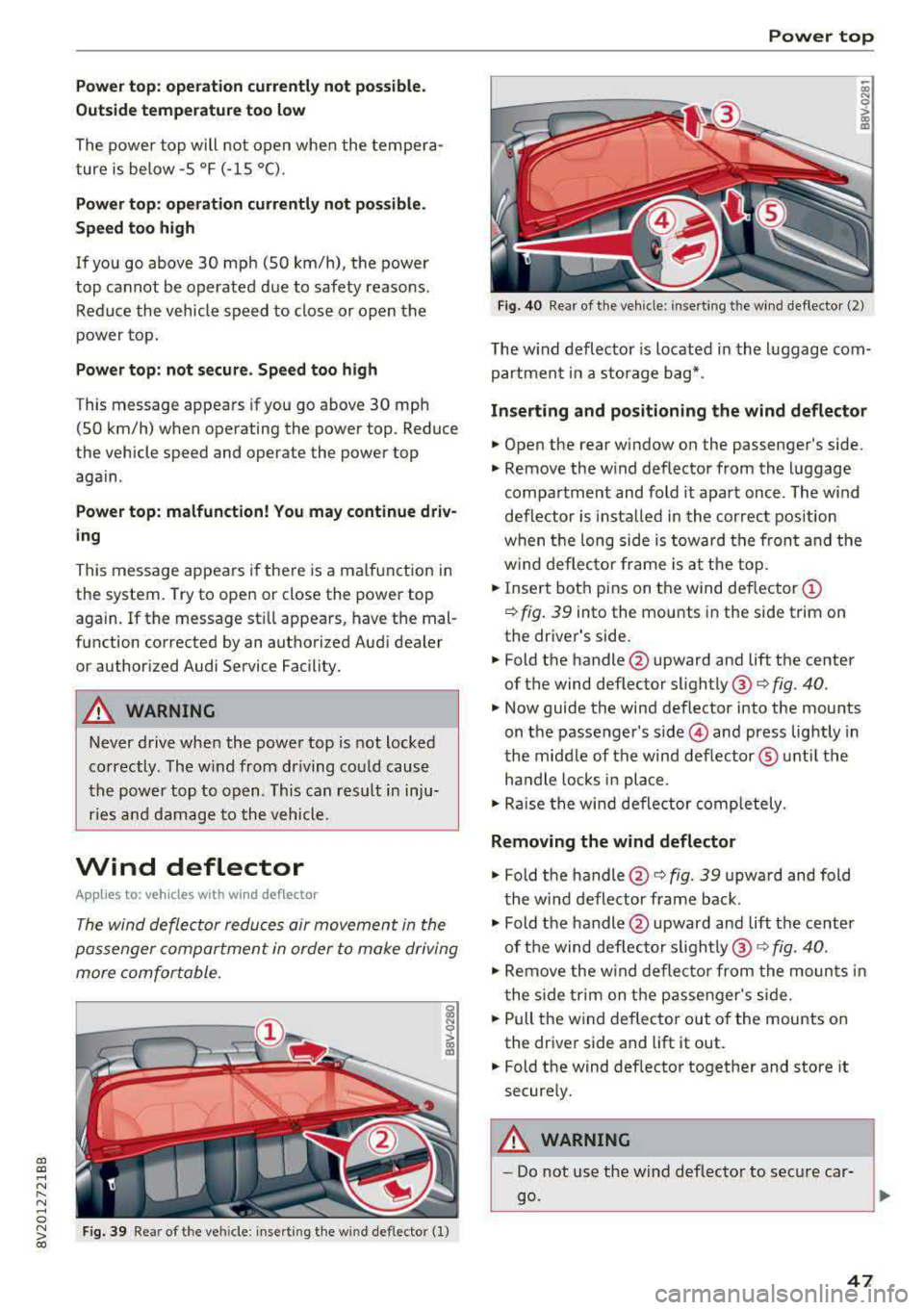
F ig. 39 Re ar of th e vehicle: inserting th e wind def lecto r (1)
Power top
~ a, N 0 > a, m
Fig . 40 Rea r o f th e ve hicle : inserting th e w ind deflecto r (2)
The w ind defl ector is located i n the l uggage com
partmen t in a storage b ag*.
Inserting and positioning the wind deflector
.,. Open the rear window on the passenger's side.
.,. Remove the w ind deflector from the l uggage
compa rtment and fold it apart once . The w ind
deflector is insta lled in the cor rect position
w hen the long side is towa rd th e fron t and the
w ind deflec to r fra me is a t th e to p .
.,. Insert bot h pins on t he wind deflec tor (D
¢ fig . 39 into the mounts in the side trim on
the dr iver's side .
.. Fold the handle @upward and lift the center
of t he wind deflector
sli ghtly @¢ fig. 40.
.,. Now guide the wind deflector into the mou nts
on t he passenger's
side © and press lightly in
t he middle of the wind deflector ® unti l the
ha ndle locks in place .
.,. Rai se the win d de flector completely .
Removing the wind deflector
.,. Fold th e handle @¢ fig. 39 upwa rd and fold
t he wind deflector frame back .
.,. Fold the handle@upward an d lift t he center
of t he wind def lec to r
slightly @¢ fig. 40.
.,. Remove the w ind deflector fr om the moun ts in
t he side t rim on the p assenger's side .
.,. Pull the w ind deflec to r out of the mounts on
the dr iver side and lift it out .
.. Fold th e wind def lector together and store it
secure ly.
A WARNING
=
- Do not use t he wind deflecto r to sec ure car -
go.
~
47
Page 57 of 400
a, a, ..... N
" N ..... 0 N > 00
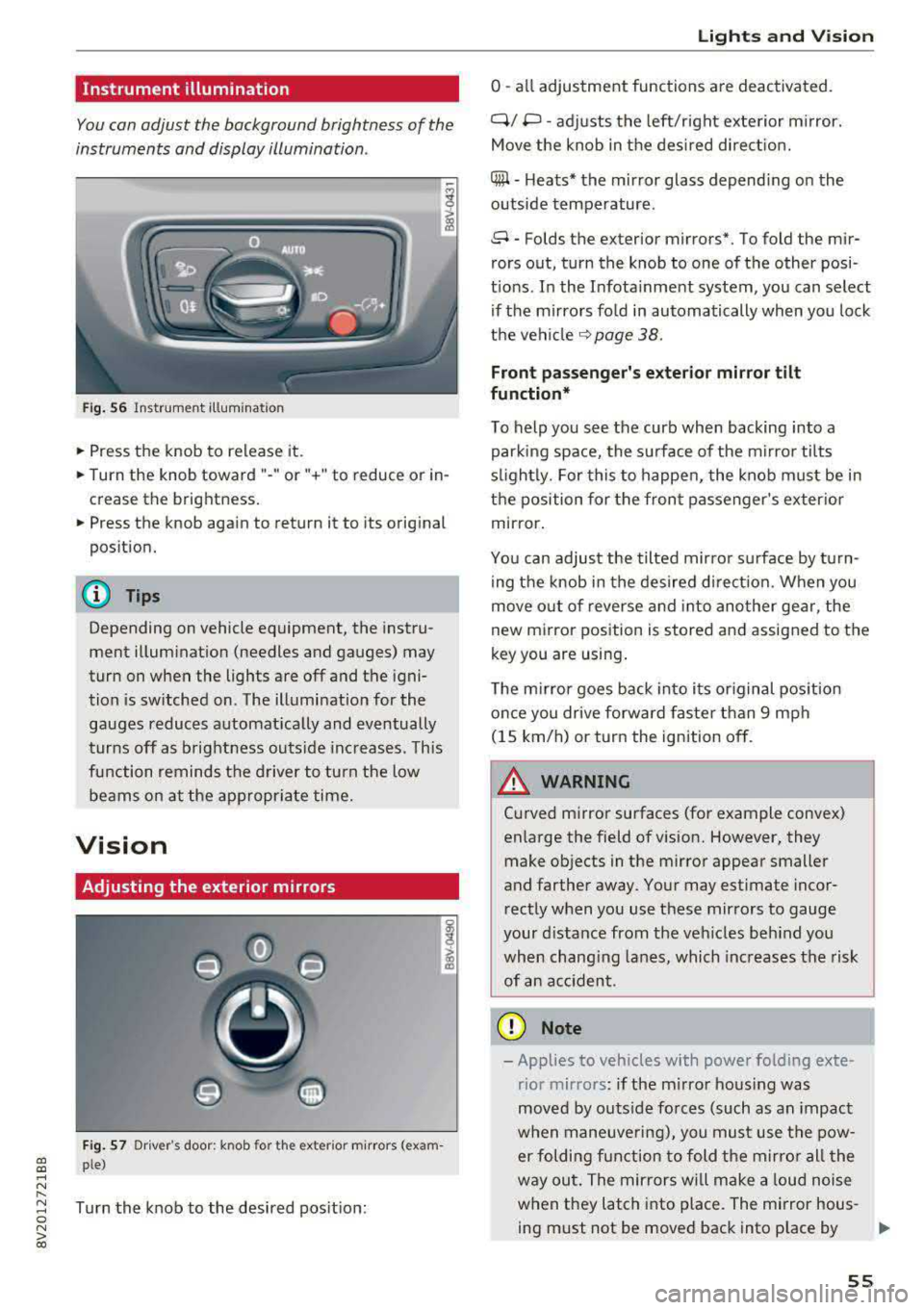
Instrument illumination
You can adjust the background brightness of the
instruments and display illumination .
Fig. 56 Instrumerit illumination
• Press the knob to release it.
• Turn the knob toward"-" or"+" to reduce or in
crease the brightness.
• Press the knob again to return it to its original
position.
(D Tips
Depending on vehicle equipment, the instru
ment illuminat ion (needles and gauges) may
turn on when the lights are off and the igni
tion is sw itched on. The illumination for the
gauges reduces automat ically and eventually
turns off as brightness outs ide inc reases. This
function remind s the d river to turn the low
beams on at the appropr iate time.
Vision
Adjusting the exterior mirrors
F ig . 57 Dr iver's door: knob for t he exter ior m irrors (exam
ple)
Turn the knob to the desired pos it ion:
Lights and V ision
0 -all adjustment functions are deactivated.
Q/ P -adj usts the left/right exte rior m irror.
Move the knob in the des ired direct ion.
C@ -H eats* the mir ror glass depend ing on the
outside temperature .
8 -Folds the exterior mirrors*. To fold the mir
rors out, turn the knob to one of the other posi
t ions. In the Infota inment system, you can select
if the mirrors fo ld in automatically when you lock
the
vehi cle ~ page 38.
Front passenge r's e xterior mirror tilt
function*
To help you see the curb when backing into a parking space, the surface of the m irro r tilts
s li ghtly. For this to happen, the knob must be in
the position for the front passenger's exterio r
mirror.
You can adjus t the tilted mirro r sur face by turn
ing the knob in the desired d irect ion. When you
move out o f reverse and into another gear, the
new mirror position is stored and assigned to the
key you are using .
T he m irror goes back into its or iginal pos ition
once you drive forwa rd faster than 9 mph
(15 km/h) or turn the ignition off.
A WARNING ~
Cu rved mirror surfaces (for example convex)
enlarge the field of vision. However, they make objects in the mirror appear smaller
and farther away. Your may est imate incor
rect ly when you use these mirrors to gauge
your distance from the veh icles beh ind you
when chang ing lanes, which increases the risk
of an accident .
(D Note
-Applies to vehicles with power folding exte
rior mirrors : if the m irro r hous ing was
moved by outs ide forces (such as an impact
w hen maneuve ring), you must use the pow-
er folding function to fold the mirro r all the
way out. The mirrors will make a loud noise
when they latch into place. The mirror hous-
ing must not be moved back into p lace by
II>-
55
Page 59 of 400
a, a, ..... N
" N ..... 0 N > 00
The sun visors can be pulled out of their brackets
and turned toward the doors
(D *. The sun shade
can also be moved back and forth lengthwise in
this position.
The mirror light switches on w hen the cover over
the vanity mirror* @opens.
Windshield wipers
Switching the windshield wipers on
A
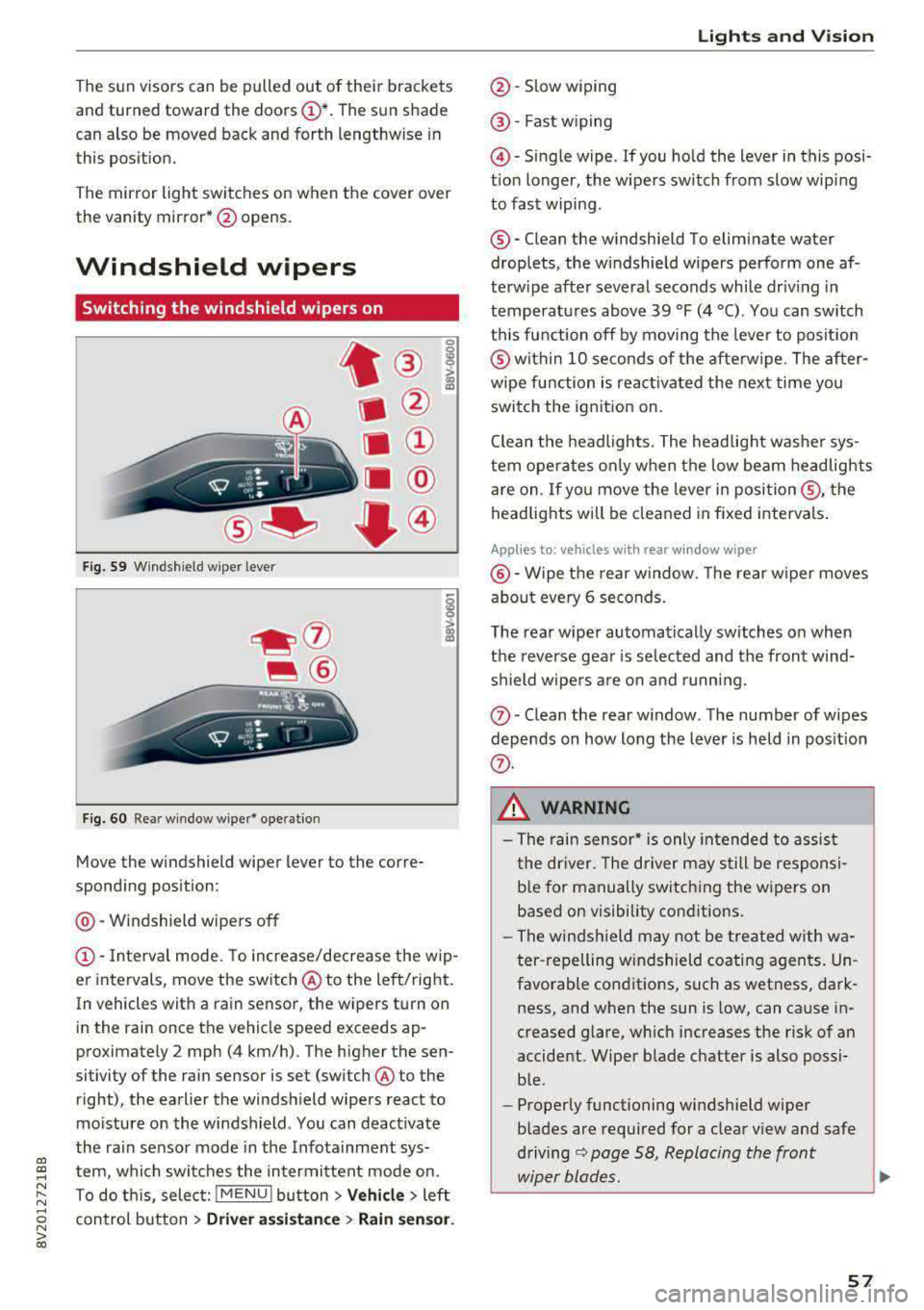
Fig. 59 Windshield wiper lever
Fig. 60 Rear window wiper* ope ration
t ® I
. @
Ill ®
[II @
•®
Move the windshield wiper lever to the corre
sponding position:
@ -Windshield wipers off
(D -Interva l mode. To increase/decrease the w ip
er intervals, move the switch
@ to the left/right.
In vehicles with a rain sensor, the wipers turn on
in the rain once the vehicle speed exceeds ap
proximately 2 mph (4 km/h). The higher the sen
sitivity of the rain sensor is set (switch @to the
right), the earlier the windshield wipers react to
mo isture on the windshield . You can deact ivate
the ra in sensor mode in the Infotainment sys
tem, which switches the intermittent mode on.
To do th is, select:
! MENU ! button> Vehicle> left
control button >
Dri ver assis tance > Rain sen sor.
Lights and V ision
@ -Slow wiping
@ -Fast w iping
@ -Single wipe . If you ho ld the lever in this posi
t ion longer, the wipers switch from slow wip ing
to fast wiping .
®-Clean the windshield To eliminate water
droplets, the w indshield wipers perform one af
terw ipe after several seconds while dr iv ing in
temperatures above 39 °F (4 °C) . You can switch
th is function off by moving the lever to posit ion
@ with in 10 seconds of the afterw ipe . The after
wipe function is reac tivated the next time you
switch the ignition on.
Clean the headlights. The headlig ht washe r sys
tem operates only when the low beam headlights
are on . If you move the lever in
posi tion @, the
headlig hts will be cleaned in fixed intervals .
Applies to: vehicles wi th re ar w indow wiper
@ -Wipe the rear window. The rear w iper moves
abo ut eve ry 6 seconds.
The rear wiper automatically switches on when
the reverse gear is selected and the front wind
shield wipe rs a re on and running.
(J) -Clean the rear w indow . The number of wipes
depends on how long the lever is held in pos ition
(f) .
_& WARNING
-The rain sensor* is only in tended to assist
the dr iver. The driver may still be responsi
b le for manually switching the wipers on
based on visibility conditions.
- The windsh ield may not be t reated w ith wa
ter -repelling w indshield coating agen ts . Un
favorable conditions, such as wetness, dark
ness, and when the sun is low, can cause in
creased glare, wh ich increases the risk of an
accident. Wiper blade chatter is also possi ble.
- Properly functioning windshield wiper
b lades are required for a clear view and safe
driving
¢ page 58, Replacing the front
wiper blades.
~
57
Page 86 of 400
Driving
"'To start driving and release the parking brake
automatically, press the accelerator pedal as
usual.
In addition to releasing the parking brake auto
matically, other convenience and safety functions
are available when you start driving
¢ page 85,
Starting from a stop.
Preventing the automatic parking brake
release
The vehicle could begin rolling unintentionally,
dep ending on the hill or if towing a trailer.
"'To prevent the parking brake from releasing au
tomatically, pull and hold
the®> switch and
press the accelerator pedal. The parking brake
remains set and prevents the vehicle from roll
ing backward.
"'You can release the(®) switch again once you
are sure that you are giving enough driving
force to the wheels by pressing the accelerator pedal.
Emergency braking function
You can use the emergency braking function in an emergency situation, or if the standard brake op
eration malfunctions or is disabled .
"'Pull and hold the(®) switch.
"' As soon as you release the ®> switch or acceler-
ate, the braking stops .
Pulling and holding
the®> switch while driving
the vehicle activates the emergency braking func
tion . The vehicle is braked at all four wheels by
activating the hydraulic brake system. The brak ing effect is similar to heavy
braking ¢,&. .
To reduce the risk of activating the emergency
braking by mistake, a warning tone (bu zzer)
sounds when
the(®) switch is pulled. Emergency
braking stops as soon as
the(®) switch is released
or the accelerator pedal is pressed .
Parking
"' Press the brake pedal to stop the vehicle.
"'Pull the®> switch to set the parking brake.
"'Place the selector lever in the P position.
"'Turn the engine off ¢,&. .
84
"'Turn the steering wheel when parking on in
clines so that the wheels will roll into the curb
if the vehicle starts moving.
A WARNING
- Do not press the accelerator pedal inadver
tently if a gear is selected when the vehicle
is stationary and the engine is running . Oth
erwise, the vehicle will start to move imme
diately and this could result in an accident.
- Emergency braking should only be used in
an emergency, when the normal brake pedal has failed or the brake pedal is obstructed.
During emergency braking, your vehicle will
brake similar to heavy braking. ESC and the
associated components (ABS, ASR, EDL)
cannot overcome the laws of physics. In cor
ners and when road or weather conditions
are bad, a full brake application can cause
the vehicle to skid or the rear end to swerve,
which increases the risk of an accident.
- If the power supply fails, you cannot set the
parking brake if it is released . In this case,
park the vehicle on level ground and secure
it by placing the selector lever in the P posi
tion. See an authorized Audi dealer or au
thorized Audi Service Facility for assistance.
-Always take the vehicle key with you when
leaving your vehicle, even for a short period
of time . This applies particularly when chil
dren remain in the vehicle. Otherwise chil
dren could start the engine, release the
parking brake or operate electrical equip
ment such as power windows, which in
creases the risk of an accident.
- No one should remain in the vehicle when it
is locked - especially children. Locked doors
make it more difficult for emergency work
ers to get into the vehicle, which puts lives
at risk .
(D Tips
When stopping at a traffic signal or stopping
in city traffic, you can set the parking brake
manually . The vehicle does not have to be
held with the brake pedal. The parking brake
eliminates the tendency to creep when a se lector lever position is engaged . As soon as
Page 90 of 400
Driving
Driving tips
Applies to: ve hicles w ith a utomat ic tra nsm iss io ns
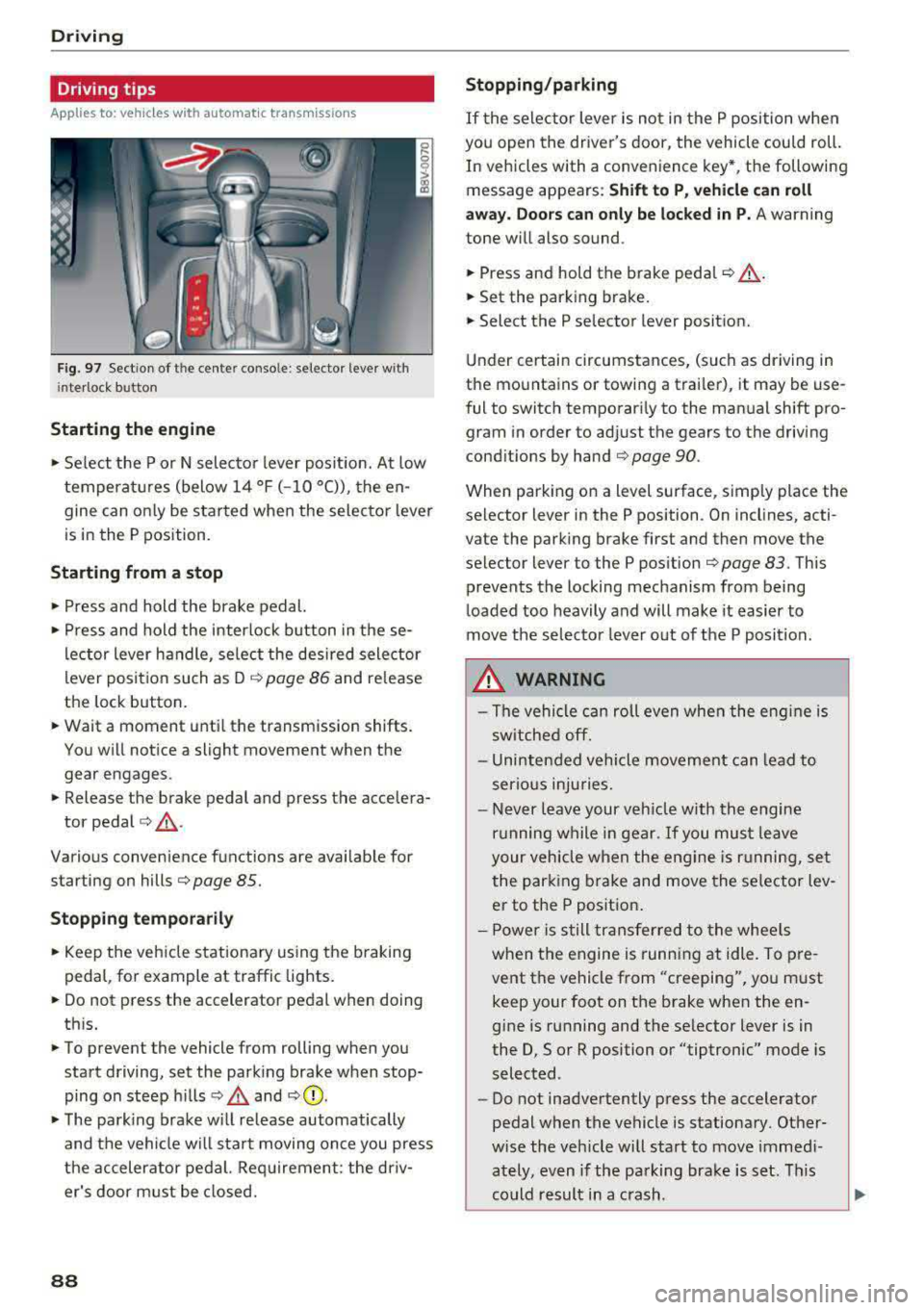
Fig. 97 Sect ion of the cente r conso le : se lector lever w ith
i nte rlock button
Starting the engine
• Se lect the P or N selec to r l ever posit ion. At low
temperat ures (below
14 °F (- 10 °C)), the en
gine can on ly be star ted when the selector lever
is in the P position.
Starting from a stop
• Press and hold the brake pedal.
• Press and hold the interlock button in these
l ector lever handle, se lect the des ired selector
lever posit io n such as D
c::> page 86 and release
the lock button.
• Wait a moment unti l the transmission shifts.
You w ill notice a slight movement when the
gear engages.
• Release the brake pedal and press the accelera-
tor pedal
c::> ,& .
Various convenience functions are ava ilab le for
starting on hills
c:::> page 85.
Stopping temporarily
• Keep the veh icle stationary using the b raking
peda l, for example at traffic lights.
• Do not press the accelerator pedal when doing
th is.
• To prevent the vehicle from rolling when you
start driving, set the park ing brake when stop
ping on steep hills
c::> .& and c::> 0.
• The park ing brake w ill release automatically
and t he veh icle wi ll sta rt moving on ce you press
the accelerator pedal. Req uirement: the driv
er's door m ust be closed.
88
Stopping/parking
If the sele ctor lever is not in the P position w hen
you open the driver's door, the vehicle cou ld roll.
In vehicles with a conven ience key *, the following
message appears:
Shift to P , vehicle can roll
away . Doors can only be locked in P.
A warning
tone w ill also sound.
• Press and hold the brake peda l c::> A.
• Set the parking brake.
• Select the P selector lever posit ion.
U nder certai n circumstances, (such as driving in
t h e mountains or towing a trai ler), it may be use
ful to switch temporar ily to the manual shift pro
gram in order to ad just the gears to the driving
cond it ions by hand
c:::> page 90.
When park ing o n a level sur face, s imply place the
se lector lever in the P position . On inclines, acti
vate the parking brake first and then move the
selector lever to the P pos ition
c:::> page 83 . This
prevents the locking mechanism from being
loaded too heavily and will make it easier to
move the selec tor lever o ut of the P posi tion.
.&_ WARNING
- The vehicle can ro ll even whe n the engi ne is
sw itche d off.
- Unin ten ded vehicle movement can lead to
s e rio us inju ries.
- Never leav e your ve hicle w ith th e engine
r u nning w hile in gear.
If you mus t leave
your veh icle when the eng ine is r unning, se t
the par king brake and move the se lector lev
er to the P position .
- P owe r is s till tran sfer red to the whee ls
when t he engine is runn ing at idle. To pre
vent the vehicle f rom "creeping", yo u m ust
keep your foot on t he brake when the en
gine is running and the se lector lever is in
the D, So r R position or "tiptronic" mode is
selected.
- Do not inadvertently press the accelerator
pedal when the vehicle is stationa ry. Ot her
w ise the veh icle will start to move immed i
ately, even if the parking b ra ke is set. T his
c o uld result in a c rash.